> ## Documentation Index
> Fetch the complete documentation index at: https://docs.langchain.com/llms.txt
> Use this file to discover all available pages before exploring further.
# Self-hosted LangSmith on AWS
When running LangSmith on [Amazon Web Services (AWS)](https://aws.amazon.com/), you can set up in either [full self-hosted](/langsmith/self-hosted) or [hybrid](/langsmith/hybrid) mode. Full self-hosted mode deploys a complete LangSmith platform with observability functionality as well as the option to create [agent deployments](/langsmith/deployment). Hybrid mode includes just the infrastructure to run agents in a data plane within your cloud, while our SaaS provides the control plane and observability functionality.
This page provides:
* [Initial setup steps](#initial-setup) for deploying to EKS, configuring managed services, and setting up authentication.
* [AWS-specific architecture patterns](#reference-architecture) and reference diagrams.
* [Service recommendations](#compute-options) and best practices.
* [AWS Well-Architected best practices](#aws-well-architected-best-practices) for operational excellence, security, and reliability.
LangChain provides Terraform modules specifically for AWS to help provision infrastructure for LangSmith. These modules can quickly set up EKS clusters, RDS, ElastiCache, S3, and networking resources.
View the [AWS Terraform modules](https://github.com/langchain-ai/terraform/tree/main/modules/aws) for documentation and examples.
## Initial setup
Follow the [Kubernetes installation guide](/langsmith/kubernetes). LangSmith is tested on Amazon Elastic Kubernetes Service (EKS).
**EKS-specific notes:**
* Ensure the EBS CSI Driver is installed for persistent storage
* Use the `ebs.csi.aws.com` storage class provisioner
For production deployments, connect to AWS managed services:
Store trace data in S3
PostgreSQL database
Redis or Valkey for caching
Analytics database
Use [IAM Roles for Service Accounts (IRSA)](https://docs.aws.amazon.com/eks/latest/userguide/iam-roles-for-service-accounts.html) to authenticate LangSmith pods to AWS services without static credentials.
**Key pages:**
* [S3 IRSA configuration](/langsmith/self-host-blob-storage#amazon-s3)
* [RDS IAM authentication](/langsmith/self-host-external-postgres#iam-authentication)
* [ElastiCache IAM authentication](/langsmith/self-host-external-redis#iam-authentication)
After completing these initial setup steps, you can review the complete AWS architecture and best practices below.
## Reference architecture
We recommend leveraging AWS's managed services to provide a scalable, secure, and resilient platform. The following architecture applies to both self-hosted and hybrid and aligns with the [AWS Well-Architected Framework](https://aws.amazon.com/architecture/well-architected/):
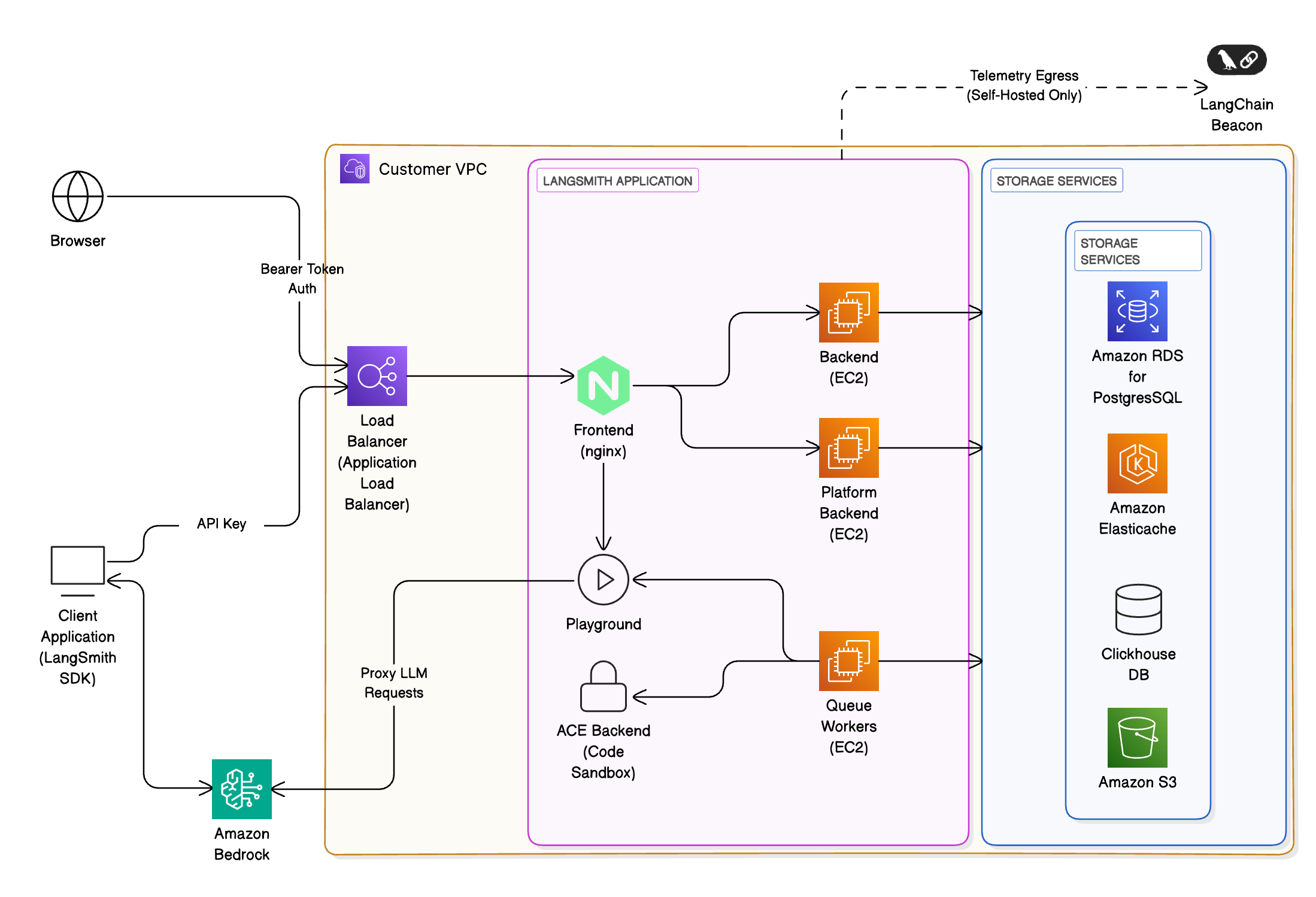 * **Ingress & networking**: Requests enter via [Amazon Application Load Balancer (ALB)](https://aws.amazon.com/elasticloadbalancing/application-load-balancer/) within your [VPC](https://aws.amazon.com/vpc/), secured using [AWS WAF](https://aws.amazon.com/waf/) and [IAM](https://aws.amazon.com/iam/)-based authentication.
* **Frontend & backend services:** Containers run on [Amazon EKS](https://aws.amazon.com/eks/), orchestrated behind the ALB. routes requests to other services within the cluster as necessary.
* **Storage & databases:**
* [Amazon RDS for PostgreSQL](https://aws.amazon.com/rds/postgresql/) or [Aurora](https://aws.amazon.com/rds/aurora/): metadata, projects, users, and short-term and long-term memory for deployed agents. LangSmith supports PostgreSQL version 14 or higher.
* [Amazon ElastiCache](https://aws.amazon.com/elasticache/) (Redis or Valkey): caching and job queues. ElastiCache can be in single-instance or cluster mode. LangSmith requires Redis OSS version 5 or higher, or Valkey 8.
* ClickHouse + [Amazon EBS](https://aws.amazon.com/ebs/): analytics and trace storage.
* We recommend using an [externally managed ClickHouse solution](/langsmith/self-host-external-clickhouse) unless security or compliance reasons
prevent you from doing so.
* ClickHouse is not required for hybrid deployments.
* [Amazon S3](https://aws.amazon.com/s3/): object storage for trace artifacts and telemetry.
* **LLM integration:** Optionally proxy requests to [Amazon Bedrock](https://aws.amazon.com/bedrock/) or [Amazon SageMaker](https://aws.amazon.com/sagemaker/) for LLM inference.
* **Monitoring & observability:** Integrate with [Amazon CloudWatch](https://aws.amazon.com/cloudwatch/)
## Compute options
LangSmith supports multiple compute options depending on your requirements:
| Compute option | Description | Suitable for |
| ------------------------------------------ | ----------------------------------------- | ------------------------------------ |
| **Elastic Kubernetes Service (preferred)** | Advanced scaling and multi-tenant support | Large enterprises |
| **EC2-based** | Full control, BYO-infra | Regulated or air-gapped environments |
## AWS Well-Architected best practices
This reference is designed to align with the six pillars of the AWS Well-Architected Framework:
### Operational excellence
* Automate deployments with IaC ([CloudFormation](https://aws.amazon.com/cloudformation/) / [Terraform](https://www.terraform.io/)).
* Use [AWS Systems Manager Parameter Store](https://docs.aws.amazon.com/systems-manager/latest/userguide/systems-manager-parameter-store.html) for configuration.
* Configure your LangSmith instance to [export telemetry data](/langsmith/export-backend) and continuously monitor via [CloudWatch Logs](https://docs.aws.amazon.com/AmazonCloudWatch/latest/logs/WhatIsCloudWatchLogs.html).
* The preferred method to manage [LangSmith deployments](/langsmith/deployment) is to create a CI process that builds [Agent Server](/langsmith/agent-server) images and pushes them to [ECR](https://aws.amazon.com/ecr/). Create a test deployment for pull requests before deploying a new revision to staging or production upon PR merge.
### Security
* Use [IAM](https://aws.amazon.com/iam/) roles with least-privilege policies.
* Enable encryption at rest ([RDS](https://docs.aws.amazon.com/AmazonRDS/latest/UserGuide/Overview.Encryption.html), [S3](https://docs.aws.amazon.com/AmazonS3/latest/userguide/UsingEncryption.html), ClickHouse volumes) and in transit (TLS 1.2+).
* Integrate with [AWS Secrets Manager](https://aws.amazon.com/secrets-manager/) for credentials.
* Use [Amazon Cognito](https://aws.amazon.com/cognito/) as an IDP in conjunction with LangSmith's built-in authentication and authorization features to secure access to agents and their tools.
### Reliability
* Replicate the LangSmith [data plane](/langsmith/data-plane) across regions: Deploy identical data planes to Kubernetes clusters in different regions for LangSmith Deployment. Deploy [RDS](https://docs.aws.amazon.com/AmazonRDS/latest/UserGuide/Concepts.MultiAZSingleStandby.html) and [ECS](https://aws.amazon.com/ecs/) services across [Multi-AZ](https://aws.amazon.com/about-aws/global-infrastructure/regions_az/).
* Implement [auto-scaling](https://aws.amazon.com/autoscaling/) for backend workers.
* Use [Amazon Route 53](https://aws.amazon.com/route53/) health checks and failover policies.
### Performance efficiency
* Leverage [EC2](https://aws.amazon.com/ec2/) instances for optimized compute.
* Use [S3 Intelligent-Tiering](https://aws.amazon.com/s3/storage-classes/intelligent-tiering/) for infrequently accessed trace data.
### Cost optimization
* Right-size [EKS](https://aws.amazon.com/eks/) clusters using [Compute Savings Plans](https://aws.amazon.com/savingsplans/compute-pricing/).
* Monitor cost KPIs using [AWS Cost Explorer](https://aws.amazon.com/aws-cost-management/aws-cost-explorer/) dashboards.
### Sustainability
* Minimize idle workloads with on-demand compute.
* Store telemetry in low-latency, low-cost tiers.
* Enable auto-shutdown for non-prod environments.
## Security and compliance
LangSmith can be configured for:
* [PrivateLink](https://aws.amazon.com/privatelink/)-only access (no public internet exposure, besides egress necessary for billing).
* [KMS](https://aws.amazon.com/kms/)-based encryption keys for S3, RDS, and EBS.
* Audit logging to [CloudWatch](https://aws.amazon.com/cloudwatch/) and [AWS CloudTrail](https://aws.amazon.com/cloudtrail/).
Customers can deploy in [GovCloud](https://aws.amazon.com/govcloud-us/), ISO, or HIPAA regions as needed.
## Monitoring and evals
Use LangSmith to:
* Capture traces from LLM apps running on [Bedrock](https://aws.amazon.com/bedrock/) or [SageMaker](https://aws.amazon.com/sagemaker/).
* Evaluate model outputs via [LangSmith datasets](/langsmith/manage-datasets).
* Track latency, token usage, and success rates.
Integrate with:
* [AWS CloudWatch](https://aws.amazon.com/cloudwatch/) dashboards.
* [OpenTelemetry](https://opentelemetry.io/) and [Prometheus](https://prometheus.io/) exporters.
***
* **Ingress & networking**: Requests enter via [Amazon Application Load Balancer (ALB)](https://aws.amazon.com/elasticloadbalancing/application-load-balancer/) within your [VPC](https://aws.amazon.com/vpc/), secured using [AWS WAF](https://aws.amazon.com/waf/) and [IAM](https://aws.amazon.com/iam/)-based authentication.
* **Frontend & backend services:** Containers run on [Amazon EKS](https://aws.amazon.com/eks/), orchestrated behind the ALB. routes requests to other services within the cluster as necessary.
* **Storage & databases:**
* [Amazon RDS for PostgreSQL](https://aws.amazon.com/rds/postgresql/) or [Aurora](https://aws.amazon.com/rds/aurora/): metadata, projects, users, and short-term and long-term memory for deployed agents. LangSmith supports PostgreSQL version 14 or higher.
* [Amazon ElastiCache](https://aws.amazon.com/elasticache/) (Redis or Valkey): caching and job queues. ElastiCache can be in single-instance or cluster mode. LangSmith requires Redis OSS version 5 or higher, or Valkey 8.
* ClickHouse + [Amazon EBS](https://aws.amazon.com/ebs/): analytics and trace storage.
* We recommend using an [externally managed ClickHouse solution](/langsmith/self-host-external-clickhouse) unless security or compliance reasons
prevent you from doing so.
* ClickHouse is not required for hybrid deployments.
* [Amazon S3](https://aws.amazon.com/s3/): object storage for trace artifacts and telemetry.
* **LLM integration:** Optionally proxy requests to [Amazon Bedrock](https://aws.amazon.com/bedrock/) or [Amazon SageMaker](https://aws.amazon.com/sagemaker/) for LLM inference.
* **Monitoring & observability:** Integrate with [Amazon CloudWatch](https://aws.amazon.com/cloudwatch/)
## Compute options
LangSmith supports multiple compute options depending on your requirements:
| Compute option | Description | Suitable for |
| ------------------------------------------ | ----------------------------------------- | ------------------------------------ |
| **Elastic Kubernetes Service (preferred)** | Advanced scaling and multi-tenant support | Large enterprises |
| **EC2-based** | Full control, BYO-infra | Regulated or air-gapped environments |
## AWS Well-Architected best practices
This reference is designed to align with the six pillars of the AWS Well-Architected Framework:
### Operational excellence
* Automate deployments with IaC ([CloudFormation](https://aws.amazon.com/cloudformation/) / [Terraform](https://www.terraform.io/)).
* Use [AWS Systems Manager Parameter Store](https://docs.aws.amazon.com/systems-manager/latest/userguide/systems-manager-parameter-store.html) for configuration.
* Configure your LangSmith instance to [export telemetry data](/langsmith/export-backend) and continuously monitor via [CloudWatch Logs](https://docs.aws.amazon.com/AmazonCloudWatch/latest/logs/WhatIsCloudWatchLogs.html).
* The preferred method to manage [LangSmith deployments](/langsmith/deployment) is to create a CI process that builds [Agent Server](/langsmith/agent-server) images and pushes them to [ECR](https://aws.amazon.com/ecr/). Create a test deployment for pull requests before deploying a new revision to staging or production upon PR merge.
### Security
* Use [IAM](https://aws.amazon.com/iam/) roles with least-privilege policies.
* Enable encryption at rest ([RDS](https://docs.aws.amazon.com/AmazonRDS/latest/UserGuide/Overview.Encryption.html), [S3](https://docs.aws.amazon.com/AmazonS3/latest/userguide/UsingEncryption.html), ClickHouse volumes) and in transit (TLS 1.2+).
* Integrate with [AWS Secrets Manager](https://aws.amazon.com/secrets-manager/) for credentials.
* Use [Amazon Cognito](https://aws.amazon.com/cognito/) as an IDP in conjunction with LangSmith's built-in authentication and authorization features to secure access to agents and their tools.
### Reliability
* Replicate the LangSmith [data plane](/langsmith/data-plane) across regions: Deploy identical data planes to Kubernetes clusters in different regions for LangSmith Deployment. Deploy [RDS](https://docs.aws.amazon.com/AmazonRDS/latest/UserGuide/Concepts.MultiAZSingleStandby.html) and [ECS](https://aws.amazon.com/ecs/) services across [Multi-AZ](https://aws.amazon.com/about-aws/global-infrastructure/regions_az/).
* Implement [auto-scaling](https://aws.amazon.com/autoscaling/) for backend workers.
* Use [Amazon Route 53](https://aws.amazon.com/route53/) health checks and failover policies.
### Performance efficiency
* Leverage [EC2](https://aws.amazon.com/ec2/) instances for optimized compute.
* Use [S3 Intelligent-Tiering](https://aws.amazon.com/s3/storage-classes/intelligent-tiering/) for infrequently accessed trace data.
### Cost optimization
* Right-size [EKS](https://aws.amazon.com/eks/) clusters using [Compute Savings Plans](https://aws.amazon.com/savingsplans/compute-pricing/).
* Monitor cost KPIs using [AWS Cost Explorer](https://aws.amazon.com/aws-cost-management/aws-cost-explorer/) dashboards.
### Sustainability
* Minimize idle workloads with on-demand compute.
* Store telemetry in low-latency, low-cost tiers.
* Enable auto-shutdown for non-prod environments.
## Security and compliance
LangSmith can be configured for:
* [PrivateLink](https://aws.amazon.com/privatelink/)-only access (no public internet exposure, besides egress necessary for billing).
* [KMS](https://aws.amazon.com/kms/)-based encryption keys for S3, RDS, and EBS.
* Audit logging to [CloudWatch](https://aws.amazon.com/cloudwatch/) and [AWS CloudTrail](https://aws.amazon.com/cloudtrail/).
Customers can deploy in [GovCloud](https://aws.amazon.com/govcloud-us/), ISO, or HIPAA regions as needed.
## Monitoring and evals
Use LangSmith to:
* Capture traces from LLM apps running on [Bedrock](https://aws.amazon.com/bedrock/) or [SageMaker](https://aws.amazon.com/sagemaker/).
* Evaluate model outputs via [LangSmith datasets](/langsmith/manage-datasets).
* Track latency, token usage, and success rates.
Integrate with:
* [AWS CloudWatch](https://aws.amazon.com/cloudwatch/) dashboards.
* [OpenTelemetry](https://opentelemetry.io/) and [Prometheus](https://prometheus.io/) exporters.
***
[Connect these docs](/use-these-docs) to Claude, VSCode, and more via MCP for real-time answers.
[Edit this page on GitHub](https://github.com/langchain-ai/docs/edit/main/src/langsmith/aws-self-hosted.mdx) or [file an issue](https://github.com/langchain-ai/docs/issues/new/choose).