> ## Documentation Index
> Fetch the complete documentation index at: https://docs.langchain.com/llms.txt
> Use this file to discover all available pages before exploring further.
# Self-hosted LangSmith on Azure
When running LangSmith on [Microsoft Azure](https://azure.microsoft.com/), you can set up in either [full self-hosted](/langsmith/self-hosted) or [hybrid](/langsmith/hybrid) mode. Full self-hosted mode deploys a complete LangSmith platform with observability functionality as well as the option to create agent deployments. Hybrid mode entails just the infrastructure to run agents in a data plane within your cloud, while our SaaS provides the control plane and observability functionality.
This page provides:
* [Initial setup steps](#initial-setup) for deploying to AKS, configuring managed services, and setting up authentication.
* [Azure-specific architecture patterns](#reference-architecture) and reference diagrams.
* [Compute and networking guidance](#compute-and-networking-on-azure) and best practices.
* [Security and access control](#security-and-access-control) recommendations for Azure deployments.
LangChain provides Terraform modules specifically for Azure to help provision infrastructure for LangSmith. These modules can quickly set up AKS clusters, Azure Database for PostgreSQL, Azure Managed Redis, Blob Storage, and networking resources.
View the [Azure Terraform modules](https://github.com/langchain-ai/terraform/tree/main/modules/azure) for documentation and examples.
## Initial setup
Follow the [Kubernetes installation guide](/langsmith/kubernetes). LangSmith is tested on Azure Kubernetes Service (AKS).
**AKS-specific notes:**
* LangSmith works with standard AKS clusters
* Use Azure Disk storage class for persistent volumes
For production deployments, connect to Azure managed services:
Store trace data in Azure Blob
PostgreSQL database
Redis for caching
Analytics database
Use [Azure Workload Identity](https://azure.github.io/azure-workload-identity/docs/introduction.html) to authenticate LangSmith pods to Azure services.
**Key pages:**
* [Azure Blob managed identity](/langsmith/self-host-blob-storage#azure-blob-storage)
* [Azure Database Entra authentication](/langsmith/self-host-external-postgres#iam-authentication)
* [Azure Cache Entra authentication](/langsmith/self-host-external-redis#iam-authentication)
After completing these initial setup steps, you can review the complete Azure architecture and best practices below.
## Reference architecture
We recommend using Azure's managed services to provide a scalable, secure, and resilient platform. The following architecture applies to both self-hosted and hybrid deployments:
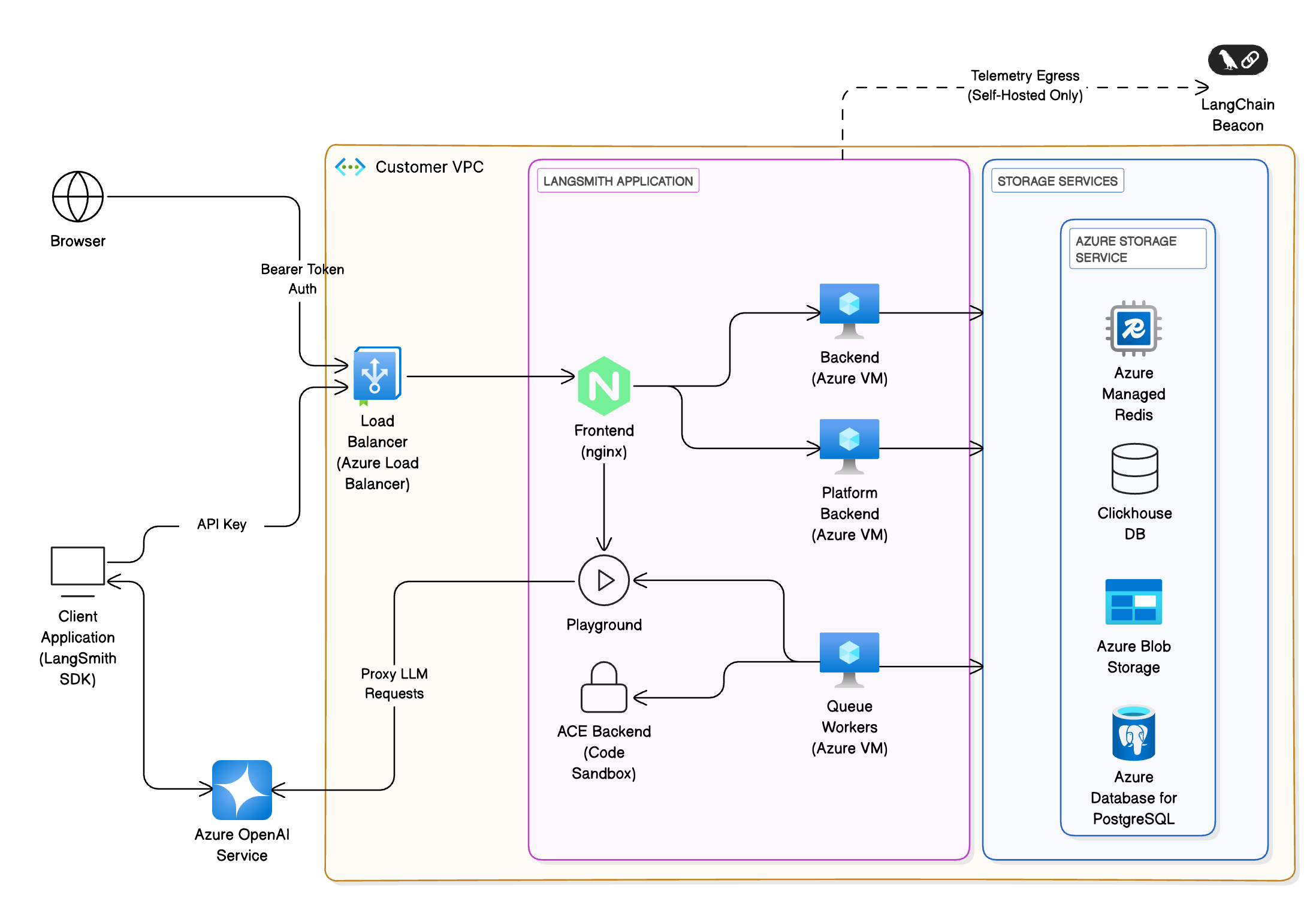 * **Client interfaces**: Users interact with LangSmith via a web browser or the LangChain SDK. All traffic terminates at an [Azure Load Balancer](https://azure.microsoft.com/en-us/products/load-balancer/) and is routed to the frontend (NGINX) within the [AKS](https://azure.microsoft.com/en-us/products/kubernetes-service/) cluster before being routed to another service within the cluster if necessary.
* **Storage services**: The platform requires persistent storage for traces, metadata and caching. On Azure the recommended services are:
* **[Azure Database for PostgreSQL (Flexible Server)](https://azure.microsoft.com/en-us/products/postgresql/)** for transactional data (e.g., runs, projects). Azure's high-availability options provision a standby replica in another zone; data is synchronously committed to both primary and standby servers. LangSmith requires PostgreSQL version 14 or higher.
* **[Azure Managed Redis](https://azure.microsoft.com/en-us/products/managed-redis/)** for queues and caching. Best practices include storing small values and breaking large objects into multiple keys, using pipelining to maximize throughput and ensuring the client and server reside in the same region. You can also use [Azure Cache for Redis](https://azure.microsoft.com/en-us/products/cache), running either in single-instance or cluster mode. LangSmith requires Redis OSS version 5 or higher.
* **ClickHouse** for high-volume analytics of traces. We recommend using an [externally managed ClickHouse solution](/langsmith/self-host-external-clickhouse). If, for security or compliance reasons, that is not an option, deploy a ClickHouse cluster on AKS using the open-source operator. Ensure replication across [availability zones](https://learn.microsoft.com/en-us/azure/reliability/availability-zones-overview) for durability. Clickhouse is not required for a hybrid deployment.
* **[Azure Blob Storage](https://azure.microsoft.com/en-us/products/storage/blobs/)** for large artifacts. Use redundant storage configurations such as read-access geo-redundant (RA-GRS) or geo-zone-redundant (RA-GZRS) storage and design applications to read from the secondary region during an outage.
## Compute and networking on Azure
### Azure Kubernetes Service (AKS)
[AKS](https://azure.microsoft.com/en-us/products/kubernetes-service/) is the recommended compute platform for production deployments. This section outlines the key considerations for planning your setup.
#### Network model
Use [Azure CNI](https://learn.microsoft.com/en-us/azure/aks/configure-azure-cni) networking for production clusters. This model integrates the cluster into an existing virtual network, assigns IP addresses to each pod and node, and allows direct connectivity to on-premises or other Azure services. Ensure the subnet has enough IPs for nodes and pods, avoid overlapping address ranges and allocate additional IP space for scale-out events.
#### Ingress and load balancing
Use Kubernetes Ingress resources and controllers to distribute HTTP/HTTPS traffic. Ingress controllers operate at layer 7 and can route traffic based on URL paths and handle TLS termination. They reduce the number of public IP addresses compared to layer-4 load balancers. Use the [application routing add-on](https://learn.microsoft.com/en-us/azure/aks/app-routing) for managed NGINX ingress controllers integrated with [Azure DNS](https://azure.microsoft.com/en-us/products/dns/) and [Key Vault](https://azure.microsoft.com/en-us/products/key-vault/) for SSL certificates.
#### Web Application Firewall (WAF)
For additional protection against attacks, deploy a [WAF](https://learn.microsoft.com/en-us/azure/web-application-firewall/overview) such as [Azure Application Gateway](https://azure.microsoft.com/en-us/products/application-gateway/). A WAF filters traffic using OWASP rules and can terminate TLS before the traffic reaches your AKS cluster.
#### Network policies
Apply [Kubernetes network policies](https://learn.microsoft.com/en-us/azure/aks/use-network-policies) to restrict pod-to-pod traffic and reduce the impact of compromised workloads. Enable network policy support when creating the cluster and design rules based on application connectivity.
#### High availability
Configure node pools across [availability zones](https://learn.microsoft.com/en-us/azure/reliability/availability-zones-overview) and use Pod Disruption Budgets (PDB) and multiple replicas for all deployments. Set pod resource requests and limits; the [AKS resource management best practices](https://learn.microsoft.com/en-us/azure/aks/developer-best-practices-resource-management) recommend setting CPU and memory limits to prevent pods from consuming all resources. Use [Cluster Autoscaler](https://learn.microsoft.com/en-us/azure/aks/cluster-autoscaler) and [Vertical Pod Autoscaler](https://learn.microsoft.com/en-us/azure/aks/vertical-pod-autoscaler) to scale node pools and adjust pod resources automatically.
### Networking and identity
#### Virtual network integration
Deploy AKS into its own [virtual network](https://azure.microsoft.com/en-us/products/virtual-network/) and create separate subnets for the cluster, database, Redis, and storage endpoints. Use [Private Link](https://azure.microsoft.com/en-us/products/private-link/) and [service endpoints](https://learn.microsoft.com/en-us/azure/virtual-network/virtual-network-service-endpoints-overview) to keep traffic within your virtual network and avoid exposure to the public internet.
#### Authentication
Integrate LangSmith with [Microsoft Entra ID](https://www.microsoft.com/en-us/security/business/identity-access/microsoft-entra-id) (Azure AD) for single sign-on. Use Azure AD OAuth2 for bearer tokens and assign roles to control access to the UI and API.
## Storage and data services
### Azure Database for PostgreSQL
#### High availability
Use [Flexible Server](https://learn.microsoft.com/en-us/azure/postgresql/flexible-server/overview) with high-availability mode. Azure provisions a standby replica either within the same availability zone (zonal) or across zones (zone-redundant). Data is synchronously committed to both the primary and standby servers, ensuring that committed data is not lost. Zone-redundant configurations place the standby in a different zone to protect against zone outages but may add write latency.
#### Backups and disaster recovery
Enable [automatic backups](https://learn.microsoft.com/en-us/azure/postgresql/flexible-server/concepts-backup-restore) and configure geo-redundant backup storage to protect against region-wide outages. For critical applications, create read replicas in a secondary region.
#### Scaling
Choose an appropriate SKU that matches your workload; Flexible Server allows scaling compute and storage independently. Monitor metrics and configure alerts through [Azure Monitor](https://azure.microsoft.com/en-us/products/monitor/).
### Azure Managed Redis
#### Persistence and redundancy
Choose a tier that provides replication and persistence. Configure Redis persistence or data backup for durability. For high-availability, use [active geo-replication](https://learn.microsoft.com/en-us/azure/redis/how-to-active-geo-replication) or zone-redundant caches depending on the tier.
### ClickHouse on Azure
ClickHouse is used for analytical workloads (traces and feedback). If you cannot use an externally managed solution, deploy a ClickHouse cluster on AKS using Helm or the official operator. For resilience, replicate data across nodes and availability zones. Consider using [Azure Disks](https://azure.microsoft.com/en-us/products/storage/disks/) for local storage and mount them as StatefulSets.
### Azure Blob Storage
#### Redundancy
Choose a redundancy configuration based on your recovery objectives. Use [read-access geo-redundant (RA-GRS) or geo-zone-redundant (RA-GZRS) storage](https://learn.microsoft.com/en-us/azure/storage/common/storage-redundancy) and design applications to switch reads to the secondary region during a primary region outage.
#### Naming and partitioning
Use naming conventions that improve load balancing across partitions and plan for the maximum number of concurrent clients. Stay within Azure's scalability and capacity targets and partition data across multiple storage accounts if necessary.
#### Networking
Access blob storage through [private endpoints](https://learn.microsoft.com/en-us/azure/storage/common/storage-private-endpoints) or by using SAS tokens and CORS rules to enable direct client access.
## Security and access control
### Azure Key Vault
#### Separate vaults per application and environment
Store secrets such as database connection strings and API keys in [Azure Key Vault](https://azure.microsoft.com/en-us/products/key-vault/). Use a dedicated vault for each application and environment (dev, test, prod) to limit the impact of a security breach.
#### Access control
Use the [RBAC permission model](https://learn.microsoft.com/en-us/azure/key-vault/general/rbac-guide) to assign roles at the vault scope and restrict access to required principals. Restrict network access using Private Link and firewalls.
#### Data protection and logging
Enable [soft delete and purge protection](https://learn.microsoft.com/en-us/azure/key-vault/general/soft-delete-overview) to prevent accidental deletion. Turn on logging and configure alerts for Key Vault access events.
### Network security
#### Ingress isolation
Expose only the frontend service through the ingress controller or WAF. Other services should be internal and communicate through cluster networking.
#### RBAC and pod security
Use [Kubernetes RBAC](https://kubernetes.io/docs/reference/access-authn-authz/rbac/) to control who can deploy, modify, or read resources. Enable [pod security admission](https://kubernetes.io/docs/concepts/security/pod-security-admission/) to enforce baseline, restricted, or privileged profiles.
#### Secrets management
Mount secrets from Key Vault into pods using [CSI Secret Store](https://learn.microsoft.com/en-us/azure/aks/csi-secrets-store-driver). Avoid storing secrets in environment variables or configuration files.
## Observability and monitoring
Configure your LangSmith instance to [export telemetry data](/langsmith/export-backend) so you can use Azure's services to monitor it.
### Azure Monitor
Use [Azure Monitor](https://azure.microsoft.com/en-us/products/monitor/) for metrics, logs, and alerting. Proactive monitoring involves configuring alerts on key signals like node CPU/memory utilization, pod status, and service latency. Azure Monitor alerts notify you when predefined thresholds are exceeded.
### Managed Prometheus and Grafana
Enable [Azure Monitor managed Prometheus](https://learn.microsoft.com/en-us/azure/azure-monitor/essentials/prometheus-metrics-overview) to collect Kubernetes metrics. Combine it with [Grafana dashboards](https://azure.microsoft.com/en-us/products/managed-grafana/) for visualization. Define service-level objectives (SLOs) and configure alerts accordingly.
### Container Insights
Install [Container Insights](https://learn.microsoft.com/en-us/azure/azure-monitor/containers/container-insights-overview) to capture logs and metrics from AKS nodes and pods. Use [Azure Log Analytics workspaces](https://learn.microsoft.com/en-us/azure/azure-monitor/logs/log-analytics-overview) to query and analyze logs.
### Application logging
Ensure LangSmith services emit logs to stdout/stderr and forward them via [Fluent Bit](https://fluentbit.io/) or the Azure Monitor agent.
## Continuous integration
* The preferred method to manage [LangSmith deployments](/langsmith/deployment) is to create a CI process that builds [Agent Server](/langsmith/agent-server) images and pushes them to [Azure Container Registry](https://azure.microsoft.com/en-us/products/container-registry). Create a test deployment for pull requests before deploying a new revision to staging or production upon PR merge.
***
* **Client interfaces**: Users interact with LangSmith via a web browser or the LangChain SDK. All traffic terminates at an [Azure Load Balancer](https://azure.microsoft.com/en-us/products/load-balancer/) and is routed to the frontend (NGINX) within the [AKS](https://azure.microsoft.com/en-us/products/kubernetes-service/) cluster before being routed to another service within the cluster if necessary.
* **Storage services**: The platform requires persistent storage for traces, metadata and caching. On Azure the recommended services are:
* **[Azure Database for PostgreSQL (Flexible Server)](https://azure.microsoft.com/en-us/products/postgresql/)** for transactional data (e.g., runs, projects). Azure's high-availability options provision a standby replica in another zone; data is synchronously committed to both primary and standby servers. LangSmith requires PostgreSQL version 14 or higher.
* **[Azure Managed Redis](https://azure.microsoft.com/en-us/products/managed-redis/)** for queues and caching. Best practices include storing small values and breaking large objects into multiple keys, using pipelining to maximize throughput and ensuring the client and server reside in the same region. You can also use [Azure Cache for Redis](https://azure.microsoft.com/en-us/products/cache), running either in single-instance or cluster mode. LangSmith requires Redis OSS version 5 or higher.
* **ClickHouse** for high-volume analytics of traces. We recommend using an [externally managed ClickHouse solution](/langsmith/self-host-external-clickhouse). If, for security or compliance reasons, that is not an option, deploy a ClickHouse cluster on AKS using the open-source operator. Ensure replication across [availability zones](https://learn.microsoft.com/en-us/azure/reliability/availability-zones-overview) for durability. Clickhouse is not required for a hybrid deployment.
* **[Azure Blob Storage](https://azure.microsoft.com/en-us/products/storage/blobs/)** for large artifacts. Use redundant storage configurations such as read-access geo-redundant (RA-GRS) or geo-zone-redundant (RA-GZRS) storage and design applications to read from the secondary region during an outage.
## Compute and networking on Azure
### Azure Kubernetes Service (AKS)
[AKS](https://azure.microsoft.com/en-us/products/kubernetes-service/) is the recommended compute platform for production deployments. This section outlines the key considerations for planning your setup.
#### Network model
Use [Azure CNI](https://learn.microsoft.com/en-us/azure/aks/configure-azure-cni) networking for production clusters. This model integrates the cluster into an existing virtual network, assigns IP addresses to each pod and node, and allows direct connectivity to on-premises or other Azure services. Ensure the subnet has enough IPs for nodes and pods, avoid overlapping address ranges and allocate additional IP space for scale-out events.
#### Ingress and load balancing
Use Kubernetes Ingress resources and controllers to distribute HTTP/HTTPS traffic. Ingress controllers operate at layer 7 and can route traffic based on URL paths and handle TLS termination. They reduce the number of public IP addresses compared to layer-4 load balancers. Use the [application routing add-on](https://learn.microsoft.com/en-us/azure/aks/app-routing) for managed NGINX ingress controllers integrated with [Azure DNS](https://azure.microsoft.com/en-us/products/dns/) and [Key Vault](https://azure.microsoft.com/en-us/products/key-vault/) for SSL certificates.
#### Web Application Firewall (WAF)
For additional protection against attacks, deploy a [WAF](https://learn.microsoft.com/en-us/azure/web-application-firewall/overview) such as [Azure Application Gateway](https://azure.microsoft.com/en-us/products/application-gateway/). A WAF filters traffic using OWASP rules and can terminate TLS before the traffic reaches your AKS cluster.
#### Network policies
Apply [Kubernetes network policies](https://learn.microsoft.com/en-us/azure/aks/use-network-policies) to restrict pod-to-pod traffic and reduce the impact of compromised workloads. Enable network policy support when creating the cluster and design rules based on application connectivity.
#### High availability
Configure node pools across [availability zones](https://learn.microsoft.com/en-us/azure/reliability/availability-zones-overview) and use Pod Disruption Budgets (PDB) and multiple replicas for all deployments. Set pod resource requests and limits; the [AKS resource management best practices](https://learn.microsoft.com/en-us/azure/aks/developer-best-practices-resource-management) recommend setting CPU and memory limits to prevent pods from consuming all resources. Use [Cluster Autoscaler](https://learn.microsoft.com/en-us/azure/aks/cluster-autoscaler) and [Vertical Pod Autoscaler](https://learn.microsoft.com/en-us/azure/aks/vertical-pod-autoscaler) to scale node pools and adjust pod resources automatically.
### Networking and identity
#### Virtual network integration
Deploy AKS into its own [virtual network](https://azure.microsoft.com/en-us/products/virtual-network/) and create separate subnets for the cluster, database, Redis, and storage endpoints. Use [Private Link](https://azure.microsoft.com/en-us/products/private-link/) and [service endpoints](https://learn.microsoft.com/en-us/azure/virtual-network/virtual-network-service-endpoints-overview) to keep traffic within your virtual network and avoid exposure to the public internet.
#### Authentication
Integrate LangSmith with [Microsoft Entra ID](https://www.microsoft.com/en-us/security/business/identity-access/microsoft-entra-id) (Azure AD) for single sign-on. Use Azure AD OAuth2 for bearer tokens and assign roles to control access to the UI and API.
## Storage and data services
### Azure Database for PostgreSQL
#### High availability
Use [Flexible Server](https://learn.microsoft.com/en-us/azure/postgresql/flexible-server/overview) with high-availability mode. Azure provisions a standby replica either within the same availability zone (zonal) or across zones (zone-redundant). Data is synchronously committed to both the primary and standby servers, ensuring that committed data is not lost. Zone-redundant configurations place the standby in a different zone to protect against zone outages but may add write latency.
#### Backups and disaster recovery
Enable [automatic backups](https://learn.microsoft.com/en-us/azure/postgresql/flexible-server/concepts-backup-restore) and configure geo-redundant backup storage to protect against region-wide outages. For critical applications, create read replicas in a secondary region.
#### Scaling
Choose an appropriate SKU that matches your workload; Flexible Server allows scaling compute and storage independently. Monitor metrics and configure alerts through [Azure Monitor](https://azure.microsoft.com/en-us/products/monitor/).
### Azure Managed Redis
#### Persistence and redundancy
Choose a tier that provides replication and persistence. Configure Redis persistence or data backup for durability. For high-availability, use [active geo-replication](https://learn.microsoft.com/en-us/azure/redis/how-to-active-geo-replication) or zone-redundant caches depending on the tier.
### ClickHouse on Azure
ClickHouse is used for analytical workloads (traces and feedback). If you cannot use an externally managed solution, deploy a ClickHouse cluster on AKS using Helm or the official operator. For resilience, replicate data across nodes and availability zones. Consider using [Azure Disks](https://azure.microsoft.com/en-us/products/storage/disks/) for local storage and mount them as StatefulSets.
### Azure Blob Storage
#### Redundancy
Choose a redundancy configuration based on your recovery objectives. Use [read-access geo-redundant (RA-GRS) or geo-zone-redundant (RA-GZRS) storage](https://learn.microsoft.com/en-us/azure/storage/common/storage-redundancy) and design applications to switch reads to the secondary region during a primary region outage.
#### Naming and partitioning
Use naming conventions that improve load balancing across partitions and plan for the maximum number of concurrent clients. Stay within Azure's scalability and capacity targets and partition data across multiple storage accounts if necessary.
#### Networking
Access blob storage through [private endpoints](https://learn.microsoft.com/en-us/azure/storage/common/storage-private-endpoints) or by using SAS tokens and CORS rules to enable direct client access.
## Security and access control
### Azure Key Vault
#### Separate vaults per application and environment
Store secrets such as database connection strings and API keys in [Azure Key Vault](https://azure.microsoft.com/en-us/products/key-vault/). Use a dedicated vault for each application and environment (dev, test, prod) to limit the impact of a security breach.
#### Access control
Use the [RBAC permission model](https://learn.microsoft.com/en-us/azure/key-vault/general/rbac-guide) to assign roles at the vault scope and restrict access to required principals. Restrict network access using Private Link and firewalls.
#### Data protection and logging
Enable [soft delete and purge protection](https://learn.microsoft.com/en-us/azure/key-vault/general/soft-delete-overview) to prevent accidental deletion. Turn on logging and configure alerts for Key Vault access events.
### Network security
#### Ingress isolation
Expose only the frontend service through the ingress controller or WAF. Other services should be internal and communicate through cluster networking.
#### RBAC and pod security
Use [Kubernetes RBAC](https://kubernetes.io/docs/reference/access-authn-authz/rbac/) to control who can deploy, modify, or read resources. Enable [pod security admission](https://kubernetes.io/docs/concepts/security/pod-security-admission/) to enforce baseline, restricted, or privileged profiles.
#### Secrets management
Mount secrets from Key Vault into pods using [CSI Secret Store](https://learn.microsoft.com/en-us/azure/aks/csi-secrets-store-driver). Avoid storing secrets in environment variables or configuration files.
## Observability and monitoring
Configure your LangSmith instance to [export telemetry data](/langsmith/export-backend) so you can use Azure's services to monitor it.
### Azure Monitor
Use [Azure Monitor](https://azure.microsoft.com/en-us/products/monitor/) for metrics, logs, and alerting. Proactive monitoring involves configuring alerts on key signals like node CPU/memory utilization, pod status, and service latency. Azure Monitor alerts notify you when predefined thresholds are exceeded.
### Managed Prometheus and Grafana
Enable [Azure Monitor managed Prometheus](https://learn.microsoft.com/en-us/azure/azure-monitor/essentials/prometheus-metrics-overview) to collect Kubernetes metrics. Combine it with [Grafana dashboards](https://azure.microsoft.com/en-us/products/managed-grafana/) for visualization. Define service-level objectives (SLOs) and configure alerts accordingly.
### Container Insights
Install [Container Insights](https://learn.microsoft.com/en-us/azure/azure-monitor/containers/container-insights-overview) to capture logs and metrics from AKS nodes and pods. Use [Azure Log Analytics workspaces](https://learn.microsoft.com/en-us/azure/azure-monitor/logs/log-analytics-overview) to query and analyze logs.
### Application logging
Ensure LangSmith services emit logs to stdout/stderr and forward them via [Fluent Bit](https://fluentbit.io/) or the Azure Monitor agent.
## Continuous integration
* The preferred method to manage [LangSmith deployments](/langsmith/deployment) is to create a CI process that builds [Agent Server](/langsmith/agent-server) images and pushes them to [Azure Container Registry](https://azure.microsoft.com/en-us/products/container-registry). Create a test deployment for pull requests before deploying a new revision to staging or production upon PR merge.
***
[Connect these docs](/use-these-docs) to Claude, VSCode, and more via MCP for real-time answers.
[Edit this page on GitHub](https://github.com/langchain-ai/docs/edit/main/src/langsmith/azure-self-hosted.mdx) or [file an issue](https://github.com/langchain-ai/docs/issues/new/choose).