> ## Documentation Index
> Fetch the complete documentation index at: https://docs.langchain.com/llms.txt
> Use this file to discover all available pages before exploring further.
# BYOC architecture
> How a LangSmith BYOC deployment is structured across the LangChain control plane and the data plane in your AWS account.
## Control plane and data plane model
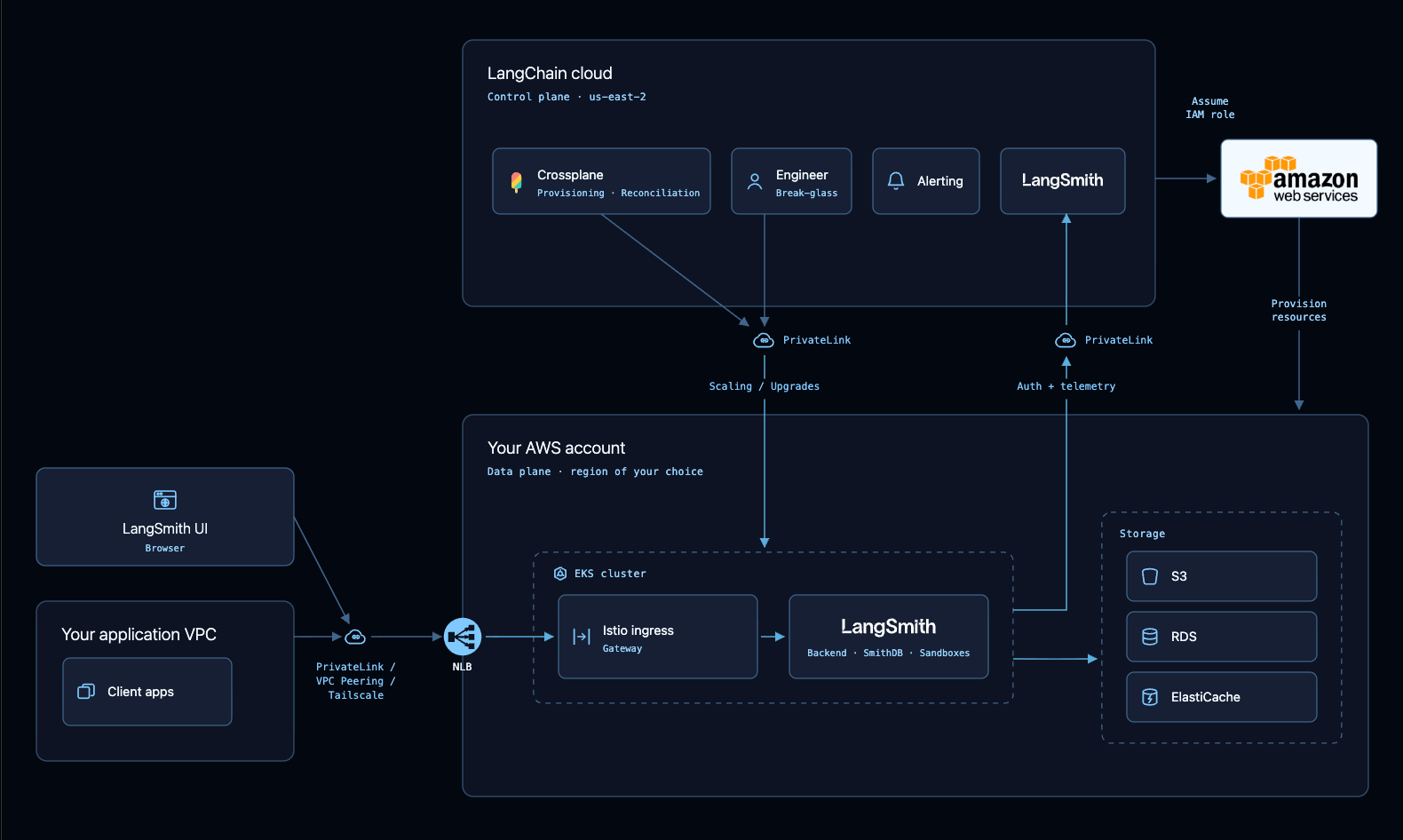
A BYOC deployment is split across two planes. This page describes the components of each plane, how they communicate, and what LangChain provisions in your account.
The **control plane** runs in LangChain's cloud and handles authentication, organization configuration, and billing. It provisions, monitors, and orchestrates your deployment, but does not hold any sensitive application data.
The **data plane** runs in your AWS account and ingests, stores, and queries all of your sensitive application data. It holds your VPC, EKS cluster, databases, and other resources.
The table below summarizes the split:
| Plane | Where it runs | What it holds |
| ----------------- | ------------------------------------------ | ------------------------------------------------------------------------------------------------------------------------------------------------------ |
| **Control plane** | LangChain's cloud, `us-east-2` | Authentication, organization and workspace configuration, billing and usage metadata, LangSmith API keys, and the static frontend assets |
| **Data plane** | Your AWS account, in the region you choose | Traces, prompts, datasets, evaluators, experiments, insights runs, annotation queues, agent deployments, workspace secrets, and other application data |
 ## Provisioned resources
LangChain provisions the following in your account:
* **VPC**: A dedicated VPC spread across the region's availability zones, fully private by default. It uses VPC endpoints for private communication to AWS services, and PrivateLink for communication between the data plane and the control plane.
* **Managed databases**: RDS for relational workloads, and ElastiCache for caching.
* **Storage**: S3 buckets for the blob store holding trace data, VPC flow logs, and ClickHouse backups.
* **EKS**: A private EKS cluster with managed add-ons.
* **Compute**: A system node group for platform workloads, and application node groups through Karpenter.
* **In-cluster resources**: The LangSmith Helm chart, Istio, KEDA, and other in-cluster resources.
* **IAM roles**: The roles and permissions required for Kubernetes resources.
## Cross-account IAM permissions
LangChain needs cross-account IAM permissions to provision and manage resources within your AWS account. These permissions let LangChain:
* **Provision infrastructure**: Create and configure the VPC, subnets, security groups, and other networking components.
* **Manage the Kubernetes cluster**: Deploy and maintain the EKS cluster, its node groups, and cluster add-ons.
* **Create storage resources**: Provision RDS, ElastiCache, and the S3 buckets used for application data and backups.
* **Create IAM roles**: Create and configure the roles used by Kubernetes service accounts and supporting services.
* **Operate supporting services**: Deploy and manage ingress and autoscaling, and scale and upgrade LangSmith workloads.
Permissions are granted through a single cross-account IAM role that you create during onboarding by applying the [`langsmith-byoc-role` Terraform module](https://github.com/langchain-ai/terraform/tree/main/modules/byoc/aws/langsmith-byoc-role).
### How least privilege is enforced
The role is scoped to only what BYOC operations require:
* **Scoped to LangSmith-owned resources**: Wherever AWS supports resource-level scoping, permissions are restricted to resources carrying specific tags and name prefixes, so the role cannot act on unrelated resources in the account.
* **Infrastructure-scoped, not data-scoped**: The role can manage the resources that hold your data, but cannot read the data itself through AWS data APIs. It holds no `s3:GetObject` on the trace bucket, no `rds-db:connect` to PostgreSQL, and no `elasticache:Connect` to Redis.
## Networking
### Data traffic
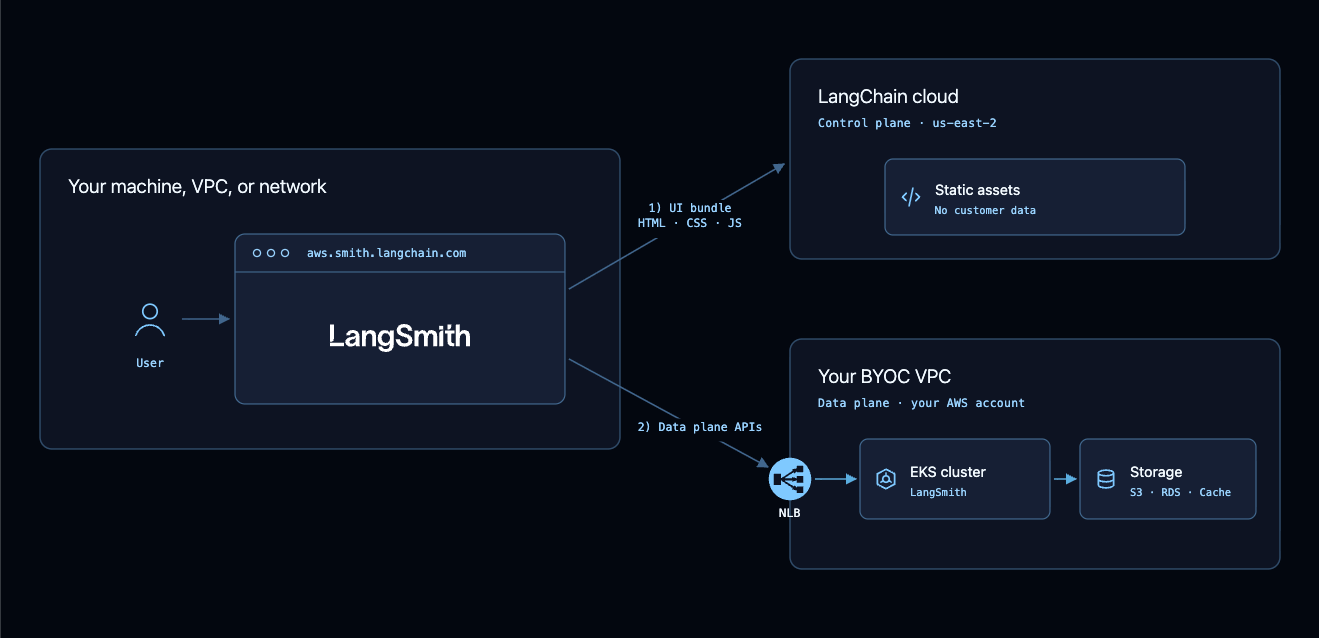
Sensitive data does not leave your VPC, and does not pass through LangChain's VPC.
1. When a user opens `aws.smith.langchain.com`, the browser fetches the LangSmith UI bundle of HTML, JavaScript, CSS, and images from LangChain's cloud. These assets are the same code that every BYOC and Cloud tenant runs, and contain no customer data.
2. Once loaded, the application resolves the data plane endpoint for the selected workspace and routes every request for sensitive data to your VPC.
To ingest or query data programmatically, point your client at your data plane directly. The data flow is always `browser or client → data plane → back to client`.
## Provisioned resources
LangChain provisions the following in your account:
* **VPC**: A dedicated VPC spread across the region's availability zones, fully private by default. It uses VPC endpoints for private communication to AWS services, and PrivateLink for communication between the data plane and the control plane.
* **Managed databases**: RDS for relational workloads, and ElastiCache for caching.
* **Storage**: S3 buckets for the blob store holding trace data, VPC flow logs, and ClickHouse backups.
* **EKS**: A private EKS cluster with managed add-ons.
* **Compute**: A system node group for platform workloads, and application node groups through Karpenter.
* **In-cluster resources**: The LangSmith Helm chart, Istio, KEDA, and other in-cluster resources.
* **IAM roles**: The roles and permissions required for Kubernetes resources.
## Cross-account IAM permissions
LangChain needs cross-account IAM permissions to provision and manage resources within your AWS account. These permissions let LangChain:
* **Provision infrastructure**: Create and configure the VPC, subnets, security groups, and other networking components.
* **Manage the Kubernetes cluster**: Deploy and maintain the EKS cluster, its node groups, and cluster add-ons.
* **Create storage resources**: Provision RDS, ElastiCache, and the S3 buckets used for application data and backups.
* **Create IAM roles**: Create and configure the roles used by Kubernetes service accounts and supporting services.
* **Operate supporting services**: Deploy and manage ingress and autoscaling, and scale and upgrade LangSmith workloads.
Permissions are granted through a single cross-account IAM role that you create during onboarding by applying the [`langsmith-byoc-role` Terraform module](https://github.com/langchain-ai/terraform/tree/main/modules/byoc/aws/langsmith-byoc-role).
### How least privilege is enforced
The role is scoped to only what BYOC operations require:
* **Scoped to LangSmith-owned resources**: Wherever AWS supports resource-level scoping, permissions are restricted to resources carrying specific tags and name prefixes, so the role cannot act on unrelated resources in the account.
* **Infrastructure-scoped, not data-scoped**: The role can manage the resources that hold your data, but cannot read the data itself through AWS data APIs. It holds no `s3:GetObject` on the trace bucket, no `rds-db:connect` to PostgreSQL, and no `elasticache:Connect` to Redis.
## Networking
### Data traffic
Sensitive data does not leave your VPC, and does not pass through LangChain's VPC.
1. When a user opens `aws.smith.langchain.com`, the browser fetches the LangSmith UI bundle of HTML, JavaScript, CSS, and images from LangChain's cloud. These assets are the same code that every BYOC and Cloud tenant runs, and contain no customer data.
2. Once loaded, the application resolves the data plane endpoint for the selected workspace and routes every request for sensitive data to your VPC.
To ingest or query data programmatically, point your client at your data plane directly. The data flow is always `browser or client → data plane → back to client`.
 ### Connectivity
All communication between the control plane and your data plane travels over AWS PrivateLink, in both directions. LangChain does not reach your environment over the public internet. BYOC establishes two PrivateLink connections:
* **Control plane to data plane (management path)**: Exposes only your cluster's Kubernetes API server, which LangChain uses to install and reconcile the LangSmith components. Your data is not reachable over this connection.
* **Data plane to control plane (runtime path)**: The data plane calls the control plane to authenticate requests, validate API keys, resolve roles and permissions, and load organization and workspace configuration.
Container images are pulled read-only from LangChain's control plane ECR repositories through VPC endpoints.
### DNS and ingress
Traffic reaches LangSmith through an Istio ingress fronted by an AWS NLB, using Route 53 for DNS resolution. Once your data plane is created, its API URL is listed under **Settings > Data Planes** in the LangSmith UI.
## See also
* [BYOC overview](/langsmith/byoc)
* [Operations](/langsmith/byoc-operations)
* [Egress for billing and operational telemetry](/langsmith/self-host-egress)
***
### Connectivity
All communication between the control plane and your data plane travels over AWS PrivateLink, in both directions. LangChain does not reach your environment over the public internet. BYOC establishes two PrivateLink connections:
* **Control plane to data plane (management path)**: Exposes only your cluster's Kubernetes API server, which LangChain uses to install and reconcile the LangSmith components. Your data is not reachable over this connection.
* **Data plane to control plane (runtime path)**: The data plane calls the control plane to authenticate requests, validate API keys, resolve roles and permissions, and load organization and workspace configuration.
Container images are pulled read-only from LangChain's control plane ECR repositories through VPC endpoints.
### DNS and ingress
Traffic reaches LangSmith through an Istio ingress fronted by an AWS NLB, using Route 53 for DNS resolution. Once your data plane is created, its API URL is listed under **Settings > Data Planes** in the LangSmith UI.
## See also
* [BYOC overview](/langsmith/byoc)
* [Operations](/langsmith/byoc-operations)
* [Egress for billing and operational telemetry](/langsmith/self-host-egress)
***
[Connect these docs](/use-these-docs) to Claude, VSCode, and more via MCP for real-time answers.
[Edit this page on GitHub](https://github.com/langchain-ai/docs/edit/main/src/langsmith/byoc-architecture.mdx) or [file an issue](https://github.com/langchain-ai/docs/issues/new/choose).