> ## Documentation Index
> Fetch the complete documentation index at: https://docs.langchain.com/llms.txt
> Use this file to discover all available pages before exploring further.

# BYOC usage

> Route tracing and API traffic to a LangSmith BYOC data plane, including tracing to multiple endpoints and the path prefixes for each service.

Once your data plane is active, all API traffic for its workspaces goes to the data plane endpoint rather than to the LangSmith Cloud backend. This page explains how to route requests to the right service.

The LangSmith UI handles this automatically: it routes to the correct data plane based on the workspace you have selected. The guidance below applies to your own client applications and direct API calls.

## Organizations, data planes, and workspaces

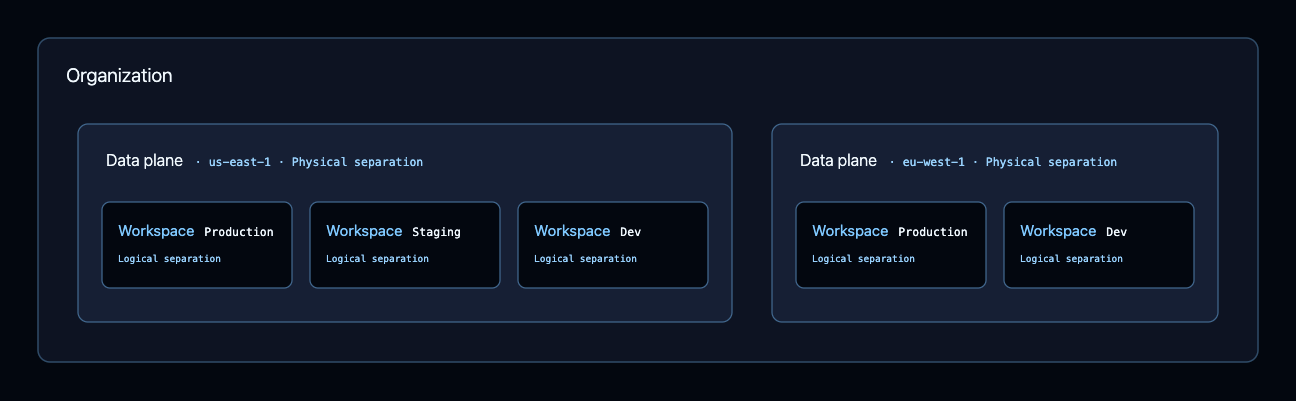
A BYOC deployment has three levels:

* **Organization**: The top level. Users, roles, billing, SSO configuration, and API keys belong to the organization and live in the control plane.
* **Data plane**: Belongs to an organization and represents physical separation of data. An organization can have several data planes, each in its own AWS account and region.
* **Workspace**: Belongs to exactly one data plane, which you select when you create the workspace. Traces, datasets, experiments, and other application data live in a workspace, the same as on Cloud or self-hosted.

<img src="https://mintcdn.com/langchain-5e9cc07a/sRMLsyZ-6iriBvN5/langsmith/images/byoc-org-structure.png?fit=max&auto=format&n=sRMLsyZ-6iriBvN5&q=85&s=1121c5471f8c452fb4b6759698a06aeb" alt="Nesting diagram of a BYOC deployment. An organization contains two data planes, each labeled as physical separation. The first is in us-east-1 and holds three workspaces named Production, Staging, and Dev. The second is in eu-west-1 and holds two workspaces named Production and Dev. Every workspace is labeled as logical separation within its data plane." width="1296" height="401" data-path="langsmith/images/byoc-org-structure.png" />

Use data planes for physical separation of data, and workspaces for logical separation within a data plane. Common combinations are:

| Data planes                                                                                    | Workspaces                                      |
| ---------------------------------------------------------------------------------------------- | ----------------------------------------------- |
| Per region, such as `us-east-1` and `us-west-2`                                                | Per environment, such as dev, staging, and prod |
| Per environment and region, such as prod `us-east-1`, staging `us-east-1`, and dev `us-east-1` | Per team                                        |
| Per business unit                                                                              | Per team                                        |

## Find your data plane endpoint

Each data plane has a base URL. Navigate to **Settings > Data Planes** to see each of your data planes, its state, and its API URL.

<Warning>
  Data planes are provisioned with a private endpoint by default, so you need private connectivity to reach the base URL, such as Tailscale, AWS PrivateLink, or VPC peering.
</Warning>

## Trace to a data plane

To send traces to a workspace that lives in your data plane, point the LangSmith SDK at the data plane endpoint and authenticate with an API key scoped to a workspace in that data plane:

```bash theme={"theme":{"light":"catppuccin-latte","dark":"catppuccin-mocha"}}
export LANGSMITH_TRACING=true
export LANGSMITH_API_KEY="<your-api-key>"
export LANGSMITH_ENDPOINT="https://<data_plane_host>"
```

<Warning>
  Create `LANGSMITH_API_KEY` from a workspace inside the target data plane. Traces are tenant-scoped, so an API key from a workspace on a different data plane, including a Cloud workspace, is rejected.
</Warning>

For a complete, runnable example, follow the [Observability quickstart](/langsmith/observability-quickstart) and substitute the environment variables above.

## Route API requests

The base URL routes to different services depending on the path prefix:

| Service              | Path prefix | Example                                                 |
| -------------------- | ----------- | ------------------------------------------------------- |
| LangSmith            | `/api`      | `https://<data_plane_host>/api/v1/sessions`             |
| LangSmith Deployment | `/api-host` | `https://<data_plane_host>/api-host/v2/deployments`     |
| LLM Gateway          | `/gateway`  | `https://<data_plane_host>/gateway/v1/chat/completions` |

## Trace to multiple endpoints

Use these patterns to trace to both Cloud and a data plane, or to multiple data planes.

### Dual write to two endpoints

Set `LANGSMITH_RUNS_ENDPOINTS` to write to multiple endpoints:

```bash theme={"theme":{"light":"catppuccin-latte","dark":"catppuccin-mocha"}}
export LANGSMITH_RUNS_ENDPOINTS='[
  {"api_url": "https://aws.api.smith.langchain.com", "api_key": "ls__key1", "project_name": "project-cloud"},
  {"api_url": "https://<data_plane_host>", "api_key": "ls__key2", "project_name": "project-byoc"}
]'
```

### Choose the destination in application logic

To decide where to trace at runtime, create a client per endpoint and select between them:

```python theme={"theme":{"light":"catppuccin-latte","dark":"catppuccin-mocha"}}
import os

from langsmith import Client, traceable, tracing_context

CLOUD_ENDPOINT = "https://aws.api.smith.langchain.com"
BYOC_ENDPOINT = "https://<data_plane_host>"


def require_env(name: str) -> str:
    value = os.getenv(name)
    if not value:
        raise RuntimeError(f"Missing required environment variable: {name}")
    return value


cloud_client = Client(
    api_key=require_env("LANGSMITH_CLOUD_API_KEY"),
    api_url=CLOUD_ENDPOINT,
    workspace_id=os.getenv("LANGSMITH_CLOUD_WORKSPACE_ID"),
)

byoc_client = Client(
    api_key=require_env("LANGSMITH_BYOC_API_KEY"),
    api_url=BYOC_ENDPOINT,
    workspace_id=os.getenv("LANGSMITH_BYOC_WORKSPACE_ID"),
)


def get_workspace_routing(tenant_id: str):
    """Determine the tracing destination based on application routing logic."""
    if tenant_id.startswith("byoc_"):
        return byoc_client, os.getenv("LANGSMITH_BYOC_PROJECT", "byoc-customer-project")
    return cloud_client, os.getenv("LANGSMITH_CLOUD_PROJECT", "cloud-customer-project")


@traceable
def run_agent_workflow(query: str):
    return f"Processed: {query}"


def handle_request(tenant_id: str, query: str):
    client, project_name = get_workspace_routing(tenant_id)

    with tracing_context(enabled=True, client=client, project_name=project_name):
        return run_agent_workflow(query)
```

## See also

* [BYOC onboarding](/langsmith/byoc-onboarding)
* [BYOC architecture](/langsmith/byoc-architecture)

***

<div className="source-links">
  <Callout icon="terminal-2">
    [Connect these docs](/use-these-docs) to Claude, VSCode, and more via MCP for real-time answers.
  </Callout>

  <Callout icon="edit">
    [Edit this page on GitHub](https://github.com/langchain-ai/docs/edit/main/src/langsmith/byoc-usage.mdx) or [file an issue](https://github.com/langchain-ai/docs/issues/new/choose).
  </Callout>
</div>
