> ## Documentation Index
> Fetch the complete documentation index at: https://docs.langchain.com/llms.txt
> Use this file to discover all available pages before exploring further.

# Cloud (SaaS)

<Callout icon="rocket" color="#4F46E5" iconType="regular">
  If you're ready to deploy your app to LangSmith Cloud (AWS or GCP), follow the [Cloud deployment quickstart](/langsmith/deployment-quickstart) or the [full setup guide](/langsmith/deploy-to-cloud). This page explains the Cloud managed architecture for reference.
</Callout>

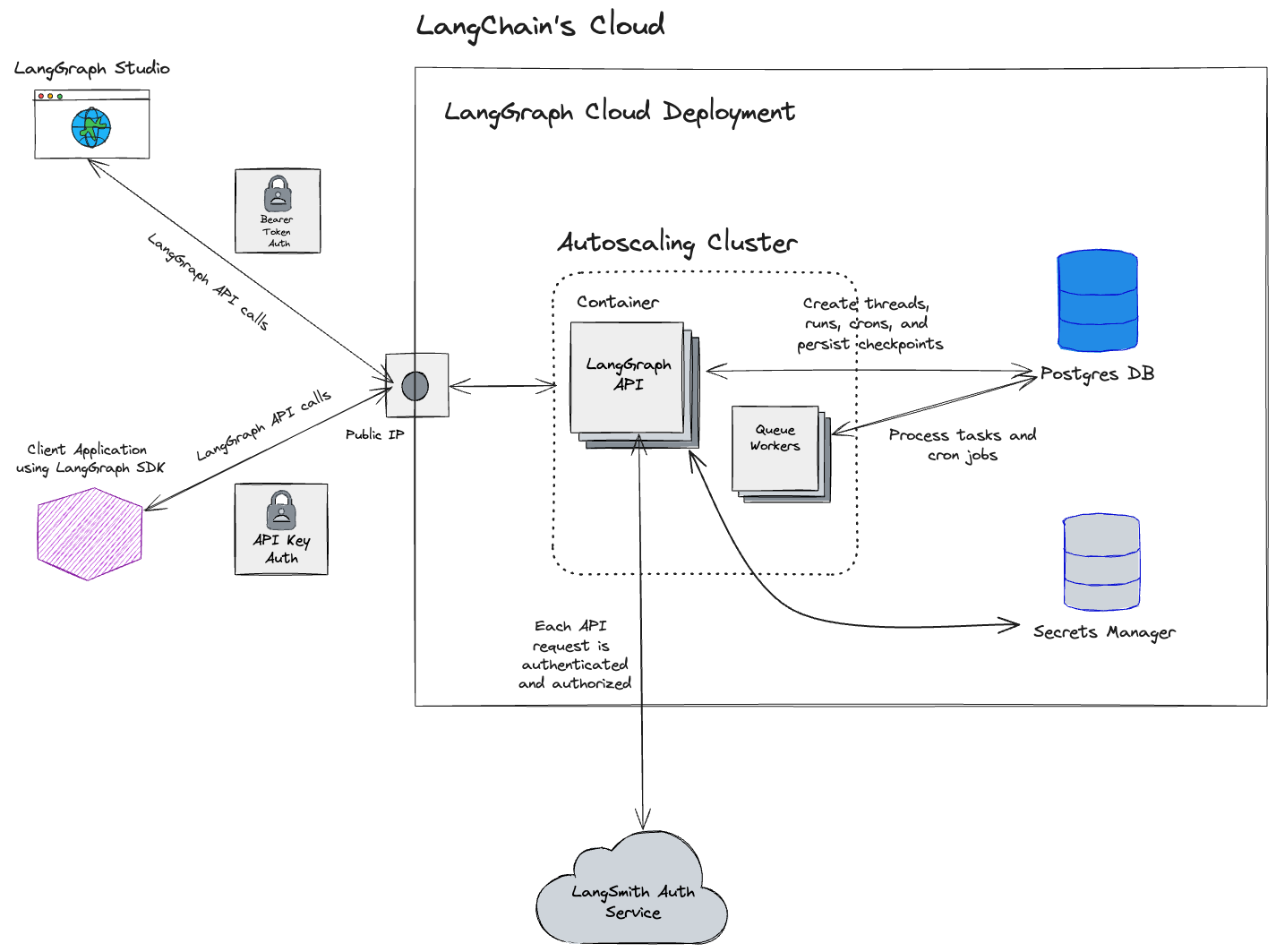
The **Cloud** option is a fully managed model where LangChain hosts and operates all LangSmith infrastructure and services:

* **Fully managed infrastructure**: LangChain handles all infrastructure, updates, scaling, and maintenance.
* **Deploy from GitHub**: Connect your repositories and deploy with a few clicks.
* **Automated CI/CD**: Build process is handled automatically by the platform.
* **LangSmith UI**: Full access to [observability](/langsmith/observability), [evaluation](/langsmith/evaluation), [deployment management](/langsmith/deployment), and [Studio](/langsmith/studio).

|                                               | **Who manages it** | **Where it runs**               |
| --------------------------------------------- | ------------------ | ------------------------------- |
| **LangSmith platform (UI, APIs, datastores)** | LangChain          | LangChain's cloud (AWS and GCP) |
| **Your Agent Servers**                        | LangChain          | LangChain's cloud (AWS and GCP) |
| **CI/CD for your apps**                       | LangChain          | LangChain's cloud (AWS and GCP) |

<img src="https://mintcdn.com/langchain-5e9cc07a/JOyLr_spVEW0t2KF/langsmith/images/langgraph-cloud-architecture.png?fit=max&auto=format&n=JOyLr_spVEW0t2KF&q=85&s=3f0316122425895270d0ecd47b12e139" alt="Cloud deployment: LangChain hosts and manages all components including the UI, APIs, and your Agent Servers." width="1425" height="1063" data-path="langsmith/images/langgraph-cloud-architecture.png" />

## Get started

To deploy your first application to Cloud, follow the [Cloud deployment quickstart](/langsmith/deployment-quickstart) or refer to the [comprehensive setup guide](/langsmith/deploy-to-cloud).

## Cloud architecture and scalability

<Note>
  This section is only relevant for cloud-managed LangSmith at [https://smith.langchain.com?utm\_source=docs\&utm\_medium=cta\&utm\_campaign=langsmith-signup\&utm\_content=langsmith-cloud](https://smith.langchain.com), [https://eu.smith.langchain.com](https://eu.smith.langchain.com), and [https://aws.smith.langchain.com](https://aws.smith.langchain.com).

  For information on the self-hosted LangSmith solution, please refer to the [self-hosted documentation](/langsmith/self-hosted).
</Note>

LangSmith is deployed on Google Cloud Platform (GCP) for the US and EU SaaS regions and on Amazon Web Services (AWS) for the AWS-hosted US SaaS region. The platform is designed to be highly scalable. Many customers run production workloads on LangSmith for LLM application observability, evaluation, and agent deployment.

The US-based LangSmith service (default GCP region) is deployed in the `us-central1` (Iowa) region of GCP.

<Note>
  The [EU-based LangSmith service](https://eu.smith.langchain.com) is now available (as of mid-July 2024) and is deployed in the `europe-west4` (Netherlands) region of GCP. If you are interested in an enterprise plan in this region, [contact our sales team](https://www.langchain.com/contact-sales).
</Note>

<Note>
  As of April 2026, LangSmith SaaS is available on AWS in `us-east-2` (Ohio).
</Note>

### Regional storage

The resources and services in this table are stored in the location corresponding to the URL where sign-up occurred (US (GCP), EU (GCP), or US (AWS)). Cloud-managed LangSmith uses [Supabase](https://supabase.com) for authentication/authorization and [ClickHouse Cloud](https://clickhouse.com/cloud) for the data warehouse.

|                                               | US (GCP)                                                                                                                                                   | EU (GCP)                                                                 | US (AWS)                                                                   |
| --------------------------------------------- | ---------------------------------------------------------------------------------------------------------------------------------------------------------- | ------------------------------------------------------------------------ | -------------------------------------------------------------------------- |
| URL                                           | [https://smith.langchain.com?utm\_source=docs\&utm\_medium=cta\&utm\_campaign=langsmith-signup\&utm\_content=langsmith-cloud](https://smith.langchain.com) | [https://eu.smith.langchain.com](https://eu.smith.langchain.com)         | [https://aws.smith.langchain.com](https://aws.smith.langchain.com)         |
| API URL                                       | [https://api.smith.langchain.com](https://api.smith.langchain.com)                                                                                         | [https://eu.api.smith.langchain.com](https://eu.api.smith.langchain.com) | [https://aws.api.smith.langchain.com](https://aws.api.smith.langchain.com) |
| Cloud                                         | GCP us-central1 (Iowa)                                                                                                                                     | GCP europe-west4 (Netherlands)                                           | AWS us-east-2 (Ohio)                                                       |
| Supabase                                      | AWS us-east-1 (N. Virginia)                                                                                                                                | AWS eu-central-1 (Germany)                                               | AWS us-east-2 (Ohio)                                                       |
| ClickHouse Cloud                              | us-central1 (Iowa)                                                                                                                                         | europe-west4 (Netherlands)                                               | us-east-2 (Ohio)                                                           |
| [LangSmith deployment](/langsmith/deployment) | GCP us-central1 (Iowa); `*.us.langgraph.app`                                                                                                               | GCP europe-west4 (Netherlands); `*.eu.langgraph.app`                     | AWS us-east-2 (Ohio); `*.aws.us.langgraph.app`                             |

See the [Regions FAQ](/langsmith/regions-faq) for more information.

### Region-independent storage

Data listed here is stored exclusively in the US:

* Payment and billing information with Stripe and Metronome

### GCP services

The following applies to the **US and EU** SaaS regions on GCP.

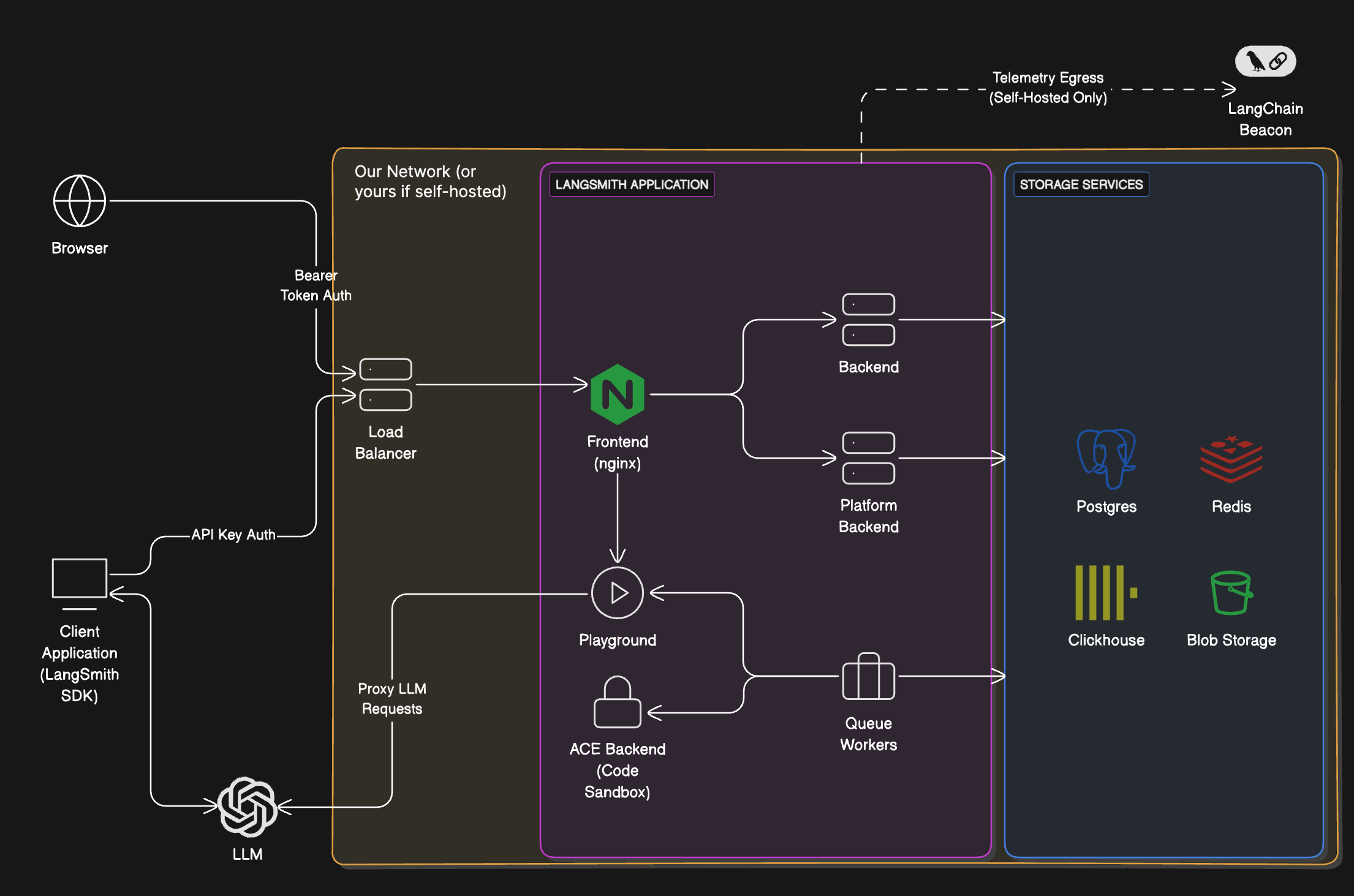
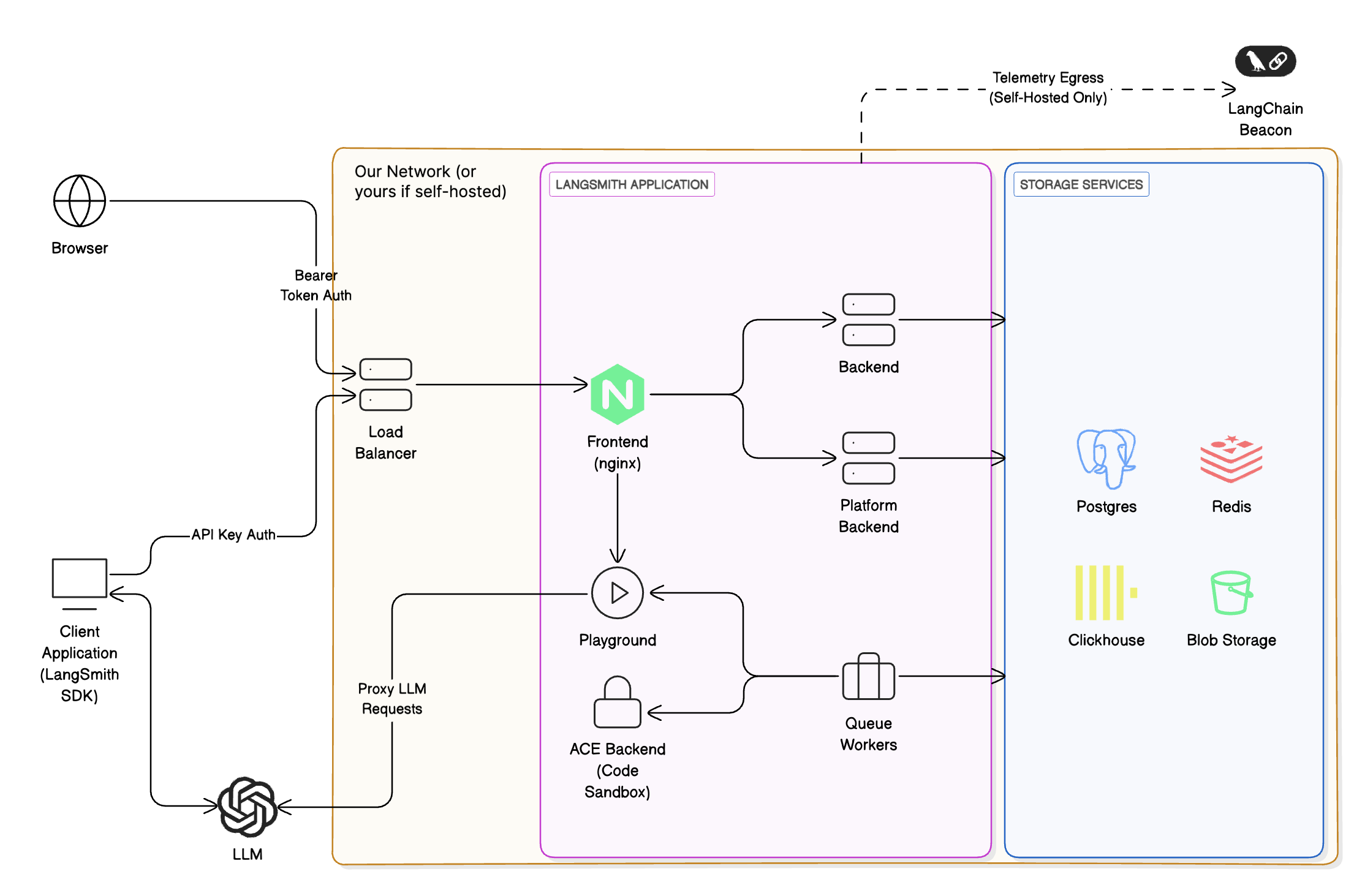
LangSmith is composed of the following services, all deployed on Google Kubernetes Engine (GKE):

* LangSmith Frontend: serves the LangSmith UI.
* LangSmith Backend: serves the LangSmith API.
* LangSmith Platform Backend: handles authentication and other high-volume tasks. (Internal service)
* LangSmith Playground: handles forwarding requests to various LLM providers for the Playground feature.
* LangSmith Queue: handles processing of asynchronous tasks. (Internal service)

LangSmith uses the following GCP storage services:

* Google Cloud Storage (GCS) for runs inputs and outputs.
* Google Cloud SQL PostgreSQL for transactional workloads.
* Google Cloud Memorystore for Redis for queuing and caching.
* Clickhouse Cloud on GCP for trace ingestion and analytics. Our services connect to Clickhouse Cloud, which is hosted in the same GCP region, via a private endpoint.

Some additional GCP services we use include:

* Google Cloud Load Balancer for routing traffic to the LangSmith services.
* Google Cloud CDN for caching static assets.
* Google Cloud Armor for security and rate limits. For more information on rate limits we enforce, please refer to [Rate limits](/langsmith/administration-overview#rate-limits).

### AWS services

The following applies to the **US (AWS)** SaaS region in `us-east-2` (Ohio). The same logical LangSmith components run on **Amazon EKS** instead of GKE.

LangSmith is composed of the following services, all deployed on Amazon EKS:

* LangSmith Frontend: serves the LangSmith UI.
* LangSmith Backend: serves the LangSmith API.
* LangSmith Platform Backend: handles authentication and other high-volume tasks. (Internal service)
* LangSmith Playground: handles forwarding requests to various LLM providers for the Playground feature.
* LangSmith Queue: handles processing of asynchronous tasks. (Internal service)

LangSmith uses the following AWS storage and data services:

* Amazon S3 for runs inputs and outputs.
* Amazon RDS for PostgreSQL for transactional workloads.
* Amazon ElastiCache for Redis for queuing and caching.
* ClickHouse Cloud over AWS PrivateLink in `us-east-2` for trace ingestion and analytics, consistent with the [regional storage](#regional-storage) table above.

Some additional AWS services we use include:

* Elastic Load Balancing (Network Load Balancers) and Istio ingress for routing traffic to the LangSmith services. Documented API rate limits are enforced at the Istio ingress gateway. For details, see [Rate limits](/langsmith/administration-overview#rate-limits).
* Amazon CloudFront for caching static assets (including the web UI hostname `aws.smith.langchain.com`).
* AWS WAF on CloudFront for managed rule groups at the edge (for example, AWS Managed Rules common protections and Bot Control).

<div style={{ textAlign: 'center' }}>
  <img className="block dark:hidden" src="https://mintcdn.com/langchain-5e9cc07a/rqYqeBEA_2oeiw17/langsmith/images/cloud-arch-light.png?fit=max&auto=format&n=rqYqeBEA_2oeiw17&q=85&s=0790cbdf4fe131c74d1e60bb120834e3" alt="Light mode overview" width="2210" height="1463" data-path="langsmith/images/cloud-arch-light.png" />

  <img className="hidden dark:block" src="https://mintcdn.com/langchain-5e9cc07a/rqYqeBEA_2oeiw17/langsmith/images/cloud-arch-dark.png?fit=max&auto=format&n=rqYqeBEA_2oeiw17&q=85&s=767f3bc3dc73ffe1a806f54e0aaa428b" alt="Dark mode overview" width="2210" height="1463" data-path="langsmith/images/cloud-arch-dark.png" />
</div>

## Allowlisting IP addresses

### Egress from LangChain SaaS

All traffic leaving LangSmith services will be routed through a NAT gateway. All traffic will appear to originate from the following IP addresses:

| US (GCP)       | EU (GCP)       | US (AWS)       |
| -------------- | -------------- | -------------- |
| 34.59.65.97    | 34.13.192.67   | 18.188.147.158 |
| 34.67.51.221   | 34.147.105.64  | 18.219.86.202  |
| 34.46.212.37   | 34.90.22.166   | 3.21.57.192    |
| 34.132.150.88  | 34.147.36.213  |                |
| 35.188.222.201 | 34.32.137.113  |                |
| 34.58.194.127  | 34.91.238.184  |                |
| 34.59.97.173   | 35.204.101.241 |                |
| 104.198.162.55 | 35.204.48.32   |                |

It may be helpful to allowlist these IP addresses if connecting to your own AzureOpenAI service or other endpoints that may be required by the Playground or Online Evaluation.

### Ingress into LangChain SaaS

The LangChain endpoints map to the following static IP addresses for traffic that terminates on our **GCP load balancers** (US/EU) or, for **US (AWS)**, on the **Network Load Balancer** in `us-east-2` (API and gateway hostnames):

| US (GCP)       | EU (GCP)     | US (AWS)      |
| -------------- | ------------ | ------------- |
| 34.8.121.39    | 34.95.92.214 | 3.129.27.169  |
| 34.107.251.234 | 34.13.73.122 | 13.58.107.119 |
|                |              | 16.59.151.49  |
|                |              | 16.59.98.147  |
|                |              | 3.134.146.243 |
|                |              | 3.150.87.246  |

You may need to allowlist these to enable traffic from your private network to LangSmith SaaS endpoints (`api.smith.langchain.com`, `smith.langchain.com`, `beacon.langchain.com`, `eu.api.smith.langchain.com`, `eu.smith.langchain.com`, `eu.beacon.langchain.com`, `aws.api.smith.langchain.com`, `aws.smith.langchain.com`).

## Private connectivity (Enterprise)

<Callout icon="lock" color="#4F46E5" iconType="regular">
  **Enterprise only.** Private connectivity is available exclusively for Enterprise customers. Contact your account representative or [sales@langchain.dev](mailto:sales@langchain.dev) to enable this feature.
</Callout>

Enterprise customers can connect to LangSmith without exposing traffic to the public internet using **AWS PrivateLink** or **GCP Private Service Connect (PSC)**.

### AWS PrivateLink

Customers on **AWS** can connect to LangSmith via [AWS PrivateLink](https://docs.aws.amazon.com/vpc/latest/privatelink/), providing private connectivity from any VPC. Cross-region connectivity is supported natively.

#### Endpoint service name

| Region           | Service Name                                              |
| ---------------- | --------------------------------------------------------- |
| US (`us-east-2`) | `com.amazonaws.vpce.us-east-2.vpce-svc-054f37092752bff6b` |

#### Setup

**1. Request access:** Contact your account representative or [sales@langchain.dev](mailto:sales@langchain.dev) with your AWS account ID. LangChain will add your account to the endpoint service's allowed principals list.

**2. Create an Interface VPC Endpoint** in your AWS account. Attach a security group that allows **TCP 443 inbound** from your VPC CIDR (or from the instances that need to reach LangSmith):

<CodeGroup>
  ```bash AWS CLI theme={"theme":{"light":"catppuccin-latte","dark":"catppuccin-mocha"}}
  aws ec2 create-vpc-endpoint \
    --vpc-id <YOUR_VPC_ID> \
    --service-name <SERVICE_NAME_FROM_TABLE_ABOVE> \
    --vpc-endpoint-type Interface \
    --subnet-ids <YOUR_SUBNET_IDS> \
    --security-group-ids <YOUR_SECURITY_GROUP_ID> \
    --region <YOUR_REGION>
  ```

  ```hcl Terraform theme={"theme":{"light":"catppuccin-latte","dark":"catppuccin-mocha"}}
  resource "aws_vpc_endpoint" "langsmith" {
    vpc_id              = "<YOUR_VPC_ID>"
    service_name        = "<SERVICE_NAME_FROM_TABLE_ABOVE>"
    vpc_endpoint_type   = "Interface"
    subnet_ids          = ["<YOUR_SUBNET_IDS>"]
    security_group_ids  = ["<YOUR_SECURITY_GROUP_ID>"]
  }
  ```
</CodeGroup>

**3. Wait for acceptance.** LangChain will accept the connection. The endpoint status will change from `pendingAcceptance` to `available`. Allow a few minutes after acceptance for the change to fully propagate before testing connectivity.

#### Configure DNS

Configure DNS so that `aws.api.smith.langchain.com` resolves to your VPC endpoint's private DNS name within your VPC. You can use any private DNS solution — Route 53 Private Hosted Zones, a corporate DNS resolver, or any DNS server reachable from your VPC.

First, get your endpoint's DNS name:

```bash theme={"theme":{"light":"catppuccin-latte","dark":"catppuccin-mocha"}}
aws ec2 describe-vpc-endpoints \
  --vpc-endpoint-ids <YOUR_ENDPOINT_ID> \
  --query 'VpcEndpoints[0].DnsEntries[0].DnsName' \
  --output text --region <YOUR_REGION>
```

Then create a CNAME record for `aws.api.smith.langchain.com` pointing to that DNS name. Here's an example using Route 53:

<CodeGroup>
  ```bash AWS CLI theme={"theme":{"light":"catppuccin-latte","dark":"catppuccin-mocha"}}
  aws route53 create-hosted-zone \
    --name aws.api.smith.langchain.com \
    --vpc VPCRegion=<YOUR_REGION>,VPCId=<YOUR_VPC_ID> \
    --caller-reference langsmith-privatelink-$(date +%s) \
    --hosted-zone-config PrivateZone=true

  aws route53 change-resource-record-sets \
    --hosted-zone-id <HOSTED_ZONE_ID> \
    --change-batch '{
      "Changes": [{
        "Action": "CREATE",
        "ResourceRecordSet": {
          "Name": "aws.api.smith.langchain.com",
          "Type": "CNAME",
          "TTL": 300,
          "ResourceRecords": [{"Value": "<ENDPOINT_DNS_NAME>"}]
        }
      }]
    }'
  ```

  ```hcl Terraform theme={"theme":{"light":"catppuccin-latte","dark":"catppuccin-mocha"}}
  resource "aws_route53_zone" "langsmith_privatelink" {
    name = "aws.api.smith.langchain.com"

    vpc {
      vpc_id = "<YOUR_VPC_ID>"
    }
  }

  resource "aws_route53_record" "langsmith_privatelink" {
    zone_id = aws_route53_zone.langsmith_privatelink.zone_id
    name    = "aws.api.smith.langchain.com"
    type    = "CNAME"
    ttl     = 300
    records = [aws_vpc_endpoint.langsmith.dns_entry[0]["dns_name"]]
  }
  ```
</CodeGroup>

#### Verify connectivity

From an EC2 instance or container in your VPC:

```bash theme={"theme":{"light":"catppuccin-latte","dark":"catppuccin-mocha"}}
curl https://aws.api.smith.langchain.com/ok
```

### GCP Private Service Connect

Enterprise customers on **GCP** can connect to LangSmith via [Private Service Connect (PSC)](https://cloud.google.com/vpc/docs/private-service-connect), providing private connectivity without exposing traffic to the public internet.

#### Service attachment URIs

Use the following service attachment URIs to create a PSC endpoint in your VPC:

| Region              | Service Attachment URI                                                                |
| ------------------- | ------------------------------------------------------------------------------------- |
| US (`us-central1`)  | `projects/langchain-prod/regions/us-central1/serviceAttachments/gateway-psc-publish`  |
| EU (`europe-west4`) | `projects/langchain-prod/regions/europe-west4/serviceAttachments/gateway-psc-publish` |

#### PSC domains

After setup, use the following domains to connect to LangSmith over your PSC connection:

| Region | Domain                                   |
| ------ | ---------------------------------------- |
| US     | `us-central1.p.api.smith.langchain.com`  |
| EU     | `europe-west4.p.api.smith.langchain.com` |

#### Setup

**Request access:** Contact your account representative or [sales@langchain.dev](mailto:sales@langchain.dev) with your GCP project ID. LangChain will add your project to the service attachment's allowed consumer list.

After access is granted, create a PSC endpoint and configure DNS using either the gcloud CLI or Terraform.

#### Create a PSC endpoint

Create a forwarding rule in your VPC targeting the service attachment:

<CodeGroup>
  ```bash gcloud CLI theme={"theme":{"light":"catppuccin-latte","dark":"catppuccin-mocha"}}
  # Create the PSC endpoint
  gcloud compute forwarding-rules create langsmith-psc-endpoint \
    --region=<REGION> \
    --network=<YOUR_VPC_NETWORK> \
    --subnet=<YOUR_SUBNET> \
    --target-service-attachment=projects/langchain-prod/regions/<REGION>/serviceAttachments/gateway-psc-publish \
    --load-balancing-scheme=""

  # Get the assigned IP address
  gcloud compute forwarding-rules describe langsmith-psc-endpoint \
    --region=<REGION> \
    --format="value(IPAddress)"
  ```

  ```hcl Terraform theme={"theme":{"light":"catppuccin-latte","dark":"catppuccin-mocha"}}
  resource "google_compute_forwarding_rule" "langsmith_psc" {
    name                  = "langsmith-psc-endpoint"
    project               = "<YOUR_PROJECT_ID>"
    region                = "<REGION>"
    network               = "<YOUR_VPC_NETWORK>"
    subnetwork            = "<YOUR_SUBNET>"
    target                = "projects/langchain-prod/regions/<REGION>/serviceAttachments/gateway-psc-publish"
    load_balancing_scheme = ""
  }
  ```
</CodeGroup>

#### Configure DNS

Create a private DNS zone in your VPC and add an A record pointing to the PSC endpoint IP:

<CodeGroup>
  ```bash gcloud CLI theme={"theme":{"light":"catppuccin-latte","dark":"catppuccin-mocha"}}
  # Create a private DNS zone
  gcloud dns managed-zones create langsmith-psc \
    --dns-name="<REGION>.p.api.smith.langchain.com." \
    --visibility=private \
    --networks=<YOUR_VPC_NETWORK>

  # Add an A record pointing to the PSC endpoint IP
  gcloud dns record-sets create "<REGION>.p.api.smith.langchain.com." \
    --zone=langsmith-psc \
    --type=A \
    --rrdatas=<PSC_ENDPOINT_IP>
  ```

  ```hcl Terraform theme={"theme":{"light":"catppuccin-latte","dark":"catppuccin-mocha"}}
  resource "google_dns_managed_zone" "langsmith_psc" {
    name        = "langsmith-psc"
    project     = "<YOUR_PROJECT_ID>"
    dns_name    = "<REGION>.p.api.smith.langchain.com."
    visibility  = "private"

    private_visibility_config {
      networks {
        network_url = "<YOUR_VPC_NETWORK_SELF_LINK>"
      }
    }
  }

  resource "google_dns_record_set" "langsmith_psc" {
    name         = "<REGION>.p.api.smith.langchain.com."
    project      = "<YOUR_PROJECT_ID>"
    managed_zone = google_dns_managed_zone.langsmith_psc.name
    type         = "A"
    ttl          = 300
    rrdatas      = [google_compute_forwarding_rule.langsmith_psc.ip_address]
  }
  ```
</CodeGroup>

#### Verify connectivity

From a VM in your VPC:

```bash theme={"theme":{"light":"catppuccin-latte","dark":"catppuccin-mocha"}}
curl https://<REGION>.p.api.smith.langchain.com/ok
```

## API rate limits

LangSmith enforces rate limits on API endpoints to ensure service stability and fair usage. The following table shows the rate limits for different endpoints in both US and EU regions. Note that:

* Rate limits are expressed as `count / interval` where count is the number of requests allowed within the interval (in seconds). For example, `2000 / 10` means 2000 requests per 10 seconds.
* When no HTTP method is specified in the endpoint column, the rate limit applies to all HTTP methods for that endpoint.
* When a specific method is listed (e.g., `POST`, `GET`), the rate limit applies only to that method.

| Match / Endpoint (method)                   | Identity key     | US prod limit | EU prod limit | Category                                     |
| ------------------------------------------- | ---------------- | ------------- | ------------- | -------------------------------------------- |
| OPTIONS, `/info`, `*/v1/metadata/submit`    | IP               | 2000 / 10     | 2000 / 10     | [High throughput](#rate-limit-categories)    |
| `/auth`                                     | `x-api-key`      | 2000 / 10     | 2000 / 10     | [High throughput](#rate-limit-categories)    |
| `/auth`                                     | `x-user-id` + IP | 2000 / 10     | 2000 / 10     | [High throughput](#rate-limit-categories)    |
| `/v1/beacon`                                | IP               | 2000 / 10     | 2000 / 10     | [High throughput](#rate-limit-categories)    |
| `/repos`                                    | `x-api-key`      | 100 / 60      | 100 / 60      | [Repository](#rate-limit-categories)         |
| `/repos`                                    | `x-user-id` + IP | 100 / 60      | 100 / 60      | [Repository](#rate-limit-categories)         |
| `POST /runs/batch`                          | `x-api-key`      | 2000 / 10     | 2000 / 10     | [High throughput](#rate-limit-categories)    |
| `POST /otel/v1/traces`                      | `x-api-key`      | 2000 / 10     | 2000 / 10     | [Run ingest](#rate-limit-categories)         |
| `POST` containing `/charts`                 | `x-api-key`      | 750 / 600     | 750 / 600     | [Charts](#rate-limit-categories)             |
| `POST` containing `/charts`                 | `x-user-id` + IP | 750 / 600     | 750 / 600     | [Charts](#rate-limit-categories)             |
| `POST /runs/multipart`                      | `x-api-key`      | 6000 / 10     | 6000 / 10     | [Multipart ingest](#rate-limit-categories)   |
| `POST /runs/query`                          | `x-api-key`      | 15 / 10       | 15 / 10       | [Run query (API)](#rate-limit-categories)    |
| `POST /runs/query`                          | `x-user-id` + IP | 300 / 10      | 300 / 10      | [Run query (User)](#rate-limit-categories)   |
| `/generate`                                 | `x-api-key`      | 30 / 3600     | 30 / 3600     | [Generation](#rate-limit-categories)         |
| `/generate`                                 | `x-user-id` + IP | 30 / 3600     | 30 / 3600     | [Generation](#rate-limit-categories)         |
| `/commits`                                  | `x-api-key`      | 10000 / 60    | 2000 / 60     | [Commits](#rate-limit-categories)            |
| `/commits`                                  | `x-user-id` + IP | 10000 / 60    | 2000 / 60     | [Commits](#rate-limit-categories)            |
| `DELETE /sessions` or `*/trigger`           | `x-api-key`      | 10 / 60       | 10 / 60       | [Deletion](#rate-limit-categories)           |
| `DELETE /sessions` or `*/trigger`           | `x-user-id` + IP | 30 / 60       | 30 / 60       | [Deletion](#rate-limit-categories)           |
| `POST /runs` (single run ingest)            | `x-api-key`      | 2000 / 10     | 2000 / 10     | [Run ingest](#rate-limit-categories)         |
| `PATCH` containing `/runs`                  | `x-api-key`      | 2000 / 10     | 2000 / 10     | [Run ingest](#rate-limit-categories)         |
| `POST /feedback`                            | `x-api-key`      | 2000 / 10     | 2000 / 10     | [High throughput](#rate-limit-categories)    |
| `GET /runs/{uuid}` or `/api/v1/runs/{uuid}` | `x-api-key`      | 30 / 60       | 30 / 60       | [Run lookup](#rate-limit-categories)         |
| `GET` containing `/examples`                | `x-api-key`      | 5000 / 60     | 5000 / 60     | [Examples](#rate-limit-categories)           |
| Any request with `x-api-key`                | `x-api-key`      | 1000 / 10     | 1000 / 10     | [Default (API key)](#rate-limit-categories)  |
| Any request with `x-user-id`                | `x-user-id` + IP | 1000 / 10     | 1000 / 10     | [Default (User)](#rate-limit-categories)     |
| `/public/download`                          | IP               | 5000 / 60     | 5000 / 60     | [Public download](#rate-limit-categories)    |
| `/runs/stats`                               | `x-api-key`      | 1 / 10        | 20 / 10       | [Stats](#rate-limit-categories)              |
| All other IPs (catch-all)                   | IP               | 100 / 60      | 100 / 60      | [Public (catch-all)](#rate-limit-categories) |

### Rate limit categories

* **High throughput**: General high-volume endpoints for core operations like authentication, metadata, and feedback.
* **Repository**: Repository and prompt management operations.
* **Run ingest**: Individual trace/run ingestion endpoints for observability.
* **Charts**: Chart generation and visualization endpoints.
* **Multipart ingest**: Bulk run ingestion via multipart upload for high-volume tracing.
* **Run query (API)**: API key-based run query operations with stricter limits for complex queries.
* **Run query (User)**: User-based run query operations with higher limits for interactive use.
* **Generation**: AI-powered code and content generation endpoints (limited to prevent abuse).
* **Commits**: Prompt versioning and commit operations.
* **Deletion**: Session deletion and workflow trigger operations.
* **Run lookup**: Retrieving specific runs by UUID.
* **Examples**: Fetching dataset examples for few-shot prompting.
* **Default (API key)**: Fallback rate limit for authenticated API requests not matching specific patterns.
* **Default (User)**: Fallback rate limit for authenticated user requests not matching specific patterns.
* **Public download**: High-volume public download endpoints for shared resources.
* **Stats**: Run statistics and analytics endpoints (region-specific limits apply).
* **Public (catch-all)**: Default rate limit for unauthenticated public access.

For more information on rate limits and other service limits, refer to the [Administration overview](/langsmith/administration-overview#rate-limits).

***

<div className="source-links">
  <Callout icon="terminal-2">
    [Connect these docs](/use-these-docs) to Claude, VSCode, and more via MCP for real-time answers.
  </Callout>

  <Callout icon="edit">
    [Edit this page on GitHub](https://github.com/langchain-ai/docs/edit/main/src/langsmith/cloud.mdx) or [file an issue](https://github.com/langchain-ai/docs/issues/new/choose).
  </Callout>
</div>