> ## Documentation Index
> Fetch the complete documentation index at: https://docs.langchain.com/llms.txt
> Use this file to discover all available pages before exploring further.
# Self-hosted LangSmith
**Important**
Self-hosted LangSmith is an add-on to the Enterprise plan designed for our largest, most security-conscious customers. For more details, refer to [Pricing](https://www.langchain.com/pricing). [Contact our sales team](https://www.langchain.com/contact-sales) if you want to get a license key to trial LangSmith in your environment.
LangSmith supports different self-hosted configurations depending on your scale, security, and infrastructure needs.
You can use LangSmith for [observability](/langsmith/observability) and [evaluation](/langsmith/evaluation) without agent deployment. Or, you can set up the **full self-hosted platform** for observability, evaluation, and [agent deployment](/langsmith/deployment). Alternatively, you can deploy agents directly without the [control plane](/langsmith/control-plane).
**For step-by-step setup instructions for self-hosted LangSmith on AWS, GCP, or Azure**, refer to our cloud architecture guides: [AWS](/langsmith/aws-self-hosted), [GCP](/langsmith/gcp-self-hosted), or [Azure](/langsmith/azure-self-hosted).
This page provides an overview of each self-hosted model:
Host an instance of LangSmith that includes observability, tracing, and evaluations in the UI and API. Best for teams who want self-hosted monitoring and evaluation without deploying agents.
Enables deploying graphs to Agent Server via the control plane. The control plane and data plane provide the full LangSmith platform for running and monitoring agents. This includes observability, evaluation, and deployment.
Host an Agent Server directly without the control plane UI. A lightweight option for running one or a few agents as independent services, with full control over scaling and integration.
| Model | Includes | Best for | Methods |
| ------------------------------------------ | ----------------------------------------------------------------------------------------------------------------------------------------------------------------------------------------------------------------------- | -------------------------------------------------------------------------------------------------------------------------------------------------------------------------------------- | ---------------------------------------------------------------------------------------------------------- |
| **Observability & Evaluation** | - LangSmith (UI + API)
- Backend services (queue, Playground, ACE)
- Datastores: PostgreSQL, Redis, ClickHouse, optional blob storage
| - Teams who need self-hosted observability, tracing, and evaluation
- Running LangSmith without deploying agents/graphs
| - Kubernetes + Helm (production)
|
| **Observability, Evaluation & Deployment** | - Everything from Observability and Evaluation
- Control plane (deployments UI, revision management, Studio)
- Data plane (Agent Server pods)
- Kubernetes operator for orchestration
| - Enterprise teams needing a private LangChain Cloud
- Centralized UI/API for managing multiple agents/graphs
- Integrated observability and orchestration
| - Kubernetes with Helm (required)
- Runs on EKS, GKE, AKS, or self-managed clusters
|
| **Standalone server** | - Agent Server container(s)
- Requires PostgreSQL + Redis (shared or dedicated)
- Optional LangSmith integration for tracing
| - Lightweight deployments of one or a few agents
- Integrating Agent Servers as microservices
- Teams preferring to manage scaling & CI/CD themselves
| - Kubernetes + Helm (production)
- Any container runtime or VM (ECS, EC2, ACI, etc.)
|
For setup guides, refer to:
* [Enable LangSmith Deployment](/langsmith/deploy-self-hosted-full-platform)
* [Deploy Standalone Server](/langsmith/deploy-standalone-server)
Supported compute platforms: [Kubernetes](https://kubernetes.io/) (for LangSmith Deployment), any compute platform (for Standalone Server)
## Self-host LangSmith observability and evaluation
Host an instance of LangSmith that includes observability, tracing, and evaluations in the UI and API, but **without** the ability to deploy agents through the control plane.
This includes:
**Services:**
* LangSmith frontend UI
* LangSmith backend API
* LangSmith Platform backend
* LangSmith Playground
* LangSmith queue
* LangSmith ACE (Arbitrary Code Execution) backend
**Storage services:**
* ClickHouse (traces and feedback data)
* PostgreSQL (operational data)
* Redis (queuing and caching)
* Blob storage (optional, but recommended for production)
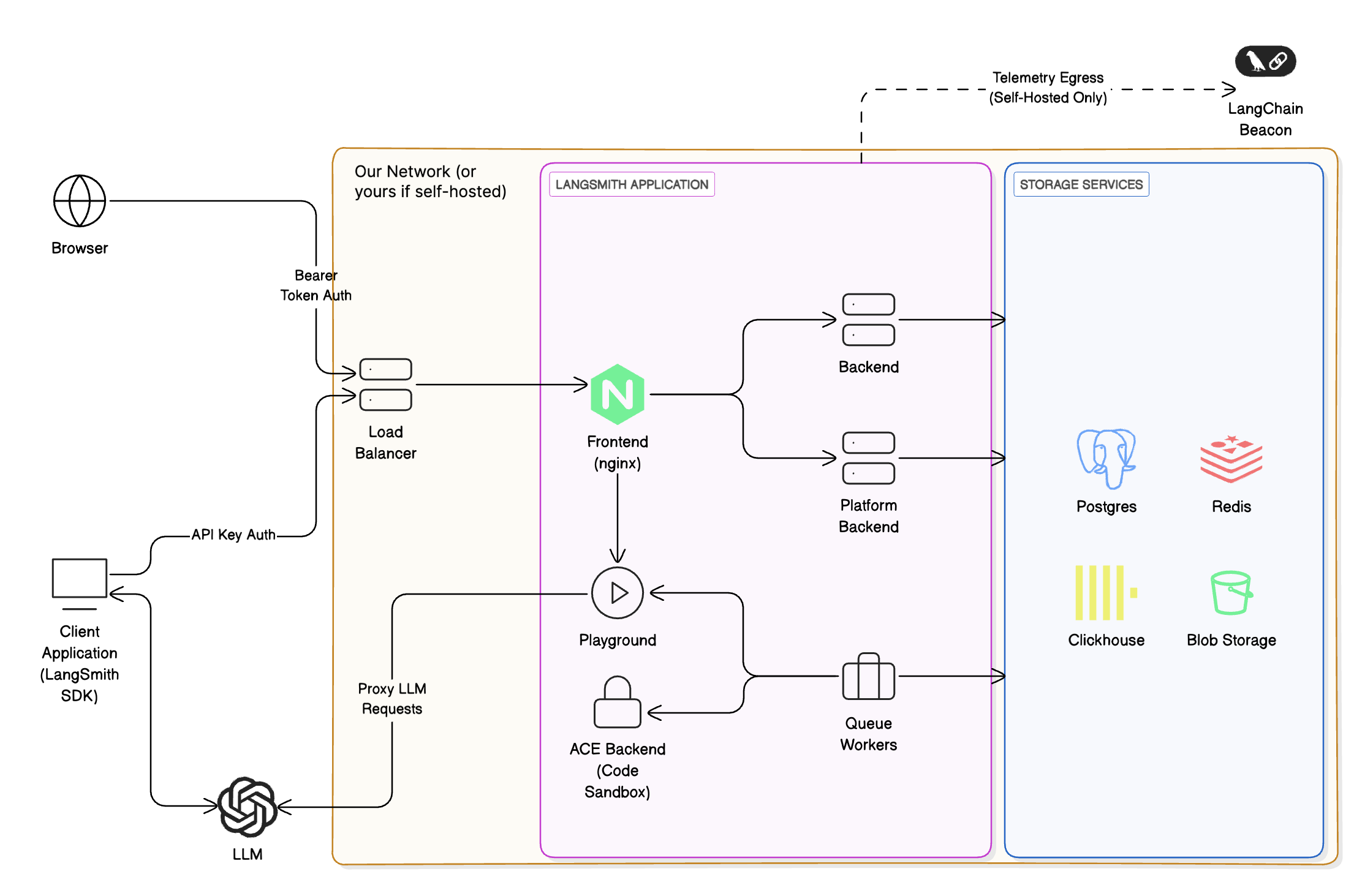
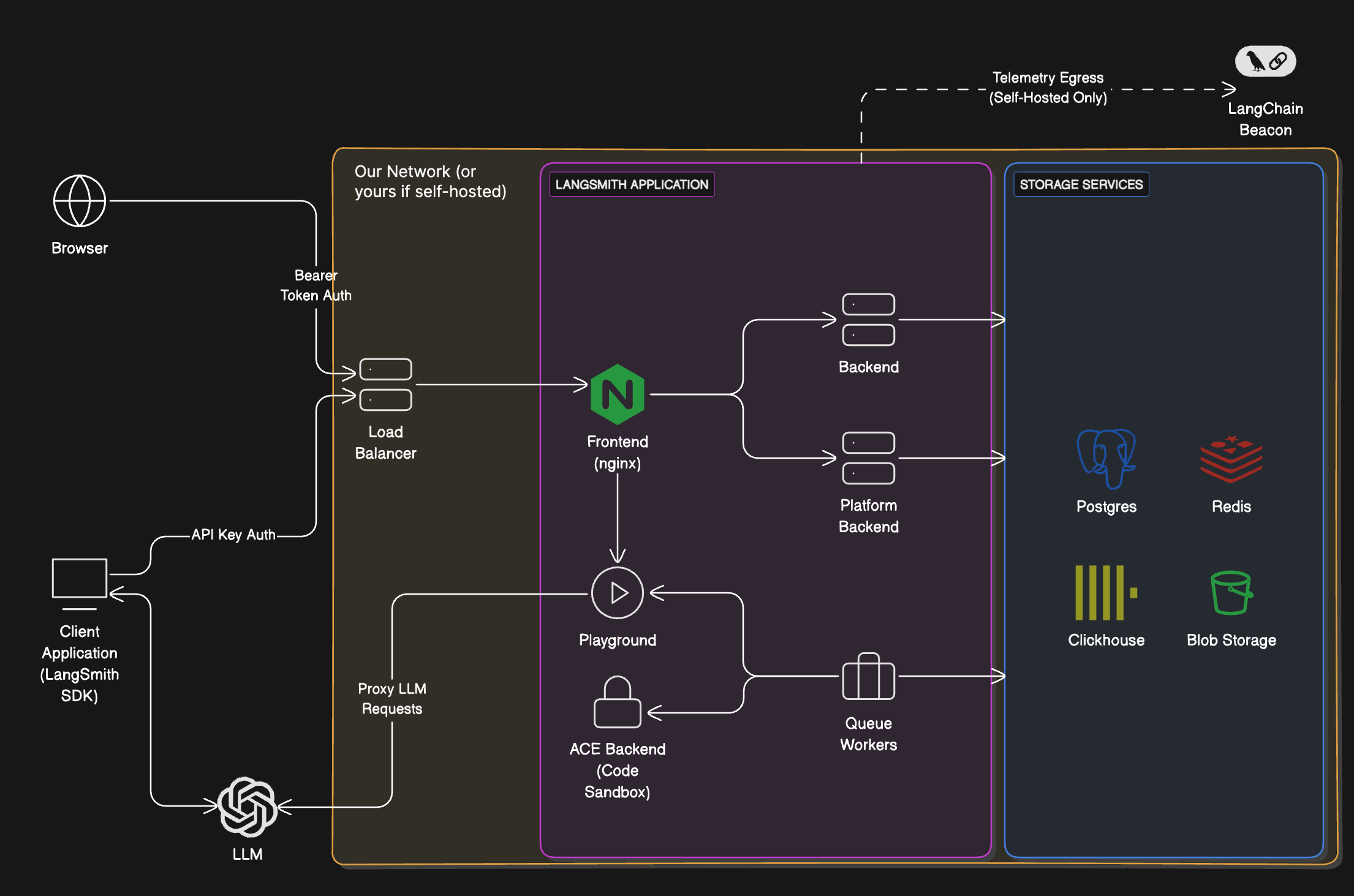 To access the LangSmith UI and send API requests, you will need to expose the [LangSmith frontend](#services) service. Depending on your installation method, this can be a load balancer or a port exposed on the host machine.
### Services
| Service | Description |
| -------------------------------------------------------------------------------------------------------------- | -------------------------------------------------------------------------------------------------------------------------------------------------------------------------------------------------------------------------------------------------------------------------------------------------------------------------------------------------------- |
| **LangSmith frontend** | The frontend uses Nginx to serve the LangSmith UI and route API requests to the other servers. This serves as the entrypoint for the application and is the only component that must be exposed to users. |
| **LangSmith backend** | The backend is the main entrypoint for CRUD API requests and handles the majority of the business logic for the application. This includes handling requests from the frontend and SDK, preparing traces for ingestion, and supporting the hub API. |
| **LangSmith queue** | The queue handles incoming traces and feedback to ensure that they are ingested and persisted into the traces and feedback datastore asynchronously, handling checks for data integrity and ensuring successful insert into the datastore, handling retries in situations such as database errors or the temporary inability to connect to the database. |
| **LangSmith platform backend** | The platform backend is another critical service that primarily handles authentication, run ingestion, and other high-volume tasks. |
| **LangSmith Playground** | The Playground is a service that handles forwarding requests to various LLM APIs to support the Playground feature. This can also be used to connect to your own custom model servers. |
| **LangSmith ACE (Arbitrary Code Execution) backend** | The ACE backend is a service that handles executing arbitrary code in a secure environment. This is used to support running custom code within LangSmith. |
### Storage services
LangSmith will bundle all storage services by default. You can configure it to use external versions of all storage services. In a production setting, we **strongly recommend using external storage services**.
| Service | Description |
| ---------------------------------------- | ----------------------------------------------------------------------------------------------------------------------------------------------------------------------------------------------------------------------------------------------------------------------------------------------------------------------------------------------------------------------------------------------------------------------------------------------------------------------------------------------------------------------------------------------------------------------------- |
| **ClickHouse** | [ClickHouse](https://clickhouse.com/docs/en/intro) is a high-performance, column-oriented SQL database management system (DBMS) for online analytical processing (OLAP).
To access the LangSmith UI and send API requests, you will need to expose the [LangSmith frontend](#services) service. Depending on your installation method, this can be a load balancer or a port exposed on the host machine.
### Services
| Service | Description |
| -------------------------------------------------------------------------------------------------------------- | -------------------------------------------------------------------------------------------------------------------------------------------------------------------------------------------------------------------------------------------------------------------------------------------------------------------------------------------------------- |
| **LangSmith frontend** | The frontend uses Nginx to serve the LangSmith UI and route API requests to the other servers. This serves as the entrypoint for the application and is the only component that must be exposed to users. |
| **LangSmith backend** | The backend is the main entrypoint for CRUD API requests and handles the majority of the business logic for the application. This includes handling requests from the frontend and SDK, preparing traces for ingestion, and supporting the hub API. |
| **LangSmith queue** | The queue handles incoming traces and feedback to ensure that they are ingested and persisted into the traces and feedback datastore asynchronously, handling checks for data integrity and ensuring successful insert into the datastore, handling retries in situations such as database errors or the temporary inability to connect to the database. |
| **LangSmith platform backend** | The platform backend is another critical service that primarily handles authentication, run ingestion, and other high-volume tasks. |
| **LangSmith Playground** | The Playground is a service that handles forwarding requests to various LLM APIs to support the Playground feature. This can also be used to connect to your own custom model servers. |
| **LangSmith ACE (Arbitrary Code Execution) backend** | The ACE backend is a service that handles executing arbitrary code in a secure environment. This is used to support running custom code within LangSmith. |
### Storage services
LangSmith will bundle all storage services by default. You can configure it to use external versions of all storage services. In a production setting, we **strongly recommend using external storage services**.
| Service | Description |
| ---------------------------------------- | ----------------------------------------------------------------------------------------------------------------------------------------------------------------------------------------------------------------------------------------------------------------------------------------------------------------------------------------------------------------------------------------------------------------------------------------------------------------------------------------------------------------------------------------------------------------------------- |
| **ClickHouse** | [ClickHouse](https://clickhouse.com/docs/en/intro) is a high-performance, column-oriented SQL database management system (DBMS) for online analytical processing (OLAP).
LangSmith uses ClickHouse as the primary data store for traces and feedback (high-volume data).
💡 [Connect to external ClickHouse](/langsmith/self-host-external-clickhouse) |
| **PostgreSQL** | [PostgreSQL](https://www.postgresql.org/about/) is a powerful, open source object-relational database system that uses and extends the SQL language combined with many features that safely store and scale the most complicated data workloads.
LangSmith uses PostgreSQL as the primary data store for transactional workloads and operational data (almost everything besides traces and feedback).
💡 [Connect to external PostgreSQL](/langsmith/self-host-external-postgres) - AWS RDS, GCP Cloud SQL, Azure Database |
| **Redis / Valkey** | [Redis](https://github.com/redis/redis) is a powerful in-memory key-value database that persists on disk. By holding data in memory, Redis offers high performance for operations like caching.
LangSmith uses Redis to back queuing and caching operations. [Valkey](https://valkey.io/) is also officially supported as a drop-in replacement for Redis.
💡 [Connect to external Redis or Valkey](/langsmith/self-host-external-redis) - AWS ElastiCache, GCP Memorystore, Azure Cache |
| **Blob storage** | LangSmith supports several blob storage providers, including [AWS S3](https://aws.amazon.com/s3/), [Azure Blob Storage](https://azure.microsoft.com/en-us/services/storage/blobs/), and [Google Cloud Storage](https://cloud.google.com/storage).
LangSmith uses blob storage to store large files, such as trace artifacts, feedback attachments, and other large data objects. Blob storage is optional, but highly recommended for production deployments.
💡 [Enable blob storage](/langsmith/self-host-blob-storage) - AWS S3, GCP GCS, Azure Blob |
To install, follow the [Kubernetes setup guide](/langsmith/kubernetes).
## Enable LangSmith Deployment
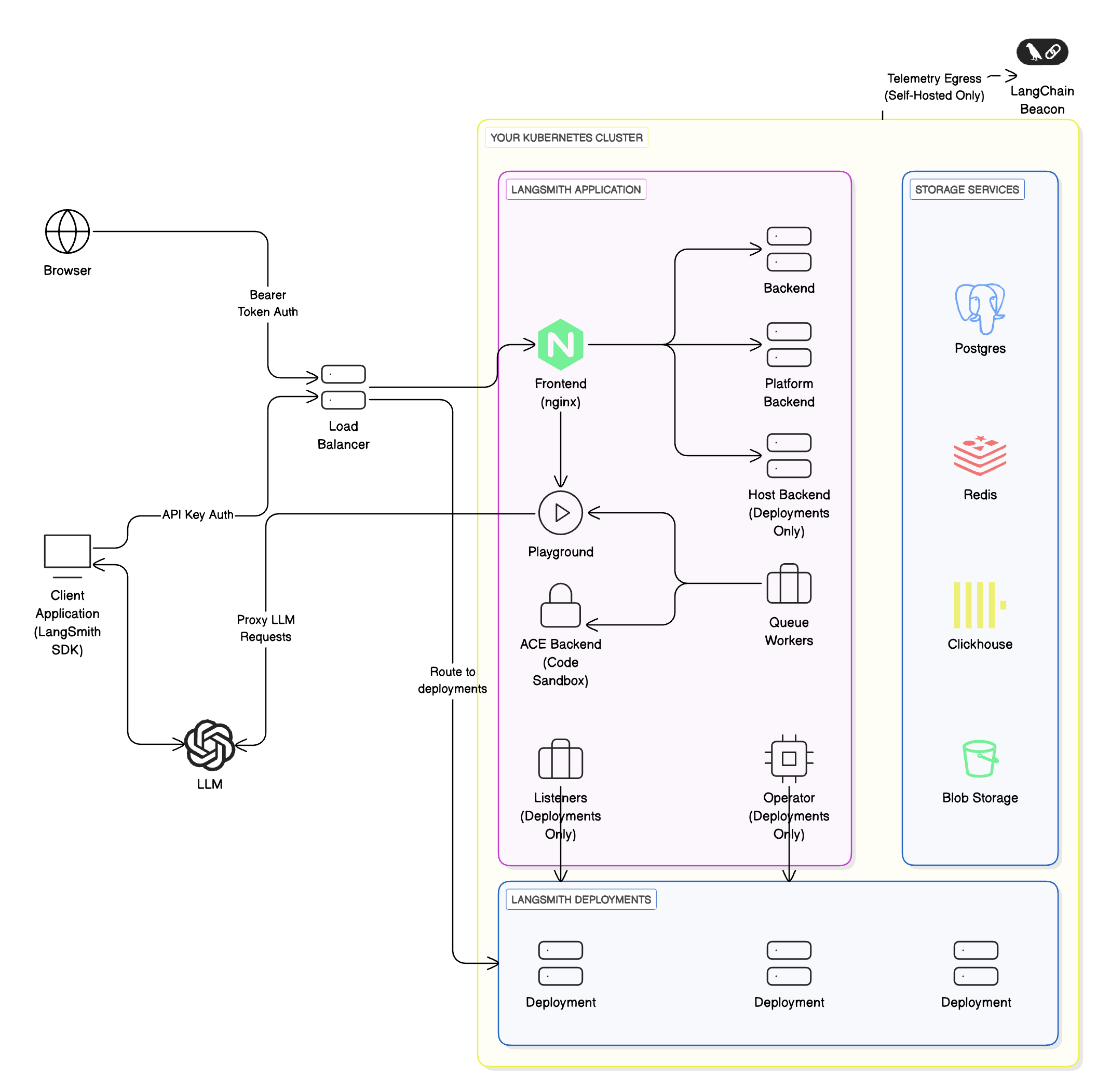
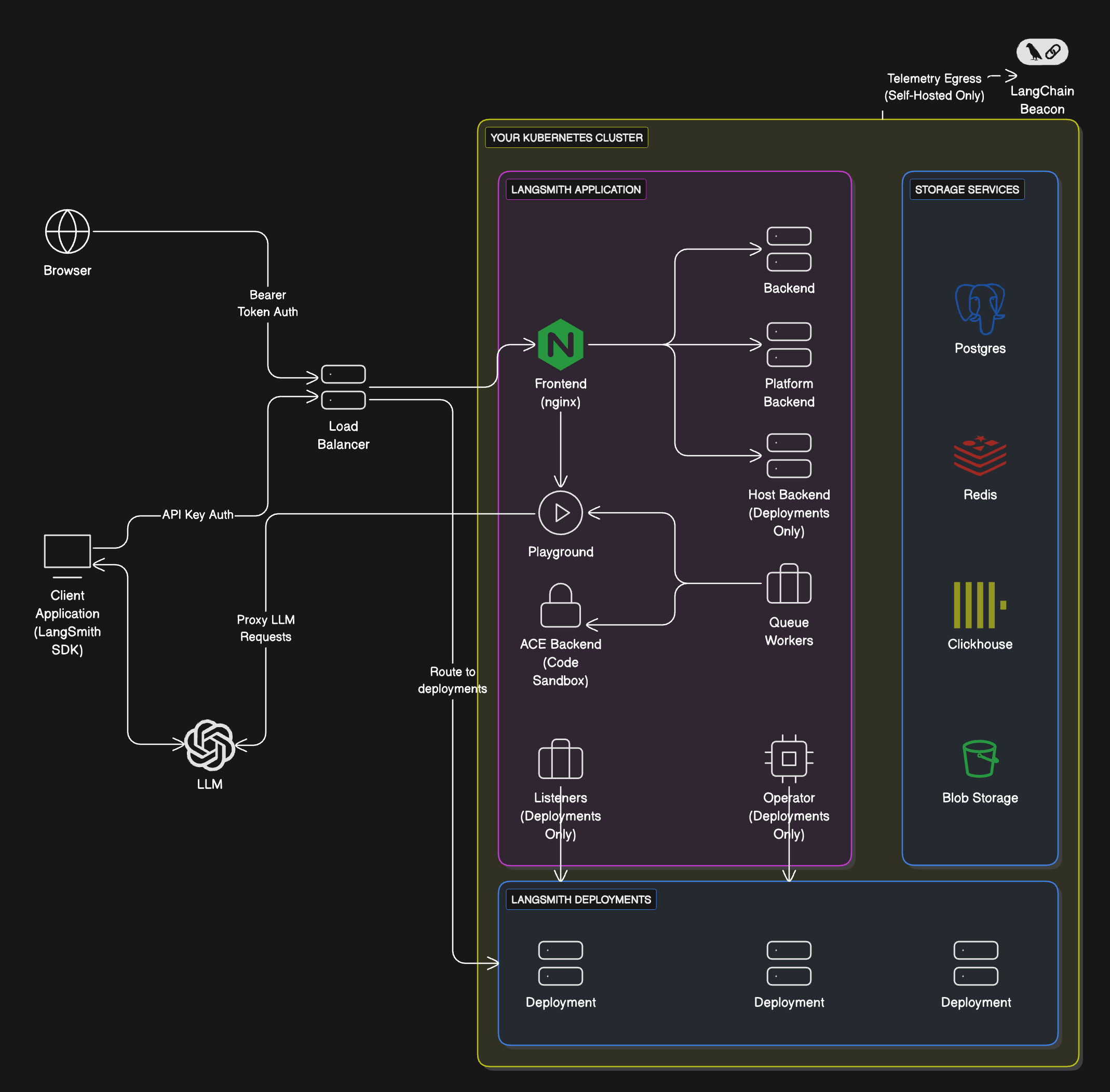
**LangSmith Deployment** is an optional add-on that can be enabled on your [LangSmith](#langsmith) instance. It's ideal for enterprise teams who want a centralized, UI-driven platform to deploy and manage multiple agents and graphs, with all infrastructure, data, and orchestration fully under their control.
This includes everything from [LangSmith](#langsmith), plus:
| Component | Responsibilities | Where it runs | Who manages it |
| -------------------------------------------------------------------------------------------------------- | --------------------------------------------------------------------------------------------------------------------------------------------------- | ------------- | -------------- |
| Control plane | - UI for creating deployments & revisions
- APIs for deployment management
| Your cloud | You |
| Data plane | - Operator/listener to reconcile deployments
- Agent Servers (agents/graphs)
- Backing services (Postgres, Redis, etc.)
| Your cloud | You |
You run both the control plane and the data plane entirely within your own infrastructure. You are responsible for provisioning and managing all components.
Learn more about the [control plane](/langsmith/control-plane) and [data plane](/langsmith/data-plane) architecture concepts.
 ### Workflow
If you want to self-host LangSmith for observability, evaluation, and agent deployment, follow these steps:
You must already have a [self-hosted LangSmith instance](#langsmith) installed in your cloud with a Kubernetes cluster (required for control plane and data plane).
Use `langgraph-cli` or [Studio](/langsmith/studio) to test your graph locally.
Follow the [setup guide](/langsmith/deploy-self-hosted-full-platform) to enable LangSmith Deployment on your LangSmith instance.
## Standalone Server
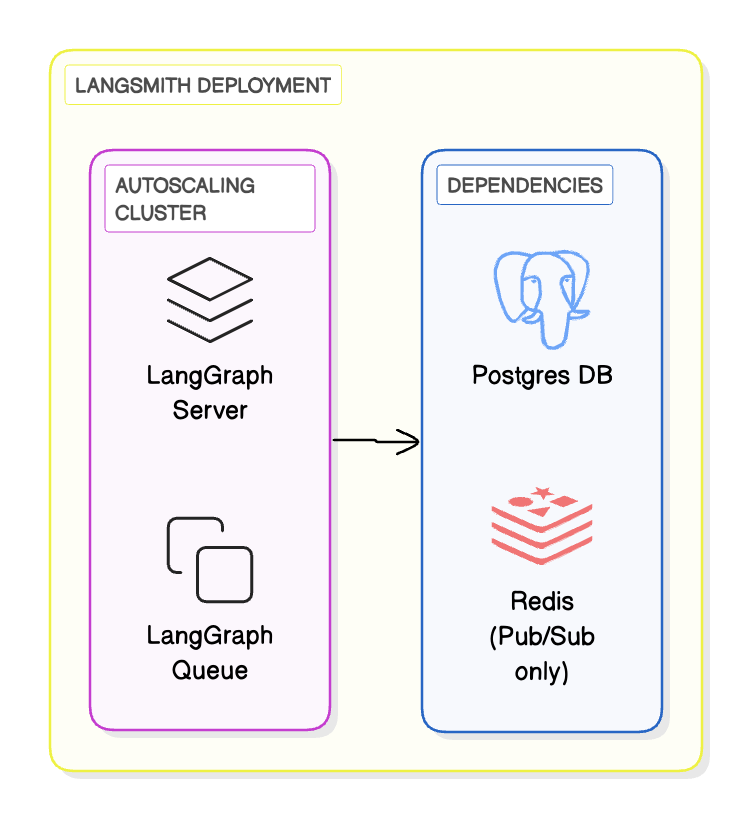
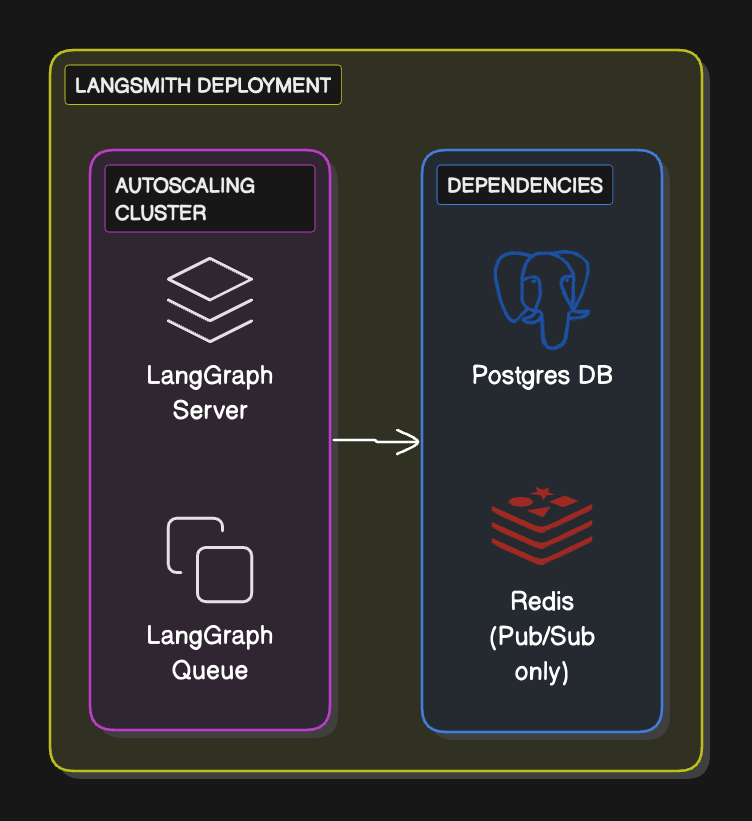
The **Standalone server** option is the most lightweight and flexible way to run LangSmith. Unlike the other models, you only manage a simplified data plane made up of Agent Servers and their required backing services (PostgreSQL, Redis, etc.).
This includes:
| Component | Responsibilities | Where it runs | Who manages it |
| ----------------- | ------------------------------------------------------------- | ------------- | -------------- |
| **Control plane** | n/a | n/a | n/a |
| **Data plane** |
### Workflow
If you want to self-host LangSmith for observability, evaluation, and agent deployment, follow these steps:
You must already have a [self-hosted LangSmith instance](#langsmith) installed in your cloud with a Kubernetes cluster (required for control plane and data plane).
Use `langgraph-cli` or [Studio](/langsmith/studio) to test your graph locally.
Follow the [setup guide](/langsmith/deploy-self-hosted-full-platform) to enable LangSmith Deployment on your LangSmith instance.
## Standalone Server
The **Standalone server** option is the most lightweight and flexible way to run LangSmith. Unlike the other models, you only manage a simplified data plane made up of Agent Servers and their required backing services (PostgreSQL, Redis, etc.).
This includes:
| Component | Responsibilities | Where it runs | Who manages it |
| ----------------- | ------------------------------------------------------------- | ------------- | -------------- |
| **Control plane** | n/a | n/a | n/a |
| **Data plane** | - Agent Servers
- Postgres, Redis, etc.
| Your cloud | You |
This option gives you full control over scaling, deployment, and CI/CD pipelines, while still allowing optional integration with LangSmith for tracing and evaluation.
Do not run standalone servers in serverless environments. Scale-to-zero may cause task loss and scaling up will not work reliably.
 ### Workflow
1. Define and test your graph locally using the `langgraph-cli` or [Studio](/langsmith/studio)
2. Package your agent as a Docker image
3. Deploy the Agent Server to your compute platform of choice (Kubernetes, Docker, VM)
4. Optionally, configure LangSmith API keys and endpoints so the server reports traces and evaluations back to LangSmith (self-hosted or SaaS)
### Supported compute platforms
* **Kubernetes**: Use the LangSmith Helm chart to run Agent Servers in a Kubernetes cluster. This is the recommended option for production-grade deployments.
* **Docker**: Run in any Docker-supported compute platform (local dev machine, VM, ECS, etc.). This is best suited for development or small-scale workloads.
### Setup guide
To set up an [Agent Server](/langsmith/agent-server), refer to the [how-to guide](/langsmith/deploy-standalone-server) in the application deployment section.
***
### Workflow
1. Define and test your graph locally using the `langgraph-cli` or [Studio](/langsmith/studio)
2. Package your agent as a Docker image
3. Deploy the Agent Server to your compute platform of choice (Kubernetes, Docker, VM)
4. Optionally, configure LangSmith API keys and endpoints so the server reports traces and evaluations back to LangSmith (self-hosted or SaaS)
### Supported compute platforms
* **Kubernetes**: Use the LangSmith Helm chart to run Agent Servers in a Kubernetes cluster. This is the recommended option for production-grade deployments.
* **Docker**: Run in any Docker-supported compute platform (local dev machine, VM, ECS, etc.). This is best suited for development or small-scale workloads.
### Setup guide
To set up an [Agent Server](/langsmith/agent-server), refer to the [how-to guide](/langsmith/deploy-standalone-server) in the application deployment section.
***
[Connect these docs](/use-these-docs) to Claude, VSCode, and more via MCP for real-time answers.
[Edit this page on GitHub](https://github.com/langchain-ai/docs/edit/main/src/langsmith/self-hosted.mdx) or [file an issue](https://github.com/langchain-ai/docs/issues/new/choose).