> ## Documentation Index
> Fetch the complete documentation index at: https://docs.langchain.com/llms.txt
> Use this file to discover all available pages before exploring further.
# Evaluation quickstart
[*Evaluations*](/langsmith/evaluation-concepts) are a quantitative way to measure the performance of LLM applications. LLMs can behave unpredictably, even small changes to prompts, models, or inputs can significantly affect results. Evaluations provide a structured way to identify failures, compare versions, and build more reliable AI applications.
Running an evaluation in LangSmith requires three key components:
* [*Dataset*](/langsmith/evaluation-concepts#datasets): A set of test inputs (and optionally, expected outputs).
* [*Target function*](/langsmith/define-target-function): The part of your application you want to test—this might be a single LLM call with a new prompt, one module, or your entire workflow.
* [*Evaluators*](/langsmith/evaluation-concepts#evaluators): Functions that score your target function’s outputs.
This quickstart guides you through running a starter evaluation that checks the correctness of LLM responses, using either the LangSmith SDK or UI.
## Prerequisites
Before you begin, make sure you have:
* **A LangSmith account**: Sign up or log in at [smith.langchain.com](https://smith.langchain.com?utm_source=docs\&utm_medium=cta\&utm_campaign=langsmith-signup\&utm_content=langsmith-evaluation-quickstart).
* **A LangSmith API key**: Follow the [Create an API key](/langsmith/create-account-api-key) guide.
* **An OpenAI API key**: Generate this from the [OpenAI dashboard](https://platform.openai.com/account/api-keys).
**Select the UI or SDK filter for instructions:**
## 1. Set workspace secrets
In the [LangSmith UI](https://smith.langchain.com?utm_source=docs\&utm_medium=cta\&utm_campaign=langsmith-signup\&utm_content=snippets-langsmith-set-workspace-secrets), ensure that your API key is set as a [workspace secret](/langsmith/set-up-hierarchy#configure-workspace-settings).
1. Navigate to **Settings** and then move to the **Secrets** tab.
2. Select **Add secret** and enter the key environment variable (e.g.,`OPENAI_API_KEY` or `ANTHROPIC_API_KEY`) and your API key as the **Value**.
3. Select **Save secret**.
When adding workspace secrets in the LangSmith UI, make sure the secret keys match the environment variable names expected by your model provider.
## 2. Create a prompt
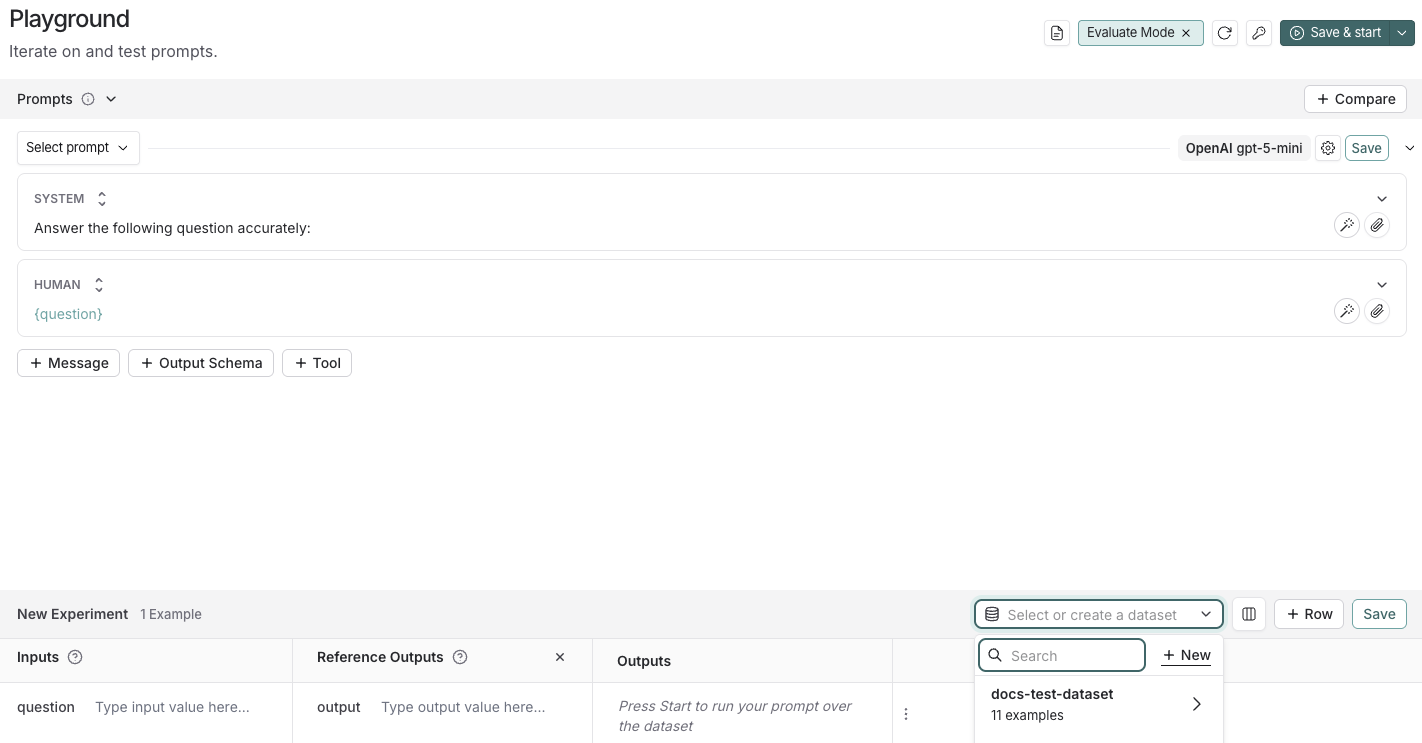
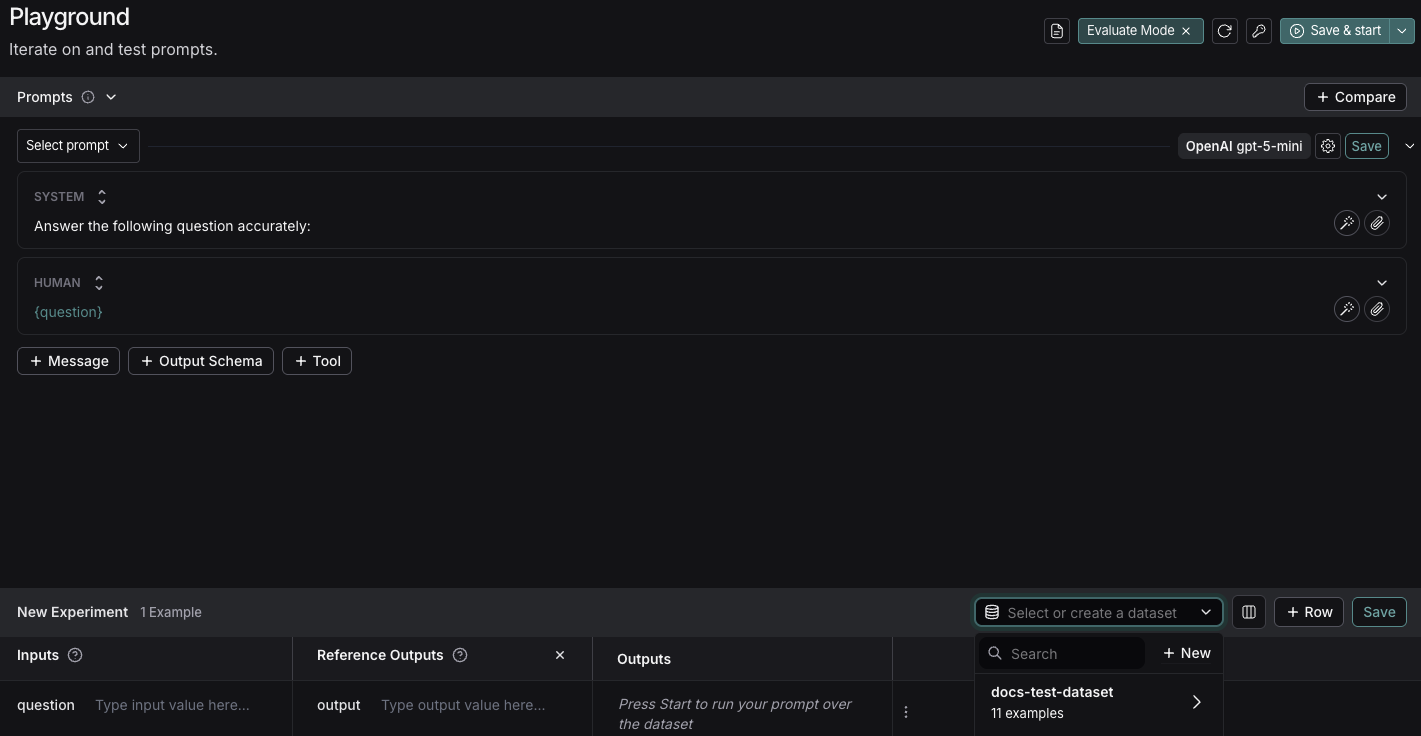
The [Playground](/langsmith/prompt-engineering-concepts#playground) makes it possible to run evaluations over different prompts, new models, or test different model configurations.
1. In the [LangSmith UI](https://smith.langchain.com?utm_source=docs\&utm_medium=cta\&utm_campaign=langsmith-signup\&utm_content=langsmith-evaluation-quickstart), click **Playground** in the sidebar.
2. Under the **Prompts** panel, modify the **system** prompt to:
```
Answer the following question accurately:
```
Leave the **Human** message as is: `{question}`.
## 3. Create a dataset
1. Click **Set up Evaluation**, which will open a **New Experiment** table at the bottom of the page.
2. In the **Select or create a new dataset** dropdown, click the **+ New** button to create a new dataset.
3. Add the following examples to the dataset:
| Inputs | Reference Outputs |
| -------------------------------------------------------- | ------------------------------------------------- |
| question: Which country is Mount Kilimanjaro located in? | output: Mount Kilimanjaro is located in Tanzania. |
| question: What is Earth's lowest point? | output: Earth's lowest point is The Dead Sea. |
4. Click **Save** and enter a name to save your newly created dataset.
## 4. Add an evaluator
1. Click **+ Evaluator** and select **Correctness** from the **Prebuilt Evaluator** options.
2. In the **Correctness** panel, click **Save**.
## 5. Run your evaluation
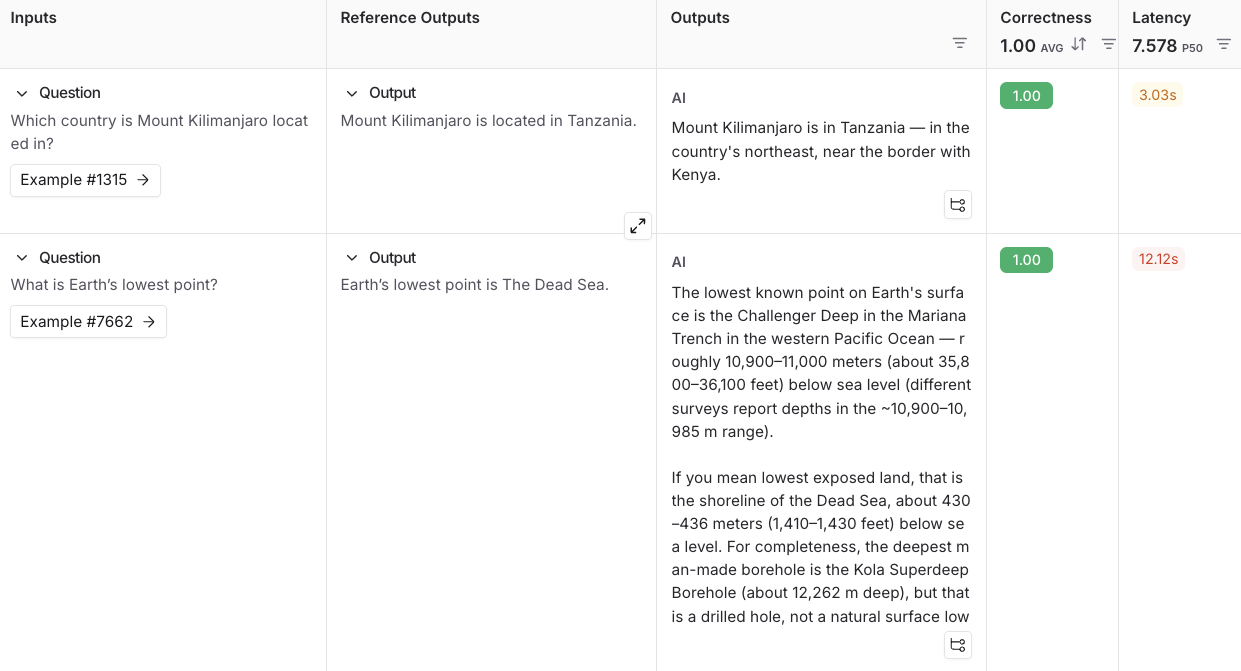
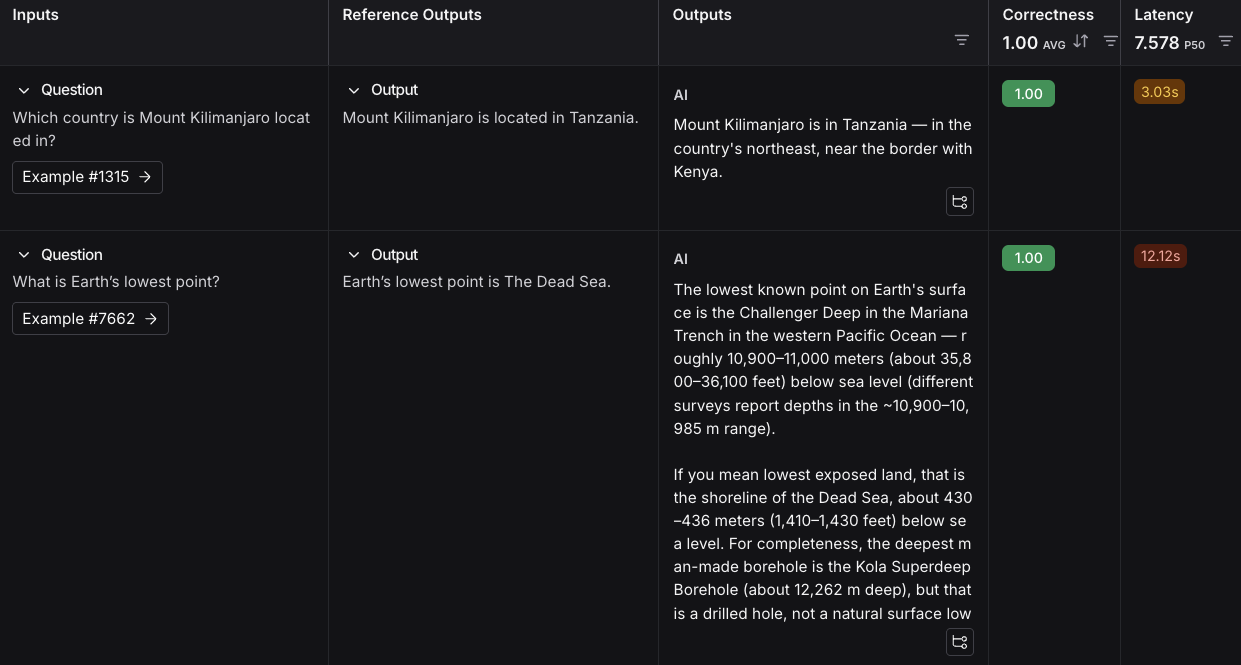
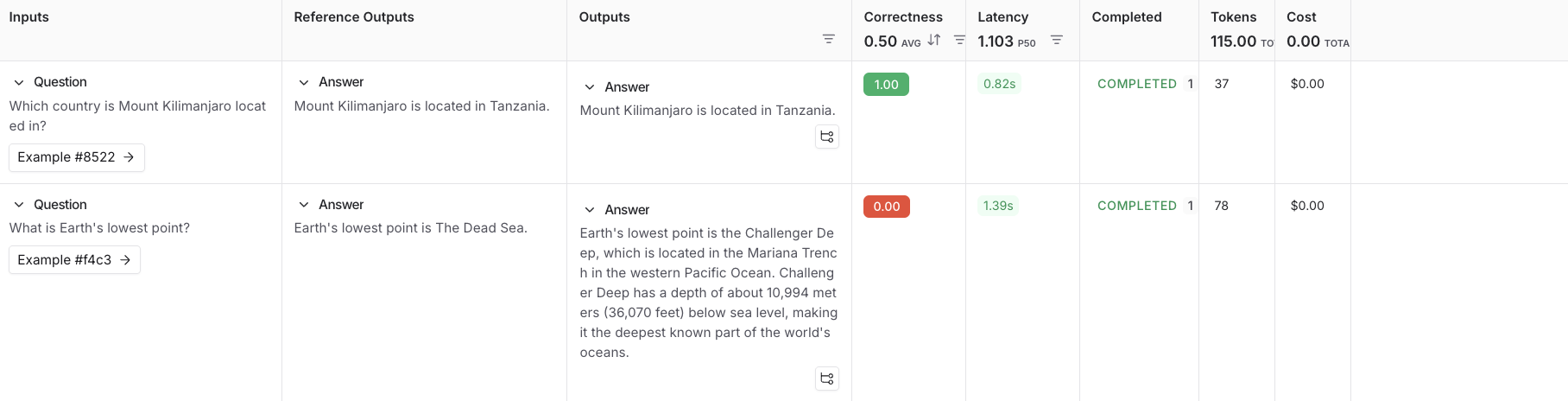
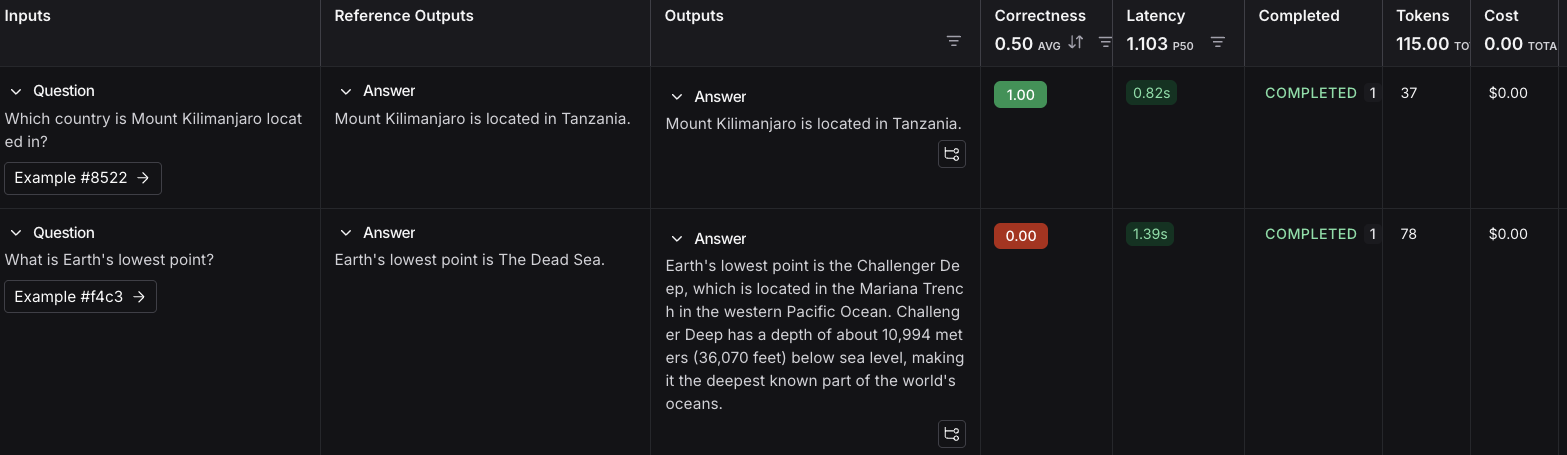
1. Select **Start** on the top right to run your evaluation. This will create an [*experiment*](/langsmith/evaluation-concepts#experiment) with a preview in the **New Experiment** table. You can view in full by clicking the experiment name.
## Next steps
To learn more about running experiments in LangSmith, read the [evaluation conceptual guide](/langsmith/evaluation-concepts).
* For more details on evaluations, refer to the [Evaluation documentation](/langsmith/evaluation).
* Learn how to [create and manage datasets in the UI](/langsmith/manage-datasets-in-application#create-a-dataset-and-add-examples).
* Learn how to [run an evaluation from the Playground](/langsmith/run-evaluation-from-playground).
This guide uses prebuilt LLM-as-judge evaluators from the open-source [`openevals`](https://github.com/langchain-ai/openevals) package. OpenEvals includes a set of commonly used evaluators and is a great starting point if you're new to evaluations. If you want greater flexibility in how you evaluate your apps, you can also [define completely custom evaluators](/langsmith/code-evaluator-ui).
## 1. Install dependencies
In your terminal, create a directory for your project and install the dependencies in your environment:
```bash Python theme={"theme":{"light":"catppuccin-latte","dark":"catppuccin-mocha"}}
mkdir ls-evaluation-quickstart && cd ls-evaluation-quickstart
python -m venv .venv && source .venv/bin/activate
python -m pip install --upgrade pip
pip install -U langsmith openevals openai
```
```bash TypeScript theme={"theme":{"light":"catppuccin-latte","dark":"catppuccin-mocha"}}
mkdir ls-evaluation-quickstart-ts && cd ls-evaluation-quickstart-ts
npm init -y
npm install langsmith openevals openai
npx tsc --init
```
If you are using `yarn` as your package manager, you will also need to manually install `@langchain/core` as a peer dependency of `openevals`. This is not required for LangSmith evals in general, you may define evaluators [using arbitrary custom code](/langsmith/code-evaluator-ui).
## 2. Set up environment variables
Set the following environment variables:
* `LANGSMITH_TRACING`
* `LANGSMITH_API_KEY`
* `OPENAI_API_KEY` (or your LLM provider's API key)
* (optional) `LANGSMITH_WORKSPACE_ID`: If your LangSmith API key is linked to multiple [workspaces](/langsmith/administration-overview#workspaces), set this variable to specify which workspace to use.
```bash theme={"theme":{"light":"catppuccin-latte","dark":"catppuccin-mocha"}}
export LANGSMITH_TRACING=true
export LANGSMITH_API_KEY=""
export OPENAI_API_KEY=""
export LANGSMITH_WORKSPACE_ID=""
```
If you're using Anthropic, use the [Anthropic wrapper](/langsmith/trace-anthropic) to trace your calls. For other providers, use [the traceable wrapper](/langsmith/annotate-code#use-%40traceable-%2F-traceable).
## 3. Create a dataset
1. Create a file and add the following code, which will:
* Import the `Client` to connect to LangSmith.
* Create a dataset.
* Define example [*inputs* and *outputs*](/langsmith/evaluation-concepts#examples).
* Associate the input and output pairs with that dataset in LangSmith so they can be used in evaluations.
```python Python theme={"theme":{"light":"catppuccin-latte","dark":"catppuccin-mocha"}}
# dataset.py
from langsmith import Client
def main():
client = Client()
# Programmatically create a dataset in LangSmith
dataset = client.create_dataset(
dataset_name="Sample dataset",
description="A sample dataset in LangSmith."
)
# Create examples
examples = [
{
"inputs": {"question": "Which country is Mount Kilimanjaro located in?"},
"outputs": {"answer": "Mount Kilimanjaro is located in Tanzania."},
},
{
"inputs": {"question": "What is Earth's lowest point?"},
"outputs": {"answer": "Earth's lowest point is The Dead Sea."},
},
]
# Add examples to the dataset
client.create_examples(dataset_id=dataset.id, examples=examples)
print("Created dataset:", dataset.name)
if __name__ == "__main__":
main()
```
```typescript TypeScript theme={"theme":{"light":"catppuccin-latte","dark":"catppuccin-mocha"}}
// dataset.ts
import { Client } from "langsmith";
async function main() {
const client = new Client();
const dataset = await client.createDataset(
"Sample dataset",
{ description: "A sample dataset in LangSmith." }
);
// Define examples
const inputs = [
{ question: "Which country is Mount Kilimanjaro located in?" },
{ question: "What is Earth's lowest point?" },
];
const outputs = [
{ answer: "Mount Kilimanjaro is located in Tanzania." },
{ answer: "Earth's lowest point is The Dead Sea." },
];
await client.createExamples({
datasetId: dataset.id,
inputs,
outputs,
});
console.log("Created dataset:", dataset.name);
}
if (require.main === module) {
main().catch((e) => {
console.error(e);
process.exit(1);
});
}
```
2. In your terminal, run the `dataset` file to create the datasets you'll use to evaluate your app:
```bash Python theme={"theme":{"light":"catppuccin-latte","dark":"catppuccin-mocha"}}
python dataset.py
```
```bash TypeScript theme={"theme":{"light":"catppuccin-latte","dark":"catppuccin-mocha"}}
npx ts-node dataset.ts
```
You'll see the following output:
```bash theme={"theme":{"light":"catppuccin-latte","dark":"catppuccin-mocha"}}
Created dataset: Sample dataset
```
## 4. Create your target function
Define a [target function](/langsmith/define-target-function) that contains what you're evaluating. In this guide, you'll define a target function that contains a single LLM call to answer a question.
Add the following to an `eval` file:
```python Python theme={"theme":{"light":"catppuccin-latte","dark":"catppuccin-mocha"}}
# eval.py
from langsmith import Client, wrappers
from openai import OpenAI
# Wrap the OpenAI client for LangSmith tracing
openai_client = wrappers.wrap_openai(OpenAI())
# Define the application logic you want to evaluate inside a target function
# The SDK will automatically send the inputs from the dataset to your target function
def target(inputs: dict) -> dict:
response = openai_client.chat.completions.create(
model="gpt-5-mini",
messages=[
{"role": "system", "content": "Answer the following question accurately"},
{"role": "user", "content": inputs["question"]},
],
)
return {"answer": response.choices[0].message.content.strip()}
```
```typescript TypeScript theme={"theme":{"light":"catppuccin-latte","dark":"catppuccin-mocha"}}
// eval.ts
import { evaluate } from "langsmith/evaluation";
import { wrapOpenAI } from "langsmith/wrappers/openai";
import OpenAI from "openai";
const openaiClient = wrapOpenAI(new OpenAI());
async function target(inputs: Record): Promise> {
const question = String(inputs.question ?? "");
const resp = await openaiClient.chat.completions.create({
model: "gpt-5-mini",
messages: [
{ role: "system", content: "Answer the following question accurately" },
{ role: "user", content: question },
],
});
return { answer: resp.choices[0].message.content?.trim() ?? "" };
}
```
## 5. Define an evaluator
In this step, you’re telling LangSmith how to grade the answers your app produces.
Import a prebuilt evaluation prompt (`CORRECTNESS_PROMPT`) from [`openevals`](https://github.com/langchain-ai/openevals) and a helper that wraps it into an [*LLM-as-judge evaluator*](/langsmith/evaluation-concepts#llm-as-judge), which will score the application's output.
`CORRECTNESS_PROMPT` is just an f-string with variables for `"inputs"`, `"outputs"`, and `"reference_outputs"`. See [customizing OpenEvals prompts](https://github.com/langchain-ai/openevals#customizing-prompts) for more information.
The evaluator compares:
* `inputs`: what was passed into your target function (e.g., the question text).
* `outputs`: what your target function returned (e.g., the model’s answer).
* `reference_outputs`: the ground truth answers you attached to each dataset example in [Step 3](#3-create-a-dataset).
Add the following highlighted code to your `eval` file:
```python Python highlight={3,4,21-31} theme={"theme":{"light":"catppuccin-latte","dark":"catppuccin-mocha"}}
from langsmith import Client, wrappers
from openai import OpenAI
from openevals.llm import create_llm_as_judge
from openevals.prompts import CORRECTNESS_PROMPT
# Wrap the OpenAI client for LangSmith tracing
openai_client = wrappers.wrap_openai(OpenAI())
# Define the application logic you want to evaluate inside a target function
# The SDK will automatically send the inputs from the dataset to your target function
def target(inputs: dict) -> dict:
response = openai_client.chat.completions.create(
model="gpt-5-mini",
messages=[
{"role": "system", "content": "Answer the following question accurately"},
{"role": "user", "content": inputs["question"]},
],
)
return {"answer": response.choices[0].message.content.strip()}
def correctness_evaluator(inputs: dict, outputs: dict, reference_outputs: dict):
evaluator = create_llm_as_judge(
prompt=CORRECTNESS_PROMPT,
model="openai:o3-mini",
feedback_key="correctness",
)
return evaluator(
inputs=inputs,
outputs=outputs,
reference_outputs=reference_outputs
)
```
```typescript TypeScript highlight={4,20-37} theme={"theme":{"light":"catppuccin-latte","dark":"catppuccin-mocha"}}
import { evaluate } from "langsmith/evaluation";
import { wrapOpenAI } from "langsmith/wrappers/openai";
import OpenAI from "openai";
import { createLLMAsJudge, CORRECTNESS_PROMPT } from "openevals";
const openaiClient = wrapOpenAI(new OpenAI());
async function target(inputs: Record): Promise> {
const question = String(inputs.question ?? "");
const resp = await openaiClient.chat.completions.create({
model: "gpt-5-mini",
messages: [
{ role: "system", content: "Answer the following question accurately" },
{ role: "user", content: question },
],
});
return { answer: resp.choices[0].message.content?.trim() ?? "" };
}
const judge = createLLMAsJudge({
prompt: CORRECTNESS_PROMPT,
model: "openai:o3-mini",
feedbackKey: "correctness",
});
async function correctnessEvaluator(run: {
inputs: Record;
outputs: Record;
referenceOutputs?: Record;
}) {
return judge({
inputs: run.inputs,
outputs: run.outputs,
// OpenEvals expects snake_case here:
reference_outputs: run.referenceOutputs,
});
}
```
## 6. Run and view results
To run the evaluation experiment, you'll call `evaluate(...)`, which:
* Pulls example from the dataset you created in [Step 3](#3-create-a-dataset).
* Sends each example's inputs to your target function from [Step 4](#4-add-an-evaluator).
* Collects the outputs (the model's answers).
* Passes the outputs along with the `reference_outputs` to your evaluator from [Step 5](#5-define-an-evaluator).
* Records all results in LangSmith as an experiment, so you can view them in the UI.
1. Add the highlighted code to your `eval` file:
```python Python highlight={33-49} theme={"theme":{"light":"catppuccin-latte","dark":"catppuccin-mocha"}}
from langsmith import Client, wrappers
from openai import OpenAI
from openevals.llm import create_llm_as_judge
from openevals.prompts import CORRECTNESS_PROMPT
# Wrap the OpenAI client for LangSmith tracing
openai_client = wrappers.wrap_openai(OpenAI())
# Define the application logic you want to evaluate inside a target function
# The SDK will automatically send the inputs from the dataset to your target function
def target(inputs: dict) -> dict:
response = openai_client.chat.completions.create(
model="gpt-5-mini",
messages=[
{"role": "system", "content": "Answer the following question accurately"},
{"role": "user", "content": inputs["question"]},
],
)
return {"answer": response.choices[0].message.content.strip()}
def correctness_evaluator(inputs: dict, outputs: dict, reference_outputs: dict):
evaluator = create_llm_as_judge(
prompt=CORRECTNESS_PROMPT,
model="openai:o3-mini",
feedback_key="correctness",
)
return evaluator(
inputs=inputs,
outputs=outputs,
reference_outputs=reference_outputs
)
# After running the evaluation, a link will be provided to view the results in langsmith
def main():
client = Client()
experiment_results = client.evaluate(
target,
data="Sample dataset",
evaluators=[
correctness_evaluator,
# can add multiple evaluators here
],
experiment_prefix="first-eval-in-langsmith",
max_concurrency=2,
)
print(experiment_results)
if __name__ == "__main__":
main()
```
```typescript TypeScript highlight={39-57} theme={"theme":{"light":"catppuccin-latte","dark":"catppuccin-mocha"}}
import { evaluate } from "langsmith/evaluation";
import { wrapOpenAI } from "langsmith/wrappers/openai"; // helper to wrap OpenAI client
import OpenAI from "openai"; // model provider
import { createLLMAsJudge, CORRECTNESS_PROMPT } from "openevals"; // evaluator tools
const openaiClient = wrapOpenAI(new OpenAI());
async function target(inputs: Record): Promise> {
const question = String(inputs.question ?? "");
const resp = await openaiClient.chat.completions.create({
model: "gpt-5-mini",
messages: [
{ role: "system", content: "Answer the following question accurately" },
{ role: "user", content: question },
],
});
return { answer: resp.choices[0].message.content?.trim() ?? "" };
}
const judge = createLLMAsJudge({
prompt: CORRECTNESS_PROMPT,
model: "openai:o3-mini",
feedbackKey: "correctness",
});
async function correctnessEvaluator(run: {
inputs: Record;
outputs: Record;
referenceOutputs?: Record;
}) {
return judge({
inputs: run.inputs,
outputs: run.outputs,
// OpenEvals expects snake_case here:
reference_outputs: run.referenceOutputs,
});
}
async function main() {
const datasetName = process.env.DATASET_NAME ?? "Sample dataset";
const results = await evaluate(target, {
data: datasetName,
evaluators: [correctnessEvaluator],
experimentPrefix: "first-eval-in-langsmith",
maxConcurrency: 2,
});
console.log(results);
}
if (require.main === module) {
main().catch((e) => {
console.error(e);
process.exit(1);
});
}
```
2. Run your evaluator:
```bash Python theme={"theme":{"light":"catppuccin-latte","dark":"catppuccin-mocha"}}
python eval.py
```
```bash TypeScript theme={"theme":{"light":"catppuccin-latte","dark":"catppuccin-mocha"}}
npx ts-node eval.ts
```
3. You'll receive a link to view the evaluation results and metadata for the experiment results:
```
View the evaluation results for experiment: 'first-eval-in-langsmith-00000000' at: https://smith.langchain.com/o/6551f9c4-2685-4a08-86b9-1b29643deb3d/datasets/e5fde557-c274-4e49-b39d-000000000000/compare?selectedSessions=70b11778-6a28-4cdb-be81-000000000000
```
4. Follow the link in the output of your evaluation run to access the **Datasets & Experiments** page in the [LangSmith UI](https://smith.langchain.com?utm_source=docs\&utm_medium=cta\&utm_campaign=langsmith-signup\&utm_content=langsmith-evaluation-quickstart), and explore the results of the experiment. This will direct you to the created experiment with a table showing the **Inputs**, **Reference Output**, and **Outputs**. You can select a dataset to open an expanded view of the results.
## Next steps
Here are some topics you might want to explore next:
* [Evaluation concepts](/langsmith/evaluation-concepts) provides descriptions of the key terminology for evaluations in LangSmith.
* [OpenEvals README](https://github.com/langchain-ai/openevals) to see all available prebuilt evaluators and how to customize them.
* [Define custom evaluators](/langsmith/code-evaluator-ui).
* [Python](https://docs.smith.langchain.com/reference/python/reference) or [TypeScript](https://docs.smith.langchain.com/reference/js) SDK references for comprehensive descriptions of every class and function.
***
[Connect these docs](/use-these-docs) to Claude, VSCode, and more via MCP for real-time answers.
[Edit this page on GitHub](https://github.com/langchain-ai/docs/edit/main/src/langsmith/evaluation-quickstart.mdx) or [file an issue](https://github.com/langchain-ai/docs/issues/new/choose).