> ## Documentation Index
> Fetch the complete documentation index at: https://docs.langchain.com/llms.txt
> Use this file to discover all available pages before exploring further.

# Use Fleet agents in code

> Invoke Fleet agents via the LangGraph SDK or REST API, or download and run them locally with the fleet-deepagents-export package.

There are two main ways to use Fleet agents programmatically:

* **[Call from code](#call-from-code)**: Invoke your agent remotely via the LangGraph SDK or REST API, without downloading anything.
* **[Export to code](#export-to-code)**: Download your agent's configuration and run it locally as a self-contained Python project using the `fleet-deepagents-export` package.

## Call from code

You can invoke LangSmith Fleet agents from your applications using the [LangGraph SDK](/langsmith/reference) or the REST API. Fleet agents run on [Agent Server](/langsmith/agent-server), so you can use the same API methods as any other [LangSmith deployment](/langsmith/deployment).

The REST API lets you call your agent from any language or platform that supports HTTP requests.

### Prerequisites

* A LangSmith account with a Fleet agent
* A [Personal Access Token (PAT)](/langsmith/create-account-api-key) for authentication
* (SDK only) The [LangGraph SDK](/langsmith/reference) installed:

<CodeGroup>
  ```bash Python theme={"theme":{"light":"catppuccin-latte","dark":"catppuccin-mocha"}}
  pip install langgraph-sdk python-dotenv
  ```

  ```bash TypeScript theme={"theme":{"light":"catppuccin-latte","dark":"catppuccin-mocha"}}
  yarn add @langchain/langgraph-sdk
  ```
</CodeGroup>

### Authentication

To authenticate with your agent's Fleet deployment, provide a LangSmith [Personal Access Token (PAT)](/langsmith/create-account-api-key) to the `api_key` argument when instantiating the LangGraph SDK client, or via the `X-API-Key` header. If using `X-API-Key`, you must also set the `X-Auth-Scheme` header to `langsmith-api-key`.

If the PAT you pass is not tied to the owner of the agent, your request will be rejected with a `404 Not Found` error.

If the agent you're trying to invoke is a <Tooltip tip="Agents shared with all members of a LangSmith workspace. Private agents are only visible to the creator." cta="Learn more" href="/langsmith/fleet/manage-agent-settings">workspace agent</Tooltip> and you're not the owner, you can perform all the same operations as you would in the UI (read-only).

### 1. Get the agent ID and URL

To get your agent's `agent_id` and `api_url`:

1. In the [LangSmith UI](https://smith.langchain.com?utm_source=docs\&utm_medium=cta\&utm_campaign=langsmith-signup\&utm_content=langsmith-fleet-code), navigate to your agent's inbox.
2. Next to the agent name, click the <Icon icon="pencil" /> **Edit Agent** icon.
3. Click the <Icon icon="settings" /> **Settings** icon in the top right corner.
4. Click **View code snippets** to see pre-populated values for your agent.

Copy the code below and replace `agent_id` and `api_url` with the values from your agent's code snippets.

Create a `.env` file in your project root with your [Personal Access Token](/langsmith/create-account-api-key):

```bash .env theme={"theme":{"light":"catppuccin-latte","dark":"catppuccin-mocha"}}
LANGGRAPH_API_KEY=your-personal-access-token
```

### 2. Fetch agent configuration

Verify your connection by fetching your agent's configuration:

<Tabs>
  <Tab title="Python">
    ```python theme={"theme":{"light":"catppuccin-latte","dark":"catppuccin-mocha"}}
    import os
    from dotenv import load_dotenv
    from langgraph_sdk.client import get_client

    load_dotenv()

    agent_id = "your-agent-id"

    api_key = os.getenv("LANGGRAPH_API_KEY")
    api_url = "<AGENT-BUILDER-URL>.us.langgraph.app"

    client = get_client(
        url=api_url,
        api_key=api_key,
        headers={
            "X-Auth-Scheme": "langsmith-api-key",
        },
    )

    async def get_assistant(agent_id: str):
        agent = await client.assistants.get(agent_id)
        print(agent)

    if __name__ == "__main__":
        import asyncio
        asyncio.run(get_assistant(agent_id))
    ```
  </Tab>

  <Tab title="TypeScript">
    ```ts theme={"theme":{"light":"catppuccin-latte","dark":"catppuccin-mocha"}}
    import "dotenv/config";
    import { Client } from "@langchain/langgraph-sdk";

    const agentId = "your-agent-id";

    const apiKey = process.env.LANGGRAPH_API_KEY;
    const apiUrl = "<AGENT-BUILDER-URL>.us.langgraph.app";

    const client = new Client({
      apiUrl,
      apiKey,
      defaultHeaders: {
        "X-Auth-Scheme": "langsmith-api-key",
      },
    });

    async function main(agentId: string) {
      const agent = await client.assistants.get(agentId);
      console.log(agent);
    }

    main(agentId).catch(console.error);
    ```
  </Tab>

  <Tab title="cURL">
    ```bash theme={"theme":{"light":"catppuccin-latte","dark":"catppuccin-mocha"}}
    curl --request GET \
        --url "<AGENT-BUILDER-URL>.us.langgraph.app/assistants/your-agent-id" \
        --header 'Content-Type: application/json' \
        --header 'X-Api-Key: your-personal-access-token' \
        --header 'X-Auth-Scheme: langsmith-api-key'
    ```
  </Tab>
</Tabs>

<Callout icon="key" color="#FEF3C7" iconType="regular">
  Use a [Personal Access Token (PAT)](/langsmith/create-account-api-key) tied to your LangSmith account. Set the `X-Auth-Scheme` header to `langsmith-api-key` for authentication.
</Callout>

### 3. Invoke agent

The examples below show how to send a message to your agent and receive a response. You can use either a **stateless** run (no thread, no conversation history) or a **stateful** run (with a thread to maintain conversation history across multiple turns).

#### Stateless run

A stateless run sends a single request and returns the full response. No conversation history is persisted. This is the simplest way to call your agent:

<Tabs>
  <Tab title="Python">
    ```python theme={"theme":{"light":"catppuccin-latte","dark":"catppuccin-mocha"}}
    import os
    from dotenv import load_dotenv
    from langgraph_sdk.client import get_client

    load_dotenv()

    agent_id = "your-agent-id"

    api_key = os.getenv("LANGGRAPH_API_KEY")
    api_url = "https://<AGENT-BUILDER-URL>.us.langgraph.app"

    client = get_client(
        url=api_url,
        api_key=api_key,
        headers={
            "X-Auth-Scheme": "langsmith-api-key",
        },
    )

    result = await client.runs.wait(
        None,
        agent_id,
        input={
            "messages": [
                {"role": "user", "content": "What can you help me with?"}
            ]
        },
    )
    print(result)
    ```
  </Tab>

  <Tab title="TypeScript">
    ```ts theme={"theme":{"light":"catppuccin-latte","dark":"catppuccin-mocha"}}
    import "dotenv/config";
    import { Client } from "@langchain/langgraph-sdk";

    const agentId = "your-agent-id";

    const apiKey = process.env.LANGGRAPH_API_KEY;
    const apiUrl = "<AGENT-BUILDER-URL>.us.langgraph.app";

    const client = new Client({
      apiUrl,
      apiKey,
      defaultHeaders: {
        "X-Auth-Scheme": "langsmith-api-key",
      },
    });

    const result = await client.runs.wait(
      null,
      agentId,
      {
        input: {
          messages: [
            { role: "user", content: "What can you help me with?" }
          ]
        }
      }
    );
    console.log(result);
    ```
  </Tab>

  <Tab title="cURL">
    ```bash theme={"theme":{"light":"catppuccin-latte","dark":"catppuccin-mocha"}}
    curl --request POST \
        --url "<AGENT-BUILDER-URL>.us.langgraph.app/runs/wait" \
        --header 'Content-Type: application/json' \
        --header 'X-Api-Key: your-personal-access-token' \
        --header 'X-Auth-Scheme: langsmith-api-key' \
        --data '{
            "assistant_id": "your-agent-id",
            "input": {
                "messages": [
                    {
                        "role": "user",
                        "content": "What can you help me with?"
                    }
                ]
            }
        }'
    ```
  </Tab>
</Tabs>

#### Stateless streaming run

To stream the response as it is generated rather than waiting for the full result, use the streaming endpoint:

<Tabs>
  <Tab title="Python">
    ```python theme={"theme":{"light":"catppuccin-latte","dark":"catppuccin-mocha"}}
    async for chunk in client.runs.stream(
        None,
        agent_id,
        input={
            "messages": [
                {"role": "user", "content": "What can you help me with?"}
            ]
        },
        stream_mode="updates",
    ):
        if chunk.data and "run_id" not in chunk.data:
            print(chunk.data)
    ```
  </Tab>

  <Tab title="TypeScript">
    ```ts theme={"theme":{"light":"catppuccin-latte","dark":"catppuccin-mocha"}}
    const streamResponse = client.runs.stream(
      null,
      agentId,
      {
        input: {
          messages: [
            { role: "user", content: "What can you help me with?" }
          ]
        },
        streamMode: "updates"
      }
    );
    for await (const chunk of streamResponse) {
      if (chunk.data && !("run_id" in chunk.data)) {
        console.log(chunk.data);
      }
    }
    ```
  </Tab>

  <Tab title="cURL">
    ```bash theme={"theme":{"light":"catppuccin-latte","dark":"catppuccin-mocha"}}
    curl --request POST \
        --url "<AGENT-BUILDER-URL>.us.langgraph.app/runs/stream" \
        --header 'Content-Type: application/json' \
        --header 'X-Api-Key: your-personal-access-token' \
        --header 'X-Auth-Scheme: langsmith-api-key' \
        --data '{
            "assistant_id": "your-agent-id",
            "input": {
                "messages": [
                    {
                        "role": "user",
                        "content": "What can you help me with?"
                    }
                ]
            },
            "stream_mode": [
                "updates"
            ]
        }'
    ```
  </Tab>
</Tabs>

#### Stateful run with a thread

To maintain conversation history across multiple interactions, first create a thread and then run your agent on it. Each subsequent run on the same thread has access to the full message history:

<Tabs>
  <Tab title="Python">
    ```python theme={"theme":{"light":"catppuccin-latte","dark":"catppuccin-mocha"}}
    import os
    from dotenv import load_dotenv
    from langgraph_sdk.client import get_client

    load_dotenv()

    agent_id = "your-agent-id"

    api_key = os.getenv("LANGGRAPH_API_KEY")
    api_url = "<AGENT-BUILDER-URL>.us.langgraph.app"

    client = get_client(
        url=api_url,
        api_key=api_key,
        headers={
            "X-Auth-Scheme": "langsmith-api-key",
        },
    )

    thread = await client.threads.create()

    async for chunk in client.runs.stream(
        thread["thread_id"],
        agent_id,
        input={
            "messages": [
                {"role": "user", "content": "Hi, my name is Alice."}
            ]
        },
        stream_mode="updates",
    ):
        if chunk.data and "run_id" not in chunk.data:
            print(chunk.data)

    async for chunk in client.runs.stream(
        thread["thread_id"],
        agent_id,
        input={
            "messages": [
                {"role": "user", "content": "What is my name?"}
            ]
        },
        stream_mode="updates",
    ):
        if chunk.data and "run_id" not in chunk.data:
            print(chunk.data)
    ```
  </Tab>

  <Tab title="TypeScript">
    ```ts theme={"theme":{"light":"catppuccin-latte","dark":"catppuccin-mocha"}}
    import "dotenv/config";
    import { Client } from "@langchain/langgraph-sdk";

    const agentId = "your-agent-id";

    const apiKey = process.env.LANGGRAPH_API_KEY;
    const apiUrl = "<AGENT-BUILDER-URL>.us.langgraph.app";

    const client = new Client({
      apiUrl,
      apiKey,
      defaultHeaders: {
        "X-Auth-Scheme": "langsmith-api-key",
      },
    });

    const thread = await client.threads.create();

    let streamResponse = client.runs.stream(
      thread["thread_id"],
      agentId,
      {
        input: {
          messages: [
            { role: "user", content: "Hi, my name is Alice." }
          ]
        },
        streamMode: "updates"
      }
    );
    for await (const chunk of streamResponse) {
      if (chunk.data && !("run_id" in chunk.data)) {
        console.log(chunk.data);
      }
    }

    streamResponse = client.runs.stream(
      thread["thread_id"],
      agentId,
      {
        input: {
          messages: [
            { role: "user", content: "What is my name?" }
          ]
        },
        streamMode: "updates"
      }
    );
    for await (const chunk of streamResponse) {
      if (chunk.data && !("run_id" in chunk.data)) {
        console.log(chunk.data);
      }
    }
    ```
  </Tab>

  <Tab title="cURL">
    First, create a thread:

    ```bash theme={"theme":{"light":"catppuccin-latte","dark":"catppuccin-mocha"}}
    curl --request POST \
        --url "<AGENT-BUILDER-URL>.us.langgraph.app/threads" \
        --header 'Content-Type: application/json' \
        --header 'X-Api-Key: your-personal-access-token' \
        --header 'X-Auth-Scheme: langsmith-api-key' \
        --data '{}'
    ```

    Use the `thread_id` from the response to send messages on the thread:

    ```bash theme={"theme":{"light":"catppuccin-latte","dark":"catppuccin-mocha"}}
    curl --request POST \
        --url "<AGENT-BUILDER-URL>.us.langgraph.app/threads/<THREAD_ID>/runs/stream" \
        --header 'Content-Type: application/json' \
        --header 'X-Api-Key: your-personal-access-token' \
        --header 'X-Auth-Scheme: langsmith-api-key' \
        --data '{
            "assistant_id": "your-agent-id",
            "input": {
                "messages": [
                    {
                        "role": "user",
                        "content": "Hi, my name is Alice."
                    }
                ]
            },
            "stream_mode": [
                "updates"
            ]
        }'
    ```

    Send a follow-up message on the same thread:

    ```bash theme={"theme":{"light":"catppuccin-latte","dark":"catppuccin-mocha"}}
    curl --request POST \
        --url "<AGENT-BUILDER-URL>.us.langgraph.app/threads/<THREAD_ID>/runs/stream" \
        --header 'Content-Type: application/json' \
        --header 'X-Api-Key: your-personal-access-token' \
        --header 'X-Auth-Scheme: langsmith-api-key' \
        --data '{
            "assistant_id": "your-agent-id",
            "input": {
                "messages": [
                    {
                        "role": "user",
                        "content": "What is my name?"
                    }
                ]
            },
            "stream_mode": [
                "updates"
            ]
        }'
    ```
  </Tab>
</Tabs>

### REST API reference

The table below summarizes the key endpoints. Replace `<API_URL>` with your agent's deployment URL.

| Operation                                                                                                                | Method | Endpoint                                    |
| ------------------------------------------------------------------------------------------------------------------------ | ------ | ------------------------------------------- |
| [Get agent info](/langsmith/agent-server-api/assistants/get-assistant)                                                   | `GET`  | `<API_URL>/assistants/<AGENT_ID>`           |
| [Create a thread](/langsmith/agent-server-api/threads/create-thread)                                                     | `POST` | `<API_URL>/threads`                         |
| [Run (wait for result)](https://docs.langchain.com/langsmith/agent-server-api/stateless-runs/create-run-wait-for-output) | `POST` | `<API_URL>/runs/wait`                       |
| [Run (streaming)](/langsmith/agent-server-api/stateless-runs/create-run-stream-output)                                   | `POST` | `<API_URL>/runs/stream`                     |
| [Run on thread (wait)](/langsmith/agent-server-api/thread-runs/create-run-wait-for-output)                               | `POST` | `<API_URL>/threads/<THREAD_ID>/runs/wait`   |
| /langsmith/agent-server-api/thread-runs/create-run-stream-output                                                         | `POST` | `<API_URL>/threads/<THREAD_ID>/runs/stream` |

All endpoints require the following headers:

* `Content-Type: application/json`
* `X-Api-Key:` your [Personal Access Token](/langsmith/create-account-api-key)
* `X-Auth-Scheme: langsmith-api-key`

For the full API specification, see the [Agent Server API reference](/langsmith/server-api-ref).

## Export to code

The **Export to code** feature lets you download your Fleet agent as a self-contained Python project and run it locally. This is useful when you want to:

* Run your agent in your own infrastructure without calling the Fleet API
* Extend or customize the agent beyond what the Fleet UI supports (add custom tools, middleware, or skills)
* Inspect or version-control the full agent implementation
* Use LangGraph Studio for local development and graph inspection

The [`fleet-deepagents-export`](https://pypi.org/project/fleet-deepagents-export/) package ([GitHub](https://github.com/langchain-ai/fleet-deepagents-export)) handles reading the exported configuration and wiring up your agent with MCP tools, subagents, and skills.

### Prerequisites

* Python 3.11+
* [`uv`](https://docs.astral.sh/uv/getting-started/installation/) (recommended) for dependency management
* A LangSmith Fleet agent to export

### 1. Copy the starter project

The starter project at [`examples/template-agent/`](https://github.com/langchain-ai/fleet-deepagents-export/tree/main/examples/template-agent) is the recommended starting point. Clone the repo and copy the starter:

```bash theme={"theme":{"light":"catppuccin-latte","dark":"catppuccin-mocha"}}
git clone https://github.com/langchain-ai/fleet-deepagents-export.git
cp -R fleet-deepagents-export/examples/template-agent my-agent
cd my-agent
```

### 2. Export your agent from Fleet

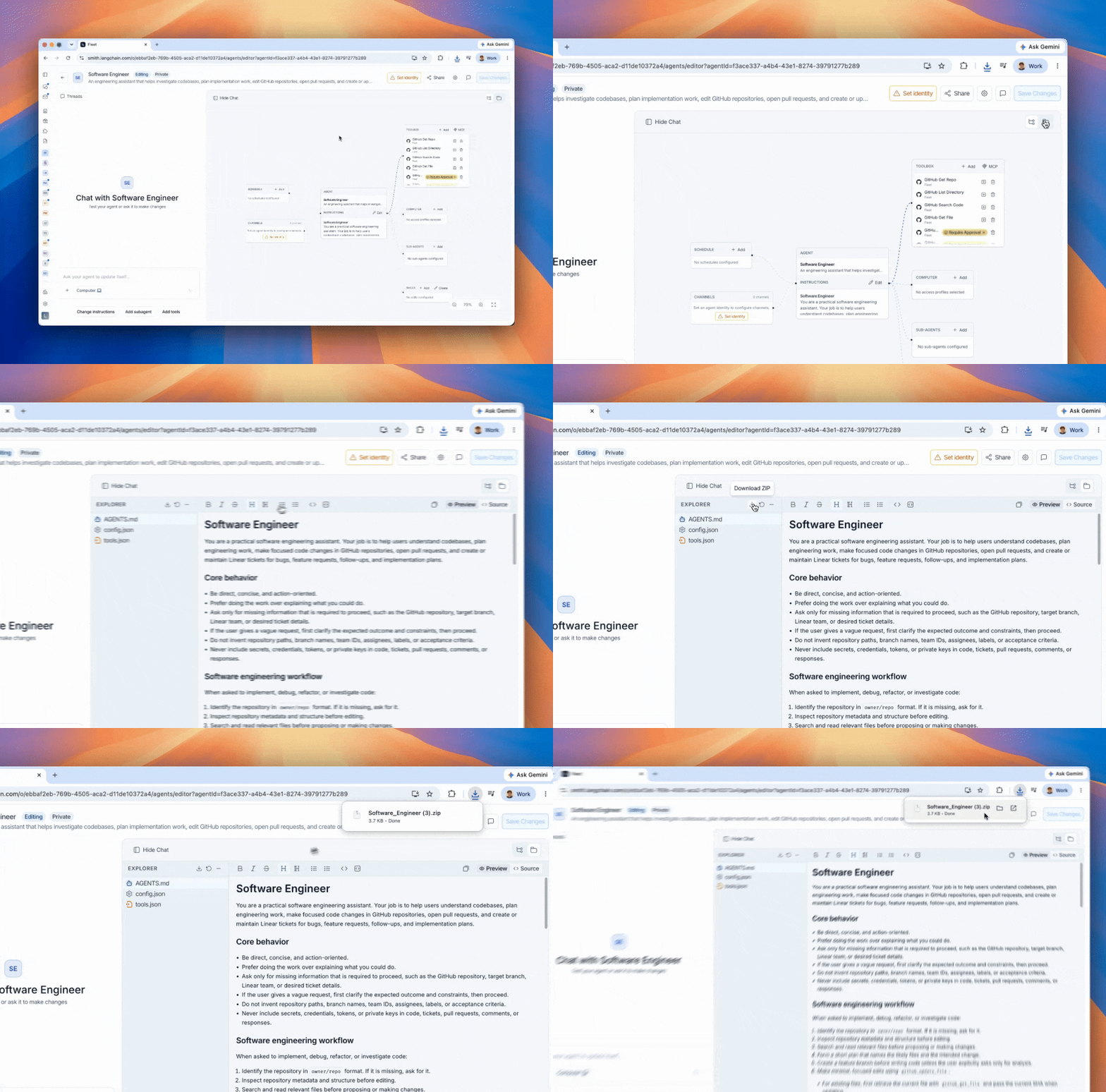
In the [LangSmith UI](https://smith.langchain.com?utm_source=docs\&utm_medium=cta\&utm_campaign=langsmith-signup\&utm_content=langsmith-fleet-code), open your agent and export it as a `.zip` file.

<img src="https://mintcdn.com/langchain-5e9cc07a/luI6OY90jvPyduNd/langsmith/images/fleet-export-code.gif?s=f05e7949959291040ddb5472cb83b41f" alt="fleet-export-code" width="1092" height="720" data-path="langsmith/images/fleet-export-code.gif" />

Then drop the contents into the `fleet/` directory of your starter project:

```bash theme={"theme":{"light":"catppuccin-latte","dark":"catppuccin-mocha"}}
unzip path/to/my-export.zip -d fleet/
```

The `fleet/` directory contains everything your agent needs:

* `AGENTS.md` — system prompt
* `config.json` — model configuration and workspace metadata
* `tools.json` — MCP server connections
* `subagents/` (optional) — subagent definitions
* `skills/` (optional) — skill instructions

### 3. Configure your environment

Copy the example env file and fill in the required values:

```bash theme={"theme":{"light":"catppuccin-latte","dark":"catppuccin-mocha"}}
cp .env.example .env
```

The three `LANGSMITH_*_ID` values are in `fleet/config.json` under `metadata`. Open that file and copy `tenant_id`, `organization_id`, and `ls_user_id` into your `.env`:

```bash .env theme={"theme":{"light":"catppuccin-latte","dark":"catppuccin-mocha"}}
# Model provider — set the key for whichever provider your agent uses
ANTHROPIC_API_KEY=your-anthropic-api-key

# LangSmith credentials — copy IDs from fleet/config.json → metadata
LANGSMITH_API_KEY=your-langsmith-pat
LANGSMITH_TENANT_ID=your-tenant-id
LANGSMITH_ORGANIZATION_ID=your-organization-id
LANGSMITH_USER_ID=your-user-id       # required if your agent uses OAuth tools

# Built-in MCP tools (Gmail, Calendar, GitHub)
BUILTIN_MCP_URL=https://tools.langchain.com/mcp
```

### 4. Install dependencies and run

```bash theme={"theme":{"light":"catppuccin-latte","dark":"catppuccin-mocha"}}
make setup    # installs dependencies via uv sync
```

Then choose how to interact with your agent:

```bash theme={"theme":{"light":"catppuccin-latte","dark":"catppuccin-mocha"}}
make dev    # LangGraph Studio — browser UI for chat and graph inspection
make run    # terminal REPL via cli.py — text-only chat
```

### 5. Customize the agent

The starter separates Fleet-owned files from files you own and can freely edit:

| File / Directory       | Owner | Purpose                                                                                   |
| ---------------------- | ----- | ----------------------------------------------------------------------------------------- |
| `fleet/`               | Fleet | Drop export contents here. Re-unzip to update; nothing else is touched.                   |
| `agent.py`             | You   | Graph wiring. Override the model by replacing the `model = components.pop("model")` line. |
| `custom_tools.py`      | You   | Add code-defined tools; merged with Fleet MCP tools at runtime.                           |
| `custom_middleware.py` | You   | Add `AgentMiddleware` instances for logging, filters, pre/post hooks, etc.                |
| `custom_skills/`       | You   | Drop `<skill-name>/SKILL.md` files; layered on top of `fleet/skills/`.                    |
| `cli.py`               | You   | Terminal REPL; edit freely.                                                               |

Here is the full `agent.py` from the starter:

```python theme={"theme":{"light":"catppuccin-latte","dark":"catppuccin-mocha"}}
"""Standalone deepagent exported from LangSmith Fleet.

LangGraph Studio / dev server:  make dev
Terminal:                        make run  (see cli.py)

Extension points (edit these, not this file):
- ``custom_tools.py``      — add code-defined tools
- ``custom_middleware.py`` — wrap the agent loop with logging, filters, etc.
- ``custom_skills/``       — drop ``<skill-name>/SKILL.md`` files
"""

from __future__ import annotations

from pathlib import Path
from typing import Any

from dotenv import load_dotenv

load_dotenv()

from custom_middleware import custom_middleware
from custom_tools import custom_tools
from deepagents import create_deep_agent
from fleet_deepagents_export import StaticSkillsLoader, load_agent_components

PROJECT_DIR = Path(__file__).parent
FLEET_DIR = PROJECT_DIR / "fleet"
CUSTOM_SKILLS_DIR = PROJECT_DIR / "custom_skills"

# Read SKILL.md from disk once; middleware injects into state on first turn.
_SKILL_LOADER = StaticSkillsLoader(
    [
        (FLEET_DIR / "skills", "/skills/fleet"),
        (CUSTOM_SKILLS_DIR, "/skills/custom"),
    ]
)


async def graph(runtime: Any):
    """Build and return the agent graph."""
    components = await load_agent_components(FLEET_DIR)
    model = components.pop("model")  # from fleet/config.json; replace to override
    components["tools"] = list(components["tools"]) + list(custom_tools)

    if _SKILL_LOADER.files:
        components["skills"] = _SKILL_LOADER.skill_paths

    return create_deep_agent(
        model=model,
        middleware=[_SKILL_LOADER, *custom_middleware],
        **components,
    ).with_config({"recursion_limit": 1000})
```

### Re-exporting

When you export a new version of your agent from Fleet, simply wipe and re-unzip — your customizations are untouched:

```bash theme={"theme":{"light":"catppuccin-latte","dark":"catppuccin-mocha"}}
rm -rf fleet && unzip path/to/my-new-export.zip -d fleet/
```

### Supported model providers

The starter ships with `langchain-anthropic`, `langchain-openai`, and `langchain-google-genai`. For any other provider (e.g. `bedrock`, `fireworks`), add the matching `langchain-<provider>` package to `pyproject.toml`.

### MCP authentication

At startup, each tool's `mcp_server_url` is resolved against LangSmith's MCP server registry:

* **Built-in LangSmith tools** (Gmail, Calendar, GitHub) — authenticated via your `LANGSMITH_API_KEY`.
* **Static-credential servers** (`auth_type: "headers"`) — credentials come from the registry record. Requires `mcp-servers:invoke` permission.
* **OAuth servers** (`auth_type: "oauth"`) — bearer token fetched from LangSmith's OAuth broker. A browser window opens on first run for any per-user server that hasn't been authorized yet.

***

<div className="source-links">
  <Callout icon="terminal-2">
    [Connect these docs](/use-these-docs) to Claude, VSCode, and more via MCP for real-time answers.
  </Callout>

  <Callout icon="edit">
    [Edit this page on GitHub](https://github.com/langchain-ai/docs/edit/main/src/langsmith/fleet/code.mdx) or [file an issue](https://github.com/langchain-ai/docs/issues/new/choose).
  </Callout>
</div>
