> ## Documentation Index
> Fetch the complete documentation index at: https://docs.langchain.com/llms.txt
> Use this file to discover all available pages before exploring further.
# Hybrid
The hybrid option requires an [Enterprise](https://langchain.com/pricing) plan. [Get a demo](https://www.langchain.com/contact-sales) to learn more.
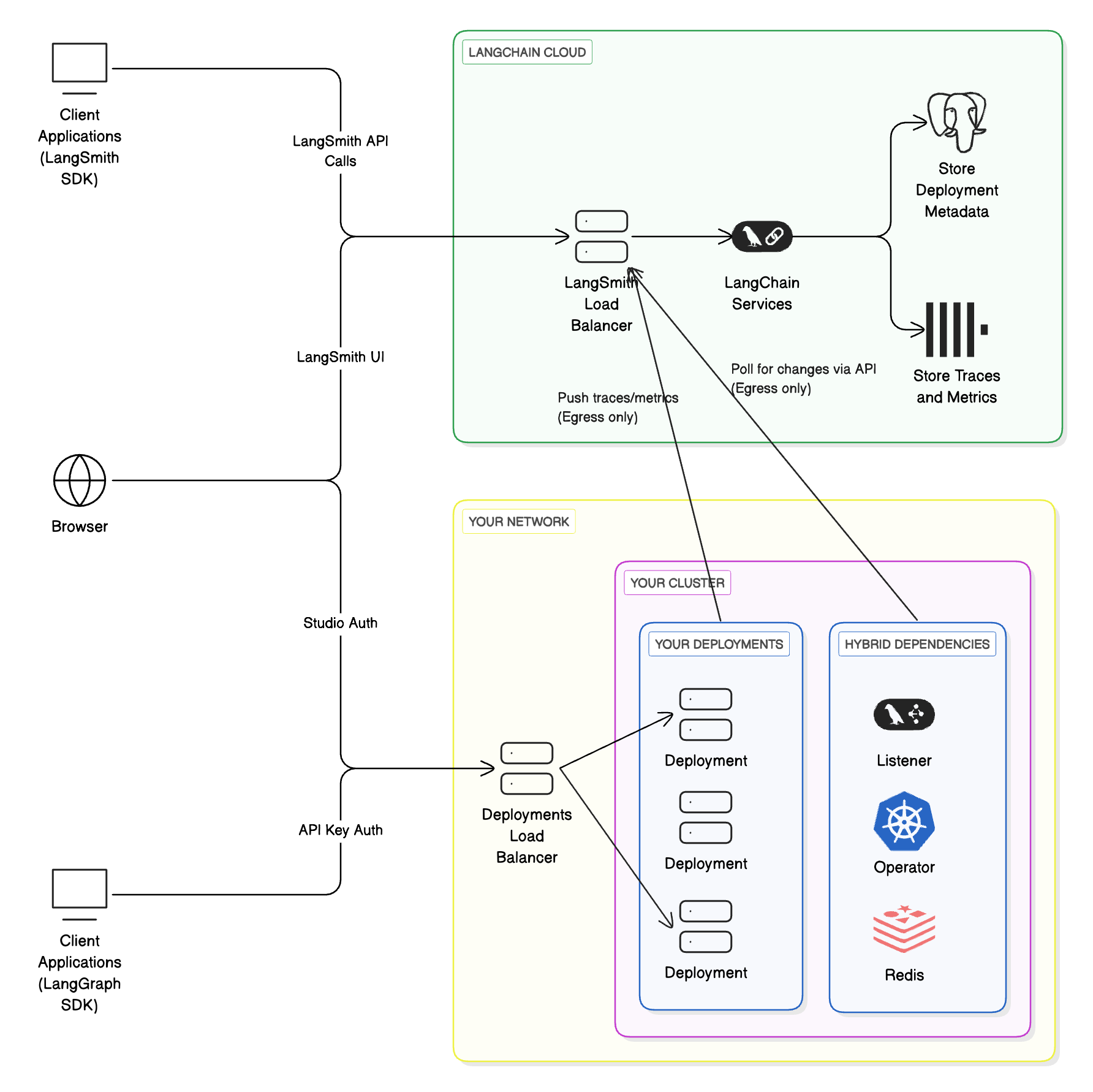
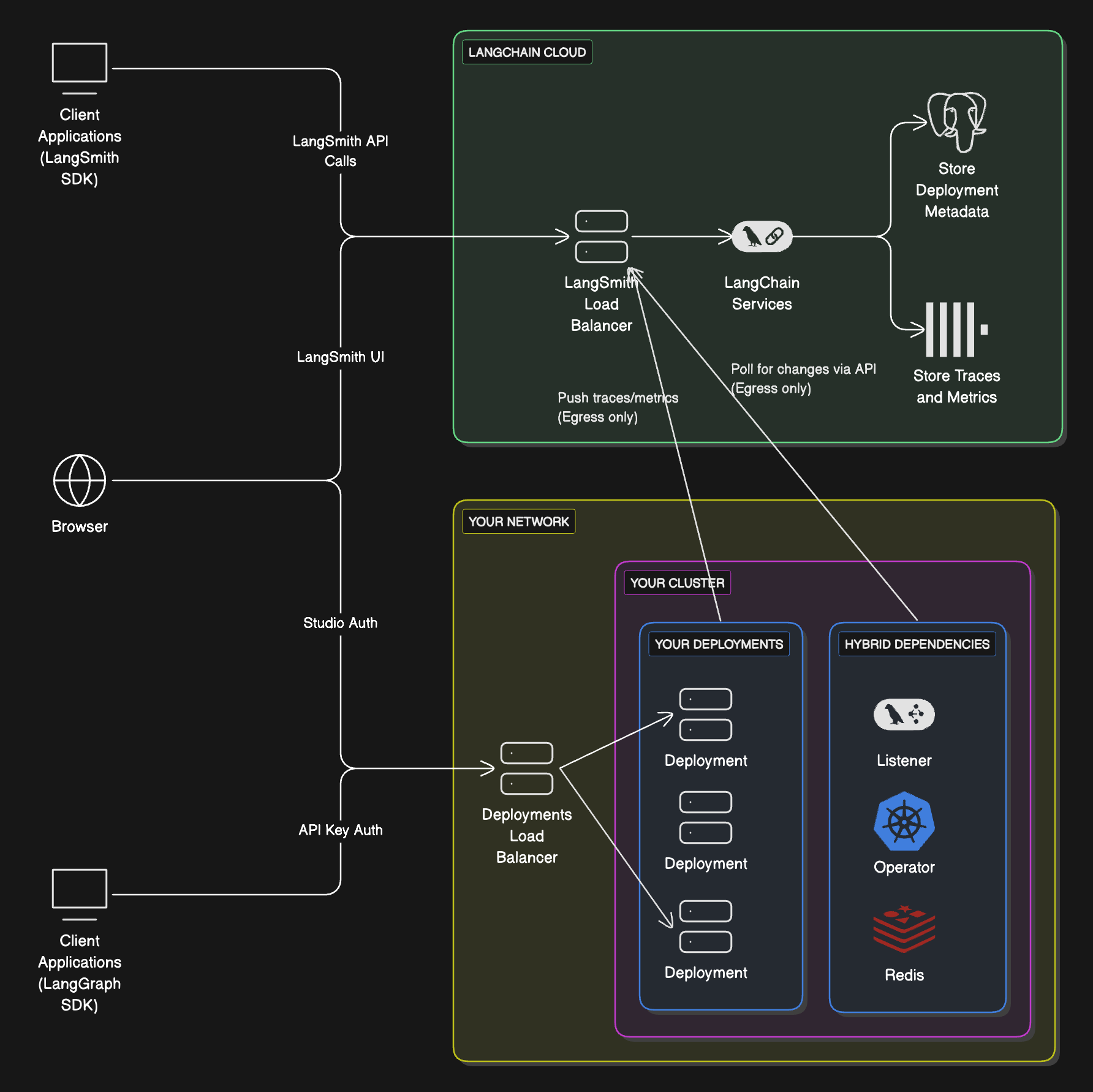
The **hybrid** model splits LangSmith infrastructure between LangChain's cloud and yours:
* **Control plane** (LangSmith UI, APIs, and orchestration) runs in LangChain's cloud, managed by LangChain.
* **Data plane** (your Agent Servers and agent workloads) runs in your cloud, managed by you.
This combines the convenience of a managed interface with the flexibility of running workloads in your own environment.
Learn more about the [control plane](/langsmith/control-plane), [data plane](/langsmith/data-plane), and [Agent Server](/langsmith/agent-server) architecture concepts.
| Component | Responsibilities | Where it runs | Who manages it |
| -------------------------------------------------------------------------------------------------------- | --------------------------------------------------------------------------------------------------------------------------------------------------- | ----------------- | -------------- |
| Control plane | - UI for creating deployments and revisions
- APIs for managing deployments
- Observability data storage
| LangChain's cloud | LangChain |
| Data plane | - Operator/listener to reconcile deployments
- Agent Servers (agents/graphs)
- Backing services (Postgres, Redis, etc.)
| Your cloud | You |
When running LangSmith in a hybrid model, you authenticate with a [LangSmith API key](/langsmith/create-account-api-key).
### Workflow
1. Use the `langgraph-cli` or [Studio](/langsmith/studio) to test your graph locally.
2. Build a Docker image using the `langgraph build` command.
3. Deploy your Agent Server from the [control plane UI](/langsmith/control-plane#control-plane-ui).
Supported Compute Platforms: [Kubernetes](https://kubernetes.io/).
For setup, refer to the [Hybrid setup guide](/langsmith/deploy-hybrid).
### Architecture
 ### Compute platforms
* **Kubernetes**: Hybrid supports running the data plane on any Kubernetes cluster.
For setup in Kubernetes, refer to the [Hybrid setup guide](/langsmith/deploy-hybrid)
### Egress to LangSmith and the control plane
In the hybrid deployment model, your self-hosted data plane will send network requests to the control plane to poll for changes that need to be implemented in the data plane. Traces from data plane deployments also get sent to the LangSmith instance integrated with the control plane. This traffic to the control plane is encrypted, over HTTPS. The data plane authenticates with the control plane with a LangSmith API key.
In order to enable this egress, you may need to update internal firewall rules or cloud resources (such as Security Groups) to [allow certain IP addresses](/langsmith/cloud#ingress-into-langchain-saas).
AWS/Azure PrivateLink or GCP Private Service Connect is currently not supported. This traffic will go over the internet.
## Listeners
In the hybrid option, one or more ["listener" applications](/langsmith/data-plane#listener-application) can run depending on how your LangSmith workspaces and Kubernetes clusters are organized.
### Kubernetes cluster organization
* One or more listeners can run in a Kubernetes cluster.
* A listener can deploy into one or more namespaces in that cluster.
* Multiple listeners cannot deploy to the same namespace.
* Cluster owners are responsible for planning listener layout and Agent Server deployments.
### LangSmith workspace organization
* A workspace can be associated with one or more listeners.
* A listener can only be associated with one workspace. LangSmith workspace to listener is a one-to-many relationship.
* A workspace can only deploy to Kubernetes clusters where all of its listeners are deployed.
## Use cases
Here are some common listener configurations (not strict requirements):
### Each LangSmith workspace → separate Kubernetes cluster
* Cluster `alpha` runs workspace `A`
* Cluster `beta` runs workspace `B`
### One cluster, one namespace per workspace
* Cluster `alpha`, namespace `1` runs workspace `A`
* Cluster `alpha`, namespace `2` runs workspace `B`
### Separate clusters, with shared “dev” cluster
* Cluster `alpha` runs workspace `A`
* Cluster `beta` runs workspace `B`
* Cluster `dev` runs workspaces `A` and `B`
* Both workspaces have two listeners; cluster `dev` has two listener deployments
***
### Compute platforms
* **Kubernetes**: Hybrid supports running the data plane on any Kubernetes cluster.
For setup in Kubernetes, refer to the [Hybrid setup guide](/langsmith/deploy-hybrid)
### Egress to LangSmith and the control plane
In the hybrid deployment model, your self-hosted data plane will send network requests to the control plane to poll for changes that need to be implemented in the data plane. Traces from data plane deployments also get sent to the LangSmith instance integrated with the control plane. This traffic to the control plane is encrypted, over HTTPS. The data plane authenticates with the control plane with a LangSmith API key.
In order to enable this egress, you may need to update internal firewall rules or cloud resources (such as Security Groups) to [allow certain IP addresses](/langsmith/cloud#ingress-into-langchain-saas).
AWS/Azure PrivateLink or GCP Private Service Connect is currently not supported. This traffic will go over the internet.
## Listeners
In the hybrid option, one or more ["listener" applications](/langsmith/data-plane#listener-application) can run depending on how your LangSmith workspaces and Kubernetes clusters are organized.
### Kubernetes cluster organization
* One or more listeners can run in a Kubernetes cluster.
* A listener can deploy into one or more namespaces in that cluster.
* Multiple listeners cannot deploy to the same namespace.
* Cluster owners are responsible for planning listener layout and Agent Server deployments.
### LangSmith workspace organization
* A workspace can be associated with one or more listeners.
* A listener can only be associated with one workspace. LangSmith workspace to listener is a one-to-many relationship.
* A workspace can only deploy to Kubernetes clusters where all of its listeners are deployed.
## Use cases
Here are some common listener configurations (not strict requirements):
### Each LangSmith workspace → separate Kubernetes cluster
* Cluster `alpha` runs workspace `A`
* Cluster `beta` runs workspace `B`
### One cluster, one namespace per workspace
* Cluster `alpha`, namespace `1` runs workspace `A`
* Cluster `alpha`, namespace `2` runs workspace `B`
### Separate clusters, with shared “dev” cluster
* Cluster `alpha` runs workspace `A`
* Cluster `beta` runs workspace `B`
* Cluster `dev` runs workspaces `A` and `B`
* Both workspaces have two listeners; cluster `dev` has two listener deployments
***
[Connect these docs](/use-these-docs) to Claude, VSCode, and more via MCP for real-time answers.
[Edit this page on GitHub](https://github.com/langchain-ai/docs/edit/main/src/langsmith/hybrid.mdx) or [file an issue](https://github.com/langchain-ai/docs/issues/new/choose).