> ## Documentation Index
> Fetch the complete documentation index at: https://docs.langchain.com/llms.txt
> Use this file to discover all available pages before exploring further.

# Set up the LLM auth proxy

> Deploy an Envoy-based auth proxy that validates LangSmith-signed JWTs and routes LLM requests to your upstream provider or gateway.

The LLM auth proxy lets your organization enforce its own authentication flows for all model invocations from LangSmith so that provider credentials are never exposed to end users and every request is traceable back to a specific actor.

The LLM auth proxy is an [Envoy](https://www.envoyproxy.io/)-based component that runs in your environment and sits between LangSmith and your upstream LLM provider or gateway (such as OpenAI, Anthropic, or an internal LLM gateway like LiteLLM). LangSmith signs every request with a short-lived JWT (JSON Web Token). The proxy validates the JWT, optionally injects provider credentials or transforms request and response bodies, then forwards the request upstream. It is available to both [SaaS](/langsmith/cloud) and [self-hosted](/langsmith/self-hosted) LangSmith customers.

<Info>
  The LLM auth proxy requires a LangSmith Enterprise plan. For more details, refer to [Pricing](https://www.langchain.com/pricing) or [contact our sales team](https://www.langchain.com/contact-sales).
</Info>

Use the LLM auth proxy when you need to:

* Authenticate [Playground](/langsmith/custom-endpoint#use-the-model-in-the-playground) or [LLM-as-judge evaluation](/langsmith/evaluation) requests against your own provider gateway.
* Inject provider-specific API keys or auth headers without exposing them to end users.
* Transform request or response bodies (for example, converting between OpenAI format and a custom gateway format).

## How it works

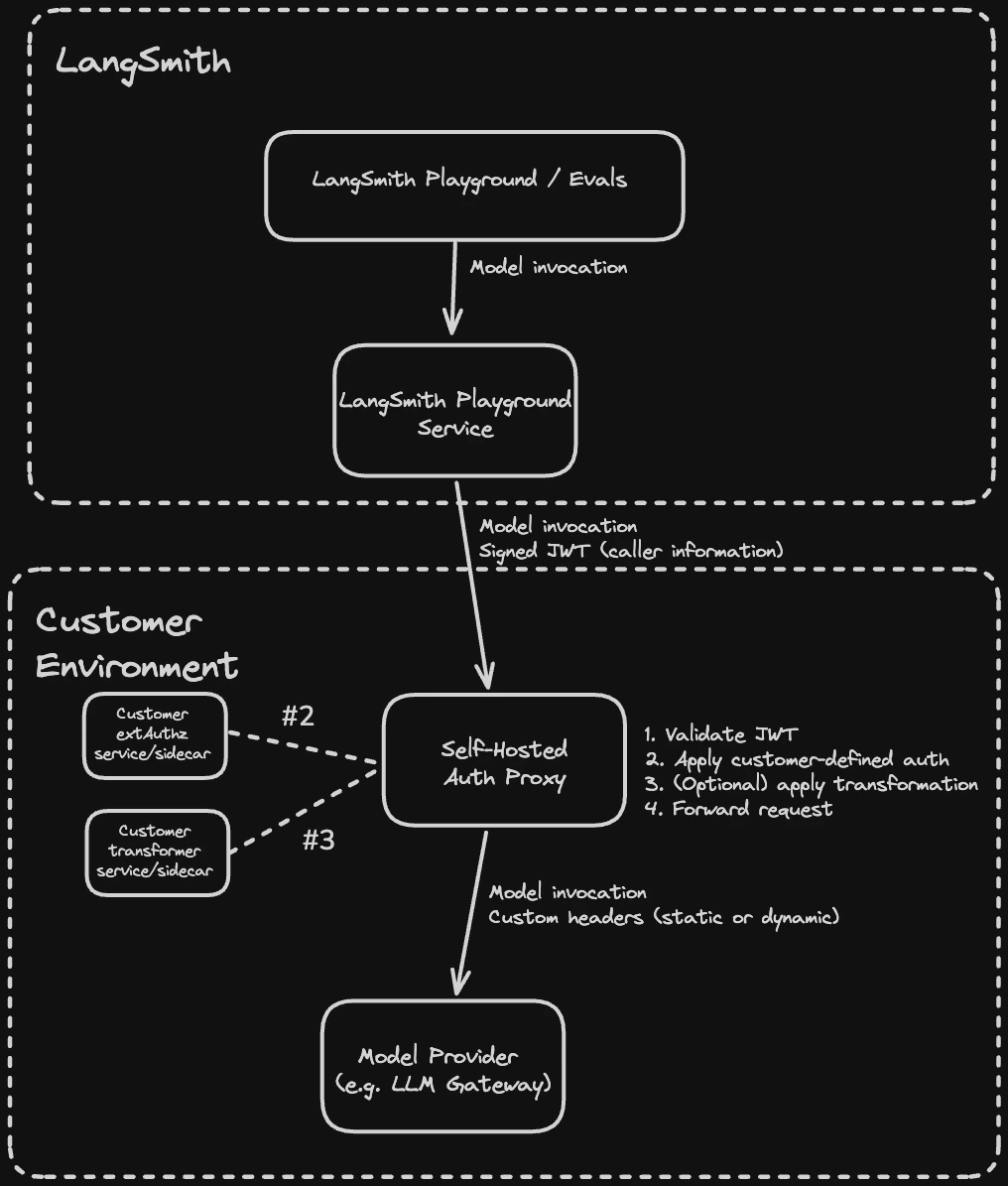
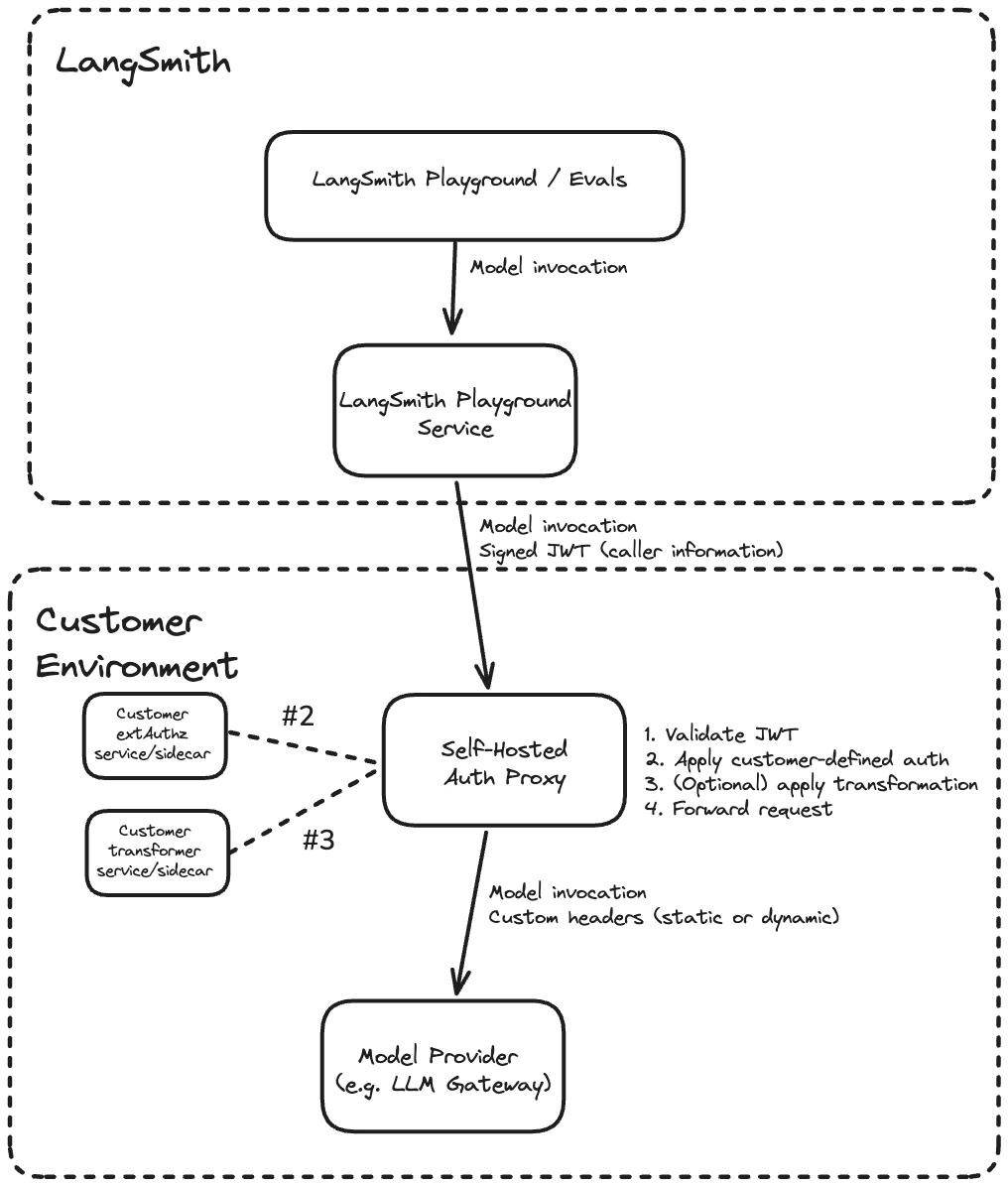
Each request from LangSmith passes through the following steps in the proxy:

1. Validate the JWT (signature, issuer, audience)
2. Call your [`ext_authz`](https://www.envoyproxy.io/docs/envoy/latest/intro/arch_overview/security/ext_authz_filter) service, which receives the validated JWT and returns the provider credentials to inject as headers
3. Optionally call your [`ext_proc`](https://www.envoyproxy.io/docs/envoy/latest/configuration/http/http_filters/ext_proc_filter) transformer, which can rewrite request and response bodies (for example, converting between OpenAI format and a custom gateway format)
4. Forward the request with custom headers (static or dynamic) to the upstream provider

Both the `ext_authz` service and the transformer are customer-deployed components that run alongside the proxy in your environment. Either or both can be enabled [depending on your use case](#when-to-use-ext_proc-vs-ext_authz).

<img className="block dark:hidden" src="https://mintcdn.com/langchain-5e9cc07a/P0dgApy5uvIpggEa/langsmith/images/llm-auth-proxy-architecture-light.png?fit=max&auto=format&n=P0dgApy5uvIpggEa&q=85&s=2358bba74cb9be8ca92a5f6028937ee1" alt="Architecture diagram showing LangSmith issuing a signed JWT to the self-hosted auth proxy, which validates the JWT, applies customer-defined auth, and forwards the request to the upstream model provider." width="1016" height="1195" data-path="langsmith/images/llm-auth-proxy-architecture-light.png" />

<img className="hidden dark:block" src="https://mintcdn.com/langchain-5e9cc07a/P0dgApy5uvIpggEa/langsmith/images/llm-auth-proxy-architecture-dark.png?fit=max&auto=format&n=P0dgApy5uvIpggEa&q=85&s=60f84bc54a41125d0c0b03fb4f1cfb60" alt="Architecture diagram showing LangSmith issuing a signed JWT to the self-hosted auth proxy, which validates the JWT, applies customer-defined auth, and forwards the request to the upstream model provider." width="1016" height="1195" data-path="langsmith/images/llm-auth-proxy-architecture-dark.png" />

## Prerequisites

* LangSmith Enterprise plan (SaaS or self-hosted on version 0.13.33+)
* Kubernetes cluster with Helm 3
* Envoy v1.37 or later (the Helm chart defaults to `envoyproxy/envoy:v1.37-latest`)
* The URL of your upstream LLM provider or gateway (the destination the proxy will forward requests to)

<Note>
  The auth proxy currently supports the [Playground](/langsmith/prompt-engineering-concepts), [Evals](/langsmith/evaluation), [Fleet](/langsmith/fleet), [Polly](/langsmith/polly), and [Insights](/langsmith/insights) features.
  Playground and Evals are available in v0.13.33+. Polly and Insights are available in v0.13.39+.
</Note>

## 1. Configure JWT signing (self-hosted LangSmith only)

Skip this step for LangSmith SaaS. JWT signing is already configured.

**Generate an Ed25519 key pair** using [step CLI](https://smallstep.com/docs/step-cli/installation/) (or an internal process if you prefer). Ed25519 is the signing algorithm LangSmith uses to sign JWTs. The private key signs each request; the auth proxy verifies the signature using only the public key.

```shell theme={"theme":{"light":"catppuccin-latte","dark":"catppuccin-mocha"}}
TMPDIR_KEYS="$(mktemp -d)"
step crypto keypair "$TMPDIR_KEYS/pub.pem" "$TMPDIR_KEYS/priv.pem" \
  --kty OKP --crv Ed25519 --no-password --insecure
PRIV_JWK=$(step crypto key format --jwk --no-password --insecure < "$TMPDIR_KEYS/priv.pem")
SIGNING_JWKS=$(echo "$PRIV_JWK" | jq -c '{keys: [. + {use: "sig", alg: "EdDSA"}]}')
echo "$SIGNING_JWKS"
```

**Store the JWKS in a Kubernetes secret:**

```shell theme={"theme":{"light":"catppuccin-latte","dark":"catppuccin-mocha"}}
kubectl create secret generic langsmith-signing-jwks \
  --namespace <namespace> \
  --from-literal=LANGSMITH_SIGNING_JWKS="$SIGNING_JWKS"
```

A JWKS (JSON Web Key Set) is a standard JSON format for publishing cryptographic keys. `LANGSMITH_SIGNING_JWKS` contains the Ed25519 private key and is stored as a Kubernetes secret. It is never exposed. LangSmith automatically extracts the corresponding public key and serves it at `/.well-known/jwks.json`. The auth proxy fetches this public endpoint to verify JWT signatures without ever needing the private key.

**Reference the secret in your [LangSmith `values.yaml`](https://github.com/langchain-ai/helm/blob/main/charts/langsmith/values.yaml):**

```yaml theme={"theme":{"light":"catppuccin-latte","dark":"catppuccin-mocha"}}
platformBackend:
  deployment:
    extraEnv:
      - name: LLM_AUTH_PROXY_ISSUER
        value: "langsmith"        # must match jwtIssuer in the auth proxy chart
      - secretRef:
          name: langsmith-signing-jwks
```

`LLM_AUTH_PROXY_ISSUER` sets the `iss` claim in signed JWTs. Use `langsmith` to match the SaaS default, or a custom identifier like `langsmith:self-hosted:<short_identifier>` to distinguish your installation. The value must match `jwtIssuer` in the auth proxy chart in [Step 4](#4-install-the-auth-proxy-helm-chart)).

## 2. Enable LLM Auth Proxy for your organization

<Tabs>
  <Tab title="Self-hosted">
    **Option A:** Enable for a specific organization:

    In the LangSmith UI, navigate to the **Settings** page, copy the organization ID at the top left next to **Organizations**.

    Run the following against your LangSmith PostgreSQL database:

    ```sql theme={"theme":{"light":"catppuccin-latte","dark":"catppuccin-mocha"}}
    UPDATE organizations
    SET config = config || '{"can_use_llm_auth_proxy": true}'
    WHERE id = '<organization_id>';
    ```

    **Option B:** Enable for all organizations in an installation:

    Add the following to `commonEnv` in your [LangSmith `values.yaml`](https://github.com/langchain-ai/helm/blob/main/charts/langsmith/values.yaml):

    ```yaml theme={"theme":{"light":"catppuccin-latte","dark":"catppuccin-mocha"}}
    commonEnv:
      DEFAULT_ORG_FEATURE_CAN_USE_LLM_AUTH_PROXY: "true"
    ```

    <Note>
      This setting has no effect on Personal organizations.
    </Note>
  </Tab>

  <Tab title="SaaS">
    Contact [LangChain support](mailto:support@langchain.dev) to enable LLM Auth Proxy for your organization.
  </Tab>
</Tabs>

## 3. Configure organization settings in LangSmith

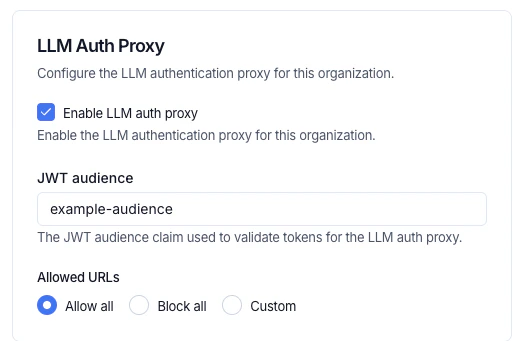
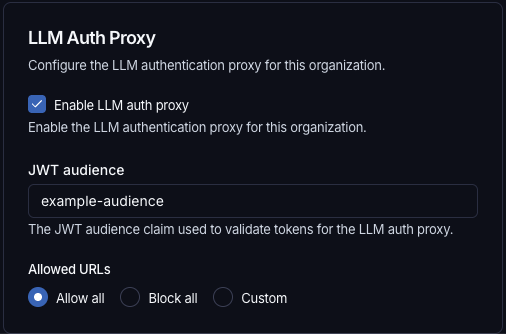
In the LangSmith UI, navigate to **Settings** > **General**, configure the following:

1. **JWT audience:** the `aud` claim value the proxy will validate (for example, `example-audience`). This must match `jwtAudiences` in the auth proxy chart in [Step 4](#4-install-the-auth-proxy-helm-chart).
2. **Enable LLM auth proxy:** toggle on for your organization.
3. **Allowed URLs:** control which destination URLs the proxy is permitted to forward JWTs to. This prevents credential forwarding to unintended hosts. Choose one of three options:

   * **Allow all** (default): permits JWT forwarding to any upstream URL. Equivalent to no restriction.
   * **Block all:** blocks JWT forwarding to all URLs.
   * **Custom:** specify an explicit list of allowed URL patterns. Empty strings and bare `*` are not accepted. The control is disabled when the LLM auth proxy toggle is off.

   <img className="block dark:hidden" src="https://mintcdn.com/langchain-5e9cc07a/bbAQLTZm05DckBS2/langsmith/images/llm-auth-proxy-settings-light.png?fit=max&auto=format&n=bbAQLTZm05DckBS2&q=85&s=b9bbd4314eeb945ca236a2c6dec2d221" alt="LLM Auth Proxy settings in LangSmith showing the Enable LLM auth proxy checkbox, JWT audience field, and Allowed URLs radio buttons with Allow all selected." width="518" height="341" data-path="langsmith/images/llm-auth-proxy-settings-light.png" />

   <img className="hidden dark:block" src="https://mintcdn.com/langchain-5e9cc07a/bbAQLTZm05DckBS2/langsmith/images/llm-auth-proxy-settings-dark.png?fit=max&auto=format&n=bbAQLTZm05DckBS2&q=85&s=b5a405d42f8fb2e7b351c7119147aa9c" alt="LLM Auth Proxy settings in LangSmith showing the Enable LLM auth proxy checkbox, JWT audience field, and Allowed URLs radio buttons with Allow all selected." width="506" height="334" data-path="langsmith/images/llm-auth-proxy-settings-dark.png" />

## 4. Install the auth proxy Helm chart

Add the LangChain Helm repository:

```bash theme={"theme":{"light":"catppuccin-latte","dark":"catppuccin-mocha"}}
helm repo add langchain https://langchain-ai.github.io/helm/
helm repo update
```

Create a `values.yaml` with the upstream URL and JWT validation settings. There are two options for JWKS configuration:

* **`jwksUri` (recommended):** Point to your LangSmith instance's `/.well-known/jwks.json` endpoint. Envoy fetches and caches the public keys automatically, supporting seamless key rotation.
* **`jwksJson` (inline):** Paste the JWKS JSON directly into `values.yaml`. Use this for testing or air-gapped environments where the auth proxy has no outbound network access to LangSmith. Requires a chart update to rotate keys. Include only the public key components; omit the `d` field (the private key).

If both are set, `jwksUri` takes precedence.

```yaml theme={"theme":{"light":"catppuccin-latte","dark":"catppuccin-mocha"}}
authProxy:
  upstream: "https://gateway.example.com"
  jwtIssuer: "langsmith" # must match LLM_AUTH_PROXY_ISSUER in LangSmith values.yaml
  jwtAudiences:
    - "example-audience" # must match the org setting in LangSmith

  # Option A: remote JWKS (recommended for production)
  # Envoy fetches and caches public keys from LangSmith's /.well-known/jwks.json.
  jwksUri: "https://langsmith.example.com/.well-known/jwks.json"       # self-hosted
  # jwksUri: "https://api.smith.langchain.com/.well-known/jwks.json"   # SaaS
  jwksCacheDurationSeconds: 300

  # Option B: inline JWKS (testing or air-gapped environments only)
  # Omit the "d" field (private key); include public key components only.
  # jwksJson: '{"keys": [{"kty": "OKP", "crv": "Ed25519", "x": "<base64url-public-key>", "use": "sig", "alg": "EdDSA"}]}'
```

Install the chart:

```bash theme={"theme":{"light":"catppuccin-latte","dark":"catppuccin-mocha"}}
helm install langsmith-auth-proxy langchain/langsmith-auth-proxy \
  --namespace <your-namespace> \
  -f values.yaml
```

## Write an `ext_authz` service

Use `ext_authz` when you need to add, remove, or edit authorization headers, for example, to inject a provider API key based on the identity in the JWT. Your service receives the validated JWT and optionally the request body, and returns the headers to inject upstream. This uses Envoy's [HTTP `ext_authz` filter](https://www.envoyproxy.io/docs/envoy/latest/configuration/http/http_filters/ext_authz_filter) (not gRPC).

Enable it in `values.yaml`:

```yaml theme={"theme":{"light":"catppuccin-latte","dark":"catppuccin-mocha"}}
authProxy:
  extAuthz:
    enabled: true
    serviceUrl: "http://my-auth-service:8080"
    timeout: "10s"
```

### How it works

Before forwarding each request, Envoy calls your service at `<serviceUrl>/check<original_path>` using the same HTTP method as the original request. Your service receives the validated JWT in the `x-langsmith-llm-auth` header.

Your service returns a plain HTTP response:

* **`2xx`:** allow the request. Any headers matching `allowedUpstreamHeaders` patterns (default: `authorization` and `x-*`) are injected into the upstream request. To strip the JWT before forwarding, include `x-envoy-auth-headers-to-remove: x-langsmith-llm-auth` in your response.
* **Non-`2xx`:** deny the request. The status code and any headers matching `allowedClientHeaders` patterns (default: `www-authenticate` and `x-*`) are returned to the client.

### Deployment options

Your `ext_authz` service can run in two ways:

* **Sidecar:** run the service in the same pod as the proxy. Add the container under `authProxy.deployment.sidecars` and any required volumes under `authProxy.deployment.volumes` in `values.yaml`. Use a `localhost` URL, for example `http://localhost:10002`.
* **Separate deployment:** deploy the service independently and point `extAuthz.serviceUrl` at it. Use the in-cluster DNS name, for example `http://my-auth-service.my-namespace.svc.cluster.local:8080`, or an external HTTPS URL if the service has its own ingress.

### Sample deployment

The example below is a minimal Python `ext_authz` service that performs an OAuth2 client credentials token exchange. On each request, it returns a cached `Authorization` header with a fresh access token, refreshing it from the configured token endpoint before it expires. See [e2e/oauth/](https://github.com/langchain-ai/helm/tree/main/charts/langsmith-auth-proxy/e2e/oauth) in the chart repository for the full example.

<Accordion title="ext-authz-oauth.py">
  ```python theme={"theme":{"light":"catppuccin-latte","dark":"catppuccin-mocha"}}
  """ext_authz service that performs an OAuth2 client-credentials token exchange.

  Runs as a sidecar (or standalone service) alongside the main auth-proxy component.
  On each ext_authz check request it returns a cached OAuth access token,
  refreshing it from the configured token endpoint when expired.

  Environment variables:
    OAUTH_TOKEN_URL    – Token endpoint (e.g. https://login.example.com/oauth/token)
    OAUTH_CLIENT_ID    – Client ID for the credentials grant
    OAUTH_CLIENT_SECRET– Client secret for the credentials grant
    OAUTH_SCOPE        – (optional) Space-separated scopes to request
    LISTEN_PORT        – (optional) Port to listen on, default 10002
  """

  from http.server import HTTPServer, BaseHTTPRequestHandler
  import json
  import os
  import sys
  import threading
  import time
  import urllib.request
  import urllib.parse

  # ---------------------------------------------------------------------------
  # Configuration
  # ---------------------------------------------------------------------------
  TOKEN_URL = os.environ["OAUTH_TOKEN_URL"]
  CLIENT_ID = os.environ["OAUTH_CLIENT_ID"]
  CLIENT_SECRET = os.environ["OAUTH_CLIENT_SECRET"]
  SCOPE = os.environ.get("OAUTH_SCOPE", "")
  LISTEN_PORT = int(os.environ.get("LISTEN_PORT", "10002"))

  # Refresh the token this many seconds before it actually expires.
  EXPIRY_BUFFER_SECONDS = 30

  # ---------------------------------------------------------------------------
  # Token cache (thread-safe)
  # ---------------------------------------------------------------------------
  _lock = threading.Lock()
  _cached_token: str | None = None
  _token_expiry: float = 0  # epoch seconds


  def _fetch_token() -> tuple[str, float]:
      """Perform a client_credentials grant and return (access_token, expiry_epoch)."""
      data = urllib.parse.urlencode({
          "grant_type": "client_credentials",
          "client_id": CLIENT_ID,
          "client_secret": CLIENT_SECRET,
          **({"scope": SCOPE} if SCOPE else {}),
      }).encode()

      req = urllib.request.Request(
          TOKEN_URL,
          data=data,
          headers={"Content-Type": "application/x-www-form-urlencoded"},
          method="POST",
      )
      with urllib.request.urlopen(req, timeout=10) as resp:
          body = json.loads(resp.read())

      access_token = body["access_token"]
      expires_in = int(body.get("expires_in", 3600))
      expiry = time.time() + expires_in - EXPIRY_BUFFER_SECONDS
      return access_token, expiry


  def get_token() -> str:
      """Return a valid access token, refreshing if necessary."""
      global _cached_token, _token_expiry
      with _lock:
          if _cached_token and time.time() < _token_expiry:
              return _cached_token
      # Fetch outside the lock so other requests aren't blocked on I/O.
      token, expiry = _fetch_token()
      with _lock:
          _cached_token = token
          _token_expiry = expiry
      print(f"Refreshed OAuth token (expires in {int(expiry - time.time())}s)", flush=True)
      return token


  # ---------------------------------------------------------------------------
  # ext_authz HTTP handler
  # ---------------------------------------------------------------------------
  class Handler(BaseHTTPRequestHandler):
      def do_any(self):
          try:
              token = get_token()
          except Exception as exc:
              print(f"OAuth token fetch failed: {exc}", flush=True)
              self.send_response(500)
              self.send_header("Content-Type", "text/plain")
              self.end_headers()
              self.wfile.write(b"OAuth token exchange failed")
              return

          self.send_response(200)
          # Replace the header name as needed - this header will be forwarded to the upstream LLM provider / gateway.
          self.send_header("Authorization", f"Bearer {token}")
          self.end_headers()

      # Handle every method Envoy might send for ext_authz checks.
      do_GET = do_POST = do_PUT = do_DELETE = do_PATCH = do_HEAD = do_OPTIONS = do_any

      def log_message(self, format, *args):
          # Quieter logs — only print errors.
          pass


  if __name__ == "__main__":
      server = HTTPServer(("0.0.0.0", LISTEN_PORT), Handler)
      print(f"ext-authz-oauth listening on :{LISTEN_PORT}", flush=True)
      print(f"  token_url={TOKEN_URL} client_id=<redacted>", flush=True)
      server.serve_forever()
  ```
</Accordion>

For the full list of `extAuthz` parameters, see the [Helm chart README](https://github.com/langchain-ai/helm/tree/main/charts/langsmith-auth-proxy#readme).

## Write an `ext_proc` transformer

Use `ext_proc` when you need to rewrite request or response bodies, for example, to convert between OpenAI format and a custom gateway format, or to inject additional fields into the request payload. This uses Envoy's [`ext_proc` filter](https://www.envoyproxy.io/docs/envoy/latest/configuration/http/http_filters/ext_proc_filter).

Unlike `ext_authz` (HTTP), `ext_proc` uses a bidirectional gRPC stream. Envoy sends your transformer service one message per processing phase (request headers, request body, response headers, response body), and your service replies with mutations for each phase. Your transformer must implement the `envoy.service.ext_proc.v3.ExternalProcessor` gRPC service. See [e2e/transformer/](https://github.com/langchain-ai/helm/tree/main/charts/langsmith-auth-proxy/e2e/transformer) in the chart repository for a sample Go implementation.

### When to use `ext_proc` vs `ext_authz`

| Capability              | `ext_authz` | `ext_proc` |
| ----------------------- | ----------- | ---------- |
| Modify request headers  | Yes         | Yes        |
| Modify response headers | No          | Yes        |
| Modify request body     | No          | Yes        |
| Modify response body    | No          | Yes        |
| Protocol                | HTTP        | gRPC       |

Use `ext_authz` if you only need to inject auth headers, for example, for API keys. Use `ext_proc` if you need to rewrite bodies. Both can be enabled simultaneously.

Enable `ext_proc` in `values.yaml`:

```yaml theme={"theme":{"light":"catppuccin-latte","dark":"catppuccin-mocha"}}
authProxy:
  transformer:
    enabled: true
    serviceUrl: "grpc://my-transformer:50051"
    timeout: "10s"
    failureModeAllow: false
    processingMode:
      requestHeaderMode: "SEND"
      requestBodyMode: "BUFFERED"
      responseHeaderMode: "SKIP"
      responseBodyMode: "NONE"
```

Set `failureModeAllow: true` to allow requests through if the transformer is unavailable. The default (`false`) rejects the request.

### Processing modes

Control which phases are sent to your transformer via `processingMode`. Only enable the phases you need, as disabling unused phases reduces latency.

| Field                 | Options                                            | Description                           |
| --------------------- | -------------------------------------------------- | ------------------------------------- |
| `requestHeaderMode`   | `SEND`, `SKIP`, `DEFAULT`                          | Whether to forward request headers.   |
| `responseHeaderMode`  | `SEND`, `SKIP`, `DEFAULT`                          | Whether to forward response headers.  |
| `requestBodyMode`     | `NONE`, `BUFFERED`, `STREAMED`, `BUFFERED_PARTIAL` | How to send the request body.         |
| `responseBodyMode`    | `NONE`, `BUFFERED`, `STREAMED`, `BUFFERED_PARTIAL` | How to send the response body.        |
| `requestTrailerMode`  | `SEND`, `SKIP`                                     | Whether to forward request trailers.  |
| `responseTrailerMode` | `SEND`, `SKIP`                                     | Whether to forward response trailers. |

* Use `BUFFERED` for request body rewriting: buffers the full body before sending, simplest for JSON rewriting.
* Use `STREAMED` for streaming LLM response body rewriting: sends chunks as they arrive, lower latency but more complex to implement.
* Use `NONE` to skip a phase entirely.

<Warning>
  When mutating the body, your `ext_proc` service must also update the `content-length` header to match the new body size via `HeaderMutation`. Envoy rejects responses where `content-length` does not match the mutated body.
</Warning>

### Request flow

Example with `ext_proc` enabled for header injection and body rewriting:

```
curl -H "X-LangSmith-LLM-Auth: <JWT>" -d '{"model":"gpt-4",...}'
  -> Envoy(:10000)
  -> built-in Envoy JWT filter (validate sig, iss, aud)
  -> `ext_proc` filter -> transformer:50051 (gRPC)
    <- phase 1: request_headers -> mutate headers (inject Authorization)
    <- phase 2: request_body   -> mutate body (rewrite JSON) + update content-length
  -> upstream LLM provider or gateway
```

### Sample deployment

The example below deploys a minimal Go transformer as a Kubernetes Deployment. It reads the JWT from request headers, injects an `Authorization` header, and rewrites the request body from OpenAI format to a custom format.

<Accordion title="transformer-configmap.yaml">
  ```yaml theme={"theme":{"light":"catppuccin-latte","dark":"catppuccin-mocha"}}
  apiVersion: v1
  kind: ConfigMap
  metadata:
    name: transformer-source
  data:
    main.go: |
      package main

      import (
          "encoding/json"
          "fmt"
          "io"
          "log"
          "net"
          "strings"

          core "github.com/envoyproxy/go-control-plane/envoy/config/core/v3"
          ext_proc "github.com/envoyproxy/go-control-plane/envoy/service/ext_proc/v3"
          "google.golang.org/grpc"
      )

      type server struct {
          ext_proc.UnimplementedExternalProcessorServer
      }

      func (s *server) Process(stream ext_proc.ExternalProcessor_ProcessServer) error {
          for {
              req, err := stream.Recv()
              if err == io.EOF {
                  return nil
              }
              if err != nil {
                  return err
              }

              var resp *ext_proc.ProcessingResponse
              switch v := req.Request.(type) {
              case *ext_proc.ProcessingRequest_RequestHeaders:
                  resp = handleRequestHeaders(v.RequestHeaders)
              case *ext_proc.ProcessingRequest_RequestBody:
                  resp = handleRequestBody(v.RequestBody)
              default:
                  resp = &ext_proc.ProcessingResponse{}
              }

              if err := stream.Send(resp); err != nil {
                  return err
              }
          }
      }

      func handleRequestHeaders(headers *ext_proc.HttpHeaders) *ext_proc.ProcessingResponse {
          var jwtValue string
          for _, h := range headers.Headers.Headers {
              if strings.EqualFold(h.Key, "x-langsmith-llm-auth") {
                  if len(h.RawValue) > 0 {
                      jwtValue = string(h.RawValue)
                  } else {
                      jwtValue = h.Value
                  }
                  break
              }
          }

          resp := &ext_proc.ProcessingResponse{
              Response: &ext_proc.ProcessingResponse_RequestHeaders{
                  RequestHeaders: &ext_proc.HeadersResponse{},
              },
          }

          if jwtValue != "" {
              // TODO: Replace with your auth logic, e.g. exchange JWT for a
              // provider-specific token, call a secrets manager, etc.
              providerKey := "Bearer your-provider-key"

              headerResp := resp.GetRequestHeaders()
              headerResp.Response = &ext_proc.CommonResponse{
                  HeaderMutation: &ext_proc.HeaderMutation{
                      SetHeaders: []*core.HeaderValueOption{
                          {
                              Header: &core.HeaderValue{
                                  Key:      "Authorization",
                                  RawValue: []byte(providerKey),
                              },
                          },
                      },
                  },
              }
          }
          return resp
      }

      func handleRequestBody(body *ext_proc.HttpBody) *ext_proc.ProcessingResponse {
          resp := &ext_proc.ProcessingResponse{
              Response: &ext_proc.ProcessingResponse_RequestBody{
                  RequestBody: &ext_proc.BodyResponse{},
              },
          }

          var original map[string]interface{}
          if err := json.Unmarshal(body.Body, &original); err != nil {
              log.Printf("Body parse failed, passing through: %v", err)
              return resp
          }

          // TODO: Replace with your transformation logic.
          // This example wraps the OpenAI-format body in a custom envelope.
          transformed := map[string]interface{}{
              "custom_model":    original["model"],
              "custom_messages": original["messages"],
              "metadata":        map[string]string{"source": "langsmith"},
          }

          newBody, err := json.Marshal(transformed)
          if err != nil {
              log.Printf("Body marshal failed, passing through: %v", err)
              return resp
          }

          // IMPORTANT: update content-length to match the new body size.
          bodyResp := resp.GetRequestBody()
          bodyResp.Response = &ext_proc.CommonResponse{
              Status: ext_proc.CommonResponse_CONTINUE_AND_REPLACE,
              HeaderMutation: &ext_proc.HeaderMutation{
                  SetHeaders: []*core.HeaderValueOption{
                      {
                          Header: &core.HeaderValue{
                              Key:      "content-length",
                              RawValue: []byte(fmt.Sprintf("%d", len(newBody))),
                          },
                      },
                  },
              },
              BodyMutation: &ext_proc.BodyMutation{
                  Mutation: &ext_proc.BodyMutation_Body{
                      Body: newBody,
                  },
              },
          }
          return resp
      }

      func main() {
          lis, err := net.Listen("tcp", ":50051")
          if err != nil {
              log.Fatalf("failed to listen: %v", err)
          }
          s := grpc.NewServer()
          ext_proc.RegisterExternalProcessorServer(s, &server{})
          log.Println("transformer listening on :50051")
          if err := s.Serve(lis); err != nil {
              log.Fatalf("failed to serve: %v", err)
          }
      }
    go.mod: |
      module transformer

      go 1.23

      require (
          github.com/envoyproxy/go-control-plane/envoy v1.32.4
          google.golang.org/grpc v1.72.1
      )
  ```
</Accordion>

<Accordion title="transformer-deployment.yaml">
  ```yaml theme={"theme":{"light":"catppuccin-latte","dark":"catppuccin-mocha"}}
  apiVersion: apps/v1
  kind: Deployment
  metadata:
    name: transformer
    labels:
      app: transformer
  spec:
    replicas: 1
    selector:
      matchLabels:
        app: transformer
    template:
      metadata:
        labels:
          app: transformer
      spec:
        initContainers:
          - name: build
            image: golang:1.23
            command: ["sh", "-c"]
            args:
              - |
                cp /src/main.go /src/go.mod /build/ &&
                cd /build &&
                go mod tidy &&
                CGO_ENABLED=0 go build -o /build/transformer ./main.go
            volumeMounts:
              - name: source
                mountPath: /src
                readOnly: true
              - name: binary
                mountPath: /build
        containers:
          - name: transformer
            image: gcr.io/distroless/static-debian12:nonroot
            command: ["/app/transformer"]
            ports:
              - containerPort: 50051
            volumeMounts:
              - name: binary
                mountPath: /app
                readOnly: true
        volumes:
          - name: source
            configMap:
              name: transformer-source
          - name: binary
            emptyDir: {}
  ---
  apiVersion: v1
  kind: Service
  metadata:
    name: transformer
    labels:
      app: transformer
  spec:
    selector:
      app: transformer
    ports:
      - port: 50051
        targetPort: 50051
        protocol: TCP
  ```
</Accordion>

<Note>
  For production, pre-build a container image instead of compiling in an init container. See `e2e/transformer/Dockerfile` in the [Helm chart repository](https://github.com/langchain-ai/helm/tree/main/charts/langsmith-auth-proxy) for an example multi-stage build.
</Note>

## Additional configuration

### HTTP proxy

Envoy does not respect `HTTP_PROXY`, `HTTPS_PROXY`, or `NO_PROXY` environment variables. Configure an HTTP proxy explicitly:

```yaml theme={"theme":{"light":"catppuccin-latte","dark":"catppuccin-mocha"}}
authProxy:
  httpProxy:
    enabled: true
    host: "proxy.example.com"
    port: 3128
    noProxy:
      - "internal.corp"
      - ".internal.corp"
```

### Other options

For ingress, autoscaling, resource limits, and other configuration options, see the [Helm chart README](https://github.com/langchain-ai/helm/tree/main/charts/langsmith-auth-proxy#readme).

<Tip>
  For production reliability, set `authProxy.autoscaling.hpa.minReplicas` to at least `3`.
</Tip>

## Full configuration example

```yaml theme={"theme":{"light":"catppuccin-latte","dark":"catppuccin-mocha"}}
authProxy:
  upstream: "https://gateway.example.com"   # your LLM gateway or provider
  jwtIssuer: "langsmith"                    # must match LLM_AUTH_PROXY_ISSUER on LangSmith
  jwtAudiences:
    - "example-audience"                    # must match org setting in LangSmith

  # Option A: remote JWKS (recommended for production)
  # Envoy fetches and caches public keys from LangSmith's /.well-known/jwks.json endpoint.
  jwksUri: "https://langsmith.example.com/.well-known/jwks.json"   # self-hosted
  # jwksUri: "https://api.smith.langchain.com/.well-known/jwks.json"  # SaaS
  jwksCacheDurationSeconds: 300             # how long Envoy caches the JWKS (default 5 min)

  # Option B: inline JWKS (testing or air-gapped environments only)
  # jwksJson: '{"keys": [...]}'

  # ext_authz: header-only auth logic (include only if needed)
  # Use this to inject, remove, or modify authorization headers.
  # Your service receives an HTTP request at /check with the validated JWT
  # in the x-langsmith-llm-auth header and responds with headers to inject upstream.
  extAuthz:
    enabled: true
    serviceUrl: "http://localhost:10002"    # sidecar URL
    # serviceUrl: "http://ext-authz.<namespace>.svc.cluster.local:10002"  # separate deployment
    sendBody: false                         # set true to include request body

  # transformer: request/response body transformation (include only if needed)
  # Use this when you need to rewrite request or response bodies (e.g. OpenAI -> custom format).
  # Can be enabled alongside ext_authz.
  transformer:
    enabled: true
    serviceUrl: "grpc://transformer.<namespace>.svc.cluster.local:50051"
    timeout: "10s"
    failureModeAllow: false                 # reject if transformer is unavailable
    processingMode:
      requestHeaderMode: "SEND"             # forward request headers (read JWT, inject auth)
      responseHeaderMode: "SKIP"            # skip response headers
      requestBodyMode: "BUFFERED"           # buffer full body for JSON rewriting
      responseBodyMode: "NONE"              # skip response body
      requestTrailerMode: "SKIP"
      responseTrailerMode: "SKIP"
```

## JWT claims reference

LangSmith signs JWTs using **Ed25519 (EdDSA)**. Public keys are served at `/.well-known/jwks.json` and fetched automatically by the proxy. The auth proxy validates signatures using these public keys.

| Claim                      | Description                                                                   |
| -------------------------- | ----------------------------------------------------------------------------- |
| `iat`, `exp`, `jti`, `nbf` | Standard JWT claims (issued-at, expiry, JWT ID, not-before)                   |
| `iss`                      | Issuer. `langsmith` for SaaS; set via `LLM_AUTH_PROXY_ISSUER` for self-hosted |
| `aud`                      | Audience. Matches the JWT audience in LangSmith organization settings         |
| `sub`                      | Actor identifier (user ID, evaluator ID, assistant ID, or API key ID)         |
| `actor_type`               | One of: `user`, `evaluator`, `agent-builder`, `api_key`                       |
| `workspace_id`             | Workspace ID                                                                  |
| `workspace_name`           | Workspace Name                                                                |
| `organization_id`          | Organization ID                                                               |
| `organization_name`        | Organization Name                                                             |
| `request_id`               | Request correlation ID                                                        |
| `ls_user_id`               | LangSmith user ID (present only when `actor_type` is `user`)                  |

The JWT is passed to your `ext_authz` or transformer service in the `x-langsmith-llm-auth` request header.

## FAQ

<Accordion title="Does the auth proxy support corporate proxies?">
  Yes. Configure an HTTP proxy via the `httpProxy` section in `values.yaml`. See [HTTP proxy](#http-proxy) for details.
</Accordion>

<Accordion title="Does the auth proxy support custom certificates?">
  Yes, via `customCa` for custom CA certificates and `mtls` for mutual TLS.
</Accordion>

<Accordion title="Can a single auth proxy route to multiple upstream LLM gateways?">
  No. The auth proxy has a single `upstream` field.
</Accordion>

<Accordion title="Can the auth proxy serve multiple organizations?">
  Yes. Multiple organizations can point to the same auth proxy instance via their model configuration in LangSmith.
</Accordion>

<Accordion title="Can the LangSmith to auth proxy connection use HTTP instead of HTTPS?">
  Yes, but only in self-hosted, and we generally recommend placing the auth proxy behind a dedicated ingress so communication uses HTTPS. To allow HTTP, add `LLM_AUTH_PROXY_ACCEPT_HTTP` to `commonEnv` and `playground.deployment.extraEnv` in your [LangSmith `values.yaml`](https://github.com/langchain-ai/helm/blob/main/charts/langsmith/values.yaml).
  To enable HTTP traffic to the auth proxy for [Polly and Insights](/langsmith/deploy-self-hosted-full-platform#enable-fleet-insights-and-polly), set this environment variable in the respective `extraEnv` sections: `config.polly.agent.extraEnv` and `config.insights.agent.extraEnv`.
</Accordion>

## Helm chart reference

For the full list of configurable values, see the [Helm chart README](https://github.com/langchain-ai/helm/tree/main/charts/langsmith-auth-proxy).

***

<div className="source-links">
  <Callout icon="terminal-2">
    [Connect these docs](/use-these-docs) to Claude, VSCode, and more via MCP for real-time answers.
  </Callout>

  <Callout icon="edit">
    [Edit this page on GitHub](https://github.com/langchain-ai/docs/edit/main/src/langsmith/llm-auth-proxy-self-hosted.mdx) or [file an issue](https://github.com/langchain-ai/docs/issues/new/choose).
  </Callout>
</div>