"
```
To send traces to a specific project, use the [`LANGSMITH_PROJECT` environment variable](/langsmith/log-traces-to-project). If this is not set, LangSmith will create a default tracing project automatically on trace ingestion.
If you are using Anthropic, use the [Anthropic wrapper](/langsmith/trace-anthropic). If you are using Google Gemini, use the [Gemini wrapper](/langsmith/trace-with-google-gemini). For other providers, use the [`@traceable` decorator](/langsmith/annotate-code#use-%40traceable-%2F-traceable) to trace calls manually.
## 2. Build the app
The following app uses two LangSmith tools to add tracing:
* **OpenAI wrapper**: wraps the OpenAI client so every LLM call is automatically logged as a nested span.
* **Traceable wrapper**: wraps a function so its inputs, outputs, and any nested spans appear as a single trace in LangSmith. Use `@traceable` in Python, `traceable` in TypeScript and Kotlin, and `Tracing.traceFunction` in Java.
The `assistant` function calls a tool (`get_context`) to retrieve relevant context, then passes that context to the model. Using the traceable wrapper on both functions captures the full pipeline in one trace, with the tool call and LLM call as nested spans.
Create a file called `app.py`, `index.ts`, `App.java`, or `App.kt` with the following code:
```python Python theme={"theme":{"light":"catppuccin-latte","dark":"catppuccin-mocha"}}
from openai import OpenAI
from langsmith.wrappers import wrap_openai
from langsmith import traceable
client = wrap_openai(OpenAI()) # log every OpenAI call automatically
@traceable(run_type="tool") # trace this as a tool span
def get_context(question: str) -> str:
# In a real app, this would query a knowledge base or vector store
return "LangSmith traces are stored for 14 days on the Developer plan."
@traceable # capture the full pipeline as a single trace
def assistant(question: str) -> str:
context = get_context(question)
response = client.chat.completions.create(
model="gpt-5.4-mini",
messages=[
{
"role": "system",
"content": f"Answer using the context below.\n\nContext: {context}",
},
{"role": "user", "content": question},
],
)
return response.choices[0].message.content
if __name__ == "__main__":
print(assistant("How long are LangSmith traces stored?"))
```
```typescript TypeScript theme={"theme":{"light":"catppuccin-latte","dark":"catppuccin-mocha"}}
import OpenAI from "openai";
import { wrapOpenAI } from "langsmith/wrappers";
import { traceable } from "langsmith/traceable";
const client = wrapOpenAI(new OpenAI()); // log every OpenAI call automatically
const getContext = traceable(
async function getContext(question: string): Promise { // trace this as a tool span
// In a real app, this would query a knowledge base or vector store
return "LangSmith traces are stored for 14 days on the Developer plan.";
},
{ run_type: "tool" }
);
const assistant = traceable(async function assistant(question: string) { // capture the full pipeline as a single trace
const context = await getContext(question);
const response = await client.chat.completions.create({
model: "gpt-5.4-mini",
messages: [
{
role: "system",
content: `Answer using the context below.\n\nContext: ${context}`,
},
{ role: "user", content: question },
],
});
return response.choices[0]?.message?.content ?? null;
});
(async () => {
console.log(await assistant("How long are LangSmith traces stored?"));
})();
```
```java Java theme={"theme":{"light":"catppuccin-latte","dark":"catppuccin-mocha"}}
import com.langchain.smith.tracing.RunType;
import com.langchain.smith.tracing.TraceConfig;
import com.langchain.smith.tracing.Tracing;
import com.langchain.smith.wrappers.openai.OpenAITracing;
import com.openai.client.OpenAIClient;
import com.openai.client.okhttp.OpenAIOkHttpClient;
import com.openai.models.ChatModel;
import com.openai.models.chat.completions.ChatCompletion;
import com.openai.models.chat.completions.ChatCompletionCreateParams;
import com.openai.models.chat.completions.ChatCompletionMessageParam;
import com.openai.models.chat.completions.ChatCompletionSystemMessageParam;
import com.openai.models.chat.completions.ChatCompletionUserMessageParam;
import java.util.function.Function;
class ObservabilityQuickstartApp {
public static void main(String[] args) {
new ObservabilityQuickstartRunner().run();
}
private static final class ObservabilityQuickstartRunner {
private final OpenAIClient client =
OpenAITracing.wrapOpenAI(OpenAIOkHttpClient.fromEnv());
private final Function getContext =
Tracing.traceFunction(
question -> "LangSmith traces are stored for 14 days on the Developer plan.",
TraceConfig.builder().name("get_context").runType(RunType.TOOL).build());
private final Function assistant =
Tracing.traceFunction(
question -> {
String context = getContext.apply(question);
ChatCompletion response =
client.chat()
.completions()
.create(
ChatCompletionCreateParams.builder()
.model(ChatModel.GPT_5_CHAT_LATEST)
.addMessage(
ChatCompletionMessageParam.ofSystem(
ChatCompletionSystemMessageParam.builder()
.content(
"Answer using the context below.\n\nContext: " + context)
.build()))
.addMessage(
ChatCompletionMessageParam.ofUser(
ChatCompletionUserMessageParam.builder()
.content(question)
.build()))
.build());
return response.choices().get(0).message().content().orElse("");
},
TraceConfig.builder().name("assistant").build());
void run() {
System.out.println(assistant.apply("How long are LangSmith traces stored?"));
}
}
}
```
```kotlin Kotlin theme={"theme":{"light":"catppuccin-latte","dark":"catppuccin-mocha"}}
import com.langchain.smith.tracing.RunType
import com.langchain.smith.tracing.TraceConfig
import com.langchain.smith.tracing.traceable
import com.langchain.smith.wrappers.openai.wrapOpenAI
import com.openai.client.okhttp.OpenAIOkHttpClient
import com.openai.models.ChatModel
import com.openai.models.chat.completions.ChatCompletionCreateParams
import com.openai.models.chat.completions.ChatCompletionMessageParam
import com.openai.models.chat.completions.ChatCompletionSystemMessageParam
import com.openai.models.chat.completions.ChatCompletionUserMessageParam
import kotlin.jvm.optionals.getOrNull
val client = wrapOpenAI(OpenAIOkHttpClient.fromEnv())
val getContext =
traceable(
{ _: String -> "LangSmith traces are stored for 14 days on the Developer plan." },
TraceConfig.builder().name("get_context").runType(RunType.TOOL).build(),
)
val assistant =
traceable(
{ question: String ->
val context = getContext(question)
val response =
client.chat().completions().create(
ChatCompletionCreateParams.builder()
.model(ChatModel.GPT_5_CHAT_LATEST)
.addMessage(
ChatCompletionMessageParam.ofSystem(
ChatCompletionSystemMessageParam.builder()
.content("Answer using the context below.\n\nContext: $context")
.build(),
),
)
.addMessage(
ChatCompletionMessageParam.ofUser(
ChatCompletionUserMessageParam.builder()
.content(question)
.build(),
),
)
.build(),
)
response.choices()[0].message().content().getOrNull().orEmpty()
},
TraceConfig.builder().name("assistant").build(),
)
println(assistant("How long are LangSmith traces stored?"))
```
## 3. Run the app
```bash Python theme={"theme":{"light":"catppuccin-latte","dark":"catppuccin-mocha"}}
python app.py
```
```bash TypeScript theme={"theme":{"light":"catppuccin-latte","dark":"catppuccin-mocha"}}
npx tsx index.ts
```
```bash Java/Kotlin theme={"theme":{"light":"catppuccin-latte","dark":"catppuccin-mocha"}}
./gradlew run
```
## 4. View your trace
In the [LangSmith UI](https://smith.langchain.com?utm_source=docs\&utm_medium=cta\&utm_campaign=langsmith-signup\&utm_content=langsmith-observability-quickstart), go to **Tracing** and select your **default** project. Click the `assistant` row to open the **Trace** details panel, which shows the `assistant` function with the `get_context` tool call and the OpenAI call nested inside it.
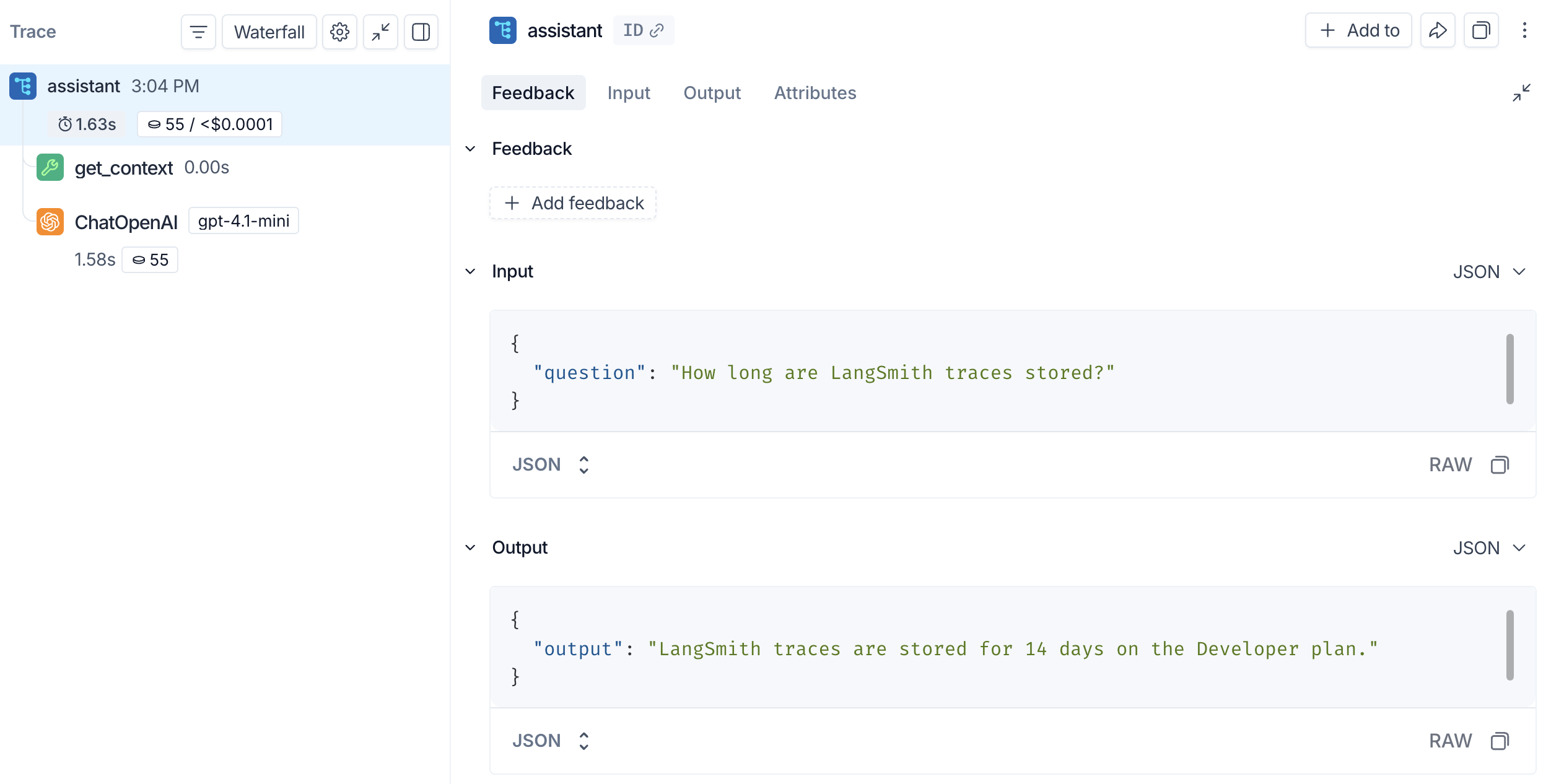
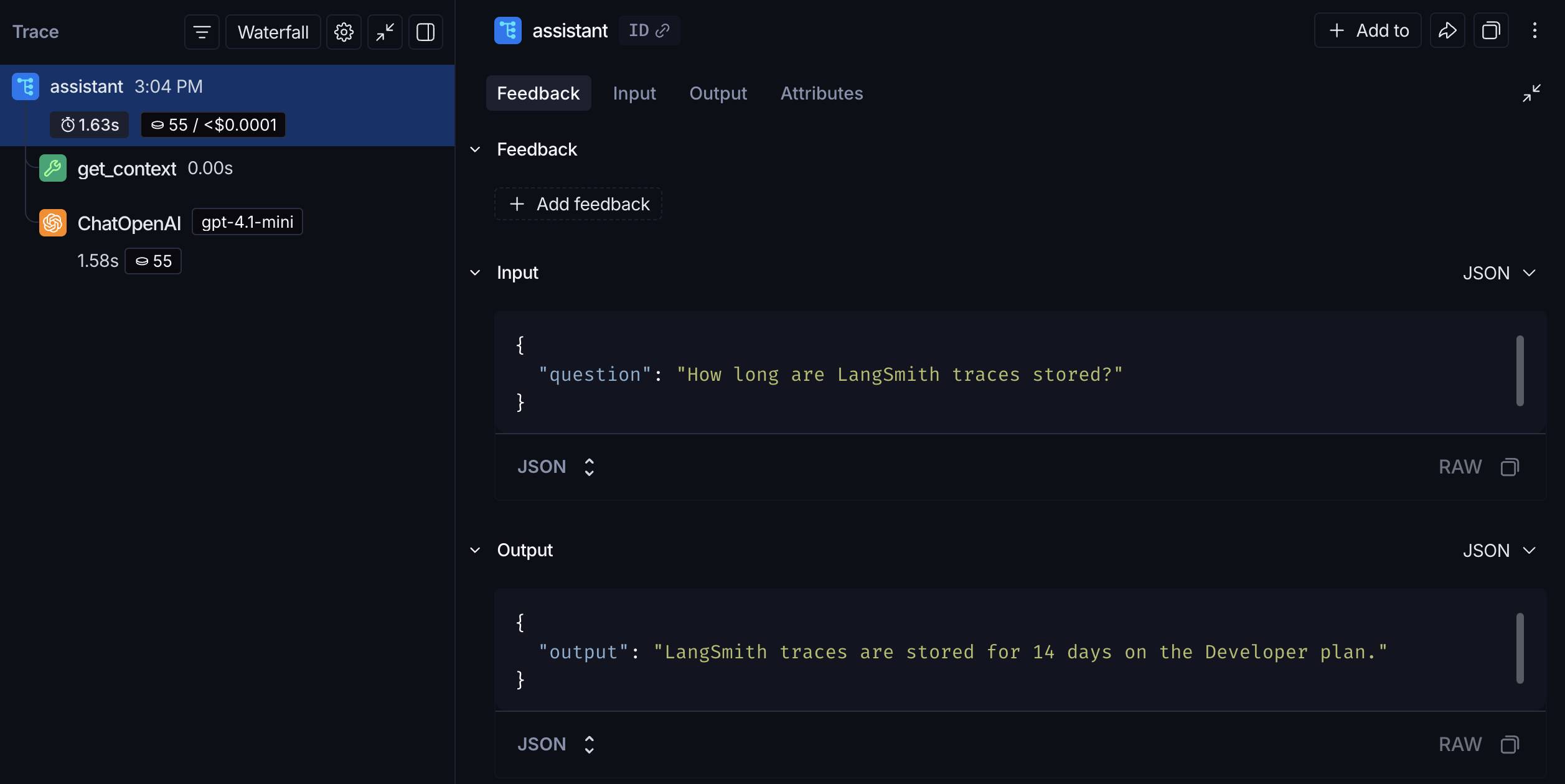 The outer span captures your `assistant` function's inputs and outputs. The nested **get\_context** span records the tool call, and the **ChatOpenAI** span records the exact prompt sent to the model and the response returned.
You can also inspect traces from the terminal using the [LangSmith CLI](/langsmith/langsmith-cli).
## Next steps
* [Tracing integrations](/langsmith/integrations): LangChain, LangGraph, Anthropic, and other providers.
* [Trace an LLM application](/langsmith/observability-llm-tutorial): a full lifecycle tutorial, from prototyping through production.
* [Filter traces](/langsmith/filter-traces-in-application): search and navigate large tracing projects.
* [Log to a specific project](/langsmith/log-traces-to-project): send traces to a named project instead of **default**.
After logging traces, use **[Polly](/langsmith/polly)** to analyze them and get AI-powered insights into your application's performance.
***
The outer span captures your `assistant` function's inputs and outputs. The nested **get\_context** span records the tool call, and the **ChatOpenAI** span records the exact prompt sent to the model and the response returned.
You can also inspect traces from the terminal using the [LangSmith CLI](/langsmith/langsmith-cli).
## Next steps
* [Tracing integrations](/langsmith/integrations): LangChain, LangGraph, Anthropic, and other providers.
* [Trace an LLM application](/langsmith/observability-llm-tutorial): a full lifecycle tutorial, from prototyping through production.
* [Filter traces](/langsmith/filter-traces-in-application): search and navigate large tracing projects.
* [Log to a specific project](/langsmith/log-traces-to-project): send traces to a named project instead of **default**.
After logging traces, use **[Polly](/langsmith/polly)** to analyze them and get AI-powered insights into your application's performance.
***
[Connect these docs](/use-these-docs) to Claude, VSCode, and more via MCP for real-time answers.
[Edit this page on GitHub](https://github.com/langchain-ai/docs/edit/main/src/langsmith/observability-quickstart.mdx) or [file an issue](https://github.com/langchain-ai/docs/issues/new/choose).