> ## Documentation Index
> Fetch the complete documentation index at: https://docs.langchain.com/llms.txt
> Use this file to discover all available pages before exploring further.
# How to run evaluations with pytest
The LangSmith pytest plugin lets Python developers define their datasets and evaluations as pytest test cases.
Compared to the standard evaluation flow, this is useful when:
* **Each example requires different evaluation logic**: Standard evaluation flows assume consistent application and evaluator execution across all dataset examples. For more complex systems or comprehensive evaluations, specific system subsets may require evaluation with particular input types and metrics. These heterogeneous evaluations are simpler to write as distinct test case suites that track together.
* **You want to assert binary expectations**: Track assertions in LangSmith and raise assertion errors locally (e.g. in CI pipelines). Testing tools help when both evaluating system outputs and asserting basic properties about them.
* **You want pytest-like terminal outputs**: Get familiar pytest output formatting
* **You already use pytest to test your app**: Add LangSmith tracking to existing pytest workflows
The JS/TS SDK has an analogous [Vitest/Jest integration](/langsmith/vitest-jest).
## Installation
This functionality requires Python SDK version `langsmith>=0.3.4`.
For extra features like [rich terminal outputs](#rich-outputs) and [test caching](#caching) install:
```bash pip theme={"theme":{"light":"catppuccin-latte","dark":"catppuccin-mocha"}}
pip install -U "langsmith[pytest]"
```
```bash uv theme={"theme":{"light":"catppuccin-latte","dark":"catppuccin-mocha"}}
uv add "langsmith[pytest]"
```
## Define and run tests
The pytest integration lets you define datasets and evaluators as test cases.
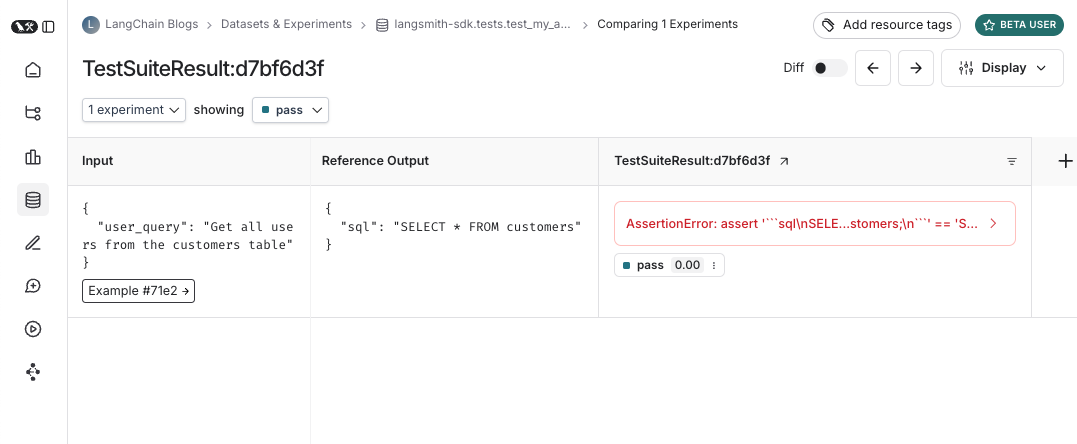
To track a test in LangSmith add the `@pytest.mark.langsmith` decorator. Every decorated test case will be synced to a dataset example. When you run the test suite, the dataset will be updated and a new experiment will be created with one result for each test case.
```python Python theme={"theme":{"light":"catppuccin-latte","dark":"catppuccin-mocha"}}
###################### my_app/main.py ######################
import openai
from langsmith import traceable, wrappers
oai_client = wrappers.wrap_openai(openai.OpenAI())
@traceable
def generate_sql(user_query: str) -> str:
result = oai_client.chat.completions.create(
model="gpt-5.4-mini",
messages=[
{"role": "system", "content": "Convert the user query to a SQL query."},
{"role": "user", "content": user_query},
],
)
return result.choices[0].message.content
###################### tests/test_my_app.py ######################
import pytest
from langsmith import testing as t
def is_valid_sql(query: str) -> bool:
"""Return True if the query is valid SQL."""
return True # Dummy implementation
@pytest.mark.langsmith # <-- Mark as a LangSmith test case
def test_sql_generation_select_all() -> None:
user_query = "Get all users from the customers table"
t.log_inputs({"user_query": user_query}) # <-- Log example inputs, optional
expected = "SELECT * FROM customers;"
t.log_reference_outputs({"sql": expected}) # <-- Log example reference outputs, optional
sql = generate_sql(user_query)
t.log_outputs({"sql": sql}) # <-- Log run outputs, optional
t.log_feedback(key="valid_sql", score=is_valid_sql(sql)) # <-- Log feedback, optional
assert sql == expected # <-- Test pass/fail status automatically logged to LangSmith under 'pass' feedback key
```
When you run this test it will have a default `pass` boolean feedback key based on the test case passing / failing. It will also track any inputs, outputs, and reference (expected) outputs that you log.
Use `pytest` as you normally would to run the tests:
```bash theme={"theme":{"light":"catppuccin-latte","dark":"catppuccin-mocha"}}
pytest tests/
```
In most cases we recommend setting a test suite name:
```bash theme={"theme":{"light":"catppuccin-latte","dark":"catppuccin-mocha"}}
LANGSMITH_TEST_SUITE='SQL app tests' pytest tests/
```
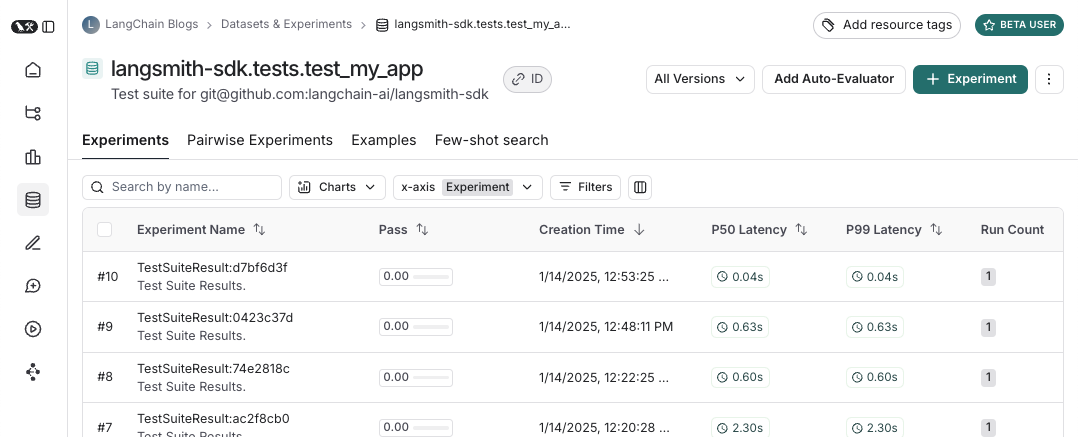
Each time you run this test suite, LangSmith:
* creates a [dataset](/langsmith/evaluation-concepts#datasets) for each test file. If a dataset for this test file already exists it will be updated
* creates an [experiment](/langsmith/evaluation-concepts#experiment) in each created/updated dataset
* creates an experiment row for each test case, with the inputs, outputs, reference outputs and feedback you've logged
* collects the pass/fail rate under the `pass` feedback key for each test case
Here's what a test suite dataset looks like:
 And what an experiment against that test suite looks like:
 ## Log inputs, outputs, and reference outputs
Every time we run a test we're syncing it to a dataset example and tracing it as a run. There's a few different ways that we can trace the example inputs and reference outputs and the run outputs. The simplest is to use the `log_inputs`, `log_outputs`, and `log_reference_outputs` methods. You can run these any time in a test to update the example and run for that test:
```python theme={"theme":{"light":"catppuccin-latte","dark":"catppuccin-mocha"}}
import pytest
from langsmith import testing as t
@pytest.mark.langsmith
def test_foo() -> None:
t.log_inputs({"a": 1, "b": 2})
t.log_reference_outputs({"foo": "bar"})
t.log_outputs({"foo": "baz"})
assert True
```
Running this test will create/update an example with name "test\_foo", inputs `{"a": 1, "b": 2}`, reference outputs `{"foo": "bar"}` and trace a run with outputs `{"foo": "baz"}`.
**NOTE**: If you run `log_inputs`, `log_outputs`, or `log_reference_outputs` twice, the previous values will be overwritten.
Another way to define example inputs and reference outputs is via pytest fixtures/parametrizations. By default any arguments to your test function will be logged as inputs on the corresponding example. If certain arguments are meant to represet reference outputs, you can specify that they should be logged as such using `@pytest.mark.langsmith(output_keys=["name_of_ref_output_arg"])`:
```python theme={"theme":{"light":"catppuccin-latte","dark":"catppuccin-mocha"}}
import pytest
@pytest.fixture
def c() -> int:
return 5
@pytest.fixture
def d() -> int:
return 6
@pytest.mark.langsmith(output_keys=["d"])
def test_cd(c: int, d: int) -> None:
result = 2 * c
t.log_outputs({"d": result}) # Log run outputs
assert result == d
```
This will create/sync an example with name "test\_cd", inputs `{"c": 5}` and reference outputs `{"d": 6}`, and run output `{"d": 10}`.
## Log feedback
By default LangSmith collects the pass/fail rate under the `pass` feedback key for each test case. You can add additional feedback with `log_feedback`.
```python theme={"theme":{"light":"catppuccin-latte","dark":"catppuccin-mocha"}}
import openai
import pytest
from langsmith import wrappers
from langsmith import testing as t
oai_client = wrappers.wrap_openai(openai.OpenAI())
@pytest.mark.langsmith
def test_offtopic_input() -> None:
user_query = "whats up"
t.log_inputs({"user_query": user_query})
sql = generate_sql(user_query)
t.log_outputs({"sql": sql})
expected = "Sorry that is not a valid query."
t.log_reference_outputs({"sql": expected})
# Use this context manager to trace any steps used for generating evaluation
# feedback separately from the main application logic
with t.trace_feedback():
instructions = (
"Return 1 if the ACTUAL and EXPECTED answers are semantically equivalent, "
"otherwise return 0. Return only 0 or 1 and nothing else."
)
grade = oai_client.chat.completions.create(
model="gpt-5.4-mini",
messages=[
{"role": "system", "content": instructions},
{"role": "user", "content": f"ACTUAL: {sql}\nEXPECTED: {expected}"},
],
)
score = float(grade.choices[0].message.content)
t.log_feedback(key="correct", score=score)
assert score
```
Note the use of the `trace_feedback()` context manager. This makes it so that the LLM-as-judge call is traced separately from the rest of the test case. Instead of showing up in the main test case run it will instead show up in the trace for the `correct` feedback key.
**NOTE**: Make sure that the `log_feedback` call associated with the feedback trace occurs inside the `trace_feedback` context. This way we'll be able to associate the feedback with the trace, and when seeing the feedback in the UI you'll be able to click on it to see the trace that generated it.
## Trace intermediate calls
LangSmith will automatically trace any traceable intermediate calls that happen in the course of test case execution.
## Grouping tests into a test suite
By default, all tests within a given file will be grouped as a single "test suite" with a corresponding dataset. You can configure which test suite a test belongs to by passing the `test_suite_name` parameter to `@pytest.mark.langsmith` for case-by-case grouping, or you can set the `LANGSMITH_TEST_SUITE` env var to group all tests from an execution into a single test suite:
```bash theme={"theme":{"light":"catppuccin-latte","dark":"catppuccin-mocha"}}
LANGSMITH_TEST_SUITE="SQL app tests" pytest tests/
```
We generally recommend setting `LANGSMITH_TEST_SUITE` to get a consolidated view of all of your results.
## Naming experiments
You can name an experiment using the `LANGSMITH_EXPERIMENT` env var:
```bash theme={"theme":{"light":"catppuccin-latte","dark":"catppuccin-mocha"}}
LANGSMITH_TEST_SUITE="SQL app tests" LANGSMITH_EXPERIMENT="baseline" pytest tests/
```
## Experiment metadata
You can attach custom metadata to the experiment (project) created by each test run. This is useful for tracking which model, prompt version, or environment was used for a given experiment.
**Option 1: Fixture (recommended)**
Define a session-scoped fixture in your `conftest.py`:
```python theme={"theme":{"light":"catppuccin-latte","dark":"catppuccin-mocha"}}
# conftest.py
import os
import pytest
@pytest.fixture(scope="session")
def langsmith_experiment_metadata():
return {
"model": "gpt-4o",
"prompt_version": "v2.3",
"environment": os.environ.get("ENV", "local"),
}
```
The fixture is dynamic (can read env vars, call functions, etc.) and follows pytest's `conftest.py` hierarchy so it can be scoped per directory.
**Option 2: Environment variable**
Set `LANGSMITH_EXPERIMENT_METADATA` to a JSON string. This is useful in CI/CD pipelines where you don't want to modify code:
```bash theme={"theme":{"light":"catppuccin-latte","dark":"catppuccin-mocha"}}
LANGSMITH_EXPERIMENT_METADATA='{"model":"gpt-4o","env":"staging"}' pytest tests/
```
If both the fixture and the env var are set, the fixture takes precedence. System-managed metadata keys (like `revision_id` and git info) always take precedence over user-supplied keys.
This feature requires `langsmith>=0.7.13`.
## Caching
LLMs on every commit in CI can get expensive. To save time and resources, LangSmith lets you cache HTTP requests to disk. To enable caching, install with `langsmith[pytest]` and set an env var: `LANGSMITH_TEST_CACHE=/my/cache/path`:
```bash pip theme={"theme":{"light":"catppuccin-latte","dark":"catppuccin-mocha"}}
pip install -U "langsmith[pytest]"
LANGSMITH_TEST_CACHE=tests/cassettes pytest tests/my_llm_tests
```
```bash uv theme={"theme":{"light":"catppuccin-latte","dark":"catppuccin-mocha"}}
uv add "langsmith[pytest]"
LANGSMITH_TEST_CACHE=tests/cassettes pytest tests/my_llm_tests
```
All requests will be cached to `tests/cassettes` and loaded from there on subsequent runs. If you check this in to your repository, your CI will be able to use the cache as well.
In `langsmith>=0.4.10`, you may selectively enable caching for requests to individual URLs or hostnames like this:
```python theme={"theme":{"light":"catppuccin-latte","dark":"catppuccin-mocha"}}
@pytest.mark.langsmith(cached_hosts=["api.openai.com", "https://api.anthropic.com"])
def my_test():
...
```
## pytest features
`@pytest.mark.langsmith` is designed to stay out of your way and works well with familiar `pytest` features.
### Parametrize with `pytest.mark.parametrize`
You can use the `parametrize` decorator as before. This will create a new test case for each parametrized instance of the test.
```python theme={"theme":{"light":"catppuccin-latte","dark":"catppuccin-mocha"}}
@pytest.mark.langsmith(output_keys=["expected_sql"])
@pytest.mark.parametrize(
"user_query, expected_sql",
[
("Get all users from the customers table", "SELECT * FROM customers"),
("Get all users from the orders table", "SELECT * FROM orders"),
],
)
def test_sql_generation_parametrized(user_query, expected_sql):
sql = generate_sql(user_query)
assert sql == expected_sql
```
**Note:** as the parametrized list grows, you may consider using `evaluate()` instead. This parallelizes the evaluation and makes it easier to control individual experiments and the corresponding dataset.
### Parallelize with `pytest-xdist`
You can use [pytest-xdist](https://pytest-xdist.readthedocs.io/en/stable/) as you normally would to parallelize test execution:
```bash pip theme={"theme":{"light":"catppuccin-latte","dark":"catppuccin-mocha"}}
pip install -U pytest-xdist
pytest -n auto tests
```
```bash uv theme={"theme":{"light":"catppuccin-latte","dark":"catppuccin-mocha"}}
uv add pytest-xdist
pytest -n auto tests
```
### Async tests with `pytest-asyncio`
`@pytest.mark.langsmith` works with sync or async tests, so you can run async tests exactly as before.
### Watch mode with `pytest-watch`
Use watch mode to quickly iterate on your tests. We *highly* recommend only using this with test caching (see below) enabled to avoid unnecessary LLM calls:
```bash pip theme={"theme":{"light":"catppuccin-latte","dark":"catppuccin-mocha"}}
pip install pytest-watch
LANGSMITH_TEST_CACHE=tests/cassettes ptw tests/my_llm_tests
```
```bash uv theme={"theme":{"light":"catppuccin-latte","dark":"catppuccin-mocha"}}
uv add pytest-watch
LANGSMITH_TEST_CACHE=tests/cassettes ptw tests/my_llm_tests
```
## Rich outputs
If you'd like to see a rich display of the LangSmith results of your test run you can specify `--langsmith-output`:
```bash theme={"theme":{"light":"catppuccin-latte","dark":"catppuccin-mocha"}}
pytest --langsmith-output tests
```
**Note:** This flag used to be `--output=langsmith` in `langsmith<=0.3.3` but was updated to avoid collisions with other pytest plugins.
You'll get a nice table per test suite that updates live as the results are uploaded to LangSmith:
## Log inputs, outputs, and reference outputs
Every time we run a test we're syncing it to a dataset example and tracing it as a run. There's a few different ways that we can trace the example inputs and reference outputs and the run outputs. The simplest is to use the `log_inputs`, `log_outputs`, and `log_reference_outputs` methods. You can run these any time in a test to update the example and run for that test:
```python theme={"theme":{"light":"catppuccin-latte","dark":"catppuccin-mocha"}}
import pytest
from langsmith import testing as t
@pytest.mark.langsmith
def test_foo() -> None:
t.log_inputs({"a": 1, "b": 2})
t.log_reference_outputs({"foo": "bar"})
t.log_outputs({"foo": "baz"})
assert True
```
Running this test will create/update an example with name "test\_foo", inputs `{"a": 1, "b": 2}`, reference outputs `{"foo": "bar"}` and trace a run with outputs `{"foo": "baz"}`.
**NOTE**: If you run `log_inputs`, `log_outputs`, or `log_reference_outputs` twice, the previous values will be overwritten.
Another way to define example inputs and reference outputs is via pytest fixtures/parametrizations. By default any arguments to your test function will be logged as inputs on the corresponding example. If certain arguments are meant to represet reference outputs, you can specify that they should be logged as such using `@pytest.mark.langsmith(output_keys=["name_of_ref_output_arg"])`:
```python theme={"theme":{"light":"catppuccin-latte","dark":"catppuccin-mocha"}}
import pytest
@pytest.fixture
def c() -> int:
return 5
@pytest.fixture
def d() -> int:
return 6
@pytest.mark.langsmith(output_keys=["d"])
def test_cd(c: int, d: int) -> None:
result = 2 * c
t.log_outputs({"d": result}) # Log run outputs
assert result == d
```
This will create/sync an example with name "test\_cd", inputs `{"c": 5}` and reference outputs `{"d": 6}`, and run output `{"d": 10}`.
## Log feedback
By default LangSmith collects the pass/fail rate under the `pass` feedback key for each test case. You can add additional feedback with `log_feedback`.
```python theme={"theme":{"light":"catppuccin-latte","dark":"catppuccin-mocha"}}
import openai
import pytest
from langsmith import wrappers
from langsmith import testing as t
oai_client = wrappers.wrap_openai(openai.OpenAI())
@pytest.mark.langsmith
def test_offtopic_input() -> None:
user_query = "whats up"
t.log_inputs({"user_query": user_query})
sql = generate_sql(user_query)
t.log_outputs({"sql": sql})
expected = "Sorry that is not a valid query."
t.log_reference_outputs({"sql": expected})
# Use this context manager to trace any steps used for generating evaluation
# feedback separately from the main application logic
with t.trace_feedback():
instructions = (
"Return 1 if the ACTUAL and EXPECTED answers are semantically equivalent, "
"otherwise return 0. Return only 0 or 1 and nothing else."
)
grade = oai_client.chat.completions.create(
model="gpt-5.4-mini",
messages=[
{"role": "system", "content": instructions},
{"role": "user", "content": f"ACTUAL: {sql}\nEXPECTED: {expected}"},
],
)
score = float(grade.choices[0].message.content)
t.log_feedback(key="correct", score=score)
assert score
```
Note the use of the `trace_feedback()` context manager. This makes it so that the LLM-as-judge call is traced separately from the rest of the test case. Instead of showing up in the main test case run it will instead show up in the trace for the `correct` feedback key.
**NOTE**: Make sure that the `log_feedback` call associated with the feedback trace occurs inside the `trace_feedback` context. This way we'll be able to associate the feedback with the trace, and when seeing the feedback in the UI you'll be able to click on it to see the trace that generated it.
## Trace intermediate calls
LangSmith will automatically trace any traceable intermediate calls that happen in the course of test case execution.
## Grouping tests into a test suite
By default, all tests within a given file will be grouped as a single "test suite" with a corresponding dataset. You can configure which test suite a test belongs to by passing the `test_suite_name` parameter to `@pytest.mark.langsmith` for case-by-case grouping, or you can set the `LANGSMITH_TEST_SUITE` env var to group all tests from an execution into a single test suite:
```bash theme={"theme":{"light":"catppuccin-latte","dark":"catppuccin-mocha"}}
LANGSMITH_TEST_SUITE="SQL app tests" pytest tests/
```
We generally recommend setting `LANGSMITH_TEST_SUITE` to get a consolidated view of all of your results.
## Naming experiments
You can name an experiment using the `LANGSMITH_EXPERIMENT` env var:
```bash theme={"theme":{"light":"catppuccin-latte","dark":"catppuccin-mocha"}}
LANGSMITH_TEST_SUITE="SQL app tests" LANGSMITH_EXPERIMENT="baseline" pytest tests/
```
## Experiment metadata
You can attach custom metadata to the experiment (project) created by each test run. This is useful for tracking which model, prompt version, or environment was used for a given experiment.
**Option 1: Fixture (recommended)**
Define a session-scoped fixture in your `conftest.py`:
```python theme={"theme":{"light":"catppuccin-latte","dark":"catppuccin-mocha"}}
# conftest.py
import os
import pytest
@pytest.fixture(scope="session")
def langsmith_experiment_metadata():
return {
"model": "gpt-4o",
"prompt_version": "v2.3",
"environment": os.environ.get("ENV", "local"),
}
```
The fixture is dynamic (can read env vars, call functions, etc.) and follows pytest's `conftest.py` hierarchy so it can be scoped per directory.
**Option 2: Environment variable**
Set `LANGSMITH_EXPERIMENT_METADATA` to a JSON string. This is useful in CI/CD pipelines where you don't want to modify code:
```bash theme={"theme":{"light":"catppuccin-latte","dark":"catppuccin-mocha"}}
LANGSMITH_EXPERIMENT_METADATA='{"model":"gpt-4o","env":"staging"}' pytest tests/
```
If both the fixture and the env var are set, the fixture takes precedence. System-managed metadata keys (like `revision_id` and git info) always take precedence over user-supplied keys.
This feature requires `langsmith>=0.7.13`.
## Caching
LLMs on every commit in CI can get expensive. To save time and resources, LangSmith lets you cache HTTP requests to disk. To enable caching, install with `langsmith[pytest]` and set an env var: `LANGSMITH_TEST_CACHE=/my/cache/path`:
```bash pip theme={"theme":{"light":"catppuccin-latte","dark":"catppuccin-mocha"}}
pip install -U "langsmith[pytest]"
LANGSMITH_TEST_CACHE=tests/cassettes pytest tests/my_llm_tests
```
```bash uv theme={"theme":{"light":"catppuccin-latte","dark":"catppuccin-mocha"}}
uv add "langsmith[pytest]"
LANGSMITH_TEST_CACHE=tests/cassettes pytest tests/my_llm_tests
```
All requests will be cached to `tests/cassettes` and loaded from there on subsequent runs. If you check this in to your repository, your CI will be able to use the cache as well.
In `langsmith>=0.4.10`, you may selectively enable caching for requests to individual URLs or hostnames like this:
```python theme={"theme":{"light":"catppuccin-latte","dark":"catppuccin-mocha"}}
@pytest.mark.langsmith(cached_hosts=["api.openai.com", "https://api.anthropic.com"])
def my_test():
...
```
## pytest features
`@pytest.mark.langsmith` is designed to stay out of your way and works well with familiar `pytest` features.
### Parametrize with `pytest.mark.parametrize`
You can use the `parametrize` decorator as before. This will create a new test case for each parametrized instance of the test.
```python theme={"theme":{"light":"catppuccin-latte","dark":"catppuccin-mocha"}}
@pytest.mark.langsmith(output_keys=["expected_sql"])
@pytest.mark.parametrize(
"user_query, expected_sql",
[
("Get all users from the customers table", "SELECT * FROM customers"),
("Get all users from the orders table", "SELECT * FROM orders"),
],
)
def test_sql_generation_parametrized(user_query, expected_sql):
sql = generate_sql(user_query)
assert sql == expected_sql
```
**Note:** as the parametrized list grows, you may consider using `evaluate()` instead. This parallelizes the evaluation and makes it easier to control individual experiments and the corresponding dataset.
### Parallelize with `pytest-xdist`
You can use [pytest-xdist](https://pytest-xdist.readthedocs.io/en/stable/) as you normally would to parallelize test execution:
```bash pip theme={"theme":{"light":"catppuccin-latte","dark":"catppuccin-mocha"}}
pip install -U pytest-xdist
pytest -n auto tests
```
```bash uv theme={"theme":{"light":"catppuccin-latte","dark":"catppuccin-mocha"}}
uv add pytest-xdist
pytest -n auto tests
```
### Async tests with `pytest-asyncio`
`@pytest.mark.langsmith` works with sync or async tests, so you can run async tests exactly as before.
### Watch mode with `pytest-watch`
Use watch mode to quickly iterate on your tests. We *highly* recommend only using this with test caching (see below) enabled to avoid unnecessary LLM calls:
```bash pip theme={"theme":{"light":"catppuccin-latte","dark":"catppuccin-mocha"}}
pip install pytest-watch
LANGSMITH_TEST_CACHE=tests/cassettes ptw tests/my_llm_tests
```
```bash uv theme={"theme":{"light":"catppuccin-latte","dark":"catppuccin-mocha"}}
uv add pytest-watch
LANGSMITH_TEST_CACHE=tests/cassettes ptw tests/my_llm_tests
```
## Rich outputs
If you'd like to see a rich display of the LangSmith results of your test run you can specify `--langsmith-output`:
```bash theme={"theme":{"light":"catppuccin-latte","dark":"catppuccin-mocha"}}
pytest --langsmith-output tests
```
**Note:** This flag used to be `--output=langsmith` in `langsmith<=0.3.3` but was updated to avoid collisions with other pytest plugins.
You'll get a nice table per test suite that updates live as the results are uploaded to LangSmith:
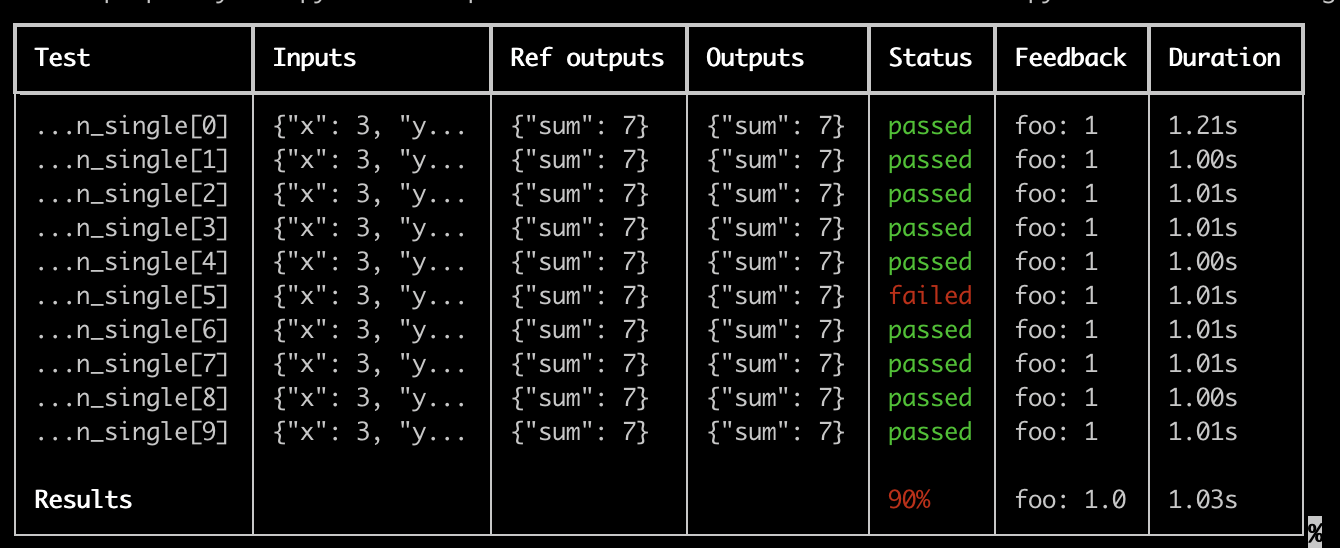 Some important notes for using this feature:
* Make sure you've installed `pip install -U "langsmith[pytest]"`
* Rich outputs do not currently work with `pytest-xdist`
The custom output removes all the standard pytest outputs. If you're trying to debug some unexpected behavior it's often better to show the regular pytest outputs so to get full error traces.
## Dry-run mode
If you want to run the tests without syncing the results to LangSmith, you can set `LANGSMITH_TEST_TRACKING=false` in your environment.
```bash theme={"theme":{"light":"catppuccin-latte","dark":"catppuccin-mocha"}}
LANGSMITH_TEST_TRACKING=false pytest tests/
```
The tests will run as normal, but the experiment logs will not be sent to LangSmith.
## Expectations
LangSmith provides an [expect](https://reference.langchain.com/python/langsmith/observability/sdk/expect/) utility to help define expectations about your LLM output. For example:
```python theme={"theme":{"light":"catppuccin-latte","dark":"catppuccin-mocha"}}
from langsmith import expect
@pytest.mark.langsmith
def test_sql_generation_select_all():
user_query = "Get all users from the customers table"
sql = generate_sql(user_query)
expect(sql).to_contain("customers")
```
This will log the binary "expectation" score to the experiment results, additionally `assert`ing that the expectation is met possibly triggering a test failure.
`expect` also provides "fuzzy match" methods. For example:
```python theme={"theme":{"light":"catppuccin-latte","dark":"catppuccin-mocha"}}
@pytest.mark.langsmith(output_keys=["expectation"])
@pytest.mark.parametrize(
"query, expectation",
[
("what's the capital of France?", "Paris"),
],
)
def test_embedding_similarity(query, expectation):
prediction = my_chatbot(query)
expect.embedding_distance(
# This step logs the distance as feedback for this run
prediction=prediction, expectation=expectation
# Adding a matcher (in this case, 'to_be_*"), logs 'expectation' feedback
).to_be_less_than(0.5) # Optional predicate to assert against
expect.edit_distance(
# This computes the normalized Damerau-Levenshtein distance between the two strings
prediction=prediction, expectation=expectation
# If no predicate is provided below, 'assert' isn't called, but the score is still logged
)
```
This test case will be assigned 4 scores:
1. The `embedding_distance` between the prediction and the expectation
2. The binary `expectation` score (1 if cosine distance is less than 0.5, 0 if not)
3. The `edit_distance` between the prediction and the expectation
4. The overall test pass/fail score (binary)
The `expect` utility is modeled off of [Jest](https://jestjs.io/docs/expect)'s expect API, with some off-the-shelf functionality to make it easier to grade your LLMs.
## Legacy
#### `@test` / `@unit` decorator
The legacy method for marking test cases is using the `@test` or `@unit` decorators:
```python theme={"theme":{"light":"catppuccin-latte","dark":"catppuccin-mocha"}}
from langsmith import test
@test
def test_foo() -> None:
pass
```
***
Some important notes for using this feature:
* Make sure you've installed `pip install -U "langsmith[pytest]"`
* Rich outputs do not currently work with `pytest-xdist`
The custom output removes all the standard pytest outputs. If you're trying to debug some unexpected behavior it's often better to show the regular pytest outputs so to get full error traces.
## Dry-run mode
If you want to run the tests without syncing the results to LangSmith, you can set `LANGSMITH_TEST_TRACKING=false` in your environment.
```bash theme={"theme":{"light":"catppuccin-latte","dark":"catppuccin-mocha"}}
LANGSMITH_TEST_TRACKING=false pytest tests/
```
The tests will run as normal, but the experiment logs will not be sent to LangSmith.
## Expectations
LangSmith provides an [expect](https://reference.langchain.com/python/langsmith/observability/sdk/expect/) utility to help define expectations about your LLM output. For example:
```python theme={"theme":{"light":"catppuccin-latte","dark":"catppuccin-mocha"}}
from langsmith import expect
@pytest.mark.langsmith
def test_sql_generation_select_all():
user_query = "Get all users from the customers table"
sql = generate_sql(user_query)
expect(sql).to_contain("customers")
```
This will log the binary "expectation" score to the experiment results, additionally `assert`ing that the expectation is met possibly triggering a test failure.
`expect` also provides "fuzzy match" methods. For example:
```python theme={"theme":{"light":"catppuccin-latte","dark":"catppuccin-mocha"}}
@pytest.mark.langsmith(output_keys=["expectation"])
@pytest.mark.parametrize(
"query, expectation",
[
("what's the capital of France?", "Paris"),
],
)
def test_embedding_similarity(query, expectation):
prediction = my_chatbot(query)
expect.embedding_distance(
# This step logs the distance as feedback for this run
prediction=prediction, expectation=expectation
# Adding a matcher (in this case, 'to_be_*"), logs 'expectation' feedback
).to_be_less_than(0.5) # Optional predicate to assert against
expect.edit_distance(
# This computes the normalized Damerau-Levenshtein distance between the two strings
prediction=prediction, expectation=expectation
# If no predicate is provided below, 'assert' isn't called, but the score is still logged
)
```
This test case will be assigned 4 scores:
1. The `embedding_distance` between the prediction and the expectation
2. The binary `expectation` score (1 if cosine distance is less than 0.5, 0 if not)
3. The `edit_distance` between the prediction and the expectation
4. The overall test pass/fail score (binary)
The `expect` utility is modeled off of [Jest](https://jestjs.io/docs/expect)'s expect API, with some off-the-shelf functionality to make it easier to grade your LLMs.
## Legacy
#### `@test` / `@unit` decorator
The legacy method for marking test cases is using the `@test` or `@unit` decorators:
```python theme={"theme":{"light":"catppuccin-latte","dark":"catppuccin-mocha"}}
from langsmith import test
@test
def test_foo() -> None:
pass
```
***
[Connect these docs](/use-these-docs) to Claude, VSCode, and more via MCP for real-time answers.
[Edit this page on GitHub](https://github.com/langchain-ai/docs/edit/main/src/langsmith/pytest.mdx) or [file an issue](https://github.com/langchain-ai/docs/issues/new/choose).