> ## Documentation Index
> Fetch the complete documentation index at: https://docs.langchain.com/llms.txt
> Use this file to discover all available pages before exploring further.
# Sandbox service URLs
> Access HTTP services running inside sandboxes via authenticated URLs, from a browser or programmatically.
Service URLs let you access an HTTP service running inside a sandbox (a REST API, a Streamlit app, a Jupyter notebook, API documentation) without tunnels, port forwarding, or CLI tools. Each sandbox + port combination gets its own URL that you can open in a browser, call from code, or share with a teammate.
 ## Quick start
Start an HTTP server inside a sandbox, then get a URL to access it:
```python theme={"theme":{"light":"catppuccin-latte","dark":"catppuccin-mocha"}}
from langsmith.sandbox import SandboxClient
client = SandboxClient()
with client.sandbox() as sb:
handle = sb.run("python -m http.server 8000", timeout=0, wait=False)
svc = sb.service(port=8000)
# Open in a browser
print(svc.browser_url)
# Or make requests programmatically
resp = svc.get("/")
print(resp.status_code)
handle.kill()
```
## Use cases
| Scenario | How |
| -------------------------------------------- | ----------------------------------------------------------------- |
| Preview a web app (Streamlit, Jupyter, etc.) | `sb.service(port=)` then open `browser_url` |
| Call an API from code or CI | `svc.get(...)` / `svc.post(...)` or `curl` with the service token |
| Share a live demo with a teammate | Click **Share Link** in the UI and send the URL |
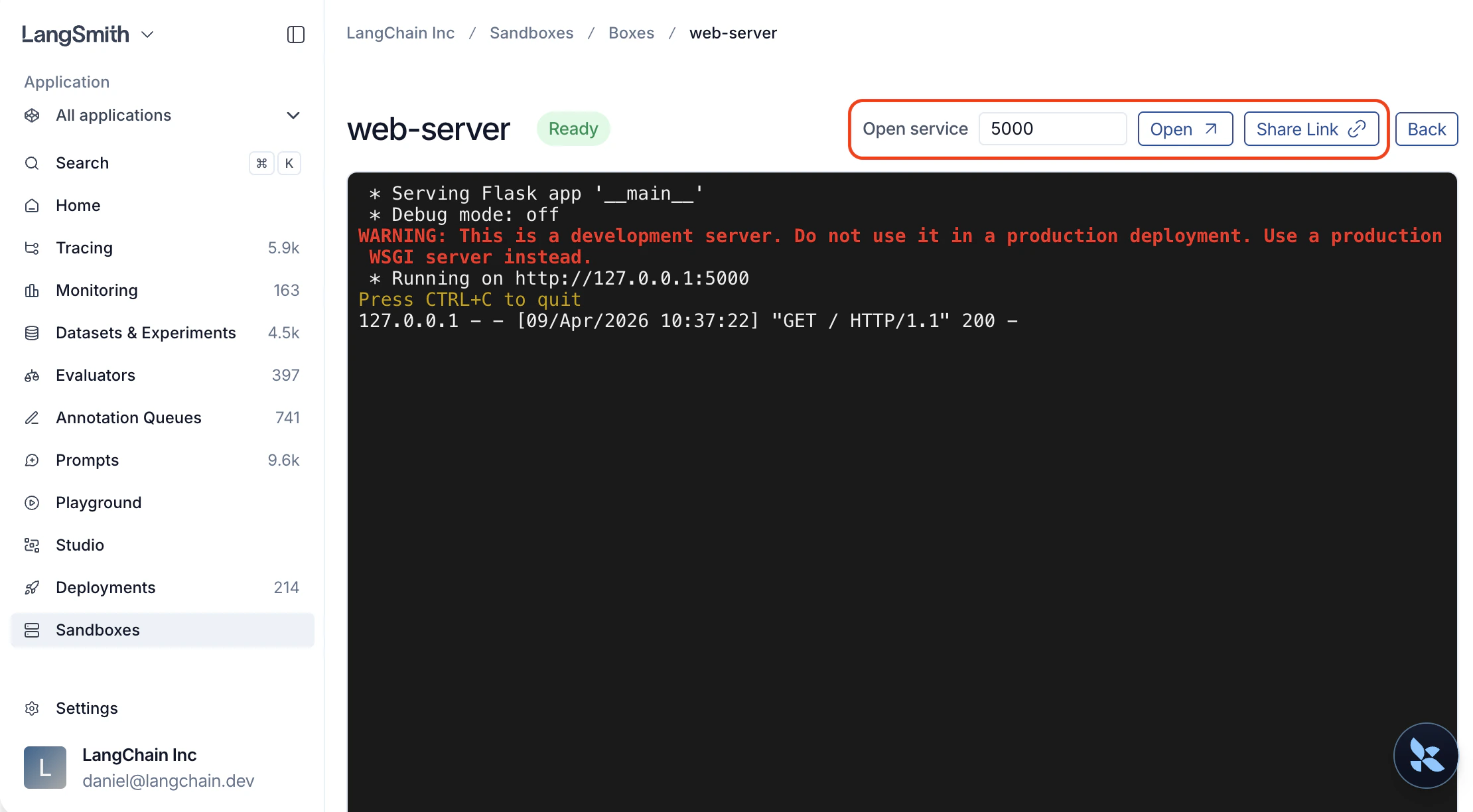
## Open a service from the UI
1. Open the sandbox detail page.
2. Find the **Open service** widget.
3. Type a port number (e.g. `3000`).
4. Click **Open** to launch in a new tab, or **Share Link** to copy a URL you can send to a teammate.
Anyone with the link can access the service, even without a LangSmith account. After the token expires, generate a new link from the UI.
## Open a service from the SDK
### Get a service URL
Call `service()` on a sandbox instance or on the client directly:
```python theme={"theme":{"light":"catppuccin-latte","dark":"catppuccin-mocha"}}
svc = sb.service(port=3000)
# Or from the client, by sandbox name
svc = client.service("my-sandbox", port=3000)
# Customize token lifetime (default: 10 minutes, max: 24 hours)
svc = sb.service(port=3000, expires_in_seconds=3600)
```
The service must be running and listening on the specified port before you request a service URL. The URL only routes traffic and does not start a service for you.
### Make requests
The returned `ServiceURL` object has built-in HTTP helpers that handle authentication automatically. Tokens refresh transparently before they expire, so no manual management is needed.
```python theme={"theme":{"light":"catppuccin-latte","dark":"catppuccin-mocha"}}
svc = sb.service(port=8000)
resp = svc.get("/api/items")
resp = svc.post("/api/items", json={"name": "widget"})
resp = svc.put("/api/items/1", json={"name": "updated"})
resp = svc.patch("/api/items/1", json={"status": "active"})
resp = svc.delete("/api/items/1")
```
### Use your own HTTP client
If you prefer a different HTTP client, use the raw URL and token:
```python theme={"theme":{"light":"catppuccin-latte","dark":"catppuccin-mocha"}}
import httpx
svc = sb.service(port=8000)
resp = httpx.get(
svc.service_url + "api/items",
headers={"X-Langsmith-Sandbox-Service-Token": svc.token},
)
```
### Open in a browser
Use `browser_url` to open the service in a browser. It sets an authentication cookie automatically, so all subsequent page loads, images, and API calls are authenticated without tokens in the URL.
```python theme={"theme":{"light":"catppuccin-latte","dark":"catppuccin-mocha"}}
svc = sb.service(port=8000)
print(svc.browser_url)
```
You can share this URL with teammates. No LangSmith login is required to access it.
### Generate a URL via the REST API
```bash theme={"theme":{"light":"catppuccin-latte","dark":"catppuccin-mocha"}}
curl -X POST \
"$LANGSMITH_ENDPOINT/api/v2/sandboxes/boxes/{sandbox_name}/service-url" \
-H "x-api-key: $LANGSMITH_API_KEY" \
-H "Content-Type: application/json" \
-d '{"port": 3000, "expires_in_seconds": 3600}'
```
Response:
```json theme={"theme":{"light":"catppuccin-latte","dark":"catppuccin-mocha"}}
{
"browser_url": "https://{sandbox-id}--3000.smithbox.dev/_svc/auth?token=ey...",
"service_url": "https://{sandbox-id}--3000.smithbox.dev/",
"token": "ey...",
"expires_at": "2026-04-08T15:30:00Z"
}
```
## Example: serve a FastAPI app
```python theme={"theme":{"light":"catppuccin-latte","dark":"catppuccin-mocha"}}
from langsmith.sandbox import SandboxClient
client = SandboxClient()
with client.sandbox() as sb:
sb.write("/app/main.py", """
from fastapi import FastAPI
app = FastAPI()
items = []
@app.get("/items")
def list_items():
return items
@app.post("/items")
def create_item(item: dict):
items.append(item)
return item
""")
sb.run("pip install fastapi uvicorn", timeout=120)
handle = sb.run(
"uvicorn main:app --host 0.0.0.0 --port 8000",
timeout=0,
wait=False,
env={"PYTHONPATH": "/app"},
)
import time
time.sleep(3)
svc = sb.service(port=8000)
svc.post("/items", json={"name": "widget", "price": 9.99})
svc.post("/items", json={"name": "gadget", "price": 24.99})
resp = svc.get("/items")
print(resp.json())
# [{"name": "widget", "price": 9.99}, {"name": "gadget", "price": 24.99}]
# Open the auto-generated API docs in a browser
print(svc.browser_url)
handle.kill()
```
## Service URLs vs TCP tunnels
| | Service URLs | TCP tunnels |
| ----------------------- | -------------------------------- | ------------------------------------- |
| **Protocol** | HTTP | Any TCP (databases, Redis, SSH, HTTP) |
| **Setup** | Zero — just a URL | Requires SDK or CLI |
| **Access from** | Browser, scripts, CI, anywhere | Local machine only |
| **Sharing** | Copy the URL and send it | Not shareable |
| **Multi-page web apps** | Full support (subdomain routing) | Full support (local port) |
| **Non-HTTP services** | Not supported | Full support |
Use **service URLs** for HTTP services you want to access from a browser or share with others. Use **[TCP tunnels](/langsmith/sandbox-sdk#tcp-tunnels-python)** for non-HTTP protocols (like `psql` or `redis-cli`) or when you need local-only access.
## Troubleshoot
| Error | Cause | Fix |
| ------------------------------ | --------------------------------- | ------------------------------------------------------------------------------------------ |
| **"Service link has expired"** | Token lifetime exceeded | Open the service again from LangSmith or call `sb.service()` for a fresh URL |
| **"Service is not reachable"** | Nothing is listening on that port | Verify the server is running inside the sandbox |
| **"Authentication required"** | No token in header or cookie | Use `browser_url` for browser access or set the `X-Langsmith-Sandbox-Service-Token` header |
***
## Quick start
Start an HTTP server inside a sandbox, then get a URL to access it:
```python theme={"theme":{"light":"catppuccin-latte","dark":"catppuccin-mocha"}}
from langsmith.sandbox import SandboxClient
client = SandboxClient()
with client.sandbox() as sb:
handle = sb.run("python -m http.server 8000", timeout=0, wait=False)
svc = sb.service(port=8000)
# Open in a browser
print(svc.browser_url)
# Or make requests programmatically
resp = svc.get("/")
print(resp.status_code)
handle.kill()
```
## Use cases
| Scenario | How |
| -------------------------------------------- | ----------------------------------------------------------------- |
| Preview a web app (Streamlit, Jupyter, etc.) | `sb.service(port=)` then open `browser_url` |
| Call an API from code or CI | `svc.get(...)` / `svc.post(...)` or `curl` with the service token |
| Share a live demo with a teammate | Click **Share Link** in the UI and send the URL |
## Open a service from the UI
1. Open the sandbox detail page.
2. Find the **Open service** widget.
3. Type a port number (e.g. `3000`).
4. Click **Open** to launch in a new tab, or **Share Link** to copy a URL you can send to a teammate.
Anyone with the link can access the service, even without a LangSmith account. After the token expires, generate a new link from the UI.
## Open a service from the SDK
### Get a service URL
Call `service()` on a sandbox instance or on the client directly:
```python theme={"theme":{"light":"catppuccin-latte","dark":"catppuccin-mocha"}}
svc = sb.service(port=3000)
# Or from the client, by sandbox name
svc = client.service("my-sandbox", port=3000)
# Customize token lifetime (default: 10 minutes, max: 24 hours)
svc = sb.service(port=3000, expires_in_seconds=3600)
```
The service must be running and listening on the specified port before you request a service URL. The URL only routes traffic and does not start a service for you.
### Make requests
The returned `ServiceURL` object has built-in HTTP helpers that handle authentication automatically. Tokens refresh transparently before they expire, so no manual management is needed.
```python theme={"theme":{"light":"catppuccin-latte","dark":"catppuccin-mocha"}}
svc = sb.service(port=8000)
resp = svc.get("/api/items")
resp = svc.post("/api/items", json={"name": "widget"})
resp = svc.put("/api/items/1", json={"name": "updated"})
resp = svc.patch("/api/items/1", json={"status": "active"})
resp = svc.delete("/api/items/1")
```
### Use your own HTTP client
If you prefer a different HTTP client, use the raw URL and token:
```python theme={"theme":{"light":"catppuccin-latte","dark":"catppuccin-mocha"}}
import httpx
svc = sb.service(port=8000)
resp = httpx.get(
svc.service_url + "api/items",
headers={"X-Langsmith-Sandbox-Service-Token": svc.token},
)
```
### Open in a browser
Use `browser_url` to open the service in a browser. It sets an authentication cookie automatically, so all subsequent page loads, images, and API calls are authenticated without tokens in the URL.
```python theme={"theme":{"light":"catppuccin-latte","dark":"catppuccin-mocha"}}
svc = sb.service(port=8000)
print(svc.browser_url)
```
You can share this URL with teammates. No LangSmith login is required to access it.
### Generate a URL via the REST API
```bash theme={"theme":{"light":"catppuccin-latte","dark":"catppuccin-mocha"}}
curl -X POST \
"$LANGSMITH_ENDPOINT/api/v2/sandboxes/boxes/{sandbox_name}/service-url" \
-H "x-api-key: $LANGSMITH_API_KEY" \
-H "Content-Type: application/json" \
-d '{"port": 3000, "expires_in_seconds": 3600}'
```
Response:
```json theme={"theme":{"light":"catppuccin-latte","dark":"catppuccin-mocha"}}
{
"browser_url": "https://{sandbox-id}--3000.smithbox.dev/_svc/auth?token=ey...",
"service_url": "https://{sandbox-id}--3000.smithbox.dev/",
"token": "ey...",
"expires_at": "2026-04-08T15:30:00Z"
}
```
## Example: serve a FastAPI app
```python theme={"theme":{"light":"catppuccin-latte","dark":"catppuccin-mocha"}}
from langsmith.sandbox import SandboxClient
client = SandboxClient()
with client.sandbox() as sb:
sb.write("/app/main.py", """
from fastapi import FastAPI
app = FastAPI()
items = []
@app.get("/items")
def list_items():
return items
@app.post("/items")
def create_item(item: dict):
items.append(item)
return item
""")
sb.run("pip install fastapi uvicorn", timeout=120)
handle = sb.run(
"uvicorn main:app --host 0.0.0.0 --port 8000",
timeout=0,
wait=False,
env={"PYTHONPATH": "/app"},
)
import time
time.sleep(3)
svc = sb.service(port=8000)
svc.post("/items", json={"name": "widget", "price": 9.99})
svc.post("/items", json={"name": "gadget", "price": 24.99})
resp = svc.get("/items")
print(resp.json())
# [{"name": "widget", "price": 9.99}, {"name": "gadget", "price": 24.99}]
# Open the auto-generated API docs in a browser
print(svc.browser_url)
handle.kill()
```
## Service URLs vs TCP tunnels
| | Service URLs | TCP tunnels |
| ----------------------- | -------------------------------- | ------------------------------------- |
| **Protocol** | HTTP | Any TCP (databases, Redis, SSH, HTTP) |
| **Setup** | Zero — just a URL | Requires SDK or CLI |
| **Access from** | Browser, scripts, CI, anywhere | Local machine only |
| **Sharing** | Copy the URL and send it | Not shareable |
| **Multi-page web apps** | Full support (subdomain routing) | Full support (local port) |
| **Non-HTTP services** | Not supported | Full support |
Use **service URLs** for HTTP services you want to access from a browser or share with others. Use **[TCP tunnels](/langsmith/sandbox-sdk#tcp-tunnels-python)** for non-HTTP protocols (like `psql` or `redis-cli`) or when you need local-only access.
## Troubleshoot
| Error | Cause | Fix |
| ------------------------------ | --------------------------------- | ------------------------------------------------------------------------------------------ |
| **"Service link has expired"** | Token lifetime exceeded | Open the service again from LangSmith or call `sb.service()` for a fresh URL |
| **"Service is not reachable"** | Nothing is listening on that port | Verify the server is running inside the sandbox |
| **"Authentication required"** | No token in header or cookie | Use `browser_url` for browser access or set the `X-Langsmith-Sandbox-Service-Token` header |
***
[Connect these docs](/use-these-docs) to Claude, VSCode, and more via MCP for real-time answers.
[Edit this page on GitHub](https://github.com/langchain-ai/docs/edit/main/src/langsmith/sandbox-service-urls.mdx) or [file an issue](https://github.com/langchain-ai/docs/issues/new/choose).