> ## Documentation Index
> Fetch the complete documentation index at: https://docs.langchain.com/llms.txt
> Use this file to discover all available pages before exploring further.
# Sandbox snapshots
> Build and capture reusable filesystem images for sandboxes.
A **snapshot** is a reusable filesystem bundle backed by a Docker image. Build or capture a snapshot when you want to boot sandboxes from a custom filesystem image.
You can also capture a snapshot from a running sandbox—install packages, write data files, or configure state, then snapshot the result and reuse it as a new starting point.
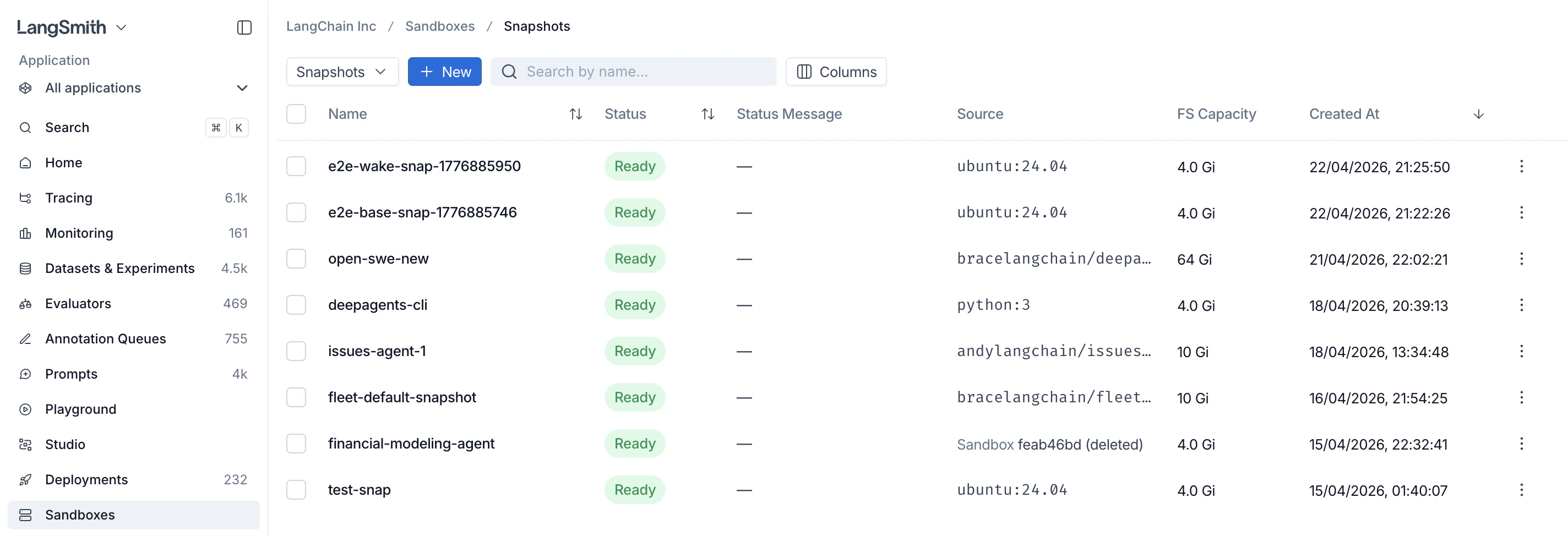 ## Build a snapshot from a Docker image
Build a snapshot by pointing at any Docker image. The call blocks until the snapshot is ready (default timeout is 60 seconds; bump it for large images).
```python Python theme={"theme":{"light":"catppuccin-latte","dark":"catppuccin-mocha"}}
from langsmith.sandbox import SandboxClient
client = SandboxClient()
snapshot = client.create_snapshot(
"python",
docker_image="python:3.12-slim",
fs_capacity_bytes=1 * 1024**3, # 1 GiB
)
print(snapshot.id)
```
```ts TypeScript theme={"theme":{"light":"catppuccin-latte","dark":"catppuccin-mocha"}}
import { SandboxClient } from "langsmith/sandbox";
const client = new SandboxClient();
const snapshot = await client.createSnapshot(
"python",
"python:3.12-slim",
1_073_741_824, // 1 GiB
);
console.log(snapshot.id);
```
### Private registries
Pass registry credentials (or a pre-registered `registry_id` / `registryId`) to pull from a private registry.
```python Python theme={"theme":{"light":"catppuccin-latte","dark":"catppuccin-mocha"}}
import os
snapshot = client.create_snapshot(
"internal-python",
docker_image="registry.example.com/internal/python:3.12",
fs_capacity_bytes=2 * 1024**3,
registry_url="https://registry.example.com",
registry_username="me",
registry_password=os.environ["REGISTRY_PASSWORD"],
timeout=600,
)
```
```ts TypeScript theme={"theme":{"light":"catppuccin-latte","dark":"catppuccin-mocha"}}
const snapshot = await client.createSnapshot(
"internal-python",
"registry.example.com/internal/python:3.12",
2_147_483_648,
{
registryUrl: "https://registry.example.com",
registryUsername: "me",
registryPassword: process.env.REGISTRY_PASSWORD,
timeout: 600,
},
);
```
## Build a snapshot from a Dockerfile
When you have a local `Dockerfile` but don't want to publish the image to a registry first, build a snapshot directly from the `Dockerfile` and its build context. LangSmith spins up a temporary builder sandbox, uploads the context, runs the build inside it with [BuildKit](https://docs.docker.com/build/buildkit/), and captures the resulting image as a snapshot. The builder sandbox is torn down automatically once the build finishes.
The call blocks until the snapshot is ready (default timeout is 60 seconds; raise it for large or slow builds). `fs_capacity_bytes` must be large enough to hold the build context, the intermediate layers, and the final image.
```python Python theme={"theme":{"light":"catppuccin-latte","dark":"catppuccin-mocha"}}
from langsmith.sandbox import SandboxClient
client = SandboxClient()
snapshot = client.create_snapshot_from_dockerfile(
"my-app",
dockerfile="Dockerfile",
fs_capacity_bytes=2 * 1024**3, # 2 GiB
context=".", # build context directory (default: current directory)
)
print(snapshot.id)
```
```ts TypeScript theme={"theme":{"light":"catppuccin-latte","dark":"catppuccin-mocha"}}
import { SandboxClient } from "langsmith/sandbox";
const client = new SandboxClient();
const snapshot = await client.createSnapshotFromDockerfile(
"my-app",
"Dockerfile",
2_147_483_648, // 2 GiB
{ context: "." },
);
console.log(snapshot.id);
```
`dockerfile` is resolved relative to `context` unless you pass an absolute path, and it must live inside the context directory. The `.git` directory is excluded from the uploaded context automatically.
### Build args and target stage
Pass `build_args` / `buildArgs` to set Docker `ARG` values, and `target` to stop at a specific stage of a multi-stage build.
```python Python theme={"theme":{"light":"catppuccin-latte","dark":"catppuccin-mocha"}}
snapshot = client.create_snapshot_from_dockerfile(
"my-app",
dockerfile="Dockerfile",
fs_capacity_bytes=2 * 1024**3,
build_args={"PYTHON_VERSION": "3.12", "ENV": "prod"},
target="runtime",
)
```
```ts TypeScript theme={"theme":{"light":"catppuccin-latte","dark":"catppuccin-mocha"}}
const snapshot = await client.createSnapshotFromDockerfile(
"my-app",
"Dockerfile",
2_147_483_648,
{
buildArgs: { PYTHON_VERSION: "3.12", ENV: "prod" },
target: "runtime",
},
);
```
### Stream build logs
Pass a callback to `on_build_log` / `onBuildLog` to receive the build's stdout and stderr as it runs, which is useful for surfacing progress or debugging a failing build.
```python Python theme={"theme":{"light":"catppuccin-latte","dark":"catppuccin-mocha"}}
snapshot = client.create_snapshot_from_dockerfile(
"my-app",
dockerfile="Dockerfile",
fs_capacity_bytes=2 * 1024**3,
on_build_log=lambda line: print(line, end=""),
)
```
```ts TypeScript theme={"theme":{"light":"catppuccin-latte","dark":"catppuccin-mocha"}}
const snapshot = await client.createSnapshotFromDockerfile(
"my-app",
"Dockerfile",
2_147_483_648,
{ onBuildLog: (line) => process.stdout.write(line) },
);
```
### Speed up cold builds
`vcpus` / `vCpus` and `mem_bytes` / `memBytes` size the temporary builder sandbox. The build runs BuildKit plus the native snapshotter's layer copies inside it, which contend for a single core by default, so giving the builder an extra vCPU can cut a cold build's wall time substantially.
```python Python theme={"theme":{"light":"catppuccin-latte","dark":"catppuccin-mocha"}}
snapshot = client.create_snapshot_from_dockerfile(
"my-app",
dockerfile="Dockerfile",
fs_capacity_bytes=2 * 1024**3,
vcpus=2,
mem_bytes=4 * 1024**3, # 4 GiB
timeout=600,
)
```
```ts TypeScript theme={"theme":{"light":"catppuccin-latte","dark":"catppuccin-mocha"}}
const snapshot = await client.createSnapshotFromDockerfile(
"my-app",
"Dockerfile",
2_147_483_648,
{
vCpus: 2,
memBytes: 4_294_967_296, // 4 GiB
timeout: 600,
},
);
```
Both the sync `SandboxClient` and the `AsyncSandboxClient` expose this method with the same arguments—`await client.create_snapshot_from_dockerfile(...)` on the async client.
## Capture a snapshot from a running sandbox
Start a sandbox from an existing snapshot, install packages or prepare data, then capture the result as a new snapshot. The returned snapshot has its `source_sandbox_id` set to the sandbox it was captured from, and can be used as the `snapshot_id` for any later `create_sandbox` call.
```python Python theme={"theme":{"light":"catppuccin-latte","dark":"catppuccin-mocha"}}
sb = client.create_sandbox(snapshot_id=base_snapshot_id, name="setup-box")
sb.run("pip install numpy pandas scikit-learn", timeout=180)
sb.write("/opt/config.yaml", "model: gpt-5\n")
# Capture the current filesystem as a new snapshot
snapshot = sb.capture_snapshot("ml-ready")
print(snapshot.id, snapshot.source_sandbox_id)
sb.delete()
# Boot fresh sandboxes pre-loaded with those dependencies
with client.sandbox(snapshot_id=snapshot.id) as sb:
sb.run("python -c 'import numpy; print(numpy.__version__)'")
assert sb.read("/opt/config.yaml") == b"model: gpt-5\n"
```
```ts TypeScript theme={"theme":{"light":"catppuccin-latte","dark":"catppuccin-mocha"}}
const running = await client.createSandbox(baseSnapshotId, { name: "setup-box" });
await running.run("pip install numpy pandas scikit-learn", { timeout: 180 });
await running.write("/opt/config.yaml", "model: gpt-5\n");
const snapshot = await running.captureSnapshot("ml-ready");
console.log(snapshot.id, snapshot.source_sandbox_id);
await running.delete();
const sandbox = await client.createSandbox(snapshot.id);
try {
await sandbox.run("python -c 'import numpy; print(numpy.__version__)'");
const cfg = await sandbox.read("/opt/config.yaml");
console.log(new TextDecoder().decode(cfg));
} finally {
await sandbox.delete();
}
```
Capture preserves the **persistent filesystem only**. Installed packages (under `/usr/local`, `/root`, `/opt`, the home directory, etc.) and files you wrote to those locations are kept. Running processes, open sockets, in-memory state, and anything under `/tmp` (which is a tmpfs) are **not** carried over — boot the new sandbox and start the processes you need again.
You can boot a sandbox from a snapshot by **name** instead of ID — handy when you know the human-readable label you captured with:
```python Python theme={"theme":{"light":"catppuccin-latte","dark":"catppuccin-mocha"}}
sb = client.create_sandbox(snapshot_name="ml-ready")
```
```ts TypeScript theme={"theme":{"light":"catppuccin-latte","dark":"catppuccin-mocha"}}
const sb = await client.createSandbox({ snapshotName: "ml-ready" });
```
Pass at most one of `snapshot_id` / `snapshot_name` (or `snapshotId` / `snapshotName` in TypeScript). Omit both to use the default runtime.
### Tune capture timing
`capture_snapshot` blocks until the new snapshot is ready. Raise the `timeout` kwarg (default 60s) if your filesystem is large or your storage backend is slow.
```python Python theme={"theme":{"light":"catppuccin-latte","dark":"catppuccin-mocha"}}
snapshot = sb.capture_snapshot("ml-ready-v2", timeout=600)
```
```ts TypeScript theme={"theme":{"light":"catppuccin-latte","dark":"catppuccin-mocha"}}
const snapshot = await sb.captureSnapshot("ml-ready-v2", { timeout: 600 });
```
## List, fetch, and delete snapshots
```python Python theme={"theme":{"light":"catppuccin-latte","dark":"catppuccin-mocha"}}
# List all snapshots in the workspace
snapshots = client.list_snapshots()
for s in snapshots:
print(s.id, s.name, s.status)
# Fetch a single snapshot by ID
snapshot = client.get_snapshot("550e8400-e29b-41d4-a716-446655440000")
# Delete a snapshot (fails if any sandbox still references it)
client.delete_snapshot(snapshot.id)
```
```ts TypeScript theme={"theme":{"light":"catppuccin-latte","dark":"catppuccin-mocha"}}
const snapshots = await client.listSnapshots();
for (const s of snapshots) {
console.log(s.id, s.name, s.status);
}
const snapshot = await client.getSnapshot("550e8400-e29b-41d4-a716-446655440000");
await client.deleteSnapshot(snapshot.id);
```
`list_snapshots` / `listSnapshots` paginates server-side (default page size 50, max 500) and accepts optional filters: `name_contains` / `nameContains` (case-insensitive substring on name), `limit` (1–500), and `offset` (≥ 0). Page through results by advancing `offset`.
```python Python theme={"theme":{"light":"catppuccin-latte","dark":"catppuccin-mocha"}}
page = client.list_snapshots(name_contains="ml", limit=100)
```
```ts TypeScript theme={"theme":{"light":"catppuccin-latte","dark":"catppuccin-mocha"}}
const page = await client.listSnapshots({ nameContains: "ml", limit: 100 });
```
## Stop and start sandboxes
Sandboxes can be stopped and restarted without losing filesystem state. Files you wrote during the previous run are still there when the sandbox comes back up.
```python Python theme={"theme":{"light":"catppuccin-latte","dark":"catppuccin-mocha"}}
sb = client.create_sandbox(snapshot_id=snapshot.id, name="my-vm")
sb.run("echo 'hello' > /tmp/state.txt")
# Stop the sandbox — preserves files on disk
sb.stop()
# Later: start it again (blocks until ready, default timeout=120s)
sb.start()
result = sb.run("cat /tmp/state.txt")
assert result.stdout.strip() == "hello"
```
```ts TypeScript theme={"theme":{"light":"catppuccin-latte","dark":"catppuccin-mocha"}}
const sb = await client.createSandbox(snapshot.id, { name: "my-vm" });
await sb.run("echo 'hello' > /tmp/state.txt");
await sb.stop();
await sb.start();
const result = await sb.run("cat /tmp/state.txt");
console.log(result.stdout.trim()); // "hello"
```
You can also stop and start by name via the client directly (`client.stop_sandbox(name)` / `client.start_sandbox(name)` in Python, `client.stopSandbox(name)` / `client.startSandbox(name)` in TypeScript).
## Next steps
* [Create sandboxes from snapshots with the SDK](/langsmith/sandbox-sdk)
* [Expose HTTP services with Service URLs](/langsmith/sandbox-service-urls)
* [Inject credentials via the Auth proxy](/langsmith/sandbox-auth-proxy)
***
## Build a snapshot from a Docker image
Build a snapshot by pointing at any Docker image. The call blocks until the snapshot is ready (default timeout is 60 seconds; bump it for large images).
```python Python theme={"theme":{"light":"catppuccin-latte","dark":"catppuccin-mocha"}}
from langsmith.sandbox import SandboxClient
client = SandboxClient()
snapshot = client.create_snapshot(
"python",
docker_image="python:3.12-slim",
fs_capacity_bytes=1 * 1024**3, # 1 GiB
)
print(snapshot.id)
```
```ts TypeScript theme={"theme":{"light":"catppuccin-latte","dark":"catppuccin-mocha"}}
import { SandboxClient } from "langsmith/sandbox";
const client = new SandboxClient();
const snapshot = await client.createSnapshot(
"python",
"python:3.12-slim",
1_073_741_824, // 1 GiB
);
console.log(snapshot.id);
```
### Private registries
Pass registry credentials (or a pre-registered `registry_id` / `registryId`) to pull from a private registry.
```python Python theme={"theme":{"light":"catppuccin-latte","dark":"catppuccin-mocha"}}
import os
snapshot = client.create_snapshot(
"internal-python",
docker_image="registry.example.com/internal/python:3.12",
fs_capacity_bytes=2 * 1024**3,
registry_url="https://registry.example.com",
registry_username="me",
registry_password=os.environ["REGISTRY_PASSWORD"],
timeout=600,
)
```
```ts TypeScript theme={"theme":{"light":"catppuccin-latte","dark":"catppuccin-mocha"}}
const snapshot = await client.createSnapshot(
"internal-python",
"registry.example.com/internal/python:3.12",
2_147_483_648,
{
registryUrl: "https://registry.example.com",
registryUsername: "me",
registryPassword: process.env.REGISTRY_PASSWORD,
timeout: 600,
},
);
```
## Build a snapshot from a Dockerfile
When you have a local `Dockerfile` but don't want to publish the image to a registry first, build a snapshot directly from the `Dockerfile` and its build context. LangSmith spins up a temporary builder sandbox, uploads the context, runs the build inside it with [BuildKit](https://docs.docker.com/build/buildkit/), and captures the resulting image as a snapshot. The builder sandbox is torn down automatically once the build finishes.
The call blocks until the snapshot is ready (default timeout is 60 seconds; raise it for large or slow builds). `fs_capacity_bytes` must be large enough to hold the build context, the intermediate layers, and the final image.
```python Python theme={"theme":{"light":"catppuccin-latte","dark":"catppuccin-mocha"}}
from langsmith.sandbox import SandboxClient
client = SandboxClient()
snapshot = client.create_snapshot_from_dockerfile(
"my-app",
dockerfile="Dockerfile",
fs_capacity_bytes=2 * 1024**3, # 2 GiB
context=".", # build context directory (default: current directory)
)
print(snapshot.id)
```
```ts TypeScript theme={"theme":{"light":"catppuccin-latte","dark":"catppuccin-mocha"}}
import { SandboxClient } from "langsmith/sandbox";
const client = new SandboxClient();
const snapshot = await client.createSnapshotFromDockerfile(
"my-app",
"Dockerfile",
2_147_483_648, // 2 GiB
{ context: "." },
);
console.log(snapshot.id);
```
`dockerfile` is resolved relative to `context` unless you pass an absolute path, and it must live inside the context directory. The `.git` directory is excluded from the uploaded context automatically.
### Build args and target stage
Pass `build_args` / `buildArgs` to set Docker `ARG` values, and `target` to stop at a specific stage of a multi-stage build.
```python Python theme={"theme":{"light":"catppuccin-latte","dark":"catppuccin-mocha"}}
snapshot = client.create_snapshot_from_dockerfile(
"my-app",
dockerfile="Dockerfile",
fs_capacity_bytes=2 * 1024**3,
build_args={"PYTHON_VERSION": "3.12", "ENV": "prod"},
target="runtime",
)
```
```ts TypeScript theme={"theme":{"light":"catppuccin-latte","dark":"catppuccin-mocha"}}
const snapshot = await client.createSnapshotFromDockerfile(
"my-app",
"Dockerfile",
2_147_483_648,
{
buildArgs: { PYTHON_VERSION: "3.12", ENV: "prod" },
target: "runtime",
},
);
```
### Stream build logs
Pass a callback to `on_build_log` / `onBuildLog` to receive the build's stdout and stderr as it runs, which is useful for surfacing progress or debugging a failing build.
```python Python theme={"theme":{"light":"catppuccin-latte","dark":"catppuccin-mocha"}}
snapshot = client.create_snapshot_from_dockerfile(
"my-app",
dockerfile="Dockerfile",
fs_capacity_bytes=2 * 1024**3,
on_build_log=lambda line: print(line, end=""),
)
```
```ts TypeScript theme={"theme":{"light":"catppuccin-latte","dark":"catppuccin-mocha"}}
const snapshot = await client.createSnapshotFromDockerfile(
"my-app",
"Dockerfile",
2_147_483_648,
{ onBuildLog: (line) => process.stdout.write(line) },
);
```
### Speed up cold builds
`vcpus` / `vCpus` and `mem_bytes` / `memBytes` size the temporary builder sandbox. The build runs BuildKit plus the native snapshotter's layer copies inside it, which contend for a single core by default, so giving the builder an extra vCPU can cut a cold build's wall time substantially.
```python Python theme={"theme":{"light":"catppuccin-latte","dark":"catppuccin-mocha"}}
snapshot = client.create_snapshot_from_dockerfile(
"my-app",
dockerfile="Dockerfile",
fs_capacity_bytes=2 * 1024**3,
vcpus=2,
mem_bytes=4 * 1024**3, # 4 GiB
timeout=600,
)
```
```ts TypeScript theme={"theme":{"light":"catppuccin-latte","dark":"catppuccin-mocha"}}
const snapshot = await client.createSnapshotFromDockerfile(
"my-app",
"Dockerfile",
2_147_483_648,
{
vCpus: 2,
memBytes: 4_294_967_296, // 4 GiB
timeout: 600,
},
);
```
Both the sync `SandboxClient` and the `AsyncSandboxClient` expose this method with the same arguments—`await client.create_snapshot_from_dockerfile(...)` on the async client.
## Capture a snapshot from a running sandbox
Start a sandbox from an existing snapshot, install packages or prepare data, then capture the result as a new snapshot. The returned snapshot has its `source_sandbox_id` set to the sandbox it was captured from, and can be used as the `snapshot_id` for any later `create_sandbox` call.
```python Python theme={"theme":{"light":"catppuccin-latte","dark":"catppuccin-mocha"}}
sb = client.create_sandbox(snapshot_id=base_snapshot_id, name="setup-box")
sb.run("pip install numpy pandas scikit-learn", timeout=180)
sb.write("/opt/config.yaml", "model: gpt-5\n")
# Capture the current filesystem as a new snapshot
snapshot = sb.capture_snapshot("ml-ready")
print(snapshot.id, snapshot.source_sandbox_id)
sb.delete()
# Boot fresh sandboxes pre-loaded with those dependencies
with client.sandbox(snapshot_id=snapshot.id) as sb:
sb.run("python -c 'import numpy; print(numpy.__version__)'")
assert sb.read("/opt/config.yaml") == b"model: gpt-5\n"
```
```ts TypeScript theme={"theme":{"light":"catppuccin-latte","dark":"catppuccin-mocha"}}
const running = await client.createSandbox(baseSnapshotId, { name: "setup-box" });
await running.run("pip install numpy pandas scikit-learn", { timeout: 180 });
await running.write("/opt/config.yaml", "model: gpt-5\n");
const snapshot = await running.captureSnapshot("ml-ready");
console.log(snapshot.id, snapshot.source_sandbox_id);
await running.delete();
const sandbox = await client.createSandbox(snapshot.id);
try {
await sandbox.run("python -c 'import numpy; print(numpy.__version__)'");
const cfg = await sandbox.read("/opt/config.yaml");
console.log(new TextDecoder().decode(cfg));
} finally {
await sandbox.delete();
}
```
Capture preserves the **persistent filesystem only**. Installed packages (under `/usr/local`, `/root`, `/opt`, the home directory, etc.) and files you wrote to those locations are kept. Running processes, open sockets, in-memory state, and anything under `/tmp` (which is a tmpfs) are **not** carried over — boot the new sandbox and start the processes you need again.
You can boot a sandbox from a snapshot by **name** instead of ID — handy when you know the human-readable label you captured with:
```python Python theme={"theme":{"light":"catppuccin-latte","dark":"catppuccin-mocha"}}
sb = client.create_sandbox(snapshot_name="ml-ready")
```
```ts TypeScript theme={"theme":{"light":"catppuccin-latte","dark":"catppuccin-mocha"}}
const sb = await client.createSandbox({ snapshotName: "ml-ready" });
```
Pass at most one of `snapshot_id` / `snapshot_name` (or `snapshotId` / `snapshotName` in TypeScript). Omit both to use the default runtime.
### Tune capture timing
`capture_snapshot` blocks until the new snapshot is ready. Raise the `timeout` kwarg (default 60s) if your filesystem is large or your storage backend is slow.
```python Python theme={"theme":{"light":"catppuccin-latte","dark":"catppuccin-mocha"}}
snapshot = sb.capture_snapshot("ml-ready-v2", timeout=600)
```
```ts TypeScript theme={"theme":{"light":"catppuccin-latte","dark":"catppuccin-mocha"}}
const snapshot = await sb.captureSnapshot("ml-ready-v2", { timeout: 600 });
```
## List, fetch, and delete snapshots
```python Python theme={"theme":{"light":"catppuccin-latte","dark":"catppuccin-mocha"}}
# List all snapshots in the workspace
snapshots = client.list_snapshots()
for s in snapshots:
print(s.id, s.name, s.status)
# Fetch a single snapshot by ID
snapshot = client.get_snapshot("550e8400-e29b-41d4-a716-446655440000")
# Delete a snapshot (fails if any sandbox still references it)
client.delete_snapshot(snapshot.id)
```
```ts TypeScript theme={"theme":{"light":"catppuccin-latte","dark":"catppuccin-mocha"}}
const snapshots = await client.listSnapshots();
for (const s of snapshots) {
console.log(s.id, s.name, s.status);
}
const snapshot = await client.getSnapshot("550e8400-e29b-41d4-a716-446655440000");
await client.deleteSnapshot(snapshot.id);
```
`list_snapshots` / `listSnapshots` paginates server-side (default page size 50, max 500) and accepts optional filters: `name_contains` / `nameContains` (case-insensitive substring on name), `limit` (1–500), and `offset` (≥ 0). Page through results by advancing `offset`.
```python Python theme={"theme":{"light":"catppuccin-latte","dark":"catppuccin-mocha"}}
page = client.list_snapshots(name_contains="ml", limit=100)
```
```ts TypeScript theme={"theme":{"light":"catppuccin-latte","dark":"catppuccin-mocha"}}
const page = await client.listSnapshots({ nameContains: "ml", limit: 100 });
```
## Stop and start sandboxes
Sandboxes can be stopped and restarted without losing filesystem state. Files you wrote during the previous run are still there when the sandbox comes back up.
```python Python theme={"theme":{"light":"catppuccin-latte","dark":"catppuccin-mocha"}}
sb = client.create_sandbox(snapshot_id=snapshot.id, name="my-vm")
sb.run("echo 'hello' > /tmp/state.txt")
# Stop the sandbox — preserves files on disk
sb.stop()
# Later: start it again (blocks until ready, default timeout=120s)
sb.start()
result = sb.run("cat /tmp/state.txt")
assert result.stdout.strip() == "hello"
```
```ts TypeScript theme={"theme":{"light":"catppuccin-latte","dark":"catppuccin-mocha"}}
const sb = await client.createSandbox(snapshot.id, { name: "my-vm" });
await sb.run("echo 'hello' > /tmp/state.txt");
await sb.stop();
await sb.start();
const result = await sb.run("cat /tmp/state.txt");
console.log(result.stdout.trim()); // "hello"
```
You can also stop and start by name via the client directly (`client.stop_sandbox(name)` / `client.start_sandbox(name)` in Python, `client.stopSandbox(name)` / `client.startSandbox(name)` in TypeScript).
## Next steps
* [Create sandboxes from snapshots with the SDK](/langsmith/sandbox-sdk)
* [Expose HTTP services with Service URLs](/langsmith/sandbox-service-urls)
* [Inject credentials via the Auth proxy](/langsmith/sandbox-auth-proxy)
***
[Connect these docs](/use-these-docs) to Claude, VSCode, and more via MCP for real-time answers.
[Edit this page on GitHub](https://github.com/langchain-ai/docs/edit/main/src/langsmith/sandbox-snapshots.mdx) or [file an issue](https://github.com/langchain-ai/docs/issues/new/choose).