> ## Documentation Index
> Fetch the complete documentation index at: https://docs.langchain.com/llms.txt
> Use this file to discover all available pages before exploring further.
# Deep Agents CLI
> Terminal coding agent built on the Deep Agents SDK
The Deep Agents CLI is an open source coding agent built on the [Deep Agents SDK](/oss/javascript/deepagents/quickstart).
The CLI works with any LLM that supports tool calling and allows you to switch LLMs between inputs.
It retains persistent memory of learnings from conversations, maintains context across sessions, uses customizable skills, and executes code with approval controls.
## Quickstart
OpenAI, Anthropic, and Google are installed by default. Other providers (Ollama, Groq, xAI, etc.) are available as optional extras—see [Providers](/oss/javascript/deepagents/cli/providers) for details.
```bash Script theme={"theme":{"light":"catppuccin-latte","dark":"catppuccin-mocha"}}
curl -LsSf https://langch.in/gh-da-cli | bash
```
```bash Optional extras theme={"theme":{"light":"catppuccin-latte","dark":"catppuccin-mocha"}}
# Example: install with Fireworks and Nvidia providers
DEEPAGENTS_EXTRAS="fireworks,nvidia" curl -LsSf https://langch.in/gh-da-cli | bash
# OpenAI, Anthropic, and Gemini are included by default
# View all extras:
# https://docs.langchain.com/oss/python/deepagents/cli/providers
```
```bash uv theme={"theme":{"light":"catppuccin-latte","dark":"catppuccin-mocha"}}
# Example: install with Fireworks and Nvidia providers
uv tool install 'deepagents-cli[fireworks,nvidia]'
# OpenAI, Anthropic, and Gemini are included by default
# View all extras:
# https://docs.langchain.com/oss/python/deepagents/cli/providers
```
```bash theme={"theme":{"light":"catppuccin-latte","dark":"catppuccin-mocha"}}
deepagents
```
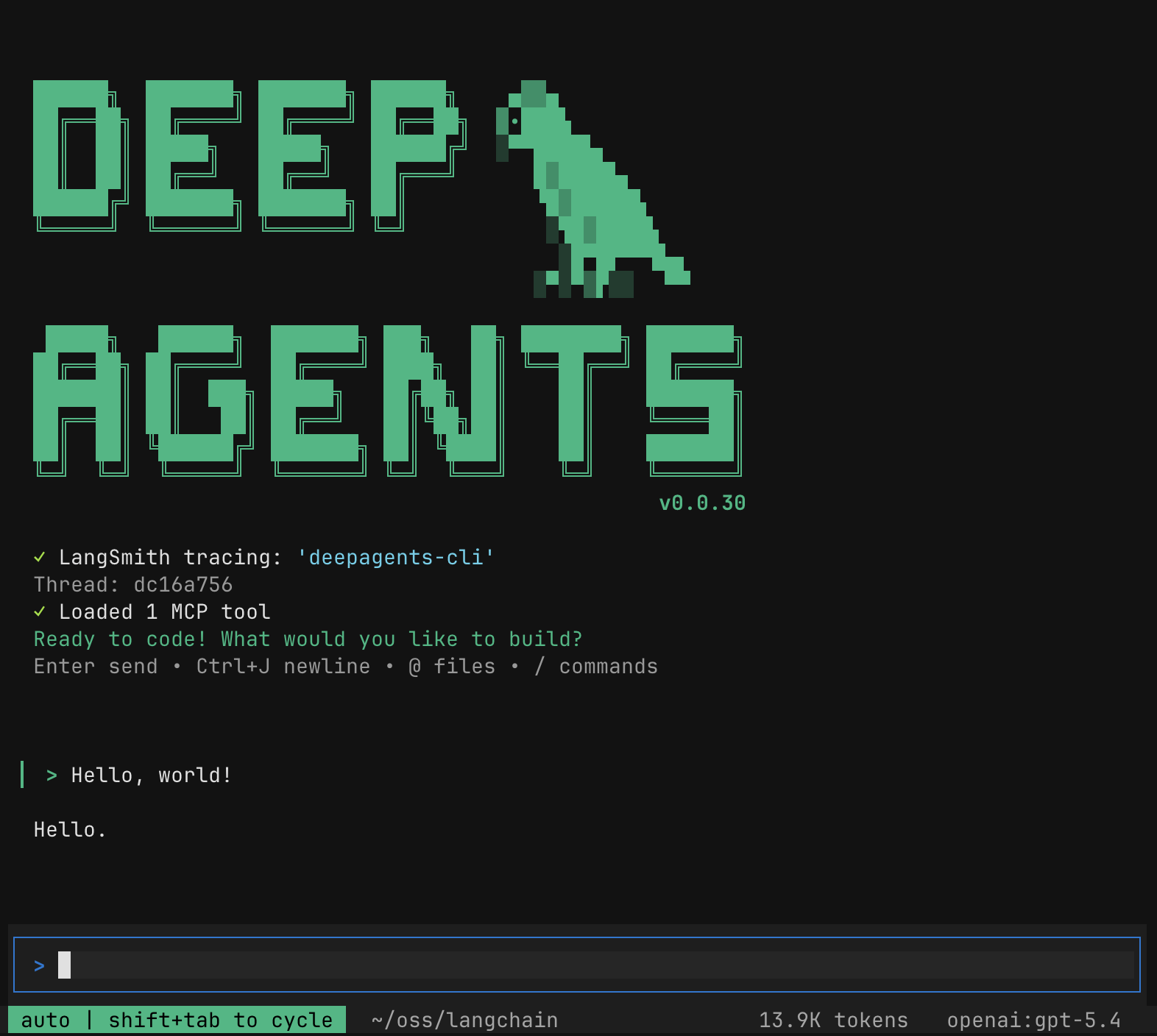 The CLI works with any LLM that supports tool calling. Use the `/auth` command to set an API key for your chosen providers — see [Provider credentials](/oss/javascript/deepagents/cli/configuration#provider-credentials) for the full flow and storage details.
For additional providers and headless runs, see [Providers](/oss/javascript/deepagents/cli/providers).
Web search uses [Tavily](https://tavily.com) and is **not** configured through `/auth`. If you see "Web search disabled — `TAVILY_API_KEY` is not set" on startup, add `TAVILY_API_KEY=tvly-...` to `~/.deepagents/.env` and run `/reload` (or restart). See [Enable web search with Tavily](/oss/javascript/deepagents/cli/configuration#enable-web-search-with-tavily).
```txt theme={"theme":{"light":"catppuccin-latte","dark":"catppuccin-mocha"}}
Create a Python script that prints "Hello, World!"
```
The agent interprets the query and proposes changes with diffs for your approval before modifying files. If needed, it can run shell commands to test the code, check documentation, or search the web for up-to-date information.
To log agent operations, tool calls, and decisions in LangSmith, add the following to `~/.deepagents/.env` or export the variables in your shell:
```bash title="~/.deepagents/.env" theme={"theme":{"light":"catppuccin-latte","dark":"catppuccin-mocha"}}
LANGSMITH_TRACING=true
LANGSMITH_API_KEY=lsv2_...
LANGSMITH_PROJECT=optional-project-name # Specify a project name or default to "deepagents-cli"
```
For more details and usage, see [Trace with LangSmith](#trace-with-langsmith).
The Deep Agents CLI is not officially supported on Windows. Windows users can try running it under [Windows Subsystem for Linux (WSL)](https://learn.microsoft.com/en-us/windows/wsl/install).
## Capabilities
The Deep Agents CLI has the following built-in capabilities:
* **File operations** - read, write, and edit files with tools that enable agents to manage and modify code and documentation.
* **Shell execution** - execute commands to run tests, build projects, manage dependencies, and interact with version control.
* **[Remote sandboxes](/oss/javascript/deepagents/cli/remote-sandboxes)** - run agent tools in LangSmith, Daytona, Modal, Runloop, or AgentCore instead of your local machine. The linked page covers provider installation, credentials, sandbox flags (`--sandbox`, `--sandbox-id`, `--sandbox-setup`), and setup scripts.
* **Web search** - search the web for up-to-date information and documentation. Requires a Tavily API key in [`TAVILY_API_KEY`](/oss/javascript/deepagents/cli/configuration#enable-web-search-with-tavily).
* **HTTP requests** - make HTTP requests to APIs and external services for data fetching and integration tasks.
* **Task planning and tracking** - break down complex tasks into discrete steps and track progress.
* **[Subagents](/oss/javascript/deepagents/cli/subagents)** - delegate work with the `task` tool. In the CLI, define custom subagents as `AGENTS.md` files; the linked page covers paths, frontmatter, and examples.
* **[Memory storage and retrieval](/oss/javascript/deepagents/cli/memory-and-skills#memory)** - store and retrieve information across sessions, enabling agents to remember project conventions and learned patterns.
* **Context compaction & offloading** - summarize older conversation messages and offload originals to storage, freeing context window space during long sessions.
* **Human-in-the-loop** - require human approval for sensitive tool operations.
* **[Skills](/oss/javascript/deepagents/cli/memory-and-skills#skills)** - extend agent capabilities with custom expertise and instructions.
* **[MCP tools](/oss/javascript/deepagents/cli/mcp-tools)** - load external tools from [Model Context Protocol](https://modelcontextprotocol.io/) servers.
* **[Tracing](/oss/javascript/deepagents/cli/overview#trace-with-langsmith)** - trace agent operations in LangSmith for observability and debugging.
## Built-in tools
The agent comes with the following built-in tools which are available without configuration:
| Tool | Description | Human-in-the-Loop |
| ---------------------- | ------------------------------------------------------------------------------------------------------------------------------------------------------------- | -------------------- |
| `ls` | List files and directories | - |
| `read_file` | Read contents of a file; multimodal content for select models | - |
| `write_file` | Create or overwrite a file | Required1 |
| `edit_file` | Make targeted edits to existing files | Required1 |
| `glob` | Find files matching a pattern | - |
| `grep` | Search for text patterns across files | - |
| `execute` | Execute shell commands locally or in a remote sandbox | Required1 |
| `web_search` | Search the web using Tavily (requires `TAVILY_API_KEY` — see [Enable web search](/oss/javascript/deepagents/cli/configuration#enable-web-search-with-tavily)) | Required1 |
| `fetch_url` | Fetch and convert web pages to markdown | Required1 |
| `task` | Delegate work to subagents for parallel execution | Required1 |
| `ask_user` | Ask the user free-form or multiple-choice questions | - |
| `compact_conversation` | Summarize older messages, offload originals to backend storage, and replace them in context with the summary | Mixed2 |
| `write_todos` | Create and manage task lists for complex work | - |
1: Potentially destructive operations require user approval before execution. To bypass human approval, you can toggle auto-approve (shift+tab) or start with the option:
```bash theme={"theme":{"light":"catppuccin-latte","dark":"catppuccin-mocha"}}
deepagents -y
# or
deepagents --auto-approve
```
When running the CLI non-interactively (via `-n` or piped stdin), shell execution is disabled by default even with `-y`/`--auto-approve`. Use `-S`/`--shell-allow-list` to allowlist specific commands (e.g., `-S "pytest,git,make"`), `recommended` for safe defaults, or `all` to permit any command. The `DEEPAGENTS_CLI_SHELL_ALLOW_LIST` environment variable is also supported. See [Non-interactive mode and piping](#non-interactive-mode-and-piping) for more details.
2: The CLI automatically offloads the conversation in the background when token usage exceeds a model-aware threshold. Offloading summarizes older messages via the LLM, and ejects originals to storage (`/conversation_history/{thread_id}.md`), replacing them in context with the summary. The agent can still retrieve the full history from the offloaded file if needed. The `compact_conversation` tool lets the agent (or you) trigger offloading on demand. When called as a tool, it requires user approval by default.
[Watch the demo video](https://youtu.be/IrnacLa9PJc?si=3yUnPbxnm2yaqVQb) to see how the Deep Agents CLI works.
## Command reference
```bash theme={"theme":{"light":"catppuccin-latte","dark":"catppuccin-mocha"}}
# Use a specific agent configuration
deepagents --agent mybot
# Use a specific model (provider:model format or auto-detect)
deepagents --model anthropic:claude-opus-4-7
deepagents --model gpt-5.5
# Auto-approve tool usage (skip human-in-the-loop prompts)
deepagents -y
# list directory contents, then summarize directory as first prompt — the command runs first, then the prompt is submitted
# the prompt does NOT have access to the command output
deepagents --startup-cmd "ls -la" -m "Summarize what's in this directory"
# Non-interactive with startup command: show git status before the task runs
# the task does NOT have access to the command output
deepagents --startup-cmd "git diff --stat" -n "Review these changes"
```
| Option | Description |
| ------------------------------- | --------------------------------------------------------------------------------------------------------------------------------------------------------------------------------------------------------------------------------------------------------------------------------------------------------------------------------------------------------------------------------------------------- |
| `-a`, `--agent NAME` | Use named agent with separate memory. Overrides `[agents].recent` in `config.toml`. Default: `agent` (or the most recently used agent if `[agents].recent` is set) |
| `-M`, `--model MODEL` | Use a specific model (`provider:model`) |
| `--model-params JSON` | Extra kwargs to pass to the model as a JSON string (e.g., `'{"temperature": 0.7}'`) |
| `--default-model [MODEL]` | Set the default model |
| `--clear-default-model` | Clear the default model |
| `-r`, `--resume [ID]` | Resume a session: `-r` for most recent, `-r ` for a specific thread |
| `-m`, `--message TEXT` | Initial prompt to auto-submit when the session starts (interactive mode) |
| `--skill NAME` | Invoke a skill at startup |
| `--startup-cmd CMD` | Shell command to run at startup, before the first prompt. Output is rendered in the transcript for your reference but is **not** added to the agent's message history. To hand command output to the agent, pipe it in via stdin instead (e.g., `git diff \| deepagents -n "Review these changes"`). Non-zero exits and timeouts warn but do not abort; non-interactive mode applies a 60s timeout. |
| `-n`, `--non-interactive TEXT` | Run a single task non-interactively and exit. Shell is disabled unless `--shell-allow-list` is set |
| `--max-turns N` | Cap agentic turns in non-interactive mode. Exits with code 124 when exceeded. Requires `-n` or piped stdin. See [Cap turn count with `--max-turns`](#non-interactive-mode-and-piping) |
| `-q`, `--quiet` | Clean output for piping—only the agent's response goes to stdout. Requires `-n` or piped stdin |
| `--no-stream` | Buffer the full response and write to stdout at once instead of streaming. Requires `-n` or piped stdin |
| `--stdin` | Read input from stdin explicitly instead of auto-detection. Errors clearly when stdin is unavailable or is a TTY |
| `-y`, `--auto-approve` | Auto-approve all tool calls without prompting (disables human-in-the-loop). Toggle with `Shift+Tab` during an interactive session |
| `-S`, `--shell-allow-list LIST` | Comma-separated shell commands to auto-approve, `'recommended'` for safe defaults, or `'all'` to allow any command. Applies to both `-n` and interactive modes |
| `--json` | Emit machine-readable JSON from management subcommands (`agents`, `threads`, `skills`, `update`). Output envelope: `{"schema_version": 1, "command": "...", "data": ...}` |
| `--sandbox TYPE` | Remote sandbox for code execution: `none` (default), `langsmith`, `agentcore`, `modal`, `daytona`, `runloop`. LangSmith is included; AgentCore/Modal/Daytona/Runloop require extras |
| `--sandbox-id ID` | Reuse an existing sandbox (skips creation and cleanup) |
| `--sandbox-setup PATH` | Path to setup script to run in sandbox after creation |
| `--mcp-config PATH` | Add an explicit MCP config as the highest-precedence source (merged with auto-discovered configs) |
| `--no-mcp` | Disable all MCP tool loading |
| `--trust-project-mcp` | Trust project-level MCP configs with stdio servers (skip approval prompt) |
| `--profile-override JSON` | Override model profile fields as a JSON string (e.g., `'{"max_input_tokens": 4096}'`). Merged on top of config file profile overrides |
| `--acp` | Run as an ACP server over stdio instead of launching the interactive UI |
| `-v`, `--version` | Display version |
| `-h`, `--help` | Show help |
| Command | Description |
| ------------------------------------------------------ | --------------------------------------------------------------------------------------------------------------------------------------------------------------------------------------------------------------------------------------------------------------------------------------------------------- |
| `deepagents help` | Show help |
| `deepagents agents list` | List all agents (alias: `ls`) |
| `deepagents agents reset --agent NAME` | Clear agent memory and reset to default. Supports `--dry-run` |
| `deepagents agents reset --agent NAME --target SOURCE` | Copy memory from another agent |
| `deepagents update` | Check for and install CLI updates |
| `deepagents skills list [--project]` | List all skills (alias: `ls`) |
| `deepagents skills create NAME [--project]` | Create a new skill with template `SKILL.md`. Idempotent — re-creating an existing skill prints an informational message instead of an error |
| `deepagents skills info NAME [--project]` | Show detailed information about a skill |
| `deepagents skills delete NAME [--project] [-f]` | Delete a skill and its contents. Supports `--dry-run` |
| `deepagents threads list [--agent NAME] [--limit N]` | List sessions (alias: `ls`). Default limit: 20. `-n` is a short flag for `--limit`. Additional flags: `--sort {created,updated}`, `--branch TEXT` (filter by git branch), `-v`/`--verbose` (show all columns including branch, created time, and initial prompt), `-r`/`--relative` (relative timestamps) |
| `deepagents threads delete ID` | Delete a session. Supports `--dry-run` |
| `deepagents mcp login NAME [--config PATH]` | Run the OAuth login flow for an MCP server marked `auth: "oauth"`. See [MCP tools](/oss/javascript/deepagents/cli/mcp-tools#oauth-login) |
| `deepagents deploy` | Deploy your agent to LangSmith. See [Deploy with the CLI](/oss/javascript/deepagents/deploy) |
All management subcommands support `--json` for machine-readable output. See [command-line options](#command-line-options) for details.
Destructive commands (`agents reset`, `skills delete`, `threads delete`) support `--dry-run` to preview what would happen without making changes. In JSON mode, `--dry-run` returns the same envelope with a `dry_run: true` field.
## Configuration
For the full reference — including `config.toml` schema, provider parameters, profile overrides, and hook configuration — see [Configuration](/oss/javascript/deepagents/cli/configuration).
The CLI stores all configuration under `~/.deepagents/`. Within that directory, each agent gets its own subdirectory (default: `agent`):
| Path | Purpose |
| ----------------------------- | ---------------------------------------------------------------------------------------------------------------------------- |
| `~/.deepagents/config.toml` | Model and agent defaults, provider settings, constructor params, profile overrides, themes, update settings, MCP trust store |
| `~/.deepagents/.env` | Global API keys and secrets. See [configuration](/oss/javascript/deepagents/cli/configuration#environment-variables) |
| `~/.deepagents/hooks.json` | Lifecycle event hooks (session start/end, task complete, etc.) |
| `~/.deepagents//` | Per-agent memory, skills, and conversation threads |
| `.deepagents/` (project root) | Project-specific memory and skills, loaded when running inside a git repo |
```bash theme={"theme":{"light":"catppuccin-latte","dark":"catppuccin-mocha"}}
# List all configured agents
deepagents agents list
```
## Interactive mode
Type naturally as you would in a chat interface.
The agent will use its built-in tools, skills, and memory to help you with tasks.
Use these commands within the CLI session:
* `/model` - Switch models or open the interactive model selector.
* `/agents` - Hot-swap between pre-configured agents without relaunching. See [Command reference](/oss/javascript/deepagents/cli/overview#command-reference) for details
* `/auth` - Manage stored API keys for model providers. See [Provider credentials](/oss/javascript/deepagents/cli/configuration#provider-credentials) for details
* `/remember [context]` - Review conversation and update memory and skills. Optionally pass additional context
* `/skill: [args]` - Directly invoke a skill by name. The skill's `SKILL.md` instructions are injected into the prompt along with any arguments you provide
* `/skill-creator [args]` - Guide for creating effective agent skills
* `/offload` (alias `/compact`) - Free up context window space by offloading messages to storage with a summary placeholder. The agent can retrieve the full history from the offloaded file if needed
* `/tokens` - Display current context window token usage breakdown
* `/clear` - Clear conversation history and start a new thread
* `/threads` - Browse and resume previous conversation threads
* `/mcp` - Show active MCP servers and tools
* `/reload` - Re-read `.env` files, refresh configuration, and re-discover skills without restarting. Conversation state is preserved. See [`DEEPAGENTS_CLI_` prefix](/oss/javascript/deepagents/cli/configuration#deepagents_cli_-prefix) for override behavior
* `/theme` - Open the interactive theme selector to switch color themes. Built-in themes are available plus any [user-defined themes](/oss/javascript/deepagents/cli/configuration#themes)
* `/update` - Check for and install CLI updates inline. Detects your install method (uv, Homebrew, pip) and runs the appropriate upgrade command
* `/auto-update` - Toggle automatic updates on or off
* `/trace` - Open the current thread in LangSmith (requires `LANGSMITH_API_KEY`)
* `/editor` - Open the current prompt in your external editor (`$VISUAL` / `$EDITOR`). See [External editor](/oss/javascript/deepagents/cli/configuration#external-editor)
* `/changelog` - Open the CLI changelog in your browser
* `/docs` - Open the documentation in your browser
* `/feedback` - Open the GitHub issues page to file a bug report or feature request
* `/version` - Show installed `deepagents-cli` and SDK versions
* `/help` - Show help and available commands
* `/quit` - Exit the CLI
Type `!` to enter shell mode, then type your command.
```bash theme={"theme":{"light":"catppuccin-latte","dark":"catppuccin-mocha"}}
git status
npm test
ls -la
```
**General**
| Shortcut | Action |
| ----------------------------------------------------- | ------------------------------------------- |
| `Enter` | Submit prompt |
| `Shift+Enter`, `Ctrl+J`, `Alt+Enter`, or `Ctrl+Enter` | Insert newline |
| `Ctrl+A` | Select all text in input |
| `@filename` | Auto-complete files and inject content |
| `Shift+Tab` or `Ctrl+T` | Toggle auto-approve |
| `Ctrl+U` | Delete to start of line |
| `Ctrl+X` | Open prompt in external editor |
| `Ctrl+O` | Expand/collapse the most recent tool output |
| `Escape` | Interrupt current operation |
| `Ctrl+C` | Interrupt or quit |
| `Ctrl+D` | Exit |
## Non-interactive mode and piping
Use `-n` to run a single task without launching the interactive UI:
```bash theme={"theme":{"light":"catppuccin-latte","dark":"catppuccin-mocha"}}
deepagents -n "Write a Python script that prints hello world"
```
You can also pipe input via stdin. When input is piped, the CLI automatically runs non-interactively:
```bash theme={"theme":{"light":"catppuccin-latte","dark":"catppuccin-mocha"}}
echo "Explain this code" | deepagents
cat error.log | deepagents -n "What's causing this error?"
git diff | deepagents -n "Review these changes"
git diff | deepagents --skill code-review -n 'summarize changes'
```
When you combine piped input with `-n` or `-m`, the piped content appears first, followed by the text you pass to the flag.
The maximum piped input size is 10 MiB.
Shell execution is disabled by default in non-interactive mode. Use `-S`/`--shell-allow-list` to enable specific commands (e.g., `-S "pytest,git,make"`), `recommended` for safe defaults, or `all` to permit any command.
Long-running or misbehaving agents in CI/CD pipelines can loop indefinitely. `--max-turns N` gives operators a hard upper bound without having to touch SDK internals:
```bash theme={"theme":{"light":"catppuccin-latte","dark":"catppuccin-mocha"}}
deepagents -n "fix the failing tests" --max-turns 10
```
`N` must be a positive integer, and overrides the internal safety default that otherwise caps runaway loops. Exits with code 124 (matching GNU `timeout`) when the budget is exceeded, so CI can distinguish a budget hit from a generic failure. Requires `-n` or piped stdin; otherwise exits with code 2.
Use `-q` for clean output suitable for piping into other commands, and `--no-stream` to buffer the full response (instead of streaming) before writing to stdout:
```bash theme={"theme":{"light":"catppuccin-latte","dark":"catppuccin-mocha"}}
deepagents -n "Generate a .gitignore for Python" -q > .gitignore
deepagents -n "List dependencies" -q --no-stream | sort
```
In non-interactive mode, the agent is instructed to make reasonable assumptions and proceed autonomously rather than ask clarifying questions. It also favors non-interactive command variants (e.g., `npm init -y`, `apt-get install -y`).
```bash theme={"theme":{"light":"catppuccin-latte","dark":"catppuccin-mocha"}}
# Allow specific commands (validated against the list)
deepagents -n "Run the tests and fix failures" -S "pytest,git,make"
# Use the curated safe-command list
deepagents -n "Build the project" -S recommended
# Allow any shell command
deepagents -n "Fix the build" -S all
```
**Use with caution.**
`-S all` (or `--shell-allow-list all`) lets the agent execute arbitrary shell commands with no human confirmation.
## Trace with LangSmith
Enable [LangSmith](https://smith.langchain.com?utm_source=docs\&utm_medium=cta\&utm_campaign=langsmith-signup\&utm_content=oss-deepagents-cli-overview) tracing to see agent operations, tool calls, and decisions in a LangSmith project.
Add your tracing keys to `~/.deepagents/.env` so tracing is enabled in every session without per-shell exports:
```bash title="~/.deepagents/.env" theme={"theme":{"light":"catppuccin-latte","dark":"catppuccin-mocha"}}
LANGSMITH_TRACING=true
LANGSMITH_API_KEY=lsv2_...
LANGSMITH_PROJECT=optional-project-name # Specify a project name or default to "deepagents-cli"
```
To override for a specific project, add the same keys to a `.env` in the project directory. See [environment variables](/oss/javascript/deepagents/cli/configuration#environment-variables) for the full loading order.
You can also set these as shell environment variables if you prefer. Shell exports always take precedence over `.env` values, so this is a good option for temporary overrides or testing:
```bash theme={"theme":{"light":"catppuccin-latte","dark":"catppuccin-mocha"}}
export LANGSMITH_TRACING=false
```
When invoking the CLI programmatically from a LangChain application (e.g., as a subprocess in [non-interactive mode](#non-interactive-mode-and-piping)), both your app and the CLI produce LangSmith traces. By default, these all land in the same project.
To send CLI traces to a dedicated project, set `DEEPAGENTS_CLI_LANGSMITH_PROJECT`:
```bash title="~/.deepagents/.env" theme={"theme":{"light":"catppuccin-latte","dark":"catppuccin-mocha"}}
DEEPAGENTS_CLI_LANGSMITH_PROJECT=my-deep-agent-execution
```
Then configure `LANGSMITH_PROJECT` for your parent application's traces:
```bash title="~/.deepagents/.env" theme={"theme":{"light":"catppuccin-latte","dark":"catppuccin-mocha"}}
LANGSMITH_PROJECT=my-app-traces
```
This keeps your app-level observability clean while still capturing the agent's internal execution in a separate project.
You can also scope LangSmith credentials to the CLI using the [`DEEPAGENTS_CLI_` prefix](/oss/javascript/deepagents/cli/configuration#deepagents_cli_-prefix) (e.g., `DEEPAGENTS_CLI_LANGSMITH_API_KEY`).
When configured, the CLI displays a status line with a link to the LangSmith project. In supported terminals, click the link to open it directly. You can also use `/trace` to print the URL and open it in your browser.
```sh theme={"theme":{"light":"catppuccin-latte","dark":"catppuccin-mocha"}}
✓ LangSmith tracing: 'my-project'
```
***
The CLI works with any LLM that supports tool calling. Use the `/auth` command to set an API key for your chosen providers — see [Provider credentials](/oss/javascript/deepagents/cli/configuration#provider-credentials) for the full flow and storage details.
For additional providers and headless runs, see [Providers](/oss/javascript/deepagents/cli/providers).
Web search uses [Tavily](https://tavily.com) and is **not** configured through `/auth`. If you see "Web search disabled — `TAVILY_API_KEY` is not set" on startup, add `TAVILY_API_KEY=tvly-...` to `~/.deepagents/.env` and run `/reload` (or restart). See [Enable web search with Tavily](/oss/javascript/deepagents/cli/configuration#enable-web-search-with-tavily).
```txt theme={"theme":{"light":"catppuccin-latte","dark":"catppuccin-mocha"}}
Create a Python script that prints "Hello, World!"
```
The agent interprets the query and proposes changes with diffs for your approval before modifying files. If needed, it can run shell commands to test the code, check documentation, or search the web for up-to-date information.
To log agent operations, tool calls, and decisions in LangSmith, add the following to `~/.deepagents/.env` or export the variables in your shell:
```bash title="~/.deepagents/.env" theme={"theme":{"light":"catppuccin-latte","dark":"catppuccin-mocha"}}
LANGSMITH_TRACING=true
LANGSMITH_API_KEY=lsv2_...
LANGSMITH_PROJECT=optional-project-name # Specify a project name or default to "deepagents-cli"
```
For more details and usage, see [Trace with LangSmith](#trace-with-langsmith).
The Deep Agents CLI is not officially supported on Windows. Windows users can try running it under [Windows Subsystem for Linux (WSL)](https://learn.microsoft.com/en-us/windows/wsl/install).
## Capabilities
The Deep Agents CLI has the following built-in capabilities:
* **File operations** - read, write, and edit files with tools that enable agents to manage and modify code and documentation.
* **Shell execution** - execute commands to run tests, build projects, manage dependencies, and interact with version control.
* **[Remote sandboxes](/oss/javascript/deepagents/cli/remote-sandboxes)** - run agent tools in LangSmith, Daytona, Modal, Runloop, or AgentCore instead of your local machine. The linked page covers provider installation, credentials, sandbox flags (`--sandbox`, `--sandbox-id`, `--sandbox-setup`), and setup scripts.
* **Web search** - search the web for up-to-date information and documentation. Requires a Tavily API key in [`TAVILY_API_KEY`](/oss/javascript/deepagents/cli/configuration#enable-web-search-with-tavily).
* **HTTP requests** - make HTTP requests to APIs and external services for data fetching and integration tasks.
* **Task planning and tracking** - break down complex tasks into discrete steps and track progress.
* **[Subagents](/oss/javascript/deepagents/cli/subagents)** - delegate work with the `task` tool. In the CLI, define custom subagents as `AGENTS.md` files; the linked page covers paths, frontmatter, and examples.
* **[Memory storage and retrieval](/oss/javascript/deepagents/cli/memory-and-skills#memory)** - store and retrieve information across sessions, enabling agents to remember project conventions and learned patterns.
* **Context compaction & offloading** - summarize older conversation messages and offload originals to storage, freeing context window space during long sessions.
* **Human-in-the-loop** - require human approval for sensitive tool operations.
* **[Skills](/oss/javascript/deepagents/cli/memory-and-skills#skills)** - extend agent capabilities with custom expertise and instructions.
* **[MCP tools](/oss/javascript/deepagents/cli/mcp-tools)** - load external tools from [Model Context Protocol](https://modelcontextprotocol.io/) servers.
* **[Tracing](/oss/javascript/deepagents/cli/overview#trace-with-langsmith)** - trace agent operations in LangSmith for observability and debugging.
## Built-in tools
The agent comes with the following built-in tools which are available without configuration:
| Tool | Description | Human-in-the-Loop |
| ---------------------- | ------------------------------------------------------------------------------------------------------------------------------------------------------------- | -------------------- |
| `ls` | List files and directories | - |
| `read_file` | Read contents of a file; multimodal content for select models | - |
| `write_file` | Create or overwrite a file | Required1 |
| `edit_file` | Make targeted edits to existing files | Required1 |
| `glob` | Find files matching a pattern | - |
| `grep` | Search for text patterns across files | - |
| `execute` | Execute shell commands locally or in a remote sandbox | Required1 |
| `web_search` | Search the web using Tavily (requires `TAVILY_API_KEY` — see [Enable web search](/oss/javascript/deepagents/cli/configuration#enable-web-search-with-tavily)) | Required1 |
| `fetch_url` | Fetch and convert web pages to markdown | Required1 |
| `task` | Delegate work to subagents for parallel execution | Required1 |
| `ask_user` | Ask the user free-form or multiple-choice questions | - |
| `compact_conversation` | Summarize older messages, offload originals to backend storage, and replace them in context with the summary | Mixed2 |
| `write_todos` | Create and manage task lists for complex work | - |
1: Potentially destructive operations require user approval before execution. To bypass human approval, you can toggle auto-approve (shift+tab) or start with the option:
```bash theme={"theme":{"light":"catppuccin-latte","dark":"catppuccin-mocha"}}
deepagents -y
# or
deepagents --auto-approve
```
When running the CLI non-interactively (via `-n` or piped stdin), shell execution is disabled by default even with `-y`/`--auto-approve`. Use `-S`/`--shell-allow-list` to allowlist specific commands (e.g., `-S "pytest,git,make"`), `recommended` for safe defaults, or `all` to permit any command. The `DEEPAGENTS_CLI_SHELL_ALLOW_LIST` environment variable is also supported. See [Non-interactive mode and piping](#non-interactive-mode-and-piping) for more details.
2: The CLI automatically offloads the conversation in the background when token usage exceeds a model-aware threshold. Offloading summarizes older messages via the LLM, and ejects originals to storage (`/conversation_history/{thread_id}.md`), replacing them in context with the summary. The agent can still retrieve the full history from the offloaded file if needed. The `compact_conversation` tool lets the agent (or you) trigger offloading on demand. When called as a tool, it requires user approval by default.
[Watch the demo video](https://youtu.be/IrnacLa9PJc?si=3yUnPbxnm2yaqVQb) to see how the Deep Agents CLI works.
## Command reference
```bash theme={"theme":{"light":"catppuccin-latte","dark":"catppuccin-mocha"}}
# Use a specific agent configuration
deepagents --agent mybot
# Use a specific model (provider:model format or auto-detect)
deepagents --model anthropic:claude-opus-4-7
deepagents --model gpt-5.5
# Auto-approve tool usage (skip human-in-the-loop prompts)
deepagents -y
# list directory contents, then summarize directory as first prompt — the command runs first, then the prompt is submitted
# the prompt does NOT have access to the command output
deepagents --startup-cmd "ls -la" -m "Summarize what's in this directory"
# Non-interactive with startup command: show git status before the task runs
# the task does NOT have access to the command output
deepagents --startup-cmd "git diff --stat" -n "Review these changes"
```
| Option | Description |
| ------------------------------- | --------------------------------------------------------------------------------------------------------------------------------------------------------------------------------------------------------------------------------------------------------------------------------------------------------------------------------------------------------------------------------------------------- |
| `-a`, `--agent NAME` | Use named agent with separate memory. Overrides `[agents].recent` in `config.toml`. Default: `agent` (or the most recently used agent if `[agents].recent` is set) |
| `-M`, `--model MODEL` | Use a specific model (`provider:model`) |
| `--model-params JSON` | Extra kwargs to pass to the model as a JSON string (e.g., `'{"temperature": 0.7}'`) |
| `--default-model [MODEL]` | Set the default model |
| `--clear-default-model` | Clear the default model |
| `-r`, `--resume [ID]` | Resume a session: `-r` for most recent, `-r ` for a specific thread |
| `-m`, `--message TEXT` | Initial prompt to auto-submit when the session starts (interactive mode) |
| `--skill NAME` | Invoke a skill at startup |
| `--startup-cmd CMD` | Shell command to run at startup, before the first prompt. Output is rendered in the transcript for your reference but is **not** added to the agent's message history. To hand command output to the agent, pipe it in via stdin instead (e.g., `git diff \| deepagents -n "Review these changes"`). Non-zero exits and timeouts warn but do not abort; non-interactive mode applies a 60s timeout. |
| `-n`, `--non-interactive TEXT` | Run a single task non-interactively and exit. Shell is disabled unless `--shell-allow-list` is set |
| `--max-turns N` | Cap agentic turns in non-interactive mode. Exits with code 124 when exceeded. Requires `-n` or piped stdin. See [Cap turn count with `--max-turns`](#non-interactive-mode-and-piping) |
| `-q`, `--quiet` | Clean output for piping—only the agent's response goes to stdout. Requires `-n` or piped stdin |
| `--no-stream` | Buffer the full response and write to stdout at once instead of streaming. Requires `-n` or piped stdin |
| `--stdin` | Read input from stdin explicitly instead of auto-detection. Errors clearly when stdin is unavailable or is a TTY |
| `-y`, `--auto-approve` | Auto-approve all tool calls without prompting (disables human-in-the-loop). Toggle with `Shift+Tab` during an interactive session |
| `-S`, `--shell-allow-list LIST` | Comma-separated shell commands to auto-approve, `'recommended'` for safe defaults, or `'all'` to allow any command. Applies to both `-n` and interactive modes |
| `--json` | Emit machine-readable JSON from management subcommands (`agents`, `threads`, `skills`, `update`). Output envelope: `{"schema_version": 1, "command": "...", "data": ...}` |
| `--sandbox TYPE` | Remote sandbox for code execution: `none` (default), `langsmith`, `agentcore`, `modal`, `daytona`, `runloop`. LangSmith is included; AgentCore/Modal/Daytona/Runloop require extras |
| `--sandbox-id ID` | Reuse an existing sandbox (skips creation and cleanup) |
| `--sandbox-setup PATH` | Path to setup script to run in sandbox after creation |
| `--mcp-config PATH` | Add an explicit MCP config as the highest-precedence source (merged with auto-discovered configs) |
| `--no-mcp` | Disable all MCP tool loading |
| `--trust-project-mcp` | Trust project-level MCP configs with stdio servers (skip approval prompt) |
| `--profile-override JSON` | Override model profile fields as a JSON string (e.g., `'{"max_input_tokens": 4096}'`). Merged on top of config file profile overrides |
| `--acp` | Run as an ACP server over stdio instead of launching the interactive UI |
| `-v`, `--version` | Display version |
| `-h`, `--help` | Show help |
| Command | Description |
| ------------------------------------------------------ | --------------------------------------------------------------------------------------------------------------------------------------------------------------------------------------------------------------------------------------------------------------------------------------------------------- |
| `deepagents help` | Show help |
| `deepagents agents list` | List all agents (alias: `ls`) |
| `deepagents agents reset --agent NAME` | Clear agent memory and reset to default. Supports `--dry-run` |
| `deepagents agents reset --agent NAME --target SOURCE` | Copy memory from another agent |
| `deepagents update` | Check for and install CLI updates |
| `deepagents skills list [--project]` | List all skills (alias: `ls`) |
| `deepagents skills create NAME [--project]` | Create a new skill with template `SKILL.md`. Idempotent — re-creating an existing skill prints an informational message instead of an error |
| `deepagents skills info NAME [--project]` | Show detailed information about a skill |
| `deepagents skills delete NAME [--project] [-f]` | Delete a skill and its contents. Supports `--dry-run` |
| `deepagents threads list [--agent NAME] [--limit N]` | List sessions (alias: `ls`). Default limit: 20. `-n` is a short flag for `--limit`. Additional flags: `--sort {created,updated}`, `--branch TEXT` (filter by git branch), `-v`/`--verbose` (show all columns including branch, created time, and initial prompt), `-r`/`--relative` (relative timestamps) |
| `deepagents threads delete ID` | Delete a session. Supports `--dry-run` |
| `deepagents mcp login NAME [--config PATH]` | Run the OAuth login flow for an MCP server marked `auth: "oauth"`. See [MCP tools](/oss/javascript/deepagents/cli/mcp-tools#oauth-login) |
| `deepagents deploy` | Deploy your agent to LangSmith. See [Deploy with the CLI](/oss/javascript/deepagents/deploy) |
All management subcommands support `--json` for machine-readable output. See [command-line options](#command-line-options) for details.
Destructive commands (`agents reset`, `skills delete`, `threads delete`) support `--dry-run` to preview what would happen without making changes. In JSON mode, `--dry-run` returns the same envelope with a `dry_run: true` field.
## Configuration
For the full reference — including `config.toml` schema, provider parameters, profile overrides, and hook configuration — see [Configuration](/oss/javascript/deepagents/cli/configuration).
The CLI stores all configuration under `~/.deepagents/`. Within that directory, each agent gets its own subdirectory (default: `agent`):
| Path | Purpose |
| ----------------------------- | ---------------------------------------------------------------------------------------------------------------------------- |
| `~/.deepagents/config.toml` | Model and agent defaults, provider settings, constructor params, profile overrides, themes, update settings, MCP trust store |
| `~/.deepagents/.env` | Global API keys and secrets. See [configuration](/oss/javascript/deepagents/cli/configuration#environment-variables) |
| `~/.deepagents/hooks.json` | Lifecycle event hooks (session start/end, task complete, etc.) |
| `~/.deepagents//` | Per-agent memory, skills, and conversation threads |
| `.deepagents/` (project root) | Project-specific memory and skills, loaded when running inside a git repo |
```bash theme={"theme":{"light":"catppuccin-latte","dark":"catppuccin-mocha"}}
# List all configured agents
deepagents agents list
```
## Interactive mode
Type naturally as you would in a chat interface.
The agent will use its built-in tools, skills, and memory to help you with tasks.
Use these commands within the CLI session:
* `/model` - Switch models or open the interactive model selector.
* `/agents` - Hot-swap between pre-configured agents without relaunching. See [Command reference](/oss/javascript/deepagents/cli/overview#command-reference) for details
* `/auth` - Manage stored API keys for model providers. See [Provider credentials](/oss/javascript/deepagents/cli/configuration#provider-credentials) for details
* `/remember [context]` - Review conversation and update memory and skills. Optionally pass additional context
* `/skill: [args]` - Directly invoke a skill by name. The skill's `SKILL.md` instructions are injected into the prompt along with any arguments you provide
* `/skill-creator [args]` - Guide for creating effective agent skills
* `/offload` (alias `/compact`) - Free up context window space by offloading messages to storage with a summary placeholder. The agent can retrieve the full history from the offloaded file if needed
* `/tokens` - Display current context window token usage breakdown
* `/clear` - Clear conversation history and start a new thread
* `/threads` - Browse and resume previous conversation threads
* `/mcp` - Show active MCP servers and tools
* `/reload` - Re-read `.env` files, refresh configuration, and re-discover skills without restarting. Conversation state is preserved. See [`DEEPAGENTS_CLI_` prefix](/oss/javascript/deepagents/cli/configuration#deepagents_cli_-prefix) for override behavior
* `/theme` - Open the interactive theme selector to switch color themes. Built-in themes are available plus any [user-defined themes](/oss/javascript/deepagents/cli/configuration#themes)
* `/update` - Check for and install CLI updates inline. Detects your install method (uv, Homebrew, pip) and runs the appropriate upgrade command
* `/auto-update` - Toggle automatic updates on or off
* `/trace` - Open the current thread in LangSmith (requires `LANGSMITH_API_KEY`)
* `/editor` - Open the current prompt in your external editor (`$VISUAL` / `$EDITOR`). See [External editor](/oss/javascript/deepagents/cli/configuration#external-editor)
* `/changelog` - Open the CLI changelog in your browser
* `/docs` - Open the documentation in your browser
* `/feedback` - Open the GitHub issues page to file a bug report or feature request
* `/version` - Show installed `deepagents-cli` and SDK versions
* `/help` - Show help and available commands
* `/quit` - Exit the CLI
Type `!` to enter shell mode, then type your command.
```bash theme={"theme":{"light":"catppuccin-latte","dark":"catppuccin-mocha"}}
git status
npm test
ls -la
```
**General**
| Shortcut | Action |
| ----------------------------------------------------- | ------------------------------------------- |
| `Enter` | Submit prompt |
| `Shift+Enter`, `Ctrl+J`, `Alt+Enter`, or `Ctrl+Enter` | Insert newline |
| `Ctrl+A` | Select all text in input |
| `@filename` | Auto-complete files and inject content |
| `Shift+Tab` or `Ctrl+T` | Toggle auto-approve |
| `Ctrl+U` | Delete to start of line |
| `Ctrl+X` | Open prompt in external editor |
| `Ctrl+O` | Expand/collapse the most recent tool output |
| `Escape` | Interrupt current operation |
| `Ctrl+C` | Interrupt or quit |
| `Ctrl+D` | Exit |
## Non-interactive mode and piping
Use `-n` to run a single task without launching the interactive UI:
```bash theme={"theme":{"light":"catppuccin-latte","dark":"catppuccin-mocha"}}
deepagents -n "Write a Python script that prints hello world"
```
You can also pipe input via stdin. When input is piped, the CLI automatically runs non-interactively:
```bash theme={"theme":{"light":"catppuccin-latte","dark":"catppuccin-mocha"}}
echo "Explain this code" | deepagents
cat error.log | deepagents -n "What's causing this error?"
git diff | deepagents -n "Review these changes"
git diff | deepagents --skill code-review -n 'summarize changes'
```
When you combine piped input with `-n` or `-m`, the piped content appears first, followed by the text you pass to the flag.
The maximum piped input size is 10 MiB.
Shell execution is disabled by default in non-interactive mode. Use `-S`/`--shell-allow-list` to enable specific commands (e.g., `-S "pytest,git,make"`), `recommended` for safe defaults, or `all` to permit any command.
Long-running or misbehaving agents in CI/CD pipelines can loop indefinitely. `--max-turns N` gives operators a hard upper bound without having to touch SDK internals:
```bash theme={"theme":{"light":"catppuccin-latte","dark":"catppuccin-mocha"}}
deepagents -n "fix the failing tests" --max-turns 10
```
`N` must be a positive integer, and overrides the internal safety default that otherwise caps runaway loops. Exits with code 124 (matching GNU `timeout`) when the budget is exceeded, so CI can distinguish a budget hit from a generic failure. Requires `-n` or piped stdin; otherwise exits with code 2.
Use `-q` for clean output suitable for piping into other commands, and `--no-stream` to buffer the full response (instead of streaming) before writing to stdout:
```bash theme={"theme":{"light":"catppuccin-latte","dark":"catppuccin-mocha"}}
deepagents -n "Generate a .gitignore for Python" -q > .gitignore
deepagents -n "List dependencies" -q --no-stream | sort
```
In non-interactive mode, the agent is instructed to make reasonable assumptions and proceed autonomously rather than ask clarifying questions. It also favors non-interactive command variants (e.g., `npm init -y`, `apt-get install -y`).
```bash theme={"theme":{"light":"catppuccin-latte","dark":"catppuccin-mocha"}}
# Allow specific commands (validated against the list)
deepagents -n "Run the tests and fix failures" -S "pytest,git,make"
# Use the curated safe-command list
deepagents -n "Build the project" -S recommended
# Allow any shell command
deepagents -n "Fix the build" -S all
```
**Use with caution.**
`-S all` (or `--shell-allow-list all`) lets the agent execute arbitrary shell commands with no human confirmation.
## Trace with LangSmith
Enable [LangSmith](https://smith.langchain.com?utm_source=docs\&utm_medium=cta\&utm_campaign=langsmith-signup\&utm_content=oss-deepagents-cli-overview) tracing to see agent operations, tool calls, and decisions in a LangSmith project.
Add your tracing keys to `~/.deepagents/.env` so tracing is enabled in every session without per-shell exports:
```bash title="~/.deepagents/.env" theme={"theme":{"light":"catppuccin-latte","dark":"catppuccin-mocha"}}
LANGSMITH_TRACING=true
LANGSMITH_API_KEY=lsv2_...
LANGSMITH_PROJECT=optional-project-name # Specify a project name or default to "deepagents-cli"
```
To override for a specific project, add the same keys to a `.env` in the project directory. See [environment variables](/oss/javascript/deepagents/cli/configuration#environment-variables) for the full loading order.
You can also set these as shell environment variables if you prefer. Shell exports always take precedence over `.env` values, so this is a good option for temporary overrides or testing:
```bash theme={"theme":{"light":"catppuccin-latte","dark":"catppuccin-mocha"}}
export LANGSMITH_TRACING=false
```
When invoking the CLI programmatically from a LangChain application (e.g., as a subprocess in [non-interactive mode](#non-interactive-mode-and-piping)), both your app and the CLI produce LangSmith traces. By default, these all land in the same project.
To send CLI traces to a dedicated project, set `DEEPAGENTS_CLI_LANGSMITH_PROJECT`:
```bash title="~/.deepagents/.env" theme={"theme":{"light":"catppuccin-latte","dark":"catppuccin-mocha"}}
DEEPAGENTS_CLI_LANGSMITH_PROJECT=my-deep-agent-execution
```
Then configure `LANGSMITH_PROJECT` for your parent application's traces:
```bash title="~/.deepagents/.env" theme={"theme":{"light":"catppuccin-latte","dark":"catppuccin-mocha"}}
LANGSMITH_PROJECT=my-app-traces
```
This keeps your app-level observability clean while still capturing the agent's internal execution in a separate project.
You can also scope LangSmith credentials to the CLI using the [`DEEPAGENTS_CLI_` prefix](/oss/javascript/deepagents/cli/configuration#deepagents_cli_-prefix) (e.g., `DEEPAGENTS_CLI_LANGSMITH_API_KEY`).
When configured, the CLI displays a status line with a link to the LangSmith project. In supported terminals, click the link to open it directly. You can also use `/trace` to print the URL and open it in your browser.
```sh theme={"theme":{"light":"catppuccin-latte","dark":"catppuccin-mocha"}}
✓ LangSmith tracing: 'my-project'
```
***
[Connect these docs](/use-these-docs) to Claude, VSCode, and more via MCP for real-time answers.
[Edit this page on GitHub](https://github.com/langchain-ai/docs/edit/main/src/oss/deepagents/cli/overview.mdx) or [file an issue](https://github.com/langchain-ai/docs/issues/new/choose).