> ## Documentation Index
> Fetch the complete documentation index at: https://docs.langchain.com/llms.txt
> Use this file to discover all available pages before exploring further.
# Harness capabilities
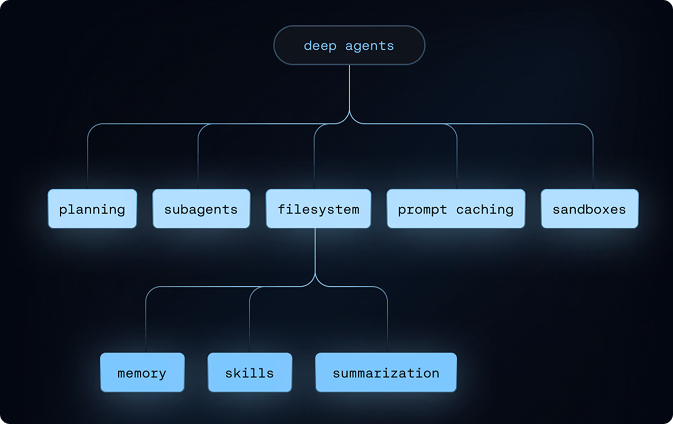
An agent harness is a combination of several different capabilities that make building long-running agents easier:
* [Planning capabilities](#planning-capabilities)
* [Virtual filesystem](#virtual-filesystem-access)
* [Filesystem permissions](#filesystem-permissions)
* [Task delegation (subagents)](#task-delegation-subagents)
* [Context and token management](#context-management)
* [Code execution](#code-execution)
* [Human-in-the-loop](#human-in-the-loop)
* [Harness profiles](#harness-profiles)
Alongside these capabilities, Deep Agents use [Skills](#skills) and [Memory](#memory) for additional context and instructions.
 ## Planning capabilities
The harness provides a `write_todos` tool that agents can use to maintain a structured task list.
**Features:**
* Track multiple tasks with statuses (`'pending'`, `'in_progress'`, `'completed'`)
* Persisted in agent state
* Helps agent organize complex multi-step work
* Useful for long-running tasks and planning
## Virtual filesystem access
The harness provides a configurable virtual filesystem which can be backed by different pluggable backends.
The backends support the following file system operations:
| Tool | Description |
| ------------ | ------------------------------------------------------------------------------------------------------------------------------------------------------------------------------------------------------------------------ |
| `ls` | List files in a directory with metadata (size, modified time) |
| `read_file` | Read file contents with line numbers, supports offset/limit for large files. Also supports returning multimodal content blocks for non-text files (images, video, audio, and documents). See supported extensions below. |
| `write_file` | Create new files |
| `edit_file` | Perform exact string replacements in files (with global replace mode) |
| `glob` | Find files matching patterns (e.g., `**/*.py`) |
| `grep` | Search file contents with multiple output modes (files only, content with context, or counts) |
| `execute` | Run shell commands in the environment (available with [sandbox backends](/oss/javascript/deepagents/sandboxes) only) |
| Type | Extensions |
| ------------------------------------------------------ | ------------------------------------------------------------------------- |
| [Image](/oss/javascript/langchain/messages#multimodal) | `.png`, `.jpg`, `.jpeg`, `.gif`, `.webp`, `.heic`, `.heif` |
| [Video](/oss/javascript/langchain/messages#multimodal) | `.mp4`, `.mpeg`, `.mov`, `.avi`, `.flv`, `.mpg`, `.webm`, `.wmv`, `.3gpp` |
| [Audio](/oss/javascript/langchain/messages#multimodal) | `.wav`, `.mp3`, `.aiff`, `.aac`, `.ogg`, `.flac` |
| [File](/oss/javascript/langchain/messages#multimodal) | `.pdf`, `.ppt`, `.pptx` |
To hide the filesystem tools listed above from the model, register a [harness profile](#harness-profiles) with `excluded_tools`:
```python theme={"theme":{"light":"catppuccin-latte","dark":"catppuccin-mocha"}}
from deepagents import HarnessProfile, register_harness_profile
register_harness_profile(
"anthropic:claude-sonnet-4-6",
HarnessProfile(
excluded_tools=frozenset(
{"ls", "read_file", "write_file", "edit_file", "glob", "grep"}
),
),
)
```
Removing `FilesystemMiddleware` itself via `excluded_middleware` is intentionally rejected — use `excluded_tools` to hide only the model-visible tool surface and leave the middleware in place. To remove the `task` tool, see [Running without subagents](/oss/javascript/deepagents/subagents#running-without-subagents).
The virtual filesystem is used by several other harness capabilities such as skills, memory, code execution, and context management.
You can also use the file system when building custom tools and middleware for Deep Agents.
For more information, see [backends](/oss/javascript/deepagents/backends).
## Filesystem permissions
The harness supports declarative permission rules that control which files and directories the agent can read or write. Permissions apply to the built-in filesystem tools listed above and are evaluated in declaration order with first-match-wins semantics.
**How it works:**
* Pass a list of rules to `permissions=` when creating the agent
* Each rule specifies `operations` (`"read"`, `"write"`), `paths` (glob patterns), and `mode` (`"allow"` or `"deny"`)
* The first matching rule wins. If no rule matches, the operation is allowed.
**Why it's useful:**
* Restrict agents to specific directories (e.g., `/workspace/`)
* Protect sensitive files (e.g., `.env`, credentials)
* Give subagents narrower access than the parent agent
Permissions do not apply to [sandbox backends](/oss/javascript/deepagents/sandboxes), which support arbitrary command execution via the `execute` tool. For custom validation logic, use [backend policy hooks](/oss/javascript/deepagents/backends#add-policy-hooks).
For the full rule structure, examples, and subagent inheritance, see [Permissions](/oss/javascript/deepagents/permissions).
## Task delegation (subagents)
The harness allows the main agent to create ephemeral "subagents" for isolated multi-step tasks.
**Why it's useful:**
* **Context isolation** - Subagent's work doesn't clutter main agent's context
* **Parallel execution** - Multiple subagents can run concurrently
* **Specialization** - Subagents can have different tools/configurations
* **Token efficiency** - Large subtask context is compressed into a single result
**How it works:**
* Main agent has a `task` tool
* When invoked, it creates a fresh agent instance with its own context
* Subagent executes autonomously until completion
* Returns a single final report to the main agent
* Subagents are stateless (can't send multiple messages back)
**Default subagent:**
* "general-purpose" subagent automatically available
* Has filesystem tools by default
* Can be customized with additional tools/middleware
**Custom subagents:**
* Define specialized subagents with specific tools
* Example: code-reviewer, web-researcher, test-runner
* Configure via `subagents` parameter
To run an agent without the `task` tool, see [Running without subagents](/oss/javascript/deepagents/subagents#running-without-subagents). Don't try removing `SubAgentMiddleware` via `excluded_middleware`—that's intentionally rejected. Instead, disable the auto-added subagent via the [harness profile](#harness-profiles) and pass no synchronous subagents via `subagents=`. Async subagents are unaffected.
## Context management
The harness manages context so deep agents can handle long-running tasks within token limits while retaining the information they need.
**How it works:**
* **Input context** — System prompt, memory, skills, and tool prompts shape what the agent knows at startup
* **Compression** — Built-in offloading and summarization keep context within window limits as tasks progress
* **Isolation** — Subagents quarantine heavy work and return only results (see [Task delegation](#task-delegation-subagents))
* **Long-term memory** — Persistent storage across threads via the virtual filesystem
**Why it's useful:**
* Enables multi-step tasks that exceed a single context window
* Keeps the most relevant information in scope without manual trimming
* Reduces token usage through automatic summarization and offloading
For configuration details, see [Context engineering](/oss/javascript/deepagents/context-engineering).
## Code execution
When you use a [sandbox backend](/oss/javascript/deepagents/sandboxes), the harness exposes an `execute` tool that lets the agent run shell commands in an isolated environment. This enables the agent to install dependencies, run scripts, and execute code as part of its task.
**How it works:**
* Sandbox backends implement the `SandboxBackendProtocolV2` — when detected, the harness adds the `execute` tool to the agent's available tools
* Without a sandbox backend, the agent only has filesystem tools (`read_file`, `write_file`, etc.) and cannot run commands
* The `execute` tool returns combined stdout/stderr, exit code, and truncates large outputs (saving to a file for the agent to read incrementally)
**Why it's useful:**
* **Security** — Code runs in isolation, protecting your host system from the agent's operations
* **Clean environments** — Use specific dependencies or OS configurations without local setup
* **Reproducibility** — Consistent execution environments across teams
For setup, providers, and file transfer APIs, see [Sandboxes](/oss/javascript/deepagents/sandboxes).
## Human-in-the-loop
The harness can pause agent execution at specified tool calls to allow human approval or modification. This feature is opt-in via the `interrupt_on` parameter.
**Configuration:**
* Pass `interrupt_on` to `create_deep_agent` with a mapping of tool names to interrupt configurations
* Example: `interrupt_on={"edit_file": True}` pauses before every edit
* You can provide approval messages or modify tool inputs when prompted
**Why it's useful:**
* Safety gates for destructive operations
* User verification before expensive API calls
* Interactive debugging and guidance
## Skills
The harness supports skills that provide specialized workflows and domain knowledge to your deep agent.
**How it works:**
* Skills follow the [Agent Skills standard](https://agentskills.io/)
* Each skill is a directory containing a `SKILL.md` file with instructions and metadata
* Skills can include additional scripts, reference docs, templates, and other resources
* Skills use progressive disclosure—they are only loaded when the agent determines they're useful for the current task
* Agent reads frontmatter from each `SKILL.md` file at startup, then reviews full skill content when needed
**Why it's useful:**
* Reduces token usage by only loading relevant skills when needed
* Bundles capabilities together into larger actions with additional context
* Provides specialized expertise without cluttering the system prompt
* Enables modular, reusable agent capabilities
For more information, see [Skills](/oss/javascript/deepagents/skills).
## Memory
The harness supports persistent memory files that provide extra context to your deep agent across conversations.
These files often contain general coding style, preferences, conventions, and guidelines that help the agent understand how to work with your codebase and follow your preferences.
**How it works:**
* Uses [`AGENTS.md` files](https://agents.md/) to provide persistent context
* Memory files are always loaded (unlike skills, which use progressive disclosure)
* Pass one or more file paths to the `memory` parameter when creating your agent
* Files are stored in the agent's backend (StateBackend, StoreBackend, or FilesystemBackend)
* The agent can update memory based on your interactions, feedback, and identified patterns
**Why it's useful:**
* Provides persistent context that doesn't need to be re-specified each conversation
* Useful for storing user preferences, project guidelines, or domain knowledge
* Always available to the agent, ensuring consistent behavior
For configuration details and examples, see [Memory](/oss/javascript/deepagents/customization#memory).
## Harness profiles
The harness can apply a declarative configuration bundle (a `HarnessProfile`) whenever a given provider or model is selected. Profiles tune runtime behavior after the model is built, without requiring per-agent setup code.
**How it works:**
* Register a profile under a provider name (`"openai"`) or a `provider:model` key (`"openai:gpt-5.4"`)
* `create_deep_agent` looks up and applies the profile when resolving the model
* Provider-level and model-level profiles merge at resolution time
**Why it's useful:**
* Package per-provider or per-model defaults (system-prompt tweaks, tool overrides, middleware) in one place
* Keep the `create_deep_agent` call site unchanged when switching models
* Ship reusable profiles as plugins via entry points
For the full field list, merge semantics, and plugin packaging, see [Profiles](/oss/javascript/deepagents/profiles).
***
## Planning capabilities
The harness provides a `write_todos` tool that agents can use to maintain a structured task list.
**Features:**
* Track multiple tasks with statuses (`'pending'`, `'in_progress'`, `'completed'`)
* Persisted in agent state
* Helps agent organize complex multi-step work
* Useful for long-running tasks and planning
## Virtual filesystem access
The harness provides a configurable virtual filesystem which can be backed by different pluggable backends.
The backends support the following file system operations:
| Tool | Description |
| ------------ | ------------------------------------------------------------------------------------------------------------------------------------------------------------------------------------------------------------------------ |
| `ls` | List files in a directory with metadata (size, modified time) |
| `read_file` | Read file contents with line numbers, supports offset/limit for large files. Also supports returning multimodal content blocks for non-text files (images, video, audio, and documents). See supported extensions below. |
| `write_file` | Create new files |
| `edit_file` | Perform exact string replacements in files (with global replace mode) |
| `glob` | Find files matching patterns (e.g., `**/*.py`) |
| `grep` | Search file contents with multiple output modes (files only, content with context, or counts) |
| `execute` | Run shell commands in the environment (available with [sandbox backends](/oss/javascript/deepagents/sandboxes) only) |
| Type | Extensions |
| ------------------------------------------------------ | ------------------------------------------------------------------------- |
| [Image](/oss/javascript/langchain/messages#multimodal) | `.png`, `.jpg`, `.jpeg`, `.gif`, `.webp`, `.heic`, `.heif` |
| [Video](/oss/javascript/langchain/messages#multimodal) | `.mp4`, `.mpeg`, `.mov`, `.avi`, `.flv`, `.mpg`, `.webm`, `.wmv`, `.3gpp` |
| [Audio](/oss/javascript/langchain/messages#multimodal) | `.wav`, `.mp3`, `.aiff`, `.aac`, `.ogg`, `.flac` |
| [File](/oss/javascript/langchain/messages#multimodal) | `.pdf`, `.ppt`, `.pptx` |
To hide the filesystem tools listed above from the model, register a [harness profile](#harness-profiles) with `excluded_tools`:
```python theme={"theme":{"light":"catppuccin-latte","dark":"catppuccin-mocha"}}
from deepagents import HarnessProfile, register_harness_profile
register_harness_profile(
"anthropic:claude-sonnet-4-6",
HarnessProfile(
excluded_tools=frozenset(
{"ls", "read_file", "write_file", "edit_file", "glob", "grep"}
),
),
)
```
Removing `FilesystemMiddleware` itself via `excluded_middleware` is intentionally rejected — use `excluded_tools` to hide only the model-visible tool surface and leave the middleware in place. To remove the `task` tool, see [Running without subagents](/oss/javascript/deepagents/subagents#running-without-subagents).
The virtual filesystem is used by several other harness capabilities such as skills, memory, code execution, and context management.
You can also use the file system when building custom tools and middleware for Deep Agents.
For more information, see [backends](/oss/javascript/deepagents/backends).
## Filesystem permissions
The harness supports declarative permission rules that control which files and directories the agent can read or write. Permissions apply to the built-in filesystem tools listed above and are evaluated in declaration order with first-match-wins semantics.
**How it works:**
* Pass a list of rules to `permissions=` when creating the agent
* Each rule specifies `operations` (`"read"`, `"write"`), `paths` (glob patterns), and `mode` (`"allow"` or `"deny"`)
* The first matching rule wins. If no rule matches, the operation is allowed.
**Why it's useful:**
* Restrict agents to specific directories (e.g., `/workspace/`)
* Protect sensitive files (e.g., `.env`, credentials)
* Give subagents narrower access than the parent agent
Permissions do not apply to [sandbox backends](/oss/javascript/deepagents/sandboxes), which support arbitrary command execution via the `execute` tool. For custom validation logic, use [backend policy hooks](/oss/javascript/deepagents/backends#add-policy-hooks).
For the full rule structure, examples, and subagent inheritance, see [Permissions](/oss/javascript/deepagents/permissions).
## Task delegation (subagents)
The harness allows the main agent to create ephemeral "subagents" for isolated multi-step tasks.
**Why it's useful:**
* **Context isolation** - Subagent's work doesn't clutter main agent's context
* **Parallel execution** - Multiple subagents can run concurrently
* **Specialization** - Subagents can have different tools/configurations
* **Token efficiency** - Large subtask context is compressed into a single result
**How it works:**
* Main agent has a `task` tool
* When invoked, it creates a fresh agent instance with its own context
* Subagent executes autonomously until completion
* Returns a single final report to the main agent
* Subagents are stateless (can't send multiple messages back)
**Default subagent:**
* "general-purpose" subagent automatically available
* Has filesystem tools by default
* Can be customized with additional tools/middleware
**Custom subagents:**
* Define specialized subagents with specific tools
* Example: code-reviewer, web-researcher, test-runner
* Configure via `subagents` parameter
To run an agent without the `task` tool, see [Running without subagents](/oss/javascript/deepagents/subagents#running-without-subagents). Don't try removing `SubAgentMiddleware` via `excluded_middleware`—that's intentionally rejected. Instead, disable the auto-added subagent via the [harness profile](#harness-profiles) and pass no synchronous subagents via `subagents=`. Async subagents are unaffected.
## Context management
The harness manages context so deep agents can handle long-running tasks within token limits while retaining the information they need.
**How it works:**
* **Input context** — System prompt, memory, skills, and tool prompts shape what the agent knows at startup
* **Compression** — Built-in offloading and summarization keep context within window limits as tasks progress
* **Isolation** — Subagents quarantine heavy work and return only results (see [Task delegation](#task-delegation-subagents))
* **Long-term memory** — Persistent storage across threads via the virtual filesystem
**Why it's useful:**
* Enables multi-step tasks that exceed a single context window
* Keeps the most relevant information in scope without manual trimming
* Reduces token usage through automatic summarization and offloading
For configuration details, see [Context engineering](/oss/javascript/deepagents/context-engineering).
## Code execution
When you use a [sandbox backend](/oss/javascript/deepagents/sandboxes), the harness exposes an `execute` tool that lets the agent run shell commands in an isolated environment. This enables the agent to install dependencies, run scripts, and execute code as part of its task.
**How it works:**
* Sandbox backends implement the `SandboxBackendProtocolV2` — when detected, the harness adds the `execute` tool to the agent's available tools
* Without a sandbox backend, the agent only has filesystem tools (`read_file`, `write_file`, etc.) and cannot run commands
* The `execute` tool returns combined stdout/stderr, exit code, and truncates large outputs (saving to a file for the agent to read incrementally)
**Why it's useful:**
* **Security** — Code runs in isolation, protecting your host system from the agent's operations
* **Clean environments** — Use specific dependencies or OS configurations without local setup
* **Reproducibility** — Consistent execution environments across teams
For setup, providers, and file transfer APIs, see [Sandboxes](/oss/javascript/deepagents/sandboxes).
## Human-in-the-loop
The harness can pause agent execution at specified tool calls to allow human approval or modification. This feature is opt-in via the `interrupt_on` parameter.
**Configuration:**
* Pass `interrupt_on` to `create_deep_agent` with a mapping of tool names to interrupt configurations
* Example: `interrupt_on={"edit_file": True}` pauses before every edit
* You can provide approval messages or modify tool inputs when prompted
**Why it's useful:**
* Safety gates for destructive operations
* User verification before expensive API calls
* Interactive debugging and guidance
## Skills
The harness supports skills that provide specialized workflows and domain knowledge to your deep agent.
**How it works:**
* Skills follow the [Agent Skills standard](https://agentskills.io/)
* Each skill is a directory containing a `SKILL.md` file with instructions and metadata
* Skills can include additional scripts, reference docs, templates, and other resources
* Skills use progressive disclosure—they are only loaded when the agent determines they're useful for the current task
* Agent reads frontmatter from each `SKILL.md` file at startup, then reviews full skill content when needed
**Why it's useful:**
* Reduces token usage by only loading relevant skills when needed
* Bundles capabilities together into larger actions with additional context
* Provides specialized expertise without cluttering the system prompt
* Enables modular, reusable agent capabilities
For more information, see [Skills](/oss/javascript/deepagents/skills).
## Memory
The harness supports persistent memory files that provide extra context to your deep agent across conversations.
These files often contain general coding style, preferences, conventions, and guidelines that help the agent understand how to work with your codebase and follow your preferences.
**How it works:**
* Uses [`AGENTS.md` files](https://agents.md/) to provide persistent context
* Memory files are always loaded (unlike skills, which use progressive disclosure)
* Pass one or more file paths to the `memory` parameter when creating your agent
* Files are stored in the agent's backend (StateBackend, StoreBackend, or FilesystemBackend)
* The agent can update memory based on your interactions, feedback, and identified patterns
**Why it's useful:**
* Provides persistent context that doesn't need to be re-specified each conversation
* Useful for storing user preferences, project guidelines, or domain knowledge
* Always available to the agent, ensuring consistent behavior
For configuration details and examples, see [Memory](/oss/javascript/deepagents/customization#memory).
## Harness profiles
The harness can apply a declarative configuration bundle (a `HarnessProfile`) whenever a given provider or model is selected. Profiles tune runtime behavior after the model is built, without requiring per-agent setup code.
**How it works:**
* Register a profile under a provider name (`"openai"`) or a `provider:model` key (`"openai:gpt-5.4"`)
* `create_deep_agent` looks up and applies the profile when resolving the model
* Provider-level and model-level profiles merge at resolution time
**Why it's useful:**
* Package per-provider or per-model defaults (system-prompt tweaks, tool overrides, middleware) in one place
* Keep the `create_deep_agent` call site unchanged when switching models
* Ship reusable profiles as plugins via entry points
For the full field list, merge semantics, and plugin packaging, see [Profiles](/oss/javascript/deepagents/profiles).
***
[Connect these docs](/use-these-docs) to Claude, VSCode, and more via MCP for real-time answers.
[Edit this page on GitHub](https://github.com/langchain-ai/docs/edit/main/src/oss/deepagents/harness.mdx) or [file an issue](https://github.com/langchain-ai/docs/issues/new/choose).