> ## Documentation Index
> Fetch the complete documentation index at: https://docs.langchain.com/llms.txt
> Use this file to discover all available pages before exploring further.

# Persistence

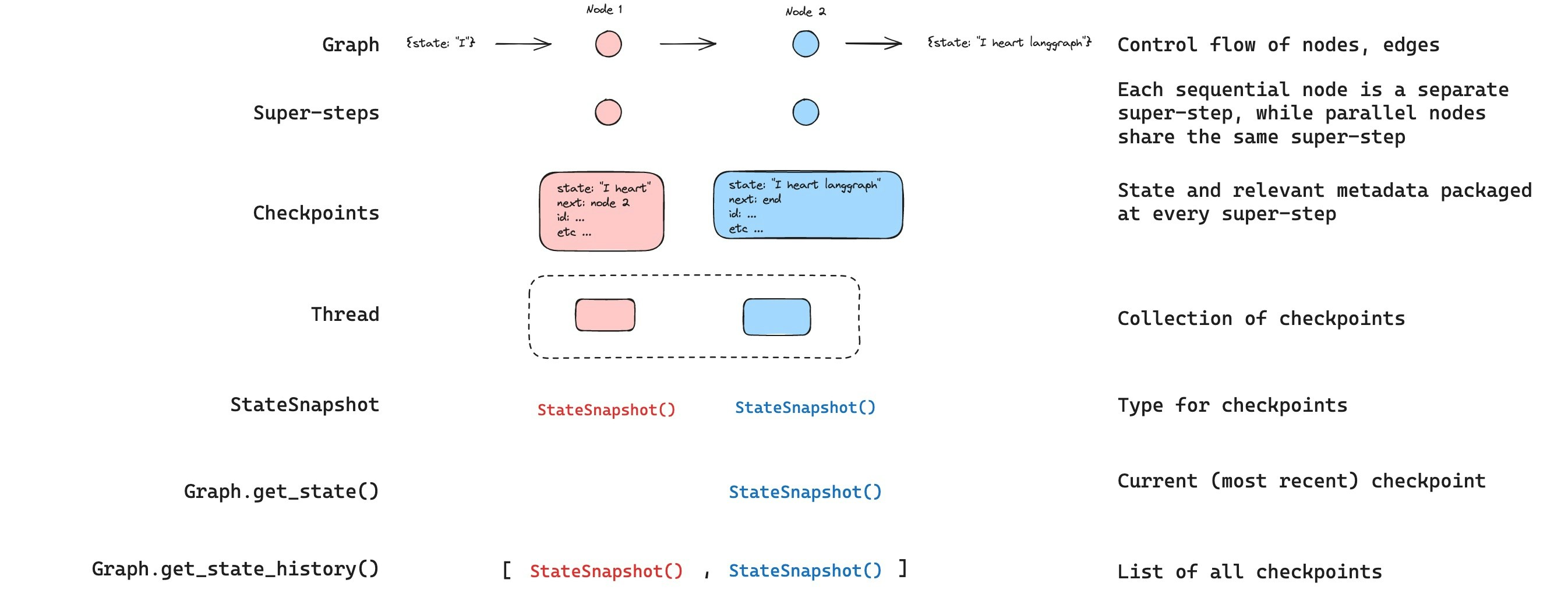
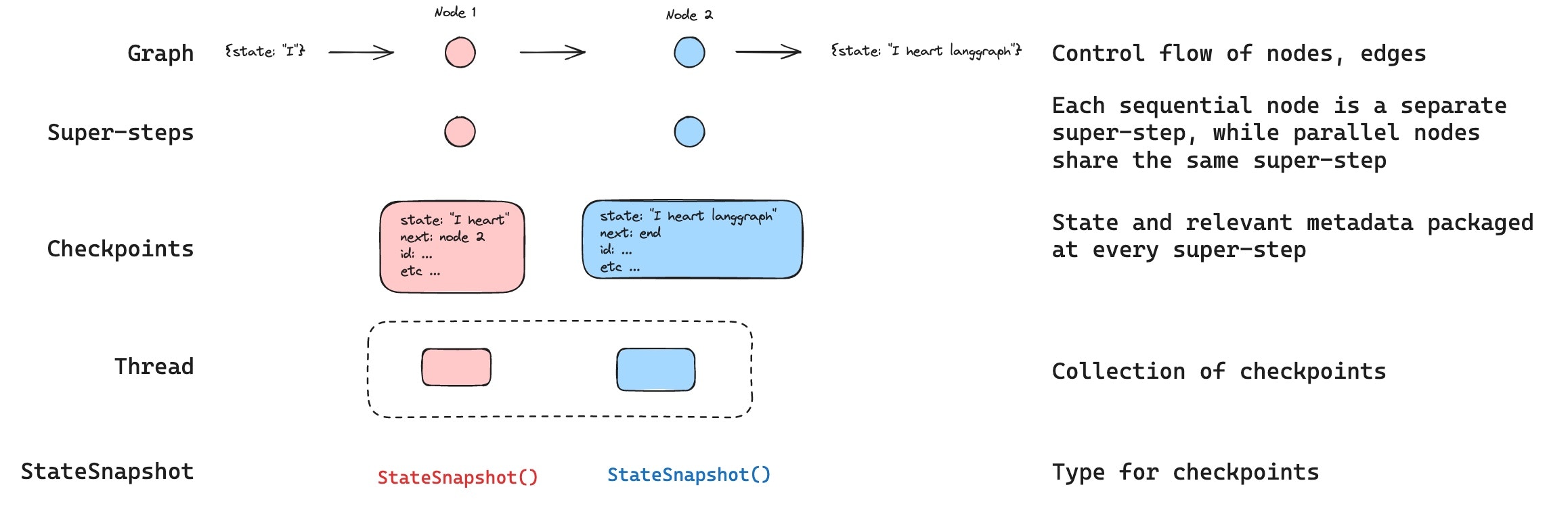
LangGraph has a built-in persistence layer that saves graph state as checkpoints. When you compile a graph with a checkpointer, a snapshot of the graph state is saved at every step of execution, organized into threads. This enables human-in-the-loop workflows, conversational memory, time travel debugging, and fault-tolerant execution.

<img src="https://mintcdn.com/langchain-5e9cc07a/-_xGPoyjhyiDWTPJ/oss/images/checkpoints.jpg?fit=max&auto=format&n=-_xGPoyjhyiDWTPJ&q=85&s=966566aaae853ed4d240c2d0d067467c" alt="Checkpoints" width="2316" height="748" data-path="oss/images/checkpoints.jpg" />

<Info>
  **Agent Server handles checkpointing automatically**
  When using the [Agent Server](/langsmith/agent-server), you don't need to implement or configure checkpointers manually. The server handles all persistence infrastructure for you behind the scenes.
</Info>

<Tip>
  Trace checkpointed state and debug how your agent resumes across sessions with [LangSmith](https://smith.langchain.com?utm_source=docs\&utm_medium=cta\&utm_campaign=langsmith-signup\&utm_content=oss-langgraph-persistence). Follow the [tracing quickstart](/langsmith/trace-with-langgraph) to get set up.
</Tip>

## Why use persistence

Persistence is required for the following features:

* **Human-in-the-loop**: Checkpointers facilitate [human-in-the-loop workflows](/oss/javascript/langgraph/interrupts) by allowing humans to inspect, interrupt, and approve graph steps. Checkpointers are needed for these workflows as the person has to be able to view the state of a graph at any point in time, and the graph has to be able to resume execution after the person has made any updates to the state. See [Interrupts](/oss/javascript/langgraph/interrupts) for examples.
* **Memory**: Checkpointers allow for ["memory"](/oss/javascript/concepts/memory) between interactions. In the case of repeated human interactions (like conversations) any follow up messages can be sent to that thread, which will retain its memory of previous ones. See [Add memory](/oss/javascript/langgraph/add-memory) for information on how to add and manage conversation memory using checkpointers.
* **Time travel**: Checkpointers allow for ["time travel"](/oss/javascript/langgraph/use-time-travel), allowing users to replay prior graph executions to review and / or debug specific graph steps. In addition, checkpointers make it possible to fork the graph state at arbitrary checkpoints to explore alternative trajectories.
* **Fault-tolerance**: Checkpointing provides fault-tolerance and error recovery: if one or more nodes fail at a given superstep, you can restart your graph from the last successful step.

<a id="pending-writes" />

* **Pending writes**: When a graph node fails mid-execution at a given [super-step](#super-steps), LangGraph stores pending checkpoint writes from any other nodes that completed successfully at that super-step. When you resume graph execution from that super-step you don't re-run the successful nodes.

## Core concepts

### Threads

A thread is a unique ID or thread identifier assigned to each checkpoint saved by a checkpointer. It contains the accumulated state of a sequence of [runs](/langsmith/runs). When a run is executed, the [state](/oss/javascript/langgraph/graph-api#state) of the underlying graph of the assistant will be persisted to the thread.

When invoking a graph with a checkpointer, you **must** specify a `thread_id` as part of the `configurable` portion of the config:

```typescript theme={"theme":{"light":"catppuccin-latte","dark":"catppuccin-mocha"}}
{
  configurable: {
    thread_id: "1";
  }
}
```

A thread's current and historical state can be retrieved. To persist state, a thread must be created prior to executing a run. The LangSmith API provides several endpoints for creating and managing threads and thread state. See the [API reference](https://reference.langchain.com/python/langsmith/) for more details.

The checkpointer uses `thread_id` as the primary key for storing and retrieving checkpoints. Without it, the checkpointer cannot save state or resume execution after an [interrupt](/oss/javascript/langgraph/interrupts), since the checkpointer uses `thread_id` to load the saved state.

### Checkpoints

The state of a thread at a particular point in time is called a checkpoint. A checkpoint is a snapshot of the graph state saved at each [super-step](#super-steps) and is represented by a `StateSnapshot` object (see [StateSnapshot fields](#statesnapshot-fields) for the full field reference).

#### Super-steps

LangGraph creates a checkpoint at each **super-step** boundary. A super-step is a single "tick" of the graph where all nodes scheduled for that step execute (potentially in parallel). For a sequential graph like `START -> A -> B -> END`, there are separate super-steps for the input, node A, and node B — producing a checkpoint after each one. Understanding super-step boundaries is important for [time travel](/oss/javascript/langgraph/use-time-travel), because you can only resume execution from a checkpoint (i.e., a super-step boundary).

In addition to super-step checkpoints, LangGraph also persists writes at the **node (task) level**. As each node within a super-step finishes, its outputs are written to the checkpointer's `checkpoint_writes` table as task entries linked to the in-progress checkpoint. These per-task writes are what enable [pending writes](#pending-writes) recovery: if another node in the same super-step fails, the successful nodes' writes are already durable and don't need to be re-run on resume. The full state snapshot is then committed once the super-step completes.

LangGraph also persists writes from individual node executions within a super-step. These writes are stored as tasks and used for fault tolerance: if another node in the same super-step fails, successful node writes do not need to be recomputed when you resume. These task writes are not full `StateSnapshot` checkpoints, so time travel resumes from full checkpoints at super-step boundaries.

Checkpoints are persisted and can be used to restore the state of a thread at a later time.

Let's see what checkpoints are saved when a simple graph is invoked as follows:

```typescript theme={"theme":{"light":"catppuccin-latte","dark":"catppuccin-mocha"}}
import { StateGraph, StateSchema, ReducedValue, START, END, MemorySaver } from "@langchain/langgraph";
import { z } from "zod/v4";

const State = new StateSchema({
  foo: z.string(),
  bar: new ReducedValue(
    z.array(z.string()).default(() => []),
    {
      inputSchema: z.array(z.string()),
      reducer: (x, y) => x.concat(y),
    }
  ),
});

const workflow = new StateGraph(State)
  .addNode("nodeA", (state) => {
    return { foo: "a", bar: ["a"] };
  })
  .addNode("nodeB", (state) => {
    return { foo: "b", bar: ["b"] };
  })
  .addEdge(START, "nodeA")
  .addEdge("nodeA", "nodeB")
  .addEdge("nodeB", END);

const checkpointer = new MemorySaver();
const graph = workflow.compile({ checkpointer });

const config = { configurable: { thread_id: "1" } };
await graph.invoke({ foo: "", bar: [] }, config);
```

After we run the graph, we expect to see exactly 4 checkpoints:

* Empty checkpoint with [`START`](https://reference.langchain.com/javascript/langchain-langgraph/index/START) as the next node to be executed
* Checkpoint with the user input `{'foo': '', 'bar': []}` and `nodeA` as the next node to be executed
* Checkpoint with the outputs of `nodeA` `{'foo': 'a', 'bar': ['a']}` and `nodeB` as the next node to be executed
* Checkpoint with the outputs of `nodeB` `{'foo': 'b', 'bar': ['a', 'b']}` and no next nodes to be executed

Note that the `bar` channel values contain outputs from both nodes as we have a reducer for the `bar` channel.

#### Checkpoint namespace

Each checkpoint has a `checkpoint_ns` (checkpoint namespace) field that identifies which graph or subgraph it belongs to:

* **`""`** (empty string): The checkpoint belongs to the parent (root) graph.
* **`"node_name:uuid"`**: The checkpoint belongs to a subgraph invoked as the given node. For nested subgraphs, namespaces are joined with `|` separators (e.g., `"outer_node:uuid|inner_node:uuid"`).

You can access the checkpoint namespace from within a node via the config:

```typescript theme={"theme":{"light":"catppuccin-latte","dark":"catppuccin-mocha"}}
import { RunnableConfig } from "@langchain/core/runnables";

function myNode(state: typeof State.Type, config: RunnableConfig) {
  const checkpointNs = config.configurable?.checkpoint_ns;
  // "" for the parent graph, "node_name:uuid" for a subgraph
}
```

See [Subgraphs](/oss/javascript/langgraph/use-subgraphs) for more details on working with subgraph state and checkpoints.

## Get and update state

### Get state

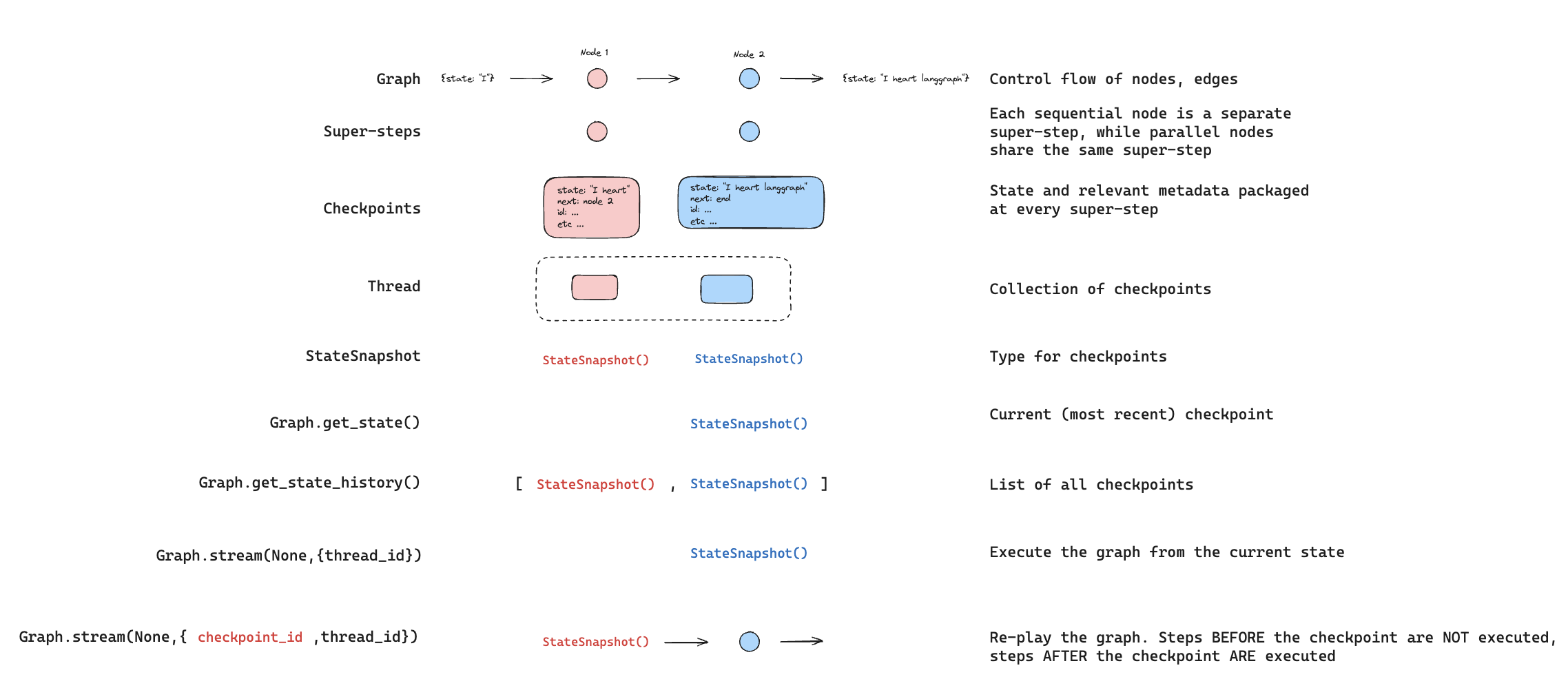
When interacting with the saved graph state, you **must** specify a [thread identifier](#threads). You can view the *latest* state of the graph by calling `graph.getState(config)`. This will return a `StateSnapshot` object that corresponds to the latest checkpoint associated with the thread ID provided in the config or a checkpoint associated with a checkpoint ID for the thread, if provided.

```typescript theme={"theme":{"light":"catppuccin-latte","dark":"catppuccin-mocha"}}
// get the latest state snapshot
const config = { configurable: { thread_id: "1" } };
await graph.getState(config);

// get a state snapshot for a specific checkpoint_id
const config = {
  configurable: {
    thread_id: "1",
    checkpoint_id: "1ef663ba-28fe-6528-8002-5a559208592c",
  },
};
await graph.getState(config);
```

In our example, the output of `getState` will look like this:

```
StateSnapshot {
  values: { foo: 'b', bar: ['a', 'b'] },
  next: [],
  config: {
    configurable: {
      thread_id: '1',
      checkpoint_ns: '',
      checkpoint_id: '1ef663ba-28fe-6528-8002-5a559208592c'
    }
  },
  metadata: {
    source: 'loop',
    writes: { nodeB: { foo: 'b', bar: ['b'] } },
    step: 2
  },
  createdAt: '2024-08-29T19:19:38.821749+00:00',
  parentConfig: {
    configurable: {
      thread_id: '1',
      checkpoint_ns: '',
      checkpoint_id: '1ef663ba-28f9-6ec4-8001-31981c2c39f8'
    }
  },
  tasks: []
}
```

#### StateSnapshot fields

| Field          | Type             | Description                                                                                                                                                 |
| -------------- | ---------------- | ----------------------------------------------------------------------------------------------------------------------------------------------------------- |
| `values`       | `object`         | State channel values at this checkpoint.                                                                                                                    |
| `next`         | `string[]`       | Node names to execute next. Empty `[]` means the graph is complete.                                                                                         |
| `config`       | `object`         | Contains `thread_id`, `checkpoint_ns`, and `checkpoint_id`.                                                                                                 |
| `metadata`     | `object`         | Execution metadata. Contains `source` (`"input"`, `"loop"`, or `"update"`), `writes` (node outputs), and `step` (super-step counter).                       |
| `createdAt`    | `string`         | ISO 8601 timestamp of when this checkpoint was created.                                                                                                     |
| `parentConfig` | `object \| null` | Config of the previous checkpoint. `null` for the first checkpoint.                                                                                         |
| `tasks`        | `PregelTask[]`   | Tasks to execute at this step. Each task has `id`, `name`, `error`, `interrupts`, and optionally `state` (subgraph snapshot, when using `subgraphs: true`). |

### Get state history

You can get the full history of the graph execution for a given thread by calling `graph.getStateHistory(config)`. This will return a list of `StateSnapshot` objects associated with the thread ID provided in the config. Importantly, the checkpoints will be ordered chronologically with the most recent checkpoint / `StateSnapshot` being the first in the list.

```typescript theme={"theme":{"light":"catppuccin-latte","dark":"catppuccin-mocha"}}
const config = { configurable: { thread_id: "1" } };
for await (const state of graph.getStateHistory(config)) {
  console.log(state);
}
```

In our example, the output of `getStateHistory` will look like this:

```
[
  StateSnapshot {
    values: { foo: 'b', bar: ['a', 'b'] },
    next: [],
    config: {
      configurable: {
        thread_id: '1',
        checkpoint_ns: '',
        checkpoint_id: '1ef663ba-28fe-6528-8002-5a559208592c'
      }
    },
    metadata: {
      source: 'loop',
      writes: { nodeB: { foo: 'b', bar: ['b'] } },
      step: 2
    },
    createdAt: '2024-08-29T19:19:38.821749+00:00',
    parentConfig: {
      configurable: {
        thread_id: '1',
        checkpoint_ns: '',
        checkpoint_id: '1ef663ba-28f9-6ec4-8001-31981c2c39f8'
      }
    },
    tasks: []
  },
  StateSnapshot {
    values: { foo: 'a', bar: ['a'] },
    next: ['nodeB'],
    config: {
      configurable: {
        thread_id: '1',
        checkpoint_ns: '',
        checkpoint_id: '1ef663ba-28f9-6ec4-8001-31981c2c39f8'
      }
    },
    metadata: {
      source: 'loop',
      writes: { nodeA: { foo: 'a', bar: ['a'] } },
      step: 1
    },
    createdAt: '2024-08-29T19:19:38.819946+00:00',
    parentConfig: {
      configurable: {
        thread_id: '1',
        checkpoint_ns: '',
        checkpoint_id: '1ef663ba-28f4-6b4a-8000-ca575a13d36a'
      }
    },
    tasks: [
      PregelTask {
        id: '6fb7314f-f114-5413-a1f3-d37dfe98ff44',
        name: 'nodeB',
        error: null,
        interrupts: []
      }
    ]
  },
  StateSnapshot {
    values: { foo: '', bar: [] },
    next: ['node_a'],
    config: {
      configurable: {
        thread_id: '1',
        checkpoint_ns: '',
        checkpoint_id: '1ef663ba-28f4-6b4a-8000-ca575a13d36a'
      }
    },
    metadata: {
      source: 'loop',
      writes: null,
      step: 0
    },
    createdAt: '2024-08-29T19:19:38.817813+00:00',
    parentConfig: {
      configurable: {
        thread_id: '1',
        checkpoint_ns: '',
        checkpoint_id: '1ef663ba-28f0-6c66-bfff-6723431e8481'
      }
    },
    tasks: [
      PregelTask {
        id: 'f1b14528-5ee5-579c-949b-23ef9bfbed58',
        name: 'node_a',
        error: null,
        interrupts: []
      }
    ]
  },
  StateSnapshot {
    values: { bar: [] },
    next: ['__start__'],
    config: {
      configurable: {
        thread_id: '1',
        checkpoint_ns: '',
        checkpoint_id: '1ef663ba-28f0-6c66-bfff-6723431e8481'
      }
    },
    metadata: {
      source: 'input',
      writes: { foo: '' },
      step: -1
    },
    createdAt: '2024-08-29T19:19:38.816205+00:00',
    parentConfig: null,
    tasks: [
      PregelTask {
        id: '6d27aa2e-d72b-5504-a36f-8620e54a76dd',
        name: '__start__',
        error: null,
        interrupts: []
      }
    ]
  }
]
```

<img src="https://mintcdn.com/langchain-5e9cc07a/-_xGPoyjhyiDWTPJ/oss/images/get_state.jpg?fit=max&auto=format&n=-_xGPoyjhyiDWTPJ&q=85&s=38ffff52be4d8806b287836295a3c058" alt="State" width="2692" height="1056" data-path="oss/images/get_state.jpg" />

#### Find a specific checkpoint

You can filter the state history to find checkpoints matching specific criteria:

```typescript theme={"theme":{"light":"catppuccin-latte","dark":"catppuccin-mocha"}}
const history: StateSnapshot[] = [];
for await (const state of graph.getStateHistory(config)) {
  history.push(state);
}

// Find the checkpoint before a specific node executed
const beforeNodeB = history.find((s) => s.next.includes("nodeB"));

// Find a checkpoint by step number
const step2 = history.find((s) => s.metadata.step === 2);

// Find checkpoints created by updateState
const forks = history.filter((s) => s.metadata.source === "update");

// Find the checkpoint where an interrupt occurred
const interrupted = history.find(
  (s) => s.tasks.length > 0 && s.tasks.some((t) => t.interrupts.length > 0)
);
```

### Replay

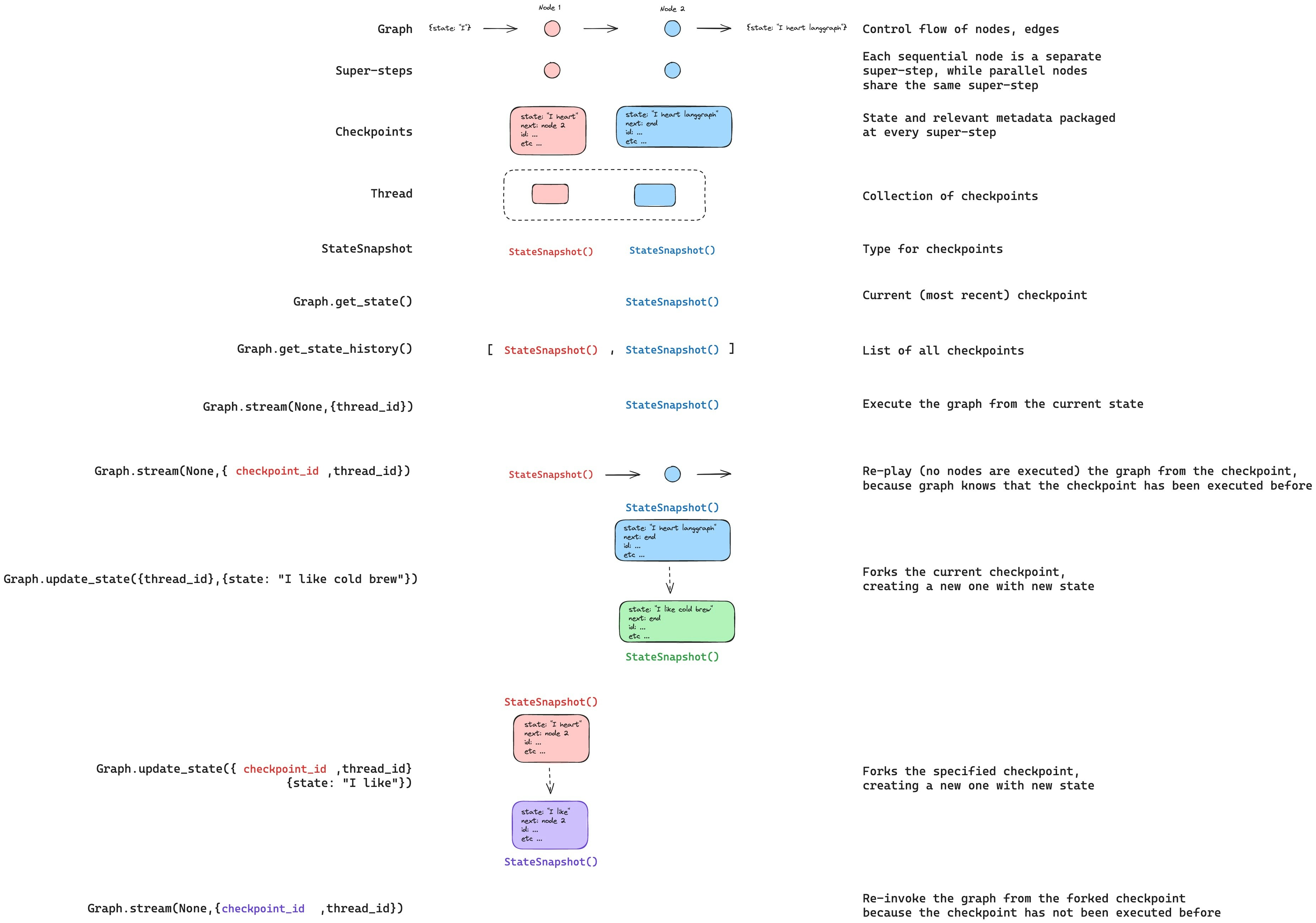
Replay re-executes steps from a prior checkpoint. Invoke the graph with a prior `checkpoint_id` to re-run nodes after that checkpoint. Nodes before the checkpoint are skipped (their results are already saved). Nodes after the checkpoint re-execute, including any LLM calls, API requests, or [interrupts](/oss/javascript/langgraph/interrupts) — which are always re-triggered during replay.

See [Time travel](/oss/javascript/langgraph/use-time-travel) for full details and code examples on replaying past executions.

<img src="https://mintcdn.com/langchain-5e9cc07a/dL5Sn6Cmy9pwtY0V/oss/images/re_play.png?fit=max&auto=format&n=dL5Sn6Cmy9pwtY0V&q=85&s=d7b34b85c106e55d181ae1f4afb50251" alt="Replay" width="2276" height="986" data-path="oss/images/re_play.png" />

### Update state

You can edit the graph state using `graph.updateState()`. This creates a new checkpoint with the updated values — it does not modify the original checkpoint. The update is treated the same as a node update: values are passed through [reducer](/oss/javascript/langgraph/graph-api#reducers) functions when defined, so channels with reducers *accumulate* values rather than overwrite them.

You can optionally specify `asNode` to control which node the update is treated as coming from, which affects which node executes next. See [Time travel: `asNode`](/oss/javascript/langgraph/use-time-travel#from-a-specific-node) for details.

<img src="https://mintcdn.com/langchain-5e9cc07a/-_xGPoyjhyiDWTPJ/oss/images/checkpoints_full_story.jpg?fit=max&auto=format&n=-_xGPoyjhyiDWTPJ&q=85&s=a52016b2c44b57bd395d6e1eac47aa36" alt="Update" width="3705" height="2598" data-path="oss/images/checkpoints_full_story.jpg" />

## Memory store

<img src="https://mintcdn.com/langchain-5e9cc07a/dL5Sn6Cmy9pwtY0V/oss/images/shared_state.png?fit=max&auto=format&n=dL5Sn6Cmy9pwtY0V&q=85&s=354526fb48c5eb11b4b2684a2df40d6c" alt="Model of shared state" width="1482" height="777" data-path="oss/images/shared_state.png" />

A [state schema](/oss/javascript/langgraph/graph-api#schema) specifies a set of keys that are populated as a graph is executed. As discussed above, state can be written by a checkpointer to a thread at each graph step, enabling state persistence.

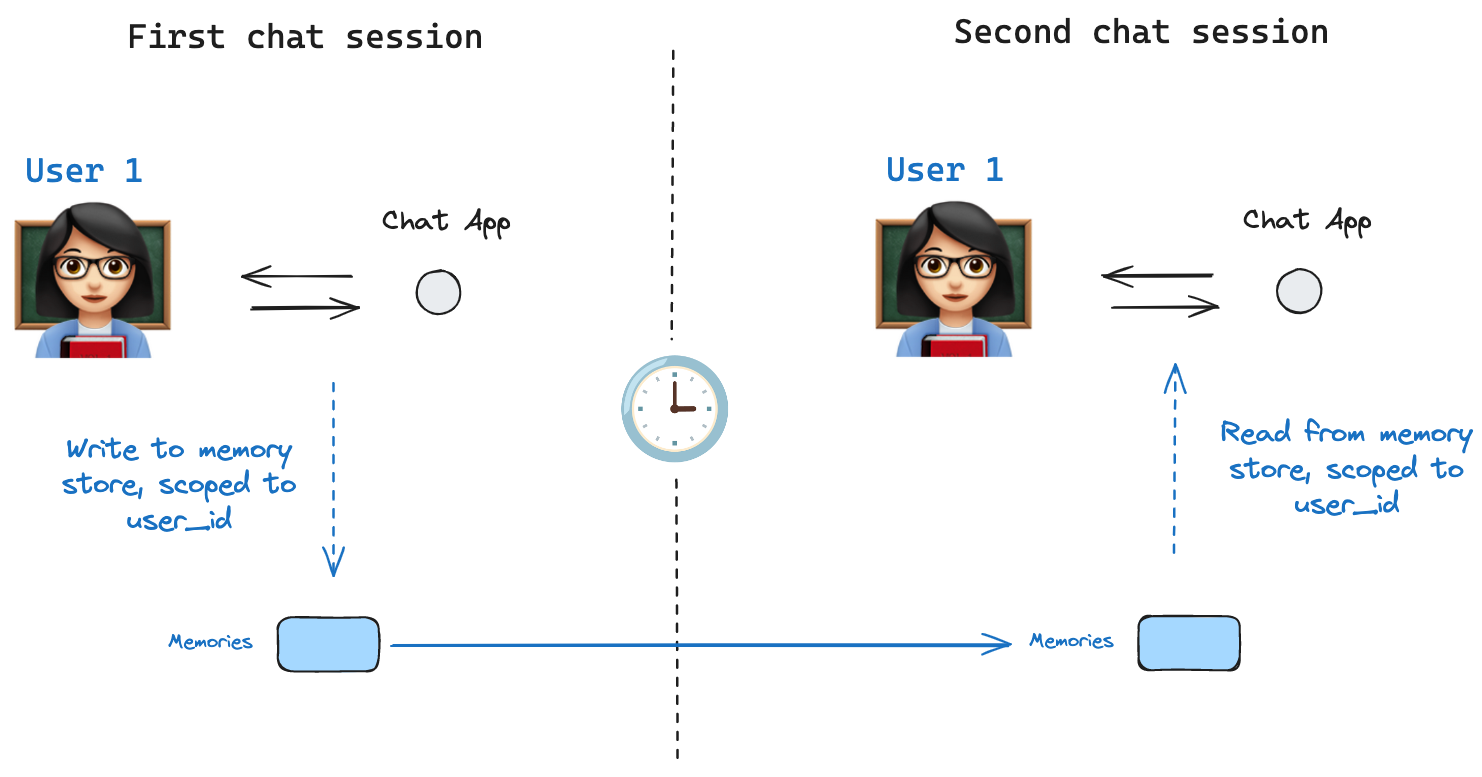
What if we want to retain some information *across threads*? Consider the case of a chatbot where we want to retain specific information about the user across *all* chat conversations (e.g., threads) with that user!

With checkpointers alone, we cannot share information across threads. This motivates the need for the [`Store`](https://reference.langchain.com/python/langgraph/store/) interface. As an illustration, we can define an `InMemoryStore` to store information about a user across threads. We simply compile our graph with a checkpointer, as before, and pass the store.

<Info>
  **LangGraph API handles stores automatically**
  When using the LangGraph API, you don't need to implement or configure stores manually. The API handles all storage infrastructure for you behind the scenes.
</Info>

<Note>
  [InMemoryStore](https://reference.langchain.com/javascript/langchain-core/stores/InMemoryStore) is suitable for development and testing. For production, use a persistent store like `PostgresStore`, `MongoDBStore`, or `RedisStore`. All implementations extend [BaseStore](https://reference.langchain.com/javascript/langchain-core/stores/BaseStore), which is the type annotation to use in node function signatures.
</Note>

### Basic usage

First, let's showcase this in isolation without using LangGraph.

```typescript theme={"theme":{"light":"catppuccin-latte","dark":"catppuccin-mocha"}}
import { MemoryStore } from "@langchain/langgraph";

const memoryStore = new MemoryStore();
```

Memories are namespaced by a `tuple`, which in this specific example will be `(<user_id>, "memories")`. The namespace can be any length and represent anything, does not have to be user specific.

```typescript theme={"theme":{"light":"catppuccin-latte","dark":"catppuccin-mocha"}}
const userId = "1";
const namespaceForMemory = [userId, "memories"];
```

We use the `store.put` method to save memories to our namespace in the store. When we do this, we specify the namespace, as defined above, and a key-value pair for the memory: the key is simply a unique identifier for the memory (`memory_id`) and the value (a dictionary) is the memory itself.

```typescript theme={"theme":{"light":"catppuccin-latte","dark":"catppuccin-mocha"}}
import { v4 as uuidv4 } from "uuid";

const memoryId = uuidv4();
const memory = { food_preference: "I like pizza" };
await memoryStore.put(namespaceForMemory, memoryId, memory);
```

We can read out memories in our namespace using the `store.search` method, which will return all memories for a given user as a list. The most recent memory is the last in the list.

```typescript theme={"theme":{"light":"catppuccin-latte","dark":"catppuccin-mocha"}}
const memories = await memoryStore.search(namespaceForMemory);
memories[memories.length - 1];

// {
//   value: { food_preference: 'I like pizza' },
//   key: '07e0caf4-1631-47b7-b15f-65515d4c1843',
//   namespace: ['1', 'memories'],
//   createdAt: '2024-10-02T17:22:31.590602+00:00',
//   updatedAt: '2024-10-02T17:22:31.590605+00:00'
// }
```

The attributes it has are:

* `value`: The value of this memory

* `key`: A unique key for this memory in this namespace

* `namespace`: A tuple of strings, the namespace of this memory type

  <Note>
    While the type is `tuple`, it may be serialized as a list when converted to JSON (for example, `['1', 'memories']`).
  </Note>

* `createdAt`: Timestamp for when this memory was created

* `updatedAt`: Timestamp for when this memory was updated

### Semantic search

Beyond simple retrieval, the store also supports semantic search, allowing you to find memories based on meaning rather than exact matches. To enable this, configure the store with an embedding model:

```typescript theme={"theme":{"light":"catppuccin-latte","dark":"catppuccin-mocha"}}
import { OpenAIEmbeddings } from "@langchain/openai";

const store = new InMemoryStore({
  index: {
    embeddings: new OpenAIEmbeddings({ model: "text-embedding-3-small" }),
    dims: 1536,
    fields: ["food_preference", "$"], // Fields to embed
  },
});
```

Now when searching, you can use natural language queries to find relevant memories:

```typescript theme={"theme":{"light":"catppuccin-latte","dark":"catppuccin-mocha"}}
// Find memories about food preferences
// (This can be done after putting memories into the store)
const memories = await store.search(namespaceForMemory, {
  query: "What does the user like to eat?",
  limit: 3, // Return top 3 matches
});
```

You can control which parts of your memories get embedded by configuring the `fields` parameter or by specifying the `index` parameter when storing memories:

```typescript theme={"theme":{"light":"catppuccin-latte","dark":"catppuccin-mocha"}}
// Store with specific fields to embed
await store.put(
  namespaceForMemory,
  uuidv4(),
  {
    food_preference: "I love Italian cuisine",
    context: "Discussing dinner plans",
  },
  { index: ["food_preference"] } // Only embed "food_preferences" field
);

// Store without embedding (still retrievable, but not searchable)
await store.put(
  namespaceForMemory,
  uuidv4(),
  { system_info: "Last updated: 2024-01-01" },
  { index: false }
);
```

### Using in LangGraph

With this all in place, we use the `memoryStore` in LangGraph. The `memoryStore` works hand-in-hand with the checkpointer: the checkpointer saves state to threads, as discussed above, and the `memoryStore` allows us to store arbitrary information for access *across* threads. We compile the graph with both the checkpointer and the `memoryStore` as follows.

```typescript theme={"theme":{"light":"catppuccin-latte","dark":"catppuccin-mocha"}}
import { MemorySaver } from "@langchain/langgraph";

// We need this because we want to enable threads (conversations)
const checkpointer = new MemorySaver();

// ... Define the graph ...

// Compile the graph with the checkpointer and store
const graph = workflow.compile({ checkpointer, store: memoryStore });
```

We invoke the graph with a `thread_id`, as before, and also with a `user_id`, which we'll use to namespace our memories to this particular user as we showed above.

```typescript theme={"theme":{"light":"catppuccin-latte","dark":"catppuccin-mocha"}}
// Invoke the graph
const userId = "1";
const config = { configurable: { thread_id: "1" }, context: { userId } };

// First let's just say hi to the AI
for await (const update of await graph.stream(
  { messages: [{ role: "user", content: "hi" }] },
  { ...config, streamMode: "updates" }
)) {
  console.log(update);
}
```

You can access the store and the `userId` in *any node* with the `runtime` argument. Here's how you might use it to save memories:

```typescript theme={"theme":{"light":"catppuccin-latte","dark":"catppuccin-mocha"}}
import { StateSchema, MessagesValue, Runtime } from "@langchain/langgraph";
import { v4 as uuidv4 } from "uuid";

const MessagesState = new StateSchema({
  messages: MessagesValue,
});

const updateMemory: GraphNode<typeof MessagesState> = async (state, runtime) => {
  // Get the user id from the config
  const userId = runtime.context?.user_id;
  if (!userId) throw new Error("User ID is required");

  // Namespace the memory
  const namespace = [userId, "memories"];

  // ... Analyze conversation and create a new memory
  const memory = "Some memory content";

  // Create a new memory ID
  const memoryId = uuidv4();

  // We create a new memory
  await runtime.store?.put(namespace, memoryId, { memory });
};
```

As we showed above, we can also access the store in any node and use the `store.search` method to get memories. Recall the memories are returned as a list of objects that can be converted to a dictionary.

```typescript theme={"theme":{"light":"catppuccin-latte","dark":"catppuccin-mocha"}}
memories[memories.length - 1];
// {
//   value: { food_preference: 'I like pizza' },
//   key: '07e0caf4-1631-47b7-b15f-65515d4c1843',
//   namespace: ['1', 'memories'],
//   createdAt: '2024-10-02T17:22:31.590602+00:00',
//   updatedAt: '2024-10-02T17:22:31.590605+00:00'
// }
```

We can access the memories and use them in our model call.

```typescript theme={"theme":{"light":"catppuccin-latte","dark":"catppuccin-mocha"}}
const callModel: GraphNode<typeof MessagesState> = async (state, runtime) => {
  // Get the user id from the config
  const userId = runtime.context?.user_id;

  // Namespace the memory
  const namespace = [userId, "memories"];

  // Search based on the most recent message
  const memories = await runtime.store?.search(namespace, {
    query: state.messages[state.messages.length - 1].content,
    limit: 3,
  });
  const info = memories.map((d) => d.value.memory).join("\n");

  // ... Use memories in the model call
};
```

If we create a new thread, we can still access the same memories so long as the `user_id` is the same.

```typescript theme={"theme":{"light":"catppuccin-latte","dark":"catppuccin-mocha"}}
// Invoke the graph
const config = { configurable: { thread_id: "2" }, context: { userId: "1" } };

// Let's say hi again
for await (const update of await graph.stream(
  { messages: [{ role: "user", content: "hi, tell me about my memories" }] },
  { ...config, streamMode: "updates" }
)) {
  console.log(update);
}
```

When we use the LangSmith, either locally (e.g., in [Studio](/langsmith/studio)) or [hosted with LangSmith](/langsmith/platform-setup), the base store is available to use by default and does not need to be specified during graph compilation. To enable semantic search, however, you **do** need to configure the indexing settings in your `langgraph.json` file. For example:

```json theme={"theme":{"light":"catppuccin-latte","dark":"catppuccin-mocha"}}
{
    ...
    "store": {
        "index": {
            "embed": "openai:text-embeddings-3-small",
            "dims": 1536,
            "fields": ["$"]
        }
    }
}
```

See the [deployment guide](/langsmith/semantic-search) for more details and configuration options.

## Optimize checkpoint storage

## Checkpointer libraries

Under the hood, checkpointing is powered by checkpointer objects that conform to [`BaseCheckpointSaver`](https://reference.langchain.com/javascript/langchain-langgraph/index/BaseCheckpointSaver) interface. LangGraph provides several checkpointer implementations, all implemented via standalone, installable libraries.

* `@langchain/langgraph-checkpoint`: The base interface for checkpointer savers ([`BaseCheckpointSaver`](https://reference.langchain.com/javascript/langchain-langgraph/index/BaseCheckpointSaver)) and serialization/deserialization interface ([`SerializerProtocol`](https://reference.langchain.com/javascript/langchain-langgraph-checkpoint/SerializerProtocol)). Includes in-memory checkpointer implementation ([`MemorySaver`](https://reference.langchain.com/javascript/langchain-langgraph/index/MemorySaver)) for experimentation. LangGraph comes with `@langchain/langgraph-checkpoint` included.
* `@langchain/langgraph-checkpoint-sqlite`: An implementation of LangGraph checkpointer that uses SQLite database ([`SqliteSaver`](https://reference.langchain.com/javascript/langchain-langgraph-checkpoint-sqlite/SqliteSaver)). Ideal for experimentation and local workflows. Needs to be installed separately.
* `@langchain/langgraph-checkpoint-postgres`: An advanced checkpointer that uses Postgres database ([`PostgresSaver`](https://reference.langchain.com/javascript/langchain-langgraph-checkpoint-postgres/index/PostgresSaver)), used in LangSmith. Ideal for using in production. Needs to be installed separately.
* `@langchain/langgraph-checkpoint-mongodb`: An advanced checkpointer (`MongoDBSaver`) and long-term memory store (`MongoDBStore`) backed by MongoDB. The store supports cross-thread persistence with optional integrated vector search. Ideal for production use. Needs to be installed separately.
* `@langchain/langgraph-checkpoint-redis`: An advanced checkpointer that uses Redis database (`RedisSaver`). Ideal for using in production. Needs to be installed separately.

### Checkpointer interface

Each checkpointer conforms to the [`BaseCheckpointSaver`](https://reference.langchain.com/javascript/langchain-langgraph/index/BaseCheckpointSaver) interface and implements the following methods:

* `.put` - Store a checkpoint with its configuration and metadata.
* `.putWrites` - Store intermediate writes linked to a checkpoint (i.e. [pending writes](#pending-writes)).
* `.getTuple` - Fetch a checkpoint tuple using for a given configuration (`thread_id` and `checkpoint_id`). This is used to populate `StateSnapshot` in `graph.getState()`.
* `.list` - List checkpoints that match a given configuration and filter criteria. This is used to populate state history in `graph.getStateHistory()`

***

<div className="source-links">
  <Callout icon="terminal-2">
    [Connect these docs](/use-these-docs) to Claude, VSCode, and more via MCP for real-time answers.
  </Callout>

  <Callout icon="edit">
    [Edit this page on GitHub](https://github.com/langchain-ai/docs/edit/main/src/oss/langgraph/persistence.mdx) or [file an issue](https://github.com/langchain-ai/docs/issues/new/choose).
  </Callout>
</div>