> ## Documentation Index
> Fetch the complete documentation index at: https://docs.langchain.com/llms.txt
> Use this file to discover all available pages before exploring further.

# Stores

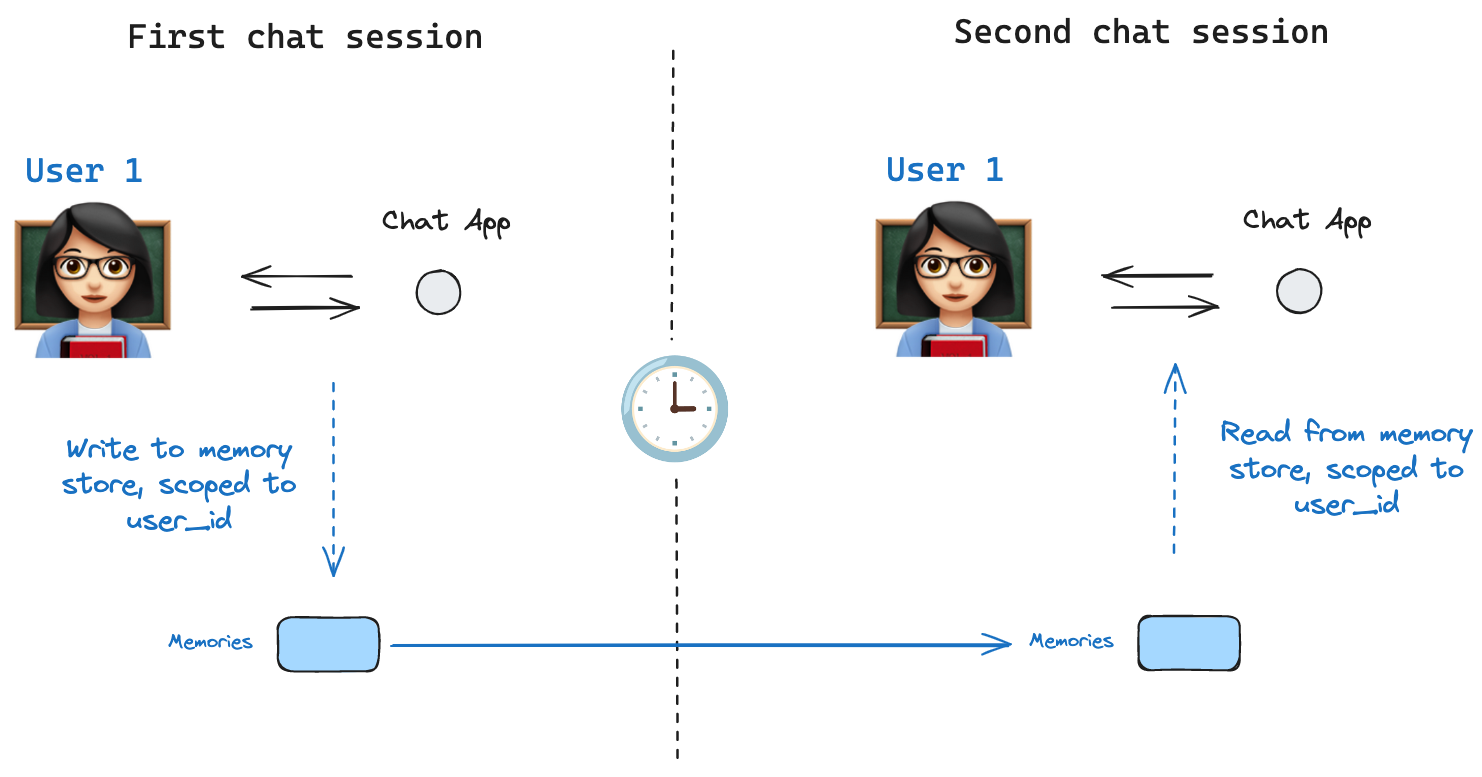
> LangGraph stores provide cross-thread long-term memory, complementing per-thread checkpointer persistence.

Stores let agents persist information across threads, including user preferences, accumulated knowledge, and facts that should survive beyond a single conversation. Unlike [checkpointers](/oss/javascript/langgraph/checkpointers), which save the full graph state scoped to one thread, stores hold arbitrary key-value data accessible from any thread.

<img src="https://mintcdn.com/langchain-5e9cc07a/dL5Sn6Cmy9pwtY0V/oss/images/shared_state.png?fit=max&auto=format&n=dL5Sn6Cmy9pwtY0V&q=85&s=354526fb48c5eb11b4b2684a2df40d6c" alt="Model of shared state" width="1482" height="777" data-path="oss/images/shared_state.png" />

<Info>
  **Agent Server handles stores automatically**
  When using the [Agent Server](/langsmith/agent-server), you do not need to implement or configure stores manually. The API handles all storage infrastructure for you behind the scenes.
</Info>

<Note>
  [InMemoryStore](https://reference.langchain.com/javascript/langchain-core/stores/InMemoryStore) is suitable for development and testing. For production, use a persistent store like `PostgresStore`, `MongoDBStore`, or `RedisStore`. All implementations extend [BaseStore](https://reference.langchain.com/javascript/langchain-core/stores/BaseStore), which is the type annotation to use in node function signatures.
</Note>

## Basic usage

The following code snippet shows the [InMemoryStore](https://reference.langchain.com/javascript/langchain-core/stores/InMemoryStore) in isolation without using LangGraph:

```typescript theme={"theme":{"light":"catppuccin-latte","dark":"catppuccin-mocha"}}
import { MemoryStore } from "@langchain/langgraph";

const memoryStore = new MemoryStore();
```

Memories are namespaced by a `tuple`, which is `(<user_id>, "memories")` in the following example. The namespace can be any length and represent anything, does not have to be user specific.

```typescript theme={"theme":{"light":"catppuccin-latte","dark":"catppuccin-mocha"}}
const userId = "1";
const namespaceForMemory = [userId, "memories"];
```

Use the `store.put` method to save memories to the namespace in the store. Specify the namespace, as defined above, and a key-value pair for the memory: the key is simply a unique identifier for the memory (`memory_id`) and the value (a dictionary) is the memory itself.

```typescript theme={"theme":{"light":"catppuccin-latte","dark":"catppuccin-mocha"}}
const memoryId = crypto.randomUUID();
const memory = { food_preference: "I like pizza" };
await memoryStore.put(namespaceForMemory, memoryId, memory);
```

Read out memories from your namespace using the `store.search` method, which returns memories for a given user as a list, up to the `limit` argument (default `10`). With `InMemoryStore`, items are returned in insertion order, so the most recent memory is last in the list; other backends may order memories differently (see [Listing items in a namespace](#listing-items-in-a-namespace)).

```typescript theme={"theme":{"light":"catppuccin-latte","dark":"catppuccin-mocha"}}
const memories = await memoryStore.search(namespaceForMemory);
memories[memories.length - 1];

// {
//   value: { food_preference: 'I like pizza' },
//   key: '07e0caf4-1631-47b7-b15f-65515d4c1843',
//   namespace: ['1', 'memories'],
//   createdAt: '2024-10-02T17:22:31.590602+00:00',
//   updatedAt: '2024-10-02T17:22:31.590605+00:00'
// }
```

The attributes it has are:

* `value`: The value of this memory

* `key`: A unique key for this memory in this namespace

* `namespace`: A tuple of strings, the namespace of this memory type

  <Note>
    While the type is `tuple`, it may be serialized as a list when converted to JSON (for example, `['1', 'memories']`).
  </Note>

* `createdAt`: Timestamp for when this memory was created

* `updatedAt`: Timestamp for when this memory was updated

## Listing items in a namespace

Calling `store.search` with no `query` and no `filter` returns the items stored under the namespace prefix, up to `limit`. Use this to enumerate everything in a namespace when you don't need semantic ranking.

```ts theme={"theme":{"light":"catppuccin-latte","dark":"catppuccin-mocha"}}
// Return up to 100 items stored under ["alice", "memories"].
const items = await store.search(["alice", "memories"], { limit: 100 });
```

Three behaviors to keep in mind:

* **`namespace_prefix` matches by prefix, not exactly.** `("alice",)` also returns items under `("alice", "memories")`, `("alice", "preferences")`, and so on. To restrict to a single level, pass the full namespace or filter the returned items client-side on `item.namespace`.
* **Results past `limit` are silently truncated.** There is no overflow signal—set `limit` above your expected maximum, or paginate with `offset`.
* **Default ordering depends on the store backend.** `PostgresStore` and `AsyncPostgresStore` return results ordered by `updated_at` descending (most recently updated first). `InMemoryStore` returns results in insertion order (most recently inserted last). Do not rely on a specific order across implementations; sort client-side on `item.updated_at` if order matters.

To page through a large namespace:

```ts theme={"theme":{"light":"catppuccin-latte","dark":"catppuccin-mocha"}}
const pageSize = 50;
let offset = 0;
while (true) {
  const page = await store.search(["alice", "memories"], { limit: pageSize, offset });
  if (page.length === 0) break;
  for (const item of page) {
    // ...
  }
  offset += pageSize;
}
```

To discover which namespaces exist (for example, to iterate over every user before listing their memories), use `store.listNamespaces`:

```ts theme={"theme":{"light":"catppuccin-latte","dark":"catppuccin-mocha"}}
// All namespaces that start with ["alice"], truncated to two levels deep.
const namespaces = await store.listNamespaces({ prefix: ["alice"], maxDepth: 2 });
```

## Semantic search

Beyond simple retrieval, the store also supports semantic search, allowing you to find memories based on meaning rather than exact matches. To enable this, configure the store with an embedding model:

```typescript theme={"theme":{"light":"catppuccin-latte","dark":"catppuccin-mocha"}}
import { OpenAIEmbeddings } from "@langchain/openai";

const store = new InMemoryStore({
  index: {
    embeddings: new OpenAIEmbeddings({ model: "text-embedding-3-small" }),
    dims: 1536,
    fields: ["food_preference", "$"], // Fields to embed
  },
});
```

Now when searching, you can use natural language queries to find relevant memories:

```typescript theme={"theme":{"light":"catppuccin-latte","dark":"catppuccin-mocha"}}
// Find memories about food preferences
// (This can be done after putting memories into the store)
const memories = await store.search(namespaceForMemory, {
  query: "What does the user like to eat?",
  limit: 3, // Return top 3 matches
});
```

You can control which parts of your memories get embedded by configuring the `fields` parameter or by specifying the `index` parameter when storing memories:

```typescript theme={"theme":{"light":"catppuccin-latte","dark":"catppuccin-mocha"}}
// Store with specific fields to embed
await store.put(
  namespaceForMemory,
  crypto.randomUUID(),
  {
    food_preference: "I love Italian cuisine",
    context: "Discussing dinner plans",
  },
  { index: ["food_preference"] } // Only embed "food_preferences" field
);

// Store without embedding (still retrievable, but not searchable)
await store.put(
  namespaceForMemory,
  crypto.randomUUID(),
  { system_info: "Last updated: 2024-01-01" },
  { index: false }
);
```

## Using in LangGraph

The `memoryStore` works hand-in-hand with the checkpointer: the checkpointer saves state to threads, as discussed above, and the `memoryStore` allows you to store arbitrary information for access *across* threads. Compile the graph with both the checkpointer and the `memoryStore` as follows.

```typescript theme={"theme":{"light":"catppuccin-latte","dark":"catppuccin-mocha"}}
import { MemorySaver } from "@langchain/langgraph";

// We need this because we want to enable threads (conversations)
const checkpointer = new MemorySaver();

// ... Define the graph ...

// Compile the graph with the checkpointer and store
const graph = workflow.compile({ checkpointer, store: memoryStore });
```

Then invoke the graph with a `thread_id`, as before, and also with a `user_id`, which serves as the namespace for memories for this particular user as before.

```typescript theme={"theme":{"light":"catppuccin-latte","dark":"catppuccin-mocha"}}
// Invoke the graph
const userId = "1";
const config = { configurable: { thread_id: "1" }, context: { userId } };

// First let's just say hi to the AI
for await (const update of await graph.stream(
  { messages: [{ role: "user", content: "hi" }] },
  { ...config, streamMode: "updates" }
)) {
  console.log(update);
}
```

You can access the store and the `userId` from *any node* with the `runtime` argument. You can use it to save memories:

```typescript theme={"theme":{"light":"catppuccin-latte","dark":"catppuccin-mocha"}}
import { StateSchema, MessagesValue, Runtime } from "@langchain/langgraph";

const MessagesState = new StateSchema({
  messages: MessagesValue,
});

const updateMemory: GraphNode<typeof MessagesState> = async (state, runtime) => {
  // Get the user id from the config
  const userId = runtime.context?.user_id;
  if (!userId) throw new Error("User ID is required");

  // Namespace the memory
  const namespace = [userId, "memories"];

  // ... Analyze conversation and create a new memory
  const memory = "Some memory content";

  // Create a new memory ID
  const memoryId = crypto.randomUUID();

  // We create a new memory
  await runtime.store?.put(namespace, memoryId, { memory });
};
```

You can also access the store from any node and use the `store.search` method to get memories. Memories are returned as a list of objects that can be converted to a dictionary.

```typescript theme={"theme":{"light":"catppuccin-latte","dark":"catppuccin-mocha"}}
memories[memories.length - 1];
// {
//   value: { food_preference: 'I like pizza' },
//   key: '07e0caf4-1631-47b7-b15f-65515d4c1843',
//   namespace: ['1', 'memories'],
//   createdAt: '2024-10-02T17:22:31.590602+00:00',
//   updatedAt: '2024-10-02T17:22:31.590605+00:00'
// }
```

You access the memories and use them in model calls.

```typescript theme={"theme":{"light":"catppuccin-latte","dark":"catppuccin-mocha"}}
const callModel: GraphNode<typeof MessagesState> = async (state, runtime) => {
  // Get the user id from the config
  const userId = runtime.context?.user_id;

  // Namespace the memory
  const namespace = [userId, "memories"];

  // Search based on the most recent message
  const memories = await runtime.store?.search(namespace, {
    query: state.messages[state.messages.length - 1].content,
    limit: 3,
  });
  const info = memories.map((d) => d.value.memory).join("\n");

  // ... Use memories in the model call
};
```

If you create a new thread, you can still access the same memories so long as the `user_id` is the same.

```typescript theme={"theme":{"light":"catppuccin-latte","dark":"catppuccin-mocha"}}
// Invoke the graph
const config = { configurable: { thread_id: "2" }, context: { userId: "1" } };

// Let's say hi again
for await (const update of await graph.stream(
  { messages: [{ role: "user", content: "hi, tell me about my memories" }] },
  { ...config, streamMode: "updates" }
)) {
  console.log(update);
}
```

When you use LangSmith locally (e.g., in [Studio](/langsmith/studio)) or [hosted](/langsmith/platform-setup), the base store is available to use by default and you do not need to specify it during graph compilation. To enable semantic search, however, you **do** need to configure the indexing settings in your `langgraph.json` file. For example:

```json theme={"theme":{"light":"catppuccin-latte","dark":"catppuccin-mocha"}}
{
    ...
    "store": {
        "index": {
            "embed": "openai:text-embeddings-3-small",
            "dims": 1536,
            "fields": ["$"]
        }
    }
}
```

See the [deployment guide](/langsmith/semantic-search) for more details and configuration options.

### Next steps

* [Add a custom store to Agent Server](/langsmith/custom-store) — deploying your implementation
* [Checkpointers](/oss/javascript/langgraph/checkpointers) — thread-scoped state persistence

***

<div className="source-links">
  <Callout icon="terminal-2">
    [Connect these docs](/use-these-docs) to Claude, VSCode, and more via MCP for real-time answers.
  </Callout>

  <Callout icon="edit">
    [Edit this page on GitHub](https://github.com/langchain-ai/docs/edit/main/src/oss/langgraph/stores.mdx) or [file an issue](https://github.com/langchain-ai/docs/issues/new/choose).
  </Callout>
</div>
