= (state) => {
// Kick off section writing in parallel via Send() API
return state.sections.map((section) =>
new Send("llmCall", { section })
);
};
// Build workflow
const orchestratorWorker = new StateGraph(State)
.addNode("orchestrator", orchestrator)
.addNode("llmCall", llmCall)
.addNode("synthesizer", synthesizer)
.addEdge("__start__", "orchestrator")
.addConditionalEdges(
"orchestrator",
assignWorkers,
["llmCall"]
)
.addEdge("llmCall", "synthesizer")
.addEdge("synthesizer", "__end__")
.compile();
// Invoke
const state = await orchestratorWorker.invoke({
topic: "Create a report on LLM scaling laws"
});
console.log(state.finalReport);
```
## Evaluator-optimizer
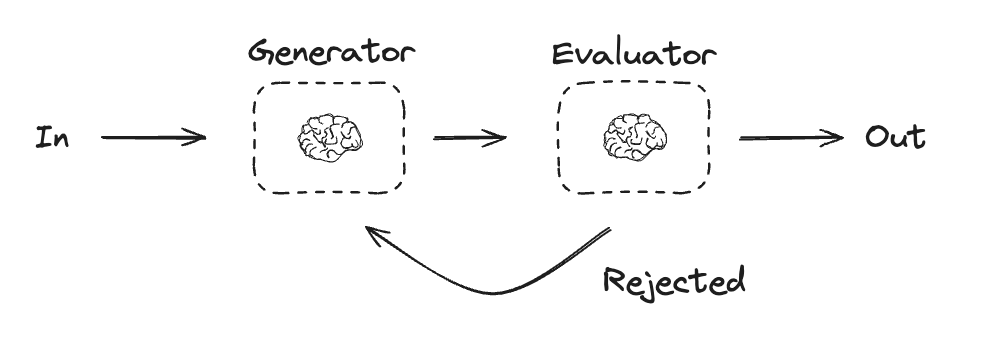
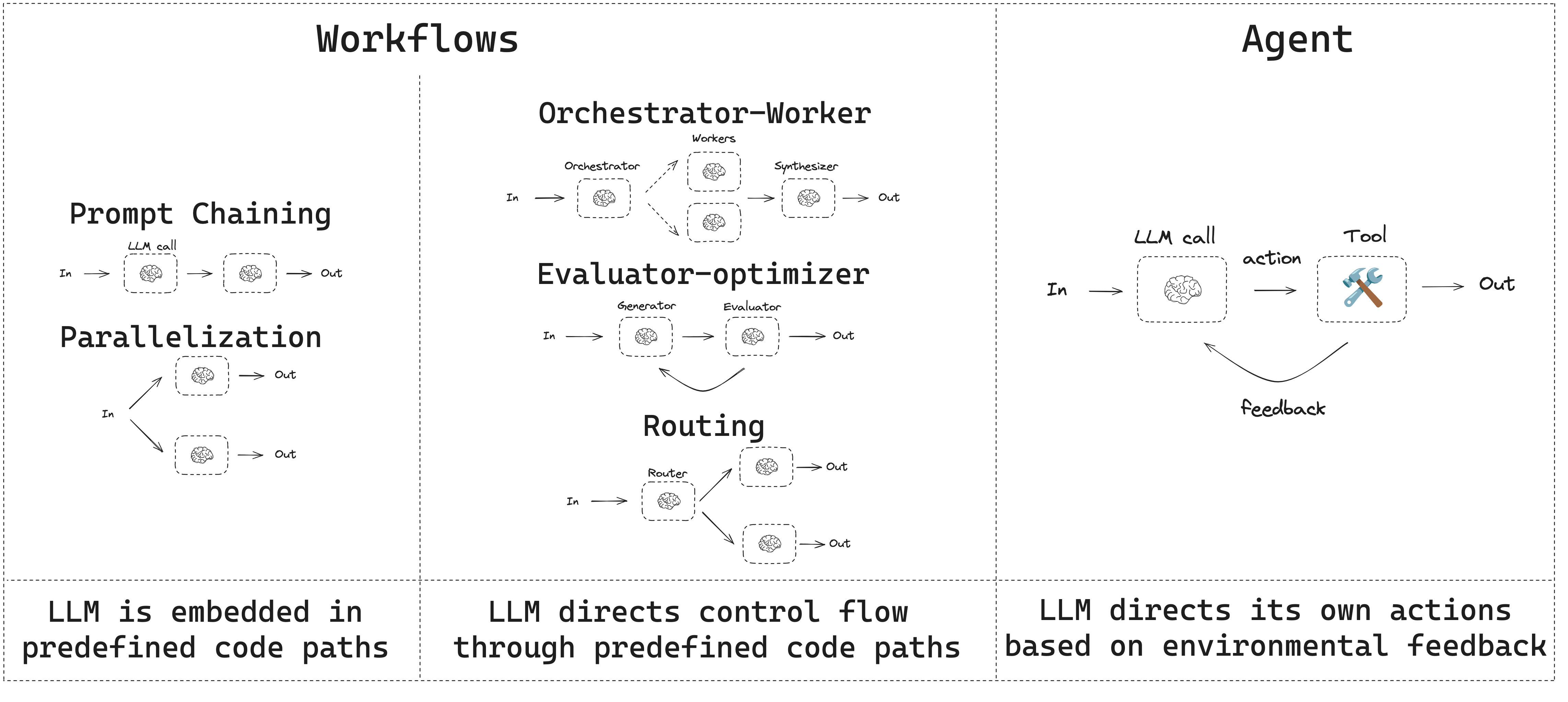
In evaluator-optimizer workflows, one LLM call creates a response and the other evaluates that response. If the evaluator or a [human-in-the-loop](/oss/javascript/langgraph/interrupts) determines the response needs refinement, feedback is provided and the response is recreated. This loop continues until an acceptable response is generated.
Evaluator-optimizer workflows are commonly used when there's particular success criteria for a task, but iteration is required to meet that criteria. For example, there's not always a perfect match when translating text between two languages. It might take a few iterations to generate a translation with the same meaning across the two languages.
 ```typescript Graph API theme={"theme":{"light":"catppuccin-latte","dark":"catppuccin-mocha"}}
import { StateGraph, StateSchema, GraphNode, ConditionalEdgeRouter } from "@langchain/langgraph";
import * as z from "zod";
// Graph state
const State = new StateSchema({
joke: z.string(),
topic: z.string(),
feedback: z.string(),
funnyOrNot: z.string(),
});
// Schema for structured output to use in evaluation
const feedbackSchema = z.object({
grade: z.enum(["funny", "not funny"]).describe(
"Decide if the joke is funny or not."
),
feedback: z.string().describe(
"If the joke is not funny, provide feedback on how to improve it."
),
});
// Augment the LLM with schema for structured output
const evaluator = llm.withStructuredOutput(feedbackSchema);
// Nodes
const llmCallGenerator: GraphNode = async (state) => {
// LLM generates a joke
let msg;
if (state.feedback) {
msg = await llm.invoke(
`Write a joke about ${state.topic} but take into account the feedback: ${state.feedback}`
);
} else {
msg = await llm.invoke(`Write a joke about ${state.topic}`);
}
return { joke: msg.content };
};
const llmCallEvaluator: GraphNode = async (state) => {
// LLM evaluates the joke
const grade = await evaluator.invoke(`Grade the joke ${state.joke}`);
return { funnyOrNot: grade.grade, feedback: grade.feedback };
};
// Conditional edge function to route back to joke generator or end based upon feedback from the evaluator
const routeJoke: ConditionalEdgeRouter = (state) => {
// Route back to joke generator or end based upon feedback from the evaluator
if (state.funnyOrNot === "funny") {
return "Accepted";
} else {
return "Rejected + Feedback";
}
};
// Build workflow
const optimizerWorkflow = new StateGraph(State)
.addNode("llmCallGenerator", llmCallGenerator)
.addNode("llmCallEvaluator", llmCallEvaluator)
.addEdge("__start__", "llmCallGenerator")
.addEdge("llmCallGenerator", "llmCallEvaluator")
.addConditionalEdges(
"llmCallEvaluator",
routeJoke,
{
// Name returned by routeJoke : Name of next node to visit
"Accepted": "__end__",
"Rejected + Feedback": "llmCallGenerator",
}
)
.compile();
// Invoke
const state = await optimizerWorkflow.invoke({ topic: "Cats" });
console.log(state.joke);
```
```typescript Functional API theme={"theme":{"light":"catppuccin-latte","dark":"catppuccin-mocha"}}
import * as z from "zod";
import { task, entrypoint } from "@langchain/langgraph";
// Schema for structured output to use in evaluation
const feedbackSchema = z.object({
grade: z.enum(["funny", "not funny"]).describe(
"Decide if the joke is funny or not."
),
feedback: z.string().describe(
"If the joke is not funny, provide feedback on how to improve it."
),
});
// Augment the LLM with schema for structured output
const evaluator = llm.withStructuredOutput(feedbackSchema);
// Tasks
const llmCallGenerator = task("jokeGenerator", async (params: {
topic: string;
feedback?: z.infer;
}) => {
// LLM generates a joke
const msg = params.feedback
? await llm.invoke(
`Write a joke about ${params.topic} but take into account the feedback: ${params.feedback.feedback}`
)
: await llm.invoke(`Write a joke about ${params.topic}`);
return msg.content;
});
const llmCallEvaluator = task("jokeEvaluator", async (joke: string) => {
// LLM evaluates the joke
return evaluator.invoke(`Grade the joke ${joke}`);
});
// Build workflow
const workflow = entrypoint(
"optimizerWorkflow",
async (topic: string) => {
let feedback: z.infer | undefined;
let joke: string;
while (true) {
joke = await llmCallGenerator({ topic, feedback });
feedback = await llmCallEvaluator(joke);
if (feedback.grade === "funny") {
break;
}
}
return joke;
}
);
// Invoke
const stream = await workflow.stream("Cats", {
streamMode: "updates",
});
for await (const step of stream) {
console.log(step);
console.log("\n");
}
```
## Agents
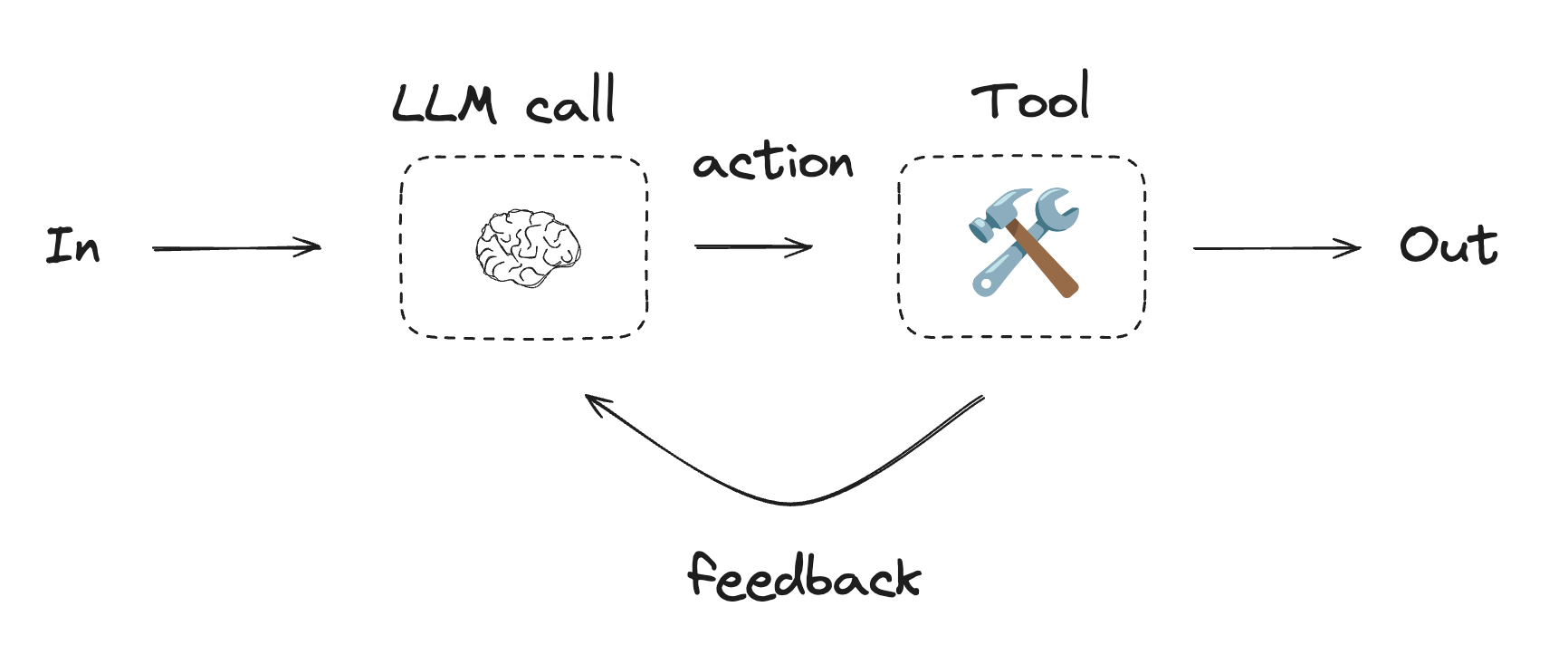
Agents are typically implemented as an LLM performing actions using [tools](/oss/javascript/langchain/tools). They operate in continuous feedback loops, and are used in situations where problems and solutions are unpredictable. Agents have more autonomy than workflows, and can make decisions about the tools they use and how to solve problems. You can still define the available toolset and guidelines for how agents behave.
```typescript Graph API theme={"theme":{"light":"catppuccin-latte","dark":"catppuccin-mocha"}}
import { StateGraph, StateSchema, GraphNode, ConditionalEdgeRouter } from "@langchain/langgraph";
import * as z from "zod";
// Graph state
const State = new StateSchema({
joke: z.string(),
topic: z.string(),
feedback: z.string(),
funnyOrNot: z.string(),
});
// Schema for structured output to use in evaluation
const feedbackSchema = z.object({
grade: z.enum(["funny", "not funny"]).describe(
"Decide if the joke is funny or not."
),
feedback: z.string().describe(
"If the joke is not funny, provide feedback on how to improve it."
),
});
// Augment the LLM with schema for structured output
const evaluator = llm.withStructuredOutput(feedbackSchema);
// Nodes
const llmCallGenerator: GraphNode = async (state) => {
// LLM generates a joke
let msg;
if (state.feedback) {
msg = await llm.invoke(
`Write a joke about ${state.topic} but take into account the feedback: ${state.feedback}`
);
} else {
msg = await llm.invoke(`Write a joke about ${state.topic}`);
}
return { joke: msg.content };
};
const llmCallEvaluator: GraphNode = async (state) => {
// LLM evaluates the joke
const grade = await evaluator.invoke(`Grade the joke ${state.joke}`);
return { funnyOrNot: grade.grade, feedback: grade.feedback };
};
// Conditional edge function to route back to joke generator or end based upon feedback from the evaluator
const routeJoke: ConditionalEdgeRouter = (state) => {
// Route back to joke generator or end based upon feedback from the evaluator
if (state.funnyOrNot === "funny") {
return "Accepted";
} else {
return "Rejected + Feedback";
}
};
// Build workflow
const optimizerWorkflow = new StateGraph(State)
.addNode("llmCallGenerator", llmCallGenerator)
.addNode("llmCallEvaluator", llmCallEvaluator)
.addEdge("__start__", "llmCallGenerator")
.addEdge("llmCallGenerator", "llmCallEvaluator")
.addConditionalEdges(
"llmCallEvaluator",
routeJoke,
{
// Name returned by routeJoke : Name of next node to visit
"Accepted": "__end__",
"Rejected + Feedback": "llmCallGenerator",
}
)
.compile();
// Invoke
const state = await optimizerWorkflow.invoke({ topic: "Cats" });
console.log(state.joke);
```
```typescript Functional API theme={"theme":{"light":"catppuccin-latte","dark":"catppuccin-mocha"}}
import * as z from "zod";
import { task, entrypoint } from "@langchain/langgraph";
// Schema for structured output to use in evaluation
const feedbackSchema = z.object({
grade: z.enum(["funny", "not funny"]).describe(
"Decide if the joke is funny or not."
),
feedback: z.string().describe(
"If the joke is not funny, provide feedback on how to improve it."
),
});
// Augment the LLM with schema for structured output
const evaluator = llm.withStructuredOutput(feedbackSchema);
// Tasks
const llmCallGenerator = task("jokeGenerator", async (params: {
topic: string;
feedback?: z.infer;
}) => {
// LLM generates a joke
const msg = params.feedback
? await llm.invoke(
`Write a joke about ${params.topic} but take into account the feedback: ${params.feedback.feedback}`
)
: await llm.invoke(`Write a joke about ${params.topic}`);
return msg.content;
});
const llmCallEvaluator = task("jokeEvaluator", async (joke: string) => {
// LLM evaluates the joke
return evaluator.invoke(`Grade the joke ${joke}`);
});
// Build workflow
const workflow = entrypoint(
"optimizerWorkflow",
async (topic: string) => {
let feedback: z.infer | undefined;
let joke: string;
while (true) {
joke = await llmCallGenerator({ topic, feedback });
feedback = await llmCallEvaluator(joke);
if (feedback.grade === "funny") {
break;
}
}
return joke;
}
);
// Invoke
const stream = await workflow.stream("Cats", {
streamMode: "updates",
});
for await (const step of stream) {
console.log(step);
console.log("\n");
}
```
## Agents
Agents are typically implemented as an LLM performing actions using [tools](/oss/javascript/langchain/tools). They operate in continuous feedback loops, and are used in situations where problems and solutions are unpredictable. Agents have more autonomy than workflows, and can make decisions about the tools they use and how to solve problems. You can still define the available toolset and guidelines for how agents behave.
 To get started with agents, see the [quickstart](/oss/javascript/langchain/quickstart) or read more about [how they work](/oss/javascript/langchain/agents) in LangChain.
```typescript Using tools theme={"theme":{"light":"catppuccin-latte","dark":"catppuccin-mocha"}}
import { tool } from "@langchain/core/tools";
import * as z from "zod";
// Define tools
const multiply = tool(
({ a, b }) => {
return a * b;
},
{
name: "multiply",
description: "Multiply two numbers together",
schema: z.object({
a: z.number().describe("first number"),
b: z.number().describe("second number"),
}),
}
);
const add = tool(
({ a, b }) => {
return a + b;
},
{
name: "add",
description: "Add two numbers together",
schema: z.object({
a: z.number().describe("first number"),
b: z.number().describe("second number"),
}),
}
);
const divide = tool(
({ a, b }) => {
return a / b;
},
{
name: "divide",
description: "Divide two numbers",
schema: z.object({
a: z.number().describe("first number"),
b: z.number().describe("second number"),
}),
}
);
// Augment the LLM with tools
const tools = [add, multiply, divide];
const toolsByName = Object.fromEntries(tools.map((tool) => [tool.name, tool]));
const llmWithTools = llm.bindTools(tools);
```
```typescript Graph API theme={"theme":{"light":"catppuccin-latte","dark":"catppuccin-mocha"}}
import { StateGraph, StateSchema, MessagesValue, GraphNode, ConditionalEdgeRouter } from "@langchain/langgraph";
import { ToolNode } from "@langchain/langgraph/prebuilt";
import {
SystemMessage,
ToolMessage
} from "@langchain/core/messages";
// Graph state
const State = new StateSchema({
messages: MessagesValue,
});
// Nodes
const llmCall: GraphNode = async (state) => {
// LLM decides whether to call a tool or not
const result = await llmWithTools.invoke([
{
role: "system",
content: "You are a helpful assistant tasked with performing arithmetic on a set of inputs."
},
...state.messages
]);
return {
messages: [result]
};
};
const toolNode = new ToolNode(tools);
// Conditional edge function to route to the tool node or end
const shouldContinue: ConditionalEdgeRouter = (state) => {
const messages = state.messages;
const lastMessage = messages.at(-1);
// If the LLM makes a tool call, then perform an action
if (lastMessage?.tool_calls?.length) {
return "toolNode";
}
// Otherwise, we stop (reply to the user)
return "__end__";
};
// Build workflow
const agentBuilder = new StateGraph(State)
.addNode("llmCall", llmCall)
.addNode("toolNode", toolNode)
// Add edges to connect nodes
.addEdge("__start__", "llmCall")
.addConditionalEdges(
"llmCall",
shouldContinue,
["toolNode", "__end__"]
)
.addEdge("toolNode", "llmCall")
.compile();
// Invoke
const messages = [{
role: "user",
content: "Add 3 and 4."
}];
const result = await agentBuilder.invoke({ messages });
console.log(result.messages);
```
```typescript Functional API theme={"theme":{"light":"catppuccin-latte","dark":"catppuccin-mocha"}}
import { task, entrypoint, addMessages } from "@langchain/langgraph";
import { BaseMessageLike, ToolCall } from "@langchain/core/messages";
const callLlm = task("llmCall", async (messages: BaseMessageLike[]) => {
// LLM decides whether to call a tool or not
return llmWithTools.invoke([
{
role: "system",
content: "You are a helpful assistant tasked with performing arithmetic on a set of inputs."
},
...messages
]);
});
const callTool = task("toolCall", async (toolCall: ToolCall) => {
// Performs the tool call
const tool = toolsByName[toolCall.name];
return tool.invoke(toolCall.args);
});
const agent = entrypoint(
"agent",
async (messages) => {
let llmResponse = await callLlm(messages);
while (true) {
if (!llmResponse.tool_calls?.length) {
break;
}
// Execute tools
const toolResults = await Promise.all(
llmResponse.tool_calls.map((toolCall) => callTool(toolCall))
);
messages = addMessages(messages, [llmResponse, ...toolResults]);
llmResponse = await callLlm(messages);
}
messages = addMessages(messages, [llmResponse]);
return messages;
}
);
// Invoke
const messages = [{
role: "user",
content: "Add 3 and 4."
}];
const stream = await agent.stream([messages], {
streamMode: "updates",
});
for await (const step of stream) {
console.log(step);
}
```
### ToolNode
[`ToolNode`](https://reference.langchain.com/javascript/langchain-langgraph/prebuilt/ToolNode) is a prebuilt node that executes tools in LangGraph workflows. It handles parallel tool execution, error handling, and state injection automatically.
Use [`ToolNode`](https://reference.langchain.com/javascript/langchain-langgraph/prebuilt/ToolNode) when you need fine-grained control over how your graph executes tools. This is the building block that powers tool execution in many LangGraph agent patterns.
```typescript theme={"theme":{"light":"catppuccin-latte","dark":"catppuccin-mocha"}}
import { ToolNode } from "@langchain/langgraph/prebuilt";
import { tool } from "@langchain/core/tools";
import * as z from "zod";
const search = tool(
({ query }) => `Results for: ${query}`,
{
name: "search",
description: "Search for information.",
schema: z.object({ query: z.string() }),
}
);
const calculator = tool(
({ expression }) => String(eval(expression)),
{
name: "calculator",
description: "Evaluate a math expression.",
schema: z.object({ expression: z.string() }),
}
);
const toolNode = new ToolNode([search, calculator]);
```
***
To get started with agents, see the [quickstart](/oss/javascript/langchain/quickstart) or read more about [how they work](/oss/javascript/langchain/agents) in LangChain.
```typescript Using tools theme={"theme":{"light":"catppuccin-latte","dark":"catppuccin-mocha"}}
import { tool } from "@langchain/core/tools";
import * as z from "zod";
// Define tools
const multiply = tool(
({ a, b }) => {
return a * b;
},
{
name: "multiply",
description: "Multiply two numbers together",
schema: z.object({
a: z.number().describe("first number"),
b: z.number().describe("second number"),
}),
}
);
const add = tool(
({ a, b }) => {
return a + b;
},
{
name: "add",
description: "Add two numbers together",
schema: z.object({
a: z.number().describe("first number"),
b: z.number().describe("second number"),
}),
}
);
const divide = tool(
({ a, b }) => {
return a / b;
},
{
name: "divide",
description: "Divide two numbers",
schema: z.object({
a: z.number().describe("first number"),
b: z.number().describe("second number"),
}),
}
);
// Augment the LLM with tools
const tools = [add, multiply, divide];
const toolsByName = Object.fromEntries(tools.map((tool) => [tool.name, tool]));
const llmWithTools = llm.bindTools(tools);
```
```typescript Graph API theme={"theme":{"light":"catppuccin-latte","dark":"catppuccin-mocha"}}
import { StateGraph, StateSchema, MessagesValue, GraphNode, ConditionalEdgeRouter } from "@langchain/langgraph";
import { ToolNode } from "@langchain/langgraph/prebuilt";
import {
SystemMessage,
ToolMessage
} from "@langchain/core/messages";
// Graph state
const State = new StateSchema({
messages: MessagesValue,
});
// Nodes
const llmCall: GraphNode = async (state) => {
// LLM decides whether to call a tool or not
const result = await llmWithTools.invoke([
{
role: "system",
content: "You are a helpful assistant tasked with performing arithmetic on a set of inputs."
},
...state.messages
]);
return {
messages: [result]
};
};
const toolNode = new ToolNode(tools);
// Conditional edge function to route to the tool node or end
const shouldContinue: ConditionalEdgeRouter = (state) => {
const messages = state.messages;
const lastMessage = messages.at(-1);
// If the LLM makes a tool call, then perform an action
if (lastMessage?.tool_calls?.length) {
return "toolNode";
}
// Otherwise, we stop (reply to the user)
return "__end__";
};
// Build workflow
const agentBuilder = new StateGraph(State)
.addNode("llmCall", llmCall)
.addNode("toolNode", toolNode)
// Add edges to connect nodes
.addEdge("__start__", "llmCall")
.addConditionalEdges(
"llmCall",
shouldContinue,
["toolNode", "__end__"]
)
.addEdge("toolNode", "llmCall")
.compile();
// Invoke
const messages = [{
role: "user",
content: "Add 3 and 4."
}];
const result = await agentBuilder.invoke({ messages });
console.log(result.messages);
```
```typescript Functional API theme={"theme":{"light":"catppuccin-latte","dark":"catppuccin-mocha"}}
import { task, entrypoint, addMessages } from "@langchain/langgraph";
import { BaseMessageLike, ToolCall } from "@langchain/core/messages";
const callLlm = task("llmCall", async (messages: BaseMessageLike[]) => {
// LLM decides whether to call a tool or not
return llmWithTools.invoke([
{
role: "system",
content: "You are a helpful assistant tasked with performing arithmetic on a set of inputs."
},
...messages
]);
});
const callTool = task("toolCall", async (toolCall: ToolCall) => {
// Performs the tool call
const tool = toolsByName[toolCall.name];
return tool.invoke(toolCall.args);
});
const agent = entrypoint(
"agent",
async (messages) => {
let llmResponse = await callLlm(messages);
while (true) {
if (!llmResponse.tool_calls?.length) {
break;
}
// Execute tools
const toolResults = await Promise.all(
llmResponse.tool_calls.map((toolCall) => callTool(toolCall))
);
messages = addMessages(messages, [llmResponse, ...toolResults]);
llmResponse = await callLlm(messages);
}
messages = addMessages(messages, [llmResponse]);
return messages;
}
);
// Invoke
const messages = [{
role: "user",
content: "Add 3 and 4."
}];
const stream = await agent.stream([messages], {
streamMode: "updates",
});
for await (const step of stream) {
console.log(step);
}
```
### ToolNode
[`ToolNode`](https://reference.langchain.com/javascript/langchain-langgraph/prebuilt/ToolNode) is a prebuilt node that executes tools in LangGraph workflows. It handles parallel tool execution, error handling, and state injection automatically.
Use [`ToolNode`](https://reference.langchain.com/javascript/langchain-langgraph/prebuilt/ToolNode) when you need fine-grained control over how your graph executes tools. This is the building block that powers tool execution in many LangGraph agent patterns.
```typescript theme={"theme":{"light":"catppuccin-latte","dark":"catppuccin-mocha"}}
import { ToolNode } from "@langchain/langgraph/prebuilt";
import { tool } from "@langchain/core/tools";
import * as z from "zod";
const search = tool(
({ query }) => `Results for: ${query}`,
{
name: "search",
description: "Search for information.",
schema: z.object({ query: z.string() }),
}
);
const calculator = tool(
({ expression }) => String(eval(expression)),
{
name: "calculator",
description: "Evaluate a math expression.",
schema: z.object({ expression: z.string() }),
}
);
const toolNode = new ToolNode([search, calculator]);
```
***
[Connect these docs](/use-these-docs) to Claude, VSCode, and more via MCP for real-time answers.
[Edit this page on GitHub](https://github.com/langchain-ai/docs/edit/main/src/oss/langgraph/workflows-agents.mdx) or [file an issue](https://github.com/langchain-ai/docs/issues/new/choose).
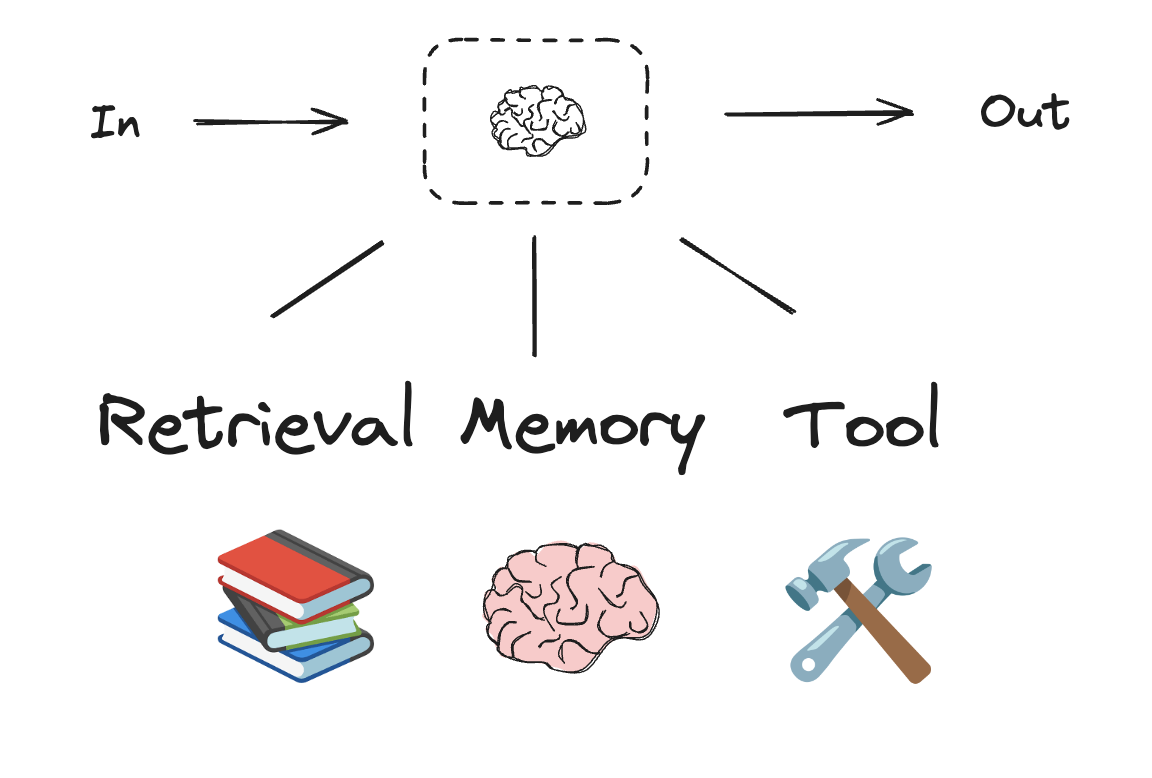
 LangGraph offers several benefits when building agents and workflows, including [persistence](/oss/javascript/langgraph/persistence), [streaming](/oss/javascript/langgraph/streaming), and support for debugging as well as [deployment](/oss/javascript/langgraph/deploy).
 ```typescript theme={"theme":{"light":"catppuccin-latte","dark":"catppuccin-mocha"}}
import * as z from "zod";
import { tool } from "langchain";
// Schema for structured output
const SearchQuery = z.object({
search_query: z.string().describe("Query that is optimized web search."),
justification: z
.string()
.describe("Why this query is relevant to the user's request."),
});
// Augment the LLM with schema for structured output
const structuredLlm = llm.withStructuredOutput(SearchQuery);
// Invoke the augmented LLM
const output = await structuredLlm.invoke(
"How does Calcium CT score relate to high cholesterol?"
);
// Define a tool
const multiply = tool(
({ a, b }) => {
return a * b;
},
{
name: "multiply",
description: "Multiply two numbers",
schema: z.object({
a: z.number(),
b: z.number(),
}),
}
);
// Augment the LLM with tools
const llmWithTools = llm.bindTools([multiply]);
// Invoke the LLM with input that triggers the tool call
const msg = await llmWithTools.invoke("What is 2 times 3?");
// Get the tool call
console.log(msg.tool_calls);
```
## Prompt chaining
Prompt chaining is when each LLM call processes the output of the previous call. It's often used for performing well-defined tasks that can be broken down into smaller, verifiable steps. Some examples include:
* Translating documents into different languages
* Verifying generated content for consistency
```typescript theme={"theme":{"light":"catppuccin-latte","dark":"catppuccin-mocha"}}
import * as z from "zod";
import { tool } from "langchain";
// Schema for structured output
const SearchQuery = z.object({
search_query: z.string().describe("Query that is optimized web search."),
justification: z
.string()
.describe("Why this query is relevant to the user's request."),
});
// Augment the LLM with schema for structured output
const structuredLlm = llm.withStructuredOutput(SearchQuery);
// Invoke the augmented LLM
const output = await structuredLlm.invoke(
"How does Calcium CT score relate to high cholesterol?"
);
// Define a tool
const multiply = tool(
({ a, b }) => {
return a * b;
},
{
name: "multiply",
description: "Multiply two numbers",
schema: z.object({
a: z.number(),
b: z.number(),
}),
}
);
// Augment the LLM with tools
const llmWithTools = llm.bindTools([multiply]);
// Invoke the LLM with input that triggers the tool call
const msg = await llmWithTools.invoke("What is 2 times 3?");
// Get the tool call
console.log(msg.tool_calls);
```
## Prompt chaining
Prompt chaining is when each LLM call processes the output of the previous call. It's often used for performing well-defined tasks that can be broken down into smaller, verifiable steps. Some examples include:
* Translating documents into different languages
* Verifying generated content for consistency
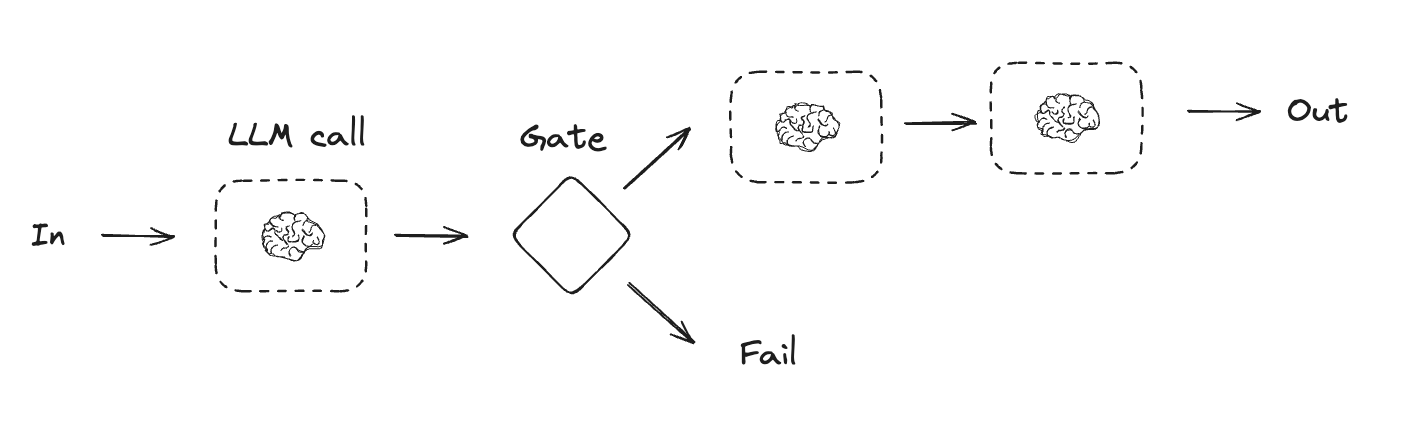
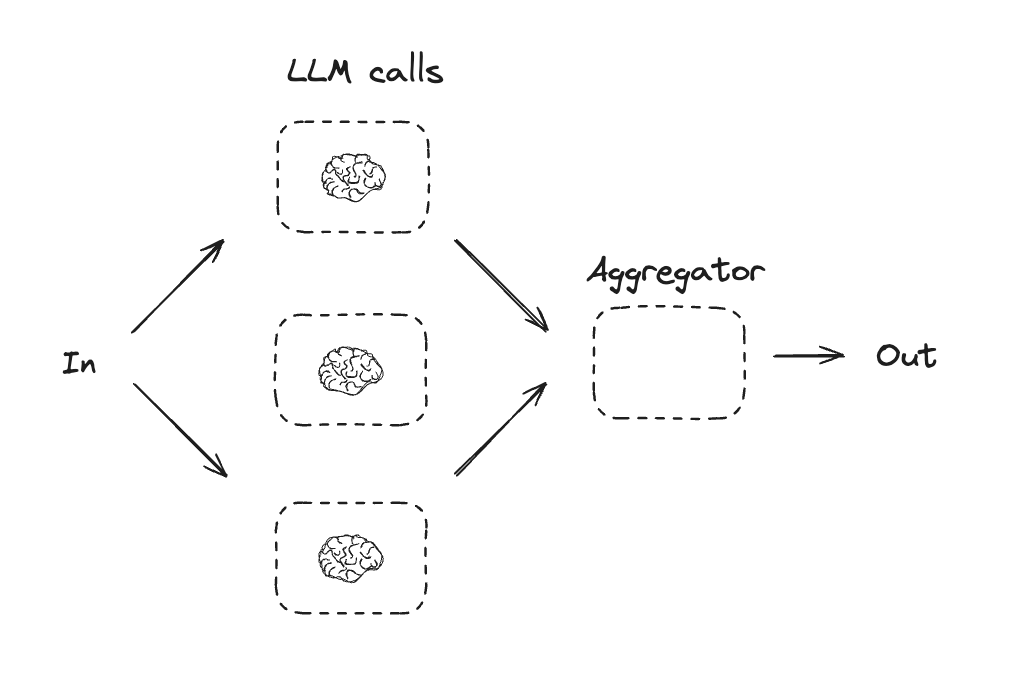
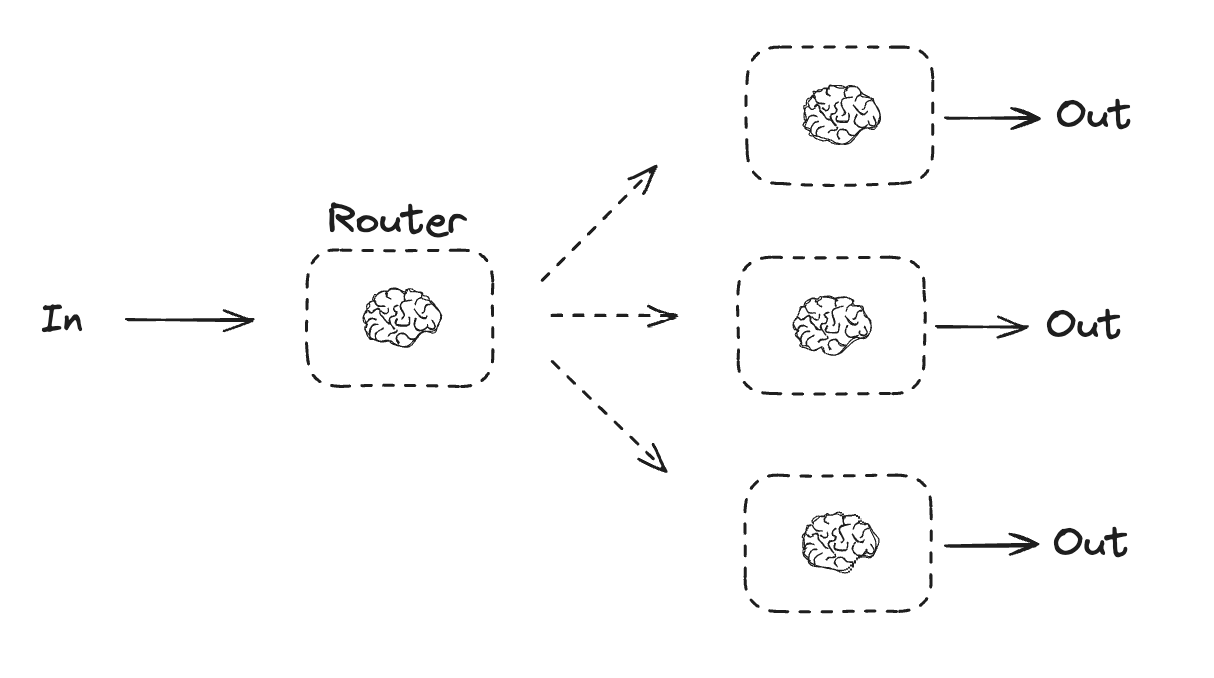
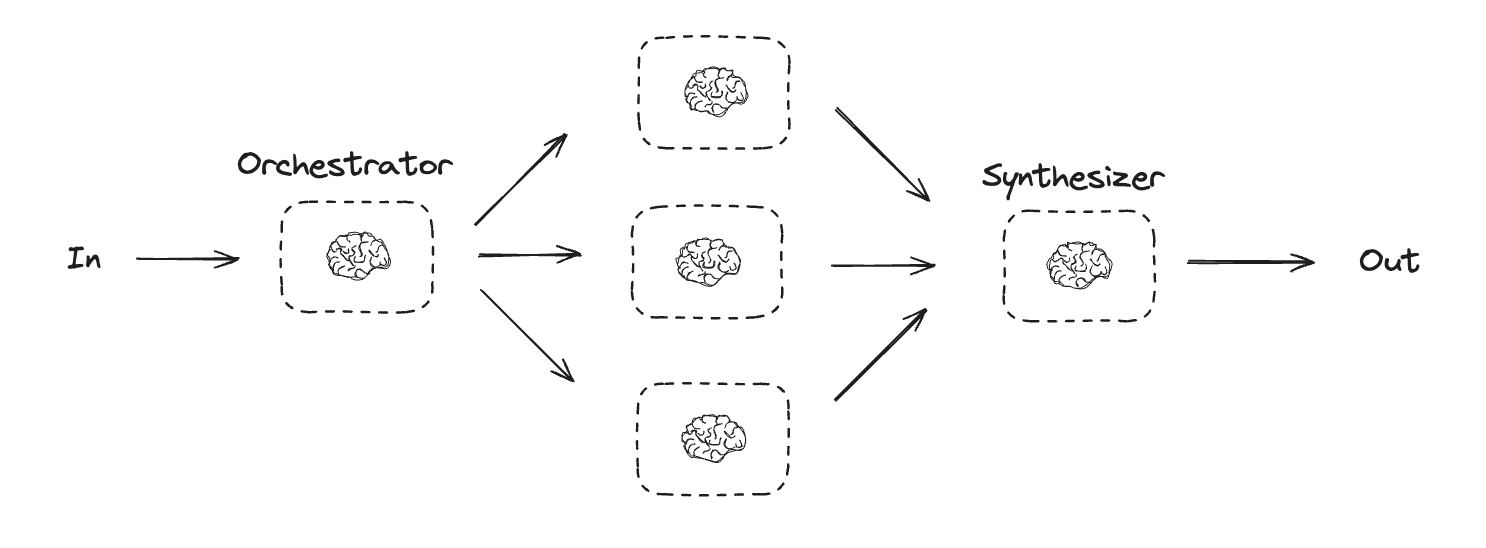 Orchestrator-worker workflows provide more flexibility and are often used when subtasks cannot be predefined the way they can with [parallelization](#parallelization). This is common with workflows that write code or need to update content across multiple files. For example, a workflow that needs to update installation instructions for multiple Python libraries across an unknown number of documents might use this pattern.