> ## Documentation Index
> Fetch the complete documentation index at: https://docs.langchain.com/llms.txt
> Use this file to discover all available pages before exploring further.
# Subagents
> Learn how to use subagents to delegate work and keep context clean
A deep agent can create subagents to delegate work. You can specify custom subagents in the `subagents` parameter. Subagents are useful for [context quarantine](https://www.dbreunig.com/2025/06/26/how-to-fix-your-context.html#context-quarantine) (keeping the main agent's context clean) and for providing specialized instructions.
This page covers **synchronous** subagents, where the supervisor blocks until the subagent finishes. For long-running tasks, parallel workstreams, or cases where you need mid-flight steering and cancellation, see [Async subagents](/oss/python/deepagents/async-subagents).
```mermaid theme={"theme":{"light":"catppuccin-latte","dark":"catppuccin-mocha"}}
graph TB
Main[Main Agent] --> |task tool| Sub[Subagent]
Sub --> Research[Research]
Sub --> Code[Code]
Sub --> General[General]
Research --> |isolated work| Result[Final Result]
Code --> |isolated work| Result
General --> |isolated work| Result
Result --> Main
```
## Why use subagents?
Subagents solve the **context bloat problem**. When agents use tools with large outputs (web search, file reads, database queries), the context window fills up quickly with intermediate results. Subagents isolate this detailed work—the main agent receives only the final result, not the dozens of tool calls that produced it.
**When to use subagents:**
* ✅ Multi-step tasks that would clutter the main agent's context
* ✅ Specialized domains that need custom instructions or tools
* ✅ Tasks requiring different model capabilities
* ✅ When you want to keep the main agent focused on high-level coordination
**When NOT to use subagents:**
* ❌ Simple, single-step tasks
* ❌ When you need to maintain intermediate context
* ❌ When the overhead outweighs benefits
## Configuration
`subagents` should be a list of dictionaries or [`CompiledSubAgent`](https://reference.langchain.com/python/deepagents/middleware/subagents/CompiledSubAgent) objects. There are two types:
### Default subagent
Deep Agents automatically adds a synchronous `general-purpose` subagent unless you already provide a synchronous subagent with that name.
* To replace it, pass your own subagent named `general-purpose`.
* To rename or re-prompt the auto-added version, set `general_purpose_subagent=GeneralPurposeSubagentProfile(...)` on the active [harness profile](/oss/python/deepagents/profiles#harness-profiles).
* To disable it, see [Running without subagents](#running-without-subagents) below.
### Running without subagents
To run an agent without the `task` tool, do two things:
1. Set `general_purpose_subagent=GeneralPurposeSubagentProfile(enabled=False)` on the active [harness profile](/oss/python/deepagents/profiles#harness-profiles).
2. Pass no synchronous subagents via `subagents=` on `create_deep_agent`.
Deep Agents only attaches `SubAgentMiddleware` (and the `task` tool) when at least one synchronous subagent exists. With neither the default nor a caller-provided one, the agent runs without delegation.
Async subagents are unaffected—they flow through their own middleware and tools, described in [Async subagents](/oss/python/deepagents/async-subagents).
Don't reach for `excluded_middleware` here—`SubAgentMiddleware` is required scaffolding and listing it raises `ValueError`. The `general_purpose_subagent.enabled = False` knob is the supported path.
### SubAgent (Dictionary-based)
For most use cases, define subagents as dictionaries matching the [`SubAgent`](https://reference.langchain.com/python/deepagents/middleware/subagents/SubAgent) spec with the following fields:
| Field | Type | Description |
| ----------------- | ---------------------------- | -------------------------------------------------------------------------------------------------------------------------------------------------------------------------------------------------------------------------------------------------------------------------------------------------------------------------------------------------------------------------------------------------------------------------------------------------------------------------------------------------------------------------------------------------------------------------------------------------------------------------------------------------------------------- |
| `name` | `str` | Required. Unique identifier for the subagent. The main agent uses this name when calling the `task()` tool. The subagent name becomes metadata for `AIMessage`s and for streaming, which helps to differentiate between agents. |
| `description` | `str` | Required. Description of what this subagent does. Be specific and action-oriented. The main agent uses this to decide when to delegate. |
| `system_prompt` | `str` | Required. Instructions for the subagent. Custom subagents must define their own. Include tool usage guidance and output format requirements.
Does not inherit from main agent. |
| `tools` | `list[Callable]` | Optional. Tools the subagent can use. Keep this minimal and include only what's needed.
Inherits from main agent by default. When specified, overrides the inherited tools entirely. |
| `model` | `str` \| `BaseChatModel` | Optional. Overrides the main agent's model. Omit to use the main agent's model.
Inherits from main agent by default. You can pass either a model identifier string like `'openai:gpt-5.4'` (using the `'provider:model'` format) or a LangChain chat model object (`init_chat_model("gpt-5.4")` or `ChatOpenAI(model="gpt-5.4")`). |
| `middleware` | `list[Middleware]` | Optional. Additional middleware for custom behavior, logging, or rate limiting.
Does not inherit from main agent. |
| `interrupt_on` | `dict[str, bool]` | Optional. Configure [human-in-the-loop](/oss/python/deepagents/human-in-the-loop) for specific tools. Subagent value overrides main agent. Requires checkpointer.
Inherits from main agent by default. Subagent value overrides the default. |
| `skills` | `list[str]` | Optional. [Skills](/oss/python/deepagents/skills) source paths. When specified, the subagent will load skills from these directories (e.g., `["/skills/research/", "/skills/web-search/"]`). This allows subagents to have different skill sets than the main agent.
Does not inherit from main agent. Only the general-purpose subagent inherits the main agent's skills. When a subagent has skills, it runs its own independent [`SkillsMiddleware`](https://reference.langchain.com/python/deepagents/middleware/skills/SkillsMiddleware) instance. Skill state is fully isolated—a subagent's loaded skills are not visible to the parent, and vice versa. |
| `response_format` | `ResponseFormat` | Optional. [Structured output](/oss/python/langchain/structured-output) schema for the subagent. When set, the parent receives the subagent's result as JSON instead of free-form text. Accepts Pydantic models, `ToolStrategy(...)`, `ProviderStrategy(...)`, or a raw schema type. See [Structured output](#structured-output). |
| `permissions` | `list[FilesystemPermission]` | Optional. [Filesystem permission rules](/oss/python/deepagents/permissions) for the subagent. When set, **replaces** the parent agent's permissions entirely.
Inherits from main agent by default. |
**CLI users:** You can also define subagents as `AGENTS.md` files on disk instead of in code. The `name`, `description`, and `model` fields map to YAML frontmatter, and the markdown body becomes the `system_prompt`. See [Use subagents in the CLI](/oss/python/deepagents/cli/subagents) for the file format.
**Deploy users:** Define subagents as directories under `subagents/` with their own `deepagents.toml` and `AGENTS.md`. The bundler auto-discovers them. See [Deploy subagents](/oss/python/deepagents/deploy#subagents) for the full configuration reference.
### CompiledSubAgent
For complex workflows, use a prebuilt LangGraph graph as a [`CompiledSubAgent`](https://reference.langchain.com/python/deepagents/middleware/subagents/CompiledSubAgent):
| Field | Type | Description |
| ------------- | ---------- | ----------------------------------------------------------------------------------------------------------------------------------------------------------------- |
| `name` | `str` | Required. Unique identifier for the subagent. The subagent name becomes metadata for `AIMessage`s and for streaming, which helps to differentiate between agents. |
| `description` | `str` | Required. What this subagent does. |
| `runnable` | `Runnable` | Required. A compiled LangGraph graph (must call `.compile()` first). |
## Using SubAgent
```python theme={"theme":{"light":"catppuccin-latte","dark":"catppuccin-mocha"}}
import os
from typing import Literal
from tavily import TavilyClient
from deepagents import create_deep_agent
tavily_client = TavilyClient(api_key=os.environ["TAVILY_API_KEY"])
def internet_search(
query: str,
max_results: int = 5,
topic: Literal["general", "news", "finance"] = "general",
include_raw_content: bool = False,
):
"""Run a web search"""
return tavily_client.search(
query,
max_results=max_results,
include_raw_content=include_raw_content,
topic=topic,
)
research_subagent = {
"name": "research-agent",
"description": "Used to research more in depth questions",
"system_prompt": "You are a great researcher",
"tools": [internet_search],
"model": "openai:gpt-5.4", # Optional override, defaults to main agent model
}
subagents = [research_subagent]
agent = create_deep_agent(
model="claude-sonnet-4-6",
subagents=subagents
)
```
## Using CompiledSubAgent
For more complex use cases, you can provide your custom subagents with [`CompiledSubAgent`](https://reference.langchain.com/python/deepagents/middleware/subagents/CompiledSubAgent).
You can create a custom subagent using LangChain's [`create_agent`](https://reference.langchain.com/python/langchain/agents/factory/create_agent) or by making a custom LangGraph graph using the [graph API](/oss/python/langgraph/graph-api).
If you're creating a custom LangGraph graph, make sure that the graph has a [state key called `"messages"`](/oss/python/langgraph/quickstart#2-define-state):
```python theme={"theme":{"light":"catppuccin-latte","dark":"catppuccin-mocha"}}
from deepagents import create_deep_agent, CompiledSubAgent
from langchain.agents import create_agent
# Create a custom agent graph
custom_graph = create_agent(
model=your_model,
tools=specialized_tools,
prompt="You are a specialized agent for data analysis..."
)
# Use it as a custom subagent
custom_subagent = CompiledSubAgent(
name="data-analyzer",
description="Specialized agent for complex data analysis tasks",
runnable=custom_graph
)
subagents = [custom_subagent]
agent = create_deep_agent(
model="google_genai:gemini-3.1-pro-preview",
tools=[internet_search],
system_prompt=research_instructions,
subagents=subagents
)
```
## Streaming
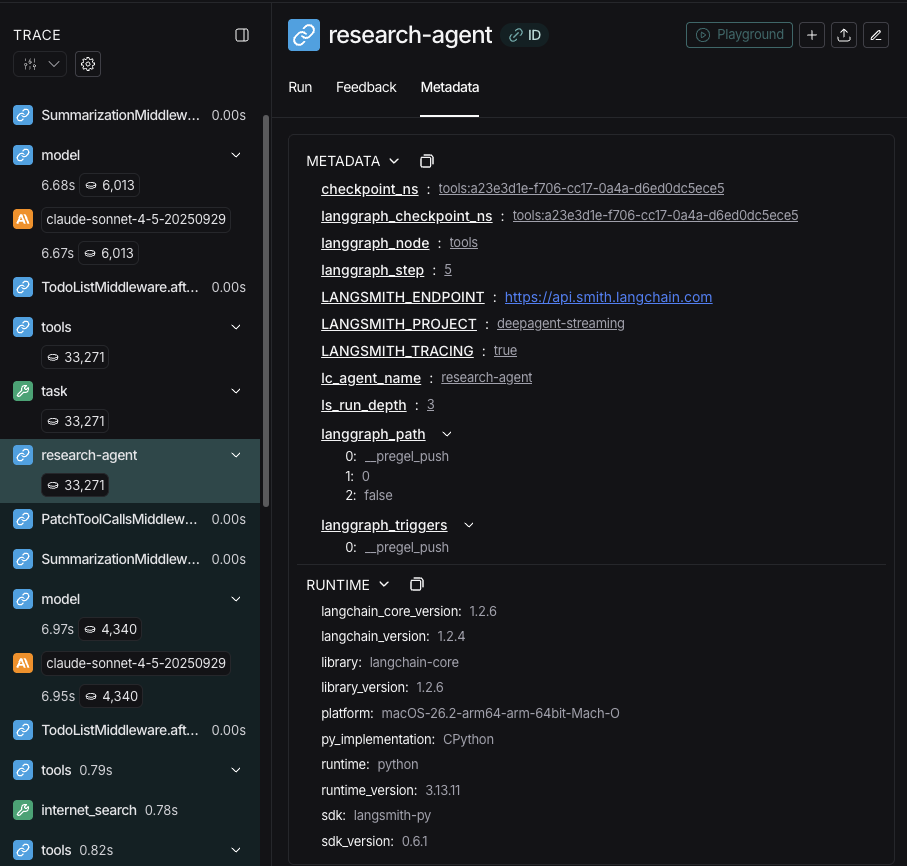
When streaming tracing information agents' names are available as `lc_agent_name` in metadata.
When reviewing tracing information, you can use this metadata to differentiate which agent the data came from.
The following example creates a deep agent with the name `main-agent` and a subagent with the name `research-agent`:
```python theme={"theme":{"light":"catppuccin-latte","dark":"catppuccin-mocha"}}
import os
from typing import Literal
from tavily import TavilyClient
from deepagents import create_deep_agent
tavily_client = TavilyClient(api_key=os.environ["TAVILY_API_KEY"])
def internet_search(
query: str,
max_results: int = 5,
topic: Literal["general", "news", "finance"] = "general",
include_raw_content: bool = False,
):
"""Run a web search"""
return tavily_client.search(
query,
max_results=max_results,
include_raw_content=include_raw_content,
topic=topic,
)
research_subagent = {
"name": "research-agent",
"description": "Used to research more in depth questions",
"system_prompt": "You are a great researcher",
"tools": [internet_search],
"model": "google_genai:gemini-3.1-pro-preview", # Optional override, defaults to main agent model
}
subagents = [research_subagent]
agent = create_deep_agent(
model="google_genai:gemini-3.1-pro-preview",
subagents=subagents,
name="main-agent"
)
```
As you prompt your deep agent, all agent runs executed by a subagent or deep agent will have the agent name in their metadata.
In this case the subagent with the name `"research-agent"`, will have `{'lc_agent_name': 'research-agent'}` in any associated agent run metadata:
 ## Structured output
Subagents support [structured output](/oss/python/langchain/structured-output), so the parent agent receives predictable, parseable JSON instead of free-form text.
Structured output for subagents requires `deepagents>=0.5.3`.
Pass `response_format` on the subagent config. When the subagent finishes, its structured response is JSON-serialized and returned as the `ToolMessage` content to the parent agent. The schema accepts anything supported by [`create_agent`](https://reference.langchain.com/python/langchain/agents/factory/create_agent): Pydantic models, `ToolStrategy(...)`, `ProviderStrategy(...)`, or a raw schema type.
```python theme={"theme":{"light":"catppuccin-latte","dark":"catppuccin-mocha"}}
from pydantic import BaseModel, Field
from deepagents import create_deep_agent
class ResearchFindings(BaseModel):
"""Structured findings from a research task."""
summary: str = Field(description="Summary of findings")
confidence: float = Field(description="Confidence score from 0 to 1")
sources: list[str] = Field(description="List of source URLs")
research_subagent = {
"name": "researcher",
"description": "Researches topics and returns structured findings",
"system_prompt": "Research the given topic thoroughly. Return your findings.",
"tools": [web_search],
"response_format": ResearchFindings,
}
agent = create_deep_agent(
model="claude-sonnet-4-6",
subagents=[research_subagent],
)
result = await agent.ainvoke(
{"messages": [{"role": "user", "content": "Research recent advances in quantum computing"}]}
)
# The parent's ToolMessage contains JSON-serialized structured data:
# '{"summary": "...", "confidence": 0.87, "sources": ["https://..."]}'
```
Without `response_format`, the parent receives the subagent's last message text as-is. With it, the parent always gets valid JSON matching the schema, which is useful when the parent needs to process the result programmatically or pass it to downstream tools.
For full details on schema types and strategies (tool calling vs. provider-native), see [Structured output](/oss/python/langchain/structured-output).
## The general-purpose subagent
In addition to any user-defined subagents, every deep agent has access to a `general-purpose` subagent at all times. This subagent:
* Has the same system prompt as the main agent
* Has access to all the same tools
* Uses the same model (unless overridden)
* Inherits skills from the main agent (when skills are configured)
### Override the general-purpose subagent
Include a subagent with `name="general-purpose"` in your `subagents` list to replace the default. Use this to configure a different model, tools, or system prompt for the general-purpose subagent:
```python theme={"theme":{"light":"catppuccin-latte","dark":"catppuccin-mocha"}}
from deepagents import create_deep_agent
# Main agent uses Gemini; general-purpose subagent uses GPT
agent = create_deep_agent(
model="google_genai:gemini-3.1-pro-preview",
tools=[internet_search],
subagents=[
{
"name": "general-purpose",
"description": "General-purpose agent for research and multi-step tasks",
"system_prompt": "You are a general-purpose assistant.",
"tools": [internet_search],
"model": "openai:gpt-5.4", # Different model for delegated tasks
},
],
)
```
When you provide a subagent with the general-purpose name, the default general-purpose subagent is not added. Your spec fully replaces it.
To remove the built-in general-purpose subagent entirely instead of replacing it, set the active harness profile's general-purpose subagent `enabled` flag to `False`.
### When to use it
The general-purpose subagent is ideal for context isolation without specialized behavior. The main agent can delegate a complex multi-step task to this subagent and get a concise result back without bloat from intermediate tool calls.
Instead of the main agent making 10 web searches and filling its context with results, it delegates to the general-purpose subagent: `task(name="general-purpose", task="Research quantum computing trends")`. The subagent performs all the searches internally and returns only a summary.
### Skills inheritance
When configuring [skills](/oss/python/deepagents/skills) with `create_deep_agent`:
* **General-purpose subagent**: Automatically inherits skills from the main agent
* **Custom subagents**: Do NOT inherit skills by default—use the `skills` parameter to give them their own skills
Only subagents configured with skills get a `SkillsMiddleware` instance—custom subagents without a `skills` parameter do not. When present, skill state is fully isolated in both directions: the parent's skills are not visible to the child, and the child's skills are not propagated back to the parent.
```python theme={"theme":{"light":"catppuccin-latte","dark":"catppuccin-mocha"}}
from deepagents import create_deep_agent
# Research subagent with its own skills
research_subagent = {
"name": "researcher",
"description": "Research assistant with specialized skills",
"system_prompt": "You are a researcher.",
"tools": [web_search],
"skills": ["/skills/research/", "/skills/web-search/"], # Subagent-specific skills
}
agent = create_deep_agent(
model="google_genai:gemini-3.1-pro-preview",
skills=["/skills/main/"], # Main agent and GP subagent get these
subagents=[research_subagent], # Gets only /skills/research/ and /skills/web-search/
)
```
## Best practices
### Write clear descriptions
The main agent uses descriptions to decide which subagent to call. Be specific:
✅ **Good:** `"Analyzes financial data and generates investment insights with confidence scores"`
❌ **Bad:** `"Does finance stuff"`
### Keep system prompts detailed
Include specific guidance on how to use tools and format outputs:
```python theme={"theme":{"light":"catppuccin-latte","dark":"catppuccin-mocha"}}
research_subagent = {
"name": "research-agent",
"description": "Conducts in-depth research using web search and synthesizes findings",
"system_prompt": """You are a thorough researcher. Your job is to:
1. Break down the research question into searchable queries
2. Use internet_search to find relevant information
3. Synthesize findings into a comprehensive but concise summary
4. Cite sources when making claims
Output format:
- Summary (2-3 paragraphs)
- Key findings (bullet points)
- Sources (with URLs)
Keep your response under 500 words to maintain clean context.""",
"tools": [internet_search],
}
```
### Minimize tool sets
Only give subagents the tools they need. This improves focus and security:
```python theme={"theme":{"light":"catppuccin-latte","dark":"catppuccin-mocha"}}
# ✅ Good: Focused tool set
email_agent = {
"name": "email-sender",
"tools": [send_email, validate_email], # Only email-related
}
# ❌ Bad: Too many tools
email_agent = {
"name": "email-sender",
"tools": [send_email, web_search, database_query, file_upload], # Unfocused
}
```
### Choose models by task
Different models excel at different tasks:
```python theme={"theme":{"light":"catppuccin-latte","dark":"catppuccin-mocha"}}
subagents = [
{
"name": "contract-reviewer",
"description": "Reviews legal documents and contracts",
"system_prompt": "You are an expert legal reviewer...",
"tools": [read_document, analyze_contract],
"model": "google_genai:gemini-3.1-pro-preview", # Large context for long documents
},
{
"name": "financial-analyst",
"description": "Analyzes financial data and market trends",
"system_prompt": "You are an expert financial analyst...",
"tools": [get_stock_price, analyze_fundamentals],
"model": "openai:gpt-5.4", # Better for numerical analysis
},
]
```
### Return concise results
Instruct subagents to return summaries, not raw data:
```python theme={"theme":{"light":"catppuccin-latte","dark":"catppuccin-mocha"}}
data_analyst = {
"system_prompt": """Analyze the data and return:
1. Key insights (3-5 bullet points)
2. Overall confidence score
3. Recommended next actions
Do NOT include:
- Raw data
- Intermediate calculations
- Detailed tool outputs
Keep response under 300 words."""
}
```
## Common patterns
### Multiple specialized subagents
Create specialized subagents for different domains:
```python theme={"theme":{"light":"catppuccin-latte","dark":"catppuccin-mocha"}}
from deepagents import create_deep_agent
subagents = [
{
"name": "data-collector",
"description": "Gathers raw data from various sources",
"system_prompt": "Collect comprehensive data on the topic",
"tools": [web_search, api_call, database_query],
},
{
"name": "data-analyzer",
"description": "Analyzes collected data for insights",
"system_prompt": "Analyze data and extract key insights",
"tools": [statistical_analysis],
},
{
"name": "report-writer",
"description": "Writes polished reports from analysis",
"system_prompt": "Create professional reports from insights",
"tools": [format_document],
},
]
agent = create_deep_agent(
model="google_genai:gemini-3.1-pro-preview",
system_prompt="You coordinate data analysis and reporting. Use subagents for specialized tasks.",
subagents=subagents
)
```
**Workflow:**
1. Main agent creates high-level plan
2. Delegates data collection to data-collector
3. Passes results to data-analyzer
4. Sends insights to report-writer
5. Compiles final output
Each subagent works with clean context focused only on its task.
## Context management
When you invoke a parent agent with [runtime context](/oss/python/langchain/runtime), that context automatically propagates to all subagents. Each subagent run receives the same runtime context you passed on the parent `invoke` / `ainvoke` call.
This means tools running inside any subagent can access the same context values you provided to the parent:
```python theme={"theme":{"light":"catppuccin-latte","dark":"catppuccin-mocha"}}
from dataclasses import dataclass
from deepagents import create_deep_agent
from langchain.messages import HumanMessage
from langchain.tools import tool, ToolRuntime
@dataclass
class Context:
user_id: str
session_id: str
@tool
def get_user_data(query: str, runtime: ToolRuntime[Context]) -> str:
"""Fetch data for the current user."""
user_id = runtime.context.user_id
return f"Data for user {user_id}: {query}"
research_subagent = {
"name": "researcher",
"description": "Conducts research for the current user",
"system_prompt": "You are a research assistant.",
"tools": [get_user_data],
}
agent = create_deep_agent(
model="google_genai:gemini-3.1-pro-preview",
subagents=[research_subagent],
context_schema=Context,
)
# Context flows to the researcher subagent and its tools automatically
result = await agent.invoke(
{"messages": [HumanMessage("Look up my recent activity")]},
context=Context(user_id="user-123", session_id="abc"),
)
```
### Per-subagent context
All subagents receive the same parent context. To pass configuration that is specific to a particular subagent, use **namespaced keys** (prefix keys with the subagent name, for example `researcher:max_depth`) in a flat `context` mapping, **or** model those settings as separate fields on your context type:
```python theme={"theme":{"light":"catppuccin-latte","dark":"catppuccin-mocha"}}
from dataclasses import dataclass
from langchain.messages import HumanMessage
from langchain.tools import tool, ToolRuntime
@dataclass
class Context:
user_id: str
researcher_max_depth: int | None = None
fact_checker_strict_mode: bool | None = None
result = await agent.invoke(
{"messages": [HumanMessage("Research this and verify the claims")]},
context=Context(
user_id="user-123",
researcher_max_depth=3,
fact_checker_strict_mode=True,
),
)
@tool
def verify_claim(claim: str, runtime: ToolRuntime[Context]) -> str:
"""Verify a factual claim."""
strict_mode = runtime.context.fact_checker_strict_mode or False
if strict_mode:
return strict_verification(claim)
return basic_verification(claim)
```
### Identifying which subagent called a tool
When the same tool is shared between the parent and multiple subagents, you can use the `lc_agent_name` metadata (the same value used in [streaming](#streaming)) to determine which agent initiated the call:
```python theme={"theme":{"light":"catppuccin-latte","dark":"catppuccin-mocha"}}
from langchain.tools import tool, ToolRuntime
@tool
def shared_lookup(query: str, runtime: ToolRuntime) -> str:
"""Look up information."""
agent_name = runtime.config.get("metadata", {}).get("lc_agent_name")
if agent_name == "fact-checker":
return strict_lookup(query)
return general_lookup(query)
```
You can combine both patterns—read agent-specific settings from `runtime.context` and read `lc_agent_name` from `runtime.config` metadata when branching tool behavior.
```python theme={"theme":{"light":"catppuccin-latte","dark":"catppuccin-mocha"}}
from langchain.tools import tool, ToolRuntime
@tool
def flexible_search(query: str, runtime: ToolRuntime[Context]) -> str:
"""Search with agent-specific settings."""
agent_name = runtime.config.get("metadata", {}).get("lc_agent_name", "unknown")
ctx = runtime.context
if agent_name == "researcher":
max_results = ctx.researcher_max_depth or 5
else:
max_results = 5
include_raw = False
return perform_search(query, max_results=max_results, include_raw=include_raw)
```
## Troubleshooting
### Subagent not being called
**Problem**: Main agent tries to do work itself instead of delegating.
**Solutions**:
1. **Make descriptions more specific:**
```python theme={"theme":{"light":"catppuccin-latte","dark":"catppuccin-mocha"}}
# ✅ Good
{"name": "research-specialist", "description": "Conducts in-depth research on specific topics using web search. Use when you need detailed information that requires multiple searches."}
# ❌ Bad
{"name": "helper", "description": "helps with stuff"}
```
2. **Instruct main agent to delegate:**
```python theme={"theme":{"light":"catppuccin-latte","dark":"catppuccin-mocha"}}
agent = create_deep_agent(
model="google_genai:gemini-3.1-pro-preview",
system_prompt="""...your instructions...
IMPORTANT: For complex tasks, delegate to your subagents using the task() tool.
This keeps your context clean and improves results.""",
subagents=[...]
)
```
### Context still getting bloated
**Problem**: Context fills up despite using subagents.
**Solutions**:
1. **Instruct subagent to return concise results:**
```python theme={"theme":{"light":"catppuccin-latte","dark":"catppuccin-mocha"}}
system_prompt="""...
IMPORTANT: Return only the essential summary.
Do NOT include raw data, intermediate search results, or detailed tool outputs.
Your response should be under 500 words."""
```
2. **Use filesystem for large data:**
```python theme={"theme":{"light":"catppuccin-latte","dark":"catppuccin-mocha"}}
system_prompt="""When you gather large amounts of data:
1. Save raw data to /data/raw_results.txt
2. Process and analyze the data
3. Return only the analysis summary
This keeps context clean."""
```
### Wrong subagent being selected
**Problem**: Main agent calls inappropriate subagent for the task.
**Solution**: Differentiate subagents clearly in descriptions:
```python theme={"theme":{"light":"catppuccin-latte","dark":"catppuccin-mocha"}}
subagents = [
{
"name": "quick-researcher",
"description": "For simple, quick research questions that need 1-2 searches. Use when you need basic facts or definitions.",
},
{
"name": "deep-researcher",
"description": "For complex, in-depth research requiring multiple searches, synthesis, and analysis. Use for comprehensive reports.",
}
]
```
:::
***
## Structured output
Subagents support [structured output](/oss/python/langchain/structured-output), so the parent agent receives predictable, parseable JSON instead of free-form text.
Structured output for subagents requires `deepagents>=0.5.3`.
Pass `response_format` on the subagent config. When the subagent finishes, its structured response is JSON-serialized and returned as the `ToolMessage` content to the parent agent. The schema accepts anything supported by [`create_agent`](https://reference.langchain.com/python/langchain/agents/factory/create_agent): Pydantic models, `ToolStrategy(...)`, `ProviderStrategy(...)`, or a raw schema type.
```python theme={"theme":{"light":"catppuccin-latte","dark":"catppuccin-mocha"}}
from pydantic import BaseModel, Field
from deepagents import create_deep_agent
class ResearchFindings(BaseModel):
"""Structured findings from a research task."""
summary: str = Field(description="Summary of findings")
confidence: float = Field(description="Confidence score from 0 to 1")
sources: list[str] = Field(description="List of source URLs")
research_subagent = {
"name": "researcher",
"description": "Researches topics and returns structured findings",
"system_prompt": "Research the given topic thoroughly. Return your findings.",
"tools": [web_search],
"response_format": ResearchFindings,
}
agent = create_deep_agent(
model="claude-sonnet-4-6",
subagents=[research_subagent],
)
result = await agent.ainvoke(
{"messages": [{"role": "user", "content": "Research recent advances in quantum computing"}]}
)
# The parent's ToolMessage contains JSON-serialized structured data:
# '{"summary": "...", "confidence": 0.87, "sources": ["https://..."]}'
```
Without `response_format`, the parent receives the subagent's last message text as-is. With it, the parent always gets valid JSON matching the schema, which is useful when the parent needs to process the result programmatically or pass it to downstream tools.
For full details on schema types and strategies (tool calling vs. provider-native), see [Structured output](/oss/python/langchain/structured-output).
## The general-purpose subagent
In addition to any user-defined subagents, every deep agent has access to a `general-purpose` subagent at all times. This subagent:
* Has the same system prompt as the main agent
* Has access to all the same tools
* Uses the same model (unless overridden)
* Inherits skills from the main agent (when skills are configured)
### Override the general-purpose subagent
Include a subagent with `name="general-purpose"` in your `subagents` list to replace the default. Use this to configure a different model, tools, or system prompt for the general-purpose subagent:
```python theme={"theme":{"light":"catppuccin-latte","dark":"catppuccin-mocha"}}
from deepagents import create_deep_agent
# Main agent uses Gemini; general-purpose subagent uses GPT
agent = create_deep_agent(
model="google_genai:gemini-3.1-pro-preview",
tools=[internet_search],
subagents=[
{
"name": "general-purpose",
"description": "General-purpose agent for research and multi-step tasks",
"system_prompt": "You are a general-purpose assistant.",
"tools": [internet_search],
"model": "openai:gpt-5.4", # Different model for delegated tasks
},
],
)
```
When you provide a subagent with the general-purpose name, the default general-purpose subagent is not added. Your spec fully replaces it.
To remove the built-in general-purpose subagent entirely instead of replacing it, set the active harness profile's general-purpose subagent `enabled` flag to `False`.
### When to use it
The general-purpose subagent is ideal for context isolation without specialized behavior. The main agent can delegate a complex multi-step task to this subagent and get a concise result back without bloat from intermediate tool calls.
Instead of the main agent making 10 web searches and filling its context with results, it delegates to the general-purpose subagent: `task(name="general-purpose", task="Research quantum computing trends")`. The subagent performs all the searches internally and returns only a summary.
### Skills inheritance
When configuring [skills](/oss/python/deepagents/skills) with `create_deep_agent`:
* **General-purpose subagent**: Automatically inherits skills from the main agent
* **Custom subagents**: Do NOT inherit skills by default—use the `skills` parameter to give them their own skills
Only subagents configured with skills get a `SkillsMiddleware` instance—custom subagents without a `skills` parameter do not. When present, skill state is fully isolated in both directions: the parent's skills are not visible to the child, and the child's skills are not propagated back to the parent.
```python theme={"theme":{"light":"catppuccin-latte","dark":"catppuccin-mocha"}}
from deepagents import create_deep_agent
# Research subagent with its own skills
research_subagent = {
"name": "researcher",
"description": "Research assistant with specialized skills",
"system_prompt": "You are a researcher.",
"tools": [web_search],
"skills": ["/skills/research/", "/skills/web-search/"], # Subagent-specific skills
}
agent = create_deep_agent(
model="google_genai:gemini-3.1-pro-preview",
skills=["/skills/main/"], # Main agent and GP subagent get these
subagents=[research_subagent], # Gets only /skills/research/ and /skills/web-search/
)
```
## Best practices
### Write clear descriptions
The main agent uses descriptions to decide which subagent to call. Be specific:
✅ **Good:** `"Analyzes financial data and generates investment insights with confidence scores"`
❌ **Bad:** `"Does finance stuff"`
### Keep system prompts detailed
Include specific guidance on how to use tools and format outputs:
```python theme={"theme":{"light":"catppuccin-latte","dark":"catppuccin-mocha"}}
research_subagent = {
"name": "research-agent",
"description": "Conducts in-depth research using web search and synthesizes findings",
"system_prompt": """You are a thorough researcher. Your job is to:
1. Break down the research question into searchable queries
2. Use internet_search to find relevant information
3. Synthesize findings into a comprehensive but concise summary
4. Cite sources when making claims
Output format:
- Summary (2-3 paragraphs)
- Key findings (bullet points)
- Sources (with URLs)
Keep your response under 500 words to maintain clean context.""",
"tools": [internet_search],
}
```
### Minimize tool sets
Only give subagents the tools they need. This improves focus and security:
```python theme={"theme":{"light":"catppuccin-latte","dark":"catppuccin-mocha"}}
# ✅ Good: Focused tool set
email_agent = {
"name": "email-sender",
"tools": [send_email, validate_email], # Only email-related
}
# ❌ Bad: Too many tools
email_agent = {
"name": "email-sender",
"tools": [send_email, web_search, database_query, file_upload], # Unfocused
}
```
### Choose models by task
Different models excel at different tasks:
```python theme={"theme":{"light":"catppuccin-latte","dark":"catppuccin-mocha"}}
subagents = [
{
"name": "contract-reviewer",
"description": "Reviews legal documents and contracts",
"system_prompt": "You are an expert legal reviewer...",
"tools": [read_document, analyze_contract],
"model": "google_genai:gemini-3.1-pro-preview", # Large context for long documents
},
{
"name": "financial-analyst",
"description": "Analyzes financial data and market trends",
"system_prompt": "You are an expert financial analyst...",
"tools": [get_stock_price, analyze_fundamentals],
"model": "openai:gpt-5.4", # Better for numerical analysis
},
]
```
### Return concise results
Instruct subagents to return summaries, not raw data:
```python theme={"theme":{"light":"catppuccin-latte","dark":"catppuccin-mocha"}}
data_analyst = {
"system_prompt": """Analyze the data and return:
1. Key insights (3-5 bullet points)
2. Overall confidence score
3. Recommended next actions
Do NOT include:
- Raw data
- Intermediate calculations
- Detailed tool outputs
Keep response under 300 words."""
}
```
## Common patterns
### Multiple specialized subagents
Create specialized subagents for different domains:
```python theme={"theme":{"light":"catppuccin-latte","dark":"catppuccin-mocha"}}
from deepagents import create_deep_agent
subagents = [
{
"name": "data-collector",
"description": "Gathers raw data from various sources",
"system_prompt": "Collect comprehensive data on the topic",
"tools": [web_search, api_call, database_query],
},
{
"name": "data-analyzer",
"description": "Analyzes collected data for insights",
"system_prompt": "Analyze data and extract key insights",
"tools": [statistical_analysis],
},
{
"name": "report-writer",
"description": "Writes polished reports from analysis",
"system_prompt": "Create professional reports from insights",
"tools": [format_document],
},
]
agent = create_deep_agent(
model="google_genai:gemini-3.1-pro-preview",
system_prompt="You coordinate data analysis and reporting. Use subagents for specialized tasks.",
subagents=subagents
)
```
**Workflow:**
1. Main agent creates high-level plan
2. Delegates data collection to data-collector
3. Passes results to data-analyzer
4. Sends insights to report-writer
5. Compiles final output
Each subagent works with clean context focused only on its task.
## Context management
When you invoke a parent agent with [runtime context](/oss/python/langchain/runtime), that context automatically propagates to all subagents. Each subagent run receives the same runtime context you passed on the parent `invoke` / `ainvoke` call.
This means tools running inside any subagent can access the same context values you provided to the parent:
```python theme={"theme":{"light":"catppuccin-latte","dark":"catppuccin-mocha"}}
from dataclasses import dataclass
from deepagents import create_deep_agent
from langchain.messages import HumanMessage
from langchain.tools import tool, ToolRuntime
@dataclass
class Context:
user_id: str
session_id: str
@tool
def get_user_data(query: str, runtime: ToolRuntime[Context]) -> str:
"""Fetch data for the current user."""
user_id = runtime.context.user_id
return f"Data for user {user_id}: {query}"
research_subagent = {
"name": "researcher",
"description": "Conducts research for the current user",
"system_prompt": "You are a research assistant.",
"tools": [get_user_data],
}
agent = create_deep_agent(
model="google_genai:gemini-3.1-pro-preview",
subagents=[research_subagent],
context_schema=Context,
)
# Context flows to the researcher subagent and its tools automatically
result = await agent.invoke(
{"messages": [HumanMessage("Look up my recent activity")]},
context=Context(user_id="user-123", session_id="abc"),
)
```
### Per-subagent context
All subagents receive the same parent context. To pass configuration that is specific to a particular subagent, use **namespaced keys** (prefix keys with the subagent name, for example `researcher:max_depth`) in a flat `context` mapping, **or** model those settings as separate fields on your context type:
```python theme={"theme":{"light":"catppuccin-latte","dark":"catppuccin-mocha"}}
from dataclasses import dataclass
from langchain.messages import HumanMessage
from langchain.tools import tool, ToolRuntime
@dataclass
class Context:
user_id: str
researcher_max_depth: int | None = None
fact_checker_strict_mode: bool | None = None
result = await agent.invoke(
{"messages": [HumanMessage("Research this and verify the claims")]},
context=Context(
user_id="user-123",
researcher_max_depth=3,
fact_checker_strict_mode=True,
),
)
@tool
def verify_claim(claim: str, runtime: ToolRuntime[Context]) -> str:
"""Verify a factual claim."""
strict_mode = runtime.context.fact_checker_strict_mode or False
if strict_mode:
return strict_verification(claim)
return basic_verification(claim)
```
### Identifying which subagent called a tool
When the same tool is shared between the parent and multiple subagents, you can use the `lc_agent_name` metadata (the same value used in [streaming](#streaming)) to determine which agent initiated the call:
```python theme={"theme":{"light":"catppuccin-latte","dark":"catppuccin-mocha"}}
from langchain.tools import tool, ToolRuntime
@tool
def shared_lookup(query: str, runtime: ToolRuntime) -> str:
"""Look up information."""
agent_name = runtime.config.get("metadata", {}).get("lc_agent_name")
if agent_name == "fact-checker":
return strict_lookup(query)
return general_lookup(query)
```
You can combine both patterns—read agent-specific settings from `runtime.context` and read `lc_agent_name` from `runtime.config` metadata when branching tool behavior.
```python theme={"theme":{"light":"catppuccin-latte","dark":"catppuccin-mocha"}}
from langchain.tools import tool, ToolRuntime
@tool
def flexible_search(query: str, runtime: ToolRuntime[Context]) -> str:
"""Search with agent-specific settings."""
agent_name = runtime.config.get("metadata", {}).get("lc_agent_name", "unknown")
ctx = runtime.context
if agent_name == "researcher":
max_results = ctx.researcher_max_depth or 5
else:
max_results = 5
include_raw = False
return perform_search(query, max_results=max_results, include_raw=include_raw)
```
## Troubleshooting
### Subagent not being called
**Problem**: Main agent tries to do work itself instead of delegating.
**Solutions**:
1. **Make descriptions more specific:**
```python theme={"theme":{"light":"catppuccin-latte","dark":"catppuccin-mocha"}}
# ✅ Good
{"name": "research-specialist", "description": "Conducts in-depth research on specific topics using web search. Use when you need detailed information that requires multiple searches."}
# ❌ Bad
{"name": "helper", "description": "helps with stuff"}
```
2. **Instruct main agent to delegate:**
```python theme={"theme":{"light":"catppuccin-latte","dark":"catppuccin-mocha"}}
agent = create_deep_agent(
model="google_genai:gemini-3.1-pro-preview",
system_prompt="""...your instructions...
IMPORTANT: For complex tasks, delegate to your subagents using the task() tool.
This keeps your context clean and improves results.""",
subagents=[...]
)
```
### Context still getting bloated
**Problem**: Context fills up despite using subagents.
**Solutions**:
1. **Instruct subagent to return concise results:**
```python theme={"theme":{"light":"catppuccin-latte","dark":"catppuccin-mocha"}}
system_prompt="""...
IMPORTANT: Return only the essential summary.
Do NOT include raw data, intermediate search results, or detailed tool outputs.
Your response should be under 500 words."""
```
2. **Use filesystem for large data:**
```python theme={"theme":{"light":"catppuccin-latte","dark":"catppuccin-mocha"}}
system_prompt="""When you gather large amounts of data:
1. Save raw data to /data/raw_results.txt
2. Process and analyze the data
3. Return only the analysis summary
This keeps context clean."""
```
### Wrong subagent being selected
**Problem**: Main agent calls inappropriate subagent for the task.
**Solution**: Differentiate subagents clearly in descriptions:
```python theme={"theme":{"light":"catppuccin-latte","dark":"catppuccin-mocha"}}
subagents = [
{
"name": "quick-researcher",
"description": "For simple, quick research questions that need 1-2 searches. Use when you need basic facts or definitions.",
},
{
"name": "deep-researcher",
"description": "For complex, in-depth research requiring multiple searches, synthesis, and analysis. Use for comprehensive reports.",
}
]
```
:::
***
[Connect these docs](/use-these-docs) to Claude, VSCode, and more via MCP for real-time answers.
[Edit this page on GitHub](https://github.com/langchain-ai/docs/edit/main/src/oss/deepagents/subagents.mdx) or [file an issue](https://github.com/langchain-ai/docs/issues/new/choose).