> ## Documentation Index
> Fetch the complete documentation index at: https://docs.langchain.com/llms.txt
> Use this file to discover all available pages before exploring further.
# Overview
> Control and customize agent execution at every step
Middleware provides a way to more tightly control what happens inside the agent. Middleware is useful for the following:
* Tracking agent behavior with logging, analytics, and debugging.
* Transforming prompts, [tool selection](/oss/python/langchain/middleware/built-in#llm-tool-selector), and output formatting.
* Adding [retries](/oss/python/langchain/middleware/built-in#tool-retry), [fallbacks](/oss/python/langchain/middleware/built-in#model-fallback), and early termination logic.
* Applying [rate limits](/oss/python/langchain/middleware/built-in#model-call-limit), guardrails, and [PII detection](/oss/python/langchain/middleware/built-in#pii-detection).
Add middleware by passing them to [`create_agent`](https://reference.langchain.com/python/langchain/agents/factory/create_agent):
```python theme={"theme":{"light":"catppuccin-latte","dark":"catppuccin-mocha"}}
from langchain.agents import create_agent
from langchain.agents.middleware import SummarizationMiddleware, HumanInTheLoopMiddleware
agent = create_agent(
model="gpt-5.4",
tools=[...],
middleware=[
SummarizationMiddleware(...),
HumanInTheLoopMiddleware(...)
],
)
```
## The agent loop
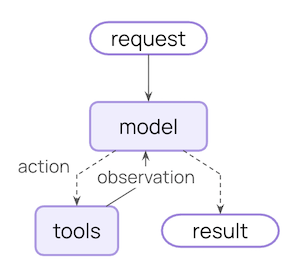
The core agent loop involves calling a model, letting it choose tools to execute, and then finishing when it calls no more tools:
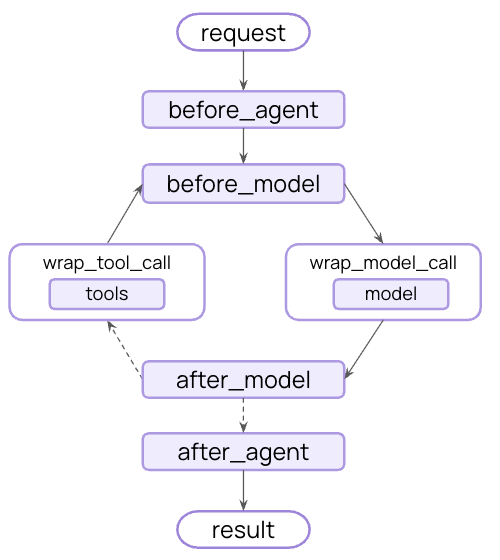
 Middleware exposes hooks before and after each of those steps:
 ## Additional resources
Explore built-in middleware for common use cases.
Build your own middleware with hooks and decorators.
Complete API reference for middleware.
Provider-specific middleware for Anthropic, AWS, OpenAI, and more.
Test your agents with LangSmith.
***
## Additional resources
Explore built-in middleware for common use cases.
Build your own middleware with hooks and decorators.
Complete API reference for middleware.
Provider-specific middleware for Anthropic, AWS, OpenAI, and more.
Test your agents with LangSmith.
***
[Connect these docs](/use-these-docs) to Claude, VSCode, and more via MCP for real-time answers.
[Edit this page on GitHub](https://github.com/langchain-ai/docs/edit/main/src/oss/langchain/middleware/overview.mdx) or [file an issue](https://github.com/langchain-ai/docs/issues/new/choose).