> ## Documentation Index
> Fetch the complete documentation index at: https://docs.langchain.com/llms.txt
> Use this file to discover all available pages before exploring further.
# Short-term memory
## Overview
Memory is a system that remembers information about previous interactions. For AI agents, memory is crucial because it lets them remember previous interactions, learn from feedback, and adapt to user preferences. As agents tackle more complex tasks with numerous user interactions, this capability becomes essential for both efficiency and user satisfaction.
Short term memory lets your application remember previous interactions within a single thread or conversation.
A thread organizes multiple interactions in a session, similar to the way email groups messages in a single conversation.
Conversation history is the most common form of short-term memory. Long conversations pose a challenge to today's LLMs; a full history may not fit inside an LLM's context window, resulting in an context loss or errors.
Even if your model supports the full context length, most LLMs still perform poorly over long contexts. They get "distracted" by stale or off-topic content, all while suffering from slower response times and higher costs.
Chat models accept context using [messages](/oss/python/langchain/messages), which include instructions (a system message) and inputs (human messages). In chat applications, messages alternate between human inputs and model responses, resulting in a list of messages that grows longer over time. Because context windows are limited, many applications can benefit from using techniques to remove or "forget" stale information.
Need to remember information **across** conversations? Use [long-term memory](/oss/python/langchain/long-term-memory) to store and recall user-specific or application-level data across different threads and sessions.
## Usage
To add short-term memory (thread-level persistence) to an agent, you need to specify a `checkpointer` when creating an agent.
LangChain's agent manages short-term memory as a part of your agent's state.
By storing these in the graph's state, the agent can access the full context for a given conversation while maintaining separation between different threads.
State is persisted to a database (or memory) using a checkpointer so the thread can be resumed at any time.
Short-term memory updates when the agent is invoked or a step (like a tool call) is completed, and the state is read at the start of each step.
```python theme={"theme":{"light":"catppuccin-latte","dark":"catppuccin-mocha"}}
from langchain.agents import create_agent
from langgraph.checkpoint.memory import InMemorySaver # [!code highlight]
agent = create_agent(
"gpt-5.4",
tools=[get_user_info],
checkpointer=InMemorySaver(), # [!code highlight]
)
agent.invoke(
{"messages": [{"role": "user", "content": "Hi! My name is Bob."}]},
{"configurable": {"thread_id": "1"}}, # [!code highlight]
)
```
### In production
In production, use a checkpointer backed by a database:
```shell theme={"theme":{"light":"catppuccin-latte","dark":"catppuccin-mocha"}}
pip install langgraph-checkpoint-postgres
```
```python theme={"theme":{"light":"catppuccin-latte","dark":"catppuccin-mocha"}}
from langchain.agents import create_agent
from langgraph.checkpoint.postgres import PostgresSaver # [!code highlight]
DB_URI = "postgresql://postgres:postgres@localhost:5432/postgres?sslmode=disable"
with PostgresSaver.from_conn_string(DB_URI) as checkpointer:
checkpointer.setup() # auto create tables in PostgreSQL
agent = create_agent(
"gpt-5.4",
tools=[get_user_info],
checkpointer=checkpointer, # [!code highlight]
)
```
For more checkpointer options including SQLite, Postgres, and Azure Cosmos DB, see the [list of checkpointer libraries](/oss/python/langgraph/persistence#checkpointer-libraries) in the Persistence documentation.
## Customizing agent memory
By default, agents use [`AgentState`](https://reference.langchain.com/python/langchain/agents/middleware/types/AgentState) to manage short term memory, specifically the conversation history via a `messages` key.
You can extend [`AgentState`](https://reference.langchain.com/python/langchain/agents/middleware/types/AgentState) to add additional fields. Custom state schemas are passed to [`create_agent`](https://reference.langchain.com/python/langchain/agents/factory/create_agent) using the [`state_schema`](https://reference.langchain.com/python/langchain/middleware/#langchain.agents.middleware.AgentMiddleware.state_schema) parameter.
```python theme={"theme":{"light":"catppuccin-latte","dark":"catppuccin-mocha"}}
from langchain.agents import create_agent, AgentState
from langgraph.checkpoint.memory import InMemorySaver
class CustomAgentState(AgentState): # [!code highlight]
user_id: str # [!code highlight]
preferences: dict # [!code highlight]
agent = create_agent(
"gpt-5.4",
tools=[get_user_info],
state_schema=CustomAgentState, # [!code highlight]
checkpointer=InMemorySaver(),
)
# Custom state can be passed in invoke
result = agent.invoke(
{
"messages": [{"role": "user", "content": "Hello"}],
"user_id": "user_123", # [!code highlight]
"preferences": {"theme": "dark"} # [!code highlight]
},
{"configurable": {"thread_id": "1"}})
```
## Common patterns
With [short-term memory](#usage) enabled, long conversations can exceed the LLM's context window. Common solutions are:
Remove first or last N messages (before calling LLM)
Delete messages from LangGraph state permanently
Summarize earlier messages in the history and replace them with a summary
Custom strategies (e.g., message filtering, etc.)
This allows the agent to keep track of the conversation without exceeding the LLM's context window.
### Trim messages
Most LLMs have a maximum supported context window (denominated in tokens).
One way to decide when to truncate messages is to count the tokens in the message history and truncate whenever it approaches that limit. If you're using LangChain, you can use the trim messages utility and specify the number of tokens to keep from the list, as well as the `strategy` (e.g., keep the last `max_tokens`) to use for handling the boundary.
To trim message history in an agent, use the [`@before_model`](https://reference.langchain.com/python/langchain/agents/middleware/types/before_model) middleware decorator:
```python theme={"theme":{"light":"catppuccin-latte","dark":"catppuccin-mocha"}}
from langchain.messages import RemoveMessage
from langgraph.graph.message import REMOVE_ALL_MESSAGES
from langgraph.checkpoint.memory import InMemorySaver
from langchain.agents import create_agent, AgentState
from langchain.agents.middleware import before_model
from langgraph.runtime import Runtime
from langchain_core.runnables import RunnableConfig
from typing import Any
@before_model
def trim_messages(state: AgentState, runtime: Runtime) -> dict[str, Any] | None:
"""Keep only the last few messages to fit context window."""
messages = state["messages"]
if len(messages) <= 3:
return None # No changes needed
first_msg = messages[0]
recent_messages = messages[-3:] if len(messages) % 2 == 0 else messages[-4:]
new_messages = [first_msg] + recent_messages
return {
"messages": [
RemoveMessage(id=REMOVE_ALL_MESSAGES),
*new_messages
]
}
agent = create_agent(
your_model_here,
tools=your_tools_here,
middleware=[trim_messages],
checkpointer=InMemorySaver(),
)
config: RunnableConfig = {"configurable": {"thread_id": "1"}}
agent.invoke({"messages": "hi, my name is bob"}, config)
agent.invoke({"messages": "write a short poem about cats"}, config)
agent.invoke({"messages": "now do the same but for dogs"}, config)
final_response = agent.invoke({"messages": "what's my name?"}, config)
final_response["messages"][-1].pretty_print()
"""
================================== Ai Message ==================================
Your name is Bob. You told me that earlier.
If you'd like me to call you a nickname or use a different name, just say the word.
"""
```
### Delete messages
You can delete messages from the graph state to manage the message history.
This is useful when you want to remove specific messages or clear the entire message history.
To delete messages from the graph state, you can use the `RemoveMessage`.
For `RemoveMessage` to work, you need to use a state key with [`add_messages`](https://reference.langchain.com/python/langgraph/graph/message/add_messages) [reducer](/oss/python/langgraph/graph-api#reducers).
The default [`AgentState`](https://reference.langchain.com/python/langchain/agents/middleware/types/AgentState) provides this.
To remove specific messages:
```python theme={"theme":{"light":"catppuccin-latte","dark":"catppuccin-mocha"}}
from langchain.messages import RemoveMessage # [!code highlight]
def delete_messages(state):
messages = state["messages"]
if len(messages) > 2:
# remove the earliest two messages
return {"messages": [RemoveMessage(id=m.id) for m in messages[:2]]} # [!code highlight]
```
To remove **all** messages:
```python theme={"theme":{"light":"catppuccin-latte","dark":"catppuccin-mocha"}}
from langgraph.graph.message import REMOVE_ALL_MESSAGES # [!code highlight]
def delete_messages(state):
return {"messages": [RemoveMessage(id=REMOVE_ALL_MESSAGES)]} # [!code highlight]
```
When deleting messages, **make sure** that the resulting message history is valid. Check the limitations of the LLM provider you're using. For example:
* Some providers expect message history to start with a `user` message
* Most providers require `assistant` messages with tool calls to be followed by corresponding `tool` result messages.
```python theme={"theme":{"light":"catppuccin-latte","dark":"catppuccin-mocha"}}
from langchain.messages import RemoveMessage
from langchain.agents import create_agent, AgentState
from langchain.agents.middleware import after_model
from langgraph.checkpoint.memory import InMemorySaver
from langgraph.runtime import Runtime
from langchain_core.runnables import RunnableConfig
@after_model
def delete_old_messages(state: AgentState, runtime: Runtime) -> dict | None:
"""Remove old messages to keep conversation manageable."""
messages = state["messages"]
if len(messages) > 2:
# remove the earliest two messages
return {"messages": [RemoveMessage(id=m.id) for m in messages[:2]]}
return None
agent = create_agent(
"gpt-5-nano",
tools=[],
system_prompt="Please be concise and to the point.",
middleware=[delete_old_messages],
checkpointer=InMemorySaver(),
)
config: RunnableConfig = {"configurable": {"thread_id": "1"}}
for event in agent.stream(
{"messages": [{"role": "user", "content": "hi! I'm bob"}]},
config,
stream_mode="values",
):
print([(message.type, message.content) for message in event["messages"]])
for event in agent.stream(
{"messages": [{"role": "user", "content": "what's my name?"}]},
config,
stream_mode="values",
):
print([(message.type, message.content) for message in event["messages"]])
```
```
[('human', "hi! I'm bob")]
[('human', "hi! I'm bob"), ('ai', 'Hi Bob! Nice to meet you. How can I help you today? I can answer questions, brainstorm ideas, draft text, explain things, or help with code.')]
[('human', "hi! I'm bob"), ('ai', 'Hi Bob! Nice to meet you. How can I help you today? I can answer questions, brainstorm ideas, draft text, explain things, or help with code.'), ('human', "what's my name?")]
[('human', "hi! I'm bob"), ('ai', 'Hi Bob! Nice to meet you. How can I help you today? I can answer questions, brainstorm ideas, draft text, explain things, or help with code.'), ('human', "what's my name?"), ('ai', 'Your name is Bob. How can I help you today, Bob?')]
[('human', "what's my name?"), ('ai', 'Your name is Bob. How can I help you today, Bob?')]
```
### Summarize messages
The problem with trimming or removing messages, as shown above, is that you may lose information from culling of the message queue.
Because of this, some applications benefit from a more sophisticated approach of summarizing the message history using a chat model.
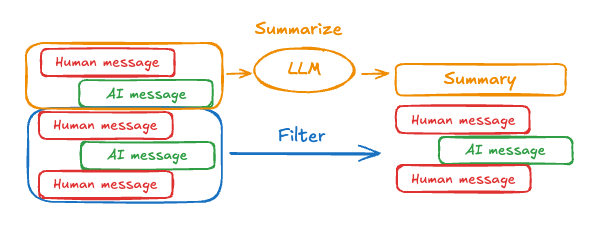 To summarize message history in an agent, use the built-in [`SummarizationMiddleware`](/oss/python/langchain/middleware#summarization):
```python theme={"theme":{"light":"catppuccin-latte","dark":"catppuccin-mocha"}}
from langchain.agents import create_agent
from langchain.agents.middleware import SummarizationMiddleware
from langgraph.checkpoint.memory import InMemorySaver
from langchain_core.runnables import RunnableConfig
checkpointer = InMemorySaver()
agent = create_agent(
model="gpt-5.4",
tools=[],
middleware=[
SummarizationMiddleware(
model="gpt-5.4-mini",
trigger=("tokens", 4000),
keep=("messages", 20)
)
],
checkpointer=checkpointer,
)
config: RunnableConfig = {"configurable": {"thread_id": "1"}}
agent.invoke({"messages": "hi, my name is bob"}, config)
agent.invoke({"messages": "write a short poem about cats"}, config)
agent.invoke({"messages": "now do the same but for dogs"}, config)
final_response = agent.invoke({"messages": "what's my name?"}, config)
final_response["messages"][-1].pretty_print()
"""
================================== Ai Message ==================================
Your name is Bob!
"""
```
See [`SummarizationMiddleware`](/oss/python/langchain/middleware#summarization) for more configuration options.
## Access memory
You can access and modify the short-term memory (state) of an agent in several ways:
### Tools
#### Read short-term memory in a tool
Access short term memory (state) in a tool using the `runtime` parameter (typed as `ToolRuntime`).
The `runtime` parameter is hidden from the tool signature (so the model doesn't see it), but the tool can access the state through it.
```python theme={"theme":{"light":"catppuccin-latte","dark":"catppuccin-mocha"}}
from langchain.agents import create_agent, AgentState
from langchain.tools import tool, ToolRuntime
class CustomState(AgentState):
user_id: str
@tool
def get_user_info(
runtime: ToolRuntime
) -> str:
"""Look up user info."""
user_id = runtime.state["user_id"]
return "User is John Smith" if user_id == "user_123" else "Unknown user"
agent = create_agent(
model="gpt-5-nano",
tools=[get_user_info],
state_schema=CustomState,
)
result = agent.invoke({
"messages": "look up user information",
"user_id": "user_123"
})
print(result["messages"][-1].content)
# > User is John Smith.
```
#### Write short-term memory from tools
To modify the agent's short-term memory (state) during execution, you can return state updates directly from the tools.
This is useful for persisting intermediate results or making information accessible to subsequent tools or prompts.
```python theme={"theme":{"light":"catppuccin-latte","dark":"catppuccin-mocha"}}
from langchain.tools import tool, ToolRuntime
from langchain_core.runnables import RunnableConfig
from langchain.messages import ToolMessage
from langchain.agents import create_agent, AgentState
from langgraph.types import Command
from pydantic import BaseModel
class CustomState(AgentState): # [!code highlight]
user_name: str
class CustomContext(BaseModel):
user_id: str
@tool
def update_user_info(
runtime: ToolRuntime[CustomContext, CustomState],
) -> Command:
"""Look up and update user info."""
user_id = runtime.context.user_id
name = "John Smith" if user_id == "user_123" else "Unknown user"
return Command(update={ # [!code highlight]
"user_name": name,
# update the message history
"messages": [
ToolMessage(
"Successfully looked up user information",
tool_call_id=runtime.tool_call_id
)
]
})
@tool
def greet(
runtime: ToolRuntime[CustomContext, CustomState]
) -> str | Command:
"""Use this to greet the user once you found their info."""
user_name = runtime.state.get("user_name", None)
if user_name is None:
return Command(update={
"messages": [
ToolMessage(
"Please call the 'update_user_info' tool it will get and update the user's name.",
tool_call_id=runtime.tool_call_id
)
]
})
return f"Hello {user_name}!"
agent = create_agent(
model="gpt-5-nano",
tools=[update_user_info, greet],
state_schema=CustomState, # [!code highlight]
context_schema=CustomContext,
)
agent.invoke(
{"messages": [{"role": "user", "content": "greet the user"}]},
context=CustomContext(user_id="user_123"),
)
```
### Prompt
Access short term memory (state) in middleware to create dynamic prompts based on conversation history or custom state fields.
```python theme={"theme":{"light":"catppuccin-latte","dark":"catppuccin-mocha"}}
from langchain.agents import create_agent
from typing import TypedDict
from langchain.agents.middleware import dynamic_prompt, ModelRequest
class CustomContext(TypedDict):
user_name: str
def get_weather(city: str) -> str:
"""Get the weather in a city."""
return f"The weather in {city} is always sunny!"
@dynamic_prompt
def dynamic_system_prompt(request: ModelRequest) -> str:
user_name = request.runtime.context["user_name"]
system_prompt = f"You are a helpful assistant. Address the user as {user_name}."
return system_prompt
agent = create_agent(
model="gpt-5-nano",
tools=[get_weather],
middleware=[dynamic_system_prompt],
context_schema=CustomContext,
)
result = agent.invoke(
{"messages": [{"role": "user", "content": "What is the weather in SF?"}]},
context=CustomContext(user_name="John Smith"),
)
for msg in result["messages"]:
msg.pretty_print()
```
```shell title="Output" theme={"theme":{"light":"catppuccin-latte","dark":"catppuccin-mocha"}}
================================ Human Message =================================
What is the weather in SF?
================================== Ai Message ==================================
Tool Calls:
get_weather (call_WFQlOGn4b2yoJrv7cih342FG)
Call ID: call_WFQlOGn4b2yoJrv7cih342FG
Args:
city: San Francisco
================================= Tool Message =================================
Name: get_weather
The weather in San Francisco is always sunny!
================================== Ai Message ==================================
Hi John Smith, the weather in San Francisco is always sunny!
```
### Before model
Access short term memory (state) in [`@before_model`](https://reference.langchain.com/python/langchain/agents/middleware/types/before_model) middleware to process messages before model calls.
```mermaid theme={"theme":{"light":"catppuccin-latte","dark":"catppuccin-mocha"}}
%%{
init: {
"fontFamily": "monospace",
"flowchart": {
"curve": "basis"
}
}
}%%
graph TD
S(["\_\_start\_\_"])
PRE(before_model)
MODEL(model)
TOOLS(tools)
END(["\_\_end\_\_"])
S --> PRE
PRE --> MODEL
MODEL -.-> TOOLS
MODEL -.-> END
TOOLS --> PRE
classDef blueHighlight fill:#E5F4FF,stroke:#006DDD,color:#030710;
classDef neutral fill:#F2FAFF,stroke:#40668D,stroke-width:2px,color:#2F4B68;
class S blueHighlight;
class END blueHighlight;
class PRE,MODEL,TOOLS neutral;
```
```python theme={"theme":{"light":"catppuccin-latte","dark":"catppuccin-mocha"}}
from langchain.messages import RemoveMessage
from langgraph.graph.message import REMOVE_ALL_MESSAGES
from langgraph.checkpoint.memory import InMemorySaver
from langchain.agents import create_agent, AgentState
from langchain.agents.middleware import before_model
from langchain_core.runnables import RunnableConfig
from langgraph.runtime import Runtime
from typing import Any
@before_model
def trim_messages(state: AgentState, runtime: Runtime) -> dict[str, Any] | None:
"""Keep only the last few messages to fit context window."""
messages = state["messages"]
if len(messages) <= 3:
return None # No changes needed
first_msg = messages[0]
recent_messages = messages[-3:] if len(messages) % 2 == 0 else messages[-4:]
new_messages = [first_msg] + recent_messages
return {
"messages": [
RemoveMessage(id=REMOVE_ALL_MESSAGES),
*new_messages
]
}
agent = create_agent(
"gpt-5-nano",
tools=[],
middleware=[trim_messages],
checkpointer=InMemorySaver()
)
config: RunnableConfig = {"configurable": {"thread_id": "1"}}
agent.invoke({"messages": "hi, my name is bob"}, config)
agent.invoke({"messages": "write a short poem about cats"}, config)
agent.invoke({"messages": "now do the same but for dogs"}, config)
final_response = agent.invoke({"messages": "what's my name?"}, config)
final_response["messages"][-1].pretty_print()
"""
================================== Ai Message ==================================
Your name is Bob. You told me that earlier.
If you'd like me to call you a nickname or use a different name, just say the word.
"""
```
### After model
Access short term memory (state) in [`@after_model`](https://reference.langchain.com/python/langchain/agents/middleware/types/after_model) middleware to process messages after model calls.
```mermaid theme={"theme":{"light":"catppuccin-latte","dark":"catppuccin-mocha"}}
%%{
init: {
"fontFamily": "monospace",
"flowchart": {
"curve": "basis"
}
}
}%%
graph TD
S(["\_\_start\_\_"])
MODEL(model)
POST(after_model)
TOOLS(tools)
END(["\_\_end\_\_"])
S --> MODEL
MODEL --> POST
POST -.-> END
POST -.-> TOOLS
TOOLS --> MODEL
classDef blueHighlight fill:#E5F4FF,stroke:#006DDD,color:#030710;
classDef greenHighlight fill:#F6FFDB,stroke:#6E8900,color:#2E3900;
classDef neutral fill:#F2FAFF,stroke:#40668D,stroke-width:2px,color:#2F4B68;
class S blueHighlight;
class END blueHighlight;
class POST greenHighlight;
class MODEL,TOOLS neutral;
```
```python theme={"theme":{"light":"catppuccin-latte","dark":"catppuccin-mocha"}}
from langchain.messages import RemoveMessage
from langgraph.checkpoint.memory import InMemorySaver
from langchain.agents import create_agent, AgentState
from langchain.agents.middleware import after_model
from langgraph.runtime import Runtime
@after_model
def validate_response(state: AgentState, runtime: Runtime) -> dict | None:
"""Remove messages containing sensitive words."""
STOP_WORDS = ["password", "secret"]
last_message = state["messages"][-1]
if any(word in last_message.content for word in STOP_WORDS):
return {"messages": [RemoveMessage(id=last_message.id)]}
return None
agent = create_agent(
model="gpt-5-nano",
tools=[],
middleware=[validate_response],
checkpointer=InMemorySaver(),
)
```
***
To summarize message history in an agent, use the built-in [`SummarizationMiddleware`](/oss/python/langchain/middleware#summarization):
```python theme={"theme":{"light":"catppuccin-latte","dark":"catppuccin-mocha"}}
from langchain.agents import create_agent
from langchain.agents.middleware import SummarizationMiddleware
from langgraph.checkpoint.memory import InMemorySaver
from langchain_core.runnables import RunnableConfig
checkpointer = InMemorySaver()
agent = create_agent(
model="gpt-5.4",
tools=[],
middleware=[
SummarizationMiddleware(
model="gpt-5.4-mini",
trigger=("tokens", 4000),
keep=("messages", 20)
)
],
checkpointer=checkpointer,
)
config: RunnableConfig = {"configurable": {"thread_id": "1"}}
agent.invoke({"messages": "hi, my name is bob"}, config)
agent.invoke({"messages": "write a short poem about cats"}, config)
agent.invoke({"messages": "now do the same but for dogs"}, config)
final_response = agent.invoke({"messages": "what's my name?"}, config)
final_response["messages"][-1].pretty_print()
"""
================================== Ai Message ==================================
Your name is Bob!
"""
```
See [`SummarizationMiddleware`](/oss/python/langchain/middleware#summarization) for more configuration options.
## Access memory
You can access and modify the short-term memory (state) of an agent in several ways:
### Tools
#### Read short-term memory in a tool
Access short term memory (state) in a tool using the `runtime` parameter (typed as `ToolRuntime`).
The `runtime` parameter is hidden from the tool signature (so the model doesn't see it), but the tool can access the state through it.
```python theme={"theme":{"light":"catppuccin-latte","dark":"catppuccin-mocha"}}
from langchain.agents import create_agent, AgentState
from langchain.tools import tool, ToolRuntime
class CustomState(AgentState):
user_id: str
@tool
def get_user_info(
runtime: ToolRuntime
) -> str:
"""Look up user info."""
user_id = runtime.state["user_id"]
return "User is John Smith" if user_id == "user_123" else "Unknown user"
agent = create_agent(
model="gpt-5-nano",
tools=[get_user_info],
state_schema=CustomState,
)
result = agent.invoke({
"messages": "look up user information",
"user_id": "user_123"
})
print(result["messages"][-1].content)
# > User is John Smith.
```
#### Write short-term memory from tools
To modify the agent's short-term memory (state) during execution, you can return state updates directly from the tools.
This is useful for persisting intermediate results or making information accessible to subsequent tools or prompts.
```python theme={"theme":{"light":"catppuccin-latte","dark":"catppuccin-mocha"}}
from langchain.tools import tool, ToolRuntime
from langchain_core.runnables import RunnableConfig
from langchain.messages import ToolMessage
from langchain.agents import create_agent, AgentState
from langgraph.types import Command
from pydantic import BaseModel
class CustomState(AgentState): # [!code highlight]
user_name: str
class CustomContext(BaseModel):
user_id: str
@tool
def update_user_info(
runtime: ToolRuntime[CustomContext, CustomState],
) -> Command:
"""Look up and update user info."""
user_id = runtime.context.user_id
name = "John Smith" if user_id == "user_123" else "Unknown user"
return Command(update={ # [!code highlight]
"user_name": name,
# update the message history
"messages": [
ToolMessage(
"Successfully looked up user information",
tool_call_id=runtime.tool_call_id
)
]
})
@tool
def greet(
runtime: ToolRuntime[CustomContext, CustomState]
) -> str | Command:
"""Use this to greet the user once you found their info."""
user_name = runtime.state.get("user_name", None)
if user_name is None:
return Command(update={
"messages": [
ToolMessage(
"Please call the 'update_user_info' tool it will get and update the user's name.",
tool_call_id=runtime.tool_call_id
)
]
})
return f"Hello {user_name}!"
agent = create_agent(
model="gpt-5-nano",
tools=[update_user_info, greet],
state_schema=CustomState, # [!code highlight]
context_schema=CustomContext,
)
agent.invoke(
{"messages": [{"role": "user", "content": "greet the user"}]},
context=CustomContext(user_id="user_123"),
)
```
### Prompt
Access short term memory (state) in middleware to create dynamic prompts based on conversation history or custom state fields.
```python theme={"theme":{"light":"catppuccin-latte","dark":"catppuccin-mocha"}}
from langchain.agents import create_agent
from typing import TypedDict
from langchain.agents.middleware import dynamic_prompt, ModelRequest
class CustomContext(TypedDict):
user_name: str
def get_weather(city: str) -> str:
"""Get the weather in a city."""
return f"The weather in {city} is always sunny!"
@dynamic_prompt
def dynamic_system_prompt(request: ModelRequest) -> str:
user_name = request.runtime.context["user_name"]
system_prompt = f"You are a helpful assistant. Address the user as {user_name}."
return system_prompt
agent = create_agent(
model="gpt-5-nano",
tools=[get_weather],
middleware=[dynamic_system_prompt],
context_schema=CustomContext,
)
result = agent.invoke(
{"messages": [{"role": "user", "content": "What is the weather in SF?"}]},
context=CustomContext(user_name="John Smith"),
)
for msg in result["messages"]:
msg.pretty_print()
```
```shell title="Output" theme={"theme":{"light":"catppuccin-latte","dark":"catppuccin-mocha"}}
================================ Human Message =================================
What is the weather in SF?
================================== Ai Message ==================================
Tool Calls:
get_weather (call_WFQlOGn4b2yoJrv7cih342FG)
Call ID: call_WFQlOGn4b2yoJrv7cih342FG
Args:
city: San Francisco
================================= Tool Message =================================
Name: get_weather
The weather in San Francisco is always sunny!
================================== Ai Message ==================================
Hi John Smith, the weather in San Francisco is always sunny!
```
### Before model
Access short term memory (state) in [`@before_model`](https://reference.langchain.com/python/langchain/agents/middleware/types/before_model) middleware to process messages before model calls.
```mermaid theme={"theme":{"light":"catppuccin-latte","dark":"catppuccin-mocha"}}
%%{
init: {
"fontFamily": "monospace",
"flowchart": {
"curve": "basis"
}
}
}%%
graph TD
S(["\_\_start\_\_"])
PRE(before_model)
MODEL(model)
TOOLS(tools)
END(["\_\_end\_\_"])
S --> PRE
PRE --> MODEL
MODEL -.-> TOOLS
MODEL -.-> END
TOOLS --> PRE
classDef blueHighlight fill:#E5F4FF,stroke:#006DDD,color:#030710;
classDef neutral fill:#F2FAFF,stroke:#40668D,stroke-width:2px,color:#2F4B68;
class S blueHighlight;
class END blueHighlight;
class PRE,MODEL,TOOLS neutral;
```
```python theme={"theme":{"light":"catppuccin-latte","dark":"catppuccin-mocha"}}
from langchain.messages import RemoveMessage
from langgraph.graph.message import REMOVE_ALL_MESSAGES
from langgraph.checkpoint.memory import InMemorySaver
from langchain.agents import create_agent, AgentState
from langchain.agents.middleware import before_model
from langchain_core.runnables import RunnableConfig
from langgraph.runtime import Runtime
from typing import Any
@before_model
def trim_messages(state: AgentState, runtime: Runtime) -> dict[str, Any] | None:
"""Keep only the last few messages to fit context window."""
messages = state["messages"]
if len(messages) <= 3:
return None # No changes needed
first_msg = messages[0]
recent_messages = messages[-3:] if len(messages) % 2 == 0 else messages[-4:]
new_messages = [first_msg] + recent_messages
return {
"messages": [
RemoveMessage(id=REMOVE_ALL_MESSAGES),
*new_messages
]
}
agent = create_agent(
"gpt-5-nano",
tools=[],
middleware=[trim_messages],
checkpointer=InMemorySaver()
)
config: RunnableConfig = {"configurable": {"thread_id": "1"}}
agent.invoke({"messages": "hi, my name is bob"}, config)
agent.invoke({"messages": "write a short poem about cats"}, config)
agent.invoke({"messages": "now do the same but for dogs"}, config)
final_response = agent.invoke({"messages": "what's my name?"}, config)
final_response["messages"][-1].pretty_print()
"""
================================== Ai Message ==================================
Your name is Bob. You told me that earlier.
If you'd like me to call you a nickname or use a different name, just say the word.
"""
```
### After model
Access short term memory (state) in [`@after_model`](https://reference.langchain.com/python/langchain/agents/middleware/types/after_model) middleware to process messages after model calls.
```mermaid theme={"theme":{"light":"catppuccin-latte","dark":"catppuccin-mocha"}}
%%{
init: {
"fontFamily": "monospace",
"flowchart": {
"curve": "basis"
}
}
}%%
graph TD
S(["\_\_start\_\_"])
MODEL(model)
POST(after_model)
TOOLS(tools)
END(["\_\_end\_\_"])
S --> MODEL
MODEL --> POST
POST -.-> END
POST -.-> TOOLS
TOOLS --> MODEL
classDef blueHighlight fill:#E5F4FF,stroke:#006DDD,color:#030710;
classDef greenHighlight fill:#F6FFDB,stroke:#6E8900,color:#2E3900;
classDef neutral fill:#F2FAFF,stroke:#40668D,stroke-width:2px,color:#2F4B68;
class S blueHighlight;
class END blueHighlight;
class POST greenHighlight;
class MODEL,TOOLS neutral;
```
```python theme={"theme":{"light":"catppuccin-latte","dark":"catppuccin-mocha"}}
from langchain.messages import RemoveMessage
from langgraph.checkpoint.memory import InMemorySaver
from langchain.agents import create_agent, AgentState
from langchain.agents.middleware import after_model
from langgraph.runtime import Runtime
@after_model
def validate_response(state: AgentState, runtime: Runtime) -> dict | None:
"""Remove messages containing sensitive words."""
STOP_WORDS = ["password", "secret"]
last_message = state["messages"][-1]
if any(word in last_message.content for word in STOP_WORDS):
return {"messages": [RemoveMessage(id=last_message.id)]}
return None
agent = create_agent(
model="gpt-5-nano",
tools=[],
middleware=[validate_response],
checkpointer=InMemorySaver(),
)
```
***
[Connect these docs](/use-these-docs) to Claude, VSCode, and more via MCP for real-time answers.
[Edit this page on GitHub](https://github.com/langchain-ai/docs/edit/main/src/oss/langchain/short-term-memory.mdx) or [file an issue](https://github.com/langchain-ai/docs/issues/new/choose).