> ## Documentation Index
> Fetch the complete documentation index at: https://docs.langchain.com/llms.txt
> Use this file to discover all available pages before exploring further.
# Memory
AI applications need [memory](/oss/python/concepts/memory) to share context across multiple interactions. In LangGraph, you can add two types of memory:
* [Add short-term memory](#add-short-term-memory) as a part of your agent's [state](/oss/python/langgraph/graph-api#state) to enable multi-turn conversations.
* [Add long-term memory](#add-long-term-memory) to store user-specific or application-level data across sessions.
## Add short-term memory
**Short-term** memory (thread-level [persistence](/oss/python/langgraph/persistence)) enables agents to track multi-turn conversations. To add short-term memory:
```python theme={"theme":{"light":"catppuccin-latte","dark":"catppuccin-mocha"}}
from langgraph.checkpoint.memory import InMemorySaver # [!code highlight]
from langgraph.graph import StateGraph
checkpointer = InMemorySaver() # [!code highlight]
builder = StateGraph(...)
graph = builder.compile(checkpointer=checkpointer) # [!code highlight]
graph.invoke(
{"messages": [{"role": "user", "content": "hi! i am Bob"}]},
{"configurable": {"thread_id": "1"}}, # [!code highlight]
)
```
### Use in production
In production, use a checkpointer backed by a database:
```python theme={"theme":{"light":"catppuccin-latte","dark":"catppuccin-mocha"}}
from langgraph.checkpoint.postgres import PostgresSaver
DB_URI = "postgresql://postgres:postgres@localhost:5442/postgres?sslmode=disable"
with PostgresSaver.from_conn_string(DB_URI) as checkpointer: # [!code highlight]
builder = StateGraph(...)
graph = builder.compile(checkpointer=checkpointer) # [!code highlight]
```
```
pip install -U "psycopg[binary,pool]" langgraph langgraph-checkpoint-postgres
```
You need to call `checkpointer.setup()` the first time you're using Postgres checkpointer
```python theme={"theme":{"light":"catppuccin-latte","dark":"catppuccin-mocha"}}
from langchain.chat_models import init_chat_model
from langgraph.graph import StateGraph, MessagesState, START
from langgraph.checkpoint.postgres import PostgresSaver # [!code highlight]
model = init_chat_model(model="claude-haiku-4-5-20251001")
DB_URI = "postgresql://postgres:postgres@localhost:5442/postgres?sslmode=disable"
with PostgresSaver.from_conn_string(DB_URI) as checkpointer: # [!code highlight]
# checkpointer.setup()
def call_model(state: MessagesState):
response = model.invoke(state["messages"])
return {"messages": response}
builder = StateGraph(MessagesState)
builder.add_node(call_model)
builder.add_edge(START, "call_model")
graph = builder.compile(checkpointer=checkpointer) # [!code highlight]
config = {
"configurable": {
"thread_id": "1" # [!code highlight]
}
}
for chunk in graph.stream(
{"messages": [{"role": "user", "content": "hi! I'm bob"}]},
config, # [!code highlight]
stream_mode="values"
):
chunk["messages"][-1].pretty_print()
for chunk in graph.stream(
{"messages": [{"role": "user", "content": "what's my name?"}]},
config, # [!code highlight]
stream_mode="values"
):
chunk["messages"][-1].pretty_print()
```
```python theme={"theme":{"light":"catppuccin-latte","dark":"catppuccin-mocha"}}
from langchain.chat_models import init_chat_model
from langgraph.graph import StateGraph, MessagesState, START
from langgraph.checkpoint.postgres.aio import AsyncPostgresSaver # [!code highlight]
model = init_chat_model(model="claude-haiku-4-5-20251001")
DB_URI = "postgresql://postgres:postgres@localhost:5442/postgres?sslmode=disable"
async with AsyncPostgresSaver.from_conn_string(DB_URI) as checkpointer: # [!code highlight]
# await checkpointer.setup()
async def call_model(state: MessagesState):
response = await model.ainvoke(state["messages"])
return {"messages": response}
builder = StateGraph(MessagesState)
builder.add_node(call_model)
builder.add_edge(START, "call_model")
graph = builder.compile(checkpointer=checkpointer) # [!code highlight]
config = {
"configurable": {
"thread_id": "1" # [!code highlight]
}
}
async for chunk in graph.astream(
{"messages": [{"role": "user", "content": "hi! I'm bob"}]},
config, # [!code highlight]
stream_mode="values"
):
chunk["messages"][-1].pretty_print()
async for chunk in graph.astream(
{"messages": [{"role": "user", "content": "what's my name?"}]},
config, # [!code highlight]
stream_mode="values"
):
chunk["messages"][-1].pretty_print()
```
```
pip install -U pymongo langgraph langgraph-checkpoint-mongodb
```
**Setup**
To use the [MongoDB checkpointer](https://pypi.org/project/langgraph-checkpoint-mongodb/), you will need a MongoDB cluster. Follow [this guide](https://www.mongodb.com/docs/guides/atlas/cluster/) to create a cluster if you don't already have one.
```python theme={"theme":{"light":"catppuccin-latte","dark":"catppuccin-mocha"}}
from langchain.chat_models import init_chat_model
from langgraph.graph import StateGraph, MessagesState, START
from langgraph.checkpoint.mongodb import MongoDBSaver # [!code highlight]
model = init_chat_model(model="claude-haiku-4-5-20251001")
MONGODB_URI = "localhost:27017"
with MongoDBSaver.from_conn_string(MONGODB_URI) as checkpointer: # [!code highlight]
def call_model(state: MessagesState):
response = model.invoke(state["messages"])
return {"messages": response}
builder = StateGraph(MessagesState)
builder.add_node(call_model)
builder.add_edge(START, "call_model")
graph = builder.compile(checkpointer=checkpointer) # [!code highlight]
config = {
"configurable": {
"thread_id": "1" # [!code highlight]
}
}
for chunk in graph.stream(
{"messages": [{"role": "user", "content": "hi! I'm bob"}]},
config, # [!code highlight]
stream_mode="values"
):
chunk["messages"][-1].pretty_print()
for chunk in graph.stream(
{"messages": [{"role": "user", "content": "what's my name?"}]},
config, # [!code highlight]
stream_mode="values"
):
chunk["messages"][-1].pretty_print()
```
```python theme={"theme":{"light":"catppuccin-latte","dark":"catppuccin-mocha"}}
from langchain.chat_models import init_chat_model
from langgraph.graph import StateGraph, MessagesState, START
from langgraph.checkpoint.mongodb.aio import AsyncMongoDBSaver # [!code highlight]
model = init_chat_model(model="claude-haiku-4-5-20251001")
MONGODB_URI = "localhost:27017"
async with AsyncMongoDBSaver.from_conn_string(MONGODB_URI) as checkpointer: # [!code highlight]
async def call_model(state: MessagesState):
response = await model.ainvoke(state["messages"])
return {"messages": response}
builder = StateGraph(MessagesState)
builder.add_node(call_model)
builder.add_edge(START, "call_model")
graph = builder.compile(checkpointer=checkpointer) # [!code highlight]
config = {
"configurable": {
"thread_id": "1" # [!code highlight]
}
}
async for chunk in graph.astream(
{"messages": [{"role": "user", "content": "hi! I'm bob"}]},
config, # [!code highlight]
stream_mode="values"
):
chunk["messages"][-1].pretty_print()
async for chunk in graph.astream(
{"messages": [{"role": "user", "content": "what's my name?"}]},
config, # [!code highlight]
stream_mode="values"
):
chunk["messages"][-1].pretty_print()
```
```
pip install -U langgraph langgraph-checkpoint-redis
```
You need to call `checkpointer.setup()` the first time you're using Redis checkpointer.
```python theme={"theme":{"light":"catppuccin-latte","dark":"catppuccin-mocha"}}
from langchain.chat_models import init_chat_model
from langgraph.graph import StateGraph, MessagesState, START
from langgraph.checkpoint.redis import RedisSaver # [!code highlight]
model = init_chat_model(model="claude-haiku-4-5-20251001")
DB_URI = "redis://localhost:6379"
with RedisSaver.from_conn_string(DB_URI) as checkpointer: # [!code highlight]
# checkpointer.setup()
def call_model(state: MessagesState):
response = model.invoke(state["messages"])
return {"messages": response}
builder = StateGraph(MessagesState)
builder.add_node(call_model)
builder.add_edge(START, "call_model")
graph = builder.compile(checkpointer=checkpointer) # [!code highlight]
config = {
"configurable": {
"thread_id": "1" # [!code highlight]
}
}
for chunk in graph.stream(
{"messages": [{"role": "user", "content": "hi! I'm bob"}]},
config, # [!code highlight]
stream_mode="values"
):
chunk["messages"][-1].pretty_print()
for chunk in graph.stream(
{"messages": [{"role": "user", "content": "what's my name?"}]},
config, # [!code highlight]
stream_mode="values"
):
chunk["messages"][-1].pretty_print()
```
```python theme={"theme":{"light":"catppuccin-latte","dark":"catppuccin-mocha"}}
from langchain.chat_models import init_chat_model
from langgraph.graph import StateGraph, MessagesState, START
from langgraph.checkpoint.redis.aio import AsyncRedisSaver # [!code highlight]
model = init_chat_model(model="claude-haiku-4-5-20251001")
DB_URI = "redis://localhost:6379"
async with AsyncRedisSaver.from_conn_string(DB_URI) as checkpointer: # [!code highlight]
# await checkpointer.asetup()
async def call_model(state: MessagesState):
response = await model.ainvoke(state["messages"])
return {"messages": response}
builder = StateGraph(MessagesState)
builder.add_node(call_model)
builder.add_edge(START, "call_model")
graph = builder.compile(checkpointer=checkpointer) # [!code highlight]
config = {
"configurable": {
"thread_id": "1" # [!code highlight]
}
}
async for chunk in graph.astream(
{"messages": [{"role": "user", "content": "hi! I'm bob"}]},
config, # [!code highlight]
stream_mode="values"
):
chunk["messages"][-1].pretty_print()
async for chunk in graph.astream(
{"messages": [{"role": "user", "content": "what's my name?"}]},
config, # [!code highlight]
stream_mode="values"
):
chunk["messages"][-1].pretty_print()
```
### Use in subgraphs
If your graph contains [subgraphs](/oss/python/langgraph/use-subgraphs), you only need to provide the checkpointer when compiling the parent graph. LangGraph will automatically propagate the checkpointer to the child subgraphs.
```python theme={"theme":{"light":"catppuccin-latte","dark":"catppuccin-mocha"}}
from langgraph.graph import START, StateGraph
from langgraph.checkpoint.memory import InMemorySaver
from typing import TypedDict
class State(TypedDict):
foo: str
# Subgraph
def subgraph_node_1(state: State):
return {"foo": state["foo"] + "bar"}
subgraph_builder = StateGraph(State)
subgraph_builder.add_node(subgraph_node_1)
subgraph_builder.add_edge(START, "subgraph_node_1")
subgraph = subgraph_builder.compile() # [!code highlight]
# Parent graph
builder = StateGraph(State)
builder.add_node("node_1", subgraph) # [!code highlight]
builder.add_edge(START, "node_1")
checkpointer = InMemorySaver()
graph = builder.compile(checkpointer=checkpointer) # [!code highlight]
```
You can configure subgraph-specific checkpointing behavior. See [subgraph persistence](/oss/python/langgraph/use-subgraphs#subgraph-persistence) for details on persistence levels including interrupt support and stateful continuations.
```python theme={"theme":{"light":"catppuccin-latte","dark":"catppuccin-mocha"}}
subgraph_builder = StateGraph(...)
subgraph = subgraph_builder.compile(checkpointer=True) # [!code highlight]
```
## Add long-term memory
Use long-term memory to store user-specific or application-specific data across conversations.
```python theme={"theme":{"light":"catppuccin-latte","dark":"catppuccin-mocha"}}
from langgraph.store.memory import InMemoryStore # [!code highlight]
from langgraph.graph import StateGraph
store = InMemoryStore() # [!code highlight]
builder = StateGraph(...)
graph = builder.compile(store=store) # [!code highlight]
```
### Access the store inside nodes
Once you compile a graph with a store, LangGraph automatically injects the store into your node functions. The recommended way to access the store is through the `Runtime` object.
```python theme={"theme":{"light":"catppuccin-latte","dark":"catppuccin-mocha"}}
from dataclasses import dataclass
from langgraph.runtime import Runtime
from langgraph.graph import StateGraph, MessagesState, START
import uuid
@dataclass
class Context:
user_id: str
async def call_model(state: MessagesState, runtime: Runtime[Context]): # [!code highlight]
user_id = runtime.context.user_id # [!code highlight]
namespace = (user_id, "memories")
# Search for relevant memories
memories = await runtime.store.asearch( # [!code highlight]
namespace, query=state["messages"][-1].content, limit=3
)
info = "\n".join([d.value["data"] for d in memories])
# ... Use memories in model call
# Store a new memory
await runtime.store.aput( # [!code highlight]
namespace, str(uuid.uuid4()), {"data": "User prefers dark mode"}
)
builder = StateGraph(MessagesState, context_schema=Context) # [!code highlight]
builder.add_node(call_model)
builder.add_edge(START, "call_model")
graph = builder.compile(store=store)
# Pass context at invocation time
graph.invoke(
{"messages": [{"role": "user", "content": "hi"}]},
{"configurable": {"thread_id": "1"}},
context=Context(user_id="1"), # [!code highlight]
)
```
### Use in production
In production, use a store backed by a database:
```python theme={"theme":{"light":"catppuccin-latte","dark":"catppuccin-mocha"}}
from langgraph.store.postgres import PostgresStore
DB_URI = "postgresql://postgres:postgres@localhost:5442/postgres?sslmode=disable"
with PostgresStore.from_conn_string(DB_URI) as store: # [!code highlight]
builder = StateGraph(...)
graph = builder.compile(store=store) # [!code highlight]
```
```
pip install -U "psycopg[binary,pool]" langgraph langgraph-checkpoint-postgres
```
You need to call `store.setup()` the first time you're using Postgres store
```python theme={"theme":{"light":"catppuccin-latte","dark":"catppuccin-mocha"}}
from dataclasses import dataclass
from langchain.chat_models import init_chat_model
from langgraph.graph import StateGraph, MessagesState, START
from langgraph.checkpoint.postgres.aio import AsyncPostgresSaver
from langgraph.store.postgres.aio import AsyncPostgresStore # [!code highlight]
from langgraph.runtime import Runtime # [!code highlight]
import uuid
model = init_chat_model(model="claude-haiku-4-5-20251001")
@dataclass
class Context:
user_id: str
async def call_model( # [!code highlight]
state: MessagesState,
runtime: Runtime[Context], # [!code highlight]
):
user_id = runtime.context.user_id # [!code highlight]
namespace = ("memories", user_id)
memories = await runtime.store.asearch(namespace, query=str(state["messages"][-1].content)) # [!code highlight]
info = "\n".join([d.value["data"] for d in memories])
system_msg = f"You are a helpful assistant talking to the user. User info: {info}"
# Store new memories if the user asks the model to remember
last_message = state["messages"][-1]
if "remember" in last_message.content.lower():
memory = "User name is Bob"
await runtime.store.aput(namespace, str(uuid.uuid4()), {"data": memory}) # [!code highlight]
response = await model.ainvoke(
[{"role": "system", "content": system_msg}] + state["messages"]
)
return {"messages": response}
DB_URI = "postgresql://postgres:postgres@localhost:5442/postgres?sslmode=disable"
async with (
AsyncPostgresStore.from_conn_string(DB_URI) as store, # [!code highlight]
AsyncPostgresSaver.from_conn_string(DB_URI) as checkpointer,
):
# await store.setup()
# await checkpointer.setup()
builder = StateGraph(MessagesState, context_schema=Context) # [!code highlight]
builder.add_node(call_model)
builder.add_edge(START, "call_model")
graph = builder.compile(
checkpointer=checkpointer,
store=store, # [!code highlight]
)
config = {"configurable": {"thread_id": "1"}}
async for chunk in graph.astream(
{"messages": [{"role": "user", "content": "Hi! Remember: my name is Bob"}]},
config,
stream_mode="values",
context=Context(user_id="1"), # [!code highlight]
):
chunk["messages"][-1].pretty_print()
config = {"configurable": {"thread_id": "2"}}
async for chunk in graph.astream(
{"messages": [{"role": "user", "content": "what is my name?"}]},
config,
stream_mode="values",
context=Context(user_id="1"), # [!code highlight]
):
chunk["messages"][-1].pretty_print()
```
```python theme={"theme":{"light":"catppuccin-latte","dark":"catppuccin-mocha"}}
from dataclasses import dataclass
from langchain.chat_models import init_chat_model
from langgraph.graph import StateGraph, MessagesState, START
from langgraph.checkpoint.postgres import PostgresSaver
from langgraph.store.postgres import PostgresStore # [!code highlight]
from langgraph.runtime import Runtime # [!code highlight]
import uuid
model = init_chat_model(model="claude-haiku-4-5-20251001")
@dataclass
class Context:
user_id: str
def call_model( # [!code highlight]
state: MessagesState,
runtime: Runtime[Context], # [!code highlight]
):
user_id = runtime.context.user_id # [!code highlight]
namespace = ("memories", user_id)
memories = runtime.store.search(namespace, query=str(state["messages"][-1].content)) # [!code highlight]
info = "\n".join([d.value["data"] for d in memories])
system_msg = f"You are a helpful assistant talking to the user. User info: {info}"
# Store new memories if the user asks the model to remember
last_message = state["messages"][-1]
if "remember" in last_message.content.lower():
memory = "User name is Bob"
runtime.store.put(namespace, str(uuid.uuid4()), {"data": memory}) # [!code highlight]
response = model.invoke(
[{"role": "system", "content": system_msg}] + state["messages"]
)
return {"messages": response}
DB_URI = "postgresql://postgres:postgres@localhost:5442/postgres?sslmode=disable"
with (
PostgresStore.from_conn_string(DB_URI) as store, # [!code highlight]
PostgresSaver.from_conn_string(DB_URI) as checkpointer,
):
# store.setup()
# checkpointer.setup()
builder = StateGraph(MessagesState, context_schema=Context) # [!code highlight]
builder.add_node(call_model)
builder.add_edge(START, "call_model")
graph = builder.compile(
checkpointer=checkpointer,
store=store, # [!code highlight]
)
config = {"configurable": {"thread_id": "1"}}
for chunk in graph.stream(
{"messages": [{"role": "user", "content": "Hi! Remember: my name is Bob"}]},
config,
stream_mode="values",
context=Context(user_id="1"), # [!code highlight]
):
chunk["messages"][-1].pretty_print()
config = {"configurable": {"thread_id": "2"}}
for chunk in graph.stream(
{"messages": [{"role": "user", "content": "what is my name?"}]},
config,
stream_mode="values",
context=Context(user_id="1"), # [!code highlight]
):
chunk["messages"][-1].pretty_print()
```
```
pip install -U langgraph langgraph-checkpoint-redis
```
You need to call `store.setup()` the first time you're using [Redis store](https://pypi.org/project/langgraph-checkpoint-redis/).
```python theme={"theme":{"light":"catppuccin-latte","dark":"catppuccin-mocha"}}
from dataclasses import dataclass
from langchain.chat_models import init_chat_model
from langgraph.graph import StateGraph, MessagesState, START
from langgraph.checkpoint.redis.aio import AsyncRedisSaver
from langgraph.store.redis.aio import AsyncRedisStore # [!code highlight]
from langgraph.runtime import Runtime # [!code highlight]
import uuid
model = init_chat_model(model="claude-haiku-4-5-20251001")
@dataclass
class Context:
user_id: str
async def call_model( # [!code highlight]
state: MessagesState,
runtime: Runtime[Context], # [!code highlight]
):
user_id = runtime.context.user_id # [!code highlight]
namespace = ("memories", user_id)
memories = await runtime.store.asearch(namespace, query=str(state["messages"][-1].content)) # [!code highlight]
info = "\n".join([d.value["data"] for d in memories])
system_msg = f"You are a helpful assistant talking to the user. User info: {info}"
# Store new memories if the user asks the model to remember
last_message = state["messages"][-1]
if "remember" in last_message.content.lower():
memory = "User name is Bob"
await runtime.store.aput(namespace, str(uuid.uuid4()), {"data": memory}) # [!code highlight]
response = await model.ainvoke(
[{"role": "system", "content": system_msg}] + state["messages"]
)
return {"messages": response}
DB_URI = "redis://localhost:6379"
async with (
AsyncRedisStore.from_conn_string(DB_URI) as store, # [!code highlight]
AsyncRedisSaver.from_conn_string(DB_URI) as checkpointer,
):
# await store.setup()
# await checkpointer.asetup()
builder = StateGraph(MessagesState, context_schema=Context) # [!code highlight]
builder.add_node(call_model)
builder.add_edge(START, "call_model")
graph = builder.compile(
checkpointer=checkpointer,
store=store, # [!code highlight]
)
config = {"configurable": {"thread_id": "1"}}
async for chunk in graph.astream(
{"messages": [{"role": "user", "content": "Hi! Remember: my name is Bob"}]},
config,
stream_mode="values",
context=Context(user_id="1"), # [!code highlight]
):
chunk["messages"][-1].pretty_print()
config = {"configurable": {"thread_id": "2"}}
async for chunk in graph.astream(
{"messages": [{"role": "user", "content": "what is my name?"}]},
config,
stream_mode="values",
context=Context(user_id="1"), # [!code highlight]
):
chunk["messages"][-1].pretty_print()
```
```python theme={"theme":{"light":"catppuccin-latte","dark":"catppuccin-mocha"}}
from dataclasses import dataclass
from langchain.chat_models import init_chat_model
from langgraph.graph import StateGraph, MessagesState, START
from langgraph.checkpoint.redis import RedisSaver
from langgraph.store.redis import RedisStore # [!code highlight]
from langgraph.runtime import Runtime # [!code highlight]
import uuid
model = init_chat_model(model="claude-haiku-4-5-20251001")
@dataclass
class Context:
user_id: str
def call_model( # [!code highlight]
state: MessagesState,
runtime: Runtime[Context], # [!code highlight]
):
user_id = runtime.context.user_id # [!code highlight]
namespace = ("memories", user_id)
memories = runtime.store.search(namespace, query=str(state["messages"][-1].content)) # [!code highlight]
info = "\n".join([d.value["data"] for d in memories])
system_msg = f"You are a helpful assistant talking to the user. User info: {info}"
# Store new memories if the user asks the model to remember
last_message = state["messages"][-1]
if "remember" in last_message.content.lower():
memory = "User name is Bob"
runtime.store.put(namespace, str(uuid.uuid4()), {"data": memory}) # [!code highlight]
response = model.invoke(
[{"role": "system", "content": system_msg}] + state["messages"]
)
return {"messages": response}
DB_URI = "redis://localhost:6379"
with (
RedisStore.from_conn_string(DB_URI) as store, # [!code highlight]
RedisSaver.from_conn_string(DB_URI) as checkpointer,
):
store.setup()
checkpointer.setup()
builder = StateGraph(MessagesState, context_schema=Context) # [!code highlight]
builder.add_node(call_model)
builder.add_edge(START, "call_model")
graph = builder.compile(
checkpointer=checkpointer,
store=store, # [!code highlight]
)
config = {"configurable": {"thread_id": "1"}}
for chunk in graph.stream(
{"messages": [{"role": "user", "content": "Hi! Remember: my name is Bob"}]},
config,
stream_mode="values",
context=Context(user_id="1"), # [!code highlight]
):
chunk["messages"][-1].pretty_print()
config = {"configurable": {"thread_id": "2"}}
for chunk in graph.stream(
{"messages": [{"role": "user", "content": "what is my name?"}]},
config,
stream_mode="values",
context=Context(user_id="1"), # [!code highlight]
):
chunk["messages"][-1].pretty_print()
```
### Use semantic search
Enable semantic search in your graph's memory store to let graph agents search for items in the store by semantic similarity.
```python theme={"theme":{"light":"catppuccin-latte","dark":"catppuccin-mocha"}}
from langchain.embeddings import init_embeddings
from langgraph.store.memory import InMemoryStore
# Create store with semantic search enabled
embeddings = init_embeddings("openai:text-embedding-3-small")
store = InMemoryStore(
index={
"embed": embeddings,
"dims": 1536,
}
)
store.put(("user_123", "memories"), "1", {"text": "I love pizza"})
store.put(("user_123", "memories"), "2", {"text": "I am a plumber"})
items = store.search(
("user_123", "memories"), query="I'm hungry", limit=1
)
```
```python theme={"theme":{"light":"catppuccin-latte","dark":"catppuccin-mocha"}}
from langchain.embeddings import init_embeddings
from langchain.chat_models import init_chat_model
from langgraph.store.memory import InMemoryStore
from langgraph.graph import START, MessagesState, StateGraph
from langgraph.runtime import Runtime # [!code highlight]
model = init_chat_model("gpt-5.4-mini")
# Create store with semantic search enabled
embeddings = init_embeddings("openai:text-embedding-3-small")
store = InMemoryStore(
index={
"embed": embeddings,
"dims": 1536,
}
)
store.put(("user_123", "memories"), "1", {"text": "I love pizza"})
store.put(("user_123", "memories"), "2", {"text": "I am a plumber"})
async def chat(state: MessagesState, runtime: Runtime): # [!code highlight]
# Search based on user's last message
items = await runtime.store.asearch( # [!code highlight]
("user_123", "memories"), query=state["messages"][-1].content, limit=2
)
memories = "\n".join(item.value["text"] for item in items)
memories = f"## Memories of user\n{memories}" if memories else ""
response = await model.ainvoke(
[
{"role": "system", "content": f"You are a helpful assistant.\n{memories}"},
*state["messages"],
]
)
return {"messages": [response]}
builder = StateGraph(MessagesState)
builder.add_node(chat)
builder.add_edge(START, "chat")
graph = builder.compile(store=store)
async for message, metadata in graph.astream(
input={"messages": [{"role": "user", "content": "I'm hungry"}]},
stream_mode="messages",
):
print(message.content, end="")
```
## Manage short-term memory
With [short-term memory](#add-short-term-memory) enabled, long conversations can exceed the LLM's context window. Common solutions are:
* [Trim messages](#trim-messages): Remove first or last N messages (before calling LLM)
* [Delete messages](#delete-messages) from LangGraph state permanently
* [Summarize messages](#summarize-messages): Summarize earlier messages in the history and replace them with a summary
* [Manage checkpoints](#manage-checkpoints) to store and retrieve message history
* Custom strategies (e.g., message filtering, etc.)
This allows the agent to keep track of the conversation without exceeding the LLM's context window.
### Trim messages
Most LLMs have a maximum supported context window (denominated in tokens). One way to decide when to truncate messages is to count the tokens in the message history and truncate whenever it approaches that limit. If you're using LangChain, you can use the trim messages utility and specify the number of tokens to keep from the list, as well as the `strategy` (e.g., keep the last `max_tokens`) to use for handling the boundary.
To trim message history, use the [`trim_messages`](https://reference.langchain.com/python/langchain-core/messages/utils/trim_messages) function:
```python theme={"theme":{"light":"catppuccin-latte","dark":"catppuccin-mocha"}}
from langchain_core.messages.utils import ( # [!code highlight]
trim_messages, # [!code highlight]
count_tokens_approximately # [!code highlight]
) # [!code highlight]
def call_model(state: MessagesState):
messages = trim_messages( # [!code highlight]
state["messages"],
strategy="last",
token_counter=count_tokens_approximately,
max_tokens=128,
start_on="human",
end_on=("human", "tool"),
)
response = model.invoke(messages)
return {"messages": [response]}
builder = StateGraph(MessagesState)
builder.add_node(call_model)
...
```
```python theme={"theme":{"light":"catppuccin-latte","dark":"catppuccin-mocha"}}
from langchain_core.messages.utils import (
trim_messages, # [!code highlight]
count_tokens_approximately # [!code highlight]
)
from langchain.chat_models import init_chat_model
from langgraph.graph import StateGraph, START, MessagesState
model = init_chat_model("claude-sonnet-4-6")
summarization_model = model.bind(max_tokens=128)
def call_model(state: MessagesState):
messages = trim_messages( # [!code highlight]
state["messages"],
strategy="last",
token_counter=count_tokens_approximately,
max_tokens=128,
start_on="human",
end_on=("human", "tool"),
)
response = model.invoke(messages)
return {"messages": [response]}
checkpointer = InMemorySaver()
builder = StateGraph(MessagesState)
builder.add_node(call_model)
builder.add_edge(START, "call_model")
graph = builder.compile(checkpointer=checkpointer)
config = {"configurable": {"thread_id": "1"}}
graph.invoke({"messages": "hi, my name is bob"}, config)
graph.invoke({"messages": "write a short poem about cats"}, config)
graph.invoke({"messages": "now do the same but for dogs"}, config)
final_response = graph.invoke({"messages": "what's my name?"}, config)
final_response["messages"][-1].pretty_print()
```
```
================================== Ai Message ==================================
Your name is Bob, as you mentioned when you first introduced yourself.
```
### Delete messages
You can delete messages from the graph state to manage the message history. This is useful when you want to remove specific messages or clear the entire message history.
To delete messages from the graph state, you can use the `RemoveMessage`. For `RemoveMessage` to work, you need to use a state key with [`add_messages`](https://reference.langchain.com/python/langgraph/graph/message/add_messages) [reducer](/oss/python/langgraph/graph-api#reducers), like [`MessagesState`](/oss/python/langgraph/graph-api#messagesstate).
To remove specific messages:
```python theme={"theme":{"light":"catppuccin-latte","dark":"catppuccin-mocha"}}
from langchain.messages import RemoveMessage # [!code highlight]
def delete_messages(state):
messages = state["messages"]
if len(messages) > 2:
# remove the earliest two messages
return {"messages": [RemoveMessage(id=m.id) for m in messages[:2]]} # [!code highlight]
```
To remove **all** messages:
```python theme={"theme":{"light":"catppuccin-latte","dark":"catppuccin-mocha"}}
from langgraph.graph.message import REMOVE_ALL_MESSAGES # [!code highlight]
def delete_messages(state):
return {"messages": [RemoveMessage(id=REMOVE_ALL_MESSAGES)]} # [!code highlight]
```
When deleting messages, **make sure** that the resulting message history is valid. Check the limitations of the LLM provider you're using. For example:
* Some providers expect message history to start with a `user` message
* Most providers require `assistant` messages with tool calls to be followed by corresponding `tool` result messages.
```python theme={"theme":{"light":"catppuccin-latte","dark":"catppuccin-mocha"}}
from langchain.messages import RemoveMessage # [!code highlight]
def delete_messages(state):
messages = state["messages"]
if len(messages) > 2:
# remove the earliest two messages
return {"messages": [RemoveMessage(id=m.id) for m in messages[:2]]} # [!code highlight]
def call_model(state: MessagesState):
response = model.invoke(state["messages"])
return {"messages": response}
builder = StateGraph(MessagesState)
builder.add_sequence([call_model, delete_messages])
builder.add_edge(START, "call_model")
checkpointer = InMemorySaver()
app = builder.compile(checkpointer=checkpointer)
for event in app.stream(
{"messages": [{"role": "user", "content": "hi! I'm bob"}]},
config,
stream_mode="values"
):
print([(message.type, message.content) for message in event["messages"]])
for event in app.stream(
{"messages": [{"role": "user", "content": "what's my name?"}]},
config,
stream_mode="values"
):
print([(message.type, message.content) for message in event["messages"]])
```
```
[('human', "hi! I'm bob")]
[('human', "hi! I'm bob"), ('ai', 'Hi Bob! How are you doing today? Is there anything I can help you with?')]
[('human', "hi! I'm bob"), ('ai', 'Hi Bob! How are you doing today? Is there anything I can help you with?'), ('human', "what's my name?")]
[('human', "hi! I'm bob"), ('ai', 'Hi Bob! How are you doing today? Is there anything I can help you with?'), ('human', "what's my name?"), ('ai', 'Your name is Bob.')]
[('human', "what's my name?"), ('ai', 'Your name is Bob.')]
```
### Summarize messages
The problem with trimming or removing messages, as shown above, is that you may lose information from culling of the message queue. Because of this, some applications benefit from a more sophisticated approach of summarizing the message history using a chat model.
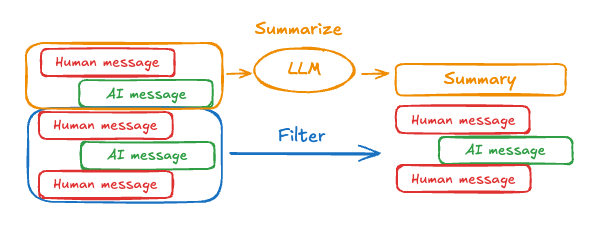 Prompting and orchestration logic can be used to summarize the message history. For example, in LangGraph you can extend the [`MessagesState`](/oss/python/langgraph/graph-api#working-with-messages-in-graph-state) to include a `summary` key:
```python theme={"theme":{"light":"catppuccin-latte","dark":"catppuccin-mocha"}}
from langgraph.graph import MessagesState
class State(MessagesState):
summary: str
```
Then, you can generate a summary of the chat history, using any existing summary as context for the next summary. This `summarize_conversation` node can be called after some number of messages have accumulated in the `messages` state key.
```python theme={"theme":{"light":"catppuccin-latte","dark":"catppuccin-mocha"}}
def summarize_conversation(state: State):
# First, we get any existing summary
summary = state.get("summary", "")
# Create our summarization prompt
if summary:
# A summary already exists
summary_message = (
f"This is a summary of the conversation to date: {summary}\n\n"
"Extend the summary by taking into account the new messages above:"
)
else:
summary_message = "Create a summary of the conversation above:"
# Add prompt to our history
messages = state["messages"] + [HumanMessage(content=summary_message)]
response = model.invoke(messages)
# Delete all but the 2 most recent messages
delete_messages = [RemoveMessage(id=m.id) for m in state["messages"][:-2]]
return {"summary": response.content, "messages": delete_messages}
```
```python theme={"theme":{"light":"catppuccin-latte","dark":"catppuccin-mocha"}}
from typing import Any, TypedDict
from langchain.chat_models import init_chat_model
from langchain.messages import AnyMessage
from langchain_core.messages.utils import count_tokens_approximately
from langgraph.graph import StateGraph, START, MessagesState
from langgraph.checkpoint.memory import InMemorySaver
from langmem.short_term import SummarizationNode, RunningSummary # [!code highlight]
model = init_chat_model("claude-sonnet-4-6")
summarization_model = model.bind(max_tokens=128)
class State(MessagesState):
context: dict[str, RunningSummary] # [!code highlight]
class LLMInputState(TypedDict): # [!code highlight]
summarized_messages: list[AnyMessage]
context: dict[str, RunningSummary]
summarization_node = SummarizationNode( # [!code highlight]
token_counter=count_tokens_approximately,
model=summarization_model,
max_tokens=256,
max_tokens_before_summary=256,
max_summary_tokens=128,
)
def call_model(state: LLMInputState): # [!code highlight]
response = model.invoke(state["summarized_messages"])
return {"messages": [response]}
checkpointer = InMemorySaver()
builder = StateGraph(State)
builder.add_node(call_model)
builder.add_node("summarize", summarization_node) # [!code highlight]
builder.add_edge(START, "summarize")
builder.add_edge("summarize", "call_model")
graph = builder.compile(checkpointer=checkpointer)
# Invoke the graph
config = {"configurable": {"thread_id": "1"}}
graph.invoke({"messages": "hi, my name is bob"}, config)
graph.invoke({"messages": "write a short poem about cats"}, config)
graph.invoke({"messages": "now do the same but for dogs"}, config)
final_response = graph.invoke({"messages": "what's my name?"}, config)
final_response["messages"][-1].pretty_print()
print("\nSummary:", final_response["context"]["running_summary"].summary)
```
1. We will keep track of our running summary in the `context` field
(expected by the `SummarizationNode`).
1. Define private state that will be used only for filtering
the inputs to `call_model` node.
1. We're passing a private input state here to isolate the messages returned by the summarization node
```
================================== Ai Message ==================================
From our conversation, I can see that you introduced yourself as Bob. That's the name you shared with me when we began talking.
Summary: In this conversation, I was introduced to Bob, who then asked me to write a poem about cats. I composed a poem titled "The Mystery of Cats" that captured cats' graceful movements, independent nature, and their special relationship with humans. Bob then requested a similar poem about dogs, so I wrote "The Joy of Dogs," which highlighted dogs' loyalty, enthusiasm, and loving companionship. Both poems were written in a similar style but emphasized the distinct characteristics that make each pet special.
```
### Manage checkpoints
You can view and delete the information stored by the checkpointer.
#### View thread state
```python theme={"theme":{"light":"catppuccin-latte","dark":"catppuccin-mocha"}}
config = {
"configurable": {
"thread_id": "1", # [!code highlight]
# optionally provide an ID for a specific checkpoint,
# otherwise the latest checkpoint is shown
# "checkpoint_id": "1f029ca3-1f5b-6704-8004-820c16b69a5a" # [!code highlight]
}
}
graph.get_state(config) # [!code highlight]
```
```
StateSnapshot(
values={'messages': [HumanMessage(content="hi! I'm bob"), AIMessage(content='Hi Bob! How are you doing today?), HumanMessage(content="what's my name?"), AIMessage(content='Your name is Bob.')]}, next=(),
config={'configurable': {'thread_id': '1', 'checkpoint_ns': '', 'checkpoint_id': '1f029ca3-1f5b-6704-8004-820c16b69a5a'}},
metadata={
'source': 'loop',
'writes': {'call_model': {'messages': AIMessage(content='Your name is Bob.')}},
'step': 4,
'parents': {},
'thread_id': '1'
},
created_at='2025-05-05T16:01:24.680462+00:00',
parent_config={'configurable': {'thread_id': '1', 'checkpoint_ns': '', 'checkpoint_id': '1f029ca3-1790-6b0a-8003-baf965b6a38f'}},
tasks=(),
interrupts=()
)
```
```python theme={"theme":{"light":"catppuccin-latte","dark":"catppuccin-mocha"}}
config = {
"configurable": {
"thread_id": "1", # [!code highlight]
# optionally provide an ID for a specific checkpoint,
# otherwise the latest checkpoint is shown
# "checkpoint_id": "1f029ca3-1f5b-6704-8004-820c16b69a5a" # [!code highlight]
}
}
checkpointer.get_tuple(config) # [!code highlight]
```
```
CheckpointTuple(
config={'configurable': {'thread_id': '1', 'checkpoint_ns': '', 'checkpoint_id': '1f029ca3-1f5b-6704-8004-820c16b69a5a'}},
checkpoint={
'v': 3,
'ts': '2025-05-05T16:01:24.680462+00:00',
'id': '1f029ca3-1f5b-6704-8004-820c16b69a5a',
'channel_versions': {'__start__': '00000000000000000000000000000005.0.5290678567601859', 'messages': '00000000000000000000000000000006.0.3205149138784782', 'branch:to:call_model': '00000000000000000000000000000006.0.14611156755133758'}, 'versions_seen': {'__input__': {}, '__start__': {'__start__': '00000000000000000000000000000004.0.5736472536395331'}, 'call_model': {'branch:to:call_model': '00000000000000000000000000000005.0.1410174088651449'}},
'channel_values': {'messages': [HumanMessage(content="hi! I'm bob"), AIMessage(content='Hi Bob! How are you doing today?), HumanMessage(content="what's my name?"), AIMessage(content='Your name is Bob.')]},
},
metadata={
'source': 'loop',
'writes': {'call_model': {'messages': AIMessage(content='Your name is Bob.')}},
'step': 4,
'parents': {},
'thread_id': '1'
},
parent_config={'configurable': {'thread_id': '1', 'checkpoint_ns': '', 'checkpoint_id': '1f029ca3-1790-6b0a-8003-baf965b6a38f'}},
pending_writes=[]
)
```
#### View the history of the thread
```python theme={"theme":{"light":"catppuccin-latte","dark":"catppuccin-mocha"}}
config = {
"configurable": {
"thread_id": "1" # [!code highlight]
}
}
list(graph.get_state_history(config)) # [!code highlight]
```
```
[
StateSnapshot(
values={'messages': [HumanMessage(content="hi! I'm bob"), AIMessage(content='Hi Bob! How are you doing today? Is there anything I can help you with?'), HumanMessage(content="what's my name?"), AIMessage(content='Your name is Bob.')]},
next=(),
config={'configurable': {'thread_id': '1', 'checkpoint_ns': '', 'checkpoint_id': '1f029ca3-1f5b-6704-8004-820c16b69a5a'}},
metadata={'source': 'loop', 'writes': {'call_model': {'messages': AIMessage(content='Your name is Bob.')}}, 'step': 4, 'parents': {}, 'thread_id': '1'},
created_at='2025-05-05T16:01:24.680462+00:00',
parent_config={'configurable': {'thread_id': '1', 'checkpoint_ns': '', 'checkpoint_id': '1f029ca3-1790-6b0a-8003-baf965b6a38f'}},
tasks=(),
interrupts=()
),
StateSnapshot(
values={'messages': [HumanMessage(content="hi! I'm bob"), AIMessage(content='Hi Bob! How are you doing today? Is there anything I can help you with?'), HumanMessage(content="what's my name?")]},
next=('call_model',),
config={'configurable': {'thread_id': '1', 'checkpoint_ns': '', 'checkpoint_id': '1f029ca3-1790-6b0a-8003-baf965b6a38f'}},
metadata={'source': 'loop', 'writes': None, 'step': 3, 'parents': {}, 'thread_id': '1'},
created_at='2025-05-05T16:01:23.863421+00:00',
parent_config={...}
tasks=(PregelTask(id='8ab4155e-6b15-b885-9ce5-bed69a2c305c', name='call_model', path=('__pregel_pull', 'call_model'), error=None, interrupts=(), state=None, result={'messages': AIMessage(content='Your name is Bob.')}),),
interrupts=()
),
StateSnapshot(
values={'messages': [HumanMessage(content="hi! I'm bob"), AIMessage(content='Hi Bob! How are you doing today? Is there anything I can help you with?')]},
next=('__start__',),
config={...},
metadata={'source': 'input', 'writes': {'__start__': {'messages': [{'role': 'user', 'content': "what's my name?"}]}}, 'step': 2, 'parents': {}, 'thread_id': '1'},
created_at='2025-05-05T16:01:23.863173+00:00',
parent_config={...}
tasks=(PregelTask(id='24ba39d6-6db1-4c9b-f4c5-682aeaf38dcd', name='__start__', path=('__pregel_pull', '__start__'), error=None, interrupts=(), state=None, result={'messages': [{'role': 'user', 'content': "what's my name?"}]}),),
interrupts=()
),
StateSnapshot(
values={'messages': [HumanMessage(content="hi! I'm bob"), AIMessage(content='Hi Bob! How are you doing today? Is there anything I can help you with?')]},
next=(),
config={...},
metadata={'source': 'loop', 'writes': {'call_model': {'messages': AIMessage(content='Hi Bob! How are you doing today? Is there anything I can help you with?')}}, 'step': 1, 'parents': {}, 'thread_id': '1'},
created_at='2025-05-05T16:01:23.862295+00:00',
parent_config={...}
tasks=(),
interrupts=()
),
StateSnapshot(
values={'messages': [HumanMessage(content="hi! I'm bob")]},
next=('call_model',),
config={...},
metadata={'source': 'loop', 'writes': None, 'step': 0, 'parents': {}, 'thread_id': '1'},
created_at='2025-05-05T16:01:22.278960+00:00',
parent_config={...}
tasks=(PregelTask(id='8cbd75e0-3720-b056-04f7-71ac805140a0', name='call_model', path=('__pregel_pull', 'call_model'), error=None, interrupts=(), state=None, result={'messages': AIMessage(content='Hi Bob! How are you doing today? Is there anything I can help you with?')}),),
interrupts=()
),
StateSnapshot(
values={'messages': []},
next=('__start__',),
config={'configurable': {'thread_id': '1', 'checkpoint_ns': '', 'checkpoint_id': '1f029ca3-0870-6ce2-bfff-1f3f14c3e565'}},
metadata={'source': 'input', 'writes': {'__start__': {'messages': [{'role': 'user', 'content': "hi! I'm bob"}]}}, 'step': -1, 'parents': {}, 'thread_id': '1'},
created_at='2025-05-05T16:01:22.277497+00:00',
parent_config=None,
tasks=(PregelTask(id='d458367b-8265-812c-18e2-33001d199ce6', name='__start__', path=('__pregel_pull', '__start__'), error=None, interrupts=(), state=None, result={'messages': [{'role': 'user', 'content': "hi! I'm bob"}]}),),
interrupts=()
)
]
```
```python theme={"theme":{"light":"catppuccin-latte","dark":"catppuccin-mocha"}}
config = {
"configurable": {
"thread_id": "1" # [!code highlight]
}
}
list(checkpointer.list(config)) # [!code highlight]
```
```
[
CheckpointTuple(
config={'configurable': {'thread_id': '1', 'checkpoint_ns': '', 'checkpoint_id': '1f029ca3-1f5b-6704-8004-820c16b69a5a'}},
checkpoint={
'v': 3,
'ts': '2025-05-05T16:01:24.680462+00:00',
'id': '1f029ca3-1f5b-6704-8004-820c16b69a5a',
'channel_versions': {'__start__': '00000000000000000000000000000005.0.5290678567601859', 'messages': '00000000000000000000000000000006.0.3205149138784782', 'branch:to:call_model': '00000000000000000000000000000006.0.14611156755133758'},
'versions_seen': {'__input__': {}, '__start__': {'__start__': '00000000000000000000000000000004.0.5736472536395331'}, 'call_model': {'branch:to:call_model': '00000000000000000000000000000005.0.1410174088651449'}},
'channel_values': {'messages': [HumanMessage(content="hi! I'm bob"), AIMessage(content='Hi Bob! How are you doing today? Is there anything I can help you with?'), HumanMessage(content="what's my name?"), AIMessage(content='Your name is Bob.')]},
},
metadata={'source': 'loop', 'writes': {'call_model': {'messages': AIMessage(content='Your name is Bob.')}}, 'step': 4, 'parents': {}, 'thread_id': '1'},
parent_config={'configurable': {'thread_id': '1', 'checkpoint_ns': '', 'checkpoint_id': '1f029ca3-1790-6b0a-8003-baf965b6a38f'}},
pending_writes=[]
),
CheckpointTuple(
config={'configurable': {'thread_id': '1', 'checkpoint_ns': '', 'checkpoint_id': '1f029ca3-1790-6b0a-8003-baf965b6a38f'}},
checkpoint={
'v': 3,
'ts': '2025-05-05T16:01:23.863421+00:00',
'id': '1f029ca3-1790-6b0a-8003-baf965b6a38f',
'channel_versions': {'__start__': '00000000000000000000000000000005.0.5290678567601859', 'messages': '00000000000000000000000000000006.0.3205149138784782', 'branch:to:call_model': '00000000000000000000000000000006.0.14611156755133758'},
'versions_seen': {'__input__': {}, '__start__': {'__start__': '00000000000000000000000000000004.0.5736472536395331'}, 'call_model': {'branch:to:call_model': '00000000000000000000000000000005.0.1410174088651449'}},
'channel_values': {'messages': [HumanMessage(content="hi! I'm bob"), AIMessage(content='Hi Bob! How are you doing today? Is there anything I can help you with?'), HumanMessage(content="what's my name?")], 'branch:to:call_model': None}
},
metadata={'source': 'loop', 'writes': None, 'step': 3, 'parents': {}, 'thread_id': '1'},
parent_config={...},
pending_writes=[('8ab4155e-6b15-b885-9ce5-bed69a2c305c', 'messages', AIMessage(content='Your name is Bob.'))]
),
CheckpointTuple(
config={...},
checkpoint={
'v': 3,
'ts': '2025-05-05T16:01:23.863173+00:00',
'id': '1f029ca3-1790-616e-8002-9e021694a0cd',
'channel_versions': {'__start__': '00000000000000000000000000000004.0.5736472536395331', 'messages': '00000000000000000000000000000003.0.7056767754077798', 'branch:to:call_model': '00000000000000000000000000000003.0.22059023329132854'},
'versions_seen': {'__input__': {}, '__start__': {'__start__': '00000000000000000000000000000001.0.7040775356287469'}, 'call_model': {'branch:to:call_model': '00000000000000000000000000000002.0.9300422176788571'}},
'channel_values': {'__start__': {'messages': [{'role': 'user', 'content': "what's my name?"}]}, 'messages': [HumanMessage(content="hi! I'm bob"), AIMessage(content='Hi Bob! How are you doing today? Is there anything I can help you with?')]}
},
metadata={'source': 'input', 'writes': {'__start__': {'messages': [{'role': 'user', 'content': "what's my name?"}]}}, 'step': 2, 'parents': {}, 'thread_id': '1'},
parent_config={...},
pending_writes=[('24ba39d6-6db1-4c9b-f4c5-682aeaf38dcd', 'messages', [{'role': 'user', 'content': "what's my name?"}]), ('24ba39d6-6db1-4c9b-f4c5-682aeaf38dcd', 'branch:to:call_model', None)]
),
CheckpointTuple(
config={...},
checkpoint={
'v': 3,
'ts': '2025-05-05T16:01:23.862295+00:00',
'id': '1f029ca3-178d-6f54-8001-d7b180db0c89',
'channel_versions': {'__start__': '00000000000000000000000000000002.0.18673090920108737', 'messages': '00000000000000000000000000000003.0.7056767754077798', 'branch:to:call_model': '00000000000000000000000000000003.0.22059023329132854'},
'versions_seen': {'__input__': {}, '__start__': {'__start__': '00000000000000000000000000000001.0.7040775356287469'}, 'call_model': {'branch:to:call_model': '00000000000000000000000000000002.0.9300422176788571'}},
'channel_values': {'messages': [HumanMessage(content="hi! I'm bob"), AIMessage(content='Hi Bob! How are you doing today? Is there anything I can help you with?')]}
},
metadata={'source': 'loop', 'writes': {'call_model': {'messages': AIMessage(content='Hi Bob! How are you doing today? Is there anything I can help you with?')}}, 'step': 1, 'parents': {}, 'thread_id': '1'},
parent_config={...},
pending_writes=[]
),
CheckpointTuple(
config={...},
checkpoint={
'v': 3,
'ts': '2025-05-05T16:01:22.278960+00:00',
'id': '1f029ca3-0874-6612-8000-339f2abc83b1',
'channel_versions': {'__start__': '00000000000000000000000000000002.0.18673090920108737', 'messages': '00000000000000000000000000000002.0.30296526818059655', 'branch:to:call_model': '00000000000000000000000000000002.0.9300422176788571'},
'versions_seen': {'__input__': {}, '__start__': {'__start__': '00000000000000000000000000000001.0.7040775356287469'}},
'channel_values': {'messages': [HumanMessage(content="hi! I'm bob")], 'branch:to:call_model': None}
},
metadata={'source': 'loop', 'writes': None, 'step': 0, 'parents': {}, 'thread_id': '1'},
parent_config={...},
pending_writes=[('8cbd75e0-3720-b056-04f7-71ac805140a0', 'messages', AIMessage(content='Hi Bob! How are you doing today? Is there anything I can help you with?'))]
),
CheckpointTuple(
config={'configurable': {'thread_id': '1', 'checkpoint_ns': '', 'checkpoint_id': '1f029ca3-0870-6ce2-bfff-1f3f14c3e565'}},
checkpoint={
'v': 3,
'ts': '2025-05-05T16:01:22.277497+00:00',
'id': '1f029ca3-0870-6ce2-bfff-1f3f14c3e565',
'channel_versions': {'__start__': '00000000000000000000000000000001.0.7040775356287469'},
'versions_seen': {'__input__': {}},
'channel_values': {'__start__': {'messages': [{'role': 'user', 'content': "hi! I'm bob"}]}}
},
metadata={'source': 'input', 'writes': {'__start__': {'messages': [{'role': 'user', 'content': "hi! I'm bob"}]}}, 'step': -1, 'parents': {}, 'thread_id': '1'},
parent_config=None,
pending_writes=[('d458367b-8265-812c-18e2-33001d199ce6', 'messages', [{'role': 'user', 'content': "hi! I'm bob"}]), ('d458367b-8265-812c-18e2-33001d199ce6', 'branch:to:call_model', None)]
)
]
```
#### Delete all checkpoints for a thread
```python theme={"theme":{"light":"catppuccin-latte","dark":"catppuccin-mocha"}}
thread_id = "1"
checkpointer.delete_thread(thread_id)
```
## Database management
If you are using any database-backed persistence implementation (such as Postgres or Redis) to store short and/or long-term memory, you will need to run migrations to set up the required schema before you can use it with your database.
By convention, most database-specific libraries define a `setup()` method on the checkpointer or store instance that runs the required migrations. However, you should check with your specific implementation of [`BaseCheckpointSaver`](https://reference.langchain.com/python/langgraph/checkpoints/#langgraph.checkpoint.base.BaseCheckpointSaver) or [`BaseStore`](https://reference.langchain.com/python/langchain-core/stores/BaseStore) to confirm the exact method name and usage.
We recommend running migrations as a dedicated deployment step, or you can ensure they're run as part of server startup.
***
Prompting and orchestration logic can be used to summarize the message history. For example, in LangGraph you can extend the [`MessagesState`](/oss/python/langgraph/graph-api#working-with-messages-in-graph-state) to include a `summary` key:
```python theme={"theme":{"light":"catppuccin-latte","dark":"catppuccin-mocha"}}
from langgraph.graph import MessagesState
class State(MessagesState):
summary: str
```
Then, you can generate a summary of the chat history, using any existing summary as context for the next summary. This `summarize_conversation` node can be called after some number of messages have accumulated in the `messages` state key.
```python theme={"theme":{"light":"catppuccin-latte","dark":"catppuccin-mocha"}}
def summarize_conversation(state: State):
# First, we get any existing summary
summary = state.get("summary", "")
# Create our summarization prompt
if summary:
# A summary already exists
summary_message = (
f"This is a summary of the conversation to date: {summary}\n\n"
"Extend the summary by taking into account the new messages above:"
)
else:
summary_message = "Create a summary of the conversation above:"
# Add prompt to our history
messages = state["messages"] + [HumanMessage(content=summary_message)]
response = model.invoke(messages)
# Delete all but the 2 most recent messages
delete_messages = [RemoveMessage(id=m.id) for m in state["messages"][:-2]]
return {"summary": response.content, "messages": delete_messages}
```
```python theme={"theme":{"light":"catppuccin-latte","dark":"catppuccin-mocha"}}
from typing import Any, TypedDict
from langchain.chat_models import init_chat_model
from langchain.messages import AnyMessage
from langchain_core.messages.utils import count_tokens_approximately
from langgraph.graph import StateGraph, START, MessagesState
from langgraph.checkpoint.memory import InMemorySaver
from langmem.short_term import SummarizationNode, RunningSummary # [!code highlight]
model = init_chat_model("claude-sonnet-4-6")
summarization_model = model.bind(max_tokens=128)
class State(MessagesState):
context: dict[str, RunningSummary] # [!code highlight]
class LLMInputState(TypedDict): # [!code highlight]
summarized_messages: list[AnyMessage]
context: dict[str, RunningSummary]
summarization_node = SummarizationNode( # [!code highlight]
token_counter=count_tokens_approximately,
model=summarization_model,
max_tokens=256,
max_tokens_before_summary=256,
max_summary_tokens=128,
)
def call_model(state: LLMInputState): # [!code highlight]
response = model.invoke(state["summarized_messages"])
return {"messages": [response]}
checkpointer = InMemorySaver()
builder = StateGraph(State)
builder.add_node(call_model)
builder.add_node("summarize", summarization_node) # [!code highlight]
builder.add_edge(START, "summarize")
builder.add_edge("summarize", "call_model")
graph = builder.compile(checkpointer=checkpointer)
# Invoke the graph
config = {"configurable": {"thread_id": "1"}}
graph.invoke({"messages": "hi, my name is bob"}, config)
graph.invoke({"messages": "write a short poem about cats"}, config)
graph.invoke({"messages": "now do the same but for dogs"}, config)
final_response = graph.invoke({"messages": "what's my name?"}, config)
final_response["messages"][-1].pretty_print()
print("\nSummary:", final_response["context"]["running_summary"].summary)
```
1. We will keep track of our running summary in the `context` field
(expected by the `SummarizationNode`).
1. Define private state that will be used only for filtering
the inputs to `call_model` node.
1. We're passing a private input state here to isolate the messages returned by the summarization node
```
================================== Ai Message ==================================
From our conversation, I can see that you introduced yourself as Bob. That's the name you shared with me when we began talking.
Summary: In this conversation, I was introduced to Bob, who then asked me to write a poem about cats. I composed a poem titled "The Mystery of Cats" that captured cats' graceful movements, independent nature, and their special relationship with humans. Bob then requested a similar poem about dogs, so I wrote "The Joy of Dogs," which highlighted dogs' loyalty, enthusiasm, and loving companionship. Both poems were written in a similar style but emphasized the distinct characteristics that make each pet special.
```
### Manage checkpoints
You can view and delete the information stored by the checkpointer.
#### View thread state
```python theme={"theme":{"light":"catppuccin-latte","dark":"catppuccin-mocha"}}
config = {
"configurable": {
"thread_id": "1", # [!code highlight]
# optionally provide an ID for a specific checkpoint,
# otherwise the latest checkpoint is shown
# "checkpoint_id": "1f029ca3-1f5b-6704-8004-820c16b69a5a" # [!code highlight]
}
}
graph.get_state(config) # [!code highlight]
```
```
StateSnapshot(
values={'messages': [HumanMessage(content="hi! I'm bob"), AIMessage(content='Hi Bob! How are you doing today?), HumanMessage(content="what's my name?"), AIMessage(content='Your name is Bob.')]}, next=(),
config={'configurable': {'thread_id': '1', 'checkpoint_ns': '', 'checkpoint_id': '1f029ca3-1f5b-6704-8004-820c16b69a5a'}},
metadata={
'source': 'loop',
'writes': {'call_model': {'messages': AIMessage(content='Your name is Bob.')}},
'step': 4,
'parents': {},
'thread_id': '1'
},
created_at='2025-05-05T16:01:24.680462+00:00',
parent_config={'configurable': {'thread_id': '1', 'checkpoint_ns': '', 'checkpoint_id': '1f029ca3-1790-6b0a-8003-baf965b6a38f'}},
tasks=(),
interrupts=()
)
```
```python theme={"theme":{"light":"catppuccin-latte","dark":"catppuccin-mocha"}}
config = {
"configurable": {
"thread_id": "1", # [!code highlight]
# optionally provide an ID for a specific checkpoint,
# otherwise the latest checkpoint is shown
# "checkpoint_id": "1f029ca3-1f5b-6704-8004-820c16b69a5a" # [!code highlight]
}
}
checkpointer.get_tuple(config) # [!code highlight]
```
```
CheckpointTuple(
config={'configurable': {'thread_id': '1', 'checkpoint_ns': '', 'checkpoint_id': '1f029ca3-1f5b-6704-8004-820c16b69a5a'}},
checkpoint={
'v': 3,
'ts': '2025-05-05T16:01:24.680462+00:00',
'id': '1f029ca3-1f5b-6704-8004-820c16b69a5a',
'channel_versions': {'__start__': '00000000000000000000000000000005.0.5290678567601859', 'messages': '00000000000000000000000000000006.0.3205149138784782', 'branch:to:call_model': '00000000000000000000000000000006.0.14611156755133758'}, 'versions_seen': {'__input__': {}, '__start__': {'__start__': '00000000000000000000000000000004.0.5736472536395331'}, 'call_model': {'branch:to:call_model': '00000000000000000000000000000005.0.1410174088651449'}},
'channel_values': {'messages': [HumanMessage(content="hi! I'm bob"), AIMessage(content='Hi Bob! How are you doing today?), HumanMessage(content="what's my name?"), AIMessage(content='Your name is Bob.')]},
},
metadata={
'source': 'loop',
'writes': {'call_model': {'messages': AIMessage(content='Your name is Bob.')}},
'step': 4,
'parents': {},
'thread_id': '1'
},
parent_config={'configurable': {'thread_id': '1', 'checkpoint_ns': '', 'checkpoint_id': '1f029ca3-1790-6b0a-8003-baf965b6a38f'}},
pending_writes=[]
)
```
#### View the history of the thread
```python theme={"theme":{"light":"catppuccin-latte","dark":"catppuccin-mocha"}}
config = {
"configurable": {
"thread_id": "1" # [!code highlight]
}
}
list(graph.get_state_history(config)) # [!code highlight]
```
```
[
StateSnapshot(
values={'messages': [HumanMessage(content="hi! I'm bob"), AIMessage(content='Hi Bob! How are you doing today? Is there anything I can help you with?'), HumanMessage(content="what's my name?"), AIMessage(content='Your name is Bob.')]},
next=(),
config={'configurable': {'thread_id': '1', 'checkpoint_ns': '', 'checkpoint_id': '1f029ca3-1f5b-6704-8004-820c16b69a5a'}},
metadata={'source': 'loop', 'writes': {'call_model': {'messages': AIMessage(content='Your name is Bob.')}}, 'step': 4, 'parents': {}, 'thread_id': '1'},
created_at='2025-05-05T16:01:24.680462+00:00',
parent_config={'configurable': {'thread_id': '1', 'checkpoint_ns': '', 'checkpoint_id': '1f029ca3-1790-6b0a-8003-baf965b6a38f'}},
tasks=(),
interrupts=()
),
StateSnapshot(
values={'messages': [HumanMessage(content="hi! I'm bob"), AIMessage(content='Hi Bob! How are you doing today? Is there anything I can help you with?'), HumanMessage(content="what's my name?")]},
next=('call_model',),
config={'configurable': {'thread_id': '1', 'checkpoint_ns': '', 'checkpoint_id': '1f029ca3-1790-6b0a-8003-baf965b6a38f'}},
metadata={'source': 'loop', 'writes': None, 'step': 3, 'parents': {}, 'thread_id': '1'},
created_at='2025-05-05T16:01:23.863421+00:00',
parent_config={...}
tasks=(PregelTask(id='8ab4155e-6b15-b885-9ce5-bed69a2c305c', name='call_model', path=('__pregel_pull', 'call_model'), error=None, interrupts=(), state=None, result={'messages': AIMessage(content='Your name is Bob.')}),),
interrupts=()
),
StateSnapshot(
values={'messages': [HumanMessage(content="hi! I'm bob"), AIMessage(content='Hi Bob! How are you doing today? Is there anything I can help you with?')]},
next=('__start__',),
config={...},
metadata={'source': 'input', 'writes': {'__start__': {'messages': [{'role': 'user', 'content': "what's my name?"}]}}, 'step': 2, 'parents': {}, 'thread_id': '1'},
created_at='2025-05-05T16:01:23.863173+00:00',
parent_config={...}
tasks=(PregelTask(id='24ba39d6-6db1-4c9b-f4c5-682aeaf38dcd', name='__start__', path=('__pregel_pull', '__start__'), error=None, interrupts=(), state=None, result={'messages': [{'role': 'user', 'content': "what's my name?"}]}),),
interrupts=()
),
StateSnapshot(
values={'messages': [HumanMessage(content="hi! I'm bob"), AIMessage(content='Hi Bob! How are you doing today? Is there anything I can help you with?')]},
next=(),
config={...},
metadata={'source': 'loop', 'writes': {'call_model': {'messages': AIMessage(content='Hi Bob! How are you doing today? Is there anything I can help you with?')}}, 'step': 1, 'parents': {}, 'thread_id': '1'},
created_at='2025-05-05T16:01:23.862295+00:00',
parent_config={...}
tasks=(),
interrupts=()
),
StateSnapshot(
values={'messages': [HumanMessage(content="hi! I'm bob")]},
next=('call_model',),
config={...},
metadata={'source': 'loop', 'writes': None, 'step': 0, 'parents': {}, 'thread_id': '1'},
created_at='2025-05-05T16:01:22.278960+00:00',
parent_config={...}
tasks=(PregelTask(id='8cbd75e0-3720-b056-04f7-71ac805140a0', name='call_model', path=('__pregel_pull', 'call_model'), error=None, interrupts=(), state=None, result={'messages': AIMessage(content='Hi Bob! How are you doing today? Is there anything I can help you with?')}),),
interrupts=()
),
StateSnapshot(
values={'messages': []},
next=('__start__',),
config={'configurable': {'thread_id': '1', 'checkpoint_ns': '', 'checkpoint_id': '1f029ca3-0870-6ce2-bfff-1f3f14c3e565'}},
metadata={'source': 'input', 'writes': {'__start__': {'messages': [{'role': 'user', 'content': "hi! I'm bob"}]}}, 'step': -1, 'parents': {}, 'thread_id': '1'},
created_at='2025-05-05T16:01:22.277497+00:00',
parent_config=None,
tasks=(PregelTask(id='d458367b-8265-812c-18e2-33001d199ce6', name='__start__', path=('__pregel_pull', '__start__'), error=None, interrupts=(), state=None, result={'messages': [{'role': 'user', 'content': "hi! I'm bob"}]}),),
interrupts=()
)
]
```
```python theme={"theme":{"light":"catppuccin-latte","dark":"catppuccin-mocha"}}
config = {
"configurable": {
"thread_id": "1" # [!code highlight]
}
}
list(checkpointer.list(config)) # [!code highlight]
```
```
[
CheckpointTuple(
config={'configurable': {'thread_id': '1', 'checkpoint_ns': '', 'checkpoint_id': '1f029ca3-1f5b-6704-8004-820c16b69a5a'}},
checkpoint={
'v': 3,
'ts': '2025-05-05T16:01:24.680462+00:00',
'id': '1f029ca3-1f5b-6704-8004-820c16b69a5a',
'channel_versions': {'__start__': '00000000000000000000000000000005.0.5290678567601859', 'messages': '00000000000000000000000000000006.0.3205149138784782', 'branch:to:call_model': '00000000000000000000000000000006.0.14611156755133758'},
'versions_seen': {'__input__': {}, '__start__': {'__start__': '00000000000000000000000000000004.0.5736472536395331'}, 'call_model': {'branch:to:call_model': '00000000000000000000000000000005.0.1410174088651449'}},
'channel_values': {'messages': [HumanMessage(content="hi! I'm bob"), AIMessage(content='Hi Bob! How are you doing today? Is there anything I can help you with?'), HumanMessage(content="what's my name?"), AIMessage(content='Your name is Bob.')]},
},
metadata={'source': 'loop', 'writes': {'call_model': {'messages': AIMessage(content='Your name is Bob.')}}, 'step': 4, 'parents': {}, 'thread_id': '1'},
parent_config={'configurable': {'thread_id': '1', 'checkpoint_ns': '', 'checkpoint_id': '1f029ca3-1790-6b0a-8003-baf965b6a38f'}},
pending_writes=[]
),
CheckpointTuple(
config={'configurable': {'thread_id': '1', 'checkpoint_ns': '', 'checkpoint_id': '1f029ca3-1790-6b0a-8003-baf965b6a38f'}},
checkpoint={
'v': 3,
'ts': '2025-05-05T16:01:23.863421+00:00',
'id': '1f029ca3-1790-6b0a-8003-baf965b6a38f',
'channel_versions': {'__start__': '00000000000000000000000000000005.0.5290678567601859', 'messages': '00000000000000000000000000000006.0.3205149138784782', 'branch:to:call_model': '00000000000000000000000000000006.0.14611156755133758'},
'versions_seen': {'__input__': {}, '__start__': {'__start__': '00000000000000000000000000000004.0.5736472536395331'}, 'call_model': {'branch:to:call_model': '00000000000000000000000000000005.0.1410174088651449'}},
'channel_values': {'messages': [HumanMessage(content="hi! I'm bob"), AIMessage(content='Hi Bob! How are you doing today? Is there anything I can help you with?'), HumanMessage(content="what's my name?")], 'branch:to:call_model': None}
},
metadata={'source': 'loop', 'writes': None, 'step': 3, 'parents': {}, 'thread_id': '1'},
parent_config={...},
pending_writes=[('8ab4155e-6b15-b885-9ce5-bed69a2c305c', 'messages', AIMessage(content='Your name is Bob.'))]
),
CheckpointTuple(
config={...},
checkpoint={
'v': 3,
'ts': '2025-05-05T16:01:23.863173+00:00',
'id': '1f029ca3-1790-616e-8002-9e021694a0cd',
'channel_versions': {'__start__': '00000000000000000000000000000004.0.5736472536395331', 'messages': '00000000000000000000000000000003.0.7056767754077798', 'branch:to:call_model': '00000000000000000000000000000003.0.22059023329132854'},
'versions_seen': {'__input__': {}, '__start__': {'__start__': '00000000000000000000000000000001.0.7040775356287469'}, 'call_model': {'branch:to:call_model': '00000000000000000000000000000002.0.9300422176788571'}},
'channel_values': {'__start__': {'messages': [{'role': 'user', 'content': "what's my name?"}]}, 'messages': [HumanMessage(content="hi! I'm bob"), AIMessage(content='Hi Bob! How are you doing today? Is there anything I can help you with?')]}
},
metadata={'source': 'input', 'writes': {'__start__': {'messages': [{'role': 'user', 'content': "what's my name?"}]}}, 'step': 2, 'parents': {}, 'thread_id': '1'},
parent_config={...},
pending_writes=[('24ba39d6-6db1-4c9b-f4c5-682aeaf38dcd', 'messages', [{'role': 'user', 'content': "what's my name?"}]), ('24ba39d6-6db1-4c9b-f4c5-682aeaf38dcd', 'branch:to:call_model', None)]
),
CheckpointTuple(
config={...},
checkpoint={
'v': 3,
'ts': '2025-05-05T16:01:23.862295+00:00',
'id': '1f029ca3-178d-6f54-8001-d7b180db0c89',
'channel_versions': {'__start__': '00000000000000000000000000000002.0.18673090920108737', 'messages': '00000000000000000000000000000003.0.7056767754077798', 'branch:to:call_model': '00000000000000000000000000000003.0.22059023329132854'},
'versions_seen': {'__input__': {}, '__start__': {'__start__': '00000000000000000000000000000001.0.7040775356287469'}, 'call_model': {'branch:to:call_model': '00000000000000000000000000000002.0.9300422176788571'}},
'channel_values': {'messages': [HumanMessage(content="hi! I'm bob"), AIMessage(content='Hi Bob! How are you doing today? Is there anything I can help you with?')]}
},
metadata={'source': 'loop', 'writes': {'call_model': {'messages': AIMessage(content='Hi Bob! How are you doing today? Is there anything I can help you with?')}}, 'step': 1, 'parents': {}, 'thread_id': '1'},
parent_config={...},
pending_writes=[]
),
CheckpointTuple(
config={...},
checkpoint={
'v': 3,
'ts': '2025-05-05T16:01:22.278960+00:00',
'id': '1f029ca3-0874-6612-8000-339f2abc83b1',
'channel_versions': {'__start__': '00000000000000000000000000000002.0.18673090920108737', 'messages': '00000000000000000000000000000002.0.30296526818059655', 'branch:to:call_model': '00000000000000000000000000000002.0.9300422176788571'},
'versions_seen': {'__input__': {}, '__start__': {'__start__': '00000000000000000000000000000001.0.7040775356287469'}},
'channel_values': {'messages': [HumanMessage(content="hi! I'm bob")], 'branch:to:call_model': None}
},
metadata={'source': 'loop', 'writes': None, 'step': 0, 'parents': {}, 'thread_id': '1'},
parent_config={...},
pending_writes=[('8cbd75e0-3720-b056-04f7-71ac805140a0', 'messages', AIMessage(content='Hi Bob! How are you doing today? Is there anything I can help you with?'))]
),
CheckpointTuple(
config={'configurable': {'thread_id': '1', 'checkpoint_ns': '', 'checkpoint_id': '1f029ca3-0870-6ce2-bfff-1f3f14c3e565'}},
checkpoint={
'v': 3,
'ts': '2025-05-05T16:01:22.277497+00:00',
'id': '1f029ca3-0870-6ce2-bfff-1f3f14c3e565',
'channel_versions': {'__start__': '00000000000000000000000000000001.0.7040775356287469'},
'versions_seen': {'__input__': {}},
'channel_values': {'__start__': {'messages': [{'role': 'user', 'content': "hi! I'm bob"}]}}
},
metadata={'source': 'input', 'writes': {'__start__': {'messages': [{'role': 'user', 'content': "hi! I'm bob"}]}}, 'step': -1, 'parents': {}, 'thread_id': '1'},
parent_config=None,
pending_writes=[('d458367b-8265-812c-18e2-33001d199ce6', 'messages', [{'role': 'user', 'content': "hi! I'm bob"}]), ('d458367b-8265-812c-18e2-33001d199ce6', 'branch:to:call_model', None)]
)
]
```
#### Delete all checkpoints for a thread
```python theme={"theme":{"light":"catppuccin-latte","dark":"catppuccin-mocha"}}
thread_id = "1"
checkpointer.delete_thread(thread_id)
```
## Database management
If you are using any database-backed persistence implementation (such as Postgres or Redis) to store short and/or long-term memory, you will need to run migrations to set up the required schema before you can use it with your database.
By convention, most database-specific libraries define a `setup()` method on the checkpointer or store instance that runs the required migrations. However, you should check with your specific implementation of [`BaseCheckpointSaver`](https://reference.langchain.com/python/langgraph/checkpoints/#langgraph.checkpoint.base.BaseCheckpointSaver) or [`BaseStore`](https://reference.langchain.com/python/langchain-core/stores/BaseStore) to confirm the exact method name and usage.
We recommend running migrations as a dedicated deployment step, or you can ensure they're run as part of server startup.
***
[Connect these docs](/use-these-docs) to Claude, VSCode, and more via MCP for real-time answers.
[Edit this page on GitHub](https://github.com/langchain-ai/docs/edit/main/src/oss/langgraph/add-memory.mdx) or [file an issue](https://github.com/langchain-ai/docs/issues/new/choose).