> ## Documentation Index
> Fetch the complete documentation index at: https://docs.langchain.com/llms.txt
> Use this file to discover all available pages before exploring further.
# Use the graph API
This guide demonstrates the basics of LangGraph's Graph API. It walks through [state](#define-and-update-state), as well as composing common graph structures such as [sequences](#create-a-sequence-of-steps), [branches](#create-branches), and [loops](#create-and-control-loops). It also covers LangGraph's control features, including the [Send API](#map-reduce-and-the-send-api) for map-reduce workflows and the [Command API](#combine-control-flow-and-state-updates-with-command) for combining state updates with "hops" across nodes.
## Setup
Install `langgraph`:
```bash pip theme={"theme":{"light":"catppuccin-latte","dark":"catppuccin-mocha"}}
pip install -U langgraph
```
```bash uv theme={"theme":{"light":"catppuccin-latte","dark":"catppuccin-mocha"}}
uv add langgraph
```
**Set up LangSmith for better debugging**
Sign up for [LangSmith](https://smith.langchain.com?utm_source=docs\&utm_medium=cta\&utm_campaign=langsmith-signup\&utm_content=oss-langgraph-use-graph-api) to quickly spot issues and improve the performance of your LangGraph projects. LangSmith lets you use trace data to debug, test, and monitor your LLM apps built with LangGraph—read more about how to get started in the [docs](/langsmith/observability).
## Define and update state
Here we show how to define and update [state](/oss/python/langgraph/graph-api#state) in LangGraph. We will demonstrate:
1. How to use state to define a graph's [schema](/oss/python/langgraph/graph-api#schema)
2. How to use [reducers](/oss/python/langgraph/graph-api#reducers) to control how state updates are processed.
### Define state
[State](/oss/python/langgraph/graph-api#state) in LangGraph can be a `TypedDict`, `Pydantic` model, or dataclass. Below we will use `TypedDict`. See [Use Pydantic models for graph state](#use-pydantic-models-for-graph-state) for detail on using Pydantic.
By default, graphs will have the same input and output schema, and the state determines that schema. See [Define input and output schemas](#define-input-and-output-schemas) for how to define distinct input and output schemas.
Let's consider a simple example using [messages](/oss/python/langgraph/graph-api#messagesstate). This represents a versatile formulation of state for many LLM applications. See our [concepts page](/oss/python/langgraph/graph-api#working-with-messages-in-graph-state) for more detail.
```python theme={"theme":{"light":"catppuccin-latte","dark":"catppuccin-mocha"}}
from langchain.messages import AnyMessage
from typing_extensions import TypedDict
class State(TypedDict):
messages: list[AnyMessage]
extra_field: int
```
This state tracks a list of [message](https://python.langchain.com/docs/concepts/messages/) objects, as well as an extra integer field.
### Update state
Let's build an example graph with a single node. Our [node](/oss/python/langgraph/graph-api#nodes) is just a Python function that reads our graph's state and makes updates to it. The first argument to this function will always be the state:
```python theme={"theme":{"light":"catppuccin-latte","dark":"catppuccin-mocha"}}
from langchain.messages import AIMessage
def node(state: State):
messages = state["messages"]
new_message = AIMessage("Hello!")
return {"messages": messages + [new_message], "extra_field": 10}
```
This node simply appends a message to our message list, and populates an extra field.
Nodes should return updates to the state directly, instead of mutating the state.
Let's next define a simple graph containing this node. We use [`StateGraph`](/oss/python/langgraph/graph-api#stategraph) to define a graph that operates on this state. We then use [`add_node`](/oss/python/langgraph/graph-api#nodes) populate our graph.
```python theme={"theme":{"light":"catppuccin-latte","dark":"catppuccin-mocha"}}
from langgraph.graph import StateGraph
builder = StateGraph(State)
builder.add_node(node)
builder.set_entry_point("node")
graph = builder.compile()
```
LangGraph provides built-in utilities for visualizing your graph. Let's inspect our graph. See [Visualize your graph](#visualize-your-graph) for detail on visualization.
```python theme={"theme":{"light":"catppuccin-latte","dark":"catppuccin-mocha"}}
from IPython.display import Image, display
display(Image(graph.get_graph().draw_mermaid_png()))
```
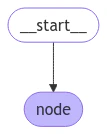 In this case, our graph just executes a single node. Let's proceed with a simple invocation:
```python theme={"theme":{"light":"catppuccin-latte","dark":"catppuccin-mocha"}}
from langchain.messages import HumanMessage
result = graph.invoke({"messages": [HumanMessage("Hi")]})
result
```
```
{'messages': [HumanMessage(content='Hi'), AIMessage(content='Hello!')], 'extra_field': 10}
```
Note that:
* We kicked off invocation by updating a single key of the state.
* We receive the entire state in the invocation result.
For convenience, we frequently inspect the content of [message objects](https://python.langchain.com/docs/concepts/messages/) via pretty-print:
```python theme={"theme":{"light":"catppuccin-latte","dark":"catppuccin-mocha"}}
for message in result["messages"]:
message.pretty_print()
```
```
================================ Human Message ================================
Hi
================================== Ai Message ==================================
Hello!
```
### Process state updates with reducers
Each key in the state can have its own independent [reducer](/oss/python/langgraph/graph-api#reducers) function, which controls how updates from nodes are applied. If no reducer function is explicitly specified then it is assumed that all updates to the key should override it.
For `TypedDict` state schemas, we can define reducers by annotating the corresponding field of the state with a reducer function.
In the earlier example, our node updated the `"messages"` key in the state by appending a message to it. Below, we add a reducer to this key, such that updates are automatically appended:
```python theme={"theme":{"light":"catppuccin-latte","dark":"catppuccin-mocha"}}
from typing_extensions import Annotated
def add(left, right):
"""Can also import `add` from the `operator` built-in."""
return left + right
class State(TypedDict):
messages: Annotated[list[AnyMessage], add] # [!code highlight]
extra_field: int
```
Now our node can be simplified:
```python theme={"theme":{"light":"catppuccin-latte","dark":"catppuccin-mocha"}}
def node(state: State):
new_message = AIMessage("Hello!")
return {"messages": [new_message], "extra_field": 10} # [!code highlight]
```
```python theme={"theme":{"light":"catppuccin-latte","dark":"catppuccin-mocha"}}
from langgraph.graph import START
graph = StateGraph(State).add_node(node).add_edge(START, "node").compile()
result = graph.invoke({"messages": [HumanMessage("Hi")]})
for message in result["messages"]:
message.pretty_print()
```
```
================================ Human Message ================================
Hi
================================== Ai Message ==================================
Hello!
```
#### MessagesState
In practice, there are additional considerations for updating lists of messages:
* We may wish to update an existing message in the state.
* We may want to accept short-hands for [message formats](/oss/python/langgraph/graph-api#using-messages-in-your-graph), such as [OpenAI format](https://python.langchain.com/docs/concepts/messages/#openai-format).
LangGraph includes a built-in reducer [`add_messages`](https://reference.langchain.com/python/langgraph/graph/message/add_messages) that handles these considerations:
```python theme={"theme":{"light":"catppuccin-latte","dark":"catppuccin-mocha"}}
from langgraph.graph.message import add_messages
class State(TypedDict):
messages: Annotated[list[AnyMessage], add_messages] # [!code highlight]
extra_field: int
def node(state: State):
new_message = AIMessage("Hello!")
return {"messages": [new_message], "extra_field": 10}
graph = StateGraph(State).add_node(node).set_entry_point("node").compile()
```
```python theme={"theme":{"light":"catppuccin-latte","dark":"catppuccin-mocha"}}
input_message = {"role": "user", "content": "Hi"} # [!code highlight]
result = graph.invoke({"messages": [input_message]})
for message in result["messages"]:
message.pretty_print()
```
```
================================ Human Message ================================
Hi
================================== Ai Message ==================================
Hello!
```
This is a versatile representation of state for applications involving [chat models](https://python.langchain.com/docs/concepts/chat_models/). LangGraph includes a prebuilt `MessagesState` for convenience, so that we can have:
```python theme={"theme":{"light":"catppuccin-latte","dark":"catppuccin-mocha"}}
from langgraph.graph import MessagesState
class State(MessagesState):
extra_field: int
```
### Bypass reducers with `Overwrite`
In some cases, you may want to bypass a reducer and directly overwrite a state value. LangGraph provides the [`Overwrite`](https://reference.langchain.com/python/langgraph/types/) type for this purpose. When a node returns a value wrapped with `Overwrite`, the reducer is bypassed and the channel is set directly to that value.
This is useful when you want to reset or replace accumulated state rather than merge it with existing values.
```python theme={"theme":{"light":"catppuccin-latte","dark":"catppuccin-mocha"}}
from langgraph.graph import StateGraph, START, END
from langgraph.types import Overwrite
from typing_extensions import Annotated, TypedDict
import operator
class State(TypedDict):
messages: Annotated[list, operator.add]
def add_message(state: State):
return {"messages": ["first message"]}
def replace_messages(state: State):
# Bypass the reducer and replace the entire messages list
return {"messages": Overwrite(["replacement message"])}
builder = StateGraph(State)
builder.add_node("add_message", add_message)
builder.add_node("replace_messages", replace_messages)
builder.add_edge(START, "add_message")
builder.add_edge("add_message", "replace_messages")
builder.add_edge("replace_messages", END)
graph = builder.compile()
result = graph.invoke({"messages": ["initial"]})
print(result["messages"])
```
```
['replacement message']
```
You can also use JSON format with the special key `"__overwrite__"`:
```python theme={"theme":{"light":"catppuccin-latte","dark":"catppuccin-mocha"}}
def replace_messages(state: State):
return {"messages": {"__overwrite__": ["replacement message"]}}
```
When nodes execute in parallel, only one node can use `Overwrite` on the same state key in a given super-step. If multiple nodes attempt to overwrite the same key in the same super-step, an `InvalidUpdateError` will be raised.
### Define input and output schemas
By default, `StateGraph` operates with a single schema, and all nodes are expected to communicate using that schema. However, it's also possible to define distinct input and output schemas for a graph.
When distinct schemas are specified, an internal schema will still be used for communication between nodes. The input schema ensures that the provided input matches the expected structure, while the output schema filters the internal data to return only the relevant information according to the defined output schema.
Below, we'll see how to define distinct input and output schema.
```python theme={"theme":{"light":"catppuccin-latte","dark":"catppuccin-mocha"}}
from langgraph.graph import StateGraph, START, END
from typing_extensions import TypedDict
# Define the schema for the input
class InputState(TypedDict):
question: str
# Define the schema for the output
class OutputState(TypedDict):
answer: str
# Define the overall schema, combining both input and output
class OverallState(InputState, OutputState):
pass
# Define the node that processes the input and generates an answer
def answer_node(state: InputState):
# Example answer and an extra key
return {"answer": "bye", "question": state["question"]}
# Build the graph with input and output schemas specified
builder = StateGraph(OverallState, input_schema=InputState, output_schema=OutputState)
builder.add_node(answer_node) # Add the answer node
builder.add_edge(START, "answer_node") # Define the starting edge
builder.add_edge("answer_node", END) # Define the ending edge
graph = builder.compile() # Compile the graph
# Invoke the graph with an input and print the result
print(graph.invoke({"question": "hi"}))
```
```
{'answer': 'bye'}
```
Notice that the output of invoke only includes the output schema.
### Pass private state between nodes
In some cases, you may want nodes to exchange information that is crucial for intermediate logic but doesn't need to be part of the main schema of the graph. This private data is not relevant to the overall input/output of the graph and should only be shared between certain nodes.
Below, we'll create an example sequential graph consisting of three nodes (node\_1, node\_2 and node\_3), where private data is passed between the first two steps (node\_1 and node\_2), while the third step (node\_3) only has access to the public overall state.
```python theme={"theme":{"light":"catppuccin-latte","dark":"catppuccin-mocha"}}
from langgraph.graph import StateGraph, START, END
from typing_extensions import TypedDict
# The overall state of the graph (this is the public state shared across nodes)
class OverallState(TypedDict):
a: str
# Output from node_1 contains private data that is not part of the overall state
class Node1Output(TypedDict):
private_data: str
# The private data is only shared between node_1 and node_2
def node_1(state: OverallState) -> Node1Output:
output = {"private_data": "set by node_1"}
print(f"Entered node `node_1`:\n\tInput: {state}.\n\tReturned: {output}")
return output
# Node 2 input only requests the private data available after node_1
class Node2Input(TypedDict):
private_data: str
def node_2(state: Node2Input) -> OverallState:
output = {"a": "set by node_2"}
print(f"Entered node `node_2`:\n\tInput: {state}.\n\tReturned: {output}")
return output
# Node 3 only has access to the overall state (no access to private data from node_1)
def node_3(state: OverallState) -> OverallState:
output = {"a": "set by node_3"}
print(f"Entered node `node_3`:\n\tInput: {state}.\n\tReturned: {output}")
return output
# Connect nodes in a sequence
# node_2 accepts private data from node_1, whereas
# node_3 does not see the private data.
builder = StateGraph(OverallState).add_sequence([node_1, node_2, node_3])
builder.add_edge(START, "node_1")
graph = builder.compile()
# Invoke the graph with the initial state
response = graph.invoke(
{
"a": "set at start",
}
)
print()
print(f"Output of graph invocation: {response}")
```
```
Entered node `node_1`:
Input: {'a': 'set at start'}.
Returned: {'private_data': 'set by node_1'}
Entered node `node_2`:
Input: {'private_data': 'set by node_1'}.
Returned: {'a': 'set by node_2'}
Entered node `node_3`:
Input: {'a': 'set by node_2'}.
Returned: {'a': 'set by node_3'}
Output of graph invocation: {'a': 'set by node_3'}
```
### Use pydantic models for graph state
A [StateGraph](https://langchain-ai.github.io/langgraph/reference/graphs.md#langgraph.graph.StateGraph) accepts a [`state_schema`](https://reference.langchain.com/python/langchain/middleware/#langchain.agents.middleware.AgentMiddleware.state_schema) argument on initialization that specifies the "shape" of the state that the nodes in the graph can access and update.
In our examples, we typically use a python-native `TypedDict` or [`dataclass`](https://docs.python.org/3/library/dataclasses.html) for `state_schema`, but [`state_schema`](https://reference.langchain.com/python/langchain/middleware/#langchain.agents.middleware.AgentMiddleware.state_schema) can be any [type](https://docs.python.org/3/library/stdtypes.html#type-objects).
Here, we'll see how a [Pydantic BaseModel](https://docs.pydantic.dev/latest/api/base_model/) can be used for [`state_schema`](https://reference.langchain.com/python/langchain/middleware/#langchain.agents.middleware.AgentMiddleware.state_schema) to add run-time validation on **inputs**.
**Known Limitations**
* Currently, the output of the graph will **NOT** be an instance of a pydantic model.
* Run-time validation only occurs on inputs to the first node in the graph, not on subsequent nodes or outputs.
* The validation error trace from pydantic does not show which node the error arises in.
* Pydantic's recursive validation can be slow. For performance-sensitive applications, you may want to consider using a `dataclass` instead.
```python theme={"theme":{"light":"catppuccin-latte","dark":"catppuccin-mocha"}}
from langgraph.graph import StateGraph, START, END
from typing_extensions import TypedDict
from pydantic import BaseModel
# The overall state of the graph (this is the public state shared across nodes)
class OverallState(BaseModel):
a: str
def node(state: OverallState):
return {"a": "goodbye"}
# Build the state graph
builder = StateGraph(OverallState)
builder.add_node(node) # node_1 is the first node
builder.add_edge(START, "node") # Start the graph with node_1
builder.add_edge("node", END) # End the graph after node_1
graph = builder.compile()
# Test the graph with a valid input
graph.invoke({"a": "hello"})
```
Invoke the graph with an **invalid** input
```python theme={"theme":{"light":"catppuccin-latte","dark":"catppuccin-mocha"}}
try:
graph.invoke({"a": 123}) # Should be a string
except Exception as e:
print("An exception was raised because `a` is an integer rather than a string.")
print(e)
```
```
An exception was raised because `a` is an integer rather than a string.
1 validation error for OverallState
a
Input should be a valid string [type=string_type, input_value=123, input_type=int]
For further information visit https://errors.pydantic.dev/2.9/v/string_type
```
See below for additional features of Pydantic model state:
When using Pydantic models as state schemas, it's important to understand how serialization works, especially when:
* Passing Pydantic objects as inputs
* Receiving outputs from the graph
* Working with nested Pydantic models
Let's see these behaviors in action.
```python theme={"theme":{"light":"catppuccin-latte","dark":"catppuccin-mocha"}}
from langgraph.graph import StateGraph, START, END
from pydantic import BaseModel
class NestedModel(BaseModel):
value: str
class ComplexState(BaseModel):
text: str
count: int
nested: NestedModel
def process_node(state: ComplexState):
# Node receives a validated Pydantic object
print(f"Input state type: {type(state)}")
print(f"Nested type: {type(state.nested)}")
# Return a dictionary update
return {"text": state.text + " processed", "count": state.count + 1}
# Build the graph
builder = StateGraph(ComplexState)
builder.add_node("process", process_node)
builder.add_edge(START, "process")
builder.add_edge("process", END)
graph = builder.compile()
# Create a Pydantic instance for input
input_state = ComplexState(text="hello", count=0, nested=NestedModel(value="test"))
print(f"Input object type: {type(input_state)}")
# Invoke graph with a Pydantic instance
result = graph.invoke(input_state)
print(f"Output type: {type(result)}")
print(f"Output content: {result}")
# Convert back to Pydantic model if needed
output_model = ComplexState(**result)
print(f"Converted back to Pydantic: {type(output_model)}")
```
Pydantic performs runtime type coercion for certain data types. This can be helpful but also lead to unexpected behavior if you're not aware of it.
```python theme={"theme":{"light":"catppuccin-latte","dark":"catppuccin-mocha"}}
from langgraph.graph import StateGraph, START, END
from pydantic import BaseModel
class CoercionExample(BaseModel):
# Pydantic will coerce string numbers to integers
number: int
# Pydantic will parse string booleans to bool
flag: bool
def inspect_node(state: CoercionExample):
print(f"number: {state.number} (type: {type(state.number)})")
print(f"flag: {state.flag} (type: {type(state.flag)})")
return {}
builder = StateGraph(CoercionExample)
builder.add_node("inspect", inspect_node)
builder.add_edge(START, "inspect")
builder.add_edge("inspect", END)
graph = builder.compile()
# Demonstrate coercion with string inputs that will be converted
result = graph.invoke({"number": "42", "flag": "true"})
# This would fail with a validation error
try:
graph.invoke({"number": "not-a-number", "flag": "true"})
except Exception as e:
print(f"\nExpected validation error: {e}")
```
When working with LangChain message types in your state schema, there are important considerations for serialization. You should use `AnyMessage` (rather than `BaseMessage`) for proper serialization/deserialization when using message objects over the wire.
```python theme={"theme":{"light":"catppuccin-latte","dark":"catppuccin-mocha"}}
from langgraph.graph import StateGraph, START, END
from pydantic import BaseModel
from langchain.messages import HumanMessage, AIMessage, AnyMessage
from typing import List
class ChatState(BaseModel):
messages: List[AnyMessage]
context: str
def add_message(state: ChatState):
return {"messages": state.messages + [AIMessage(content="Hello there!")]}
builder = StateGraph(ChatState)
builder.add_node("add_message", add_message)
builder.add_edge(START, "add_message")
builder.add_edge("add_message", END)
graph = builder.compile()
# Create input with a message
initial_state = ChatState(
messages=[HumanMessage(content="Hi")], context="Customer support chat"
)
result = graph.invoke(initial_state)
print(f"Output: {result}")
# Convert back to Pydantic model to see message types
output_model = ChatState(**result)
for i, msg in enumerate(output_model.messages):
print(f"Message {i}: {type(msg).__name__} - {msg.content}")
```
## Add runtime configuration
Sometimes you want to be able to configure your graph when calling it. For example, you might want to be able to specify what LLM or system prompt to use at runtime, *without polluting the graph state with these parameters*.
To add runtime configuration:
1. Specify a schema for your configuration
2. Add the configuration to the function signature for nodes or conditional edges
3. Pass the configuration into the graph.
See below for a simple example:
```python theme={"theme":{"light":"catppuccin-latte","dark":"catppuccin-mocha"}}
from langgraph.graph import END, StateGraph, START
from langgraph.runtime import Runtime
from typing_extensions import TypedDict
# 1. Specify config schema
class ContextSchema(TypedDict):
my_runtime_value: str
# 2. Define a graph that accesses the config in a node
class State(TypedDict):
my_state_value: str
def node(state: State, runtime: Runtime[ContextSchema]): # [!code highlight]
if runtime.context["my_runtime_value"] == "a": # [!code highlight]
return {"my_state_value": 1}
elif runtime.context["my_runtime_value"] == "b": # [!code highlight]
return {"my_state_value": 2}
else:
raise ValueError("Unknown values.")
builder = StateGraph(State, context_schema=ContextSchema) # [!code highlight]
builder.add_node(node)
builder.add_edge(START, "node")
builder.add_edge("node", END)
graph = builder.compile()
# 3. Pass in configuration at runtime:
print(graph.invoke({}, context={"my_runtime_value": "a"})) # [!code highlight]
print(graph.invoke({}, context={"my_runtime_value": "b"})) # [!code highlight]
```
```
{'my_state_value': 1}
{'my_state_value': 2}
```
Below we demonstrate a practical example in which we configure what LLM to use at runtime. We will use both OpenAI and Anthropic models.
```python theme={"theme":{"light":"catppuccin-latte","dark":"catppuccin-mocha"}}
from dataclasses import dataclass
from langchain.chat_models import init_chat_model
from langgraph.graph import MessagesState, END, StateGraph, START
from langgraph.runtime import Runtime
from typing_extensions import TypedDict
@dataclass
class ContextSchema:
model_provider: str = "anthropic"
MODELS = {
"anthropic": init_chat_model("claude-haiku-4-5-20251001"),
"openai": init_chat_model("gpt-5.4-mini"),
}
def call_model(state: MessagesState, runtime: Runtime[ContextSchema]):
model = MODELS[runtime.context.model_provider]
response = model.invoke(state["messages"])
return {"messages": [response]}
builder = StateGraph(MessagesState, context_schema=ContextSchema)
builder.add_node("model", call_model)
builder.add_edge(START, "model")
builder.add_edge("model", END)
graph = builder.compile()
# Usage
input_message = {"role": "user", "content": "hi"}
# With no configuration, uses default (Anthropic)
response_1 = graph.invoke({"messages": [input_message]}, context=ContextSchema())["messages"][-1]
# Or, can set OpenAI
response_2 = graph.invoke({"messages": [input_message]}, context={"model_provider": "openai"})["messages"][-1]
print(response_1.response_metadata["model_name"])
print(response_2.response_metadata["model_name"])
```
```
claude-haiku-4-5-20251001
gpt-5.4-mini
```
Below we demonstrate a practical example in which we configure two parameters: the LLM and system message to use at runtime.
```python theme={"theme":{"light":"catppuccin-latte","dark":"catppuccin-mocha"}}
from dataclasses import dataclass
from langchain.chat_models import init_chat_model
from langchain.messages import SystemMessage
from langgraph.graph import END, MessagesState, StateGraph, START
from langgraph.runtime import Runtime
from typing_extensions import TypedDict
@dataclass
class ContextSchema:
model_provider: str = "anthropic"
system_message: str | None = None
MODELS = {
"anthropic": init_chat_model("claude-haiku-4-5-20251001"),
"openai": init_chat_model("gpt-5.4-mini"),
}
def call_model(state: MessagesState, runtime: Runtime[ContextSchema]):
model = MODELS[runtime.context.model_provider]
messages = state["messages"]
if (system_message := runtime.context.system_message):
messages = [SystemMessage(system_message)] + messages
response = model.invoke(messages)
return {"messages": [response]}
builder = StateGraph(MessagesState, context_schema=ContextSchema)
builder.add_node("model", call_model)
builder.add_edge(START, "model")
builder.add_edge("model", END)
graph = builder.compile()
# Usage
input_message = {"role": "user", "content": "hi"}
response = graph.invoke({"messages": [input_message]}, context={"model_provider": "openai", "system_message": "Respond in Italian."})
for message in response["messages"]:
message.pretty_print()
```
```
================================ Human Message ================================
hi
================================== Ai Message ==================================
Ciao! Come posso aiutarti oggi?
```
## Add retry policies
There are many use cases where you may wish for your node to have a custom retry policy, for example if you are calling an API, querying a database, or calling an LLM, etc. LangGraph lets you add retry policies to nodes.
To configure a retry policy, pass the `retry_policy` parameter to the [`add_node`](https://reference.langchain.com/python/langgraph/graph/state/StateGraph/add_node). The `retry_policy` parameter takes in a `RetryPolicy` named tuple object. Below we instantiate a `RetryPolicy` object with the default parameters and associate it with a node:
```python theme={"theme":{"light":"catppuccin-latte","dark":"catppuccin-mocha"}}
from langgraph.types import RetryPolicy
builder.add_node(
"node_name",
node_function,
retry_policy=RetryPolicy(),
)
```
By default, the `retry_on` parameter uses the `default_retry_on` function, which retries on any exception except for the following:
* `ValueError`
* `TypeError`
* `ArithmeticError`
* `ImportError`
* `LookupError`
* `NameError`
* `SyntaxError`
* `RuntimeError`
* `ReferenceError`
* `StopIteration`
* `StopAsyncIteration`
* `OSError`
In addition, for exceptions from popular http request libraries such as `requests` and `httpx` it only retries on 5xx status codes.
Consider an example in which we are reading from a SQL database. Below we pass two different retry policies to nodes:
```python theme={"theme":{"light":"catppuccin-latte","dark":"catppuccin-mocha"}}
import sqlite3
from typing_extensions import TypedDict
from langchain.chat_models import init_chat_model
from langgraph.graph import END, MessagesState, StateGraph, START
from langgraph.types import RetryPolicy
from langchain_community.utilities import SQLDatabase
from langchain.messages import AIMessage
db = SQLDatabase.from_uri("sqlite:///:memory:")
model = init_chat_model("claude-haiku-4-5-20251001")
def query_database(state: MessagesState):
query_result = db.run("SELECT * FROM Artist LIMIT 10;")
return {"messages": [AIMessage(content=query_result)]}
def call_model(state: MessagesState):
response = model.invoke(state["messages"])
return {"messages": [response]}
# Define a new graph
builder = StateGraph(MessagesState)
builder.add_node(
"query_database",
query_database,
retry_policy=RetryPolicy(retry_on=sqlite3.OperationalError),
)
builder.add_node("model", call_model, retry_policy=RetryPolicy(max_attempts=5))
builder.add_edge(START, "model")
builder.add_edge("model", "query_database")
builder.add_edge("query_database", END)
graph = builder.compile()
```
## Set node timeouts
Use the `timeout` parameter with [`add_node`](https://reference.langchain.com/python/langgraph/graph/state/StateGraph/add_node) to limit how long a single async node invocation can run. Provide the timeout in seconds or as a `datetime.timedelta`.
```python theme={"theme":{"light":"catppuccin-latte","dark":"catppuccin-mocha"}}
import asyncio
from typing_extensions import TypedDict
from langgraph.errors import NodeTimeoutError
from langgraph.graph import END, START, StateGraph
class State(TypedDict):
value: str
async def call_model(state: State) -> State:
await asyncio.sleep(2)
return {"value": "done"}
builder = StateGraph(State)
builder.add_node("model", call_model, timeout=1.0)
builder.add_edge(START, "model")
builder.add_edge("model", END)
graph = builder.compile()
try:
await graph.ainvoke({"value": "start"})
except NodeTimeoutError:
print("Node timed out")
```
Node timeouts are supported only for async nodes. If you set `timeout` on a sync node, LangGraph raises an error when the graph is compiled because sync Python execution cannot be safely canceled in-process.
When a node exceeds its timeout, LangGraph raises `NodeTimeoutError`, which subclasses Python's built-in `TimeoutError`. If the node has a `retry_policy` that retries `TimeoutError` or `NodeTimeoutError`, the timed-out attempt is retried. The timeout applies to each attempt independently, so the timer resets for every retry.
Timed-out attempts do not commit their buffered writes. This prevents state updates or child-task scheduling from leaking out after the timeout boundary.
## Configure node timeouts
The `timeout=` parameter on [`add_node`](https://reference.langchain.com/python/langgraph/graph/state/StateGraph/add_node) caps how long a single async node attempt may run. Pass a number (seconds), a `timedelta`, or a [`TimeoutPolicy`](https://reference.langchain.com/python/langgraph/types/TimeoutPolicy) for finer control over run and idle timeouts. When the limit is exceeded, LangGraph raises [`NodeTimeoutError`](https://reference.langchain.com/python/langgraph/errors/NodeTimeoutError) and lets the retry policy decide whether to retry.
Per-node timeouts require `langgraph>=1.2`.
```python theme={"theme":{"light":"catppuccin-latte","dark":"catppuccin-mocha"}}
from langgraph.types import TimeoutPolicy
builder.add_node(
"call_model",
call_model,
timeout=TimeoutPolicy(run_timeout=120, idle_timeout=30),
)
```
See [Fault tolerance](/oss/python/langgraph/fault-tolerance#timeouts) for the full timeout lifecycle, idle-timeout refresh sources, and `runtime.heartbeat()`.
## Handle node errors
The `error_handler=` parameter on [`add_node`](https://reference.langchain.com/python/langgraph/graph/state/StateGraph/add_node) registers a function that runs after a node fails and all retries are exhausted. The handler receives the current state and a typed [`NodeError`](https://reference.langchain.com/python/langgraph/errors/NodeError) with failure context, and can route to a recovery branch via [`Command`](https://reference.langchain.com/python/langgraph/types/Command):
Node-level error handlers require `langgraph>=1.2`.
```python theme={"theme":{"light":"catppuccin-latte","dark":"catppuccin-mocha"}}
from langgraph.errors import NodeError
from langgraph.types import Command, RetryPolicy
def payment_error_handler(state: State, error: NodeError) -> Command:
return Command(
update={"status": f"compensated: {error.error}"},
goto="finalize",
)
builder.add_node(
"charge_payment",
charge_payment,
retry_policy=RetryPolicy(max_attempts=3, retry_on=ConnectionError),
error_handler=payment_error_handler,
)
```
See [Fault tolerance](/oss/python/langgraph/fault-tolerance#error-handling) for compensation patterns and `Command` routing.
### Access execution info inside a node
You can access execution identity and retry information via `runtime.execution_info`. This surfaces thread, run, and checkpoint identifiers as well as retry state, without needing to read from `config` directly.
| Attribute | Type | Description |
| ------------------------- | --------------- | ------------------------------------------------------------------------------------------------ |
| `thread_id` | `str \| None` | Thread ID for the current execution. `None` without a checkpointer. |
| `run_id` | `str \| None` | Run ID for the current execution. `None` when not provided in config. |
| `checkpoint_id` | `str` | Checkpoint ID for the current execution. |
| `checkpoint_ns` | `str` | Checkpoint namespace for the current execution. |
| `task_id` | `str` | Task ID for the current execution. |
| `node_attempt` | `int` | Current execution attempt number (1-indexed). `1` on the first try, `2` on the first retry, etc. |
| `node_first_attempt_time` | `float \| None` | Unix timestamp (seconds) of when the first attempt started. Stays the same across retries. |
#### Access thread and run IDs
Use `execution_info` to access the thread ID, run ID, and other identity fields inside a node:
```python theme={"theme":{"light":"catppuccin-latte","dark":"catppuccin-mocha"}}
from langgraph.graph import StateGraph, START, END
from langgraph.runtime import Runtime
from typing_extensions import TypedDict
class State(TypedDict):
result: str
def my_node(state: State, runtime: Runtime):
info = runtime.execution_info
print(f"Thread: {info.thread_id}, Run: {info.run_id}") # [!code highlight]
return {"result": "done"}
builder = StateGraph(State)
builder.add_node("my_node", my_node)
builder.add_edge(START, "my_node")
builder.add_edge("my_node", END)
graph = builder.compile()
```
#### Adjust behavior based on retry state
When a node has a retry policy, use `execution_info` to inspect the current attempt number and switch to a fallback after the first attempt fails:
```python theme={"theme":{"light":"catppuccin-latte","dark":"catppuccin-mocha"}}
from langgraph.graph import StateGraph, START, END
from langgraph.runtime import Runtime
from langgraph.types import RetryPolicy
from typing_extensions import TypedDict
class State(TypedDict):
result: str
def my_node(state: State, runtime: Runtime):
info = runtime.execution_info
if info.node_attempt > 1: # [!code highlight]
# use a fallback on retries
return {"result": call_fallback_api()}
return {"result": call_primary_api()}
builder = StateGraph(State)
builder.add_node("my_node", my_node, retry_policy=RetryPolicy(max_attempts=3))
builder.add_edge(START, "my_node")
builder.add_edge("my_node", END)
graph = builder.compile()
```
`execution_info` is available on the `Runtime` object even without a retry policy — `node_attempt` defaults to `1` and `node_first_attempt_time` is set to the time the node starts executing.
### Access server info inside a node
When your graph runs on LangGraph Server, you can access server-specific metadata via `runtime.server_info`. This surfaces the assistant ID, graph ID, and authenticated user without needing to read from config metadata or configurable keys directly.
| Attribute | Type | Description |
| -------------- | ------------------ | ------------------------------------------------------------------------------- |
| `assistant_id` | `str` | The assistant ID for the current deployment. |
| `graph_id` | `str` | The graph ID for the current deployment. |
| `user` | `BaseUser \| None` | The authenticated user, if [custom auth](/langsmith/custom-auth) is configured. |
```python theme={"theme":{"light":"catppuccin-latte","dark":"catppuccin-mocha"}}
from langgraph.graph import StateGraph, START, END
from langgraph.runtime import Runtime
from typing_extensions import TypedDict
class State(TypedDict):
result: str
def my_node(state: State, runtime: Runtime):
server = runtime.server_info
if server is not None:
print(f"Assistant: {server.assistant_id}, Graph: {server.graph_id}") # [!code highlight]
if server.user is not None:
print(f"User: {server.user.identity}")
return {"result": "done"}
builder = StateGraph(State)
builder.add_node("my_node", my_node)
builder.add_edge(START, "my_node")
builder.add_edge("my_node", END)
graph = builder.compile()
```
`server_info` is `None` when the graph is not running on LangGraph Server (e.g., during local development or testing).
Requires `deepagents>=0.5.0` (or `langgraph>=1.1.5`) for `runtime.execution_info` and `runtime.server_info`.
### Access drain state inside a node
When a [graceful shutdown](/oss/python/langgraph/durable-execution#graceful-shutdown) has been requested, `runtime.drain_requested` is `True`. Read this inside a node to skip expensive work before the next superstep boundary:
```python theme={"theme":{"light":"catppuccin-latte","dark":"catppuccin-mocha"}}
from langgraph.runtime import Runtime
def my_node(state: State, runtime: Runtime) -> State:
if runtime.drain_requested: # [!code highlight]
return {"status": "skipped", "reason": runtime.drain_reason}
return {"status": do_work()}
```
| Property | Type | Description |
| ----------------- | ------------- | ------------------------------------------------------------------------------------ |
| `drain_requested` | `bool` | `True` if `RunControl.request_drain()` has been called for this run. |
| `drain_reason` | `str \| None` | The reason string passed to `request_drain()`, or `None` if drain was not requested. |
Requires `langgraph>=1.2`. See [Graceful shutdown](/oss/python/langgraph/durable-execution#graceful-shutdown) for the full `RunControl` API.
## Add node caching
Node caching is useful in cases where you want to avoid repeating operations, like when doing something expensive (either in terms of time or cost). LangGraph lets you add individualized caching policies to nodes in a graph.
To configure a cache policy, pass the `cache_policy` parameter to the [`add_node`](https://reference.langchain.com/python/langgraph/graph/state/StateGraph/add_node) function. In the following example, a [`CachePolicy`](https://reference.langchain.com/python/langgraph/types/CachePolicy) object is instantiated with a time to live of 120 seconds and the default `key_func` generator. Then it is associated with a node:
```python theme={"theme":{"light":"catppuccin-latte","dark":"catppuccin-mocha"}}
from langgraph.types import CachePolicy
builder.add_node(
"node_name",
node_function,
cache_policy=CachePolicy(ttl=120),
)
```
Then, to enable node-level caching for a graph, set the `cache` argument when compiling the graph. The example below uses `InMemoryCache` to set up a graph with in-memory cache, but `SqliteCache` is also available.
```python theme={"theme":{"light":"catppuccin-latte","dark":"catppuccin-mocha"}}
from langgraph.cache.memory import InMemoryCache
graph = builder.compile(cache=InMemoryCache())
```
## Create a sequence of steps
**Prerequisites**
This guide assumes familiarity with the above section on [state](#define-and-update-state).
Here we demonstrate how to construct a simple sequence of steps. We will show:
1. How to build a sequential graph
2. Built-in short-hand for constructing similar graphs.
To add a sequence of nodes, we use the [`add_node`](https://reference.langchain.com/python/langgraph/graph/state/StateGraph/add_node) and [`add_edge`](https://reference.langchain.com/python/langgraph/pregel/_draw/add_edge) methods of our [graph](/oss/python/langgraph/graph-api#stategraph):
```python theme={"theme":{"light":"catppuccin-latte","dark":"catppuccin-mocha"}}
from langgraph.graph import START, StateGraph
builder = StateGraph(State)
# Add nodes
builder.add_node(step_1)
builder.add_node(step_2)
builder.add_node(step_3)
# Add edges
builder.add_edge(START, "step_1")
builder.add_edge("step_1", "step_2")
builder.add_edge("step_2", "step_3")
```
We can also use the built-in shorthand `.add_sequence`:
```python theme={"theme":{"light":"catppuccin-latte","dark":"catppuccin-mocha"}}
builder = StateGraph(State).add_sequence([step_1, step_2, step_3])
builder.add_edge(START, "step_1")
```
LangGraph makes it easy to add an underlying persistence layer to your application.
This allows state to be checkpointed in between the execution of nodes, so your LangGraph nodes govern:
* How state updates are [checkpointed](/oss/python/langgraph/persistence)
* How interruptions are resumed in [human-in-the-loop](/oss/python/langgraph/interrupts) workflows
* How we can "rewind" and branch-off executions using LangGraph's [time travel](/oss/python/langgraph/use-time-travel) features
They also determine how execution steps are [streamed](/oss/python/langgraph/streaming), and how your application is visualized and debugged using [Studio](/langsmith/studio).
Let's demonstrate an end-to-end example. We will create a sequence of three steps:
1. Populate a value in a key of the state
2. Update the same value
3. Populate a different value
Let's first define our [state](/oss/python/langgraph/graph-api#state). This governs the [schema of the graph](/oss/python/langgraph/graph-api#schema), and can also specify how to apply updates. See [Process state updates with reducers](#process-state-updates-with-reducers) for more detail.
In our case, we will just keep track of two values:
```python theme={"theme":{"light":"catppuccin-latte","dark":"catppuccin-mocha"}}
from typing_extensions import TypedDict
class State(TypedDict):
value_1: str
value_2: int
```
Our [nodes](/oss/python/langgraph/graph-api#nodes) are just Python functions that read our graph's state and make updates to it. The first argument to this function will always be the state:
```python theme={"theme":{"light":"catppuccin-latte","dark":"catppuccin-mocha"}}
def step_1(state: State):
return {"value_1": "a"}
def step_2(state: State):
current_value_1 = state["value_1"]
return {"value_1": f"{current_value_1} b"}
def step_3(state: State):
return {"value_2": 10}
```
Note that when issuing updates to the state, each node can just specify the value of the key it wishes to update.
By default, this will **overwrite** the value of the corresponding key. You can also use [reducers](/oss/python/langgraph/graph-api#reducers) to control how updates are processed—for example, you can append successive updates to a key instead. See [Process state updates with reducers](#process-state-updates-with-reducers) for more detail.
Finally, we define the graph. We use [StateGraph](/oss/python/langgraph/graph-api#stategraph) to define a graph that operates on this state.
We will then use [`add_node`](/oss/python/langgraph/graph-api#messagesstate) and [`add_edge`](/oss/python/langgraph/graph-api#edges) to populate our graph and define its control flow.
```python theme={"theme":{"light":"catppuccin-latte","dark":"catppuccin-mocha"}}
from langgraph.graph import START, StateGraph
builder = StateGraph(State)
# Add nodes
builder.add_node(step_1)
builder.add_node(step_2)
builder.add_node(step_3)
# Add edges
builder.add_edge(START, "step_1")
builder.add_edge("step_1", "step_2")
builder.add_edge("step_2", "step_3")
```
**Specifying custom names**
You can specify custom names for nodes using [`add_node`](https://reference.langchain.com/python/langgraph/graph/state/StateGraph/add_node):
```python theme={"theme":{"light":"catppuccin-latte","dark":"catppuccin-mocha"}}
builder.add_node("my_node", step_1)
```
Note that:
* [`add_edge`](https://reference.langchain.com/python/langgraph/pregel/_draw/add_edge) takes the names of nodes, which for functions defaults to `node.__name__`.
* We must specify the entry point of the graph. For this we add an edge with the [START node](/oss/python/langgraph/graph-api#start-node).
* The graph halts when there are no more nodes to execute.
We next [compile](/oss/python/langgraph/graph-api#compiling-your-graph) our graph. This provides a few basic checks on the structure of the graph (e.g., identifying orphaned nodes). If we were adding persistence to our application via a [checkpointer](/oss/python/langgraph/persistence), it would also be passed in here.
```python theme={"theme":{"light":"catppuccin-latte","dark":"catppuccin-mocha"}}
graph = builder.compile()
```
LangGraph provides built-in utilities for visualizing your graph. Let's inspect our sequence. See [Visualize your graph](#visualize-your-graph) for detail on visualization.
```python theme={"theme":{"light":"catppuccin-latte","dark":"catppuccin-mocha"}}
from IPython.display import Image, display
display(Image(graph.get_graph().draw_mermaid_png()))
```
In this case, our graph just executes a single node. Let's proceed with a simple invocation:
```python theme={"theme":{"light":"catppuccin-latte","dark":"catppuccin-mocha"}}
from langchain.messages import HumanMessage
result = graph.invoke({"messages": [HumanMessage("Hi")]})
result
```
```
{'messages': [HumanMessage(content='Hi'), AIMessage(content='Hello!')], 'extra_field': 10}
```
Note that:
* We kicked off invocation by updating a single key of the state.
* We receive the entire state in the invocation result.
For convenience, we frequently inspect the content of [message objects](https://python.langchain.com/docs/concepts/messages/) via pretty-print:
```python theme={"theme":{"light":"catppuccin-latte","dark":"catppuccin-mocha"}}
for message in result["messages"]:
message.pretty_print()
```
```
================================ Human Message ================================
Hi
================================== Ai Message ==================================
Hello!
```
### Process state updates with reducers
Each key in the state can have its own independent [reducer](/oss/python/langgraph/graph-api#reducers) function, which controls how updates from nodes are applied. If no reducer function is explicitly specified then it is assumed that all updates to the key should override it.
For `TypedDict` state schemas, we can define reducers by annotating the corresponding field of the state with a reducer function.
In the earlier example, our node updated the `"messages"` key in the state by appending a message to it. Below, we add a reducer to this key, such that updates are automatically appended:
```python theme={"theme":{"light":"catppuccin-latte","dark":"catppuccin-mocha"}}
from typing_extensions import Annotated
def add(left, right):
"""Can also import `add` from the `operator` built-in."""
return left + right
class State(TypedDict):
messages: Annotated[list[AnyMessage], add] # [!code highlight]
extra_field: int
```
Now our node can be simplified:
```python theme={"theme":{"light":"catppuccin-latte","dark":"catppuccin-mocha"}}
def node(state: State):
new_message = AIMessage("Hello!")
return {"messages": [new_message], "extra_field": 10} # [!code highlight]
```
```python theme={"theme":{"light":"catppuccin-latte","dark":"catppuccin-mocha"}}
from langgraph.graph import START
graph = StateGraph(State).add_node(node).add_edge(START, "node").compile()
result = graph.invoke({"messages": [HumanMessage("Hi")]})
for message in result["messages"]:
message.pretty_print()
```
```
================================ Human Message ================================
Hi
================================== Ai Message ==================================
Hello!
```
#### MessagesState
In practice, there are additional considerations for updating lists of messages:
* We may wish to update an existing message in the state.
* We may want to accept short-hands for [message formats](/oss/python/langgraph/graph-api#using-messages-in-your-graph), such as [OpenAI format](https://python.langchain.com/docs/concepts/messages/#openai-format).
LangGraph includes a built-in reducer [`add_messages`](https://reference.langchain.com/python/langgraph/graph/message/add_messages) that handles these considerations:
```python theme={"theme":{"light":"catppuccin-latte","dark":"catppuccin-mocha"}}
from langgraph.graph.message import add_messages
class State(TypedDict):
messages: Annotated[list[AnyMessage], add_messages] # [!code highlight]
extra_field: int
def node(state: State):
new_message = AIMessage("Hello!")
return {"messages": [new_message], "extra_field": 10}
graph = StateGraph(State).add_node(node).set_entry_point("node").compile()
```
```python theme={"theme":{"light":"catppuccin-latte","dark":"catppuccin-mocha"}}
input_message = {"role": "user", "content": "Hi"} # [!code highlight]
result = graph.invoke({"messages": [input_message]})
for message in result["messages"]:
message.pretty_print()
```
```
================================ Human Message ================================
Hi
================================== Ai Message ==================================
Hello!
```
This is a versatile representation of state for applications involving [chat models](https://python.langchain.com/docs/concepts/chat_models/). LangGraph includes a prebuilt `MessagesState` for convenience, so that we can have:
```python theme={"theme":{"light":"catppuccin-latte","dark":"catppuccin-mocha"}}
from langgraph.graph import MessagesState
class State(MessagesState):
extra_field: int
```
### Bypass reducers with `Overwrite`
In some cases, you may want to bypass a reducer and directly overwrite a state value. LangGraph provides the [`Overwrite`](https://reference.langchain.com/python/langgraph/types/) type for this purpose. When a node returns a value wrapped with `Overwrite`, the reducer is bypassed and the channel is set directly to that value.
This is useful when you want to reset or replace accumulated state rather than merge it with existing values.
```python theme={"theme":{"light":"catppuccin-latte","dark":"catppuccin-mocha"}}
from langgraph.graph import StateGraph, START, END
from langgraph.types import Overwrite
from typing_extensions import Annotated, TypedDict
import operator
class State(TypedDict):
messages: Annotated[list, operator.add]
def add_message(state: State):
return {"messages": ["first message"]}
def replace_messages(state: State):
# Bypass the reducer and replace the entire messages list
return {"messages": Overwrite(["replacement message"])}
builder = StateGraph(State)
builder.add_node("add_message", add_message)
builder.add_node("replace_messages", replace_messages)
builder.add_edge(START, "add_message")
builder.add_edge("add_message", "replace_messages")
builder.add_edge("replace_messages", END)
graph = builder.compile()
result = graph.invoke({"messages": ["initial"]})
print(result["messages"])
```
```
['replacement message']
```
You can also use JSON format with the special key `"__overwrite__"`:
```python theme={"theme":{"light":"catppuccin-latte","dark":"catppuccin-mocha"}}
def replace_messages(state: State):
return {"messages": {"__overwrite__": ["replacement message"]}}
```
When nodes execute in parallel, only one node can use `Overwrite` on the same state key in a given super-step. If multiple nodes attempt to overwrite the same key in the same super-step, an `InvalidUpdateError` will be raised.
### Define input and output schemas
By default, `StateGraph` operates with a single schema, and all nodes are expected to communicate using that schema. However, it's also possible to define distinct input and output schemas for a graph.
When distinct schemas are specified, an internal schema will still be used for communication between nodes. The input schema ensures that the provided input matches the expected structure, while the output schema filters the internal data to return only the relevant information according to the defined output schema.
Below, we'll see how to define distinct input and output schema.
```python theme={"theme":{"light":"catppuccin-latte","dark":"catppuccin-mocha"}}
from langgraph.graph import StateGraph, START, END
from typing_extensions import TypedDict
# Define the schema for the input
class InputState(TypedDict):
question: str
# Define the schema for the output
class OutputState(TypedDict):
answer: str
# Define the overall schema, combining both input and output
class OverallState(InputState, OutputState):
pass
# Define the node that processes the input and generates an answer
def answer_node(state: InputState):
# Example answer and an extra key
return {"answer": "bye", "question": state["question"]}
# Build the graph with input and output schemas specified
builder = StateGraph(OverallState, input_schema=InputState, output_schema=OutputState)
builder.add_node(answer_node) # Add the answer node
builder.add_edge(START, "answer_node") # Define the starting edge
builder.add_edge("answer_node", END) # Define the ending edge
graph = builder.compile() # Compile the graph
# Invoke the graph with an input and print the result
print(graph.invoke({"question": "hi"}))
```
```
{'answer': 'bye'}
```
Notice that the output of invoke only includes the output schema.
### Pass private state between nodes
In some cases, you may want nodes to exchange information that is crucial for intermediate logic but doesn't need to be part of the main schema of the graph. This private data is not relevant to the overall input/output of the graph and should only be shared between certain nodes.
Below, we'll create an example sequential graph consisting of three nodes (node\_1, node\_2 and node\_3), where private data is passed between the first two steps (node\_1 and node\_2), while the third step (node\_3) only has access to the public overall state.
```python theme={"theme":{"light":"catppuccin-latte","dark":"catppuccin-mocha"}}
from langgraph.graph import StateGraph, START, END
from typing_extensions import TypedDict
# The overall state of the graph (this is the public state shared across nodes)
class OverallState(TypedDict):
a: str
# Output from node_1 contains private data that is not part of the overall state
class Node1Output(TypedDict):
private_data: str
# The private data is only shared between node_1 and node_2
def node_1(state: OverallState) -> Node1Output:
output = {"private_data": "set by node_1"}
print(f"Entered node `node_1`:\n\tInput: {state}.\n\tReturned: {output}")
return output
# Node 2 input only requests the private data available after node_1
class Node2Input(TypedDict):
private_data: str
def node_2(state: Node2Input) -> OverallState:
output = {"a": "set by node_2"}
print(f"Entered node `node_2`:\n\tInput: {state}.\n\tReturned: {output}")
return output
# Node 3 only has access to the overall state (no access to private data from node_1)
def node_3(state: OverallState) -> OverallState:
output = {"a": "set by node_3"}
print(f"Entered node `node_3`:\n\tInput: {state}.\n\tReturned: {output}")
return output
# Connect nodes in a sequence
# node_2 accepts private data from node_1, whereas
# node_3 does not see the private data.
builder = StateGraph(OverallState).add_sequence([node_1, node_2, node_3])
builder.add_edge(START, "node_1")
graph = builder.compile()
# Invoke the graph with the initial state
response = graph.invoke(
{
"a": "set at start",
}
)
print()
print(f"Output of graph invocation: {response}")
```
```
Entered node `node_1`:
Input: {'a': 'set at start'}.
Returned: {'private_data': 'set by node_1'}
Entered node `node_2`:
Input: {'private_data': 'set by node_1'}.
Returned: {'a': 'set by node_2'}
Entered node `node_3`:
Input: {'a': 'set by node_2'}.
Returned: {'a': 'set by node_3'}
Output of graph invocation: {'a': 'set by node_3'}
```
### Use pydantic models for graph state
A [StateGraph](https://langchain-ai.github.io/langgraph/reference/graphs.md#langgraph.graph.StateGraph) accepts a [`state_schema`](https://reference.langchain.com/python/langchain/middleware/#langchain.agents.middleware.AgentMiddleware.state_schema) argument on initialization that specifies the "shape" of the state that the nodes in the graph can access and update.
In our examples, we typically use a python-native `TypedDict` or [`dataclass`](https://docs.python.org/3/library/dataclasses.html) for `state_schema`, but [`state_schema`](https://reference.langchain.com/python/langchain/middleware/#langchain.agents.middleware.AgentMiddleware.state_schema) can be any [type](https://docs.python.org/3/library/stdtypes.html#type-objects).
Here, we'll see how a [Pydantic BaseModel](https://docs.pydantic.dev/latest/api/base_model/) can be used for [`state_schema`](https://reference.langchain.com/python/langchain/middleware/#langchain.agents.middleware.AgentMiddleware.state_schema) to add run-time validation on **inputs**.
**Known Limitations**
* Currently, the output of the graph will **NOT** be an instance of a pydantic model.
* Run-time validation only occurs on inputs to the first node in the graph, not on subsequent nodes or outputs.
* The validation error trace from pydantic does not show which node the error arises in.
* Pydantic's recursive validation can be slow. For performance-sensitive applications, you may want to consider using a `dataclass` instead.
```python theme={"theme":{"light":"catppuccin-latte","dark":"catppuccin-mocha"}}
from langgraph.graph import StateGraph, START, END
from typing_extensions import TypedDict
from pydantic import BaseModel
# The overall state of the graph (this is the public state shared across nodes)
class OverallState(BaseModel):
a: str
def node(state: OverallState):
return {"a": "goodbye"}
# Build the state graph
builder = StateGraph(OverallState)
builder.add_node(node) # node_1 is the first node
builder.add_edge(START, "node") # Start the graph with node_1
builder.add_edge("node", END) # End the graph after node_1
graph = builder.compile()
# Test the graph with a valid input
graph.invoke({"a": "hello"})
```
Invoke the graph with an **invalid** input
```python theme={"theme":{"light":"catppuccin-latte","dark":"catppuccin-mocha"}}
try:
graph.invoke({"a": 123}) # Should be a string
except Exception as e:
print("An exception was raised because `a` is an integer rather than a string.")
print(e)
```
```
An exception was raised because `a` is an integer rather than a string.
1 validation error for OverallState
a
Input should be a valid string [type=string_type, input_value=123, input_type=int]
For further information visit https://errors.pydantic.dev/2.9/v/string_type
```
See below for additional features of Pydantic model state:
When using Pydantic models as state schemas, it's important to understand how serialization works, especially when:
* Passing Pydantic objects as inputs
* Receiving outputs from the graph
* Working with nested Pydantic models
Let's see these behaviors in action.
```python theme={"theme":{"light":"catppuccin-latte","dark":"catppuccin-mocha"}}
from langgraph.graph import StateGraph, START, END
from pydantic import BaseModel
class NestedModel(BaseModel):
value: str
class ComplexState(BaseModel):
text: str
count: int
nested: NestedModel
def process_node(state: ComplexState):
# Node receives a validated Pydantic object
print(f"Input state type: {type(state)}")
print(f"Nested type: {type(state.nested)}")
# Return a dictionary update
return {"text": state.text + " processed", "count": state.count + 1}
# Build the graph
builder = StateGraph(ComplexState)
builder.add_node("process", process_node)
builder.add_edge(START, "process")
builder.add_edge("process", END)
graph = builder.compile()
# Create a Pydantic instance for input
input_state = ComplexState(text="hello", count=0, nested=NestedModel(value="test"))
print(f"Input object type: {type(input_state)}")
# Invoke graph with a Pydantic instance
result = graph.invoke(input_state)
print(f"Output type: {type(result)}")
print(f"Output content: {result}")
# Convert back to Pydantic model if needed
output_model = ComplexState(**result)
print(f"Converted back to Pydantic: {type(output_model)}")
```
Pydantic performs runtime type coercion for certain data types. This can be helpful but also lead to unexpected behavior if you're not aware of it.
```python theme={"theme":{"light":"catppuccin-latte","dark":"catppuccin-mocha"}}
from langgraph.graph import StateGraph, START, END
from pydantic import BaseModel
class CoercionExample(BaseModel):
# Pydantic will coerce string numbers to integers
number: int
# Pydantic will parse string booleans to bool
flag: bool
def inspect_node(state: CoercionExample):
print(f"number: {state.number} (type: {type(state.number)})")
print(f"flag: {state.flag} (type: {type(state.flag)})")
return {}
builder = StateGraph(CoercionExample)
builder.add_node("inspect", inspect_node)
builder.add_edge(START, "inspect")
builder.add_edge("inspect", END)
graph = builder.compile()
# Demonstrate coercion with string inputs that will be converted
result = graph.invoke({"number": "42", "flag": "true"})
# This would fail with a validation error
try:
graph.invoke({"number": "not-a-number", "flag": "true"})
except Exception as e:
print(f"\nExpected validation error: {e}")
```
When working with LangChain message types in your state schema, there are important considerations for serialization. You should use `AnyMessage` (rather than `BaseMessage`) for proper serialization/deserialization when using message objects over the wire.
```python theme={"theme":{"light":"catppuccin-latte","dark":"catppuccin-mocha"}}
from langgraph.graph import StateGraph, START, END
from pydantic import BaseModel
from langchain.messages import HumanMessage, AIMessage, AnyMessage
from typing import List
class ChatState(BaseModel):
messages: List[AnyMessage]
context: str
def add_message(state: ChatState):
return {"messages": state.messages + [AIMessage(content="Hello there!")]}
builder = StateGraph(ChatState)
builder.add_node("add_message", add_message)
builder.add_edge(START, "add_message")
builder.add_edge("add_message", END)
graph = builder.compile()
# Create input with a message
initial_state = ChatState(
messages=[HumanMessage(content="Hi")], context="Customer support chat"
)
result = graph.invoke(initial_state)
print(f"Output: {result}")
# Convert back to Pydantic model to see message types
output_model = ChatState(**result)
for i, msg in enumerate(output_model.messages):
print(f"Message {i}: {type(msg).__name__} - {msg.content}")
```
## Add runtime configuration
Sometimes you want to be able to configure your graph when calling it. For example, you might want to be able to specify what LLM or system prompt to use at runtime, *without polluting the graph state with these parameters*.
To add runtime configuration:
1. Specify a schema for your configuration
2. Add the configuration to the function signature for nodes or conditional edges
3. Pass the configuration into the graph.
See below for a simple example:
```python theme={"theme":{"light":"catppuccin-latte","dark":"catppuccin-mocha"}}
from langgraph.graph import END, StateGraph, START
from langgraph.runtime import Runtime
from typing_extensions import TypedDict
# 1. Specify config schema
class ContextSchema(TypedDict):
my_runtime_value: str
# 2. Define a graph that accesses the config in a node
class State(TypedDict):
my_state_value: str
def node(state: State, runtime: Runtime[ContextSchema]): # [!code highlight]
if runtime.context["my_runtime_value"] == "a": # [!code highlight]
return {"my_state_value": 1}
elif runtime.context["my_runtime_value"] == "b": # [!code highlight]
return {"my_state_value": 2}
else:
raise ValueError("Unknown values.")
builder = StateGraph(State, context_schema=ContextSchema) # [!code highlight]
builder.add_node(node)
builder.add_edge(START, "node")
builder.add_edge("node", END)
graph = builder.compile()
# 3. Pass in configuration at runtime:
print(graph.invoke({}, context={"my_runtime_value": "a"})) # [!code highlight]
print(graph.invoke({}, context={"my_runtime_value": "b"})) # [!code highlight]
```
```
{'my_state_value': 1}
{'my_state_value': 2}
```
Below we demonstrate a practical example in which we configure what LLM to use at runtime. We will use both OpenAI and Anthropic models.
```python theme={"theme":{"light":"catppuccin-latte","dark":"catppuccin-mocha"}}
from dataclasses import dataclass
from langchain.chat_models import init_chat_model
from langgraph.graph import MessagesState, END, StateGraph, START
from langgraph.runtime import Runtime
from typing_extensions import TypedDict
@dataclass
class ContextSchema:
model_provider: str = "anthropic"
MODELS = {
"anthropic": init_chat_model("claude-haiku-4-5-20251001"),
"openai": init_chat_model("gpt-5.4-mini"),
}
def call_model(state: MessagesState, runtime: Runtime[ContextSchema]):
model = MODELS[runtime.context.model_provider]
response = model.invoke(state["messages"])
return {"messages": [response]}
builder = StateGraph(MessagesState, context_schema=ContextSchema)
builder.add_node("model", call_model)
builder.add_edge(START, "model")
builder.add_edge("model", END)
graph = builder.compile()
# Usage
input_message = {"role": "user", "content": "hi"}
# With no configuration, uses default (Anthropic)
response_1 = graph.invoke({"messages": [input_message]}, context=ContextSchema())["messages"][-1]
# Or, can set OpenAI
response_2 = graph.invoke({"messages": [input_message]}, context={"model_provider": "openai"})["messages"][-1]
print(response_1.response_metadata["model_name"])
print(response_2.response_metadata["model_name"])
```
```
claude-haiku-4-5-20251001
gpt-5.4-mini
```
Below we demonstrate a practical example in which we configure two parameters: the LLM and system message to use at runtime.
```python theme={"theme":{"light":"catppuccin-latte","dark":"catppuccin-mocha"}}
from dataclasses import dataclass
from langchain.chat_models import init_chat_model
from langchain.messages import SystemMessage
from langgraph.graph import END, MessagesState, StateGraph, START
from langgraph.runtime import Runtime
from typing_extensions import TypedDict
@dataclass
class ContextSchema:
model_provider: str = "anthropic"
system_message: str | None = None
MODELS = {
"anthropic": init_chat_model("claude-haiku-4-5-20251001"),
"openai": init_chat_model("gpt-5.4-mini"),
}
def call_model(state: MessagesState, runtime: Runtime[ContextSchema]):
model = MODELS[runtime.context.model_provider]
messages = state["messages"]
if (system_message := runtime.context.system_message):
messages = [SystemMessage(system_message)] + messages
response = model.invoke(messages)
return {"messages": [response]}
builder = StateGraph(MessagesState, context_schema=ContextSchema)
builder.add_node("model", call_model)
builder.add_edge(START, "model")
builder.add_edge("model", END)
graph = builder.compile()
# Usage
input_message = {"role": "user", "content": "hi"}
response = graph.invoke({"messages": [input_message]}, context={"model_provider": "openai", "system_message": "Respond in Italian."})
for message in response["messages"]:
message.pretty_print()
```
```
================================ Human Message ================================
hi
================================== Ai Message ==================================
Ciao! Come posso aiutarti oggi?
```
## Add retry policies
There are many use cases where you may wish for your node to have a custom retry policy, for example if you are calling an API, querying a database, or calling an LLM, etc. LangGraph lets you add retry policies to nodes.
To configure a retry policy, pass the `retry_policy` parameter to the [`add_node`](https://reference.langchain.com/python/langgraph/graph/state/StateGraph/add_node). The `retry_policy` parameter takes in a `RetryPolicy` named tuple object. Below we instantiate a `RetryPolicy` object with the default parameters and associate it with a node:
```python theme={"theme":{"light":"catppuccin-latte","dark":"catppuccin-mocha"}}
from langgraph.types import RetryPolicy
builder.add_node(
"node_name",
node_function,
retry_policy=RetryPolicy(),
)
```
By default, the `retry_on` parameter uses the `default_retry_on` function, which retries on any exception except for the following:
* `ValueError`
* `TypeError`
* `ArithmeticError`
* `ImportError`
* `LookupError`
* `NameError`
* `SyntaxError`
* `RuntimeError`
* `ReferenceError`
* `StopIteration`
* `StopAsyncIteration`
* `OSError`
In addition, for exceptions from popular http request libraries such as `requests` and `httpx` it only retries on 5xx status codes.
Consider an example in which we are reading from a SQL database. Below we pass two different retry policies to nodes:
```python theme={"theme":{"light":"catppuccin-latte","dark":"catppuccin-mocha"}}
import sqlite3
from typing_extensions import TypedDict
from langchain.chat_models import init_chat_model
from langgraph.graph import END, MessagesState, StateGraph, START
from langgraph.types import RetryPolicy
from langchain_community.utilities import SQLDatabase
from langchain.messages import AIMessage
db = SQLDatabase.from_uri("sqlite:///:memory:")
model = init_chat_model("claude-haiku-4-5-20251001")
def query_database(state: MessagesState):
query_result = db.run("SELECT * FROM Artist LIMIT 10;")
return {"messages": [AIMessage(content=query_result)]}
def call_model(state: MessagesState):
response = model.invoke(state["messages"])
return {"messages": [response]}
# Define a new graph
builder = StateGraph(MessagesState)
builder.add_node(
"query_database",
query_database,
retry_policy=RetryPolicy(retry_on=sqlite3.OperationalError),
)
builder.add_node("model", call_model, retry_policy=RetryPolicy(max_attempts=5))
builder.add_edge(START, "model")
builder.add_edge("model", "query_database")
builder.add_edge("query_database", END)
graph = builder.compile()
```
## Set node timeouts
Use the `timeout` parameter with [`add_node`](https://reference.langchain.com/python/langgraph/graph/state/StateGraph/add_node) to limit how long a single async node invocation can run. Provide the timeout in seconds or as a `datetime.timedelta`.
```python theme={"theme":{"light":"catppuccin-latte","dark":"catppuccin-mocha"}}
import asyncio
from typing_extensions import TypedDict
from langgraph.errors import NodeTimeoutError
from langgraph.graph import END, START, StateGraph
class State(TypedDict):
value: str
async def call_model(state: State) -> State:
await asyncio.sleep(2)
return {"value": "done"}
builder = StateGraph(State)
builder.add_node("model", call_model, timeout=1.0)
builder.add_edge(START, "model")
builder.add_edge("model", END)
graph = builder.compile()
try:
await graph.ainvoke({"value": "start"})
except NodeTimeoutError:
print("Node timed out")
```
Node timeouts are supported only for async nodes. If you set `timeout` on a sync node, LangGraph raises an error when the graph is compiled because sync Python execution cannot be safely canceled in-process.
When a node exceeds its timeout, LangGraph raises `NodeTimeoutError`, which subclasses Python's built-in `TimeoutError`. If the node has a `retry_policy` that retries `TimeoutError` or `NodeTimeoutError`, the timed-out attempt is retried. The timeout applies to each attempt independently, so the timer resets for every retry.
Timed-out attempts do not commit their buffered writes. This prevents state updates or child-task scheduling from leaking out after the timeout boundary.
## Configure node timeouts
The `timeout=` parameter on [`add_node`](https://reference.langchain.com/python/langgraph/graph/state/StateGraph/add_node) caps how long a single async node attempt may run. Pass a number (seconds), a `timedelta`, or a [`TimeoutPolicy`](https://reference.langchain.com/python/langgraph/types/TimeoutPolicy) for finer control over run and idle timeouts. When the limit is exceeded, LangGraph raises [`NodeTimeoutError`](https://reference.langchain.com/python/langgraph/errors/NodeTimeoutError) and lets the retry policy decide whether to retry.
Per-node timeouts require `langgraph>=1.2`.
```python theme={"theme":{"light":"catppuccin-latte","dark":"catppuccin-mocha"}}
from langgraph.types import TimeoutPolicy
builder.add_node(
"call_model",
call_model,
timeout=TimeoutPolicy(run_timeout=120, idle_timeout=30),
)
```
See [Fault tolerance](/oss/python/langgraph/fault-tolerance#timeouts) for the full timeout lifecycle, idle-timeout refresh sources, and `runtime.heartbeat()`.
## Handle node errors
The `error_handler=` parameter on [`add_node`](https://reference.langchain.com/python/langgraph/graph/state/StateGraph/add_node) registers a function that runs after a node fails and all retries are exhausted. The handler receives the current state and a typed [`NodeError`](https://reference.langchain.com/python/langgraph/errors/NodeError) with failure context, and can route to a recovery branch via [`Command`](https://reference.langchain.com/python/langgraph/types/Command):
Node-level error handlers require `langgraph>=1.2`.
```python theme={"theme":{"light":"catppuccin-latte","dark":"catppuccin-mocha"}}
from langgraph.errors import NodeError
from langgraph.types import Command, RetryPolicy
def payment_error_handler(state: State, error: NodeError) -> Command:
return Command(
update={"status": f"compensated: {error.error}"},
goto="finalize",
)
builder.add_node(
"charge_payment",
charge_payment,
retry_policy=RetryPolicy(max_attempts=3, retry_on=ConnectionError),
error_handler=payment_error_handler,
)
```
See [Fault tolerance](/oss/python/langgraph/fault-tolerance#error-handling) for compensation patterns and `Command` routing.
### Access execution info inside a node
You can access execution identity and retry information via `runtime.execution_info`. This surfaces thread, run, and checkpoint identifiers as well as retry state, without needing to read from `config` directly.
| Attribute | Type | Description |
| ------------------------- | --------------- | ------------------------------------------------------------------------------------------------ |
| `thread_id` | `str \| None` | Thread ID for the current execution. `None` without a checkpointer. |
| `run_id` | `str \| None` | Run ID for the current execution. `None` when not provided in config. |
| `checkpoint_id` | `str` | Checkpoint ID for the current execution. |
| `checkpoint_ns` | `str` | Checkpoint namespace for the current execution. |
| `task_id` | `str` | Task ID for the current execution. |
| `node_attempt` | `int` | Current execution attempt number (1-indexed). `1` on the first try, `2` on the first retry, etc. |
| `node_first_attempt_time` | `float \| None` | Unix timestamp (seconds) of when the first attempt started. Stays the same across retries. |
#### Access thread and run IDs
Use `execution_info` to access the thread ID, run ID, and other identity fields inside a node:
```python theme={"theme":{"light":"catppuccin-latte","dark":"catppuccin-mocha"}}
from langgraph.graph import StateGraph, START, END
from langgraph.runtime import Runtime
from typing_extensions import TypedDict
class State(TypedDict):
result: str
def my_node(state: State, runtime: Runtime):
info = runtime.execution_info
print(f"Thread: {info.thread_id}, Run: {info.run_id}") # [!code highlight]
return {"result": "done"}
builder = StateGraph(State)
builder.add_node("my_node", my_node)
builder.add_edge(START, "my_node")
builder.add_edge("my_node", END)
graph = builder.compile()
```
#### Adjust behavior based on retry state
When a node has a retry policy, use `execution_info` to inspect the current attempt number and switch to a fallback after the first attempt fails:
```python theme={"theme":{"light":"catppuccin-latte","dark":"catppuccin-mocha"}}
from langgraph.graph import StateGraph, START, END
from langgraph.runtime import Runtime
from langgraph.types import RetryPolicy
from typing_extensions import TypedDict
class State(TypedDict):
result: str
def my_node(state: State, runtime: Runtime):
info = runtime.execution_info
if info.node_attempt > 1: # [!code highlight]
# use a fallback on retries
return {"result": call_fallback_api()}
return {"result": call_primary_api()}
builder = StateGraph(State)
builder.add_node("my_node", my_node, retry_policy=RetryPolicy(max_attempts=3))
builder.add_edge(START, "my_node")
builder.add_edge("my_node", END)
graph = builder.compile()
```
`execution_info` is available on the `Runtime` object even without a retry policy — `node_attempt` defaults to `1` and `node_first_attempt_time` is set to the time the node starts executing.
### Access server info inside a node
When your graph runs on LangGraph Server, you can access server-specific metadata via `runtime.server_info`. This surfaces the assistant ID, graph ID, and authenticated user without needing to read from config metadata or configurable keys directly.
| Attribute | Type | Description |
| -------------- | ------------------ | ------------------------------------------------------------------------------- |
| `assistant_id` | `str` | The assistant ID for the current deployment. |
| `graph_id` | `str` | The graph ID for the current deployment. |
| `user` | `BaseUser \| None` | The authenticated user, if [custom auth](/langsmith/custom-auth) is configured. |
```python theme={"theme":{"light":"catppuccin-latte","dark":"catppuccin-mocha"}}
from langgraph.graph import StateGraph, START, END
from langgraph.runtime import Runtime
from typing_extensions import TypedDict
class State(TypedDict):
result: str
def my_node(state: State, runtime: Runtime):
server = runtime.server_info
if server is not None:
print(f"Assistant: {server.assistant_id}, Graph: {server.graph_id}") # [!code highlight]
if server.user is not None:
print(f"User: {server.user.identity}")
return {"result": "done"}
builder = StateGraph(State)
builder.add_node("my_node", my_node)
builder.add_edge(START, "my_node")
builder.add_edge("my_node", END)
graph = builder.compile()
```
`server_info` is `None` when the graph is not running on LangGraph Server (e.g., during local development or testing).
Requires `deepagents>=0.5.0` (or `langgraph>=1.1.5`) for `runtime.execution_info` and `runtime.server_info`.
### Access drain state inside a node
When a [graceful shutdown](/oss/python/langgraph/durable-execution#graceful-shutdown) has been requested, `runtime.drain_requested` is `True`. Read this inside a node to skip expensive work before the next superstep boundary:
```python theme={"theme":{"light":"catppuccin-latte","dark":"catppuccin-mocha"}}
from langgraph.runtime import Runtime
def my_node(state: State, runtime: Runtime) -> State:
if runtime.drain_requested: # [!code highlight]
return {"status": "skipped", "reason": runtime.drain_reason}
return {"status": do_work()}
```
| Property | Type | Description |
| ----------------- | ------------- | ------------------------------------------------------------------------------------ |
| `drain_requested` | `bool` | `True` if `RunControl.request_drain()` has been called for this run. |
| `drain_reason` | `str \| None` | The reason string passed to `request_drain()`, or `None` if drain was not requested. |
Requires `langgraph>=1.2`. See [Graceful shutdown](/oss/python/langgraph/durable-execution#graceful-shutdown) for the full `RunControl` API.
## Add node caching
Node caching is useful in cases where you want to avoid repeating operations, like when doing something expensive (either in terms of time or cost). LangGraph lets you add individualized caching policies to nodes in a graph.
To configure a cache policy, pass the `cache_policy` parameter to the [`add_node`](https://reference.langchain.com/python/langgraph/graph/state/StateGraph/add_node) function. In the following example, a [`CachePolicy`](https://reference.langchain.com/python/langgraph/types/CachePolicy) object is instantiated with a time to live of 120 seconds and the default `key_func` generator. Then it is associated with a node:
```python theme={"theme":{"light":"catppuccin-latte","dark":"catppuccin-mocha"}}
from langgraph.types import CachePolicy
builder.add_node(
"node_name",
node_function,
cache_policy=CachePolicy(ttl=120),
)
```
Then, to enable node-level caching for a graph, set the `cache` argument when compiling the graph. The example below uses `InMemoryCache` to set up a graph with in-memory cache, but `SqliteCache` is also available.
```python theme={"theme":{"light":"catppuccin-latte","dark":"catppuccin-mocha"}}
from langgraph.cache.memory import InMemoryCache
graph = builder.compile(cache=InMemoryCache())
```
## Create a sequence of steps
**Prerequisites**
This guide assumes familiarity with the above section on [state](#define-and-update-state).
Here we demonstrate how to construct a simple sequence of steps. We will show:
1. How to build a sequential graph
2. Built-in short-hand for constructing similar graphs.
To add a sequence of nodes, we use the [`add_node`](https://reference.langchain.com/python/langgraph/graph/state/StateGraph/add_node) and [`add_edge`](https://reference.langchain.com/python/langgraph/pregel/_draw/add_edge) methods of our [graph](/oss/python/langgraph/graph-api#stategraph):
```python theme={"theme":{"light":"catppuccin-latte","dark":"catppuccin-mocha"}}
from langgraph.graph import START, StateGraph
builder = StateGraph(State)
# Add nodes
builder.add_node(step_1)
builder.add_node(step_2)
builder.add_node(step_3)
# Add edges
builder.add_edge(START, "step_1")
builder.add_edge("step_1", "step_2")
builder.add_edge("step_2", "step_3")
```
We can also use the built-in shorthand `.add_sequence`:
```python theme={"theme":{"light":"catppuccin-latte","dark":"catppuccin-mocha"}}
builder = StateGraph(State).add_sequence([step_1, step_2, step_3])
builder.add_edge(START, "step_1")
```
LangGraph makes it easy to add an underlying persistence layer to your application.
This allows state to be checkpointed in between the execution of nodes, so your LangGraph nodes govern:
* How state updates are [checkpointed](/oss/python/langgraph/persistence)
* How interruptions are resumed in [human-in-the-loop](/oss/python/langgraph/interrupts) workflows
* How we can "rewind" and branch-off executions using LangGraph's [time travel](/oss/python/langgraph/use-time-travel) features
They also determine how execution steps are [streamed](/oss/python/langgraph/streaming), and how your application is visualized and debugged using [Studio](/langsmith/studio).
Let's demonstrate an end-to-end example. We will create a sequence of three steps:
1. Populate a value in a key of the state
2. Update the same value
3. Populate a different value
Let's first define our [state](/oss/python/langgraph/graph-api#state). This governs the [schema of the graph](/oss/python/langgraph/graph-api#schema), and can also specify how to apply updates. See [Process state updates with reducers](#process-state-updates-with-reducers) for more detail.
In our case, we will just keep track of two values:
```python theme={"theme":{"light":"catppuccin-latte","dark":"catppuccin-mocha"}}
from typing_extensions import TypedDict
class State(TypedDict):
value_1: str
value_2: int
```
Our [nodes](/oss/python/langgraph/graph-api#nodes) are just Python functions that read our graph's state and make updates to it. The first argument to this function will always be the state:
```python theme={"theme":{"light":"catppuccin-latte","dark":"catppuccin-mocha"}}
def step_1(state: State):
return {"value_1": "a"}
def step_2(state: State):
current_value_1 = state["value_1"]
return {"value_1": f"{current_value_1} b"}
def step_3(state: State):
return {"value_2": 10}
```
Note that when issuing updates to the state, each node can just specify the value of the key it wishes to update.
By default, this will **overwrite** the value of the corresponding key. You can also use [reducers](/oss/python/langgraph/graph-api#reducers) to control how updates are processed—for example, you can append successive updates to a key instead. See [Process state updates with reducers](#process-state-updates-with-reducers) for more detail.
Finally, we define the graph. We use [StateGraph](/oss/python/langgraph/graph-api#stategraph) to define a graph that operates on this state.
We will then use [`add_node`](/oss/python/langgraph/graph-api#messagesstate) and [`add_edge`](/oss/python/langgraph/graph-api#edges) to populate our graph and define its control flow.
```python theme={"theme":{"light":"catppuccin-latte","dark":"catppuccin-mocha"}}
from langgraph.graph import START, StateGraph
builder = StateGraph(State)
# Add nodes
builder.add_node(step_1)
builder.add_node(step_2)
builder.add_node(step_3)
# Add edges
builder.add_edge(START, "step_1")
builder.add_edge("step_1", "step_2")
builder.add_edge("step_2", "step_3")
```
**Specifying custom names**
You can specify custom names for nodes using [`add_node`](https://reference.langchain.com/python/langgraph/graph/state/StateGraph/add_node):
```python theme={"theme":{"light":"catppuccin-latte","dark":"catppuccin-mocha"}}
builder.add_node("my_node", step_1)
```
Note that:
* [`add_edge`](https://reference.langchain.com/python/langgraph/pregel/_draw/add_edge) takes the names of nodes, which for functions defaults to `node.__name__`.
* We must specify the entry point of the graph. For this we add an edge with the [START node](/oss/python/langgraph/graph-api#start-node).
* The graph halts when there are no more nodes to execute.
We next [compile](/oss/python/langgraph/graph-api#compiling-your-graph) our graph. This provides a few basic checks on the structure of the graph (e.g., identifying orphaned nodes). If we were adding persistence to our application via a [checkpointer](/oss/python/langgraph/persistence), it would also be passed in here.
```python theme={"theme":{"light":"catppuccin-latte","dark":"catppuccin-mocha"}}
graph = builder.compile()
```
LangGraph provides built-in utilities for visualizing your graph. Let's inspect our sequence. See [Visualize your graph](#visualize-your-graph) for detail on visualization.
```python theme={"theme":{"light":"catppuccin-latte","dark":"catppuccin-mocha"}}
from IPython.display import Image, display
display(Image(graph.get_graph().draw_mermaid_png()))
```
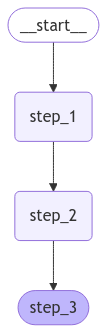 Let's proceed with a simple invocation:
```python theme={"theme":{"light":"catppuccin-latte","dark":"catppuccin-mocha"}}
graph.invoke({"value_1": "c"})
```
```
{'value_1': 'a b', 'value_2': 10}
```
Note that:
* We kicked off invocation by providing a value for a single state key. We must always provide a value for at least one key.
* The value we passed in was overwritten by the first node.
* The second node updated the value.
* The third node populated a different value.
**Built-in shorthand**
`langgraph>=0.2.46` includes a built-in short-hand `add_sequence` for adding node sequences. You can compile the same graph as follows:
```python theme={"theme":{"light":"catppuccin-latte","dark":"catppuccin-mocha"}}
builder = StateGraph(State).add_sequence([step_1, step_2, step_3]) # [!code highlight]
builder.add_edge(START, "step_1")
graph = builder.compile()
graph.invoke({"value_1": "c"})
```
## Create branches
Parallel execution of nodes is essential to speed up overall graph operation. LangGraph offers native support for parallel execution of nodes, which can significantly enhance the performance of graph-based workflows. This parallelization is achieved through fan-out and fan-in mechanisms, utilizing both standard edges and [conditional\_edges](https://langchain-ai.github.io/langgraph/reference/graphs.md#langgraph.graph.MessageGraph.add_conditional_edges). Below are some examples showing how to add create branching dataflows that work for you.
### Run graph nodes in parallel
In this example, we fan out from `Node A` to `B and C` and then fan in to `D`. With our state, [we specify the reducer add operation](/oss/python/langgraph/graph-api#reducers). This will combine or accumulate values for the specific key in the State, rather than simply overwriting the existing value. For lists, this means concatenating the new list with the existing list. See the above section on [state reducers](#process-state-updates-with-reducers) for more detail on updating state with reducers.
```python theme={"theme":{"light":"catppuccin-latte","dark":"catppuccin-mocha"}}
import operator
from typing import Annotated, Any
from typing_extensions import TypedDict
from langgraph.graph import StateGraph, START, END
class State(TypedDict):
# The operator.add reducer fn makes this append-only
aggregate: Annotated[list, operator.add]
def a(state: State):
print(f'Adding "A" to {state["aggregate"]}')
return {"aggregate": ["A"]}
def b(state: State):
print(f'Adding "B" to {state["aggregate"]}')
return {"aggregate": ["B"]}
def c(state: State):
print(f'Adding "C" to {state["aggregate"]}')
return {"aggregate": ["C"]}
def d(state: State):
print(f'Adding "D" to {state["aggregate"]}')
return {"aggregate": ["D"]}
builder = StateGraph(State)
builder.add_node(a)
builder.add_node(b)
builder.add_node(c)
builder.add_node(d)
builder.add_edge(START, "a")
builder.add_edge("a", "b")
builder.add_edge("a", "c")
builder.add_edge("b", "d")
builder.add_edge("c", "d")
builder.add_edge("d", END)
graph = builder.compile()
```
```python theme={"theme":{"light":"catppuccin-latte","dark":"catppuccin-mocha"}}
from IPython.display import Image, display
display(Image(graph.get_graph().draw_mermaid_png()))
```
Let's proceed with a simple invocation:
```python theme={"theme":{"light":"catppuccin-latte","dark":"catppuccin-mocha"}}
graph.invoke({"value_1": "c"})
```
```
{'value_1': 'a b', 'value_2': 10}
```
Note that:
* We kicked off invocation by providing a value for a single state key. We must always provide a value for at least one key.
* The value we passed in was overwritten by the first node.
* The second node updated the value.
* The third node populated a different value.
**Built-in shorthand**
`langgraph>=0.2.46` includes a built-in short-hand `add_sequence` for adding node sequences. You can compile the same graph as follows:
```python theme={"theme":{"light":"catppuccin-latte","dark":"catppuccin-mocha"}}
builder = StateGraph(State).add_sequence([step_1, step_2, step_3]) # [!code highlight]
builder.add_edge(START, "step_1")
graph = builder.compile()
graph.invoke({"value_1": "c"})
```
## Create branches
Parallel execution of nodes is essential to speed up overall graph operation. LangGraph offers native support for parallel execution of nodes, which can significantly enhance the performance of graph-based workflows. This parallelization is achieved through fan-out and fan-in mechanisms, utilizing both standard edges and [conditional\_edges](https://langchain-ai.github.io/langgraph/reference/graphs.md#langgraph.graph.MessageGraph.add_conditional_edges). Below are some examples showing how to add create branching dataflows that work for you.
### Run graph nodes in parallel
In this example, we fan out from `Node A` to `B and C` and then fan in to `D`. With our state, [we specify the reducer add operation](/oss/python/langgraph/graph-api#reducers). This will combine or accumulate values for the specific key in the State, rather than simply overwriting the existing value. For lists, this means concatenating the new list with the existing list. See the above section on [state reducers](#process-state-updates-with-reducers) for more detail on updating state with reducers.
```python theme={"theme":{"light":"catppuccin-latte","dark":"catppuccin-mocha"}}
import operator
from typing import Annotated, Any
from typing_extensions import TypedDict
from langgraph.graph import StateGraph, START, END
class State(TypedDict):
# The operator.add reducer fn makes this append-only
aggregate: Annotated[list, operator.add]
def a(state: State):
print(f'Adding "A" to {state["aggregate"]}')
return {"aggregate": ["A"]}
def b(state: State):
print(f'Adding "B" to {state["aggregate"]}')
return {"aggregate": ["B"]}
def c(state: State):
print(f'Adding "C" to {state["aggregate"]}')
return {"aggregate": ["C"]}
def d(state: State):
print(f'Adding "D" to {state["aggregate"]}')
return {"aggregate": ["D"]}
builder = StateGraph(State)
builder.add_node(a)
builder.add_node(b)
builder.add_node(c)
builder.add_node(d)
builder.add_edge(START, "a")
builder.add_edge("a", "b")
builder.add_edge("a", "c")
builder.add_edge("b", "d")
builder.add_edge("c", "d")
builder.add_edge("d", END)
graph = builder.compile()
```
```python theme={"theme":{"light":"catppuccin-latte","dark":"catppuccin-mocha"}}
from IPython.display import Image, display
display(Image(graph.get_graph().draw_mermaid_png()))
```
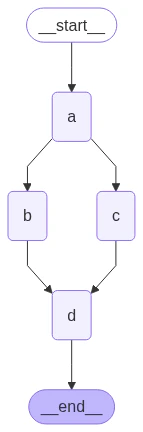 With the reducer, you can see that the values added in each node are accumulated.
```python theme={"theme":{"light":"catppuccin-latte","dark":"catppuccin-mocha"}}
graph.invoke({"aggregate": []}, {"configurable": {"thread_id": "foo"}})
```
```
Adding "A" to []
Adding "B" to ['A']
Adding "C" to ['A']
Adding "D" to ['A', 'B', 'C']
```
In the above example, nodes `"b"` and `"c"` are executed concurrently in the same [superstep](/oss/python/langgraph/graph-api#graphs). Because they are in the same step, node `"d"` executes after both `"b"` and `"c"` are finished.
Importantly, updates from a parallel superstep may not be ordered consistently. If you need a consistent, predetermined ordering of updates from a parallel superstep, you should write the outputs to a separate field in the state together with a value with which to order them.
LangGraph executes nodes within [supersteps](/oss/python/langgraph/graph-api#graphs), meaning that while parallel branches are executed in parallel, the entire superstep is **transactional**. If any of these branches raises an exception, **none** of the updates are applied to the state (the entire superstep errors).
Importantly, when using a [checkpointer](/oss/python/langgraph/persistence), results from successful nodes within a superstep are saved, and don't repeat when resumed.
If you have error-prone (perhaps want to handle flakey API calls), LangGraph provides two ways to address this:
1. You can write regular python code within your node to catch and handle exceptions.
2. You can set a **[retry\_policy](https://langchain-ai.github.io/langgraph/reference/types/#langgraph.types.RetryPolicy)** to direct the graph to retry nodes that raise certain types of exceptions. Only failing branches are retried, so you needn't worry about performing redundant work.
Together, these let you perform parallel execution and fully control exception handling.
**Set max concurrency**
You can control the maximum number of concurrent tasks by setting `max_concurrency` in the [configuration](https://reference.langchain.com/python/langchain-core/runnables/config/RunnableConfig) when invoking the graph.
```python theme={"theme":{"light":"catppuccin-latte","dark":"catppuccin-mocha"}}
graph.invoke({"value_1": "c"}, {"configurable": {"max_concurrency": 10}})
```
### Defer node execution
Deferring node execution is useful when you want to delay the execution of a node until all other pending tasks are completed. This is particularly relevant when branches have different lengths, which is common in workflows like map-reduce flows.
The above example showed how to fan-out and fan-in when each path was only one step. But what if one branch had more than one step? Let's add a node `"b_2"` in the `"b"` branch:
```python theme={"theme":{"light":"catppuccin-latte","dark":"catppuccin-mocha"}}
import operator
from typing import Annotated, Any
from typing_extensions import TypedDict
from langgraph.graph import StateGraph, START, END
class State(TypedDict):
# The operator.add reducer fn makes this append-only
aggregate: Annotated[list, operator.add]
def a(state: State):
print(f'Adding "A" to {state["aggregate"]}')
return {"aggregate": ["A"]}
def b(state: State):
print(f'Adding "B" to {state["aggregate"]}')
return {"aggregate": ["B"]}
def b_2(state: State):
print(f'Adding "B_2" to {state["aggregate"]}')
return {"aggregate": ["B_2"]}
def c(state: State):
print(f'Adding "C" to {state["aggregate"]}')
return {"aggregate": ["C"]}
def d(state: State):
print(f'Adding "D" to {state["aggregate"]}')
return {"aggregate": ["D"]}
builder = StateGraph(State)
builder.add_node(a)
builder.add_node(b)
builder.add_node(b_2)
builder.add_node(c)
builder.add_node(d, defer=True) # [!code highlight]
builder.add_edge(START, "a")
builder.add_edge("a", "b")
builder.add_edge("a", "c")
builder.add_edge("b", "b_2")
builder.add_edge("b_2", "d")
builder.add_edge("c", "d")
builder.add_edge("d", END)
graph = builder.compile()
```
```python theme={"theme":{"light":"catppuccin-latte","dark":"catppuccin-mocha"}}
from IPython.display import Image, display
display(Image(graph.get_graph().draw_mermaid_png()))
```
With the reducer, you can see that the values added in each node are accumulated.
```python theme={"theme":{"light":"catppuccin-latte","dark":"catppuccin-mocha"}}
graph.invoke({"aggregate": []}, {"configurable": {"thread_id": "foo"}})
```
```
Adding "A" to []
Adding "B" to ['A']
Adding "C" to ['A']
Adding "D" to ['A', 'B', 'C']
```
In the above example, nodes `"b"` and `"c"` are executed concurrently in the same [superstep](/oss/python/langgraph/graph-api#graphs). Because they are in the same step, node `"d"` executes after both `"b"` and `"c"` are finished.
Importantly, updates from a parallel superstep may not be ordered consistently. If you need a consistent, predetermined ordering of updates from a parallel superstep, you should write the outputs to a separate field in the state together with a value with which to order them.
LangGraph executes nodes within [supersteps](/oss/python/langgraph/graph-api#graphs), meaning that while parallel branches are executed in parallel, the entire superstep is **transactional**. If any of these branches raises an exception, **none** of the updates are applied to the state (the entire superstep errors).
Importantly, when using a [checkpointer](/oss/python/langgraph/persistence), results from successful nodes within a superstep are saved, and don't repeat when resumed.
If you have error-prone (perhaps want to handle flakey API calls), LangGraph provides two ways to address this:
1. You can write regular python code within your node to catch and handle exceptions.
2. You can set a **[retry\_policy](https://langchain-ai.github.io/langgraph/reference/types/#langgraph.types.RetryPolicy)** to direct the graph to retry nodes that raise certain types of exceptions. Only failing branches are retried, so you needn't worry about performing redundant work.
Together, these let you perform parallel execution and fully control exception handling.
**Set max concurrency**
You can control the maximum number of concurrent tasks by setting `max_concurrency` in the [configuration](https://reference.langchain.com/python/langchain-core/runnables/config/RunnableConfig) when invoking the graph.
```python theme={"theme":{"light":"catppuccin-latte","dark":"catppuccin-mocha"}}
graph.invoke({"value_1": "c"}, {"configurable": {"max_concurrency": 10}})
```
### Defer node execution
Deferring node execution is useful when you want to delay the execution of a node until all other pending tasks are completed. This is particularly relevant when branches have different lengths, which is common in workflows like map-reduce flows.
The above example showed how to fan-out and fan-in when each path was only one step. But what if one branch had more than one step? Let's add a node `"b_2"` in the `"b"` branch:
```python theme={"theme":{"light":"catppuccin-latte","dark":"catppuccin-mocha"}}
import operator
from typing import Annotated, Any
from typing_extensions import TypedDict
from langgraph.graph import StateGraph, START, END
class State(TypedDict):
# The operator.add reducer fn makes this append-only
aggregate: Annotated[list, operator.add]
def a(state: State):
print(f'Adding "A" to {state["aggregate"]}')
return {"aggregate": ["A"]}
def b(state: State):
print(f'Adding "B" to {state["aggregate"]}')
return {"aggregate": ["B"]}
def b_2(state: State):
print(f'Adding "B_2" to {state["aggregate"]}')
return {"aggregate": ["B_2"]}
def c(state: State):
print(f'Adding "C" to {state["aggregate"]}')
return {"aggregate": ["C"]}
def d(state: State):
print(f'Adding "D" to {state["aggregate"]}')
return {"aggregate": ["D"]}
builder = StateGraph(State)
builder.add_node(a)
builder.add_node(b)
builder.add_node(b_2)
builder.add_node(c)
builder.add_node(d, defer=True) # [!code highlight]
builder.add_edge(START, "a")
builder.add_edge("a", "b")
builder.add_edge("a", "c")
builder.add_edge("b", "b_2")
builder.add_edge("b_2", "d")
builder.add_edge("c", "d")
builder.add_edge("d", END)
graph = builder.compile()
```
```python theme={"theme":{"light":"catppuccin-latte","dark":"catppuccin-mocha"}}
from IPython.display import Image, display
display(Image(graph.get_graph().draw_mermaid_png()))
```
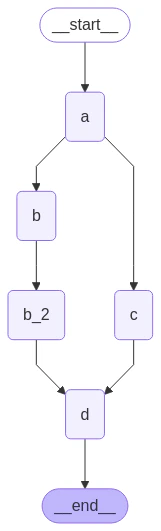 ```python theme={"theme":{"light":"catppuccin-latte","dark":"catppuccin-mocha"}}
graph.invoke({"aggregate": []})
```
```
Adding "A" to []
Adding "B" to ['A']
Adding "C" to ['A']
Adding "B_2" to ['A', 'B', 'C']
Adding "D" to ['A', 'B', 'C', 'B_2']
```
In the above example, nodes `"b"` and `"c"` are executed concurrently in the same superstep. We set `defer=True` on node `d` so it will not execute until all pending tasks are finished. In this case, this means that `"d"` waits to execute until the entire `"b"` branch is finished.
### Conditional branching
If your fan-out should vary at runtime based on the state, you can use [`add_conditional_edges`](https://reference.langchain.com/python/langgraph/graph/state/StateGraph/add_conditional_edges) to select one or more paths using the graph state. See example below, where node `a` generates a state update that determines the following node.
```python theme={"theme":{"light":"catppuccin-latte","dark":"catppuccin-mocha"}}
import operator
from typing import Annotated, Literal, Sequence
from typing_extensions import TypedDict
from langgraph.graph import StateGraph, START, END
class State(TypedDict):
aggregate: Annotated[list, operator.add]
# Add a key to the state. We will set this key to determine
# how we branch.
which: str
def a(state: State):
print(f'Adding "A" to {state["aggregate"]}')
return {"aggregate": ["A"], "which": "c"} # [!code highlight]
def b(state: State):
print(f'Adding "B" to {state["aggregate"]}')
return {"aggregate": ["B"]}
def c(state: State):
print(f'Adding "C" to {state["aggregate"]}')
return {"aggregate": ["C"]}
builder = StateGraph(State)
builder.add_node(a)
builder.add_node(b)
builder.add_node(c)
builder.add_edge(START, "a")
builder.add_edge("b", END)
builder.add_edge("c", END)
def conditional_edge(state: State) -> Literal["b", "c"]:
# Fill in arbitrary logic here that uses the state
# to determine the next node
return state["which"]
builder.add_conditional_edges("a", conditional_edge) # [!code highlight]
graph = builder.compile()
```
```python theme={"theme":{"light":"catppuccin-latte","dark":"catppuccin-mocha"}}
from IPython.display import Image, display
display(Image(graph.get_graph().draw_mermaid_png()))
```
```python theme={"theme":{"light":"catppuccin-latte","dark":"catppuccin-mocha"}}
graph.invoke({"aggregate": []})
```
```
Adding "A" to []
Adding "B" to ['A']
Adding "C" to ['A']
Adding "B_2" to ['A', 'B', 'C']
Adding "D" to ['A', 'B', 'C', 'B_2']
```
In the above example, nodes `"b"` and `"c"` are executed concurrently in the same superstep. We set `defer=True` on node `d` so it will not execute until all pending tasks are finished. In this case, this means that `"d"` waits to execute until the entire `"b"` branch is finished.
### Conditional branching
If your fan-out should vary at runtime based on the state, you can use [`add_conditional_edges`](https://reference.langchain.com/python/langgraph/graph/state/StateGraph/add_conditional_edges) to select one or more paths using the graph state. See example below, where node `a` generates a state update that determines the following node.
```python theme={"theme":{"light":"catppuccin-latte","dark":"catppuccin-mocha"}}
import operator
from typing import Annotated, Literal, Sequence
from typing_extensions import TypedDict
from langgraph.graph import StateGraph, START, END
class State(TypedDict):
aggregate: Annotated[list, operator.add]
# Add a key to the state. We will set this key to determine
# how we branch.
which: str
def a(state: State):
print(f'Adding "A" to {state["aggregate"]}')
return {"aggregate": ["A"], "which": "c"} # [!code highlight]
def b(state: State):
print(f'Adding "B" to {state["aggregate"]}')
return {"aggregate": ["B"]}
def c(state: State):
print(f'Adding "C" to {state["aggregate"]}')
return {"aggregate": ["C"]}
builder = StateGraph(State)
builder.add_node(a)
builder.add_node(b)
builder.add_node(c)
builder.add_edge(START, "a")
builder.add_edge("b", END)
builder.add_edge("c", END)
def conditional_edge(state: State) -> Literal["b", "c"]:
# Fill in arbitrary logic here that uses the state
# to determine the next node
return state["which"]
builder.add_conditional_edges("a", conditional_edge) # [!code highlight]
graph = builder.compile()
```
```python theme={"theme":{"light":"catppuccin-latte","dark":"catppuccin-mocha"}}
from IPython.display import Image, display
display(Image(graph.get_graph().draw_mermaid_png()))
```
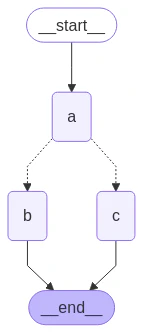 ```python theme={"theme":{"light":"catppuccin-latte","dark":"catppuccin-mocha"}}
result = graph.invoke({"aggregate": []})
print(result)
```
```
Adding "A" to []
Adding "C" to ['A']
{'aggregate': ['A', 'C'], 'which': 'c'}
```
Your conditional edges can route to multiple destination nodes. For example:
```python theme={"theme":{"light":"catppuccin-latte","dark":"catppuccin-mocha"}}
def route_bc_or_cd(state: State) -> Sequence[str]:
if state["which"] == "cd":
return ["c", "d"]
return ["b", "c"]
```
## Map-Reduce and the send API
LangGraph supports map-reduce and other advanced branching patterns using the Send API. Here is an example of how to use it:
```python theme={"theme":{"light":"catppuccin-latte","dark":"catppuccin-mocha"}}
from langgraph.graph import StateGraph, START, END
from langgraph.types import Send
from typing_extensions import TypedDict, Annotated
import operator
class OverallState(TypedDict):
topic: str
subjects: list[str]
jokes: Annotated[list[str], operator.add]
best_selected_joke: str
def generate_topics(state: OverallState):
return {"subjects": ["lions", "elephants", "penguins"]}
def generate_joke(state: OverallState):
joke_map = {
"lions": "Why don't lions like fast food? Because they can't catch it!",
"elephants": "Why don't elephants use computers? They're afraid of the mouse!",
"penguins": "Why don't penguins like talking to strangers at parties? Because they find it hard to break the ice."
}
return {"jokes": [joke_map[state["subject"]]]}
def continue_to_jokes(state: OverallState):
return [Send("generate_joke", {"subject": s}) for s in state["subjects"]]
def best_joke(state: OverallState):
return {"best_selected_joke": "penguins"}
builder = StateGraph(OverallState)
builder.add_node("generate_topics", generate_topics)
builder.add_node("generate_joke", generate_joke)
builder.add_node("best_joke", best_joke)
builder.add_edge(START, "generate_topics")
builder.add_conditional_edges("generate_topics", continue_to_jokes, ["generate_joke"])
builder.add_edge("generate_joke", "best_joke")
builder.add_edge("best_joke", END)
graph = builder.compile()
```
```python theme={"theme":{"light":"catppuccin-latte","dark":"catppuccin-mocha"}}
from IPython.display import Image, display
display(Image(graph.get_graph().draw_mermaid_png()))
```
```python theme={"theme":{"light":"catppuccin-latte","dark":"catppuccin-mocha"}}
result = graph.invoke({"aggregate": []})
print(result)
```
```
Adding "A" to []
Adding "C" to ['A']
{'aggregate': ['A', 'C'], 'which': 'c'}
```
Your conditional edges can route to multiple destination nodes. For example:
```python theme={"theme":{"light":"catppuccin-latte","dark":"catppuccin-mocha"}}
def route_bc_or_cd(state: State) -> Sequence[str]:
if state["which"] == "cd":
return ["c", "d"]
return ["b", "c"]
```
## Map-Reduce and the send API
LangGraph supports map-reduce and other advanced branching patterns using the Send API. Here is an example of how to use it:
```python theme={"theme":{"light":"catppuccin-latte","dark":"catppuccin-mocha"}}
from langgraph.graph import StateGraph, START, END
from langgraph.types import Send
from typing_extensions import TypedDict, Annotated
import operator
class OverallState(TypedDict):
topic: str
subjects: list[str]
jokes: Annotated[list[str], operator.add]
best_selected_joke: str
def generate_topics(state: OverallState):
return {"subjects": ["lions", "elephants", "penguins"]}
def generate_joke(state: OverallState):
joke_map = {
"lions": "Why don't lions like fast food? Because they can't catch it!",
"elephants": "Why don't elephants use computers? They're afraid of the mouse!",
"penguins": "Why don't penguins like talking to strangers at parties? Because they find it hard to break the ice."
}
return {"jokes": [joke_map[state["subject"]]]}
def continue_to_jokes(state: OverallState):
return [Send("generate_joke", {"subject": s}) for s in state["subjects"]]
def best_joke(state: OverallState):
return {"best_selected_joke": "penguins"}
builder = StateGraph(OverallState)
builder.add_node("generate_topics", generate_topics)
builder.add_node("generate_joke", generate_joke)
builder.add_node("best_joke", best_joke)
builder.add_edge(START, "generate_topics")
builder.add_conditional_edges("generate_topics", continue_to_jokes, ["generate_joke"])
builder.add_edge("generate_joke", "best_joke")
builder.add_edge("best_joke", END)
graph = builder.compile()
```
```python theme={"theme":{"light":"catppuccin-latte","dark":"catppuccin-mocha"}}
from IPython.display import Image, display
display(Image(graph.get_graph().draw_mermaid_png()))
```
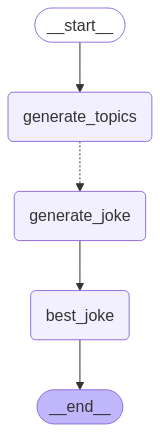 ```python theme={"theme":{"light":"catppuccin-latte","dark":"catppuccin-mocha"}}
# Call the graph: here we call it to generate a list of jokes
for step in graph.stream({"topic": "animals"}):
print(step)
```
```
{'generate_topics': {'subjects': ['lions', 'elephants', 'penguins']}}
{'generate_joke': {'jokes': ["Why don't lions like fast food? Because they can't catch it!"]}}
{'generate_joke': {'jokes': ["Why don't elephants use computers? They're afraid of the mouse!"]}}
{'generate_joke': {'jokes': ['Why don't penguins like talking to strangers at parties? Because they find it hard to break the ice.']}}
{'best_joke': {'best_selected_joke': 'penguins'}}
```
## Create and control loops
When creating a graph with a loop, we require a mechanism for terminating execution. This is most commonly done by adding a [conditional edge](/oss/python/langgraph/graph-api#conditional-edges) that routes to the [END](/oss/python/langgraph/graph-api#end-node) node once we reach some termination condition.
You can also set the graph recursion limit when invoking or streaming the graph. The recursion limit sets the number of [super-steps](/oss/python/langgraph/graph-api#graphs) that the graph is allowed to execute before it raises an error. Read more about the [recursion limit concept](/oss/python/langgraph/graph-api#recursion-limit).
Let's consider a simple graph with a loop to better understand how these mechanisms work.
To return the last value of your state instead of receiving a recursion limit error, see the [next section](#impose-a-recursion-limit).
When creating a loop, you can include a conditional edge that specifies a termination condition:
```python theme={"theme":{"light":"catppuccin-latte","dark":"catppuccin-mocha"}}
builder = StateGraph(State)
builder.add_node(a)
builder.add_node(b)
def route(state: State) -> Literal["b", END]:
if termination_condition(state):
return END
else:
return "b"
builder.add_edge(START, "a")
builder.add_conditional_edges("a", route)
builder.add_edge("b", "a")
graph = builder.compile()
```
To control the recursion limit, specify `"recursion_limit"` in the config. This will raise a `GraphRecursionError`, which you can catch and handle:
```python theme={"theme":{"light":"catppuccin-latte","dark":"catppuccin-mocha"}}
from langgraph.errors import GraphRecursionError
try:
graph.invoke(inputs, {"recursion_limit": 3})
except GraphRecursionError:
print("Recursion Error")
```
Let's define a graph with a simple loop. Note that we use a conditional edge to implement a termination condition.
```python theme={"theme":{"light":"catppuccin-latte","dark":"catppuccin-mocha"}}
import operator
from typing import Annotated, Literal
from typing_extensions import TypedDict
from langgraph.graph import StateGraph, START, END
class State(TypedDict):
# The operator.add reducer fn makes this append-only
aggregate: Annotated[list, operator.add]
def a(state: State):
print(f'Node A sees {state["aggregate"]}')
return {"aggregate": ["A"]}
def b(state: State):
print(f'Node B sees {state["aggregate"]}')
return {"aggregate": ["B"]}
# Define nodes
builder = StateGraph(State)
builder.add_node(a)
builder.add_node(b)
# Define edges
def route(state: State) -> Literal["b", END]:
if len(state["aggregate"]) < 7:
return "b"
else:
return END
builder.add_edge(START, "a")
builder.add_conditional_edges("a", route)
builder.add_edge("b", "a")
graph = builder.compile()
```
```python theme={"theme":{"light":"catppuccin-latte","dark":"catppuccin-mocha"}}
from IPython.display import Image, display
display(Image(graph.get_graph().draw_mermaid_png()))
```
```python theme={"theme":{"light":"catppuccin-latte","dark":"catppuccin-mocha"}}
# Call the graph: here we call it to generate a list of jokes
for step in graph.stream({"topic": "animals"}):
print(step)
```
```
{'generate_topics': {'subjects': ['lions', 'elephants', 'penguins']}}
{'generate_joke': {'jokes': ["Why don't lions like fast food? Because they can't catch it!"]}}
{'generate_joke': {'jokes': ["Why don't elephants use computers? They're afraid of the mouse!"]}}
{'generate_joke': {'jokes': ['Why don't penguins like talking to strangers at parties? Because they find it hard to break the ice.']}}
{'best_joke': {'best_selected_joke': 'penguins'}}
```
## Create and control loops
When creating a graph with a loop, we require a mechanism for terminating execution. This is most commonly done by adding a [conditional edge](/oss/python/langgraph/graph-api#conditional-edges) that routes to the [END](/oss/python/langgraph/graph-api#end-node) node once we reach some termination condition.
You can also set the graph recursion limit when invoking or streaming the graph. The recursion limit sets the number of [super-steps](/oss/python/langgraph/graph-api#graphs) that the graph is allowed to execute before it raises an error. Read more about the [recursion limit concept](/oss/python/langgraph/graph-api#recursion-limit).
Let's consider a simple graph with a loop to better understand how these mechanisms work.
To return the last value of your state instead of receiving a recursion limit error, see the [next section](#impose-a-recursion-limit).
When creating a loop, you can include a conditional edge that specifies a termination condition:
```python theme={"theme":{"light":"catppuccin-latte","dark":"catppuccin-mocha"}}
builder = StateGraph(State)
builder.add_node(a)
builder.add_node(b)
def route(state: State) -> Literal["b", END]:
if termination_condition(state):
return END
else:
return "b"
builder.add_edge(START, "a")
builder.add_conditional_edges("a", route)
builder.add_edge("b", "a")
graph = builder.compile()
```
To control the recursion limit, specify `"recursion_limit"` in the config. This will raise a `GraphRecursionError`, which you can catch and handle:
```python theme={"theme":{"light":"catppuccin-latte","dark":"catppuccin-mocha"}}
from langgraph.errors import GraphRecursionError
try:
graph.invoke(inputs, {"recursion_limit": 3})
except GraphRecursionError:
print("Recursion Error")
```
Let's define a graph with a simple loop. Note that we use a conditional edge to implement a termination condition.
```python theme={"theme":{"light":"catppuccin-latte","dark":"catppuccin-mocha"}}
import operator
from typing import Annotated, Literal
from typing_extensions import TypedDict
from langgraph.graph import StateGraph, START, END
class State(TypedDict):
# The operator.add reducer fn makes this append-only
aggregate: Annotated[list, operator.add]
def a(state: State):
print(f'Node A sees {state["aggregate"]}')
return {"aggregate": ["A"]}
def b(state: State):
print(f'Node B sees {state["aggregate"]}')
return {"aggregate": ["B"]}
# Define nodes
builder = StateGraph(State)
builder.add_node(a)
builder.add_node(b)
# Define edges
def route(state: State) -> Literal["b", END]:
if len(state["aggregate"]) < 7:
return "b"
else:
return END
builder.add_edge(START, "a")
builder.add_conditional_edges("a", route)
builder.add_edge("b", "a")
graph = builder.compile()
```
```python theme={"theme":{"light":"catppuccin-latte","dark":"catppuccin-mocha"}}
from IPython.display import Image, display
display(Image(graph.get_graph().draw_mermaid_png()))
```
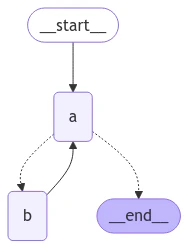 This architecture is similar to a [ReAct agent](/oss/python/langgraph/workflows-agents) in which node `"a"` is a tool-calling model, and node `"b"` represents the tools.
In our `route` conditional edge, we specify that we should end after the `"aggregate"` list in the state passes a threshold length.
Invoking the graph, we see that we alternate between nodes `"a"` and `"b"` before terminating once we reach the termination condition.
```python theme={"theme":{"light":"catppuccin-latte","dark":"catppuccin-mocha"}}
graph.invoke({"aggregate": []})
```
```
Node A sees []
Node B sees ['A']
Node A sees ['A', 'B']
Node B sees ['A', 'B', 'A']
Node A sees ['A', 'B', 'A', 'B']
Node B sees ['A', 'B', 'A', 'B', 'A']
Node A sees ['A', 'B', 'A', 'B', 'A', 'B']
```
### Impose a recursion limit
In some applications, we may not have a guarantee that we will reach a given termination condition. In these cases, we can set the graph's [recursion limit](/oss/python/langgraph/graph-api#recursion-limit). This will raise a `GraphRecursionError` after a given number of [supersteps](/oss/python/langgraph/graph-api#graphs). We can then catch and handle this exception:
```python theme={"theme":{"light":"catppuccin-latte","dark":"catppuccin-mocha"}}
from langgraph.errors import GraphRecursionError
try:
graph.invoke({"aggregate": []}, {"recursion_limit": 4})
except GraphRecursionError:
print("Recursion Error")
```
```
Node A sees []
Node B sees ['A']
Node C sees ['A', 'B']
Node D sees ['A', 'B']
Node A sees ['A', 'B', 'C', 'D']
Recursion Error
```
Instead of raising `GraphRecursionError`, we can introduce a new key to the state that keeps track of the number of steps remaining until reaching the recursion limit. We can then use this key to determine if we should end the run.
LangGraph implements a special `RemainingSteps` annotation. Under the hood, it creates a `ManagedValue` channel -- a state channel that will exist for the duration of our graph run and no longer.
```python theme={"theme":{"light":"catppuccin-latte","dark":"catppuccin-mocha"}}
import operator
from typing import Annotated, Literal
from typing_extensions import TypedDict
from langgraph.graph import StateGraph, START, END
from langgraph.managed.is_last_step import RemainingSteps
class State(TypedDict):
aggregate: Annotated[list, operator.add]
remaining_steps: RemainingSteps
def a(state: State):
print(f'Node A sees {state["aggregate"]}')
return {"aggregate": ["A"]}
def b(state: State):
print(f'Node B sees {state["aggregate"]}')
return {"aggregate": ["B"]}
# Define nodes
builder = StateGraph(State)
builder.add_node(a)
builder.add_node(b)
# Define edges
def route(state: State) -> Literal["b", END]:
if state["remaining_steps"] <= 2:
return END
else:
return "b"
builder.add_edge(START, "a")
builder.add_conditional_edges("a", route)
builder.add_edge("b", "a")
graph = builder.compile()
# Test it out
result = graph.invoke({"aggregate": []}, {"recursion_limit": 4})
print(result)
```
```
Node A sees []
Node B sees ['A']
Node A sees ['A', 'B']
{'aggregate': ['A', 'B', 'A']}
```
To better understand how the recursion limit works, let's consider a more complex example. Below we implement a loop, but one step fans out into two nodes:
```python theme={"theme":{"light":"catppuccin-latte","dark":"catppuccin-mocha"}}
import operator
from typing import Annotated, Literal
from typing_extensions import TypedDict
from langgraph.graph import StateGraph, START, END
class State(TypedDict):
aggregate: Annotated[list, operator.add]
def a(state: State):
print(f'Node A sees {state["aggregate"]}')
return {"aggregate": ["A"]}
def b(state: State):
print(f'Node B sees {state["aggregate"]}')
return {"aggregate": ["B"]}
def c(state: State):
print(f'Node C sees {state["aggregate"]}')
return {"aggregate": ["C"]}
def d(state: State):
print(f'Node D sees {state["aggregate"]}')
return {"aggregate": ["D"]}
# Define nodes
builder = StateGraph(State)
builder.add_node(a)
builder.add_node(b)
builder.add_node(c)
builder.add_node(d)
# Define edges
def route(state: State) -> Literal["b", END]:
if len(state["aggregate"]) < 7:
return "b"
else:
return END
builder.add_edge(START, "a")
builder.add_conditional_edges("a", route)
builder.add_edge("b", "c")
builder.add_edge("b", "d")
builder.add_edge(["c", "d"], "a")
graph = builder.compile()
```
```python theme={"theme":{"light":"catppuccin-latte","dark":"catppuccin-mocha"}}
from IPython.display import Image, display
display(Image(graph.get_graph().draw_mermaid_png()))
```
This architecture is similar to a [ReAct agent](/oss/python/langgraph/workflows-agents) in which node `"a"` is a tool-calling model, and node `"b"` represents the tools.
In our `route` conditional edge, we specify that we should end after the `"aggregate"` list in the state passes a threshold length.
Invoking the graph, we see that we alternate between nodes `"a"` and `"b"` before terminating once we reach the termination condition.
```python theme={"theme":{"light":"catppuccin-latte","dark":"catppuccin-mocha"}}
graph.invoke({"aggregate": []})
```
```
Node A sees []
Node B sees ['A']
Node A sees ['A', 'B']
Node B sees ['A', 'B', 'A']
Node A sees ['A', 'B', 'A', 'B']
Node B sees ['A', 'B', 'A', 'B', 'A']
Node A sees ['A', 'B', 'A', 'B', 'A', 'B']
```
### Impose a recursion limit
In some applications, we may not have a guarantee that we will reach a given termination condition. In these cases, we can set the graph's [recursion limit](/oss/python/langgraph/graph-api#recursion-limit). This will raise a `GraphRecursionError` after a given number of [supersteps](/oss/python/langgraph/graph-api#graphs). We can then catch and handle this exception:
```python theme={"theme":{"light":"catppuccin-latte","dark":"catppuccin-mocha"}}
from langgraph.errors import GraphRecursionError
try:
graph.invoke({"aggregate": []}, {"recursion_limit": 4})
except GraphRecursionError:
print("Recursion Error")
```
```
Node A sees []
Node B sees ['A']
Node C sees ['A', 'B']
Node D sees ['A', 'B']
Node A sees ['A', 'B', 'C', 'D']
Recursion Error
```
Instead of raising `GraphRecursionError`, we can introduce a new key to the state that keeps track of the number of steps remaining until reaching the recursion limit. We can then use this key to determine if we should end the run.
LangGraph implements a special `RemainingSteps` annotation. Under the hood, it creates a `ManagedValue` channel -- a state channel that will exist for the duration of our graph run and no longer.
```python theme={"theme":{"light":"catppuccin-latte","dark":"catppuccin-mocha"}}
import operator
from typing import Annotated, Literal
from typing_extensions import TypedDict
from langgraph.graph import StateGraph, START, END
from langgraph.managed.is_last_step import RemainingSteps
class State(TypedDict):
aggregate: Annotated[list, operator.add]
remaining_steps: RemainingSteps
def a(state: State):
print(f'Node A sees {state["aggregate"]}')
return {"aggregate": ["A"]}
def b(state: State):
print(f'Node B sees {state["aggregate"]}')
return {"aggregate": ["B"]}
# Define nodes
builder = StateGraph(State)
builder.add_node(a)
builder.add_node(b)
# Define edges
def route(state: State) -> Literal["b", END]:
if state["remaining_steps"] <= 2:
return END
else:
return "b"
builder.add_edge(START, "a")
builder.add_conditional_edges("a", route)
builder.add_edge("b", "a")
graph = builder.compile()
# Test it out
result = graph.invoke({"aggregate": []}, {"recursion_limit": 4})
print(result)
```
```
Node A sees []
Node B sees ['A']
Node A sees ['A', 'B']
{'aggregate': ['A', 'B', 'A']}
```
To better understand how the recursion limit works, let's consider a more complex example. Below we implement a loop, but one step fans out into two nodes:
```python theme={"theme":{"light":"catppuccin-latte","dark":"catppuccin-mocha"}}
import operator
from typing import Annotated, Literal
from typing_extensions import TypedDict
from langgraph.graph import StateGraph, START, END
class State(TypedDict):
aggregate: Annotated[list, operator.add]
def a(state: State):
print(f'Node A sees {state["aggregate"]}')
return {"aggregate": ["A"]}
def b(state: State):
print(f'Node B sees {state["aggregate"]}')
return {"aggregate": ["B"]}
def c(state: State):
print(f'Node C sees {state["aggregate"]}')
return {"aggregate": ["C"]}
def d(state: State):
print(f'Node D sees {state["aggregate"]}')
return {"aggregate": ["D"]}
# Define nodes
builder = StateGraph(State)
builder.add_node(a)
builder.add_node(b)
builder.add_node(c)
builder.add_node(d)
# Define edges
def route(state: State) -> Literal["b", END]:
if len(state["aggregate"]) < 7:
return "b"
else:
return END
builder.add_edge(START, "a")
builder.add_conditional_edges("a", route)
builder.add_edge("b", "c")
builder.add_edge("b", "d")
builder.add_edge(["c", "d"], "a")
graph = builder.compile()
```
```python theme={"theme":{"light":"catppuccin-latte","dark":"catppuccin-mocha"}}
from IPython.display import Image, display
display(Image(graph.get_graph().draw_mermaid_png()))
```
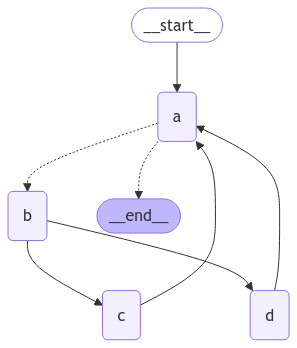 This graph looks complex, but can be conceptualized as loop of [supersteps](/oss/python/langgraph/graph-api#graphs):
1. Node A
2. Node B
3. Nodes C and D
4. Node A
5. ...
We have a loop of four supersteps, where nodes C and D are executed concurrently.
Invoking the graph as before, we see that we complete two full "laps" before hitting the termination condition:
```python theme={"theme":{"light":"catppuccin-latte","dark":"catppuccin-mocha"}}
result = graph.invoke({"aggregate": []})
```
```
Node A sees []
Node B sees ['A']
Node D sees ['A', 'B']
Node C sees ['A', 'B']
Node A sees ['A', 'B', 'C', 'D']
Node B sees ['A', 'B', 'C', 'D', 'A']
Node D sees ['A', 'B', 'C', 'D', 'A', 'B']
Node C sees ['A', 'B', 'C', 'D', 'A', 'B']
Node A sees ['A', 'B', 'C', 'D', 'A', 'B', 'C', 'D']
```
However, if we set the recursion limit to four, we only complete one lap because each lap is four supersteps:
```python theme={"theme":{"light":"catppuccin-latte","dark":"catppuccin-mocha"}}
from langgraph.errors import GraphRecursionError
try:
result = graph.invoke({"aggregate": []}, {"recursion_limit": 4})
except GraphRecursionError:
print("Recursion Error")
```
```
Node A sees []
Node B sees ['A']
Node C sees ['A', 'B']
Node D sees ['A', 'B']
Node A sees ['A', 'B', 'C', 'D']
Recursion Error
```
## Async
Using the async programming paradigm can produce significant performance improvements when running [IO-bound](https://en.wikipedia.org/wiki/I/O_bound) code concurrently (e.g., making concurrent API requests to a chat model provider).
To convert a `sync` implementation of the graph to an `async` implementation, you will need to:
1. Update `nodes` use `async def` instead of `def`.
2. Update the code inside to use `await` appropriately.
3. Invoke the graph with `.ainvoke` or `.astream` as desired.
Because many LangChain objects implement the [Runnable Protocol](https://python.langchain.com/docs/expression_language/interface/) which has `async` variants of all the `sync` methods it's typically fairly quick to upgrade a `sync` graph to an `async` graph.
See example below. To demonstrate async invocations of underlying LLMs, we will include a chat model:
👉 Read the [OpenAI chat model integration docs](/oss/python/integrations/chat/openai/)
```shell theme={"theme":{"light":"catppuccin-latte","dark":"catppuccin-mocha"}} theme={"theme":{"light":"catppuccin-latte","dark":"catppuccin-mocha"}}
pip install -U "langchain[openai]"
```
```python init_chat_model theme={"theme":{"light":"catppuccin-latte","dark":"catppuccin-mocha"}} theme={"theme":{"light":"catppuccin-latte","dark":"catppuccin-mocha"}}
import os
from langchain.chat_models import init_chat_model
os.environ["OPENAI_API_KEY"] = "sk-..."
model = init_chat_model("gpt-5.4")
```
```python Model Class theme={"theme":{"light":"catppuccin-latte","dark":"catppuccin-mocha"}} theme={"theme":{"light":"catppuccin-latte","dark":"catppuccin-mocha"}}
import os
from langchain_openai import ChatOpenAI
os.environ["OPENAI_API_KEY"] = "sk-..."
model = ChatOpenAI(model="gpt-5.4")
```
👉 Read the [Anthropic chat model integration docs](/oss/python/integrations/chat/anthropic/)
```shell theme={"theme":{"light":"catppuccin-latte","dark":"catppuccin-mocha"}} theme={"theme":{"light":"catppuccin-latte","dark":"catppuccin-mocha"}}
pip install -U "langchain[anthropic]"
```
```python init_chat_model theme={"theme":{"light":"catppuccin-latte","dark":"catppuccin-mocha"}} theme={"theme":{"light":"catppuccin-latte","dark":"catppuccin-mocha"}}
import os
from langchain.chat_models import init_chat_model
os.environ["ANTHROPIC_API_KEY"] = "sk-..."
model = init_chat_model("claude-sonnet-4-6")
```
```python Model Class theme={"theme":{"light":"catppuccin-latte","dark":"catppuccin-mocha"}} theme={"theme":{"light":"catppuccin-latte","dark":"catppuccin-mocha"}}
import os
from langchain_anthropic import ChatAnthropic
os.environ["ANTHROPIC_API_KEY"] = "sk-..."
model = ChatAnthropic(model="claude-sonnet-4-6")
```
👉 Read the [Azure chat model integration docs](/oss/python/integrations/chat/azure_chat_openai/)
```shell theme={"theme":{"light":"catppuccin-latte","dark":"catppuccin-mocha"}} theme={"theme":{"light":"catppuccin-latte","dark":"catppuccin-mocha"}}
pip install -U "langchain[openai]"
```
```python init_chat_model theme={"theme":{"light":"catppuccin-latte","dark":"catppuccin-mocha"}} theme={"theme":{"light":"catppuccin-latte","dark":"catppuccin-mocha"}}
import os
from langchain.chat_models import init_chat_model
os.environ["AZURE_OPENAI_API_KEY"] = "..."
os.environ["AZURE_OPENAI_ENDPOINT"] = "..."
os.environ["OPENAI_API_VERSION"] = "2025-03-01-preview"
model = init_chat_model(
"azure_openai:gpt-5.4",
azure_deployment=os.environ["AZURE_OPENAI_DEPLOYMENT_NAME"],
)
```
```python Model Class theme={"theme":{"light":"catppuccin-latte","dark":"catppuccin-mocha"}} theme={"theme":{"light":"catppuccin-latte","dark":"catppuccin-mocha"}}
import os
from langchain_openai import AzureChatOpenAI
os.environ["AZURE_OPENAI_API_KEY"] = "..."
os.environ["AZURE_OPENAI_ENDPOINT"] = "..."
os.environ["OPENAI_API_VERSION"] = "2025-03-01-preview"
model = AzureChatOpenAI(
model="gpt-5.4",
azure_deployment=os.environ["AZURE_OPENAI_DEPLOYMENT_NAME"]
)
```
👉 Read the [Google GenAI chat model integration docs](/oss/python/integrations/chat/google_generative_ai/)
```shell theme={"theme":{"light":"catppuccin-latte","dark":"catppuccin-mocha"}} theme={"theme":{"light":"catppuccin-latte","dark":"catppuccin-mocha"}}
pip install -U "langchain[google-genai]"
```
```python init_chat_model theme={"theme":{"light":"catppuccin-latte","dark":"catppuccin-mocha"}} theme={"theme":{"light":"catppuccin-latte","dark":"catppuccin-mocha"}}
import os
from langchain.chat_models import init_chat_model
os.environ["GOOGLE_API_KEY"] = "..."
model = init_chat_model("google_genai:gemini-2.5-flash-lite")
```
```python Model Class theme={"theme":{"light":"catppuccin-latte","dark":"catppuccin-mocha"}} theme={"theme":{"light":"catppuccin-latte","dark":"catppuccin-mocha"}}
import os
from langchain_google_genai import ChatGoogleGenerativeAI
os.environ["GOOGLE_API_KEY"] = "..."
model = ChatGoogleGenerativeAI(model="gemini-2.5-flash-lite")
```
👉 Read the [AWS Bedrock chat model integration docs](/oss/python/integrations/chat/bedrock/)
```shell theme={"theme":{"light":"catppuccin-latte","dark":"catppuccin-mocha"}} theme={"theme":{"light":"catppuccin-latte","dark":"catppuccin-mocha"}}
pip install -U "langchain[aws]"
```
```python init_chat_model theme={"theme":{"light":"catppuccin-latte","dark":"catppuccin-mocha"}} theme={"theme":{"light":"catppuccin-latte","dark":"catppuccin-mocha"}}
from langchain.chat_models import init_chat_model
# Follow the steps here to configure your credentials:
# https://docs.aws.amazon.com/bedrock/latest/userguide/getting-started.html
model = init_chat_model(
"anthropic.claude-3-5-sonnet-20240620-v1:0",
model_provider="bedrock_converse",
)
```
```python Model Class theme={"theme":{"light":"catppuccin-latte","dark":"catppuccin-mocha"}} theme={"theme":{"light":"catppuccin-latte","dark":"catppuccin-mocha"}}
from langchain_aws import ChatBedrock
model = ChatBedrock(model="anthropic.claude-3-5-sonnet-20240620-v1:0")
```
👉 Read the [HuggingFace chat model integration docs](/oss/python/integrations/chat/huggingface/)
```shell theme={"theme":{"light":"catppuccin-latte","dark":"catppuccin-mocha"}} theme={"theme":{"light":"catppuccin-latte","dark":"catppuccin-mocha"}}
pip install -U "langchain[huggingface]"
```
```python init_chat_model theme={"theme":{"light":"catppuccin-latte","dark":"catppuccin-mocha"}} theme={"theme":{"light":"catppuccin-latte","dark":"catppuccin-mocha"}}
import os
from langchain.chat_models import init_chat_model
os.environ["HUGGINGFACEHUB_API_TOKEN"] = "hf_..."
model = init_chat_model(
"microsoft/Phi-3-mini-4k-instruct",
model_provider="huggingface",
temperature=0.7,
max_tokens=1024,
)
```
```python Model Class theme={"theme":{"light":"catppuccin-latte","dark":"catppuccin-mocha"}} theme={"theme":{"light":"catppuccin-latte","dark":"catppuccin-mocha"}}
import os
from langchain_huggingface import ChatHuggingFace, HuggingFaceEndpoint
os.environ["HUGGINGFACEHUB_API_TOKEN"] = "hf_..."
llm = HuggingFaceEndpoint(
repo_id="microsoft/Phi-3-mini-4k-instruct",
temperature=0.7,
max_length=1024,
)
model = ChatHuggingFace(llm=llm)
```
👉 Read the [OpenRouter chat model integration docs](/oss/python/integrations/chat/openrouter/)
```shell theme={"theme":{"light":"catppuccin-latte","dark":"catppuccin-mocha"}} theme={"theme":{"light":"catppuccin-latte","dark":"catppuccin-mocha"}}
pip install -U "langchain-openrouter"
```
```python init_chat_model theme={"theme":{"light":"catppuccin-latte","dark":"catppuccin-mocha"}} theme={"theme":{"light":"catppuccin-latte","dark":"catppuccin-mocha"}}
import os
from langchain.chat_models import init_chat_model
os.environ["OPENROUTER_API_KEY"] = "sk-..."
model = init_chat_model(
"auto",
model_provider="openrouter",
)
```
```python Model Class theme={"theme":{"light":"catppuccin-latte","dark":"catppuccin-mocha"}} theme={"theme":{"light":"catppuccin-latte","dark":"catppuccin-mocha"}}
import os
from langchain_openrouter import ChatOpenRouter
os.environ["OPENROUTER_API_KEY"] = "sk-..."
model = ChatOpenRouter(model="auto")
```
```python theme={"theme":{"light":"catppuccin-latte","dark":"catppuccin-mocha"}}
from langchain.chat_models import init_chat_model
from langgraph.graph import MessagesState, StateGraph
async def node(state: MessagesState): # [!code highlight]
new_message = await llm.ainvoke(state["messages"]) # [!code highlight]
return {"messages": [new_message]}
builder = StateGraph(MessagesState).add_node(node).set_entry_point("node")
graph = builder.compile()
input_message = {"role": "user", "content": "Hello"}
result = await graph.ainvoke({"messages": [input_message]}) # [!code highlight]
```
**Async streaming**
See the [streaming guide](/oss/python/langgraph/streaming) for examples of streaming with async.
## Combine control flow and state updates with `Command`
It can be useful to combine control flow (edges) and state updates (nodes). For example, you might want to BOTH perform state updates AND decide which node to go to next in the SAME node. LangGraph provides a way to do so by returning a [Command](https://langchain-ai.github.io/langgraph/reference/types/#langgraph.types.Command) object from node functions:
```python theme={"theme":{"light":"catppuccin-latte","dark":"catppuccin-mocha"}}
def my_node(state: State) -> Command[Literal["my_other_node"]]:
return Command(
# state update
update={"foo": "bar"},
# control flow
goto="my_other_node"
)
```
We show an end-to-end example below. Let's create a simple graph with 3 nodes: A, B and C. We will first execute node A, and then decide whether to go to Node B or Node C next based on the output of node A.
```python theme={"theme":{"light":"catppuccin-latte","dark":"catppuccin-mocha"}}
import random
from typing_extensions import TypedDict, Literal
from langgraph.graph import StateGraph, START
from langgraph.types import Command
# Define graph state
class State(TypedDict):
foo: str
# Define the nodes
def node_a(state: State) -> Command[Literal["node_b", "node_c"]]:
print("Called A")
value = random.choice(["b", "c"])
# this is a replacement for a conditional edge function
if value == "b":
goto = "node_b"
else:
goto = "node_c"
# note how Command allows you to BOTH update the graph state AND route to the next node
return Command(
# this is the state update
update={"foo": value},
# this is a replacement for an edge
goto=goto,
)
def node_b(state: State):
print("Called B")
return {"foo": state["foo"] + "b"}
def node_c(state: State):
print("Called C")
return {"foo": state["foo"] + "c"}
```
We can now create the [`StateGraph`](https://reference.langchain.com/python/langgraph/graph/state/StateGraph) with the above nodes. Notice that the graph doesn't have [conditional edges](/oss/python/langgraph/graph-api#conditional-edges) for routing! This is because control flow is defined with [`Command`](https://reference.langchain.com/python/langgraph/types/Command) inside `node_a`.
```python theme={"theme":{"light":"catppuccin-latte","dark":"catppuccin-mocha"}}
builder = StateGraph(State)
builder.add_edge(START, "node_a")
builder.add_node(node_a)
builder.add_node(node_b)
builder.add_node(node_c)
# NOTE: there are no edges between nodes A, B and C!
graph = builder.compile()
```
You might have noticed that we used [`Command`](https://reference.langchain.com/python/langgraph/types/Command) as a return type annotation, e.g. `Command[Literal["node_b", "node_c"]]`. This is necessary for the graph rendering and tells LangGraph that `node_a` can navigate to `node_b` and `node_c`.
```python theme={"theme":{"light":"catppuccin-latte","dark":"catppuccin-mocha"}}
from IPython.display import display, Image
display(Image(graph.get_graph().draw_mermaid_png()))
```
This graph looks complex, but can be conceptualized as loop of [supersteps](/oss/python/langgraph/graph-api#graphs):
1. Node A
2. Node B
3. Nodes C and D
4. Node A
5. ...
We have a loop of four supersteps, where nodes C and D are executed concurrently.
Invoking the graph as before, we see that we complete two full "laps" before hitting the termination condition:
```python theme={"theme":{"light":"catppuccin-latte","dark":"catppuccin-mocha"}}
result = graph.invoke({"aggregate": []})
```
```
Node A sees []
Node B sees ['A']
Node D sees ['A', 'B']
Node C sees ['A', 'B']
Node A sees ['A', 'B', 'C', 'D']
Node B sees ['A', 'B', 'C', 'D', 'A']
Node D sees ['A', 'B', 'C', 'D', 'A', 'B']
Node C sees ['A', 'B', 'C', 'D', 'A', 'B']
Node A sees ['A', 'B', 'C', 'D', 'A', 'B', 'C', 'D']
```
However, if we set the recursion limit to four, we only complete one lap because each lap is four supersteps:
```python theme={"theme":{"light":"catppuccin-latte","dark":"catppuccin-mocha"}}
from langgraph.errors import GraphRecursionError
try:
result = graph.invoke({"aggregate": []}, {"recursion_limit": 4})
except GraphRecursionError:
print("Recursion Error")
```
```
Node A sees []
Node B sees ['A']
Node C sees ['A', 'B']
Node D sees ['A', 'B']
Node A sees ['A', 'B', 'C', 'D']
Recursion Error
```
## Async
Using the async programming paradigm can produce significant performance improvements when running [IO-bound](https://en.wikipedia.org/wiki/I/O_bound) code concurrently (e.g., making concurrent API requests to a chat model provider).
To convert a `sync` implementation of the graph to an `async` implementation, you will need to:
1. Update `nodes` use `async def` instead of `def`.
2. Update the code inside to use `await` appropriately.
3. Invoke the graph with `.ainvoke` or `.astream` as desired.
Because many LangChain objects implement the [Runnable Protocol](https://python.langchain.com/docs/expression_language/interface/) which has `async` variants of all the `sync` methods it's typically fairly quick to upgrade a `sync` graph to an `async` graph.
See example below. To demonstrate async invocations of underlying LLMs, we will include a chat model:
👉 Read the [OpenAI chat model integration docs](/oss/python/integrations/chat/openai/)
```shell theme={"theme":{"light":"catppuccin-latte","dark":"catppuccin-mocha"}} theme={"theme":{"light":"catppuccin-latte","dark":"catppuccin-mocha"}}
pip install -U "langchain[openai]"
```
```python init_chat_model theme={"theme":{"light":"catppuccin-latte","dark":"catppuccin-mocha"}} theme={"theme":{"light":"catppuccin-latte","dark":"catppuccin-mocha"}}
import os
from langchain.chat_models import init_chat_model
os.environ["OPENAI_API_KEY"] = "sk-..."
model = init_chat_model("gpt-5.4")
```
```python Model Class theme={"theme":{"light":"catppuccin-latte","dark":"catppuccin-mocha"}} theme={"theme":{"light":"catppuccin-latte","dark":"catppuccin-mocha"}}
import os
from langchain_openai import ChatOpenAI
os.environ["OPENAI_API_KEY"] = "sk-..."
model = ChatOpenAI(model="gpt-5.4")
```
👉 Read the [Anthropic chat model integration docs](/oss/python/integrations/chat/anthropic/)
```shell theme={"theme":{"light":"catppuccin-latte","dark":"catppuccin-mocha"}} theme={"theme":{"light":"catppuccin-latte","dark":"catppuccin-mocha"}}
pip install -U "langchain[anthropic]"
```
```python init_chat_model theme={"theme":{"light":"catppuccin-latte","dark":"catppuccin-mocha"}} theme={"theme":{"light":"catppuccin-latte","dark":"catppuccin-mocha"}}
import os
from langchain.chat_models import init_chat_model
os.environ["ANTHROPIC_API_KEY"] = "sk-..."
model = init_chat_model("claude-sonnet-4-6")
```
```python Model Class theme={"theme":{"light":"catppuccin-latte","dark":"catppuccin-mocha"}} theme={"theme":{"light":"catppuccin-latte","dark":"catppuccin-mocha"}}
import os
from langchain_anthropic import ChatAnthropic
os.environ["ANTHROPIC_API_KEY"] = "sk-..."
model = ChatAnthropic(model="claude-sonnet-4-6")
```
👉 Read the [Azure chat model integration docs](/oss/python/integrations/chat/azure_chat_openai/)
```shell theme={"theme":{"light":"catppuccin-latte","dark":"catppuccin-mocha"}} theme={"theme":{"light":"catppuccin-latte","dark":"catppuccin-mocha"}}
pip install -U "langchain[openai]"
```
```python init_chat_model theme={"theme":{"light":"catppuccin-latte","dark":"catppuccin-mocha"}} theme={"theme":{"light":"catppuccin-latte","dark":"catppuccin-mocha"}}
import os
from langchain.chat_models import init_chat_model
os.environ["AZURE_OPENAI_API_KEY"] = "..."
os.environ["AZURE_OPENAI_ENDPOINT"] = "..."
os.environ["OPENAI_API_VERSION"] = "2025-03-01-preview"
model = init_chat_model(
"azure_openai:gpt-5.4",
azure_deployment=os.environ["AZURE_OPENAI_DEPLOYMENT_NAME"],
)
```
```python Model Class theme={"theme":{"light":"catppuccin-latte","dark":"catppuccin-mocha"}} theme={"theme":{"light":"catppuccin-latte","dark":"catppuccin-mocha"}}
import os
from langchain_openai import AzureChatOpenAI
os.environ["AZURE_OPENAI_API_KEY"] = "..."
os.environ["AZURE_OPENAI_ENDPOINT"] = "..."
os.environ["OPENAI_API_VERSION"] = "2025-03-01-preview"
model = AzureChatOpenAI(
model="gpt-5.4",
azure_deployment=os.environ["AZURE_OPENAI_DEPLOYMENT_NAME"]
)
```
👉 Read the [Google GenAI chat model integration docs](/oss/python/integrations/chat/google_generative_ai/)
```shell theme={"theme":{"light":"catppuccin-latte","dark":"catppuccin-mocha"}} theme={"theme":{"light":"catppuccin-latte","dark":"catppuccin-mocha"}}
pip install -U "langchain[google-genai]"
```
```python init_chat_model theme={"theme":{"light":"catppuccin-latte","dark":"catppuccin-mocha"}} theme={"theme":{"light":"catppuccin-latte","dark":"catppuccin-mocha"}}
import os
from langchain.chat_models import init_chat_model
os.environ["GOOGLE_API_KEY"] = "..."
model = init_chat_model("google_genai:gemini-2.5-flash-lite")
```
```python Model Class theme={"theme":{"light":"catppuccin-latte","dark":"catppuccin-mocha"}} theme={"theme":{"light":"catppuccin-latte","dark":"catppuccin-mocha"}}
import os
from langchain_google_genai import ChatGoogleGenerativeAI
os.environ["GOOGLE_API_KEY"] = "..."
model = ChatGoogleGenerativeAI(model="gemini-2.5-flash-lite")
```
👉 Read the [AWS Bedrock chat model integration docs](/oss/python/integrations/chat/bedrock/)
```shell theme={"theme":{"light":"catppuccin-latte","dark":"catppuccin-mocha"}} theme={"theme":{"light":"catppuccin-latte","dark":"catppuccin-mocha"}}
pip install -U "langchain[aws]"
```
```python init_chat_model theme={"theme":{"light":"catppuccin-latte","dark":"catppuccin-mocha"}} theme={"theme":{"light":"catppuccin-latte","dark":"catppuccin-mocha"}}
from langchain.chat_models import init_chat_model
# Follow the steps here to configure your credentials:
# https://docs.aws.amazon.com/bedrock/latest/userguide/getting-started.html
model = init_chat_model(
"anthropic.claude-3-5-sonnet-20240620-v1:0",
model_provider="bedrock_converse",
)
```
```python Model Class theme={"theme":{"light":"catppuccin-latte","dark":"catppuccin-mocha"}} theme={"theme":{"light":"catppuccin-latte","dark":"catppuccin-mocha"}}
from langchain_aws import ChatBedrock
model = ChatBedrock(model="anthropic.claude-3-5-sonnet-20240620-v1:0")
```
👉 Read the [HuggingFace chat model integration docs](/oss/python/integrations/chat/huggingface/)
```shell theme={"theme":{"light":"catppuccin-latte","dark":"catppuccin-mocha"}} theme={"theme":{"light":"catppuccin-latte","dark":"catppuccin-mocha"}}
pip install -U "langchain[huggingface]"
```
```python init_chat_model theme={"theme":{"light":"catppuccin-latte","dark":"catppuccin-mocha"}} theme={"theme":{"light":"catppuccin-latte","dark":"catppuccin-mocha"}}
import os
from langchain.chat_models import init_chat_model
os.environ["HUGGINGFACEHUB_API_TOKEN"] = "hf_..."
model = init_chat_model(
"microsoft/Phi-3-mini-4k-instruct",
model_provider="huggingface",
temperature=0.7,
max_tokens=1024,
)
```
```python Model Class theme={"theme":{"light":"catppuccin-latte","dark":"catppuccin-mocha"}} theme={"theme":{"light":"catppuccin-latte","dark":"catppuccin-mocha"}}
import os
from langchain_huggingface import ChatHuggingFace, HuggingFaceEndpoint
os.environ["HUGGINGFACEHUB_API_TOKEN"] = "hf_..."
llm = HuggingFaceEndpoint(
repo_id="microsoft/Phi-3-mini-4k-instruct",
temperature=0.7,
max_length=1024,
)
model = ChatHuggingFace(llm=llm)
```
👉 Read the [OpenRouter chat model integration docs](/oss/python/integrations/chat/openrouter/)
```shell theme={"theme":{"light":"catppuccin-latte","dark":"catppuccin-mocha"}} theme={"theme":{"light":"catppuccin-latte","dark":"catppuccin-mocha"}}
pip install -U "langchain-openrouter"
```
```python init_chat_model theme={"theme":{"light":"catppuccin-latte","dark":"catppuccin-mocha"}} theme={"theme":{"light":"catppuccin-latte","dark":"catppuccin-mocha"}}
import os
from langchain.chat_models import init_chat_model
os.environ["OPENROUTER_API_KEY"] = "sk-..."
model = init_chat_model(
"auto",
model_provider="openrouter",
)
```
```python Model Class theme={"theme":{"light":"catppuccin-latte","dark":"catppuccin-mocha"}} theme={"theme":{"light":"catppuccin-latte","dark":"catppuccin-mocha"}}
import os
from langchain_openrouter import ChatOpenRouter
os.environ["OPENROUTER_API_KEY"] = "sk-..."
model = ChatOpenRouter(model="auto")
```
```python theme={"theme":{"light":"catppuccin-latte","dark":"catppuccin-mocha"}}
from langchain.chat_models import init_chat_model
from langgraph.graph import MessagesState, StateGraph
async def node(state: MessagesState): # [!code highlight]
new_message = await llm.ainvoke(state["messages"]) # [!code highlight]
return {"messages": [new_message]}
builder = StateGraph(MessagesState).add_node(node).set_entry_point("node")
graph = builder.compile()
input_message = {"role": "user", "content": "Hello"}
result = await graph.ainvoke({"messages": [input_message]}) # [!code highlight]
```
**Async streaming**
See the [streaming guide](/oss/python/langgraph/streaming) for examples of streaming with async.
## Combine control flow and state updates with `Command`
It can be useful to combine control flow (edges) and state updates (nodes). For example, you might want to BOTH perform state updates AND decide which node to go to next in the SAME node. LangGraph provides a way to do so by returning a [Command](https://langchain-ai.github.io/langgraph/reference/types/#langgraph.types.Command) object from node functions:
```python theme={"theme":{"light":"catppuccin-latte","dark":"catppuccin-mocha"}}
def my_node(state: State) -> Command[Literal["my_other_node"]]:
return Command(
# state update
update={"foo": "bar"},
# control flow
goto="my_other_node"
)
```
We show an end-to-end example below. Let's create a simple graph with 3 nodes: A, B and C. We will first execute node A, and then decide whether to go to Node B or Node C next based on the output of node A.
```python theme={"theme":{"light":"catppuccin-latte","dark":"catppuccin-mocha"}}
import random
from typing_extensions import TypedDict, Literal
from langgraph.graph import StateGraph, START
from langgraph.types import Command
# Define graph state
class State(TypedDict):
foo: str
# Define the nodes
def node_a(state: State) -> Command[Literal["node_b", "node_c"]]:
print("Called A")
value = random.choice(["b", "c"])
# this is a replacement for a conditional edge function
if value == "b":
goto = "node_b"
else:
goto = "node_c"
# note how Command allows you to BOTH update the graph state AND route to the next node
return Command(
# this is the state update
update={"foo": value},
# this is a replacement for an edge
goto=goto,
)
def node_b(state: State):
print("Called B")
return {"foo": state["foo"] + "b"}
def node_c(state: State):
print("Called C")
return {"foo": state["foo"] + "c"}
```
We can now create the [`StateGraph`](https://reference.langchain.com/python/langgraph/graph/state/StateGraph) with the above nodes. Notice that the graph doesn't have [conditional edges](/oss/python/langgraph/graph-api#conditional-edges) for routing! This is because control flow is defined with [`Command`](https://reference.langchain.com/python/langgraph/types/Command) inside `node_a`.
```python theme={"theme":{"light":"catppuccin-latte","dark":"catppuccin-mocha"}}
builder = StateGraph(State)
builder.add_edge(START, "node_a")
builder.add_node(node_a)
builder.add_node(node_b)
builder.add_node(node_c)
# NOTE: there are no edges between nodes A, B and C!
graph = builder.compile()
```
You might have noticed that we used [`Command`](https://reference.langchain.com/python/langgraph/types/Command) as a return type annotation, e.g. `Command[Literal["node_b", "node_c"]]`. This is necessary for the graph rendering and tells LangGraph that `node_a` can navigate to `node_b` and `node_c`.
```python theme={"theme":{"light":"catppuccin-latte","dark":"catppuccin-mocha"}}
from IPython.display import display, Image
display(Image(graph.get_graph().draw_mermaid_png()))
```
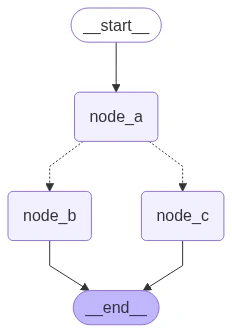 If we run the graph multiple times, we'd see it take different paths (A -> B or A -> C) based on the random choice in node A.
```python theme={"theme":{"light":"catppuccin-latte","dark":"catppuccin-mocha"}}
graph.invoke({"foo": ""})
```
```
Called A
Called C
```
### Navigate to a node in a parent graph
If you are using [subgraphs](/oss/python/langgraph/use-subgraphs), you might want to navigate from a node within a subgraph to a different subgraph (i.e. a different node in the parent graph). To do so, you can specify `graph=Command.PARENT` in `Command`:
```python theme={"theme":{"light":"catppuccin-latte","dark":"catppuccin-mocha"}}
def my_node(state: State) -> Command[Literal["my_other_node"]]:
return Command(
update={"foo": "bar"},
goto="other_subgraph", # where `other_subgraph` is a node in the parent graph
graph=Command.PARENT
)
```
Let's demonstrate this using the above example. We'll do so by changing `nodeA` in the above example into a single-node graph that we'll add as a subgraph to our parent graph.
**State updates with `Command.PARENT`**
When you send updates from a subgraph node to a parent graph node for a key that's shared by both parent and subgraph [state schemas](/oss/python/langgraph/graph-api#schema), you **must** define a [reducer](/oss/python/langgraph/graph-api#reducers) for the key you're updating in the parent graph state. See the example below.
```python theme={"theme":{"light":"catppuccin-latte","dark":"catppuccin-mocha"}}
import operator
from typing_extensions import Annotated
class State(TypedDict):
# NOTE: we define a reducer here
foo: Annotated[str, operator.add] # [!code highlight]
def node_a(state: State):
print("Called A")
value = random.choice(["a", "b"])
# this is a replacement for a conditional edge function
if value == "a":
goto = "node_b"
else:
goto = "node_c"
# note how Command allows you to BOTH update the graph state AND route to the next node
return Command(
update={"foo": value},
goto=goto,
# this tells LangGraph to navigate to node_b or node_c in the parent graph
# NOTE: this will navigate to the closest parent graph relative to the subgraph
graph=Command.PARENT, # [!code highlight]
)
subgraph = StateGraph(State).add_node(node_a).add_edge(START, "node_a").compile()
def node_b(state: State):
print("Called B")
# NOTE: since we've defined a reducer, we don't need to manually append
# new characters to existing 'foo' value. instead, reducer will append these
# automatically (via operator.add)
return {"foo": "b"} # [!code highlight]
def node_c(state: State):
print("Called C")
return {"foo": "c"} # [!code highlight]
builder = StateGraph(State)
builder.add_edge(START, "subgraph")
builder.add_node("subgraph", subgraph)
builder.add_node(node_b)
builder.add_node(node_c)
graph = builder.compile()
```
```python theme={"theme":{"light":"catppuccin-latte","dark":"catppuccin-mocha"}}
graph.invoke({"foo": ""})
```
```
Called A
Called C
```
### Use inside tools
A common use case is updating graph state from inside a tool. For example, in a customer support application you might want to look up customer information based on their account number or ID in the beginning of the conversation. To update the graph state from the tool, you can return `Command(update={"my_custom_key": "foo", "messages": [...]})` from the tool:
```python theme={"theme":{"light":"catppuccin-latte","dark":"catppuccin-mocha"}}
from langchain.tools import ToolRuntime
@tool
def lookup_user_info(runtime: ToolRuntime):
"""Use this to look up user information to better assist them with their questions."""
user_info = get_user_info(runtime.server_info.user.identity) # [!code highlight]
return Command(
update={
# update the state keys
"user_info": user_info,
# update the message history
"messages": [ToolMessage("Successfully looked up user information", tool_call_id=runtime.tool_call_id)]
}
)
```
You MUST include `messages` (or any state key used for the message history) in `Command.update` when returning [`Command`](https://reference.langchain.com/python/langgraph/types/Command) from a tool and the list of messages in `messages` MUST contain a `ToolMessage`. This is necessary for the resulting message history to be valid (LLM providers require AI messages with tool calls to be followed by the tool result messages).
If you are using tools that update state via [`Command`](https://reference.langchain.com/python/langgraph/types/Command), we recommend using prebuilt [`ToolNode`](https://reference.langchain.com/python/langgraph/agents/#langgraph.prebuilt.tool_node.ToolNode) which automatically handles tools returning [`Command`](https://reference.langchain.com/python/langgraph/types/Command) objects and propagates them to the graph state. If you're writing a custom node that calls tools, you would need to manually propagate [`Command`](https://reference.langchain.com/python/langgraph/types/Command) objects returned by the tools as the update from the node.
## Visualize your graph
Here we demonstrate how to visualize the graphs you create.
You can visualize any arbitrary [Graph](https://langchain-ai.github.io/langgraph/reference/graphs/), including [StateGraph](https://langchain-ai.github.io/langgraph/reference/graphs/#langgraph.graph.state.StateGraph).
Let's have some fun by drawing fractals :).
```python theme={"theme":{"light":"catppuccin-latte","dark":"catppuccin-mocha"}}
import random
from typing import Annotated, Literal
from typing_extensions import TypedDict
from langgraph.graph import StateGraph, START, END
from langgraph.graph.message import add_messages
class State(TypedDict):
messages: Annotated[list, add_messages]
class MyNode:
def __init__(self, name: str):
self.name = name
def __call__(self, state: State):
return {"messages": [("assistant", f"Called node {self.name}")]}
def route(state) -> Literal["entry_node", END]:
if len(state["messages"]) > 10:
return END
return "entry_node"
def add_fractal_nodes(builder, current_node, level, max_level):
if level > max_level:
return
# Number of nodes to create at this level
num_nodes = random.randint(1, 3) # Adjust randomness as needed
for i in range(num_nodes):
nm = ["A", "B", "C"][i]
node_name = f"node_{current_node}_{nm}"
builder.add_node(node_name, MyNode(node_name))
builder.add_edge(current_node, node_name)
# Recursively add more nodes
r = random.random()
if r > 0.2 and level + 1 < max_level:
add_fractal_nodes(builder, node_name, level + 1, max_level)
elif r > 0.05:
builder.add_conditional_edges(node_name, route, node_name)
else:
# End
builder.add_edge(node_name, END)
def build_fractal_graph(max_level: int):
builder = StateGraph(State)
entry_point = "entry_node"
builder.add_node(entry_point, MyNode(entry_point))
builder.add_edge(START, entry_point)
add_fractal_nodes(builder, entry_point, 1, max_level)
# Optional: set a finish point if required
builder.add_edge(entry_point, END) # or any specific node
return builder.compile()
app = build_fractal_graph(3)
```
### Mermaid
We can also convert a graph class into Mermaid syntax.
```python theme={"theme":{"light":"catppuccin-latte","dark":"catppuccin-mocha"}}
print(app.get_graph().draw_mermaid())
```
```
%%{init: {'flowchart': {'curve': 'linear'}}}%%
graph TD;
tart__([
If we run the graph multiple times, we'd see it take different paths (A -> B or A -> C) based on the random choice in node A.
```python theme={"theme":{"light":"catppuccin-latte","dark":"catppuccin-mocha"}}
graph.invoke({"foo": ""})
```
```
Called A
Called C
```
### Navigate to a node in a parent graph
If you are using [subgraphs](/oss/python/langgraph/use-subgraphs), you might want to navigate from a node within a subgraph to a different subgraph (i.e. a different node in the parent graph). To do so, you can specify `graph=Command.PARENT` in `Command`:
```python theme={"theme":{"light":"catppuccin-latte","dark":"catppuccin-mocha"}}
def my_node(state: State) -> Command[Literal["my_other_node"]]:
return Command(
update={"foo": "bar"},
goto="other_subgraph", # where `other_subgraph` is a node in the parent graph
graph=Command.PARENT
)
```
Let's demonstrate this using the above example. We'll do so by changing `nodeA` in the above example into a single-node graph that we'll add as a subgraph to our parent graph.
**State updates with `Command.PARENT`**
When you send updates from a subgraph node to a parent graph node for a key that's shared by both parent and subgraph [state schemas](/oss/python/langgraph/graph-api#schema), you **must** define a [reducer](/oss/python/langgraph/graph-api#reducers) for the key you're updating in the parent graph state. See the example below.
```python theme={"theme":{"light":"catppuccin-latte","dark":"catppuccin-mocha"}}
import operator
from typing_extensions import Annotated
class State(TypedDict):
# NOTE: we define a reducer here
foo: Annotated[str, operator.add] # [!code highlight]
def node_a(state: State):
print("Called A")
value = random.choice(["a", "b"])
# this is a replacement for a conditional edge function
if value == "a":
goto = "node_b"
else:
goto = "node_c"
# note how Command allows you to BOTH update the graph state AND route to the next node
return Command(
update={"foo": value},
goto=goto,
# this tells LangGraph to navigate to node_b or node_c in the parent graph
# NOTE: this will navigate to the closest parent graph relative to the subgraph
graph=Command.PARENT, # [!code highlight]
)
subgraph = StateGraph(State).add_node(node_a).add_edge(START, "node_a").compile()
def node_b(state: State):
print("Called B")
# NOTE: since we've defined a reducer, we don't need to manually append
# new characters to existing 'foo' value. instead, reducer will append these
# automatically (via operator.add)
return {"foo": "b"} # [!code highlight]
def node_c(state: State):
print("Called C")
return {"foo": "c"} # [!code highlight]
builder = StateGraph(State)
builder.add_edge(START, "subgraph")
builder.add_node("subgraph", subgraph)
builder.add_node(node_b)
builder.add_node(node_c)
graph = builder.compile()
```
```python theme={"theme":{"light":"catppuccin-latte","dark":"catppuccin-mocha"}}
graph.invoke({"foo": ""})
```
```
Called A
Called C
```
### Use inside tools
A common use case is updating graph state from inside a tool. For example, in a customer support application you might want to look up customer information based on their account number or ID in the beginning of the conversation. To update the graph state from the tool, you can return `Command(update={"my_custom_key": "foo", "messages": [...]})` from the tool:
```python theme={"theme":{"light":"catppuccin-latte","dark":"catppuccin-mocha"}}
from langchain.tools import ToolRuntime
@tool
def lookup_user_info(runtime: ToolRuntime):
"""Use this to look up user information to better assist them with their questions."""
user_info = get_user_info(runtime.server_info.user.identity) # [!code highlight]
return Command(
update={
# update the state keys
"user_info": user_info,
# update the message history
"messages": [ToolMessage("Successfully looked up user information", tool_call_id=runtime.tool_call_id)]
}
)
```
You MUST include `messages` (or any state key used for the message history) in `Command.update` when returning [`Command`](https://reference.langchain.com/python/langgraph/types/Command) from a tool and the list of messages in `messages` MUST contain a `ToolMessage`. This is necessary for the resulting message history to be valid (LLM providers require AI messages with tool calls to be followed by the tool result messages).
If you are using tools that update state via [`Command`](https://reference.langchain.com/python/langgraph/types/Command), we recommend using prebuilt [`ToolNode`](https://reference.langchain.com/python/langgraph/agents/#langgraph.prebuilt.tool_node.ToolNode) which automatically handles tools returning [`Command`](https://reference.langchain.com/python/langgraph/types/Command) objects and propagates them to the graph state. If you're writing a custom node that calls tools, you would need to manually propagate [`Command`](https://reference.langchain.com/python/langgraph/types/Command) objects returned by the tools as the update from the node.
## Visualize your graph
Here we demonstrate how to visualize the graphs you create.
You can visualize any arbitrary [Graph](https://langchain-ai.github.io/langgraph/reference/graphs/), including [StateGraph](https://langchain-ai.github.io/langgraph/reference/graphs/#langgraph.graph.state.StateGraph).
Let's have some fun by drawing fractals :).
```python theme={"theme":{"light":"catppuccin-latte","dark":"catppuccin-mocha"}}
import random
from typing import Annotated, Literal
from typing_extensions import TypedDict
from langgraph.graph import StateGraph, START, END
from langgraph.graph.message import add_messages
class State(TypedDict):
messages: Annotated[list, add_messages]
class MyNode:
def __init__(self, name: str):
self.name = name
def __call__(self, state: State):
return {"messages": [("assistant", f"Called node {self.name}")]}
def route(state) -> Literal["entry_node", END]:
if len(state["messages"]) > 10:
return END
return "entry_node"
def add_fractal_nodes(builder, current_node, level, max_level):
if level > max_level:
return
# Number of nodes to create at this level
num_nodes = random.randint(1, 3) # Adjust randomness as needed
for i in range(num_nodes):
nm = ["A", "B", "C"][i]
node_name = f"node_{current_node}_{nm}"
builder.add_node(node_name, MyNode(node_name))
builder.add_edge(current_node, node_name)
# Recursively add more nodes
r = random.random()
if r > 0.2 and level + 1 < max_level:
add_fractal_nodes(builder, node_name, level + 1, max_level)
elif r > 0.05:
builder.add_conditional_edges(node_name, route, node_name)
else:
# End
builder.add_edge(node_name, END)
def build_fractal_graph(max_level: int):
builder = StateGraph(State)
entry_point = "entry_node"
builder.add_node(entry_point, MyNode(entry_point))
builder.add_edge(START, entry_point)
add_fractal_nodes(builder, entry_point, 1, max_level)
# Optional: set a finish point if required
builder.add_edge(entry_point, END) # or any specific node
return builder.compile()
app = build_fractal_graph(3)
```
### Mermaid
We can also convert a graph class into Mermaid syntax.
```python theme={"theme":{"light":"catppuccin-latte","dark":"catppuccin-mocha"}}
print(app.get_graph().draw_mermaid())
```
```
%%{init: {'flowchart': {'curve': 'linear'}}}%%
graph TD;
tart__([__start__
]):::first
ry_node(entry_node)
e_entry_node_A(node_entry_node_A)
e_entry_node_B(node_entry_node_B)
e_node_entry_node_B_A(node_node_entry_node_B_A)
e_node_entry_node_B_B(node_node_entry_node_B_B)
e_node_entry_node_B_C(node_node_entry_node_B_C)
nd__([__end__
]):::last
tart__ --> entry_node;
ry_node --> __end__;
ry_node --> node_entry_node_A;
ry_node --> node_entry_node_B;
e_entry_node_B --> node_node_entry_node_B_A;
e_entry_node_B --> node_node_entry_node_B_B;
e_entry_node_B --> node_node_entry_node_B_C;
e_entry_node_A -.-> entry_node;
e_entry_node_A -.-> __end__;
e_node_entry_node_B_A -.-> entry_node;
e_node_entry_node_B_A -.-> __end__;
e_node_entry_node_B_B -.-> entry_node;
e_node_entry_node_B_B -.-> __end__;
e_node_entry_node_B_C -.-> entry_node;
e_node_entry_node_B_C -.-> __end__;
ssDef default fill:#f2f0ff,line-height:1.2
ssDef first fill-opacity:0
ssDef last fill:#bfb6fc
```
### PNG
If preferred, we could render the Graph into a `.png`. Here we could use three options:
* Using Mermaid.ink API (does not require additional packages)
* Using Mermaid + Pyppeteer (requires `pip install pyppeteer`)
* Using graphviz (which requires `pip install graphviz`)
**Using Mermaid.Ink**
By default, `draw_mermaid_png()` uses Mermaid.Ink's API to generate the diagram.
```python theme={"theme":{"light":"catppuccin-latte","dark":"catppuccin-mocha"}}
from IPython.display import Image, display
from langchain_core.runnables.graph import CurveStyle, MermaidDrawMethod, NodeStyles
display(Image(app.get_graph().draw_mermaid_png()))
```
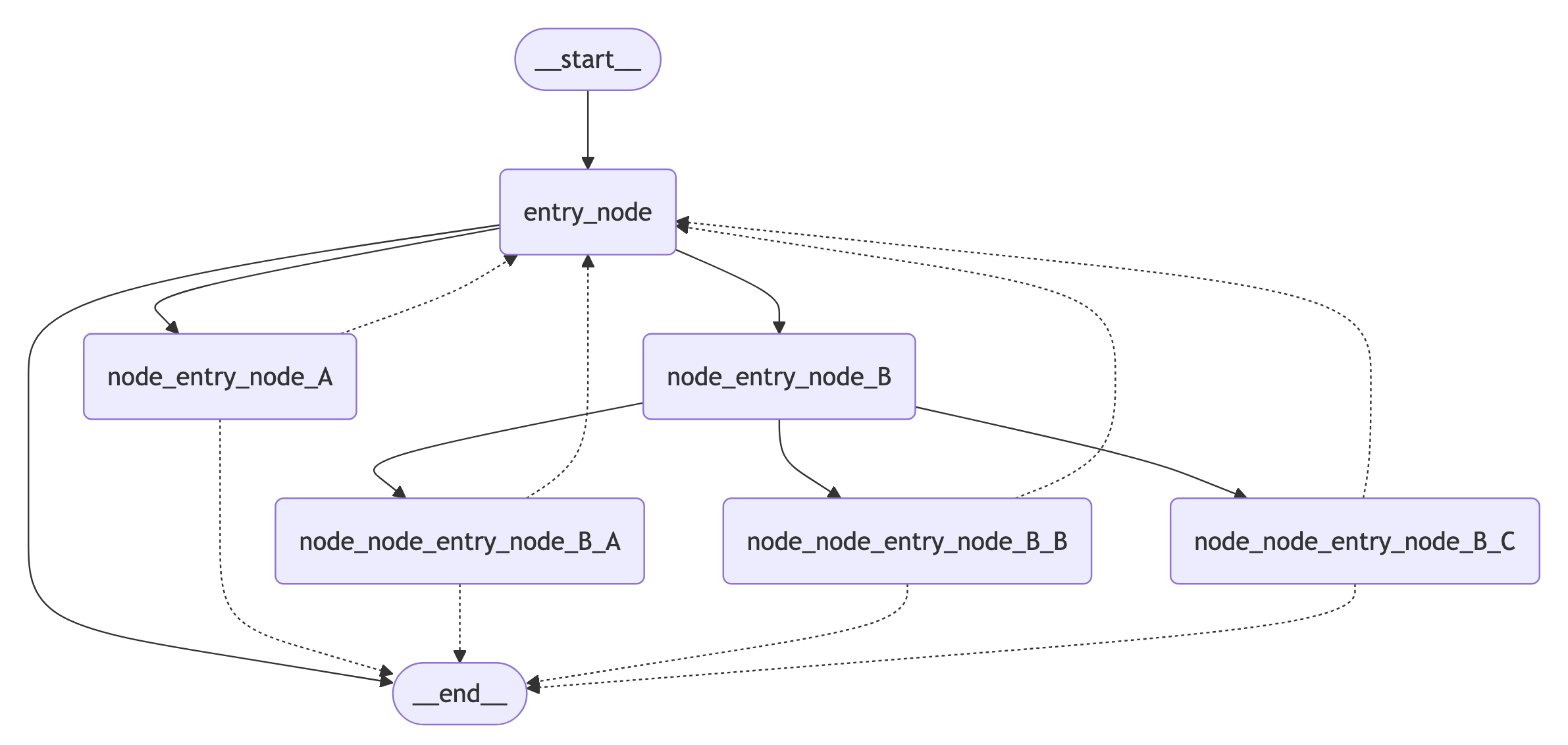 **Using Mermaid + Pyppeteer**
```python theme={"theme":{"light":"catppuccin-latte","dark":"catppuccin-mocha"}}
import nest_asyncio
nest_asyncio.apply() # Required for Jupyter Notebook to run async functions
display(
Image(
app.get_graph().draw_mermaid_png(
curve_style=CurveStyle.LINEAR,
node_colors=NodeStyles(first="#ffdfba", last="#baffc9", default="#fad7de"),
wrap_label_n_words=9,
output_file_path=None,
draw_method=MermaidDrawMethod.PYPPETEER,
background_color="white",
padding=10,
)
)
)
```
**Using Graphviz**
```python theme={"theme":{"light":"catppuccin-latte","dark":"catppuccin-mocha"}}
try:
display(Image(app.get_graph().draw_png()))
except ImportError:
print(
"You likely need to install dependencies for pygraphviz, see more here https://github.com/pygraphviz/pygraphviz/blob/main/INSTALL.txt"
)
```
***
**Using Mermaid + Pyppeteer**
```python theme={"theme":{"light":"catppuccin-latte","dark":"catppuccin-mocha"}}
import nest_asyncio
nest_asyncio.apply() # Required for Jupyter Notebook to run async functions
display(
Image(
app.get_graph().draw_mermaid_png(
curve_style=CurveStyle.LINEAR,
node_colors=NodeStyles(first="#ffdfba", last="#baffc9", default="#fad7de"),
wrap_label_n_words=9,
output_file_path=None,
draw_method=MermaidDrawMethod.PYPPETEER,
background_color="white",
padding=10,
)
)
)
```
**Using Graphviz**
```python theme={"theme":{"light":"catppuccin-latte","dark":"catppuccin-mocha"}}
try:
display(Image(app.get_graph().draw_png()))
except ImportError:
print(
"You likely need to install dependencies for pygraphviz, see more here https://github.com/pygraphviz/pygraphviz/blob/main/INSTALL.txt"
)
```
***
[Connect these docs](/use-these-docs) to Claude, VSCode, and more via MCP for real-time answers.
[Edit this page on GitHub](https://github.com/langchain-ai/docs/edit/main/src/oss/langgraph/use-graph-api.mdx) or [file an issue](https://github.com/langchain-ai/docs/issues/new/choose).