> ## Documentation Index
> Fetch the complete documentation index at: https://docs.langchain.com/llms.txt
> Use this file to discover all available pages before exploring further.
# Workflows and agents
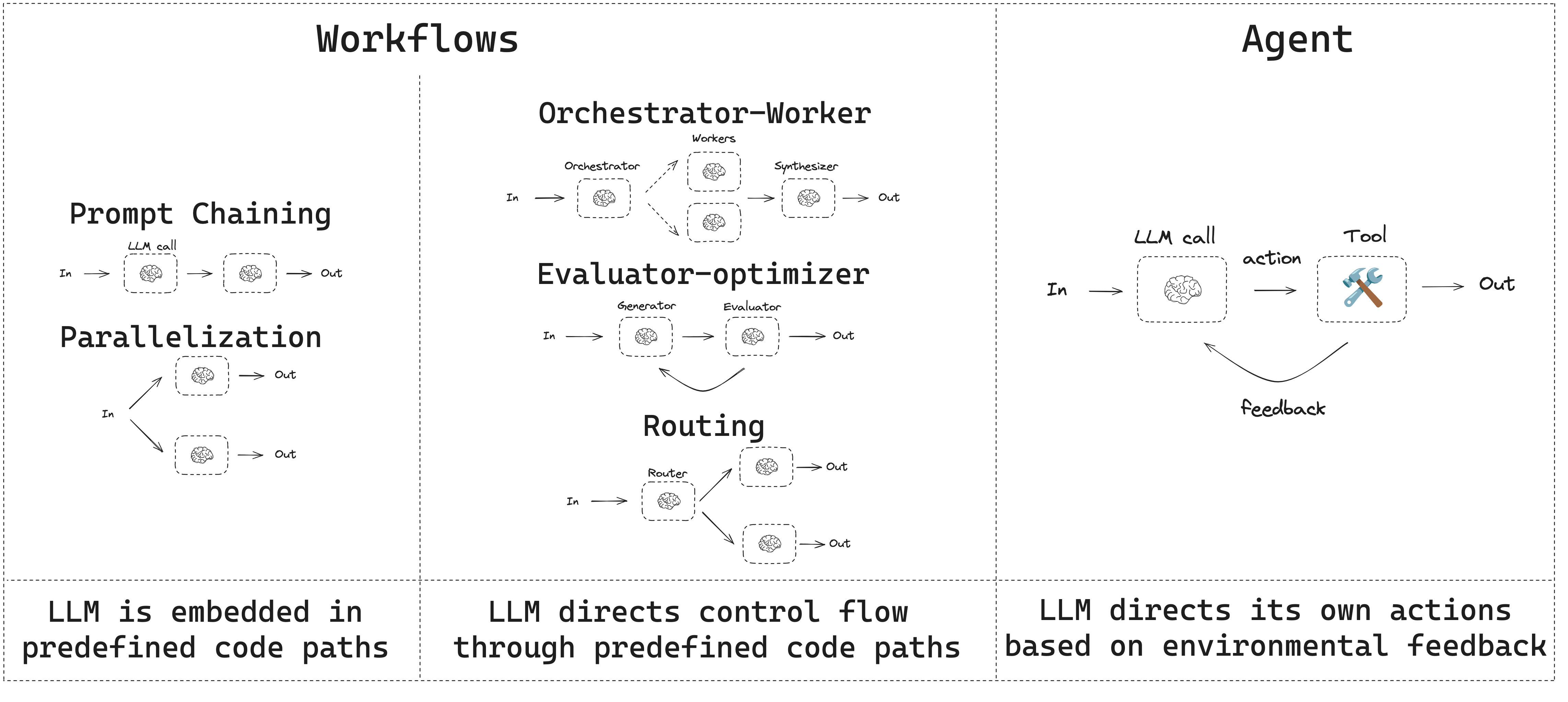
This guide reviews common workflow and agent patterns.
* Workflows have predetermined code paths and are designed to operate in a certain order.
* Agents are dynamic and define their own processes and tool usage.
 LangGraph offers several benefits when building agents and workflows, including [persistence](/oss/python/langgraph/persistence), [streaming](/oss/python/langgraph/streaming), and support for debugging as well as [deployment](/oss/python/langgraph/deploy).
Trace and compare these workflow patterns with [LangSmith](https://smith.langchain.com?utm_source=docs\&utm_medium=cta\&utm_campaign=langsmith-signup\&utm_content=oss-langgraph-workflows-agents). Follow the [tracing quickstart](/langsmith/trace-with-langgraph) to see how data flows through each step.
## Setup
To build a workflow or agent, you can use [any chat model](/oss/python/integrations/chat) that supports structured outputs and tool calling. The following example uses Anthropic:
1. Install dependencies:
```bash theme={"theme":{"light":"catppuccin-latte","dark":"catppuccin-mocha"}}
pip install langchain_core langchain-anthropic langgraph
```
2. Initialize the LLM:
```python theme={"theme":{"light":"catppuccin-latte","dark":"catppuccin-mocha"}}
import os
import getpass
from langchain_anthropic import ChatAnthropic
def _set_env(var: str):
if not os.environ.get(var):
os.environ[var] = getpass.getpass(f"{var}: ")
_set_env("ANTHROPIC_API_KEY")
llm = ChatAnthropic(model="claude-sonnet-4-6")
```
## LLMs and augmentations
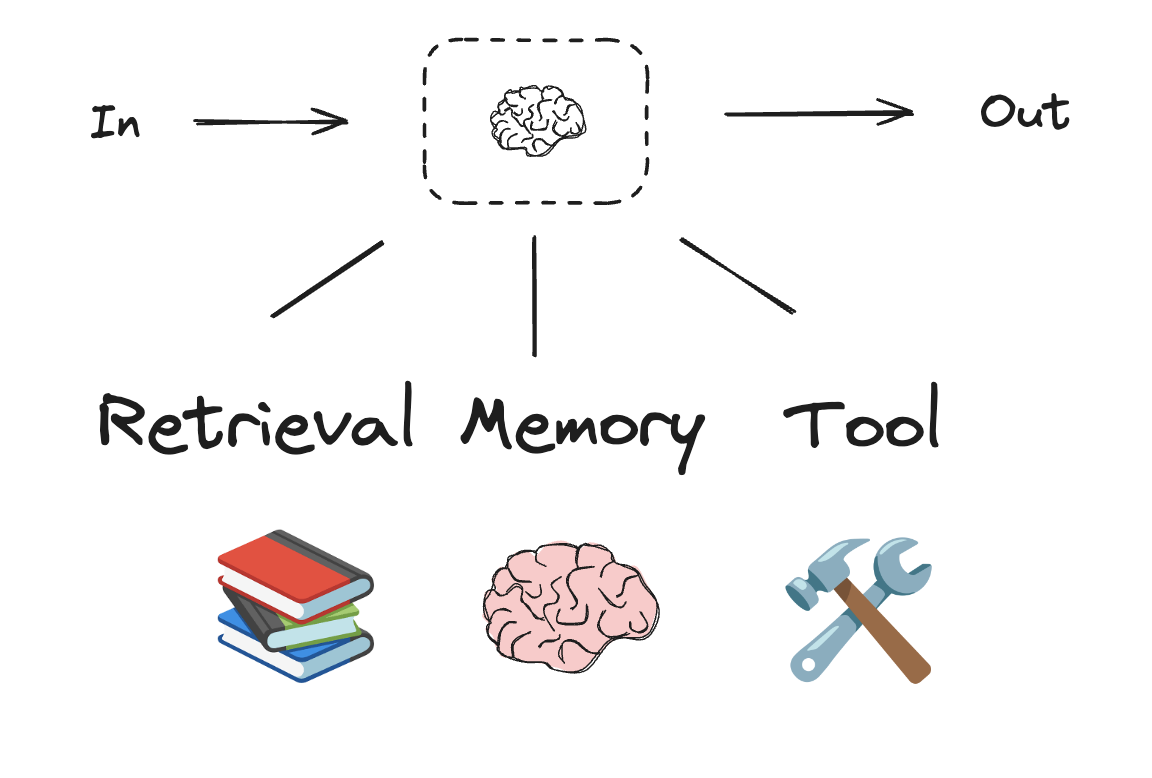
Workflows and agentic systems are based on LLMs and the various augmentations you add to them. [Tool calling](/oss/python/langchain/tools), [structured outputs](/oss/python/langchain/structured-output), and [short term memory](/oss/python/langchain/short-term-memory) are a few options for tailoring LLMs to your needs.
LangGraph offers several benefits when building agents and workflows, including [persistence](/oss/python/langgraph/persistence), [streaming](/oss/python/langgraph/streaming), and support for debugging as well as [deployment](/oss/python/langgraph/deploy).
Trace and compare these workflow patterns with [LangSmith](https://smith.langchain.com?utm_source=docs\&utm_medium=cta\&utm_campaign=langsmith-signup\&utm_content=oss-langgraph-workflows-agents). Follow the [tracing quickstart](/langsmith/trace-with-langgraph) to see how data flows through each step.
## Setup
To build a workflow or agent, you can use [any chat model](/oss/python/integrations/chat) that supports structured outputs and tool calling. The following example uses Anthropic:
1. Install dependencies:
```bash theme={"theme":{"light":"catppuccin-latte","dark":"catppuccin-mocha"}}
pip install langchain_core langchain-anthropic langgraph
```
2. Initialize the LLM:
```python theme={"theme":{"light":"catppuccin-latte","dark":"catppuccin-mocha"}}
import os
import getpass
from langchain_anthropic import ChatAnthropic
def _set_env(var: str):
if not os.environ.get(var):
os.environ[var] = getpass.getpass(f"{var}: ")
_set_env("ANTHROPIC_API_KEY")
llm = ChatAnthropic(model="claude-sonnet-4-6")
```
## LLMs and augmentations
Workflows and agentic systems are based on LLMs and the various augmentations you add to them. [Tool calling](/oss/python/langchain/tools), [structured outputs](/oss/python/langchain/structured-output), and [short term memory](/oss/python/langchain/short-term-memory) are a few options for tailoring LLMs to your needs.
 ```python theme={"theme":{"light":"catppuccin-latte","dark":"catppuccin-mocha"}}
# Schema for structured output
from pydantic import BaseModel, Field
class SearchQuery(BaseModel):
search_query: str = Field(None, description="Query that is optimized web search.")
justification: str = Field(
None, description="Why this query is relevant to the user's request."
)
# Augment the LLM with schema for structured output
structured_llm = llm.with_structured_output(SearchQuery)
# Invoke the augmented LLM
output = structured_llm.invoke("How does Calcium CT score relate to high cholesterol?")
# Define a tool
def multiply(a: int, b: int) -> int:
return a * b
# Augment the LLM with tools
llm_with_tools = llm.bind_tools([multiply])
# Invoke the LLM with input that triggers the tool call
msg = llm_with_tools.invoke("What is 2 times 3?")
# Get the tool call
msg.tool_calls
```
## Prompt chaining
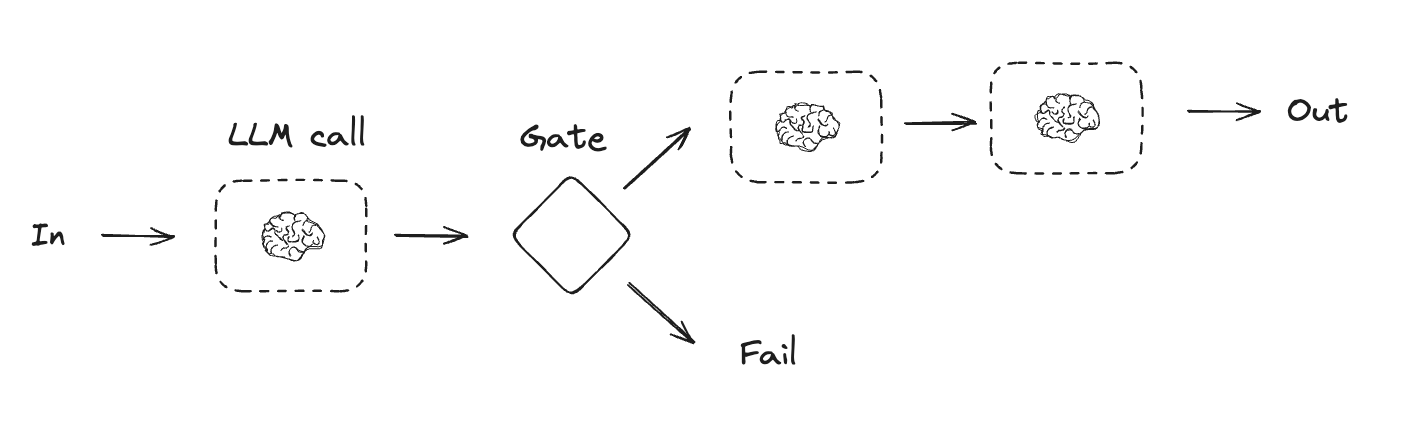
Prompt chaining is when each LLM call processes the output of the previous call. It's often used for performing well-defined tasks that can be broken down into smaller, verifiable steps. Some examples include:
* Translating documents into different languages
* Verifying generated content for consistency
```python theme={"theme":{"light":"catppuccin-latte","dark":"catppuccin-mocha"}}
# Schema for structured output
from pydantic import BaseModel, Field
class SearchQuery(BaseModel):
search_query: str = Field(None, description="Query that is optimized web search.")
justification: str = Field(
None, description="Why this query is relevant to the user's request."
)
# Augment the LLM with schema for structured output
structured_llm = llm.with_structured_output(SearchQuery)
# Invoke the augmented LLM
output = structured_llm.invoke("How does Calcium CT score relate to high cholesterol?")
# Define a tool
def multiply(a: int, b: int) -> int:
return a * b
# Augment the LLM with tools
llm_with_tools = llm.bind_tools([multiply])
# Invoke the LLM with input that triggers the tool call
msg = llm_with_tools.invoke("What is 2 times 3?")
# Get the tool call
msg.tool_calls
```
## Prompt chaining
Prompt chaining is when each LLM call processes the output of the previous call. It's often used for performing well-defined tasks that can be broken down into smaller, verifiable steps. Some examples include:
* Translating documents into different languages
* Verifying generated content for consistency
 ```python Graph API theme={"theme":{"light":"catppuccin-latte","dark":"catppuccin-mocha"}}
from typing_extensions import TypedDict
from langgraph.graph import StateGraph, START, END
from IPython.display import Image, display
# Graph state
class State(TypedDict):
topic: str
joke: str
improved_joke: str
final_joke: str
# Nodes
def generate_joke(state: State):
"""First LLM call to generate initial joke"""
msg = llm.invoke(f"Write a short joke about {state['topic']}")
return {"joke": msg.content}
def check_punchline(state: State):
"""Gate function to check if the joke has a punchline"""
# Simple check - does the joke contain "?" or "!"
if "?" in state["joke"] or "!" in state["joke"]:
return "Pass"
return "Fail"
def improve_joke(state: State):
"""Second LLM call to improve the joke"""
msg = llm.invoke(f"Make this joke funnier by adding wordplay: {state['joke']}")
return {"improved_joke": msg.content}
def polish_joke(state: State):
"""Third LLM call for final polish"""
msg = llm.invoke(f"Add a surprising twist to this joke: {state['improved_joke']}")
return {"final_joke": msg.content}
# Build workflow
workflow = StateGraph(State)
# Add nodes
workflow.add_node("generate_joke", generate_joke)
workflow.add_node("improve_joke", improve_joke)
workflow.add_node("polish_joke", polish_joke)
# Add edges to connect nodes
workflow.add_edge(START, "generate_joke")
workflow.add_conditional_edges(
"generate_joke", check_punchline, {"Fail": "improve_joke", "Pass": END}
)
workflow.add_edge("improve_joke", "polish_joke")
workflow.add_edge("polish_joke", END)
# Compile
chain = workflow.compile()
# Show workflow
display(Image(chain.get_graph().draw_mermaid_png()))
# Invoke
state = chain.invoke({"topic": "cats"})
print("Initial joke:")
print(state["joke"])
print("\n--- --- ---\n")
if "improved_joke" in state:
print("Improved joke:")
print(state["improved_joke"])
print("\n--- --- ---\n")
print("Final joke:")
print(state["final_joke"])
else:
print("Final joke:")
print(state["joke"])
```
```python Functional API theme={"theme":{"light":"catppuccin-latte","dark":"catppuccin-mocha"}}
from langgraph.func import entrypoint, task
# Tasks
@task
def generate_joke(topic: str):
"""First LLM call to generate initial joke"""
msg = llm.invoke(f"Write a short joke about {topic}")
return msg.content
def check_punchline(joke: str):
"""Gate function to check if the joke has a punchline"""
# Simple check - does the joke contain "?" or "!"
if "?" in joke or "!" in joke:
return "Fail"
return "Pass"
@task
def improve_joke(joke: str):
"""Second LLM call to improve the joke"""
msg = llm.invoke(f"Make this joke funnier by adding wordplay: {joke}")
return msg.content
@task
def polish_joke(joke: str):
"""Third LLM call for final polish"""
msg = llm.invoke(f"Add a surprising twist to this joke: {joke}")
return msg.content
@entrypoint()
def prompt_chaining_workflow(topic: str):
original_joke = generate_joke(topic).result()
if check_punchline(original_joke) == "Pass":
return original_joke
improved_joke = improve_joke(original_joke).result()
return polish_joke(improved_joke).result()
# Invoke
for step in prompt_chaining_workflow.stream("cats", stream_mode="updates"):
print(step)
print("\n")
```
## Parallelization
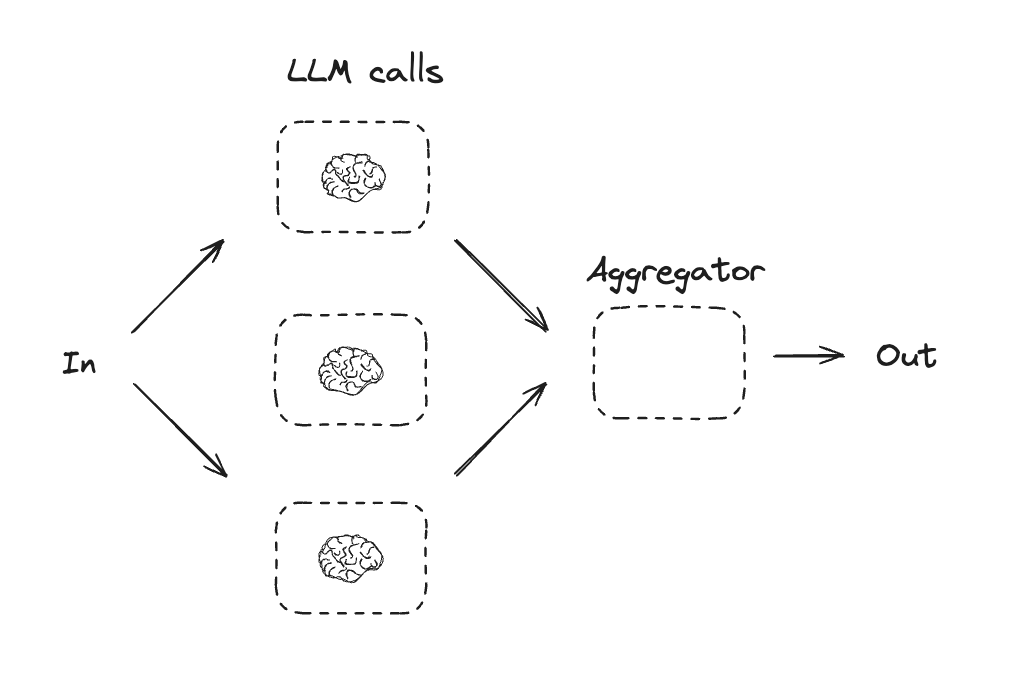
With parallelization, LLMs work simultaneously on a task. This is either done by running multiple independent subtasks at the same time, or running the same task multiple times to check for different outputs. Parallelization is commonly used to:
* Split up subtasks and run them in parallel, which increases speed
* Run tasks multiple times to check for different outputs, which increases confidence
Some examples include:
* Running one subtask that processes a document for keywords, and a second subtask to check for formatting errors
* Running a task multiple times that scores a document for accuracy based on different criteria, like the number of citations, the number of sources used, and the quality of the sources
```python Graph API theme={"theme":{"light":"catppuccin-latte","dark":"catppuccin-mocha"}}
from typing_extensions import TypedDict
from langgraph.graph import StateGraph, START, END
from IPython.display import Image, display
# Graph state
class State(TypedDict):
topic: str
joke: str
improved_joke: str
final_joke: str
# Nodes
def generate_joke(state: State):
"""First LLM call to generate initial joke"""
msg = llm.invoke(f"Write a short joke about {state['topic']}")
return {"joke": msg.content}
def check_punchline(state: State):
"""Gate function to check if the joke has a punchline"""
# Simple check - does the joke contain "?" or "!"
if "?" in state["joke"] or "!" in state["joke"]:
return "Pass"
return "Fail"
def improve_joke(state: State):
"""Second LLM call to improve the joke"""
msg = llm.invoke(f"Make this joke funnier by adding wordplay: {state['joke']}")
return {"improved_joke": msg.content}
def polish_joke(state: State):
"""Third LLM call for final polish"""
msg = llm.invoke(f"Add a surprising twist to this joke: {state['improved_joke']}")
return {"final_joke": msg.content}
# Build workflow
workflow = StateGraph(State)
# Add nodes
workflow.add_node("generate_joke", generate_joke)
workflow.add_node("improve_joke", improve_joke)
workflow.add_node("polish_joke", polish_joke)
# Add edges to connect nodes
workflow.add_edge(START, "generate_joke")
workflow.add_conditional_edges(
"generate_joke", check_punchline, {"Fail": "improve_joke", "Pass": END}
)
workflow.add_edge("improve_joke", "polish_joke")
workflow.add_edge("polish_joke", END)
# Compile
chain = workflow.compile()
# Show workflow
display(Image(chain.get_graph().draw_mermaid_png()))
# Invoke
state = chain.invoke({"topic": "cats"})
print("Initial joke:")
print(state["joke"])
print("\n--- --- ---\n")
if "improved_joke" in state:
print("Improved joke:")
print(state["improved_joke"])
print("\n--- --- ---\n")
print("Final joke:")
print(state["final_joke"])
else:
print("Final joke:")
print(state["joke"])
```
```python Functional API theme={"theme":{"light":"catppuccin-latte","dark":"catppuccin-mocha"}}
from langgraph.func import entrypoint, task
# Tasks
@task
def generate_joke(topic: str):
"""First LLM call to generate initial joke"""
msg = llm.invoke(f"Write a short joke about {topic}")
return msg.content
def check_punchline(joke: str):
"""Gate function to check if the joke has a punchline"""
# Simple check - does the joke contain "?" or "!"
if "?" in joke or "!" in joke:
return "Fail"
return "Pass"
@task
def improve_joke(joke: str):
"""Second LLM call to improve the joke"""
msg = llm.invoke(f"Make this joke funnier by adding wordplay: {joke}")
return msg.content
@task
def polish_joke(joke: str):
"""Third LLM call for final polish"""
msg = llm.invoke(f"Add a surprising twist to this joke: {joke}")
return msg.content
@entrypoint()
def prompt_chaining_workflow(topic: str):
original_joke = generate_joke(topic).result()
if check_punchline(original_joke) == "Pass":
return original_joke
improved_joke = improve_joke(original_joke).result()
return polish_joke(improved_joke).result()
# Invoke
for step in prompt_chaining_workflow.stream("cats", stream_mode="updates"):
print(step)
print("\n")
```
## Parallelization
With parallelization, LLMs work simultaneously on a task. This is either done by running multiple independent subtasks at the same time, or running the same task multiple times to check for different outputs. Parallelization is commonly used to:
* Split up subtasks and run them in parallel, which increases speed
* Run tasks multiple times to check for different outputs, which increases confidence
Some examples include:
* Running one subtask that processes a document for keywords, and a second subtask to check for formatting errors
* Running a task multiple times that scores a document for accuracy based on different criteria, like the number of citations, the number of sources used, and the quality of the sources
 ```python Graph API theme={"theme":{"light":"catppuccin-latte","dark":"catppuccin-mocha"}}
# Graph state
class State(TypedDict):
topic: str
joke: str
story: str
poem: str
combined_output: str
# Nodes
def call_llm_1(state: State):
"""First LLM call to generate initial joke"""
msg = llm.invoke(f"Write a joke about {state['topic']}")
return {"joke": msg.content}
def call_llm_2(state: State):
"""Second LLM call to generate story"""
msg = llm.invoke(f"Write a story about {state['topic']}")
return {"story": msg.content}
def call_llm_3(state: State):
"""Third LLM call to generate poem"""
msg = llm.invoke(f"Write a poem about {state['topic']}")
return {"poem": msg.content}
def aggregator(state: State):
"""Combine the joke, story and poem into a single output"""
combined = f"Here's a story, joke, and poem about {state['topic']}!\n\n"
combined += f"STORY:\n{state['story']}\n\n"
combined += f"JOKE:\n{state['joke']}\n\n"
combined += f"POEM:\n{state['poem']}"
return {"combined_output": combined}
# Build workflow
parallel_builder = StateGraph(State)
# Add nodes
parallel_builder.add_node("call_llm_1", call_llm_1)
parallel_builder.add_node("call_llm_2", call_llm_2)
parallel_builder.add_node("call_llm_3", call_llm_3)
parallel_builder.add_node("aggregator", aggregator)
# Add edges to connect nodes
parallel_builder.add_edge(START, "call_llm_1")
parallel_builder.add_edge(START, "call_llm_2")
parallel_builder.add_edge(START, "call_llm_3")
parallel_builder.add_edge("call_llm_1", "aggregator")
parallel_builder.add_edge("call_llm_2", "aggregator")
parallel_builder.add_edge("call_llm_3", "aggregator")
parallel_builder.add_edge("aggregator", END)
parallel_workflow = parallel_builder.compile()
# Show workflow
display(Image(parallel_workflow.get_graph().draw_mermaid_png()))
# Invoke
state = parallel_workflow.invoke({"topic": "cats"})
print(state["combined_output"])
```
```python Functional API theme={"theme":{"light":"catppuccin-latte","dark":"catppuccin-mocha"}}
@task
def call_llm_1(topic: str):
"""First LLM call to generate initial joke"""
msg = llm.invoke(f"Write a joke about {topic}")
return msg.content
@task
def call_llm_2(topic: str):
"""Second LLM call to generate story"""
msg = llm.invoke(f"Write a story about {topic}")
return msg.content
@task
def call_llm_3(topic):
"""Third LLM call to generate poem"""
msg = llm.invoke(f"Write a poem about {topic}")
return msg.content
@task
def aggregator(topic, joke, story, poem):
"""Combine the joke and story into a single output"""
combined = f"Here's a story, joke, and poem about {topic}!\n\n"
combined += f"STORY:\n{story}\n\n"
combined += f"JOKE:\n{joke}\n\n"
combined += f"POEM:\n{poem}"
return combined
# Build workflow
@entrypoint()
def parallel_workflow(topic: str):
joke_fut = call_llm_1(topic)
story_fut = call_llm_2(topic)
poem_fut = call_llm_3(topic)
return aggregator(
topic, joke_fut.result(), story_fut.result(), poem_fut.result()
).result()
# Invoke
for step in parallel_workflow.stream("cats", stream_mode="updates"):
print(step)
print("\n")
```
## Routing
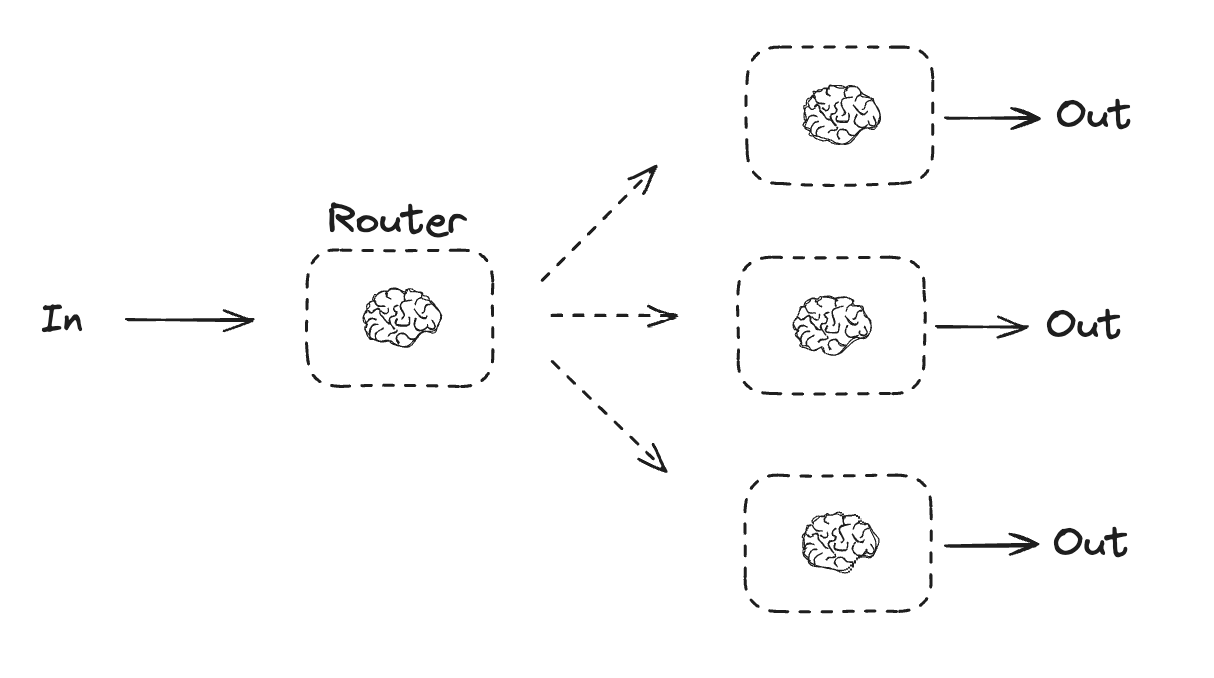
Routing workflows process inputs and then directs them to context-specific tasks. This allows you to define specialized flows for complex tasks. For example, a workflow built to answer product related questions might process the type of question first, and then route the request to specific processes for pricing, refunds, returns, etc.
```python Graph API theme={"theme":{"light":"catppuccin-latte","dark":"catppuccin-mocha"}}
# Graph state
class State(TypedDict):
topic: str
joke: str
story: str
poem: str
combined_output: str
# Nodes
def call_llm_1(state: State):
"""First LLM call to generate initial joke"""
msg = llm.invoke(f"Write a joke about {state['topic']}")
return {"joke": msg.content}
def call_llm_2(state: State):
"""Second LLM call to generate story"""
msg = llm.invoke(f"Write a story about {state['topic']}")
return {"story": msg.content}
def call_llm_3(state: State):
"""Third LLM call to generate poem"""
msg = llm.invoke(f"Write a poem about {state['topic']}")
return {"poem": msg.content}
def aggregator(state: State):
"""Combine the joke, story and poem into a single output"""
combined = f"Here's a story, joke, and poem about {state['topic']}!\n\n"
combined += f"STORY:\n{state['story']}\n\n"
combined += f"JOKE:\n{state['joke']}\n\n"
combined += f"POEM:\n{state['poem']}"
return {"combined_output": combined}
# Build workflow
parallel_builder = StateGraph(State)
# Add nodes
parallel_builder.add_node("call_llm_1", call_llm_1)
parallel_builder.add_node("call_llm_2", call_llm_2)
parallel_builder.add_node("call_llm_3", call_llm_3)
parallel_builder.add_node("aggregator", aggregator)
# Add edges to connect nodes
parallel_builder.add_edge(START, "call_llm_1")
parallel_builder.add_edge(START, "call_llm_2")
parallel_builder.add_edge(START, "call_llm_3")
parallel_builder.add_edge("call_llm_1", "aggregator")
parallel_builder.add_edge("call_llm_2", "aggregator")
parallel_builder.add_edge("call_llm_3", "aggregator")
parallel_builder.add_edge("aggregator", END)
parallel_workflow = parallel_builder.compile()
# Show workflow
display(Image(parallel_workflow.get_graph().draw_mermaid_png()))
# Invoke
state = parallel_workflow.invoke({"topic": "cats"})
print(state["combined_output"])
```
```python Functional API theme={"theme":{"light":"catppuccin-latte","dark":"catppuccin-mocha"}}
@task
def call_llm_1(topic: str):
"""First LLM call to generate initial joke"""
msg = llm.invoke(f"Write a joke about {topic}")
return msg.content
@task
def call_llm_2(topic: str):
"""Second LLM call to generate story"""
msg = llm.invoke(f"Write a story about {topic}")
return msg.content
@task
def call_llm_3(topic):
"""Third LLM call to generate poem"""
msg = llm.invoke(f"Write a poem about {topic}")
return msg.content
@task
def aggregator(topic, joke, story, poem):
"""Combine the joke and story into a single output"""
combined = f"Here's a story, joke, and poem about {topic}!\n\n"
combined += f"STORY:\n{story}\n\n"
combined += f"JOKE:\n{joke}\n\n"
combined += f"POEM:\n{poem}"
return combined
# Build workflow
@entrypoint()
def parallel_workflow(topic: str):
joke_fut = call_llm_1(topic)
story_fut = call_llm_2(topic)
poem_fut = call_llm_3(topic)
return aggregator(
topic, joke_fut.result(), story_fut.result(), poem_fut.result()
).result()
# Invoke
for step in parallel_workflow.stream("cats", stream_mode="updates"):
print(step)
print("\n")
```
## Routing
Routing workflows process inputs and then directs them to context-specific tasks. This allows you to define specialized flows for complex tasks. For example, a workflow built to answer product related questions might process the type of question first, and then route the request to specific processes for pricing, refunds, returns, etc.
 ```python Graph API theme={"theme":{"light":"catppuccin-latte","dark":"catppuccin-mocha"}}
from typing_extensions import Literal
from langchain.messages import HumanMessage, SystemMessage
# Schema for structured output to use as routing logic
class Route(BaseModel):
step: Literal["poem", "story", "joke"] = Field(
None, description="The next step in the routing process"
)
# Augment the LLM with schema for structured output
router = llm.with_structured_output(Route)
# State
class State(TypedDict):
input: str
decision: str
output: str
# Nodes
def llm_call_1(state: State):
"""Write a story"""
result = llm.invoke(state["input"])
return {"output": result.content}
def llm_call_2(state: State):
"""Write a joke"""
result = llm.invoke(state["input"])
return {"output": result.content}
def llm_call_3(state: State):
"""Write a poem"""
result = llm.invoke(state["input"])
return {"output": result.content}
def llm_call_router(state: State):
"""Route the input to the appropriate node"""
# Run the augmented LLM with structured output to serve as routing logic
decision = router.invoke(
[
SystemMessage(
content="Route the input to story, joke, or poem based on the user's request."
),
HumanMessage(content=state["input"]),
]
)
return {"decision": decision.step}
# Conditional edge function to route to the appropriate node
def route_decision(state: State):
# Return the node name you want to visit next
if state["decision"] == "story":
return "llm_call_1"
elif state["decision"] == "joke":
return "llm_call_2"
elif state["decision"] == "poem":
return "llm_call_3"
# Build workflow
router_builder = StateGraph(State)
# Add nodes
router_builder.add_node("llm_call_1", llm_call_1)
router_builder.add_node("llm_call_2", llm_call_2)
router_builder.add_node("llm_call_3", llm_call_3)
router_builder.add_node("llm_call_router", llm_call_router)
# Add edges to connect nodes
router_builder.add_edge(START, "llm_call_router")
router_builder.add_conditional_edges(
"llm_call_router",
route_decision,
{ # Name returned by route_decision : Name of next node to visit
"llm_call_1": "llm_call_1",
"llm_call_2": "llm_call_2",
"llm_call_3": "llm_call_3",
},
)
router_builder.add_edge("llm_call_1", END)
router_builder.add_edge("llm_call_2", END)
router_builder.add_edge("llm_call_3", END)
# Compile workflow
router_workflow = router_builder.compile()
# Show the workflow
display(Image(router_workflow.get_graph().draw_mermaid_png()))
# Invoke
state = router_workflow.invoke({"input": "Write me a joke about cats"})
print(state["output"])
```
```python Functional API theme={"theme":{"light":"catppuccin-latte","dark":"catppuccin-mocha"}}
from typing_extensions import Literal
from pydantic import BaseModel
from langchain.messages import HumanMessage, SystemMessage
# Schema for structured output to use as routing logic
class Route(BaseModel):
step: Literal["poem", "story", "joke"] = Field(
None, description="The next step in the routing process"
)
# Augment the LLM with schema for structured output
router = llm.with_structured_output(Route)
@task
def llm_call_1(input_: str):
"""Write a story"""
result = llm.invoke(input_)
return result.content
@task
def llm_call_2(input_: str):
"""Write a joke"""
result = llm.invoke(input_)
return result.content
@task
def llm_call_3(input_: str):
"""Write a poem"""
result = llm.invoke(input_)
return result.content
def llm_call_router(input_: str):
"""Route the input to the appropriate node"""
# Run the augmented LLM with structured output to serve as routing logic
decision = router.invoke(
[
SystemMessage(
content="Route the input to story, joke, or poem based on the user's request."
),
HumanMessage(content=input_),
]
)
return decision.step
# Create workflow
@entrypoint()
def router_workflow(input_: str):
next_step = llm_call_router(input_)
if next_step == "story":
llm_call = llm_call_1
elif next_step == "joke":
llm_call = llm_call_2
elif next_step == "poem":
llm_call = llm_call_3
return llm_call(input_).result()
# Invoke
for step in router_workflow.stream("Write me a joke about cats", stream_mode="updates"):
print(step)
print("\n")
```
## Orchestrator-worker
In an orchestrator-worker configuration, the orchestrator:
* Breaks down tasks into subtasks
* Delegates subtasks to workers
* Synthesizes worker outputs into a final result
```python Graph API theme={"theme":{"light":"catppuccin-latte","dark":"catppuccin-mocha"}}
from typing_extensions import Literal
from langchain.messages import HumanMessage, SystemMessage
# Schema for structured output to use as routing logic
class Route(BaseModel):
step: Literal["poem", "story", "joke"] = Field(
None, description="The next step in the routing process"
)
# Augment the LLM with schema for structured output
router = llm.with_structured_output(Route)
# State
class State(TypedDict):
input: str
decision: str
output: str
# Nodes
def llm_call_1(state: State):
"""Write a story"""
result = llm.invoke(state["input"])
return {"output": result.content}
def llm_call_2(state: State):
"""Write a joke"""
result = llm.invoke(state["input"])
return {"output": result.content}
def llm_call_3(state: State):
"""Write a poem"""
result = llm.invoke(state["input"])
return {"output": result.content}
def llm_call_router(state: State):
"""Route the input to the appropriate node"""
# Run the augmented LLM with structured output to serve as routing logic
decision = router.invoke(
[
SystemMessage(
content="Route the input to story, joke, or poem based on the user's request."
),
HumanMessage(content=state["input"]),
]
)
return {"decision": decision.step}
# Conditional edge function to route to the appropriate node
def route_decision(state: State):
# Return the node name you want to visit next
if state["decision"] == "story":
return "llm_call_1"
elif state["decision"] == "joke":
return "llm_call_2"
elif state["decision"] == "poem":
return "llm_call_3"
# Build workflow
router_builder = StateGraph(State)
# Add nodes
router_builder.add_node("llm_call_1", llm_call_1)
router_builder.add_node("llm_call_2", llm_call_2)
router_builder.add_node("llm_call_3", llm_call_3)
router_builder.add_node("llm_call_router", llm_call_router)
# Add edges to connect nodes
router_builder.add_edge(START, "llm_call_router")
router_builder.add_conditional_edges(
"llm_call_router",
route_decision,
{ # Name returned by route_decision : Name of next node to visit
"llm_call_1": "llm_call_1",
"llm_call_2": "llm_call_2",
"llm_call_3": "llm_call_3",
},
)
router_builder.add_edge("llm_call_1", END)
router_builder.add_edge("llm_call_2", END)
router_builder.add_edge("llm_call_3", END)
# Compile workflow
router_workflow = router_builder.compile()
# Show the workflow
display(Image(router_workflow.get_graph().draw_mermaid_png()))
# Invoke
state = router_workflow.invoke({"input": "Write me a joke about cats"})
print(state["output"])
```
```python Functional API theme={"theme":{"light":"catppuccin-latte","dark":"catppuccin-mocha"}}
from typing_extensions import Literal
from pydantic import BaseModel
from langchain.messages import HumanMessage, SystemMessage
# Schema for structured output to use as routing logic
class Route(BaseModel):
step: Literal["poem", "story", "joke"] = Field(
None, description="The next step in the routing process"
)
# Augment the LLM with schema for structured output
router = llm.with_structured_output(Route)
@task
def llm_call_1(input_: str):
"""Write a story"""
result = llm.invoke(input_)
return result.content
@task
def llm_call_2(input_: str):
"""Write a joke"""
result = llm.invoke(input_)
return result.content
@task
def llm_call_3(input_: str):
"""Write a poem"""
result = llm.invoke(input_)
return result.content
def llm_call_router(input_: str):
"""Route the input to the appropriate node"""
# Run the augmented LLM with structured output to serve as routing logic
decision = router.invoke(
[
SystemMessage(
content="Route the input to story, joke, or poem based on the user's request."
),
HumanMessage(content=input_),
]
)
return decision.step
# Create workflow
@entrypoint()
def router_workflow(input_: str):
next_step = llm_call_router(input_)
if next_step == "story":
llm_call = llm_call_1
elif next_step == "joke":
llm_call = llm_call_2
elif next_step == "poem":
llm_call = llm_call_3
return llm_call(input_).result()
# Invoke
for step in router_workflow.stream("Write me a joke about cats", stream_mode="updates"):
print(step)
print("\n")
```
## Orchestrator-worker
In an orchestrator-worker configuration, the orchestrator:
* Breaks down tasks into subtasks
* Delegates subtasks to workers
* Synthesizes worker outputs into a final result
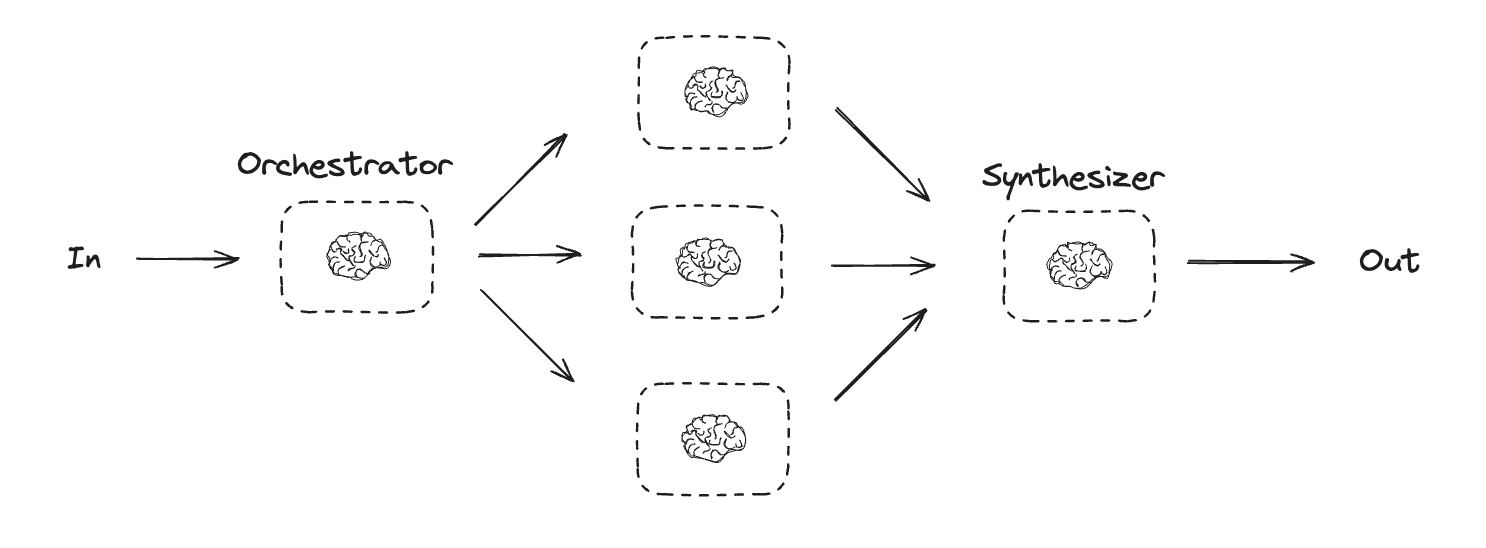 Orchestrator-worker workflows provide more flexibility and are often used when subtasks cannot be predefined the way they can with [parallelization](#parallelization). This is common with workflows that write code or need to update content across multiple files. For example, a workflow that needs to update installation instructions for multiple Python libraries across an unknown number of documents might use this pattern.
```python Graph API theme={"theme":{"light":"catppuccin-latte","dark":"catppuccin-mocha"}}
from typing import Annotated, List
import operator
# Schema for structured output to use in planning
class Section(BaseModel):
name: str = Field(
description="Name for this section of the report.",
)
description: str = Field(
description="Brief overview of the main topics and concepts to be covered in this section.",
)
class Sections(BaseModel):
sections: List[Section] = Field(
description="Sections of the report.",
)
# Augment the LLM with schema for structured output
planner = llm.with_structured_output(Sections)
```
```python Functional API theme={"theme":{"light":"catppuccin-latte","dark":"catppuccin-mocha"}}
from typing import List
# Schema for structured output to use in planning
class Section(BaseModel):
name: str = Field(
description="Name for this section of the report.",
)
description: str = Field(
description="Brief overview of the main topics and concepts to be covered in this section.",
)
class Sections(BaseModel):
sections: List[Section] = Field(
description="Sections of the report.",
)
# Augment the LLM with schema for structured output
planner = llm.with_structured_output(Sections)
@task
def orchestrator(topic: str):
"""Orchestrator that generates a plan for the report"""
# Generate queries
report_sections = planner.invoke(
[
SystemMessage(content="Generate a plan for the report."),
HumanMessage(content=f"Here is the report topic: {topic}"),
]
)
return report_sections.sections
@task
def llm_call(section: Section):
"""Worker writes a section of the report"""
# Generate section
result = llm.invoke(
[
SystemMessage(content="Write a report section."),
HumanMessage(
content=f"Here is the section name: {section.name} and description: {section.description}"
),
]
)
# Write the updated section to completed sections
return result.content
@task
def synthesizer(completed_sections: list[str]):
"""Synthesize full report from sections"""
final_report = "\n\n---\n\n".join(completed_sections)
return final_report
@entrypoint()
def orchestrator_worker(topic: str):
sections = orchestrator(topic).result()
section_futures = [llm_call(section) for section in sections]
final_report = synthesizer(
[section_fut.result() for section_fut in section_futures]
).result()
return final_report
# Invoke
report = orchestrator_worker.invoke("Create a report on LLM scaling laws")
from IPython.display import Markdown
Markdown(report)
```
### Creating workers in LangGraph
Orchestrator-worker workflows are common and LangGraph has built-in support for them. The `Send` API lets you dynamically create worker nodes and send them specific inputs. Each worker has its own state, and all worker outputs are written to a shared state key that is accessible to the orchestrator graph. This gives the orchestrator access to all worker output and allows it to synthesize them into a final output. The example below iterates over a list of sections and uses the `Send` API to send a section to each worker.
```python theme={"theme":{"light":"catppuccin-latte","dark":"catppuccin-mocha"}}
from langgraph.types import Send
# Graph state
class State(TypedDict):
topic: str # Report topic
sections: list[Section] # List of report sections
completed_sections: Annotated[
list, operator.add
] # All workers write to this key in parallel
final_report: str # Final report
# Worker state
class WorkerState(TypedDict):
section: Section
completed_sections: Annotated[list, operator.add]
# Nodes
def orchestrator(state: State):
"""Orchestrator that generates a plan for the report"""
# Generate queries
report_sections = planner.invoke(
[
SystemMessage(content="Generate a plan for the report."),
HumanMessage(content=f"Here is the report topic: {state['topic']}"),
]
)
return {"sections": report_sections.sections}
def llm_call(state: WorkerState):
"""Worker writes a section of the report"""
# Generate section
section = llm.invoke(
[
SystemMessage(
content="Write a report section following the provided name and description. Include no preamble for each section. Use markdown formatting."
),
HumanMessage(
content=f"Here is the section name: {state['section'].name} and description: {state['section'].description}"
),
]
)
# Write the updated section to completed sections
return {"completed_sections": [section.content]}
def synthesizer(state: State):
"""Synthesize full report from sections"""
# List of completed sections
completed_sections = state["completed_sections"]
# Format completed section to str to use as context for final sections
completed_report_sections = "\n\n---\n\n".join(completed_sections)
return {"final_report": completed_report_sections}
# Conditional edge function to create llm_call workers that each write a section of the report
def assign_workers(state: State):
"""Assign a worker to each section in the plan"""
# Kick off section writing in parallel via Send() API
return [Send("llm_call", {"section": s}) for s in state["sections"]]
# Build workflow
orchestrator_worker_builder = StateGraph(State)
# Add the nodes
orchestrator_worker_builder.add_node("orchestrator", orchestrator)
orchestrator_worker_builder.add_node("llm_call", llm_call)
orchestrator_worker_builder.add_node("synthesizer", synthesizer)
# Add edges to connect nodes
orchestrator_worker_builder.add_edge(START, "orchestrator")
orchestrator_worker_builder.add_conditional_edges(
"orchestrator", assign_workers, ["llm_call"]
)
orchestrator_worker_builder.add_edge("llm_call", "synthesizer")
orchestrator_worker_builder.add_edge("synthesizer", END)
# Compile the workflow
orchestrator_worker = orchestrator_worker_builder.compile()
# Show the workflow
display(Image(orchestrator_worker.get_graph().draw_mermaid_png()))
# Invoke
state = orchestrator_worker.invoke({"topic": "Create a report on LLM scaling laws"})
from IPython.display import Markdown
Markdown(state["final_report"])
```
## Evaluator-optimizer
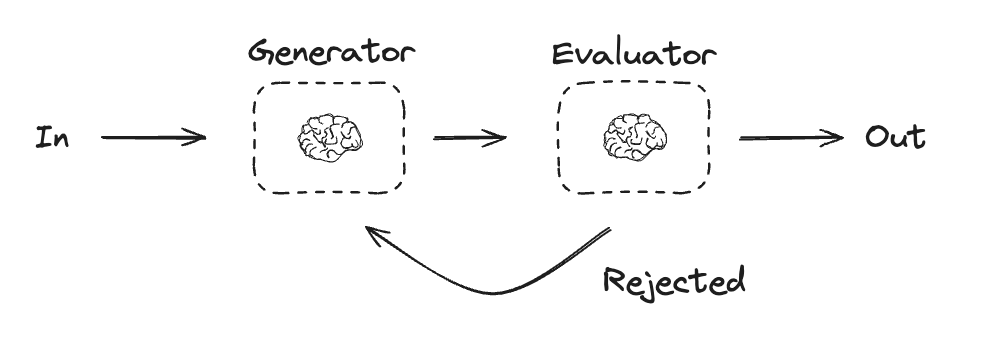
In evaluator-optimizer workflows, one LLM call creates a response and the other evaluates that response. If the evaluator or a [human-in-the-loop](/oss/python/langgraph/interrupts) determines the response needs refinement, feedback is provided and the response is recreated. This loop continues until an acceptable response is generated.
Evaluator-optimizer workflows are commonly used when there's particular success criteria for a task, but iteration is required to meet that criteria. For example, there's not always a perfect match when translating text between two languages. It might take a few iterations to generate a translation with the same meaning across the two languages.
Orchestrator-worker workflows provide more flexibility and are often used when subtasks cannot be predefined the way they can with [parallelization](#parallelization). This is common with workflows that write code or need to update content across multiple files. For example, a workflow that needs to update installation instructions for multiple Python libraries across an unknown number of documents might use this pattern.
```python Graph API theme={"theme":{"light":"catppuccin-latte","dark":"catppuccin-mocha"}}
from typing import Annotated, List
import operator
# Schema for structured output to use in planning
class Section(BaseModel):
name: str = Field(
description="Name for this section of the report.",
)
description: str = Field(
description="Brief overview of the main topics and concepts to be covered in this section.",
)
class Sections(BaseModel):
sections: List[Section] = Field(
description="Sections of the report.",
)
# Augment the LLM with schema for structured output
planner = llm.with_structured_output(Sections)
```
```python Functional API theme={"theme":{"light":"catppuccin-latte","dark":"catppuccin-mocha"}}
from typing import List
# Schema for structured output to use in planning
class Section(BaseModel):
name: str = Field(
description="Name for this section of the report.",
)
description: str = Field(
description="Brief overview of the main topics and concepts to be covered in this section.",
)
class Sections(BaseModel):
sections: List[Section] = Field(
description="Sections of the report.",
)
# Augment the LLM with schema for structured output
planner = llm.with_structured_output(Sections)
@task
def orchestrator(topic: str):
"""Orchestrator that generates a plan for the report"""
# Generate queries
report_sections = planner.invoke(
[
SystemMessage(content="Generate a plan for the report."),
HumanMessage(content=f"Here is the report topic: {topic}"),
]
)
return report_sections.sections
@task
def llm_call(section: Section):
"""Worker writes a section of the report"""
# Generate section
result = llm.invoke(
[
SystemMessage(content="Write a report section."),
HumanMessage(
content=f"Here is the section name: {section.name} and description: {section.description}"
),
]
)
# Write the updated section to completed sections
return result.content
@task
def synthesizer(completed_sections: list[str]):
"""Synthesize full report from sections"""
final_report = "\n\n---\n\n".join(completed_sections)
return final_report
@entrypoint()
def orchestrator_worker(topic: str):
sections = orchestrator(topic).result()
section_futures = [llm_call(section) for section in sections]
final_report = synthesizer(
[section_fut.result() for section_fut in section_futures]
).result()
return final_report
# Invoke
report = orchestrator_worker.invoke("Create a report on LLM scaling laws")
from IPython.display import Markdown
Markdown(report)
```
### Creating workers in LangGraph
Orchestrator-worker workflows are common and LangGraph has built-in support for them. The `Send` API lets you dynamically create worker nodes and send them specific inputs. Each worker has its own state, and all worker outputs are written to a shared state key that is accessible to the orchestrator graph. This gives the orchestrator access to all worker output and allows it to synthesize them into a final output. The example below iterates over a list of sections and uses the `Send` API to send a section to each worker.
```python theme={"theme":{"light":"catppuccin-latte","dark":"catppuccin-mocha"}}
from langgraph.types import Send
# Graph state
class State(TypedDict):
topic: str # Report topic
sections: list[Section] # List of report sections
completed_sections: Annotated[
list, operator.add
] # All workers write to this key in parallel
final_report: str # Final report
# Worker state
class WorkerState(TypedDict):
section: Section
completed_sections: Annotated[list, operator.add]
# Nodes
def orchestrator(state: State):
"""Orchestrator that generates a plan for the report"""
# Generate queries
report_sections = planner.invoke(
[
SystemMessage(content="Generate a plan for the report."),
HumanMessage(content=f"Here is the report topic: {state['topic']}"),
]
)
return {"sections": report_sections.sections}
def llm_call(state: WorkerState):
"""Worker writes a section of the report"""
# Generate section
section = llm.invoke(
[
SystemMessage(
content="Write a report section following the provided name and description. Include no preamble for each section. Use markdown formatting."
),
HumanMessage(
content=f"Here is the section name: {state['section'].name} and description: {state['section'].description}"
),
]
)
# Write the updated section to completed sections
return {"completed_sections": [section.content]}
def synthesizer(state: State):
"""Synthesize full report from sections"""
# List of completed sections
completed_sections = state["completed_sections"]
# Format completed section to str to use as context for final sections
completed_report_sections = "\n\n---\n\n".join(completed_sections)
return {"final_report": completed_report_sections}
# Conditional edge function to create llm_call workers that each write a section of the report
def assign_workers(state: State):
"""Assign a worker to each section in the plan"""
# Kick off section writing in parallel via Send() API
return [Send("llm_call", {"section": s}) for s in state["sections"]]
# Build workflow
orchestrator_worker_builder = StateGraph(State)
# Add the nodes
orchestrator_worker_builder.add_node("orchestrator", orchestrator)
orchestrator_worker_builder.add_node("llm_call", llm_call)
orchestrator_worker_builder.add_node("synthesizer", synthesizer)
# Add edges to connect nodes
orchestrator_worker_builder.add_edge(START, "orchestrator")
orchestrator_worker_builder.add_conditional_edges(
"orchestrator", assign_workers, ["llm_call"]
)
orchestrator_worker_builder.add_edge("llm_call", "synthesizer")
orchestrator_worker_builder.add_edge("synthesizer", END)
# Compile the workflow
orchestrator_worker = orchestrator_worker_builder.compile()
# Show the workflow
display(Image(orchestrator_worker.get_graph().draw_mermaid_png()))
# Invoke
state = orchestrator_worker.invoke({"topic": "Create a report on LLM scaling laws"})
from IPython.display import Markdown
Markdown(state["final_report"])
```
## Evaluator-optimizer
In evaluator-optimizer workflows, one LLM call creates a response and the other evaluates that response. If the evaluator or a [human-in-the-loop](/oss/python/langgraph/interrupts) determines the response needs refinement, feedback is provided and the response is recreated. This loop continues until an acceptable response is generated.
Evaluator-optimizer workflows are commonly used when there's particular success criteria for a task, but iteration is required to meet that criteria. For example, there's not always a perfect match when translating text between two languages. It might take a few iterations to generate a translation with the same meaning across the two languages.
 ```python Graph API theme={"theme":{"light":"catppuccin-latte","dark":"catppuccin-mocha"}}
# Graph state
class State(TypedDict):
joke: str
topic: str
feedback: str
funny_or_not: str
# Schema for structured output to use in evaluation
class Feedback(BaseModel):
grade: Literal["funny", "not funny"] = Field(
description="Decide if the joke is funny or not.",
)
feedback: str = Field(
description="If the joke is not funny, provide feedback on how to improve it.",
)
# Augment the LLM with schema for structured output
evaluator = llm.with_structured_output(Feedback)
# Nodes
def llm_call_generator(state: State):
"""LLM generates a joke"""
if state.get("feedback"):
msg = llm.invoke(
f"Write a joke about {state['topic']} but take into account the feedback: {state['feedback']}"
)
else:
msg = llm.invoke(f"Write a joke about {state['topic']}")
return {"joke": msg.content}
def llm_call_evaluator(state: State):
"""LLM evaluates the joke"""
grade = evaluator.invoke(f"Grade the joke {state['joke']}")
return {"funny_or_not": grade.grade, "feedback": grade.feedback}
# Conditional edge function to route back to joke generator or end based upon feedback from the evaluator
def route_joke(state: State):
"""Route back to joke generator or end based upon feedback from the evaluator"""
if state["funny_or_not"] == "funny":
return "Accepted"
elif state["funny_or_not"] == "not funny":
return "Rejected + Feedback"
# Build workflow
optimizer_builder = StateGraph(State)
# Add the nodes
optimizer_builder.add_node("llm_call_generator", llm_call_generator)
optimizer_builder.add_node("llm_call_evaluator", llm_call_evaluator)
# Add edges to connect nodes
optimizer_builder.add_edge(START, "llm_call_generator")
optimizer_builder.add_edge("llm_call_generator", "llm_call_evaluator")
optimizer_builder.add_conditional_edges(
"llm_call_evaluator",
route_joke,
{ # Name returned by route_joke : Name of next node to visit
"Accepted": END,
"Rejected + Feedback": "llm_call_generator",
},
)
# Compile the workflow
optimizer_workflow = optimizer_builder.compile()
# Show the workflow
display(Image(optimizer_workflow.get_graph().draw_mermaid_png()))
# Invoke
state = optimizer_workflow.invoke({"topic": "Cats"})
print(state["joke"])
```
```python Functional API theme={"theme":{"light":"catppuccin-latte","dark":"catppuccin-mocha"}}
# Schema for structured output to use in evaluation
class Feedback(BaseModel):
grade: Literal["funny", "not funny"] = Field(
description="Decide if the joke is funny or not.",
)
feedback: str = Field(
description="If the joke is not funny, provide feedback on how to improve it.",
)
# Augment the LLM with schema for structured output
evaluator = llm.with_structured_output(Feedback)
# Nodes
@task
def llm_call_generator(topic: str, feedback: Feedback):
"""LLM generates a joke"""
if feedback:
msg = llm.invoke(
f"Write a joke about {topic} but take into account the feedback: {feedback}"
)
else:
msg = llm.invoke(f"Write a joke about {topic}")
return msg.content
@task
def llm_call_evaluator(joke: str):
"""LLM evaluates the joke"""
feedback = evaluator.invoke(f"Grade the joke {joke}")
return feedback
@entrypoint()
def optimizer_workflow(topic: str):
feedback = None
while True:
joke = llm_call_generator(topic, feedback).result()
feedback = llm_call_evaluator(joke).result()
if feedback.grade == "funny":
break
return joke
# Invoke
for step in optimizer_workflow.stream("Cats", stream_mode="updates"):
print(step)
print("\n")
```
## Agents
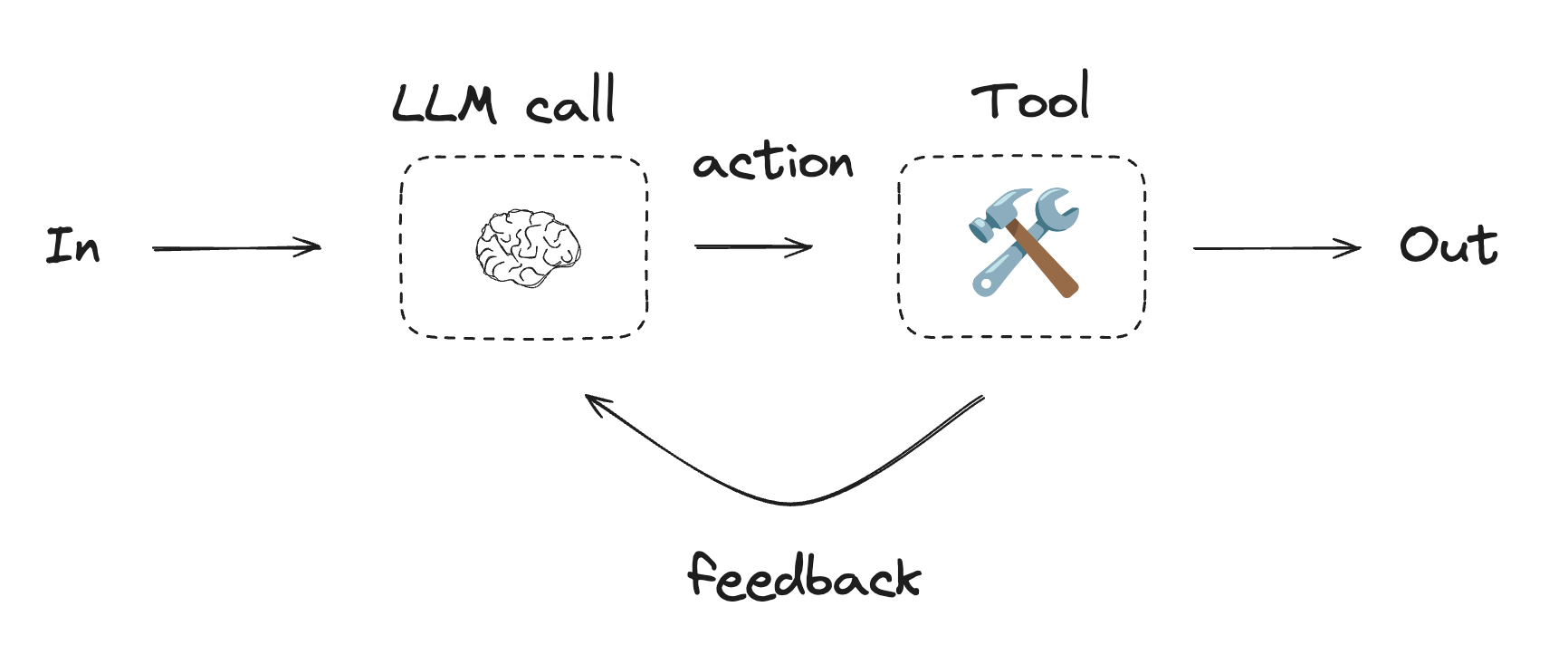
Agents are typically implemented as an LLM performing actions using [tools](/oss/python/langchain/tools). They operate in continuous feedback loops, and are used in situations where problems and solutions are unpredictable. Agents have more autonomy than workflows, and can make decisions about the tools they use and how to solve problems. You can still define the available toolset and guidelines for how agents behave.
```python Graph API theme={"theme":{"light":"catppuccin-latte","dark":"catppuccin-mocha"}}
# Graph state
class State(TypedDict):
joke: str
topic: str
feedback: str
funny_or_not: str
# Schema for structured output to use in evaluation
class Feedback(BaseModel):
grade: Literal["funny", "not funny"] = Field(
description="Decide if the joke is funny or not.",
)
feedback: str = Field(
description="If the joke is not funny, provide feedback on how to improve it.",
)
# Augment the LLM with schema for structured output
evaluator = llm.with_structured_output(Feedback)
# Nodes
def llm_call_generator(state: State):
"""LLM generates a joke"""
if state.get("feedback"):
msg = llm.invoke(
f"Write a joke about {state['topic']} but take into account the feedback: {state['feedback']}"
)
else:
msg = llm.invoke(f"Write a joke about {state['topic']}")
return {"joke": msg.content}
def llm_call_evaluator(state: State):
"""LLM evaluates the joke"""
grade = evaluator.invoke(f"Grade the joke {state['joke']}")
return {"funny_or_not": grade.grade, "feedback": grade.feedback}
# Conditional edge function to route back to joke generator or end based upon feedback from the evaluator
def route_joke(state: State):
"""Route back to joke generator or end based upon feedback from the evaluator"""
if state["funny_or_not"] == "funny":
return "Accepted"
elif state["funny_or_not"] == "not funny":
return "Rejected + Feedback"
# Build workflow
optimizer_builder = StateGraph(State)
# Add the nodes
optimizer_builder.add_node("llm_call_generator", llm_call_generator)
optimizer_builder.add_node("llm_call_evaluator", llm_call_evaluator)
# Add edges to connect nodes
optimizer_builder.add_edge(START, "llm_call_generator")
optimizer_builder.add_edge("llm_call_generator", "llm_call_evaluator")
optimizer_builder.add_conditional_edges(
"llm_call_evaluator",
route_joke,
{ # Name returned by route_joke : Name of next node to visit
"Accepted": END,
"Rejected + Feedback": "llm_call_generator",
},
)
# Compile the workflow
optimizer_workflow = optimizer_builder.compile()
# Show the workflow
display(Image(optimizer_workflow.get_graph().draw_mermaid_png()))
# Invoke
state = optimizer_workflow.invoke({"topic": "Cats"})
print(state["joke"])
```
```python Functional API theme={"theme":{"light":"catppuccin-latte","dark":"catppuccin-mocha"}}
# Schema for structured output to use in evaluation
class Feedback(BaseModel):
grade: Literal["funny", "not funny"] = Field(
description="Decide if the joke is funny or not.",
)
feedback: str = Field(
description="If the joke is not funny, provide feedback on how to improve it.",
)
# Augment the LLM with schema for structured output
evaluator = llm.with_structured_output(Feedback)
# Nodes
@task
def llm_call_generator(topic: str, feedback: Feedback):
"""LLM generates a joke"""
if feedback:
msg = llm.invoke(
f"Write a joke about {topic} but take into account the feedback: {feedback}"
)
else:
msg = llm.invoke(f"Write a joke about {topic}")
return msg.content
@task
def llm_call_evaluator(joke: str):
"""LLM evaluates the joke"""
feedback = evaluator.invoke(f"Grade the joke {joke}")
return feedback
@entrypoint()
def optimizer_workflow(topic: str):
feedback = None
while True:
joke = llm_call_generator(topic, feedback).result()
feedback = llm_call_evaluator(joke).result()
if feedback.grade == "funny":
break
return joke
# Invoke
for step in optimizer_workflow.stream("Cats", stream_mode="updates"):
print(step)
print("\n")
```
## Agents
Agents are typically implemented as an LLM performing actions using [tools](/oss/python/langchain/tools). They operate in continuous feedback loops, and are used in situations where problems and solutions are unpredictable. Agents have more autonomy than workflows, and can make decisions about the tools they use and how to solve problems. You can still define the available toolset and guidelines for how agents behave.
 To get started with agents, see the [quickstart](/oss/python/langchain/quickstart) or read more about [how they work](/oss/python/langchain/agents) in LangChain.
```python Using tools theme={"theme":{"light":"catppuccin-latte","dark":"catppuccin-mocha"}}
from langchain.tools import tool
# Define tools
@tool
def multiply(a: int, b: int) -> int:
"""Multiply `a` and `b`.
Args:
a: First int
b: Second int
"""
return a * b
@tool
def add(a: int, b: int) -> int:
"""Adds `a` and `b`.
Args:
a: First int
b: Second int
"""
return a + b
@tool
def divide(a: int, b: int) -> float:
"""Divide `a` and `b`.
Args:
a: First int
b: Second int
"""
return a / b
# Augment the LLM with tools
tools = [add, multiply, divide]
tools_by_name = {tool.name: tool for tool in tools}
llm_with_tools = llm.bind_tools(tools)
```
```python Graph API theme={"theme":{"light":"catppuccin-latte","dark":"catppuccin-mocha"}}
from langgraph.graph import MessagesState
from langchain.messages import SystemMessage, HumanMessage, ToolMessage
# Nodes
def llm_call(state: MessagesState):
"""LLM decides whether to call a tool or not"""
return {
"messages": [
llm_with_tools.invoke(
[
SystemMessage(
content="You are a helpful assistant tasked with performing arithmetic on a set of inputs."
)
]
+ state["messages"]
)
]
}
def tool_node(state: dict):
"""Performs the tool call"""
result = []
for tool_call in state["messages"][-1].tool_calls:
tool = tools_by_name[tool_call["name"]]
observation = tool.invoke(tool_call["args"])
result.append(ToolMessage(content=observation, tool_call_id=tool_call["id"]))
return {"messages": result}
# Conditional edge function to route to the tool node or end based upon whether the LLM made a tool call
def should_continue(state: MessagesState) -> Literal["tool_node", END]:
"""Decide if we should continue the loop or stop based upon whether the LLM made a tool call"""
messages = state["messages"]
last_message = messages[-1]
# If the LLM makes a tool call, then perform an action
if last_message.tool_calls:
return "tool_node"
# Otherwise, we stop (reply to the user)
return END
# Build workflow
agent_builder = StateGraph(MessagesState)
# Add nodes
agent_builder.add_node("llm_call", llm_call)
agent_builder.add_node("tool_node", tool_node)
# Add edges to connect nodes
agent_builder.add_edge(START, "llm_call")
agent_builder.add_conditional_edges(
"llm_call",
should_continue,
["tool_node", END]
)
agent_builder.add_edge("tool_node", "llm_call")
# Compile the agent
agent = agent_builder.compile()
# Show the agent
display(Image(agent.get_graph(xray=True).draw_mermaid_png()))
# Invoke
messages = [HumanMessage(content="Add 3 and 4.")]
messages = agent.invoke({"messages": messages})
for m in messages["messages"]:
m.pretty_print()
```
```python Functional API theme={"theme":{"light":"catppuccin-latte","dark":"catppuccin-mocha"}}
from langgraph.graph import add_messages
from langchain.messages import (
SystemMessage,
HumanMessage,
ToolCall,
)
from langchain_core.messages import BaseMessage
@task
def call_llm(messages: list[BaseMessage]):
"""LLM decides whether to call a tool or not"""
return llm_with_tools.invoke(
[
SystemMessage(
content="You are a helpful assistant tasked with performing arithmetic on a set of inputs."
)
]
+ messages
)
@task
def call_tool(tool_call: ToolCall):
"""Performs the tool call"""
tool = tools_by_name[tool_call["name"]]
return tool.invoke(tool_call)
@entrypoint()
def agent(messages: list[BaseMessage]):
llm_response = call_llm(messages).result()
while True:
if not llm_response.tool_calls:
break
# Execute tools
tool_result_futures = [
call_tool(tool_call) for tool_call in llm_response.tool_calls
]
tool_results = [fut.result() for fut in tool_result_futures]
messages = add_messages(messages, [llm_response, *tool_results])
llm_response = call_llm(messages).result()
messages = add_messages(messages, llm_response)
return messages
# Invoke
messages = [HumanMessage(content="Add 3 and 4.")]
for chunk in agent.stream(messages, stream_mode="updates"):
print(chunk)
print("\n")
```
### ToolNode
[`ToolNode`](https://reference.langchain.com/python/langgraph/agents/#langgraph.prebuilt.tool_node.ToolNode) is a prebuilt node that executes tools in LangGraph workflows. It handles parallel tool execution, error handling, and state injection automatically.
Use [`ToolNode`](https://reference.langchain.com/python/langgraph/agents/#langgraph.prebuilt.tool_node.ToolNode) when you need fine-grained control over how your graph executes tools. This is the building block that powers tool execution in many LangGraph agent patterns.
```python theme={"theme":{"light":"catppuccin-latte","dark":"catppuccin-mocha"}}
from langchain.tools import tool
from langgraph.prebuilt import ToolNode
from langgraph.graph import MessagesState, StateGraph
@tool
def search(query: str) -> str:
"""Search for information."""
return f"Results for: {query}"
@tool
def calculator(expression: str) -> str:
"""Evaluate a math expression."""
return str(eval(expression))
builder = StateGraph(MessagesState)
builder.add_node("tools", ToolNode([search, calculator]))
# ... add other nodes and edges
graph = builder.compile()
```
***
To get started with agents, see the [quickstart](/oss/python/langchain/quickstart) or read more about [how they work](/oss/python/langchain/agents) in LangChain.
```python Using tools theme={"theme":{"light":"catppuccin-latte","dark":"catppuccin-mocha"}}
from langchain.tools import tool
# Define tools
@tool
def multiply(a: int, b: int) -> int:
"""Multiply `a` and `b`.
Args:
a: First int
b: Second int
"""
return a * b
@tool
def add(a: int, b: int) -> int:
"""Adds `a` and `b`.
Args:
a: First int
b: Second int
"""
return a + b
@tool
def divide(a: int, b: int) -> float:
"""Divide `a` and `b`.
Args:
a: First int
b: Second int
"""
return a / b
# Augment the LLM with tools
tools = [add, multiply, divide]
tools_by_name = {tool.name: tool for tool in tools}
llm_with_tools = llm.bind_tools(tools)
```
```python Graph API theme={"theme":{"light":"catppuccin-latte","dark":"catppuccin-mocha"}}
from langgraph.graph import MessagesState
from langchain.messages import SystemMessage, HumanMessage, ToolMessage
# Nodes
def llm_call(state: MessagesState):
"""LLM decides whether to call a tool or not"""
return {
"messages": [
llm_with_tools.invoke(
[
SystemMessage(
content="You are a helpful assistant tasked with performing arithmetic on a set of inputs."
)
]
+ state["messages"]
)
]
}
def tool_node(state: dict):
"""Performs the tool call"""
result = []
for tool_call in state["messages"][-1].tool_calls:
tool = tools_by_name[tool_call["name"]]
observation = tool.invoke(tool_call["args"])
result.append(ToolMessage(content=observation, tool_call_id=tool_call["id"]))
return {"messages": result}
# Conditional edge function to route to the tool node or end based upon whether the LLM made a tool call
def should_continue(state: MessagesState) -> Literal["tool_node", END]:
"""Decide if we should continue the loop or stop based upon whether the LLM made a tool call"""
messages = state["messages"]
last_message = messages[-1]
# If the LLM makes a tool call, then perform an action
if last_message.tool_calls:
return "tool_node"
# Otherwise, we stop (reply to the user)
return END
# Build workflow
agent_builder = StateGraph(MessagesState)
# Add nodes
agent_builder.add_node("llm_call", llm_call)
agent_builder.add_node("tool_node", tool_node)
# Add edges to connect nodes
agent_builder.add_edge(START, "llm_call")
agent_builder.add_conditional_edges(
"llm_call",
should_continue,
["tool_node", END]
)
agent_builder.add_edge("tool_node", "llm_call")
# Compile the agent
agent = agent_builder.compile()
# Show the agent
display(Image(agent.get_graph(xray=True).draw_mermaid_png()))
# Invoke
messages = [HumanMessage(content="Add 3 and 4.")]
messages = agent.invoke({"messages": messages})
for m in messages["messages"]:
m.pretty_print()
```
```python Functional API theme={"theme":{"light":"catppuccin-latte","dark":"catppuccin-mocha"}}
from langgraph.graph import add_messages
from langchain.messages import (
SystemMessage,
HumanMessage,
ToolCall,
)
from langchain_core.messages import BaseMessage
@task
def call_llm(messages: list[BaseMessage]):
"""LLM decides whether to call a tool or not"""
return llm_with_tools.invoke(
[
SystemMessage(
content="You are a helpful assistant tasked with performing arithmetic on a set of inputs."
)
]
+ messages
)
@task
def call_tool(tool_call: ToolCall):
"""Performs the tool call"""
tool = tools_by_name[tool_call["name"]]
return tool.invoke(tool_call)
@entrypoint()
def agent(messages: list[BaseMessage]):
llm_response = call_llm(messages).result()
while True:
if not llm_response.tool_calls:
break
# Execute tools
tool_result_futures = [
call_tool(tool_call) for tool_call in llm_response.tool_calls
]
tool_results = [fut.result() for fut in tool_result_futures]
messages = add_messages(messages, [llm_response, *tool_results])
llm_response = call_llm(messages).result()
messages = add_messages(messages, llm_response)
return messages
# Invoke
messages = [HumanMessage(content="Add 3 and 4.")]
for chunk in agent.stream(messages, stream_mode="updates"):
print(chunk)
print("\n")
```
### ToolNode
[`ToolNode`](https://reference.langchain.com/python/langgraph/agents/#langgraph.prebuilt.tool_node.ToolNode) is a prebuilt node that executes tools in LangGraph workflows. It handles parallel tool execution, error handling, and state injection automatically.
Use [`ToolNode`](https://reference.langchain.com/python/langgraph/agents/#langgraph.prebuilt.tool_node.ToolNode) when you need fine-grained control over how your graph executes tools. This is the building block that powers tool execution in many LangGraph agent patterns.
```python theme={"theme":{"light":"catppuccin-latte","dark":"catppuccin-mocha"}}
from langchain.tools import tool
from langgraph.prebuilt import ToolNode
from langgraph.graph import MessagesState, StateGraph
@tool
def search(query: str) -> str:
"""Search for information."""
return f"Results for: {query}"
@tool
def calculator(expression: str) -> str:
"""Evaluate a math expression."""
return str(eval(expression))
builder = StateGraph(MessagesState)
builder.add_node("tools", ToolNode([search, calculator]))
# ... add other nodes and edges
graph = builder.compile()
```
***
[Connect these docs](/use-these-docs) to Claude, VSCode, and more via MCP for real-time answers.
[Edit this page on GitHub](https://github.com/langchain-ai/docs/edit/main/src/oss/langgraph/workflows-agents.mdx) or [file an issue](https://github.com/langchain-ai/docs/issues/new/choose).