> ## Documentation Index
> Fetch the complete documentation index at: https://docs.langchain.com/llms.txt
> Use this file to discover all available pages before exploring further.
# What's new in LangChain v1
**LangChain v1 is a focused, production-ready foundation for building agents.** We've streamlined the framework around three core improvements:
The new standard for building agents in LangChain, replacing `langgraph.prebuilt.create_react_agent`.
A new `content_blocks` property that provides unified access to modern LLM features across providers.
The `langchain` namespace has been streamlined to focus on essential building blocks for agents, with legacy functionality moved to `langchain-classic`.
To upgrade,
```bash pip theme={"theme":{"light":"catppuccin-latte","dark":"catppuccin-mocha"}}
pip install -U langchain
```
```bash uv theme={"theme":{"light":"catppuccin-latte","dark":"catppuccin-mocha"}}
uv add langchain
```
For a complete list of changes, see the [migration guide](/oss/python/migrate/langchain-v1).
## `create_agent`
[`create_agent`](https://reference.langchain.com/python/langchain/agents/factory/create_agent) is the standard way to build agents in LangChain 1.0. It provides a simpler interface than [`langgraph.prebuilt.create_react_agent`](https://reference.langchain.com/python/langchain-classic/agents/react/agent/create_react_agent) while offering greater customization potential by using [middleware](#middleware).
```python theme={"theme":{"light":"catppuccin-latte","dark":"catppuccin-mocha"}}
from langchain.agents import create_agent
agent = create_agent(
model="claude-sonnet-4-6",
tools=[search_web, analyze_data, send_email],
system_prompt="You are a helpful research assistant."
)
result = agent.invoke({
"messages": [
{"role": "user", "content": "Research AI safety trends"}
]
})
```
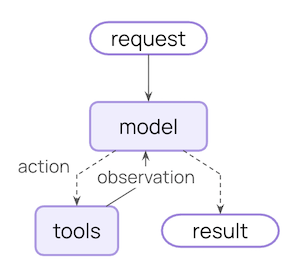
Under the hood, [`create_agent`](https://reference.langchain.com/python/langchain/agents/factory/create_agent) is built on the basic agent loop -- calling a model, letting it choose tools to execute, and then finishing when it calls no more tools:
For more information, see [Agents](/oss/python/langchain/agents).
### Middleware
Middleware is the defining feature of [`create_agent`](https://reference.langchain.com/python/langchain/agents/factory/create_agent). It offers a highly customizable entry-point, raising the ceiling for what you can build.
Great agents require [context engineering](/oss/python/langchain/context-engineering): getting the right information to the model at the right time. Middleware helps you control dynamic prompts, conversation summarization, selective tool access, state management, and guardrails through a composable abstraction.
#### Prebuilt middleware
LangChain provides a few [prebuilt middlewares](/oss/python/langchain/middleware#built-in-middleware) for common patterns, including:
* [`PIIMiddleware`](https://reference.langchain.com/python/langchain/agents/middleware/pii/PIIMiddleware): Redact sensitive information before sending to the model
* [`SummarizationMiddleware`](https://reference.langchain.com/python/langchain/agents/middleware/summarization/SummarizationMiddleware): Condense conversation history when it gets too long
* [`HumanInTheLoopMiddleware`](https://reference.langchain.com/python/langchain/agents/middleware/human_in_the_loop/HumanInTheLoopMiddleware): Require approval for sensitive tool calls
```python theme={"theme":{"light":"catppuccin-latte","dark":"catppuccin-mocha"}}
from langchain.agents import create_agent
from langchain.agents.middleware import (
PIIMiddleware,
SummarizationMiddleware,
HumanInTheLoopMiddleware
)
agent = create_agent(
model="claude-sonnet-4-6",
tools=[read_email, send_email],
middleware=[
PIIMiddleware("email", strategy="redact", apply_to_input=True),
PIIMiddleware(
"phone_number",
detector=(
r"(?:\+?\d{1,3}[\s.-]?)?"
r"(?:\(?\d{2,4}\)?[\s.-]?)?"
r"\d{3,4}[\s.-]?\d{4}"
),
strategy="block"
),
SummarizationMiddleware(
model="claude-sonnet-4-6",
trigger={"tokens": 500}
),
HumanInTheLoopMiddleware(
interrupt_on={
"send_email": {
"allowed_decisions": ["approve", "edit", "reject"]
}
}
),
]
)
```
#### Custom middleware
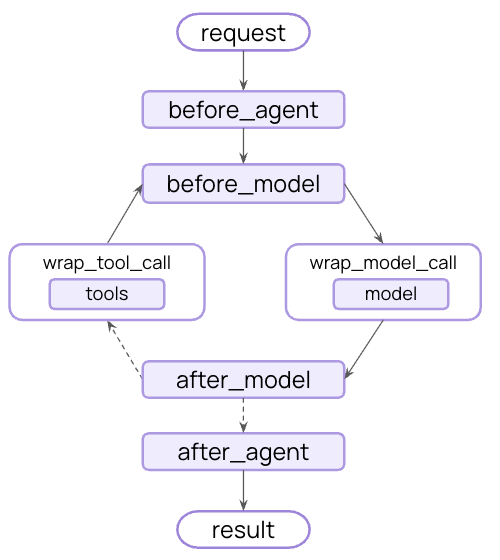
You can also build custom middleware to fit your needs. Middleware exposes hooks at each step in an agent's execution:
Build custom middleware by implementing any of these hooks on a subclass of the [`AgentMiddleware`](https://reference.langchain.com/python/langchain/agents/middleware/types/AgentMiddleware) class:
| Hook | When it runs | Use cases |
| ----------------- | ------------------------ | --------------------------------------- |
| `before_agent` | Before calling the agent | Load memory, validate input |
| `before_model` | Before each LLM call | Update prompts, trim messages |
| `wrap_model_call` | Around each LLM call | Intercept and modify requests/responses |
| `wrap_tool_call` | Around each tool call | Intercept and modify tool execution |
| `after_model` | After each LLM response | Validate output, apply guardrails |
| `after_agent` | After agent completes | Save results, cleanup |
Example custom middleware:
```python expandable theme={"theme":{"light":"catppuccin-latte","dark":"catppuccin-mocha"}}
from dataclasses import dataclass
from typing import Callable
from langchain_openai import ChatOpenAI
from langchain.agents.middleware import (
AgentMiddleware,
ModelRequest
)
from langchain.agents.middleware.types import ModelResponse
@dataclass
class Context:
user_expertise: str = "beginner"
class ExpertiseBasedToolMiddleware(AgentMiddleware):
def wrap_model_call(
self,
request: ModelRequest,
handler: Callable[[ModelRequest], ModelResponse]
) -> ModelResponse:
user_level = request.runtime.context.user_expertise
if user_level == "expert":
# More powerful model
model = ChatOpenAI(model="gpt-5.4")
tools = [advanced_search, data_analysis]
else:
# Less powerful model
model = ChatOpenAI(model="gpt-5-nano")
tools = [simple_search, basic_calculator]
return handler(request.override(model=model, tools=tools))
agent = create_agent(
model="claude-sonnet-4-6",
tools=[
simple_search,
advanced_search,
basic_calculator,
data_analysis
],
middleware=[ExpertiseBasedToolMiddleware()],
context_schema=Context
)
```
For more information, see [the complete middleware guide](/oss/python/langchain/middleware).
### Built on LangGraph
Because [`create_agent`](https://reference.langchain.com/python/langchain/agents/factory/create_agent) is built on [LangGraph](/oss/python/langgraph), you automatically get built in support for long running and reliable agents via:
Conversations automatically persist across sessions with built-in checkpointing
Stream tokens, tool calls, and reasoning traces in real-time
Pause agent execution for human approval before sensitive actions
Rewind conversations to any point and explore alternate paths and prompts
You don't need to learn LangGraph to use these features—they work out of the box.
### Structured output
[`create_agent`](https://reference.langchain.com/python/langchain/agents/factory/create_agent) has improved structured output generation:
* **Main loop integration**: Structured output is now generated in the main loop instead of requiring an additional LLM call
* **Structured output strategy**: Models can choose between calling tools or using provider-side structured output generation
* **Cost reduction**: Eliminates extra expense from additional LLM calls
```python theme={"theme":{"light":"catppuccin-latte","dark":"catppuccin-mocha"}}
from langchain.agents import create_agent
from langchain.agents.structured_output import ToolStrategy
from pydantic import BaseModel
class Weather(BaseModel):
temperature: float
condition: str
def weather_tool(city: str) -> str:
"""Get the weather for a city."""
return f"it's sunny and 70 degrees in {city}"
agent = create_agent(
"gpt-5.4-mini",
tools=[weather_tool],
response_format=ToolStrategy(Weather)
)
result = agent.invoke({
"messages": [{"role": "user", "content": "What's the weather in SF?"}]
})
print(repr(result["structured_response"]))
# results in `Weather(temperature=70.0, condition='sunny')`
```
**Error handling**: Control error handling via the `handle_errors` parameter to `ToolStrategy`:
* **Parsing errors**: Model generates data that doesn't match desired structure
* **Multiple tool calls**: Model generates 2+ tool calls for structured output schemas
***
## Standard content blocks
Content block support is currently only available for the following integrations:
* [`langchain-anthropic`](https://pypi.org/project/langchain-anthropic/)
* [`langchain-aws`](https://pypi.org/project/langchain-aws/)
* [`langchain-openai`](https://pypi.org/project/langchain-openai/)
* [`langchain-google-genai`](https://pypi.org/project/langchain-google-genai/)
* [`langchain-ollama`](https://pypi.org/project/langchain-ollama/)
Broader support for content blocks will be rolled out gradually across more providers.
The new [`content_blocks`](https://reference.langchain.com/python/langchain-core/messages/base/BaseMessage) property introduces a standard representation for message content that works across providers:
```python theme={"theme":{"light":"catppuccin-latte","dark":"catppuccin-mocha"}}
from langchain_anthropic import ChatAnthropic
model = ChatAnthropic(model="claude-sonnet-4-6")
response = model.invoke("What's the capital of France?")
# Unified access to content blocks
for block in response.content_blocks:
if block["type"] == "reasoning":
print(f"Model reasoning: {block['reasoning']}")
elif block["type"] == "text":
print(f"Response: {block['text']}")
elif block["type"] == "tool_call":
print(f"Tool call: {block['name']}({block['args']})")
```
### Benefits
* **Provider agnostic**: Access reasoning traces, citations, built-in tools (web search, code interpreters, etc.), and other features using the same API regardless of provider
* **Type safe**: Full type hints for all content block types
* **Backward compatible**: Standard content can be [loaded lazily](/oss/python/langchain/messages#standard-content-blocks), so there are no associated breaking changes
For more information, see our guide on [content blocks](/oss/python/langchain/messages#standard-content-blocks).
***
## Simplified package
LangChain v1 streamlines the [`langchain`](https://pypi.org/project/langchain/) package namespace to focus on essential building blocks for agents. The refined namespace exposes the most useful and relevant functionality:
### Namespace
| Module | What's available | Notes |
| ------------------------------------------------------------------------------------- | --------------------------------------------------------------------------------------------------------------------------------------------------------------------------------------------------------------------------- | ------------------------------------------------------------------------------------------- |
| [`langchain.agents`](https://reference.langchain.com/python/langchain/agents) | [`create_agent`](https://reference.langchain.com/python/langchain/agents/factory/create_agent), [`AgentState`](https://reference.langchain.com/python/langchain/agents/middleware/types/AgentState) | Core agent creation functionality |
| [`langchain.messages`](https://reference.langchain.com/python/langchain/messages) | Message types, [content blocks](https://reference.langchain.com/python/langchain-core/messages/content/ContentBlock), [`trim_messages`](https://reference.langchain.com/python/langchain-core/messages/utils/trim_messages) | Re-exported from [`langchain-core`](https://reference.langchain.com/python/langchain-core/) |
| [`langchain.tools`](https://reference.langchain.com/python/langchain/tools) | [`@tool`](https://reference.langchain.com/python/langchain-core/tools/convert/tool), [`BaseTool`](https://reference.langchain.com/python/langchain-core/tools/base/BaseTool), injection helpers | Re-exported from [`langchain-core`](https://reference.langchain.com/python/langchain-core/) |
| [`langchain.chat_models`](https://reference.langchain.com/python/langchain/models) | [`init_chat_model`](https://reference.langchain.com/python/langchain/chat_models/base/init_chat_model), [`BaseChatModel`](https://reference.langchain.com/python/langchain-core/language_models/chat_models/BaseChatModel) | Unified model initialization |
| [`langchain.embeddings`](https://reference.langchain.com/python/langchain/embeddings) | [`Embeddings`](https://reference.langchain.com/python/langchain-core/embeddings/embeddings/Embeddings), [`init_embeddings`](https://reference.langchain.com/python/langchain/embeddings/base/init_embeddings) | Embedding models |
Most of these are re-exported from `langchain-core` for convenience, which gives you a focused API surface for building agents.
```python theme={"theme":{"light":"catppuccin-latte","dark":"catppuccin-mocha"}}
# Agent building
from langchain.agents import create_agent
# Messages and content
from langchain.messages import AIMessage, HumanMessage
# Tools
from langchain.tools import tool
# Model initialization
from langchain.chat_models import init_chat_model
from langchain.embeddings import init_embeddings
```
### `langchain-classic`
Legacy functionality has moved to [`langchain-classic`](https://pypi.org/project/langchain-classic) to keep the core packages lean and focused.
**What's in `langchain-classic`:**
* Legacy chains and chain implementations
* Retrievers (e.g. `MultiQueryRetriever` or anything from the previous `langchain.retrievers` module)
* The indexing API
* The hub module (for managing prompts programmatically)
* [`langchain-community`](https://pypi.org/project/langchain-community) exports
* Other deprecated functionality
If you use any of this functionality, install [`langchain-classic`](https://pypi.org/project/langchain-classic):
```bash pip theme={"theme":{"light":"catppuccin-latte","dark":"catppuccin-mocha"}}
pip install langchain-classic
```
```bash uv theme={"theme":{"light":"catppuccin-latte","dark":"catppuccin-mocha"}}
uv add langchain-classic
```
Then update your imports:
```python theme={"theme":{"light":"catppuccin-latte","dark":"catppuccin-mocha"}}
from langchain import ... # [!code --]
from langchain_classic import ... # [!code ++]
from langchain.chains import ... # [!code --]
from langchain_classic.chains import ... # [!code ++]
from langchain.retrievers import ... # [!code --]
from langchain_classic.retrievers import ... # [!code ++]
from langchain import hub # [!code --]
from langchain_classic import hub # [!code ++]
```
## Migration guide
See our [migration guide](/oss/python/migrate/langchain-v1) for help updating your code to LangChain v1.
## Reporting issues
Please report any issues discovered with 1.0 on [GitHub](https://github.com/langchain-ai/langchain/issues) using the `'v1'` [label](https://github.com/langchain-ai/langchain/issues?q=state%3Aopen%20label%3Av1).
## Additional resources
Read the announcement
Deep dive into middleware
Full agent documentation
New content blocks API
How to migrate to LangChain v1
Report issues or contribute
## See also
* [Versioning](/oss/python/versioning) – Understanding version numbers
* [Release policy](/oss/python/release-policy) – Detailed release policies
***
[Connect these docs](/use-these-docs) to Claude, VSCode, and more via MCP for real-time answers.
[Edit this page on GitHub](https://github.com/langchain-ai/docs/edit/main/src/oss/python/releases/langchain-v1.mdx) or [file an issue](https://github.com/langchain-ai/docs/issues/new/choose).