Deploy Content Studio, an open-source design agent, to Slack as a Managed Deep Agents project.
Content Studio is an open-source design agent built on Managed Deep Agents. Your team requests work in Slack, and the agent returns finished files in the thread.
A key for your model provider. On the LLM Gateway, the agent uses your LangSmith key instead.
Permission to install apps in your Slack workspace, or a workspace admin who can approve the agent’s Slack app.
To deploy with a coding agent such as Claude Code, Codex, or Cursor, paste this prompt. It installs the agent, checks the setup, and asks before anything that bills or deploys.
Deploy the design agent with your coding agent
To deploy it yourself:
1
Install the project
The installer installs uv if needed, then clones the repository and sets it up.
uv run design-agent config set LANGSMITH_API_KEY ANTHROPIC_API_KEY
The command asks for each key and keeps it hidden. On the LLM Gateway, skip the provider key and run uv run design-agent config set DESIGN_AGENT_MODEL=langsmith:anthropic/claude-opus-5-5 instead.mda deploy forwards every key in .env as a deployment secret, except LANGSMITH_API_KEY, which signs the deploy.
3
Publish the sandbox
uv run design-agent sandbox publish
mda deploy builds sandbox/setup.sh into a snapshot on its own. That build uses a Docker image base, which gets a 1 GiB filesystem. The design agent’s machine, with Chrome, FFmpeg, and HyperFrames, is about 1.3 GiB. This command builds a larger snapshot in your workspace instead and points sandbox/__init__.py at it.It takes 10 to 15 minutes and runs once per workspace. Publish again only when sandbox/setup.sh changes.
4
Deploy
uv run mda deploy
The first deploy provisions the agent’s Slack app. If the command prints a Slack link, open it, approve the app for your workspace, and press Enter. A workspace admin may need to approve the app first.
5
Send a first request
After the first deploy, the agent sends you a direct message. Reply there, or invite it to a channel and mention it with a request, such as a launch graphic for a product. Progress updates and finished files appear in the same thread.
Example Slack thread: progress updates, then finished files.
Most changes are edits to files in the repository. Common ones:
Brand pack: Your colors, fonts, logos, and voice live in workspace/brand/. Ask your coding agent to build the pack from your website and brand guide.
Skills: Each workflow is a folder in skills/. Add one for a request your team makes often, such as a weekly newsletter header.
Instructions: The always-on prompt is instructions.md. Keep it short, and put workflows in skills.
MCP servers: Copy config/mcp.example.toml to config/mcp.toml and turn on servers such as Notion or GitHub. Each person signs in as themselves through a workspace connection.
Model: Set DESIGN_AGENT_MODEL with uv run design-agent config set. Any chat model with tool calling and vision works.
To try a change and ship it, use these mda commands:
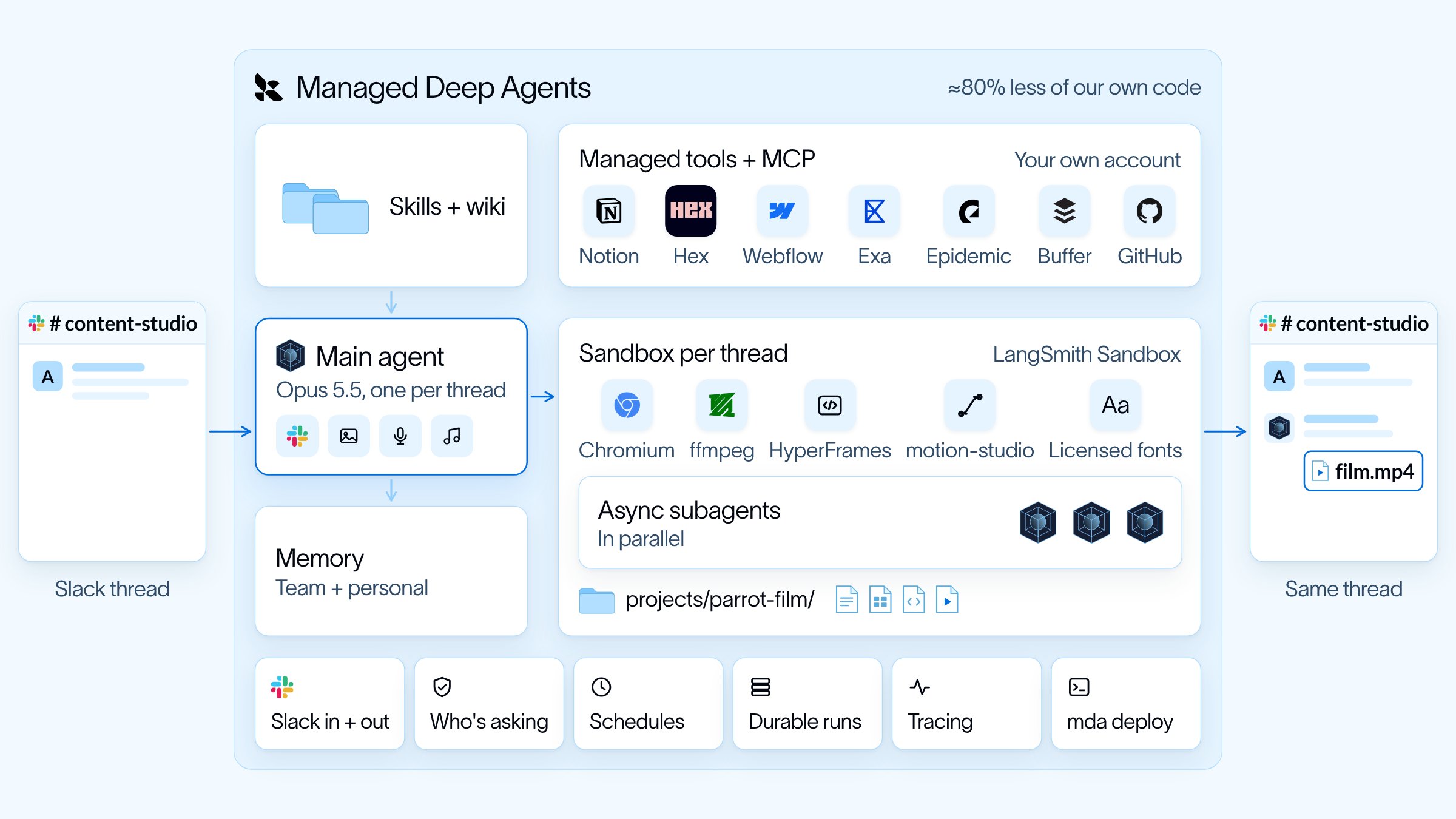
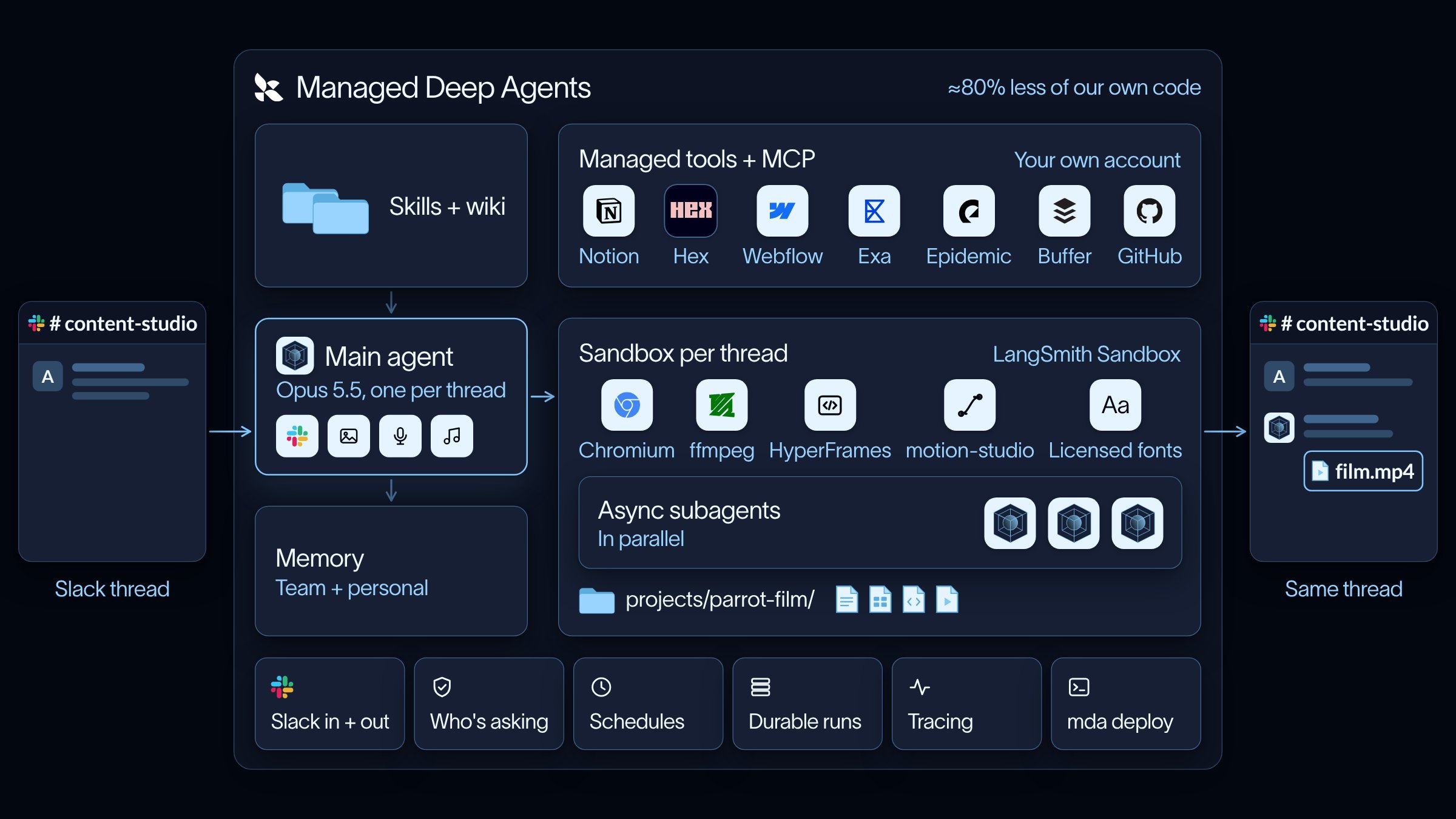
Managed Deep Agents provides the Slack app, identity, schedules, and a sandbox per thread. The repository adds the design workflows, brand pack, and rendering tools.
Request path from Slack through the agent and sandbox back to the thread.
Long jobs like video generation run in the background. The main agent hands parts to subagents on the same sandbox and stays free to talk. A one-time schedule wakes the main agent when a background job finishes or stalls.The brand pack in workspace/brand/ is the source of colors, fonts, logos, and voice. The agent checks each render against that pack before posting.
{"docsConfig":{"theme":"aspen","$schema":"https://mintlify.com/docs.json","name":"Docs by LangChain","description":"Documentation for LangSmith, Fleet, and our open source packages.","colors":{"primary":"#161F34","light":"#7FC8FF","dark":"#006DDD"},"logo":{"light":"https://mintcdn.com/langchain-5e9cc07a/nQm-sjd_MByLhgeW/images/brand/langchain-docs-dark-blue.png?fit=max\u0026auto=format\u0026n=nQm-sjd_MByLhgeW\u0026q=85\u0026s=5babf1a1962208fd7eed942fa2432ecb","dark":"https://mintcdn.com/langchain-5e9cc07a/nQm-sjd_MByLhgeW/images/brand/langchain-docs-light-blue.png?fit=max\u0026auto=format\u0026n=nQm-sjd_MByLhgeW\u0026q=85\u0026s=0bcd2a1f2599ed228bcedf0f535b45b1"},"favicon":{"light":"https://mintcdn.com/langchain-5e9cc07a/8njVp3mXF3LrAS1d/images/brand/docs-favicon.png?fit=max\u0026auto=format\u0026n=8njVp3mXF3LrAS1d\u0026q=85\u0026s=a61c2b4666f558992e1fd44750b08465","dark":"https://mintcdn.com/langchain-5e9cc07a/8njVp3mXF3LrAS1d/images/brand/docs-favicon.png?fit=max\u0026auto=format\u0026n=8njVp3mXF3LrAS1d\u0026q=85\u0026s=a61c2b4666f558992e1fd44750b08465"},"appearance":{"default":"system","strict":false},"background":{"color":{"light":"#FFFFFF","dark":"#030710"}},"navbar":{"links":[{"icon":"message","href":"https://chat.langchain.com/","label":"Ask AI"},{"icon":"brand-github","href":"https://github.com/langchain-ai","label":"GitHub"}],"primary":{"type":"button","label":"Try LangSmith","href":"https://smith.langchain.com/"}},"footer":{"socials":{"github":"https://github.com/langchain-ai","x":"https://x.com/LangChain","linkedin":"https://www.linkedin.com/company/langchain","youtube":"https://www.youtube.com/@LangChain"},"links":[{"header":"Resources","items":[{"label":"Forum","href":"https://forum.langchain.com/"},{"label":"Changelog","href":"https://changelog.langchain.com/"},{"label":"LangChain Academy","href":"https://academy.langchain.com/"},{"label":"Contact Sales","href":"https://www.langchain.com/contact-sales"}]},{"header":"Company","items":[{"label":"Home","href":"https://langchain.com/"},{"label":"Trust Center","href":"https://trust.langchain.com/"},{"label":"Careers","href":"https://langchain.com/careers"},{"label":"Blog","href":"https://blog.langchain.com/"}]}]},"seo":{"metatags":{"canonical":"https://docs.langchain.com","google-site-verification":"9_2KHeJwmEdwgncBRk1MsKxriZz7Sc21EJdbfCxkTEo"}},"fonts":{"heading":{"family":"TWK Lausanne","weight":700,"source":"fonts/TWKLausanne-700.woff2","format":"woff2"},"body":{"family":"Inter","weight":400}},"icons":{"library":"tabler"},"styling":{"eyebrows":"breadcrumbs","codeblocks":{"theme":{"light":"catppuccin-latte","dark":"catppuccin-mocha"}},"latex":true},"integrations":{"gtm":{"tagId":"GTM-MBBX68ST"}},"banner":{"content":"Interrupt is coming to San Francisco March 24–25 | [Get early bird pricing now](https://interrupt.langchain.com/)","dismissible":true},"errors":{"404":{"redirect":false,"title":"Page not found","description":"We couldn't find the page you were looking for."}},"contextual":{"options":["copy","view",{"title":"llms.txt","description":"Open llms.txt for this site","icon":"file","href":"https://docs.langchain.com/llms.txt"},"chatgpt","claude","mcp","cursor","vscode"],"display":"header"},"interaction":{"drilldown":true},"navigation":{"pages":[]}},"deployment":{"deploymentMetadataValue":{"subdomain":"langchain-5e9cc07a","hasAudioNarration":false,"actualSubdomain":"langchain-5e9cc07a","customDomains":["docs.langchain.com"],"gitSource":{"type":"github","owner":"langchain-ai","repo":"docs","deployBranch":"prod","contentDirectory":"build","isPrivate":false,"mountPath":"","label":""},"chroma":{"liveDeploymentHistoryId":"6aecd1eb20ef8f1b4c25e6d1","collectionId":"1ab70863-0935-4d6f-870a-a3cdb675dcca","schemaVersion":"v3","latestBuiltDeploymentHistoryId":"6aecd1eb20ef8f1b4c25e6d1"},"feedback":{"thumbs":true,"edits":false,"issues":false},"entitlements":{"AI_CHAT":{"status":"ENABLED"},"REMOVE_BRANDING":{"status":"ENABLED"},"WEB_MCP":{"status":"ENABLED"},"NARRATION":{"status":"ENABLED"}},"buildId":"6aee4fda66131602055bd2e1","clientVersion":"0.0.4076","searchFilterCounts":[{"language":"default","tag":"AGENT DEVELOPMENT LIFECYCLE","count":1501},{"language":"default","tag":"Reference","count":766},{"language":"default","tag":"Monitor","count":704},{"language":"default","tag":"LangSmith REST API","count":596},{"language":"default","tag":"Build","count":468},{"language":"default","tag":"Deploy","count":251},{"language":"default","tag":"TypeScript","count":244},{"language":"default","tag":"Python","count":224},{"language":"default","tag":"PRODUCTS AND SETUP","count":220},{"language":"default","tag":"Get started","count":181}],"searchSettings":{"maxResults":10,"showContentSnippets":true,"isFiltersEnabled":false}},"assistantConfig":{"enableAskAiButton":false,"enableAskAiSearchBar":true,"deflection":{"enabled":false,"email":"support@langchain.dev"}},"basePath":"","hasChatPermissions":false,"hasWebMcpPermissions":true,"toggles":[{"name":"kill-isr","enabled":true,"variant":{"name":"disabled","enabled":false,"feature_enabled":true},"impressionData":false},{"name":"agent-mintlify-slack","enabled":true,"variant":{"name":"disabled","enabled":false,"feature_enabled":true},"impressionData":false},{"name":"agent-integrations-settings","enabled":true,"variant":{"name":"disabled","enabled":false,"feature_enabled":true},"impressionData":false},{"name":"rbac-expansion","enabled":true,"variant":{"name":"disabled","enabled":false,"feature_enabled":true},"impressionData":false},{"name":"automations-pr-grouping","enabled":true,"variant":{"name":"disabled","enabled":false,"feature_enabled":true},"impressionData":false},{"name":"custom-prefix","enabled":true,"variant":{"name":"disabled","enabled":false,"feature_enabled":true},"impressionData":false},{"name":"analytics-v7","enabled":true,"variant":{"name":"disabled","enabled":false,"feature_enabled":true},"impressionData":false},{"name":"user-flows-analytics","enabled":true,"variant":{"name":"disabled","enabled":false,"feature_enabled":true},"impressionData":false},{"name":"no-publish-flow","enabled":true,"variant":{"name":"disabled","enabled":false,"feature_enabled":true},"impressionData":false},{"name":"workos-onboarding","enabled":true,"variant":{"name":"disabled","enabled":false,"feature_enabled":true},"impressionData":false},{"name":"llms-txt-v2","enabled":true,"variant":{"name":"disabled","enabled":false,"feature_enabled":true},"impressionData":false},{"name":"snapshot-serving-live","enabled":true,"variant":{"name":"disabled","enabled":false,"feature_enabled":true},"impressionData":false},{"name":"stripTemperatureMiddleware","enabled":true,"variant":{"name":"disabled","enabled":false,"feature_enabled":true},"impressionData":false},{"name":"support-platform-pylon-zendesk","enabled":true,"variant":{"name":"disabled","enabled":false,"feature_enabled":true},"impressionData":false},{"name":"snapshot-serving","enabled":true,"variant":{"name":"disabled","enabled":false,"feature_enabled":true},"impressionData":false},{"name":"instant-rollback","enabled":true,"variant":{"name":"disabled","enabled":false,"feature_enabled":true},"impressionData":false},{"name":"granular-notifications-server","enabled":true,"variant":{"name":"disabled","enabled":false,"feature_enabled":true},"impressionData":false},{"name":"granular-notifications","enabled":true,"variant":{"name":"disabled","enabled":false,"feature_enabled":true},"impressionData":false},{"name":"automations-fable","enabled":true,"variant":{"name":"disabled","enabled":false,"feature_enabled":true},"impressionData":false},{"name":"fixed-ai-action-pricing","enabled":true,"variant":{"name":"disabled","enabled":false,"feature_enabled":true},"impressionData":false},{"name":"automation-resolve-merge-conflict","enabled":true,"variant":{"name":"disabled","enabled":false,"feature_enabled":true},"impressionData":false},{"name":"scoped-publishing","enabled":true,"variant":{"name":"disabled","enabled":false,"feature_enabled":true},"impressionData":false},{"name":"mintql","enabled":true,"variant":{"name":"disabled","enabled":false,"feature_enabled":true},"impressionData":false},{"name":"page-level-analytics","enabled":true,"variant":{"name":"disabled","enabled":false,"feature_enabled":true},"impressionData":false},{"name":"editor-version-history-v2","enabled":true,"variant":{"name":"disabled","enabled":false,"feature_enabled":true},"impressionData":false},{"name":"billing-page-v2","enabled":true,"variant":{"name":"disabled","enabled":false,"feature_enabled":true},"impressionData":false},{"name":"full-page-search","enabled":true,"variant":{"name":"disabled","enabled":false,"feature_enabled":true},"impressionData":false},{"name":"workspace-projects","enabled":true,"variant":{"name":"disabled","enabled":false,"feature_enabled":true},"impressionData":false},{"name":"assistant-v5","enabled":true,"variant":{"name":"disabled","enabled":false,"feature_enabled":true},"impressionData":false},{"name":"fork-pr-previews","enabled":true,"variant":{"name":"disabled","enabled":false,"feature_enabled":true},"impressionData":false},{"name":"revalidation-jwt","enabled":true,"variant":{"name":"disabled","enabled":false,"feature_enabled":true},"impressionData":false},{"name":"workos-sso-scim","enabled":true,"variant":{"name":"disabled","enabled":false,"feature_enabled":true},"impressionData":false},{"name":"hobby-abuse-scan","enabled":true,"variant":{"name":"disabled","enabled":false,"feature_enabled":true},"impressionData":false},{"name":"dashboard-inbox","enabled":true,"variant":{"name":"disabled","enabled":false,"feature_enabled":true},"impressionData":false},{"name":"workos-signup","enabled":true,"variant":{"name":"disabled","enabled":false,"feature_enabled":true},"impressionData":false},{"name":"turbopuffer-dual-write","enabled":true,"variant":{"name":"disabled","enabled":false,"feature_enabled":true},"impressionData":false},{"name":"workos-enabled","enabled":true,"variant":{"name":"disabled","enabled":false,"feature_enabled":true},"impressionData":false},{"name":"approve-review-flow","enabled":true,"variant":{"name":"disabled","enabled":false,"feature_enabled":true},"impressionData":false},{"name":"sso-setup-deadline-banner","enabled":true,"variant":{"name":"disabled","enabled":false,"feature_enabled":true},"impressionData":false},{"name":"turbopuffer-serve","enabled":true,"variant":{"name":"disabled","enabled":false,"feature_enabled":true},"impressionData":false},{"name":"live-agents","enabled":true,"variant":{"name":"disabled","enabled":false,"feature_enabled":true},"impressionData":false},{"name":"comment-mode","enabled":true,"variant":{"name":"disabled","enabled":false,"feature_enabled":true},"impressionData":false}],"googleFontsInlined":false},"customCss":[{"filePath":"style.css","content":"/* cyrillic-ext */\n@font-face {\n font-family: 'IBM Plex Mono';\n font-style: italic;\n font-weight: 400;\n font-display: swap;\n src: url(/_mintlify/assets/fonts/google/s/ibmplexmono/v20/-F6pfjptAgt5VM-kVkqdyU8n1ioa2Hdgv-s.woff2) format('woff2');\n unicode-range: U+0460-052F, U+1C80-1C8A, U+20B4, U+2DE0-2DFF, U+A640-A69F, U+FE2E-FE2F;\n}\n/* cyrillic */\n@font-face {\n font-family: 'IBM Plex Mono';\n font-style: italic;\n font-weight: 400;\n font-display: swap;\n src: url(/_mintlify/assets/fonts/google/s/ibmplexmono/v20/-F6pfjptAgt5VM-kVkqdyU8n1ioa0Xdgv-s.woff2) format('woff2');\n unicode-range: U+0301, U+0400-045F, U+0490-0491, U+04B0-04B1, U+2116;\n}\n/* vietnamese */\n@font-face {\n font-family: 'IBM Plex Mono';\n font-style: italic;\n font-weight: 400;\n font-display: swap;\n src: url(/_mintlify/assets/fonts/google/s/ibmplexmono/v20/-F6pfjptAgt5VM-kVkqdyU8n1ioa2ndgv-s.woff2) format('woff2');\n unicode-range: U+0102-0103, U+0110-0111, U+0128-0129, U+0168-0169, U+01A0-01A1, U+01AF-01B0, U+0300-0301, U+0303-0304, U+0308-0309, U+0323, U+0329, U+1EA0-1EF9, U+20AB;\n}\n/* latin-ext */\n@font-face {\n font-family: 'IBM Plex Mono';\n font-style: italic;\n font-weight: 400;\n font-display: swap;\n src: url(/_mintlify/assets/fonts/google/s/ibmplexmono/v20/-F6pfjptAgt5VM-kVkqdyU8n1ioa23dgv-s.woff2) format('woff2');\n unicode-range: U+0100-02BA, U+02BD-02C5, U+02C7-02CC, U+02CE-02D7, U+02DD-02FF, U+0304, U+0308, U+0329, U+1D00-1DBF, U+1E00-1E9F, U+1EF2-1EFF, U+2020, U+20A0-20AB, U+20AD-20C4, U+2113, U+2C60-2C7F, U+A720-A7FF;\n}\n/* latin */\n@font-face {\n font-family: 'IBM Plex Mono';\n font-style: italic;\n font-weight: 400;\n font-display: swap;\n src: url(/_mintlify/assets/fonts/google/s/ibmplexmono/v20/-F6pfjptAgt5VM-kVkqdyU8n1ioa1Xdg.woff2) format('woff2');\n unicode-range: U+0000-00FF, U+0131, U+0152-0153, U+02BB-02BC, U+02C6, U+02DA, U+02DC, U+0304, U+0308, U+0329, U+2000-206F, U+20AC, U+2122, U+2191, U+2193, U+2212, U+2215, U+FEFF, U+FFFD;\n}\n/* cyrillic-ext */\n@font-face {\n font-family: 'IBM Plex Mono';\n font-style: italic;\n font-weight: 500;\n font-display: swap;\n src: url(/_mintlify/assets/fonts/google/s/ibmplexmono/v20/-F6sfjptAgt5VM-kVkqdyU8n1ioSJlR1jcoQLNg.woff2) format('woff2');\n unicode-range: U+0460-052F, U+1C80-1C8A, U+20B4, U+2DE0-2DFF, U+A640-A69F, U+FE2E-FE2F;\n}\n/* cyrillic */\n@font-face {\n font-family: 'IBM Plex Mono';\n font-style: italic;\n font-weight: 500;\n font-display: swap;\n src: url(/_mintlify/assets/fonts/google/s/ibmplexmono/v20/-F6sfjptAgt5VM-kVkqdyU8n1ioSJlR1hMoQLNg.woff2) format('woff2');\n unicode-range: U+0301, U+0400-045F, U+0490-0491, U+04B0-04B1, U+2116;\n}\n/* vietnamese */\n@font-face {\n font-family: 'IBM Plex Mono';\n font-style: italic;\n font-weight: 500;\n font-display: swap;\n src: url(/_mintlify/assets/fonts/google/s/ibmplexmono/v20/-F6sfjptAgt5VM-kVkqdyU8n1ioSJlR1j8oQLNg.woff2) format('woff2');\n unicode-range: U+0102-0103, U+0110-0111, U+0128-0129, U+0168-0169, U+01A0-01A1, U+01AF-01B0, U+0300-0301, U+0303-0304, U+0308-0309, U+0323, U+0329, U+1EA0-1EF9, U+20AB;\n}\n/* latin-ext */\n@font-face {\n font-family: 'IBM Plex Mono';\n font-style: italic;\n font-weight: 500;\n font-display: swap;\n src: url(/_mintlify/assets/fonts/google/s/ibmplexmono/v20/-F6sfjptAgt5VM-kVkqdyU8n1ioSJlR1jsoQLNg.woff2) format('woff2');\n unicode-range: U+0100-02BA, U+02BD-02C5, U+02C7-02CC, U+02CE-02D7, U+02DD-02FF, U+0304, U+0308, U+0329, U+1D00-1DBF, U+1E00-1E9F, U+1EF2-1EFF, U+2020, U+20A0-20AB, U+20AD-20C4, U+2113, U+2C60-2C7F, U+A720-A7FF;\n}\n/* latin */\n@font-face {\n font-family: 'IBM Plex Mono';\n font-style: italic;\n font-weight: 500;\n font-display: swap;\n src: url(/_mintlify/assets/fonts/google/s/ibmplexmono/v20/-F6sfjptAgt5VM-kVkqdyU8n1ioSJlR1gMoQ.woff2) format('woff2');\n unicode-range: U+0000-00FF, U+0131, U+0152-0153, U+02BB-02BC, U+02C6, U+02DA, U+02DC, U+0304, U+0308, U+0329, U+2000-206F, U+20AC, U+2122, U+2191, U+2193, U+2212, U+2215, U+FEFF, U+FFFD;\n}\n/* cyrillic-ext */\n@font-face {\n font-family: 'IBM Plex Mono';\n font-style: italic;\n font-weight: 600;\n font-display: swap;\n src: url(/_mintlify/assets/fonts/google/s/ibmplexmono/v20/-F6sfjptAgt5VM-kVkqdyU8n1ioSClN1jcoQLNg.woff2) format('woff2');\n unicode-range: U+0460-052F, U+1C80-1C8A, U+20B4, U+2DE0-2DFF, U+A640-A69F, U+FE2E-FE2F;\n}\n/* cyrillic */\n@font-face {\n font-family: 'IBM Plex Mono';\n font-style: italic;\n font-weight: 600;\n font-display: swap;\n src: url(/_mintlify/assets/fonts/google/s/ibmplexmono/v20/-F6sfjptAgt5VM-kVkqdyU8n1ioSClN1hMoQLNg.woff2) format('woff2');\n unicode-range: U+0301, U+0400-045F, U+0490-0491, U+04B0-04B1, U+2116;\n}\n/* vietnamese */\n@font-face {\n font-family: 'IBM Plex Mono';\n font-style: italic;\n font-weight: 600;\n font-display: swap;\n src: url(/_mintlify/assets/fonts/google/s/ibmplexmono/v20/-F6sfjptAgt5VM-kVkqdyU8n1ioSClN1j8oQLNg.woff2) format('woff2');\n unicode-range: U+0102-0103, U+0110-0111, U+0128-0129, U+0168-0169, U+01A0-01A1, U+01AF-01B0, U+0300-0301, U+0303-0304, U+0308-0309, U+0323, U+0329, U+1EA0-1EF9, U+20AB;\n}\n/* latin-ext */\n@font-face {\n font-family: 'IBM Plex Mono';\n font-style: italic;\n font-weight: 600;\n font-display: swap;\n src: url(/_mintlify/assets/fonts/google/s/ibmplexmono/v20/-F6sfjptAgt5VM-kVkqdyU8n1ioSClN1jsoQLNg.woff2) format('woff2');\n unicode-range: U+0100-02BA, U+02BD-02C5, U+02C7-02CC, U+02CE-02D7, U+02DD-02FF, U+0304, U+0308, U+0329, U+1D00-1DBF, U+1E00-1E9F, U+1EF2-1EFF, U+2020, U+20A0-20AB, U+20AD-20C4, U+2113, U+2C60-2C7F, U+A720-A7FF;\n}\n/* latin */\n@font-face {\n font-family: 'IBM Plex Mono';\n font-style: italic;\n font-weight: 600;\n font-display: swap;\n src: url(/_mintlify/assets/fonts/google/s/ibmplexmono/v20/-F6sfjptAgt5VM-kVkqdyU8n1ioSClN1gMoQ.woff2) format('woff2');\n unicode-range: U+0000-00FF, U+0131, U+0152-0153, U+02BB-02BC, U+02C6, U+02DA, U+02DC, U+0304, U+0308, U+0329, U+2000-206F, U+20AC, U+2122, U+2191, U+2193, U+2212, U+2215, U+FEFF, U+FFFD;\n}\n/* cyrillic-ext */\n@font-face {\n font-family: 'IBM Plex Mono';\n font-style: italic;\n font-weight: 700;\n font-display: swap;\n src: url(/_mintlify/assets/fonts/google/s/ibmplexmono/v20/-F6sfjptAgt5VM-kVkqdyU8n1ioSblJ1jcoQLNg.woff2) format('woff2');\n unicode-range: U+0460-052F, U+1C80-1C8A, U+20B4, U+2DE0-2DFF, U+A640-A69F, U+FE2E-FE2F;\n}\n/* cyrillic */\n@font-face {\n font-family: 'IBM Plex Mono';\n font-style: italic;\n font-weight: 700;\n font-display: swap;\n src: url(/_mintlify/assets/fonts/google/s/ibmplexmono/v20/-F6sfjptAgt5VM-kVkqdyU8n1ioSblJ1hMoQLNg.woff2) format('woff2');\n unicode-range: U+0301, U+0400-045F, U+0490-0491, U+04B0-04B1, U+2116;\n}\n/* vietnamese */\n@font-face {\n font-family: 'IBM Plex Mono';\n font-style: italic;\n font-weight: 700;\n font-display: swap;\n src: url(/_mintlify/assets/fonts/google/s/ibmplexmono/v20/-F6sfjptAgt5VM-kVkqdyU8n1ioSblJ1j8oQLNg.woff2) format('woff2');\n unicode-range: U+0102-0103, U+0110-0111, U+0128-0129, U+0168-0169, U+01A0-01A1, U+01AF-01B0, U+0300-0301, U+0303-0304, U+0308-0309, U+0323, U+0329, U+1EA0-1EF9, U+20AB;\n}\n/* latin-ext */\n@font-face {\n font-family: 'IBM Plex Mono';\n font-style: italic;\n font-weight: 700;\n font-display: swap;\n src: url(/_mintlify/assets/fonts/google/s/ibmplexmono/v20/-F6sfjptAgt5VM-kVkqdyU8n1ioSblJ1jsoQLNg.woff2) format('woff2');\n unicode-range: U+0100-02BA, U+02BD-02C5, U+02C7-02CC, U+02CE-02D7, U+02DD-02FF, U+0304, U+0308, U+0329, U+1D00-1DBF, U+1E00-1E9F, U+1EF2-1EFF, U+2020, U+20A0-20AB, U+20AD-20C4, U+2113, U+2C60-2C7F, U+A720-A7FF;\n}\n/* latin */\n@font-face {\n font-family: 'IBM Plex Mono';\n font-style: italic;\n font-weight: 700;\n font-display: swap;\n src: url(/_mintlify/assets/fonts/google/s/ibmplexmono/v20/-F6sfjptAgt5VM-kVkqdyU8n1ioSblJ1gMoQ.woff2) format('woff2');\n unicode-range: U+0000-00FF, U+0131, U+0152-0153, U+02BB-02BC, U+02C6, U+02DA, U+02DC, U+0304, U+0308, U+0329, U+2000-206F, U+20AC, U+2122, U+2191, U+2193, U+2212, U+2215, U+FEFF, U+FFFD;\n}\n/* cyrillic-ext */\n@font-face {\n font-family: 'IBM Plex Mono';\n font-style: normal;\n font-weight: 400;\n font-display: swap;\n src: url(/_mintlify/assets/fonts/google/s/ibmplexmono/v20/-F63fjptAgt5VM-kVkqdyU8n1iIq129k.woff2) format('woff2');\n unicode-range: U+0460-052F, U+1C80-1C8A, U+20B4, U+2DE0-2DFF, U+A640-A69F, U+FE2E-FE2F;\n}\n/* cyrillic */\n@font-face {\n font-family: 'IBM Plex Mono';\n font-style: normal;\n font-weight: 400;\n font-display: swap;\n src: url(/_mintlify/assets/fonts/google/s/ibmplexmono/v20/-F63fjptAgt5VM-kVkqdyU8n1isq129k.woff2) format('woff2');\n unicode-range: U+0301, U+0400-045F, U+0490-0491, U+04B0-04B1, U+2116;\n}\n/* vietnamese */\n@font-face {\n font-family: 'IBM Plex Mono';\n font-style: normal;\n font-weight: 400;\n font-display: swap;\n src: url(/_mintlify/assets/fonts/google/s/ibmplexmono/v20/-F63fjptAgt5VM-kVkqdyU8n1iAq129k.woff2) format('woff2');\n unicode-range: U+0102-0103, U+0110-0111, U+0128-0129, U+0168-0169, U+01A0-01A1, U+01AF-01B0, U+0300-0301, U+0303-0304, U+0308-0309, U+0323, U+0329, U+1EA0-1EF9, U+20AB;\n}\n/* latin-ext */\n@font-face {\n font-family: 'IBM Plex Mono';\n font-style: normal;\n font-weight: 400;\n font-display: swap;\n src: url(/_mintlify/assets/fonts/google/s/ibmplexmono/v20/-F63fjptAgt5VM-kVkqdyU8n1iEq129k.woff2) format('woff2');\n unicode-range: U+0100-02BA, U+02BD-02C5, U+02C7-02CC, U+02CE-02D7, U+02DD-02FF, U+0304, U+0308, U+0329, U+1D00-1DBF, U+1E00-1E9F, U+1EF2-1EFF, U+2020, U+20A0-20AB, U+20AD-20C4, U+2113, U+2C60-2C7F, U+A720-A7FF;\n}\n/* latin */\n@font-face {\n font-family: 'IBM Plex Mono';\n font-style: normal;\n font-weight: 400;\n font-display: swap;\n src: url(/_mintlify/assets/fonts/google/s/ibmplexmono/v20/-F63fjptAgt5VM-kVkqdyU8n1i8q1w.woff2) format('woff2');\n unicode-range: U+0000-00FF, U+0131, U+0152-0153, U+02BB-02BC, U+02C6, U+02DA, U+02DC, U+0304, U+0308, U+0329, U+2000-206F, U+20AC, U+2122, U+2191, U+2193, U+2212, U+2215, U+FEFF, U+FFFD;\n}\n/* cyrillic-ext */\n@font-face {\n font-family: 'IBM Plex Mono';\n font-style: normal;\n font-weight: 500;\n font-display: swap;\n src: url(/_mintlify/assets/fonts/google/s/ibmplexmono/v20/-F6qfjptAgt5VM-kVkqdyU8n3twJwl1FgtIU.woff2) format('woff2');\n unicode-range: U+0460-052F, U+1C80-1C8A, U+20B4, U+2DE0-2DFF, U+A640-A69F, U+FE2E-FE2F;\n}\n/* cyrillic */\n@font-face {\n font-family: 'IBM Plex Mono';\n font-style: normal;\n font-weight: 500;\n font-display: swap;\n src: url(/_mintlify/assets/fonts/google/s/ibmplexmono/v20/-F6qfjptAgt5VM-kVkqdyU8n3twJwlRFgtIU.woff2) format('woff2');\n unicode-range: U+0301, U+0400-045F, U+0490-0491, U+04B0-04B1, U+2116;\n}\n/* vietnamese */\n@font-face {\n font-family: 'IBM Plex Mono';\n font-style: normal;\n font-weight: 500;\n font-display: swap;\n src: url(/_mintlify/assets/fonts/google/s/ibmplexmono/v20/-F6qfjptAgt5VM-kVkqdyU8n3twJwl9FgtIU.woff2) format('woff2');\n unicode-range: U+0102-0103, U+0110-0111, U+0128-0129, U+0168-0169, U+01A0-01A1, U+01AF-01B0, U+0300-0301, U+0303-0304, U+0308-0309, U+0323, U+0329, U+1EA0-1EF9, U+20AB;\n}\n/* latin-ext */\n@font-face {\n font-family: 'IBM Plex Mono';\n font-style: normal;\n font-weight: 500;\n font-display: swap;\n src: url(/_mintlify/assets/fonts/google/s/ibmplexmono/v20/-F6qfjptAgt5VM-kVkqdyU8n3twJwl5FgtIU.woff2) format('woff2');\n unicode-range: U+0100-02BA, U+02BD-02C5, U+02C7-02CC, U+02CE-02D7, U+02DD-02FF, U+0304, U+0308, U+0329, U+1D00-1DBF, U+1E00-1E9F, U+1EF2-1EFF, U+2020, U+20A0-20AB, U+20AD-20C4, U+2113, U+2C60-2C7F, U+A720-A7FF;\n}\n/* latin */\n@font-face {\n font-family: 'IBM Plex Mono';\n font-style: normal;\n font-weight: 500;\n font-display: swap;\n src: url(/_mintlify/assets/fonts/google/s/ibmplexmono/v20/-F6qfjptAgt5VM-kVkqdyU8n3twJwlBFgg.woff2) format('woff2');\n unicode-range: U+0000-00FF, U+0131, U+0152-0153, U+02BB-02BC, U+02C6, U+02DA, U+02DC, U+0304, U+0308, U+0329, U+2000-206F, U+20AC, U+2122, U+2191, U+2193, U+2212, U+2215, U+FEFF, U+FFFD;\n}\n/* cyrillic-ext */\n@font-face {\n font-family: 'IBM Plex Mono';\n font-style: normal;\n font-weight: 600;\n font-display: swap;\n src: url(/_mintlify/assets/fonts/google/s/ibmplexmono/v20/-F6qfjptAgt5VM-kVkqdyU8n3vAOwl1FgtIU.woff2) format('woff2');\n unicode-range: U+0460-052F, U+1C80-1C8A, U+20B4, U+2DE0-2DFF, U+A640-A69F, U+FE2E-FE2F;\n}\n/* cyrillic */\n@font-face {\n font-family: 'IBM Plex Mono';\n font-style: normal;\n font-weight: 600;\n font-display: swap;\n src: url(/_mintlify/assets/fonts/google/s/ibmplexmono/v20/-F6qfjptAgt5VM-kVkqdyU8n3vAOwlRFgtIU.woff2) format('woff2');\n unicode-range: U+0301, U+0400-045F, U+0490-0491, U+04B0-04B1, U+2116;\n}\n/* vietnamese */\n@font-face {\n font-family: 'IBM Plex Mono';\n font-style: normal;\n font-weight: 600;\n font-display: swap;\n src: url(/_mintlify/assets/fonts/google/s/ibmplexmono/v20/-F6qfjptAgt5VM-kVkqdyU8n3vAOwl9FgtIU.woff2) format('woff2');\n unicode-range: U+0102-0103, U+0110-0111, U+0128-0129, U+0168-0169, U+01A0-01A1, U+01AF-01B0, U+0300-0301, U+0303-0304, U+0308-0309, U+0323, U+0329, U+1EA0-1EF9, U+20AB;\n}\n/* latin-ext */\n@font-face {\n font-family: 'IBM Plex Mono';\n font-style: normal;\n font-weight: 600;\n font-display: swap;\n src: url(/_mintlify/assets/fonts/google/s/ibmplexmono/v20/-F6qfjptAgt5VM-kVkqdyU8n3vAOwl5FgtIU.woff2) format('woff2');\n unicode-range: U+0100-02BA, U+02BD-02C5, U+02C7-02CC, U+02CE-02D7, U+02DD-02FF, U+0304, U+0308, U+0329, U+1D00-1DBF, U+1E00-1E9F, U+1EF2-1EFF, U+2020, U+20A0-20AB, U+20AD-20C4, U+2113, U+2C60-2C7F, U+A720-A7FF;\n}\n/* latin */\n@font-face {\n font-family: 'IBM Plex Mono';\n font-style: normal;\n font-weight: 600;\n font-display: swap;\n src: url(/_mintlify/assets/fonts/google/s/ibmplexmono/v20/-F6qfjptAgt5VM-kVkqdyU8n3vAOwlBFgg.woff2) format('woff2');\n unicode-range: U+0000-00FF, U+0131, U+0152-0153, U+02BB-02BC, U+02C6, U+02DA, U+02DC, U+0304, U+0308, U+0329, U+2000-206F, U+20AC, U+2122, U+2191, U+2193, U+2212, U+2215, U+FEFF, U+FFFD;\n}\n/* cyrillic-ext */\n@font-face {\n font-family: 'IBM Plex Mono';\n font-style: normal;\n font-weight: 700;\n font-display: swap;\n src: url(/_mintlify/assets/fonts/google/s/ibmplexmono/v20/-F6qfjptAgt5VM-kVkqdyU8n3pQPwl1FgtIU.woff2) format('woff2');\n unicode-range: U+0460-052F, U+1C80-1C8A, U+20B4, U+2DE0-2DFF, U+A640-A69F, U+FE2E-FE2F;\n}\n/* cyrillic */\n@font-face {\n font-family: 'IBM Plex Mono';\n font-style: normal;\n font-weight: 700;\n font-display: swap;\n src: url(/_mintlify/assets/fonts/google/s/ibmplexmono/v20/-F6qfjptAgt5VM-kVkqdyU8n3pQPwlRFgtIU.woff2) format('woff2');\n unicode-range: U+0301, U+0400-045F, U+0490-0491, U+04B0-04B1, U+2116;\n}\n/* vietnamese */\n@font-face {\n font-family: 'IBM Plex Mono';\n font-style: normal;\n font-weight: 700;\n font-display: swap;\n src: url(/_mintlify/assets/fonts/google/s/ibmplexmono/v20/-F6qfjptAgt5VM-kVkqdyU8n3pQPwl9FgtIU.woff2) format('woff2');\n unicode-range: U+0102-0103, U+0110-0111, U+0128-0129, U+0168-0169, U+01A0-01A1, U+01AF-01B0, U+0300-0301, U+0303-0304, U+0308-0309, U+0323, U+0329, U+1EA0-1EF9, U+20AB;\n}\n/* latin-ext */\n@font-face {\n font-family: 'IBM Plex Mono';\n font-style: normal;\n font-weight: 700;\n font-display: swap;\n src: url(/_mintlify/assets/fonts/google/s/ibmplexmono/v20/-F6qfjptAgt5VM-kVkqdyU8n3pQPwl5FgtIU.woff2) format('woff2');\n unicode-range: U+0100-02BA, U+02BD-02C5, U+02C7-02CC, U+02CE-02D7, U+02DD-02FF, U+0304, U+0308, U+0329, U+1D00-1DBF, U+1E00-1E9F, U+1EF2-1EFF, U+2020, U+20A0-20AB, U+20AD-20C4, U+2113, U+2C60-2C7F, U+A720-A7FF;\n}\n/* latin */\n@font-face {\n font-family: 'IBM Plex Mono';\n font-style: normal;\n font-weight: 700;\n font-display: swap;\n src: url(/_mintlify/assets/fonts/google/s/ibmplexmono/v20/-F6qfjptAgt5VM-kVkqdyU8n3pQPwlBFgg.woff2) format('woff2');\n unicode-range: U+0000-00FF, U+0131, U+0152-0153, U+02BB-02BC, U+02C6, U+02DA, U+02DC, U+0304, U+0308, U+0329, U+2000-206F, U+20AC, U+2122, U+2191, U+2193, U+2212, U+2215, U+FEFF, U+FFFD;\n}\n:root{--font-family-headings-custom: 'TWK Lausanne', sans-serif;--font-family-body-custom: 'Inter', sans-serif;--font-weight-body-custom: 400;--font-inter: 'Inter', sans-serif}@font-face{font-family:'TWK Lausanne';src:url('/fonts/TWKLausanne-250.woff2') format('woff2');font-weight:250;font-style:normal;font-display:swap}@font-face{font-family:'TWK Lausanne';src:url('/fonts/TWKLausanne-250Italic.woff2') format('woff2');font-weight:250;font-style:italic;font-display:swap}@font-face{font-family:'TWK Lausanne';src:url('/fonts/TWKLausanne-300.woff2') format('woff2');font-weight:300;font-style:normal;font-display:swap}@font-face{font-family:'TWK Lausanne';src:url('/fonts/TWKLausanne-300Italic.woff2') format('woff2');font-weight:300;font-style:italic;font-display:swap}@font-face{font-family:'TWK Lausanne';src:url('/fonts/TWKLausanne-350.woff2') format('woff2');font-weight:350;font-style:normal;font-display:swap}@font-face{font-family:'TWK Lausanne';src:url('/fonts/TWKLausanne-350Italic.woff2') format('woff2');font-weight:350;font-style:italic;font-display:swap}@font-face{font-family:'TWK Lausanne';src:url('/fonts/TWKLausanne-400Italic.woff2') format('woff2');font-weight:400;font-style:italic;font-display:swap}@font-face{font-family:'TWK Lausanne';src:url('/fonts/TWKLausanne-400.woff2') format('woff2');font-weight:400;font-style:normal;font-display:swap}@font-face{font-family:'TWK Lausanne';src:url('/fonts/TWKLausanne-600.woff2') format('woff2');font-weight:600;font-style:normal;font-display:swap}@font-face{font-family:'TWK Lausanne';src:url('/fonts/TWKLausanne-600Italic.woff2') format('woff2');font-weight:600;font-style:italic;font-display:swap}@font-face{font-family:'TWK Lausanne';src:url('/fonts/TWKLausanne-700.woff2') format('woff2');font-weight:700;font-style:normal;font-display:swap}@font-face{font-family:'TWK Lausanne';src:url('/fonts/TWKLausanne-700Italic.woff2') format('woff2');font-weight:700;font-style:italic;font-display:swap}body,.mdx-content,.prose,.prose p,.prose li,article,[class*=\"prose\"]{font-family:'Inter', sans-serif!important;color:#030710!important}.dark body,.dark .mdx-content,.dark .prose,.dark .prose p,.dark .prose li,.dark article,.dark [class*=\"prose\"]{color:#ffffff!important}strong,b,.prose strong,.prose b,[class*=\"prose\"] strong,[class*=\"prose\"] b{font-weight:700!important}strong a,b a,.prose strong a,.prose b a,[class*=\"prose\"] strong a,[class*=\"prose\"] b a{font-weight:700!important}code,pre,kbd,samp{font-family:'IBM Plex Mono', monospace!important}.dark :not(pre)>code{background-color:#161F34!important}[data-callout-type] :not(pre)>code{background-color:#FFFFFF20!important}h1,h2,h3,h4{font-family:'TWK Lausanne', sans-serif!important;color:#030710!important}.dark h1,.dark h2,.dark h3,.dark h4{color:#ffffff!important}[data-callout-type] :is(h1,h2,h3,h4){color:inherit!important}[data-component-part=\"card-title\"]{font-family:'TWK Lausanne', sans-serif!important}.dark .card img[src*=\".svg\"],.dark [data-component-part=\"card-icon\"] img[src*=\".svg\"]{filter:invert(1)}.dark img[src*=\"engine-icon-no-bg-dark\"]{filter:invert(1)}.dark .card img[src*=\"engine-icon-no-bg-dark\"],.dark [data-component-part=\"card-icon\"] img[src*=\"engine-icon-no-bg-dark\"]{content:url(\"/images/brand/engine-icon-no-bg-light.svg\");filter:none}#sidebar-title{font-weight:600!important}:where(.h-\\\\[1lh\\\\].flex.items-center.flex-1.justify-end),\n:where([class*=\"h-[1lh]\"][class*=\"items-center\"][class*=\"flex-1\"][class*=\"justify-end\"]){flex:0 0 auto!important;width:fit-content!important}:where(.h-\\\\[1lh\\\\].flex.items-center.flex-1.justify-end) svg,\n:where([class*=\"h-[1lh]\"][class*=\"items-center\"][class*=\"flex-1\"][class*=\"justify-end\"]) svg{flex-shrink:0!important}.prose,[class*=\"prose\"]{--tw-prose-counters: currentColor !important;--tw-prose-bullets: currentColor !important}.mdx-content li::marker{font-family:'Inter', sans-serif!important}.prose li>span[data-as=\"p\"]+span[data-rmiz],[class*=\"prose\"] li>span[data-as=\"p\"]+span[data-rmiz],.mdx-content li>span[data-as=\"p\"]+span[data-rmiz],article li>span[data-as=\"p\"]+span[data-rmiz]{display:block;margin-top:2em;margin-bottom:2em}a code{color:inherit!important;text-decoration:underline!important;text-underline-offset:3px!important}.mermaid{text-align:center;display:flex;justify-content:center}.mermaid .nodeLabel p,.mermaid .edgeLabel p{font-family:inherit!important}.sandbox-diagram-container,.sandbox-diagram-link,.sandbox-diagram{width:100%}.sandbox-diagram{height:auto}.sandbox-diagram-link{display:block;text-decoration:none!important}.sandbox-diagram-link[data-diagram-theme=\"dark\"],.dark .sandbox-diagram-link[data-diagram-theme=\"light\"]{display:none}.dark .sandbox-diagram-link[data-diagram-theme=\"dark\"]{display:block}.skills-composition-diagram{margin:1.5rem 0 2rem;text-align:center}.skills-composition-diagram img{width:100%;max-width:920px;border-radius:16px;display:inline-block}.dark .nodeLabel,.dark .nodeLabel p{color:inherit!important}.dark .edgeLabel,.dark .edgeLabel p,.dark .edgeLabel span{color:#CCE9FF!important}.dark span.edgeLabel,.dark .edgeLabel p{background-color:#030710!important}.dark .edgeLabel rect,.dark .edgeLabel .labelBkg{fill:#030710!important}.dark .cluster-label span,.dark .cluster-label p,.dark .cluster-label div{color:#CCE9FF!important}.dark .cluster-label text,.dark .cluster-label tspan{fill:#CCE9FF!important}.dark .cluster-label span p{background-color:transparent!important}.dark text.actor,.dark .messageText,.dark .labelText,.dark .loopText,.dark .noteText{fill:#CCE9FF}.dark .mermaid text.actor,.dark .mermaid text.actor tspan,.dark .mermaid .messageText{fill:#CCE9FF!important}.dark .mermaid rect.actor{fill:#161F34!important}.prose table td,article table td,.markdown table td,.content table td,[class*=\"prose\"] table td,.prose table th,article table th,.markdown table th,.content table th,[class*=\"prose\"] table th{vertical-align:middle!important;line-height:1.5!important}.sandbox-impact-table table td{vertical-align:top!important}.sandbox-impact{display:inline-block;margin-bottom:0.375rem;padding:0.125rem 0.5rem;border-radius:0.25rem;font-size:0.75rem;font-weight:600;line-height:1.5}.sandbox-impact--api{background-color:#fef3c7;color:#78350f}.sandbox-impact--host{background-color:#FDF3FF;color:#504B5F}.sandbox-impact--pool{background-color:#F8E8E6;color:#634643}.sandbox-impact--data{background-color:#fce8e6;color:#7d2a24}.sandbox-impact--cache{background-color:#E5F4FF;color:#2F4B68}.dark .sandbox-impact--api{background-color:#5c3a0e;color:#fde68a}.dark .sandbox-impact--host{background-color:#161F34;color:#D5C3F7}.dark .sandbox-impact--pool{background-color:#161F34;color:#FBB0A5}.dark .sandbox-impact--data{background-color:#634643;color:#fce8e6}.dark .sandbox-impact--cache{background-color:#161F34;color:#CCE9FF}.prose-gray.text-lg.mt-2{display:none!important}#pagination{display:none}#banner a{color:inherit!important}.compact-first-col [data-table-wrapper]{overflow-x:visible!important}.compact-first-col table{table-layout:auto!important;width:100%!important}.compact-first-col table td,.compact-first-col table th{min-width:0!important}.compact-first-col table td:first-child,.compact-first-col table th:first-child{width:1%!important;white-space:nowrap!important}.deepagents-eval-category-matrix{display:block;width:100%}.deepagents-eval-category-matrix table{width:auto!important;min-width:0!important;max-width:100%;table-layout:auto!important}.deepagents-eval-category-matrix table th,.deepagents-eval-category-matrix table td{min-width:0!important;box-sizing:border-box}.deepagents-eval-category-matrix table th:not(:first-child),.deepagents-eval-category-matrix table td:not(:first-child){white-space:nowrap;width:1%;padding-left:0.5rem;padding-right:0.5rem;vertical-align:top}.home-page .columns.card-group{grid-template-columns:minmax(0, 1fr)!important}@media (min-width: 640px){.home-page .columns.card-group{grid-template-columns:repeat(var(--cols, 1), minmax(0, 1fr))!important}}body:has(.home-page) .source-links,:root:has(.home-page) .source-links{display:none!important}.home-page~:is(.callout,[data-callout-type]){display:none!important}[data-callout-type=\"note\"]{background-color:#e0edf8!important;border-color:#7ba3c9!important}[data-callout-type=\"note\"] [data-component-part=\"callout-content\"],[data-callout-type=\"note\"] [data-component-part=\"callout-content\"] *{color:#1e3a52!important}[data-callout-type=\"note\"] [data-component-part=\"callout-icon\"] svg{color:#2c5282!important}.dark [data-callout-type=\"note\"]{background-color:#2a3f5f!important;border-color:#3d5a80!important}.dark [data-callout-type=\"note\"] [data-component-part=\"callout-content\"],.dark [data-callout-type=\"note\"] [data-component-part=\"callout-content\"] *,.dark [data-callout-type=\"note\"] [data-component-part=\"callout-icon\"] svg{color:#d6eeff!important}[data-callout-type=\"tip\"],[data-callout-type=\"check\"]{background-color:#d4e8a8!important;border-color:#8da042!important}[data-callout-type=\"tip\"] [data-component-part=\"callout-content\"],[data-callout-type=\"tip\"] [data-component-part=\"callout-content\"] *,[data-callout-type=\"check\"] [data-component-part=\"callout-content\"],[data-callout-type=\"check\"] [data-component-part=\"callout-content\"] *{color:#2d3319!important}[data-callout-type=\"tip\"] [data-component-part=\"callout-icon\"] svg,[data-callout-type=\"check\"] [data-component-part=\"callout-icon\"] svg{color:#5a6b1f!important}.dark [data-callout-type=\"tip\"],.dark [data-callout-type=\"check\"]{background-color:#2e3900!important;border-color:#6e8900!important}.dark [data-callout-type=\"tip\"] [data-component-part=\"callout-content\"],.dark [data-callout-type=\"tip\"] [data-component-part=\"callout-content\"] *,.dark [data-callout-type=\"check\"] [data-component-part=\"callout-content\"],.dark [data-callout-type=\"check\"] [data-component-part=\"callout-content\"] *{color:#c3e796!important}.dark [data-callout-type=\"tip\"] [data-component-part=\"callout-icon\"] svg,.dark [data-callout-type=\"check\"] [data-component-part=\"callout-icon\"] svg{color:#c3e796!important}[data-callout-type=\"warning\"]{background-color:#fef3c7!important;border-color:#d97706!important}[data-callout-type=\"warning\"] [data-component-part=\"callout-content\"],[data-callout-type=\"warning\"] [data-component-part=\"callout-content\"] *{color:#78350f!important}[data-callout-type=\"warning\"] [data-component-part=\"callout-icon\"] svg{color:#b45309!important}.dark [data-callout-type=\"warning\"]{background-color:#5c3a0e!important;border-color:#b45309!important}.dark [data-callout-type=\"warning\"] [data-component-part=\"callout-content\"],.dark [data-callout-type=\"warning\"] [data-component-part=\"callout-content\"] *,.dark [data-callout-type=\"warning\"] [data-component-part=\"callout-icon\"] svg{color:#fde68a!important}[data-callout-type=\"danger\"]{background-color:#fce8e6!important;border-color:#c75a52!important}[data-callout-type=\"danger\"] [data-component-part=\"callout-content\"],[data-callout-type=\"danger\"] [data-component-part=\"callout-content\"] *{color:#7d2a24!important}[data-callout-type=\"danger\"] [data-component-part=\"callout-icon\"] svg{color:#b91c1c!important}.dark [data-callout-type=\"danger\"]{background-color:rgb(239 68 68 / 0.15)!important;border-color:rgb(239 68 68 / 0.4)!important}.dark [data-callout-type=\"danger\"] [data-component-part=\"callout-content\"],.dark [data-callout-type=\"danger\"] [data-component-part=\"callout-content\"] *{color:#fecaca!important}.dark [data-callout-type=\"danger\"] [data-component-part=\"callout-icon\"] svg{color:#fca5a5!important}[data-callout-type=\"info\"]{background-color:#fafafa!important;border-color:#d1d5db!important}[data-callout-type=\"info\"] [data-component-part=\"callout-content\"],[data-callout-type=\"info\"] [data-component-part=\"callout-content\"] *{color:#374151!important}[data-callout-type=\"info\"] [data-component-part=\"callout-icon\"] svg{color:#6b7280!important}.dark [data-callout-type=\"info\"]{background-color:#27272a!important;border-color:#52525b!important}.dark [data-callout-type=\"info\"] [data-component-part=\"callout-content\"],.dark [data-callout-type=\"info\"] [data-component-part=\"callout-content\"] *,.dark [data-callout-type=\"info\"] [data-component-part=\"callout-icon\"] svg{color:#d4d4d8!important}[data-callout-type=\"example\"]{background-color:#f8e0ed!important;border-color:#c9a8b8!important}[data-callout-type=\"example\"] [data-component-part=\"callout-content\"],[data-callout-type=\"example\"] [data-component-part=\"callout-content\"] *{color:#4a3540!important}[data-callout-type=\"example\"] [data-component-part=\"callout-icon\"] svg{color:#735a6c!important}.dark [data-callout-type=\"example\"]{background-color:#4a3d52!important;border-color:#735a6c!important}.dark [data-callout-type=\"example\"] [data-component-part=\"callout-content\"],.dark [data-callout-type=\"example\"] [data-component-part=\"callout-content\"] *,.dark [data-callout-type=\"example\"] [data-component-part=\"callout-icon\"] svg{color:#e8d4dc!important}[data-callout-type=\"question\"]{background-color:#e8e0ec!important;border-color:#735a6c!important}[data-callout-type=\"question\"] [data-component-part=\"callout-content\"],[data-callout-type=\"question\"] [data-component-part=\"callout-content\"] *{color:#3d3142!important}[data-callout-type=\"question\"] [data-component-part=\"callout-icon\"] svg{color:#5a4a62!important}.dark [data-callout-type=\"question\"]{background-color:rgb(115 90 108 / 0.25)!important;border-color:#735a6c!important}.dark [data-callout-type=\"question\"] [data-component-part=\"callout-content\"],.dark [data-callout-type=\"question\"] [data-component-part=\"callout-content\"] *{color:#e8d4ec!important}.dark [data-callout-type=\"question\"] [data-component-part=\"callout-icon\"] svg{color:#d5c3d7!important}[data-callout-type=\"callout\"]{background-color:#ede9fe!important;border-color:#7c3aed!important}[data-callout-type=\"callout\"] [data-component-part=\"callout-content\"],[data-callout-type=\"callout\"] [data-component-part=\"callout-content\"] *{color:#4c1d95!important}[data-callout-type=\"callout\"] [data-component-part=\"callout-icon\"] svg{color:#6d28d9!important}.dark [data-callout-type=\"callout\"]{background-color:rgb(124 58 237 / 0.15)!important;border-color:#7c3aed!important}.dark [data-callout-type=\"callout\"] [data-component-part=\"callout-content\"],.dark [data-callout-type=\"callout\"] [data-component-part=\"callout-content\"] *{color:#e9d5ff!important}.dark [data-callout-type=\"callout\"] [data-component-part=\"callout-icon\"] svg{color:#c4b5fd!important}[data-callout-type] [data-component-part=\"prompt-action-copy-button\"],[data-callout-type] [data-component-part=\"prompt-action-copy-button\"] *{color:#fff!important}[data-callout-type] [data-component-part=\"prompt-action-cursor-button\"],[data-callout-type] [data-component-part=\"prompt-action-cursor-button\"] *{color:#1c1917!important}[data-callout-type] [data-component-part=\"prompt-action-cursor-button\"]{border-color:#e7e5e4!important}.dark [data-callout-type] [data-component-part=\"prompt-action-cursor-button\"],.dark [data-callout-type] [data-component-part=\"prompt-action-cursor-button\"] *{color:#fafaf9!important}.dark [data-callout-type] [data-component-part=\"prompt-action-cursor-button\"]{border-color:#44403c!important}.source-links [data-callout-type]{background-color:#eef2f7!important;border-color:#dde2e9!important}.source-links [data-callout-type] [data-component-part=\"callout-content\"],.source-links [data-callout-type] [data-component-part=\"callout-content\"] *,.source-links [data-callout-type] [data-component-part=\"callout-icon\"] svg{color:#5c6370!important}.source-links [data-callout-type] [data-component-part=\"callout-icon\"] svg{background-color:#5c6370!important}.source-links [data-callout-type] a{color:inherit!important;text-decoration-color:currentColor!important}.dark .source-links [data-callout-type]{background-color:#1e2028!important;border-color:#2a2d38!important}.dark .source-links [data-callout-type] [data-component-part=\"callout-content\"],.dark .source-links [data-callout-type] [data-component-part=\"callout-content\"] *,.dark .source-links [data-callout-type] [data-component-part=\"callout-icon\"] svg{color:#8b8f99!important}.dark .source-links [data-callout-type] [data-component-part=\"callout-icon\"] svg{background-color:#8b8f99!important}.dark .source-links [data-callout-type] a{color:inherit!important;text-decoration-color:currentColor!important}.card{background-color:transparent!important}.card.card-tip,[data-component=\"card\"].card-tip{background-color:#d4e8a8!important;border-color:#8da042!important}.card.card-tip [data-component-part=\"card-title\"],.card.card-tip [data-component-part=\"card-content\"],.card.card-tip [data-component-part=\"card-content\"] *,.card.card-tip p,.card.card-tip a,[data-component=\"card\"].card-tip [data-component-part=\"card-title\"],[data-component=\"card\"].card-tip [data-component-part=\"card-content\"],[data-component=\"card\"].card-tip [data-component-part=\"card-content\"] *,[data-component=\"card\"].card-tip p,[data-component=\"card\"].card-tip a{color:#2d3319!important}.card.card-tip [data-component-part=\"card-icon\"] svg,[data-component=\"card\"].card-tip [data-component-part=\"card-icon\"] svg{color:#5a6b1f!important}.dark .card.card-tip,.dark [data-component=\"card\"].card-tip{background-color:#2e3900!important;border-color:#6e8900!important}.dark .card.card-tip [data-component-part=\"card-title\"],.dark .card.card-tip [data-component-part=\"card-content\"],.dark .card.card-tip [data-component-part=\"card-content\"] *,.dark .card.card-tip p,.dark .card.card-tip a,.dark [data-component=\"card\"].card-tip [data-component-part=\"card-title\"],.dark [data-component=\"card\"].card-tip [data-component-part=\"card-content\"],.dark [data-component=\"card\"].card-tip [data-component-part=\"card-content\"] *,.dark [data-component=\"card\"].card-tip p,.dark [data-component=\"card\"].card-tip a{color:#c3e796!important}.dark .card.card-tip [data-component-part=\"card-icon\"] svg,.dark [data-component=\"card\"].card-tip [data-component-part=\"card-icon\"] svg{color:#c3e796!important}.dark .card:not(.card-tip),.dark [data-component=\"card\"]:not(.card-tip){border-color:#4f5d73!important}.dark [data-radix-popper-content-wrapper] *,.dark [data-radix-collection-item],.dark [role=\"listbox\"],.dark [role=\"menu\"],.dark [role=\"combobox\"],.dark details,.dark details>summary,.dark button[class*=\"border\"],.dark [class*=\"border-\"][class*=\"rounded\"]{border-color:#4f5d73!important}.dark table a{color:#7FC8FF!important;text-decoration:underline!important;text-decoration-color:#7FC8FF!important;text-underline-offset:2px}.dark table *{border-color:#4f5d73!important}table.products-page td.tdlist,table.products-page th.tdlist{vertical-align:top!important}[data-component-part=\"tabs-list\"]{-webkit-mask-image:linear-gradient(\n to right,\n #000 0,\n #000 calc(100% - 1.5rem),\n transparent 100%\n );mask-image:linear-gradient(\n to right,\n #000 0,\n #000 calc(100% - 1.5rem),\n transparent 100%\n )}@supports (animation-timeline: scroll()){[data-component-part=\"tabs-list\"]{animation:tabs-overflow-mask linear both;animation-timeline:scroll(self inline)}@keyframes tabs-overflow-mask{0%{-webkit-mask-image:linear-gradient(\n to right,\n #000 0,\n #000 calc(100% - 1.5rem),\n transparent 100%\n );mask-image:linear-gradient(\n to right,\n #000 0,\n #000 calc(100% - 1.5rem),\n transparent 100%\n )}1%,99%{-webkit-mask-image:linear-gradient(\n to right,\n transparent 0,\n #000 1.5rem,\n #000 calc(100% - 1.5rem),\n transparent 100%\n );mask-image:linear-gradient(\n to right,\n transparent 0,\n #000 1.5rem,\n #000 calc(100% - 1.5rem),\n transparent 100%\n )}100%{-webkit-mask-image:linear-gradient(\n to right,\n transparent 0,\n #000 1.5rem,\n #000 100%\n );mask-image:linear-gradient(\n to right,\n transparent 0,\n #000 1.5rem,\n #000 100%\n )}}}html[data-current-path$=\"/deepagents/code/overview\"] breadcrumb-list,html[data-current-path$=\"/deepagents/code/overview\"] .breadcrumb-list{display:none!important}html.hide-language-dropdown .nav-dropdown-trigger{display:none!important}.adl-engine{position:relative;max-width:1180px;margin:2.5rem auto;container-type:inline-size;display:flex;flex-direction:column;align-items:center}.adl-engine-box{text-align:center;background:#E5F4FF;border:1.5px solid #006DDD;border-radius:16px;padding:1.4cqw 3cqw;margin-bottom:2cqw}.adl-engine-title{font-weight:600;font-size:clamp(20px, 3.2cqw, 34px);color:#0a1929;text-decoration:none}.adl-engine-title:hover{text-decoration:underline}.adl-engine-tagline{font-size:clamp(13px, 1.9cqw, 22px);color:#40668d;margin-top:0.4cqw}.adl-board{position:relative;width:100%;max-width:1100px;margin:1.5rem auto 0;aspect-ratio:1200 / 780;container-type:inline-size;z-index:1}.adl-arrows{position:absolute;inset:0;width:100%;height:100%;pointer-events:none;z-index:0}.adl-arrow{stroke:#6aa3d0;stroke-width:2;stroke-dasharray:3 6;fill:none}.adl-arrow-head{fill:#6aa3d0}.adl-panel{position:absolute;box-sizing:border-box;border-radius:16px;background:#E5F4FF;border:1.5px solid #006DDD;padding:1.4cqw;display:flex;flex-direction:column;gap:1cqw;z-index:1}.adl-panel-title{color:#00355c;font-weight:600;font-size:clamp(13px, 2cqw, 22px);line-height:1.1}.adl-pills{display:grid;grid-template-columns:1fr 1fr;gap:0.8cqw;flex:1;align-content:center}.adl-pill{display:flex;align-items:center;justify-content:center;text-align:center;background:#ffffff;border:1px solid #b8d8f0;border-radius:8px;color:#0a3553;font-size:clamp(9px, 1.25cqw, 14px);font-weight:500;text-decoration:none;padding:0.7cqw 0.4cqw;line-height:1.15;transition:background .15s ease, border-color .15s ease, color .15s ease}.adl-pill:hover{background:#cde7fa;border-color:#006DDD;color:#003f7a}.adl-hub{position:absolute;left:50%;top:43.5%;transform:translate(-50%, -50%);display:flex;flex-direction:column;align-items:center;gap:1cqw;z-index:1}.adl-hub-pill{display:flex;align-items:center;justify-content:center;text-align:center;background:#33415a;color:#ffffff;border-radius:12px;font-size:clamp(12px, 1.7cqw, 20px);font-weight:600;text-decoration:none;padding:1cqw 2.2cqw;white-space:nowrap;transition:background .15s ease}a.adl-hub-pill:hover{background:#45577a}.adl-govern{position:absolute;left:38%;width:24%;top:84%;display:flex;flex-direction:column;align-items:center;gap:0.8cqw;z-index:1}.adl-govern-title{color:#006DDD;font-weight:600;font-size:clamp(12px, 1.8cqw, 20px)}.adl-govern .adl-pill{width:75%}.dark .adl-arrow{stroke:#4a7ca0}.dark .adl-arrow-head{fill:#4a7ca0}.dark .adl-panel{background:#102a3f;border-color:#4ba8e8}.dark .adl-panel-title{color:#b8d8f0}.dark .adl-pill{background:#0d1b27;border-color:#2c4a66;color:#cce5fb}.dark .adl-pill:hover{background:#1a3a52;border-color:#6cb6ee;color:#ffffff}.dark .adl-govern-title{color:#6cb6ee}.dark .adl-engine-title{color:#e6f4ff}.dark .adl-engine-tagline{color:#6cb6ee}.dark .adl-engine-box{background:#102a3f;border-color:#4ba8e8}.dark .adl-hub-pill{background:#1b2737;color:#cfe0f2}.dark a.adl-hub-pill:hover{background:#27374d}.integration-downloads-table th,.integration-downloads-table td{text-align:left}.integration-downloads-table th[data-sortable=\"true\"]{cursor:pointer;user-select:none;white-space:nowrap}.integration-downloads-table th[data-sortable=\"true\"]::after{content:\" \\2195\";opacity:0.35;font-size:0.85em}.integration-downloads-table th[aria-sort=\"ascending\"]::after{content:\" \\2191\";opacity:1}.integration-downloads-table th[aria-sort=\"descending\"]::after{content:\" \\2193\";opacity:1}.integration-downloads-table th[data-sortable=\"true\"]:hover{color:#006DDD}.dark .integration-downloads-table th[data-sortable=\"true\"]:hover{color:#7FC8FF}html[data-current-path=\"/langsmith/self-hosted-changelog\"] .changelog-chapter-heading{font-size:clamp(2rem, 4vw, 2.625rem);line-height:1.15;font-weight:700;border-top:2px solid currentColor;padding-top:1.25rem}.changelog-chapter-index{display:grid;gap:0.75rem;padding-top:1rem;border-top:1px solid #CDDFEE;font-size:0.875rem;line-height:1.5}#changelog-chapters-sidebar{margin:1.5rem 0 0 2.5rem}#changelog-chapters-inline{margin:1.5rem 0}.changelog-chapter-links{display:flex;flex-wrap:wrap;gap:0.75rem 1rem}#changelog-chapters-sidebar .changelog-chapter-links{flex-direction:column}.changelog-chapter-links a{color:#40668D;text-decoration:none}.changelog-chapter-links a:hover{text-decoration:underline}.changelog-chapter-links a:focus-visible{outline:2px solid currentColor;outline-offset:4px}.dark .changelog-chapter-index{border-color:#31445E}.dark .changelog-chapter-links a{color:#A7C5DE}@media (min-width: 1280px){#changelog-chapters-inline:not(.changelog-chapter-index-fallback){display:none}}.registry-diagram{border:2px solid #40668D;border-radius:16px;padding:16px 16px 4px}.dark .registry-diagram{border-color:#2F4B68}.registry-diagram-title{text-align:center;font-weight:600;margin:0 0 8px}.registry-diagram [data-component-part=\"card-content-container\"]{display:flex;flex-direction:column;align-items:center;text-align:center}.registry-diagram .registry-diagram-foundation{background-color:#E5F4FF!important;border-color:#006DDD!important}.dark .registry-diagram .registry-diagram-foundation{background-color:#161F34!important;border-color:#40668D!important}"}],"page":{"pagePath":"langsmith/javascript/managed-deep-agents-design-agent","slug":"/langsmith/javascript/managed-deep-agents-design-agent","pageMetadata":{"title":"Deploy the open-source design agent","sidebarTitle":"Design agent","description":"Deploy Content Studio, an open-source design agent, to Slack as a Managed Deep Agents project.","href":"/langsmith/javascript/managed-deep-agents-design-agent"},"description":{"compiledSource":"\"use strict\";\nconst {jsx: _jsx} = arguments[0];\nconst {useMDXComponents: _provideComponents} = arguments[0];\nfunction _createMdxContent(props) {\n const _components = {\n p: \"p\",\n ..._provideComponents(),\n ...props.components\n };\n return _jsx(_components.p, {\n children: \"Deploy Content Studio, an open-source design agent, to Slack as a Managed Deep Agents project.\"\n });\n}\nfunction MDXContent(props = {}) {\n const {wrapper: MDXLayout} = {\n ..._provideComponents(),\n ...props.components\n };\n return MDXLayout ? _jsx(MDXLayout, {\n ...props,\n children: _jsx(_createMdxContent, {\n ...props\n })\n }) : _createMdxContent(props);\n}\nreturn {\n default: MDXContent\n};\n","frontmatter":{},"scope":{}},"pageType":"default","mdx":{"mdxSource":{"compiledSource":"\"use strict\";const{Fragment:_Fragment,jsx:_jsx,jsxs:_jsxs}=arguments[0];const{useMDXComponents:_provideComponents}=arguments[0];function _createMdxContent(props){const _components={a:`a`,code:`code`,hr:`hr`,li:`li`,p:`p`,pre:`pre`,span:`span`,strong:`strong`,tbody:`tbody`,td:`td`,th:`th`,thead:`thead`,tr:`tr`,ul:`ul`,..._provideComponents(),...props.components},{Callout,CodeBlock,Frame,Heading,Note,OptimizedImage,Prompt,Step,Steps,Table}=_components;if(!Callout)_missingMdxReference(`Callout`,true);if(!CodeBlock)_missingMdxReference(`CodeBlock`,true);if(!Frame)_missingMdxReference(`Frame`,true);if(!Heading)_missingMdxReference(`Heading`,true);if(!Note)_missingMdxReference(`Note`,true);if(!OptimizedImage)_missingMdxReference(`OptimizedImage`,true);if(!Prompt)_missingMdxReference(`Prompt`,true);if(!Step)_missingMdxReference(`Step`,true);if(!Steps)_missingMdxReference(`Steps`,true);if(!Table)_missingMdxReference(`Table`,true);return _jsxs(_Fragment,{children:[_jsxs(_components.p,{children:[_jsx(_components.a,{href:`https://github.com/langchain-ai/design-agent`,children:`Content Studio`}),` is an open-source design agent built on Managed Deep Agents. Your team requests work in Slack, and the agent returns finished files in the thread.`]}),`\n`,_jsx(Note,{children:_jsxs(_components.p,{children:[`Managed Deep Agents is in `,_jsxs(_components.strong,{children:[`public `,_jsx(_components.a,{href:`/langsmith/release-stages`,children:`beta`})]}),` on `,_jsx(_components.a,{href:`/langsmith/cloud`,children:`LangSmith Cloud`}),` and `,_jsx(_components.a,{href:`/langsmith/byoc`,children:`Bring Your Own Cloud (BYOC)`}),`. Use Managed Deep Agents CLI and SDK v0.10 or later for BYOC.`]})}),`\n`,_jsx(Heading,{level:`2`,id:`deploy-the-agent`,children:`Deploy the agent`}),`\n`,_jsx(_components.p,{children:`Before you start, make sure you have:`}),`\n`,_jsxs(_components.ul,{children:[`\n`,_jsxs(_components.li,{children:[`A `,_jsx(_components.a,{href:`/langsmith/cloud`,children:`LangSmith Cloud`}),` account and an `,_jsx(_components.a,{href:`/langsmith/create-account-api-key`,children:`API key`}),` that can deploy.`]}),`\n`,_jsxs(_components.li,{children:[`A key for your model provider. On the `,_jsx(_components.a,{href:`/langsmith/llm-gateway`,children:`LLM Gateway`}),`, the agent uses your LangSmith key instead.`]}),`\n`,_jsx(_components.li,{children:`Permission to install apps in your Slack workspace, or a workspace admin who can approve the agent’s Slack app.`}),`\n`]}),`\n`,_jsx(_components.p,{children:`To deploy with a coding agent such as Claude Code, Codex, or Cursor, paste this prompt. It installs the agent, checks the setup, and asks before anything that bills or deploys.`}),`\n`,_jsx(Prompt,{description:`Deploy the design agent with your coding agent`,icon:`terminal`,actions:[`copy`],children:\"Deploy the open-source design agent to my Slack workspace with Managed Deep Agents.\\n\\n1. Install it with `curl -fsSL https://raw.githubusercontent.com/langchain-ai/design-agent/main/install.sh | bash`, then work in the `design-agent` folder it creates.\\n2. Read `AGENTS.md` and follow the `design-agent-deploy` skill.\\n3. Tell me which keys you need. I will type them myself with `uv run design-agent config set \u003cKEY>` in my terminal; never ask me to paste a key in chat.\\n4. Run `uv run design-agent doctor` and fix what it flags. Its `mda-deploy` line lists what a deploy still needs.\\n5. Ask me before `uv run design-agent sandbox publish`, which bills. Then have me run the first deploy, `uv run mda deploy`, in my own terminal, since it sets up the Slack app.\\n6. When it is live, walk me through messaging the agent in Slack and sending a first request.\"}),`\n`,_jsx(_components.p,{children:`To deploy it yourself:`}),`\n`,_jsxs(Steps,{children:[_jsxs(Step,{title:`Install the project`,children:[_jsx(_components.p,{children:`The installer installs uv if needed, then clones the repository and sets it up.`}),_jsx(CodeBlock,{filename:``,numberOfLines:`2`,language:`shellscript`,children:_jsx(_components.pre,{className:`shiki shiki-themes catppuccin-latte catppuccin-mocha`,style:{backgroundColor:`#eff1f5`,\"--shiki-dark-bg\":`#1e1e2e`,color:`#4c4f69`,\"--shiki-dark\":`#cdd6f4`},language:`shellscript`,children:_jsxs(_components.code,{language:`shellscript`,numberOfLines:`2`,children:[_jsxs(_components.span,{className:`line`,children:[_jsx(_components.span,{style:{color:`#1E66F5`,\"--shiki-light-font-style\":`italic`,\"--shiki-dark\":`#89B4FA`,\"--shiki-dark-font-style\":`italic`},children:`curl`}),_jsx(_components.span,{style:{color:`#40A02B`,\"--shiki-dark\":`#A6E3A1`},children:` -fsSL`}),_jsx(_components.span,{style:{color:`#40A02B`,\"--shiki-dark\":`#A6E3A1`},children:` https://raw.githubusercontent.com/langchain-ai/design-agent/main/install.sh`}),_jsx(_components.span,{style:{color:`#179299`,\"--shiki-dark\":`#94E2D5`},children:` |`}),_jsx(_components.span,{style:{color:`#1E66F5`,\"--shiki-light-font-style\":`italic`,\"--shiki-dark\":`#89B4FA`,\"--shiki-dark-font-style\":`italic`},children:` bash`})]}),`\n`,_jsxs(_components.span,{className:`line`,children:[_jsx(_components.span,{style:{color:`#D20F39`,\"--shiki-light-font-style\":`italic`,\"--shiki-dark\":`#F38BA8`,\"--shiki-dark-font-style\":`italic`},children:`cd`}),_jsx(_components.span,{style:{color:`#40A02B`,\"--shiki-dark\":`#A6E3A1`},children:` design-agent`})]}),`\n`]})})})]}),_jsxs(Step,{title:`Add your keys`,children:[_jsx(CodeBlock,{filename:``,numberOfLines:`1`,language:`shellscript`,children:_jsx(_components.pre,{className:`shiki shiki-themes catppuccin-latte catppuccin-mocha`,style:{backgroundColor:`#eff1f5`,\"--shiki-dark-bg\":`#1e1e2e`,color:`#4c4f69`,\"--shiki-dark\":`#cdd6f4`},language:`shellscript`,children:_jsxs(_components.code,{language:`shellscript`,numberOfLines:`1`,children:[_jsxs(_components.span,{className:`line`,children:[_jsx(_components.span,{style:{color:`#1E66F5`,\"--shiki-light-font-style\":`italic`,\"--shiki-dark\":`#89B4FA`,\"--shiki-dark-font-style\":`italic`},children:`uv`}),_jsx(_components.span,{style:{color:`#40A02B`,\"--shiki-dark\":`#A6E3A1`},children:` run`}),_jsx(_components.span,{style:{color:`#40A02B`,\"--shiki-dark\":`#A6E3A1`},children:` design-agent`}),_jsx(_components.span,{style:{color:`#40A02B`,\"--shiki-dark\":`#A6E3A1`},children:` config`}),_jsx(_components.span,{style:{color:`#40A02B`,\"--shiki-dark\":`#A6E3A1`},children:` set`}),_jsx(_components.span,{style:{color:`#40A02B`,\"--shiki-dark\":`#A6E3A1`},children:` LANGSMITH_API_KEY`}),_jsx(_components.span,{style:{color:`#40A02B`,\"--shiki-dark\":`#A6E3A1`},children:` ANTHROPIC_API_KEY`})]}),`\n`]})})}),_jsxs(_components.p,{children:[`The command asks for each key and keeps it hidden. On the `,_jsx(_components.a,{href:`/langsmith/llm-gateway`,children:`LLM Gateway`}),`, skip the provider key and run `,_jsx(_components.code,{children:`uv run design-agent config set DESIGN_AGENT_MODEL=langsmith:anthropic/claude-opus-5-5`}),` instead.`]}),_jsxs(_components.p,{children:[_jsx(_components.code,{children:`mda deploy`}),` forwards every key in `,_jsx(_components.code,{children:`.env`}),` as a deployment secret, except `,_jsx(_components.code,{children:`LANGSMITH_API_KEY`}),`, which signs the deploy.`]})]}),_jsxs(Step,{title:`Publish the sandbox`,children:[_jsx(CodeBlock,{filename:``,numberOfLines:`1`,language:`shellscript`,children:_jsx(_components.pre,{className:`shiki shiki-themes catppuccin-latte catppuccin-mocha`,style:{backgroundColor:`#eff1f5`,\"--shiki-dark-bg\":`#1e1e2e`,color:`#4c4f69`,\"--shiki-dark\":`#cdd6f4`},language:`shellscript`,children:_jsxs(_components.code,{language:`shellscript`,numberOfLines:`1`,children:[_jsxs(_components.span,{className:`line`,children:[_jsx(_components.span,{style:{color:`#1E66F5`,\"--shiki-light-font-style\":`italic`,\"--shiki-dark\":`#89B4FA`,\"--shiki-dark-font-style\":`italic`},children:`uv`}),_jsx(_components.span,{style:{color:`#40A02B`,\"--shiki-dark\":`#A6E3A1`},children:` run`}),_jsx(_components.span,{style:{color:`#40A02B`,\"--shiki-dark\":`#A6E3A1`},children:` design-agent`}),_jsx(_components.span,{style:{color:`#40A02B`,\"--shiki-dark\":`#A6E3A1`},children:` sandbox`}),_jsx(_components.span,{style:{color:`#40A02B`,\"--shiki-dark\":`#A6E3A1`},children:` publish`})]}),`\n`]})})}),_jsxs(_components.p,{children:[_jsx(_components.code,{children:`mda deploy`}),` builds `,_jsx(_components.code,{children:`sandbox/setup.sh`}),` into a snapshot on its own. That build uses a Docker image base, which gets a 1 GiB filesystem. The design agent’s machine, with Chrome, FFmpeg, and HyperFrames, is about 1.3 GiB. This command builds a larger snapshot in your `,_jsx(_components.a,{href:`/langsmith/administration-overview#workspaces`,children:`workspace`}),` instead and points `,_jsx(_components.code,{children:`sandbox/__init__.py`}),` at it.`]}),_jsxs(_components.p,{children:[`It takes 10 to 15 minutes and runs once per workspace. Publish again only when `,_jsx(_components.code,{children:`sandbox/setup.sh`}),` changes.`]})]}),_jsxs(Step,{title:`Deploy`,children:[_jsx(CodeBlock,{filename:``,numberOfLines:`1`,language:`shellscript`,children:_jsx(_components.pre,{className:`shiki shiki-themes catppuccin-latte catppuccin-mocha`,style:{backgroundColor:`#eff1f5`,\"--shiki-dark-bg\":`#1e1e2e`,color:`#4c4f69`,\"--shiki-dark\":`#cdd6f4`},language:`shellscript`,children:_jsxs(_components.code,{language:`shellscript`,numberOfLines:`1`,children:[_jsxs(_components.span,{className:`line`,children:[_jsx(_components.span,{style:{color:`#1E66F5`,\"--shiki-light-font-style\":`italic`,\"--shiki-dark\":`#89B4FA`,\"--shiki-dark-font-style\":`italic`},children:`uv`}),_jsx(_components.span,{style:{color:`#40A02B`,\"--shiki-dark\":`#A6E3A1`},children:` run`}),_jsx(_components.span,{style:{color:`#40A02B`,\"--shiki-dark\":`#A6E3A1`},children:` mda`}),_jsx(_components.span,{style:{color:`#40A02B`,\"--shiki-dark\":`#A6E3A1`},children:` deploy`})]}),`\n`]})})}),_jsx(_components.p,{children:`The first deploy provisions the agent’s Slack app. If the command prints a Slack link, open it, approve the app for your workspace, and press Enter. A workspace admin may need to approve the app first.`})]}),_jsxs(Step,{title:`Send a first request`,children:[_jsx(_components.p,{children:`After the first deploy, the agent sends you a direct message. Reply there, or invite it to a channel and mention it with a request, such as a launch graphic for a product. Progress updates and finished files appear in the same thread.`}),_jsx(Frame,{caption:`Example Slack thread: progress updates, then finished files.`,children:_jsx(OptimizedImage,{src:`https://mintcdn.com/langchain-5e9cc07a/iUeSEP3j6ExFou6p/langsmith/images/design-agent-slack-thread.png?fit=max\u0026auto=format\u0026n=iUeSEP3j6ExFou6p\u0026q=85\u0026s=871ad43952fcb1cbadfd9c960ca4c516`,alt:`A Slack thread. A person asks Content Studio for a product launch graphic for Managed Deep Agents. The agent marks its steps done, attaches four versions of the graphic in landscape and square, light and dark, and explains the idea behind the design.`,\"data-og-width\":`2000`,width:`2000`,\"data-og-height\":`1247`,height:`1247`,\"data-path\":`langsmith/images/design-agent-slack-thread.png`,\"data-optimize\":`true`,\"data-opv\":`3`,srcset:`https://mintcdn.com/langchain-5e9cc07a/iUeSEP3j6ExFou6p/langsmith/images/design-agent-slack-thread.png?w=280\u0026fit=max\u0026auto=format\u0026n=iUeSEP3j6ExFou6p\u0026q=85\u0026s=4532f09b086d98ccb744a5286b97b227 280w, https://mintcdn.com/langchain-5e9cc07a/iUeSEP3j6ExFou6p/langsmith/images/design-agent-slack-thread.png?w=560\u0026fit=max\u0026auto=format\u0026n=iUeSEP3j6ExFou6p\u0026q=85\u0026s=322f0cc20f7d57f067d63658ad33a678 560w, https://mintcdn.com/langchain-5e9cc07a/iUeSEP3j6ExFou6p/langsmith/images/design-agent-slack-thread.png?w=840\u0026fit=max\u0026auto=format\u0026n=iUeSEP3j6ExFou6p\u0026q=85\u0026s=060d03d682b04a3cca510cd77356f177 840w, https://mintcdn.com/langchain-5e9cc07a/iUeSEP3j6ExFou6p/langsmith/images/design-agent-slack-thread.png?w=1100\u0026fit=max\u0026auto=format\u0026n=iUeSEP3j6ExFou6p\u0026q=85\u0026s=b61ae85c7f6efc2364c7928857ba4336 1100w, https://mintcdn.com/langchain-5e9cc07a/iUeSEP3j6ExFou6p/langsmith/images/design-agent-slack-thread.png?w=1650\u0026fit=max\u0026auto=format\u0026n=iUeSEP3j6ExFou6p\u0026q=85\u0026s=e710c7f74021cfa374940543bb923d12 1650w, https://mintcdn.com/langchain-5e9cc07a/iUeSEP3j6ExFou6p/langsmith/images/design-agent-slack-thread.png?w=2500\u0026fit=max\u0026auto=format\u0026n=iUeSEP3j6ExFou6p\u0026q=85\u0026s=ad3b3393566b119919cd1b290b0dbf03 2500w`})})]})]}),`\n`,_jsx(Heading,{level:`2`,id:`customize-the-design-agent`,children:`Customize the design agent`}),`\n`,_jsx(_components.p,{children:`Most changes are edits to files in the repository. Common ones:`}),`\n`,_jsxs(_components.ul,{children:[`\n`,_jsxs(_components.li,{children:[_jsx(_components.strong,{children:`Brand pack`}),`: Your colors, fonts, logos, and voice live in `,_jsx(_components.code,{children:`workspace/brand/`}),`. Ask your coding agent to build the pack from your website and brand guide.`]}),`\n`,_jsxs(_components.li,{children:[_jsx(_components.strong,{children:`Skills`}),`: Each workflow is a folder in `,_jsx(_components.code,{children:`skills/`}),`. Add one for a request your team makes often, such as a weekly newsletter header.`]}),`\n`,_jsxs(_components.li,{children:[_jsx(_components.strong,{children:`Instructions`}),`: The always-on prompt is `,_jsx(_components.code,{children:`instructions.md`}),`. Keep it short, and put workflows in skills.`]}),`\n`,_jsxs(_components.li,{children:[_jsx(_components.strong,{children:`MCP servers`}),`: Copy `,_jsx(_components.code,{children:`config/mcp.example.toml`}),` to `,_jsx(_components.code,{children:`config/mcp.toml`}),` and turn on servers such as Notion or GitHub. Each person signs in as themselves through a `,_jsx(_components.a,{href:`/langsmith/javascript/managed-deep-agents-connections`,children:`workspace connection`}),`.`]}),`\n`,_jsxs(_components.li,{children:[_jsx(_components.strong,{children:`Model`}),`: Set `,_jsx(_components.code,{children:`DESIGN_AGENT_MODEL`}),` with `,_jsx(_components.code,{children:`uv run design-agent config set`}),`. Any chat model with tool calling and vision works.`]}),`\n`]}),`\n`,_jsxs(_components.p,{children:[`To try a change and ship it, use these `,_jsxs(_components.a,{href:`/langsmith/javascript/managed-deep-agents-cli`,children:[_jsx(_components.code,{children:`mda`}),` commands`]}),`:`]}),`\n`,_jsxs(Table,{children:[_jsx(_components.thead,{children:_jsxs(_components.tr,{children:[_jsx(_components.th,{children:`Command`}),_jsx(_components.th,{children:`What it does`})]})}),_jsxs(_components.tbody,{children:[_jsxs(_components.tr,{children:[_jsx(_components.td,{children:_jsx(_components.code,{children:`uv run mda dev`})}),_jsxs(_components.td,{children:[`Runs the agent locally and opens it in `,_jsx(_components.a,{href:`/langsmith/studio`,children:`LangSmith Studio`})]})]}),_jsxs(_components.tr,{children:[_jsx(_components.td,{children:_jsx(_components.code,{children:`uv run mda deploy --name design-agent-test`})}),_jsx(_components.td,{children:`Deploys a separate copy to test changes without touching the one your team uses`})]}),_jsxs(_components.tr,{children:[_jsx(_components.td,{children:_jsx(_components.code,{children:`uv run mda deploy`})}),_jsx(_components.td,{children:`Ships your changes to the deployment your team uses`})]}),_jsxs(_components.tr,{children:[_jsx(_components.td,{children:_jsx(_components.code,{children:`uv run mda logs`})}),_jsx(_components.td,{children:`Tails the logs of the deployed agent`})]}),_jsxs(_components.tr,{children:[_jsx(_components.td,{children:_jsx(_components.code,{children:`uv run mda build`})}),_jsxs(_components.td,{children:[`Compiles what would ship into `,_jsx(_components.code,{children:`.mda/build/`}),` without deploying`]})]})]})]}),`\n`,_jsxs(_components.p,{children:[`For more information, see `,_jsx(_components.a,{href:`https://github.com/langchain-ai/design-agent/blob/main/docs/customization.md`,children:`Customization`}),` in the repository.`]}),`\n`,_jsx(Heading,{level:`2`,id:`explore-the-project`,children:`Explore the project`}),`\n`,_jsx(_components.p,{children:`Each managed capability is a file or folder at the root of the repository:`}),`\n`,_jsxs(Table,{children:[_jsx(_components.thead,{children:_jsxs(_components.tr,{children:[_jsx(_components.th,{children:`Path`}),_jsx(_components.th,{children:`In this agent`}),_jsx(_components.th,{children:`Learn more`})]})}),_jsxs(_components.tbody,{children:[_jsxs(_components.tr,{children:[_jsx(_components.td,{children:_jsx(_components.code,{children:`agent.py`})}),_jsxs(_components.td,{children:[`Builds the agent with `,_jsx(_components.code,{children:`define_deep_agent`}),` from one shared assembly of model, tools, middleware, and subagents`]}),_jsx(_components.td,{children:_jsx(_components.a,{href:`/langsmith/javascript/managed-deep-agents-agent-definition`,children:`Agent definition`})})]}),_jsxs(_components.tr,{children:[_jsx(_components.td,{children:_jsx(_components.code,{children:`instructions.md`})}),_jsx(_components.td,{children:`A short always-on prompt, with workflows kept in skills`}),_jsx(_components.td,{children:_jsx(_components.a,{href:`/langsmith/javascript/managed-deep-agents-instructions`,children:`Instructions`})})]}),_jsxs(_components.tr,{children:[_jsx(_components.td,{children:_jsx(_components.code,{children:`skills/`})}),_jsx(_components.td,{children:`35 skills and a design wiki, synced to Context Hub and loaded only when a job needs them`}),_jsx(_components.td,{children:_jsx(_components.a,{href:`/langsmith/javascript/managed-deep-agents-skills`,children:`Skills`})})]}),_jsxs(_components.tr,{children:[_jsx(_components.td,{children:_jsx(_components.code,{children:`sandbox/`})}),_jsx(_components.td,{children:`A pinned recipe for the Linux machine each thread clones, with Chrome, FFmpeg, HyperFrames, D2, and your fonts`}),_jsx(_components.td,{children:_jsx(_components.a,{href:`/langsmith/javascript/managed-deep-agents-sandboxes`,children:`Sandboxes`})})]}),_jsxs(_components.tr,{children:[_jsx(_components.td,{children:_jsx(_components.code,{children:`channels/slack.py`})}),_jsx(_components.td,{children:`The managed Slack app for mentions, DMs, thread replies, files, and approval cards`}),_jsx(_components.td,{children:_jsx(_components.a,{href:`/langsmith/javascript/managed-deep-agents-channels-slack`,children:`Slack channel`})})]}),_jsxs(_components.tr,{children:[_jsx(_components.td,{children:_jsx(_components.code,{children:`memory.py`})}),_jsx(_components.td,{children:`Team memory everyone shares and personal memory for each person`}),_jsx(_components.td,{children:_jsx(_components.a,{href:`/langsmith/javascript/managed-deep-agents-memory`,children:`Memory`})})]}),_jsxs(_components.tr,{children:[_jsx(_components.td,{children:_jsx(_components.code,{children:`tools/mcp.py`})}),_jsxs(_components.td,{children:[`MCP servers from `,_jsx(_components.code,{children:`config/mcp.toml`}),`, with each person signed in as themselves`]}),_jsx(_components.td,{children:_jsx(_components.a,{href:`/langsmith/javascript/managed-deep-agents-mcp-connectors`,children:`MCP connectors`})})]}),_jsxs(_components.tr,{children:[_jsx(_components.td,{children:_jsx(_components.code,{children:`schedules/housekeeping.py`})}),_jsx(_components.td,{children:`Runs every 15 minutes to sweep work a restart stopped, with no model call`}),_jsx(_components.td,{children:_jsx(_components.a,{href:`/langsmith/javascript/managed-deep-agents-schedules`,children:`Schedules`})})]}),_jsxs(_components.tr,{children:[_jsx(_components.td,{children:_jsx(_components.code,{children:`identity.py`})}),_jsx(_components.td,{children:`Authenticates API callers with a LangSmith API key`}),_jsx(_components.td,{children:_jsx(_components.a,{href:`/langsmith/javascript/managed-deep-agents-identity`,children:`Identity`})})]}),_jsxs(_components.tr,{children:[_jsx(_components.td,{children:_jsx(_components.code,{children:`src/design_agent/`})}),_jsx(_components.td,{children:`Application code the agent entry imports, such as host tools and middleware`}),_jsx(_components.td,{children:_jsx(_components.a,{href:`/langsmith/javascript/managed-deep-agents-tools`,children:`Tools`})})]})]})]}),`\n`,_jsx(Heading,{level:`2`,id:`architecture`,children:`Architecture`}),`\n`,_jsx(_components.p,{children:`Managed Deep Agents provides the Slack app, identity, schedules, and a sandbox per thread. The repository adds the design workflows, brand pack, and rendering tools.`}),`\n`,_jsxs(Frame,{caption:`Request path from Slack through the agent and sandbox back to the thread.`,children:[_jsx(OptimizedImage,{className:`mint-block dark:mint-hidden`,src:`https://mintcdn.com/langchain-5e9cc07a/iUeSEP3j6ExFou6p/langsmith/images/design-agent-architecture-light.png?fit=max\u0026auto=format\u0026n=iUeSEP3j6ExFou6p\u0026q=85\u0026s=bb8dc7cf8ad2027a6f82c379c725550b`,alt:`A Slack thread goes to the main agent on Managed Deep Agents, which reads skills and a wiki, keeps team and personal memory, uses managed tools and MCP servers, and works in a sandbox per thread with async subagents, then posts the film back to the same thread.`,\"data-og-width\":`2400`,width:`2400`,\"data-og-height\":`1350`,height:`1350`,\"data-path\":`langsmith/images/design-agent-architecture-light.png`,\"data-optimize\":`true`,\"data-opv\":`3`,srcset:`https://mintcdn.com/langchain-5e9cc07a/iUeSEP3j6ExFou6p/langsmith/images/design-agent-architecture-light.png?w=280\u0026fit=max\u0026auto=format\u0026n=iUeSEP3j6ExFou6p\u0026q=85\u0026s=729f812d46acb88a2ca9866f18dbfdf0 280w, https://mintcdn.com/langchain-5e9cc07a/iUeSEP3j6ExFou6p/langsmith/images/design-agent-architecture-light.png?w=560\u0026fit=max\u0026auto=format\u0026n=iUeSEP3j6ExFou6p\u0026q=85\u0026s=5398c0e023a8f0ecd1f4bfde6ac5cdba 560w, https://mintcdn.com/langchain-5e9cc07a/iUeSEP3j6ExFou6p/langsmith/images/design-agent-architecture-light.png?w=840\u0026fit=max\u0026auto=format\u0026n=iUeSEP3j6ExFou6p\u0026q=85\u0026s=c562485066f3a8ffe5eaaf115567b35c 840w, https://mintcdn.com/langchain-5e9cc07a/iUeSEP3j6ExFou6p/langsmith/images/design-agent-architecture-light.png?w=1100\u0026fit=max\u0026auto=format\u0026n=iUeSEP3j6ExFou6p\u0026q=85\u0026s=1ae6c25e0ef477eaef60ee415adc8199 1100w, https://mintcdn.com/langchain-5e9cc07a/iUeSEP3j6ExFou6p/langsmith/images/design-agent-architecture-light.png?w=1650\u0026fit=max\u0026auto=format\u0026n=iUeSEP3j6ExFou6p\u0026q=85\u0026s=6504ff48fcc7a474a87054037c77a727 1650w, https://mintcdn.com/langchain-5e9cc07a/iUeSEP3j6ExFou6p/langsmith/images/design-agent-architecture-light.png?w=2500\u0026fit=max\u0026auto=format\u0026n=iUeSEP3j6ExFou6p\u0026q=85\u0026s=f74bf599a930a10173aa102d86c2ca75 2500w`}),_jsx(OptimizedImage,{className:`mint-hidden dark:mint-block`,src:`https://mintcdn.com/langchain-5e9cc07a/iUeSEP3j6ExFou6p/langsmith/images/design-agent-architecture-dark.png?fit=max\u0026auto=format\u0026n=iUeSEP3j6ExFou6p\u0026q=85\u0026s=77733de58cf4b64757d0bc62f0183be8`,alt:`A Slack thread goes to the main agent on Managed Deep Agents, which reads skills and a wiki, keeps team and personal memory, uses managed tools and MCP servers, and works in a sandbox per thread with async subagents, then posts the film back to the same thread.`,\"data-og-width\":`2400`,width:`2400`,\"data-og-height\":`1350`,height:`1350`,\"data-path\":`langsmith/images/design-agent-architecture-dark.png`,\"data-optimize\":`true`,\"data-opv\":`3`,srcset:`https://mintcdn.com/langchain-5e9cc07a/iUeSEP3j6ExFou6p/langsmith/images/design-agent-architecture-dark.png?w=280\u0026fit=max\u0026auto=format\u0026n=iUeSEP3j6ExFou6p\u0026q=85\u0026s=f006073a983033fde3612062fe3bbfff 280w, https://mintcdn.com/langchain-5e9cc07a/iUeSEP3j6ExFou6p/langsmith/images/design-agent-architecture-dark.png?w=560\u0026fit=max\u0026auto=format\u0026n=iUeSEP3j6ExFou6p\u0026q=85\u0026s=ef1ab3f4d70d4b5e41a47d243c1abdad 560w, https://mintcdn.com/langchain-5e9cc07a/iUeSEP3j6ExFou6p/langsmith/images/design-agent-architecture-dark.png?w=840\u0026fit=max\u0026auto=format\u0026n=iUeSEP3j6ExFou6p\u0026q=85\u0026s=3611dc287d29d8d121c4acbf1a90966a 840w, https://mintcdn.com/langchain-5e9cc07a/iUeSEP3j6ExFou6p/langsmith/images/design-agent-architecture-dark.png?w=1100\u0026fit=max\u0026auto=format\u0026n=iUeSEP3j6ExFou6p\u0026q=85\u0026s=7eadc67b841584c812900eadb7176259 1100w, https://mintcdn.com/langchain-5e9cc07a/iUeSEP3j6ExFou6p/langsmith/images/design-agent-architecture-dark.png?w=1650\u0026fit=max\u0026auto=format\u0026n=iUeSEP3j6ExFou6p\u0026q=85\u0026s=c47ed87c1036280333b4f468ad1aa241 1650w, https://mintcdn.com/langchain-5e9cc07a/iUeSEP3j6ExFou6p/langsmith/images/design-agent-architecture-dark.png?w=2500\u0026fit=max\u0026auto=format\u0026n=iUeSEP3j6ExFou6p\u0026q=85\u0026s=64d2469382edec642923c1d0c297e92b 2500w`})]}),`\n`,_jsxs(_components.p,{children:[`Long jobs like video generation run in the background. The main agent hands parts to `,_jsx(_components.a,{href:`/langsmith/javascript/managed-deep-agents-subagents`,children:`subagents`}),` on the same sandbox and stays free to talk. A one-time `,_jsx(_components.a,{href:`/langsmith/javascript/managed-deep-agents-schedules`,children:`schedule`}),` wakes the main agent when a background job finishes or stalls.`]}),`\n`,_jsxs(_components.p,{children:[`The brand pack in `,_jsx(_components.code,{children:`workspace/brand/`}),` is the source of colors, fonts, logos, and voice. The agent checks each render against that pack before posting.`]}),`\n`,_jsx(Heading,{level:`2`,id:`see-also`,children:`See also`}),`\n`,_jsxs(_components.ul,{children:[`\n`,_jsx(_components.li,{children:_jsx(_components.a,{href:`https://github.com/langchain-ai/design-agent`,children:`Design agent repository`})}),`\n`,_jsx(_components.li,{children:_jsx(_components.a,{href:`https://github.com/langchain-ai/design-agent#try-it-locally`,children:`Run the demo locally, with no API keys`})}),`\n`,_jsx(_components.li,{children:_jsx(_components.a,{href:`/langsmith/javascript/managed-deep-agents-paid-media-agent`,children:`Paid media agent template`})}),`\n`,_jsx(_components.li,{children:_jsx(_components.a,{href:`https://github.com/langchain-ai/design-agent/blob/main/docs/deploy-mda.md`,children:`Deploy with Managed Deep Agents, in the repository`})}),`\n`,_jsx(_components.li,{children:_jsx(_components.a,{href:`/langsmith/javascript/managed-deep-agents-project-structure`,children:`Managed Deep Agents project structure`})}),`\n`,_jsx(_components.li,{children:_jsx(_components.a,{href:`/langsmith/javascript/managed-deep-agents-deploy`,children:`Deploy a Managed Deep Agents project`})}),`\n`]}),`\n`,_jsx(_components.hr,{}),`\n`,_jsxs(`div`,{className:`source-links`,children:[_jsx(Callout,{icon:`terminal-2`,children:_jsxs(_components.p,{children:[_jsx(_components.a,{href:`/use-these-docs`,children:`Connect these docs`}),` to your agent of choice via MCP for real-time answers.`]})}),_jsx(Callout,{icon:`edit`,children:_jsxs(_components.p,{children:[_jsx(_components.a,{href:`https://github.com/langchain-ai/docs/edit/main/src/langsmith/managed-deep-agents-design-agent.mdx`,children:`Edit this page on GitHub`}),` or `,_jsx(_components.a,{href:`https://github.com/langchain-ai/docs/issues/new/choose`,children:`file an issue`}),`.`]})})]})]})}function MDXContent(props={}){const{wrapper:MDXLayout}={..._provideComponents(),...props.components};return MDXLayout?_jsx(MDXLayout,{...props,children:_jsx(_createMdxContent,{...props})}):_createMdxContent(props)}return{default:MDXContent};function _missingMdxReference(id,component){throw new Error(`Expected `+(component?`component`:`object`)+\" `\"+id+\"` to be defined: you likely forgot to import, pass, or provide it.\")}","frontmatter":{},"scope":{"codeStyling":{"theme":{"light":"catppuccin-latte","dark":"catppuccin-mocha"}},"config":{},"pageMetadata":{"title":"Deploy the open-source design agent","sidebarTitle":"Design agent","description":"Deploy Content Studio, an open-source design agent, to Slack as a Managed Deep Agents project.","href":"/langsmith/javascript/managed-deep-agents-design-agent"}}},"mdxSourceWithNoJs":null},"mdxExtracts":{"tableOfContents":[{"title":"Deploy the agent","slug":"deploy-the-agent","depth":2,"children":[]},{"title":"Customize the design agent","slug":"customize-the-design-agent","depth":2,"children":[]},{"title":"Explore the project","slug":"explore-the-project","depth":2,"children":[]},{"title":"Architecture","slug":"architecture","depth":2,"children":[]},{"title":"See also","slug":"see-also","depth":2,"children":[]}],"codeExamples":{}},"jsLinks":["/_mintlify/custom/langchain-5e9cc07a/8e2bdc5fa13bae3b/language-toggle.js","/_mintlify/custom/langchain-5e9cc07a/e53df5e6c631412e/ChatLangChainEmbed.js","/_mintlify/custom/langchain-5e9cc07a/de0c938f8f025ce1/integration-downloads-table.js","/_mintlify/custom/langchain-5e9cc07a/bf5a14ed20580d69/default-changelog-filter.js","/_mintlify/custom/langchain-5e9cc07a/2b68992dd6b93a5a/changelog-navigation.js"],"dynamicCss":".mint-block {\n display: block\n}\n.mint-hidden {\n display: none\n}\n.dark\\:mint-block:is(.dark *) {\n display: block\n}\n.dark\\:mint-hidden:is(.dark *) {\n display: none\n}","subdomain":"langchain-5e9cc07a","siteName":"Docs by LangChain","title":"Deploy the open-source design agent - Docs by LangChain","navMaps":{"firstHrefInVersion":{},"firstHrefInLanguage":{}},"lastModified":"2026-11-06T21:37:50.764Z","originalFileLocation":"langsmith/javascript/managed-deep-agents-design-agent.mdx"},"headHtml":"\u003cscript data-mint-head>(function(){var d=document.documentElement,p=null;if(!p){try{p=localStorage.getItem(\"isDarkMode\")}catch(e){}if(p==='true')p='dark';else if(p==='false')p='light';if(p!=='light'\u0026\u0026p!=='dark'\u0026\u0026p!=='system')p=\"system\"}var r=p==='system'?(matchMedia(\"(prefers-color-scheme: dark)\").matches?'dark':'light'):p;d.classList.remove(r==='dark'?'light':'dark');d.classList.add(r);d.setAttribute(\"data-theme-preference\",p)})();\u003c/script>\u003cmeta data-mint-head name=\"description\" content=\"Deploy Content Studio, an open-source design agent, to Slack as a Managed Deep Agents project.\">\u003cmeta data-mint-head name=\"application-name\" content=\"Docs by LangChain\">\u003cmeta data-mint-head name=\"generator\" content=\"Mintlify\">\u003clink data-mint-head rel=\"icon\" type=\"image/png\" sizes=\"192x192\" href=\"/mintlify-assets/_mintlify/favicons/langchain-5e9cc07a/YSQua9Gt91yRswvJ/_generated/favicon/android-chrome-192x192.png\" media=\"(prefers-color-scheme: light)\">\u003clink data-mint-head rel=\"apple-touch-icon\" type=\"image/png\" sizes=\"180x180\" href=\"/mintlify-assets/_mintlify/favicons/langchain-5e9cc07a/YSQua9Gt91yRswvJ/_generated/favicon/apple-touch-icon.png\">\u003clink data-mint-head rel=\"icon\" type=\"image/png\" sizes=\"16x16\" href=\"/mintlify-assets/_mintlify/favicons/langchain-5e9cc07a/YSQua9Gt91yRswvJ/_generated/favicon/favicon-16x16.png\" media=\"(prefers-color-scheme: light)\">\u003clink data-mint-head rel=\"icon\" type=\"image/png\" sizes=\"32x32\" href=\"/mintlify-assets/_mintlify/favicons/langchain-5e9cc07a/YSQua9Gt91yRswvJ/_generated/favicon/favicon-32x32.png\" media=\"(prefers-color-scheme: light)\">\u003clink data-mint-head rel=\"shortcut icon\" type=\"image/x-icon\" href=\"/mintlify-assets/_mintlify/favicons/langchain-5e9cc07a/YSQua9Gt91yRswvJ/_generated/favicon/favicon.ico\" media=\"(prefers-color-scheme: light)\">\u003clink data-mint-head rel=\"icon\" type=\"image/png\" sizes=\"192x192\" href=\"/mintlify-assets/_mintlify/favicons/langchain-5e9cc07a/YSQua9Gt91yRswvJ/_generated/favicon-dark/android-chrome-192x192.png\" media=\"(prefers-color-scheme: dark)\">\u003clink data-mint-head rel=\"icon\" type=\"image/png\" sizes=\"16x16\" href=\"/mintlify-assets/_mintlify/favicons/langchain-5e9cc07a/YSQua9Gt91yRswvJ/_generated/favicon-dark/favicon-16x16.png\" media=\"(prefers-color-scheme: dark)\">\u003clink data-mint-head rel=\"icon\" type=\"image/png\" sizes=\"32x32\" href=\"/mintlify-assets/_mintlify/favicons/langchain-5e9cc07a/YSQua9Gt91yRswvJ/_generated/favicon-dark/favicon-32x32.png\" media=\"(prefers-color-scheme: dark)\">\u003clink data-mint-head rel=\"shortcut icon\" type=\"image/x-icon\" href=\"/mintlify-assets/_mintlify/favicons/langchain-5e9cc07a/YSQua9Gt91yRswvJ/_generated/favicon-dark/favicon.ico\" media=\"(prefers-color-scheme: dark)\">\u003cmeta data-mint-head property=\"og:title\" content=\"Deploy the open-source design agent - Docs by LangChain\">\u003cmeta data-mint-head property=\"og:description\" content=\"Deploy Content Studio, an open-source design agent, to Slack as a Managed Deep Agents project.\">\u003cmeta data-mint-head property=\"og:site_name\" content=\"Docs by LangChain\">\u003cmeta data-mint-head property=\"og:url\" content=\"https://docs.langchain.com/langsmith/javascript/managed-deep-agents-design-agent\">\u003cmeta data-mint-head property=\"og:type\" content=\"website\">\u003cmeta data-mint-head property=\"og:image\" content=\"https://langchain-5e9cc07a.mintlify.site/_mintlify/api/og/v2?division=Templates\u0026amp;title=Deploy+the+open-source+design+agent\u0026amp;description=Deploy+Content+Studio%2C+an+open-source+design+agent%2C+to+Slack+as+a+Managed+Deep+Agents+project.\u0026amp;theme=5f787871cd9e0fc0371614e6\u0026amp;signature=1d461d140cd2a040a78dc31c020b3dbda20e99585e49eefa95b0a1cfb1574dd0\">\u003cmeta data-mint-head property=\"og:image:width\" content=\"1200\">\u003cmeta data-mint-head property=\"og:image:height\" content=\"630\">\u003cmeta data-mint-head name=\"twitter:card\" content=\"summary_large_image\">\u003cmeta data-mint-head name=\"twitter:title\" content=\"Deploy the open-source design agent - Docs by LangChain\">\u003cmeta data-mint-head name=\"twitter:description\" content=\"Deploy Content Studio, an open-source design agent, to Slack as a Managed Deep Agents project.\">\u003cmeta data-mint-head name=\"twitter:image\" content=\"https://langchain-5e9cc07a.mintlify.site/_mintlify/api/og/v2?division=Templates\u0026amp;title=Deploy+the+open-source+design+agent\u0026amp;description=Deploy+Content+Studio%2C+an+open-source+design+agent%2C+to+Slack+as+a+Managed+Deep+Agents+project.\u0026amp;theme=5f787871cd9e0fc0371614e6\u0026amp;signature=1d461d140cd2a040a78dc31c020b3dbda20e99585e49eefa95b0a1cfb1574dd0\">\u003cmeta data-mint-head name=\"twitter:image:width\" content=\"1200\">\u003cmeta data-mint-head name=\"twitter:image:height\" content=\"630\">\u003cmeta data-mint-head name=\"msapplication-config\" content=\"/mintlify-assets/_mintlify/favicons/langchain-5e9cc07a/YSQua9Gt91yRswvJ/_generated/favicon/browserconfig.xml\">\u003cmeta data-mint-head name=\"apple-mobile-web-app-title\" content=\"Docs by LangChain\">\u003cmeta data-mint-head name=\"msapplication-TileColor\" content=\"#161F34\">\u003cmeta data-mint-head name=\"google-site-verification\" content=\"9_2KHeJwmEdwgncBRk1MsKxriZz7Sc21EJdbfCxkTEo\">\u003clink data-mint-head rel=\"canonical\" href=\"https://docs.langchain.com/langsmith/javascript/managed-deep-agents-design-agent\">\u003clink data-mint-head rel=\"alternate\" type=\"application/xml\" href=\"/sitemap.xml\">\u003clink data-mint-head rel=\"alternate\" type=\"text/markdown\" href=\"/langsmith/javascript/managed-deep-agents-design-agent.md\">\u003cscript data-mint-head type=\"application/ld+json\">{\"@context\":\"https://schema.org\",\"@graph\":[{\"@type\":\"Organization\",\"@id\":\"https://docs.langchain.com/#organization\",\"name\":\"Docs by LangChain\",\"url\":\"https://docs.langchain.com\",\"logo\":{\"@type\":\"ImageObject\",\"url\":\"https://mintcdn.com/langchain-5e9cc07a/nQm-sjd_MByLhgeW/images/brand/langchain-docs-dark-blue.png?fit=max\u0026auto=format\u0026n=nQm-sjd_MByLhgeW\u0026q=85\u0026s=5babf1a1962208fd7eed942fa2432ecb\"}},{\"@type\":\"WebSite\",\"@id\":\"https://docs.langchain.com#website\",\"name\":\"Docs by LangChain\",\"url\":\"https://docs.langchain.com\",\"publisher\":{\"@id\":\"https://docs.langchain.com/#organization\"}},{\"@type\":\"WebPage\",\"@id\":\"https://docs.langchain.com/langsmith/javascript/managed-deep-agents-design-agent#webpage\",\"url\":\"https://docs.langchain.com/langsmith/javascript/managed-deep-agents-design-agent\",\"name\":\"Deploy the open-source design agent\",\"description\":\"Deploy Content Studio, an open-source design agent, to Slack as a Managed Deep Agents project.\",\"dateModified\":\"2026-11-06T21:37:50.764Z\",\"isPartOf\":{\"@id\":\"https://docs.langchain.com#website\"},\"breadcrumb\":{\"@id\":\"https://docs.langchain.com/langsmith/javascript/managed-deep-agents-design-agent#breadcrumb\"}},{\"@type\":\"BreadcrumbList\",\"@id\":\"https://docs.langchain.com/langsmith/javascript/managed-deep-agents-design-agent#breadcrumb\",\"itemListElement\":[{\"@type\":\"ListItem\",\"position\":1,\"name\":\"Docs by LangChain\",\"item\":\"https://docs.langchain.com\"},{\"@type\":\"ListItem\",\"position\":2,\"name\":\"Deploy the open-source design agent\",\"item\":\"https://docs.langchain.com/langsmith/javascript/managed-deep-agents-design-agent\"}]},{\"@type\":[\"Article\",\"TechArticle\"],\"@id\":\"https://docs.langchain.com/langsmith/javascript/managed-deep-agents-design-agent#article\",\"headline\":\"Deploy the open-source design agent\",\"name\":\"Deploy the open-source design agent\",\"description\":\"Deploy Content Studio, an open-source design agent, to Slack as a Managed Deep Agents project.\",\"url\":\"https://docs.langchain.com/langsmith/javascript/managed-deep-agents-design-agent\",\"mainEntityOfPage\":{\"@id\":\"https://docs.langchain.com/langsmith/javascript/managed-deep-agents-design-agent#webpage\"},\"dateModified\":\"2026-11-06T21:37:50.764Z\",\"publisher\":{\"@id\":\"https://docs.langchain.com/#organization\"},\"isPartOf\":{\"@id\":\"https://docs.langchain.com#website\"}}]}\u003c/script>","siteName":"Docs by LangChain","nav":{"global":null,"products":[{"product":"AGENT DEVELOPMENT LIFECYCLE","menu":[{"item":"Home","icon":"home","description":"Get started","pages":[{"title":null,"sidebarTitle":"Home","mode":"custom","href":""}]},{"item":"Build","icon":"hammer","description":"Build agents with open source","dropdowns":[{"dropdown":"Python","icon":{"style":"regular","name":"brand-python"},"tabs":[{"tab":"Overview","pages":[{"title":"Build","sidebarTitle":"Overview","mode":"custom","icon":"hammer","href":"/build-overview"}]},{"tab":"Managed Deep Agents","pages":[{"group":"Get started","tag":"BETA","pages":[{"title":"Managed Deep Agents","sidebarTitle":"Overview","href":"/langsmith/python/managed-deep-agents-overview"},{"title":"Managed Deep Agents quickstart","sidebarTitle":"Quickstart","href":"/langsmith/python/managed-deep-agents-quickstart"},{"title":"Managed Deep Agents project structure","sidebarTitle":"Project structure","href":"/langsmith/python/managed-deep-agents-project-structure"},{"title":"Move from Deep Agents to Managed Deep Agents","sidebarTitle":"Move from Deep Agents","href":"/langsmith/python/managed-deep-agents-migrate"}]},{"group":"Agent capabilities","pages":[{"title":"Define a Managed Deep Agent","sidebarTitle":"Agent definition","href":"/langsmith/python/managed-deep-agents-agent-definition"},{"title":"Add instructions to Managed Deep Agents","sidebarTitle":"Instructions","href":"/langsmith/python/managed-deep-agents-instructions"},{"title":"Add skills to Managed Deep Agents","sidebarTitle":"Skills","href":"/langsmith/python/managed-deep-agents-skills"},{"title":"Add custom tools to Managed Deep Agents","sidebarTitle":"Tools","href":"/langsmith/python/managed-deep-agents-tools"},{"title":"Web search","sidebarTitle":"Web search","href":"/langsmith/python/managed-deep-agents-search"},{"title":"Manage connections","sidebarTitle":"Connections","href":"/langsmith/python/managed-deep-agents-connections"},{"title":"Connect to MCP servers","sidebarTitle":"MCP","href":"/langsmith/python/managed-deep-agents-mcp-connectors"},{"title":"Add custom middleware to Managed Deep Agents","sidebarTitle":"Middleware","href":"/langsmith/python/managed-deep-agents-middleware"},{"title":"Add memory to Managed Deep Agents","sidebarTitle":"Memory","href":"/langsmith/python/managed-deep-agents-memory"},{"title":"Add a sandbox to Managed Deep Agents","sidebarTitle":"Sandboxes","href":"/langsmith/python/managed-deep-agents-sandboxes"},{"title":"Browser use","sidebarTitle":"Browser use","href":"/langsmith/python/managed-deep-agents-browser-use"},{"title":"Subagents","sidebarTitle":"Subagents","href":"/langsmith/python/managed-deep-agents-subagents"},{"title":"Add identity to Managed Deep Agents","sidebarTitle":"Identity","href":"/langsmith/python/managed-deep-agents-identity"},{"group":"Channels","expanded":false,"pages":[{"title":"Connect Managed Deep Agents to channels","sidebarTitle":"Overview","href":"/langsmith/python/managed-deep-agents-channels"},{"title":"Connect a Managed Deep Agent to Slack","sidebarTitle":"Slack","href":"/langsmith/python/managed-deep-agents-channels-slack"},{"title":"Connect a Managed Deep Agent over HTTP","sidebarTitle":"HTTP","href":"/langsmith/python/managed-deep-agents-channels-http"},{"title":"Prompt Slack users with agent-owned interrupts","sidebarTitle":"Agent-owned interrupts","href":"/langsmith/python/managed-deep-agents-agent-owned-interrupts"}]},{"title":"Add schedules to Managed Deep Agents","sidebarTitle":"Schedules","href":"/langsmith/python/managed-deep-agents-schedules"},{"title":"Evaluate Managed Deep Agents","sidebarTitle":"Evals","href":"/langsmith/python/managed-deep-agents-evals"},{"title":"Managed Deep Agents runtime","sidebarTitle":"Runtime","href":"/langsmith/python/managed-deep-agents-runtime"}]},{"group":"Build and deploy","pages":[{"title":"Develop locally with LangSmith Studio","sidebarTitle":"Local Studio","href":"/langsmith/python/managed-deep-agents-local-development"},{"title":"Add a custom search tool, memory, and a schedule","sidebarTitle":"Build a scheduled agent","href":"/langsmith/python/managed-deep-agents-tutorial"},{"title":"Deploy a Managed Deep Agent","sidebarTitle":"Deploy an agent","href":"/langsmith/python/managed-deep-agents-deploy"},{"title":"Connect MCP clients to a Managed Deep Agent","sidebarTitle":"MCP endpoint","href":"/langsmith/python/managed-deep-agents-mcp-endpoint"},{"title":"Build a custom frontend for a Managed Deep Agent","sidebarTitle":"Custom frontend","href":"/langsmith/python/managed-deep-agents-custom-frontend"},{"title":"Manage Context Hub for Managed Deep Agents","sidebarTitle":"Context Hub","href":"/langsmith/python/managed-deep-agents-context-hub"},{"title":"Managed Deep Agents CLI reference","sidebarTitle":"CLI reference","href":"/langsmith/python/managed-deep-agents-cli"},{"title":"Changelog","url":"https://github.com/langchain-ai/managed-deepagents/blob/main/CHANGELOG.md","href":"/langsmith/python/managed-deep-agents-changelog"}]},{"group":"Templates","pages":[{"title":"Deploy the open-source design agent","sidebarTitle":"Design agent","href":"/langsmith/python/managed-deep-agents-design-agent"},{"title":"Deploy the open-source paid media agent","sidebarTitle":"Paid media agent","href":"/langsmith/python/managed-deep-agents-paid-media-agent"}]}]},{"tab":"Deep Agents","pages":[{"title":"Deep Agents overview","sidebarTitle":"Overview","href":"/oss/python/deepagents/overview"},{"group":"Get started","pages":[{"title":"Quickstart","href":"/oss/python/deepagents/quickstart"},{"title":"Customize Deep Agents","sidebarTitle":"Customization","href":"/oss/python/deepagents/customization"},{"title":"Models","href":"/oss/python/deepagents/models"},{"title":"Comparison with Claude Agent SDK","sidebarTitle":"Comparison with Claude Agent SDK","href":"/oss/python/deepagents/comparison"},{"title":"Changelog","url":"https://docs.langchain.com/oss/python/releases/changelog","href":"/oss/python/deepagents/changelog-py"}]},{"group":"Deployment","pages":[{"title":"Managed Deep Agents","sidebarTitle":"Managed Deep Agents","tag":"BETA","url":"/langsmith/python/managed-deep-agents-overview","href":"/langsmith/python/managed-deep-agents"},{"group":"Going to production","root":{"title":"Going to production","href":"/oss/python/deepagents/going-to-production"},"pages":[{"title":"Fault tolerance","href":"/oss/python/deepagents/fault-tolerance"}]}]},{"group":"Execution environment","expanded":true,"pages":[{"title":"Tools","href":"/oss/python/deepagents/tools"},{"title":"Backends","href":"/oss/python/deepagents/backends"},{"title":"Permissions","href":"/oss/python/deepagents/permissions"},{"title":"Multimodal inputs and outputs","sidebarTitle":"Multimodality","href":"/oss/python/deepagents/multimodal"},{"title":"Sandboxes","sidebarTitle":"Sandboxes","href":"/oss/python/deepagents/sandboxes"},{"title":"Browser use","href":"/oss/python/deepagents/browser-use"},{"title":"Interpreters","tag":"Beta","href":"/oss/python/deepagents/interpreters"},{"title":"Event streaming","tag":"Beta","href":"/oss/python/deepagents/event-streaming"},{"title":"Streaming","href":"/oss/python/deepagents/streaming"}]},{"group":"Context management","expanded":true,"pages":[{"title":"Skills","href":"/oss/python/deepagents/skills"},{"title":"Memory","href":"/oss/python/deepagents/memory"},{"title":"Retrieval","href":"/oss/python/deepagents/retrieval"},{"title":"Context engineering in Deep Agents","sidebarTitle":"Context engineering","href":"/oss/python/deepagents/context-engineering"},{"title":"Profiles","tag":"Beta","href":"/oss/python/deepagents/profiles"},{"title":"OpenWiki","sidebarTitle":"OpenWiki","url":"/oss/openwiki/overview","href":"/oss/python/deepagents/openwiki"}]},{"group":"Delegation","expanded":true,"pages":[{"title":"Subagents","href":"/oss/python/deepagents/subagents"},{"title":"Dynamic subagents","tag":"Beta","href":"/oss/python/deepagents/dynamic-subagents"},{"title":"Async subagents","href":"/oss/python/deepagents/async-subagents"}]},{"group":"Steering","expanded":true,"pages":[{"title":"Human-in-the-loop","href":"/oss/python/deepagents/human-in-the-loop"},{"title":"Grading rubrics","tag":"Beta","href":"/oss/python/deepagents/rubric"}]},{"group":"Middleware","expanded":true,"pages":[{"title":"Middleware overview","sidebarTitle":"Overview","href":"/oss/python/langchain/middleware/overview"},{"title":"Prebuilt middleware","href":"/oss/python/langchain/middleware/built-in"},{"title":"Custom middleware","href":"/oss/python/langchain/middleware/custom"}]},{"group":"Frontend","pages":[{"title":"Overview","href":"/oss/python/deepagents/frontend/overview"},{"group":"Patterns","pages":[{"title":"Subagent streaming","href":"/oss/python/deepagents/frontend/subagent-streaming"},{"title":"Todo list","href":"/oss/python/deepagents/frontend/todo-list"},{"title":"Sandbox","href":"/oss/python/deepagents/frontend/sandbox"}]}]},{"group":"Protocols","pages":[{"title":"Agent Client Protocol (ACP)","href":"/oss/python/deepagents/acp"},{"title":"Model Context Protocol","sidebarTitle":"MCP with LangChain","url":"/oss/python/langchain/mcp","href":"/oss/python/deepagents/mcp"},{"title":"A2A server","sidebarTitle":"A2A with LangSmith","url":"/langsmith/server-a2a","href":"/oss/python/deepagents/a2a"},{"title":"Agent User Interaction Protocol (AG-UI)","sidebarTitle":"AG-UI","href":"/oss/python/deepagents/ag-ui"}]}]},{"tab":"LangChain","pages":[{"title":"LangChain overview","sidebarTitle":"Overview","href":"/oss/python/langchain/overview"},{"group":"Get started","pages":[{"title":"Install LangChain","sidebarTitle":"Install","href":"/oss/python/langchain/install"},{"title":"Quickstart","href":"/oss/python/langchain/quickstart"},{"title":"Changelog","url":"https://docs.langchain.com/oss/python/releases/changelog","href":"/oss/python/langchain/changelog-py"},{"title":"Philosophy","mode":"wide","href":"/oss/python/langchain/philosophy"}]},{"group":"Core components","pages":[{"title":"Agents","href":"/oss/python/langchain/agents"},{"title":"Models","href":"/oss/python/langchain/models"},{"title":"Messages","href":"/oss/python/langchain/messages"},{"title":"Tools","href":"/oss/python/langchain/tools"},{"title":"Short-term memory","href":"/oss/python/langchain/short-term-memory"},{"title":"Event streaming","href":"/oss/python/langchain/event-streaming"},{"title":"Streaming","href":"/oss/python/langchain/streaming"},{"title":"Structured output","href":"/oss/python/langchain/structured-output"}]},{"group":"Middleware","pages":[{"title":"Middleware overview","sidebarTitle":"Overview","href":"/oss/python/langchain/middleware/overview"},{"title":"Prebuilt middleware","href":"/oss/python/langchain/middleware/built-in"},{"title":"Custom middleware","href":"/oss/python/langchain/middleware/custom"}]},{"group":"Frontend","pages":[{"title":"Overview","href":"/oss/python/langchain/frontend/overview"},{"group":"Patterns","pages":[{"title":"Markdown messages","href":"/oss/python/langchain/frontend/markdown-messages"},{"title":"Tool calling","href":"/oss/python/langchain/frontend/tool-calling"},{"title":"Headless tools","href":"/oss/python/langchain/frontend/headless-tools"},{"title":"Human-in-the-Loop","href":"/oss/python/langchain/frontend/human-in-the-loop"},{"title":"Branching chat","href":"/oss/python/langchain/frontend/branching-chat"},{"title":"Reasoning tokens","href":"/oss/python/langchain/frontend/reasoning-tokens"},{"title":"Structured output","href":"/oss/python/langchain/frontend/structured-output"},{"title":"Message queues","href":"/oss/python/langchain/frontend/message-queues"},{"title":"Join \u0026 rejoin streams","href":"/oss/python/langchain/frontend/join-rejoin"},{"title":"Time travel","href":"/oss/python/langchain/frontend/time-travel"},{"group":"Generative UI","pages":[{"title":"Generative UI overview","sidebarTitle":"Overview","href":"/oss/python/langchain/frontend/generative-ui-overview"},{"title":"Controlled generative UI","sidebarTitle":"Controlled","href":"/oss/python/langchain/frontend/controlled-generative-ui"},{"title":"Declarative generative UI","sidebarTitle":"Declarative","href":"/oss/python/langchain/frontend/declarative-generative-ui"},{"title":"Open-ended generative UI","sidebarTitle":"Open-ended","href":"/oss/python/langchain/frontend/open-ended-generative-ui"}]}]},{"group":"Integrations","pages":[{"title":"Overview","href":"/oss/python/langchain/frontend/integrations/overview"},{"title":"CopilotKit","href":"/oss/python/langchain/frontend/integrations/copilotkit"},{"title":"AI Elements","href":"/oss/python/langchain/frontend/integrations/ai-elements"},{"title":"assistant-ui","href":"/oss/python/langchain/frontend/integrations/assistant-ui"},{"title":"OpenUI","href":"/oss/python/langchain/frontend/integrations/openui"}]}]},{"group":"Advanced usage","pages":[{"title":"Guardrails","href":"/oss/python/langchain/guardrails"},{"title":"Runtime","href":"/oss/python/langchain/runtime"},{"title":"Context engineering in agents","sidebarTitle":"Context engineering","href":"/oss/python/langchain/context-engineering"},{"group":"MCP","pages":[{"title":"Model Context Protocol (MCP)","sidebarTitle":"Overview","href":"/oss/python/langchain/mcp/index"},{"title":"Tools","href":"/oss/python/langchain/mcp/tools"},{"title":"Connections","href":"/oss/python/langchain/mcp/connections"},{"title":"Authentication","href":"/oss/python/langchain/mcp/auth"}]},{"title":"Human-in-the-loop","href":"/oss/python/langchain/human-in-the-loop"},{"group":"Multi-agent","pages":[{"title":"Multi-agent","sidebarTitle":"Overview","href":"/oss/python/langchain/multi-agent/index"},{"title":"Subagents","href":"/oss/python/langchain/multi-agent/subagents"},{"title":"Handoffs","href":"/oss/python/langchain/multi-agent/handoffs"},{"title":"Skills","href":"/oss/python/langchain/multi-agent/skills"},{"title":"Router","href":"/oss/python/langchain/multi-agent/router"},{"title":"Custom workflow","href":"/oss/python/langchain/multi-agent/custom-workflow"}]},{"title":"Retrieval","href":"/oss/python/deepagents/retrieval"},{"title":"Long-term memory","href":"/oss/python/langchain/long-term-memory"}]},{"group":"Agent development","pages":[{"title":"LangSmith Studio","sidebarTitle":"LangSmith Studio","href":"/oss/python/langchain/studio"},{"group":"Test","pages":[{"title":"Test","sidebarTitle":"Overview","href":"/oss/python/langchain/test/index"},{"title":"Unit testing","href":"/oss/python/langchain/test/unit-testing"},{"title":"Integration testing","href":"/oss/python/langchain/test/integration-testing"},{"title":"Agent Evals","href":"/oss/python/langchain/test/evals"}]},{"title":"Agent Chat UI","href":"/oss/python/langchain/ui"}]},{"group":"Production","pages":[{"title":"Deployment","sidebarTitle":"Deployment","href":"/oss/python/langchain/deploy"},{"title":"LangSmith Observability","sidebarTitle":"Observability","href":"/oss/python/langchain/observability"}]}]},{"tab":"LangGraph","pages":[{"title":"LangGraph overview","sidebarTitle":"Overview","href":"/oss/python/langgraph/overview"},{"group":"Get started","pages":[{"title":"Quickstart","href":"/oss/python/langgraph/quickstart"},{"title":"Changelog","url":"https://docs.langchain.com/oss/python/releases/changelog","href":"/oss/python/langgraph/changelog-py"}]},{"group":"Capabilities","pages":[{"title":"Persistence","href":"/oss/python/langgraph/persistence"},{"title":"Checkpointers","href":"/oss/python/langgraph/checkpointers"},{"title":"Stores","href":"/oss/python/langgraph/stores"},{"title":"Fault tolerance","href":"/oss/python/langgraph/fault-tolerance"},{"title":"Event streaming","href":"/oss/python/langgraph/event-streaming"},{"title":"Streaming","href":"/oss/python/langgraph/streaming"},{"title":"Interrupts","href":"/oss/python/langgraph/interrupts"},{"title":"Use time-travel","sidebarTitle":"Time travel","href":"/oss/python/langgraph/use-time-travel"},{"title":"Memory","href":"/oss/python/langgraph/add-memory"},{"title":"Subgraphs","sidebarTitle":"Subgraphs","href":"/oss/python/langgraph/use-subgraphs"}]},{"group":"Patterns","pages":[{"title":"Workflows and agents","sidebarTitle":"Workflows + agents","href":"/oss/python/langgraph/workflows-agents"}]},{"group":"Build with the Graph API","pages":[{"title":"Thinking in the Graph API","sidebarTitle":"Thinking in the Graph API","href":"/oss/python/langgraph/thinking-in-graph-api"},{"title":"Build checklist for the Graph API","sidebarTitle":"Build checklist","href":"/oss/python/langgraph/use-graph-api"},{"title":"Graph API overview","sidebarTitle":"Graph API","href":"/oss/python/langgraph/graph-api"},{"title":"Define and update state","sidebarTitle":"Define and update state","href":"/oss/python/langgraph/graph-api-state"},{"title":"Build sequences, branches, and loops","sidebarTitle":"Control flow","href":"/oss/python/langgraph/graph-api-control-flow"},{"title":"Use Send and Command","sidebarTitle":"Send and Command","href":"/oss/python/langgraph/graph-api-send-command"},{"title":"Configure nodes","sidebarTitle":"Configure nodes","href":"/oss/python/langgraph/graph-api-nodes"},{"title":"Visualize your graph","sidebarTitle":"Visualize your graph","href":"/oss/python/langgraph/graph-api-visualize"}]},{"group":"Deployment","pages":[{"title":"Run a local server","sidebarTitle":"Local server","href":"/oss/python/langgraph/local-server"},{"title":"Application structure","href":"/oss/python/langgraph/application-structure"},{"title":"Test","href":"/oss/python/langgraph/test"},{"title":"Backward compatibility","href":"/oss/python/langgraph/backward-compatibility"},{"title":"LangSmith Studio","href":"/oss/python/langgraph/studio"},{"title":"Agent Chat UI","href":"/oss/python/langgraph/ui"},{"title":"Deployment","sidebarTitle":"Deployment","href":"/oss/python/langgraph/deploy"},{"title":"LangSmith Observability","href":"/oss/python/langgraph/observability"}]},{"group":"Frontend","pages":[{"title":"Overview","href":"/oss/python/langgraph/frontend/overview"},{"title":"Graph execution","href":"/oss/python/langgraph/frontend/graph-execution"},{"title":"Custom stream channels","href":"/oss/python/langgraph/frontend/custom-stream-channels"}]},{"group":"Advanced","pages":[{"title":"Functional API overview","sidebarTitle":"Functional API","href":"/oss/python/langgraph/functional-api"},{"title":"LangGraph runtime","sidebarTitle":"Runtime","href":"/oss/python/langgraph/pregel"}]},{"title":"Studio","url":"https://docs.langchain.com/langsmith/studio","href":"/oss/python/studio"}]},{"tab":"OpenWiki","pages":[{"title":"OpenWiki","sidebarTitle":"Overview","mode":"wide","href":"/oss/openwiki/overview"},{"title":"Quickstart","sidebarTitle":"Quickstart","href":"/oss/openwiki/quickstart"},{"group":"Modes","pages":[{"title":"Code mode","sidebarTitle":"Code mode","href":"/oss/openwiki/code-mode"},{"title":"Personal mode","sidebarTitle":"Personal mode","href":"/oss/openwiki/personal-mode"}]},{"title":"Coding-agent integrations","sidebarTitle":"Integrations","href":"/oss/openwiki/integrations"},{"title":"Search and link wikis","sidebarTitle":"Search and link","href":"/oss/openwiki/search-and-link"},{"title":"Visualize your wiki","sidebarTitle":"Visualize","href":"/oss/openwiki/visualize"},{"title":"Command reference","sidebarTitle":"CLI reference","href":"/oss/openwiki/cli-reference"},{"title":"Customize OpenWiki","sidebarTitle":"Customize OpenWiki","href":"/oss/openwiki/customize"},{"title":"Model providers","sidebarTitle":"Providers","href":"/oss/openwiki/providers"},{"title":"Automate updates","sidebarTitle":"Automate updates","href":"/oss/openwiki/automate-updates"},{"title":"Changelog","url":"https://github.com/langchain-ai/openwiki/releases","href":"/oss/openwiki/changelog"}]},{"tab":"Integrations","pages":[{"title":"LangChain Python integrations","sidebarTitle":"LangChain integrations","mode":"wide","href":"/oss/python/integrations/providers/overview"},{"title":"All LangChain Python integration providers","sidebarTitle":"All providers","mode":"wide","href":"/oss/python/integrations/providers/all_providers"},{"group":"Popular Providers","icon":"users-group","pages":[{"title":"OpenAI integrations","sidebarTitle":"OpenAI","href":"/oss/python/integrations/providers/openai"},{"title":"Anthropic (Claude) integrations","sidebarTitle":"Anthropic","href":"/oss/python/integrations/providers/anthropic"},{"title":"Google integrations","sidebarTitle":"Google","href":"/oss/python/integrations/providers/google"},{"title":"AWS (Amazon) integrations","sidebarTitle":"AWS","href":"/oss/python/integrations/providers/aws"},{"title":"NVIDIA","href":"/oss/python/integrations/providers/nvidia"},{"title":"Hugging Face integrations","sidebarTitle":"Hugging Face","href":"/oss/python/integrations/providers/huggingface"},{"title":"Microsoft integrations","sidebarTitle":"Microsoft","href":"/oss/python/integrations/providers/microsoft"},{"title":"Ollama integrations","sidebarTitle":"Ollama","href":"/oss/python/integrations/providers/ollama"},{"title":"Groq integrations","sidebarTitle":"Groq","href":"/oss/python/integrations/providers/groq"},{"title":"Fireworks integrations","sidebarTitle":"Fireworks","href":"/oss/python/integrations/providers/fireworks"},{"title":"Browserbase integrations","href":"/oss/python/integrations/providers/browserbase"}]},{"group":"Integrations by component","icon":"plug","pages":[{"title":"Chat model integrations","sidebarTitle":"Chat models","mode":"wide","href":"/oss/python/integrations/chat/index"},{"title":"Tool integrations","sidebarTitle":"Tools and toolkits","href":"/oss/python/integrations/tools/index"},{"title":"Middleware integrations","sidebarTitle":"Middleware","href":"/oss/python/integrations/middleware/index"},{"title":"Sandbox integrations","sidebarTitle":"Sandboxes","href":"/oss/python/integrations/sandboxes/index"},{"title":"Backend integrations","sidebarTitle":"Backends","href":"/oss/python/integrations/backends/index"},{"title":"Checkpointer integrations","sidebarTitle":"Checkpointers","href":"/oss/python/integrations/checkpointers/index"},{"title":"Store integrations","sidebarTitle":"Stores","href":"/oss/python/integrations/long-term-memory/index"},{"title":"Retriever integrations","sidebarTitle":"Retrievers","href":"/oss/python/integrations/retrievers/index"},{"title":"Text splitter integrations","sidebarTitle":"Text splitters","href":"/oss/python/integrations/splitters/index"},{"title":"Embedding model integrations","sidebarTitle":"Embedding models","href":"/oss/python/integrations/embeddings/index"},{"title":"Vector store integrations","sidebarTitle":"Vector stores","href":"/oss/python/integrations/vectorstores/index"},{"title":"Document loader integrations","sidebarTitle":"Document loaders","href":"/oss/python/integrations/document_loaders/index"}]}]},{"tab":"Learn","pages":[{"title":"Learn","href":"/oss/python/learn"},{"group":"Tutorials","icon":"code","pages":[{"group":"Deep Agents","expanded":true,"pages":[{"title":"Build a data analysis agent","sidebarTitle":"Data Analysis","href":"/oss/python/deepagents/data-analysis"},{"title":"Build a deep research agent","sidebarTitle":"Deep Research","href":"/oss/python/deepagents/deep-research"},{"title":"Build a content builder agent","sidebarTitle":"Content Builder","href":"/oss/python/deepagents/content-builder"},{"title":"Retrieval Augmented Generation (RAG) with Deep Agents","sidebarTitle":"RAG","href":"/oss/python/deepagents/rag"}]},{"group":"LangChain","expanded":true,"pages":[{"title":"Build a data analysis agent from scratch","sidebarTitle":"Deep Agent","href":"/oss/python/langchain/deep-agent-from-scratch"},{"title":"Build a semantic search engine with LangChain","sidebarTitle":"Semantic search","href":"/oss/python/langchain/knowledge-base"},{"title":"Build a SQL agent","sidebarTitle":"SQL agent","href":"/oss/python/langchain/sql-agent"},{"title":"Build a voice agent with LangChain","sidebarTitle":"Voice agent","href":"/oss/python/langchain/voice-agent"}]},{"group":"Multi-agent","expanded":true,"pages":[{"title":"Build a personal assistant with subagents","sidebarTitle":"Subagents: Personal assistant","href":"/oss/python/langchain/multi-agent/subagents-personal-assistant"},{"title":"Build customer support with handoffs","sidebarTitle":"Handoffs: Customer support","href":"/oss/python/langchain/multi-agent/handoffs-customer-support"},{"title":"Build a multi-source knowledge base with routing","sidebarTitle":"Router: Knowledge base","href":"/oss/python/langchain/multi-agent/router-knowledge-base"},{"title":"Build a SQL assistant with on-demand skills","sidebarTitle":"Skills: SQL assistant","href":"/oss/python/langchain/multi-agent/skills-sql-assistant"}]},{"group":"LangGraph","expanded":true,"pages":[{"title":"Build a custom RAG agent with LangGraph","sidebarTitle":"Custom RAG agent","href":"/oss/python/langgraph/agentic-rag"},{"title":"Build a custom SQL agent","sidebarTitle":"Custom SQL agent","href":"/oss/python/langgraph/sql-agent"}]}]},{"group":"Conceptual overviews","icon":"book","pages":[{"title":"Runtimes, frameworks, and harnesses","sidebarTitle":"LangChain vs. LangGraph vs. Deep Agents","href":"/oss/python/concepts/products"},{"title":"Providers and models","href":"/oss/python/concepts/providers-and-models"},{"title":"Component architecture","href":"/oss/python/langchain/component-architecture"},{"title":"Memory overview","sidebarTitle":"Memory","href":"/oss/python/concepts/memory"},{"title":"Context overview","sidebarTitle":"Context","href":"/oss/python/concepts/context"},{"title":"Human-in-the-loop overview","sidebarTitle":"Human-in-the-loop","href":"/oss/python/concepts/human-in-the-loop"},{"title":"Graph API overview","sidebarTitle":"Graph API","href":"/oss/python/langgraph/graph-api"},{"title":"Functional API overview","sidebarTitle":"Functional API","href":"/oss/python/langgraph/functional-api"}]},{"group":"Additional resources","icon":"list","pages":[{"title":"Use docs programmatically","href":"/use-these-docs"},{"title":"LangChain Academy","url":"https://academy.langchain.com/","href":"/oss/python/langchain/academy"},{"title":"Case studies","href":"/oss/python/langgraph/case-studies"},{"title":"Get help","href":"/oss/python/langchain/get-help"}]}]},{"tab":"Reference","pages":[{"title":"Reference","sidebarTitle":"Overview","href":"/oss/python/reference/overview"},{"group":"Reference","pages":[{"title":"Deep Agents","url":"https://reference.langchain.com/python/deepagents","href":"/oss/python/reference/deepagents-python"},{"title":"LangChain SDK","url":"https://reference.langchain.com/python/langchain","href":"/oss/python/reference/langchain-python"},{"title":"LangGraph SDK","url":"https://reference.langchain.com/python/langgraph","href":"/oss/python/reference/langgraph-python"},{"title":"Integrations","url":"https://reference.langchain.com/python/integrations/overview","href":"/oss/python/reference/integrations-python"},{"title":"Errors","sidebarTitle":"Errors","href":"/oss/python/common-errors"}]},{"group":"Releases","pages":[{"title":"Versioning","href":"/oss/python/versioning"},{"title":"Changelog","sidebarTitle":"Changelog","href":"/oss/python/releases/changelog"},{"group":"Releases","boost":0.5,"pages":[{"title":"What's new in LangChain v1","sidebarTitle":"LangChain v1","href":"/oss/python/releases/langchain-v1"},{"title":"What's new in LangGraph v1","sidebarTitle":"LangGraph v1","href":"/oss/python/releases/langgraph-v1"}]},{"group":"Migration guides","boost":0.5,"pages":[{"title":"LangChain v1 migration guide","sidebarTitle":"LangChain v1","href":"/oss/python/migrate/langchain-v1"},{"title":"LangGraph v1 migration guide","sidebarTitle":"LangGraph v1","href":"/oss/python/migrate/langgraph-v1"},{"title":"Migrate from langgraph-supervisor","sidebarTitle":"langgraph-supervisor","href":"/oss/python/migrate/langgraph-supervisor"},{"title":"Migrate from langchain-mcp-adapters","sidebarTitle":"langchain-mcp-adapters","href":"/oss/python/migrate/langchain-mcp-adapters"}]}]},{"group":"Policies","pages":[{"title":"Release policy","href":"/oss/python/release-policy"},{"title":"Security policy","sidebarTitle":"Security","href":"/oss/python/security-policy"}]}]},{"tab":"Contribute","pages":[{"title":"Contributing","sidebarTitle":"Overview","href":"/oss/python/contributing/overview"},{"group":"Contribute","boost":0.5,"icon":"heart-plus","pages":[{"title":"Contributing to documentation","sidebarTitle":"Documentation","href":"/oss/python/contributing/documentation"},{"title":"Contributing to code","sidebarTitle":"Code","href":"/oss/python/contributing/code"},{"group":"Integrations","pages":[{"title":"Contributing integrations","sidebarTitle":"Guide","href":"/oss/python/contributing/integrations-langchain"},{"title":"Implement a LangChain integration","sidebarTitle":"Implement","href":"/oss/python/contributing/implement-langchain"},{"title":"Using standard tests","sidebarTitle":"Standard tests","href":"/oss/python/contributing/standard-tests-langchain"},{"title":"Publish an integration","sidebarTitle":"Publish","href":"/oss/python/contributing/publish-langchain"},{"title":"Co-marketing","href":"/oss/python/contributing/comarketing"}]}]}]}]},{"dropdown":"TypeScript","icon":{"style":"regular","name":"brand-typescript"},"tabs":[{"tab":"Overview","pages":[{"title":"Overview","href":"/build-overview"}]},{"tab":"Managed Deep Agents","pages":[{"group":"Get started","tag":"BETA","pages":[{"title":"Managed Deep Agents","sidebarTitle":"Overview","href":"/langsmith/javascript/managed-deep-agents-overview"},{"title":"Managed Deep Agents quickstart","sidebarTitle":"Quickstart","href":"/langsmith/javascript/managed-deep-agents-quickstart"},{"title":"Managed Deep Agents project structure","sidebarTitle":"Project structure","href":"/langsmith/javascript/managed-deep-agents-project-structure"},{"title":"Move from Deep Agents to Managed Deep Agents","sidebarTitle":"Move from Deep Agents","href":"/langsmith/javascript/managed-deep-agents-migrate"}]},{"group":"Agent capabilities","pages":[{"title":"Define a Managed Deep Agent","sidebarTitle":"Agent definition","href":"/langsmith/javascript/managed-deep-agents-agent-definition"},{"title":"Add instructions to Managed Deep Agents","sidebarTitle":"Instructions","href":"/langsmith/javascript/managed-deep-agents-instructions"},{"title":"Add skills to Managed Deep Agents","sidebarTitle":"Skills","href":"/langsmith/javascript/managed-deep-agents-skills"},{"title":"Add custom tools to Managed Deep Agents","sidebarTitle":"Tools","href":"/langsmith/javascript/managed-deep-agents-tools"},{"title":"Web search","sidebarTitle":"Web search","href":"/langsmith/javascript/managed-deep-agents-search"},{"title":"Manage connections","sidebarTitle":"Connections","href":"/langsmith/javascript/managed-deep-agents-connections"},{"title":"Connect to MCP servers","sidebarTitle":"MCP","href":"/langsmith/javascript/managed-deep-agents-mcp-connectors"},{"title":"Add custom middleware to Managed Deep Agents","sidebarTitle":"Middleware","href":"/langsmith/javascript/managed-deep-agents-middleware"},{"title":"Add memory to Managed Deep Agents","sidebarTitle":"Memory","href":"/langsmith/javascript/managed-deep-agents-memory"},{"title":"Add a sandbox to Managed Deep Agents","sidebarTitle":"Sandboxes","href":"/langsmith/javascript/managed-deep-agents-sandboxes"},{"title":"Browser use","sidebarTitle":"Browser use","href":"/langsmith/javascript/managed-deep-agents-browser-use"},{"title":"Subagents","sidebarTitle":"Subagents","href":"/langsmith/javascript/managed-deep-agents-subagents"},{"title":"Add identity to Managed Deep Agents","sidebarTitle":"Identity","href":"/langsmith/javascript/managed-deep-agents-identity"},{"group":"Channels","expanded":false,"pages":[{"title":"Connect Managed Deep Agents to channels","sidebarTitle":"Overview","href":"/langsmith/javascript/managed-deep-agents-channels"},{"title":"Connect a Managed Deep Agent to Slack","sidebarTitle":"Slack","href":"/langsmith/javascript/managed-deep-agents-channels-slack"},{"title":"Connect a Managed Deep Agent over HTTP","sidebarTitle":"HTTP","href":"/langsmith/javascript/managed-deep-agents-channels-http"},{"title":"Prompt Slack users with agent-owned interrupts","sidebarTitle":"Agent-owned interrupts","href":"/langsmith/javascript/managed-deep-agents-agent-owned-interrupts"}]},{"title":"Add schedules to Managed Deep Agents","sidebarTitle":"Schedules","href":"/langsmith/javascript/managed-deep-agents-schedules"},{"title":"Evaluate Managed Deep Agents","sidebarTitle":"Evals","href":"/langsmith/javascript/managed-deep-agents-evals"},{"title":"Managed Deep Agents runtime","sidebarTitle":"Runtime","href":"/langsmith/javascript/managed-deep-agents-runtime"}]},{"group":"Build and deploy","pages":[{"title":"Develop locally with LangSmith Studio","sidebarTitle":"Local Studio","href":"/langsmith/javascript/managed-deep-agents-local-development"},{"title":"Add a custom search tool, memory, and a schedule","sidebarTitle":"Build a scheduled agent","href":"/langsmith/javascript/managed-deep-agents-tutorial"},{"title":"Deploy a Managed Deep Agent","sidebarTitle":"Deploy an agent","href":"/langsmith/javascript/managed-deep-agents-deploy"},{"title":"Connect MCP clients to a Managed Deep Agent","sidebarTitle":"MCP endpoint","href":"/langsmith/javascript/managed-deep-agents-mcp-endpoint"},{"title":"Build a custom frontend for a Managed Deep Agent","sidebarTitle":"Custom frontend","href":"/langsmith/javascript/managed-deep-agents-custom-frontend"},{"title":"Manage Context Hub for Managed Deep Agents","sidebarTitle":"Context Hub","href":"/langsmith/javascript/managed-deep-agents-context-hub"},{"title":"Managed Deep Agents CLI reference","sidebarTitle":"CLI reference","href":"/langsmith/javascript/managed-deep-agents-cli"},{"title":"Changelog","url":"https://github.com/langchain-ai/managed-deepagents/blob/main/CHANGELOG.md","description":null,"href":"/langsmith/javascript/managed-deep-agents-changelog"}]},{"group":"Templates","pages":[{"title":"Deploy the open-source design agent","sidebarTitle":"Design agent","href":"/langsmith/javascript/managed-deep-agents-design-agent"},{"title":"Deploy the open-source paid media agent","sidebarTitle":"Paid media agent","description":"Deploy the open-source paid media agent to Slack as a Managed Deep Agents project for campaign analysis, scheduled reports, and reviewed changes.","href":"/langsmith/javascript/managed-deep-agents-paid-media-agent"}]}]},{"tab":"Deep Agents","pages":[{"title":"Deep Agents","href":"/oss/javascript/deepagents/overview"}]},{"tab":"LangChain","pages":[{"title":"LangChain","href":"/oss/javascript/langchain/overview"}]},{"tab":"LangGraph","pages":[{"title":"LangGraph","href":"/oss/javascript/langgraph/overview"}]},{"tab":"OpenWiki","pages":[{"title":"OpenWiki","href":"/oss/openwiki/overview"}]},{"tab":"Integrations","pages":[{"title":"Integrations","href":"/oss/javascript/integrations/providers/overview"}]},{"tab":"Learn","pages":[{"title":"Learn","href":"/oss/javascript/learn"}]},{"tab":"Reference","pages":[{"title":"Reference","href":"/oss/javascript/reference/overview"}]},{"tab":"Contribute","pages":[{"title":"Contribute","href":"/oss/javascript/contributing/overview"}]}]}]},{"item":"Test","icon":"flask","description":"Evaluate and refine agents","tabs":[{"tab":"Get started","pages":[{"title":"LangSmith Evaluation","sidebarTitle":"Overview","mode":"wide","href":"/langsmith/evaluation"},{"title":"Evaluation quickstart","sidebarTitle":"Quickstart","href":"/langsmith/evaluation-quickstart"},{"title":"Evaluation concepts","sidebarTitle":"Concepts","href":"/langsmith/evaluation-concepts"},{"title":"Application-specific evaluation approaches","sidebarTitle":"Evaluation approaches","href":"/langsmith/evaluation-approaches"}]},{"tab":"Datasets \u0026 Experiments","pages":[{"group":"Datasets","pages":[{"group":"Create a dataset","pages":[{"title":"Create and manage datasets in the UI","sidebarTitle":"With the UI","icon":"browser","href":"/langsmith/manage-datasets-in-application"},{"title":"How to create and manage datasets programmatically","sidebarTitle":"With the SDK","href":"/langsmith/manage-datasets-programmatically"}]},{"title":"Manage datasets","sidebarTitle":"Manage datasets","href":"/langsmith/manage-datasets"},{"title":"Custom output rendering","sidebarTitle":"Custom output rendering","href":"/langsmith/custom-output-rendering"}]},{"group":"Run an evaluation","pages":[{"title":"How to evaluate agents","sidebarTitle":"With the SDK","href":"/langsmith/evaluate-llm-application"},{"title":"How to evaluate with OpenTelemetry","sidebarTitle":"With OpenTelemetry","href":"/langsmith/evaluate-with-opentelemetry"},{"title":"Run an evaluation with the UI","sidebarTitle":"With the UI","url":"/langsmith/run-evaluation-from-playground","href":"/langsmith/playground-link"},{"title":"How to use the REST API","sidebarTitle":"With the API","href":"/langsmith/run-evals-api-only"}]},{"group":"Evaluation techniques","pages":[{"group":"Define evaluation target","pages":[{"title":"How to define a target function to evaluate","sidebarTitle":"Define a target function to evaluate","href":"/langsmith/define-target-function"},{"title":"How to evaluate an application's intermediate steps","sidebarTitle":"Evaluate intermediate steps","href":"/langsmith/evaluate-on-intermediate-steps"},{"title":"How to evaluate a runnable","sidebarTitle":"Evaluate a runnable","href":"/langsmith/langchain-runnable"},{"title":"How to evaluate a graph","sidebarTitle":"Evaluate a graph","href":"/langsmith/evaluate-graph"},{"title":"How to simulate multi-turn interactions","sidebarTitle":"Simulate multi-turn interactions","href":"/langsmith/multi-turn-simulation"},{"title":"How to evaluate your agent with trajectory evaluations","sidebarTitle":"Evaluate agent trajectories","href":"/langsmith/trajectory-evals"}]},{"group":"Scoring methods","pages":[{"title":"How to return multiple scores in one evaluator","sidebarTitle":"Return multiple scores in one evaluator","href":"/langsmith/multiple-scores"},{"title":"How to return categorical vs numerical metrics","sidebarTitle":"Return categorical vs numerical metrics","href":"/langsmith/metric-type"}]},{"group":"Experiment configuration","pages":[{"title":"Experiment configuration","sidebarTitle":"Experiment configuration","href":"/langsmith/experiment-configuration"},{"title":"How to run an evaluation asynchronously","sidebarTitle":"Run an evaluation asynchronously","href":"/langsmith/evaluation-async"},{"title":"How to evaluate with repetitions","sidebarTitle":"Evaluate with repetitions","href":"/langsmith/repetition"},{"title":"How to handle model rate limits","sidebarTitle":"Handle model rate limits","href":"/langsmith/handle-model-rate-limiting"},{"title":"Automatically run evaluators on experiments","sidebarTitle":"Run evaluators on experiments","url":"/langsmith/bind-evaluator-to-dataset","href":"/langsmith/bind-evaluator-to-dataset-link"},{"title":"How to add evaluators to an existing experiment (Python only)","sidebarTitle":"Evaluate an existing experiment (Python)","href":"/langsmith/evaluate-existing-experiment"},{"title":"How to run an evaluation locally (Python only)","sidebarTitle":"Run an evaluation locally (Python)","href":"/langsmith/local"},{"title":"How to read experiment results locally","sidebarTitle":"Read experiment results locally","href":"/langsmith/read-local-experiment-results"},{"title":"How to retry failed runs in experiments (Python only)","sidebarTitle":"Retry on failed experiment runs (Python)","href":"/langsmith/evaluate-with-retry"}]},{"group":"Multimodal evaluations","pages":[{"title":"Run an evaluation with multimodal content","sidebarTitle":"Run an evaluation with multimodal content","href":"/langsmith/evaluate-with-attachments"}]}]},{"group":"Analyze experiment results","pages":[{"title":"Analyze an experiment","sidebarTitle":"Analyze an experiment","href":"/langsmith/analyze-an-experiment"},{"title":"LangSmith Chat","sidebarTitle":"Analyze with Chat","url":"/langsmith/chat#evaluation","href":"/langsmith/chat-evaluation"},{"title":"How to compare experiment results","sidebarTitle":"Compare experiment results","href":"/langsmith/compare-experiment-results"},{"title":"How to filter experiments in the UI","sidebarTitle":"Filter experiments in the UI","href":"/langsmith/filter-experiments-ui"},{"title":"How to fetch performance metrics for an experiment","sidebarTitle":"Fetch performance metrics for an experiment","href":"/langsmith/fetch-perf-metrics-experiment"},{"title":"How to upload experiments run outside of LangSmith with the REST API","sidebarTitle":"Upload experiments run outside of LangSmith","href":"/langsmith/upload-existing-experiments"}]},{"group":"Fine-tuning","pages":[{"title":"Fine-tune models with Smithtune","sidebarTitle":"Fine-tune models","tag":"Beta","href":"/langsmith/smithtune"}]},{"group":"Tutorials","pages":[{"title":"Evaluate a chatbot","sidebarTitle":"Evaluate a chatbot","href":"/langsmith/evaluate-chatbot-tutorial"},{"title":"Evaluate a RAG application","sidebarTitle":"Evaluate a RAG application","href":"/langsmith/evaluate-rag-tutorial"},{"title":"Test a ReAct agent with Pytest/Vitest and LangSmith","sidebarTitle":"Test a ReAct agent with Pytest/Vitest and LangSmith","href":"/langsmith/test-react-agent-pytest"},{"title":"Evaluate a complex agent","sidebarTitle":"Evaluate a complex agent","href":"/langsmith/evaluate-complex-agent"},{"title":"Run backtests on a new version of an agent","sidebarTitle":"Run backtests on a new version of an agent","href":"/langsmith/run-backtests-new-agent"}]},{"group":"Common data types","pages":[{"title":"Example data format","sidebarTitle":"Example data format","href":"/langsmith/example-data-format"},{"title":"Dataset prebuilt JSON schema types","sidebarTitle":"Dataset prebuilt JSON schema types","href":"/langsmith/dataset-json-types"},{"title":"Dataset transformations","sidebarTitle":"Dataset transformations","href":"/langsmith/dataset-transformations"}]}]},{"tab":"Evaluators","pages":[{"title":"Evaluation types","sidebarTitle":"Overview","href":"/langsmith/evaluation-types"},{"title":"Manage evaluators","sidebarTitle":"Manage evaluators","href":"/langsmith/evaluators"},{"title":"Manage evaluators with the SDK","sidebarTitle":"Manage evaluators programmatically","icon":"code","tag":"SDK","href":"/langsmith/manage-evaluators-sdk"},{"title":"Automatically run evaluators on experiments","sidebarTitle":"Run evaluators on experiments","href":"/langsmith/bind-evaluator-to-dataset"},{"title":"Track and limit evaluator spend","sidebarTitle":"Evaluator spend","href":"/langsmith/evaluator-spend"},{"group":"Evaluator types","pages":[{"group":"UI","pages":[{"title":"How to define an LLM-as-a-judge evaluator","sidebarTitle":"LLM-as-a-judge","href":"/langsmith/llm-as-judge"},{"title":"How to define a decision model evaluator","sidebarTitle":"Decision model","href":"/langsmith/decision-model-evaluator"},{"title":"How to define a code evaluator","sidebarTitle":"Code evaluator","href":"/langsmith/code-evaluator-ui"},{"title":"How to create a composite evaluator","sidebarTitle":"Composite evaluators","href":"/langsmith/composite-evaluators-ui"}]},{"group":"SDK","pages":[{"title":"How to define an LLM-as-a-judge evaluator","sidebarTitle":"LLM-as-a-judge","href":"/langsmith/llm-as-judge-sdk"},{"title":"How to define a code evaluator","sidebarTitle":"Code evaluator","href":"/langsmith/code-evaluator-sdk"},{"title":"How to create a composite evaluator","sidebarTitle":"Composite evaluators","href":"/langsmith/composite-evaluators-sdk"},{"title":"How to define a summary evaluator","sidebarTitle":"Summary evaluator","href":"/langsmith/summary"},{"title":"How to run a pairwise evaluation","sidebarTitle":"Pairwise evaluation","href":"/langsmith/evaluate-pairwise"}]}]},{"group":"Frameworks \u0026 integrations","pages":[{"title":"Run evals with openevals package","sidebarTitle":"Run evals with openevals package","href":"/langsmith/openevals"},{"title":"How to run evaluations with pytest","sidebarTitle":"Run evals with pytest","href":"/langsmith/pytest"},{"title":"How to run evaluations with Vitest/Jest","sidebarTitle":"Run evals with Vitest/Jest","href":"/langsmith/vitest-jest"},{"title":"Harbor integrations","href":"/langsmith/harbor-integrations"}]},{"group":"Improve evaluators","pages":[{"title":"Improve LLM-as-judge evaluators using human feedback","sidebarTitle":"Improve LLM-as-judge evaluators using human feedback","href":"/langsmith/improve-judge-evaluator-feedback"},{"title":"How to improve your evaluator with few-shot examples","sidebarTitle":"Improve your evaluator with few-shot examples","href":"/langsmith/create-few-shot-evaluators"},{"title":"How to audit evaluator scores","sidebarTitle":"Audit evaluator scores","href":"/langsmith/audit-evaluator-scores"}]}]},{"tab":"Annotation Queues","pages":[{"title":"Use annotation queues","sidebarTitle":"Use annotation queues","href":"/langsmith/annotation-queues"},{"title":"Build custom views for annotation queues","sidebarTitle":"Build custom views","href":"/langsmith/annotation-queue-custom-views"},{"title":"Manage feedback \u0026 annotation queues programmatically","sidebarTitle":"Manage feedback \u0026 annotation queues","tag":"SDK","href":"/langsmith/annotation-queues-sdk"},{"title":"Use assertions","sidebarTitle":"Use assertions","href":"/langsmith/assertions"},{"title":"Set up feedback criteria","sidebarTitle":"Set up feedback criteria","href":"/langsmith/set-up-feedback-criteria"},{"title":"Annotate traces and runs inline","sidebarTitle":"Annotate traces and runs inline","href":"/langsmith/annotate-traces-inline"},{"group":"Feedback","pages":[{"title":"Log user feedback using the SDK","sidebarTitle":"Log user feedback using the SDK","href":"/langsmith/attach-user-feedback"},{"title":"Collect feedback with presigned URLs","sidebarTitle":"Collect feedback with presigned URLs","href":"/langsmith/presigned-feedback-tokens"}]}]},{"tab":"Test from Playground","pages":[{"title":"Test from the Playground","sidebarTitle":"Overview","href":"/langsmith/test-from-playground"},{"title":"Run an evaluation from the Playground","sidebarTitle":"Run an evaluation","href":"/langsmith/run-evaluation-from-playground"}]},{"tab":"Test from Studio","pages":[{"title":"LangSmith Studio","sidebarTitle":"Overview","href":"/langsmith/studio"},{"title":"Get started with Studio","sidebarTitle":"Quickstart","href":"/langsmith/quick-start-studio"},{"title":"How to use Studio","sidebarTitle":"Runs, assistants, threads","href":"/langsmith/use-studio"},{"title":"Observability in Studio","sidebarTitle":"Traces, datasets, prompts","href":"/langsmith/observability-studio"},{"title":"Studio troubleshooting","sidebarTitle":"Troubleshooting","href":"/langsmith/troubleshooting-studio"}]}]},{"item":"Deploy","icon":"rocket","description":"Ship agents to production","tabs":[{"tab":"Get started","pages":[{"title":"LangSmith Deployment","sidebarTitle":"Overview","mode":"wide","href":"/langsmith/deployment"},{"title":"Deploy your app to cloud","sidebarTitle":"Quickstart","icon":"rocket","href":"/langsmith/deployment-quickstart"},{"group":"Deployment components","pages":[{"title":"LangSmith Deployment components","sidebarTitle":"Overview","mode":"wide","href":"/langsmith/components"},{"title":"LangSmith data plane","sidebarTitle":"Data plane","href":"/langsmith/data-plane"},{"title":"LangSmith control plane","sidebarTitle":"Control plane","href":"/langsmith/control-plane"}]},{"group":"Develop \u0026 test","pages":[{"title":"Local development \u0026 testing","icon":"device-laptop","href":"/langsmith/local-dev-testing"},{"title":"Studio","url":"https://docs.langchain.com/langsmith/studio","href":"/langsmith/studio-deploy"}]},{"group":"Frameworks and platforms","pages":[{"title":"Deploy Google ADK agents","sidebarTitle":"Deploy Google ADK","href":"/langsmith/deploy-google-adk"},{"title":"Deploy other frameworks","sidebarTitle":"Claude SDK, Strands, \u0026 more","href":"/langsmith/deploy-other-frameworks"},{"group":"Full-stack web apps","pages":[{"title":"Deploy full-stack web apps","sidebarTitle":"Overview","mode":"wide","href":"/langsmith/deploy-frameworks-and-platforms"},{"title":"Deploy with LangSmith and Vite","sidebarTitle":"LangSmith + Vite","href":"/langsmith/deploy-vite-langsmith"},{"title":"Deploy with Next.js","sidebarTitle":"Next.js","href":"/langsmith/deploy-nextjs"},{"title":"Deploy with SvelteKit","sidebarTitle":"SvelteKit","href":"/langsmith/deploy-sveltekit"},{"title":"Deploy with Nuxt","sidebarTitle":"Nuxt","href":"/langsmith/deploy-nuxt"},{"title":"Deploy with Cloudflare Workers","sidebarTitle":"Cloudflare Workers","href":"/langsmith/deploy-cloudflare-workers"},{"title":"Deploy with Deno Deploy","sidebarTitle":"Deno Deploy","href":"/langsmith/deploy-deno"}]}]},{"group":"Reference","pages":[{"title":"Reference","sidebarTitle":"Overview","mode":"wide","href":"/langsmith/deploy-reference-overview"},{"title":"LangSmith Deployment SDK","url":"https://reference.langchain.com/python/langsmith/deployment/sdk/","href":"/langsmith/smith-deployments-sdk"},{"title":"LangGraph CLI","sidebarTitle":"LangGraph CLI","href":"/langsmith/cli"},{"title":"RemoteGraph","sidebarTitle":"RemoteGraph","url":"https://reference.langchain.com/python/langsmith/deployment/remote_graph/","href":"/langsmith/remote-graph"},{"group":"Agent Server API","boost":0.3,"pages":[{"title":"Agent Server API reference for LangSmith Deployment","sidebarTitle":"Overview","href":"/langsmith/server-api-ref"},{"group":"Assistants","pages":[{"title":"Create Assistant","deprecated":null,"version":null,"openapi":"/langsmith/agent-server-openapi.json post /assistants","href":"/langsmith/agent-server-api/assistants/create-assistant"},{"title":"Search Assistants","deprecated":null,"version":null,"openapi":"/langsmith/agent-server-openapi.json post /assistants/search","href":"/langsmith/agent-server-api/assistants/search-assistants"},{"title":"Count Assistants","deprecated":null,"version":null,"openapi":"/langsmith/agent-server-openapi.json post /assistants/count","href":"/langsmith/agent-server-api/assistants/count-assistants"},{"title":"Get Assistant","deprecated":null,"version":null,"openapi":"/langsmith/agent-server-openapi.json get /assistants/{assistant_id}","href":"/langsmith/agent-server-api/assistants/get-assistant"},{"title":"Delete Assistant","deprecated":null,"version":null,"openapi":"/langsmith/agent-server-openapi.json delete /assistants/{assistant_id}","href":"/langsmith/agent-server-api/assistants/delete-assistant"},{"title":"Patch Assistant","deprecated":null,"version":null,"openapi":"/langsmith/agent-server-openapi.json patch /assistants/{assistant_id}","href":"/langsmith/agent-server-api/assistants/patch-assistant"},{"title":"Get Assistant Graph","deprecated":null,"version":null,"openapi":"/langsmith/agent-server-openapi.json get /assistants/{assistant_id}/graph","href":"/langsmith/agent-server-api/assistants/get-assistant-graph"},{"title":"Get Assistant Subgraphs","deprecated":null,"version":null,"openapi":"/langsmith/agent-server-openapi.json get /assistants/{assistant_id}/subgraphs","href":"/langsmith/agent-server-api/assistants/get-assistant-subgraphs"},{"title":"Get Assistant Subgraphs by Namespace","deprecated":null,"version":null,"openapi":"/langsmith/agent-server-openapi.json get /assistants/{assistant_id}/subgraphs/{namespace}","href":"/langsmith/agent-server-api/assistants/get-assistant-subgraphs-by-namespace"},{"title":"Get Assistant Schemas","deprecated":null,"version":null,"openapi":"/langsmith/agent-server-openapi.json get /assistants/{assistant_id}/schemas","href":"/langsmith/agent-server-api/assistants/get-assistant-schemas"},{"title":"Get Assistant Versions","deprecated":null,"version":null,"openapi":"/langsmith/agent-server-openapi.json post /assistants/{assistant_id}/versions","href":"/langsmith/agent-server-api/assistants/get-assistant-versions"},{"title":"Set Latest Assistant Version","deprecated":null,"version":null,"openapi":"/langsmith/agent-server-openapi.json post /assistants/{assistant_id}/latest","href":"/langsmith/agent-server-api/assistants/set-latest-assistant-version"}]},{"group":"Threads","pages":[{"title":"Create Thread","deprecated":null,"version":null,"openapi":"/langsmith/agent-server-openapi.json post /threads","href":"/langsmith/agent-server-api/threads/create-thread"},{"title":"Search Threads","deprecated":null,"version":null,"openapi":"/langsmith/agent-server-openapi.json post /threads/search","href":"/langsmith/agent-server-api/threads/search-threads"},{"title":"Count Threads","deprecated":null,"version":null,"openapi":"/langsmith/agent-server-openapi.json post /threads/count","href":"/langsmith/agent-server-api/threads/count-threads"},{"title":"Prune Threads","deprecated":null,"version":null,"openapi":"/langsmith/agent-server-openapi.json post /threads/prune","href":"/langsmith/agent-server-api/threads/prune-threads"},{"title":"Get Thread Storage","deprecated":null,"version":null,"openapi":"/langsmith/agent-server-openapi.json get /threads/{thread_id}/storage","href":"/langsmith/agent-server-api/threads/get-thread-storage"},{"title":"Get Thread State","deprecated":null,"version":null,"openapi":"/langsmith/agent-server-openapi.json get /threads/{thread_id}/state","href":"/langsmith/agent-server-api/threads/get-thread-state"},{"title":"Update Thread State","deprecated":null,"version":null,"openapi":"/langsmith/agent-server-openapi.json post /threads/{thread_id}/state","href":"/langsmith/agent-server-api/threads/update-thread-state"},{"title":"Get Thread State At Checkpoint","deprecated":null,"version":null,"openapi":"/langsmith/agent-server-openapi.json get /threads/{thread_id}/state/{checkpoint_id}","href":"/langsmith/agent-server-api/threads/get-thread-state-at-checkpoint"},{"title":"Get Thread State At Checkpoint","deprecated":null,"version":null,"openapi":"/langsmith/agent-server-openapi.json post /threads/{thread_id}/state/checkpoint","href":"/langsmith/agent-server-api/threads/get-thread-state-at-checkpoint-1"},{"title":"Get Thread History","deprecated":null,"version":null,"openapi":"/langsmith/agent-server-openapi.json get /threads/{thread_id}/history","href":"/langsmith/agent-server-api/threads/get-thread-history"},{"title":"Get Thread History Post","deprecated":null,"version":null,"openapi":"/langsmith/agent-server-openapi.json post /threads/{thread_id}/history","href":"/langsmith/agent-server-api/threads/get-thread-history-post"},{"title":"Copy Thread","deprecated":null,"version":null,"openapi":"/langsmith/agent-server-openapi.json post /threads/{thread_id}/copy","href":"/langsmith/agent-server-api/threads/copy-thread"},{"title":"Get Thread","deprecated":null,"version":null,"openapi":"/langsmith/agent-server-openapi.json get /threads/{thread_id}","href":"/langsmith/agent-server-api/threads/get-thread"},{"title":"Delete Thread","deprecated":null,"version":null,"openapi":"/langsmith/agent-server-openapi.json delete /threads/{thread_id}","href":"/langsmith/agent-server-api/threads/delete-thread"},{"title":"Patch Thread","deprecated":null,"version":null,"openapi":"/langsmith/agent-server-openapi.json patch /threads/{thread_id}","href":"/langsmith/agent-server-api/threads/patch-thread"},{"title":"Join Thread Stream","deprecated":null,"version":null,"openapi":"/langsmith/agent-server-openapi.json get /threads/{thread_id}/stream","href":"/langsmith/agent-server-api/threads/join-thread-stream"}]},{"group":"Streaming","pages":[{"title":"Protocol v2 Event Stream (SSE)","deprecated":null,"version":null,"openapi":"/langsmith/agent-server-openapi.json post /threads/{thread_id}/stream/events","href":"/langsmith/agent-server-api/streaming/protocol-v2-event-stream-sse"},{"title":"Protocol v2 Command","deprecated":null,"version":null,"openapi":"/langsmith/agent-server-openapi.json post /threads/{thread_id}/commands","href":"/langsmith/agent-server-api/streaming/protocol-v2-command"}]},{"group":"Thread Runs","pages":[{"title":"List Runs","deprecated":null,"version":null,"openapi":"/langsmith/agent-server-openapi.json get /threads/{thread_id}/runs","href":"/langsmith/agent-server-api/thread-runs/list-runs"},{"title":"Create Background Run","deprecated":null,"version":null,"openapi":"/langsmith/agent-server-openapi.json post /threads/{thread_id}/runs","href":"/langsmith/agent-server-api/thread-runs/create-background-run"},{"title":"Create Run, Stream Output","deprecated":null,"version":null,"openapi":"/langsmith/agent-server-openapi.json post /threads/{thread_id}/runs/stream","href":"/langsmith/agent-server-api/thread-runs/create-run-stream-output"},{"title":"Create Run, Wait for Output","deprecated":null,"version":null,"openapi":"/langsmith/agent-server-openapi.json post /threads/{thread_id}/runs/wait","href":"/langsmith/agent-server-api/thread-runs/create-run-wait-for-output"},{"title":"Get Run","deprecated":null,"version":null,"openapi":"/langsmith/agent-server-openapi.json get /threads/{thread_id}/runs/{run_id}","href":"/langsmith/agent-server-api/thread-runs/get-run"},{"title":"Delete Run","deprecated":null,"version":null,"openapi":"/langsmith/agent-server-openapi.json delete /threads/{thread_id}/runs/{run_id}","href":"/langsmith/agent-server-api/thread-runs/delete-run"},{"title":"Join Run","deprecated":null,"version":null,"openapi":"/langsmith/agent-server-openapi.json get /threads/{thread_id}/runs/{run_id}/join","href":"/langsmith/agent-server-api/thread-runs/join-run"},{"title":"Join Run Stream","deprecated":null,"version":null,"openapi":"/langsmith/agent-server-openapi.json get /threads/{thread_id}/runs/{run_id}/stream","href":"/langsmith/agent-server-api/thread-runs/join-run-stream"},{"title":"Cancel Run","deprecated":null,"version":null,"openapi":"/langsmith/agent-server-openapi.json post /threads/{thread_id}/runs/{run_id}/cancel","href":"/langsmith/agent-server-api/thread-runs/cancel-run"},{"title":"Cancel Runs","deprecated":null,"version":null,"openapi":"/langsmith/agent-server-openapi.json post /runs/cancel","href":"/langsmith/agent-server-api/thread-runs/cancel-runs"}]},{"group":"Crons","pages":[{"title":"Create Thread Cron","deprecated":null,"version":null,"openapi":"/langsmith/agent-server-openapi.json post /threads/{thread_id}/runs/crons","href":"/langsmith/agent-server-api/crons/create-thread-cron"},{"title":"Create Cron","deprecated":null,"version":null,"openapi":"/langsmith/agent-server-openapi.json post /runs/crons","href":"/langsmith/agent-server-api/crons/create-cron"},{"title":"Search Crons","deprecated":null,"version":null,"openapi":"/langsmith/agent-server-openapi.json post /runs/crons/search","href":"/langsmith/agent-server-api/crons/search-crons"},{"title":"Count Crons","deprecated":null,"version":null,"openapi":"/langsmith/agent-server-openapi.json post /runs/crons/count","href":"/langsmith/agent-server-api/crons/count-crons"},{"title":"Get Cron","deprecated":null,"version":null,"openapi":"/langsmith/agent-server-openapi.json get /runs/crons/{cron_id}","href":"/langsmith/agent-server-api/crons/get-cron"},{"title":"Delete Cron","deprecated":null,"version":null,"openapi":"/langsmith/agent-server-openapi.json delete /runs/crons/{cron_id}","href":"/langsmith/agent-server-api/crons/delete-cron"},{"title":"Update Cron","deprecated":null,"version":null,"openapi":"/langsmith/agent-server-openapi.json patch /runs/crons/{cron_id}","href":"/langsmith/agent-server-api/crons/update-cron"}]},{"group":"Stateless Runs","pages":[{"title":"Create Run, Stream Output","deprecated":null,"version":null,"openapi":"/langsmith/agent-server-openapi.json post /runs/stream","href":"/langsmith/agent-server-api/stateless-runs/create-run-stream-output"},{"title":"Create Run, Wait for Output","deprecated":null,"version":null,"openapi":"/langsmith/agent-server-openapi.json post /runs/wait","href":"/langsmith/agent-server-api/stateless-runs/create-run-wait-for-output"},{"title":"Create Background Run","deprecated":null,"version":null,"openapi":"/langsmith/agent-server-openapi.json post /runs","href":"/langsmith/agent-server-api/stateless-runs/create-background-run"},{"title":"Create Run Batch","deprecated":null,"version":null,"openapi":"/langsmith/agent-server-openapi.json post /runs/batch","href":"/langsmith/agent-server-api/stateless-runs/create-run-batch"}]},{"group":"Store","pages":[{"title":"Retrieve a single item.","deprecated":null,"version":null,"openapi":"/langsmith/agent-server-openapi.json get /store/items","href":"/langsmith/agent-server-api/store/retrieve-a-single-item"},{"title":"Store or update an item.","deprecated":null,"version":null,"openapi":"/langsmith/agent-server-openapi.json put /store/items","href":"/langsmith/agent-server-api/store/store-or-update-an-item"},{"title":"Delete an item.","deprecated":null,"version":null,"openapi":"/langsmith/agent-server-openapi.json delete /store/items","href":"/langsmith/agent-server-api/store/delete-an-item"},{"title":"Search or list items within a namespace prefix.","deprecated":null,"version":null,"openapi":"/langsmith/agent-server-openapi.json post /store/items/search","href":"/langsmith/agent-server-api/store/search-or-list-items-within-a-namespace-prefix"},{"title":"List namespaces with optional match conditions.","deprecated":null,"version":null,"openapi":"/langsmith/agent-server-openapi.json post /store/namespaces","href":"/langsmith/agent-server-api/store/list-namespaces-with-optional-match-conditions"}]},{"group":"A2A","pages":[{"title":"A2A JSON-RPC","deprecated":null,"version":null,"openapi":"/langsmith/agent-server-openapi.json post /a2a/{assistant_id}","href":"/langsmith/agent-server-api/a2a/a2a-json-rpc"}]},{"group":"MCP","pages":[{"title":"MCP Get","deprecated":null,"version":null,"openapi":"/langsmith/agent-server-openapi.json get /mcp/","href":"/langsmith/agent-server-api/mcp/mcp-get"},{"title":"MCP Post","deprecated":null,"version":null,"openapi":"/langsmith/agent-server-openapi.json post /mcp/","href":"/langsmith/agent-server-api/mcp/mcp-post"},{"title":"Terminate Session","deprecated":null,"version":null,"openapi":"/langsmith/agent-server-openapi.json delete /mcp/","href":"/langsmith/agent-server-api/mcp/terminate-session"}]},{"group":"System","pages":[{"title":"Server Information","deprecated":null,"version":null,"openapi":"/langsmith/agent-server-openapi.json get /info","href":"/langsmith/agent-server-api/system/server-information"},{"title":"System Metrics","deprecated":null,"version":null,"openapi":"/langsmith/agent-server-openapi.json get /metrics","href":"/langsmith/agent-server-api/system/system-metrics"},{"title":"API Documentation","deprecated":null,"version":null,"openapi":"/langsmith/agent-server-openapi.json get /docs","href":"/langsmith/agent-server-api/system/api-documentation"},{"title":"Health Check","deprecated":null,"version":null,"openapi":"/langsmith/agent-server-openapi.json get /ok","href":"/langsmith/agent-server-api/system/health-check"}]}]},{"group":"Control Plane API","boost":0.3,"pages":[{"title":"Control plane API reference for LangSmith Deployment","sidebarTitle":"Overview","href":"/langsmith/api-ref-control-plane"},{"group":"Integrations (v1)","pages":[{"title":"List GitHub Integrations","deprecated":null,"version":null,"openapi":"https://api.host.langchain.com/openapi.json get /v1/integrations/github/install","href":"/api-reference/integrations-v1/list-github-integrations"},{"title":"List GitHub Repositories","deprecated":null,"version":null,"openapi":"https://api.host.langchain.com/openapi.json get /v1/integrations/github/{integration_id}/repos","href":"/api-reference/integrations-v1/list-github-repositories"},{"title":"List Forge GitHub Integrations","deprecated":null,"version":null,"openapi":"https://api.host.langchain.com/openapi.json get /v1/integrations/forge/github/install","href":"/api-reference/integrations-v1/list-forge-github-integrations"},{"title":"List Forge GitHub Repositories","deprecated":null,"version":null,"openapi":"https://api.host.langchain.com/openapi.json get /v1/integrations/forge/github/{integration_id}/repos","href":"/api-reference/integrations-v1/list-forge-github-repositories"}]},{"group":"Deployments (v2)","pages":[{"title":"List Deployments","deprecated":null,"version":null,"openapi":"https://api.host.langchain.com/openapi.json get /v2/deployments","href":"/api-reference/deployments-v2/list-deployments"},{"title":"Create Deployment","deprecated":null,"version":null,"openapi":"https://api.host.langchain.com/openapi.json post /v2/deployments","href":"/api-reference/deployments-v2/create-deployment"},{"title":"Delete Deployments","deprecated":null,"version":null,"openapi":"https://api.host.langchain.com/openapi.json delete /v2/deployments","href":"/api-reference/deployments-v2/delete-deployments"},{"title":"Get Free Deployment Count","deprecated":null,"version":null,"openapi":"https://api.host.langchain.com/openapi.json get /v2/deployments/free-count","href":"/api-reference/deployments-v2/get-free-deployment-count"},{"title":"Get Deployment","deprecated":null,"version":null,"openapi":"https://api.host.langchain.com/openapi.json get /v2/deployments/{deployment_id}","href":"/api-reference/deployments-v2/get-deployment"},{"title":"Delete Deployment","deprecated":null,"version":null,"openapi":"https://api.host.langchain.com/openapi.json delete /v2/deployments/{deployment_id}","href":"/api-reference/deployments-v2/delete-deployment"},{"title":"Patch Deployment","deprecated":null,"version":null,"openapi":"https://api.host.langchain.com/openapi.json patch /v2/deployments/{deployment_id}","href":"/api-reference/deployments-v2/patch-deployment"},{"title":"Patch Deployment Tier","deprecated":null,"version":null,"openapi":"https://api.host.langchain.com/openapi.json patch /v2/deployments/{deployment_id}/deployment-tier","href":"/api-reference/deployments-v2/patch-deployment-tier"},{"title":"Patch Deployment Resource Tiers","deprecated":null,"version":null,"openapi":"https://api.host.langchain.com/openapi.json patch /v2/deployments/{deployment_id}/resource-tiers","href":"/api-reference/deployments-v2/patch-deployment-resource-tiers"},{"title":"List Revisions","deprecated":null,"version":null,"openapi":"https://api.host.langchain.com/openapi.json get /v2/deployments/{deployment_id}/revisions","href":"/api-reference/deployments-v2/list-revisions"},{"title":"Create Deployment Revision","deprecated":null,"version":null,"openapi":"https://api.host.langchain.com/openapi.json post /v2/deployments/{deployment_id}/revisions","href":"/api-reference/deployments-v2/create-deployment-revision"},{"title":"Get Revision","deprecated":null,"version":null,"openapi":"https://api.host.langchain.com/openapi.json get /v2/deployments/{deployment_id}/revisions/{revision_id}","href":"/api-reference/deployments-v2/get-revision"},{"title":"Redeploy Revision","deprecated":null,"version":null,"openapi":"https://api.host.langchain.com/openapi.json post /v2/deployments/{deployment_id}/revisions/{revision_id}/redeploy","href":"/api-reference/deployments-v2/redeploy-revision"},{"title":"List Deployment Logs","deprecated":null,"version":null,"openapi":"https://api.host.langchain.com/openapi.json get /v2/deployments/{deployment_id}/logs","href":"/api-reference/deployments-v2/list-deployment-logs"},{"title":"List Revision Logs","deprecated":null,"version":null,"openapi":"https://api.host.langchain.com/openapi.json get /v2/deployments/{deployment_id}/revisions/{revision_id}/logs","href":"/api-reference/deployments-v2/list-revision-logs"},{"title":"Interrupt Deployment Revision","deprecated":null,"version":null,"openapi":"https://api.host.langchain.com/openapi.json post /v2/deployments/{deployment_id}/revisions/{revision_id}/interruption","href":"/api-reference/deployments-v2/interrupt-deployment-revision"},{"title":"List Deployment Log Entries","deprecated":null,"version":null,"openapi":"https://api.host.langchain.com/openapi.json get /v2/deployment-logs","href":"/api-reference/deployments-v2/list-deployment-log-entries"}]},{"group":"Listeners (v2)","pages":[{"title":"List Listeners","deprecated":null,"version":null,"openapi":"https://api.host.langchain.com/openapi.json get /v2/listeners","href":"/api-reference/listeners-v2/list-listeners"},{"title":"Create Listener","deprecated":null,"version":null,"openapi":"https://api.host.langchain.com/openapi.json post /v2/listeners","href":"/api-reference/listeners-v2/create-listener"},{"title":"Get Listener","deprecated":null,"version":null,"openapi":"https://api.host.langchain.com/openapi.json get /v2/listeners/{listener_id}","href":"/api-reference/listeners-v2/get-listener"},{"title":"Delete Listener","deprecated":null,"version":null,"openapi":"https://api.host.langchain.com/openapi.json delete /v2/listeners/{listener_id}","href":"/api-reference/listeners-v2/delete-listener"},{"title":"Patch Listener","deprecated":null,"version":null,"openapi":"https://api.host.langchain.com/openapi.json patch /v2/listeners/{listener_id}","href":"/api-reference/listeners-v2/patch-listener"}]},{"group":"Integrations (v2)","pages":[{"title":"List Github Installations","deprecated":null,"version":null,"openapi":"https://api.host.langchain.com/openapi.json get /v2/integrations/github/installations","href":"/api-reference/integrations-v2/list-github-installations"},{"title":"List Github Installation Repositories","deprecated":null,"version":null,"openapi":"https://api.host.langchain.com/openapi.json get /v2/integrations/github/installations/{integration_id}/repositories","href":"/api-reference/integrations-v2/list-github-installation-repositories"},{"title":"Get Github Install Link Endpoint","deprecated":null,"version":null,"openapi":"https://api.host.langchain.com/openapi.json post /v2/integrations/github/installation-link","href":"/api-reference/integrations-v2/get-github-install-link-endpoint"},{"title":"List Forge Github Installations","deprecated":null,"version":null,"openapi":"https://api.host.langchain.com/openapi.json get /v2/integrations/forge-github/installations","href":"/api-reference/integrations-v2/list-forge-github-installations"},{"title":"List Forge Github Installation Repositories","deprecated":null,"version":null,"openapi":"https://api.host.langchain.com/openapi.json get /v2/integrations/forge-github/installations/{integration_id}/repositories","href":"/api-reference/integrations-v2/list-forge-github-installation-repositories"},{"title":"Get Forge Github Install Link Endpoint","deprecated":null,"version":null,"openapi":"https://api.host.langchain.com/openapi.json post /v2/integrations/forge-github/installation-link","href":"/api-reference/integrations-v2/get-forge-github-install-link-endpoint"},{"title":"Get Engine Picker Session Endpoint","deprecated":null,"version":null,"openapi":"https://api.host.langchain.com/openapi.json get /v2/integrations/forge-github/picker-sessions/{session_id}","href":"/api-reference/integrations-v2/get-engine-picker-session-endpoint"},{"title":"Create Engine Picker Session Selection","deprecated":null,"version":null,"openapi":"https://api.host.langchain.com/openapi.json post /v2/integrations/forge-github/picker-sessions/{session_id}/selection","href":"/api-reference/integrations-v2/create-engine-picker-session-selection"}]},{"group":"Auth Service (v2)","pages":[{"title":"List Oauth Providers","deprecated":null,"version":null,"openapi":"https://api.host.langchain.com/openapi.json get /v2/auth/providers","href":"/api-reference/auth-service-v2/list-oauth-providers"},{"title":"Create Oauth Provider","deprecated":null,"version":null,"openapi":"https://api.host.langchain.com/openapi.json post /v2/auth/providers","href":"/api-reference/auth-service-v2/create-oauth-provider"},{"title":"List Platform Oauth Providers","deprecated":null,"version":null,"openapi":"https://api.host.langchain.com/openapi.json get /v2/auth/platform-providers","href":"/api-reference/auth-service-v2/list-platform-oauth-providers"},{"title":"Get Platform Oauth Provider","deprecated":null,"version":null,"openapi":"https://api.host.langchain.com/openapi.json get /v2/auth/platform-providers/{provider_id}","href":"/api-reference/auth-service-v2/get-platform-oauth-provider"},{"title":"Oauth Setup Callback","deprecated":null,"version":null,"openapi":"https://api.host.langchain.com/openapi.json get /v2/auth/setup/{provider_id}","href":"/api-reference/auth-service-v2/oauth-setup-callback"},{"title":"Oauth Callback Get","deprecated":null,"version":null,"openapi":"https://api.host.langchain.com/openapi.json get /v2/auth/callback/{provider_id}","href":"/api-reference/auth-service-v2/oauth-callback-get"},{"title":"Oauth Callback","deprecated":null,"version":null,"openapi":"https://api.host.langchain.com/openapi.json post /v2/auth/callback/{provider_id}","href":"/api-reference/auth-service-v2/oauth-callback"},{"title":"Authenticate","deprecated":null,"version":null,"openapi":"https://api.host.langchain.com/openapi.json post /v2/auth/authenticate","href":"/api-reference/auth-service-v2/authenticate"},{"title":"Wait For Auth Completion","deprecated":null,"version":null,"openapi":"https://api.host.langchain.com/openapi.json get /v2/auth/wait/{auth_id}","href":"/api-reference/auth-service-v2/wait-for-auth-completion"},{"title":"Create Mcp Oauth Provider","deprecated":null,"version":null,"openapi":"https://api.host.langchain.com/openapi.json post /v2/auth/providers/mcp-discover","href":"/api-reference/auth-service-v2/create-mcp-oauth-provider"},{"title":"Get Oauth Provider","deprecated":null,"version":null,"openapi":"https://api.host.langchain.com/openapi.json get /v2/auth/providers/{provider_id}","href":"/api-reference/auth-service-v2/get-oauth-provider"},{"title":"Delete Oauth Provider","deprecated":null,"version":null,"openapi":"https://api.host.langchain.com/openapi.json delete /v2/auth/providers/{provider_id}","href":"/api-reference/auth-service-v2/delete-oauth-provider"},{"title":"Update Oauth Provider","deprecated":null,"version":null,"openapi":"https://api.host.langchain.com/openapi.json patch /v2/auth/providers/{provider_id}","href":"/api-reference/auth-service-v2/update-oauth-provider"},{"title":"List Oauth Tokens For User","deprecated":null,"version":null,"openapi":"https://api.host.langchain.com/openapi.json get /v2/auth/tokens","href":"/api-reference/auth-service-v2/list-oauth-tokens-for-user"},{"title":"Delete Oauth Tokens For User","deprecated":null,"version":null,"openapi":"https://api.host.langchain.com/openapi.json delete /v2/auth/tokens","href":"/api-reference/auth-service-v2/delete-oauth-tokens-for-user"},{"title":"List Token Events For User","deprecated":null,"version":null,"openapi":"https://api.host.langchain.com/openapi.json get /v2/auth/token-events","href":"/api-reference/auth-service-v2/list-token-events-for-user"},{"title":"Update Token Label","deprecated":null,"version":null,"openapi":"https://api.host.langchain.com/openapi.json patch /v2/auth/tokens/{token_id}/metadata","href":"/api-reference/auth-service-v2/update-token-label"},{"title":"Import Oauth Token","deprecated":null,"version":null,"openapi":"https://api.host.langchain.com/openapi.json post /v2/auth/tokens/import","href":"/api-reference/auth-service-v2/import-oauth-token"},{"title":"Delete Single Oauth Token","deprecated":null,"version":null,"openapi":"https://api.host.langchain.com/openapi.json delete /v2/auth/tokens/{token_id}","href":"/api-reference/auth-service-v2/delete-single-oauth-token"},{"title":"Check Oauth Token Exists","deprecated":null,"version":null,"openapi":"https://api.host.langchain.com/openapi.json get /v2/auth/tokens/exists","href":"/api-reference/auth-service-v2/check-oauth-token-exists"},{"title":"Check Oauth Tokens Exist Batch","deprecated":null,"version":null,"openapi":"https://api.host.langchain.com/openapi.json post /v2/auth/tokens/exists/batch","href":"/api-reference/auth-service-v2/check-oauth-tokens-exist-batch"},{"title":"Check Workspace Slack Tokens Exist","deprecated":null,"version":null,"openapi":"https://api.host.langchain.com/openapi.json get /v2/auth/tokens/workspace/slack/exists","href":"/api-reference/auth-service-v2/check-workspace-slack-tokens-exist"},{"title":"Revoke All Slack Tokens For Workspace","deprecated":null,"version":null,"openapi":"https://api.host.langchain.com/openapi.json delete /v2/auth/tokens/workspace/slack","href":"/api-reference/auth-service-v2/revoke-all-slack-tokens-for-workspace"}]},{"group":"Agent Connections (v2)","pages":[{"title":"List Connections","deprecated":null,"version":null,"openapi":"https://api.host.langchain.com/openapi.json get /v2/auth/agents/{agent_id}/connections","href":"/api-reference/agent-connections-v2/list-connections"},{"title":"Create Connection","deprecated":null,"version":null,"openapi":"https://api.host.langchain.com/openapi.json post /v2/auth/agents/{agent_id}/connections","href":"/api-reference/agent-connections-v2/create-connection"},{"title":"Remove Connection","deprecated":null,"version":null,"openapi":"https://api.host.langchain.com/openapi.json delete /v2/auth/agents/{agent_id}/connections/{connection_id}","href":"/api-reference/agent-connections-v2/remove-connection"},{"title":"Upsert Agent Provider Token","deprecated":null,"version":null,"openapi":"https://api.host.langchain.com/openapi.json post /v2/auth/agents/{agent_id}/providers/{provider_id}/tokens","href":"/api-reference/agent-connections-v2/upsert-agent-provider-token"}]}]},{"title":"Agent Server changelog","sidebarTitle":"Agent Server changelog","href":"/langsmith/agent-server-changelog"},{"group":"Related","pages":[{"title":"LangGraph Python SDK","sidebarTitle":"LangGraph Python SDK","url":"https://reference.langchain.com/python/langgraph-sdk","href":"/langsmith/langgraph-python-sdk"},{"title":"LangGraph JS/TS SDK","sidebarTitle":"LangGraph JS/TS SDK","url":"https://reference.langchain.com/javascript/langchain-langgraph-sdk","href":"/langsmith/langgraph-js-ts-sdk"}]}]}]},{"tab":"Agent Server","pages":[{"title":"Agent Server","sidebarTitle":"Overview","mode":"wide","href":"/langsmith/agent-server-overview"},{"group":"Develop your application","pages":[{"title":"Application structure","sidebarTitle":"Application structure","href":"/langsmith/application-structure"},{"group":"Set up dependencies","pages":[{"title":"How to set up an application with requirements.txt","sidebarTitle":"With requirements.txt","href":"/langsmith/setup-app-requirements-txt"},{"title":"How to set up an application with pyproject.toml","sidebarTitle":"With pyproject.toml","href":"/langsmith/setup-pyproject"},{"title":"How to set up a JavaScript application","sidebarTitle":"Set up a JavaScript application","href":"/langsmith/setup-javascript"},{"title":"How to customize the Dockerfile","sidebarTitle":"Customize the Dockerfile","href":"/langsmith/custom-docker"},{"title":"Monorepo support","sidebarTitle":"Monorepo support","href":"/langsmith/monorepo-support"}]},{"group":"Persistence","pages":[{"title":"Configure checkpointer backend","sidebarTitle":"Configure checkpointer backend","href":"/langsmith/configure-checkpointer"},{"title":"How to add TTLs to your application","sidebarTitle":"Add TTLs to your application","href":"/langsmith/configure-ttl"},{"title":"How to add semantic search to your agent deployment","sidebarTitle":"Add semantic search to your agent deployment","href":"/langsmith/semantic-search"}]}]},{"group":"Capabilities","pages":[{"title":"Agent Server","sidebarTitle":"Overview","href":"/langsmith/agent-server"},{"group":"Assistants","pages":[{"title":"Assistants","sidebarTitle":"Overview","href":"/langsmith/assistants"},{"title":"Manage assistants","sidebarTitle":"Manage assistants","href":"/langsmith/configuration-cloud"}]},{"title":"Use threads","sidebarTitle":"Threads","href":"/langsmith/use-threads"},{"group":"Runs","pages":[{"title":"Runs","sidebarTitle":"Overview","href":"/langsmith/runs"},{"title":"How to kick off background runs","sidebarTitle":"Kick off background runs","href":"/langsmith/background-run"},{"title":"How to run multiple assistants on the same thread","sidebarTitle":"Run multiple assistants on the same thread","href":"/langsmith/same-thread"},{"title":"Stateless runs","sidebarTitle":"Stateless runs","href":"/langsmith/stateless-runs"},{"title":"How to cancel a run","sidebarTitle":"Cancel a run","href":"/langsmith/cancel-run"}]},{"title":"How to interact with a deployment using RemoteGraph","sidebarTitle":"Interact with a deployment using RemoteGraph","href":"/langsmith/use-remote-graph"},{"title":"Use cron jobs","sidebarTitle":"Cron jobs","href":"/langsmith/cron-jobs"},{"title":"Streaming API","sidebarTitle":"Streaming API","href":"/langsmith/streaming"},{"title":"Human-in-the-loop using server API","sidebarTitle":"Human-in-the-loop using server API","href":"/langsmith/add-human-in-the-loop"},{"title":"Time travel using the server API","sidebarTitle":"Time travel using the server API","href":"/langsmith/human-in-the-loop-time-travel"},{"group":"Double-texting","pages":[{"title":"Double texting","sidebarTitle":"Overview","href":"/langsmith/double-texting"},{"title":"Interrupt concurrent","sidebarTitle":"Interrupt","href":"/langsmith/interrupt-concurrent"},{"title":"Rollback Concurrent","sidebarTitle":"Rollback","href":"/langsmith/rollback-concurrent"},{"title":"Reject Concurrent","sidebarTitle":"Reject","href":"/langsmith/reject-concurrent"},{"title":"Enqueue concurrent","sidebarTitle":"Enqueue","href":"/langsmith/enqueue-concurrent"}]},{"title":"Use webhooks","sidebarTitle":"Webhooks","href":"/langsmith/use-webhooks"},{"title":"Distributed tracing with Agent Server","sidebarTitle":"Distributed tracing","href":"/langsmith/agent-server-distributed-tracing"},{"title":"MCP endpoint in Agent Server","sidebarTitle":"MCP endpoint in Agent Server","href":"/langsmith/server-mcp"},{"title":"Human-in-the-loop over MCP","sidebarTitle":"Human-in-the-loop over MCP","href":"/langsmith/server-mcp-elicitation"},{"title":"A2A endpoint in Agent Server","sidebarTitle":"A2A endpoint in Agent Server","href":"/langsmith/server-a2a"},{"title":"Agent Server changelog","sidebarTitle":"Changelog","url":"/langsmith/agent-server-changelog","href":"/langsmith/agent-server-changelog-link"}]},{"group":"How to build","pages":[{"title":"How to collect user feedback for Agent Server runs","sidebarTitle":"Collect user feedback for Agent Server runs","href":"/langsmith/agent-server-feedback"},{"title":"How to implement generative user interfaces with LangGraph","sidebarTitle":"Implement generative user interfaces with LangGraph","href":"/langsmith/generative-ui-react"},{"title":"Implement a CI/CD pipeline using LangSmith Deployment and Evaluation","sidebarTitle":"Implement a CI/CD pipeline","href":"/langsmith/cicd-pipeline-example"}]},{"group":"Auth \u0026 access control","pages":[{"title":"Authentication \u0026 access control","sidebarTitle":"Overview","href":"/langsmith/auth"},{"title":"Add custom authentication","sidebarTitle":"Add custom authentication","href":"/langsmith/custom-auth"},{"group":"Custom auth tutorial","icon":"school","pages":[{"title":"Set up custom authentication","sidebarTitle":"Set up custom authentication","href":"/langsmith/set-up-custom-auth"},{"title":"Make conversations private","sidebarTitle":"Make conversations private","href":"/langsmith/resource-auth"},{"title":"Isolate store data per user","sidebarTitle":"Isolate store per user","href":"/langsmith/store-auth"},{"title":"Connect an authentication provider","sidebarTitle":"Connect an authentication provider","href":"/langsmith/add-auth-server"}]},{"title":"Document API authentication in OpenAPI","sidebarTitle":"Document API authentication in OpenAPI","href":"/langsmith/openapi-security"},{"title":"Set up Agent Auth","tag":"Beta","href":"/langsmith/agent-auth"}]},{"group":"Server customization","pages":[{"title":"Use server-side caching","sidebarTitle":"Caching","href":"/langsmith/caching"},{"title":"Configure IAM authentication for data stores","sidebarTitle":"Data store IAM authentication","href":"/langsmith/configure-iam-auth"},{"group":"Encryption at rest","root":{"title":"Encryption at rest","sidebarTitle":"Encryption at rest","href":"/langsmith/encryption"},"pages":[{"title":"Configure AES encryption at rest","sidebarTitle":"AES encryption","href":"/langsmith/aes-encryption"},{"title":"Configure custom encryption at rest","sidebarTitle":"Custom encryption","href":"/langsmith/custom-encryption"}]},{"title":"Rebuild graph at runtime","sidebarTitle":"Rebuild graph at runtime","href":"/langsmith/graph-rebuild"},{"group":"Replace built-in backends","pages":[{"title":"How to use a custom store","sidebarTitle":"Add custom store","tag":"Alpha","href":"/langsmith/custom-store"},{"title":"How to use a custom checkpointer","sidebarTitle":"Add custom checkpointer","tag":"Alpha","href":"/langsmith/custom-checkpointer"}]},{"group":"Extend the HTTP server","pages":[{"title":"How to add custom routes","sidebarTitle":"Add custom routes","href":"/langsmith/custom-routes"},{"title":"How to add custom middleware","sidebarTitle":"Add custom middleware","href":"/langsmith/custom-middleware"},{"title":"How to add custom lifespan events","sidebarTitle":"Add custom lifespan events","href":"/langsmith/custom-lifespan"}]},{"group":"Headers and logging","pages":[{"title":"Use HTTP headers for runtime configuration","sidebarTitle":"Configurable headers","href":"/langsmith/configurable-headers"},{"title":"Include HTTP headers in server logs","sidebarTitle":"Logging Headers","href":"/langsmith/configurable-logs"}]}]}]},{"tab":"Deploy to Cloud","pages":[{"title":"Deploy to Cloud","sidebarTitle":"Cloud overview","icon":"cloud","iconType":"solid","mode":"wide","href":"/langsmith/deploy-to-cloud-overview"},{"title":"Cloud platform features","sidebarTitle":"Platform features","icon":"list-check","href":"/langsmith/cloud-platform-features"},{"group":"Deployment guide","pages":[{"title":"Create a deployment","href":"/langsmith/deploy-to-cloud"},{"title":"Revisions","href":"/langsmith/deployment-revisions"},{"title":"Monitor a deployment","href":"/langsmith/monitor-deployment"},{"title":"Preview builds","href":"/langsmith/preview-builds"},{"title":"Manage a deployment","href":"/langsmith/manage-deployment"}]},{"group":"Reference","pages":[{"title":"Cloud Agent Server environment variables","sidebarTitle":"Environment variables","href":"/langsmith/env-var-cloud"}]}]},{"tab":"Deploy to Self-hosted","pages":[{"title":"Deploy to self-hosted","sidebarTitle":"Self-hosted overview","icon":"buildings","mode":"wide","href":"/langsmith/deploy-to-self-hosted-overview"},{"title":"Deploy with control plane","sidebarTitle":"With control plane","icon":"cloud-upload","href":"/langsmith/deploy-with-control-plane"},{"title":"Hybrid","sidebarTitle":"Hybrid","icon":"cloud","href":"/langsmith/hybrid"},{"title":"Self-host standalone servers","sidebarTitle":"Standalone servers","icon":"server","href":"/langsmith/deploy-standalone-server"},{"group":"Configure","pages":[{"title":"Self-hosted platform features","sidebarTitle":"Platform features","icon":"list-check","href":"/langsmith/self-hosted-platform-features"},{"title":"Agent Server metrics","sidebarTitle":"Agent Server metrics","icon":"chart-line","href":"/langsmith/self-hosted-agent-server-metrics"},{"title":"Configure Agent Server for scale","sidebarTitle":"Agent Server scaling","icon":"box-multiple","href":"/langsmith/agent-server-scale"},{"title":"Set up a build machine on a restricted network","sidebarTitle":"Build on a restricted network","icon":"world-off","href":"/langsmith/self-host-restricted-network-build"},{"title":"Troubleshooting for self-hosted deployments","sidebarTitle":"Troubleshooting","icon":"stethoscope","href":"/langsmith/diagnostics-self-hosted"}]},{"group":"Reference","pages":[{"title":"Self-hosted Agent Server environment variables","sidebarTitle":"Environment variables","href":"/langsmith/env-var-self-hosted"}]}]},{"tab":"Prompt \u0026 Context Hub","pages":[{"title":"Prompt \u0026 Context Hub","sidebarTitle":"Overview","mode":"wide","href":"/langsmith/prompt-context-hub"},{"group":"Prompts","pages":[{"title":"Prompt engineering quickstart","sidebarTitle":"Quickstart","href":"/langsmith/prompt-engineering-quickstart"},{"title":"Prompt engineering concepts","sidebarTitle":"Concepts","href":"/langsmith/prompt-engineering-concepts"},{"title":"LangSmith Chat","sidebarTitle":"Chat","url":"https://docs.langchain.com/langsmith/chat#prompt-engineering","icon":"feather","href":"/langsmith/chat-prompt-engineering"},{"title":"Model providers","sidebarTitle":"Model providers","href":"/langsmith/playground-model-providers"},{"group":"Create and manage prompts","pages":[{"title":"Create a prompt","sidebarTitle":"Create a prompt","href":"/langsmith/create-a-prompt"},{"title":"Manage prompts","sidebarTitle":"Manage prompts","href":"/langsmith/manage-prompts"},{"title":"Manage prompts programmatically","sidebarTitle":"Manage prompts programmatically","href":"/langsmith/manage-prompts-programmatically"},{"title":"Configure prompt settings","sidebarTitle":"Configure prompt settings","href":"/langsmith/managing-model-configurations"},{"title":"Prompt template format guide","sidebarTitle":"Prompt template format","href":"/langsmith/prompt-template-format"},{"title":"Use tools in a prompt","sidebarTitle":"Use tools in a prompt","href":"/langsmith/use-tools"},{"title":"Include multimodal content in a prompt","sidebarTitle":"Include multimodal content in a prompt","href":"/langsmith/multimodal-content"}]},{"title":"Write your prompt with AI","sidebarTitle":"Write your prompt with AI","href":"/langsmith/write-prompt-with-ai"},{"group":"Connect to models","pages":[{"title":"Connect to an OpenAI compliant model provider/proxy","sidebarTitle":"OpenAI-compliant model provider/proxy","href":"/langsmith/custom-openai-compliant-model"},{"title":"Connect to a compatible decision model provider","sidebarTitle":"Compatible decision model provider","href":"/langsmith/compatible-decision-model-provider"},{"title":"Connect to a custom model","sidebarTitle":"Custom model","href":"/langsmith/custom-endpoint"}]}]},{"group":"Context Hub","pages":[{"title":"Context engineering concepts","sidebarTitle":"Concepts","href":"/langsmith/context-engineering-concepts"},{"title":"Use the Context Hub","sidebarTitle":"Use the Context Hub","tag":"UI","href":"/langsmith/use-the-context-hub"},{"title":"Manage contexts with the SDK","sidebarTitle":"Manage contexts","tag":"SDK","href":"/langsmith/manage-contexts-sdk"},{"title":"Configure Context Hub commit webhooks","sidebarTitle":"Commit webhooks","href":"/langsmith/context-hub-webhooks"}]},{"group":"Tutorials","pages":[{"title":"Optimize a classifier","sidebarTitle":"Optimize a classifier","href":"/langsmith/optimize-classifier"},{"title":"How to sync prompts with GitHub","sidebarTitle":"Sync prompts with GitHub","href":"/langsmith/prompt-commit"},{"title":"Test multi-turn conversations","sidebarTitle":"Test multi-turn conversations","href":"/langsmith/multiple-messages"}]}]},{"tab":"Sandboxes","pages":[{"title":"LangSmith Sandboxes","sidebarTitle":"Overview","href":"/langsmith/sandboxes"},{"title":"Sandbox snapshots","sidebarTitle":"Snapshots","href":"/langsmith/sandbox-snapshots"},{"title":"Sandbox service URLs","sidebarTitle":"Service URLs","href":"/langsmith/sandbox-service-urls"},{"title":"Sandbox download links","sidebarTitle":"Download links","href":"/langsmith/sandbox-download-links"},{"title":"Sandbox auth proxy","sidebarTitle":"Auth proxy","href":"/langsmith/sandbox-auth-proxy"},{"title":"Sandbox mounts","sidebarTitle":"Mounts","href":"/langsmith/sandbox-mounts"},{"title":"Sandbox access permissions","sidebarTitle":"Permissions","href":"/langsmith/sandbox-permissions"},{"title":"Sandbox CLI","href":"/langsmith/sandbox-cli"},{"title":"Sandbox SDK usage","sidebarTitle":"SDK usage","href":"/langsmith/sandbox-sdk"},{"title":"Harbor integrations","href":"/langsmith/harbor-integrations"}]}]},{"item":"Monitor","icon":"chart-line","description":"Trace, debug, and observe agents","tabs":[{"tab":"Overview","pages":[{"title":"LangSmith Observability","sidebarTitle":"Overview","mode":"custom","href":"/langsmith/observability"}]},{"tab":"Trace","pages":[{"title":"Tracing quickstart","sidebarTitle":"Quickstart","icon":"rocket","href":"/langsmith/observability-quickstart"},{"title":"Trace an agent","sidebarTitle":"Tutorial","icon":"school","href":"/langsmith/observability-llm-tutorial"},{"title":"Observability concepts","sidebarTitle":"Concepts","icon":"book","href":"/langsmith/observability-concepts"},{"title":"LangSmith Chat","sidebarTitle":"Chat","url":"https://docs.langchain.com/langsmith/chat#observability","icon":"feather","href":"/langsmith/chat-observability"},{"group":"Tracing setup","pages":[{"group":"Integrations","icon":"plug","pages":[{"title":"Integrations","sidebarTitle":"Overview","mode":"wide","href":"/langsmith/integrations"},{"group":"LLM providers","pages":[{"title":"Trace with Anthropic","sidebarTitle":"Anthropic","href":"/langsmith/trace-anthropic"},{"title":"Trace with Amazon Bedrock","sidebarTitle":"Bedrock","href":"/langsmith/trace-bedrock"},{"title":"Trace with DeepSeek","sidebarTitle":"DeepSeek","href":"/langsmith/trace-deepseek"},{"title":"Trace with Google Gemini","sidebarTitle":"Google Gemini","href":"/langsmith/trace-with-google-gemini"},{"title":"Trace with LiteLLM","sidebarTitle":"LiteLLM","href":"/langsmith/trace-litellm"},{"title":"Trace with Mistral","sidebarTitle":"Mistral","href":"/langsmith/trace-with-mistral"},{"title":"Trace with OpenAI","sidebarTitle":"OpenAI","href":"/langsmith/trace-openai"},{"title":"Trace OpenAI-compatible providers","sidebarTitle":"OpenAI-compatible APIs","href":"/langsmith/trace-with-openai-compatible"}]},{"group":"Agent frameworks","pages":[{"title":"Trace AutoGen agents","sidebarTitle":"AutoGen","href":"/langsmith/trace-with-autogen"},{"title":"Trace with the Claude Agent SDK","sidebarTitle":"Claude Agent SDK","href":"/langsmith/trace-claude-agent-sdk"},{"title":"Trace Claude Managed Agents","sidebarTitle":"Claude Managed Agents","href":"/langsmith/trace-with-claude-managed-agents"},{"title":"Trace CrewAI agents","sidebarTitle":"CrewAI","href":"/langsmith/trace-with-crewai"},{"title":"Trace Deep Agents","sidebarTitle":"Deep Agents","href":"/langsmith/trace-deep-agents"},{"title":"Trace Google ADK agents","sidebarTitle":"Google ADK","href":"/langsmith/trace-with-google-adk"},{"title":"Trace LangChain agents (Python and JS/TS)","sidebarTitle":"LangChain","href":"/langsmith/trace-with-langchain"},{"title":"Trace LangGraph agents","sidebarTitle":"LangGraph","href":"/langsmith/trace-with-langgraph"},{"title":"Trace Mastra agents","sidebarTitle":"Mastra","href":"/langsmith/trace-with-mastra"},{"title":"Trace with Microsoft Agent Framework","sidebarTitle":"Microsoft Agent Framework","href":"/langsmith/trace-with-microsoft-agent-framework"},{"title":"Trace with the OpenAI Agents SDK","sidebarTitle":"OpenAI Agents SDK","href":"/langsmith/trace-with-openai-agents-sdk"},{"title":"Trace with OpenTelemetry","sidebarTitle":"OpenTelemetry","href":"/langsmith/trace-with-opentelemetry"},{"title":"Trace PydanticAI agents","sidebarTitle":"PydanticAI","href":"/langsmith/trace-with-pydantic-ai"},{"title":"Trace Semantic Kernel agents","sidebarTitle":"Semantic Kernel","href":"/langsmith/trace-with-semantic-kernel"},{"title":"Trace with Strands Agents","sidebarTitle":"Strands Agents","href":"/langsmith/trace-with-strands-agents"},{"title":"Trace Vercel AI SDK agents (JS/TS only)","sidebarTitle":"Vercel AI SDK","href":"/langsmith/trace-with-vercel-ai-sdk"}]},{"group":"Voice AI frameworks","pages":[{"title":"Voice tracing fundamentals","sidebarTitle":"Voice fundamentals","href":"/langsmith/trace-voice-fundamentals"},{"title":"Trace OpenAI Realtime agents","sidebarTitle":"OpenAI Realtime","tag":"Beta","href":"/langsmith/trace-openai-realtime"},{"title":"Trace Gemini Live agents","sidebarTitle":"Gemini Live","tag":"Beta","href":"/langsmith/trace-gemini-live"},{"title":"Trace LiveKit agents","sidebarTitle":"LiveKit","tag":"Beta","href":"/langsmith/trace-with-livekit"},{"title":"Trace Pipecat agents","sidebarTitle":"Pipecat","tag":"Beta","href":"/langsmith/trace-with-pipecat"}]},{"group":"Developer tools","pages":[{"title":"Coding agent metadata contract","sidebarTitle":"Metadata contract","href":"/langsmith/coding-agent-metadata-contract"},{"title":"Trace Claude Code sessions","sidebarTitle":"Claude Code","href":"/langsmith/trace-claude-code"},{"title":"Trace OpenAI Codex sessions","sidebarTitle":"OpenAI Codex","href":"/langsmith/trace-with-codex"},{"title":"Trace OpenCode sessions","sidebarTitle":"OpenCode","href":"/langsmith/trace-with-opencode"},{"title":"Trace Cursor sessions","sidebarTitle":"Cursor","href":"/langsmith/trace-with-cursor"},{"title":"Trace Pi coding agent sessions","sidebarTitle":"Pi","href":"/langsmith/trace-with-pi"},{"title":"Trace with Instructor","sidebarTitle":"Instructor (Python only)","href":"/langsmith/trace-with-instructor"},{"title":"Trace n8n workflows","sidebarTitle":"n8n","href":"/langsmith/trace-with-n8n"},{"title":"Trace with Temporal","sidebarTitle":"Temporal","href":"/langsmith/trace-with-temporal"},{"title":"Trace Visual Studio Code Copilot Chat sessions","sidebarTitle":"VS Code Copilot","href":"/langsmith/trace-with-vscode-copilot"}]},{"group":"Productivity","pages":[{"title":"Trace Claude Cowork sessions","sidebarTitle":"Claude Cowork","href":"/langsmith/trace-claude-cowork"}]}]},{"group":"Manual instrumentation","pages":[{"title":"Custom instrumentation","sidebarTitle":"Customize instrumentation","href":"/langsmith/annotate-code"},{"title":"Trace with API","sidebarTitle":"Trace with API","href":"/langsmith/trace-with-api"},{"title":"Log LLM calls","sidebarTitle":"Log LLM calls","href":"/langsmith/log-llm-trace"},{"title":"Log retriever traces","sidebarTitle":"Log retriever traces","href":"/langsmith/log-retriever-trace"},{"title":"Metadata parameters reference","sidebarTitle":"Metadata parameters","href":"/langsmith/ls-metadata-parameters"},{"title":"Upload files with traces","sidebarTitle":"Upload files with traces","href":"/langsmith/upload-files-with-traces"}]}]},{"group":"Configuration \u0026 troubleshooting","pages":[{"group":"Agent \u0026 environment settings","pages":[{"title":"Log traces to an agent","sidebarTitle":"Log traces to an agent","href":"/langsmith/log-traces-to-agent"},{"title":"Write traces to multiple destinations with replicas","sidebarTitle":"Trace replicas","href":"/langsmith/trace-replicas"},{"title":"Trace without setting environment variables","sidebarTitle":"Trace without env vars","mode":"wide","href":"/langsmith/trace-without-env-vars"},{"title":"Conditional tracing","sidebarTitle":"Conditional tracing","href":"/langsmith/conditional-tracing"},{"title":"Set a sampling rate for traces","sidebarTitle":"Set a sampling rate for traces","href":"/langsmith/sample-traces"}]},{"title":"Cost tracking","sidebarTitle":"Cost tracking","href":"/langsmith/cost-tracking"},{"title":"Usage and billing","sidebarTitle":"Usage and billing","href":"/langsmith/usage-and-billing"},{"group":"Advanced tracing techniques","pages":[{"title":"Implement distributed tracing","sidebarTitle":"Implement distributed tracing","href":"/langsmith/distributed-tracing"},{"title":"Access the current run (span) within a traced function","sidebarTitle":"Access the current run (span) within a traced function","href":"/langsmith/access-current-span"},{"title":"Trace JS functions in serverless environments","sidebarTitle":"Trace JS functions in serverless environments","href":"/langsmith/serverless-environments"},{"title":"Log multimodal traces","sidebarTitle":"Log multimodal traces","href":"/langsmith/log-multimodal-traces"},{"title":"Trace generator functions","sidebarTitle":"Trace generator functions","href":"/langsmith/trace-generator-functions"}]},{"group":"Data \u0026 privacy","pages":[{"title":"Add metadata and tags to traces","sidebarTitle":"Add metadata and tags to traces","href":"/langsmith/add-metadata-tags"},{"title":"Prevent logging of sensitive data in traces","sidebarTitle":"Prevent logging of sensitive data in traces","href":"/langsmith/mask-inputs-outputs"},{"title":"Redact secrets from traces","href":"/langsmith/redact-secrets"},{"title":"Redact sensitive data with the OpenTelemetry Gateway architecture","sidebarTitle":"Redact sensitive data with OTEL","href":"/langsmith/otel-gateway-trace-redaction"}]},{"group":"Troubleshooting guides","pages":[{"title":"Troubleshoot trace nesting","sidebarTitle":"Troubleshoot trace nesting","href":"/langsmith/nest-traces"},{"title":"Troubleshoot variable caching","sidebarTitle":"Troubleshoot variable caching","href":"/langsmith/troubleshooting-variable-caching"}]}]}]},{"tab":"Debug","pages":[{"group":"Viewing \u0026 managing traces","pages":[{"title":"View traces","href":"/langsmith/view-traces"},{"title":"Filter traces","sidebarTitle":"Filter traces","href":"/langsmith/filter-traces"},{"title":"Filter traces (ClickHouse)","sidebarTitle":"Filter traces (ClickHouse)","href":"/langsmith/filter-traces-in-application"},{"title":"Configure run input and output preview","sidebarTitle":"Configure run previews","href":"/langsmith/configure-input-output-preview"},{"title":"Manage a trace","href":"/langsmith/manage-trace"},{"title":"Query traces using the SDK","sidebarTitle":"Query traces","tag":"SDK","href":"/langsmith/export-traces"},{"title":"Resolve an agent environment","sidebarTitle":"Resolve an environment","href":"/langsmith/resolve-an-agent"},{"title":"Trace query syntax","sidebarTitle":"Trace query syntax","href":"/langsmith/trace-query-syntax"},{"title":"Query threads using the SDK","sidebarTitle":"Query threads","tag":"SDK","href":"/langsmith/query-threads"},{"title":"LangSmith Remote MCP","href":"/langsmith/langsmith-remote-mcp"},{"title":"LangSmith MCP Server","href":"/langsmith/langsmith-mcp-server"}]},{"title":"Configure threads","sidebarTitle":"Threads","href":"/langsmith/threads"},{"group":"Bulk export trace data","pages":[{"title":"Bulk export trace data","sidebarTitle":"Set up bulk export","href":"/langsmith/data-export"},{"title":"Manage bulk export destinations","href":"/langsmith/data-export-destinations"},{"title":"Monitor and troubleshoot bulk exports","href":"/langsmith/data-export-monitor"},{"title":"Import exported data","href":"/langsmith/data-export-downstream"},{"title":"Export trace data to BigQuery","sidebarTitle":"Export to BigQuery","href":"/langsmith/big-query-bulk-export"}]},{"group":"Trajectory view","pages":[{"title":"Trajectory view integrations","href":"/langsmith/trajectory-view-integrations"}]},{"group":"Data type reference","pages":[{"title":"Run (span) data format","sidebarTitle":"Run (span) data format","href":"/langsmith/run-data-format"},{"title":"Feedback data format","sidebarTitle":"Feedback data format","href":"/langsmith/feedback-data-format"}]}]},{"tab":"Observe","pages":[{"group":"Monitoring \u0026 alerting","pages":[{"title":"Monitor projects with dashboards","sidebarTitle":"Monitor projects with dashboards","href":"/langsmith/dashboards"},{"title":"Alerts in LangSmith","sidebarTitle":"Alerts","href":"/langsmith/alerts"},{"title":"Discover errors and usage patterns with Insights","sidebarTitle":"Insights","href":"/langsmith/insights"},{"title":"Custom Apps","href":"/langsmith/custom-apps"}]},{"group":"Online evaluators","pages":[{"title":"Set up LLM-as-a-judge online evaluators","sidebarTitle":"LLM-as-a-judge","href":"/langsmith/online-evaluations-llm-as-judge"},{"title":"Set up decision model online evaluators","sidebarTitle":"Decision model","href":"/langsmith/online-evaluations-decision-models"},{"title":"Set up multi-turn online evaluators","sidebarTitle":"Multi-turn evaluators","href":"/langsmith/online-evaluations-multi-turn"},{"title":"Set up LangChain Tuned Evaluators","sidebarTitle":"Tuned Evaluators","tag":"Beta","href":"/langsmith/tuned-evaluators"},{"title":"Set up online code evaluators","sidebarTitle":"Code evaluators","href":"/langsmith/online-evaluations-code"},{"title":"Set up composite online evaluators","sidebarTitle":"Composite evaluators","href":"/langsmith/online-evaluations-composite"}]},{"group":"Automations","pages":[{"title":"Set up automation rules","sidebarTitle":"Set up automation rules","href":"/langsmith/rules"},{"title":"Configure webhook notifications for rules","sidebarTitle":"Configure webhook notifications for rules","href":"/langsmith/webhooks"}]}]},{"tab":"Reference","pages":[{"title":"LangSmith reference","sidebarTitle":"Overview","mode":"wide","href":"/langsmith/reference"},{"title":"LangSmith Python SDK","sidebarTitle":"LangSmith Python SDK","url":"https://reference.langchain.com/python/langsmith/observability/sdk/","href":"/langsmith/smith-python-sdk"},{"title":"LangSmith JS/TS SDK","sidebarTitle":"LangSmith JS/TS SDK","url":"https://reference.langchain.com/javascript/modules/langsmith.html","href":"/langsmith/smith-js-ts-sdk"},{"title":"LangSmith Go SDK","sidebarTitle":"LangSmith Go SDK","url":"https://reference.langchain.com/go/langsmith","href":"/langsmith/smith-go-sdk"},{"title":"LangSmith Java SDK","sidebarTitle":"LangSmith Java SDK","url":"https://reference.langchain.com/java/langsmith","href":"/langsmith/smith-java-sdk"},{"group":"SmithDB API migration","pages":[{"title":"Migrate to SmithDB-backed APIs","sidebarTitle":"SmithDB API migration","href":"/langsmith/smithdb-sdk-migration"},{"title":"Migrate run queries to SmithDB","sidebarTitle":"Query runs","href":"/langsmith/smithdb-sdk-migration-query-runs"},{"title":"Migrate run retrieval to SmithDB","sidebarTitle":"Retrieve runs","href":"/langsmith/smithdb-sdk-migration-runs"},{"title":"Migrate trace methods to SmithDB","sidebarTitle":"Traces","href":"/langsmith/smithdb-sdk-migration-traces"},{"title":"Migrate thread methods to SmithDB","sidebarTitle":"Threads","href":"/langsmith/smithdb-sdk-migration-threads"},{"title":"Migrate dataset experiment runs to SmithDB","sidebarTitle":"Dataset experiment runs","href":"/langsmith/smithdb-sdk-migration-experiments"},{"title":"Migrate feedback and sharing methods to SmithDB","sidebarTitle":"Feedback and sharing","href":"/langsmith/smithdb-sdk-migration-feedback"}]},{"group":"LangSmith REST API","boost":0.3,"pages":[{"title":"LangSmith API reference","sidebarTitle":"Overview","href":"/langsmith/smith-api-ref"},{"group":"System","pages":[{"title":"Get health info","deprecated":null,"version":null,"openapi":"/langsmith/langsmith-platform-openapi.json get /api/v1/info/health","href":"/langsmith/smith-api/info/get-health-info"},{"title":"Get shared run","deprecated":null,"version":null,"openapi":"/langsmith/langsmith-platform-openapi.json get /api/v1/public/{share_token}/run","href":"/langsmith/smith-api/public/get-shared-run"},{"title":"Get shared run by ID","deprecated":true,"version":null,"openapi":"/langsmith/langsmith-platform-openapi.json get /api/v1/public/{share_token}/run/{id}","href":"/langsmith/smith-api/public/get-shared-run-by-id"},{"title":"Query shared runs","deprecated":true,"version":null,"openapi":"/langsmith/langsmith-platform-openapi.json post /api/v1/public/{share_token}/runs/query","href":"/langsmith/smith-api/public/query-shared-runs"},{"title":"Read shared feedbacks","deprecated":null,"version":null,"openapi":"/langsmith/langsmith-platform-openapi.json get /api/v1/public/{share_token}/feedbacks","href":"/langsmith/smith-api/public/read-shared-feedbacks"},{"title":"Read shared dataset","deprecated":null,"version":null,"openapi":"/langsmith/langsmith-platform-openapi.json get /api/v1/public/{share_token}/datasets","href":"/langsmith/smith-api/public/read-shared-dataset"},{"title":"Count shared examples","deprecated":null,"version":null,"openapi":"/langsmith/langsmith-platform-openapi.json get /api/v1/public/{share_token}/examples/count","href":"/langsmith/smith-api/public/count-shared-examples"},{"title":"Read shared examples","deprecated":null,"version":null,"openapi":"/langsmith/langsmith-platform-openapi.json get /api/v1/public/{share_token}/examples","href":"/langsmith/smith-api/public/read-shared-examples"},{"title":"Read shared dataset tracer sessions","deprecated":null,"version":null,"openapi":"/langsmith/langsmith-platform-openapi.json get /api/v1/public/{share_token}/datasets/sessions","href":"/langsmith/smith-api/public/read-shared-dataset-tracer-sessions"},{"title":"Read shared dataset tracer sessions bulk","deprecated":null,"version":null,"openapi":"/langsmith/langsmith-platform-openapi.json get /api/v1/public/datasets/sessions-bulk","href":"/langsmith/smith-api/public/read-shared-dataset-tracer-sessions-bulk"},{"title":"Query shared dataset runs","deprecated":null,"version":null,"openapi":"/langsmith/langsmith-platform-openapi.json post /api/v1/public/{share_token}/datasets/runs/query","href":"/langsmith/smith-api/public/query-shared-dataset-runs"},{"title":"Generate query for shared dataset runs","deprecated":null,"version":null,"openapi":"/langsmith/langsmith-platform-openapi.json post /api/v1/public/{share_token}/datasets/runs/generate-query","href":"/langsmith/smith-api/public/generate-query-for-shared-dataset-runs"},{"title":"Stats shared dataset runs","deprecated":null,"version":null,"openapi":"/langsmith/langsmith-platform-openapi.json post /api/v1/public/{share_token}/datasets/runs/stats","href":"/langsmith/smith-api/public/stats-shared-dataset-runs"},{"title":"Read shared dataset run","deprecated":null,"version":null,"openapi":"/langsmith/langsmith-platform-openapi.json get /api/v1/public/{share_token}/datasets/runs/{run_id}","href":"/langsmith/smith-api/public/read-shared-dataset-run"},{"title":"Read shared dataset feedback","deprecated":null,"version":null,"openapi":"/langsmith/langsmith-platform-openapi.json get /api/v1/public/{share_token}/datasets/feedback","href":"/langsmith/smith-api/public/read-shared-dataset-feedback"},{"title":"Read shared comparative experiments","deprecated":null,"version":null,"openapi":"/langsmith/langsmith-platform-openapi.json get /api/v1/public/{share_token}/datasets/comparative","href":"/langsmith/smith-api/public/read-shared-comparative-experiments"},{"title":"Get message JSON schema","deprecated":null,"version":null,"openapi":"/langsmith/langsmith-platform-openapi.json get /api/v1/public/schemas/{version}/message.json","href":"/langsmith/smith-api/public/get-message-json-schema"},{"title":"Get tool def JSON schema","deprecated":null,"version":null,"openapi":"/langsmith/langsmith-platform-openapi.json get /api/v1/public/schemas/{version}/tooldef.json","href":"/langsmith/smith-api/public/get-tool-def-json-schema"},{"title":"Execute","deprecated":null,"version":null,"openapi":"/langsmith/langsmith-platform-openapi.json post /api/v1/ace/execute","href":"/langsmith/smith-api/ace/execute"},{"title":"List model prices","deprecated":null,"version":null,"openapi":"/langsmith/langsmith-platform-openapi.json get /api/v1/model-price-map","href":"/langsmith/smith-api/model-price-map/list-model-prices"},{"title":"Create a model price","deprecated":null,"version":null,"openapi":"/langsmith/langsmith-platform-openapi.json post /api/v1/model-price-map","href":"/langsmith/smith-api/model-price-map/create-a-model-price"},{"title":"Replace a model price","deprecated":null,"version":null,"openapi":"/langsmith/langsmith-platform-openapi.json put /api/v1/model-price-map/{id}","href":"/langsmith/smith-api/model-price-map/replace-a-model-price"},{"title":"Delete a model price","deprecated":null,"version":null,"openapi":"/langsmith/langsmith-platform-openapi.json delete /api/v1/model-price-map/{id}","href":"/langsmith/smith-api/model-price-map/delete-a-model-price"},{"title":"Get server info","deprecated":null,"version":null,"openapi":"/langsmith/langsmith-platform-openapi.json get /api/v1/info","href":"/langsmith/smith-api/info/get-server-info"},{"title":"List feature configurations","deprecated":null,"version":null,"openapi":"/langsmith/langsmith-platform-openapi.json get /api/v1/platform/features","href":"/langsmith/smith-api/features/list-feature-configurations"},{"title":"Set default model for a feature","deprecated":null,"version":null,"openapi":"/langsmith/langsmith-platform-openapi.json put /api/v1/platform/features/{feature}/default-model","href":"/langsmith/smith-api/features/set-default-model-for-a-feature"},{"title":"Delete default model for a feature","deprecated":null,"version":null,"openapi":"/langsmith/langsmith-platform-openapi.json delete /api/v1/platform/features/{feature}/default-model","href":"/langsmith/smith-api/features/delete-default-model-for-a-feature"},{"title":"Disable a model for a feature","deprecated":null,"version":null,"openapi":"/langsmith/langsmith-platform-openapi.json put /api/v1/platform/features/{feature}/disabled-models","href":"/langsmith/smith-api/features/disable-a-model-for-a-feature"},{"title":"Re-enable a disabled model for a feature","deprecated":null,"version":null,"openapi":"/langsmith/langsmith-platform-openapi.json delete /api/v1/platform/features/{feature}/disabled-models/{model}","href":"/langsmith/smith-api/features/re-enable-a-disabled-model-for-a-feature"},{"title":"Restart a backfill job","deprecated":null,"version":null,"openapi":"/langsmith/langsmith-platform-openapi.json post /api/v1/platform/ops/backfills/restart","href":"/langsmith/smith-api/backfills/restart-a-backfill-job"}]},{"group":"Tracing","pages":[{"title":"Get tracing project prebuilt dashboard","deprecated":null,"version":null,"openapi":"/langsmith/langsmith-platform-openapi.json post /api/v1/sessions/{session_id}/dashboard","href":"/langsmith/smith-api/tracer-sessions/get-tracing-project-prebuilt-dashboard"},{"title":"Read tracer session","deprecated":null,"version":null,"openapi":"/langsmith/langsmith-platform-openapi.json get /api/v1/sessions/{session_id}","href":"/langsmith/smith-api/tracer-sessions/read-tracer-session"},{"title":"Delete tracer session","deprecated":null,"version":null,"openapi":"/langsmith/langsmith-platform-openapi.json delete /api/v1/sessions/{session_id}","href":"/langsmith/smith-api/tracer-sessions/delete-tracer-session"},{"title":"Update tracer session","deprecated":null,"version":null,"openapi":"/langsmith/langsmith-platform-openapi.json patch /api/v1/sessions/{session_id}","href":"/langsmith/smith-api/tracer-sessions/update-tracer-session"},{"title":"Read tracer sessions","deprecated":null,"version":null,"openapi":"/langsmith/langsmith-platform-openapi.json get /api/v1/sessions","href":"/langsmith/smith-api/tracer-sessions/read-tracer-sessions"},{"title":"Create tracer session","deprecated":null,"version":null,"openapi":"/langsmith/langsmith-platform-openapi.json post /api/v1/sessions","href":"/langsmith/smith-api/tracer-sessions/create-tracer-session"},{"title":"Delete tracer sessions","deprecated":null,"version":null,"openapi":"/langsmith/langsmith-platform-openapi.json delete /api/v1/sessions","href":"/langsmith/smith-api/tracer-sessions/delete-tracer-sessions"},{"title":"Read tracer sessions runs metadata","deprecated":null,"version":null,"openapi":"/langsmith/langsmith-platform-openapi.json get /api/v1/sessions/{session_id}/metadata","href":"/langsmith/smith-api/tracer-sessions/read-tracer-sessions-runs-metadata"},{"title":"Get insights jobs (Beta)","deprecated":null,"version":null,"openapi":"/langsmith/langsmith-platform-openapi.json get /api/v1/sessions/{session_id}/insights","href":"/langsmith/smith-api/tracer-sessions/get-insights-jobs-beta"},{"title":"Create insights job (Beta)","deprecated":null,"version":null,"openapi":"/langsmith/langsmith-platform-openapi.json post /api/v1/sessions/{session_id}/insights","href":"/langsmith/smith-api/tracer-sessions/create-insights-job-beta"},{"title":"Get insights job configs (Beta)","deprecated":null,"version":null,"openapi":"/langsmith/langsmith-platform-openapi.json get /api/v1/sessions/{session_id}/insights/configs","href":"/langsmith/smith-api/tracer-sessions/get-insights-job-configs-beta"},{"title":"Create insights job config (Beta)","deprecated":null,"version":null,"openapi":"/langsmith/langsmith-platform-openapi.json post /api/v1/sessions/{session_id}/insights/configs","href":"/langsmith/smith-api/tracer-sessions/create-insights-job-config-beta"},{"title":"Auto-generate insights job config (Beta)","deprecated":null,"version":null,"openapi":"/langsmith/langsmith-platform-openapi.json post /api/v1/sessions/{session_id}/insights/configs/generate","href":"/langsmith/smith-api/tracer-sessions/auto-generate-insights-job-config-beta"},{"title":"Delete insights job config (Beta)","deprecated":null,"version":null,"openapi":"/langsmith/langsmith-platform-openapi.json delete /api/v1/sessions/{session_id}/insights/configs/{config_id}","href":"/langsmith/smith-api/tracer-sessions/delete-insights-job-config-beta"},{"title":"Update insights job config (Beta)","deprecated":null,"version":null,"openapi":"/langsmith/langsmith-platform-openapi.json patch /api/v1/sessions/{session_id}/insights/configs/{config_id}","href":"/langsmith/smith-api/tracer-sessions/update-insights-job-config-beta"},{"title":"Get insights job (Beta)","deprecated":null,"version":null,"openapi":"/langsmith/langsmith-platform-openapi.json get /api/v1/sessions/{session_id}/insights/{job_id}","href":"/langsmith/smith-api/tracer-sessions/get-insights-job-beta"},{"title":"Delete insights job (Beta)","deprecated":null,"version":null,"openapi":"/langsmith/langsmith-platform-openapi.json delete /api/v1/sessions/{session_id}/insights/{job_id}","href":"/langsmith/smith-api/tracer-sessions/delete-insights-job-beta"},{"title":"Update insights job (Beta)","deprecated":null,"version":null,"openapi":"/langsmith/langsmith-platform-openapi.json patch /api/v1/sessions/{session_id}/insights/{job_id}","href":"/langsmith/smith-api/tracer-sessions/update-insights-job-beta"},{"title":"Get run cluster from insights job (Beta)","deprecated":null,"version":null,"openapi":"/langsmith/langsmith-platform-openapi.json get /api/v1/sessions/{session_id}/insights/{job_id}/clusters/{cluster_id}","href":"/langsmith/smith-api/tracer-sessions/get-run-cluster-from-insights-job-beta"},{"title":"Get runs from insights job (Beta)","deprecated":null,"version":null,"openapi":"/langsmith/langsmith-platform-openapi.json get /api/v1/sessions/{session_id}/insights/{job_id}/runs","href":"/langsmith/smith-api/tracer-sessions/get-runs-from-insights-job-beta"},{"title":"Read filter views","deprecated":null,"version":null,"openapi":"/langsmith/langsmith-platform-openapi.json get /api/v1/sessions/{session_id}/views","href":"/langsmith/smith-api/tracer-sessions/read-filter-views"},{"title":"Create filter view","deprecated":null,"version":null,"openapi":"/langsmith/langsmith-platform-openapi.json post /api/v1/sessions/{session_id}/views","href":"/langsmith/smith-api/tracer-sessions/create-filter-view"},{"title":"Read filter view","deprecated":null,"version":null,"openapi":"/langsmith/langsmith-platform-openapi.json get /api/v1/sessions/{session_id}/views/{view_id}","href":"/langsmith/smith-api/tracer-sessions/read-filter-view"},{"title":"Delete filter view","deprecated":null,"version":null,"openapi":"/langsmith/langsmith-platform-openapi.json delete /api/v1/sessions/{session_id}/views/{view_id}","href":"/langsmith/smith-api/tracer-sessions/delete-filter-view"},{"title":"Update filter view","deprecated":null,"version":null,"openapi":"/langsmith/langsmith-platform-openapi.json patch /api/v1/sessions/{session_id}/views/{view_id}","href":"/langsmith/smith-api/tracer-sessions/update-filter-view"},{"title":"Rename filter view","deprecated":null,"version":null,"openapi":"/langsmith/langsmith-platform-openapi.json patch /api/v1/sessions/{session_id}/views/{view_id}/rename","href":"/langsmith/smith-api/tracer-sessions/rename-filter-view"},{"title":"List rules","deprecated":null,"version":null,"openapi":"/langsmith/langsmith-platform-openapi.json get /api/v1/runs/rules","href":"/langsmith/smith-api/run/list-rules"},{"title":"Create rule","deprecated":null,"version":null,"openapi":"/langsmith/langsmith-platform-openapi.json post /api/v1/runs/rules","href":"/langsmith/smith-api/run/create-rule"},{"title":"Create decision model rule","deprecated":null,"version":null,"openapi":"/langsmith/langsmith-platform-openapi.json post /api/v1/runs/rules/decision-models","href":"/langsmith/smith-api/run/create-decision-model-rule"},{"title":"Validate rule","deprecated":null,"version":null,"openapi":"/langsmith/langsmith-platform-openapi.json post /api/v1/runs/rules/validate","href":"/langsmith/smith-api/run/validate-rule"},{"title":"Delete rule","deprecated":null,"version":null,"openapi":"/langsmith/langsmith-platform-openapi.json delete /api/v1/runs/rules/{rule_id}","href":"/langsmith/smith-api/run/delete-rule"},{"title":"Update rule","deprecated":null,"version":null,"openapi":"/langsmith/langsmith-platform-openapi.json patch /api/v1/runs/rules/{rule_id}","href":"/langsmith/smith-api/run/update-rule"},{"title":"Thread preview","deprecated":null,"version":null,"openapi":"/langsmith/langsmith-platform-openapi.json get /api/v1/runs/threads/{thread_id}","href":"/langsmith/smith-api/run/thread-preview"},{"title":"List rule logs","deprecated":null,"version":null,"openapi":"/langsmith/langsmith-platform-openapi.json get /api/v1/runs/rules/{rule_id}/logs","href":"/langsmith/smith-api/run/list-rule-logs"},{"title":"List rule logs (v2)","deprecated":null,"version":null,"openapi":"/langsmith/langsmith-platform-openapi.json get /api/v1/runs/rules/{rule_id}/logs/v2","href":"/langsmith/smith-api/run/list-rule-logs-v2"},{"title":"Get last applied rule","deprecated":null,"version":null,"openapi":"/langsmith/langsmith-platform-openapi.json get /api/v1/runs/rules/{rule_id}/last_applied","href":"/langsmith/smith-api/run/get-last-applied-rule"},{"title":"Trigger rule","deprecated":null,"version":null,"openapi":"/langsmith/langsmith-platform-openapi.json post /api/v1/runs/rules/{rule_id}/trigger","href":"/langsmith/smith-api/run/trigger-rule"},{"title":"Trigger rules","deprecated":null,"version":null,"openapi":"/langsmith/langsmith-platform-openapi.json post /api/v1/runs/rules/trigger","href":"/langsmith/smith-api/run/trigger-rules"},{"title":"Read run","deprecated":true,"version":null,"openapi":"/langsmith/langsmith-platform-openapi.json get /api/v1/runs/{run_id}","href":"/langsmith/smith-api/run/read-run"},{"title":"Update a run","deprecated":null,"version":null,"openapi":"/langsmith/langsmith-platform-openapi.json patch /api/v1/runs/{run_id}","href":"/langsmith/smith-api/runs/update-a-run"},{"title":"Read run share state","deprecated":true,"version":null,"openapi":"/langsmith/langsmith-platform-openapi.json get /api/v1/runs/{run_id}/share","href":"/langsmith/smith-api/run/read-run-share-state"},{"title":"Share run","deprecated":true,"version":null,"openapi":"/langsmith/langsmith-platform-openapi.json put /api/v1/runs/{run_id}/share","href":"/langsmith/smith-api/run/share-run"},{"title":"Unshare run","deprecated":true,"version":null,"openapi":"/langsmith/langsmith-platform-openapi.json delete /api/v1/runs/{run_id}/share","href":"/langsmith/smith-api/run/unshare-run"},{"title":"Validate runs query","deprecated":null,"version":null,"openapi":"/langsmith/langsmith-platform-openapi.json post /api/v1/runs/query/validate","href":"/langsmith/smith-api/run/validate-runs-query"},{"title":"Query runs","deprecated":true,"version":null,"openapi":"/langsmith/langsmith-platform-openapi.json post /api/v1/runs/query","href":"/langsmith/smith-api/run/query-runs"},{"title":"Generate query for runs","deprecated":null,"version":null,"openapi":"/langsmith/langsmith-platform-openapi.json post /api/v1/runs/generate-query","href":"/langsmith/smith-api/run/generate-query-for-runs"},{"title":"Stats runs","deprecated":null,"version":null,"openapi":"/langsmith/langsmith-platform-openapi.json post /api/v1/runs/stats","href":"/langsmith/smith-api/run/stats-runs"},{"title":"Create a run","deprecated":null,"version":null,"openapi":"/langsmith/langsmith-platform-openapi.json post /api/v1/runs","href":"/langsmith/smith-api/runs/create-a-run"},{"title":"Ingest runs (batch json)","deprecated":null,"version":null,"openapi":"/langsmith/langsmith-platform-openapi.json post /api/v1/runs/batch","href":"/langsmith/smith-api/runs/ingest-runs-batch-json"},{"title":"Ingest runs (multipart)","deprecated":null,"version":null,"openapi":"/langsmith/langsmith-platform-openapi.json post /api/v1/runs/multipart","href":"/langsmith/smith-api/runs/ingest-runs-multipart"},{"title":"Group runs","deprecated":true,"version":null,"openapi":"/langsmith/langsmith-platform-openapi.json post /api/v1/runs/group","href":"/langsmith/smith-api/run/group-runs"},{"title":"Stats group runs","deprecated":null,"version":null,"openapi":"/langsmith/langsmith-platform-openapi.json post /api/v1/runs/group/stats","href":"/langsmith/smith-api/run/stats-group-runs"},{"title":"Delete runs abac","deprecated":null,"version":null,"openapi":"/langsmith/langsmith-platform-openapi.json post /api/v1/runs/delete/traces","href":"/langsmith/smith-api/run/delete-runs-abac"},{"title":"Delete runs","deprecated":null,"version":null,"openapi":"/langsmith/langsmith-platform-openapi.json post /api/v1/runs/delete","href":"/langsmith/smith-api/run/delete-runs"},{"title":"List agent versions for a project","deprecated":null,"version":null,"openapi":"/langsmith/langsmith-platform-openapi.json get /api/v1/platform/sessions/{sessionID}/agent-versions","href":"/langsmith/smith-api/sessions/list-agent-versions-for-a-project"},{"title":"Resolve an address to its tracing project","deprecated":null,"version":null,"openapi":"/langsmith/langsmith-platform-openapi.json get /api/v1/sessions/resolutions","href":"/langsmith/smith-api/sessions/resolve-an-address-to-its-tracing-project"},{"title":"Get a public shared trace run","deprecated":null,"version":null,"openapi":"/langsmith/langsmith-platform-openapi.json get /api/v2/public/{share_token}/run/{run_id}","href":"/langsmith/smith-api/runs/get-a-public-shared-trace-run"},{"title":"Query public shared trace runs","deprecated":null,"version":null,"openapi":"/langsmith/langsmith-platform-openapi.json post /api/v2/public/{share_token}/runs/query","href":"/langsmith/smith-api/runs/query-public-shared-trace-runs"},{"title":"Query runs","deprecated":null,"version":null,"openapi":"/langsmith/langsmith-platform-openapi.json post /api/v2/runs/query","href":"/langsmith/smith-api/runs/query-runs"},{"title":"Get a single run","deprecated":null,"version":null,"openapi":"/langsmith/langsmith-platform-openapi.json get /api/v2/runs/{run_id}","href":"/langsmith/smith-api/runs/get-a-single-run"},{"title":"Share a run","deprecated":null,"version":null,"openapi":"/langsmith/langsmith-platform-openapi.json post /api/v2/runs/{run_id}/share","href":"/langsmith/smith-api/runs/share-a-run"},{"title":"Get the LangSmith UI URL for a run","deprecated":null,"version":null,"openapi":"/langsmith/langsmith-platform-openapi.json get /api/v2/runs/{run_id}/url","href":"/langsmith/smith-api/runs/get-the-langsmith-ui-url-for-a-run"},{"title":"Unshare a run","deprecated":null,"version":null,"openapi":"/langsmith/langsmith-platform-openapi.json delete /api/v2/runs/{trace_id}/share","href":"/langsmith/smith-api/runs/unshare-a-run"},{"title":"Query traces","deprecated":null,"version":null,"openapi":"/langsmith/langsmith-platform-openapi.json post /api/v2/traces/query","href":"/langsmith/smith-api/runs/query-traces"},{"title":"List runs in a trace","deprecated":null,"version":null,"openapi":"/langsmith/langsmith-platform-openapi.json get /api/v2/traces/{trace_id}/runs","href":"/langsmith/smith-api/runs/list-runs-in-a-trace"}]},{"group":"Administration","pages":[{"title":"List workspaces","deprecated":null,"version":null,"openapi":"/langsmith/langsmith-platform-openapi.json get /api/v1/workspaces","href":"/langsmith/smith-api/workspaces/list-workspaces"},{"title":"Create workspace","deprecated":null,"version":null,"openapi":"/langsmith/langsmith-platform-openapi.json post /api/v1/workspaces","href":"/langsmith/smith-api/workspaces/create-workspace"},{"title":"Get workspace","deprecated":null,"version":null,"openapi":"/langsmith/langsmith-platform-openapi.json get /api/v1/workspaces/{workspace_id}","href":"/langsmith/smith-api/workspaces/get-workspace"},{"title":"Delete workspace","deprecated":null,"version":null,"openapi":"/langsmith/langsmith-platform-openapi.json delete /api/v1/workspaces/{workspace_id}","href":"/langsmith/smith-api/workspaces/delete-workspace"},{"title":"Patch workspace","deprecated":null,"version":null,"openapi":"/langsmith/langsmith-platform-openapi.json patch /api/v1/workspaces/{workspace_id}","href":"/langsmith/smith-api/workspaces/patch-workspace"},{"title":"Get current workspace stats","deprecated":null,"version":null,"openapi":"/langsmith/langsmith-platform-openapi.json get /api/v1/workspaces/current/stats","href":"/langsmith/smith-api/workspaces/get-current-workspace-stats"},{"title":"Get current workspace usage limits info","deprecated":null,"version":null,"openapi":"/langsmith/langsmith-platform-openapi.json get /api/v1/workspaces/current/usage_limits","href":"/langsmith/smith-api/workspaces/get-current-workspace-usage-limits-info"},{"title":"Get shared tokens","deprecated":null,"version":null,"openapi":"/langsmith/langsmith-platform-openapi.json get /api/v1/workspaces/current/shared","href":"/langsmith/smith-api/workspaces/get-shared-tokens"},{"title":"Bulk unshare entities","deprecated":null,"version":null,"openapi":"/langsmith/langsmith-platform-openapi.json delete /api/v1/workspaces/current/shared","href":"/langsmith/smith-api/workspaces/bulk-unshare-entities"},{"title":"List current workspace secrets","deprecated":null,"version":null,"openapi":"/langsmith/langsmith-platform-openapi.json get /api/v1/workspaces/current/secrets","href":"/langsmith/smith-api/workspaces/list-current-workspace-secrets"},{"title":"Upsert current workspace secrets","deprecated":null,"version":null,"openapi":"/langsmith/langsmith-platform-openapi.json post /api/v1/workspaces/current/secrets","href":"/langsmith/smith-api/workspaces/upsert-current-workspace-secrets"},{"title":"Put current workspace secret","deprecated":null,"version":null,"openapi":"/langsmith/langsmith-platform-openapi.json put /api/v1/workspaces/current/secrets/{key}","href":"/langsmith/smith-api/workspaces/put-current-workspace-secret"},{"title":"Delete current workspace secret","deprecated":null,"version":null,"openapi":"/langsmith/langsmith-platform-openapi.json delete /api/v1/workspaces/current/secrets/{key}","href":"/langsmith/smith-api/workspaces/delete-current-workspace-secret"},{"title":"Get current workspace encrypted secrets","deprecated":null,"version":null,"openapi":"/langsmith/langsmith-platform-openapi.json get /api/v1/workspaces/current/secrets/encrypted","href":"/langsmith/smith-api/workspaces/get-current-workspace-encrypted-secrets"},{"title":"List tag keys","deprecated":null,"version":null,"openapi":"/langsmith/langsmith-platform-openapi.json get /api/v1/workspaces/current/tag-keys","href":"/langsmith/smith-api/workspaces/list-tag-keys"},{"title":"Create tag key","deprecated":null,"version":null,"openapi":"/langsmith/langsmith-platform-openapi.json post /api/v1/workspaces/current/tag-keys","href":"/langsmith/smith-api/workspaces/create-tag-key"},{"title":"Get tag key","deprecated":null,"version":null,"openapi":"/langsmith/langsmith-platform-openapi.json get /api/v1/workspaces/current/tag-keys/{tag_key_id}","href":"/langsmith/smith-api/workspaces/get-tag-key"},{"title":"Delete tag key","deprecated":null,"version":null,"openapi":"/langsmith/langsmith-platform-openapi.json delete /api/v1/workspaces/current/tag-keys/{tag_key_id}","href":"/langsmith/smith-api/workspaces/delete-tag-key"},{"title":"Update tag key","deprecated":null,"version":null,"openapi":"/langsmith/langsmith-platform-openapi.json patch /api/v1/workspaces/current/tag-keys/{tag_key_id}","href":"/langsmith/smith-api/workspaces/update-tag-key"},{"title":"List tag values","deprecated":null,"version":null,"openapi":"/langsmith/langsmith-platform-openapi.json get /api/v1/workspaces/current/tag-keys/{tag_key_id}/tag-values","href":"/langsmith/smith-api/workspaces/list-tag-values"},{"title":"Create tag value","deprecated":null,"version":null,"openapi":"/langsmith/langsmith-platform-openapi.json post /api/v1/workspaces/current/tag-keys/{tag_key_id}/tag-values","href":"/langsmith/smith-api/workspaces/create-tag-value"},{"title":"Get tag value","deprecated":null,"version":null,"openapi":"/langsmith/langsmith-platform-openapi.json get /api/v1/workspaces/current/tag-keys/{tag_key_id}/tag-values/{tag_value_id}","href":"/langsmith/smith-api/workspaces/get-tag-value"},{"title":"Delete tag value","deprecated":null,"version":null,"openapi":"/langsmith/langsmith-platform-openapi.json delete /api/v1/workspaces/current/tag-keys/{tag_key_id}/tag-values/{tag_value_id}","href":"/langsmith/smith-api/workspaces/delete-tag-value"},{"title":"Update tag value","deprecated":null,"version":null,"openapi":"/langsmith/langsmith-platform-openapi.json patch /api/v1/workspaces/current/tag-keys/{tag_key_id}/tag-values/{tag_value_id}","href":"/langsmith/smith-api/workspaces/update-tag-value"},{"title":"List taggings","deprecated":null,"version":null,"openapi":"/langsmith/langsmith-platform-openapi.json get /api/v1/workspaces/current/taggings","href":"/langsmith/smith-api/workspaces/list-taggings"},{"title":"Create tagging","deprecated":null,"version":null,"openapi":"/langsmith/langsmith-platform-openapi.json post /api/v1/workspaces/current/taggings","href":"/langsmith/smith-api/workspaces/create-tagging"},{"title":"Delete tagging","deprecated":null,"version":null,"openapi":"/langsmith/langsmith-platform-openapi.json delete /api/v1/workspaces/current/taggings/{tagging_id}","href":"/langsmith/smith-api/workspaces/delete-tagging"},{"title":"List tags","deprecated":null,"version":null,"openapi":"/langsmith/langsmith-platform-openapi.json get /api/v1/workspaces/current/tags","href":"/langsmith/smith-api/workspaces/list-tags"},{"title":"List tags for resource","deprecated":null,"version":null,"openapi":"/langsmith/langsmith-platform-openapi.json get /api/v1/workspaces/current/tags/resource","href":"/langsmith/smith-api/workspaces/list-tags-for-resource"},{"title":"List tags for resources","deprecated":null,"version":null,"openapi":"/langsmith/langsmith-platform-openapi.json post /api/v1/workspaces/current/tags/resources","href":"/langsmith/smith-api/workspaces/list-tags-for-resources"},{"title":"Get audit logs","deprecated":null,"version":null,"openapi":"/langsmith/langsmith-platform-openapi.json get /api/v1/audit-logs","href":"/langsmith/smith-api/audit-logs/get-audit-logs"},{"title":"List audit log operations","deprecated":null,"version":null,"openapi":"/langsmith/langsmith-platform-openapi.json get /api/v1/audit-logs/operations","href":"/langsmith/smith-api/audit-logs/list-audit-log-operations"},{"title":"List TTL settings","deprecated":null,"version":null,"openapi":"/langsmith/langsmith-platform-openapi.json get /api/v1/ttl-settings","href":"/langsmith/smith-api/ttl-settings/list-ttl-settings"},{"title":"Upsert TTL settings","deprecated":null,"version":null,"openapi":"/langsmith/langsmith-platform-openapi.json put /api/v1/ttl-settings","href":"/langsmith/smith-api/ttl-settings/upsert-ttl-settings"},{"title":"List TTL settings","deprecated":null,"version":null,"openapi":"/langsmith/langsmith-platform-openapi.json get /api/v1/orgs/ttl-settings","href":"/langsmith/smith-api/orgs/list-ttl-settings"},{"title":"Upsert TTL settings","deprecated":null,"version":null,"openapi":"/langsmith/langsmith-platform-openapi.json put /api/v1/orgs/ttl-settings","href":"/langsmith/smith-api/orgs/upsert-ttl-settings"},{"title":"List organizations","deprecated":null,"version":null,"openapi":"/langsmith/langsmith-platform-openapi.json get /api/v1/orgs","href":"/langsmith/smith-api/orgs/list-organizations"},{"title":"Create organization","deprecated":null,"version":null,"openapi":"/langsmith/langsmith-platform-openapi.json post /api/v1/orgs","href":"/langsmith/smith-api/orgs/create-organization"},{"title":"Create customers and get stripe setup intent","deprecated":null,"version":null,"openapi":"/langsmith/langsmith-platform-openapi.json post /api/v1/orgs/current/setup","href":"/langsmith/smith-api/orgs/create-customers-and-get-stripe-setup-intent"},{"title":"Get organization info","deprecated":null,"version":null,"openapi":"/langsmith/langsmith-platform-openapi.json get /api/v1/orgs/current","href":"/langsmith/smith-api/orgs/get-organization-info"},{"title":"Get current organization info","deprecated":null,"version":null,"openapi":"/langsmith/langsmith-platform-openapi.json get /api/v1/orgs/current/info","href":"/langsmith/smith-api/orgs/get-current-organization-info"},{"title":"Update current organization info","deprecated":null,"version":null,"openapi":"/langsmith/langsmith-platform-openapi.json patch /api/v1/orgs/current/info","href":"/langsmith/smith-api/orgs/update-current-organization-info"},{"title":"Get organization billing info","deprecated":null,"version":null,"openapi":"/langsmith/langsmith-platform-openapi.json get /api/v1/orgs/current/billing","href":"/langsmith/smith-api/orgs/get-organization-billing-info"},{"title":"Get dashboard","deprecated":null,"version":null,"openapi":"/langsmith/langsmith-platform-openapi.json get /api/v1/orgs/current/dashboard","href":"/langsmith/smith-api/orgs/get-dashboard"},{"title":"On payment method created","deprecated":null,"version":null,"openapi":"/langsmith/langsmith-platform-openapi.json post /api/v1/orgs/current/payment-method","href":"/langsmith/smith-api/orgs/on-payment-method-created"},{"title":"Get company info","deprecated":null,"version":null,"openapi":"/langsmith/langsmith-platform-openapi.json get /api/v1/orgs/current/business-info","href":"/langsmith/smith-api/orgs/get-company-info"},{"title":"Set company info","deprecated":null,"version":null,"openapi":"/langsmith/langsmith-platform-openapi.json post /api/v1/orgs/current/business-info","href":"/langsmith/smith-api/orgs/set-company-info"},{"title":"Change payment plan","deprecated":null,"version":null,"openapi":"/langsmith/langsmith-platform-openapi.json post /api/v1/orgs/current/plan","href":"/langsmith/smith-api/orgs/change-payment-plan"},{"title":"List organization roles","deprecated":null,"version":null,"openapi":"/langsmith/langsmith-platform-openapi.json get /api/v1/orgs/current/roles","href":"/langsmith/smith-api/orgs/list-organization-roles"},{"title":"Create organization roles","deprecated":null,"version":null,"openapi":"/langsmith/langsmith-platform-openapi.json post /api/v1/orgs/current/roles","href":"/langsmith/smith-api/orgs/create-organization-roles"},{"title":"Delete organization roles","deprecated":null,"version":null,"openapi":"/langsmith/langsmith-platform-openapi.json delete /api/v1/orgs/current/roles/{role_id}","href":"/langsmith/smith-api/orgs/delete-organization-roles"},{"title":"Update organization roles","deprecated":null,"version":null,"openapi":"/langsmith/langsmith-platform-openapi.json patch /api/v1/orgs/current/roles/{role_id}","href":"/langsmith/smith-api/orgs/update-organization-roles"},{"title":"Set role restriction","deprecated":null,"version":null,"openapi":"/langsmith/langsmith-platform-openapi.json put /api/v1/orgs/current/roles/{role_id}/restriction","href":"/langsmith/smith-api/orgs/set-role-restriction"},{"title":"List permissions","deprecated":null,"version":null,"openapi":"/langsmith/langsmith-platform-openapi.json get /api/v1/orgs/permissions","href":"/langsmith/smith-api/orgs/list-permissions"},{"title":"List pending organization invites","deprecated":null,"version":null,"openapi":"/langsmith/langsmith-platform-openapi.json get /api/v1/orgs/pending","href":"/langsmith/smith-api/orgs/list-pending-organization-invites"},{"title":"Get current org members","deprecated":null,"version":null,"openapi":"/langsmith/langsmith-platform-openapi.json get /api/v1/orgs/current/members","href":"/langsmith/smith-api/orgs/get-current-org-members"},{"title":"Add member to current org","deprecated":null,"version":null,"openapi":"/langsmith/langsmith-platform-openapi.json post /api/v1/orgs/current/members","href":"/langsmith/smith-api/orgs/add-member-to-current-org"},{"title":"Get current active org members","deprecated":null,"version":null,"openapi":"/langsmith/langsmith-platform-openapi.json get /api/v1/orgs/current/members/active","href":"/langsmith/smith-api/orgs/get-current-active-org-members"},{"title":"Get current pending org members","deprecated":null,"version":null,"openapi":"/langsmith/langsmith-platform-openapi.json get /api/v1/orgs/current/members/pending","href":"/langsmith/smith-api/orgs/get-current-pending-org-members"},{"title":"Add members to current org batch","deprecated":null,"version":null,"openapi":"/langsmith/langsmith-platform-openapi.json post /api/v1/orgs/current/members/batch","href":"/langsmith/smith-api/orgs/add-members-to-current-org-batch"},{"title":"Add basic auth members to current org","deprecated":null,"version":null,"openapi":"/langsmith/langsmith-platform-openapi.json post /api/v1/orgs/current/members/basic/batch","href":"/langsmith/smith-api/orgs/add-basic-auth-members-to-current-org"},{"title":"Delete current org pending member","deprecated":null,"version":null,"openapi":"/langsmith/langsmith-platform-openapi.json delete /api/v1/orgs/current/members/{identity_id}/pending","href":"/langsmith/smith-api/orgs/delete-current-org-pending-member"},{"title":"Patch current org pending member","deprecated":null,"version":null,"openapi":"/langsmith/langsmith-platform-openapi.json patch /api/v1/orgs/current/members/{identity_id}/pending","href":"/langsmith/smith-api/orgs/patch-current-org-pending-member"},{"title":"Delete pending organization invite","deprecated":null,"version":null,"openapi":"/langsmith/langsmith-platform-openapi.json delete /api/v1/orgs/pending/{organization_id}","href":"/langsmith/smith-api/orgs/delete-pending-organization-invite"},{"title":"Claim pending organization invite","deprecated":null,"version":null,"openapi":"/langsmith/langsmith-platform-openapi.json post /api/v1/orgs/pending/{organization_id}/claim","href":"/langsmith/smith-api/orgs/claim-pending-organization-invite"},{"title":"Remove member from current org","deprecated":null,"version":null,"openapi":"/langsmith/langsmith-platform-openapi.json delete /api/v1/orgs/current/members/{identity_id}","href":"/langsmith/smith-api/orgs/remove-member-from-current-org"},{"title":"Update current org member","deprecated":null,"version":null,"openapi":"/langsmith/langsmith-platform-openapi.json patch /api/v1/orgs/current/members/{identity_id}","href":"/langsmith/smith-api/orgs/update-current-org-member"},{"title":"Update current user","deprecated":null,"version":null,"openapi":"/langsmith/langsmith-platform-openapi.json patch /api/v1/orgs/members/basic","href":"/langsmith/smith-api/orgs/update-current-user"},{"title":"Get current SSO settings","deprecated":null,"version":null,"openapi":"/langsmith/langsmith-platform-openapi.json get /api/v1/orgs/current/sso-settings","href":"/langsmith/smith-api/orgs/get-current-sso-settings"},{"title":"Create SSO settings","deprecated":null,"version":null,"openapi":"/langsmith/langsmith-platform-openapi.json post /api/v1/orgs/current/sso-settings","href":"/langsmith/smith-api/orgs/create-sso-settings"},{"title":"Delete SSO settings","deprecated":null,"version":null,"openapi":"/langsmith/langsmith-platform-openapi.json delete /api/v1/orgs/current/sso-settings/{id}","href":"/langsmith/smith-api/orgs/delete-sso-settings"},{"title":"Update SSO settings","deprecated":null,"version":null,"openapi":"/langsmith/langsmith-platform-openapi.json patch /api/v1/orgs/current/sso-settings/{id}","href":"/langsmith/smith-api/orgs/update-sso-settings"},{"title":"Update allowed login methods","deprecated":null,"version":null,"openapi":"/langsmith/langsmith-platform-openapi.json patch /api/v1/orgs/current/login-methods","href":"/langsmith/smith-api/orgs/update-allowed-login-methods"},{"title":"Get org usage","deprecated":null,"version":null,"openapi":"/langsmith/langsmith-platform-openapi.json get /api/v1/orgs/current/billing/usage","href":"/langsmith/smith-api/orgs/get-org-usage"},{"title":"Get granular usage","deprecated":null,"version":null,"openapi":"/langsmith/langsmith-platform-openapi.json get /api/v1/orgs/current/billing/granular-usage","href":"/langsmith/smith-api/orgs/get-granular-usage"},{"title":"Export granular usage csv","deprecated":null,"version":null,"openapi":"/langsmith/langsmith-platform-openapi.json get /api/v1/orgs/current/billing/granular-usage/export","href":"/langsmith/smith-api/orgs/export-granular-usage-csv"},{"title":"Get current user login methods","deprecated":null,"version":null,"openapi":"/langsmith/langsmith-platform-openapi.json get /api/v1/orgs/current/user/login-methods","href":"/langsmith/smith-api/orgs/get-current-user-login-methods"},{"title":"Create stripe checkout sessions endpoint","deprecated":null,"version":null,"openapi":"/langsmith/langsmith-platform-openapi.json post /api/v1/orgs/current/stripe_checkout_session","href":"/langsmith/smith-api/orgs/create-stripe-checkout-sessions-endpoint"},{"title":"List org service keys","deprecated":null,"version":null,"openapi":"/langsmith/langsmith-platform-openapi.json get /api/v1/orgs/current/service-keys","href":"/langsmith/smith-api/orgs/list-org-service-keys"},{"title":"Create org service key","deprecated":null,"version":null,"openapi":"/langsmith/langsmith-platform-openapi.json post /api/v1/orgs/current/service-keys","href":"/langsmith/smith-api/orgs/create-org-service-key"},{"title":"List org tracing keys","deprecated":null,"version":null,"openapi":"/langsmith/langsmith-platform-openapi.json get /api/v1/orgs/current/tracing-keys","href":"/langsmith/smith-api/orgs/list-org-tracing-keys"},{"title":"Create org tracing key","deprecated":null,"version":null,"openapi":"/langsmith/langsmith-platform-openapi.json post /api/v1/orgs/current/tracing-keys","href":"/langsmith/smith-api/orgs/create-org-tracing-key"},{"title":"Delete org tracing key","deprecated":null,"version":null,"openapi":"/langsmith/langsmith-platform-openapi.json delete /api/v1/orgs/current/tracing-keys/{api_key_id}","href":"/langsmith/smith-api/orgs/delete-org-tracing-key"},{"title":"Delete org service key","deprecated":null,"version":null,"openapi":"/langsmith/langsmith-platform-openapi.json delete /api/v1/orgs/current/service-keys/{api_key_id}","href":"/langsmith/smith-api/orgs/delete-org-service-key"},{"title":"Update org service key","deprecated":null,"version":null,"openapi":"/langsmith/langsmith-platform-openapi.json patch /api/v1/orgs/current/service-keys/{api_key_id}","href":"/langsmith/smith-api/orgs/update-org-service-key"},{"title":"List org personal access tokens","deprecated":null,"version":null,"openapi":"/langsmith/langsmith-platform-openapi.json get /api/v1/orgs/current/personal-access-tokens","href":"/langsmith/smith-api/orgs/list-org-personal-access-tokens"},{"title":"Create org personal access token","deprecated":null,"version":null,"openapi":"/langsmith/langsmith-platform-openapi.json post /api/v1/orgs/current/personal-access-tokens","href":"/langsmith/smith-api/orgs/create-org-personal-access-token"},{"title":"List all org personal access tokens","deprecated":null,"version":null,"openapi":"/langsmith/langsmith-platform-openapi.json get /api/v1/orgs/current/members/personal-access-tokens","href":"/langsmith/smith-api/orgs/list-all-org-personal-access-tokens"},{"title":"Delete org personal access token","deprecated":null,"version":null,"openapi":"/langsmith/langsmith-platform-openapi.json delete /api/v1/orgs/current/personal-access-tokens/{pat_id}","href":"/langsmith/smith-api/orgs/delete-org-personal-access-token"},{"title":"Revoke org personal access token","deprecated":null,"version":null,"openapi":"/langsmith/langsmith-platform-openapi.json post /api/v1/orgs/current/personal-access-tokens/{pat_id}/revocation","href":"/langsmith/smith-api/orgs/revoke-org-personal-access-token"},{"title":"Reinstate org personal access token","deprecated":null,"version":null,"openapi":"/langsmith/langsmith-platform-openapi.json delete /api/v1/orgs/current/personal-access-tokens/{pat_id}/revocation","href":"/langsmith/smith-api/orgs/reinstate-org-personal-access-token"},{"title":"Set default SSO provision","deprecated":null,"version":null,"openapi":"/langsmith/langsmith-platform-openapi.json post /api/v1/orgs/current/set-default-sso-provision","href":"/langsmith/smith-api/orgs/set-default-sso-provision"},{"title":"Login","deprecated":null,"version":null,"openapi":"/langsmith/langsmith-platform-openapi.json post /api/v1/login","href":"/langsmith/smith-api/auth/login"},{"title":"Send SSO email confirmation","deprecated":null,"version":null,"openapi":"/langsmith/langsmith-platform-openapi.json post /api/v1/sso/email-verification/send","href":"/langsmith/smith-api/auth/send-sso-email-confirmation"},{"title":"Check SSO email verification status","deprecated":null,"version":null,"openapi":"/langsmith/langsmith-platform-openapi.json post /api/v1/sso/email-verification/status","href":"/langsmith/smith-api/auth/check-sso-email-verification-status"},{"title":"Confirm SSO user email","deprecated":null,"version":null,"openapi":"/langsmith/langsmith-platform-openapi.json post /api/v1/sso/email-verification/confirm","href":"/langsmith/smith-api/auth/confirm-sso-user-email"},{"title":"Get SSO settings","deprecated":null,"version":null,"openapi":"/langsmith/langsmith-platform-openapi.json get /api/v1/sso/settings/{sso_login_slug}","href":"/langsmith/smith-api/auth/get-sso-settings"},{"title":"Lookup SSO by email","deprecated":null,"version":null,"openapi":"/langsmith/langsmith-platform-openapi.json post /api/v1/sso/email-lookup","href":"/langsmith/smith-api/auth/lookup-sso-by-email"},{"title":"Get API keys","deprecated":null,"version":null,"openapi":"/langsmith/langsmith-platform-openapi.json get /api/v1/api-key","href":"/langsmith/smith-api/api-key/get-api-keys"},{"title":"Generate API key","deprecated":null,"version":null,"openapi":"/langsmith/langsmith-platform-openapi.json post /api/v1/api-key","href":"/langsmith/smith-api/api-key/generate-api-key"},{"title":"Delete API key","deprecated":null,"version":null,"openapi":"/langsmith/langsmith-platform-openapi.json delete /api/v1/api-key/{api_key_id}","href":"/langsmith/smith-api/api-key/delete-api-key"},{"title":"Get personal access tokens","deprecated":true,"version":null,"openapi":"/langsmith/langsmith-platform-openapi.json get /api/v1/api-key/current","href":"/langsmith/smith-api/api-key/get-personal-access-tokens"},{"title":"Generate personal access token","deprecated":null,"version":null,"openapi":"/langsmith/langsmith-platform-openapi.json post /api/v1/api-key/current","href":"/langsmith/smith-api/api-key/generate-personal-access-token"},{"title":"Delete personal access token","deprecated":true,"version":null,"openapi":"/langsmith/langsmith-platform-openapi.json delete /api/v1/api-key/current/{pat_id}","href":"/langsmith/smith-api/api-key/delete-personal-access-token"},{"title":"List tenants","deprecated":null,"version":null,"openapi":"/langsmith/langsmith-platform-openapi.json get /api/v1/tenants","href":"/langsmith/smith-api/tenant/list-tenants"},{"title":"Create tenant","deprecated":null,"version":null,"openapi":"/langsmith/langsmith-platform-openapi.json post /api/v1/tenants","href":"/langsmith/smith-api/tenant/create-tenant"},{"title":"Get onboarding state","deprecated":null,"version":null,"openapi":"/langsmith/langsmith-platform-openapi.json get /api/v1/me/onboarding_state","href":"/langsmith/smith-api/me/get-onboarding-state"},{"title":"Create onboarding state","deprecated":null,"version":null,"openapi":"/langsmith/langsmith-platform-openapi.json post /api/v1/me/onboarding_state","href":"/langsmith/smith-api/me/create-onboarding-state"},{"title":"Update onboarding state field","deprecated":null,"version":null,"openapi":"/langsmith/langsmith-platform-openapi.json put /api/v1/me/onboarding_state/{field}","href":"/langsmith/smith-api/me/update-onboarding-state-field"},{"title":"Get ls user ID","deprecated":null,"version":null,"openapi":"/langsmith/langsmith-platform-openapi.json get /api/v1/me/ls_user_id","href":"/langsmith/smith-api/me/get-ls-user-id"},{"title":"Get service accounts","deprecated":null,"version":null,"openapi":"/langsmith/langsmith-platform-openapi.json get /api/v1/service-accounts","href":"/langsmith/smith-api/service-accounts/get-service-accounts"},{"title":"Create service account","deprecated":null,"version":null,"openapi":"/langsmith/langsmith-platform-openapi.json post /api/v1/service-accounts","href":"/langsmith/smith-api/service-accounts/create-service-account"},{"title":"Delete service account","deprecated":null,"version":null,"openapi":"/langsmith/langsmith-platform-openapi.json delete /api/v1/service-accounts/{service_account_id}","href":"/langsmith/smith-api/service-accounts/delete-service-account"},{"title":"List pending workspace invites","deprecated":null,"version":null,"openapi":"/langsmith/langsmith-platform-openapi.json get /api/v1/workspaces/pending","href":"/langsmith/smith-api/workspaces/list-pending-workspace-invites"},{"title":"Delete pending workspace invite","deprecated":null,"version":null,"openapi":"/langsmith/langsmith-platform-openapi.json delete /api/v1/workspaces/pending/{id}","href":"/langsmith/smith-api/workspaces/delete-pending-workspace-invite"},{"title":"Claim pending workspace invite","deprecated":true,"version":null,"openapi":"/langsmith/langsmith-platform-openapi.json post /api/v1/workspaces/pending/{workspace_id}/claim","href":"/langsmith/smith-api/workspaces/claim-pending-workspace-invite"},{"title":"Get current workspace members","deprecated":null,"version":null,"openapi":"/langsmith/langsmith-platform-openapi.json get /api/v1/workspaces/current/members","href":"/langsmith/smith-api/workspaces/get-current-workspace-members"},{"title":"Add member to current workspace","deprecated":null,"version":null,"openapi":"/langsmith/langsmith-platform-openapi.json post /api/v1/workspaces/current/members","href":"/langsmith/smith-api/workspaces/add-member-to-current-workspace"},{"title":"Get current active workspace members","deprecated":null,"version":null,"openapi":"/langsmith/langsmith-platform-openapi.json get /api/v1/workspaces/current/members/active","href":"/langsmith/smith-api/workspaces/get-current-active-workspace-members"},{"title":"Get current pending workspace members","deprecated":null,"version":null,"openapi":"/langsmith/langsmith-platform-openapi.json get /api/v1/workspaces/current/members/pending","href":"/langsmith/smith-api/workspaces/get-current-pending-workspace-members"},{"title":"Add members to current workspace batch","deprecated":null,"version":null,"openapi":"/langsmith/langsmith-platform-openapi.json post /api/v1/workspaces/current/members/batch","href":"/langsmith/smith-api/workspaces/add-members-to-current-workspace-batch"},{"title":"Delete current workspace member","deprecated":null,"version":null,"openapi":"/langsmith/langsmith-platform-openapi.json delete /api/v1/workspaces/current/members/{identity_id}","href":"/langsmith/smith-api/workspaces/delete-current-workspace-member"},{"title":"Patch current workspace member","deprecated":null,"version":null,"openapi":"/langsmith/langsmith-platform-openapi.json patch /api/v1/workspaces/current/members/{identity_id}","href":"/langsmith/smith-api/workspaces/patch-current-workspace-member"},{"title":"Delete current workspace pending member","deprecated":null,"version":null,"openapi":"/langsmith/langsmith-platform-openapi.json delete /api/v1/workspaces/current/members/{identity_id}/pending","href":"/langsmith/smith-api/workspaces/delete-current-workspace-pending-member"},{"title":"Patch current workspace pending member","deprecated":null,"version":null,"openapi":"/langsmith/langsmith-platform-openapi.json patch /api/v1/workspaces/current/members/{identity_id}/pending","href":"/langsmith/smith-api/workspaces/patch-current-workspace-pending-member"},{"title":"List usage limits","deprecated":null,"version":null,"openapi":"/langsmith/langsmith-platform-openapi.json get /api/v1/usage-limits","href":"/langsmith/smith-api/usage-limits/list-usage-limits"},{"title":"Upsert usage limit","deprecated":null,"version":null,"openapi":"/langsmith/langsmith-platform-openapi.json put /api/v1/usage-limits","href":"/langsmith/smith-api/usage-limits/upsert-usage-limit"},{"title":"List org usage limits","deprecated":null,"version":null,"openapi":"/langsmith/langsmith-platform-openapi.json get /api/v1/usage-limits/org","href":"/langsmith/smith-api/usage-limits/list-org-usage-limits"},{"title":"Delete usage limit","deprecated":null,"version":null,"openapi":"/langsmith/langsmith-platform-openapi.json delete /api/v1/usage-limits/{usage_limit_id}","href":"/langsmith/smith-api/usage-limits/delete-usage-limit"},{"title":"List access policies","deprecated":null,"version":null,"openapi":"/langsmith/langsmith-platform-openapi.json get /api/v1/platform/orgs/current/access-policies","href":"/langsmith/smith-api/access_policies/list-access-policies"},{"title":"Create an access policy","deprecated":null,"version":null,"openapi":"/langsmith/langsmith-platform-openapi.json post /api/v1/platform/orgs/current/access-policies","href":"/langsmith/smith-api/access_policies/create-an-access-policy"},{"title":"Attach access policies to a role","deprecated":null,"version":null,"openapi":"/langsmith/langsmith-platform-openapi.json post /api/v1/platform/orgs/current/access-policies/roles/{role_id}/access-policies","href":"/langsmith/smith-api/access_policies/attach-access-policies-to-a-role"},{"title":"Get an access policy","deprecated":null,"version":null,"openapi":"/langsmith/langsmith-platform-openapi.json get /api/v1/platform/orgs/current/access-policies/{access_policy_id}","href":"/langsmith/smith-api/access_policies/get-an-access-policy"},{"title":"Delete an access policy","deprecated":null,"version":null,"openapi":"/langsmith/langsmith-platform-openapi.json delete /api/v1/platform/orgs/current/access-policies/{access_policy_id}","href":"/langsmith/smith-api/access_policies/delete-an-access-policy"},{"title":"Update an access policy","deprecated":null,"version":null,"openapi":"/langsmith/langsmith-platform-openapi.json patch /api/v1/platform/orgs/current/access-policies/{access_policy_id}","href":"/langsmith/smith-api/access_policies/update-an-access-policy"},{"title":"Get current organization info","deprecated":null,"version":null,"openapi":"/langsmith/langsmith-platform-openapi.json get /api/v1/platform/orgs/current/info","href":"/langsmith/smith-api/organizations/get-current-organization-info"},{"title":"List org members with workspace roles","deprecated":null,"version":null,"openapi":"/langsmith/langsmith-platform-openapi.json get /api/v1/platform/orgs/current/members","href":"/langsmith/smith-api/orgs/list-org-members-with-workspace-roles"},{"title":"Attach access policies to a role","deprecated":null,"version":null,"openapi":"/langsmith/langsmith-platform-openapi.json post /api/v1/platform/orgs/current/roles/{role_id}/access-policies","href":"/langsmith/smith-api/access_policies/attach-access-policies-to-a-role-1"},{"title":"Detach access policies from a role","deprecated":null,"version":null,"openapi":"/langsmith/langsmith-platform-openapi.json delete /api/v1/platform/orgs/current/roles/{role_id}/access-policies","href":"/langsmith/smith-api/access_policies/detach-access-policies-from-a-role"},{"title":"List SCIM tokens","deprecated":null,"version":null,"openapi":"/langsmith/langsmith-platform-openapi.json get /api/v1/platform/orgs/current/scim/tokens","href":"/langsmith/smith-api/scim-tokens/list-scim-tokens"},{"title":"Create a SCIM token","deprecated":null,"version":null,"openapi":"/langsmith/langsmith-platform-openapi.json post /api/v1/platform/orgs/current/scim/tokens","href":"/langsmith/smith-api/scim-tokens/create-a-scim-token"},{"title":"Get a SCIM token","deprecated":null,"version":null,"openapi":"/langsmith/langsmith-platform-openapi.json get /api/v1/platform/orgs/current/scim/tokens/{scim_token_id}","href":"/langsmith/smith-api/scim-tokens/get-a-scim-token"},{"title":"Delete a SCIM token","deprecated":null,"version":null,"openapi":"/langsmith/langsmith-platform-openapi.json delete /api/v1/platform/orgs/current/scim/tokens/{scim_token_id}","href":"/langsmith/smith-api/scim-tokens/delete-a-scim-token"},{"title":"Update a SCIM token","deprecated":null,"version":null,"openapi":"/langsmith/langsmith-platform-openapi.json patch /api/v1/platform/orgs/current/scim/tokens/{scim_token_id}","href":"/langsmith/smith-api/scim-tokens/update-a-scim-token"},{"title":"Get public auth info","deprecated":null,"version":null,"openapi":"/langsmith/langsmith-platform-openapi.json get /auth/public","href":"/langsmith/smith-api/auth/get-public-auth-info"},{"title":"AWS marketplace fulfillment URL registration","deprecated":null,"version":null,"openapi":"/langsmith/langsmith-platform-openapi.json post /aws-marketplace/register","href":"/langsmith/smith-api/aws_marketplace/aws-marketplace-fulfillment-url-registration"},{"title":"Get the authenticated user's provider user ID","deprecated":null,"version":null,"openapi":"/langsmith/langsmith-platform-openapi.json get /me/providers/{providerType}","href":"/langsmith/smith-api/me/get-the-authenticated-users-provider-user-id"},{"title":"List data planes for the current organization","deprecated":null,"version":null,"openapi":"/langsmith/langsmith-platform-openapi.json get /orgs/current/data-planes","href":"/langsmith/smith-api/data_planes/list-data-planes-for-the-current-organization"},{"title":"Create a new data plane","deprecated":null,"version":null,"openapi":"/langsmith/langsmith-platform-openapi.json post /orgs/current/data-planes","href":"/langsmith/smith-api/data_planes/create-a-new-data-plane"},{"title":"Get a data plane","deprecated":null,"version":null,"openapi":"/langsmith/langsmith-platform-openapi.json get /orgs/current/data-planes/{id}","href":"/langsmith/smith-api/data_planes/get-a-data-plane"},{"title":"Delete a data plane","deprecated":null,"version":null,"openapi":"/langsmith/langsmith-platform-openapi.json delete /orgs/current/data-planes/{id}","href":"/langsmith/smith-api/data_planes/delete-a-data-plane"},{"title":"Update data plane settings","deprecated":null,"version":null,"openapi":"/langsmith/langsmith-platform-openapi.json patch /orgs/current/data-planes/{id}","href":"/langsmith/smith-api/data_planes/update-data-plane-settings"},{"title":"Get workspace TTL settings","deprecated":null,"version":null,"openapi":"/langsmith/langsmith-platform-openapi.json get /workspaces/current/ttl-settings","href":"/langsmith/smith-api/ttl-settings/get-workspace-ttl-settings"},{"title":"Update workspace TTL settings","deprecated":null,"version":null,"openapi":"/langsmith/langsmith-platform-openapi.json put /workspaces/current/ttl-settings","href":"/langsmith/smith-api/ttl-settings/update-workspace-ttl-settings"}]},{"group":"Datasets","pages":[{"title":"Count examples","deprecated":null,"version":null,"openapi":"/langsmith/langsmith-platform-openapi.json get /api/v1/examples/count","href":"/langsmith/smith-api/examples/count-examples"},{"title":"Read example","deprecated":null,"version":null,"openapi":"/langsmith/langsmith-platform-openapi.json get /api/v1/examples/{example_id}","href":"/langsmith/smith-api/examples/read-example"},{"title":"Delete example","deprecated":null,"version":null,"openapi":"/langsmith/langsmith-platform-openapi.json delete /api/v1/examples/{example_id}","href":"/langsmith/smith-api/examples/delete-example"},{"title":"Update example","deprecated":null,"version":null,"openapi":"/langsmith/langsmith-platform-openapi.json patch /api/v1/examples/{example_id}","href":"/langsmith/smith-api/examples/update-example"},{"title":"Read examples","deprecated":null,"version":null,"openapi":"/langsmith/langsmith-platform-openapi.json get /api/v1/examples","href":"/langsmith/smith-api/examples/read-examples"},{"title":"Create example","deprecated":null,"version":null,"openapi":"/langsmith/langsmith-platform-openapi.json post /api/v1/examples","href":"/langsmith/smith-api/examples/create-example"},{"title":"Delete examples","deprecated":null,"version":null,"openapi":"/langsmith/langsmith-platform-openapi.json delete /api/v1/examples","href":"/langsmith/smith-api/examples/delete-examples"},{"title":"Create examples","deprecated":null,"version":null,"openapi":"/langsmith/langsmith-platform-openapi.json post /api/v1/examples/bulk","href":"/langsmith/smith-api/examples/create-examples"},{"title":"Legacy update examples","deprecated":null,"version":null,"openapi":"/langsmith/langsmith-platform-openapi.json patch /api/v1/examples/bulk","href":"/langsmith/smith-api/examples/legacy-update-examples"},{"title":"Upload examples from csv","deprecated":null,"version":null,"openapi":"/langsmith/langsmith-platform-openapi.json post /api/v1/examples/upload/{dataset_id}","href":"/langsmith/smith-api/examples/upload-examples-from-csv"},{"title":"Validate example","deprecated":null,"version":null,"openapi":"/langsmith/langsmith-platform-openapi.json post /api/v1/examples/validate","href":"/langsmith/smith-api/examples/validate-example"},{"title":"Validate examples","deprecated":null,"version":null,"openapi":"/langsmith/langsmith-platform-openapi.json post /api/v1/examples/validate/bulk","href":"/langsmith/smith-api/examples/validate-examples"},{"title":"Read datasets","deprecated":null,"version":null,"openapi":"/langsmith/langsmith-platform-openapi.json get /api/v1/datasets","href":"/langsmith/smith-api/datasets/read-datasets"},{"title":"Create dataset","deprecated":null,"version":null,"openapi":"/langsmith/langsmith-platform-openapi.json post /api/v1/datasets","href":"/langsmith/smith-api/datasets/create-dataset"},{"title":"Delete datasets","deprecated":null,"version":null,"openapi":"/langsmith/langsmith-platform-openapi.json delete /api/v1/datasets","href":"/langsmith/smith-api/datasets/delete-datasets"},{"title":"Read datasets stream","deprecated":null,"version":null,"openapi":"/langsmith/langsmith-platform-openapi.json get /api/v1/datasets/stream","href":"/langsmith/smith-api/datasets/read-datasets-stream"},{"title":"Read dataset","deprecated":null,"version":null,"openapi":"/langsmith/langsmith-platform-openapi.json get /api/v1/datasets/{dataset_id}","href":"/langsmith/smith-api/datasets/read-dataset"},{"title":"Delete dataset","deprecated":null,"version":null,"openapi":"/langsmith/langsmith-platform-openapi.json delete /api/v1/datasets/{dataset_id}","href":"/langsmith/smith-api/datasets/delete-dataset"},{"title":"Update dataset","deprecated":null,"version":null,"openapi":"/langsmith/langsmith-platform-openapi.json patch /api/v1/datasets/{dataset_id}","href":"/langsmith/smith-api/datasets/update-dataset"},{"title":"Upload csv dataset","deprecated":null,"version":null,"openapi":"/langsmith/langsmith-platform-openapi.json post /api/v1/datasets/upload","href":"/langsmith/smith-api/datasets/upload-csv-dataset"},{"title":"Upload experiment","deprecated":null,"version":null,"openapi":"/langsmith/langsmith-platform-openapi.json post /api/v1/datasets/upload-experiment","href":"/langsmith/smith-api/datasets/upload-experiment"},{"title":"Get dataset versions","deprecated":null,"version":null,"openapi":"/langsmith/langsmith-platform-openapi.json get /api/v1/datasets/{dataset_id}/versions","href":"/langsmith/smith-api/datasets/get-dataset-versions"},{"title":"Diff dataset versions","deprecated":null,"version":null,"openapi":"/langsmith/langsmith-platform-openapi.json get /api/v1/datasets/{dataset_id}/versions/diff","href":"/langsmith/smith-api/datasets/diff-dataset-versions"},{"title":"Get dataset version","deprecated":null,"version":null,"openapi":"/langsmith/langsmith-platform-openapi.json get /api/v1/datasets/{dataset_id}/version","href":"/langsmith/smith-api/datasets/get-dataset-version"},{"title":"Update dataset version","deprecated":null,"version":null,"openapi":"/langsmith/langsmith-platform-openapi.json put /api/v1/datasets/{dataset_id}/tags","href":"/langsmith/smith-api/datasets/update-dataset-version"},{"title":"Download dataset openai","deprecated":null,"version":null,"openapi":"/langsmith/langsmith-platform-openapi.json get /api/v1/datasets/{dataset_id}/openai","href":"/langsmith/smith-api/datasets/download-dataset-openai"},{"title":"Download dataset openai ft","deprecated":null,"version":null,"openapi":"/langsmith/langsmith-platform-openapi.json get /api/v1/datasets/{dataset_id}/openai_ft","href":"/langsmith/smith-api/datasets/download-dataset-openai-ft"},{"title":"Download dataset csv","deprecated":null,"version":null,"openapi":"/langsmith/langsmith-platform-openapi.json get /api/v1/datasets/{dataset_id}/csv","href":"/langsmith/smith-api/datasets/download-dataset-csv"},{"title":"Download dataset jsonl","deprecated":null,"version":null,"openapi":"/langsmith/langsmith-platform-openapi.json get /api/v1/datasets/{dataset_id}/jsonl","href":"/langsmith/smith-api/datasets/download-dataset-jsonl"},{"title":"Read examples with runs","deprecated":true,"version":null,"openapi":"/langsmith/langsmith-platform-openapi.json post /api/v1/datasets/{dataset_id}/runs","href":"/langsmith/smith-api/datasets/read-examples-with-runs"},{"title":"Read dataset share state","deprecated":null,"version":null,"openapi":"/langsmith/langsmith-platform-openapi.json get /api/v1/datasets/{dataset_id}/share","href":"/langsmith/smith-api/datasets/read-dataset-share-state"},{"title":"Share dataset","deprecated":null,"version":null,"openapi":"/langsmith/langsmith-platform-openapi.json put /api/v1/datasets/{dataset_id}/share","href":"/langsmith/smith-api/datasets/share-dataset"},{"title":"Unshare dataset","deprecated":null,"version":null,"openapi":"/langsmith/langsmith-platform-openapi.json delete /api/v1/datasets/{dataset_id}/share","href":"/langsmith/smith-api/datasets/unshare-dataset"},{"title":"Create comparative experiment","deprecated":null,"version":null,"openapi":"/langsmith/langsmith-platform-openapi.json post /api/v1/datasets/comparative","href":"/langsmith/smith-api/datasets/create-comparative-experiment"},{"title":"Delete comparative experiment","deprecated":null,"version":null,"openapi":"/langsmith/langsmith-platform-openapi.json delete /api/v1/datasets/comparative/{comparative_experiment_id}","href":"/langsmith/smith-api/datasets/delete-comparative-experiment"},{"title":"Clone dataset","deprecated":null,"version":null,"openapi":"/langsmith/langsmith-platform-openapi.json post /api/v1/datasets/clone","href":"/langsmith/smith-api/datasets/clone-dataset"},{"title":"Get dataset splits","deprecated":null,"version":null,"openapi":"/langsmith/langsmith-platform-openapi.json get /api/v1/datasets/{dataset_id}/splits","href":"/langsmith/smith-api/datasets/get-dataset-splits"},{"title":"Update dataset splits","deprecated":null,"version":null,"openapi":"/langsmith/langsmith-platform-openapi.json put /api/v1/datasets/{dataset_id}/splits","href":"/langsmith/smith-api/datasets/update-dataset-splits"},{"title":"Generate","deprecated":null,"version":null,"openapi":"/langsmith/langsmith-platform-openapi.json post /api/v1/datasets/{dataset_id}/generate","href":"/langsmith/smith-api/datasets/generate"},{"title":"Studio experiment","deprecated":null,"version":null,"openapi":"/langsmith/langsmith-platform-openapi.json post /api/v1/datasets/studio_experiment","href":"/langsmith/smith-api/datasets/studio-experiment"},{"title":"Hard delete examples","deprecated":null,"version":null,"openapi":"/langsmith/langsmith-platform-openapi.json post /api/v1/platform/datasets/examples/delete","href":"/langsmith/smith-api/examples/hard-delete-examples"},{"title":"Upload examples","deprecated":null,"version":null,"openapi":"/langsmith/langsmith-platform-openapi.json post /api/v1/platform/datasets/{dataset_id}/examples","href":"/langsmith/smith-api/examples/upload-examples"},{"title":"Update examples","deprecated":null,"version":null,"openapi":"/langsmith/langsmith-platform-openapi.json patch /api/v1/platform/datasets/{dataset_id}/examples","href":"/langsmith/smith-api/examples/update-examples"},{"title":"Delete an example","deprecated":null,"version":null,"openapi":"/langsmith/langsmith-platform-openapi.json delete /api/v1/platform/datasets/{dataset_id}/examples/{example_id}","href":"/langsmith/smith-api/examples/delete-an-example"},{"title":"Fetch shared experiment runs for dataset examples","deprecated":null,"version":null,"openapi":"/langsmith/langsmith-platform-openapi.json post /api/v2/datasets/public/{share_token}/experiment-runs","href":"/langsmith/smith-api/datasets/fetch-shared-experiment-runs-for-dataset-examples"},{"title":"Fetch experiment runs for dataset examples","deprecated":null,"version":null,"openapi":"/langsmith/langsmith-platform-openapi.json post /api/v2/datasets/{dataset_id}/experiment-runs","href":"/langsmith/smith-api/datasets/fetch-experiment-runs-for-dataset-examples"}]},{"group":"Evaluation","pages":[{"title":"Evaluate experiment adhoc","deprecated":null,"version":null,"openapi":"/langsmith/langsmith-platform-openapi.json post /api/v1/runs/experiments/{experiment_id}/evaluate","href":"/langsmith/smith-api/experiments/evaluate-experiment-adhoc"},{"title":"List evaluators","deprecated":null,"version":null,"openapi":"/langsmith/langsmith-platform-openapi.json get /api/v1/platform/evaluators","href":"/langsmith/smith-api/evaluators/list-evaluators"},{"title":"Create evaluator","deprecated":null,"version":null,"openapi":"/langsmith/langsmith-platform-openapi.json post /api/v1/platform/evaluators","href":"/langsmith/smith-api/evaluators/create-evaluator"},{"title":"Bulk delete evaluators","deprecated":null,"version":null,"openapi":"/langsmith/langsmith-platform-openapi.json delete /api/v1/platform/evaluators","href":"/langsmith/smith-api/evaluators/bulk-delete-evaluators"},{"title":"Get evaluator spend","deprecated":null,"version":null,"openapi":"/langsmith/langsmith-platform-openapi.json get /api/v1/platform/evaluators/spend","href":"/langsmith/smith-api/evaluators/get-evaluator-spend"},{"title":"Get evaluator","deprecated":null,"version":null,"openapi":"/langsmith/langsmith-platform-openapi.json get /api/v1/platform/evaluators/{evaluator_id}","href":"/langsmith/smith-api/evaluators/get-evaluator"},{"title":"Delete evaluator","deprecated":null,"version":null,"openapi":"/langsmith/langsmith-platform-openapi.json delete /api/v1/platform/evaluators/{evaluator_id}","href":"/langsmith/smith-api/evaluators/delete-evaluator"},{"title":"Update evaluator","deprecated":null,"version":null,"openapi":"/langsmith/langsmith-platform-openapi.json patch /api/v1/platform/evaluators/{evaluator_id}","href":"/langsmith/smith-api/evaluators/update-evaluator"},{"title":"Get experiment view override configurations for a dataset","deprecated":null,"version":null,"openapi":"/langsmith/langsmith-platform-openapi.json get /datasets/{dataset_id}/experiment-view-overrides","href":"/langsmith/smith-api/experiment-view-overrides/get-experiment-view-override-configurations-for-a-dataset"},{"title":"Create new experiment view override configuration for a dataset","deprecated":null,"version":null,"openapi":"/langsmith/langsmith-platform-openapi.json post /datasets/{dataset_id}/experiment-view-overrides","href":"/langsmith/smith-api/experiment-view-overrides/create-new-experiment-view-override-configuration-for-a-dataset"},{"title":"Get experiment view override configuration by specific ID","deprecated":null,"version":null,"openapi":"/langsmith/langsmith-platform-openapi.json get /datasets/{dataset_id}/experiment-view-overrides/{id}","href":"/langsmith/smith-api/experiment-view-overrides/get-experiment-view-override-configuration-by-specific-id"},{"title":"Delete experiment view override configuration","deprecated":null,"version":null,"openapi":"/langsmith/langsmith-platform-openapi.json delete /datasets/{dataset_id}/experiment-view-overrides/{id}","href":"/langsmith/smith-api/experiment-view-overrides/delete-experiment-view-override-configuration"},{"title":"Update existing experiment view override configuration","deprecated":null,"version":null,"openapi":"/langsmith/langsmith-platform-openapi.json patch /datasets/{dataset_id}/experiment-view-overrides/{id}","href":"/langsmith/smith-api/experiment-view-overrides/update-existing-experiment-view-override-configuration"}]},{"group":"Feedback \u0026 Annotation","pages":[{"title":"List feedback formula ep","deprecated":true,"version":null,"openapi":"/langsmith/langsmith-platform-openapi.json get /api/v1/feedback/formulas","href":"/langsmith/smith-api/feedback/list-feedback-formula-ep"},{"title":"Create feedback formula ep","deprecated":true,"version":null,"openapi":"/langsmith/langsmith-platform-openapi.json post /api/v1/feedback/formulas","href":"/langsmith/smith-api/feedback/create-feedback-formula-ep"},{"title":"Get feedback formula ep","deprecated":true,"version":null,"openapi":"/langsmith/langsmith-platform-openapi.json get /api/v1/feedback/formulas/{feedback_formula_id}","href":"/langsmith/smith-api/feedback/get-feedback-formula-ep"},{"title":"Update feedback formula ep","deprecated":true,"version":null,"openapi":"/langsmith/langsmith-platform-openapi.json put /api/v1/feedback/formulas/{feedback_formula_id}","href":"/langsmith/smith-api/feedback/update-feedback-formula-ep"},{"title":"Delete feedback formula endpoint","deprecated":true,"version":null,"openapi":"/langsmith/langsmith-platform-openapi.json delete /api/v1/feedback/formulas/{feedback_formula_id}","href":"/langsmith/smith-api/feedback/delete-feedback-formula-endpoint"},{"title":"Read feedback","deprecated":null,"version":null,"openapi":"/langsmith/langsmith-platform-openapi.json get /api/v1/feedback/{feedback_id}","href":"/langsmith/smith-api/feedback/read-feedback"},{"title":"Delete feedback","deprecated":null,"version":null,"openapi":"/langsmith/langsmith-platform-openapi.json delete /api/v1/feedback/{feedback_id}","href":"/langsmith/smith-api/feedback/delete-feedback"},{"title":"Update feedback","deprecated":null,"version":null,"openapi":"/langsmith/langsmith-platform-openapi.json patch /api/v1/feedback/{feedback_id}","href":"/langsmith/smith-api/feedback/update-feedback"},{"title":"Read feedbacks","deprecated":null,"version":null,"openapi":"/langsmith/langsmith-platform-openapi.json get /api/v1/feedback","href":"/langsmith/smith-api/feedback/read-feedbacks"},{"title":"Create feedback","deprecated":null,"version":null,"openapi":"/langsmith/langsmith-platform-openapi.json post /api/v1/feedback","href":"/langsmith/smith-api/feedback/create-feedback"},{"title":"List feedback ingest tokens","deprecated":null,"version":null,"openapi":"/langsmith/langsmith-platform-openapi.json get /api/v1/feedback/tokens","href":"/langsmith/smith-api/feedback/list-feedback-ingest-tokens"},{"title":"Create feedback ingest token","deprecated":null,"version":null,"openapi":"/langsmith/langsmith-platform-openapi.json post /api/v1/feedback/tokens","href":"/langsmith/smith-api/feedback/create-feedback-ingest-token"},{"title":"Create feedback with token get","deprecated":null,"version":null,"openapi":"/langsmith/langsmith-platform-openapi.json get /api/v1/feedback/tokens/{token}","href":"/langsmith/smith-api/feedback/create-feedback-with-token-get"},{"title":"Create feedback with token post","deprecated":null,"version":null,"openapi":"/langsmith/langsmith-platform-openapi.json post /api/v1/feedback/tokens/{token}","href":"/langsmith/smith-api/feedback/create-feedback-with-token-post"},{"title":"Get annotation queues","deprecated":null,"version":null,"openapi":"/langsmith/langsmith-platform-openapi.json get /api/v1/annotation-queues","href":"/langsmith/smith-api/annotation-queues/get-annotation-queues"},{"title":"Create annotation queue","deprecated":null,"version":null,"openapi":"/langsmith/langsmith-platform-openapi.json post /api/v1/annotation-queues","href":"/langsmith/smith-api/annotation-queues/create-annotation-queue"},{"title":"Delete annotation queues","deprecated":null,"version":null,"openapi":"/langsmith/langsmith-platform-openapi.json delete /api/v1/annotation-queues","href":"/langsmith/smith-api/annotation-queues/delete-annotation-queues"},{"title":"Populate annotation queue","deprecated":null,"version":null,"openapi":"/langsmith/langsmith-platform-openapi.json post /api/v1/annotation-queues/populate","href":"/langsmith/smith-api/annotation-queues/populate-annotation-queue"},{"title":"Get annotation queue","deprecated":null,"version":null,"openapi":"/langsmith/langsmith-platform-openapi.json get /api/v1/annotation-queues/{queue_id}","href":"/langsmith/smith-api/annotation-queues/get-annotation-queue"},{"title":"Delete annotation queue","deprecated":null,"version":null,"openapi":"/langsmith/langsmith-platform-openapi.json delete /api/v1/annotation-queues/{queue_id}","href":"/langsmith/smith-api/annotation-queues/delete-annotation-queue"},{"title":"Update annotation queue","deprecated":null,"version":null,"openapi":"/langsmith/langsmith-platform-openapi.json patch /api/v1/annotation-queues/{queue_id}","href":"/langsmith/smith-api/annotation-queues/update-annotation-queue"},{"title":"Get runs from annotation queue","deprecated":true,"version":null,"openapi":"/langsmith/langsmith-platform-openapi.json get /api/v1/annotation-queues/{queue_id}/runs","href":"/langsmith/smith-api/annotation-queues/get-runs-from-annotation-queue"},{"title":"Add runs to annotation queue","deprecated":true,"version":null,"openapi":"/langsmith/langsmith-platform-openapi.json post /api/v1/annotation-queues/{queue_id}/runs","href":"/langsmith/smith-api/annotation-queues/add-runs-to-annotation-queue"},{"title":"Add runs to annotation queue by key","deprecated":true,"version":null,"openapi":"/langsmith/langsmith-platform-openapi.json post /api/v1/annotation-queues/{queue_id}/runs/by-key","href":"/langsmith/smith-api/annotation-queues/add-runs-to-annotation-queue-by-key"},{"title":"Export annotation queue archived runs","deprecated":null,"version":null,"openapi":"/langsmith/langsmith-platform-openapi.json post /api/v1/annotation-queues/{queue_id}/export","href":"/langsmith/smith-api/annotation-queues/export-annotation-queue-archived-runs"},{"title":"Get run from annotation queue","deprecated":true,"version":null,"openapi":"/langsmith/langsmith-platform-openapi.json get /api/v1/annotation-queues/{queue_id}/run/{index}","href":"/langsmith/smith-api/annotation-queues/get-run-from-annotation-queue"},{"title":"Get annotation queues for run","deprecated":null,"version":null,"openapi":"/langsmith/langsmith-platform-openapi.json get /api/v1/annotation-queues/{run_id}/queues","href":"/langsmith/smith-api/annotation-queues/get-annotation-queues-for-run"},{"title":"Delete run from annotation queue","deprecated":true,"version":null,"openapi":"/langsmith/langsmith-platform-openapi.json delete /api/v1/annotation-queues/{queue_id}/runs/{queue_run_id}","href":"/langsmith/smith-api/annotation-queues/delete-run-from-annotation-queue"},{"title":"Update run in annotation queue","deprecated":true,"version":null,"openapi":"/langsmith/langsmith-platform-openapi.json patch /api/v1/annotation-queues/{queue_id}/runs/{queue_run_id}","href":"/langsmith/smith-api/annotation-queues/update-run-in-annotation-queue"},{"title":"Delete runs from annotation queue","deprecated":true,"version":null,"openapi":"/langsmith/langsmith-platform-openapi.json post /api/v1/annotation-queues/{queue_id}/runs/delete","href":"/langsmith/smith-api/annotation-queues/delete-runs-from-annotation-queue"},{"title":"Get total size from annotation queue","deprecated":true,"version":null,"openapi":"/langsmith/langsmith-platform-openapi.json get /api/v1/annotation-queues/{queue_id}/total_size","href":"/langsmith/smith-api/annotation-queues/get-total-size-from-annotation-queue"},{"title":"Get total archived from annotation queue","deprecated":true,"version":null,"openapi":"/langsmith/langsmith-platform-openapi.json get /api/v1/annotation-queues/{queue_id}/total_archived","href":"/langsmith/smith-api/annotation-queues/get-total-archived-from-annotation-queue"},{"title":"Get size from annotation queue","deprecated":true,"version":null,"openapi":"/langsmith/langsmith-platform-openapi.json get /api/v1/annotation-queues/{queue_id}/size","href":"/langsmith/smith-api/annotation-queues/get-size-from-annotation-queue"},{"title":"Create identity annotation queue run status","deprecated":true,"version":null,"openapi":"/langsmith/langsmith-platform-openapi.json post /api/v1/annotation-queues/status/{annotation_queue_run_id}","href":"/langsmith/smith-api/annotation-queues/create-identity-annotation-queue-run-status"},{"title":"Resolve annotation queue run","deprecated":true,"version":null,"openapi":"/langsmith/langsmith-platform-openapi.json get /api/v1/annotation-queues/{queue_id}/runs/resolve/{queue_run_id}","href":"/langsmith/smith-api/annotation-queues/resolve-annotation-queue-run"},{"title":"List feedback configs endpoint","deprecated":null,"version":null,"openapi":"/langsmith/langsmith-platform-openapi.json get /api/v1/feedback-configs","href":"/langsmith/smith-api/feedback-configs/list-feedback-configs-endpoint"},{"title":"Create feedback config endpoint","deprecated":null,"version":null,"openapi":"/langsmith/langsmith-platform-openapi.json post /api/v1/feedback-configs","href":"/langsmith/smith-api/feedback-configs/create-feedback-config-endpoint"},{"title":"Delete feedback config endpoint","deprecated":null,"version":null,"openapi":"/langsmith/langsmith-platform-openapi.json delete /api/v1/feedback-configs","href":"/langsmith/smith-api/feedback-configs/delete-feedback-config-endpoint"},{"title":"Update feedback config endpoint","deprecated":null,"version":null,"openapi":"/langsmith/langsmith-platform-openapi.json patch /api/v1/feedback-configs","href":"/langsmith/smith-api/feedback-configs/update-feedback-config-endpoint"},{"title":"Create annotation queue item status","deprecated":null,"version":null,"openapi":"/langsmith/langsmith-platform-openapi.json post /api/v1/platform/annotation-queues/items/{queue_item_id}/status","href":"/langsmith/smith-api/annotation_queues/create-annotation-queue-item-status"},{"title":"List annotation queue items","deprecated":null,"version":null,"openapi":"/langsmith/langsmith-platform-openapi.json get /api/v1/platform/annotation-queues/{queue_id}/items","href":"/langsmith/smith-api/annotation_queues/list-annotation-queue-items"},{"title":"Add annotation queue items","deprecated":null,"version":null,"openapi":"/langsmith/langsmith-platform-openapi.json post /api/v1/platform/annotation-queues/{queue_id}/items","href":"/langsmith/smith-api/annotation_queues/add-annotation-queue-items"},{"title":"Get the annotation queue item count","deprecated":null,"version":null,"openapi":"/langsmith/langsmith-platform-openapi.json get /api/v1/platform/annotation-queues/{queue_id}/items/count","href":"/langsmith/smith-api/annotation_queues/get-the-annotation-queue-item-count"},{"title":"Delete annotation queue items","deprecated":null,"version":null,"openapi":"/langsmith/langsmith-platform-openapi.json post /api/v1/platform/annotation-queues/{queue_id}/items/delete","href":"/langsmith/smith-api/annotation_queues/delete-annotation-queue-items"},{"title":"Update an annotation queue item","deprecated":null,"version":null,"openapi":"/langsmith/langsmith-platform-openapi.json patch /api/v1/platform/annotation-queues/{queue_id}/items/{item_id}","href":"/langsmith/smith-api/annotation_queues/update-an-annotation-queue-item"},{"title":"Get annotation queue item placement","deprecated":null,"version":null,"openapi":"/langsmith/langsmith-platform-openapi.json get /api/v1/platform/annotation-queues/{queue_id}/items/{item_id}/placement","href":"/langsmith/smith-api/annotation_queues/get-annotation-queue-item-placement"},{"title":"Add a reviewer to an annotation queue","deprecated":null,"version":null,"openapi":"/langsmith/langsmith-platform-openapi.json post /api/v1/platform/annotation-queues/{queue_id}/reviewers","href":"/langsmith/smith-api/annotation_queues/add-a-reviewer-to-an-annotation-queue"},{"title":"Remove a reviewer from an annotation queue","deprecated":null,"version":null,"openapi":"/langsmith/langsmith-platform-openapi.json delete /api/v1/platform/annotation-queues/{queue_id}/reviewers/{identity_id}","href":"/langsmith/smith-api/annotation_queues/remove-a-reviewer-from-an-annotation-queue"}]},{"group":"Monitoring","pages":[{"title":"Get bulk exports","deprecated":null,"version":null,"openapi":"/langsmith/langsmith-platform-openapi.json get /api/v1/bulk-exports","href":"/langsmith/smith-api/bulk-exports/get-bulk-exports"},{"title":"Create bulk export","deprecated":null,"version":null,"openapi":"/langsmith/langsmith-platform-openapi.json post /api/v1/bulk-exports","href":"/langsmith/smith-api/bulk-exports/create-bulk-export"},{"title":"Get bulk export destinations","deprecated":null,"version":null,"openapi":"/langsmith/langsmith-platform-openapi.json get /api/v1/bulk-exports/destinations","href":"/langsmith/smith-api/bulk-exports/get-bulk-export-destinations"},{"title":"Create bulk export destination","deprecated":null,"version":null,"openapi":"/langsmith/langsmith-platform-openapi.json post /api/v1/bulk-exports/destinations","href":"/langsmith/smith-api/bulk-exports/create-bulk-export-destination"},{"title":"Get bulk export runs filtered","deprecated":null,"version":null,"openapi":"/langsmith/langsmith-platform-openapi.json get /api/v1/bulk-exports/runs","href":"/langsmith/smith-api/bulk-exports/get-bulk-export-runs-filtered"},{"title":"Get bulk export","deprecated":null,"version":null,"openapi":"/langsmith/langsmith-platform-openapi.json get /api/v1/bulk-exports/{bulk_export_id}","href":"/langsmith/smith-api/bulk-exports/get-bulk-export"},{"title":"Cancel bulk export","deprecated":null,"version":null,"openapi":"/langsmith/langsmith-platform-openapi.json patch /api/v1/bulk-exports/{bulk_export_id}","href":"/langsmith/smith-api/bulk-exports/cancel-bulk-export"},{"title":"Get bulk export destination","deprecated":null,"version":null,"openapi":"/langsmith/langsmith-platform-openapi.json get /api/v1/bulk-exports/destinations/{destination_id}","href":"/langsmith/smith-api/bulk-exports/get-bulk-export-destination"},{"title":"Delete bulk export destination","deprecated":null,"version":null,"openapi":"/langsmith/langsmith-platform-openapi.json delete /api/v1/bulk-exports/destinations/{destination_id}","href":"/langsmith/smith-api/bulk-exports/delete-bulk-export-destination"},{"title":"Update bulk export destination","deprecated":null,"version":null,"openapi":"/langsmith/langsmith-platform-openapi.json patch /api/v1/bulk-exports/destinations/{destination_id}","href":"/langsmith/smith-api/bulk-exports/update-bulk-export-destination"},{"title":"Get bulk export runs","deprecated":null,"version":null,"openapi":"/langsmith/langsmith-platform-openapi.json get /api/v1/bulk-exports/{bulk_export_id}/runs","href":"/langsmith/smith-api/bulk-exports/get-bulk-export-runs"},{"title":"Get bulk export run","deprecated":null,"version":null,"openapi":"/langsmith/langsmith-platform-openapi.json get /api/v1/bulk-exports/{bulk_export_id}/runs/{run_id}","href":"/langsmith/smith-api/bulk-exports/get-bulk-export-run"},{"title":"Clone section","deprecated":null,"version":null,"openapi":"/langsmith/langsmith-platform-openapi.json post /api/v1/charts/section/clone","href":"/langsmith/smith-api/charts/clone-section"},{"title":"Read sections","deprecated":null,"version":null,"openapi":"/langsmith/langsmith-platform-openapi.json get /api/v1/charts/section","href":"/langsmith/smith-api/charts/read-sections"},{"title":"Create section","deprecated":null,"version":null,"openapi":"/langsmith/langsmith-platform-openapi.json post /api/v1/charts/section","href":"/langsmith/smith-api/charts/create-section"},{"title":"Read charts","deprecated":null,"version":null,"openapi":"/langsmith/langsmith-platform-openapi.json post /api/v1/charts","href":"/langsmith/smith-api/charts/read-charts"},{"title":"Read chart preview","deprecated":null,"version":null,"openapi":"/langsmith/langsmith-platform-openapi.json post /api/v1/charts/preview","href":"/langsmith/smith-api/charts/read-chart-preview"},{"title":"Create chart","deprecated":null,"version":null,"openapi":"/langsmith/langsmith-platform-openapi.json post /api/v1/charts/create","href":"/langsmith/smith-api/charts/create-chart"},{"title":"Read single chart","deprecated":null,"version":null,"openapi":"/langsmith/langsmith-platform-openapi.json post /api/v1/charts/{chart_id}","href":"/langsmith/smith-api/charts/read-single-chart"},{"title":"Delete chart","deprecated":null,"version":null,"openapi":"/langsmith/langsmith-platform-openapi.json delete /api/v1/charts/{chart_id}","href":"/langsmith/smith-api/charts/delete-chart"},{"title":"Update chart","deprecated":null,"version":null,"openapi":"/langsmith/langsmith-platform-openapi.json patch /api/v1/charts/{chart_id}","href":"/langsmith/smith-api/charts/update-chart"},{"title":"Read single section","deprecated":null,"version":null,"openapi":"/langsmith/langsmith-platform-openapi.json post /api/v1/charts/section/{section_id}","href":"/langsmith/smith-api/charts/read-single-section"},{"title":"Delete section","deprecated":null,"version":null,"openapi":"/langsmith/langsmith-platform-openapi.json delete /api/v1/charts/section/{section_id}","href":"/langsmith/smith-api/charts/delete-section"},{"title":"Update section","deprecated":null,"version":null,"openapi":"/langsmith/langsmith-platform-openapi.json patch /api/v1/charts/section/{section_id}","href":"/langsmith/smith-api/charts/update-section"},{"title":"Org read sections","deprecated":true,"version":null,"openapi":"/langsmith/langsmith-platform-openapi.json get /api/v1/org-charts/section","href":"/langsmith/smith-api/charts/org-read-sections"},{"title":"Org create section","deprecated":true,"version":null,"openapi":"/langsmith/langsmith-platform-openapi.json post /api/v1/org-charts/section","href":"/langsmith/smith-api/charts/org-create-section"},{"title":"Org read charts","deprecated":true,"version":null,"openapi":"/langsmith/langsmith-platform-openapi.json post /api/v1/org-charts","href":"/langsmith/smith-api/charts/org-read-charts"},{"title":"Org read chart preview","deprecated":true,"version":null,"openapi":"/langsmith/langsmith-platform-openapi.json post /api/v1/org-charts/preview","href":"/langsmith/smith-api/charts/org-read-chart-preview"},{"title":"Org create chart","deprecated":true,"version":null,"openapi":"/langsmith/langsmith-platform-openapi.json post /api/v1/org-charts/create","href":"/langsmith/smith-api/charts/org-create-chart"},{"title":"Org read single chart","deprecated":true,"version":null,"openapi":"/langsmith/langsmith-platform-openapi.json post /api/v1/org-charts/{chart_id}","href":"/langsmith/smith-api/charts/org-read-single-chart"},{"title":"Org delete chart","deprecated":true,"version":null,"openapi":"/langsmith/langsmith-platform-openapi.json delete /api/v1/org-charts/{chart_id}","href":"/langsmith/smith-api/charts/org-delete-chart"},{"title":"Org update chart","deprecated":true,"version":null,"openapi":"/langsmith/langsmith-platform-openapi.json patch /api/v1/org-charts/{chart_id}","href":"/langsmith/smith-api/charts/org-update-chart"},{"title":"Org read single section","deprecated":true,"version":null,"openapi":"/langsmith/langsmith-platform-openapi.json post /api/v1/org-charts/section/{section_id}","href":"/langsmith/smith-api/charts/org-read-single-section"},{"title":"Org delete section","deprecated":true,"version":null,"openapi":"/langsmith/langsmith-platform-openapi.json delete /api/v1/org-charts/section/{section_id}","href":"/langsmith/smith-api/charts/org-delete-section"},{"title":"Org update section","deprecated":true,"version":null,"openapi":"/langsmith/langsmith-platform-openapi.json patch /api/v1/org-charts/section/{section_id}","href":"/langsmith/smith-api/charts/org-update-section"},{"title":"Create an alert rule","deprecated":null,"version":null,"openapi":"/langsmith/langsmith-platform-openapi.json post /api/v1/platform/alerts/{session_id}","href":"/langsmith/smith-api/alert_rules/create-an-alert-rule"},{"title":"Test an alert action to determine if configuration is valid","deprecated":null,"version":null,"openapi":"/langsmith/langsmith-platform-openapi.json post /api/v1/platform/alerts/{session_id}/test","href":"/langsmith/smith-api/alert_rules/test-an-alert-action-to-determine-if-configuration-is-valid"},{"title":"Get an alert rule","deprecated":null,"version":null,"openapi":"/langsmith/langsmith-platform-openapi.json get /api/v1/platform/alerts/{session_id}/{alert_rule_id}","href":"/langsmith/smith-api/alert_rules/get-an-alert-rule"},{"title":"Delete an alert rule","deprecated":null,"version":null,"openapi":"/langsmith/langsmith-platform-openapi.json delete /api/v1/platform/alerts/{session_id}/{alert_rule_id}","href":"/langsmith/smith-api/alert_rules/delete-an-alert-rule"},{"title":"Update an alert rule","deprecated":null,"version":null,"openapi":"/langsmith/langsmith-platform-openapi.json patch /api/v1/platform/alerts/{session_id}/{alert_rule_id}","href":"/langsmith/smith-api/alert_rules/update-an-alert-rule"}]},{"group":"Prompts \u0026 Playground","pages":[{"title":"Invoke prompt","deprecated":null,"version":null,"openapi":"/langsmith/langsmith-platform-openapi.json post /api/v1/prompts/invoke_prompt","href":"/langsmith/smith-api/prompts/invoke-prompt"},{"title":"List prompt webhooks","deprecated":null,"version":null,"openapi":"/langsmith/langsmith-platform-openapi.json get /api/v1/prompt-webhooks","href":"/langsmith/smith-api/prompt-webhooks/list-prompt-webhooks"},{"title":"Create prompt webhook","deprecated":null,"version":null,"openapi":"/langsmith/langsmith-platform-openapi.json post /api/v1/prompt-webhooks","href":"/langsmith/smith-api/prompt-webhooks/create-prompt-webhook"},{"title":"Get prompt webhook","deprecated":null,"version":null,"openapi":"/langsmith/langsmith-platform-openapi.json get /api/v1/prompt-webhooks/{webhook_id}","href":"/langsmith/smith-api/prompt-webhooks/get-prompt-webhook"},{"title":"Delete prompt webhook","deprecated":null,"version":null,"openapi":"/langsmith/langsmith-platform-openapi.json delete /api/v1/prompt-webhooks/{webhook_id}","href":"/langsmith/smith-api/prompt-webhooks/delete-prompt-webhook"},{"title":"Update prompt webhook","deprecated":null,"version":null,"openapi":"/langsmith/langsmith-platform-openapi.json patch /api/v1/prompt-webhooks/{webhook_id}","href":"/langsmith/smith-api/prompt-webhooks/update-prompt-webhook"},{"title":"Test prompt webhook","deprecated":null,"version":null,"openapi":"/langsmith/langsmith-platform-openapi.json post /api/v1/prompt-webhooks/test","href":"/langsmith/smith-api/prompt-webhooks/test-prompt-webhook"},{"title":"List playground settings","deprecated":null,"version":null,"openapi":"/langsmith/langsmith-platform-openapi.json get /api/v1/playground-settings","href":"/langsmith/smith-api/playground-settings/list-playground-settings"},{"title":"Create playground settings","deprecated":null,"version":null,"openapi":"/langsmith/langsmith-platform-openapi.json post /api/v1/playground-settings","href":"/langsmith/smith-api/playground-settings/create-playground-settings"},{"title":"Get playground settings","deprecated":null,"version":null,"openapi":"/langsmith/langsmith-platform-openapi.json get /api/v1/playground-settings/{playground_settings_id}","href":"/langsmith/smith-api/playground-settings/get-playground-settings"},{"title":"Delete playground settings","deprecated":null,"version":null,"openapi":"/langsmith/langsmith-platform-openapi.json delete /api/v1/playground-settings/{playground_settings_id}","href":"/langsmith/smith-api/playground-settings/delete-playground-settings"},{"title":"Update playground settings","deprecated":null,"version":null,"openapi":"/langsmith/langsmith-platform-openapi.json patch /api/v1/playground-settings/{playground_settings_id}","href":"/langsmith/smith-api/playground-settings/update-playground-settings"},{"title":"List commits","deprecated":null,"version":null,"openapi":"/langsmith/langsmith-platform-openapi.json get /api/v1/commits/{owner}/{repo}","href":"/langsmith/smith-api/commits/list-commits"},{"title":"Create a commit","deprecated":null,"version":null,"openapi":"/langsmith/langsmith-platform-openapi.json post /api/v1/commits/{owner}/{repo}","href":"/langsmith/smith-api/commits/create-a-commit"},{"title":"Get a commit","deprecated":null,"version":null,"openapi":"/langsmith/langsmith-platform-openapi.json get /api/v1/commits/{owner}/{repo}/{commit}","href":"/langsmith/smith-api/commits/get-a-commit"},{"title":"List hub environments","deprecated":null,"version":null,"openapi":"/langsmith/langsmith-platform-openapi.json get /api/v1/hub/environments","href":"/langsmith/smith-api/hub_environments/list-hub-environments"},{"title":"Create hub environments model","deprecated":null,"version":null,"openapi":"/langsmith/langsmith-platform-openapi.json post /api/v1/hub/environments","href":"/langsmith/smith-api/hub_environments/create-hub-environments-model"},{"title":"Delete hub environments model","deprecated":null,"version":null,"openapi":"/langsmith/langsmith-platform-openapi.json delete /api/v1/hub/environments/{id}","href":"/langsmith/smith-api/hub_environments/delete-hub-environments-model"},{"title":"Update hub environments model","deprecated":null,"version":null,"openapi":"/langsmith/langsmith-platform-openapi.json patch /api/v1/hub/environments/{id}","href":"/langsmith/smith-api/hub_environments/update-hub-environments-model"},{"title":"Get directory contents","deprecated":null,"version":null,"openapi":"/langsmith/langsmith-platform-openapi.json get /api/v1/platform/hub/repos/{owner}/{repo}/directories","href":"/langsmith/smith-api/directories/get-directory-contents"},{"title":"Delete directory repository","deprecated":null,"version":null,"openapi":"/langsmith/langsmith-platform-openapi.json delete /api/v1/platform/hub/repos/{owner}/{repo}/directories","href":"/langsmith/smith-api/directories/delete-directory-repository"},{"title":"Create directory commit","deprecated":null,"version":null,"openapi":"/langsmith/langsmith-platform-openapi.json post /api/v1/platform/hub/repos/{owner}/{repo}/directories/commits","href":"/langsmith/smith-api/directories/create-directory-commit"},{"title":"Get tag transition history","deprecated":null,"version":null,"openapi":"/langsmith/langsmith-platform-openapi.json get /repos/{owner}/{repo}/tags/{tag_name}/history","href":"/langsmith/smith-api/tag-transitions/get-tag-transition-history"}]},{"group":"Integrations \u0026 Tools","pages":[{"title":"Get tools","deprecated":null,"version":null,"openapi":"/langsmith/langsmith-platform-openapi.json get /api/v1/mcp/tools","href":"/langsmith/smith-api/mcp/get-tools"},{"title":"Invalidate tools cache","deprecated":null,"version":null,"openapi":"/langsmith/langsmith-platform-openapi.json delete /api/v1/mcp/tools","href":"/langsmith/smith-api/mcp/invalidate-tools-cache"},{"title":"Proxy get","deprecated":null,"version":null,"openapi":"/langsmith/langsmith-platform-openapi.json get /api/v1/mcp/proxy","href":"/langsmith/smith-api/mcp/proxy-get"},{"title":"Proxy","deprecated":null,"version":null,"openapi":"/langsmith/langsmith-platform-openapi.json post /api/v1/mcp/proxy","href":"/langsmith/smith-api/mcp/proxy"},{"title":"Get OAuth2 authorization server metadata","deprecated":null,"version":null,"openapi":"/langsmith/langsmith-platform-openapi.json get /.well-known/oauth-authorization-server","href":"/langsmith/smith-api/oauth/get-oauth2-authorization-server-metadata"},{"title":"Get openid connect provider configuration","deprecated":null,"version":null,"openapi":"/langsmith/langsmith-platform-openapi.json get /.well-known/openid-configuration","href":"/langsmith/smith-api/oauth/get-openid-connect-provider-configuration"},{"title":"List MCP vendors","deprecated":null,"version":null,"openapi":"/langsmith/langsmith-platform-openapi.json get /api/v1/platform/mcp-vendors","href":"/langsmith/smith-api/mcp_vendors/list-mcp-vendors"},{"title":"Get MCP vendor","deprecated":null,"version":null,"openapi":"/langsmith/langsmith-platform-openapi.json get /api/v1/platform/mcp-vendors/{vendor_slug}","href":"/langsmith/smith-api/mcp_vendors/get-mcp-vendor"},{"title":"Get vendor account","deprecated":null,"version":null,"openapi":"/langsmith/langsmith-platform-openapi.json get /api/v1/platform/mcp-vendors/{vendor_slug}/account","href":"/langsmith/smith-api/mcp_vendors/get-vendor-account"},{"title":"List MCP servers for a vendor","deprecated":null,"version":null,"openapi":"/langsmith/langsmith-platform-openapi.json get /api/v1/platform/mcp-vendors/{vendor_slug}/mcp-servers","href":"/langsmith/smith-api/mcp_vendors/list-mcp-servers-for-a-vendor"},{"title":"Get vendor settings","deprecated":null,"version":null,"openapi":"/langsmith/langsmith-platform-openapi.json get /api/v1/platform/mcp-vendors/{vendor_slug}/settings","href":"/langsmith/smith-api/mcp_vendors/get-vendor-settings"},{"title":"Replace vendor settings","deprecated":null,"version":null,"openapi":"/langsmith/langsmith-platform-openapi.json put /api/v1/platform/mcp-vendors/{vendor_slug}/settings","href":"/langsmith/smith-api/mcp_vendors/replace-vendor-settings"},{"title":"Create vendor settings","deprecated":null,"version":null,"openapi":"/langsmith/langsmith-platform-openapi.json post /api/v1/platform/mcp-vendors/{vendor_slug}/settings","href":"/langsmith/smith-api/mcp_vendors/create-vendor-settings"},{"title":"Delete vendor settings","deprecated":null,"version":null,"openapi":"/langsmith/langsmith-platform-openapi.json delete /api/v1/platform/mcp-vendors/{vendor_slug}/settings","href":"/langsmith/smith-api/mcp_vendors/delete-vendor-settings"},{"title":"List tools for a vendor","deprecated":null,"version":null,"openapi":"/langsmith/langsmith-platform-openapi.json get /api/v1/platform/mcp-vendors/{vendor_slug}/tools","href":"/langsmith/smith-api/mcp_vendors/list-tools-for-a-vendor"},{"title":"List authorized applications","deprecated":null,"version":null,"openapi":"/langsmith/langsmith-platform-openapi.json get /api/v1/platform/oauth/authorized-apps","href":"/langsmith/smith-api/oauth/list-authorized-applications"},{"title":"Revoke an authorized application","deprecated":null,"version":null,"openapi":"/langsmith/langsmith-platform-openapi.json delete /api/v1/platform/oauth/authorized-apps/{clientID}","href":"/langsmith/smith-api/oauth/revoke-an-authorized-application"},{"title":"List oauth clients","deprecated":null,"version":null,"openapi":"/langsmith/langsmith-platform-openapi.json get /api/v1/platform/oauth/clients","href":"/langsmith/smith-api/oauth/list-oauth-clients"},{"title":"Create an oauth client","deprecated":null,"version":null,"openapi":"/langsmith/langsmith-platform-openapi.json post /api/v1/platform/oauth/clients","href":"/langsmith/smith-api/oauth/create-an-oauth-client"},{"title":"Get an oauth client","deprecated":null,"version":null,"openapi":"/langsmith/langsmith-platform-openapi.json get /api/v1/platform/oauth/clients/{id}","href":"/langsmith/smith-api/oauth/get-an-oauth-client"},{"title":"Delete an oauth client","deprecated":null,"version":null,"openapi":"/langsmith/langsmith-platform-openapi.json delete /api/v1/platform/oauth/clients/{id}","href":"/langsmith/smith-api/oauth/delete-an-oauth-client"},{"title":"Update an oauth client","deprecated":null,"version":null,"openapi":"/langsmith/langsmith-platform-openapi.json patch /api/v1/platform/oauth/clients/{id}","href":"/langsmith/smith-api/oauth/update-an-oauth-client"},{"title":"Rotate an oauth client secret","deprecated":null,"version":null,"openapi":"/langsmith/langsmith-platform-openapi.json post /api/v1/platform/oauth/clients/{id}/rotate-secret","href":"/langsmith/smith-api/oauth/rotate-an-oauth-client-secret"},{"title":"List tools","deprecated":null,"version":null,"openapi":"/langsmith/langsmith-platform-openapi.json get /api/v1/platform/tools","href":"/langsmith/smith-api/tools/list-tools"},{"title":"Create a tool","deprecated":null,"version":null,"openapi":"/langsmith/langsmith-platform-openapi.json post /api/v1/platform/tools","href":"/langsmith/smith-api/tools/create-a-tool"},{"title":"Get a tool by ID","deprecated":null,"version":null,"openapi":"/langsmith/langsmith-platform-openapi.json get /api/v1/platform/tools/id/{id}","href":"/langsmith/smith-api/tools/get-a-tool-by-id"},{"title":"Delete a tool by ID","deprecated":null,"version":null,"openapi":"/langsmith/langsmith-platform-openapi.json delete /api/v1/platform/tools/id/{id}","href":"/langsmith/smith-api/tools/delete-a-tool-by-id"},{"title":"Update a tool by ID","deprecated":null,"version":null,"openapi":"/langsmith/langsmith-platform-openapi.json patch /api/v1/platform/tools/id/{id}","href":"/langsmith/smith-api/tools/update-a-tool-by-id"},{"title":"Get a tool by handle","deprecated":null,"version":null,"openapi":"/langsmith/langsmith-platform-openapi.json get /api/v1/platform/tools/{handle}","href":"/langsmith/smith-api/tools/get-a-tool-by-handle"},{"title":"Delete a tool by handle","deprecated":null,"version":null,"openapi":"/langsmith/langsmith-platform-openapi.json delete /api/v1/platform/tools/{handle}","href":"/langsmith/smith-api/tools/delete-a-tool-by-handle"},{"title":"Update a tool by handle","deprecated":null,"version":null,"openapi":"/langsmith/langsmith-platform-openapi.json patch /api/v1/platform/tools/{handle}","href":"/langsmith/smith-api/tools/update-a-tool-by-handle"},{"title":"Initiate OAuth2 authorization","deprecated":null,"version":null,"openapi":"/langsmith/langsmith-platform-openapi.json get /oauth/authorize","href":"/langsmith/smith-api/oauth/initiate-oauth2-authorization"},{"title":"Approve OAuth2 authorization request","deprecated":null,"version":null,"openapi":"/langsmith/langsmith-platform-openapi.json post /oauth/authorize/approve","href":"/langsmith/smith-api/oauth/approve-oauth2-authorization-request"},{"title":"Get public OAuth2 client metadata","deprecated":null,"version":null,"openapi":"/langsmith/langsmith-platform-openapi.json get /oauth/client/{clientID}","href":"/langsmith/smith-api/oauth/get-public-oauth2-client-metadata"},{"title":"Authorize a device code","deprecated":null,"version":null,"openapi":"/langsmith/langsmith-platform-openapi.json post /oauth/device/authorize","href":"/langsmith/smith-api/oauth/authorize-a-device-code"},{"title":"Request OAuth2 device authorization","deprecated":null,"version":null,"openapi":"/langsmith/langsmith-platform-openapi.json post /oauth/device/code","href":"/langsmith/smith-api/oauth/request-oauth2-device-authorization"},{"title":"Register an OAuth2 dynamic client","deprecated":null,"version":null,"openapi":"/langsmith/langsmith-platform-openapi.json post /oauth/register","href":"/langsmith/smith-api/oauth/register-an-oauth2-dynamic-client"},{"title":"Revoke an OAuth2 token","deprecated":null,"version":null,"openapi":"/langsmith/langsmith-platform-openapi.json post /oauth/revoke","href":"/langsmith/smith-api/oauth/revoke-an-oauth2-token"},{"title":"Exchange grant for OAuth2 tokens","deprecated":null,"version":null,"openapi":"/langsmith/langsmith-platform-openapi.json post /oauth/token","href":"/langsmith/smith-api/oauth/exchange-grant-for-oauth2-tokens"},{"title":"Get openid connect userinfo","deprecated":null,"version":null,"openapi":"/langsmith/langsmith-platform-openapi.json get /userinfo","href":"/langsmith/smith-api/oauth/get-openid-connect-userinfo"},{"title":"Get agent builder integrations settings","deprecated":null,"version":null,"openapi":"/langsmith/langsmith-platform-openapi.json get /v1/agent-builder/integrations","href":"/langsmith/smith-api/integrations/get-agent-builder-integrations-settings"},{"title":"Update agent builder integrations settings","deprecated":null,"version":null,"openapi":"/langsmith/langsmith-platform-openapi.json put /v1/agent-builder/integrations","href":"/langsmith/smith-api/integrations/update-agent-builder-integrations-settings"}]},{"group":"Prompt Hub","pages":[{"title":"Get settings","deprecated":null,"version":null,"openapi":"/langsmith/langsmith-platform-openapi.json get /api/v1/settings","href":"/langsmith/smith-api/settings/get-settings"},{"title":"Set tenant handle","deprecated":null,"version":null,"openapi":"/langsmith/langsmith-platform-openapi.json post /api/v1/settings/handle","href":"/langsmith/smith-api/settings/set-tenant-handle"},{"title":"List repos","deprecated":null,"version":null,"openapi":"/langsmith/langsmith-platform-openapi.json get /api/v1/repos","href":"/langsmith/smith-api/repos/list-repos"},{"title":"Create repo","deprecated":null,"version":null,"openapi":"/langsmith/langsmith-platform-openapi.json post /api/v1/repos","href":"/langsmith/smith-api/repos/create-repo"},{"title":"Delete repos","deprecated":null,"version":null,"openapi":"/langsmith/langsmith-platform-openapi.json delete /api/v1/repos","href":"/langsmith/smith-api/repos/delete-repos"},{"title":"Get repo","deprecated":null,"version":null,"openapi":"/langsmith/langsmith-platform-openapi.json get /api/v1/repos/{owner}/{repo}","href":"/langsmith/smith-api/repos/get-repo"},{"title":"Delete repo","deprecated":null,"version":null,"openapi":"/langsmith/langsmith-platform-openapi.json delete /api/v1/repos/{owner}/{repo}","href":"/langsmith/smith-api/repos/delete-repo"},{"title":"Update repo","deprecated":null,"version":null,"openapi":"/langsmith/langsmith-platform-openapi.json patch /api/v1/repos/{owner}/{repo}","href":"/langsmith/smith-api/repos/update-repo"},{"title":"Fork repo","deprecated":null,"version":null,"openapi":"/langsmith/langsmith-platform-openapi.json post /api/v1/repos/{owner}/{repo}/fork","href":"/langsmith/smith-api/repos/fork-repo"},{"title":"List repo tags","deprecated":null,"version":null,"openapi":"/langsmith/langsmith-platform-openapi.json get /api/v1/repos/tags","href":"/langsmith/smith-api/repos/list-repo-tags"},{"title":"Optimize prompt job","deprecated":null,"version":null,"openapi":"/langsmith/langsmith-platform-openapi.json post /api/v1/repos/optimize-job","href":"/langsmith/smith-api/repos/optimize-prompt-job"},{"title":"Like repo","deprecated":null,"version":null,"openapi":"/langsmith/langsmith-platform-openapi.json post /api/v1/likes/{owner}/{repo}","href":"/langsmith/smith-api/likes/like-repo"},{"title":"Get comments","deprecated":null,"version":null,"openapi":"/langsmith/langsmith-platform-openapi.json get /api/v1/comments/{owner}/{repo}","href":"/langsmith/smith-api/comments/get-comments"},{"title":"Create comment","deprecated":null,"version":null,"openapi":"/langsmith/langsmith-platform-openapi.json post /api/v1/comments/{owner}/{repo}","href":"/langsmith/smith-api/comments/create-comment"},{"title":"Get sub comments","deprecated":null,"version":null,"openapi":"/langsmith/langsmith-platform-openapi.json get /api/v1/comments/{owner}/{repo}/{parent_comment_id}","href":"/langsmith/smith-api/comments/get-sub-comments"},{"title":"Create sub comment","deprecated":null,"version":null,"openapi":"/langsmith/langsmith-platform-openapi.json post /api/v1/comments/{owner}/{repo}/{parent_comment_id}","href":"/langsmith/smith-api/comments/create-sub-comment"},{"title":"Like comment","deprecated":null,"version":null,"openapi":"/langsmith/langsmith-platform-openapi.json post /api/v1/comments/{owner}/{repo}/{parent_comment_id}/like","href":"/langsmith/smith-api/comments/like-comment"},{"title":"Unlike comment","deprecated":null,"version":null,"openapi":"/langsmith/langsmith-platform-openapi.json delete /api/v1/comments/{owner}/{repo}/{parent_comment_id}/like","href":"/langsmith/smith-api/comments/unlike-comment"},{"title":"Get tags","deprecated":null,"version":null,"openapi":"/langsmith/langsmith-platform-openapi.json get /api/v1/repos/{owner}/{repo}/tags","href":"/langsmith/smith-api/tags/get-tags"},{"title":"Create tag","deprecated":null,"version":null,"openapi":"/langsmith/langsmith-platform-openapi.json post /api/v1/repos/{owner}/{repo}/tags","href":"/langsmith/smith-api/tags/create-tag"},{"title":"Get tag","deprecated":null,"version":null,"openapi":"/langsmith/langsmith-platform-openapi.json get /api/v1/repos/{owner}/{repo}/tags/{tag_name}","href":"/langsmith/smith-api/tags/get-tag"},{"title":"Delete tag","deprecated":null,"version":null,"openapi":"/langsmith/langsmith-platform-openapi.json delete /api/v1/repos/{owner}/{repo}/tags/{tag_name}","href":"/langsmith/smith-api/tags/delete-tag"},{"title":"Update tag","deprecated":null,"version":null,"openapi":"/langsmith/langsmith-platform-openapi.json patch /api/v1/repos/{owner}/{repo}/tags/{tag_name}","href":"/langsmith/smith-api/tags/update-tag"},{"title":"List repo owners","deprecated":null,"version":null,"openapi":"/langsmith/langsmith-platform-openapi.json get /api/v1/repos/{owner}/{repo}/owners","href":"/langsmith/smith-api/ownerships/list-repo-owners"},{"title":"Add repo owner","deprecated":null,"version":null,"openapi":"/langsmith/langsmith-platform-openapi.json post /api/v1/repos/{owner}/{repo}/owners","href":"/langsmith/smith-api/ownerships/add-repo-owner"},{"title":"Remove repo owner","deprecated":null,"version":null,"openapi":"/langsmith/langsmith-platform-openapi.json delete /api/v1/repos/{owner}/{repo}/owners","href":"/langsmith/smith-api/ownerships/remove-repo-owner"},{"title":"List jobs","deprecated":null,"version":null,"openapi":"/langsmith/langsmith-platform-openapi.json get /api/v1/repos/{owner}/{repo}/optimization-jobs","href":"/langsmith/smith-api/optimization-jobs/list-jobs"},{"title":"Create job","deprecated":null,"version":null,"openapi":"/langsmith/langsmith-platform-openapi.json post /api/v1/repos/{owner}/{repo}/optimization-jobs","href":"/langsmith/smith-api/optimization-jobs/create-job"},{"title":"Get job","deprecated":null,"version":null,"openapi":"/langsmith/langsmith-platform-openapi.json get /api/v1/repos/{owner}/{repo}/optimization-jobs/{job_id}","href":"/langsmith/smith-api/optimization-jobs/get-job"},{"title":"Delete job","deprecated":null,"version":null,"openapi":"/langsmith/langsmith-platform-openapi.json delete /api/v1/repos/{owner}/{repo}/optimization-jobs/{job_id}","href":"/langsmith/smith-api/optimization-jobs/delete-job"},{"title":"Update job","deprecated":null,"version":null,"openapi":"/langsmith/langsmith-platform-openapi.json patch /api/v1/repos/{owner}/{repo}/optimization-jobs/{job_id}","href":"/langsmith/smith-api/optimization-jobs/update-job"},{"title":"List job logs","deprecated":null,"version":null,"openapi":"/langsmith/langsmith-platform-openapi.json get /api/v1/repos/{owner}/{repo}/optimization-jobs/{job_id}/logs","href":"/langsmith/smith-api/optimization-jobs/list-job-logs"},{"title":"Create log","deprecated":null,"version":null,"openapi":"/langsmith/langsmith-platform-openapi.json post /api/v1/repos/{owner}/{repo}/optimization-jobs/{job_id}/logs","href":"/langsmith/smith-api/optimization-jobs/create-log"},{"title":"Get log","deprecated":null,"version":null,"openapi":"/langsmith/langsmith-platform-openapi.json get /api/v1/repos/{owner}/{repo}/optimization-jobs/{job_id}/logs/{log_id}","href":"/langsmith/smith-api/optimization-jobs/get-log"},{"title":"Delete log","deprecated":null,"version":null,"openapi":"/langsmith/langsmith-platform-openapi.json delete /api/v1/repos/{owner}/{repo}/optimization-jobs/{job_id}/logs/{log_id}","href":"/langsmith/smith-api/optimization-jobs/delete-log"}]},{"group":"agents","pages":[]},{"group":"LLM Gateway","pages":[{"title":"List gateway policies","deprecated":null,"version":null,"openapi":"/langsmith/langsmith-platform-openapi.json get /api/v1/platform/gateway-policies","href":"/langsmith/smith-api/gateway-policies/list-gateway-policies"},{"title":"Create a gateway policy","deprecated":null,"version":null,"openapi":"/langsmith/langsmith-platform-openapi.json post /api/v1/platform/gateway-policies","href":"/langsmith/smith-api/gateway-policies/create-a-gateway-policy"},{"title":"Search gateway policies by subject value set","deprecated":null,"version":null,"openapi":"/langsmith/langsmith-platform-openapi.json post /api/v1/platform/gateway-policies/search","href":"/langsmith/smith-api/gateway-policies/search-gateway-policies-by-subject-value-set"},{"title":"Get a gateway policy","deprecated":null,"version":null,"openapi":"/langsmith/langsmith-platform-openapi.json get /api/v1/platform/gateway-policies/{id}","href":"/langsmith/smith-api/gateway-policies/get-a-gateway-policy"},{"title":"Delete a gateway policy","deprecated":null,"version":null,"openapi":"/langsmith/langsmith-platform-openapi.json delete /api/v1/platform/gateway-policies/{id}","href":"/langsmith/smith-api/gateway-policies/delete-a-gateway-policy"},{"title":"Update a gateway policy","deprecated":null,"version":null,"openapi":"/langsmith/langsmith-platform-openapi.json patch /api/v1/platform/gateway-policies/{id}","href":"/langsmith/smith-api/gateway-policies/update-a-gateway-policy"}]},{"group":"Issues","pages":[{"title":"List issues (Beta)","deprecated":null,"version":null,"openapi":"/langsmith/langsmith-platform-openapi.json get /api/v1/platform/issues","href":"/langsmith/smith-api/issues/list-issues-beta"},{"title":"List issues agent configs (Beta)","deprecated":null,"version":null,"openapi":"/langsmith/langsmith-platform-openapi.json get /api/v1/platform/issues-agent","href":"/langsmith/smith-api/issues-agent/list-issues-agent-configs-beta"},{"title":"Get issue (Beta)","deprecated":null,"version":null,"openapi":"/langsmith/langsmith-platform-openapi.json get /api/v1/platform/issues/{id}","href":"/langsmith/smith-api/issues/get-issue-beta"},{"title":"Mark issue viewed (Beta)","deprecated":null,"version":null,"openapi":"/langsmith/langsmith-platform-openapi.json post /api/v1/platform/issues/{id}/views","href":"/langsmith/smith-api/issues/mark-issue-viewed-beta"},{"title":"Get the issues agent config for a session (Beta)","deprecated":null,"version":null,"openapi":"/langsmith/langsmith-platform-openapi.json get /api/v1/platform/sessions/{session_id}/issues-agent","href":"/langsmith/smith-api/issues-agent/get-the-issues-agent-config-for-a-session-beta"},{"title":"Create the issues agent for a session (Beta)","deprecated":null,"version":null,"openapi":"/langsmith/langsmith-platform-openapi.json post /api/v1/platform/sessions/{session_id}/issues-agent","href":"/langsmith/smith-api/issues-agent/create-the-issues-agent-for-a-session-beta"},{"title":"Delete the issues agent for a session (Beta)","deprecated":null,"version":null,"openapi":"/langsmith/langsmith-platform-openapi.json delete /api/v1/platform/sessions/{session_id}/issues-agent","href":"/langsmith/smith-api/issues-agent/delete-the-issues-agent-for-a-session-beta"},{"title":"Update the issues agent config for a session (Beta)","deprecated":null,"version":null,"openapi":"/langsmith/langsmith-platform-openapi.json patch /api/v1/platform/sessions/{session_id}/issues-agent","href":"/langsmith/smith-api/issues-agent/update-the-issues-agent-config-for-a-session-beta"},{"title":"Save the agent overview for a session (Beta)","deprecated":null,"version":null,"openapi":"/langsmith/langsmith-platform-openapi.json patch /api/v1/platform/sessions/{session_id}/issues-agent/overview","href":"/langsmith/smith-api/issues-agent/save-the-agent-overview-for-a-session-beta"},{"title":"Roll an issues agent webhook signing secret","deprecated":null,"version":null,"openapi":"/langsmith/langsmith-platform-openapi.json post /api/v1/platform/sessions/{session_id}/issues-agent/webhooks/{id}/roll-secret","href":"/langsmith/smith-api/issues-agent/roll-an-issues-agent-webhook-signing-secret"},{"title":"List viewed issues for a session (Beta)","deprecated":null,"version":null,"openapi":"/langsmith/langsmith-platform-openapi.json get /api/v1/platform/sessions/{session_id}/issues/views","href":"/langsmith/smith-api/issues/list-viewed-issues-for-a-session-beta"}]},{"group":"teams","pages":[{"title":"List organization teams","deprecated":null,"version":null,"openapi":"/langsmith/langsmith-platform-openapi.json get /api/v1/platform/orgs/current/teams","href":"/langsmith/smith-api/teams/list-organization-teams"},{"title":"Create a team","deprecated":null,"version":null,"openapi":"/langsmith/langsmith-platform-openapi.json post /api/v1/platform/orgs/current/teams","href":"/langsmith/smith-api/teams/create-a-team"},{"title":"Get a team","deprecated":null,"version":null,"openapi":"/langsmith/langsmith-platform-openapi.json get /api/v1/platform/orgs/current/teams/{team_id}","href":"/langsmith/smith-api/teams/get-a-team"},{"title":"Delete a team","deprecated":null,"version":null,"openapi":"/langsmith/langsmith-platform-openapi.json delete /api/v1/platform/orgs/current/teams/{team_id}","href":"/langsmith/smith-api/teams/delete-a-team"},{"title":"Update a team","deprecated":null,"version":null,"openapi":"/langsmith/langsmith-platform-openapi.json patch /api/v1/platform/orgs/current/teams/{team_id}","href":"/langsmith/smith-api/teams/update-a-team"},{"title":"List a team's access policies","deprecated":null,"version":null,"openapi":"/langsmith/langsmith-platform-openapi.json get /api/v1/platform/orgs/current/teams/{team_id}/access-policies","href":"/langsmith/smith-api/teams/list-a-teams-access-policies"},{"title":"Attach an access policy to a team","deprecated":null,"version":null,"openapi":"/langsmith/langsmith-platform-openapi.json post /api/v1/platform/orgs/current/teams/{team_id}/access-policies","href":"/langsmith/smith-api/teams/attach-an-access-policy-to-a-team"},{"title":"Detach an access policy from a team","deprecated":null,"version":null,"openapi":"/langsmith/langsmith-platform-openapi.json delete /api/v1/platform/orgs/current/teams/{team_id}/access-policies/{access_policy_id}","href":"/langsmith/smith-api/teams/detach-an-access-policy-from-a-team"},{"title":"List team members","deprecated":null,"version":null,"openapi":"/langsmith/langsmith-platform-openapi.json get /api/v1/platform/orgs/current/teams/{team_id}/members","href":"/langsmith/smith-api/teams/list-team-members"},{"title":"Add members to a team","deprecated":null,"version":null,"openapi":"/langsmith/langsmith-platform-openapi.json post /api/v1/platform/orgs/current/teams/{team_id}/members","href":"/langsmith/smith-api/teams/add-members-to-a-team"},{"title":"Remove a member from a team","deprecated":null,"version":null,"openapi":"/langsmith/langsmith-platform-openapi.json delete /api/v1/platform/orgs/current/teams/{team_id}/members/{identity_id}","href":"/langsmith/smith-api/teams/remove-a-member-from-a-team"},{"title":"List workspace scoped team members","deprecated":null,"version":null,"openapi":"/langsmith/langsmith-platform-openapi.json get /api/v1/platform/orgs/current/teams/{team_id}/workspace-members","href":"/langsmith/smith-api/teams/list-workspace-scoped-team-members"},{"title":"List a team's workspace grants","deprecated":null,"version":null,"openapi":"/langsmith/langsmith-platform-openapi.json get /api/v1/platform/orgs/current/teams/{team_id}/workspaces","href":"/langsmith/smith-api/teams/list-a-teams-workspace-grants"},{"title":"Grant a team a role in a workspace","deprecated":null,"version":null,"openapi":"/langsmith/langsmith-platform-openapi.json post /api/v1/platform/orgs/current/teams/{team_id}/workspaces","href":"/langsmith/smith-api/teams/grant-a-team-a-role-in-a-workspace"},{"title":"Get a team's role in a workspace","deprecated":null,"version":null,"openapi":"/langsmith/langsmith-platform-openapi.json get /api/v1/platform/orgs/current/teams/{team_id}/workspaces/{workspace_id}","href":"/langsmith/smith-api/teams/get-a-teams-role-in-a-workspace"},{"title":"Remove a team's access to a workspace","deprecated":null,"version":null,"openapi":"/langsmith/langsmith-platform-openapi.json delete /api/v1/platform/orgs/current/teams/{team_id}/workspaces/{workspace_id}","href":"/langsmith/smith-api/teams/remove-a-teams-access-to-a-workspace"},{"title":"Change a team's role in a workspace","deprecated":null,"version":null,"openapi":"/langsmith/langsmith-platform-openapi.json patch /api/v1/platform/orgs/current/teams/{team_id}/workspaces/{workspace_id}","href":"/langsmith/smith-api/teams/change-a-teams-role-in-a-workspace"}]},{"group":"productfeedback","pages":[]},{"group":"Threads","pages":[{"title":"Get a public shared thread's manifest","deprecated":null,"version":null,"openapi":"/langsmith/langsmith-platform-openapi.json get /api/v2/public/threads/{share_token}","href":"/langsmith/smith-api/threads/get-a-public-shared-threads-manifest"},{"title":"Stream messages for a public shared thread","deprecated":null,"version":null,"openapi":"/langsmith/langsmith-platform-openapi.json get /api/v2/public/threads/{share_token}/messages","href":"/langsmith/smith-api/threads/stream-messages-for-a-public-shared-thread"},{"title":"Get one run in a public shared thread","deprecated":null,"version":null,"openapi":"/langsmith/langsmith-platform-openapi.json get /api/v2/public/threads/{share_token}/runs/{run_id}","href":"/langsmith/smith-api/threads/get-one-run-in-a-public-shared-thread"},{"title":"Get stats for a public shared thread","deprecated":null,"version":null,"openapi":"/langsmith/langsmith-platform-openapi.json get /api/v2/public/threads/{share_token}/stats","href":"/langsmith/smith-api/threads/get-stats-for-a-public-shared-thread"},{"title":"List traces in a public shared thread","deprecated":null,"version":null,"openapi":"/langsmith/langsmith-platform-openapi.json get /api/v2/public/threads/{share_token}/traces","href":"/langsmith/smith-api/threads/list-traces-in-a-public-shared-thread"},{"title":"List runs of one trace in a public shared thread","deprecated":null,"version":null,"openapi":"/langsmith/langsmith-platform-openapi.json get /api/v2/public/threads/{share_token}/traces/{trace_id}/runs","href":"/langsmith/smith-api/threads/list-runs-of-one-trace-in-a-public-shared-thread"},{"title":"Query threads","deprecated":null,"version":null,"openapi":"/langsmith/langsmith-platform-openapi.json post /api/v2/threads/query","href":"/langsmith/smith-api/threads/query-threads"},{"title":"Query thread stats","deprecated":null,"version":null,"openapi":"/langsmith/langsmith-platform-openapi.json post /api/v2/threads/stats","href":"/langsmith/smith-api/threads/query-thread-stats"},{"title":"Read a thread's share state","deprecated":null,"version":null,"openapi":"/langsmith/langsmith-platform-openapi.json get /api/v2/threads/{thread_id}/share","href":"/langsmith/smith-api/threads/read-a-threads-share-state"},{"title":"Share a thread","deprecated":null,"version":null,"openapi":"/langsmith/langsmith-platform-openapi.json post /api/v2/threads/{thread_id}/share","href":"/langsmith/smith-api/threads/share-a-thread"},{"title":"Unshare a thread","deprecated":null,"version":null,"openapi":"/langsmith/langsmith-platform-openapi.json delete /api/v2/threads/{thread_id}/share","href":"/langsmith/smith-api/threads/unshare-a-thread"},{"title":"Query single thread stats","deprecated":null,"version":null,"openapi":"/langsmith/langsmith-platform-openapi.json get /api/v2/threads/{thread_id}/stats","href":"/langsmith/smith-api/threads/query-single-thread-stats"},{"title":"Query thread traces","deprecated":null,"version":null,"openapi":"/langsmith/langsmith-platform-openapi.json get /api/v2/threads/{thread_id}/traces","href":"/langsmith/smith-api/threads/query-thread-traces"}]},{"group":"Sandboxes","pages":[{"title":"List sandboxes","deprecated":null,"version":null,"openapi":"/langsmith/langsmith-platform-openapi.json get /api/v2/sandboxes/boxes","href":"/langsmith/smith-api/sandboxes/list-sandboxes"},{"title":"Create a sandbox","deprecated":null,"version":null,"openapi":"/langsmith/langsmith-platform-openapi.json post /api/v2/sandboxes/boxes","href":"/langsmith/smith-api/sandboxes/create-a-sandbox"},{"title":"Batch delete sandboxes","deprecated":null,"version":null,"openapi":"/langsmith/langsmith-platform-openapi.json post /api/v2/sandboxes/boxes/batch-delete","href":"/langsmith/smith-api/sandboxes/batch-delete-sandboxes"},{"title":"Get a sandbox","deprecated":null,"version":null,"openapi":"/langsmith/langsmith-platform-openapi.json get /api/v2/sandboxes/boxes/{name}","href":"/langsmith/smith-api/sandboxes/get-a-sandbox"},{"title":"Delete a sandbox","deprecated":null,"version":null,"openapi":"/langsmith/langsmith-platform-openapi.json delete /api/v2/sandboxes/boxes/{name}","href":"/langsmith/smith-api/sandboxes/delete-a-sandbox"},{"title":"Update a sandbox","deprecated":null,"version":null,"openapi":"/langsmith/langsmith-platform-openapi.json patch /api/v2/sandboxes/boxes/{name}","href":"/langsmith/smith-api/sandboxes/update-a-sandbox"},{"title":"Generate a sandbox file download link","deprecated":null,"version":null,"openapi":"/langsmith/langsmith-platform-openapi.json post /api/v2/sandboxes/boxes/{name}/download-url","href":"/langsmith/smith-api/sandboxes/generate-a-sandbox-file-download-link"},{"title":"Generate a service access token","deprecated":null,"version":null,"openapi":"/langsmith/langsmith-platform-openapi.json post /api/v2/sandboxes/boxes/{name}/service-url","href":"/langsmith/smith-api/sandboxes/generate-a-service-access-token"},{"title":"List a sandbox's shared service urls","deprecated":null,"version":null,"openapi":"/langsmith/langsmith-platform-openapi.json get /api/v2/sandboxes/boxes/{name}/service-urls","href":"/langsmith/smith-api/sandboxes/list-a-sandboxs-shared-service-urls"},{"title":"Stop sharing a sandbox service URL","deprecated":null,"version":null,"openapi":"/langsmith/langsmith-platform-openapi.json delete /api/v2/sandboxes/boxes/{name}/service-urls","href":"/langsmith/smith-api/sandboxes/stop-sharing-a-sandbox-service-url"},{"title":"Capture a snapshot from a sandbox","deprecated":null,"version":null,"openapi":"/langsmith/langsmith-platform-openapi.json post /api/v2/sandboxes/boxes/{name}/snapshot","href":"/langsmith/smith-api/sandboxes/capture-a-snapshot-from-a-sandbox"},{"title":"Start a sandbox","deprecated":null,"version":null,"openapi":"/langsmith/langsmith-platform-openapi.json post /api/v2/sandboxes/boxes/{name}/start","href":"/langsmith/smith-api/sandboxes/start-a-sandbox"},{"title":"Get sandbox status","deprecated":null,"version":null,"openapi":"/langsmith/langsmith-platform-openapi.json get /api/v2/sandboxes/boxes/{name}/status","href":"/langsmith/smith-api/sandboxes/get-sandbox-status"},{"title":"Stop a sandbox","deprecated":null,"version":null,"openapi":"/langsmith/langsmith-platform-openapi.json post /api/v2/sandboxes/boxes/{name}/stop","href":"/langsmith/smith-api/sandboxes/stop-a-sandbox"},{"title":"Create a browser (Beta)","deprecated":null,"version":null,"openapi":"/langsmith/langsmith-platform-openapi.json post /api/v2/sandboxes/browsers","href":"/langsmith/smith-api/sandboxes/create-a-browser-beta"},{"title":"Get a browser (Beta)","deprecated":null,"version":null,"openapi":"/langsmith/langsmith-platform-openapi.json get /api/v2/sandboxes/browsers/{name}","href":"/langsmith/smith-api/sandboxes/get-a-browser-beta"},{"title":"Attach a sandbox to a browser (Beta)","deprecated":null,"version":null,"openapi":"/langsmith/langsmith-platform-openapi.json post /api/v2/sandboxes/browsers/{name}/attachments","href":"/langsmith/smith-api/sandboxes/attach-a-sandbox-to-a-browser-beta"},{"title":"Detach a sandbox from a browser (Beta)","deprecated":null,"version":null,"openapi":"/langsmith/langsmith-platform-openapi.json delete /api/v2/sandboxes/browsers/{name}/attachments/{attachment_id}","href":"/langsmith/smith-api/sandboxes/detach-a-sandbox-from-a-browser-beta"},{"title":"Resize a browser window (Beta)","deprecated":null,"version":null,"openapi":"/langsmith/langsmith-platform-openapi.json patch /api/v2/sandboxes/browsers/{name}/attachments/{attachment_id}","href":"/langsmith/smith-api/sandboxes/resize-a-browser-window-beta"},{"title":"Set who controls a browser window (Beta)","deprecated":null,"version":null,"openapi":"/langsmith/langsmith-platform-openapi.json post /api/v2/sandboxes/browsers/{name}/attachments/{attachment_id}/controller","href":"/langsmith/smith-api/sandboxes/set-who-controls-a-browser-window-beta"},{"title":"Create links to a browser window (Beta)","deprecated":null,"version":null,"openapi":"/langsmith/langsmith-platform-openapi.json post /api/v2/sandboxes/browsers/{name}/attachments/{attachment_id}/links","href":"/langsmith/smith-api/sandboxes/create-links-to-a-browser-window-beta"},{"title":"Open a tab in a browser window (Beta)","deprecated":null,"version":null,"openapi":"/langsmith/langsmith-platform-openapi.json post /api/v2/sandboxes/browsers/{name}/attachments/{attachment_id}/tabs","href":"/langsmith/smith-api/sandboxes/open-a-tab-in-a-browser-window-beta"},{"title":"Close a tab in a browser window (Beta)","deprecated":null,"version":null,"openapi":"/langsmith/langsmith-platform-openapi.json delete /api/v2/sandboxes/browsers/{name}/attachments/{attachment_id}/tabs/{tab_id}","href":"/langsmith/smith-api/sandboxes/close-a-tab-in-a-browser-window-beta"},{"title":"Load a browser's extensions (Beta)","deprecated":null,"version":null,"openapi":"/langsmith/langsmith-platform-openapi.json post /api/v2/sandboxes/browsers/{name}/extensions/load","href":"/langsmith/smith-api/sandboxes/load-a-browsers-extensions-beta"},{"title":"List registries","deprecated":null,"version":null,"openapi":"/langsmith/langsmith-platform-openapi.json get /api/v2/sandboxes/registries","href":"/langsmith/smith-api/sandboxes/list-registries"},{"title":"Create a registry","deprecated":null,"version":null,"openapi":"/langsmith/langsmith-platform-openapi.json post /api/v2/sandboxes/registries","href":"/langsmith/smith-api/sandboxes/create-a-registry"},{"title":"Get a registry","deprecated":null,"version":null,"openapi":"/langsmith/langsmith-platform-openapi.json get /api/v2/sandboxes/registries/{name}","href":"/langsmith/smith-api/sandboxes/get-a-registry"},{"title":"Delete a registry","deprecated":null,"version":null,"openapi":"/langsmith/langsmith-platform-openapi.json delete /api/v2/sandboxes/registries/{name}","href":"/langsmith/smith-api/sandboxes/delete-a-registry"},{"title":"Update a registry","deprecated":null,"version":null,"openapi":"/langsmith/langsmith-platform-openapi.json patch /api/v2/sandboxes/registries/{name}","href":"/langsmith/smith-api/sandboxes/update-a-registry"},{"title":"List snapshots","deprecated":null,"version":null,"openapi":"/langsmith/langsmith-platform-openapi.json get /api/v2/sandboxes/snapshots","href":"/langsmith/smith-api/sandboxes/list-snapshots"},{"title":"Create a snapshot","deprecated":null,"version":null,"openapi":"/langsmith/langsmith-platform-openapi.json post /api/v2/sandboxes/snapshots","href":"/langsmith/smith-api/sandboxes/create-a-snapshot"},{"title":"Get a snapshot name","deprecated":null,"version":null,"openapi":"/langsmith/langsmith-platform-openapi.json get /api/v2/sandboxes/snapshots-by-name/{name}","href":"/langsmith/smith-api/sandboxes/get-a-snapshot-name"},{"title":"Get a snapshot","deprecated":null,"version":null,"openapi":"/langsmith/langsmith-platform-openapi.json get /api/v2/sandboxes/snapshots/{snapshot_id}","href":"/langsmith/smith-api/sandboxes/get-a-snapshot"},{"title":"Delete a snapshot","deprecated":null,"version":null,"openapi":"/langsmith/langsmith-platform-openapi.json delete /api/v2/sandboxes/snapshots/{snapshot_id}","href":"/langsmith/smith-api/sandboxes/delete-a-snapshot"},{"title":"Get sandbox resource usage","deprecated":null,"version":null,"openapi":"/langsmith/langsmith-platform-openapi.json get /api/v2/sandboxes/usage","href":"/langsmith/smith-api/sandboxes/get-sandbox-resource-usage"},{"title":"List hourly sandbox usage costs","deprecated":null,"version":null,"openapi":"/langsmith/langsmith-platform-openapi.json get /api/v2/sandboxes/usage/costs","href":"/langsmith/smith-api/sandboxes/list-hourly-sandbox-usage-costs"},{"title":"List volumes (Beta)","deprecated":null,"version":null,"openapi":"/langsmith/langsmith-platform-openapi.json get /api/v2/sandboxes/volumes","href":"/langsmith/smith-api/sandboxes/list-volumes-beta"},{"title":"Create a volume (Beta)","deprecated":null,"version":null,"openapi":"/langsmith/langsmith-platform-openapi.json post /api/v2/sandboxes/volumes","href":"/langsmith/smith-api/sandboxes/create-a-volume-beta"},{"title":"Get a volume (Beta)","deprecated":null,"version":null,"openapi":"/langsmith/langsmith-platform-openapi.json get /api/v2/sandboxes/volumes/{volume}","href":"/langsmith/smith-api/sandboxes/get-a-volume-beta"},{"title":"Delete a volume (Beta)","deprecated":null,"version":null,"openapi":"/langsmith/langsmith-platform-openapi.json delete /api/v2/sandboxes/volumes/{volume}","href":"/langsmith/smith-api/sandboxes/delete-a-volume-beta"},{"title":"Update a volume (Beta)","deprecated":null,"version":null,"openapi":"/langsmith/langsmith-platform-openapi.json patch /api/v2/sandboxes/volumes/{volume}","href":"/langsmith/smith-api/sandboxes/update-a-volume-beta"},{"title":"Clone a volume (Beta)","deprecated":null,"version":null,"openapi":"/langsmith/langsmith-platform-openapi.json post /api/v2/sandboxes/volumes/{volume}/clone","href":"/langsmith/smith-api/sandboxes/clone-a-volume-beta"},{"title":"Download a sandbox file","deprecated":null,"version":null,"openapi":"/langsmith/langsmith-platform-openapi.json get /api/v2/sandboxes/{sandbox_id}/download","href":"/langsmith/smith-api/sandboxes/download-a-sandbox-file"},{"title":"Download a sandbox file","deprecated":null,"version":null,"openapi":"/langsmith/langsmith-platform-openapi.json head /api/v2/sandboxes/{sandbox_id}/download","href":"/langsmith/smith-api/sandboxes/download-a-sandbox-file-1"},{"title":"Execute a sandbox command","deprecated":null,"version":null,"openapi":"/langsmith/langsmith-platform-openapi.json post /api/v2/sandboxes/{sandbox_id}/execute","href":"/langsmith/smith-api/sandboxes/execute-a-sandbox-command"},{"title":"Resume a streamed sandbox command","deprecated":null,"version":null,"openapi":"/langsmith/langsmith-platform-openapi.json post /api/v2/sandboxes/{sandbox_id}/execute/stream/resume","href":"/langsmith/smith-api/sandboxes/resume-a-streamed-sandbox-command"},{"title":"Start a streamed sandbox command","deprecated":null,"version":null,"openapi":"/langsmith/langsmith-platform-openapi.json post /api/v2/sandboxes/{sandbox_id}/execute/stream/start","href":"/langsmith/smith-api/sandboxes/start-a-streamed-sandbox-command"},{"title":"Execute a sandbox command over WebSocket","deprecated":null,"version":null,"openapi":"/langsmith/langsmith-platform-openapi.json get /api/v2/sandboxes/{sandbox_id}/execute/ws","href":"/langsmith/smith-api/sandboxes/execute-a-sandbox-command-over-websocket"},{"title":"Glob a sandbox filesystem","deprecated":null,"version":null,"openapi":"/langsmith/langsmith-platform-openapi.json post /api/v2/sandboxes/{sandbox_id}/glob","href":"/langsmith/smith-api/sandboxes/glob-a-sandbox-filesystem"},{"title":"Grep a sandbox filesystem","deprecated":null,"version":null,"openapi":"/langsmith/langsmith-platform-openapi.json post /api/v2/sandboxes/{sandbox_id}/grep","href":"/langsmith/smith-api/sandboxes/grep-a-sandbox-filesystem"},{"title":"Open a sandbox TCP tunnel","deprecated":null,"version":null,"openapi":"/langsmith/langsmith-platform-openapi.json get /api/v2/sandboxes/{sandbox_id}/tunnel","href":"/langsmith/smith-api/sandboxes/open-a-sandbox-tcp-tunnel"},{"title":"Upload a sandbox file","deprecated":null,"version":null,"openapi":"/langsmith/langsmith-platform-openapi.json post /api/v2/sandboxes/{sandbox_id}/upload","href":"/langsmith/smith-api/sandboxes/upload-a-sandbox-file"}]},{"group":"fleet orgs","pages":[]},{"group":"fleet tenants","pages":[]},{"group":"fleet secrets","pages":[]},{"group":"fleet users","pages":[]},{"group":"fleet threads","pages":[]},{"group":"usage","pages":[]}]}]}]}]},{"product":"PRODUCTS AND SETUP","menu":[{"item":"LangSmith setup","icon":"server","description":"Hosting and administration","tabs":[{"tab":"Overview","pages":[{"title":"Overview","href":"/langsmith/langsmith-setup-overview"}]},{"tab":"Account","pages":[{"title":"Account","href":"/langsmith/admin"}]},{"tab":"Cloud","pages":[{"title":"Cloud","href":"/langsmith/cloud"}]},{"tab":"BYOC","pages":[{"title":"BYOC","href":"/langsmith/byoc"}]},{"tab":"Self-hosted","pages":[{"title":"Self-hosted","href":"/langsmith/self-hosted"}]},{"tab":"Govern","pages":[{"title":"Govern","href":"/langsmith/govern-overview"}]}]},{"item":"LLM Gateway","icon":"route","description":"Route, control, and observe LLM traffic","pages":[{"title":"LLM Gateway","href":"/langsmith/llm-gateway"}]},{"item":"No-code agents","icon":"wand","description":"Build agents without code","tabs":[{"tab":"Studio","pages":[{"title":"Studio","href":"/langsmith/build-an-agent"}]},{"tab":"Fleet","pages":[{"title":"Fleet","href":"/langsmith/fleet"}]}]},{"item":"Engine","icon":"https://mintlify.s3.us-west-1.amazonaws.com/langchain-5e9cc07a/images/brand/engine-icon-no-bg-dark.svg","description":"Find and fix agent issues","pages":[{"title":"Engine","href":"/langsmith/engine"}]},{"item":"Deep Agents Code","icon":"code","description":"Code with an agent in your terminal","pages":[{"title":"Deep Agents Code","href":"/oss/deepagents/code/overview"}]}],"pages":[{"title":"PRODUCTS AND SETUP","href":"/langsmith/langsmith-setup-overview"}]}]},"basePath":"","title":"Deploy the open-source design agent - Docs by LangChain","buildId":"dpl_8LJbrAiZvr1K98WQNZXCyY5AvT34","deploymentId":"dpl_8LJbrAiZvr1K98WQNZXCyY5AvT34","dynamics":["10e4515597","869c33ed97","07c022d89b","a74be98ba7"],"chunks":["BannerMarkdown-BcDCEkh6.js","dist-CwjSCXIK.js","lib-DuNMoZ05.js","lib-B8HbPgcC.js","clsx-eKJ4rcii.js","html-void-elements-mCSPHezU.js","katex-YMM-FMeD.js","marked.esm-CZWythHk.js","Prompt-Ci3fEbRd.js","Frame-NdetNziF.js","DynamicMarkdown-CD8713Yy.js","zoom-image-lightbox-DMoL6lHz.js","lightbox-handle-r17bVUz3.js"]}