

Documentation Index
Fetch the complete documentation index at: https://docs.langchain.com/llms.txt
Use this file to discover all available pages before exploring further.
Integrate your databases with LangChain agents using MCP Toolbox.
Overview
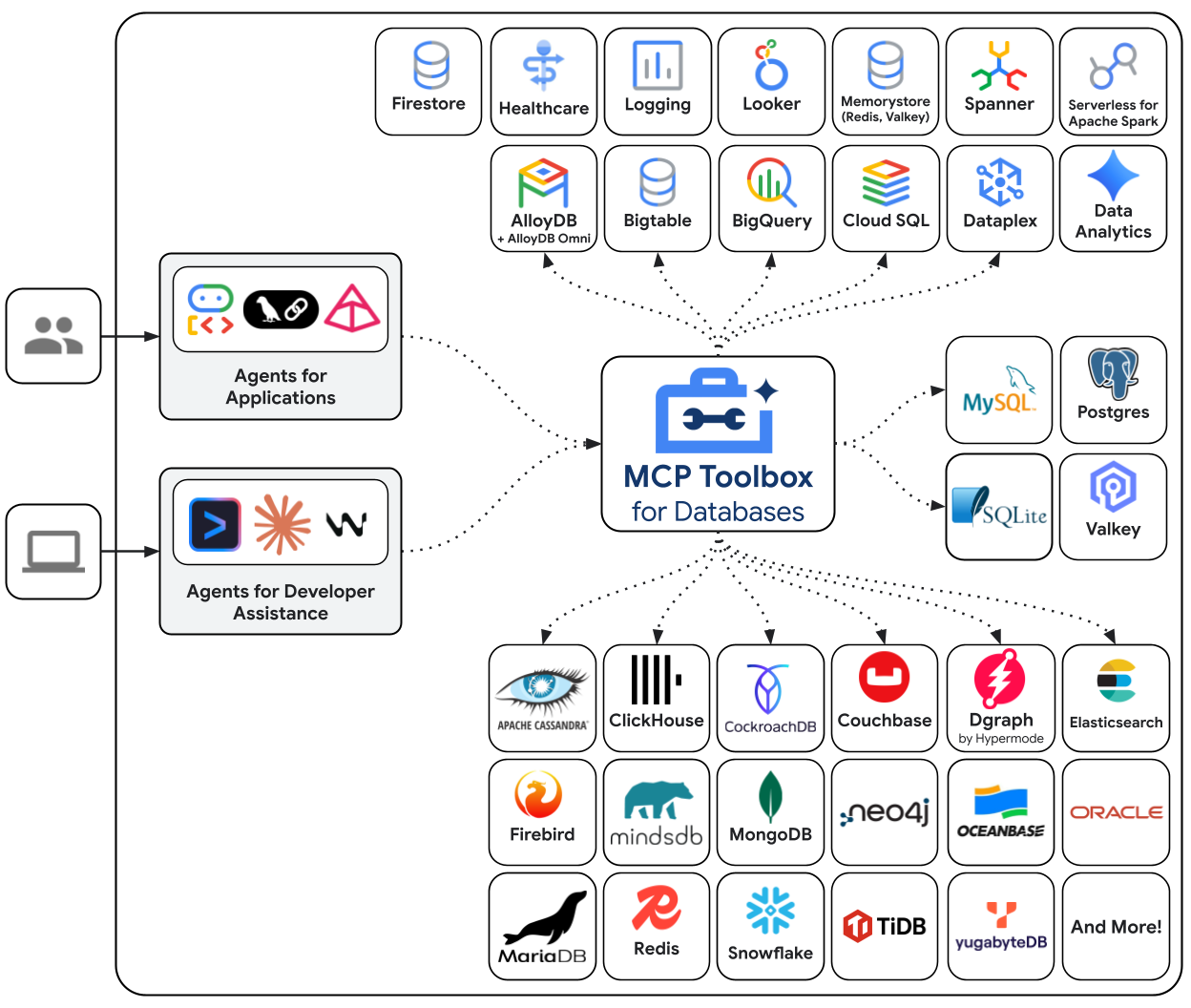
MCP Toolbox for Databases is an open source MCP server for databases. It was designed with enterprise-grade and production-quality in mind. It enables you to develop tools easier, faster, and more securely by handling the complexities such as connection pooling, authentication, and more.
Toolbox Tools can be seemlessly integrated with LangChain applications. For more
information on getting
started or
configuring
MCP Toolbox, see the
documentation.
Setup
This guide assumes you have already done the following:
- Installed Python 3.9+ and pip.
- Installed PostgreSQL 16+ and the
psql command-line client.
1. Setup your Database
First, let’s set up a PostgreSQL database. We’ll create a new database, a dedicated user for MCP Toolbox, and a hotels table with some sample data.
Connect to PostgreSQL using the psql command. You may need to adjust the command based on your PostgreSQL setup (e.g., if you need to specify a host or a different superuser).
Now, run the following SQL commands to create the user, database, and grant the necessary permissions:
CREATE USER toolbox_user WITH PASSWORD 'my-password';
CREATE DATABASE toolbox_db;
GRANT ALL PRIVILEGES ON DATABASE toolbox_db TO toolbox_user;
ALTER DATABASE toolbox_db OWNER TO toolbox_user;
Connect to your newly created database with the new user:
\c toolbox_db toolbox_user
Finally, create the hotels table and insert some data:
CREATE TABLE hotels(
id INTEGER NOT NULL PRIMARY KEY,
name VARCHAR NOT NULL,
location VARCHAR NOT NULL,
price_tier VARCHAR NOT NULL,
booked BIT NOT NULL
);
INSERT INTO hotels(id, name, location, price_tier, booked)
VALUES
(1, 'Hilton Basel', 'Basel', 'Luxury', B'0'),
(2, 'Marriott Zurich', 'Zurich', 'Upscale', B'0'),
(3, 'Hyatt Regency Basel', 'Basel', 'Upper Upscale', B'0');
You can now exit psql by typing \q.
Next, we will install MCP Toolbox, define our tools in a tools.yaml configuration file, and run the MCP Toolbox server.
For macOS users, the easiest way to install is with Homebrew:
For other platforms, download the latest MCP Toolbox binary for your operating system and architecture.
Create a tools.yaml file. This file defines the data sources MCP Toolbox can connect to and the tools it can expose to your agent. For production use, always use environment variables for secrets.
sources:
my-pg-source:
kind: postgres
host: 127.0.0.1
port: 5432
database: toolbox_db
user: toolbox_user
password: my-password
tools:
search-hotels-by-location:
kind: postgres-sql
source: my-pg-source
description: Search for hotels based on location.
parameters:
- name: location
type: string
description: The location of the hotel.
statement: SELECT id, name, location, price_tier FROM hotels WHERE location ILIKE '%' || $1 || '%';
book-hotel:
kind: postgres-sql
source: my-pg-source
description: >-
Book a hotel by its ID. If the hotel is successfully booked, returns a confirmation message.
parameters:
- name: hotel_id
type: integer
description: The ID of the hotel to book.
statement: UPDATE hotels SET booked = B'1' WHERE id = $1;
toolsets:
hotel_toolset:
- search-hotels-by-location
- book-hotel
Now, in a separate terminal window, start the MCP Toolbox server. If you installed via Homebrew, you can just run toolbox. If you downloaded the binary manually, you’ll need to run ./toolbox from the directory where you saved it:
toolbox --tools-file "tools.yaml"
MCP Toolbox will start on http://127.0.0.1:5000 by default and will hot-reload if you make changes to your tools.yaml file.
Instantiation
!pip install toolbox-langchain
from toolbox_langchain import ToolboxClient
with ToolboxClient("http://127.0.0.1:5000") as client:
search_tool = await client.aload_tool("search-hotels-by-location")
Invocation
from toolbox_langchain import ToolboxClient
with ToolboxClient("http://127.0.0.1:5000") as client:
search_tool = await client.aload_tool("search-hotels-by-location")
results = search_tool.invoke({"location": "Basel"})
print(results)
[{"id":1,"location":"Basel","name":"Hilton Basel","price_tier":"Luxury"},{"id":3,"location":"Basel","name":"Hyatt Regency Basel","price_tier":"Upper Upscale"}]
Use within an agent
Now for the fun part! We’ll install the required LangChain packages and create an agent that can use the tools we defined in MCP Toolbox.
pip install -qU toolbox-langchain langgraph langchain-google-vertexai
With the packages installed, we can define our agent. We will use ChatVertexAI for the model and ToolboxClient to load our tools. The create_agent from langchain.agents creates a robust agent that can reason about which tools to call.
Note: Ensure your MCP Toolbox server is running in a separate terminal before executing the code below.
from langchain.agents import create_agent
from langchain_google_vertexai import ChatVertexAI
from langgraph.checkpoint.memory import MemorySaver
from toolbox_langchain import ToolboxClient
prompt = """
You're a helpful hotel assistant. You handle hotel searching and booking.
When the user searches for a hotel, list the full details for each hotel found: id, name, location, and price tier.
Always use the hotel ID for booking operations.
For any bookings, provide a clear confirmation message.
Don't ask for clarification or confirmation from the user; perform the requested action directly.
"""
async def run_queries(agent_executor):
config = {"configurable": {"thread_id": "hotel-thread-1"}}
# --- Query 1: Search for hotels ---
query1 = "I need to find a hotel in Basel."
print(f'\n--- USER: "{query1}" ---')
inputs1 = {"messages": [("user", prompt + query1)]}
async for event in agent_executor.astream_events(
inputs1, config=config, version="v2"
):
if event["event"] == "on_chat_model_end" and event["data"]["output"].content:
print(f"--- AGENT: ---\n{event['data']['output'].content}")
# --- Query 2: Book a hotel ---
query2 = "Great, please book the Hyatt Regency Basel for me."
print(f'\n--- USER: "{query2}" ---')
inputs2 = {"messages": [("user", query2)]}
async for event in agent_executor.astream_events(
inputs2, config=config, version="v2"
):
if event["event"] == "on_chat_model_end" and event["data"]["output"].content:
print(f"--- AGENT: ---\n{event['data']['output'].content}")
Run the agent
async def main():
await run_hotel_agent()
async def run_hotel_agent():
model = ChatVertexAI(model_name="gemini-2.5-flash")
# Load the tools from the running MCP Toolbox server
async with ToolboxClient("http://127.0.0.1:5000") as client:
tools = await client.aload_toolset("hotel_toolset")
agent = create_agent(model, tools, checkpointer=MemorySaver())
await run_queries(agent)
await main()
You’ve successfully connected a LangChain agent to a local database using MCP Toolbox! 🥳
API reference
The primary class for this integration is ToolboxClient.
For more information, see the following resources:
MCP Toolbox has a variety of features to make developing Gen AI tools for databases seamless:
Community and support
We encourage you to get involved with the community: