

Documentation Index
Fetch the complete documentation index at: https://docs.langchain.com/llms.txt
Use this file to discover all available pages before exploring further.
This page covers how to use Google Vertex AI Vector Search as a vector store in LangChain.
Overview
Google Vertex AI Vector Search is a fully managed, high-scale, low-latency solution for finding similar vectors. It supports both exact and approximate nearest neighbor (ANN) search using Google’s ScaNN (Scalable Nearest Neighbors) technology.
Vertex AI Vector Search is available in two versions:
- Vector Search 2.0: Uses Collections to store Data Objects containing vectors, metadata, and content together. Provides a unified data model with simpler and quicker operations.
- Vector Search 1.0: Uses Indexes deployed to Endpoints with separate document storage in Google Cloud Storage or Datastore.
Choose the section below based on which version you’re using:
For migrating from Vertex AI Vector Search 1.0 to 2.0, see the Migration Guide.
Installation
Install the LangChain Google Vertex AI integration:
pip install -U langchain-google-vertexai
Vector Search 2.0
Vector Search 2.0 uses Collections to store Data Objects. Each Data Object contains vectors, metadata, and content in a unified structure.
Prerequisites
-
Google Cloud project with Vertex AI API and Vector Search APIs enabled
gcloud services enable vectorsearch.googleapis.com aiplatform.googleapis.com --project "{PROJECT_ID}"
-
Vector Search Collection created (see Creating a Collection)
-
Appropriate IAM permissions (
Vertex AI User role or equivalent)
Creating a Collection (V2)
Before using Vector Search 2.0, you need to create a collection. Here’s how to create a collection compatible with LangChain:
from google.cloud import vectorsearch_v1beta
# Configuration
PROJECT_ID = "your-project-id"
LOCATION = "us-central1"
COLLECTION_ID = "langchain-test-collection"
# Create the Vector Search service client
vector_search_service_client = vectorsearch_v1beta.VectorSearchServiceClient()
# Create the collection with schema compatible with LangChain
# IMPORTANT: To enable filtering, you must define filterable fields in data_schema.properties
request = vectorsearch_v1beta.CreateCollectionRequest(
parent=f"projects/{PROJECT_ID}/locations/{LOCATION}",
collection_id=COLLECTION_ID,
collection={
"display_name": "LangChain Test Collection",
"description": "Collection for testing LangChain VectorSearchVectorStore with filtering",
"data_schema": {
"type": "object",
"properties": {
# Define fields you want to filter on
"source": {"type": "string"},
"category": {"type": "string"},
"page": {"type": "number"},
# Add more fields as needed for your specific use case
},
},
"vector_schema": {
# Vector field must be named "embedding" to match LangChain's default
"embedding": {
"dense_vector": {
"dimensions": 768 # For text-embedding-005
}
},
},
},
)
print(f"Creating collection: {COLLECTION_ID}")
operation = vector_search_service_client.create_collection(request=request)
print(f"Operation started: {operation.operation.name}")
print("Waiting for operation to complete...")
result = operation.result()
print(f"Collection created successfully!")
print(f"Resource name: {result.name}")
Important notes:
- The vector field must be named
"embedding" to match LangChain’s default (or use vector_field_name parameter)
- Only fields defined in
data_schema.properties can be used for filtering in V2
- Dimensions should match your embedding model (768 for text-embedding-005)
Initialization
from langchain_google_vertexai import VectorSearchVectorStore, VertexAIEmbeddings
# Initialize embeddings
embeddings = VertexAIEmbeddings(model_name="text-embedding-005")
# Create vector store from a Collection
# Use the same PROJECT_ID, LOCATION, and COLLECTION_ID from collection creation
vector_store = VectorSearchVectorStore.from_components(
project_id=PROJECT_ID,
region=LOCATION,
collection_id=COLLECTION_ID,
embedding=embeddings,
api_version="v2",
)
Key parameters:
collection_id: Your Vector Search Collection ID (required)
api_version: Must be set to "v2" (required)
project_id: GCP project ID (required)
region: GCP region where Collection exists (required)
vector_field_name: Name of the vector field in your Collection schema (default: "embedding")
Adding Documents
from langchain_core.documents import Document
# Create documents
docs = [
Document(
page_content="Google Vertex AI is a managed machine learning platform",
metadata={"source": "docs", "category": "AI"}
),
Document(
page_content="LangChain integrates with Vertex AI Vector Search",
metadata={"source": "blog", "category": "integration"}
),
]
# Add documents to vector store
ids = vector_store.add_documents(docs)
print(f"Added documents with IDs: {ids}")
Adding Texts
texts = [
"Vertex AI provides scalable ML infrastructure",
"Vector Search enables similarity search at scale",
]
metadatas = [
{"source": "website", "page": 1},
{"source": "website", "page": 2},
]
ids = vector_store.add_texts(texts=texts, metadatas=metadatas)
Searching
Basic Similarity Search
# Basic similarity search
query = "What is Vertex AI?"
results = vector_store.similarity_search(query, k=5)
for doc in results:
print(f"Content: {doc.page_content}")
print(f"Metadata: {doc.metadata}\n")
Similarity Search with Scores
# Get similarity scores along with documents
results_with_scores = vector_store.similarity_search_with_score(
"What is Vertex AI?",
k=5
)
for doc, score in results_with_scores:
print(f"Score: {score}")
print(f"Content: {doc.page_content}")
print(f"Metadata: {doc.metadata}\n")
Search by Vector
# Search using a pre-computed embedding
embedding = embeddings.embed_query("Vertex AI features")
results = vector_store.similarity_search_by_vector_with_score(embedding, k=5)
for doc, score in results:
print(f"Score: {score}")
print(f"Content: {doc.page_content}\n")
Filtering
Vector Search 2.0 uses dict-based query syntax for filtering Data Objects:
# Simple equality filter
results = vector_store.similarity_search(
"AI features",
k=5,
filter={"source": {"$eq": "docs"}}
)
# Comparison operators
results = vector_store.similarity_search(
"recent pages",
k=5,
filter={"page": {"$gte": 10}}
)
# Logical AND
results = vector_store.similarity_search(
"AI documentation",
k=5,
filter={
"$and": [
{"source": {"$eq": "docs"}},
{"category": {"$eq": "AI"}}
]
}
)
# Logical OR
results = vector_store.similarity_search(
"documentation",
k=5,
filter={
"$or": [
{"source": {"$eq": "docs"}},
{"source": {"$eq": "blog"}}
]
}
)
# Less than
results = vector_store.similarity_search(
"early pages",
k=5,
filter={"page": {"$lt": 5}}
)
Supported operators:
$eq: Equals
$ne: Not equals
$lt: Less than
$lte: Less than or equal
$gt: Greater than
$gte: Greater than or equal
$and: Logical AND
$or: Logical OR
$not: Logical NOT
See the Vector Search 2.0 query documentation for more details.
Delete Operations
Delete by IDs
# Delete specific documents by ID
ids_to_delete = ["id1", "id2", "id3"]
vector_store.delete(ids=ids_to_delete)
Note: Delete by metadata filter has limitations in the current V2 API. The recommended approach is to:
- Use
similarity_search with your filter to get document IDs
- Delete by IDs
# Recommended: Search first, then delete by IDs
results = vector_store.similarity_search(
"query", # Use a broad query
k=1000, # Get more results
filter={"source": {"$eq": "old_docs"}}
)
ids_to_delete = [doc.metadata.get("id") for doc in results if "id" in doc.metadata]
vector_store.delete(ids=ids_to_delete)
Alternatively, if direct metadata deletion is supported in your environment:
# Direct deletion by metadata (may have limitations)
try:
vector_store.delete(metadata={"source": {"$eq": "old_docs"}})
except Exception as e:
# Fall back to search-then-delete approach
print(f"Direct deletion failed: {e}")
Advanced Features
Vector Search 2.0 offers several advanced search capabilities that go beyond traditional dense vector search.
Semantic Search
Semantic search automatically generates embeddings from your query text using Vertex AI models. Your collection must be configured with vertex_embedding_config in the vector schema.
# Semantic search with auto-generated embeddings
results = vector_store.semantic_search(
query="Tell me about animals",
k=5,
search_field="embedding", # Vector field with auto-embedding config
task_type="RETRIEVAL_QUERY", # Optimizes embeddings for search queries
filter={"category": {"$eq": "wildlife"}} # Optional filtering
)
for doc in results:
print(f"Content: {doc.page_content}")
print(f"Metadata: {doc.metadata}\n")
Task types:
RETRIEVAL_QUERY: For search queries (default)
RETRIEVAL_DOCUMENT: For document indexing
SEMANTIC_SIMILARITY: For semantic similarity tasks
CLASSIFICATION: For classification tasks
CLUSTERING: For clustering tasks
Text Search
Text search performs keyword/full-text matching on data fields without using embeddings.
# Keyword search on data fields
results = vector_store.text_search(
query="Python programming",
k=10,
data_field_names=["page_content", "title"] # Fields to search in
)
for doc in results:
print(f"Content: {doc.page_content}\n")
!!! note
Text search does not support filters. Use semantic_search() or similarity_search() if you need filtering.
Hybrid Search
Hybrid search combines semantic search (with auto-generated embeddings) and text search (keyword matching) using Reciprocal Rank Fusion (RRF) to produce optimally ranked results.
# Hybrid search: semantic understanding + keyword matching
results = vector_store.hybrid_search(
query="Men's outfit for beach",
k=10,
search_field="embedding", # Vector field with auto-embedding config
data_field_names=["page_content"], # Fields for text search
task_type="RETRIEVAL_QUERY",
filter={"price": {"$lt": 100}}, # Optional filter for semantic search
semantic_weight=1.0, # Weight for semantic results
text_weight=1.0 # Weight for keyword results
)
for doc in results:
print(f"Content: {doc.page_content}\n")
Weight parameters:
- Higher
semantic_weight: Prioritizes semantic understanding
- Higher
text_weight: Prioritizes exact keyword matches
- Equal weights (default): Balanced results
Products appearing high in both semantic and text search results will rank highest in the merged results.
See the Vector Search 2.0 documentation for more information.
Custom Vector Field Names
If your Collection schema uses a custom field name for vectors:
vector_store = VectorSearchVectorStore.from_components(
project_id="your-project-id",
region="us-central1",
collection_id="your-collection-id",
embedding=embeddings,
api_version="v2",
vector_field_name="custom_embedding_field", # Match your schema
)
Additional Resources
Vector Search 1.0
This notebook shows how to use functionality related to the Google Cloud Vertex AI Vector Search vector database.
Google Vertex AI Vector Search, formerly known as Vertex AI Matching Engine, provides the industry’s leading high-scale low latency vector database. These vector databases are commonly referred to as vector similarity-matching or an approximate nearest neighbor (ANN) service.
Note: LangChain API expects an endpoint and deployed index already created.Index creation time can take upto one hour.
To see how to create an index refer to the section Create Index and deploy it to an Endpoint
If you already have an index deployed , skip to Create VectorStore from texts
Create index and deploy it to an endpoint
- This section demonstrates creating a new index and deploying it to an endpoint
# TODO : Set values as per your requirements
# Project and Storage Constants
PROJECT_ID = "<my_project_id>"
REGION = "<my_region>"
BUCKET = "<my_gcs_bucket>"
BUCKET_URI = f"gs://{BUCKET}"
# The number of dimensions for the textembedding-gecko@003 is 768
# If other embedder is used, the dimensions would probably need to change.
DIMENSIONS = 768
# Index Constants
DISPLAY_NAME = "<my_matching_engine_index_id>"
DEPLOYED_INDEX_ID = "<my_matching_engine_endpoint_id>"
# Create a bucket.
! gsutil mb -l $REGION -p $PROJECT_ID $BUCKET_URI
Use VertexAIEmbeddings as the embeddings model
from google.cloud import aiplatform
from langchain_google_vertexai import VertexAIEmbeddings
aiplatform.init(project=PROJECT_ID, location=REGION, staging_bucket=BUCKET_URI)
embedding_model = VertexAIEmbeddings(model_name="text-embedding-005")
Create an empty index
Note : While creating an index you should specify an “index_update_method” from either a “BATCH_UPDATE” or “STREAM_UPDATE”
A batch index is for when you want to update your index in a batch, with data which has been stored over a set amount of time, like systems which are processed weekly or monthly. A streaming index is when you want index data to be updated as new data is added to your datastore, for instance, if you have a bookstore and want to show new inventory online as soon as possible. Which type you choose is important, since setup and requirements are different.
Refer Official Documentation for more details on configuring indexes
# NOTE : This operation can take upto 30 seconds
my_index = aiplatform.MatchingEngineIndex.create_tree_ah_index(
display_name=DISPLAY_NAME,
dimensions=DIMENSIONS,
approximate_neighbors_count=150,
distance_measure_type="DOT_PRODUCT_DISTANCE",
index_update_method="STREAM_UPDATE", # allowed values BATCH_UPDATE , STREAM_UPDATE
)
Create an endpoint
# Create an endpoint
my_index_endpoint = aiplatform.MatchingEngineIndexEndpoint.create(
display_name=f"{DISPLAY_NAME}-endpoint", public_endpoint_enabled=True
)
Deploy index to the endpoint
# NOTE : This operation can take upto 20 minutes
my_index_endpoint = my_index_endpoint.deploy_index(
index=my_index, deployed_index_id=DEPLOYED_INDEX_ID
)
my_index_endpoint.deployed_indexes
Create vector store from texts
NOTE : If you have existing Index and Endpoints, you can load them using below code
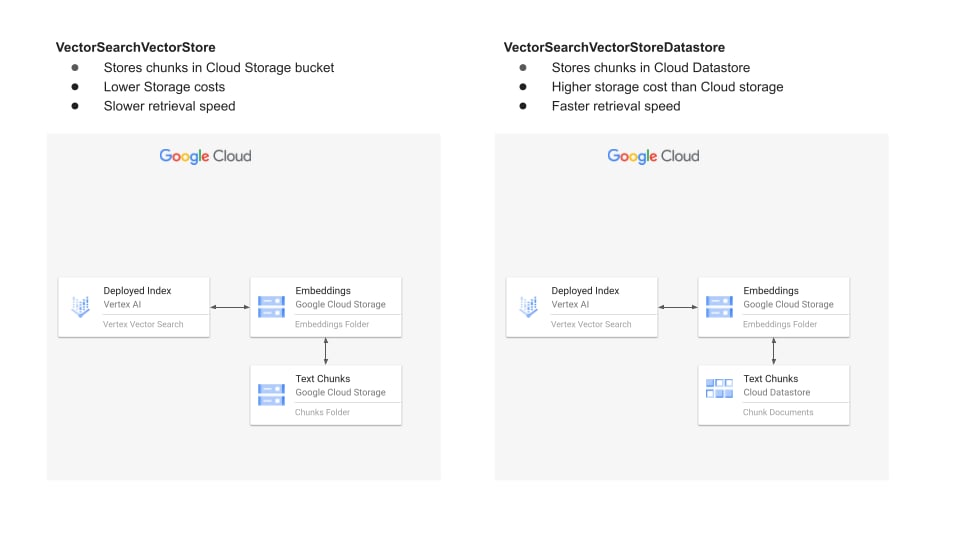
# TODO : replace 1234567890123456789 with your acutial index ID
my_index = aiplatform.MatchingEngineIndex("1234567890123456789")
# TODO : replace 1234567890123456789 with your acutial endpoint ID
my_index_endpoint = aiplatform.MatchingEngineIndexEndpoint("1234567890123456789")
from langchain_google_vertexai import (
VectorSearchVectorStore,
VectorSearchVectorStoreDatastore,
)
Create simple vectorstore ( without filters)
# Input texts
texts = [
"The cat sat on",
"the mat.",
"I like to",
"eat pizza for",
"dinner.",
"The sun sets",
"in the west.",
]
# Create a Vector Store
vector_store = VectorSearchVectorStore.from_components(
project_id=PROJECT_ID,
region=REGION,
gcs_bucket_name=BUCKET,
index_id=my_index.name,
endpoint_id=my_index_endpoint.name,
embedding=embedding_model,
stream_update=True,
)
# Add vectors and mapped text chunks to your vector store
vector_store.add_texts(texts=texts)
OPTIONAL : You can also create vector and store chunks in a datastore
# NOTE : This operation can take upto 20 mins
vector_store = VectorSearchVectorStoreDatastore.from_components(
project_id=PROJECT_ID,
region=REGION,
index_id=my_index.name,
endpoint_id=my_index_endpoint.name,
embedding=embedding_model,
stream_update=True,
)
vector_store.add_texts(texts=texts, is_complete_overwrite=True)
# Try running a simialarity search
vector_store.similarity_search("pizza")
# Input text with metadata
record_data = [
{
"description": "A versatile pair of dark-wash denim jeans."
"Made from durable cotton with a classic straight-leg cut, these jeans"
" transition easily from casual days to dressier occasions.",
"price": 65.00,
"color": "blue",
"season": ["fall", "winter", "spring"],
},
{
"description": "A lightweight linen button-down shirt in a crisp white."
" Perfect for keeping cool with breathable fabric and a relaxed fit.",
"price": 34.99,
"color": "white",
"season": ["summer", "spring"],
},
{
"description": "A soft, chunky knit sweater in a vibrant forest green. "
"The oversized fit and cozy wool blend make this ideal for staying warm "
"when the temperature drops.",
"price": 89.99,
"color": "green",
"season": ["fall", "winter"],
},
{
"description": "A classic crewneck t-shirt in a soft, heathered blue. "
"Made from comfortable cotton jersey, this t-shirt is a wardrobe essential "
"that works for every season.",
"price": 19.99,
"color": "blue",
"season": ["fall", "winter", "summer", "spring"],
},
{
"description": "A flowing midi-skirt in a delicate floral print. "
"Lightweight and airy, this skirt adds a touch of feminine style "
"to warmer days.",
"price": 45.00,
"color": "white",
"season": ["spring", "summer"],
},
]
# Parse and prepare input data
texts = []
metadatas = []
for record in record_data:
record = record.copy()
page_content = record.pop("description")
texts.append(page_content)
if isinstance(page_content, str):
metadata = {**record}
metadatas.append(metadata)
# Inspect metadatas
metadatas
# NOTE : This operation can take more than 20 mins
vector_store = VectorSearchVectorStore.from_components(
project_id=PROJECT_ID,
region=REGION,
gcs_bucket_name=BUCKET,
index_id=my_index.name,
endpoint_id=my_index_endpoint.name,
embedding=embedding_model,
)
vector_store.add_texts(texts=texts, metadatas=metadatas, is_complete_overwrite=True)
from google.cloud.aiplatform.matching_engine.matching_engine_index_endpoint import (
Namespace,
NumericNamespace,
)
# Try running a simple similarity search
# Below code should return 5 results
vector_store.similarity_search("shirt", k=5)
# Try running a similarity search with text filter
filters = [Namespace(name="season", allow_tokens=["spring"])]
# Below code should return 4 results now
vector_store.similarity_search("shirt", k=5, filter=filters)
# Try running a similarity search with combination of text and numeric filter
filters = [Namespace(name="season", allow_tokens=["spring"])]
numeric_filters = [NumericNamespace(name="price", value_float=40.0, op="LESS")]
# Below code should return 2 results now
vector_store.similarity_search(
"shirt", k=5, filter=filters, numeric_filter=numeric_filters
)
Use vector store as retriever
# Initialize the vectore_store as retriever
retriever = vector_store.as_retriever()
# perform simple similarity search on retriever
retriever.invoke("What are my options in breathable fabric?")
# Try running a similarity search with text filter
filters = [Namespace(name="season", allow_tokens=["spring"])]
retriever.search_kwargs = {"filter": filters}
# perform similarity search with filters on retriever
retriever.invoke("What are my options in breathable fabric?")
# Try running a similarity search with combination of text and numeric filter
filters = [Namespace(name="season", allow_tokens=["spring"])]
numeric_filters = [NumericNamespace(name="price", value_float=40.0, op="LESS")]
retriever.search_kwargs = {"filter": filters, "numeric_filter": numeric_filters}
retriever.invoke("What are my options in breathable fabric?")
Use filters with retriever in question answering chains
from langchain_google_vertexai import VertexAI
llm = VertexAI(model_name="gemini-pro")
from langchain_classic.chains import RetrievalQA
filters = [Namespace(name="season", allow_tokens=["spring"])]
numeric_filters = [NumericNamespace(name="price", value_float=40.0, op="LESS")]
retriever.search_kwargs = {"k": 2, "filter": filters, "numeric_filter": numeric_filters}
retrieval_qa = RetrievalQA.from_chain_type(
llm=llm,
chain_type="stuff",
retriever=retriever,
return_source_documents=True,
)
question = "What are my options in breathable fabric?"
response = retrieval_qa({"query": question})
print(f"{response['result']}")
print("REFERENCES")
print(f"{response['source_documents']}")
Read , chunk , vectorise and index PDFs
from langchain_community.document_loaders import PyPDFLoader
from langchain_text_splitters import RecursiveCharacterTextSplitter
loader = PyPDFLoader("https://arxiv.org/pdf/1706.03762.pdf")
pages = loader.load()
text_splitter = RecursiveCharacterTextSplitter(
# Set a really small chunk size, just to show.
chunk_size=1000,
chunk_overlap=20,
length_function=len,
is_separator_regex=False,
)
doc_splits = text_splitter.split_documents(pages)
texts = [doc.page_content for doc in doc_splits]
metadatas = [doc.metadata for doc in doc_splits]
# Inspect Metadata of 1st page
metadatas[0]
vector_store = VectorSearchVectorStore.from_components(
project_id=PROJECT_ID,
region=REGION,
gcs_bucket_name=BUCKET,
index_id=my_index.name,
endpoint_id=my_index_endpoint.name,
embedding=embedding_model,
)
vector_store.add_texts(texts=texts, metadatas=metadatas, is_complete_overwrite=True)
vector_store = VectorSearchVectorStore.from_components(
project_id=PROJECT_ID,
region=REGION,
gcs_bucket_name=BUCKET,
index_id=my_index.name,
endpoint_id=my_index_endpoint.name,
embedding=embedding_model,
)
Hybrid search
Vector Search supports hybrid search, a popular architecture pattern in information retrieval (IR) that combines both semantic search and keyword search (also called token-based search). With hybrid search, developers can take advantage of the best of the two approaches, effectively providing higher search quality.
Read the Vertex AI hybrid search documentation to learn more.
In order to use hybrid search, we need to fit a sparse embedding vectorizer and handle the embeddings outside of the Vector Search integration.
An example of sparse embedding vectorizer is sklearn TfidfVectorizer but other techniques can be used, for instance BM25.
# Define some sample data
texts = [
"The cat sat on",
"the mat.",
"I like to",
"eat pizza for",
"dinner.",
"The sun sets",
"in the west.",
]
# optional IDs
ids = ["i_" + str(i + 1) for i in range(len(texts))]
# optional metadata
metadatas = [{"my_metadata": i} for i in range(len(texts))]
from sklearn.feature_extraction.text import TfidfVectorizer
# Fit the TFIDF Vectorizer (This is usually done on a very large corpus of data to make sure that word statistics generalize well on new data)
vectorizer = TfidfVectorizer()
vectorizer.fit(texts)
# Utility function to transform text into a TF-IDF Sparse Vector
def get_sparse_embedding(tfidf_vectorizer, text):
tfidf_vector = tfidf_vectorizer.transform([text])
values = []
dims = []
for i, tfidf_value in enumerate(tfidf_vector.data):
values.append(float(tfidf_value))
dims.append(int(tfidf_vector.indices[i]))
return {"values": values, "dimensions": dims}
# semantic (dense) embeddings
embeddings = embedding_model.embed_documents(texts)
# tfidf (sparse) embeddings
sparse_embeddings = [get_sparse_embedding(vectorizer, x) for x in texts]
# Add the dense and sparse embeddings in Vector Search
vector_store.add_texts_with_embeddings(
texts=texts,
embeddings=embeddings,
sparse_embeddings=sparse_embeddings,
ids=ids,
metadatas=metadatas,
)
# Run hybrid search
query = "the cat"
embedding = embedding_model.embed_query(query)
sparse_embedding = get_sparse_embedding(vectorizer, query)
vector_store.similarity_search_by_vector_with_score(
embedding=embedding,
sparse_embedding=sparse_embedding,
k=5,
rrf_ranking_alpha=0.7, # 0.7 weight to dense and 0.3 weight to sparse
)