

Overview
You manage a simplified made up of Agent Servers and their required backing services (PostgreSQL, Redis, etc.):
This option gives you full control over scaling, deployment, and CI/CD pipelines, while still allowing optional integration with LangSmith for tracing and evaluation.
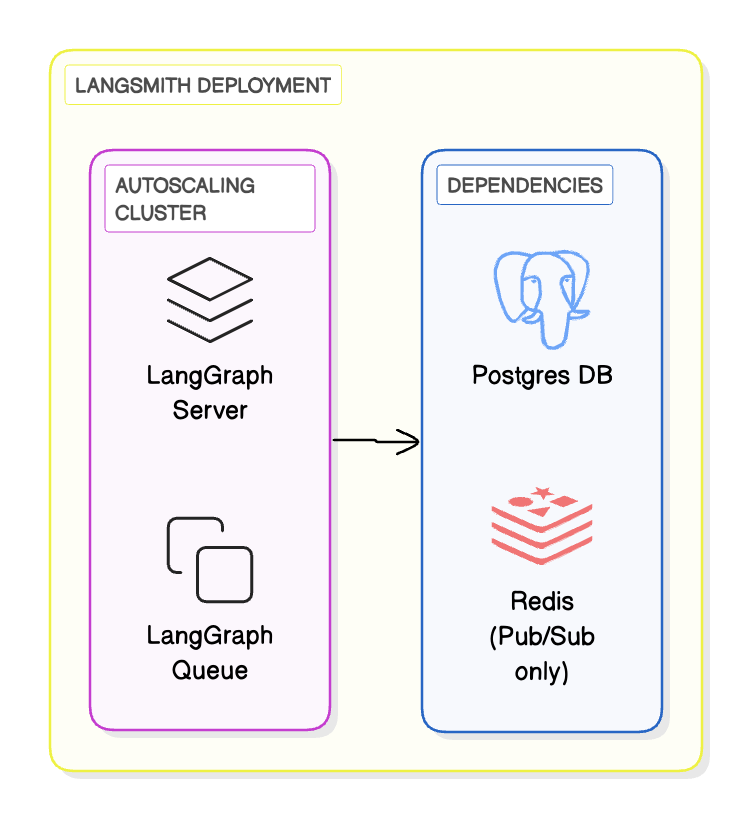
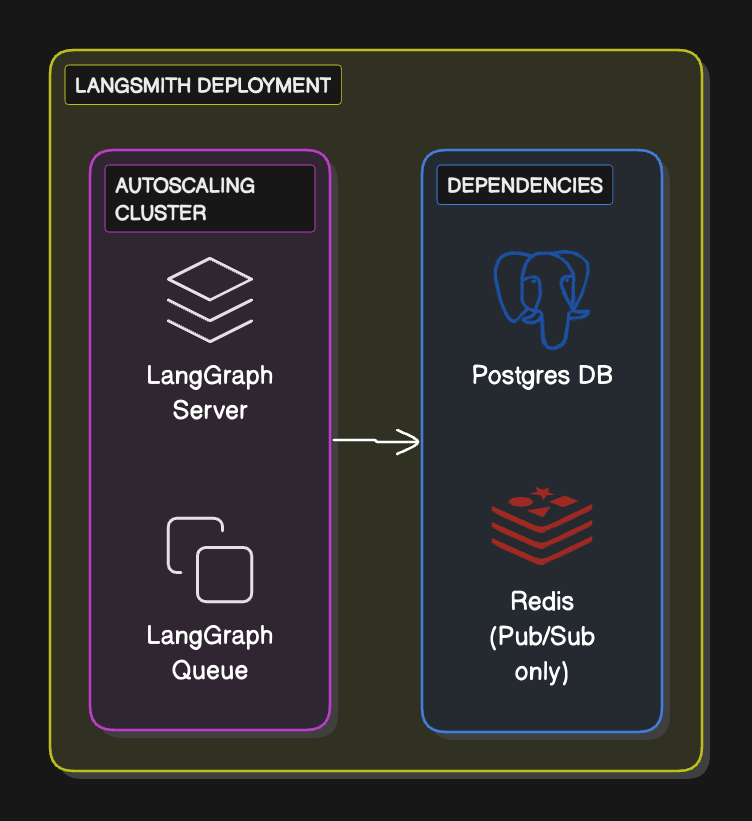
Workflow
- Define and test your graph locally using the
langgraph-clior Studio. - Package your agent as a Docker image.
- Deploy the Agent Server to your compute platform of choice (Kubernetes, Docker, VM).
- Optionally, configure LangSmith API keys and endpoints so the server reports traces and evaluations back to LangSmith (self-hosted or SaaS).
Supported compute platforms
- Kubernetes: Use the LangSmith Helm chart to run Agent Servers in a Kubernetes cluster. This is the recommended option for production-grade deployments.
- Docker: Run in any Docker-supported compute platform (local dev machine, VM, ECS, etc.). This is best suited for development or small-scale workloads.
Prerequisites
- Use the LangGraph CLI to test your application locally.
- Use the LangGraph CLI to build a Docker image (i.e.
langgraph build). To build on a network with no public internet access, see Set up a build machine on a restricted network. - The following environment variables are needed for a data plane deployment.
-
REDIS_URI: Connection details to a Redis instance. Redis will be used as a pub-sub broker to enable streaming real time output from background runs. The value ofREDIS_URImust be a valid Redis connection URI.Shared Redis Instance Multiple self-hosted deployments can share the same Redis instance. For example, forDeployment A,REDIS_URIcan be set toredis://<hostname_1>:<port>/1and forDeployment B,REDIS_URIcan be set toredis://<hostname_1>:<port>/2.1and2are different database numbers within the same instance, but<hostname_1>is shared. The same database number cannot be used for separate deployments. -
DATABASE_URI: Postgres connection details. Postgres will be used to store assistants, threads, runs, persist thread state and long term memory, and to manage the state of the background task queue with ‘exactly once’ semantics. The value ofDATABASE_URImust be a valid Postgres connection URI.Shared Postgres Instance Multiple self-hosted deployments can share the same Postgres instance. For example, forDeployment A,DATABASE_URIcan be set topostgres://<user>:<password>@/<database_name_1>?host=<hostname_1>and forDeployment B,DATABASE_URIcan be set topostgres://<user>:<password>@/<database_name_2>?host=<hostname_1>.<database_name_1>anddatabase_name_2are different databases within the same instance, but<hostname_1>is shared. The same database cannot be used for separate deployments. -
LANGSMITH_API_KEY: LangSmith API key. -
LANGGRAPH_CLOUD_LICENSE_KEY: LangSmith license key. This will be used to authenticate ONCE at server start up. -
LANGSMITH_ENDPOINT: To send traces to a self-hosted LangSmith instance, setLANGSMITH_ENDPOINTto the hostname of the self-hosted LangSmith instance.
-
- Egress to
https://beacon.langchain.comfrom your network. This is required for license verification and usage reporting if not running in air-gapped mode. See the Egress documentation for more details.
Agent Server services listen on both IPv4 and IPv6 by default as of 0.14.0. No additional configuration is required for dual-stack clusters. To listen on a single address family, set
LANGGRAPH_SERVER_HOST to 0.0.0.0 for IPv4 only or :: for IPv6 only. See Self-hosted Agent Server environment variables.Kubernetes
Use this Helm chart to deploy an Agent Server to a Kubernetes cluster. This is the recommended setup for production standalone server deployments. The Helm chart (v0.2.6+) supports MongoDB checkpointing with a bundled instance (dev/testing) or an external deployment (production). Setmongo.enabled: true in your values file. See Configure checkpointer backend for full configuration details.
Docker
Run the followingdocker command:
- You need to replace
my-imagewith the name of the image you built in the prerequisite steps (fromlanggraph build)
REDIS_URI, DATABASE_URI, and LANGSMITH_API_KEY.- If your application requires additional environment variables, you can pass them in a similar way.
Docker Compose
Use the following Docker Compose file:docker compose up with this file in the same folder.
With MongoDB checkpointing
With MongoDB checkpointing
To store checkpoints in MongoDB instead of PostgreSQL, add a MongoDB service and configure the checkpointer backend. Set the backend to See Configure checkpointer backend for more details on MongoDB configuration options.
"mongo" in your langgraph.json or use the LS_DEFAULT_CHECKPOINTER_BACKEND environment variable. PostgreSQL is still required for all other server data.8123 (change the port mapping in langgraph-api if needed). Test if the application is healthy:
Connect these docs to your agent of choice via MCP for real-time answers.