

In an agent-based workspace, create an agent once before sending traces. Use agent addressing to select its identifier and environment. If an integration requires
project_name, use the selected environment’s tracer_session_name as a compatibility value.The objective
In this example, we will build a bot that classify GitHub issues based on their title. It will take in a title and classify it into one of many different classes. Then, we will start to collect user feedback and use that to shape how this classifier performs.Getting started
Register the classifier agent, then configure its identifier and environment:Set up automations
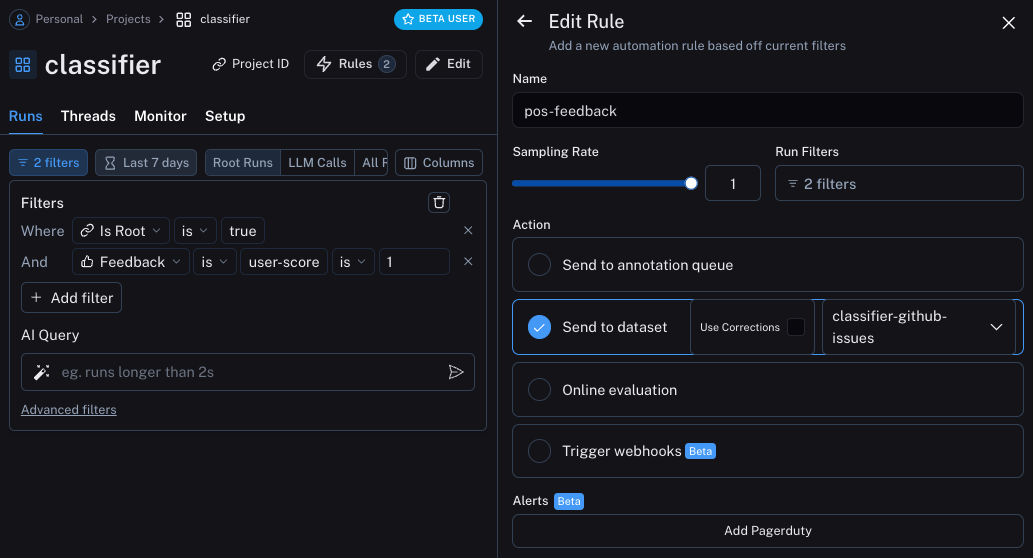
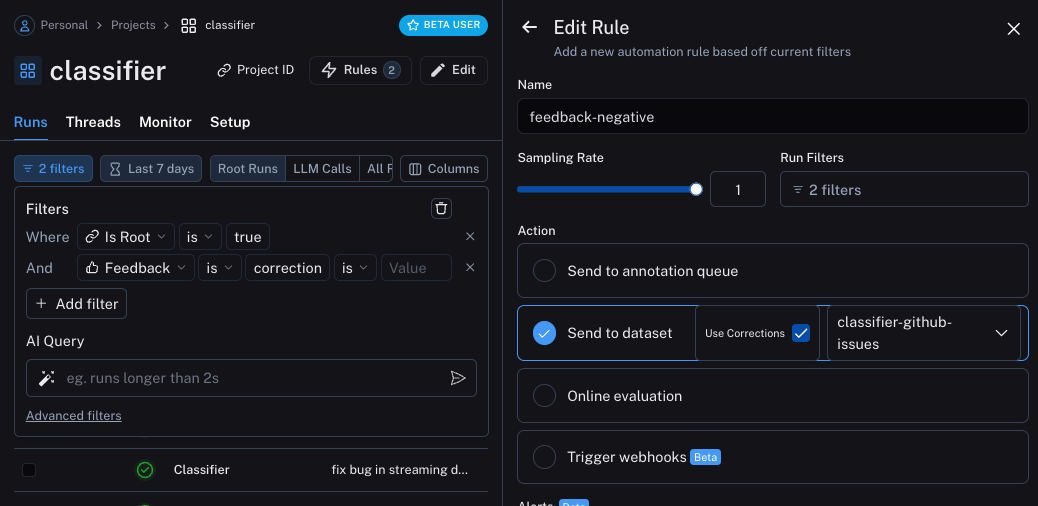
We can now set up automations to move examples with feedback of some form into a dataset. We will set up two automations, one for positive feedback and the other for negative feedback. The first will take all runs with positive feedback and automatically add them to a dataset. The logic behind this is that any run with positive feedback we can use as a good example in future iterations. Let’s create a dataset calledclassifier-github-issues to add this data to.
Update the agent
We can now update our code to pull down the dataset we are sending runs to. Once we pull it down, we can create a string with the examples in it. We can then put this string as part of the prompt!documentation
Semantic search over examples
One additional thing we can do is only use the most semantically similar examples. This is useful when you start to build up a lot of examples. In order to do this, we can first define an example to find thek most similar examples:
Connect these docs to your agent of choice via MCP for real-time answers.