


 Amazon Bedrock
 Anthropic
 Azure OpenAI
 DeepSeek
 Fireworks
 Google GeminiGemini Enterprise Agent Platform
 Groq
Groq
 Mistral AI
 OpenAIOpenAI compatible endpoint
 XAI
XAIAmazon Bedrock
Before you use this model, ensure you have AWS credentials, an IAM role, or an Amazon Bedrock API key.Authentication
Amazon Bedrock supports three authentication methods. IAM trusted entity is the recommended approach because it avoids sharing long-lived AWS access keys with LangSmith.IAM trusted entity (recommended)
Not available for self-hosted LangSmith or BYOC. Use access keys or the Bedrock API key instead.
- Create an IAM role in your AWS account with permissions to invoke Bedrock models (e.g.,
bedrock:InvokeModel). - Add a trust policy that allows LangSmith’s AWS account (
808407022534) to assume the role, using your LangSmith workspace ID as the external ID:
-
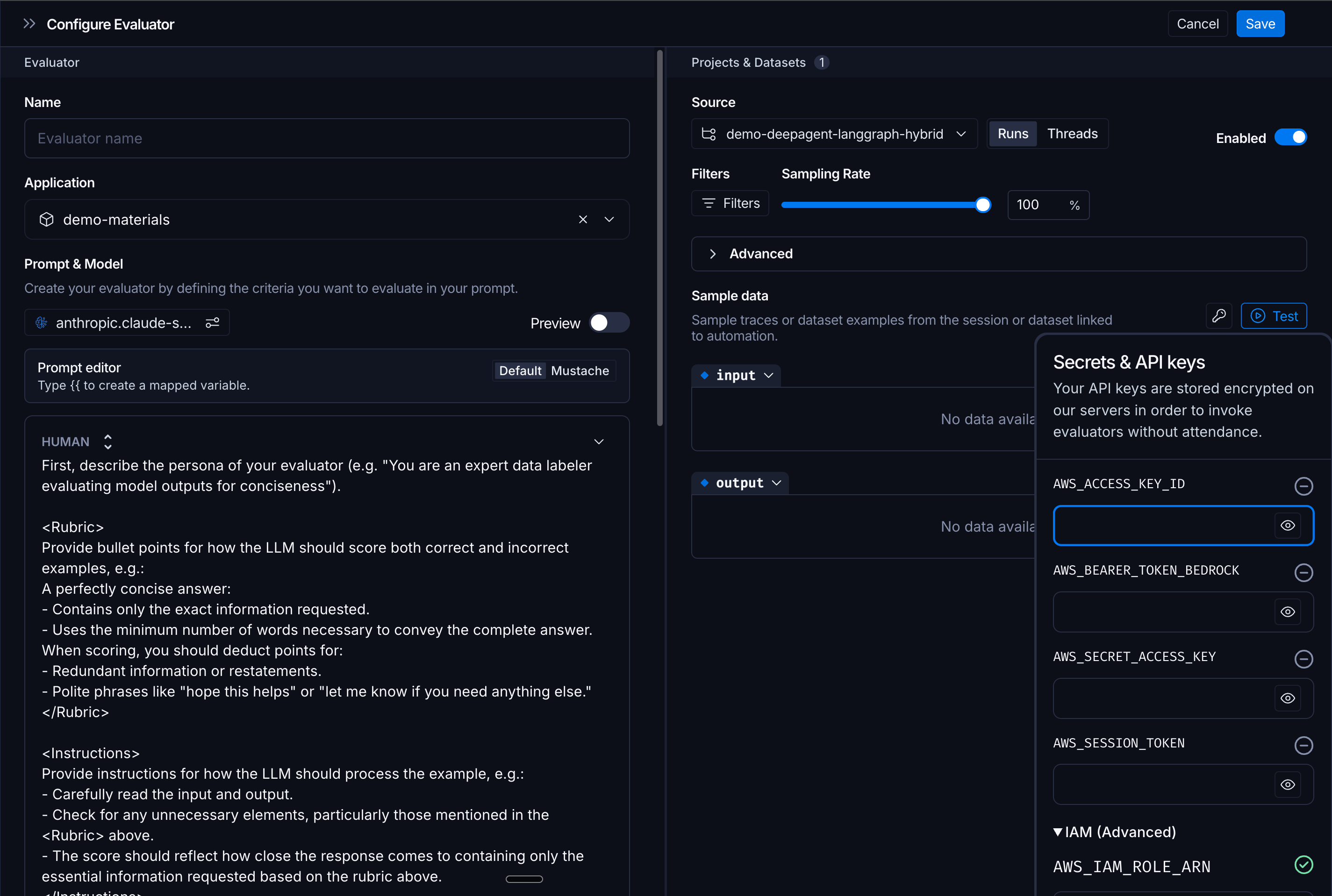
In the LangSmith Playground, open the Bedrock provider’s secrets configuration by clicking the Key icon (the IAM Trusted Entity option is not available in the model configuration dropdown itself). Then expand the IAM Trusted Entity section and enter the ARN of the role you created.
Access keys
Alternatively, you can authenticate with AWS access keys (AWS_ACCESS_KEY_ID and AWS_SECRET_ACCESS_KEY). Enter these in the Bedrock provider configuration in the Playground. This method is simpler to set up but less secure because it requires storing long-lived credentials.
Bedrock API key
Bedrock API keys authenticate requests with a bearer token instead of AWS credentials. To configure a Bedrock API key:- Generate an API key in the Amazon Bedrock console.
- In LangSmith, go to Settings > Provider Secrets, add a new secret, and select Amazon Bedrock as the provider.
- Select Bearer token under Authentication.
- Enter the API key as
AWS_BEARER_TOKEN_BEDROCK. - (Optional) Set
AWS_BEDROCK_REGION. The default isus-east-1. - Select Save.
Available models
AWS Bedrock provides access to foundation models from multiple providers:- Anthropic: Claude models.
- Amazon: Titan models.
- Cohere: Command models.
- Meta: Llama models.
- Others: Additional providers available based on region.
Configuration parameters
Parameters depend on the underlying model provider:For Anthropic models
Uses Anthropic configuration (see Anthropic section below).For Amazon Titan
AWS-specific settings
- Region: AWS region for model deployment.
Tool calling
Depends on underlying model:- Anthropic models:
auto,any. - Cohere models:
auto.
Anthropic
Before you use this model, ensure you have an Anthropic API key.Available models
Anthropic offers three tiers of models across their Claude generations:- Opus: Highest intelligence and capability.
- Sonnet: Balanced performance and cost.
- Haiku: Fast and cost-effective.
Configuration parameters
Temperature, Top P, and Top K are optional. When unchecked, Claude uses its internal defaults.
Extended Thinking
Available on supported Claude models. Enable the model to show reasoning before responding, similar to OpenAI’s o-series.
When enabled, responses include:
- A “thinking” section with the model’s reasoning.
- The final response.
Advanced options
- Base URL: Override API endpoint for custom deployments.
Tool calling
- Supported Tool Choices:
auto,any(requires at least one tool). - Parallel Execution: No (sequential only).
Azure OpenAI
Before you use this model, create an Azure OpenAI resource and model deployment.Authentication
API key
In the Azure OpenAI provider configuration, enter your endpoint, deployment name, API version, and API key.Workload identity for self-hosted LangSmith
Azure OpenAI workload identity requires self-hosted LangSmith
0.16.58 or later on Azure Kubernetes Service (AKS).- Enable the OIDC issuer and workload identity on your AKS cluster.
- Create or select a user-assigned managed identity.
- Add a federated identity credential to the managed identity. Use the AKS OIDC issuer and audience
api://AzureADTokenExchange. Set its subject tosystem:serviceaccount:<namespace>:<playground-service-account-name>. - Assign the managed identity the least-privilege
Cognitive Services OpenAI Userrole. Scope the role to the Azure OpenAI resource. See Azure OpenAI role-based access control. - Add the following values to your LangSmith Helm configuration:
Helm
443. Each configuration must use one supported Azure cloud: public, US Government, or China. LangSmith rejects invalid endpoints and configurations that mix Azure clouds.
For broader AKS deployment guidance, see Self-host LangSmith on Azure.
Available models
Azure OpenAI provides the same model families as OpenAI:- GPT series: General-purpose chat models.
- o-series: Reasoning-focused models.
- Legacy models: GPT-3.5 and GPT-4 variants.
Configuration parameters
Azure OpenAI supports the same parameters as OpenAI:Standard parameters
Advanced parameters
Reasoning Effort: Available on reasoning-optimized models (o-series and newer GPT models). Service Tier: Available on newer models. Other parameters:- JSON Mode: Force valid JSON responses.
- Parallel Tool Calls: Execute multiple tools concurrently.
Azure-specific features
- Deployment Management: Models must be deployed before use.
- Regional Availability: Choose Azure regions for data residency.
- Content Filtering: Built-in content moderation and safety features.
- Managed Identity: Azure AD authentication support.
- Private Endpoints: VNet integration for secure access.
Tool calling
- Supported Tool Choices:
auto,required,none, or specific tool name. - Parallel Execution: Yes.
DeepSeek
Before you use this model, ensure you have a DeepSeek API key.Available models
DeepSeek offers general-purpose models, reasoning-optimized models (R-series), and coding-specialized models. For the current list of available models, refer to DeepSeek’s documentation.Configuration parameters
Fireworks
Before you use this model, ensure you have a Fireworks API key.Available models
Fireworks provides high-speed inference for popular open-source models and fine-tuned variants, including:- Llama: Meta’s Llama models in various sizes.
- Mixtral: Mistral’s mixture-of-experts models.
- Qwen: Alibaba’s multilingual models.
- DeepSeek: DeepSeek models.
- Other open models: Gemma, Phi, and more.
Configuration parameters
Tool calling
- Supported Tool Choices:
auto,required,none. - Parallel Execution: Yes.
Google Gemini
Before you use this model, ensure you have a Google AI API key.Available models
Google offers Gemini models in multiple tiers (Ultra, Pro, Flash) optimized for different use cases. For the current list of available models, refer to Google’s Gemini documentation.Configuration parameters
Tool calling
- Supported Tool Choices:
auto,any,none. - Parallel Execution: No.
Gemini Enterprise Agent Platform
Before you use this model, ensure you have a Google Cloud project with the Gemini Enterprise Agent Platform API enabled.Authentication
Service account JSON key
You can authenticate by storing a service account JSON key in LangSmith. This JSON file contains credentials for a service account with Gemini Enterprise Agent Platform access. Step 1: Create a service account- Go to the Google Cloud Console > IAM & Admin > Service Accounts.
- Select your project and click Create Service Account.
- Give it a name (e.g.,
langsmith-vertex-ai) and click Create and Continue. - Assign the role Vertex AI User (
roles/aiplatform.user) and click Done.
- Click on the service account you just created.
- Go to the Keys tab and click Add Key > Create new key.
- Choose JSON and click Create. A
.jsonfile will download to your machine.
Workload identity for self-hosted LangSmith
Self-hosted LangSmith on GKE can use Workload Identity Federation and Application Default Credentials (ADC) instead of a JSON key. This keyless alternative supports Playground, Chat (polly in Helm), and Insights. See Authenticate Vertex AI with GKE workload identity to configure each workload identity.
Available models
Google offers Gemini models in multiple tiers (Ultra, Pro, Flash) optimized for different use cases, plus other models available through Gemini Enterprise Agent Platform. For the current list of available models, refer to the Gemini Enterprise Agent Platform documentation.Configuration parameters
Advanced options
- Region Selection: Deploy in specific Google Cloud regions.
- Safety Settings: Configure content filtering thresholds.
Tool calling
- Supported Tool Choices:
auto,any,none. - Parallel Execution: No.
Groq
Before you use this model, ensure you have a Groq API key.Available models
Groq provides high-speed inference for popular open-source models including Llama, Mixtral, and Gemma variants. For the current list of available models, refer to Groq’s model documentation.Configuration parameters
Tool calling
- Supported Tool Choices:
auto,required,none. - Parallel Execution: Yes.
Mistral AI
Before you use this model, ensure you have a Mistral AI API key.Available models
Mistral offers models in multiple tiers (Large, Medium, Small) optimized for different performance and cost requirements. For the current list of available models, refer to Mistral’s documentation.Configuration parameters
Tool calling
- Supported Tool Choices:
auto,any,none. - Parallel Execution: No.
OpenAI
Before you use this model, ensure you have an OpenAI API key or Azure OpenAI credentials.Available models
OpenAI offers several model families with different capabilities and price points:- GPT series: General-purpose chat models with various size/capability tiers.
- o-series: Reasoning-focused models optimized for complex problem-solving.
- Legacy models: Older GPT-3.5 and GPT-4 variants.
Configuration parameters
Standard:
Advanced:
Reasoning Effort: Available on reasoning-optimized models (o-series and newer GPT models).
Controls reasoning depth before responding. Higher effort = better quality for complex tasks, longer latency.
When reasoning_effort is active (not
none), temperature, top_p, and penalties are automatically disabled.
Other parameters:
- JSON Mode: Force valid JSON responses.
- Responses API: Improved streaming (default: enabled).
- Parallel Tool Calls: Execute multiple tools concurrently.
Tool calling
- Supported Tool Choices:
auto,required,none, or specific tool name - Parallel Execution: Yes
OpenAI Compatible Endpoint
Authentication varies by endpoint. Common options:- API key: stored as a workspace secret and forwarded as
Authorization: Bearer <key>. - None: for unauthenticated local endpoints (for example, Ollama on
localhost). - OAuth2
client_credentials: stored on the model configuration. LangSmith mints a short-lived bearer at request time and refreshes it before expiry. See OAuth client credentials.
Configuration
Required:- Base URL: Your endpoint URL (e.g.,
https://your-endpoint.com/v1). - Model Name: Your model identifier.
- Self-hosted open-source inference servers
- Model routing proxies
- Custom model endpoints
Configuration parameters
All OpenAI-compatible parameters:
Advanced:
- JSON Mode: If endpoint supports it.
- Streaming: If endpoint supports it.
- Function Calling: If endpoint implements OpenAI format.
Tool calling
- Supported Tool Choices:
auto,required,none(if endpoint supports). - Parallel Execution: Yes (if endpoint supports).
Example endpoints
Local Ollama:XAI
Before you use this model, ensure you have an xAI API key.Available models
xAI offers Grok models in multiple sizes for different use cases. For the current list of available models, refer to xAI’s documentation.Configuration parameters
Standard OpenAI-compatible parameters:Tool calling
- Supported Tool Choices: OpenAI-compatible.
- Parallel Execution: Yes (if supported).
Common Configuration Across All Providers
Extra Parameters
All providers support a JSON editor for extra parameters not exposed in the UI:- Provider-specific beta features
- Advanced parameters not yet in UI
- Custom metadata for tracking
Rate Limiting
Requests Per Second (RPS) - Available for all providers when running over datasets:- Range: 0 - 500 RPS
- Purpose: Respect API rate limits, control costs
- Default: Varies by provider
Next steps
Configure prompt settings
Learn how to create and manage model configurations in the Playground.
Create a prompt
Get started building prompts with your chosen model provider.
Connect these docs to your agent of choice via MCP for real-time answers.