

- Fetch and preprocess documents for retrieval.
- Index those documents for semantic search and create a retriever tool for the agent.
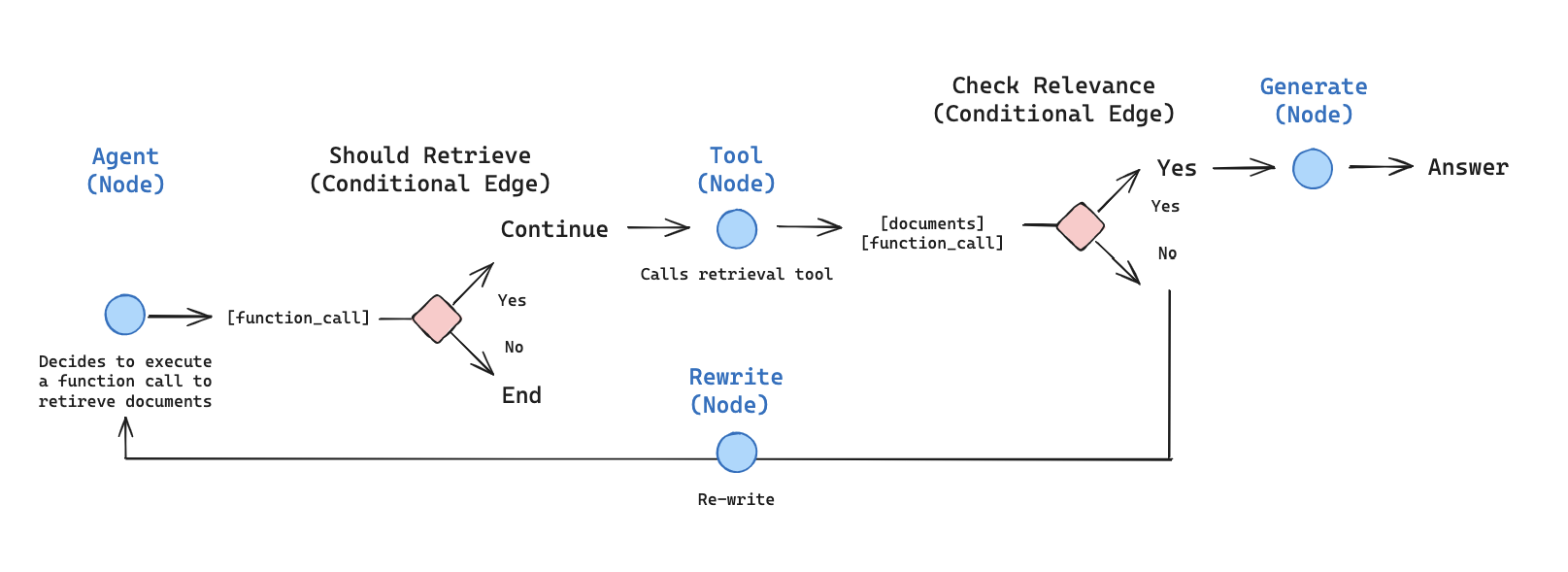
- Build an agentic RAG system that can decide when to use the retriever tool.
Concepts
This tutorial covers the following concepts:Setup
Install the required packages and set your API keys:Set up LangSmith
RAG applications run retrieval and generation in sequence. When you run the examples in this tutorial, LangSmith logs a trace for each query so you can inspect retrieval, tool calls, and model responses. After you sign up for LangSmith, set your environment variables to start logging traces:Preprocess documents
1
Fetch documents
Use three recent posts from Lilian Weng’s blog. Fetch page content with a minimal helper built on
fetch and cheerio:2
Split documents
Split the fetched documents into smaller chunks for indexing into the vector store:
Create a retriever tool
Index the split documents into a vector store for semantic search.1
Index documents and create the tool
Use an in-memory vector store and OpenAI embeddings, then create a retriever tool with LangChain’s prebuilt
createRetrieverTool:2
Test the tool
Generate a query or respond
With the retriever tool ready, start building the agent as a LangGraph graph. In the Graph API, a graph is made of:-
State: Shared data that nodes read and update. This tutorial uses
MessagesAnnotation, which stores amessageslist of chat messages. - Nodes: Functions that take the current state, run a step (for example, call a model or a tool), and return state updates.
- Edges: Connections that define which node runs next, including conditional edges that branch based on the state.
1
Build the node
Build a
generateQueryOrRespond node that calls the model on the current messages and binds the tools with .bindTools:2
Try a simple greeting
3
Ask a retrieval question
Ask a question that requires semantic search:Output:
Grade documents
A normal edge always sends the graph to the same next node. A conditional edge chooses the next node at runtime by running a function over the current state. After retrieval, use that pattern to grade whether the documents are relevant: continue to answer generation if they are, or rewrite the question and try again if they are not.1
Add document grading
Add a
gradeDocuments routing function that uses a model with structured output (Zod), and falls back to a plain yes or no response if structured parsing fails. It returns the name of the next node based on the grading decision (generate or rewrite), so use it in a conditional edge rather than adding it as a node:2
Test with irrelevant documents
Run this with irrelevant documents in the tool response:
3
Test with relevant documents
Confirm that relevant documents are classified as such:
Rewrite the question
If the grader marks the retrieved documents as irrelevant, the graph should not answer from that context. Instead, rewrite the original user question into a clearer search query, then send control back to the generate-query-or-respond node so the agent can retrieve again. This retry loop is how the agent recovers from a weak first retrieval instead of stopping or hallucinating an answer.1
Build the rewrite node
Build the
rewrite node to improve the original user question when retrieval misses:2
Try it out
Generate an answer
When the grader accepts the retrieved documents, the graph moves to answer generation. This node is the classic RAG step: combine the original user question with the tool message that holds the retrieved context, then ask the model to produce a grounded reply. Keep the prompt tight so the model answers from the provided context instead of inventing details.1
Build the answer node
Build the
generate node to produce the final reply from the question and retrieved context:2
Try it
Assemble the graph
Assemble the nodes and edges into a complete graph:- Start with
generateQueryOrRespondand determine whether to call the retriever tool. - Route to the next step using a conditional edge:
- If
generateQueryOrRespondreturnedtool_calls, call the retriever tool to retrieve context. - Otherwise, respond directly to the user.
- If
- Grade retrieved document content for relevance to the question (
gradeDocuments) and route to the next step:- If not relevant, rewrite the question using
rewriteand then callgenerateQueryOrRespondagain. - If relevant, proceed to
generateand generate the final response using the ToolMessage with the retrieved document context.
- If not relevant, rewrite the question using
Run the agentic RAG
Test the complete graph by running it with a question:See also
Connect these docs to your agent of choice via MCP for real-time answers.