

us-central1. Your trace data stays in your project. This page describes what LangSmith deploys, how traffic flows, and the access LangSmith gets in your project. For BYOC on AWS, see BYOC architecture.
BYOC on GCP is in beta. Resources and permissions can change between releases. The values on this page are the current defaults.
What gets deployed
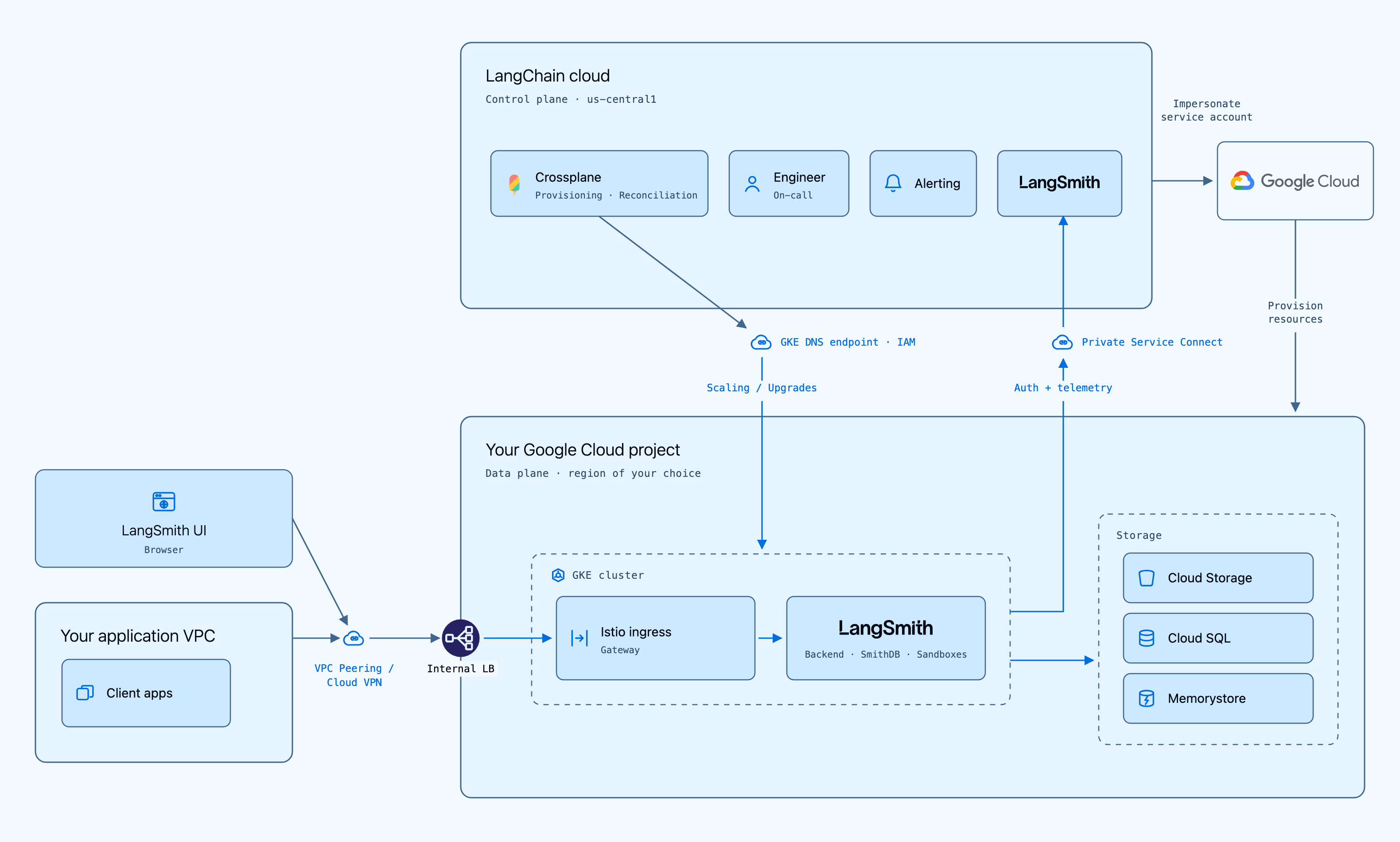
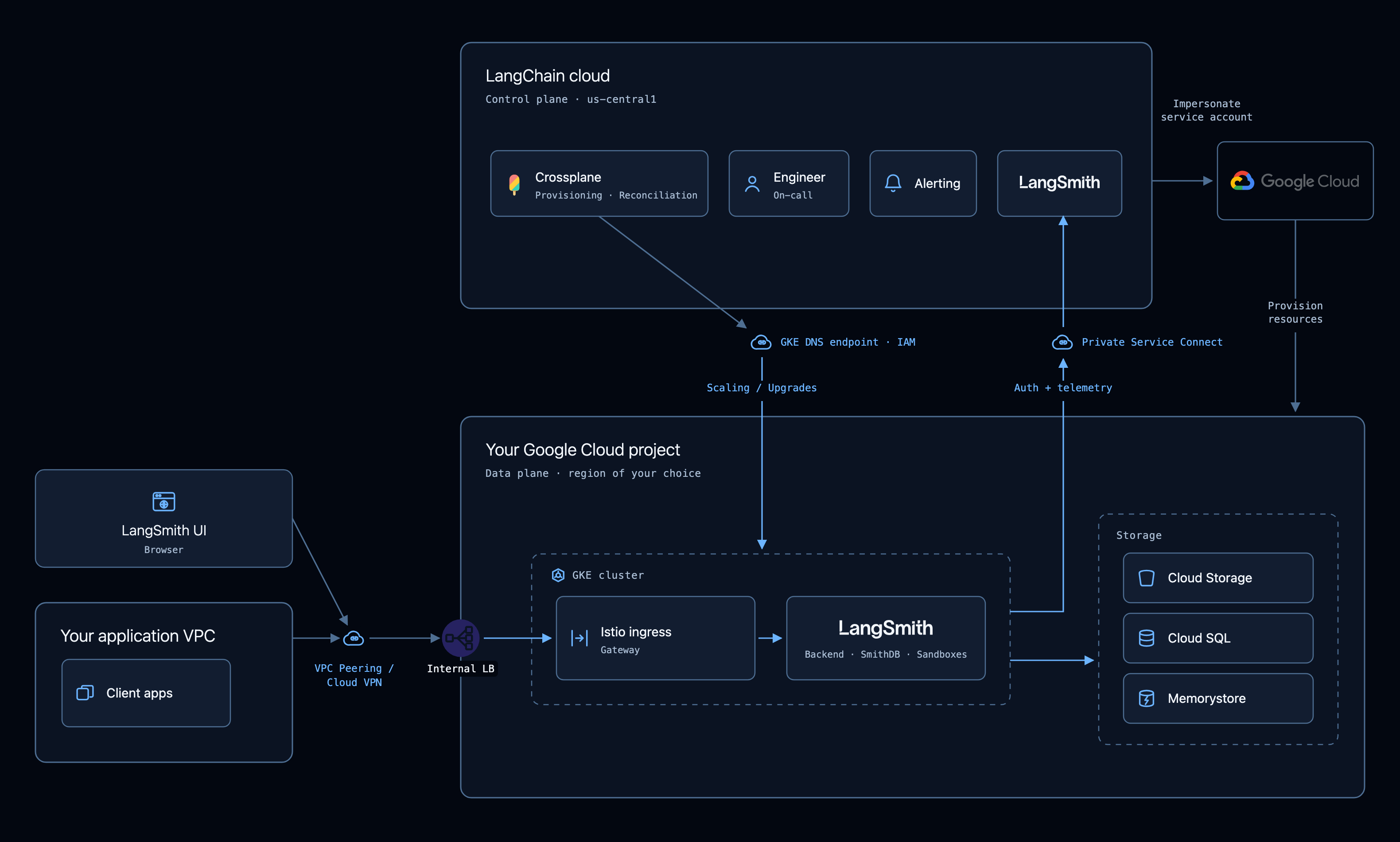
LangSmith creates the following in your GCP project:- Network: A VPC with a GKE subnet, Cloud NAT with a static egress IP address, and private services access.
- GKE: A regional, private GKE Standard cluster with Workload Identity and shielded nodes.
- Cloud SQL for PostgreSQL: Private IP only, high availability, TLS, and IAM database login, so no database password exists.
- Memorystore for Redis Cluster: TLS and IAM auth, reached through Private Service Connect.
- Cloud Storage: A bucket with public access prevention enforced.
- DNS and ingress: Cloud DNS zones for the data plane hostname, cert-manager with Let’s Encrypt, External Secrets with Secret Manager, and an Istio ingress gateway.
- Private Service Connect: An endpoint to LangSmith, so the data plane reaches the control plane without the internet.
GCP data planes store and query traces in SmithDB, and do not run ClickHouse.
How traffic flows
- Users to the data plane: Users reach
https://<first 8 characters of the data plane ID>.gcp.langchain-byoc.com. The hostname points at the Istio ingress gateway on a public or internal load balancer, which you choose when you create the data plane. - Data plane to control plane: The data plane reaches the LangSmith API at
us-central1.p.api.smith.langchain.comthrough a Private Service Connect endpoint in its VPC. This path carries the heartbeat, sign-in and auth calls, and telemetry. It does not use the internet. - Control plane to GCP APIs: The control plane acts as one LangChain identity,
byoc-crossplane@langchain-prod.iam.gserviceaccount.com. It impersonates your provisioner service account, so every GCP API call in your project is made as the provisioner. The LangSmith API writes the data plane secrets to Secret Manager, and Crossplane creates, updates, and deletes the other resources. - Control plane to GKE: Crossplane installs and updates the in-cluster resources through the cluster’s DNS-based control plane endpoint. Each request needs a Google token for an identity with access to the cluster. Crossplane’s Helm and Kubernetes providers cannot impersonate the provisioner, so the control plane service account itself holds
roles/container.adminon your project. - DNS delegation: The control plane writes the NS delegation for the data plane hostname in LangChain’s parent zone,
gcp.langchain-byoc.com. This record is in LangChain’s project, not yours.
Create and delete lifecycle
- Your Terraform creates the provisioner service account and its roles, and lets the control plane service account impersonate it.
- You create the data plane with the API.
- The control plane checks its access, writes the data plane secrets to Secret Manager, and hands the data plane to Crossplane.
- Crossplane builds the network, GKE, Cloud SQL, Memorystore, Cloud Storage, and DNS, then installs LangSmith.
- The data plane sends a heartbeat, and LangSmith shows it as
active. - When you delete the data plane, the control plane lifts deletion protection, Crossplane deletes the resources, and the control plane deletes the secrets.
Network
All subnets come from thevpc_cidr you choose, a range from /16 to /18. All have Private Google Access on.
The VPC is one regional VPC with custom subnets. Cloud NAT uses one static external IP address, so you can allowlist the data plane, and logs errors only.
Storage
None of the data stores has a public endpoint.GKE and compute
- Cluster: A regional GKE Standard cluster on the
REGULARrelease channel. Nodes repair and upgrade automatically. - Private cluster: Private nodes and a private IP endpoint, with global access inside the VPC.
- DNS-based control plane endpoint: Accepts external traffic, and requires IAM: a Google token with
container.clusters.connect, then Kubernetes RBAC. The kubeconfig that LangSmith keeps holds no credentials. - Workload Identity: Enabled with the GKE metadata server on every node pool, so pods never see node credentials.
- Dataplane V2: Enforces Kubernetes NetworkPolicy.
- Shielded nodes: Secure Boot and integrity monitoring on every pool, with no kubelet read-only port.
- Security posture: Basic image vulnerability scanning. System metrics only, with Managed Service for Prometheus off.
- Deletion protection: On. Teardown lifts it first.
- Node service accounts: GKE’s default node pool is removed, and no pool runs as the project’s default Compute Engine service account.
sandboxes_enabled, it also runs a sandbox node pool with nested virtualization, tainted for sandbox hosts only and with its own node service account. Sandboxes cannot reach the metadata server.
Not on by default: application-layer Secrets encryption with your Cloud KMS key, Binary Authorization, and Confidential GKE Nodes.
In-cluster resources
- LangSmith: The LangSmith Helm chart, with SmithDB. Every LangSmith pod runs as the workload service account through Workload Identity. SmithDB reaches Cloud SQL through a Cloud SQL Auth Proxy sidecar.
- KEDA: Autoscales the LangSmith services.
- External Secrets Operator: A ClusterSecretStore on Secret Manager, usable only from the LangSmith namespace. It syncs the data plane secrets every hour.
- cert-manager and trust-manager: cert-manager uses a Let’s Encrypt issuer with DNS-01 challenges in the data plane zones only. trust-manager builds one CA bundle with the public CAs and the Cloud SQL and Memorystore CAs.
- Istio: Base, istiod, and the ingress gateway.
- Postgres setup job: Creates the IAM database user and grants it the database owner roles. It keeps no password.
DNS and ingress
- Hostname:
<first 8 characters of the data plane ID>.gcp.langchain-byoc.com. LangChain owns the parent zone. - Public zone: A public Cloud DNS zone for the hostname in your project, which LangChain delegates from the parent zone.
- Public endpoint: An external passthrough load balancer. The hostname resolves on the internet.
- Internal endpoint (default): An internal passthrough load balancer in the GKE subnet, with global access. The address record is in a private zone, visible only in the data plane VPC, so the private address is never published. The public zone stays for the delegation and the certificate challenges.
- TLS: A Let’s Encrypt certificate. HTTP redirects to HTTPS.
- Gateway hardening: The gateway normalizes paths before routing, rejects request bodies over 100 MiB, limits requests per gateway pod, and denies
TRACE,TRACK, andCONNECT. - Control plane paths: Paths such as sign-in are forwarded to the control plane over Private Service Connect.
Private Service Connect
- LangChain publishes a service attachment in
us-central1. It accepts only projects on its accept list, which is why you send your project number to LangChain before you create a data plane. - The data plane creates the endpoint: an internal address in the control plane endpoint subnet, and a forwarding rule to the service attachment. Data planes in other regions reach the endpoint through global access.
- A private DNS zone for
us-central1.p.api.smith.langchain.com, visible only in the data plane VPC, points at the endpoint. - Private Service Connect carries traffic from the data plane to the control plane only. The control plane reaches the cluster through the GKE DNS-based endpoint.
Access and permissions
Terraform module resources
Thelangsmith-byoc-service-account Terraform module creates the following in your project:
The custom role ID prefix is
langsmithByoc by default. Set custom_role_id_prefix to change it. For the full permission list of each role, see the module’s README and source.
Checks at create
The control plane stops the create when one of these checks fails:- It can impersonate the provisioner, and the provisioner has
resourcemanager.projects.get,secretmanager.secrets.create, andsecretmanager.secrets.deleteon the project. It runs the same check before a delete. - The provisioner is in the data plane project.
- The provisioner’s description is your organization’s external ID. Every customer’s provisioner trusts the same control plane service account, so this check stops another LangSmith organization from using your provisioner.
- With
byoiam_enabled, the project has the six service accounts listed in Data plane service accounts.
Data plane service accounts
Crossplane creates one Google service account per workload class for each data plane, and binds it to its Kubernetes service accounts with Workload Identity (roles/iam.workloadIdentityUser). With byo_iam, your Terraform creates them with fixed IDs, and all data planes in the project share them.
Crossplane also grants
roles/container.admin on the project to byoc-crossplane@langchain-prod.iam.gserviceaccount.com. With byo_iam, your Terraform makes this grant.
With byo_iam, do not give your own secrets in the project IDs that start with ls-, or External Secrets can read them.
Bring your own IAM
Setbyo_iam = true in the module before you create data planes in the project, and create the data plane with byoiam_enabled set to true. Do not change byo_iam while data planes exist. With byo_iam:
- Your Terraform creates the six service accounts and their project roles.
- The provisioner role loses
iam.serviceAccounts.create,delete,update, andsetIamPolicy. It keepsget,list, andgetIamPolicy. - The module does not create the
ProjectIamGranterorServiceAccountUserroles, so the provisioner cannot change the project IAM policy. - The provisioner gets
iam.serviceAccounts.getIamPolicyandsetIamPolicy(custom rolelangsmithByocServiceAccountIamManager) on the six accounts only, to add the Workload Identity bindings. It getsroles/iam.serviceAccountUseronlangsmith-nodeandlangsmith-sandbox-hostonly. - LangSmith still grants
dns.adminon the data plane zones tolangsmith-cert-manager, because the zones do not exist before the data plane.
What LangChain can and cannot access
- Can: Create, change, and delete the data plane resources through the provisioner. Read the project’s IAM policy and service accounts. Act as cluster admin on GKE clusters in the project, through
container.admin. This is how LangSmith installs and upgrades the application. - Cannot, by role: The provisioner has no
storage.objects.get, so it cannot read objects in the bucket. It can list and delete them for teardown. It has nosecretmanager.versions.access, so it cannot read secrets. It has no Cloud SQL user or database login permissions, and no permissions outside the project.
byo_iam, on service accounts.
Remove access
To remove LangChain’s access to your project:- Recommended: Delete the data plane in LangSmith. Wait until it is gone, then run
terraform destroyif no other data planes use the project. - Immediate: Remove both LangChain grants: the Token Creator binding on the provisioner (or the provisioner itself), and the project
roles/container.admingrant tobyoc-crossplane@langchain-prod.iam.gserviceaccount.com. LangSmith then cannot change or delete the data plane. The resources stay, and you must delete them yourself.
See also
Connect these docs to your agent of choice via MCP for real-time answers.