

1
Enable BYOC on your organization
Create an organization in LangSmith on AWS at aws.smith.langchain.com, or reuse an existing one.Send your organization ID to the LangChain team to enable BYOC.
2
Create the IAM role
LangChain provides the external ID for the IAM role. Navigate to Settings > Data Planes and use the copy button next to the Data Planes header to copy it.Apply the
langsmith-byoc-role Terraform module in your AWS account using the copied external ID. This creates the cross-account role LangChain assumes to provision and manage the data plane. The role’s trust policy must use this value in its ExternalId condition.For BYOVPC, set allow_vpc_creation_permissions = false and supply your VPC ID in vpc_ids. See Create the reduced-permission IAM role.To encrypt the data plane with your own KMS keys, also set cmk_service_key_arns. See Bring your own keys.LangChain recommends a fresh AWS account dedicated to LangSmith BYOC.
3
Create the data plane
Navigate to Settings > Data Planes and create a data plane with the following parameters:
- Name: Lowercase letters, digits, and hyphens, up to 24 characters.
- AWS region: One of the supported regions.
- AWS IAM role ARN: The ARN of the role you created in the previous step, which LangSmith assumes in your account.
- Network: By default, LangSmith creates a VPC from a private RFC 1918 CIDR range from
/16to/18, such as10.20.0.0/16. To use your own VPC, select Use existing VPC and supply the VPC and subnet IDs. The load balancer is Private by default, reachable only from inside your VPC. Select Internet-facing to give your applications a public endpoint. With your own VPC, an internet-facing load balancer requires public subnet IDs. The load balancer type is Network Load Balancer by default. Select Application Load Balancer to attach your own AWS WAF web ACL. An ALB does not support AWS PrivateLink. The type cannot change after creation. - IAM roles: By default, LangSmith creates the data plane IAM roles. To use roles you create, select Use existing IAM roles and follow Bring your own IAM roles.
- Encryption keys: By default, AWS-managed keys encrypt data at rest. To use your own KMS keys, choose one key for all services or a key per service. See Bring your own keys.
- Sandboxes: Off by default. Turn them on to run sandboxes, which Engine and some evaluators require.
- EKS API access: New data planes reach the EKS API over PrivateLink by default.
- Tags: Up to 40 custom tags applied to the AWS resources LangSmith creates. Keys must be unique, and values can be empty. AWS and LangSmith system tags are reserved.
4
Wait for provisioning
LangChain provisions the infrastructure on your behalf. The data plane moves from Track its state in Settings > Data Planes. If the data plane transitions to
Requested to Provisioning to Active.For BYOVPC, LangSmith validates your VPC and subnets before provisioning, then creates the workload infrastructure inside your VPC.End-to-end provisioning of a data plane takes around 60 to 90 minutes.
Provisioning Failed, contact the LangChain team.5
Set up private connectivity
Data planes are provisioned with a private endpoint by default, so you need private connectivity to reach it, such as Tailscale, AWS PrivateLink, or VPC peering.Find the API URL under Settings > Data Planes.If you open a workspace and see the following screen, your machine does not have network access to that workspace’s data plane. The LangSmith frontend runs in your browser and calls the data plane directly, so your machine must be on a network that can reach the data plane’s private endpoint. Connect through your private connectivity option, then refresh the page.If you are connected and still see this screen in Chrome or Edge, the browser may be blocking the request. See Allow local network access in Chrome and Edge.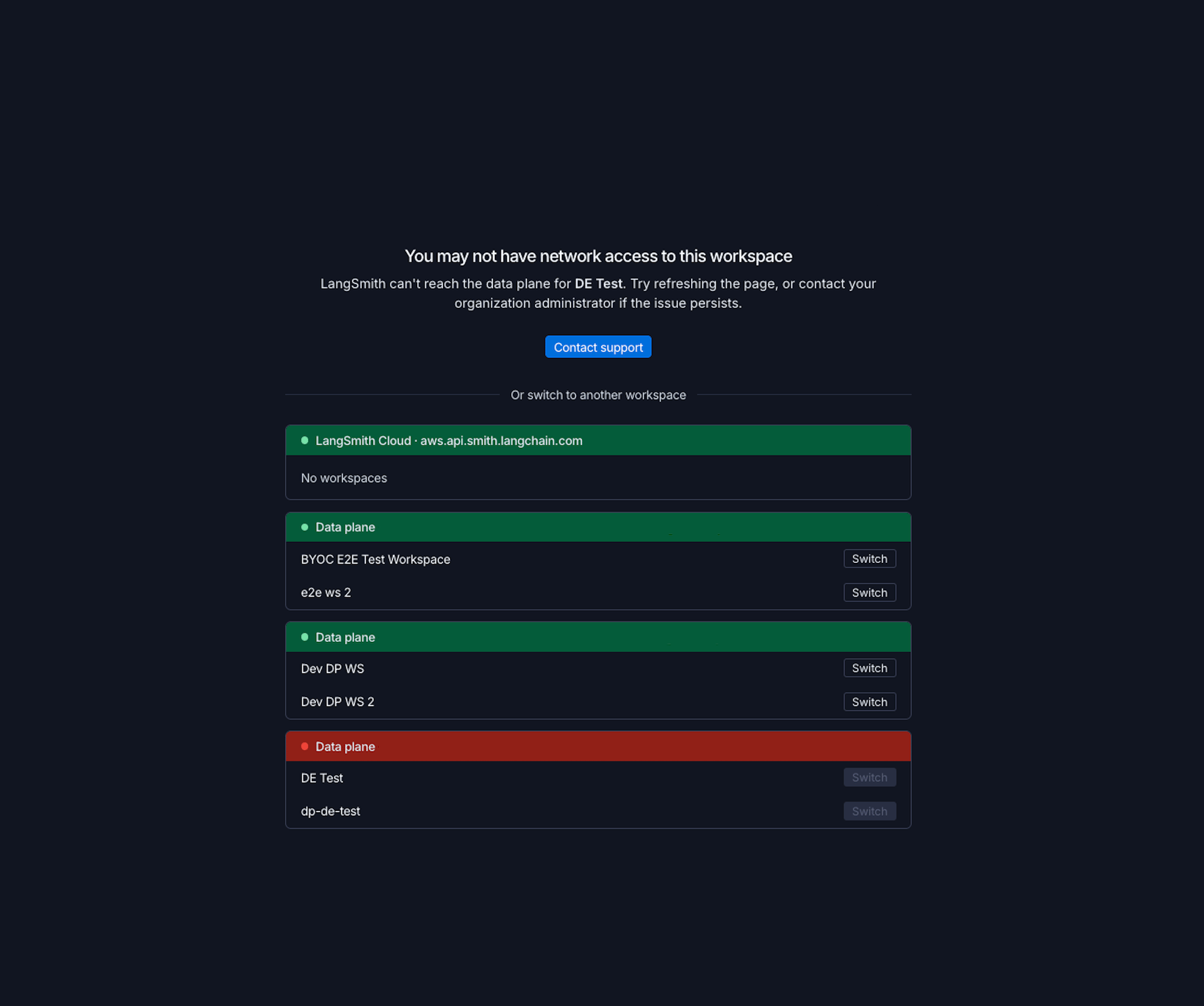
6
Create workspaces
A workspace named
dp-<data_plane_name> is provisioned automatically inside the new data plane. It is not accessible until the data plane is reachable.You can create additional workspaces in the data plane. Select the target data plane when you create each one: a workspace belongs to exactly one data plane, and a data plane can hold many workspaces.7
(Optional) Migrate existing data
If you are moving from an existing LangSmith Cloud or self-hosted instance, users, roles, datasets, prompts, experiments, annotation queue configuration, automation rules, dashboards, and Fleet resources can be copied over. Trace migration is supported on AWS. Contact the LangChain team to arrange it.For more information, see Migrate to BYOC.
Next steps
- Use your data plane to point applications and API clients at the right endpoint.
- BYOC architecture covers what LangChain provisions and how the planes communicate.
Connect these docs to your agent of choice via MCP for real-time answers.