

Organizations, data planes, and workspaces
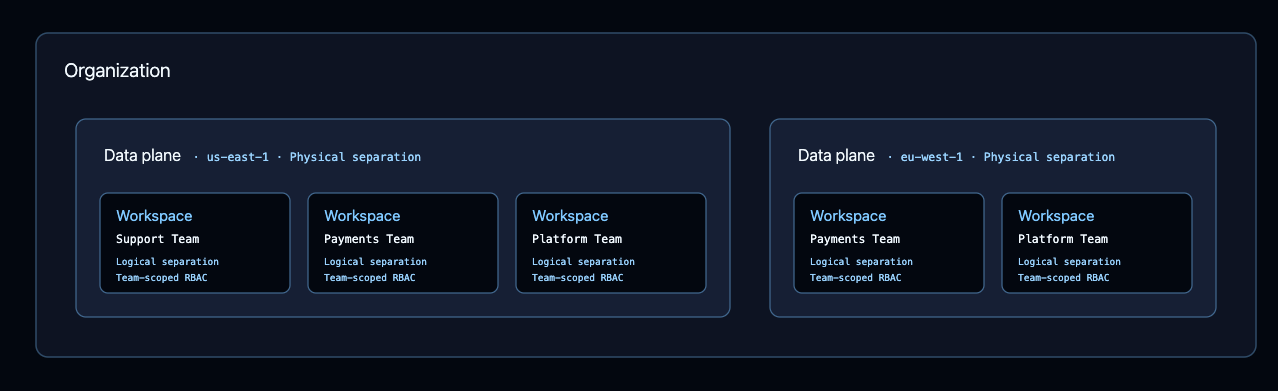
A BYOC deployment adds one level to the standard LangSmith resource hierarchy: the data plane, which sits between the organization and the workspace.- Organization: The top level. Users, roles, billing, SSO configuration, and API keys belong to the organization and live in the control plane.
- Data plane: Belongs to an organization and represents physical separation of data. An organization can have several data planes, each in its own AWS account and region.
- Workspace: Belongs to exactly one data plane, which you select when you create the workspace. Traces, datasets, experiments, and other agent data live in a workspace.
- Per region, such as
us-east-1andus-west-2, to keep sensitive agent data in a specific region. - Per environment and region, such as prod
us-east-1and devus-east-1, to hold production and development data in separate AWS accounts. - Per business unit, when each unit owns its own AWS account.
Find your data plane endpoint
Each data plane has a base URL. Navigate to Settings > Data Planes to see each of your data planes, its state, and its API URL.Trace to a data plane
For tracing in an agent-based workspace, create an agent and configure agent addressing before running the examples. To send traces to a workspace that lives in your data plane, point the LangSmith SDK at the data plane endpoint and authenticate with an API key scoped to a workspace in that data plane:Route API requests
The base URL routes to different services depending on the path prefix:Trace to multiple endpoints
Use these patterns to trace to both Cloud and a data plane, or to multiple data planes.Dual write to two endpoints
SetLANGSMITH_RUNS_ENDPOINTS to write to multiple endpoints. These replica settings use each agent environment’s tracer_session_name as project_name:
Choose the destination in agent logic
To decide where to trace at runtime, create a client per endpoint and select between them. SetLANGSMITH_CLOUD_PROJECT and LANGSMITH_BYOC_PROJECT to the corresponding agent environments’ tracer_session_name values:
See also
Connect these docs to your agent of choice via MCP for real-time answers.