

Run priority is in beta and only available for Python graphs.
Why use run priority
An Agent Server deployment can serve many graphs, and all of their runs share one queue and one pool of worker slots. Without run priority, the queue is first come, first served: a burst of background runs makes an interactive chat wait behind them. With run priority, you set a priority for each thread in a Python function that runs on the server. When every worker slot is busy, the waiting run with the most urgent priority starts next. A run that already has a slot keeps it.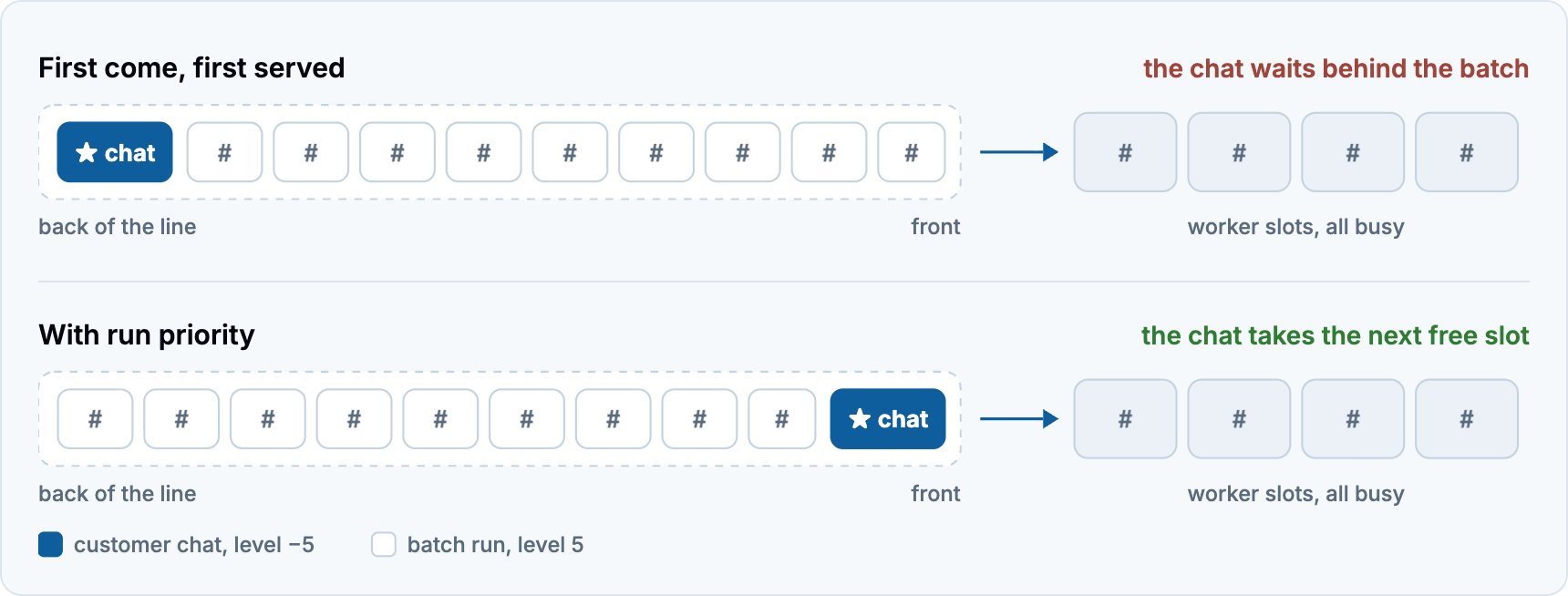
Configure run priority
Step 0. Configure dependencies to support run priority
Run priority requires Agent Server 0.18.0 or later (langgraph-api>=0.18.0) and langgraph-sdk>=0.4.12, the default for new builds. If you build the image yourself, use langgraph-cli>=0.4.38. Earlier versions ignore the priority section without an error.
Step 1. Write a priority function
Createpriority.py next to your langgraph.json, and decorate an async function with @priority.assign on a Priority instance:
userandpermissions: The authenticated user and their permissions. For a run that a cron starts, the cron’s owner.thread_idandthread_metadata: The thread and its metadata, including metadata that the run adds.thread_idisNonefor a run without a thread.assistant_id,graph_id, andassistant_metadata: The assistant, its graph, and the assistant’s metadata.run_metadata: The run’s metadata.cron_id: The ID of the cron that started the run, orNone.
None to use the defaults:
priority: An integer from -5 to 5. Defaults to 0.fairness_group: A string of at most 256 characters. Defaults to"default". The server stores it on the thread unencrypted, even with custom encryption, so use an opaque ID rather than personal data. This is a planned field to support fairness in the future, but does not currently affect run order.
Step 2. Add the function to langgraph.json
Add a priority section whose path points at the Priority instance:
Step 3. Rebuild and redeploy
Rebuild and redeploy as you normally would for your hosting environment.On LangSmith Cloud, deployments in the GCP US region apply the
priority section. Deployments in other Cloud regions do not apply it yet.Best practices
- Leave room between priorities: Start with a few spread-out values, such as -3 for interactive work, 0 for the default, and 3 for background jobs, so you can add priorities above and below as your needs change.
- Keep the function light: The function must be async, and it runs on the API server before a thread’s first run is created. Avoid slow calls, such as network requests. A blocking call, such as a synchronous HTTP request, stalls every request on that server.
- Base the priority on values that you control: No API field sets a run’s priority. If your function reads metadata that callers send, callers can influence the result, so prefer the authenticated user or assistant metadata that you control.
FAQ
How does run priority work?
Priority is an integer from -5 to 5: -5 starts first, 5 starts last, and 0 is the default. When a worker slot frees up, the waiting run with the most urgent priority starts, and runs with the same priority start in the order they became due. Priority matters only when every worker slot is busy. When a slot is free, a run starts right away, whatever its priority. Your priority function sets a thread’s priority once, at the thread’s first run, and every later run on the thread uses it. A thread that already exists receives a priority at its next run after you deploy the function, and a new version of the function applies only to threads that have not run yet. Priority does not change how runs execute on a thread: a thread still runs one run at a time, oldest first, and no running run is stopped. A run scheduled for later competes at its priority from its due time. Priorities do not age, so under sustained load at more urgent priorities, runs at less urgent priorities can wait indefinitely. Without a priority function, every run has priority 0 and runs start in the same order as before.What happens if the priority function fails?
If the function raises an exception or returns an invalid result, such as an unknown key or a priority outside -5 to 5, the server does not create the run and returns a 500 error. To refuse a run with your own status code, raise HTTPException. In every case nothing is stored, so the thread’s next run calls the function again.How do I verify that run priority is on?
- Server logs: At startup, the server logs
Loaded priority callback from path .... If the server cannot load the function, it does not start, so a wrong path shows up at deploy time rather than on every run. - Threads: After a thread’s first run, reading the thread returns
run_priorityandfairness_group.
langgraph dev calls your priority function and stores the result, but starts runs in arrival order. To see runs start in priority order, test on a deployment.
How do I monitor run priority?
While a priority function is configured, the server reports these queue metrics with apriority label from -5 to 5:
lg_api_num_startable_runs: Runs that can start now: each thread’s oldest due run, on threads with no running run.lg_api_startable_runs_wait_time_maxandlg_api_startable_runs_wait_time_med: The longest and the median wait of those runs since they became due, in seconds.lg_api_num_running_runs_by_priority: Runs that are running.
How do I turn off run priority?
Remove thepriority section from langgraph.json, then rebuild and redeploy. Every new run then has priority 0. Runs that were already waiting keep the priority they were created with. Threads keep their stored priority, which applies again if you add the function back.
See also
Connect these docs to your agent of choice via MCP for real-time answers.