

Agent Server handles checkpointing automatically
When using the Agent Server, you do not need to implement or configure checkpointers manually. The server handles all persistence infrastructure for you behind the scenes.
Why use checkpointers
Checkpointers are required for the following features:- Human-in-the-loop: Checkpointers facilitate human-in-the-loop workflows by allowing humans to inspect, interrupt, and approve graph steps. Checkpointers are needed for these workflows as the person has to be able to view the state of a graph at any point in time, and the graph has to be able to resume execution after the person has made any updates to the state. See Interrupts for examples.
- Memory: Checkpointers allow for “memory” between interactions. In the case of repeated human interactions (like conversations) any follow up messages can be sent to that thread, which will retain its memory of previous ones. See Add memory for information on how to add and manage conversation memory using checkpointers.
- Time travel: Checkpointers allow for “time travel”, allowing users to replay prior graph executions to review and / or debug specific graph steps. In addition, checkpointers make it possible to fork the graph state at arbitrary checkpoints to explore alternative trajectories.
- Fault-tolerance: Checkpointing provides fault-tolerance and error recovery: if one or more nodes fail at a given superstep, you can restart your graph from the last successful step.
- Pending writes: When a graph node fails mid-execution at a given super-step, LangGraph stores pending checkpoint writes from any other nodes that completed successfully at that super-step. When you resume graph execution from that super-step you don’t re-run the successful nodes.
Core concepts
Threads
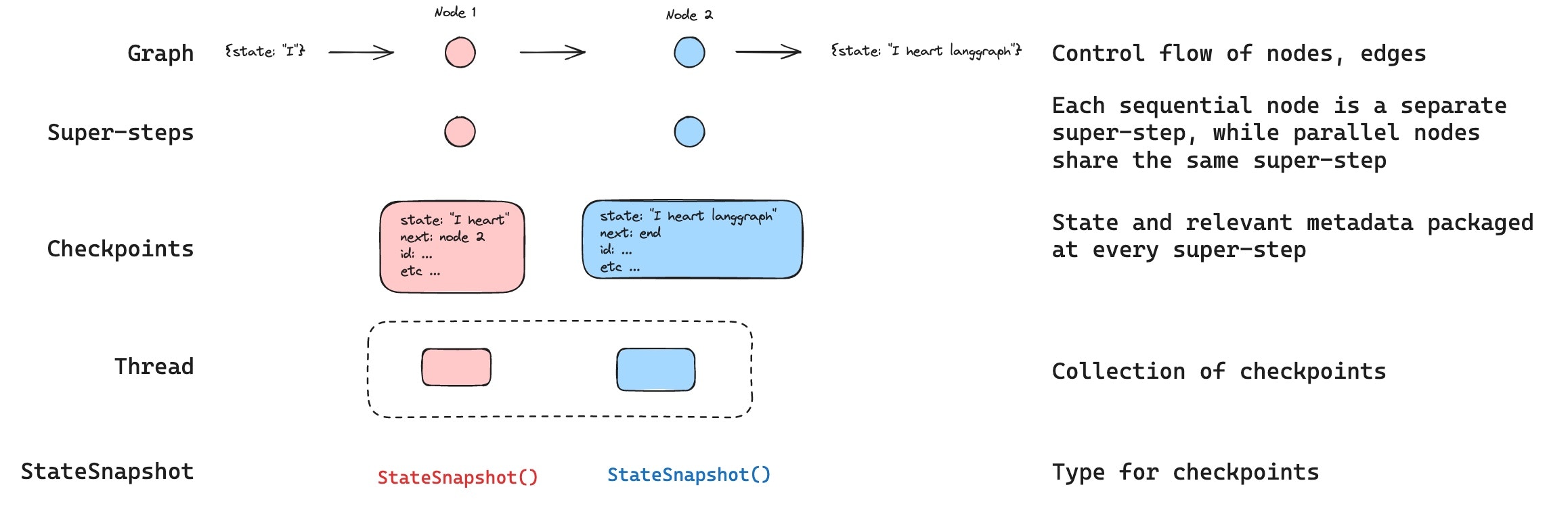
A thread is a unique ID or thread identifier assigned to each checkpoint saved by a checkpointer. It contains the accumulated state of a sequence of runs. When a run is executed, the state of the underlying graph of the assistant will be persisted to the thread. When invoking a graph with a checkpointer, you must specify athread_id as part of the configurable portion of the config:
thread_id as the primary key for storing and retrieving checkpoints. Without it, the checkpointer cannot save state or resume execution after an interrupt, since the checkpointer uses thread_id to load the saved state.
Checkpoints
The state of a thread at a particular point in time is called a checkpoint. A checkpoint is a snapshot of the graph state saved at each super-step and is represented by aStateSnapshot object (see StateSnapshot fields for the full field reference).
Super-steps
LangGraph creates a checkpoint at each super-step boundary. A super-step is a single “tick” of the graph where all nodes scheduled for that step execute (potentially in parallel). For a sequential graph likeSTART -> A -> B -> END, there are separate super-steps for the input, node A, and node B — producing a checkpoint after each one. Understanding super-step boundaries is important for time travel, because you can only resume execution from a checkpoint (i.e., a super-step boundary).
In addition to super-step checkpoints, LangGraph also persists writes at the node (task) level. As each node within a super-step finishes, its outputs are written to the checkpointer’s checkpoint_writes table as task entries linked to the in-progress checkpoint. These per-task writes are what enable pending writes recovery: if another node in the same super-step fails, the successful nodes’ writes are already durable and don’t need to be re-run on resume. The full state snapshot is then committed once the super-step completes.
LangGraph also persists writes from individual node executions within a super-step. These writes are stored as tasks and used for fault tolerance: if another node in the same super-step fails, successful node writes do not need to be recomputed when you resume. These task writes are not full StateSnapshot checkpoints, so time travel resumes from full checkpoints at super-step boundaries.
Checkpoints are persisted and can be used to restore the state of a thread at a later time.
Let’s see what checkpoints are saved when a simple graph is invoked as follows:
- Empty checkpoint with
STARTas the next node to be executed - Checkpoint with the user input
{'foo': '', 'bar': []}andnodeAas the next node to be executed - Checkpoint with the outputs of
nodeA{'foo': 'a', 'bar': ['a']}andnodeBas the next node to be executed - Checkpoint with the outputs of
nodeB{'foo': 'b', 'bar': ['a', 'b']}and no next nodes to be executed
bar channel values contain outputs from both nodes because this example has a reducer for the bar channel.
Checkpoint namespace
Each checkpoint has acheckpoint_ns (checkpoint namespace) field that identifies which graph or subgraph it belongs to:
""(empty string): The checkpoint belongs to the parent (root) graph."node_name:uuid": The checkpoint belongs to a subgraph invoked as the given node. For nested subgraphs, namespaces are joined with|separators (e.g.,"outer_node:uuid|inner_node:uuid").
Get and update state
Get state
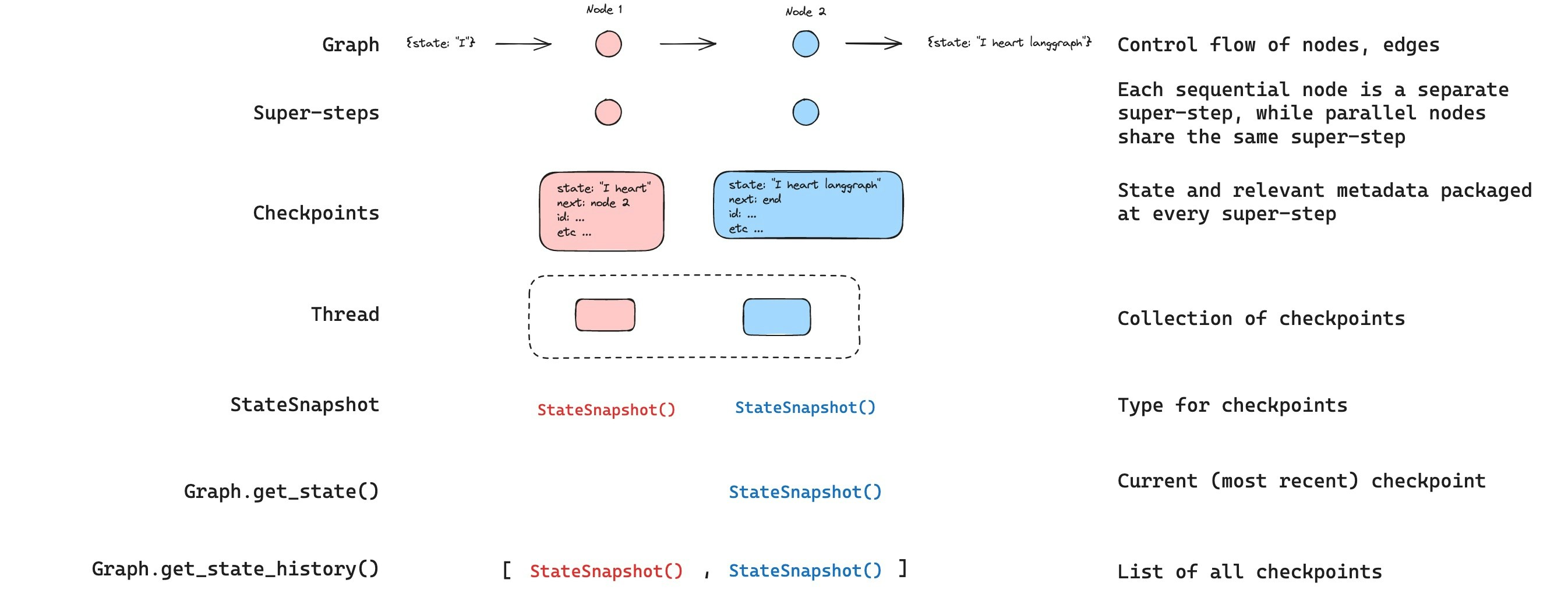
When interacting with the saved graph state, you must specify a thread identifier. You can view the latest state of the graph by callinggraph.getState(config). This will return a StateSnapshot object that corresponds to the latest checkpoint associated with the thread ID provided in the config or a checkpoint associated with a checkpoint ID for the thread, if provided.
getState will look like this:
StateSnapshot fields
Get state history
You can get the full history of the graph execution for a given thread by callinggraph.getStateHistory(config). This will return a list of StateSnapshot objects associated with the thread ID provided in the config. Importantly, the checkpoints will be ordered chronologically with the most recent checkpoint / StateSnapshot being the first in the list.
getStateHistory will look like this:
Find a specific checkpoint
You can filter the state history to find checkpoints matching specific criteria:Replay
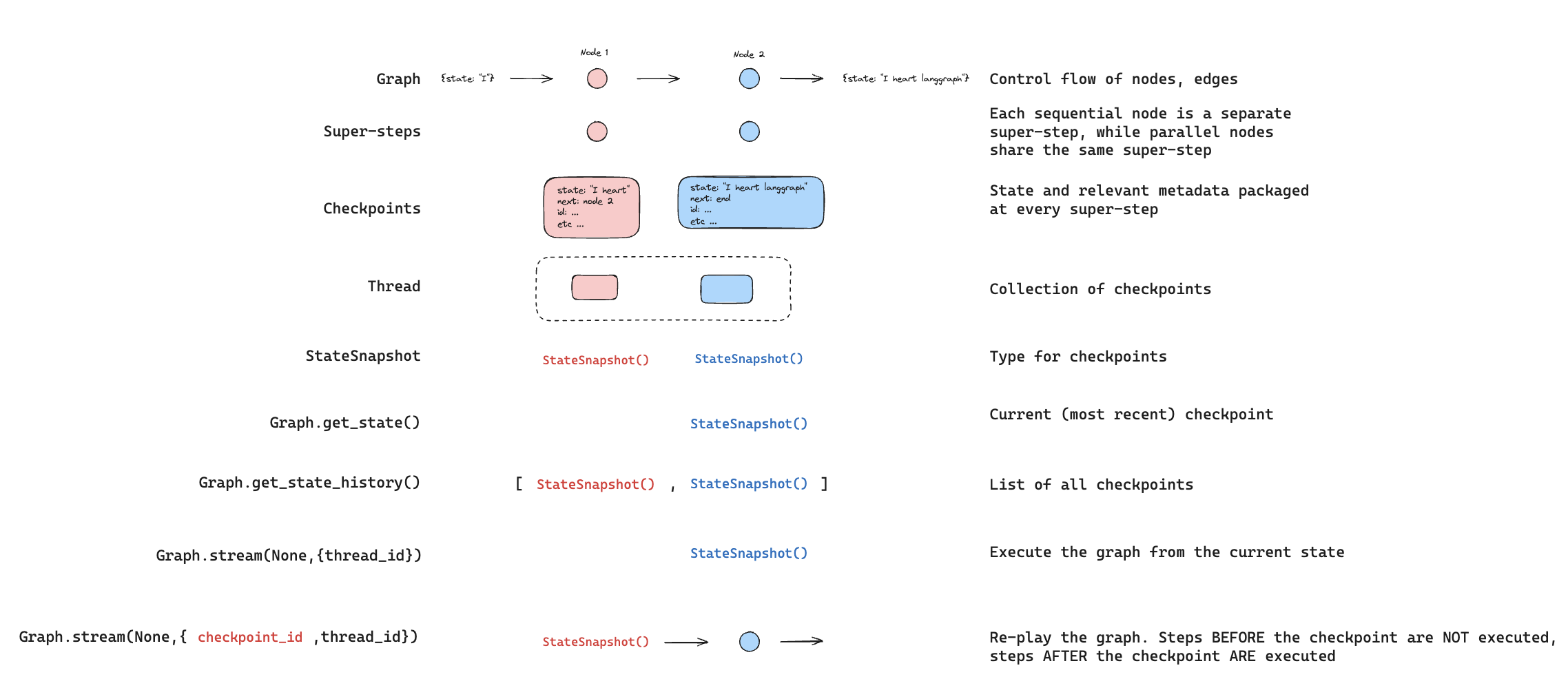
Replay re-executes steps from a prior checkpoint. Invoke the graph with a priorcheckpoint_id to re-run nodes after that checkpoint. Nodes before the checkpoint are skipped (their results are already saved). Nodes after the checkpoint re-execute, including any LLM calls, API requests, or interrupts — which are always re-triggered during replay.
See Time travel for full details and code examples on replaying past executions.
Update state
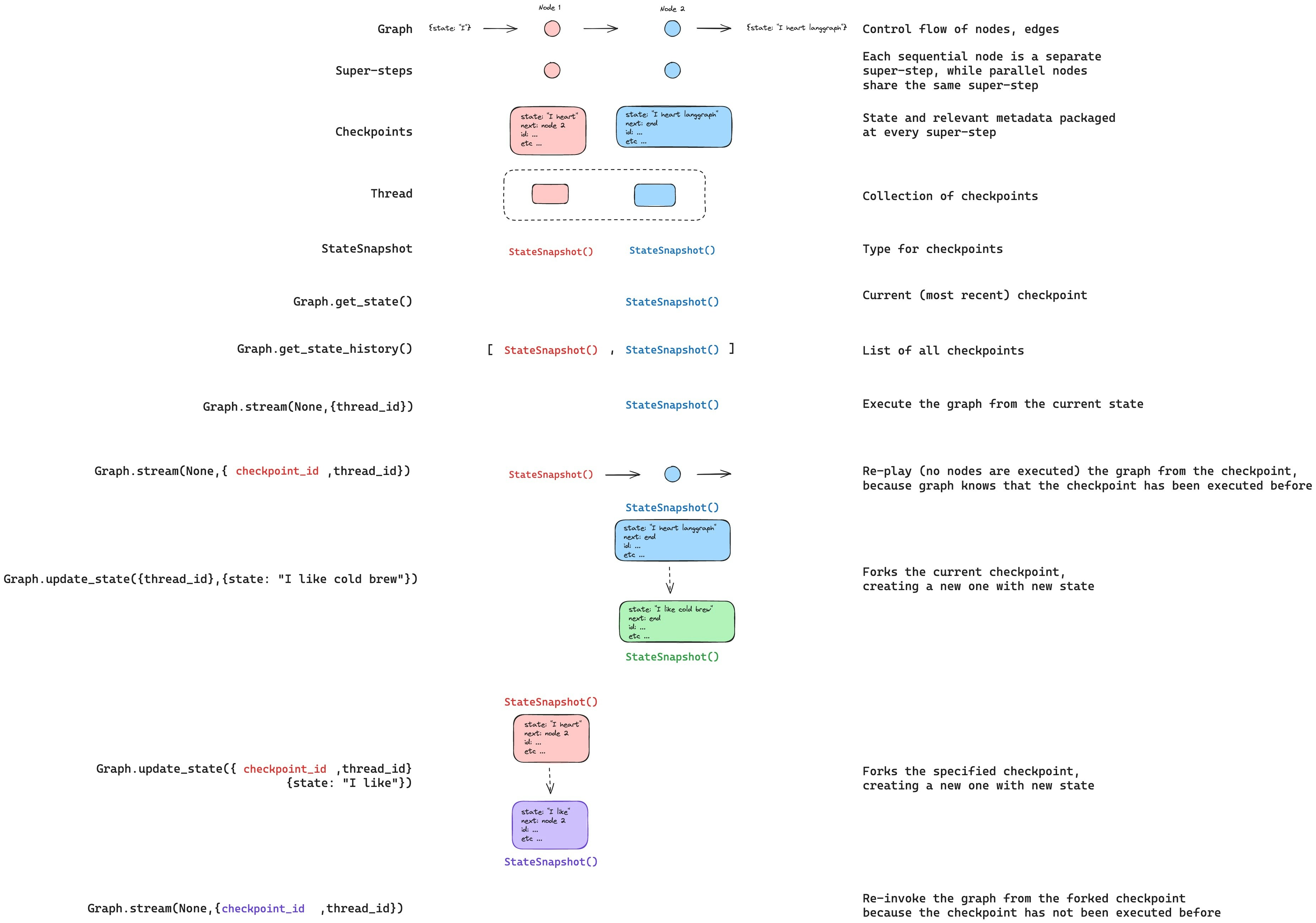
You can edit the graph state usinggraph.updateState(). This creates a new checkpoint with the updated values — it does not modify the original checkpoint. The update is treated the same as a node update: values are passed through reducer functions when defined, so channels with reducers accumulate values rather than overwrite them.
You can optionally specify asNode to control which node the update is treated as coming from, which affects which node executes next. See Time travel: asNode for details.
Durability modes
LangGraph supports three durability modes that let you balance performance and data consistency. You can specify the durability mode when calling any graph execution method:"exit": LangGraph persists changes only when graph execution exits — successfully, with an error, or due to a human-in-the-loop interrupt. This provides the best performance for long-running graphs but means intermediate state is not saved, so you cannot recover from system failures (like process crashes) mid-execution."async": LangGraph persists changes asynchronously while the next step executes. This provides good performance and durability, but there is a small risk that LangGraph does not write checkpoints if the process crashes during execution."sync": LangGraph persists changes synchronously before the next step starts. This ensures that LangGraph writes every checkpoint before continuing execution, providing high durability at the cost of some performance overhead.
Optimize checkpoint storage
Checkpointer libraries
Under the hood, checkpointing is powered by checkpointer objects that conform toBaseCheckpointSaver interface. LangGraph provides several checkpointer implementations, all implemented via standalone, installable libraries.
@langchain/langgraph-checkpoint: The base interface for checkpointer savers (BaseCheckpointSaver) and serialization/deserialization interface (SerializerProtocol). Includes in-memory checkpointer implementation (MemorySaver) for experimentation. LangGraph comes with@langchain/langgraph-checkpointincluded.@langchain/langgraph-checkpoint-sqlite: An implementation of LangGraph checkpointer that uses SQLite database (SqliteSaver). Ideal for experimentation and local workflows. Needs to be installed separately.@langchain/langgraph-checkpoint-postgres: An advanced checkpointer that uses Postgres database (PostgresSaver), used in LangSmith. Ideal for using in production. Needs to be installed separately.@langchain/langgraph-checkpoint-mongodb: An advanced checkpointer (MongoDBSaver) and long-term memory store (MongoDBStore) backed by MongoDB. The store supports cross-thread persistence with optional integrated vector search. Ideal for production use. Needs to be installed separately.@langchain/langgraph-checkpoint-redis: An advanced checkpointer that uses Redis database (RedisSaver). Ideal for using in production. Needs to be installed separately.
Checkpointer interface
Each checkpointer conforms to theBaseCheckpointSaver interface and implements the following methods:
.put- Store a checkpoint with its configuration and metadata..putWrites- Store intermediate writes linked to a checkpoint (i.e. pending writes)..getTuple- Fetch a checkpoint tuple using for a given configuration (thread_idandcheckpoint_id). This is used to populateStateSnapshotingraph.getState()..list- List checkpoints that match a given configuration and filter criteria. This is used to populate state history ingraph.getStateHistory()
Build a custom checkpointer
Connect these docs to your agent of choice via MCP for real-time answers.