

Sandboxes are in private preview. APIs and features may change as we iterate. Sign up for the waitlist to get access.
Service URLs let you access an HTTP service running inside a sandbox (a REST API, a Streamlit app, a Jupyter notebook, API documentation) without tunnels, port forwarding, or CLI tools. Each sandbox + port combination gets its own URL that you can open in a browser, call from code, or share with a teammate. Service URLs view

Quick start

Start an HTTP server inside a sandbox, then get a URL to access it:
from langsmith.sandbox import SandboxClient

client = SandboxClient()

with client.sandbox(template_name="python-sandbox") as sb:
    handle = sb.run("python -m http.server 8000", timeout=0, wait=False)

    svc = sb.service(port=8000)

    # Open in a browser
    print(svc.browser_url)

    # Or make requests programmatically
    resp = svc.get("/")
    print(resp.status_code)

    handle.kill()

Use cases

ScenarioHow
Preview a web app (Streamlit, Jupyter, etc.)sb.service(port=<PORT>) then open browser_url
Call an API from code or CIsvc.get(...) / svc.post(...) or curl with the service token
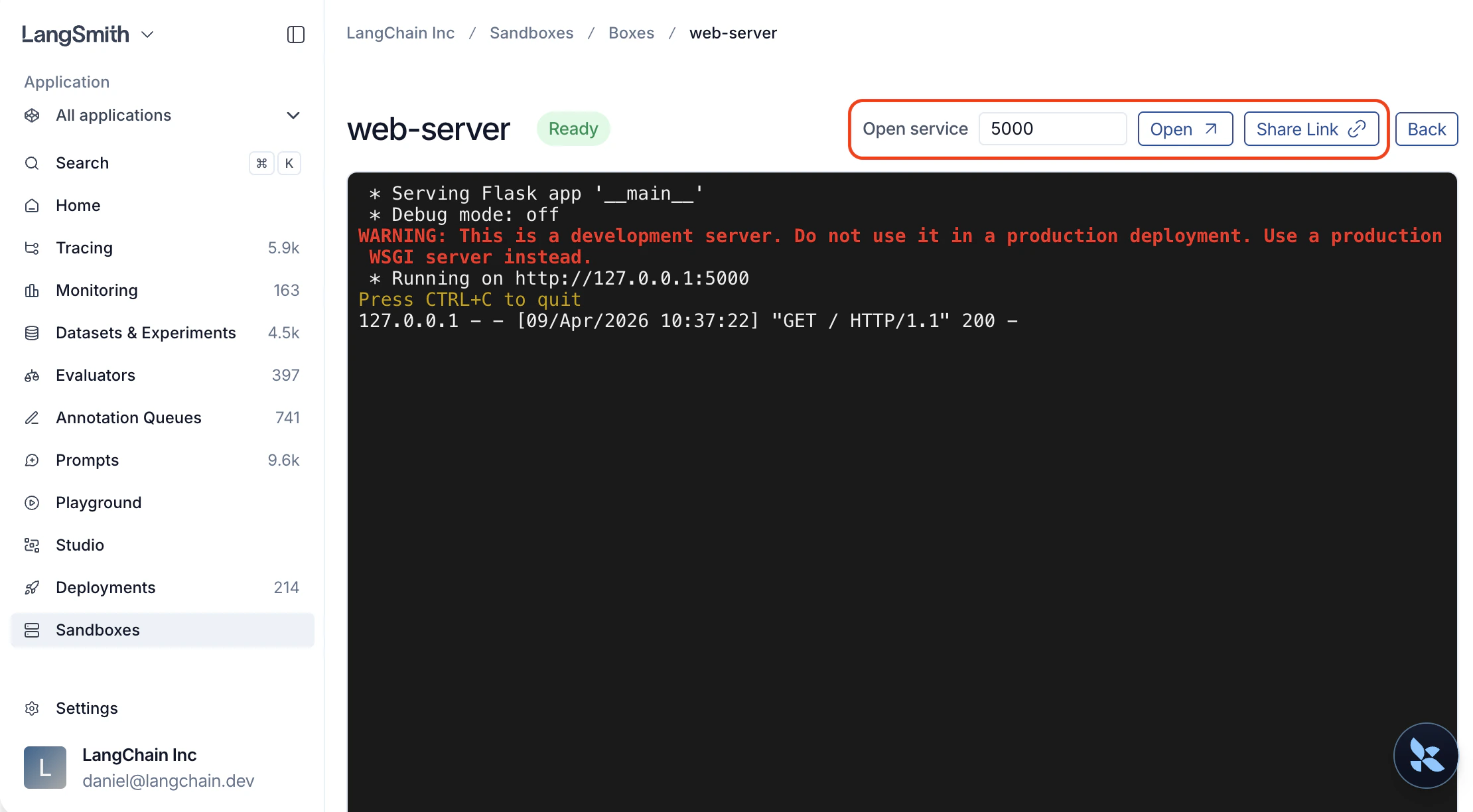
Share a live demo with a teammateClick Share Link in the UI and send the URL

Open a service from the UI

  1. Open the sandbox detail page.
  2. Find the Open service widget.
  3. Type a port number (e.g. 3000).
  4. Click Open to launch in a new tab, or Share Link to copy a URL you can send to a teammate.
Anyone with the link can access the service, even without a LangSmith account. After the token expires, generate a new link from the UI.

Open a service from the SDK

Get a service URL

Call service() on a sandbox instance or on the client directly:
svc = sb.service(port=3000)

# Or from the client, by sandbox name
svc = client.service("my-sandbox", port=3000)

# Customize token lifetime (default: 10 minutes, max: 24 hours)
svc = sb.service(port=3000, expires_in_seconds=3600)
The service must be running and listening on the specified port before you request a service URL. The URL only routes traffic and does not start a service for you.

Make requests

The returned ServiceURL object has built-in HTTP helpers that handle authentication automatically. Tokens refresh transparently before they expire, so no manual management is needed.
svc = sb.service(port=8000)

resp = svc.get("/api/items")
resp = svc.post("/api/items", json={"name": "widget"})
resp = svc.put("/api/items/1", json={"name": "updated"})
resp = svc.patch("/api/items/1", json={"status": "active"})
resp = svc.delete("/api/items/1")

Use your own HTTP client

If you prefer a different HTTP client, use the raw URL and token:
import httpx

svc = sb.service(port=8000)

resp = httpx.get(
    svc.service_url + "api/items",
    headers={"X-Langsmith-Sandbox-Service-Token": svc.token},
)

Open in a browser

Use browser_url to open the service in a browser. It sets an authentication cookie automatically, so all subsequent page loads, images, and API calls are authenticated without tokens in the URL.
svc = sb.service(port=8000)
print(svc.browser_url)
You can share this URL with teammates. No LangSmith login is required to access it.

Generate a URL via the REST API

curl -X POST \
  "$LANGSMITH_ENDPOINT/api/v2/sandboxes/boxes/{sandbox_name}/service-url" \
  -H "x-api-key: $LANGSMITH_API_KEY" \
  -H "Content-Type: application/json" \
  -d '{"port": 3000, "expires_in_seconds": 3600}'
Response:
{
  "browser_url": "https://{sandbox-id}--3000.smithbox.dev/_svc/auth?token=ey...",
  "service_url": "https://{sandbox-id}--3000.smithbox.dev/",
  "token": "ey...",
  "expires_at": "2026-04-08T15:30:00Z"
}

Example: serve a FastAPI app

from langsmith.sandbox import SandboxClient

client = SandboxClient()

with client.sandbox(template_name="python-sandbox") as sb:
    sb.write("/app/main.py", """
from fastapi import FastAPI

app = FastAPI()
items = []

@app.get("/items")
def list_items():
    return items

@app.post("/items")
def create_item(item: dict):
    items.append(item)
    return item
""")

    sb.run("pip install fastapi uvicorn", timeout=120)
    handle = sb.run(
        "uvicorn main:app --host 0.0.0.0 --port 8000",
        timeout=0,
        wait=False,
        env={"PYTHONPATH": "/app"},
    )

    import time
    time.sleep(3)

    svc = sb.service(port=8000)

    svc.post("/items", json={"name": "widget", "price": 9.99})
    svc.post("/items", json={"name": "gadget", "price": 24.99})

    resp = svc.get("/items")
    print(resp.json())
    # [{"name": "widget", "price": 9.99}, {"name": "gadget", "price": 24.99}]

    # Open the auto-generated API docs in a browser
    print(svc.browser_url)

    handle.kill()

Service URLs vs TCP tunnels

Service URLsTCP tunnels
ProtocolHTTPAny TCP (databases, Redis, SSH, HTTP)
SetupZero — just a URLRequires SDK or CLI
Access fromBrowser, scripts, CI, anywhereLocal machine only
SharingCopy the URL and send itNot shareable
Multi-page web appsFull support (subdomain routing)Full support (local port)
Non-HTTP servicesNot supportedFull support
Use service URLs for HTTP services you want to access from a browser or share with others. Use TCP tunnels for non-HTTP protocols (like psql or redis-cli) or when you need local-only access.

Troubleshoot

ErrorCauseFix
”Service link has expired”Token lifetime exceededOpen the service again from LangSmith or call sb.service() for a fresh URL
”Service is not reachable”Nothing is listening on that portVerify the server is running inside the sandbox
”Authentication required”No token in header or cookieUse browser_url for browser access or set the X-Langsmith-Sandbox-Service-Token header