Self-hosted version requirement: Access to alerts requires Helm chart version 0.10.3 or later.
Effective observability in LLM applications requires proactive detection of failures, performance degradations, and regressions. LangSmith’s alerts feature helps identify critical issues such as:
API rate limit violations from model providers.
Latency increases for your application.
Application changes that affect feedback scores reflecting end-user experience.
Unexpected cost spikes from LLM usage.
An alert is scoped to one environment of one agent, so each environment you monitor needs its own alert. Alerting on production behavior therefore does not require a filter that excludes test traffic, because the environment already excludes it.
Alerts can route to Slack, PagerDuty, Dynatrace, or any HTTP endpoint via webhook. The Webhook tab includes example recipes for Microsoft Teams, email, Slack on self-hosted deployments, and Google Chat (which requires middleware).
Follow these steps to configure an alert.
Step 1: Navigate to create alert
In the UI, select your agent in the agent switcher, go to Tracing, and select the environment you want to configure alerts for. Click the Alerts icon in the top right, next to + New, to view existing alerts for that environment and set up a new alert. You can also open the Alerts tab on the Monitoring page.
Step 2: Select metric type
LangSmith provides threshold-based alerting on the following metrics:
Metric Type
Description
Use Case
Run Count
Tracks the total number of runs over a time window.
Monitor whether a pipeline is producing runs at the expected volume and alert when it drops unexpectedly.
Cost
Tracks the total cost of runs over a time window.
Monitor LLM spending to alert when costs exceed expected thresholds. Requires cost tracking to be configured.
Errors
Tracks runs with an error status. Alert on total error count or error percent (rate of errored runs out of all runs).
Monitor for failures in an application, or alert when the error rate exceeds an acceptable threshold.
Tracks the latency of your application to alert on spikes and performance bottlenecks.
Additionally, for Errors and Latency, you can use the filter builder to stack conditions on fields such as Status, Run Type, Tag, and Error. For example, you can scope an error alert to runs where Status is error, Run Type is llm, Tag is support_agent, and Error matches RateLimitExceeded.Alert filters combine conditions with AND only. For the filter syntax that alert rules accept through the API, refer to Alert filters.
Step 3: Define alert conditions
Alert conditions consist of several components:
Aggregation Method: Average, Percentage, or Count.
Comparison Operator: >=, <=, or exceeds threshold.
Threshold Value: Numerical value triggering the alert.
Aggregation Window: Time period for metric calculation (choose between 5 or 15 minutes).
Feedback Key (Feedback Score alerts only): Specific feedback metric to monitor.
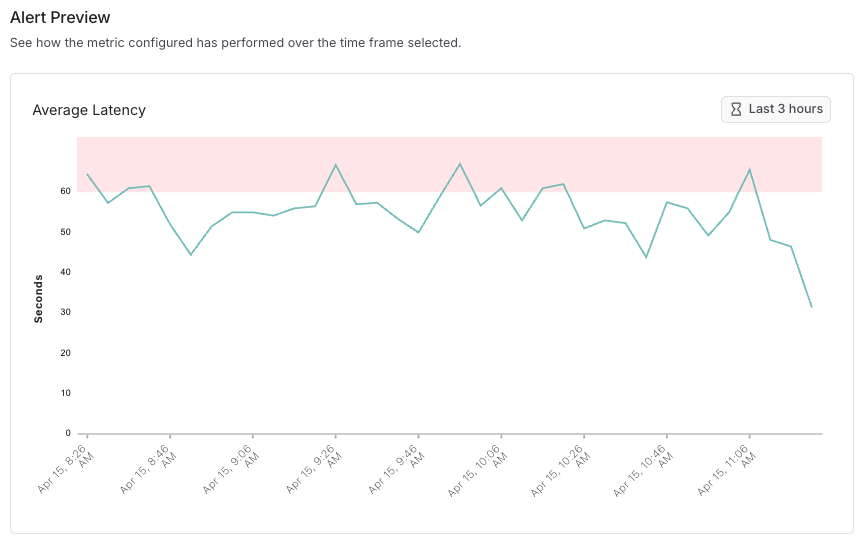
Example: The configuration in the screenshot would generate an alert when more than 5% of runs within the past 5 minutes result in errors.You can preview alert behavior over a historical time window to understand how many datapoints, and which ones, would have triggered an alert at a chosen threshold (indicated in red). For example, setting an average latency threshold of 60 seconds for a project lets you visualize potential alerts, as shown in the following screenshot.
Step 4: Configure notification channel
Slack
PagerDuty
Dynatrace
Webhook
Send alert notifications directly to a Slack channel using LangSmith’s native Slack integration.
The native Slack notification type is available on LangSmith Cloud and on self-hosted deployments with a configured Slack app. If your self-hosted deployment does not support that connection, use the webhook Slack recipe in the Webhook tab.
Prerequisites
A Slack workspace connected to your LangSmith organization. If you have not connected one yet, LangSmith will prompt you to do so inline when you configure this notification type.
1. Configure the Slack notification
In the Notification Settings section of your alert setup, select Slack.
Click the channel selector. If no Slack workspace is linked yet, click Connect Slack and complete the OAuth flow to authorize the configured Slack app.
Select the workspace and channel from the dropdown. Click the refresh icon if the channel does not appear immediately.
Click Save to save the notification configuration.
LangSmith joins the selected public channel when it first delivers a message, if needed. To post to a private channel, invite the configured Slack app to that channel in Slack first.
2. Test the integration
Click Send Test Notification to verify that LangSmith can reach the channel. Check the channel for the test message.
Notification format
When an alert triggers, LangSmith posts a structured Slack message that includes:
Headline: The alert name and your LangSmith workspace name.
Detail line: The metric attribute, triggered value, comparison operator, configured threshold, aggregation method, and time window — for example: Total Cost: $12.50 ≥ $5.00 · avg · 30 min.
Action buttons: View Alert (links to the alert preview in LangSmith) and View Runs (links to the filtered runs that triggered the alert).
Configure PagerDuty as a notification channel using PagerDuty’s Events API v2. This integration allows critical LLM application issues to trigger PagerDuty incidents, enabling rapid response through your established incident management workflow.Prerequisites
An active PagerDuty account with administrator access
Appropriate service-level permissions in PagerDuty
If on a custom deployment of LangSmith, make sure there are no firewall settings blocking egress traffic from LangSmith services.
1. Create a Service in PagerDuty
Log in to your PagerDuty account
Navigate to Services > Service Directory
Click + New Service
Complete the following fields:
Name: Provide a descriptive name (e.g., “LangSmith Monitoring”)
Description: Add details about the monitored application
Escalation Policy: Select the appropriate team escalation policy
Integration Type: Select “Events API V2”
Click Add Service to create the service
2. Obtain integration key
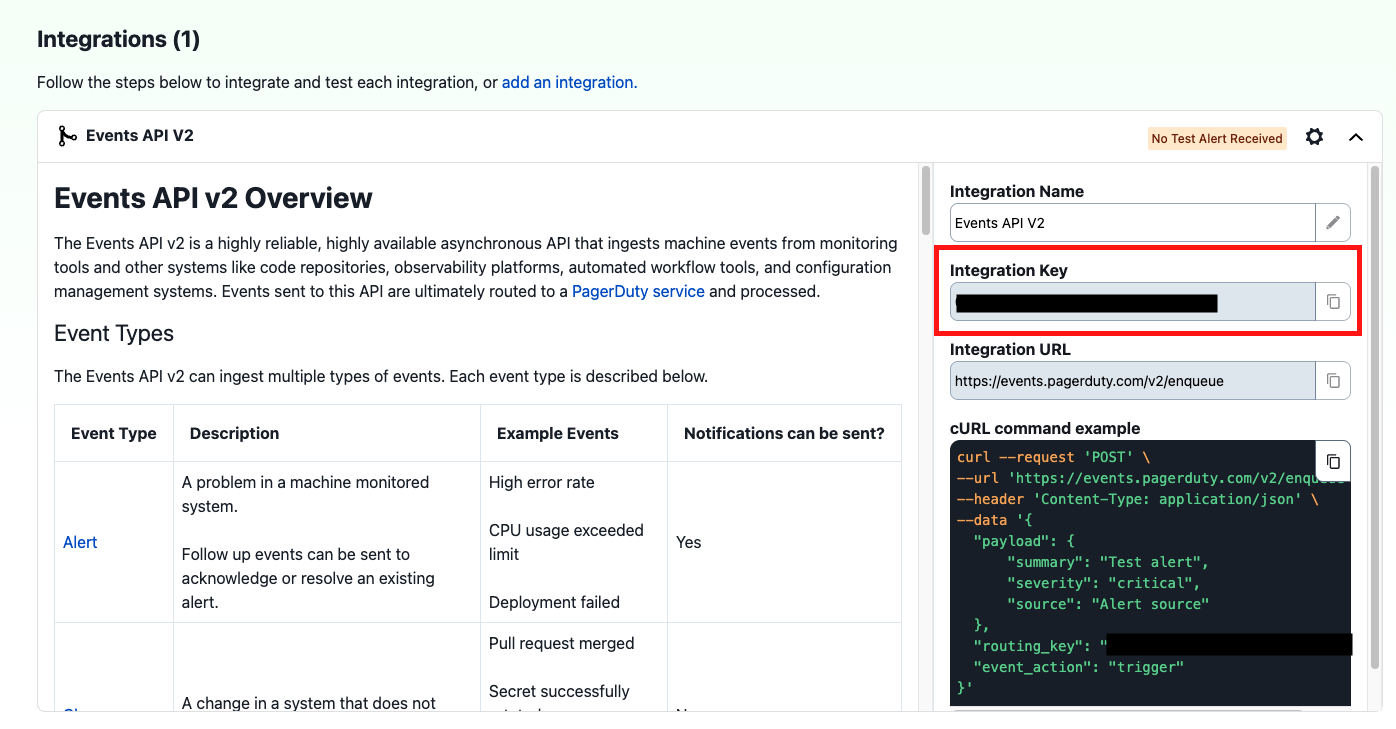
After creating the service, retrieve the Integration Key:
From the Service Directory, locate and click on your newly created service
Select the Integrations tab
Find the “Events API V2” integration
Copy the Integration Key (a 32-character alphanumeric string)
3. Configure LangSmith alert with PagerDuty
To receive the same alert again within an hour of it being triggered, you must resolve the active incident created by the alert in PagerDuty.
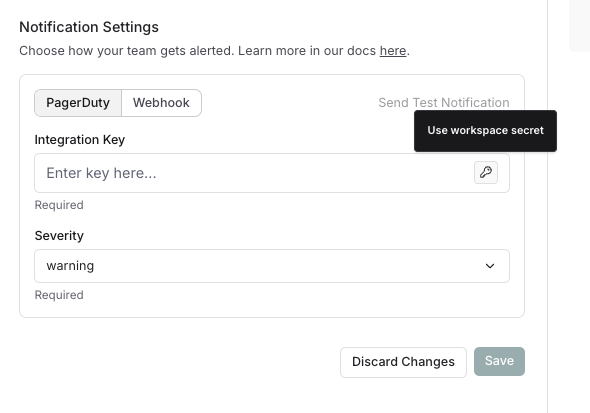
In the notification section of your alert set-up in LangSmith, select PagerDuty
Click the key icon to save the Integration Key as a Workspace secret or select an existing Workspace secret. As a best practice, we recommend saving the Integration Key as a Workspace Secret rather than adding it directly. This will allow you to reuse the same key across alerts for a workspace.
Configure additional notification options:
Severity: Maps to PagerDuty incident priority
Send a test alert by clicking Send Test Alert
Verify the incident is triggered by PagerDuty and contains relevant LangSmith alert information
Troubleshooting
If incidents are not being created in PagerDuty:
Verify the Integration Key is entered correctly in LangSmith
Ensure the PagerDuty service is active and not in maintenance mode
Check that your PagerDuty account has Events API v2 enabled
If an alert trigger appears to be missing in PagerDuty, check whether the expected trigger occurred within one hour of a previous trigger from the same alert rule, and whether the incident created by the previous alert is still open.
Review network connectivity if your LangSmith instance is behind a firewall
Configure Dynatrace as a notification channel using Dynatrace’s Events API v2. This integration sends LangSmith alert events to your Dynatrace environment, enabling correlation with your broader infrastructure monitoring.Prerequisites
An active Dynatrace environment (SaaS or Managed).
A Dynatrace API access token with the events.ingest scope.
If you are working from a custom deployment of LangSmith, make sure there are no firewall settings blocking egress traffic from LangSmith services.
1. Create an API token in Dynatrace
Log in to your Dynatrace environment.
Navigate to Access Tokens.
Click Generate new token.
Provide a descriptive name (e.g., “LangSmith Alerts”).
Under Scopes, search for and enable events.ingest (Ingest events).
Click Generate token.
Copy the generated token and store it securely. The token is only displayed once.
2. Obtain your Dynatrace environment URL
Your Dynatrace environment URL follows this format:
https://{your-environment-id}.live.dynatrace.com
You can find your environment ID in the browser URL bar when logged in to Dynatrace.
3. Configure LangSmith alert with Dynatrace
In the Notifications Settings for your alert setup in LangSmith, select Dynatrace.
Enter your Dynatrace environment URL.
Click the key icon to save the API token as a workspace secret or select an existing workspace secret. As a best practice, save the API token as a workspace secret rather than adding it directly. This allows you to reuse the same token across alerts for a workspace.
Configure additional notification options:
Event Type: Select the Dynatrace event type (e.g., CUSTOM_ALERT, ERROR_EVENT)
Send a test alert by clicking Send Test Notification.
Verify the event appears in your Dynatrace environment.
Troubleshooting
If events are not appearing in Dynatrace:
Verify the API token has the events.ingest scope and is not expired.
Ensure the environment URL is correct and includes your environment ID.
Confirm the Authorization header format uses Api-Token (not Bearer).
Check that your Dynatrace environment is active and accessible.
Review network connectivity if your LangSmith instance is behind a firewall.
Webhooks enable integration with custom services and third-party platforms by sending HTTP POST requests when alert conditions are triggered. Use webhooks to forward alert data to ticketing systems, chat applications, or custom monitoring solutions.Prerequisites
An endpoint that can receive HTTP POST requests
Appropriate authentication credentials for your receiving service (if required)
1. Prepare your receiving endpoint
Before configuring the webhook in LangSmith, ensure your receiving endpoint:
Accepts HTTP POST requests
Can process JSON payloads
Is accessible from external services
Has appropriate authentication mechanisms (if required)
If on a custom deployment of LangSmith, make sure there are no firewall settings blocking egress traffic from LangSmith services.
2. Configure webhook parameters
In the Monitoring section of the LangSmith UI under the Alerts tab, click + Alert to create a new alert.In the Notification Settings section, complete the webhook configuration with the following parameters:Required fields
URL: The complete URL of your receiving endpoint
Example: https://api.example.com/incident-webhook
Optional fields
Headers: JSON key-value pairs sent with the webhook request
Common headers include:
Authorization: For authentication tokens
Content-Type: Usually set to application/json (default)
X-Source: To identify the source as LangSmith
If no headers, use {}
Request Body Template: Customize the JSON payload sent to your endpoint
Default: LangSmith sends the payload defined and the following additional key-value pairs appended to the payload:
project_name: The tracer_session_name of the agent environment the alert is scoped to.
workspace_name: Name of the LangSmith workspace.
alert_rule_id: A UUID to identify the LangSmith alert. This can be used as a de-duplication key in the webhook service.
alert_rule_name: The name of the alert rule.
alert_rule_description: The description of the alert rule (empty string if none set).
alert_rule_type: The type of alert (as of 04/01/2025 all alerts are of type threshold).
alert_rule_attribute: The attribute associated with the alert rule - error_count, feedback_score, latency, or cost.
alert_rule_url: A direct link to the alert rule in LangSmith.
runs_url: A direct link to the runs that triggered the alert in LangSmith.
triggered_metric_value: The value of the metric at the time the threshold was triggered.
triggered_threshold: The threshold that triggered the alert.
timestamp: The timestamp that triggered the alert.
LangSmith does not perform template substitution on the request body. The auto-populated fields above are merged into the outgoing JSON as top-level keys, alongside the body you configure. Placeholder syntax like {alert_rule_name} is sent verbatim to the receiving service. It only resolves to a real value if the receiver itself can extract fields from the incoming JSON (for example, a Power Automate Workflow, an AWS Lambda, or a custom HTTP handler).
3. Test the webhook
Click Send Test Alert to send the webhook notification to ensure the notification works as intended.
Troubleshooting
If webhook notifications are not being delivered:
Verify the webhook URL is correct and accessible
Ensure any authentication headers are properly formatted
Check that your receiving endpoint accepts POST requests
Examine your endpoint’s logs for received but rejected requests
Verify your custom payload template is valid JSON format
Send Test Alert does not validate the downstream response. The UI reports your configuration is working correctly and the test notification was delivered even if the receiving endpoint returned an error (for example, a 400 or 422 rejection). Always verify receipt on the receiver side, check your endpoint’s logs or the target platform’s message history, rather than relying solely on the LangSmith success message.
Security considerations
Use HTTPS for your webhook endpoints
Implement authentication for your webhook endpoint
Consider adding a shared secret in your headers to verify webhook sources
Validate incoming webhook requests before processing them
Example recipes
Configure Slack notifications via webhook
Here is an example for configuring LangSmith alerts to send notifications to Slack channels using the chat.postMessage API.Prerequisites
Select the workspace where you want to install the app.
Click Create App.
Step 2: Configure bot permissions
In the left sidebar of your Slack app configuration, click OAuth & Permissions.
Scroll down to Bot Token Scopes under Scopes and click Add an OAuth Scope.
Add the following scopes:
chat:write (Send messages as the app).
chat:write.public (Send messages to channels the app is not in).
channels:read (View basic channel information).
Step 3: Install the app to your workspace
Scroll up to the top of the OAuth & Permissions page.
Click Install to Workspace.
Review the permissions and click Allow.
Copy the Bot User OAuth Token that appears (begins with xoxb-).
Step 4: Add the bot to a Slack channelAdd the bot to the specific channel you want to receive alerts in. You can add a bot to a Slack channel by mentioning it in the message field (e.g., @botname).You also need the channel ID to configure the webhook alert in LangSmith. You can find the channel ID by opening channel details > About.Step 5: Configure the webhook alert in LangSmith
In LangSmith, select your agent, go to Tracing, and select the environment. Click the Alerts icon in the top right, or open the Alerts tab on the Monitoring page.
On the Alerts tab, click + Alert.
Define your alert metrics and conditions.
In the notification section, select Webhook.
Configure the webhook with the following settings:
Webhook URL
https://slack.com/api/chat.postMessage
Headers
Replace xoxb-your-token-here with your Bot’s User OAuth Token
It is required to fill in the {channel_id} from the value found in Step 4.
The remaining fields: alert_name, project_name and project_url optionally add additional context to the alert message. You can find your project_url in the browser’s URL bar. Copy the portion up to but not including any query parameters.
{ "channel": "{channel_id}", "text": "{alert_name} triggered for {project_name}", "blocks": [ { "type": "section", "text": { "type": "mrkdwn", "text": "🚨{alert_name} has been triggered" } }, { "type": "section", "text": { "type": "mrkdwn", "text": "Please check the following link for more information:" } }, { "type": "section", "text": { "type": "mrkdwn", "text": "<{project-url}|View in LangSmith>" } } ]}
Click Save to activate the webhook configuration.
Step 6: Test the integration
In the LangSmith alert configuration, click Test Alert.
Check your specified Slack channel for the test notification.
Verify that the message contains the expected alert information.
(Optional) Step 7: Link to the alert preview in the request bodyAfter creating an alert, you can optionally link to its preview in the webhook’s request body.To configure this:
Save your alert.
Find your saved alert in the alerts table and click it.
Copy the displayed URL.
Click “Edit Alert”.
Replace the existing project URL with the copied alert preview URL.
Configure Microsoft Teams notifications via webhook
Here is an example for configuring LangSmith alerts to send notifications to a Microsoft Teams channel using the Workflows app (Power Automate). This approach is recommended because it extracts fields from the incoming JSON within the flow, so the auto-populated LangSmith alert fields render correctly in the Teams message.
Microsoft’s legacy Office 365 Incoming Webhook connectors are being retired. Use the Workflows app for new integrations.
Prerequisites
Access to a Microsoft Teams workspace with permissions to add Workflows.
A LangSmith agent environment to set up alerts.
Step 1: Create a Workflow in Teams
In Microsoft Teams, navigate to the channel where you want to receive alerts.
Click the … (More options) menu next to the channel name.
Select Workflows.
Search for and select the Post to a channel when a webhook request is received template.
Sign in to confirm the connections, then click Next.
Confirm the team and channel where alerts should be posted, then click Add workflow.
Copy the generated HTTP POST URL—use this in LangSmith.
Step 2: Customize the message in Power Automate (optional)The default workflow posts the raw JSON body as a card. To format alert details, edit the flow in Power Automate:
In the Adaptive Card field, reference incoming fields using triggerOutputs()?['body/alert_rule_name'], triggerOutputs()?['body/project_name'], triggerOutputs()?['body/triggered_metric_value'], triggerOutputs()?['body/triggered_threshold'], triggerOutputs()?['body/timestamp'], and triggerOutputs()?['body/alert_rule_url'].
Save the flow.
Step 3: Configure the webhook alert in LangSmith
In LangSmith, select your agent, go to Tracing, and select the environment. Click the Alerts icon in the top right, or open the Alerts tab on the Monitoring page.
On the Alerts tab, click + Alert.
Define your alert metrics and conditions.
In the notification section, select Webhook.
Configure the webhook with the following settings:
Webhook URLPaste the HTTP POST URL from your Teams Workflow:
Request Body TemplateLangSmith automatically merges the auto-populated alert fields (alert_rule_name, project_name, triggered_metric_value, triggered_threshold, timestamp, alert_rule_url, and others) into the request body as top-level JSON keys. Power Automate reads these fields directly from the incoming payload, so an empty body is sufficient:
{}
Click Save to activate the webhook configuration.
Step 4: Test the integration
In the LangSmith alert configuration, click Send Test Alert.
Check your specified Teams channel for the test notification.
Verify that the card contains the expected alert information.
Reference implementationFor a working example that translates LangSmith webhook payloads (threshold alerts, run rules, and generic events) into formatted Teams Adaptive Cards, see the langsmith-teams-webhook sample repo. The sample runs as a small Python service in front of a Teams Workflow URL, which avoids customizing the Power Automate flow itself.
Configure email notifications via webhook
Here is an example for configuring LangSmith alerts to send email notifications using SendGrid’s Mail Send API. You can use any transactional email provider that exposes an HTTP API (e.g., Mailgun, Amazon SES, Postmark).Prerequisites
A SendGrid account with a verified sender identity.
Choose Restricted Access and enable Mail Send > Full Access.
Click Create & View, copy the key, and store it securely.
Step 2: Verify your sender email
In SendGrid, navigate to Settings > Sender Authentication.
Complete either Domain Authentication (recommended) or Single Sender Verification for the address you want to send from.
Step 3: Configure the webhook alert in LangSmith
In LangSmith, select your agent, go to Tracing, and select the environment. Click the Alerts icon in the top right, or open the Alerts tab on the Monitoring page.
On the Alerts tab, click + Alert.
Define your alert metrics and conditions.
In the notification section, select Webhook.
Configure the webhook with the following settings:
Webhook URL
https://api.sendgrid.com/v3/mail/send
Headers
Replace SG.your-api-key-here with your SendGrid API key.
Replace alerts@your-company.com with your verified sender address and oncall@your-company.com with the recipient address. SendGrid does not extract fields from arbitrary top-level JSON keys, so this example uses a fixed subject and body. To include alert-specific values in the email, route the LangSmith webhook through a middleware (such as a Power Automate flow, AWS Lambda, or Zapier webhook) that reads the incoming payload and renders the SendGrid request.
{ "personalizations": [ { "to": [ { "email": "oncall@your-company.com" } ], "subject": "LangSmith alert triggered" } ], "from": { "email": "alerts@your-company.com", "name": "LangSmith Alerts" }, "content": [ { "type": "text/plain", "value": "A LangSmith alert was triggered. Open your LangSmith workspace to view the alert details, including the project, metric value, threshold, and timestamp." } ]}
Click Save to activate the webhook configuration.
Step 4: Test the integration
In the LangSmith alert configuration, click Send Test Alert.
Check the recipient inbox for the test notification.
Verify the email contains the expected alert information.
Using other email providersThe same pattern works with other transactional email APIs that accept static authentication headers. Change the Webhook URL and Headers to match your provider:
Provider
Webhook URL
Auth header format
Mailgun
https://api.mailgun.net/v3/{your-domain}/messages
Authorization: Basic <base64(api:<key>)>
Postmark
https://api.postmarkapp.com/email
X-Postmark-Server-Token: <token>
Adjust the Request Body Template to match each provider’s expected payload format. Amazon SES is not directly compatible because the SES API requires per-request AWS SigV4 signing, which cannot be expressed as a static header. To use SES, route through a middleware (for example, a Lambda function with an HTTP trigger).
Configure Google Chat notifications via webhook (requires middleware)
Google Chat’s incoming webhook API (spaces.messages.create) only accepts the text field at the top level. Because LangSmith merges all 12 alert metadata keys into the request body as top-level fields, Google Chat rejects every request with a 400 error:
Invalid JSON payload received. Unknown name "project_name" at 'message': Cannot find field.
There is no Request Body Template that avoids this, even a minimal body such as {"text": "hello", "project_name": "x"} will fail. A translation layer (middleware) is required, similar to the Amazon SES note in the email recipe.Option A: Cloud Run or Cloud Functions middleware (recommended)This approach uses a small HTTP handler that receives the LangSmith webhook, extracts the relevant fields, and forwards a clean {"text": "..."} payload to a Google Chat space webhook URL.Prerequisites
A Google Chat space with an incoming webhook configured. In Google Chat, open the space, then go to Apps & integrations > Add webhooks, create a webhook, and copy the URL.
A Google Cloud project with Cloud Run or Cloud Functions enabled, or equivalent hosting.
Step 1: Deploy the handlerDeploy the following Python function as a Cloud Run service or Cloud Function:
import jsonimport osimport reimport urllib.requestfrom urllib.parse import urlparseALLOWED_LINK_HOSTS = {"smith.langchain.com"}def build_text(payload): def safe(v): # Strip angle brackets to prevent <url|label> link injection return re.sub(r"[<>]", "", str(v if v is not None else "")) parsed = urlparse(str(payload.get("runs_url") or "")) trusted = parsed.scheme == "https" and parsed.hostname in ALLOWED_LINK_HOSTS return ( f"*{safe(payload.get('alert_rule_name'))}* triggered for " f"`{safe(payload.get('project_name'))}`\n" f"{safe(payload.get('alert_rule_attribute'))}: " f"{safe(payload.get('triggered_metric_value'))} " f"(threshold {safe(payload.get('triggered_threshold'))})" + (f"\n<{parsed.geturl()}|View runs>" if trusted else "") )def handler(request): if request.headers.get("X-Webhook-Secret") != os.environ["LANGSMITH_SHARED_SECRET"]: return ("forbidden", 403) payload = request.get_json(silent=True) or {} urllib.request.urlopen( urllib.request.Request( os.environ["GCHAT_WEBHOOK_URL"], data=json.dumps({"text": build_text(payload)}).encode(), headers={"Content-Type": "application/json"}, method="POST", ), timeout=10, ) return ("ok", 200)
Set the following environment variables for the deployed function:
GCHAT_WEBHOOK_URL: The Google Chat space webhook URL.
LANGSMITH_SHARED_SECRET: A secret string you choose (used to authenticate incoming requests from LangSmith).
Step 2: Configure the webhook alert in LangSmithPoint the LangSmith webhook at your deployed handler’s URL.Webhook URL
The metadata fields (alert_rule_name, project_name, runs_url, etc.) are merged into the body by LangSmith regardless of what you put here, so an empty body is sufficient.
Do not strip * or _ from alert field values in your handler. These characters are also used in Google Chat’s basic text formatting, but they appear in LangSmith identifiers (such as run_count). Stripping them will corrupt field names in the message.
Google Chat enforces a write rate limit of 1 message per second per space, shared across all webhooks writing to that space. If you have multiple LangSmith alerts routing to the same space and they fire simultaneously, some messages may be dropped.
Option B: Google Apps Script (no infrastructure required)Google Apps Script can serve as lightweight middleware without deploying any cloud infrastructure.Create a new Apps Script project at script.google.com, paste the following, and deploy it as a web app (execute as yourself, access to anyone):
function doPost(e) { var payload = JSON.parse(e.postData.contents); var secret = e.parameter.secret; // shared secret passed as query param if (secret !== PropertiesService.getScriptProperties().getProperty("LANGSMITH_SHARED_SECRET")) { return ContentService.createTextOutput("forbidden").setMimeType(ContentService.MimeType.TEXT); } var text = "*" + (payload.alert_rule_name || "") + "* triggered for `" + (payload.project_name || "") + "`\n" + (payload.alert_rule_attribute || "") + ": " + (payload.triggered_metric_value || "") + " (threshold " + (payload.triggered_threshold || "") + ")"; UrlFetchApp.fetch(PropertiesService.getScriptProperties().getProperty("GCHAT_WEBHOOK_URL"), { method: "post", contentType: "application/json", payload: JSON.stringify({ text: text }), }); return ContentService.createTextOutput("ok").setMimeType(ContentService.MimeType.TEXT);}
Set GCHAT_WEBHOOK_URL and LANGSMITH_SHARED_SECRET in Project Settings > Script Properties.
Apps Script web apps cannot read custom HTTP request headers, so the shared secret must be passed as a query string parameter (?secret=...) rather than a header. Include it in the LangSmith webhook URL rather than the Headers field.
{"docsConfig":{"theme":"aspen","$schema":"https://mintlify.com/docs.json","name":"Docs by LangChain","description":"Documentation for LangSmith, Fleet, and our open source packages.","colors":{"primary":"#161F34","light":"#7FC8FF","dark":"#006DDD"},"logo":{"light":"https://mintcdn.com/langchain-5e9cc07a/nQm-sjd_MByLhgeW/images/brand/langchain-docs-dark-blue.png?fit=max\u0026auto=format\u0026n=nQm-sjd_MByLhgeW\u0026q=85\u0026s=5babf1a1962208fd7eed942fa2432ecb","dark":"https://mintcdn.com/langchain-5e9cc07a/nQm-sjd_MByLhgeW/images/brand/langchain-docs-light-blue.png?fit=max\u0026auto=format\u0026n=nQm-sjd_MByLhgeW\u0026q=85\u0026s=0bcd2a1f2599ed228bcedf0f535b45b1"},"favicon":{"light":"https://mintcdn.com/langchain-5e9cc07a/8njVp3mXF3LrAS1d/images/brand/docs-favicon.png?fit=max\u0026auto=format\u0026n=8njVp3mXF3LrAS1d\u0026q=85\u0026s=a61c2b4666f558992e1fd44750b08465","dark":"https://mintcdn.com/langchain-5e9cc07a/8njVp3mXF3LrAS1d/images/brand/docs-favicon.png?fit=max\u0026auto=format\u0026n=8njVp3mXF3LrAS1d\u0026q=85\u0026s=a61c2b4666f558992e1fd44750b08465"},"appearance":{"default":"system","strict":false},"background":{"color":{"light":"#FFFFFF","dark":"#030710"}},"navbar":{"links":[{"icon":"message","href":"https://chat.langchain.com/","label":"Ask AI"},{"icon":"brand-github","href":"https://github.com/langchain-ai","label":"GitHub"}],"primary":{"type":"button","label":"Try LangSmith","href":"https://smith.langchain.com/"}},"footer":{"socials":{"github":"https://github.com/langchain-ai","x":"https://x.com/LangChain","linkedin":"https://www.linkedin.com/company/langchain","youtube":"https://www.youtube.com/@LangChain"},"links":[{"header":"Resources","items":[{"label":"Forum","href":"https://forum.langchain.com/"},{"label":"Changelog","href":"https://changelog.langchain.com/"},{"label":"LangChain Academy","href":"https://academy.langchain.com/"},{"label":"Contact Sales","href":"https://www.langchain.com/contact-sales"}]},{"header":"Company","items":[{"label":"Home","href":"https://langchain.com/"},{"label":"Trust Center","href":"https://trust.langchain.com/"},{"label":"Careers","href":"https://langchain.com/careers"},{"label":"Blog","href":"https://blog.langchain.com/"}]}]},"seo":{"metatags":{"canonical":"https://docs.langchain.com","google-site-verification":"9_2KHeJwmEdwgncBRk1MsKxriZz7Sc21EJdbfCxkTEo"}},"fonts":{"heading":{"family":"TWK Lausanne","weight":700,"source":"fonts/TWKLausanne-700.woff2","format":"woff2"},"body":{"family":"Inter","weight":400}},"icons":{"library":"tabler"},"styling":{"eyebrows":"breadcrumbs","codeblocks":{"theme":{"light":"catppuccin-latte","dark":"catppuccin-mocha"}},"latex":true},"integrations":{"gtm":{"tagId":"GTM-MBBX68ST"}},"banner":{"content":"Would you notice if your agent got worse in production? [Tell us in our annual survey](https://form.typeform.com/to/U2EAO1Lz) for the chance to win LangChain swag.","dismissible":true},"errors":{"404":{"redirect":false,"title":"Page not found","description":"We couldn't find the page you were looking for."}},"contextual":{"options":["copy","view",{"title":"llms.txt","description":"Open llms.txt for this site","icon":"file","href":"https://docs.langchain.com/llms.txt"},"chatgpt","claude","mcp","cursor","vscode"],"display":"header"},"interaction":{"drilldown":true},"navigation":{"pages":[]}},"deployment":{"deploymentMetadataValue":{"subdomain":"langchain-5e9cc07a","hasAudioNarration":false,"actualSubdomain":"langchain-5e9cc07a","customDomains":["docs.langchain.com"],"gitSource":{"type":"github","owner":"langchain-ai","repo":"docs","deployBranch":"prod","contentDirectory":"build","isPrivate":false,"mountPath":"","label":""},"feedback":{"thumbs":true,"edits":false,"issues":false},"entitlements":{"AI_CHAT":{"status":"ENABLED"},"REMOVE_BRANDING":{"status":"ENABLED"},"WEB_MCP":{"status":"ENABLED"},"NARRATION":{"status":"ENABLED"}},"buildId":"6b06de81aa9af906bc134edc","clientVersion":"0.0.4304","searchFilterCounts":[{"language":"default","tag":"Reference","count":822},{"language":"default","tag":"AGENT IMPROVEMENT","count":820},{"language":"default","tag":"AGENT RUNTIME","count":764},{"language":"default","tag":"Monitor","count":730},{"language":"default","tag":"LangSmith REST API","count":619},{"language":"default","tag":"Build","count":486},{"language":"default","tag":"TypeScript","count":254},{"language":"default","tag":"Deploy","count":253},{"language":"default","tag":"Python","count":232},{"language":"default","tag":"AGENT GOVERNANCE","count":228}],"searchSettings":{"maxResults":10,"showContentSnippets":true,"isFiltersEnabled":false}},"assistantConfig":{"enableAskAiButton":false,"enableAskAiSearchBar":true,"deflection":{"enabled":false,"email":"support@langchain.dev"}},"basePath":"","hasChatPermissions":false,"hasWebMcpPermissions":true,"toggles":[{"name":"kill-isr","enabled":true,"variant":{"name":"disabled","enabled":false,"feature_enabled":true},"impressionData":false},{"name":"custom-rbac-roles","enabled":true,"variant":{"name":"disabled","enabled":false,"feature_enabled":true},"impressionData":false},{"name":"agent-mintlify-slack","enabled":true,"variant":{"name":"disabled","enabled":false,"feature_enabled":true},"impressionData":false},{"name":"agent-integrations-settings","enabled":true,"variant":{"name":"disabled","enabled":false,"feature_enabled":true},"impressionData":false},{"name":"rbac-expansion","enabled":true,"variant":{"name":"disabled","enabled":false,"feature_enabled":true},"impressionData":false},{"name":"automations-pr-grouping","enabled":true,"variant":{"name":"disabled","enabled":false,"feature_enabled":true},"impressionData":false},{"name":"custom-prefix","enabled":true,"variant":{"name":"disabled","enabled":false,"feature_enabled":true},"impressionData":false},{"name":"analytics-v7","enabled":true,"variant":{"name":"disabled","enabled":false,"feature_enabled":true},"impressionData":false},{"name":"user-flows-analytics","enabled":true,"variant":{"name":"disabled","enabled":false,"feature_enabled":true},"impressionData":false},{"name":"no-publish-flow","enabled":true,"variant":{"name":"disabled","enabled":false,"feature_enabled":true},"impressionData":false},{"name":"snapshot-serving-live","enabled":true,"variant":{"name":"disabled","enabled":false,"feature_enabled":true},"impressionData":false},{"name":"stripTemperatureMiddleware","enabled":true,"variant":{"name":"disabled","enabled":false,"feature_enabled":true},"impressionData":false},{"name":"support-platform-pylon-zendesk","enabled":true,"variant":{"name":"disabled","enabled":false,"feature_enabled":true},"impressionData":false},{"name":"snapshot-serving","enabled":true,"variant":{"name":"disabled","enabled":false,"feature_enabled":true},"impressionData":false},{"name":"instant-rollback","enabled":true,"variant":{"name":"disabled","enabled":false,"feature_enabled":true},"impressionData":false},{"name":"granular-notifications-server","enabled":true,"variant":{"name":"disabled","enabled":false,"feature_enabled":true},"impressionData":false},{"name":"granular-notifications","enabled":true,"variant":{"name":"disabled","enabled":false,"feature_enabled":true},"impressionData":false},{"name":"automations-fable","enabled":true,"variant":{"name":"disabled","enabled":false,"feature_enabled":true},"impressionData":false},{"name":"fixed-ai-action-pricing","enabled":true,"variant":{"name":"disabled","enabled":false,"feature_enabled":true},"impressionData":false},{"name":"site-roles","enabled":true,"variant":{"name":"disabled","enabled":false,"feature_enabled":true},"impressionData":false},{"name":"automation-resolve-merge-conflict","enabled":true,"variant":{"name":"disabled","enabled":false,"feature_enabled":true},"impressionData":false},{"name":"scoped-publishing","enabled":true,"variant":{"name":"disabled","enabled":false,"feature_enabled":true},"impressionData":false},{"name":"mintql","enabled":true,"variant":{"name":"disabled","enabled":false,"feature_enabled":true},"impressionData":false},{"name":"page-level-analytics","enabled":true,"variant":{"name":"disabled","enabled":false,"feature_enabled":true},"impressionData":false},{"name":"editor-version-history-v2","enabled":true,"variant":{"name":"disabled","enabled":false,"feature_enabled":true},"impressionData":false},{"name":"billing-page-v2","enabled":true,"variant":{"name":"disabled","enabled":false,"feature_enabled":true},"impressionData":false},{"name":"full-page-search","enabled":true,"variant":{"name":"disabled","enabled":false,"feature_enabled":true},"impressionData":false},{"name":"workspace-projects","enabled":true,"variant":{"name":"disabled","enabled":false,"feature_enabled":true},"impressionData":false},{"name":"fork-pr-previews","enabled":true,"variant":{"name":"disabled","enabled":false,"feature_enabled":true},"impressionData":false},{"name":"revalidation-jwt","enabled":true,"variant":{"name":"disabled","enabled":false,"feature_enabled":true},"impressionData":false},{"name":"hobby-abuse-scan","enabled":true,"variant":{"name":"disabled","enabled":false,"feature_enabled":true},"impressionData":false},{"name":"dashboard-inbox","enabled":true,"variant":{"name":"disabled","enabled":false,"feature_enabled":true},"impressionData":false},{"name":"turbopuffer-dual-write","enabled":true,"variant":{"name":"disabled","enabled":false,"feature_enabled":true},"impressionData":false},{"name":"approve-review-flow","enabled":true,"variant":{"name":"disabled","enabled":false,"feature_enabled":true},"impressionData":false},{"name":"editor-metadata","enabled":true,"variant":{"name":"disabled","enabled":false,"feature_enabled":true},"impressionData":false},{"name":"sso-setup-deadline-banner","enabled":true,"variant":{"name":"disabled","enabled":false,"feature_enabled":true},"impressionData":false},{"name":"turbopuffer-serve","enabled":true,"variant":{"name":"disabled","enabled":false,"feature_enabled":true},"impressionData":false},{"name":"live-agents","enabled":true,"variant":{"name":"disabled","enabled":false,"feature_enabled":true},"impressionData":false},{"name":"starter-pricing","enabled":true,"variant":{"name":"treatment","enabled":true,"payload":{"type":"string","value":"treatment"},"feature_enabled":true},"impressionData":false},{"name":"llms-txt-v2","enabled":true,"variant":{"name":"disabled","enabled":false,"feature_enabled":true},"impressionData":false},{"name":"wildcard-email-auth","enabled":true,"variant":{"name":"disabled","enabled":false,"feature_enabled":true},"impressionData":false}],"googleFontsInlined":false},"customCss":[{"filePath":"style.css","href":"/_mintlify/custom/langchain-5e9cc07a/d59117b7cd22d12d/style.css"}]}
{"page":{"pagePath":"langsmith/alerts","slug":"/langsmith/alerts","pageMetadata":{"title":"Alerts in LangSmith","sidebarTitle":"Alerts","description":null,"href":"/langsmith/alerts"},"pageType":"default","mdx":{"mdxSource":{"compiledSource":"\"use strict\";const{Fragment:_Fragment,jsx:_jsx,jsxs:_jsxs}=arguments[0];const{useMDXComponents:_provideComponents}=arguments[0];function _createMdxContent(props){const _components={a:`a`,code:`code`,hr:`hr`,li:`li`,ol:`ol`,p:`p`,pre:`pre`,span:`span`,strong:`strong`,tbody:`tbody`,td:`td`,th:`th`,thead:`thead`,tr:`tr`,ul:`ul`,..._provideComponents(),...props.components},{Accordion,Callout,CodeBlock,Heading,Icon,Info,Note,OptimizedImage,Tab,Table,Tabs,Tip,Warning}=_components;if(!Accordion)_missingMdxReference(`Accordion`,true);if(!Callout)_missingMdxReference(`Callout`,true);if(!CodeBlock)_missingMdxReference(`CodeBlock`,true);if(!Heading)_missingMdxReference(`Heading`,true);if(!Icon)_missingMdxReference(`Icon`,true);if(!Info)_missingMdxReference(`Info`,true);if(!Note)_missingMdxReference(`Note`,true);if(!OptimizedImage)_missingMdxReference(`OptimizedImage`,true);if(!Tab)_missingMdxReference(`Tab`,true);if(!Table)_missingMdxReference(`Table`,true);if(!Tabs)_missingMdxReference(`Tabs`,true);if(!Tip)_missingMdxReference(`Tip`,true);if(!Warning)_missingMdxReference(`Warning`,true);return _jsxs(_Fragment,{children:[_jsx(Note,{children:_jsxs(_components.p,{children:[_jsx(_components.strong,{children:`Self-hosted version requirement`}),`: Access to alerts requires Helm chart version `,_jsx(_components.strong,{children:`0.10.3`}),` or later.`]})}),`\n`,_jsx(_components.p,{children:`Effective observability in LLM applications requires proactive detection of failures, performance degradations, and regressions. LangSmith’s alerts feature helps identify critical issues such as:`}),`\n`,_jsxs(_components.ul,{children:[`\n`,_jsx(_components.li,{children:`API rate limit violations from model providers.`}),`\n`,_jsx(_components.li,{children:`Latency increases for your application.`}),`\n`,_jsx(_components.li,{children:`Application changes that affect feedback scores reflecting end-user experience.`}),`\n`,_jsx(_components.li,{children:`Unexpected cost spikes from LLM usage.`}),`\n`]}),`\n`,_jsxs(_components.p,{children:[`An alert is scoped to one `,_jsx(_components.a,{href:`/langsmith/agent-environments#select-an-environment`,children:`environment`}),` of one `,_jsx(_components.a,{href:`/langsmith/agent-registry#agent`,children:`agent`}),`, so each environment you monitor needs its own alert. Alerting on production behavior therefore does not require a filter that excludes test traffic, because the environment already excludes it.`]}),`\n`,_jsx(Tip,{children:_jsxs(_components.p,{children:[`Alerts can `,_jsx(_components.a,{href:`#step-4-configure-notification-channel`,children:`route`}),` to Slack, PagerDuty, Dynatrace, or any HTTP endpoint via webhook. The `,_jsx(_components.strong,{children:`Webhook`}),` tab includes `,_jsx(_components.a,{href:`#example-recipes`,children:`example recipes`}),` for Microsoft Teams, email, Slack on self-hosted deployments, and Google Chat (which requires middleware).`]})}),`\n`,_jsx(_components.p,{children:`Follow these steps to configure an alert.`}),`\n`,_jsx(Heading,{level:`2`,id:`step-1-navigate-to-create-alert`,children:`Step 1: Navigate to create alert`}),`\n`,_jsxs(_components.p,{children:[`In the `,_jsx(_components.a,{href:`https://smith.langchain.com?utm_source=docs\u0026utm_medium=cta\u0026utm_campaign=langsmith-signup\u0026utm_content=langsmith-alerts`,children:`UI`}),`, select your agent in the `,_jsx(_components.a,{href:`/langsmith/navigate-agents`,children:`agent switcher`}),`, go to `,_jsx(_components.strong,{children:`Tracing`}),`, and select the environment you want to configure alerts for. Click the `,_jsx(_components.strong,{children:`Alerts`}),` `,_jsx(Icon,{icon:`bell`}),` icon in the top right, next to `,_jsx(_components.strong,{children:`+ New`}),`, to view existing alerts for that environment and set up a new alert. You can also open the `,_jsx(_components.strong,{children:`Alerts`}),` tab on the `,_jsx(_components.strong,{children:`Monitoring`}),` page.`]}),`\n`,_jsx(Heading,{level:`2`,id:`step-2-select-metric-type`,children:`Step 2: Select metric type`}),`\n`,_jsx(_components.p,{children:`LangSmith provides threshold-based alerting on the following metrics:`}),`\n`,_jsxs(Table,{children:[_jsx(_components.thead,{children:_jsxs(_components.tr,{children:[_jsx(_components.th,{children:`Metric Type`}),_jsx(_components.th,{children:`Description`}),_jsx(_components.th,{children:`Use Case`})]})}),_jsxs(_components.tbody,{children:[_jsxs(_components.tr,{children:[_jsx(_components.td,{children:_jsx(_components.strong,{children:`Run Count`})}),_jsxs(_components.td,{children:[`Tracks the total number of `,_jsx(_components.a,{href:`/langsmith/observability-concepts#runs`,children:`runs`}),` over a time window.`]}),_jsx(_components.td,{children:`Monitor whether a pipeline is producing runs at the expected volume and alert when it drops unexpectedly.`})]}),_jsxs(_components.tr,{children:[_jsx(_components.td,{children:_jsx(_components.strong,{children:`Cost`})}),_jsx(_components.td,{children:`Tracks the total cost of runs over a time window.`}),_jsxs(_components.td,{children:[`Monitor LLM spending to alert when costs exceed expected thresholds. Requires `,_jsx(_components.a,{href:`/langsmith/cost-tracking`,children:`cost tracking`}),` to be configured.`]})]}),_jsxs(_components.tr,{children:[_jsx(_components.td,{children:_jsx(_components.strong,{children:`Errors`})}),_jsx(_components.td,{children:`Tracks runs with an error status. Alert on total error count or error percent (rate of errored runs out of all runs).`}),_jsx(_components.td,{children:`Monitor for failures in an application, or alert when the error rate exceeds an acceptable threshold.`})]}),_jsxs(_components.tr,{children:[_jsx(_components.td,{children:_jsx(_components.strong,{children:`Feedback Score`})}),_jsx(_components.td,{children:`Measures the average feedback score.`}),_jsxs(_components.td,{children:[`Track `,_jsx(_components.a,{href:`/langsmith/attach-user-feedback`,children:`feedback from end users`}),` or `,_jsx(_components.a,{href:`/langsmith/online-evaluations-llm-as-judge`,children:`online evaluation results`}),` to alert on regressions.`]})]}),_jsxs(_components.tr,{children:[_jsx(_components.td,{children:_jsx(_components.strong,{children:`Latency`})}),_jsx(_components.td,{children:`Measures average run execution time.`}),_jsx(_components.td,{children:`Tracks the latency of your application to alert on spikes and performance bottlenecks.`})]})]})]}),`\n`,_jsxs(_components.p,{children:[`Additionally, for `,_jsx(_components.strong,{children:`Errors`}),` and `,_jsx(_components.strong,{children:`Latency`}),`, you can use the filter builder to stack conditions on fields such as `,_jsx(_components.strong,{children:`Status`}),`, `,_jsx(_components.strong,{children:`Run Type`}),`, `,_jsx(_components.strong,{children:`Tag`}),`, and `,_jsx(_components.strong,{children:`Error`}),`. For example, you can scope an error alert to runs where `,_jsx(_components.strong,{children:`Status`}),` is `,_jsx(_components.code,{children:`error`}),`, `,_jsx(_components.strong,{children:`Run Type`}),` is `,_jsx(_components.code,{children:`llm`}),`, `,_jsx(_components.strong,{children:`Tag`}),` is `,_jsx(_components.code,{children:`support_agent`}),`, and `,_jsx(_components.strong,{children:`Error`}),` matches `,_jsx(_components.code,{children:`RateLimitExceeded`}),`.`]}),`\n`,_jsxs(_components.p,{children:[`Alert filters combine conditions with AND only. For the filter syntax that alert rules accept through the API, refer to `,_jsx(_components.a,{href:`/langsmith/trace-query-syntax#alert-filters`,children:`Alert filters`}),`.`]}),`\n`,_jsx(Heading,{level:`2`,id:`step-3-define-alert-conditions`,children:`Step 3: Define alert conditions`}),`\n`,_jsx(_components.p,{children:`Alert conditions consist of several components:`}),`\n`,_jsxs(_components.ul,{children:[`\n`,_jsxs(_components.li,{children:[_jsx(_components.strong,{children:`Aggregation Method`}),`: Average, Percentage, or Count.`]}),`\n`,_jsxs(_components.li,{children:[_jsx(_components.strong,{children:`Comparison Operator`}),`: `,_jsx(_components.code,{children:`>=`}),`, `,_jsx(_components.code,{children:`\u003c=`}),`, or exceeds threshold.`]}),`\n`,_jsxs(_components.li,{children:[_jsx(_components.strong,{children:`Threshold Value`}),`: Numerical value triggering the alert.`]}),`\n`,_jsxs(_components.li,{children:[_jsx(_components.strong,{children:`Aggregation Window`}),`: Time period for metric calculation (choose between 5 or 15 minutes).`]}),`\n`,_jsxs(_components.li,{children:[_jsx(_components.strong,{children:`Feedback Key`}),` (Feedback Score alerts only): Specific feedback metric to monitor.`]}),`\n`]}),`\n`,_jsx(`div`,{style:{textAlign:`center`},children:_jsx(OptimizedImage,{src:`https://mintcdn.com/langchain-5e9cc07a/aKRoUGXX6ygp4DlC/langsmith/images/define-conditions.png?fit=max\u0026auto=format\u0026n=aKRoUGXX6ygp4DlC\u0026q=85\u0026s=d92406d84dec4f1b827b82a989df30b9`,alt:`Alert Condition Configuration`,\"data-og-width\":`597`,width:`597`,\"data-og-height\":`112`,height:`112`,\"data-path\":`langsmith/images/define-conditions.png`,\"data-optimize\":`true`,\"data-opv\":`3`,srcset:`https://mintcdn.com/langchain-5e9cc07a/aKRoUGXX6ygp4DlC/langsmith/images/define-conditions.png?w=280\u0026fit=max\u0026auto=format\u0026n=aKRoUGXX6ygp4DlC\u0026q=85\u0026s=3311a45f1a32527a54c71d4966fdac3b 280w, https://mintcdn.com/langchain-5e9cc07a/aKRoUGXX6ygp4DlC/langsmith/images/define-conditions.png?w=560\u0026fit=max\u0026auto=format\u0026n=aKRoUGXX6ygp4DlC\u0026q=85\u0026s=6ed12bea3c447c20bfff16e4e58d27e6 560w, https://mintcdn.com/langchain-5e9cc07a/aKRoUGXX6ygp4DlC/langsmith/images/define-conditions.png?w=840\u0026fit=max\u0026auto=format\u0026n=aKRoUGXX6ygp4DlC\u0026q=85\u0026s=78955506ecd68ba0bac2ea7053837d6e 840w, https://mintcdn.com/langchain-5e9cc07a/aKRoUGXX6ygp4DlC/langsmith/images/define-conditions.png?w=1100\u0026fit=max\u0026auto=format\u0026n=aKRoUGXX6ygp4DlC\u0026q=85\u0026s=4a0bf3da7b34bdd56777a350315b3f6a 1100w, https://mintcdn.com/langchain-5e9cc07a/aKRoUGXX6ygp4DlC/langsmith/images/define-conditions.png?w=1650\u0026fit=max\u0026auto=format\u0026n=aKRoUGXX6ygp4DlC\u0026q=85\u0026s=56a4a9e40b9c2a870b999c52dd13dd68 1650w, https://mintcdn.com/langchain-5e9cc07a/aKRoUGXX6ygp4DlC/langsmith/images/define-conditions.png?w=2500\u0026fit=max\u0026auto=format\u0026n=aKRoUGXX6ygp4DlC\u0026q=85\u0026s=5207fb3afe3b40873280d9f23e3e0e24 2500w`})}),`\n`,_jsxs(_components.p,{children:[_jsx(_components.strong,{children:`Example:`}),` The configuration in the screenshot would generate an alert when more than 5% of runs within the past 5 minutes result in errors.`]}),`\n`,_jsx(_components.p,{children:`You can preview alert behavior over a historical time window to understand how many datapoints, and which ones, would have triggered an alert at a chosen threshold (indicated in red). For example, setting an average latency threshold of 60 seconds for a project lets you visualize potential alerts, as shown in the following screenshot.`}),`\n`,_jsx(`div`,{style:{textAlign:`center`},children:_jsx(OptimizedImage,{src:`https://mintcdn.com/langchain-5e9cc07a/E8FdemkcQxROovD9/langsmith/images/alert-preview.png?fit=max\u0026auto=format\u0026n=E8FdemkcQxROovD9\u0026q=85\u0026s=d7f26bce1113c50bec8f5853c6448415`,alt:`Alert Metrics`,\"data-og-width\":`863`,width:`863`,\"data-og-height\":`545`,height:`545`,\"data-path\":`langsmith/images/alert-preview.png`,\"data-optimize\":`true`,\"data-opv\":`3`,srcset:`https://mintcdn.com/langchain-5e9cc07a/E8FdemkcQxROovD9/langsmith/images/alert-preview.png?w=280\u0026fit=max\u0026auto=format\u0026n=E8FdemkcQxROovD9\u0026q=85\u0026s=a508e02a73579624ae120276664e0e6a 280w, https://mintcdn.com/langchain-5e9cc07a/E8FdemkcQxROovD9/langsmith/images/alert-preview.png?w=560\u0026fit=max\u0026auto=format\u0026n=E8FdemkcQxROovD9\u0026q=85\u0026s=4f7c5616752dfea80a346be50532f442 560w, https://mintcdn.com/langchain-5e9cc07a/E8FdemkcQxROovD9/langsmith/images/alert-preview.png?w=840\u0026fit=max\u0026auto=format\u0026n=E8FdemkcQxROovD9\u0026q=85\u0026s=dd7d2d27fdb2335640d5ac43b6747baf 840w, https://mintcdn.com/langchain-5e9cc07a/E8FdemkcQxROovD9/langsmith/images/alert-preview.png?w=1100\u0026fit=max\u0026auto=format\u0026n=E8FdemkcQxROovD9\u0026q=85\u0026s=abbaea739f003fcbe97ee00e55e68927 1100w, https://mintcdn.com/langchain-5e9cc07a/E8FdemkcQxROovD9/langsmith/images/alert-preview.png?w=1650\u0026fit=max\u0026auto=format\u0026n=E8FdemkcQxROovD9\u0026q=85\u0026s=55672ba9518816caf74921bc26694ffa 1650w, https://mintcdn.com/langchain-5e9cc07a/E8FdemkcQxROovD9/langsmith/images/alert-preview.png?w=2500\u0026fit=max\u0026auto=format\u0026n=E8FdemkcQxROovD9\u0026q=85\u0026s=f67b99c4b5d709b1756d5b674a20dba1 2500w`})}),`\n`,_jsx(Heading,{level:`2`,id:`step-4-configure-notification-channel`,children:`Step 4: Configure notification channel`}),`\n`,_jsxs(Tabs,{children:[_jsxs(Tab,{title:`Slack`,id:`slack`,\"data-child-heading-ids\":`[\"1-configure-the-slack-notification\",\"2-test-the-integration\",\"notification-format\"]`,children:[_jsx(_components.p,{children:`Send alert notifications directly to a Slack channel using LangSmith’s native Slack integration.`}),_jsx(Note,{children:_jsxs(_components.p,{children:[`The native Slack notification type is available on LangSmith Cloud and on self-hosted deployments with a `,_jsx(_components.a,{href:`/langsmith/self-host-slack`,children:`configured Slack app`}),`. If your self-hosted deployment does not support that connection, use the `,_jsx(_components.a,{href:`#example-recipes`,children:`webhook Slack recipe`}),` in the `,_jsx(_components.strong,{children:`Webhook`}),` tab.`]})}),_jsx(_components.p,{children:_jsx(_components.strong,{children:`Prerequisites`})}),_jsxs(_components.ul,{children:[`\n`,_jsx(_components.li,{children:`A Slack workspace connected to your LangSmith organization. If you have not connected one yet, LangSmith will prompt you to do so inline when you configure this notification type.`}),`\n`]}),_jsx(Heading,{level:`3`,id:`1-configure-the-slack-notification`,children:`1. Configure the Slack notification`}),_jsxs(_components.ol,{children:[`\n`,_jsxs(_components.li,{children:[`In the `,_jsx(_components.strong,{children:`Notification Settings`}),` section of your alert setup, select `,_jsx(_components.strong,{children:`Slack`}),`.`]}),`\n`,_jsxs(_components.li,{children:[`Click the channel selector. If no Slack workspace is linked yet, click `,_jsx(_components.strong,{children:`Connect Slack`}),` and complete the OAuth flow to authorize the configured Slack app.`]}),`\n`,_jsx(_components.li,{children:`Select the workspace and channel from the dropdown. Click the refresh icon if the channel does not appear immediately.`}),`\n`,_jsxs(_components.li,{children:[`Click `,_jsx(_components.strong,{children:`Save`}),` to save the notification configuration.`]}),`\n`]}),_jsx(_components.p,{children:`LangSmith joins the selected public channel when it first delivers a message, if needed. To post to a private channel, invite the configured Slack app to that channel in Slack first.`}),_jsx(Heading,{level:`3`,id:`2-test-the-integration`,children:`2. Test the integration`}),_jsxs(_components.p,{children:[`Click `,_jsx(_components.strong,{children:`Send Test Notification`}),` to verify that LangSmith can reach the channel. Check the channel for the test message.`]}),_jsx(Heading,{level:`3`,id:`notification-format`,children:`Notification format`}),_jsx(_components.p,{children:`When an alert triggers, LangSmith posts a structured Slack message that includes:`}),_jsxs(_components.ul,{children:[`\n`,_jsxs(_components.li,{children:[_jsx(_components.strong,{children:`Headline`}),`: The alert name and your LangSmith workspace name.`]}),`\n`,_jsxs(_components.li,{children:[_jsx(_components.strong,{children:`Detail line`}),`: The metric attribute, triggered value, comparison operator, configured threshold, aggregation method, and time window — for example: `,_jsx(_components.code,{children:`Total Cost: $12.50 ≥ $5.00 · avg · 30 min`}),`.`]}),`\n`,_jsxs(_components.li,{children:[_jsx(_components.strong,{children:`Action buttons`}),`: `,_jsx(_components.strong,{children:`View Alert`}),` (links to the alert preview in LangSmith) and `,_jsx(_components.strong,{children:`View Runs`}),` (links to the filtered runs that triggered the alert).`]}),`\n`]})]}),_jsxs(Tab,{title:`PagerDuty`,id:`pagerduty`,\"data-child-heading-ids\":`[\"1-create-a-service-in-pagerduty\",\"2-obtain-integration-key\",\"3-configure-langsmith-alert-with-pagerduty\",\"troubleshooting\",\"additional-resources\"]`,children:[_jsxs(_components.p,{children:[`Configure PagerDuty as a notification channel using PagerDuty’s `,_jsx(_components.a,{href:`https://developer.pagerduty.com/docs/events-api-v2-overview`,children:`Events API v2`}),`. This integration allows critical LLM application issues to trigger PagerDuty incidents, enabling rapid response through your established incident management workflow.`]}),_jsx(_components.p,{children:_jsx(_components.strong,{children:`Prerequisites`})}),_jsxs(_components.ul,{children:[`\n`,_jsx(_components.li,{children:`An active PagerDuty account with administrator access`}),`\n`,_jsx(_components.li,{children:`Appropriate service-level permissions in PagerDuty`}),`\n`]}),_jsx(_components.p,{children:`If on a custom deployment of LangSmith, make sure there are no firewall settings blocking egress traffic from LangSmith services.`}),_jsx(Heading,{level:`3`,id:`1-create-a-service-in-pagerduty`,children:`1. Create a Service in PagerDuty`}),_jsxs(_components.ol,{children:[`\n`,_jsx(_components.li,{children:`Log in to your PagerDuty account`}),`\n`,_jsxs(_components.li,{children:[`Navigate to `,_jsx(_components.strong,{children:`Services > Service Directory`})]}),`\n`,_jsxs(_components.li,{children:[`Click `,_jsx(_components.strong,{children:`+ New Service`})]}),`\n`,_jsxs(_components.li,{children:[`Complete the following fields:`,`\n`,_jsxs(_components.ul,{children:[`\n`,_jsxs(_components.li,{children:[_jsx(_components.strong,{children:`Name`}),`: Provide a descriptive name (e.g., “LangSmith Monitoring”)`]}),`\n`,_jsxs(_components.li,{children:[_jsx(_components.strong,{children:`Description`}),`: Add details about the monitored application`]}),`\n`,_jsxs(_components.li,{children:[_jsx(_components.strong,{children:`Escalation Policy`}),`: Select the appropriate team escalation policy`]}),`\n`,_jsxs(_components.li,{children:[_jsx(_components.strong,{children:`Integration Type`}),`: Select “Events API V2”`]}),`\n`]}),`\n`]}),`\n`,_jsxs(_components.li,{children:[`Click `,_jsx(_components.strong,{children:`Add Service`}),` to create the service`]}),`\n`]}),_jsx(Heading,{level:`3`,id:`2-obtain-integration-key`,children:`2. Obtain integration key`}),_jsx(_components.p,{children:`After creating the service, retrieve the Integration Key:`}),_jsxs(_components.ol,{children:[`\n`,_jsxs(_components.li,{children:[`\n`,_jsxs(_components.p,{children:[`From the `,_jsx(_components.strong,{children:`Service Directory`}),`, locate and click on your newly created service`]}),`\n`]}),`\n`,_jsxs(_components.li,{children:[`\n`,_jsxs(_components.p,{children:[`Select the `,_jsx(_components.strong,{children:`Integrations`}),` tab`]}),`\n`]}),`\n`,_jsxs(_components.li,{children:[`\n`,_jsx(_components.p,{children:`Find the “Events API V2” integration`}),`\n`]}),`\n`,_jsxs(_components.li,{children:[`\n`,_jsxs(_components.p,{children:[`Copy the `,_jsx(_components.strong,{children:`Integration Key`}),` (a 32-character alphanumeric string)`]}),`\n`,_jsx(OptimizedImage,{src:`https://mintcdn.com/langchain-5e9cc07a/H9jA2WRyA-MV4-H0/langsmith/images/pager-duty.png?fit=max\u0026auto=format\u0026n=H9jA2WRyA-MV4-H0\u0026q=85\u0026s=c46b2b6d7d262bacd653c9c144bec21a`,alt:`PagerDuty Integration Key Location`,\"data-og-width\":`1396`,width:`1396`,\"data-og-height\":`729`,height:`729`,\"data-path\":`langsmith/images/pager-duty.png`,\"data-optimize\":`true`,\"data-opv\":`3`,srcset:`https://mintcdn.com/langchain-5e9cc07a/H9jA2WRyA-MV4-H0/langsmith/images/pager-duty.png?w=280\u0026fit=max\u0026auto=format\u0026n=H9jA2WRyA-MV4-H0\u0026q=85\u0026s=43a8e30931ba2984a19cac03bdd0bad9 280w, https://mintcdn.com/langchain-5e9cc07a/H9jA2WRyA-MV4-H0/langsmith/images/pager-duty.png?w=560\u0026fit=max\u0026auto=format\u0026n=H9jA2WRyA-MV4-H0\u0026q=85\u0026s=42211c67b5d2bb825590ce8215ed52f3 560w, https://mintcdn.com/langchain-5e9cc07a/H9jA2WRyA-MV4-H0/langsmith/images/pager-duty.png?w=840\u0026fit=max\u0026auto=format\u0026n=H9jA2WRyA-MV4-H0\u0026q=85\u0026s=67fe2d15b47a1a7e7414c50aa986bcb1 840w, https://mintcdn.com/langchain-5e9cc07a/H9jA2WRyA-MV4-H0/langsmith/images/pager-duty.png?w=1100\u0026fit=max\u0026auto=format\u0026n=H9jA2WRyA-MV4-H0\u0026q=85\u0026s=66a1d304604dbdd30fb5060aeb49930a 1100w, https://mintcdn.com/langchain-5e9cc07a/H9jA2WRyA-MV4-H0/langsmith/images/pager-duty.png?w=1650\u0026fit=max\u0026auto=format\u0026n=H9jA2WRyA-MV4-H0\u0026q=85\u0026s=a367fb2bf27853224ac797e9ab9cd8af 1650w, https://mintcdn.com/langchain-5e9cc07a/H9jA2WRyA-MV4-H0/langsmith/images/pager-duty.png?w=2500\u0026fit=max\u0026auto=format\u0026n=H9jA2WRyA-MV4-H0\u0026q=85\u0026s=b1ab69691048531de163ecbded0d2e53 2500w`}),`\n`]}),`\n`]}),_jsx(Heading,{level:`3`,id:`3-configure-langsmith-alert-with-pagerduty`,children:`3. Configure LangSmith alert with PagerDuty`}),_jsx(Info,{children:_jsx(_components.p,{children:`To receive the same alert again within an hour of it being triggered, you must resolve the active incident created by the alert in PagerDuty.`})}),_jsx(OptimizedImage,{src:`https://mintcdn.com/langchain-5e9cc07a/H9jA2WRyA-MV4-H0/langsmith/images/pagerduty-setup.png?fit=max\u0026auto=format\u0026n=H9jA2WRyA-MV4-H0\u0026q=85\u0026s=f277b7801c893695d72cebce7356c37c`,alt:`PagerDuty Setup`,\"data-og-width\":`590`,width:`590`,\"data-og-height\":`413`,height:`413`,\"data-path\":`langsmith/images/pagerduty-setup.png`,\"data-optimize\":`true`,\"data-opv\":`3`,srcset:`https://mintcdn.com/langchain-5e9cc07a/H9jA2WRyA-MV4-H0/langsmith/images/pagerduty-setup.png?w=280\u0026fit=max\u0026auto=format\u0026n=H9jA2WRyA-MV4-H0\u0026q=85\u0026s=79f4ffdd9e99e165787f53ca132ce1a2 280w, https://mintcdn.com/langchain-5e9cc07a/H9jA2WRyA-MV4-H0/langsmith/images/pagerduty-setup.png?w=560\u0026fit=max\u0026auto=format\u0026n=H9jA2WRyA-MV4-H0\u0026q=85\u0026s=564b9fb25cbf206fd43557d77c496b3b 560w, https://mintcdn.com/langchain-5e9cc07a/H9jA2WRyA-MV4-H0/langsmith/images/pagerduty-setup.png?w=840\u0026fit=max\u0026auto=format\u0026n=H9jA2WRyA-MV4-H0\u0026q=85\u0026s=3d3ba9875c24e80f58baa7c35e2ae2fb 840w, https://mintcdn.com/langchain-5e9cc07a/H9jA2WRyA-MV4-H0/langsmith/images/pagerduty-setup.png?w=1100\u0026fit=max\u0026auto=format\u0026n=H9jA2WRyA-MV4-H0\u0026q=85\u0026s=32b0a1a277fd024c545e1c874a6d2044 1100w, https://mintcdn.com/langchain-5e9cc07a/H9jA2WRyA-MV4-H0/langsmith/images/pagerduty-setup.png?w=1650\u0026fit=max\u0026auto=format\u0026n=H9jA2WRyA-MV4-H0\u0026q=85\u0026s=b7f4e89138a4fb833e6b157cd1a160e1 1650w, https://mintcdn.com/langchain-5e9cc07a/H9jA2WRyA-MV4-H0/langsmith/images/pagerduty-setup.png?w=2500\u0026fit=max\u0026auto=format\u0026n=H9jA2WRyA-MV4-H0\u0026q=85\u0026s=085827e70f83cbf0af66976defd93e1a 2500w`}),_jsxs(_components.ol,{children:[`\n`,_jsxs(_components.li,{children:[`In the notification section of your alert set-up in LangSmith, select `,_jsx(_components.strong,{children:`PagerDuty`})]}),`\n`,_jsx(_components.li,{children:`Click the key icon to save the Integration Key as a Workspace secret or select an existing Workspace secret. As a best practice, we recommend saving the Integration Key as a Workspace Secret rather than adding it directly. This will allow you to reuse the same key across alerts for a workspace.`}),`\n`,_jsxs(_components.li,{children:[`Configure additional notification options:`,`\n`,_jsxs(_components.ul,{children:[`\n`,_jsxs(_components.li,{children:[_jsx(_components.strong,{children:`Severity`}),`: Maps to PagerDuty incident priority`]}),`\n`]}),`\n`]}),`\n`,_jsxs(_components.li,{children:[`Send a test alert by clicking `,_jsx(_components.strong,{children:`Send Test Alert`})]}),`\n`,_jsx(_components.li,{children:`Verify the incident is triggered by PagerDuty and contains relevant LangSmith alert information`}),`\n`]}),_jsx(Heading,{level:`3`,id:`troubleshooting`,children:`Troubleshooting`}),_jsx(_components.p,{children:`If incidents are not being created in PagerDuty:`}),_jsxs(_components.ul,{children:[`\n`,_jsx(_components.li,{children:`Verify the Integration Key is entered correctly in LangSmith`}),`\n`,_jsx(_components.li,{children:`Ensure the PagerDuty service is active and not in maintenance mode`}),`\n`,_jsx(_components.li,{children:`Check that your PagerDuty account has Events API v2 enabled`}),`\n`,_jsx(_components.li,{children:`If an alert trigger appears to be missing in PagerDuty, check whether the expected trigger occurred within one hour of a previous trigger from the same alert rule, and whether the incident created by the previous alert is still open.`}),`\n`,_jsx(_components.li,{children:`Review network connectivity if your LangSmith instance is behind a firewall`}),`\n`]}),_jsx(Heading,{level:`3`,id:`additional-resources`,children:`Additional resources`}),_jsxs(_components.ul,{children:[`\n`,_jsx(_components.li,{children:_jsx(_components.a,{href:`https://developer.pagerduty.com/docs/events-api-v2/overview/`,children:`PagerDuty Events API v2 Documentation`})}),`\n`,_jsx(_components.li,{children:_jsx(_components.a,{href:`https://support.pagerduty.com/docs/services-and-integrations`,children:`PagerDuty Integration Guide`})}),`\n`]})]}),_jsxs(Tab,{title:`Dynatrace`,id:`dynatrace`,\"data-child-heading-ids\":`[\"1-create-an-api-token-in-dynatrace\",\"2-obtain-your-dynatrace-environment-url\",\"3-configure-langsmith-alert-with-dynatrace\",\"troubleshooting-2\",\"additional-resources-2\"]`,children:[_jsxs(_components.p,{children:[`Configure Dynatrace as a notification channel using Dynatrace’s `,_jsx(_components.a,{href:`https://docs.dynatrace.com/docs/dynatrace-api/environment-api/events-v2/post-event`,children:`Events API v2`}),`. This integration sends LangSmith alert events to your Dynatrace environment, enabling correlation with your broader infrastructure monitoring.`]}),_jsx(_components.p,{children:_jsx(_components.strong,{children:`Prerequisites`})}),_jsxs(_components.ul,{children:[`\n`,_jsx(_components.li,{children:`An active Dynatrace environment (SaaS or Managed).`}),`\n`,_jsxs(_components.li,{children:[`A Dynatrace API access token with the `,_jsx(_components.code,{children:`events.ingest`}),` scope.`]}),`\n`]}),_jsxs(_components.p,{children:[`If you are working from a custom `,_jsx(_components.a,{href:`/langsmith/self-hosted`,children:`deployment`}),` of LangSmith, make sure there are no firewall settings blocking egress traffic from LangSmith services.`]}),_jsx(Heading,{level:`3`,id:`1-create-an-api-token-in-dynatrace`,children:`1. Create an API token in Dynatrace`}),_jsxs(_components.ol,{children:[`\n`,_jsx(_components.li,{children:`Log in to your Dynatrace environment.`}),`\n`,_jsxs(_components.li,{children:[`Navigate to `,_jsx(_components.strong,{children:`Access Tokens`}),`.`]}),`\n`,_jsxs(_components.li,{children:[`Click `,_jsx(_components.strong,{children:`Generate new token`}),`.`]}),`\n`,_jsx(_components.li,{children:`Provide a descriptive name (e.g., “LangSmith Alerts”).`}),`\n`,_jsxs(_components.li,{children:[`Under `,_jsx(_components.strong,{children:`Scopes`}),`, search for and enable `,_jsx(_components.code,{children:`events.ingest`}),` (Ingest events).`]}),`\n`,_jsxs(_components.li,{children:[`Click `,_jsx(_components.strong,{children:`Generate token`}),`.`]}),`\n`,_jsx(_components.li,{children:`Copy the generated token and store it securely. The token is only displayed once.`}),`\n`]}),_jsx(Heading,{level:`3`,id:`2-obtain-your-dynatrace-environment-url`,children:`2. Obtain your Dynatrace environment URL`}),_jsx(_components.p,{children:`Your Dynatrace environment URL follows this format:`}),_jsx(CodeBlock,{numberOfLines:`2`,language:`text`,children:_jsx(_components.pre,{className:`shiki shiki-themes catppuccin-latte catppuccin-mocha`,style:{backgroundColor:`#eff1f5`,\"--shiki-dark-bg\":`#1e1e2e`,color:`#4c4f69`,\"--shiki-dark\":`#cdd6f4`},language:`text`,children:_jsxs(_components.code,{language:`text`,numberOfLines:`2`,children:[_jsx(_components.span,{className:`line`,children:_jsx(_components.span,{children:`https://{your-environment-id}.live.dynatrace.com`})}),`\n`,_jsx(_components.span,{className:`line`,children:_jsx(_components.span,{})})]})})}),_jsx(_components.p,{children:`You can find your environment ID in the browser URL bar when logged in to Dynatrace.`}),_jsx(Heading,{level:`3`,id:`3-configure-langsmith-alert-with-dynatrace`,children:`3. Configure LangSmith alert with Dynatrace`}),_jsxs(_components.ol,{children:[`\n`,_jsxs(_components.li,{children:[`In the `,_jsx(_components.strong,{children:`Notifications Settings`}),` for your alert setup in LangSmith, select `,_jsx(_components.strong,{children:`Dynatrace`}),`.`]}),`\n`,_jsx(_components.li,{children:`Enter your Dynatrace environment URL.`}),`\n`,_jsx(_components.li,{children:`Click the key icon to save the API token as a workspace secret or select an existing workspace secret. As a best practice, save the API token as a workspace secret rather than adding it directly. This allows you to reuse the same token across alerts for a workspace.`}),`\n`,_jsxs(_components.li,{children:[`Configure additional notification options:`,`\n`,_jsxs(_components.ul,{children:[`\n`,_jsxs(_components.li,{children:[_jsx(_components.strong,{children:`Event Type`}),`: Select the Dynatrace event type (e.g., `,_jsx(_components.code,{children:`CUSTOM_ALERT`}),`, `,_jsx(_components.code,{children:`ERROR_EVENT`}),`)`]}),`\n`]}),`\n`]}),`\n`,_jsxs(_components.li,{children:[`Send a test alert by clicking `,_jsx(_components.strong,{children:`Send Test Notification`}),`.`]}),`\n`,_jsx(_components.li,{children:`Verify the event appears in your Dynatrace environment.`}),`\n`]}),_jsx(Heading,{level:`3`,id:`troubleshooting-2`,children:`Troubleshooting`}),_jsx(_components.p,{children:`If events are not appearing in Dynatrace:`}),_jsxs(_components.ul,{children:[`\n`,_jsxs(_components.li,{children:[`Verify the API token has the `,_jsx(_components.code,{children:`events.ingest`}),` scope and is not expired.`]}),`\n`,_jsx(_components.li,{children:`Ensure the environment URL is correct and includes your environment ID.`}),`\n`,_jsxs(_components.li,{children:[`Confirm the `,_jsx(_components.code,{children:`Authorization`}),` header format uses `,_jsx(_components.code,{children:`Api-Token`}),` (not `,_jsx(_components.code,{children:`Bearer`}),`).`]}),`\n`,_jsx(_components.li,{children:`Check that your Dynatrace environment is active and accessible.`}),`\n`,_jsx(_components.li,{children:`Review network connectivity if your LangSmith instance is behind a firewall.`}),`\n`]}),_jsx(Heading,{level:`3`,id:`additional-resources-2`,children:`Additional resources`}),_jsxs(_components.ul,{children:[`\n`,_jsx(_components.li,{children:_jsx(_components.a,{href:`https://docs.dynatrace.com/docs/dynatrace-api/environment-api/events-v2/post-event`,children:`Dynatrace Events API v2 Documentation`})}),`\n`,_jsx(_components.li,{children:_jsx(_components.a,{href:`https://docs.dynatrace.com/docs/manage/access-control/access-tokens`,children:`Dynatrace Access Tokens`})}),`\n`]})]}),_jsxs(Tab,{title:`Webhook`,id:`webhook`,\"data-child-heading-ids\":`[\"1-prepare-your-receiving-endpoint\",\"2-configure-webhook-parameters\",\"3-test-the-webhook\",\"troubleshooting-3\",\"security-considerations\",\"example-recipes\",\"additional-resources-3\"]`,children:[_jsx(_components.p,{children:`Webhooks enable integration with custom services and third-party platforms by sending HTTP POST requests when alert conditions are triggered. Use webhooks to forward alert data to ticketing systems, chat applications, or custom monitoring solutions.`}),_jsx(_components.p,{children:_jsx(_components.strong,{children:`Prerequisites`})}),_jsxs(_components.ul,{children:[`\n`,_jsx(_components.li,{children:`An endpoint that can receive HTTP POST requests`}),`\n`,_jsx(_components.li,{children:`Appropriate authentication credentials for your receiving service (if required)`}),`\n`]}),_jsx(Heading,{level:`3`,id:`1-prepare-your-receiving-endpoint`,children:`1. Prepare your receiving endpoint`}),_jsx(_components.p,{children:`Before configuring the webhook in LangSmith, ensure your receiving endpoint:`}),_jsxs(_components.ul,{children:[`\n`,_jsx(_components.li,{children:`Accepts HTTP POST requests`}),`\n`,_jsx(_components.li,{children:`Can process JSON payloads`}),`\n`,_jsx(_components.li,{children:`Is accessible from external services`}),`\n`,_jsx(_components.li,{children:`Has appropriate authentication mechanisms (if required)`}),`\n`]}),_jsx(_components.p,{children:`If on a custom deployment of LangSmith, make sure there are no firewall settings blocking egress traffic from LangSmith services.`}),_jsx(Heading,{level:`3`,id:`2-configure-webhook-parameters`,children:`2. Configure webhook parameters`}),_jsxs(_components.p,{children:[`In the `,_jsx(_components.strong,{children:`Monitoring`}),` section of the `,_jsx(_components.a,{href:`https://smith.langchain.com?utm_source=docs\u0026utm_medium=cta\u0026utm_campaign=langsmith-signup\u0026utm_content=langsmith-alerts`,children:`LangSmith UI`}),` under the `,_jsx(_components.strong,{children:`Alerts`}),` tab, click `,_jsx(_components.strong,{children:`+ Alert`}),` to create a new alert.`]}),_jsxs(_components.p,{children:[`In the `,_jsx(_components.strong,{children:`Notification Settings`}),` section, complete the webhook configuration with the following parameters:`]}),_jsx(_components.p,{children:_jsx(_components.strong,{children:`Required fields`})}),_jsxs(_components.ul,{children:[`\n`,_jsxs(_components.li,{children:[_jsx(_components.strong,{children:`URL`}),`: The complete URL of your receiving endpoint`,`\n`,_jsxs(_components.ul,{children:[`\n`,_jsxs(_components.li,{children:[`Example: `,_jsx(_components.code,{children:`https://api.example.com/incident-webhook`})]}),`\n`]}),`\n`]}),`\n`]}),_jsx(_components.p,{children:_jsx(_components.strong,{children:`Optional fields`})}),_jsxs(_components.ul,{children:[`\n`,_jsxs(_components.li,{children:[`\n`,_jsxs(_components.p,{children:[_jsx(_components.strong,{children:`Headers`}),`: JSON key-value pairs sent with the webhook request`]}),`\n`,_jsxs(_components.ul,{children:[`\n`,_jsxs(_components.li,{children:[`Common headers include:`,`\n`,_jsxs(_components.ul,{children:[`\n`,_jsxs(_components.li,{children:[_jsx(_components.code,{children:`Authorization`}),`: For authentication tokens`]}),`\n`,_jsxs(_components.li,{children:[_jsx(_components.code,{children:`Content-Type`}),`: Usually set to `,_jsx(_components.code,{children:`application/json`}),` (default)`]}),`\n`,_jsxs(_components.li,{children:[_jsx(_components.code,{children:`X-Source`}),`: To identify the source as LangSmith`]}),`\n`]}),`\n`]}),`\n`,_jsxs(_components.li,{children:[`If no headers, use `,_jsx(_components.code,{children:`{}`})]}),`\n`]}),`\n`]}),`\n`,_jsxs(_components.li,{children:[`\n`,_jsxs(_components.p,{children:[_jsx(_components.strong,{children:`Request Body Template`}),`: Customize the JSON payload sent to your endpoint`]}),`\n`,_jsxs(_components.ul,{children:[`\n`,_jsxs(_components.li,{children:[`Default: LangSmith sends the payload defined and the following additional key-value pairs appended to the payload:`,`\n`,_jsxs(_components.ul,{children:[`\n`,_jsxs(_components.li,{children:[_jsx(_components.code,{children:`project_name`}),`: The `,_jsx(_components.a,{href:`/langsmith/create-an-agent#use-an-environment-project`,children:_jsx(_components.code,{children:`tracer_session_name`})}),` of the agent environment the alert is scoped to.`]}),`\n`,_jsxs(_components.li,{children:[_jsx(_components.code,{children:`workspace_name`}),`: Name of the LangSmith workspace.`]}),`\n`,_jsxs(_components.li,{children:[_jsx(_components.code,{children:`alert_rule_id`}),`: A UUID to identify the LangSmith alert. This can be used as a de-duplication key in the webhook service.`]}),`\n`,_jsxs(_components.li,{children:[_jsx(_components.code,{children:`alert_rule_name`}),`: The name of the alert rule.`]}),`\n`,_jsxs(_components.li,{children:[_jsx(_components.code,{children:`alert_rule_description`}),`: The description of the alert rule (empty string if none set).`]}),`\n`,_jsxs(_components.li,{children:[_jsx(_components.code,{children:`alert_rule_type`}),`: The type of alert (as of 04/01/2025 all alerts are of type `,_jsx(_components.code,{children:`threshold`}),`).`]}),`\n`,_jsxs(_components.li,{children:[_jsx(_components.code,{children:`alert_rule_attribute`}),`: The attribute associated with the alert rule - `,_jsx(_components.code,{children:`error_count`}),`, `,_jsx(_components.code,{children:`feedback_score`}),`, `,_jsx(_components.code,{children:`latency`}),`, or `,_jsx(_components.code,{children:`cost`}),`.`]}),`\n`,_jsxs(_components.li,{children:[_jsx(_components.code,{children:`alert_rule_url`}),`: A direct link to the alert rule in LangSmith.`]}),`\n`,_jsxs(_components.li,{children:[_jsx(_components.code,{children:`runs_url`}),`: A direct link to the runs that triggered the alert in LangSmith.`]}),`\n`,_jsxs(_components.li,{children:[_jsx(_components.code,{children:`triggered_metric_value`}),`: The value of the metric at the time the threshold was triggered.`]}),`\n`,_jsxs(_components.li,{children:[_jsx(_components.code,{children:`triggered_threshold`}),`: The threshold that triggered the alert.`]}),`\n`,_jsxs(_components.li,{children:[_jsx(_components.code,{children:`timestamp`}),`: The timestamp that triggered the alert.`]}),`\n`]}),`\n`]}),`\n`]}),`\n`]}),`\n`]}),_jsx(Info,{children:_jsxs(_components.p,{children:[`LangSmith does not perform template substitution on the request body. The auto-populated fields above are merged into the outgoing JSON as top-level keys, alongside the body you configure. Placeholder syntax like `,_jsx(_components.code,{children:`{alert_rule_name}`}),` is sent verbatim to the receiving service. It only resolves to a real value if the receiver itself can extract fields from the incoming JSON (for example, a Power Automate Workflow, an AWS Lambda, or a custom HTTP handler).`]})}),_jsx(Heading,{level:`3`,id:`3-test-the-webhook`,children:`3. Test the webhook`}),_jsxs(_components.p,{children:[`Click `,_jsx(_components.strong,{children:`Send Test Alert`}),` to send the webhook notification to ensure the notification works as intended.`]}),_jsx(Heading,{level:`3`,id:`troubleshooting-3`,children:`Troubleshooting`}),_jsx(_components.p,{children:`If webhook notifications are not being delivered:`}),_jsxs(_components.ul,{children:[`\n`,_jsx(_components.li,{children:`Verify the webhook URL is correct and accessible`}),`\n`,_jsx(_components.li,{children:`Ensure any authentication headers are properly formatted`}),`\n`,_jsx(_components.li,{children:`Check that your receiving endpoint accepts POST requests`}),`\n`,_jsx(_components.li,{children:`Examine your endpoint’s logs for received but rejected requests`}),`\n`,_jsx(_components.li,{children:`Verify your custom payload template is valid JSON format`}),`\n`]}),_jsx(Warning,{children:_jsxs(_components.p,{children:[_jsx(_components.strong,{children:`Send Test Alert does not validate the downstream response.`}),` The UI reports `,_jsx(_components.strong,{children:`your configuration is working correctly and the test notification was delivered`}),` even if the receiving endpoint returned an error (for example, a 400 or 422 rejection). Always verify receipt on the receiver side, check your endpoint’s logs or the target platform’s message history, rather than relying solely on the LangSmith success message.`]})}),_jsx(Heading,{level:`3`,id:`security-considerations`,children:`Security considerations`}),_jsxs(_components.ul,{children:[`\n`,_jsx(_components.li,{children:`Use HTTPS for your webhook endpoints`}),`\n`,_jsx(_components.li,{children:`Implement authentication for your webhook endpoint`}),`\n`,_jsx(_components.li,{children:`Consider adding a shared secret in your headers to verify webhook sources`}),`\n`,_jsx(_components.li,{children:`Validate incoming webhook requests before processing them`}),`\n`]}),_jsx(Heading,{level:`3`,id:`example-recipes`,children:`Example recipes`}),_jsxs(Accordion,{title:`Configure Slack notifications via webhook`,id:`configure-slack-notifications-via-webhook`,children:[_jsxs(_components.p,{children:[`Here is an example for configuring LangSmith alerts to send notifications to Slack channels using the `,_jsx(_components.a,{href:`https://api.slack.com/methods/chat.postMessage`,children:_jsx(_components.code,{children:`chat.postMessage`})}),` API.`]}),_jsx(_components.p,{children:_jsx(_components.strong,{children:`Prerequisites`})}),_jsxs(_components.ul,{children:[`\n`,_jsx(_components.li,{children:`Access to a Slack workspace.`}),`\n`,_jsx(_components.li,{children:`A LangSmith agent environment to set up alerts.`}),`\n`,_jsx(_components.li,{children:`Permissions to create Slack applications.`}),`\n`]}),_jsx(_components.p,{children:_jsx(_components.strong,{children:`Step 1: Create a Slack app`})}),_jsxs(_components.ol,{children:[`\n`,_jsxs(_components.li,{children:[`Visit the `,_jsx(_components.a,{href:`https://api.slack.com/apps`,children:`Slack API Applications page`}),`.`]}),`\n`,_jsxs(_components.li,{children:[`Click `,_jsx(_components.strong,{children:`Create New App`}),`.`]}),`\n`,_jsxs(_components.li,{children:[`Select `,_jsx(_components.strong,{children:`From scratch`}),`.`]}),`\n`,_jsxs(_components.li,{children:[`Provide an `,_jsx(_components.strong,{children:`App Name`}),` (e.g., “LangSmith Alerts”).`]}),`\n`,_jsx(_components.li,{children:`Select the workspace where you want to install the app.`}),`\n`,_jsxs(_components.li,{children:[`Click `,_jsx(_components.strong,{children:`Create App`}),`.`]}),`\n`]}),_jsx(_components.p,{children:_jsx(_components.strong,{children:`Step 2: Configure bot permissions`})}),_jsxs(_components.ol,{children:[`\n`,_jsxs(_components.li,{children:[`In the left sidebar of your Slack app configuration, click `,_jsx(_components.strong,{children:`OAuth \u0026 Permissions`}),`.`]}),`\n`,_jsxs(_components.li,{children:[`Scroll down to `,_jsx(_components.strong,{children:`Bot Token Scopes`}),` under `,_jsx(_components.strong,{children:`Scopes`}),` and click `,_jsx(_components.strong,{children:`Add an OAuth Scope`}),`.`]}),`\n`,_jsxs(_components.li,{children:[`Add the following scopes:`,`\n`,_jsxs(_components.ul,{children:[`\n`,_jsxs(_components.li,{children:[_jsx(_components.code,{children:`chat:write`}),` (Send messages as the app).`]}),`\n`,_jsxs(_components.li,{children:[_jsx(_components.code,{children:`chat:write.public`}),` (Send messages to channels the app is not in).`]}),`\n`,_jsxs(_components.li,{children:[_jsx(_components.code,{children:`channels:read`}),` (View basic channel information).`]}),`\n`]}),`\n`]}),`\n`]}),_jsx(_components.p,{children:_jsx(_components.strong,{children:`Step 3: Install the app to your workspace`})}),_jsxs(_components.ol,{children:[`\n`,_jsxs(_components.li,{children:[`Scroll up to the top of the `,_jsx(_components.strong,{children:`OAuth \u0026 Permissions`}),` page.`]}),`\n`,_jsxs(_components.li,{children:[`Click `,_jsx(_components.strong,{children:`Install to Workspace`}),`.`]}),`\n`,_jsxs(_components.li,{children:[`Review the permissions and click `,_jsx(_components.strong,{children:`Allow`}),`.`]}),`\n`,_jsxs(_components.li,{children:[`Copy the `,_jsx(_components.strong,{children:`Bot User OAuth Token`}),` that appears (begins with `,_jsx(_components.code,{children:`xoxb-`}),`).`]}),`\n`]}),_jsx(_components.p,{children:_jsx(_components.strong,{children:`Step 4: Add the bot to a Slack channel`})}),_jsxs(_components.p,{children:[`Add the bot to the specific channel you want to receive alerts in. You can add a bot to a Slack channel by mentioning it in the message field (e.g., `,_jsx(_components.code,{children:`@botname`}),`).`]}),_jsx(_components.p,{children:`You also need the channel ID to configure the webhook alert in LangSmith. You can find the channel ID by opening channel details > About.`}),_jsx(_components.p,{children:_jsx(_components.strong,{children:`Step 5: Configure the webhook alert in LangSmith`})}),_jsxs(_components.ol,{children:[`\n`,_jsxs(_components.li,{children:[`In LangSmith, select your agent, go to `,_jsx(_components.strong,{children:`Tracing`}),`, and select the environment. Click the `,_jsx(_components.strong,{children:`Alerts`}),` `,_jsx(Icon,{icon:`bell`}),` icon in the top right, or open the `,_jsx(_components.strong,{children:`Alerts`}),` tab on the `,_jsx(_components.strong,{children:`Monitoring`}),` page.`]}),`\n`,_jsxs(_components.li,{children:[`On the `,_jsx(_components.strong,{children:`Alerts`}),` tab, click `,_jsx(_components.strong,{children:`+ Alert`}),`.`]}),`\n`,_jsx(_components.li,{children:`Define your alert metrics and conditions.`}),`\n`,_jsxs(_components.li,{children:[`In the notification section, select `,_jsx(_components.strong,{children:`Webhook`}),`.`]}),`\n`,_jsx(_components.li,{children:`Configure the webhook with the following settings:`}),`\n`]}),_jsx(_components.p,{children:_jsx(_components.strong,{children:`Webhook URL`})}),_jsx(CodeBlock,{filename:``,numberOfLines:`1`,language:`json`,children:_jsx(_components.pre,{className:`shiki shiki-themes catppuccin-latte catppuccin-mocha`,style:{backgroundColor:`#eff1f5`,\"--shiki-dark-bg\":`#1e1e2e`,color:`#4c4f69`,\"--shiki-dark\":`#cdd6f4`},language:`json`,children:_jsxs(_components.code,{language:`json`,numberOfLines:`1`,children:[_jsxs(_components.span,{className:`line`,children:[_jsx(_components.span,{style:{color:`#4C4F69`,\"--shiki-dark\":`#CDD6F4`},children:`https:`}),_jsx(_components.span,{style:{color:`#7C7F93`,\"--shiki-light-font-style\":`italic`,\"--shiki-dark\":`#9399B2`,\"--shiki-dark-font-style\":`italic`},children:`//slack.com/api/chat.postMessage`})]}),`\n`]})})}),_jsxs(_components.p,{children:[_jsx(_components.strong,{children:`Headers`}),`\n`,_jsxs(Note,{children:[`Replace `,_jsx(_components.code,{children:`xoxb-your-token-here`}),` with your Bot’s User OAuth Token`]})]}),_jsx(CodeBlock,{filename:``,numberOfLines:`4`,language:`json`,children:_jsx(_components.pre,{className:`shiki shiki-themes catppuccin-latte catppuccin-mocha`,style:{backgroundColor:`#eff1f5`,\"--shiki-dark-bg\":`#1e1e2e`,color:`#4c4f69`,\"--shiki-dark\":`#cdd6f4`},language:`json`,children:_jsxs(_components.code,{language:`json`,numberOfLines:`4`,children:[_jsx(_components.span,{className:`line`,children:_jsx(_components.span,{style:{color:`#7C7F93`,\"--shiki-dark\":`#9399B2`},children:`{`})}),`\n`,_jsxs(_components.span,{className:`line`,children:[_jsx(_components.span,{style:{color:`#7C7F93`,\"--shiki-dark\":`#9399B2`},children:` \"`}),_jsx(_components.span,{style:{color:`#1E66F5`,\"--shiki-dark\":`#89B4FA`},children:`Content-Type`}),_jsx(_components.span,{style:{color:`#7C7F93`,\"--shiki-dark\":`#9399B2`},children:`\"`}),_jsx(_components.span,{style:{color:`#7C7F93`,\"--shiki-dark\":`#9399B2`},children:`:`}),_jsx(_components.span,{style:{color:`#40A02B`,\"--shiki-dark\":`#A6E3A1`},children:` \"application/json\"`}),_jsx(_components.span,{style:{color:`#7C7F93`,\"--shiki-dark\":`#9399B2`},children:`,`})]}),`\n`,_jsxs(_components.span,{className:`line`,children:[_jsx(_components.span,{style:{color:`#7C7F93`,\"--shiki-dark\":`#9399B2`},children:` \"`}),_jsx(_components.span,{style:{color:`#1E66F5`,\"--shiki-dark\":`#89B4FA`},children:`Authorization`}),_jsx(_components.span,{style:{color:`#7C7F93`,\"--shiki-dark\":`#9399B2`},children:`\"`}),_jsx(_components.span,{style:{color:`#7C7F93`,\"--shiki-dark\":`#9399B2`},children:`:`}),_jsx(_components.span,{style:{color:`#40A02B`,\"--shiki-dark\":`#A6E3A1`},children:` \"Bearer xoxb-your-token-here\"`})]}),`\n`,_jsx(_components.span,{className:`line`,children:_jsx(_components.span,{style:{color:`#7C7F93`,\"--shiki-dark\":`#9399B2`},children:`}`})}),`\n`]})})}),_jsxs(_components.p,{children:[_jsx(_components.strong,{children:`Request Body Template`}),`\n`,_jsxs(Note,{children:[`It is required to fill in the `,_jsx(_components.code,{children:`{channel_id}`}),` from the value found in Step 4. `,_jsx(`br`,{}),_jsx(`br`,{}),`The remaining fields: `,_jsx(_components.code,{children:`alert_name`}),`, `,_jsx(_components.code,{children:`project_name`}),` and `,_jsx(_components.code,{children:`project_url`}),` optionally add additional context to the alert message. You can find your `,_jsx(_components.code,{children:`project_url`}),` in the browser’s URL bar. Copy the portion up to but not including any query parameters.`]})]}),_jsx(CodeBlock,{filename:``,numberOfLines:`27`,language:`json`,children:_jsx(_components.pre,{className:`shiki shiki-themes catppuccin-latte catppuccin-mocha`,style:{backgroundColor:`#eff1f5`,\"--shiki-dark-bg\":`#1e1e2e`,color:`#4c4f69`,\"--shiki-dark\":`#cdd6f4`},language:`json`,children:_jsxs(_components.code,{language:`json`,numberOfLines:`27`,children:[_jsx(_components.span,{className:`line`,children:_jsx(_components.span,{style:{color:`#7C7F93`,\"--shiki-dark\":`#9399B2`},children:`{`})}),`\n`,_jsxs(_components.span,{className:`line`,children:[_jsx(_components.span,{style:{color:`#7C7F93`,\"--shiki-dark\":`#9399B2`},children:` \"`}),_jsx(_components.span,{style:{color:`#1E66F5`,\"--shiki-dark\":`#89B4FA`},children:`channel`}),_jsx(_components.span,{style:{color:`#7C7F93`,\"--shiki-dark\":`#9399B2`},children:`\"`}),_jsx(_components.span,{style:{color:`#7C7F93`,\"--shiki-dark\":`#9399B2`},children:`:`}),_jsx(_components.span,{style:{color:`#40A02B`,\"--shiki-dark\":`#A6E3A1`},children:` \"{channel_id}\"`}),_jsx(_components.span,{style:{color:`#7C7F93`,\"--shiki-dark\":`#9399B2`},children:`,`})]}),`\n`,_jsxs(_components.span,{className:`line`,children:[_jsx(_components.span,{style:{color:`#7C7F93`,\"--shiki-dark\":`#9399B2`},children:` \"`}),_jsx(_components.span,{style:{color:`#1E66F5`,\"--shiki-dark\":`#89B4FA`},children:`text`}),_jsx(_components.span,{style:{color:`#7C7F93`,\"--shiki-dark\":`#9399B2`},children:`\"`}),_jsx(_components.span,{style:{color:`#7C7F93`,\"--shiki-dark\":`#9399B2`},children:`:`}),_jsx(_components.span,{style:{color:`#40A02B`,\"--shiki-dark\":`#A6E3A1`},children:` \"{alert_name} triggered for {project_name}\"`}),_jsx(_components.span,{style:{color:`#7C7F93`,\"--shiki-dark\":`#9399B2`},children:`,`})]}),`\n`,_jsxs(_components.span,{className:`line`,children:[_jsx(_components.span,{style:{color:`#7C7F93`,\"--shiki-dark\":`#9399B2`},children:` \"`}),_jsx(_components.span,{style:{color:`#1E66F5`,\"--shiki-dark\":`#89B4FA`},children:`blocks`}),_jsx(_components.span,{style:{color:`#7C7F93`,\"--shiki-dark\":`#9399B2`},children:`\"`}),_jsx(_components.span,{style:{color:`#7C7F93`,\"--shiki-dark\":`#9399B2`},children:`:`}),_jsx(_components.span,{style:{color:`#7C7F93`,\"--shiki-dark\":`#9399B2`},children:` [`})]}),`\n`,_jsx(_components.span,{className:`line`,children:_jsx(_components.span,{style:{color:`#7C7F93`,\"--shiki-dark\":`#9399B2`},children:` {`})}),`\n`,_jsxs(_components.span,{className:`line`,children:[_jsx(_components.span,{style:{color:`#7C7F93`,\"--shiki-dark\":`#9399B2`},children:` \"`}),_jsx(_components.span,{style:{color:`#1E66F5`,\"--shiki-dark\":`#89B4FA`},children:`type`}),_jsx(_components.span,{style:{color:`#7C7F93`,\"--shiki-dark\":`#9399B2`},children:`\"`}),_jsx(_components.span,{style:{color:`#7C7F93`,\"--shiki-dark\":`#9399B2`},children:`:`}),_jsx(_components.span,{style:{color:`#40A02B`,\"--shiki-dark\":`#A6E3A1`},children:` \"section\"`}),_jsx(_components.span,{style:{color:`#7C7F93`,\"--shiki-dark\":`#9399B2`},children:`,`})]}),`\n`,_jsxs(_components.span,{className:`line`,children:[_jsx(_components.span,{style:{color:`#7C7F93`,\"--shiki-dark\":`#9399B2`},children:` \"`}),_jsx(_components.span,{style:{color:`#1E66F5`,\"--shiki-dark\":`#89B4FA`},children:`text`}),_jsx(_components.span,{style:{color:`#7C7F93`,\"--shiki-dark\":`#9399B2`},children:`\"`}),_jsx(_components.span,{style:{color:`#7C7F93`,\"--shiki-dark\":`#9399B2`},children:`:`}),_jsx(_components.span,{style:{color:`#7C7F93`,\"--shiki-dark\":`#9399B2`},children:` {`})]}),`\n`,_jsxs(_components.span,{className:`line`,children:[_jsx(_components.span,{style:{color:`#7C7F93`,\"--shiki-dark\":`#9399B2`},children:` \"`}),_jsx(_components.span,{style:{color:`#1E66F5`,\"--shiki-dark\":`#89B4FA`},children:`type`}),_jsx(_components.span,{style:{color:`#7C7F93`,\"--shiki-dark\":`#9399B2`},children:`\"`}),_jsx(_components.span,{style:{color:`#7C7F93`,\"--shiki-dark\":`#9399B2`},children:`:`}),_jsx(_components.span,{style:{color:`#40A02B`,\"--shiki-dark\":`#A6E3A1`},children:` \"mrkdwn\"`}),_jsx(_components.span,{style:{color:`#7C7F93`,\"--shiki-dark\":`#9399B2`},children:`,`})]}),`\n`,_jsxs(_components.span,{className:`line`,children:[_jsx(_components.span,{style:{color:`#7C7F93`,\"--shiki-dark\":`#9399B2`},children:` \"`}),_jsx(_components.span,{style:{color:`#1E66F5`,\"--shiki-dark\":`#89B4FA`},children:`text`}),_jsx(_components.span,{style:{color:`#7C7F93`,\"--shiki-dark\":`#9399B2`},children:`\"`}),_jsx(_components.span,{style:{color:`#7C7F93`,\"--shiki-dark\":`#9399B2`},children:`:`}),_jsx(_components.span,{style:{color:`#40A02B`,\"--shiki-dark\":`#A6E3A1`},children:` \"🚨{alert_name} has been triggered\"`})]}),`\n`,_jsx(_components.span,{className:`line`,children:_jsx(_components.span,{style:{color:`#7C7F93`,\"--shiki-dark\":`#9399B2`},children:` }`})}),`\n`,_jsx(_components.span,{className:`line`,children:_jsx(_components.span,{style:{color:`#7C7F93`,\"--shiki-dark\":`#9399B2`},children:` },`})}),`\n`,_jsx(_components.span,{className:`line`,children:_jsx(_components.span,{style:{color:`#7C7F93`,\"--shiki-dark\":`#9399B2`},children:` {`})}),`\n`,_jsxs(_components.span,{className:`line`,children:[_jsx(_components.span,{style:{color:`#7C7F93`,\"--shiki-dark\":`#9399B2`},children:` \"`}),_jsx(_components.span,{style:{color:`#1E66F5`,\"--shiki-dark\":`#89B4FA`},children:`type`}),_jsx(_components.span,{style:{color:`#7C7F93`,\"--shiki-dark\":`#9399B2`},children:`\"`}),_jsx(_components.span,{style:{color:`#7C7F93`,\"--shiki-dark\":`#9399B2`},children:`:`}),_jsx(_components.span,{style:{color:`#40A02B`,\"--shiki-dark\":`#A6E3A1`},children:` \"section\"`}),_jsx(_components.span,{style:{color:`#7C7F93`,\"--shiki-dark\":`#9399B2`},children:`,`})]}),`\n`,_jsxs(_components.span,{className:`line`,children:[_jsx(_components.span,{style:{color:`#7C7F93`,\"--shiki-dark\":`#9399B2`},children:` \"`}),_jsx(_components.span,{style:{color:`#1E66F5`,\"--shiki-dark\":`#89B4FA`},children:`text`}),_jsx(_components.span,{style:{color:`#7C7F93`,\"--shiki-dark\":`#9399B2`},children:`\"`}),_jsx(_components.span,{style:{color:`#7C7F93`,\"--shiki-dark\":`#9399B2`},children:`:`}),_jsx(_components.span,{style:{color:`#7C7F93`,\"--shiki-dark\":`#9399B2`},children:` {`})]}),`\n`,_jsxs(_components.span,{className:`line`,children:[_jsx(_components.span,{style:{color:`#7C7F93`,\"--shiki-dark\":`#9399B2`},children:` \"`}),_jsx(_components.span,{style:{color:`#1E66F5`,\"--shiki-dark\":`#89B4FA`},children:`type`}),_jsx(_components.span,{style:{color:`#7C7F93`,\"--shiki-dark\":`#9399B2`},children:`\"`}),_jsx(_components.span,{style:{color:`#7C7F93`,\"--shiki-dark\":`#9399B2`},children:`:`}),_jsx(_components.span,{style:{color:`#40A02B`,\"--shiki-dark\":`#A6E3A1`},children:` \"mrkdwn\"`}),_jsx(_components.span,{style:{color:`#7C7F93`,\"--shiki-dark\":`#9399B2`},children:`,`})]}),`\n`,_jsxs(_components.span,{className:`line`,children:[_jsx(_components.span,{style:{color:`#7C7F93`,\"--shiki-dark\":`#9399B2`},children:` \"`}),_jsx(_components.span,{style:{color:`#1E66F5`,\"--shiki-dark\":`#89B4FA`},children:`text`}),_jsx(_components.span,{style:{color:`#7C7F93`,\"--shiki-dark\":`#9399B2`},children:`\"`}),_jsx(_components.span,{style:{color:`#7C7F93`,\"--shiki-dark\":`#9399B2`},children:`:`}),_jsx(_components.span,{style:{color:`#40A02B`,\"--shiki-dark\":`#A6E3A1`},children:` \"Please check the following link for more information:\"`})]}),`\n`,_jsx(_components.span,{className:`line`,children:_jsx(_components.span,{style:{color:`#7C7F93`,\"--shiki-dark\":`#9399B2`},children:` }`})}),`\n`,_jsx(_components.span,{className:`line`,children:_jsx(_components.span,{style:{color:`#7C7F93`,\"--shiki-dark\":`#9399B2`},children:` },`})}),`\n`,_jsx(_components.span,{className:`line`,children:_jsx(_components.span,{style:{color:`#7C7F93`,\"--shiki-dark\":`#9399B2`},children:` {`})}),`\n`,_jsxs(_components.span,{className:`line`,children:[_jsx(_components.span,{style:{color:`#7C7F93`,\"--shiki-dark\":`#9399B2`},children:` \"`}),_jsx(_components.span,{style:{color:`#1E66F5`,\"--shiki-dark\":`#89B4FA`},children:`type`}),_jsx(_components.span,{style:{color:`#7C7F93`,\"--shiki-dark\":`#9399B2`},children:`\"`}),_jsx(_components.span,{style:{color:`#7C7F93`,\"--shiki-dark\":`#9399B2`},children:`:`}),_jsx(_components.span,{style:{color:`#40A02B`,\"--shiki-dark\":`#A6E3A1`},children:` \"section\"`}),_jsx(_components.span,{style:{color:`#7C7F93`,\"--shiki-dark\":`#9399B2`},children:`,`})]}),`\n`,_jsxs(_components.span,{className:`line`,children:[_jsx(_components.span,{style:{color:`#7C7F93`,\"--shiki-dark\":`#9399B2`},children:` \"`}),_jsx(_components.span,{style:{color:`#1E66F5`,\"--shiki-dark\":`#89B4FA`},children:`text`}),_jsx(_components.span,{style:{color:`#7C7F93`,\"--shiki-dark\":`#9399B2`},children:`\"`}),_jsx(_components.span,{style:{color:`#7C7F93`,\"--shiki-dark\":`#9399B2`},children:`:`}),_jsx(_components.span,{style:{color:`#7C7F93`,\"--shiki-dark\":`#9399B2`},children:` {`})]}),`\n`,_jsxs(_components.span,{className:`line`,children:[_jsx(_components.span,{style:{color:`#7C7F93`,\"--shiki-dark\":`#9399B2`},children:` \"`}),_jsx(_components.span,{style:{color:`#1E66F5`,\"--shiki-dark\":`#89B4FA`},children:`type`}),_jsx(_components.span,{style:{color:`#7C7F93`,\"--shiki-dark\":`#9399B2`},children:`\"`}),_jsx(_components.span,{style:{color:`#7C7F93`,\"--shiki-dark\":`#9399B2`},children:`:`}),_jsx(_components.span,{style:{color:`#40A02B`,\"--shiki-dark\":`#A6E3A1`},children:` \"mrkdwn\"`}),_jsx(_components.span,{style:{color:`#7C7F93`,\"--shiki-dark\":`#9399B2`},children:`,`})]}),`\n`,_jsxs(_components.span,{className:`line`,children:[_jsx(_components.span,{style:{color:`#7C7F93`,\"--shiki-dark\":`#9399B2`},children:` \"`}),_jsx(_components.span,{style:{color:`#1E66F5`,\"--shiki-dark\":`#89B4FA`},children:`text`}),_jsx(_components.span,{style:{color:`#7C7F93`,\"--shiki-dark\":`#9399B2`},children:`\"`}),_jsx(_components.span,{style:{color:`#7C7F93`,\"--shiki-dark\":`#9399B2`},children:`:`}),_jsx(_components.span,{style:{color:`#40A02B`,\"--shiki-dark\":`#A6E3A1`},children:` \"\u003c{project-url}|View in LangSmith>\"`})]}),`\n`,_jsx(_components.span,{className:`line`,children:_jsx(_components.span,{style:{color:`#7C7F93`,\"--shiki-dark\":`#9399B2`},children:` }`})}),`\n`,_jsx(_components.span,{className:`line`,children:_jsx(_components.span,{style:{color:`#7C7F93`,\"--shiki-dark\":`#9399B2`},children:` }`})}),`\n`,_jsx(_components.span,{className:`line`,children:_jsx(_components.span,{style:{color:`#7C7F93`,\"--shiki-dark\":`#9399B2`},children:` ]`})}),`\n`,_jsx(_components.span,{className:`line`,children:_jsx(_components.span,{style:{color:`#7C7F93`,\"--shiki-dark\":`#9399B2`},children:`}`})}),`\n`]})})}),_jsxs(_components.ol,{start:`6`,children:[`\n`,_jsxs(_components.li,{children:[`Click `,_jsx(_components.strong,{children:`Save`}),` to activate the webhook configuration.`]}),`\n`]}),_jsx(_components.p,{children:_jsx(_components.strong,{children:`Step 6: Test the integration`})}),_jsxs(_components.ol,{children:[`\n`,_jsxs(_components.li,{children:[`In the LangSmith alert configuration, click `,_jsx(_components.strong,{children:`Test Alert`}),`.`]}),`\n`,_jsx(_components.li,{children:`Check your specified Slack channel for the test notification.`}),`\n`,_jsx(_components.li,{children:`Verify that the message contains the expected alert information.`}),`\n`]}),_jsx(_components.p,{children:_jsx(_components.strong,{children:`(Optional) Step 7: Link to the alert preview in the request body`})}),_jsx(_components.p,{children:`After creating an alert, you can optionally link to its preview in the webhook’s request body.`}),_jsx(OptimizedImage,{src:`https://mintcdn.com/langchain-5e9cc07a/E8FdemkcQxROovD9/langsmith/images/alert-preview-pane.png?fit=max\u0026auto=format\u0026n=E8FdemkcQxROovD9\u0026q=85\u0026s=286ebb8f90bafbdcacf9a0602aaf749c`,alt:`Alert Preview Pane`,\"data-og-width\":`832`,width:`832`,\"data-og-height\":`773`,height:`773`,\"data-path\":`langsmith/images/alert-preview-pane.png`,\"data-optimize\":`true`,\"data-opv\":`3`,srcset:`https://mintcdn.com/langchain-5e9cc07a/E8FdemkcQxROovD9/langsmith/images/alert-preview-pane.png?w=280\u0026fit=max\u0026auto=format\u0026n=E8FdemkcQxROovD9\u0026q=85\u0026s=20a409a30bff44a1a8bb1b79a6a2216b 280w, https://mintcdn.com/langchain-5e9cc07a/E8FdemkcQxROovD9/langsmith/images/alert-preview-pane.png?w=560\u0026fit=max\u0026auto=format\u0026n=E8FdemkcQxROovD9\u0026q=85\u0026s=414bb4719617bd23452273c73327d601 560w, https://mintcdn.com/langchain-5e9cc07a/E8FdemkcQxROovD9/langsmith/images/alert-preview-pane.png?w=840\u0026fit=max\u0026auto=format\u0026n=E8FdemkcQxROovD9\u0026q=85\u0026s=6bc7bc7aaee65f7f4afac42102047ad2 840w, https://mintcdn.com/langchain-5e9cc07a/E8FdemkcQxROovD9/langsmith/images/alert-preview-pane.png?w=1100\u0026fit=max\u0026auto=format\u0026n=E8FdemkcQxROovD9\u0026q=85\u0026s=491244ac56f6f4bcbb64419b267df0fe 1100w, https://mintcdn.com/langchain-5e9cc07a/E8FdemkcQxROovD9/langsmith/images/alert-preview-pane.png?w=1650\u0026fit=max\u0026auto=format\u0026n=E8FdemkcQxROovD9\u0026q=85\u0026s=d47f5ba127c3f61e3cb7498f8b7568fe 1650w, https://mintcdn.com/langchain-5e9cc07a/E8FdemkcQxROovD9/langsmith/images/alert-preview-pane.png?w=2500\u0026fit=max\u0026auto=format\u0026n=E8FdemkcQxROovD9\u0026q=85\u0026s=6a70706db839b2d211024116ba19acef 2500w`}),_jsx(_components.p,{children:`To configure this:`}),_jsxs(_components.ol,{children:[`\n`,_jsx(_components.li,{children:`Save your alert.`}),`\n`,_jsx(_components.li,{children:`Find your saved alert in the alerts table and click it.`}),`\n`,_jsx(_components.li,{children:`Copy the displayed URL.`}),`\n`,_jsx(_components.li,{children:`Click “Edit Alert”.`}),`\n`,_jsx(_components.li,{children:`Replace the existing project URL with the copied alert preview URL.`}),`\n`]})]}),_jsxs(Accordion,{title:`Configure Microsoft Teams notifications via webhook`,id:`configure-microsoft-teams-notifications-via-webhook`,children:[_jsxs(_components.p,{children:[`Here is an example for configuring LangSmith alerts to send notifications to a Microsoft Teams channel using the `,_jsx(_components.a,{href:`https://support.microsoft.com/en-us/office/create-incoming-webhooks-with-workflows-for-microsoft-teams-8ae491c7-0394-4861-ba59-055e33f75498`,children:`Workflows app`}),` (Power Automate). This approach is recommended because it extracts fields from the incoming JSON within the flow, so the auto-populated LangSmith alert fields render correctly in the Teams message.`]}),_jsx(Note,{children:_jsx(_components.p,{children:`Microsoft’s legacy Office 365 Incoming Webhook connectors are being retired. Use the Workflows app for new integrations.`})}),_jsx(_components.p,{children:_jsx(_components.strong,{children:`Prerequisites`})}),_jsxs(_components.ul,{children:[`\n`,_jsx(_components.li,{children:`Access to a Microsoft Teams workspace with permissions to add Workflows.`}),`\n`,_jsx(_components.li,{children:`A LangSmith agent environment to set up alerts.`}),`\n`]}),_jsx(_components.p,{children:_jsx(_components.strong,{children:`Step 1: Create a Workflow in Teams`})}),_jsxs(_components.ol,{children:[`\n`,_jsx(_components.li,{children:`In Microsoft Teams, navigate to the channel where you want to receive alerts.`}),`\n`,_jsxs(_components.li,{children:[`Click the `,_jsx(_components.strong,{children:`…`}),` (More options) menu next to the channel name.`]}),`\n`,_jsxs(_components.li,{children:[`Select `,_jsx(_components.strong,{children:`Workflows`}),`.`]}),`\n`,_jsxs(_components.li,{children:[`Search for and select the `,_jsx(_components.strong,{children:`Post to a channel when a webhook request is received`}),` template.`]}),`\n`,_jsxs(_components.li,{children:[`Sign in to confirm the connections, then click `,_jsx(_components.strong,{children:`Next`}),`.`]}),`\n`,_jsxs(_components.li,{children:[`Confirm the team and channel where alerts should be posted, then click `,_jsx(_components.strong,{children:`Add workflow`}),`.`]}),`\n`,_jsxs(_components.li,{children:[`Copy the generated `,_jsx(_components.strong,{children:`HTTP POST URL`}),`—use this in LangSmith.`]}),`\n`]}),_jsx(_components.p,{children:_jsx(_components.strong,{children:`Step 2: Customize the message in Power Automate (optional)`})}),_jsx(_components.p,{children:`The default workflow posts the raw JSON body as a card. To format alert details, edit the flow in Power Automate:`}),_jsxs(_components.ol,{children:[`\n`,_jsxs(_components.li,{children:[`Open the `,_jsx(_components.a,{href:`https://make.powerautomate.com`,children:`Power Automate portal`}),` and edit the workflow you created.`]}),`\n`,_jsxs(_components.li,{children:[`Click the `,_jsx(_components.strong,{children:`Post card in a chat or channel`}),` action.`]}),`\n`,_jsxs(_components.li,{children:[`In the `,_jsx(_components.strong,{children:`Adaptive Card`}),` field, reference incoming fields using `,_jsx(_components.code,{children:`triggerOutputs()?['body/alert_rule_name']`}),`, `,_jsx(_components.code,{children:`triggerOutputs()?['body/project_name']`}),`, `,_jsx(_components.code,{children:`triggerOutputs()?['body/triggered_metric_value']`}),`, `,_jsx(_components.code,{children:`triggerOutputs()?['body/triggered_threshold']`}),`, `,_jsx(_components.code,{children:`triggerOutputs()?['body/timestamp']`}),`, and `,_jsx(_components.code,{children:`triggerOutputs()?['body/alert_rule_url']`}),`.`]}),`\n`,_jsx(_components.li,{children:`Save the flow.`}),`\n`]}),_jsx(_components.p,{children:_jsx(_components.strong,{children:`Step 3: Configure the webhook alert in LangSmith`})}),_jsxs(_components.ol,{children:[`\n`,_jsxs(_components.li,{children:[`In LangSmith, select your agent, go to `,_jsx(_components.strong,{children:`Tracing`}),`, and select the environment. Click the `,_jsx(_components.strong,{children:`Alerts`}),` `,_jsx(Icon,{icon:`bell`}),` icon in the top right, or open the `,_jsx(_components.strong,{children:`Alerts`}),` tab on the `,_jsx(_components.strong,{children:`Monitoring`}),` page.`]}),`\n`,_jsxs(_components.li,{children:[`On the `,_jsx(_components.strong,{children:`Alerts`}),` tab, click `,_jsx(_components.strong,{children:`+ Alert`}),`.`]}),`\n`,_jsx(_components.li,{children:`Define your alert metrics and conditions.`}),`\n`,_jsxs(_components.li,{children:[`In the notification section, select `,_jsx(_components.strong,{children:`Webhook`}),`.`]}),`\n`,_jsx(_components.li,{children:`Configure the webhook with the following settings:`}),`\n`]}),_jsx(_components.p,{children:_jsx(_components.strong,{children:`Webhook URL`})}),_jsx(_components.p,{children:`Paste the HTTP POST URL from your Teams Workflow:`}),_jsx(CodeBlock,{numberOfLines:`2`,language:`text`,children:_jsx(_components.pre,{className:`shiki shiki-themes catppuccin-latte catppuccin-mocha`,style:{backgroundColor:`#eff1f5`,\"--shiki-dark-bg\":`#1e1e2e`,color:`#4c4f69`,\"--shiki-dark\":`#cdd6f4`},language:`text`,children:_jsxs(_components.code,{language:`text`,numberOfLines:`2`,children:[_jsx(_components.span,{className:`line`,children:_jsx(_components.span,{children:`https://prod-XX.westus.logic.azure.com:443/workflows/.../triggers/manual/paths/invoke?...`})}),`\n`,_jsx(_components.span,{className:`line`,children:_jsx(_components.span,{})})]})})}),_jsx(_components.p,{children:_jsx(_components.strong,{children:`Headers`})}),_jsx(CodeBlock,{filename:``,numberOfLines:`3`,language:`json`,children:_jsx(_components.pre,{className:`shiki shiki-themes catppuccin-latte catppuccin-mocha`,style:{backgroundColor:`#eff1f5`,\"--shiki-dark-bg\":`#1e1e2e`,color:`#4c4f69`,\"--shiki-dark\":`#cdd6f4`},language:`json`,children:_jsxs(_components.code,{language:`json`,numberOfLines:`3`,children:[_jsx(_components.span,{className:`line`,children:_jsx(_components.span,{style:{color:`#7C7F93`,\"--shiki-dark\":`#9399B2`},children:`{`})}),`\n`,_jsxs(_components.span,{className:`line`,children:[_jsx(_components.span,{style:{color:`#7C7F93`,\"--shiki-dark\":`#9399B2`},children:` \"`}),_jsx(_components.span,{style:{color:`#1E66F5`,\"--shiki-dark\":`#89B4FA`},children:`Content-Type`}),_jsx(_components.span,{style:{color:`#7C7F93`,\"--shiki-dark\":`#9399B2`},children:`\"`}),_jsx(_components.span,{style:{color:`#7C7F93`,\"--shiki-dark\":`#9399B2`},children:`:`}),_jsx(_components.span,{style:{color:`#40A02B`,\"--shiki-dark\":`#A6E3A1`},children:` \"application/json\"`})]}),`\n`,_jsx(_components.span,{className:`line`,children:_jsx(_components.span,{style:{color:`#7C7F93`,\"--shiki-dark\":`#9399B2`},children:`}`})}),`\n`]})})}),_jsx(_components.p,{children:_jsx(_components.strong,{children:`Request Body Template`})}),_jsxs(_components.p,{children:[`LangSmith automatically merges the auto-populated alert fields (`,_jsx(_components.code,{children:`alert_rule_name`}),`, `,_jsx(_components.code,{children:`project_name`}),`, `,_jsx(_components.code,{children:`triggered_metric_value`}),`, `,_jsx(_components.code,{children:`triggered_threshold`}),`, `,_jsx(_components.code,{children:`timestamp`}),`, `,_jsx(_components.code,{children:`alert_rule_url`}),`, and others) into the request body as top-level JSON keys. Power Automate reads these fields directly from the incoming payload, so an empty body is sufficient:`]}),_jsx(CodeBlock,{filename:``,numberOfLines:`1`,language:`json`,children:_jsx(_components.pre,{className:`shiki shiki-themes catppuccin-latte catppuccin-mocha`,style:{backgroundColor:`#eff1f5`,\"--shiki-dark-bg\":`#1e1e2e`,color:`#4c4f69`,\"--shiki-dark\":`#cdd6f4`},language:`json`,children:_jsxs(_components.code,{language:`json`,numberOfLines:`1`,children:[_jsx(_components.span,{className:`line`,children:_jsx(_components.span,{style:{color:`#7C7F93`,\"--shiki-dark\":`#9399B2`},children:`{}`})}),`\n`]})})}),_jsxs(_components.ol,{start:`6`,children:[`\n`,_jsxs(_components.li,{children:[`Click `,_jsx(_components.strong,{children:`Save`}),` to activate the webhook configuration.`]}),`\n`]}),_jsx(_components.p,{children:_jsx(_components.strong,{children:`Step 4: Test the integration`})}),_jsxs(_components.ol,{children:[`\n`,_jsxs(_components.li,{children:[`In the LangSmith alert configuration, click `,_jsx(_components.strong,{children:`Send Test Alert`}),`.`]}),`\n`,_jsx(_components.li,{children:`Check your specified Teams channel for the test notification.`}),`\n`,_jsx(_components.li,{children:`Verify that the card contains the expected alert information.`}),`\n`]}),_jsx(_components.p,{children:_jsx(_components.strong,{children:`Reference implementation`})}),_jsxs(_components.p,{children:[`For a working example that translates LangSmith webhook payloads (threshold alerts, run rules, and generic events) into formatted Teams Adaptive Cards, see the `,_jsx(_components.a,{href:`https://github.com/langchain-samples/langsmith-teams-webhook`,children:`langsmith-teams-webhook`}),` sample repo. The sample runs as a small Python service in front of a Teams Workflow URL, which avoids customizing the Power Automate flow itself.`]})]}),_jsxs(Accordion,{title:`Configure email notifications via webhook`,id:`configure-email-notifications-via-webhook`,children:[_jsxs(_components.p,{children:[`Here is an example for configuring LangSmith alerts to send email notifications using `,_jsx(_components.a,{href:`https://docs.sendgrid.com/api-reference/mail-send/mail-send`,children:`SendGrid’s Mail Send API`}),`. You can use any transactional email provider that exposes an HTTP API (e.g., Mailgun, Amazon SES, Postmark).`]}),_jsx(_components.p,{children:_jsx(_components.strong,{children:`Prerequisites`})}),_jsxs(_components.ul,{children:[`\n`,_jsx(_components.li,{children:`A SendGrid account with a verified sender identity.`}),`\n`,_jsxs(_components.li,{children:[`A SendGrid API key with `,_jsx(_components.strong,{children:`Mail Send`}),` permissions.`]}),`\n`,_jsx(_components.li,{children:`A LangSmith agent environment to set up alerts.`}),`\n`]}),_jsx(_components.p,{children:_jsx(_components.strong,{children:`Step 1: Create a SendGrid API key`})}),_jsxs(_components.ol,{children:[`\n`,_jsxs(_components.li,{children:[`Log in to your `,_jsx(_components.a,{href:`https://app.sendgrid.com`,children:`SendGrid dashboard`}),`.`]}),`\n`,_jsxs(_components.li,{children:[`Navigate to `,_jsx(_components.strong,{children:`Settings > API Keys`}),`.`]}),`\n`,_jsxs(_components.li,{children:[`Click `,_jsx(_components.strong,{children:`Create API Key`}),`.`]}),`\n`,_jsxs(_components.li,{children:[`Choose `,_jsx(_components.strong,{children:`Restricted Access`}),` and enable `,_jsx(_components.strong,{children:`Mail Send > Full Access`}),`.`]}),`\n`,_jsxs(_components.li,{children:[`Click `,_jsx(_components.strong,{children:`Create \u0026 View`}),`, copy the key, and store it securely.`]}),`\n`]}),_jsx(_components.p,{children:_jsx(_components.strong,{children:`Step 2: Verify your sender email`})}),_jsxs(_components.ol,{children:[`\n`,_jsxs(_components.li,{children:[`In SendGrid, navigate to `,_jsx(_components.strong,{children:`Settings > Sender Authentication`}),`.`]}),`\n`,_jsxs(_components.li,{children:[`Complete either `,_jsx(_components.strong,{children:`Domain Authentication`}),` (recommended) or `,_jsx(_components.strong,{children:`Single Sender Verification`}),` for the address you want to send from.`]}),`\n`]}),_jsx(_components.p,{children:_jsx(_components.strong,{children:`Step 3: Configure the webhook alert in LangSmith`})}),_jsxs(_components.ol,{children:[`\n`,_jsxs(_components.li,{children:[`In LangSmith, select your agent, go to `,_jsx(_components.strong,{children:`Tracing`}),`, and select the environment. Click the `,_jsx(_components.strong,{children:`Alerts`}),` `,_jsx(Icon,{icon:`bell`}),` icon in the top right, or open the `,_jsx(_components.strong,{children:`Alerts`}),` tab on the `,_jsx(_components.strong,{children:`Monitoring`}),` page.`]}),`\n`,_jsxs(_components.li,{children:[`On the `,_jsx(_components.strong,{children:`Alerts`}),` tab, click `,_jsx(_components.strong,{children:`+ Alert`}),`.`]}),`\n`,_jsx(_components.li,{children:`Define your alert metrics and conditions.`}),`\n`,_jsxs(_components.li,{children:[`In the notification section, select `,_jsx(_components.strong,{children:`Webhook`}),`.`]}),`\n`,_jsx(_components.li,{children:`Configure the webhook with the following settings:`}),`\n`]}),_jsx(_components.p,{children:_jsx(_components.strong,{children:`Webhook URL`})}),_jsx(CodeBlock,{numberOfLines:`2`,language:`text`,children:_jsx(_components.pre,{className:`shiki shiki-themes catppuccin-latte catppuccin-mocha`,style:{backgroundColor:`#eff1f5`,\"--shiki-dark-bg\":`#1e1e2e`,color:`#4c4f69`,\"--shiki-dark\":`#cdd6f4`},language:`text`,children:_jsxs(_components.code,{language:`text`,numberOfLines:`2`,children:[_jsx(_components.span,{className:`line`,children:_jsx(_components.span,{children:`https://api.sendgrid.com/v3/mail/send`})}),`\n`,_jsx(_components.span,{className:`line`,children:_jsx(_components.span,{})})]})})}),_jsx(_components.p,{children:_jsx(_components.strong,{children:`Headers`})}),_jsxs(Note,{children:[`Replace `,_jsx(_components.code,{children:`SG.your-api-key-here`}),` with your SendGrid API key.`]}),_jsx(CodeBlock,{filename:``,numberOfLines:`4`,language:`json`,children:_jsx(_components.pre,{className:`shiki shiki-themes catppuccin-latte catppuccin-mocha`,style:{backgroundColor:`#eff1f5`,\"--shiki-dark-bg\":`#1e1e2e`,color:`#4c4f69`,\"--shiki-dark\":`#cdd6f4`},language:`json`,children:_jsxs(_components.code,{language:`json`,numberOfLines:`4`,children:[_jsx(_components.span,{className:`line`,children:_jsx(_components.span,{style:{color:`#7C7F93`,\"--shiki-dark\":`#9399B2`},children:`{`})}),`\n`,_jsxs(_components.span,{className:`line`,children:[_jsx(_components.span,{style:{color:`#7C7F93`,\"--shiki-dark\":`#9399B2`},children:` \"`}),_jsx(_components.span,{style:{color:`#1E66F5`,\"--shiki-dark\":`#89B4FA`},children:`Content-Type`}),_jsx(_components.span,{style:{color:`#7C7F93`,\"--shiki-dark\":`#9399B2`},children:`\"`}),_jsx(_components.span,{style:{color:`#7C7F93`,\"--shiki-dark\":`#9399B2`},children:`:`}),_jsx(_components.span,{style:{color:`#40A02B`,\"--shiki-dark\":`#A6E3A1`},children:` \"application/json\"`}),_jsx(_components.span,{style:{color:`#7C7F93`,\"--shiki-dark\":`#9399B2`},children:`,`})]}),`\n`,_jsxs(_components.span,{className:`line`,children:[_jsx(_components.span,{style:{color:`#7C7F93`,\"--shiki-dark\":`#9399B2`},children:` \"`}),_jsx(_components.span,{style:{color:`#1E66F5`,\"--shiki-dark\":`#89B4FA`},children:`Authorization`}),_jsx(_components.span,{style:{color:`#7C7F93`,\"--shiki-dark\":`#9399B2`},children:`\"`}),_jsx(_components.span,{style:{color:`#7C7F93`,\"--shiki-dark\":`#9399B2`},children:`:`}),_jsx(_components.span,{style:{color:`#40A02B`,\"--shiki-dark\":`#A6E3A1`},children:` \"Bearer SG.your-api-key-here\"`})]}),`\n`,_jsx(_components.span,{className:`line`,children:_jsx(_components.span,{style:{color:`#7C7F93`,\"--shiki-dark\":`#9399B2`},children:`}`})}),`\n`]})})}),_jsx(_components.p,{children:_jsx(_components.strong,{children:`Request Body Template`})}),_jsx(Note,{children:_jsxs(_components.p,{children:[`Replace `,_jsx(_components.code,{children:`alerts@your-company.com`}),` with your verified sender address and `,_jsx(_components.code,{children:`oncall@your-company.com`}),` with the recipient address. SendGrid does not extract fields from arbitrary top-level JSON keys, so this example uses a fixed subject and body. To include alert-specific values in the email, route the LangSmith webhook through a middleware (such as a Power Automate flow, AWS Lambda, or Zapier webhook) that reads the incoming payload and renders the SendGrid request.`]})}),_jsx(CodeBlock,{filename:``,numberOfLines:`22`,language:`json`,children:_jsx(_components.pre,{className:`shiki shiki-themes catppuccin-latte catppuccin-mocha`,style:{backgroundColor:`#eff1f5`,\"--shiki-dark-bg\":`#1e1e2e`,color:`#4c4f69`,\"--shiki-dark\":`#cdd6f4`},language:`json`,children:_jsxs(_components.code,{language:`json`,numberOfLines:`22`,children:[_jsx(_components.span,{className:`line`,children:_jsx(_components.span,{style:{color:`#7C7F93`,\"--shiki-dark\":`#9399B2`},children:`{`})}),`\n`,_jsxs(_components.span,{className:`line`,children:[_jsx(_components.span,{style:{color:`#7C7F93`,\"--shiki-dark\":`#9399B2`},children:` \"`}),_jsx(_components.span,{style:{color:`#1E66F5`,\"--shiki-dark\":`#89B4FA`},children:`personalizations`}),_jsx(_components.span,{style:{color:`#7C7F93`,\"--shiki-dark\":`#9399B2`},children:`\"`}),_jsx(_components.span,{style:{color:`#7C7F93`,\"--shiki-dark\":`#9399B2`},children:`:`}),_jsx(_components.span,{style:{color:`#7C7F93`,\"--shiki-dark\":`#9399B2`},children:` [`})]}),`\n`,_jsx(_components.span,{className:`line`,children:_jsx(_components.span,{style:{color:`#7C7F93`,\"--shiki-dark\":`#9399B2`},children:` {`})}),`\n`,_jsxs(_components.span,{className:`line`,children:[_jsx(_components.span,{style:{color:`#7C7F93`,\"--shiki-dark\":`#9399B2`},children:` \"`}),_jsx(_components.span,{style:{color:`#1E66F5`,\"--shiki-dark\":`#89B4FA`},children:`to`}),_jsx(_components.span,{style:{color:`#7C7F93`,\"--shiki-dark\":`#9399B2`},children:`\"`}),_jsx(_components.span,{style:{color:`#7C7F93`,\"--shiki-dark\":`#9399B2`},children:`:`}),_jsx(_components.span,{style:{color:`#7C7F93`,\"--shiki-dark\":`#9399B2`},children:` [`})]}),`\n`,_jsx(_components.span,{className:`line`,children:_jsx(_components.span,{style:{color:`#7C7F93`,\"--shiki-dark\":`#9399B2`},children:` {`})}),`\n`,_jsxs(_components.span,{className:`line`,children:[_jsx(_components.span,{style:{color:`#7C7F93`,\"--shiki-dark\":`#9399B2`},children:` \"`}),_jsx(_components.span,{style:{color:`#1E66F5`,\"--shiki-dark\":`#89B4FA`},children:`email`}),_jsx(_components.span,{style:{color:`#7C7F93`,\"--shiki-dark\":`#9399B2`},children:`\"`}),_jsx(_components.span,{style:{color:`#7C7F93`,\"--shiki-dark\":`#9399B2`},children:`:`}),_jsx(_components.span,{style:{color:`#40A02B`,\"--shiki-dark\":`#A6E3A1`},children:` \"oncall@your-company.com\"`})]}),`\n`,_jsx(_components.span,{className:`line`,children:_jsx(_components.span,{style:{color:`#7C7F93`,\"--shiki-dark\":`#9399B2`},children:` }`})}),`\n`,_jsx(_components.span,{className:`line`,children:_jsx(_components.span,{style:{color:`#7C7F93`,\"--shiki-dark\":`#9399B2`},children:` ],`})}),`\n`,_jsxs(_components.span,{className:`line`,children:[_jsx(_components.span,{style:{color:`#7C7F93`,\"--shiki-dark\":`#9399B2`},children:` \"`}),_jsx(_components.span,{style:{color:`#1E66F5`,\"--shiki-dark\":`#89B4FA`},children:`subject`}),_jsx(_components.span,{style:{color:`#7C7F93`,\"--shiki-dark\":`#9399B2`},children:`\"`}),_jsx(_components.span,{style:{color:`#7C7F93`,\"--shiki-dark\":`#9399B2`},children:`:`}),_jsx(_components.span,{style:{color:`#40A02B`,\"--shiki-dark\":`#A6E3A1`},children:` \"LangSmith alert triggered\"`})]}),`\n`,_jsx(_components.span,{className:`line`,children:_jsx(_components.span,{style:{color:`#7C7F93`,\"--shiki-dark\":`#9399B2`},children:` }`})}),`\n`,_jsx(_components.span,{className:`line`,children:_jsx(_components.span,{style:{color:`#7C7F93`,\"--shiki-dark\":`#9399B2`},children:` ],`})}),`\n`,_jsxs(_components.span,{className:`line`,children:[_jsx(_components.span,{style:{color:`#7C7F93`,\"--shiki-dark\":`#9399B2`},children:` \"`}),_jsx(_components.span,{style:{color:`#1E66F5`,\"--shiki-dark\":`#89B4FA`},children:`from`}),_jsx(_components.span,{style:{color:`#7C7F93`,\"--shiki-dark\":`#9399B2`},children:`\"`}),_jsx(_components.span,{style:{color:`#7C7F93`,\"--shiki-dark\":`#9399B2`},children:`:`}),_jsx(_components.span,{style:{color:`#7C7F93`,\"--shiki-dark\":`#9399B2`},children:` {`})]}),`\n`,_jsxs(_components.span,{className:`line`,children:[_jsx(_components.span,{style:{color:`#7C7F93`,\"--shiki-dark\":`#9399B2`},children:` \"`}),_jsx(_components.span,{style:{color:`#1E66F5`,\"--shiki-dark\":`#89B4FA`},children:`email`}),_jsx(_components.span,{style:{color:`#7C7F93`,\"--shiki-dark\":`#9399B2`},children:`\"`}),_jsx(_components.span,{style:{color:`#7C7F93`,\"--shiki-dark\":`#9399B2`},children:`:`}),_jsx(_components.span,{style:{color:`#40A02B`,\"--shiki-dark\":`#A6E3A1`},children:` \"alerts@your-company.com\"`}),_jsx(_components.span,{style:{color:`#7C7F93`,\"--shiki-dark\":`#9399B2`},children:`,`})]}),`\n`,_jsxs(_components.span,{className:`line`,children:[_jsx(_components.span,{style:{color:`#7C7F93`,\"--shiki-dark\":`#9399B2`},children:` \"`}),_jsx(_components.span,{style:{color:`#1E66F5`,\"--shiki-dark\":`#89B4FA`},children:`name`}),_jsx(_components.span,{style:{color:`#7C7F93`,\"--shiki-dark\":`#9399B2`},children:`\"`}),_jsx(_components.span,{style:{color:`#7C7F93`,\"--shiki-dark\":`#9399B2`},children:`:`}),_jsx(_components.span,{style:{color:`#40A02B`,\"--shiki-dark\":`#A6E3A1`},children:` \"LangSmith Alerts\"`})]}),`\n`,_jsx(_components.span,{className:`line`,children:_jsx(_components.span,{style:{color:`#7C7F93`,\"--shiki-dark\":`#9399B2`},children:` },`})}),`\n`,_jsxs(_components.span,{className:`line`,children:[_jsx(_components.span,{style:{color:`#7C7F93`,\"--shiki-dark\":`#9399B2`},children:` \"`}),_jsx(_components.span,{style:{color:`#1E66F5`,\"--shiki-dark\":`#89B4FA`},children:`content`}),_jsx(_components.span,{style:{color:`#7C7F93`,\"--shiki-dark\":`#9399B2`},children:`\"`}),_jsx(_components.span,{style:{color:`#7C7F93`,\"--shiki-dark\":`#9399B2`},children:`:`}),_jsx(_components.span,{style:{color:`#7C7F93`,\"--shiki-dark\":`#9399B2`},children:` [`})]}),`\n`,_jsx(_components.span,{className:`line`,children:_jsx(_components.span,{style:{color:`#7C7F93`,\"--shiki-dark\":`#9399B2`},children:` {`})}),`\n`,_jsxs(_components.span,{className:`line`,children:[_jsx(_components.span,{style:{color:`#7C7F93`,\"--shiki-dark\":`#9399B2`},children:` \"`}),_jsx(_components.span,{style:{color:`#1E66F5`,\"--shiki-dark\":`#89B4FA`},children:`type`}),_jsx(_components.span,{style:{color:`#7C7F93`,\"--shiki-dark\":`#9399B2`},children:`\"`}),_jsx(_components.span,{style:{color:`#7C7F93`,\"--shiki-dark\":`#9399B2`},children:`:`}),_jsx(_components.span,{style:{color:`#40A02B`,\"--shiki-dark\":`#A6E3A1`},children:` \"text/plain\"`}),_jsx(_components.span,{style:{color:`#7C7F93`,\"--shiki-dark\":`#9399B2`},children:`,`})]}),`\n`,_jsxs(_components.span,{className:`line`,children:[_jsx(_components.span,{style:{color:`#7C7F93`,\"--shiki-dark\":`#9399B2`},children:` \"`}),_jsx(_components.span,{style:{color:`#1E66F5`,\"--shiki-dark\":`#89B4FA`},children:`value`}),_jsx(_components.span,{style:{color:`#7C7F93`,\"--shiki-dark\":`#9399B2`},children:`\"`}),_jsx(_components.span,{style:{color:`#7C7F93`,\"--shiki-dark\":`#9399B2`},children:`:`}),_jsx(_components.span,{style:{color:`#40A02B`,\"--shiki-dark\":`#A6E3A1`},children:` \"A LangSmith alert was triggered. Open your LangSmith workspace to view the alert details, including the project, metric value, threshold, and timestamp.\"`})]}),`\n`,_jsx(_components.span,{className:`line`,children:_jsx(_components.span,{style:{color:`#7C7F93`,\"--shiki-dark\":`#9399B2`},children:` }`})}),`\n`,_jsx(_components.span,{className:`line`,children:_jsx(_components.span,{style:{color:`#7C7F93`,\"--shiki-dark\":`#9399B2`},children:` ]`})}),`\n`,_jsx(_components.span,{className:`line`,children:_jsx(_components.span,{style:{color:`#7C7F93`,\"--shiki-dark\":`#9399B2`},children:`}`})}),`\n`]})})}),_jsxs(_components.ol,{start:`6`,children:[`\n`,_jsxs(_components.li,{children:[`Click `,_jsx(_components.strong,{children:`Save`}),` to activate the webhook configuration.`]}),`\n`]}),_jsx(_components.p,{children:_jsx(_components.strong,{children:`Step 4: Test the integration`})}),_jsxs(_components.ol,{children:[`\n`,_jsxs(_components.li,{children:[`In the LangSmith alert configuration, click `,_jsx(_components.strong,{children:`Send Test Alert`}),`.`]}),`\n`,_jsx(_components.li,{children:`Check the recipient inbox for the test notification.`}),`\n`,_jsx(_components.li,{children:`Verify the email contains the expected alert information.`}),`\n`]}),_jsx(_components.p,{children:_jsx(_components.strong,{children:`Using other email providers`})}),_jsxs(_components.p,{children:[`The same pattern works with other transactional email APIs that accept static authentication headers. Change the `,_jsx(_components.strong,{children:`Webhook URL`}),` and `,_jsx(_components.strong,{children:`Headers`}),` to match your provider:`]}),_jsxs(Table,{children:[_jsx(_components.thead,{children:_jsxs(_components.tr,{children:[_jsx(_components.th,{children:`Provider`}),_jsx(_components.th,{children:`Webhook URL`}),_jsx(_components.th,{children:`Auth header format`})]})}),_jsxs(_components.tbody,{children:[_jsxs(_components.tr,{children:[_jsx(_components.td,{children:`Mailgun`}),_jsx(_components.td,{children:_jsx(_components.code,{children:`https://api.mailgun.net/v3/{your-domain}/messages`})}),_jsx(_components.td,{children:_jsx(_components.code,{children:`Authorization: Basic \u003cbase64(api:\u003ckey>)>`})})]}),_jsxs(_components.tr,{children:[_jsx(_components.td,{children:`Postmark`}),_jsx(_components.td,{children:_jsx(_components.code,{children:`https://api.postmarkapp.com/email`})}),_jsx(_components.td,{children:_jsx(_components.code,{children:`X-Postmark-Server-Token: \u003ctoken>`})})]})]})]}),_jsxs(_components.p,{children:[`Adjust the `,_jsx(_components.strong,{children:`Request Body Template`}),` to match each provider’s expected payload format. Amazon SES is not directly compatible because the SES API requires per-request AWS SigV4 signing, which cannot be expressed as a static header. To use SES, route through a middleware (for example, a Lambda function with an HTTP trigger).`]})]}),_jsxs(Accordion,{title:`Configure Google Chat notifications via webhook (requires middleware)`,id:`configure-google-chat-notifications-via-webhook-requires-middleware`,children:[_jsxs(_components.p,{children:[`Google Chat’s incoming webhook API (`,_jsx(_components.code,{children:`spaces.messages.create`}),`) only accepts the `,_jsx(_components.code,{children:`text`}),` field at the top level. Because LangSmith merges all 12 alert metadata keys into the request body as top-level fields, Google Chat rejects every request with a 400 error:`]}),_jsx(CodeBlock,{numberOfLines:`2`,language:`text`,children:_jsx(_components.pre,{className:`shiki shiki-themes catppuccin-latte catppuccin-mocha`,style:{backgroundColor:`#eff1f5`,\"--shiki-dark-bg\":`#1e1e2e`,color:`#4c4f69`,\"--shiki-dark\":`#cdd6f4`},language:`text`,children:_jsxs(_components.code,{language:`text`,numberOfLines:`2`,children:[_jsx(_components.span,{className:`line`,children:_jsx(_components.span,{children:`Invalid JSON payload received. Unknown name \"project_name\" at 'message': Cannot find field.`})}),`\n`,_jsx(_components.span,{className:`line`,children:_jsx(_components.span,{})})]})})}),_jsxs(_components.p,{children:[`There is no Request Body Template that avoids this, even a minimal body such as `,_jsx(_components.code,{children:`{\"text\": \"hello\", \"project_name\": \"x\"}`}),` will fail. `,_jsx(_components.strong,{children:`A translation layer (middleware) is required`}),`, similar to the Amazon SES note in the `,_jsx(_components.a,{href:`#configure-email-notifications-via-webhook`,children:`email recipe`}),`.`]}),_jsx(_components.p,{children:_jsx(_components.strong,{children:`Option A: Cloud Run or Cloud Functions middleware (recommended)`})}),_jsxs(_components.p,{children:[`This approach uses a small HTTP handler that receives the LangSmith webhook, extracts the relevant fields, and forwards a clean `,_jsx(_components.code,{children:`{\"text\": \"...\"}`}),` payload to a Google Chat space webhook URL.`]}),_jsx(_components.p,{children:_jsx(_components.strong,{children:`Prerequisites`})}),_jsxs(_components.ul,{children:[`\n`,_jsxs(_components.li,{children:[`A Google Chat space with an incoming webhook configured. In Google Chat, open the space, then go to `,_jsx(_components.strong,{children:`Apps \u0026 integrations`}),` > `,_jsx(_components.strong,{children:`Add webhooks`}),`, create a webhook, and copy the URL.`]}),`\n`,_jsx(_components.li,{children:`A Google Cloud project with Cloud Run or Cloud Functions enabled, or equivalent hosting.`}),`\n`]}),_jsx(_components.p,{children:_jsx(_components.strong,{children:`Step 1: Deploy the handler`})}),_jsx(_components.p,{children:`Deploy the following Python function as a Cloud Run service or Cloud Function:`}),_jsx(CodeBlock,{filename:``,numberOfLines:`38`,language:`python`,children:_jsx(_components.pre,{className:`shiki shiki-themes catppuccin-latte catppuccin-mocha`,style:{backgroundColor:`#eff1f5`,\"--shiki-dark-bg\":`#1e1e2e`,color:`#4c4f69`,\"--shiki-dark\":`#cdd6f4`},language:`python`,children:_jsxs(_components.code,{language:`python`,numberOfLines:`38`,children:[_jsxs(_components.span,{className:`line`,children:[_jsx(_components.span,{style:{color:`#8839EF`,\"--shiki-dark\":`#CBA6F7`},children:`import`}),_jsx(_components.span,{style:{color:`#4C4F69`,\"--shiki-dark\":`#CDD6F4`},children:` json`})]}),`\n`,_jsxs(_components.span,{className:`line`,children:[_jsx(_components.span,{style:{color:`#8839EF`,\"--shiki-dark\":`#CBA6F7`},children:`import`}),_jsx(_components.span,{style:{color:`#4C4F69`,\"--shiki-dark\":`#CDD6F4`},children:` os`})]}),`\n`,_jsxs(_components.span,{className:`line`,children:[_jsx(_components.span,{style:{color:`#8839EF`,\"--shiki-dark\":`#CBA6F7`},children:`import`}),_jsx(_components.span,{style:{color:`#4C4F69`,\"--shiki-dark\":`#CDD6F4`},children:` re`})]}),`\n`,_jsxs(_components.span,{className:`line`,children:[_jsx(_components.span,{style:{color:`#8839EF`,\"--shiki-dark\":`#CBA6F7`},children:`import`}),_jsx(_components.span,{style:{color:`#4C4F69`,\"--shiki-dark\":`#CDD6F4`},children:` urllib`}),_jsx(_components.span,{style:{color:`#7C7F93`,\"--shiki-dark\":`#9399B2`},children:`.`}),_jsx(_components.span,{style:{color:`#4C4F69`,\"--shiki-dark\":`#CDD6F4`},children:`request`})]}),`\n`,_jsxs(_components.span,{className:`line`,children:[_jsx(_components.span,{style:{color:`#8839EF`,\"--shiki-dark\":`#CBA6F7`},children:`from`}),_jsx(_components.span,{style:{color:`#4C4F69`,\"--shiki-dark\":`#CDD6F4`},children:` urllib`}),_jsx(_components.span,{style:{color:`#7C7F93`,\"--shiki-dark\":`#9399B2`},children:`.`}),_jsx(_components.span,{style:{color:`#4C4F69`,\"--shiki-dark\":`#CDD6F4`},children:`parse `}),_jsx(_components.span,{style:{color:`#8839EF`,\"--shiki-dark\":`#CBA6F7`},children:`import`}),_jsx(_components.span,{style:{color:`#4C4F69`,\"--shiki-dark\":`#CDD6F4`},children:` urlparse`})]}),`\n`,_jsx(_components.span,{className:`line`}),`\n`,_jsxs(_components.span,{className:`line`,children:[_jsx(_components.span,{style:{color:`#4C4F69`,\"--shiki-dark\":`#CDD6F4`},children:`ALLOWED_LINK_HOSTS `}),_jsx(_components.span,{style:{color:`#179299`,\"--shiki-dark\":`#94E2D5`},children:`=`}),_jsx(_components.span,{style:{color:`#7C7F93`,\"--shiki-dark\":`#9399B2`},children:` {`}),_jsx(_components.span,{style:{color:`#40A02B`,\"--shiki-dark\":`#A6E3A1`},children:`\"smith.langchain.com\"`}),_jsx(_components.span,{style:{color:`#7C7F93`,\"--shiki-dark\":`#9399B2`},children:`}`})]}),`\n`,_jsx(_components.span,{className:`line`}),`\n`,_jsxs(_components.span,{className:`line`,children:[_jsx(_components.span,{style:{color:`#8839EF`,\"--shiki-dark\":`#CBA6F7`},children:`def`}),_jsx(_components.span,{style:{color:`#1E66F5`,\"--shiki-light-font-style\":`italic`,\"--shiki-dark\":`#89B4FA`,\"--shiki-dark-font-style\":`italic`},children:` build_text`}),_jsx(_components.span,{style:{color:`#7C7F93`,\"--shiki-dark\":`#9399B2`},children:`(`}),_jsx(_components.span,{style:{color:`#E64553`,\"--shiki-light-font-style\":`italic`,\"--shiki-dark\":`#EBA0AC`,\"--shiki-dark-font-style\":`italic`},children:`payload`}),_jsx(_components.span,{style:{color:`#7C7F93`,\"--shiki-dark\":`#9399B2`},children:`):`})]}),`\n`,_jsxs(_components.span,{className:`line`,children:[_jsx(_components.span,{style:{color:`#8839EF`,\"--shiki-dark\":`#CBA6F7`},children:` def`}),_jsx(_components.span,{style:{color:`#1E66F5`,\"--shiki-light-font-style\":`italic`,\"--shiki-dark\":`#89B4FA`,\"--shiki-dark-font-style\":`italic`},children:` safe`}),_jsx(_components.span,{style:{color:`#7C7F93`,\"--shiki-dark\":`#9399B2`},children:`(`}),_jsx(_components.span,{style:{color:`#E64553`,\"--shiki-light-font-style\":`italic`,\"--shiki-dark\":`#EBA0AC`,\"--shiki-dark-font-style\":`italic`},children:`v`}),_jsx(_components.span,{style:{color:`#7C7F93`,\"--shiki-dark\":`#9399B2`},children:`):`})]}),`\n`,_jsx(_components.span,{className:`line`,children:_jsx(_components.span,{style:{color:`#7C7F93`,\"--shiki-light-font-style\":`italic`,\"--shiki-dark\":`#9399B2`,\"--shiki-dark-font-style\":`italic`},children:` # Strip angle brackets to prevent \u003curl|label> link injection`})}),`\n`,_jsxs(_components.span,{className:`line`,children:[_jsx(_components.span,{style:{color:`#8839EF`,\"--shiki-dark\":`#CBA6F7`},children:` return`}),_jsx(_components.span,{style:{color:`#4C4F69`,\"--shiki-dark\":`#CDD6F4`},children:` re`}),_jsx(_components.span,{style:{color:`#7C7F93`,\"--shiki-dark\":`#9399B2`},children:`.`}),_jsx(_components.span,{style:{color:`#1E66F5`,\"--shiki-dark\":`#89B4FA`},children:`sub`}),_jsx(_components.span,{style:{color:`#7C7F93`,\"--shiki-dark\":`#9399B2`},children:`(`}),_jsx(_components.span,{style:{color:`#40A02B`,\"--shiki-light-font-style\":`italic`,\"--shiki-dark\":`#A6E3A1`,\"--shiki-dark-font-style\":`italic`},children:`r`}),_jsx(_components.span,{style:{color:`#EA76CB`,\"--shiki-dark\":`#F5C2E7`},children:`\"`}),_jsx(_components.span,{style:{color:`#7C7F93`,\"--shiki-dark\":`#9399B2`},children:`[`}),_jsx(_components.span,{style:{color:`#40A02B`,\"--shiki-dark\":`#A6E3A1`},children:`\u003c>`}),_jsx(_components.span,{style:{color:`#7C7F93`,\"--shiki-dark\":`#9399B2`},children:`]`}),_jsx(_components.span,{style:{color:`#EA76CB`,\"--shiki-dark\":`#F5C2E7`},children:`\"`}),_jsx(_components.span,{style:{color:`#7C7F93`,\"--shiki-dark\":`#9399B2`},children:`,`}),_jsx(_components.span,{style:{color:`#40A02B`,\"--shiki-dark\":`#A6E3A1`},children:` \"\"`}),_jsx(_components.span,{style:{color:`#7C7F93`,\"--shiki-dark\":`#9399B2`},children:`,`}),_jsx(_components.span,{style:{color:`#8839EF`,\"--shiki-light-font-style\":`italic`,\"--shiki-dark\":`#CBA6F7`,\"--shiki-dark-font-style\":`italic`},children:` str`}),_jsx(_components.span,{style:{color:`#7C7F93`,\"--shiki-dark\":`#9399B2`},children:`(`}),_jsx(_components.span,{style:{color:`#4C4F69`,\"--shiki-dark\":`#CDD6F4`},children:`v `}),_jsx(_components.span,{style:{color:`#8839EF`,\"--shiki-dark\":`#CBA6F7`},children:`if`}),_jsx(_components.span,{style:{color:`#4C4F69`,\"--shiki-dark\":`#CDD6F4`},children:` v `}),_jsx(_components.span,{style:{color:`#8839EF`,\"--shiki-dark\":`#CBA6F7`},children:`is`}),_jsx(_components.span,{style:{color:`#8839EF`,\"--shiki-dark\":`#CBA6F7`},children:` not`}),_jsx(_components.span,{style:{color:`#FE640B`,\"--shiki-dark\":`#FAB387`},children:` None`}),_jsx(_components.span,{style:{color:`#8839EF`,\"--shiki-dark\":`#CBA6F7`},children:` else`}),_jsx(_components.span,{style:{color:`#40A02B`,\"--shiki-dark\":`#A6E3A1`},children:` \"\"`}),_jsx(_components.span,{style:{color:`#7C7F93`,\"--shiki-dark\":`#9399B2`},children:`))`})]}),`\n`,_jsx(_components.span,{className:`line`}),`\n`,_jsxs(_components.span,{className:`line`,children:[_jsx(_components.span,{style:{color:`#4C4F69`,\"--shiki-dark\":`#CDD6F4`},children:` parsed `}),_jsx(_components.span,{style:{color:`#179299`,\"--shiki-dark\":`#94E2D5`},children:`=`}),_jsx(_components.span,{style:{color:`#1E66F5`,\"--shiki-dark\":`#89B4FA`},children:` urlparse`}),_jsx(_components.span,{style:{color:`#7C7F93`,\"--shiki-dark\":`#9399B2`},children:`(`}),_jsx(_components.span,{style:{color:`#8839EF`,\"--shiki-light-font-style\":`italic`,\"--shiki-dark\":`#CBA6F7`,\"--shiki-dark-font-style\":`italic`},children:`str`}),_jsx(_components.span,{style:{color:`#7C7F93`,\"--shiki-dark\":`#9399B2`},children:`(`}),_jsx(_components.span,{style:{color:`#4C4F69`,\"--shiki-dark\":`#CDD6F4`},children:`payload`}),_jsx(_components.span,{style:{color:`#7C7F93`,\"--shiki-dark\":`#9399B2`},children:`.`}),_jsx(_components.span,{style:{color:`#1E66F5`,\"--shiki-dark\":`#89B4FA`},children:`get`}),_jsx(_components.span,{style:{color:`#7C7F93`,\"--shiki-dark\":`#9399B2`},children:`(`}),_jsx(_components.span,{style:{color:`#40A02B`,\"--shiki-dark\":`#A6E3A1`},children:`\"runs_url\"`}),_jsx(_components.span,{style:{color:`#7C7F93`,\"--shiki-dark\":`#9399B2`},children:`)`}),_jsx(_components.span,{style:{color:`#8839EF`,\"--shiki-dark\":`#CBA6F7`},children:` or`}),_jsx(_components.span,{style:{color:`#40A02B`,\"--shiki-dark\":`#A6E3A1`},children:` \"\"`}),_jsx(_components.span,{style:{color:`#7C7F93`,\"--shiki-dark\":`#9399B2`},children:`))`})]}),`\n`,_jsxs(_components.span,{className:`line`,children:[_jsx(_components.span,{style:{color:`#4C4F69`,\"--shiki-dark\":`#CDD6F4`},children:` trusted `}),_jsx(_components.span,{style:{color:`#179299`,\"--shiki-dark\":`#94E2D5`},children:`=`}),_jsx(_components.span,{style:{color:`#4C4F69`,\"--shiki-dark\":`#CDD6F4`},children:` parsed`}),_jsx(_components.span,{style:{color:`#7C7F93`,\"--shiki-dark\":`#9399B2`},children:`.`}),_jsx(_components.span,{style:{color:`#4C4F69`,\"--shiki-dark\":`#CDD6F4`},children:`scheme `}),_jsx(_components.span,{style:{color:`#179299`,\"--shiki-dark\":`#94E2D5`},children:`==`}),_jsx(_components.span,{style:{color:`#40A02B`,\"--shiki-dark\":`#A6E3A1`},children:` \"https\"`}),_jsx(_components.span,{style:{color:`#8839EF`,\"--shiki-dark\":`#CBA6F7`},children:` and`}),_jsx(_components.span,{style:{color:`#4C4F69`,\"--shiki-dark\":`#CDD6F4`},children:` parsed`}),_jsx(_components.span,{style:{color:`#7C7F93`,\"--shiki-dark\":`#9399B2`},children:`.`}),_jsx(_components.span,{style:{color:`#4C4F69`,\"--shiki-dark\":`#CDD6F4`},children:`hostname `}),_jsx(_components.span,{style:{color:`#8839EF`,\"--shiki-dark\":`#CBA6F7`},children:`in`}),_jsx(_components.span,{style:{color:`#4C4F69`,\"--shiki-dark\":`#CDD6F4`},children:` ALLOWED_LINK_HOSTS`})]}),`\n`,_jsxs(_components.span,{className:`line`,children:[_jsx(_components.span,{style:{color:`#8839EF`,\"--shiki-dark\":`#CBA6F7`},children:` return`}),_jsx(_components.span,{style:{color:`#7C7F93`,\"--shiki-dark\":`#9399B2`},children:` (`})]}),`\n`,_jsxs(_components.span,{className:`line`,children:[_jsx(_components.span,{style:{color:`#40A02B`,\"--shiki-light-font-style\":`italic`,\"--shiki-dark\":`#A6E3A1`,\"--shiki-dark-font-style\":`italic`},children:` f`}),_jsx(_components.span,{style:{color:`#40A02B`,\"--shiki-dark\":`#A6E3A1`},children:`\"*`}),_jsx(_components.span,{style:{color:`#EA76CB`,\"--shiki-dark\":`#F5C2E7`},children:`{`}),_jsx(_components.span,{style:{color:`#1E66F5`,\"--shiki-dark\":`#89B4FA`},children:`safe`}),_jsx(_components.span,{style:{color:`#7C7F93`,\"--shiki-dark\":`#9399B2`},children:`(`}),_jsx(_components.span,{style:{color:`#4C4F69`,\"--shiki-dark\":`#CDD6F4`},children:`payload`}),_jsx(_components.span,{style:{color:`#7C7F93`,\"--shiki-dark\":`#9399B2`},children:`.`}),_jsx(_components.span,{style:{color:`#1E66F5`,\"--shiki-dark\":`#89B4FA`},children:`get`}),_jsx(_components.span,{style:{color:`#7C7F93`,\"--shiki-dark\":`#9399B2`},children:`(`}),_jsx(_components.span,{style:{color:`#40A02B`,\"--shiki-dark\":`#A6E3A1`},children:`'alert_rule_name'`}),_jsx(_components.span,{style:{color:`#7C7F93`,\"--shiki-dark\":`#9399B2`},children:`))`}),_jsx(_components.span,{style:{color:`#EA76CB`,\"--shiki-dark\":`#F5C2E7`},children:`}`}),_jsx(_components.span,{style:{color:`#40A02B`,\"--shiki-dark\":`#A6E3A1`},children:`* triggered for \"`})]}),`\n`,_jsxs(_components.span,{className:`line`,children:[_jsx(_components.span,{style:{color:`#40A02B`,\"--shiki-light-font-style\":`italic`,\"--shiki-dark\":`#A6E3A1`,\"--shiki-dark-font-style\":`italic`},children:` f`}),_jsx(_components.span,{style:{color:`#40A02B`,\"--shiki-dark\":`#A6E3A1`},children:'\"`'}),_jsx(_components.span,{style:{color:`#EA76CB`,\"--shiki-dark\":`#F5C2E7`},children:`{`}),_jsx(_components.span,{style:{color:`#1E66F5`,\"--shiki-dark\":`#89B4FA`},children:`safe`}),_jsx(_components.span,{style:{color:`#7C7F93`,\"--shiki-dark\":`#9399B2`},children:`(`}),_jsx(_components.span,{style:{color:`#4C4F69`,\"--shiki-dark\":`#CDD6F4`},children:`payload`}),_jsx(_components.span,{style:{color:`#7C7F93`,\"--shiki-dark\":`#9399B2`},children:`.`}),_jsx(_components.span,{style:{color:`#1E66F5`,\"--shiki-dark\":`#89B4FA`},children:`get`}),_jsx(_components.span,{style:{color:`#7C7F93`,\"--shiki-dark\":`#9399B2`},children:`(`}),_jsx(_components.span,{style:{color:`#40A02B`,\"--shiki-dark\":`#A6E3A1`},children:`'project_name'`}),_jsx(_components.span,{style:{color:`#7C7F93`,\"--shiki-dark\":`#9399B2`},children:`))`}),_jsx(_components.span,{style:{color:`#EA76CB`,\"--shiki-dark\":`#F5C2E7`},children:`}`}),_jsx(_components.span,{style:{color:`#40A02B`,\"--shiki-dark\":`#A6E3A1`},children:\"`\"}),_jsx(_components.span,{style:{color:`#EA76CB`,\"--shiki-dark\":`#F5C2E7`},children:`\\\\n`}),_jsx(_components.span,{style:{color:`#40A02B`,\"--shiki-dark\":`#A6E3A1`},children:`\"`})]}),`\n`,_jsxs(_components.span,{className:`line`,children:[_jsx(_components.span,{style:{color:`#40A02B`,\"--shiki-light-font-style\":`italic`,\"--shiki-dark\":`#A6E3A1`,\"--shiki-dark-font-style\":`italic`},children:` f`}),_jsx(_components.span,{style:{color:`#40A02B`,\"--shiki-dark\":`#A6E3A1`},children:`\"`}),_jsx(_components.span,{style:{color:`#EA76CB`,\"--shiki-dark\":`#F5C2E7`},children:`{`}),_jsx(_components.span,{style:{color:`#1E66F5`,\"--shiki-dark\":`#89B4FA`},children:`safe`}),_jsx(_components.span,{style:{color:`#7C7F93`,\"--shiki-dark\":`#9399B2`},children:`(`}),_jsx(_components.span,{style:{color:`#4C4F69`,\"--shiki-dark\":`#CDD6F4`},children:`payload`}),_jsx(_components.span,{style:{color:`#7C7F93`,\"--shiki-dark\":`#9399B2`},children:`.`}),_jsx(_components.span,{style:{color:`#1E66F5`,\"--shiki-dark\":`#89B4FA`},children:`get`}),_jsx(_components.span,{style:{color:`#7C7F93`,\"--shiki-dark\":`#9399B2`},children:`(`}),_jsx(_components.span,{style:{color:`#40A02B`,\"--shiki-dark\":`#A6E3A1`},children:`'alert_rule_attribute'`}),_jsx(_components.span,{style:{color:`#7C7F93`,\"--shiki-dark\":`#9399B2`},children:`))`}),_jsx(_components.span,{style:{color:`#EA76CB`,\"--shiki-dark\":`#F5C2E7`},children:`}`}),_jsx(_components.span,{style:{color:`#40A02B`,\"--shiki-dark\":`#A6E3A1`},children:`: \"`})]}),`\n`,_jsxs(_components.span,{className:`line`,children:[_jsx(_components.span,{style:{color:`#40A02B`,\"--shiki-light-font-style\":`italic`,\"--shiki-dark\":`#A6E3A1`,\"--shiki-dark-font-style\":`italic`},children:` f`}),_jsx(_components.span,{style:{color:`#40A02B`,\"--shiki-dark\":`#A6E3A1`},children:`\"`}),_jsx(_components.span,{style:{color:`#EA76CB`,\"--shiki-dark\":`#F5C2E7`},children:`{`}),_jsx(_components.span,{style:{color:`#1E66F5`,\"--shiki-dark\":`#89B4FA`},children:`safe`}),_jsx(_components.span,{style:{color:`#7C7F93`,\"--shiki-dark\":`#9399B2`},children:`(`}),_jsx(_components.span,{style:{color:`#4C4F69`,\"--shiki-dark\":`#CDD6F4`},children:`payload`}),_jsx(_components.span,{style:{color:`#7C7F93`,\"--shiki-dark\":`#9399B2`},children:`.`}),_jsx(_components.span,{style:{color:`#1E66F5`,\"--shiki-dark\":`#89B4FA`},children:`get`}),_jsx(_components.span,{style:{color:`#7C7F93`,\"--shiki-dark\":`#9399B2`},children:`(`}),_jsx(_components.span,{style:{color:`#40A02B`,\"--shiki-dark\":`#A6E3A1`},children:`'triggered_metric_value'`}),_jsx(_components.span,{style:{color:`#7C7F93`,\"--shiki-dark\":`#9399B2`},children:`))`}),_jsx(_components.span,{style:{color:`#EA76CB`,\"--shiki-dark\":`#F5C2E7`},children:`}`}),_jsx(_components.span,{style:{color:`#40A02B`,\"--shiki-dark\":`#A6E3A1`},children:` \"`})]}),`\n`,_jsxs(_components.span,{className:`line`,children:[_jsx(_components.span,{style:{color:`#40A02B`,\"--shiki-light-font-style\":`italic`,\"--shiki-dark\":`#A6E3A1`,\"--shiki-dark-font-style\":`italic`},children:` f`}),_jsx(_components.span,{style:{color:`#40A02B`,\"--shiki-dark\":`#A6E3A1`},children:`\"(threshold `}),_jsx(_components.span,{style:{color:`#EA76CB`,\"--shiki-dark\":`#F5C2E7`},children:`{`}),_jsx(_components.span,{style:{color:`#1E66F5`,\"--shiki-dark\":`#89B4FA`},children:`safe`}),_jsx(_components.span,{style:{color:`#7C7F93`,\"--shiki-dark\":`#9399B2`},children:`(`}),_jsx(_components.span,{style:{color:`#4C4F69`,\"--shiki-dark\":`#CDD6F4`},children:`payload`}),_jsx(_components.span,{style:{color:`#7C7F93`,\"--shiki-dark\":`#9399B2`},children:`.`}),_jsx(_components.span,{style:{color:`#1E66F5`,\"--shiki-dark\":`#89B4FA`},children:`get`}),_jsx(_components.span,{style:{color:`#7C7F93`,\"--shiki-dark\":`#9399B2`},children:`(`}),_jsx(_components.span,{style:{color:`#40A02B`,\"--shiki-dark\":`#A6E3A1`},children:`'triggered_threshold'`}),_jsx(_components.span,{style:{color:`#7C7F93`,\"--shiki-dark\":`#9399B2`},children:`))`}),_jsx(_components.span,{style:{color:`#EA76CB`,\"--shiki-dark\":`#F5C2E7`},children:`}`}),_jsx(_components.span,{style:{color:`#40A02B`,\"--shiki-dark\":`#A6E3A1`},children:`)\"`})]}),`\n`,_jsxs(_components.span,{className:`line`,children:[_jsx(_components.span,{style:{color:`#179299`,\"--shiki-dark\":`#94E2D5`},children:` +`}),_jsx(_components.span,{style:{color:`#7C7F93`,\"--shiki-dark\":`#9399B2`},children:` (`}),_jsx(_components.span,{style:{color:`#40A02B`,\"--shiki-light-font-style\":`italic`,\"--shiki-dark\":`#A6E3A1`,\"--shiki-dark-font-style\":`italic`},children:`f`}),_jsx(_components.span,{style:{color:`#40A02B`,\"--shiki-dark\":`#A6E3A1`},children:`\"`}),_jsx(_components.span,{style:{color:`#EA76CB`,\"--shiki-dark\":`#F5C2E7`},children:`\\\\n`}),_jsx(_components.span,{style:{color:`#40A02B`,\"--shiki-dark\":`#A6E3A1`},children:`\u003c`}),_jsx(_components.span,{style:{color:`#EA76CB`,\"--shiki-dark\":`#F5C2E7`},children:`{`}),_jsx(_components.span,{style:{color:`#4C4F69`,\"--shiki-dark\":`#CDD6F4`},children:`parsed`}),_jsx(_components.span,{style:{color:`#7C7F93`,\"--shiki-dark\":`#9399B2`},children:`.`}),_jsx(_components.span,{style:{color:`#1E66F5`,\"--shiki-dark\":`#89B4FA`},children:`geturl`}),_jsx(_components.span,{style:{color:`#7C7F93`,\"--shiki-dark\":`#9399B2`},children:`()`}),_jsx(_components.span,{style:{color:`#EA76CB`,\"--shiki-dark\":`#F5C2E7`},children:`}`}),_jsx(_components.span,{style:{color:`#40A02B`,\"--shiki-dark\":`#A6E3A1`},children:`|View runs>\"`}),_jsx(_components.span,{style:{color:`#8839EF`,\"--shiki-dark\":`#CBA6F7`},children:` if`}),_jsx(_components.span,{style:{color:`#4C4F69`,\"--shiki-dark\":`#CDD6F4`},children:` trusted `}),_jsx(_components.span,{style:{color:`#8839EF`,\"--shiki-dark\":`#CBA6F7`},children:`else`}),_jsx(_components.span,{style:{color:`#40A02B`,\"--shiki-dark\":`#A6E3A1`},children:` \"\"`}),_jsx(_components.span,{style:{color:`#7C7F93`,\"--shiki-dark\":`#9399B2`},children:`)`})]}),`\n`,_jsx(_components.span,{className:`line`,children:_jsx(_components.span,{style:{color:`#7C7F93`,\"--shiki-dark\":`#9399B2`},children:` )`})}),`\n`,_jsx(_components.span,{className:`line`}),`\n`,_jsxs(_components.span,{className:`line`,children:[_jsx(_components.span,{style:{color:`#8839EF`,\"--shiki-dark\":`#CBA6F7`},children:`def`}),_jsx(_components.span,{style:{color:`#1E66F5`,\"--shiki-light-font-style\":`italic`,\"--shiki-dark\":`#89B4FA`,\"--shiki-dark-font-style\":`italic`},children:` handler`}),_jsx(_components.span,{style:{color:`#7C7F93`,\"--shiki-dark\":`#9399B2`},children:`(`}),_jsx(_components.span,{style:{color:`#E64553`,\"--shiki-light-font-style\":`italic`,\"--shiki-dark\":`#EBA0AC`,\"--shiki-dark-font-style\":`italic`},children:`request`}),_jsx(_components.span,{style:{color:`#7C7F93`,\"--shiki-dark\":`#9399B2`},children:`):`})]}),`\n`,_jsxs(_components.span,{className:`line`,children:[_jsx(_components.span,{style:{color:`#8839EF`,\"--shiki-dark\":`#CBA6F7`},children:` if`}),_jsx(_components.span,{style:{color:`#4C4F69`,\"--shiki-dark\":`#CDD6F4`},children:` request`}),_jsx(_components.span,{style:{color:`#7C7F93`,\"--shiki-dark\":`#9399B2`},children:`.`}),_jsx(_components.span,{style:{color:`#4C4F69`,\"--shiki-dark\":`#CDD6F4`},children:`headers`}),_jsx(_components.span,{style:{color:`#7C7F93`,\"--shiki-dark\":`#9399B2`},children:`.`}),_jsx(_components.span,{style:{color:`#1E66F5`,\"--shiki-dark\":`#89B4FA`},children:`get`}),_jsx(_components.span,{style:{color:`#7C7F93`,\"--shiki-dark\":`#9399B2`},children:`(`}),_jsx(_components.span,{style:{color:`#40A02B`,\"--shiki-dark\":`#A6E3A1`},children:`\"X-Webhook-Secret\"`}),_jsx(_components.span,{style:{color:`#7C7F93`,\"--shiki-dark\":`#9399B2`},children:`)`}),_jsx(_components.span,{style:{color:`#179299`,\"--shiki-dark\":`#94E2D5`},children:` !=`}),_jsx(_components.span,{style:{color:`#4C4F69`,\"--shiki-dark\":`#CDD6F4`},children:` os`}),_jsx(_components.span,{style:{color:`#7C7F93`,\"--shiki-dark\":`#9399B2`},children:`.`}),_jsx(_components.span,{style:{color:`#E64553`,\"--shiki-light-font-style\":`italic`,\"--shiki-dark\":`#EBA0AC`,\"--shiki-dark-font-style\":`italic`},children:`environ`}),_jsx(_components.span,{style:{color:`#7C7F93`,\"--shiki-dark\":`#9399B2`},children:`[`}),_jsx(_components.span,{style:{color:`#40A02B`,\"--shiki-dark\":`#A6E3A1`},children:`\"`}),_jsx(_components.span,{style:{color:`#40A02B`,\"--shiki-light-font-style\":`italic`,\"--shiki-dark\":`#A6E3A1`,\"--shiki-dark-font-style\":`italic`},children:`LANGSMITH_SHARED_SECRET`}),_jsx(_components.span,{style:{color:`#40A02B`,\"--shiki-dark\":`#A6E3A1`},children:`\"`}),_jsx(_components.span,{style:{color:`#7C7F93`,\"--shiki-dark\":`#9399B2`},children:`]:`})]}),`\n`,_jsxs(_components.span,{className:`line`,children:[_jsx(_components.span,{style:{color:`#8839EF`,\"--shiki-dark\":`#CBA6F7`},children:` return`}),_jsx(_components.span,{style:{color:`#7C7F93`,\"--shiki-dark\":`#9399B2`},children:` (`}),_jsx(_components.span,{style:{color:`#40A02B`,\"--shiki-dark\":`#A6E3A1`},children:`\"forbidden\"`}),_jsx(_components.span,{style:{color:`#7C7F93`,\"--shiki-dark\":`#9399B2`},children:`,`}),_jsx(_components.span,{style:{color:`#FE640B`,\"--shiki-dark\":`#FAB387`},children:` 403`}),_jsx(_components.span,{style:{color:`#7C7F93`,\"--shiki-dark\":`#9399B2`},children:`)`})]}),`\n`,_jsxs(_components.span,{className:`line`,children:[_jsx(_components.span,{style:{color:`#4C4F69`,\"--shiki-dark\":`#CDD6F4`},children:` payload `}),_jsx(_components.span,{style:{color:`#179299`,\"--shiki-dark\":`#94E2D5`},children:`=`}),_jsx(_components.span,{style:{color:`#4C4F69`,\"--shiki-dark\":`#CDD6F4`},children:` request`}),_jsx(_components.span,{style:{color:`#7C7F93`,\"--shiki-dark\":`#9399B2`},children:`.`}),_jsx(_components.span,{style:{color:`#1E66F5`,\"--shiki-dark\":`#89B4FA`},children:`get_json`}),_jsx(_components.span,{style:{color:`#7C7F93`,\"--shiki-dark\":`#9399B2`},children:`(`}),_jsx(_components.span,{style:{color:`#E64553`,\"--shiki-light-font-style\":`italic`,\"--shiki-dark\":`#EBA0AC`,\"--shiki-dark-font-style\":`italic`},children:`silent`}),_jsx(_components.span,{style:{color:`#179299`,\"--shiki-dark\":`#94E2D5`},children:`=`}),_jsx(_components.span,{style:{color:`#FE640B`,\"--shiki-dark\":`#FAB387`},children:`True`}),_jsx(_components.span,{style:{color:`#7C7F93`,\"--shiki-dark\":`#9399B2`},children:`)`}),_jsx(_components.span,{style:{color:`#8839EF`,\"--shiki-dark\":`#CBA6F7`},children:` or`}),_jsx(_components.span,{style:{color:`#7C7F93`,\"--shiki-dark\":`#9399B2`},children:` {}`})]}),`\n`,_jsxs(_components.span,{className:`line`,children:[_jsx(_components.span,{style:{color:`#4C4F69`,\"--shiki-dark\":`#CDD6F4`},children:` urllib`}),_jsx(_components.span,{style:{color:`#7C7F93`,\"--shiki-dark\":`#9399B2`},children:`.`}),_jsx(_components.span,{style:{color:`#4C4F69`,\"--shiki-dark\":`#CDD6F4`},children:`request`}),_jsx(_components.span,{style:{color:`#7C7F93`,\"--shiki-dark\":`#9399B2`},children:`.`}),_jsx(_components.span,{style:{color:`#1E66F5`,\"--shiki-dark\":`#89B4FA`},children:`urlopen`}),_jsx(_components.span,{style:{color:`#7C7F93`,\"--shiki-dark\":`#9399B2`},children:`(`})]}),`\n`,_jsxs(_components.span,{className:`line`,children:[_jsx(_components.span,{style:{color:`#4C4F69`,\"--shiki-dark\":`#CDD6F4`},children:` urllib`}),_jsx(_components.span,{style:{color:`#7C7F93`,\"--shiki-dark\":`#9399B2`},children:`.`}),_jsx(_components.span,{style:{color:`#4C4F69`,\"--shiki-dark\":`#CDD6F4`},children:`request`}),_jsx(_components.span,{style:{color:`#7C7F93`,\"--shiki-dark\":`#9399B2`},children:`.`}),_jsx(_components.span,{style:{color:`#1E66F5`,\"--shiki-dark\":`#89B4FA`},children:`Request`}),_jsx(_components.span,{style:{color:`#7C7F93`,\"--shiki-dark\":`#9399B2`},children:`(`})]}),`\n`,_jsxs(_components.span,{className:`line`,children:[_jsx(_components.span,{style:{color:`#4C4F69`,\"--shiki-dark\":`#CDD6F4`},children:` os`}),_jsx(_components.span,{style:{color:`#7C7F93`,\"--shiki-dark\":`#9399B2`},children:`.`}),_jsx(_components.span,{style:{color:`#E64553`,\"--shiki-light-font-style\":`italic`,\"--shiki-dark\":`#EBA0AC`,\"--shiki-dark-font-style\":`italic`},children:`environ`}),_jsx(_components.span,{style:{color:`#7C7F93`,\"--shiki-dark\":`#9399B2`},children:`[`}),_jsx(_components.span,{style:{color:`#40A02B`,\"--shiki-dark\":`#A6E3A1`},children:`\"`}),_jsx(_components.span,{style:{color:`#40A02B`,\"--shiki-light-font-style\":`italic`,\"--shiki-dark\":`#A6E3A1`,\"--shiki-dark-font-style\":`italic`},children:`GCHAT_WEBHOOK_URL`}),_jsx(_components.span,{style:{color:`#40A02B`,\"--shiki-dark\":`#A6E3A1`},children:`\"`}),_jsx(_components.span,{style:{color:`#7C7F93`,\"--shiki-dark\":`#9399B2`},children:`],`})]}),`\n`,_jsxs(_components.span,{className:`line`,children:[_jsx(_components.span,{style:{color:`#E64553`,\"--shiki-light-font-style\":`italic`,\"--shiki-dark\":`#EBA0AC`,\"--shiki-dark-font-style\":`italic`},children:` data`}),_jsx(_components.span,{style:{color:`#179299`,\"--shiki-dark\":`#94E2D5`},children:`=`}),_jsx(_components.span,{style:{color:`#4C4F69`,\"--shiki-dark\":`#CDD6F4`},children:`json`}),_jsx(_components.span,{style:{color:`#7C7F93`,\"--shiki-dark\":`#9399B2`},children:`.`}),_jsx(_components.span,{style:{color:`#1E66F5`,\"--shiki-dark\":`#89B4FA`},children:`dumps`}),_jsx(_components.span,{style:{color:`#7C7F93`,\"--shiki-dark\":`#9399B2`},children:`({`}),_jsx(_components.span,{style:{color:`#40A02B`,\"--shiki-dark\":`#A6E3A1`},children:`\"text\"`}),_jsx(_components.span,{style:{color:`#7C7F93`,\"--shiki-dark\":`#9399B2`},children:`:`}),_jsx(_components.span,{style:{color:`#1E66F5`,\"--shiki-dark\":`#89B4FA`},children:` build_text`}),_jsx(_components.span,{style:{color:`#7C7F93`,\"--shiki-dark\":`#9399B2`},children:`(`}),_jsx(_components.span,{style:{color:`#4C4F69`,\"--shiki-dark\":`#CDD6F4`},children:`payload`}),_jsx(_components.span,{style:{color:`#7C7F93`,\"--shiki-dark\":`#9399B2`},children:`)}).`}),_jsx(_components.span,{style:{color:`#1E66F5`,\"--shiki-dark\":`#89B4FA`},children:`encode`}),_jsx(_components.span,{style:{color:`#7C7F93`,\"--shiki-dark\":`#9399B2`},children:`(),`})]}),`\n`,_jsxs(_components.span,{className:`line`,children:[_jsx(_components.span,{style:{color:`#E64553`,\"--shiki-light-font-style\":`italic`,\"--shiki-dark\":`#EBA0AC`,\"--shiki-dark-font-style\":`italic`},children:` headers`}),_jsx(_components.span,{style:{color:`#179299`,\"--shiki-dark\":`#94E2D5`},children:`=`}),_jsx(_components.span,{style:{color:`#7C7F93`,\"--shiki-dark\":`#9399B2`},children:`{`}),_jsx(_components.span,{style:{color:`#40A02B`,\"--shiki-dark\":`#A6E3A1`},children:`\"Content-Type\"`}),_jsx(_components.span,{style:{color:`#7C7F93`,\"--shiki-dark\":`#9399B2`},children:`:`}),_jsx(_components.span,{style:{color:`#40A02B`,\"--shiki-dark\":`#A6E3A1`},children:` \"application/json\"`}),_jsx(_components.span,{style:{color:`#7C7F93`,\"--shiki-dark\":`#9399B2`},children:`},`})]}),`\n`,_jsxs(_components.span,{className:`line`,children:[_jsx(_components.span,{style:{color:`#E64553`,\"--shiki-light-font-style\":`italic`,\"--shiki-dark\":`#EBA0AC`,\"--shiki-dark-font-style\":`italic`},children:` method`}),_jsx(_components.span,{style:{color:`#179299`,\"--shiki-dark\":`#94E2D5`},children:`=`}),_jsx(_components.span,{style:{color:`#40A02B`,\"--shiki-dark\":`#A6E3A1`},children:`\"POST\"`}),_jsx(_components.span,{style:{color:`#7C7F93`,\"--shiki-dark\":`#9399B2`},children:`,`})]}),`\n`,_jsx(_components.span,{className:`line`,children:_jsx(_components.span,{style:{color:`#7C7F93`,\"--shiki-dark\":`#9399B2`},children:` ),`})}),`\n`,_jsxs(_components.span,{className:`line`,children:[_jsx(_components.span,{style:{color:`#E64553`,\"--shiki-light-font-style\":`italic`,\"--shiki-dark\":`#EBA0AC`,\"--shiki-dark-font-style\":`italic`},children:` timeout`}),_jsx(_components.span,{style:{color:`#179299`,\"--shiki-dark\":`#94E2D5`},children:`=`}),_jsx(_components.span,{style:{color:`#FE640B`,\"--shiki-dark\":`#FAB387`},children:`10`}),_jsx(_components.span,{style:{color:`#7C7F93`,\"--shiki-dark\":`#9399B2`},children:`,`})]}),`\n`,_jsx(_components.span,{className:`line`,children:_jsx(_components.span,{style:{color:`#7C7F93`,\"--shiki-dark\":`#9399B2`},children:` )`})}),`\n`,_jsxs(_components.span,{className:`line`,children:[_jsx(_components.span,{style:{color:`#8839EF`,\"--shiki-dark\":`#CBA6F7`},children:` return`}),_jsx(_components.span,{style:{color:`#7C7F93`,\"--shiki-dark\":`#9399B2`},children:` (`}),_jsx(_components.span,{style:{color:`#40A02B`,\"--shiki-dark\":`#A6E3A1`},children:`\"ok\"`}),_jsx(_components.span,{style:{color:`#7C7F93`,\"--shiki-dark\":`#9399B2`},children:`,`}),_jsx(_components.span,{style:{color:`#FE640B`,\"--shiki-dark\":`#FAB387`},children:` 200`}),_jsx(_components.span,{style:{color:`#7C7F93`,\"--shiki-dark\":`#9399B2`},children:`)`})]}),`\n`]})})}),_jsx(_components.p,{children:`Set the following environment variables for the deployed function:`}),_jsxs(_components.ul,{children:[`\n`,_jsxs(_components.li,{children:[_jsx(_components.code,{children:`GCHAT_WEBHOOK_URL`}),`: The Google Chat space webhook URL.`]}),`\n`,_jsxs(_components.li,{children:[_jsx(_components.code,{children:`LANGSMITH_SHARED_SECRET`}),`: A secret string you choose (used to authenticate incoming requests from LangSmith).`]}),`\n`]}),_jsx(_components.p,{children:_jsx(_components.strong,{children:`Step 2: Configure the webhook alert in LangSmith`})}),_jsx(_components.p,{children:`Point the LangSmith webhook at your deployed handler’s URL.`}),_jsx(_components.p,{children:_jsx(_components.strong,{children:`Webhook URL`})}),_jsx(CodeBlock,{numberOfLines:`2`,language:`text`,children:_jsx(_components.pre,{className:`shiki shiki-themes catppuccin-latte catppuccin-mocha`,style:{backgroundColor:`#eff1f5`,\"--shiki-dark-bg\":`#1e1e2e`,color:`#4c4f69`,\"--shiki-dark\":`#cdd6f4`},language:`text`,children:_jsxs(_components.code,{language:`text`,numberOfLines:`2`,children:[_jsx(_components.span,{className:`line`,children:_jsx(_components.span,{children:`https://\u003cyour-cloud-run-service-url>/`})}),`\n`,_jsx(_components.span,{className:`line`,children:_jsx(_components.span,{})})]})})}),_jsx(_components.p,{children:_jsx(_components.strong,{children:`Headers`})}),_jsx(CodeBlock,{filename:``,numberOfLines:`4`,language:`json`,children:_jsx(_components.pre,{className:`shiki shiki-themes catppuccin-latte catppuccin-mocha`,style:{backgroundColor:`#eff1f5`,\"--shiki-dark-bg\":`#1e1e2e`,color:`#4c4f69`,\"--shiki-dark\":`#cdd6f4`},language:`json`,children:_jsxs(_components.code,{language:`json`,numberOfLines:`4`,children:[_jsx(_components.span,{className:`line`,children:_jsx(_components.span,{style:{color:`#7C7F93`,\"--shiki-dark\":`#9399B2`},children:`{`})}),`\n`,_jsxs(_components.span,{className:`line`,children:[_jsx(_components.span,{style:{color:`#7C7F93`,\"--shiki-dark\":`#9399B2`},children:` \"`}),_jsx(_components.span,{style:{color:`#1E66F5`,\"--shiki-dark\":`#89B4FA`},children:`Content-Type`}),_jsx(_components.span,{style:{color:`#7C7F93`,\"--shiki-dark\":`#9399B2`},children:`\"`}),_jsx(_components.span,{style:{color:`#7C7F93`,\"--shiki-dark\":`#9399B2`},children:`:`}),_jsx(_components.span,{style:{color:`#40A02B`,\"--shiki-dark\":`#A6E3A1`},children:` \"application/json\"`}),_jsx(_components.span,{style:{color:`#7C7F93`,\"--shiki-dark\":`#9399B2`},children:`,`})]}),`\n`,_jsxs(_components.span,{className:`line`,children:[_jsx(_components.span,{style:{color:`#7C7F93`,\"--shiki-dark\":`#9399B2`},children:` \"`}),_jsx(_components.span,{style:{color:`#1E66F5`,\"--shiki-dark\":`#89B4FA`},children:`X-Webhook-Secret`}),_jsx(_components.span,{style:{color:`#7C7F93`,\"--shiki-dark\":`#9399B2`},children:`\"`}),_jsx(_components.span,{style:{color:`#7C7F93`,\"--shiki-dark\":`#9399B2`},children:`:`}),_jsx(_components.span,{style:{color:`#40A02B`,\"--shiki-dark\":`#A6E3A1`},children:` \"\u003cyour-shared-secret>\"`})]}),`\n`,_jsx(_components.span,{className:`line`,children:_jsx(_components.span,{style:{color:`#7C7F93`,\"--shiki-dark\":`#9399B2`},children:`}`})}),`\n`]})})}),_jsx(_components.p,{children:_jsx(_components.strong,{children:`Request Body Template`})}),_jsx(CodeBlock,{filename:``,numberOfLines:`1`,language:`json`,children:_jsx(_components.pre,{className:`shiki shiki-themes catppuccin-latte catppuccin-mocha`,style:{backgroundColor:`#eff1f5`,\"--shiki-dark-bg\":`#1e1e2e`,color:`#4c4f69`,\"--shiki-dark\":`#cdd6f4`},language:`json`,children:_jsxs(_components.code,{language:`json`,numberOfLines:`1`,children:[_jsx(_components.span,{className:`line`,children:_jsx(_components.span,{style:{color:`#7C7F93`,\"--shiki-dark\":`#9399B2`},children:`{}`})}),`\n`]})})}),_jsxs(_components.p,{children:[`The metadata fields (`,_jsx(_components.code,{children:`alert_rule_name`}),`, `,_jsx(_components.code,{children:`project_name`}),`, `,_jsx(_components.code,{children:`runs_url`}),`, etc.) are merged into the body by LangSmith regardless of what you put here, so an empty body is sufficient.`]}),_jsx(Note,{children:_jsxs(_components.p,{children:[`Do not strip `,_jsx(_components.code,{children:`*`}),` or `,_jsx(_components.code,{children:`_`}),` from alert field values in your handler. These characters are also used in Google Chat’s basic text formatting, but they appear in LangSmith identifiers (such as `,_jsx(_components.code,{children:`run_count`}),`). Stripping them will corrupt field names in the message.`]})}),_jsx(Note,{children:_jsxs(_components.p,{children:[`Google Chat enforces a write rate limit of `,_jsx(_components.strong,{children:`1 message per second per space`}),`, shared across all webhooks writing to that space. If you have multiple LangSmith alerts routing to the same space and they fire simultaneously, some messages may be dropped.`]})}),_jsx(_components.p,{children:_jsx(_components.strong,{children:`Option B: Google Apps Script (no infrastructure required)`})}),_jsx(_components.p,{children:`Google Apps Script can serve as lightweight middleware without deploying any cloud infrastructure.`}),_jsxs(_components.p,{children:[`Create a new Apps Script project at `,_jsx(_components.a,{href:`https://script.google.com`,children:`script.google.com`}),`, paste the following, and deploy it as a web app (execute as yourself, access to anyone):`]}),_jsx(CodeBlock,{filename:``,numberOfLines:`17`,language:`javascript`,children:_jsx(_components.pre,{className:`shiki shiki-themes catppuccin-latte catppuccin-mocha`,style:{backgroundColor:`#eff1f5`,\"--shiki-dark-bg\":`#1e1e2e`,color:`#4c4f69`,\"--shiki-dark\":`#cdd6f4`},language:`javascript`,children:_jsxs(_components.code,{language:`javascript`,numberOfLines:`17`,children:[_jsxs(_components.span,{className:`line`,children:[_jsx(_components.span,{style:{color:`#8839EF`,\"--shiki-dark\":`#CBA6F7`},children:`function`}),_jsx(_components.span,{style:{color:`#1E66F5`,\"--shiki-light-font-style\":`italic`,\"--shiki-dark\":`#89B4FA`,\"--shiki-dark-font-style\":`italic`},children:` doPost`}),_jsx(_components.span,{style:{color:`#7C7F93`,\"--shiki-dark\":`#9399B2`},children:`(`}),_jsx(_components.span,{style:{color:`#E64553`,\"--shiki-light-font-style\":`italic`,\"--shiki-dark\":`#EBA0AC`,\"--shiki-dark-font-style\":`italic`},children:`e`}),_jsx(_components.span,{style:{color:`#7C7F93`,\"--shiki-dark\":`#9399B2`},children:`)`}),_jsx(_components.span,{style:{color:`#7C7F93`,\"--shiki-dark\":`#9399B2`},children:` {`})]}),`\n`,_jsxs(_components.span,{className:`line`,children:[_jsx(_components.span,{style:{color:`#8839EF`,\"--shiki-dark\":`#CBA6F7`},children:` var`}),_jsx(_components.span,{style:{color:`#4C4F69`,\"--shiki-dark\":`#CDD6F4`},children:` payload `}),_jsx(_components.span,{style:{color:`#179299`,\"--shiki-dark\":`#94E2D5`},children:`=`}),_jsx(_components.span,{style:{color:`#FE640B`,\"--shiki-dark\":`#FAB387`},children:` JSON`}),_jsx(_components.span,{style:{color:`#179299`,\"--shiki-dark\":`#94E2D5`},children:`.`}),_jsx(_components.span,{style:{color:`#1E66F5`,\"--shiki-light-font-style\":`italic`,\"--shiki-dark\":`#89B4FA`,\"--shiki-dark-font-style\":`italic`},children:`parse`}),_jsx(_components.span,{style:{color:`#4C4F69`,\"--shiki-dark\":`#CDD6F4`},children:`(e`}),_jsx(_components.span,{style:{color:`#179299`,\"--shiki-dark\":`#94E2D5`},children:`.`}),_jsx(_components.span,{style:{color:`#4C4F69`,\"--shiki-dark\":`#CDD6F4`},children:`postData`}),_jsx(_components.span,{style:{color:`#179299`,\"--shiki-dark\":`#94E2D5`},children:`.`}),_jsx(_components.span,{style:{color:`#4C4F69`,\"--shiki-dark\":`#CDD6F4`},children:`contents)`}),_jsx(_components.span,{style:{color:`#7C7F93`,\"--shiki-dark\":`#9399B2`},children:`;`})]}),`\n`,_jsxs(_components.span,{className:`line`,children:[_jsx(_components.span,{style:{color:`#8839EF`,\"--shiki-dark\":`#CBA6F7`},children:` var`}),_jsx(_components.span,{style:{color:`#4C4F69`,\"--shiki-dark\":`#CDD6F4`},children:` secret `}),_jsx(_components.span,{style:{color:`#179299`,\"--shiki-dark\":`#94E2D5`},children:`=`}),_jsx(_components.span,{style:{color:`#4C4F69`,\"--shiki-dark\":`#CDD6F4`},children:` e`}),_jsx(_components.span,{style:{color:`#179299`,\"--shiki-dark\":`#94E2D5`},children:`.`}),_jsx(_components.span,{style:{color:`#4C4F69`,\"--shiki-dark\":`#CDD6F4`},children:`parameter`}),_jsx(_components.span,{style:{color:`#179299`,\"--shiki-dark\":`#94E2D5`},children:`.`}),_jsx(_components.span,{style:{color:`#4C4F69`,\"--shiki-dark\":`#CDD6F4`},children:`secret`}),_jsx(_components.span,{style:{color:`#7C7F93`,\"--shiki-dark\":`#9399B2`},children:`;`}),_jsx(_components.span,{style:{color:`#7C7F93`,\"--shiki-light-font-style\":`italic`,\"--shiki-dark\":`#9399B2`,\"--shiki-dark-font-style\":`italic`},children:` // shared secret passed as query param`})]}),`\n`,_jsxs(_components.span,{className:`line`,children:[_jsx(_components.span,{style:{color:`#8839EF`,\"--shiki-dark\":`#CBA6F7`},children:` if`}),_jsx(_components.span,{style:{color:`#4C4F69`,\"--shiki-dark\":`#CDD6F4`},children:` (secret `}),_jsx(_components.span,{style:{color:`#179299`,\"--shiki-dark\":`#94E2D5`},children:`!==`}),_jsx(_components.span,{style:{color:`#4C4F69`,\"--shiki-dark\":`#CDD6F4`},children:` PropertiesService`}),_jsx(_components.span,{style:{color:`#179299`,\"--shiki-dark\":`#94E2D5`},children:`.`}),_jsx(_components.span,{style:{color:`#1E66F5`,\"--shiki-light-font-style\":`italic`,\"--shiki-dark\":`#89B4FA`,\"--shiki-dark-font-style\":`italic`},children:`getScriptProperties`}),_jsx(_components.span,{style:{color:`#4C4F69`,\"--shiki-dark\":`#CDD6F4`},children:`()`}),_jsx(_components.span,{style:{color:`#179299`,\"--shiki-dark\":`#94E2D5`},children:`.`}),_jsx(_components.span,{style:{color:`#1E66F5`,\"--shiki-light-font-style\":`italic`,\"--shiki-dark\":`#89B4FA`,\"--shiki-dark-font-style\":`italic`},children:`getProperty`}),_jsx(_components.span,{style:{color:`#4C4F69`,\"--shiki-dark\":`#CDD6F4`},children:`(`}),_jsx(_components.span,{style:{color:`#40A02B`,\"--shiki-dark\":`#A6E3A1`},children:`\"LANGSMITH_SHARED_SECRET\"`}),_jsx(_components.span,{style:{color:`#4C4F69`,\"--shiki-dark\":`#CDD6F4`},children:`)) `}),_jsx(_components.span,{style:{color:`#7C7F93`,\"--shiki-dark\":`#9399B2`},children:`{`})]}),`\n`,_jsxs(_components.span,{className:`line`,children:[_jsx(_components.span,{style:{color:`#8839EF`,\"--shiki-dark\":`#CBA6F7`},children:` return`}),_jsx(_components.span,{style:{color:`#4C4F69`,\"--shiki-dark\":`#CDD6F4`},children:` ContentService`}),_jsx(_components.span,{style:{color:`#179299`,\"--shiki-dark\":`#94E2D5`},children:`.`}),_jsx(_components.span,{style:{color:`#1E66F5`,\"--shiki-light-font-style\":`italic`,\"--shiki-dark\":`#89B4FA`,\"--shiki-dark-font-style\":`italic`},children:`createTextOutput`}),_jsx(_components.span,{style:{color:`#4C4F69`,\"--shiki-dark\":`#CDD6F4`},children:`(`}),_jsx(_components.span,{style:{color:`#40A02B`,\"--shiki-dark\":`#A6E3A1`},children:`\"forbidden\"`}),_jsx(_components.span,{style:{color:`#4C4F69`,\"--shiki-dark\":`#CDD6F4`},children:`)`}),_jsx(_components.span,{style:{color:`#179299`,\"--shiki-dark\":`#94E2D5`},children:`.`}),_jsx(_components.span,{style:{color:`#1E66F5`,\"--shiki-light-font-style\":`italic`,\"--shiki-dark\":`#89B4FA`,\"--shiki-dark-font-style\":`italic`},children:`setMimeType`}),_jsx(_components.span,{style:{color:`#4C4F69`,\"--shiki-dark\":`#CDD6F4`},children:`(ContentService`}),_jsx(_components.span,{style:{color:`#179299`,\"--shiki-dark\":`#94E2D5`},children:`.`}),_jsx(_components.span,{style:{color:`#4C4F69`,\"--shiki-dark\":`#CDD6F4`},children:`MimeType`}),_jsx(_components.span,{style:{color:`#179299`,\"--shiki-dark\":`#94E2D5`},children:`.`}),_jsx(_components.span,{style:{color:`#FE640B`,\"--shiki-dark\":`#FAB387`},children:`TEXT`}),_jsx(_components.span,{style:{color:`#4C4F69`,\"--shiki-dark\":`#CDD6F4`},children:`)`}),_jsx(_components.span,{style:{color:`#7C7F93`,\"--shiki-dark\":`#9399B2`},children:`;`})]}),`\n`,_jsx(_components.span,{className:`line`,children:_jsx(_components.span,{style:{color:`#7C7F93`,\"--shiki-dark\":`#9399B2`},children:` }`})}),`\n`,_jsxs(_components.span,{className:`line`,children:[_jsx(_components.span,{style:{color:`#8839EF`,\"--shiki-dark\":`#CBA6F7`},children:` var`}),_jsx(_components.span,{style:{color:`#4C4F69`,\"--shiki-dark\":`#CDD6F4`},children:` text `}),_jsx(_components.span,{style:{color:`#179299`,\"--shiki-dark\":`#94E2D5`},children:`=`})]}),`\n`,_jsxs(_components.span,{className:`line`,children:[_jsx(_components.span,{style:{color:`#40A02B`,\"--shiki-dark\":`#A6E3A1`},children:` \"*\"`}),_jsx(_components.span,{style:{color:`#179299`,\"--shiki-dark\":`#94E2D5`},children:` +`}),_jsx(_components.span,{style:{color:`#4C4F69`,\"--shiki-dark\":`#CDD6F4`},children:` (payload`}),_jsx(_components.span,{style:{color:`#179299`,\"--shiki-dark\":`#94E2D5`},children:`.`}),_jsx(_components.span,{style:{color:`#4C4F69`,\"--shiki-dark\":`#CDD6F4`},children:`alert_rule_name `}),_jsx(_components.span,{style:{color:`#179299`,\"--shiki-dark\":`#94E2D5`},children:`||`}),_jsx(_components.span,{style:{color:`#40A02B`,\"--shiki-dark\":`#A6E3A1`},children:` \"\"`}),_jsx(_components.span,{style:{color:`#4C4F69`,\"--shiki-dark\":`#CDD6F4`},children:`) `}),_jsx(_components.span,{style:{color:`#179299`,\"--shiki-dark\":`#94E2D5`},children:`+`}),_jsx(_components.span,{style:{color:`#40A02B`,\"--shiki-dark\":`#A6E3A1`},children:' \"* triggered for `\"'}),_jsx(_components.span,{style:{color:`#179299`,\"--shiki-dark\":`#94E2D5`},children:` +`}),_jsx(_components.span,{style:{color:`#4C4F69`,\"--shiki-dark\":`#CDD6F4`},children:` (payload`}),_jsx(_components.span,{style:{color:`#179299`,\"--shiki-dark\":`#94E2D5`},children:`.`}),_jsx(_components.span,{style:{color:`#4C4F69`,\"--shiki-dark\":`#CDD6F4`},children:`project_name `}),_jsx(_components.span,{style:{color:`#179299`,\"--shiki-dark\":`#94E2D5`},children:`||`}),_jsx(_components.span,{style:{color:`#40A02B`,\"--shiki-dark\":`#A6E3A1`},children:` \"\"`}),_jsx(_components.span,{style:{color:`#4C4F69`,\"--shiki-dark\":`#CDD6F4`},children:`) `}),_jsx(_components.span,{style:{color:`#179299`,\"--shiki-dark\":`#94E2D5`},children:`+`}),_jsx(_components.span,{style:{color:`#40A02B`,\"--shiki-dark\":`#A6E3A1`},children:' \"`'}),_jsx(_components.span,{style:{color:`#EA76CB`,\"--shiki-dark\":`#F5C2E7`},children:`\\\\n`}),_jsx(_components.span,{style:{color:`#40A02B`,\"--shiki-dark\":`#A6E3A1`},children:`\"`}),_jsx(_components.span,{style:{color:`#179299`,\"--shiki-dark\":`#94E2D5`},children:` +`})]}),`\n`,_jsxs(_components.span,{className:`line`,children:[_jsx(_components.span,{style:{color:`#4C4F69`,\"--shiki-dark\":`#CDD6F4`},children:` (payload`}),_jsx(_components.span,{style:{color:`#179299`,\"--shiki-dark\":`#94E2D5`},children:`.`}),_jsx(_components.span,{style:{color:`#4C4F69`,\"--shiki-dark\":`#CDD6F4`},children:`alert_rule_attribute `}),_jsx(_components.span,{style:{color:`#179299`,\"--shiki-dark\":`#94E2D5`},children:`||`}),_jsx(_components.span,{style:{color:`#40A02B`,\"--shiki-dark\":`#A6E3A1`},children:` \"\"`}),_jsx(_components.span,{style:{color:`#4C4F69`,\"--shiki-dark\":`#CDD6F4`},children:`) `}),_jsx(_components.span,{style:{color:`#179299`,\"--shiki-dark\":`#94E2D5`},children:`+`}),_jsx(_components.span,{style:{color:`#40A02B`,\"--shiki-dark\":`#A6E3A1`},children:` \": \"`}),_jsx(_components.span,{style:{color:`#179299`,\"--shiki-dark\":`#94E2D5`},children:` +`}),_jsx(_components.span,{style:{color:`#4C4F69`,\"--shiki-dark\":`#CDD6F4`},children:` (payload`}),_jsx(_components.span,{style:{color:`#179299`,\"--shiki-dark\":`#94E2D5`},children:`.`}),_jsx(_components.span,{style:{color:`#4C4F69`,\"--shiki-dark\":`#CDD6F4`},children:`triggered_metric_value `}),_jsx(_components.span,{style:{color:`#179299`,\"--shiki-dark\":`#94E2D5`},children:`||`}),_jsx(_components.span,{style:{color:`#40A02B`,\"--shiki-dark\":`#A6E3A1`},children:` \"\"`}),_jsx(_components.span,{style:{color:`#4C4F69`,\"--shiki-dark\":`#CDD6F4`},children:`) `}),_jsx(_components.span,{style:{color:`#179299`,\"--shiki-dark\":`#94E2D5`},children:`+`})]}),`\n`,_jsxs(_components.span,{className:`line`,children:[_jsx(_components.span,{style:{color:`#40A02B`,\"--shiki-dark\":`#A6E3A1`},children:` \" (threshold \"`}),_jsx(_components.span,{style:{color:`#179299`,\"--shiki-dark\":`#94E2D5`},children:` +`}),_jsx(_components.span,{style:{color:`#4C4F69`,\"--shiki-dark\":`#CDD6F4`},children:` (payload`}),_jsx(_components.span,{style:{color:`#179299`,\"--shiki-dark\":`#94E2D5`},children:`.`}),_jsx(_components.span,{style:{color:`#4C4F69`,\"--shiki-dark\":`#CDD6F4`},children:`triggered_threshold `}),_jsx(_components.span,{style:{color:`#179299`,\"--shiki-dark\":`#94E2D5`},children:`||`}),_jsx(_components.span,{style:{color:`#40A02B`,\"--shiki-dark\":`#A6E3A1`},children:` \"\"`}),_jsx(_components.span,{style:{color:`#4C4F69`,\"--shiki-dark\":`#CDD6F4`},children:`) `}),_jsx(_components.span,{style:{color:`#179299`,\"--shiki-dark\":`#94E2D5`},children:`+`}),_jsx(_components.span,{style:{color:`#40A02B`,\"--shiki-dark\":`#A6E3A1`},children:` \")\"`}),_jsx(_components.span,{style:{color:`#7C7F93`,\"--shiki-dark\":`#9399B2`},children:`;`})]}),`\n`,_jsxs(_components.span,{className:`line`,children:[_jsx(_components.span,{style:{color:`#4C4F69`,\"--shiki-dark\":`#CDD6F4`},children:` UrlFetchApp`}),_jsx(_components.span,{style:{color:`#179299`,\"--shiki-dark\":`#94E2D5`},children:`.`}),_jsx(_components.span,{style:{color:`#1E66F5`,\"--shiki-light-font-style\":`italic`,\"--shiki-dark\":`#89B4FA`,\"--shiki-dark-font-style\":`italic`},children:`fetch`}),_jsx(_components.span,{style:{color:`#4C4F69`,\"--shiki-dark\":`#CDD6F4`},children:`(PropertiesService`}),_jsx(_components.span,{style:{color:`#179299`,\"--shiki-dark\":`#94E2D5`},children:`.`}),_jsx(_components.span,{style:{color:`#1E66F5`,\"--shiki-light-font-style\":`italic`,\"--shiki-dark\":`#89B4FA`,\"--shiki-dark-font-style\":`italic`},children:`getScriptProperties`}),_jsx(_components.span,{style:{color:`#4C4F69`,\"--shiki-dark\":`#CDD6F4`},children:`()`}),_jsx(_components.span,{style:{color:`#179299`,\"--shiki-dark\":`#94E2D5`},children:`.`}),_jsx(_components.span,{style:{color:`#1E66F5`,\"--shiki-light-font-style\":`italic`,\"--shiki-dark\":`#89B4FA`,\"--shiki-dark-font-style\":`italic`},children:`getProperty`}),_jsx(_components.span,{style:{color:`#4C4F69`,\"--shiki-dark\":`#CDD6F4`},children:`(`}),_jsx(_components.span,{style:{color:`#40A02B`,\"--shiki-dark\":`#A6E3A1`},children:`\"GCHAT_WEBHOOK_URL\"`}),_jsx(_components.span,{style:{color:`#4C4F69`,\"--shiki-dark\":`#CDD6F4`},children:`)`}),_jsx(_components.span,{style:{color:`#7C7F93`,\"--shiki-dark\":`#9399B2`},children:`,`}),_jsx(_components.span,{style:{color:`#7C7F93`,\"--shiki-dark\":`#9399B2`},children:` {`})]}),`\n`,_jsxs(_components.span,{className:`line`,children:[_jsx(_components.span,{style:{color:`#4C4F69`,\"--shiki-dark\":`#CDD6F4`},children:` method`}),_jsx(_components.span,{style:{color:`#179299`,\"--shiki-dark\":`#94E2D5`},children:`:`}),_jsx(_components.span,{style:{color:`#40A02B`,\"--shiki-dark\":`#A6E3A1`},children:` \"post\"`}),_jsx(_components.span,{style:{color:`#7C7F93`,\"--shiki-dark\":`#9399B2`},children:`,`})]}),`\n`,_jsxs(_components.span,{className:`line`,children:[_jsx(_components.span,{style:{color:`#4C4F69`,\"--shiki-dark\":`#CDD6F4`},children:` contentType`}),_jsx(_components.span,{style:{color:`#179299`,\"--shiki-dark\":`#94E2D5`},children:`:`}),_jsx(_components.span,{style:{color:`#40A02B`,\"--shiki-dark\":`#A6E3A1`},children:` \"application/json\"`}),_jsx(_components.span,{style:{color:`#7C7F93`,\"--shiki-dark\":`#9399B2`},children:`,`})]}),`\n`,_jsxs(_components.span,{className:`line`,children:[_jsx(_components.span,{style:{color:`#4C4F69`,\"--shiki-dark\":`#CDD6F4`},children:` payload`}),_jsx(_components.span,{style:{color:`#179299`,\"--shiki-dark\":`#94E2D5`},children:`:`}),_jsx(_components.span,{style:{color:`#FE640B`,\"--shiki-dark\":`#FAB387`},children:` JSON`}),_jsx(_components.span,{style:{color:`#179299`,\"--shiki-dark\":`#94E2D5`},children:`.`}),_jsx(_components.span,{style:{color:`#1E66F5`,\"--shiki-light-font-style\":`italic`,\"--shiki-dark\":`#89B4FA`,\"--shiki-dark-font-style\":`italic`},children:`stringify`}),_jsx(_components.span,{style:{color:`#4C4F69`,\"--shiki-dark\":`#CDD6F4`},children:`(`}),_jsx(_components.span,{style:{color:`#7C7F93`,\"--shiki-dark\":`#9399B2`},children:`{`}),_jsx(_components.span,{style:{color:`#4C4F69`,\"--shiki-dark\":`#CDD6F4`},children:` text`}),_jsx(_components.span,{style:{color:`#179299`,\"--shiki-dark\":`#94E2D5`},children:`:`}),_jsx(_components.span,{style:{color:`#4C4F69`,\"--shiki-dark\":`#CDD6F4`},children:` text `}),_jsx(_components.span,{style:{color:`#7C7F93`,\"--shiki-dark\":`#9399B2`},children:`}`}),_jsx(_components.span,{style:{color:`#4C4F69`,\"--shiki-dark\":`#CDD6F4`},children:`)`}),_jsx(_components.span,{style:{color:`#7C7F93`,\"--shiki-dark\":`#9399B2`},children:`,`})]}),`\n`,_jsxs(_components.span,{className:`line`,children:[_jsx(_components.span,{style:{color:`#7C7F93`,\"--shiki-dark\":`#9399B2`},children:` }`}),_jsx(_components.span,{style:{color:`#4C4F69`,\"--shiki-dark\":`#CDD6F4`},children:`)`}),_jsx(_components.span,{style:{color:`#7C7F93`,\"--shiki-dark\":`#9399B2`},children:`;`})]}),`\n`,_jsxs(_components.span,{className:`line`,children:[_jsx(_components.span,{style:{color:`#8839EF`,\"--shiki-dark\":`#CBA6F7`},children:` return`}),_jsx(_components.span,{style:{color:`#4C4F69`,\"--shiki-dark\":`#CDD6F4`},children:` ContentService`}),_jsx(_components.span,{style:{color:`#179299`,\"--shiki-dark\":`#94E2D5`},children:`.`}),_jsx(_components.span,{style:{color:`#1E66F5`,\"--shiki-light-font-style\":`italic`,\"--shiki-dark\":`#89B4FA`,\"--shiki-dark-font-style\":`italic`},children:`createTextOutput`}),_jsx(_components.span,{style:{color:`#4C4F69`,\"--shiki-dark\":`#CDD6F4`},children:`(`}),_jsx(_components.span,{style:{color:`#40A02B`,\"--shiki-dark\":`#A6E3A1`},children:`\"ok\"`}),_jsx(_components.span,{style:{color:`#4C4F69`,\"--shiki-dark\":`#CDD6F4`},children:`)`}),_jsx(_components.span,{style:{color:`#179299`,\"--shiki-dark\":`#94E2D5`},children:`.`}),_jsx(_components.span,{style:{color:`#1E66F5`,\"--shiki-light-font-style\":`italic`,\"--shiki-dark\":`#89B4FA`,\"--shiki-dark-font-style\":`italic`},children:`setMimeType`}),_jsx(_components.span,{style:{color:`#4C4F69`,\"--shiki-dark\":`#CDD6F4`},children:`(ContentService`}),_jsx(_components.span,{style:{color:`#179299`,\"--shiki-dark\":`#94E2D5`},children:`.`}),_jsx(_components.span,{style:{color:`#4C4F69`,\"--shiki-dark\":`#CDD6F4`},children:`MimeType`}),_jsx(_components.span,{style:{color:`#179299`,\"--shiki-dark\":`#94E2D5`},children:`.`}),_jsx(_components.span,{style:{color:`#FE640B`,\"--shiki-dark\":`#FAB387`},children:`TEXT`}),_jsx(_components.span,{style:{color:`#4C4F69`,\"--shiki-dark\":`#CDD6F4`},children:`)`}),_jsx(_components.span,{style:{color:`#7C7F93`,\"--shiki-dark\":`#9399B2`},children:`;`})]}),`\n`,_jsx(_components.span,{className:`line`,children:_jsx(_components.span,{style:{color:`#7C7F93`,\"--shiki-dark\":`#9399B2`},children:`}`})}),`\n`]})})}),_jsxs(_components.p,{children:[`Set `,_jsx(_components.code,{children:`GCHAT_WEBHOOK_URL`}),` and `,_jsx(_components.code,{children:`LANGSMITH_SHARED_SECRET`}),` in `,_jsx(_components.strong,{children:`Project Settings > Script Properties`}),`.`]}),_jsx(Warning,{children:_jsxs(_components.p,{children:[`Apps Script web apps cannot read custom HTTP request headers, so the shared secret must be passed as a `,_jsx(_components.strong,{children:`query string parameter`}),` (`,_jsx(_components.code,{children:`?secret=...`}),`) rather than a header. Include it in the LangSmith webhook URL rather than the Headers field.`]})})]}),_jsx(Heading,{level:`3`,id:`additional-resources-3`,children:`Additional resources`}),_jsxs(_components.ul,{children:[`\n`,_jsx(_components.li,{children:_jsx(_components.a,{href:`https://api.slack.com/methods/chat.postMessage`,children:`Slack chat.postMessage API Documentation`})}),`\n`,_jsx(_components.li,{children:_jsx(_components.a,{href:`https://app.slack.com/block-kit-builder/`,children:`Slack Block Kit Builder`})}),`\n`,_jsx(_components.li,{children:_jsx(_components.a,{href:`https://support.microsoft.com/en-us/office/create-incoming-webhooks-with-workflows-for-microsoft-teams-8ae491c7-0394-4861-ba59-055e33f75498`,children:`Create incoming webhooks with Workflows for Microsoft Teams`})}),`\n`,_jsx(_components.li,{children:_jsx(_components.a,{href:`https://learn.microsoft.com/en-us/power-automate/`,children:`Power Automate documentation`})}),`\n`,_jsx(_components.li,{children:_jsx(_components.a,{href:`https://github.com/langchain-samples/langsmith-teams-webhook`,children:`langsmith-teams-webhook sample repo`})}),`\n`,_jsx(_components.li,{children:_jsx(_components.a,{href:`https://docs.sendgrid.com/api-reference/mail-send/mail-send`,children:`SendGrid Mail Send API Documentation`})}),`\n`,_jsx(_components.li,{children:_jsx(_components.a,{href:`https://developers.google.com/chat/how-tos/webhooks`,children:`Google Chat incoming webhooks`})}),`\n`]})]})]}),`\n`,_jsx(Heading,{level:`2`,id:`best-practices`,children:`Best practices`}),`\n`,_jsxs(_components.ul,{children:[`\n`,_jsx(_components.li,{children:`Adjust sensitivity based on application criticality`}),`\n`,_jsx(_components.li,{children:`Start with broader thresholds and refine based on observed patterns`}),`\n`,_jsx(_components.li,{children:`Ensure alert routing reaches appropriate on-call personnel`}),`\n`]}),`\n`,_jsx(_components.hr,{}),`\n`,_jsxs(`div`,{className:`source-links`,children:[_jsx(Callout,{icon:`terminal-2`,children:_jsxs(_components.p,{children:[_jsx(_components.a,{href:`/use-these-docs`,children:`Connect these docs`}),` to your agent of choice via MCP for real-time answers.`]})}),_jsx(Callout,{icon:`edit`,children:_jsxs(_components.p,{children:[_jsx(_components.a,{href:`https://github.com/langchain-ai/docs/edit/main/src/langsmith/alerts.mdx`,children:`Edit this page on GitHub`}),` or `,_jsx(_components.a,{href:`https://github.com/langchain-ai/docs/issues/new/choose`,children:`file an issue`}),`.`]})})]})]})}function MDXContent(props={}){const{wrapper:MDXLayout}={..._provideComponents(),...props.components};return MDXLayout?_jsx(MDXLayout,{...props,children:_jsx(_createMdxContent,{...props})}):_createMdxContent(props)}return{default:MDXContent};function _missingMdxReference(id,component){throw new Error(`Expected `+(component?`component`:`object`)+\" `\"+id+\"` to be defined: you likely forgot to import, pass, or provide it.\")}","frontmatter":{},"scope":{"codeStyling":{"theme":{"light":"catppuccin-latte","dark":"catppuccin-mocha"}},"config":{},"pageMetadata":{"title":"Alerts in LangSmith","sidebarTitle":"Alerts","description":null,"href":"/langsmith/alerts"}}},"mdxSourceWithNoJs":null},"mdxExtracts":{"tableOfContents":[{"title":"Step 1: Navigate to create alert","slug":"step-1-navigate-to-create-alert","depth":2,"children":[]},{"title":"Step 2: Select metric type","slug":"step-2-select-metric-type","depth":2,"children":[]},{"title":"Step 3: Define alert conditions","slug":"step-3-define-alert-conditions","depth":2,"children":[]},{"title":"Step 4: Configure notification channel","slug":"step-4-configure-notification-channel","depth":2,"children":[{"title":"1. Configure the Slack notification","slug":"1-configure-the-slack-notification","depth":3,"children":[],"tabId":"slack"},{"title":"2. Test the integration","slug":"2-test-the-integration","depth":3,"children":[],"tabId":"slack"},{"title":"Notification format","slug":"notification-format","depth":3,"children":[],"tabId":"slack"},{"title":"1. Create a Service in PagerDuty","slug":"1-create-a-service-in-pagerduty","depth":3,"children":[],"tabId":"pagerduty"},{"title":"2. Obtain integration key","slug":"2-obtain-integration-key","depth":3,"children":[],"tabId":"pagerduty"},{"title":"3. Configure LangSmith alert with PagerDuty","slug":"3-configure-langsmith-alert-with-pagerduty","depth":3,"children":[],"tabId":"pagerduty"},{"title":"Troubleshooting","slug":"troubleshooting","depth":3,"children":[],"tabId":"pagerduty"},{"title":"Additional resources","slug":"additional-resources","depth":3,"children":[],"tabId":"pagerduty"},{"title":"1. Create an API token in Dynatrace","slug":"1-create-an-api-token-in-dynatrace","depth":3,"children":[],"tabId":"dynatrace"},{"title":"2. Obtain your Dynatrace environment URL","slug":"2-obtain-your-dynatrace-environment-url","depth":3,"children":[],"tabId":"dynatrace"},{"title":"3. Configure LangSmith alert with Dynatrace","slug":"3-configure-langsmith-alert-with-dynatrace","depth":3,"children":[],"tabId":"dynatrace"},{"title":"Troubleshooting","slug":"troubleshooting-2","depth":3,"children":[],"tabId":"dynatrace"},{"title":"Additional resources","slug":"additional-resources-2","depth":3,"children":[],"tabId":"dynatrace"},{"title":"1. Prepare your receiving endpoint","slug":"1-prepare-your-receiving-endpoint","depth":3,"children":[],"tabId":"webhook"},{"title":"2. Configure webhook parameters","slug":"2-configure-webhook-parameters","depth":3,"children":[],"tabId":"webhook"},{"title":"3. Test the webhook","slug":"3-test-the-webhook","depth":3,"children":[],"tabId":"webhook"},{"title":"Troubleshooting","slug":"troubleshooting-3","depth":3,"children":[],"tabId":"webhook"},{"title":"Security considerations","slug":"security-considerations","depth":3,"children":[],"tabId":"webhook"},{"title":"Example recipes","slug":"example-recipes","depth":3,"children":[],"tabId":"webhook"},{"title":"Additional resources","slug":"additional-resources-3","depth":3,"children":[],"tabId":"webhook"}]},{"title":"Best practices","slug":"best-practices","depth":2,"children":[]}],"codeExamples":{}},"jsLinks":["/_mintlify/custom/langchain-5e9cc07a/8e2bdc5fa13bae3b/language-toggle.js","/_mintlify/custom/langchain-5e9cc07a/e53df5e6c631412e/ChatLangChainEmbed.js","/_mintlify/custom/langchain-5e9cc07a/de0c938f8f025ce1/integration-downloads-table.js","/_mintlify/custom/langchain-5e9cc07a/bf5a14ed20580d69/default-changelog-filter.js","/_mintlify/custom/langchain-5e9cc07a/2b68992dd6b93a5a/changelog-navigation.js"],"subdomain":"langchain-5e9cc07a","siteName":"Docs by LangChain","title":"Alerts in LangSmith - Docs by LangChain","navMaps":{"firstHrefInVersion":{},"firstHrefInLanguage":{}},"lastModified":"2026-11-24T03:51:42.199Z","originalFileLocation":"langsmith/alerts.mdx"},"headHtml":"\u003cscript data-mint-head>(function(){var d=document.documentElement,p=null;if(!p){try{p=localStorage.getItem(\"isDarkMode\")}catch(e){}if(p==='true')p='dark';else if(p==='false')p='light';if(p!=='light'\u0026\u0026p!=='dark'\u0026\u0026p!=='system')p=\"system\"}var r=p==='system'?(matchMedia(\"(prefers-color-scheme: dark)\").matches?'dark':'light'):p;d.classList.remove(r==='dark'?'light':'dark');d.classList.add(r);d.setAttribute(\"data-theme-preference\",p)})();\u003c/script>\u003cmeta data-mint-head name=\"application-name\" content=\"Docs by LangChain\">\u003cmeta data-mint-head name=\"generator\" content=\"Mintlify\">\u003clink data-mint-head rel=\"icon\" type=\"image/png\" sizes=\"192x192\" href=\"/mintlify-assets/_mintlify/favicons/langchain-5e9cc07a/YSQua9Gt91yRswvJ/_generated/favicon/android-chrome-192x192.png\" media=\"(prefers-color-scheme: light)\">\u003clink data-mint-head rel=\"apple-touch-icon\" type=\"image/png\" sizes=\"180x180\" href=\"/mintlify-assets/_mintlify/favicons/langchain-5e9cc07a/YSQua9Gt91yRswvJ/_generated/favicon/apple-touch-icon.png\">\u003clink data-mint-head rel=\"icon\" type=\"image/png\" sizes=\"16x16\" href=\"/mintlify-assets/_mintlify/favicons/langchain-5e9cc07a/YSQua9Gt91yRswvJ/_generated/favicon/favicon-16x16.png\" media=\"(prefers-color-scheme: light)\">\u003clink data-mint-head rel=\"icon\" type=\"image/png\" sizes=\"32x32\" href=\"/mintlify-assets/_mintlify/favicons/langchain-5e9cc07a/YSQua9Gt91yRswvJ/_generated/favicon/favicon-32x32.png\" media=\"(prefers-color-scheme: light)\">\u003clink data-mint-head rel=\"shortcut icon\" type=\"image/x-icon\" href=\"/mintlify-assets/_mintlify/favicons/langchain-5e9cc07a/YSQua9Gt91yRswvJ/_generated/favicon/favicon.ico\" media=\"(prefers-color-scheme: light)\">\u003clink data-mint-head rel=\"icon\" type=\"image/png\" sizes=\"192x192\" href=\"/mintlify-assets/_mintlify/favicons/langchain-5e9cc07a/YSQua9Gt91yRswvJ/_generated/favicon-dark/android-chrome-192x192.png\" media=\"(prefers-color-scheme: dark)\">\u003clink data-mint-head rel=\"icon\" type=\"image/png\" sizes=\"16x16\" href=\"/mintlify-assets/_mintlify/favicons/langchain-5e9cc07a/YSQua9Gt91yRswvJ/_generated/favicon-dark/favicon-16x16.png\" media=\"(prefers-color-scheme: dark)\">\u003clink data-mint-head rel=\"icon\" type=\"image/png\" sizes=\"32x32\" href=\"/mintlify-assets/_mintlify/favicons/langchain-5e9cc07a/YSQua9Gt91yRswvJ/_generated/favicon-dark/favicon-32x32.png\" media=\"(prefers-color-scheme: dark)\">\u003clink data-mint-head rel=\"shortcut icon\" type=\"image/x-icon\" href=\"/mintlify-assets/_mintlify/favicons/langchain-5e9cc07a/YSQua9Gt91yRswvJ/_generated/favicon-dark/favicon.ico\" media=\"(prefers-color-scheme: dark)\">\u003cmeta data-mint-head property=\"og:title\" content=\"Alerts in LangSmith - Docs by LangChain\">\u003cmeta data-mint-head property=\"og:site_name\" content=\"Docs by LangChain\">\u003cmeta data-mint-head property=\"og:url\" content=\"https://docs.langchain.com/langsmith/alerts\">\u003cmeta data-mint-head property=\"og:type\" content=\"website\">\u003cmeta data-mint-head property=\"og:image\" content=\"https://langchain-5e9cc07a.mintlify.site/_mintlify/api/og/v2?division=Monitoring+%26+alerting\u0026amp;title=Alerts+in+LangSmith\u0026amp;theme=f35197f94eda06999e44c5f5\u0026amp;signature=c0f6eb2ce670118291befdf9e5d7752d3321cf383c1927a603a334c68d04323b\">\u003cmeta data-mint-head property=\"og:image:width\" content=\"1200\">\u003cmeta data-mint-head property=\"og:image:height\" content=\"630\">\u003cmeta data-mint-head name=\"twitter:card\" content=\"summary_large_image\">\u003cmeta data-mint-head name=\"twitter:title\" content=\"Alerts in LangSmith - Docs by LangChain\">\u003cmeta data-mint-head name=\"twitter:image\" content=\"https://langchain-5e9cc07a.mintlify.site/_mintlify/api/og/v2?division=Monitoring+%26+alerting\u0026amp;title=Alerts+in+LangSmith\u0026amp;theme=f35197f94eda06999e44c5f5\u0026amp;signature=c0f6eb2ce670118291befdf9e5d7752d3321cf383c1927a603a334c68d04323b\">\u003cmeta data-mint-head name=\"twitter:image:width\" content=\"1200\">\u003cmeta data-mint-head name=\"twitter:image:height\" content=\"630\">\u003cmeta data-mint-head name=\"msapplication-config\" content=\"/mintlify-assets/_mintlify/favicons/langchain-5e9cc07a/YSQua9Gt91yRswvJ/_generated/favicon/browserconfig.xml\">\u003cmeta data-mint-head name=\"apple-mobile-web-app-title\" content=\"Docs by LangChain\">\u003cmeta data-mint-head name=\"msapplication-TileColor\" content=\"#161F34\">\u003cmeta data-mint-head name=\"google-site-verification\" content=\"9_2KHeJwmEdwgncBRk1MsKxriZz7Sc21EJdbfCxkTEo\">\u003clink data-mint-head rel=\"canonical\" href=\"https://docs.langchain.com/langsmith/alerts\">\u003clink data-mint-head rel=\"alternate\" type=\"application/xml\" href=\"/sitemap.xml\">\u003clink data-mint-head rel=\"alternate\" type=\"text/markdown\" href=\"/langsmith/alerts.md\">\u003cscript data-mint-head type=\"application/ld+json\">{\"@context\":\"https://schema.org\",\"@graph\":[{\"@type\":\"Organization\",\"@id\":\"https://docs.langchain.com/#organization\",\"name\":\"Docs by LangChain\",\"url\":\"https://docs.langchain.com\",\"logo\":{\"@type\":\"ImageObject\",\"url\":\"https://mintcdn.com/langchain-5e9cc07a/nQm-sjd_MByLhgeW/images/brand/langchain-docs-dark-blue.png?fit=max\u0026auto=format\u0026n=nQm-sjd_MByLhgeW\u0026q=85\u0026s=5babf1a1962208fd7eed942fa2432ecb\"}},{\"@type\":\"WebSite\",\"@id\":\"https://docs.langchain.com#website\",\"name\":\"Docs by LangChain\",\"url\":\"https://docs.langchain.com\",\"publisher\":{\"@id\":\"https://docs.langchain.com/#organization\"}},{\"@type\":\"WebPage\",\"@id\":\"https://docs.langchain.com/langsmith/alerts#webpage\",\"url\":\"https://docs.langchain.com/langsmith/alerts\",\"name\":\"Alerts in LangSmith\",\"dateModified\":\"2026-11-24T03:51:42.199Z\",\"isPartOf\":{\"@id\":\"https://docs.langchain.com#website\"},\"breadcrumb\":{\"@id\":\"https://docs.langchain.com/langsmith/alerts#breadcrumb\"}},{\"@type\":\"BreadcrumbList\",\"@id\":\"https://docs.langchain.com/langsmith/alerts#breadcrumb\",\"itemListElement\":[{\"@type\":\"ListItem\",\"position\":1,\"name\":\"Monitoring \u0026 alerting\",\"item\":\"https://docs.langchain.com/langsmith/dashboards\"},{\"@type\":\"ListItem\",\"position\":2,\"name\":\"Alerts in LangSmith\",\"item\":\"https://docs.langchain.com/langsmith/alerts\"}]},{\"@type\":[\"Article\",\"TechArticle\"],\"@id\":\"https://docs.langchain.com/langsmith/alerts#article\",\"headline\":\"Alerts in LangSmith\",\"name\":\"Alerts in LangSmith\",\"url\":\"https://docs.langchain.com/langsmith/alerts\",\"mainEntityOfPage\":{\"@id\":\"https://docs.langchain.com/langsmith/alerts#webpage\"},\"dateModified\":\"2026-11-24T03:51:42.199Z\",\"publisher\":{\"@id\":\"https://docs.langchain.com/#organization\"},\"isPartOf\":{\"@id\":\"https://docs.langchain.com#website\"}}]}\u003c/script>","agentPointerHref":"/langsmith/alerts.md","siteName":"Docs by LangChain","nav":{"global":null,"products":[{"product":"AGENT RUNTIME","menu":[{"item":"No-code agents","icon":"wand","description":"Build agents without code","tabs":[{"tab":"Studio","pages":[{"title":"Studio","href":"/langsmith/build-an-agent"}]},{"tab":"Fleet","pages":[{"title":"Fleet","href":"/langsmith/fleet"}]}]},{"item":"Build","icon":"hammer","description":"Build agents with open source","dropdowns":[{"dropdown":"Python","icon":{"style":"regular","name":"brand-python"},"tabs":[{"tab":"Overview","pages":[{"title":"Overview","href":"/build-overview"}]},{"tab":"Managed Deep Agents","pages":[{"title":"Managed Deep Agents","href":"/langsmith/python/managed-deep-agents-overview"}]},{"tab":"Deep Agents","pages":[{"title":"Deep Agents","href":"/oss/python/deepagents/overview"}]},{"tab":"LangChain","pages":[{"title":"LangChain","href":"/oss/python/langchain/overview"}]},{"tab":"LangGraph","pages":[{"title":"LangGraph","href":"/oss/python/langgraph/overview"}]},{"tab":"OpenWiki","pages":[{"title":"OpenWiki","href":"/oss/openwiki/overview"}]},{"tab":"Integrations","pages":[{"title":"Integrations","href":"/oss/python/integrations/providers/overview"}]},{"tab":"Learn","pages":[{"title":"Learn","href":"/oss/python/learn"}]},{"tab":"Reference","pages":[{"title":"Reference","href":"/oss/python/reference/overview"}]},{"tab":"Contribute","pages":[{"title":"Contribute","href":"/oss/python/contributing/overview"}]}]},{"dropdown":"TypeScript","icon":{"style":"regular","name":"brand-typescript"},"tabs":[{"tab":"Overview","pages":[{"title":"Overview","href":"/build-overview"}]},{"tab":"Managed Deep Agents","pages":[{"title":"Managed Deep Agents","href":"/langsmith/javascript/managed-deep-agents-overview"}]},{"tab":"Deep Agents","pages":[{"title":"Deep Agents","href":"/oss/javascript/deepagents/overview"}]},{"tab":"LangChain","pages":[{"title":"LangChain","href":"/oss/javascript/langchain/overview"}]},{"tab":"LangGraph","pages":[{"title":"LangGraph","href":"/oss/javascript/langgraph/overview"}]},{"tab":"OpenWiki","pages":[{"title":"OpenWiki","href":"/oss/openwiki/overview"}]},{"tab":"Integrations","pages":[{"title":"Integrations","href":"/oss/javascript/integrations/providers/overview"}]},{"tab":"Learn","pages":[{"title":"Learn","href":"/oss/javascript/learn"}]},{"tab":"Reference","pages":[{"title":"Reference","href":"/oss/javascript/reference/overview"}]},{"tab":"Contribute","pages":[{"title":"Contribute","href":"/oss/javascript/contributing/overview"}]}]}]},{"item":"Deploy","icon":"rocket","description":"Ship agents to production","tabs":[{"tab":"Get started","pages":[{"title":"Get started","href":"/langsmith/deploy-overview"}]},{"tab":"Agent Server","pages":[{"title":"Agent Server","href":"/langsmith/agent-server"}]},{"tab":"Deploy to Cloud","pages":[{"title":"Deploy to Cloud","href":"/langsmith/deploy-to-cloud-overview"}]},{"tab":"Deploy to Self-hosted","pages":[{"title":"Deploy to Self-hosted","href":"/langsmith/deploy-to-self-hosted-overview"}]},{"tab":"Prompt \u0026 Context Hub","pages":[{"title":"Prompt \u0026 Context Hub","href":"/langsmith/prompt-context-hub"}]},{"tab":"Sandboxes","pages":[{"title":"Sandboxes","href":"/langsmith/sandboxes"}]}]}],"pages":[{"title":"AGENT RUNTIME","href":"/langsmith/build-an-agent"}]},{"product":"AGENT IMPROVEMENT","menu":[{"item":"Test","icon":"flask","description":"Evaluate and refine agents","tabs":[{"tab":"Get started","pages":[{"title":"LangSmith Evaluation","sidebarTitle":"Overview","mode":"wide","href":"/langsmith/evaluation"},{"title":"Evaluation quickstart","sidebarTitle":"Quickstart","href":"/langsmith/evaluation-quickstart"},{"title":"Evaluation concepts","sidebarTitle":"Concepts","href":"/langsmith/evaluation-concepts"},{"title":"Application-specific evaluation approaches","sidebarTitle":"Evaluation approaches","href":"/langsmith/evaluation-approaches"}]},{"tab":"Datasets \u0026 Experiments","pages":[{"group":"Datasets","pages":[{"group":"Create a dataset","pages":[{"title":"Create and manage datasets in the UI","sidebarTitle":"With the UI","icon":"browser","href":"/langsmith/manage-datasets-in-application"},{"title":"How to create and manage datasets programmatically","sidebarTitle":"With the SDK","href":"/langsmith/manage-datasets-programmatically"}]},{"title":"Manage datasets","sidebarTitle":"Manage datasets","href":"/langsmith/manage-datasets"},{"title":"Custom output rendering","sidebarTitle":"Custom output rendering","href":"/langsmith/custom-output-rendering"}]},{"group":"Run an evaluation","pages":[{"title":"How to evaluate agents","sidebarTitle":"With the SDK","href":"/langsmith/evaluate-llm-application"},{"title":"How to evaluate with OpenTelemetry","sidebarTitle":"With OpenTelemetry","href":"/langsmith/evaluate-with-opentelemetry"},{"title":"Run an evaluation with the UI","sidebarTitle":"With the UI","url":"/langsmith/run-evaluation-from-playground","href":"/langsmith/playground-link"},{"title":"How to use the REST API","sidebarTitle":"With the API","href":"/langsmith/run-evals-api-only"}]},{"group":"Evaluation techniques","pages":[{"group":"Define evaluation target","pages":[{"title":"How to define a target function to evaluate","sidebarTitle":"Define a target function to evaluate","href":"/langsmith/define-target-function"},{"title":"How to evaluate an application's intermediate steps","sidebarTitle":"Evaluate intermediate steps","href":"/langsmith/evaluate-on-intermediate-steps"},{"title":"How to evaluate a runnable","sidebarTitle":"Evaluate a runnable","href":"/langsmith/langchain-runnable"},{"title":"How to evaluate a graph","sidebarTitle":"Evaluate a graph","href":"/langsmith/evaluate-graph"},{"title":"How to simulate multi-turn interactions","sidebarTitle":"Simulate multi-turn interactions","href":"/langsmith/multi-turn-simulation"},{"title":"How to evaluate your agent with trajectory evaluations","sidebarTitle":"Evaluate agent trajectories","href":"/langsmith/trajectory-evals"}]},{"group":"Scoring methods","pages":[{"title":"How to return multiple scores in one evaluator","sidebarTitle":"Return multiple scores in one evaluator","href":"/langsmith/multiple-scores"},{"title":"How to return categorical vs numerical metrics","sidebarTitle":"Return categorical vs numerical metrics","href":"/langsmith/metric-type"}]},{"group":"Experiment configuration","pages":[{"title":"Experiment configuration","sidebarTitle":"Experiment configuration","href":"/langsmith/experiment-configuration"},{"title":"How to run an evaluation asynchronously","sidebarTitle":"Run an evaluation asynchronously","href":"/langsmith/evaluation-async"},{"title":"How to evaluate with repetitions","sidebarTitle":"Evaluate with repetitions","href":"/langsmith/repetition"},{"title":"How to handle model rate limits","sidebarTitle":"Handle model rate limits","href":"/langsmith/handle-model-rate-limiting"},{"title":"Automatically run evaluators on experiments","sidebarTitle":"Run evaluators on experiments","url":"/langsmith/bind-evaluator-to-dataset","href":"/langsmith/bind-evaluator-to-dataset-link"},{"title":"How to add evaluators to an existing experiment (Python only)","sidebarTitle":"Evaluate an existing experiment (Python)","href":"/langsmith/evaluate-existing-experiment"},{"title":"How to run an evaluation locally (Python only)","sidebarTitle":"Run an evaluation locally (Python)","href":"/langsmith/local"},{"title":"How to read experiment results locally","sidebarTitle":"Read experiment results locally","href":"/langsmith/read-local-experiment-results"},{"title":"How to retry failed runs in experiments (Python only)","sidebarTitle":"Retry on failed experiment runs (Python)","href":"/langsmith/evaluate-with-retry"}]},{"group":"Multimodal evaluations","pages":[{"title":"Run an evaluation with multimodal content","sidebarTitle":"Run an evaluation with multimodal content","href":"/langsmith/evaluate-with-attachments"}]}]},{"group":"Analyze experiment results","pages":[{"title":"Analyze an experiment","sidebarTitle":"Analyze an experiment","href":"/langsmith/analyze-an-experiment"},{"title":"LangSmith Chat","sidebarTitle":"Analyze with Chat","url":"/langsmith/chat#evaluation","href":"/langsmith/chat-evaluation"},{"title":"How to compare experiment results","sidebarTitle":"Compare experiment results","href":"/langsmith/compare-experiment-results"},{"title":"How to filter experiments in the UI","sidebarTitle":"Filter experiments in the UI","href":"/langsmith/filter-experiments-ui"},{"title":"How to fetch performance metrics for an experiment","sidebarTitle":"Fetch performance metrics for an experiment","href":"/langsmith/fetch-perf-metrics-experiment"},{"title":"How to upload experiments run outside of LangSmith with the REST API","sidebarTitle":"Upload experiments run outside of LangSmith","href":"/langsmith/upload-existing-experiments"}]},{"group":"Fine-tuning","pages":[{"title":"Fine-tune models with Smithtune","sidebarTitle":"Fine-tune models","tag":"Beta","href":"/langsmith/smithtune"}]},{"group":"Tutorials","pages":[{"title":"Evaluate a chatbot","sidebarTitle":"Evaluate a chatbot","href":"/langsmith/evaluate-chatbot-tutorial"},{"title":"Evaluate a RAG application","sidebarTitle":"Evaluate a RAG application","href":"/langsmith/evaluate-rag-tutorial"},{"title":"Test a ReAct agent with Pytest/Vitest and LangSmith","sidebarTitle":"Test a ReAct agent with Pytest/Vitest and LangSmith","href":"/langsmith/test-react-agent-pytest"},{"title":"Evaluate a complex agent","sidebarTitle":"Evaluate a complex agent","href":"/langsmith/evaluate-complex-agent"},{"title":"Run backtests on a new version of an agent","sidebarTitle":"Run backtests on a new version of an agent","href":"/langsmith/run-backtests-new-agent"}]},{"group":"Common data types","pages":[{"title":"Example data format","sidebarTitle":"Example data format","href":"/langsmith/example-data-format"},{"title":"Dataset prebuilt JSON schema types","sidebarTitle":"Dataset prebuilt JSON schema types","href":"/langsmith/dataset-json-types"},{"title":"Dataset transformations","sidebarTitle":"Dataset transformations","href":"/langsmith/dataset-transformations"}]}]},{"tab":"Evaluators","pages":[{"title":"Evaluation types","sidebarTitle":"Overview","href":"/langsmith/evaluation-types"},{"title":"Manage evaluators","sidebarTitle":"Manage evaluators","href":"/langsmith/evaluators"},{"title":"Manage evaluators with the SDK","sidebarTitle":"Manage evaluators programmatically","icon":"code","tag":"SDK","href":"/langsmith/manage-evaluators-sdk"},{"title":"Automatically run evaluators on experiments","sidebarTitle":"Run evaluators on experiments","href":"/langsmith/bind-evaluator-to-dataset"},{"title":"Track and limit evaluator spend","sidebarTitle":"Evaluator spend","href":"/langsmith/evaluator-spend"},{"group":"Evaluator types","pages":[{"group":"UI","pages":[{"title":"How to define an LLM-as-a-judge evaluator","sidebarTitle":"LLM-as-a-judge","href":"/langsmith/llm-as-judge"},{"title":"How to define a decision model evaluator","sidebarTitle":"Decision model","href":"/langsmith/decision-model-evaluator"},{"title":"How to define a code evaluator","sidebarTitle":"Code evaluator","href":"/langsmith/code-evaluator-ui"},{"title":"Use advanced code evaluators","sidebarTitle":"Advanced code evaluator","tag":"Beta","href":"/langsmith/advanced-code-evaluators"},{"title":"How to create a composite evaluator","sidebarTitle":"Composite evaluators","href":"/langsmith/composite-evaluators-ui"}]},{"group":"SDK","pages":[{"title":"How to define an LLM-as-a-judge evaluator","sidebarTitle":"LLM-as-a-judge","href":"/langsmith/llm-as-judge-sdk"},{"title":"How to define a code evaluator","sidebarTitle":"Code evaluator","href":"/langsmith/code-evaluator-sdk"},{"title":"How to create a composite evaluator","sidebarTitle":"Composite evaluators","href":"/langsmith/composite-evaluators-sdk"},{"title":"How to define a summary evaluator","sidebarTitle":"Summary evaluator","href":"/langsmith/summary"},{"title":"How to run a pairwise evaluation","sidebarTitle":"Pairwise evaluation","href":"/langsmith/evaluate-pairwise"}]}]},{"group":"Frameworks \u0026 integrations","pages":[{"title":"Run evals with openevals package","sidebarTitle":"Run evals with openevals package","href":"/langsmith/openevals"},{"title":"How to run evaluations with pytest","sidebarTitle":"Run evals with pytest","href":"/langsmith/pytest"},{"title":"How to run evaluations with Vitest/Jest","sidebarTitle":"Run evals with Vitest/Jest","href":"/langsmith/vitest-jest"},{"title":"Harbor integrations","href":"/langsmith/harbor-integrations"}]},{"group":"Improve evaluators","pages":[{"title":"Improve LLM-as-judge evaluators using human feedback","sidebarTitle":"Improve LLM-as-judge evaluators using human feedback","href":"/langsmith/improve-judge-evaluator-feedback"},{"title":"How to improve your evaluator with few-shot examples","sidebarTitle":"Improve your evaluator with few-shot examples","href":"/langsmith/create-few-shot-evaluators"},{"title":"How to audit evaluator scores","sidebarTitle":"Audit evaluator scores","href":"/langsmith/audit-evaluator-scores"}]}]},{"tab":"Annotation Queues","pages":[{"title":"Use annotation queues","sidebarTitle":"Use annotation queues","href":"/langsmith/annotation-queues"},{"title":"Build custom views for annotation queues","sidebarTitle":"Build custom views","href":"/langsmith/annotation-queue-custom-views"},{"title":"Manage feedback \u0026 annotation queues programmatically","sidebarTitle":"Manage feedback \u0026 annotation queues","tag":"SDK","href":"/langsmith/annotation-queues-sdk"},{"title":"Use assertions","sidebarTitle":"Use assertions","href":"/langsmith/assertions"},{"title":"Set up feedback criteria","sidebarTitle":"Set up feedback criteria","href":"/langsmith/set-up-feedback-criteria"},{"title":"Annotate traces and runs inline","sidebarTitle":"Annotate traces and runs inline","href":"/langsmith/annotate-traces-inline"},{"group":"Feedback","pages":[{"title":"Log user feedback using the SDK","sidebarTitle":"Log user feedback using the SDK","href":"/langsmith/attach-user-feedback"},{"title":"Collect feedback with presigned URLs","sidebarTitle":"Collect feedback with presigned URLs","href":"/langsmith/presigned-feedback-tokens"}]}]},{"tab":"Test from Playground","pages":[{"title":"Test from the Playground","sidebarTitle":"Overview","href":"/langsmith/test-from-playground"},{"title":"Run an evaluation from the Playground","sidebarTitle":"Run an evaluation","href":"/langsmith/run-evaluation-from-playground"}]},{"tab":"Test from Studio","pages":[{"title":"LangSmith Studio","sidebarTitle":"Overview","href":"/langsmith/studio"},{"title":"Get started with Studio","sidebarTitle":"Quickstart","href":"/langsmith/quick-start-studio"},{"title":"How to use Studio","sidebarTitle":"Runs, assistants, threads","href":"/langsmith/use-studio"},{"title":"Observability in Studio","sidebarTitle":"Traces, datasets, prompts","href":"/langsmith/observability-studio"},{"title":"Studio troubleshooting","sidebarTitle":"Troubleshooting","href":"/langsmith/troubleshooting-studio"}]}]},{"item":"Monitor","icon":"chart-line","description":"Trace, debug, and observe agents","tabs":[{"tab":"Overview","pages":[{"title":"Overview","href":"/langsmith/observability"}]},{"tab":"Trace","pages":[{"title":"Trace","href":"/langsmith/observability-quickstart"}]},{"tab":"Debug","pages":[{"title":"Debug","href":"/langsmith/view-traces"}]},{"tab":"Observe","pages":[{"group":"Monitoring \u0026 alerting","pages":[{"title":"Monitor agents with dashboards","sidebarTitle":"Monitor agents with dashboards","description":null,"href":"/langsmith/dashboards"},{"title":"Alerts in LangSmith","sidebarTitle":"Alerts","href":"/langsmith/alerts"},{"title":"Discover usage patterns and failure modes with Insights","sidebarTitle":"Insights","description":"Use LangSmith Insights to continuously sort your agent's traces into categories, track how usage patterns and failure modes change over time, and share the results.","href":"/langsmith/insights"},{"title":"Generate batch Insights reports on self-hosted LangSmith","sidebarTitle":"Batch Insights reports","href":"/langsmith/insights-batch-reports"},{"title":"Monitor coding agent cost and pull requests","sidebarTitle":"Coding agents","tag":"Beta","href":"/langsmith/coding-agents"},{"title":"Custom Apps","href":"/langsmith/custom-apps"}]},{"group":"Online evaluators","pages":[{"title":"Set up LLM-as-a-judge online evaluators","sidebarTitle":"LLM-as-a-judge","href":"/langsmith/online-evaluations-llm-as-judge"},{"title":"Set up decision model online evaluators","sidebarTitle":"Decision model","href":"/langsmith/online-evaluations-decision-models"},{"title":"Set up multi-turn online evaluators","sidebarTitle":"Multi-turn evaluators","href":"/langsmith/online-evaluations-multi-turn"},{"title":"Set up LangChain Tuned Evaluators","sidebarTitle":"Tuned Evaluators","tag":"Beta","href":"/langsmith/tuned-evaluators"},{"title":"Set up online code evaluators","sidebarTitle":"Code evaluators","href":"/langsmith/online-evaluations-code"},{"title":"Set up composite online evaluators","sidebarTitle":"Composite evaluators","href":"/langsmith/online-evaluations-composite"}]},{"group":"Automations","pages":[{"title":"Set up automation rules","sidebarTitle":"Set up automation rules","href":"/langsmith/rules"},{"title":"Configure webhook notifications for rules","sidebarTitle":"Configure webhook notifications for rules","href":"/langsmith/webhooks"}]}]},{"tab":"Reference","pages":[{"title":"Reference","href":"/langsmith/reference"}]}]},{"item":"Engine","icon":"https://mintlify.s3.us-west-1.amazonaws.com/langchain-5e9cc07a/images/brand/engine-icon-no-bg-dark.svg","description":"Find and fix agent issues","pages":[{"title":"LangSmith Engine","sidebarTitle":"Overview","href":"/langsmith/engine"},{"title":"Set up LangSmith Engine","sidebarTitle":"Set up Engine","href":"/langsmith/engine-setup"},{"title":"Find and fix your agent's issues with LangSmith Engine","sidebarTitle":"Find and fix issues","href":"/langsmith/engine-issues"},{"title":"Connect Engine to your repository","sidebarTitle":"Connect your repository","href":"/langsmith/engine-repositories"},{"title":"LangSmith Engine notifications","sidebarTitle":"Notifications","href":"/langsmith/engine-notifications"},{"title":"Validate fixes automatically","sidebarTitle":"Validate fixes automatically","tag":"Beta","href":"/langsmith/engine-fix-validation"},{"title":"Proactively identify issues with Red Teaming","sidebarTitle":"Proactively identify issues","tag":"Beta","href":"/langsmith/engine-red-teaming"},{"title":"LangSmith Engine security","sidebarTitle":"Security","href":"/langsmith/engine-security"},{"group":"Self-hosted and BYOC","pages":[{"title":"LangSmith Engine on Self-hosted and BYOC","sidebarTitle":"Overview and setup","href":"/langsmith/engine-self-hosted"},{"title":"Configure model providers for Engine on self-hosted and BYOC","sidebarTitle":"Model providers","href":"/langsmith/engine-self-hosted-model-providers"},{"title":"Configure GitHub for Engine on self-hosted and BYOC","sidebarTitle":"GitHub configuration","href":"/langsmith/engine-self-hosted-github"}]}]}]},{"product":"AGENT GOVERNANCE","menu":[{"item":"LangSmith setup","icon":"server","description":"Hosting and administration","tabs":[{"tab":"Overview","pages":[{"title":"Overview","href":"/langsmith/langsmith-setup-overview"}]},{"tab":"Account","pages":[{"title":"Account","href":"/langsmith/admin"}]},{"tab":"Cloud","pages":[{"title":"Cloud","href":"/langsmith/cloud"}]},{"tab":"BYOC","pages":[{"title":"BYOC","href":"/langsmith/byoc"}]},{"tab":"Self-hosted","pages":[{"title":"Self-hosted","href":"/langsmith/self-hosted"}]},{"tab":"Govern","pages":[{"title":"Govern","href":"/langsmith/govern-overview"}]}]},{"item":"LLM Gateway","icon":"route","description":"Route, control, and observe LLM traffic","pages":[{"title":"LLM Gateway","href":"/langsmith/llm-gateway"}]},{"item":"Tool Gateway","icon":"https://mintlify.s3.us-west-1.amazonaws.com/langchain-5e9cc07a/images/ui/tool-gateway.svg","description":"Govern agent tool calls","pages":[{"title":"Tool Gateway","href":"/langsmith/tool-gateway"}]}],"pages":[{"title":"AGENT GOVERNANCE","href":"/langsmith/langsmith-setup-overview"}]}]},"basePath":"","title":"Alerts in LangSmith - Docs by LangChain","deploymentId":"dpl_57NA6NKtrcUBhuxv6Tm2hAi21TK4","buildId":"dpl_57NA6NKtrcUBhuxv6Tm2hAi21TK4","dynamics":["10e4515597","a74be98ba7"],"chunks":["BannerMarkdown-C6Yt8aJE.js","dist-WDJo6xkj.js","lib-DMeTj1gb.js","lib-B8HbPgcC.js","katex-Dbtb6Wk7.js","html-void-elements-mCSPHezU.js","marked.esm-CZWythHk.js","zoom-image-lightbox-C5J5Gw3i.js","lightbox-handle-r17bVUz3.js"]}