

How LangSmith structures and visualizes data
In LangSmith, every unit of work an agent performs, such as a model call, tool invocation, or information retrieval, is recorded as a run. The runs for a single operation are collected into a trace. You can link together traces from multi-turn sessions as a thread. A trajectory is another way to structure and visualize that data. While a thread groups the traces of a session and keeps their nested structure, a trajectory flattens the entire session into an ordered list of messages that shows the path an agent took from start to finish.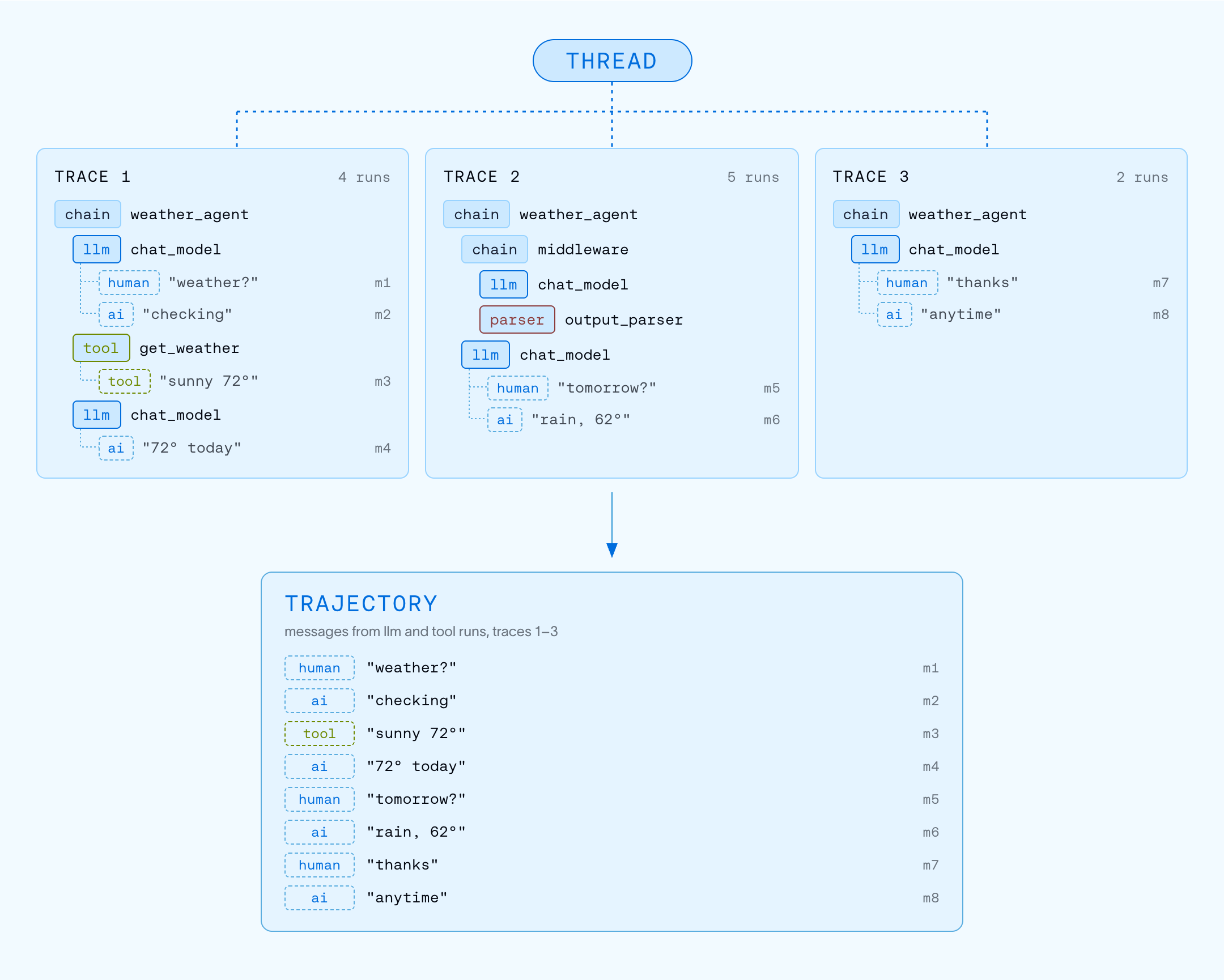
Runs
A run represents a single unit of work executed by an agent, such as calling an LLM, formatting a prompt, or retrieving documents. If you are familiar with OpenTelemetry, you can think of a run as a span.Traces
A trace is a collection of runs for a single operation. For example, if a user request triggers an agent that calls a model, runs a tool, and then calls the model again, all of those runs belong to the same trace. Runs are bound to a trace by a unique trace ID.Each trace is limited to a maximum of 25,000 runs. Once the trace reaches this limit, LangSmith will reject any additional runs that you send for that trace.
Threads
A thread is a sequence of traces representing a single multi-turn session. A turn is one exchange in that session: a user’s message and everything the agent does in response. Each turn is recorded as its own trace. To group traces into a thread, pass athread_id metadata key with a unique value.
Learn how to configure threads.
Trajectories
A trajectory is a flat, ordered list of messages that shows the path an agent took from start to finish. In LangSmith, a trajectory is a projection over the traces in a thread. It contains the human, AI, and tool messages exchanged during the session, each appearing once, in the order it first appeared, with the nesting of runs removed. Learn how trajectories render in the Trajectory view.Compare traces, threads, and trajectories
Use Chat to analyze traces, runs, and threads. Chat helps you understand agent performance, debug issues, and gain insights from conversation threads without manually digging through data.
Trace containers
An organization contains workspaces. Each workspace contains agents, and each agent has environments that separate its traces.Agents and environments
Agent-based workspaces. This section applies if your workspace organizes traces by agent and environment. To check, look at the control at the top left: it names your workspace. If it shows the LangSmith logo instead, and the sidebar has an Application section with an application picker, your workspace is project-based. Skip this section and read Tracing projects.
Compatibility with older workspaces and APIs
Compatibility with older workspaces and APIs
Project-based workspaces. This section applies if your workspace organizes traces by tracing project. To check, look at the control at the top left. In a project-based workspace, it shows the LangSmith logo, and the sidebar has an Application section with an application picker. If the control shows your workspace name instead, your workspace is agent-based. Skip this section and read Agents.
project_name and session_id. These fields refer to the environment’s trace storage, not an additional agent you need to create. See Resolve an agent environment.Trace enrichment
Feedback
Feedback allows you to score an individual run based on certain criteria. Each feedback entry consists of a tag and a score, and is bound to a run by a unique run ID. Feedback can be continuous or discrete (categorical), and tags can be reused across runs within an organization. For more on how feedback is stored, refer to the Feedback data format guide.Tags
Tags are strings you can attach to runs to categorize, filter, and group them in the LangSmith UI. Learn how to attach tags to your traces.Metadata
Metadata is a collection of key-value pairs you can attach to runs. For example, agent version, environment, or any other contextual information. Similarly to tags, you can use metadata to filter and group runs. Learn how to add metadata to your traces.Sending traces
There are two ways to send trace data to LangSmith.Integrations
LangSmith integrations provide automatic tracing for popular LLM providers and agent frameworks (the equivalent of auto-instrumentation in general observability). When you use a supported framework such as LangChain, LangGraph, OpenAI, Anthropic, or CrewAI, the integration captures inputs, outputs, and metadata without requiring manual code changes. Browse all integrations.Manual instrumentation
Manual instrumentation lets you add tracing to any code, regardless of the framework. Use it when you’re not using a supported integration or when you need granular control over what gets traced. LangSmith provides three mechanisms:@traceable/traceable: a decorator to trace any functiontracecontext manager (Python): wrap specific code blocksRunTreeAPI: low-level, explicit trace construction
Data retention
LangSmith (SaaS) retains trace data for 180 days from ingestion. After that, traces are permanently deleted, with limited metadata retained for usage statistics. For details on retention tiers and pricing, refer to Usage and billing: Data retention.To keep data beyond the retention period, add it to a dataset. Datasets persist indefinitely, even after the source trace is deleted.
Connect these docs to your agent of choice via MCP for real-time answers.