

The LLM auth proxy requires a LangSmith Enterprise plan. For more details, refer to Pricing or contact our sales team.
- Authenticate Playground or LLM-as-judge evaluation requests against your own provider gateway.
- Inject provider-specific API keys or auth headers without exposing them to end users.
- Transform request or response bodies (for example, converting between OpenAI format and a custom gateway format).
client_credentials specifically, OAuth client credentials on a model configuration is a per-configuration self-service alternative that workspace admins can set up without standing up the auth proxy. Routing is mutually exclusive at the configuration level—a configuration with OAuth enabled does not pass through the auth proxy.
How it works
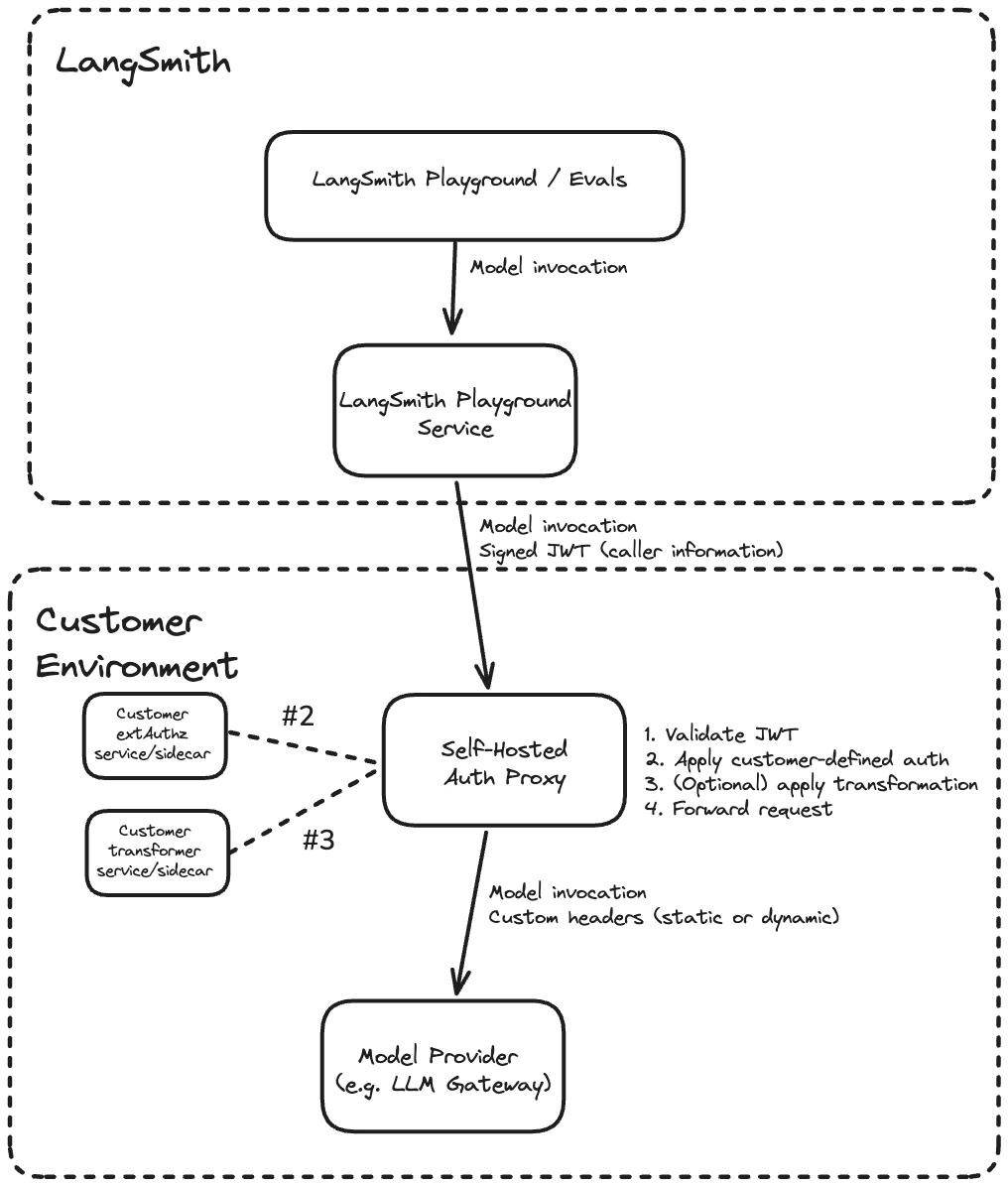
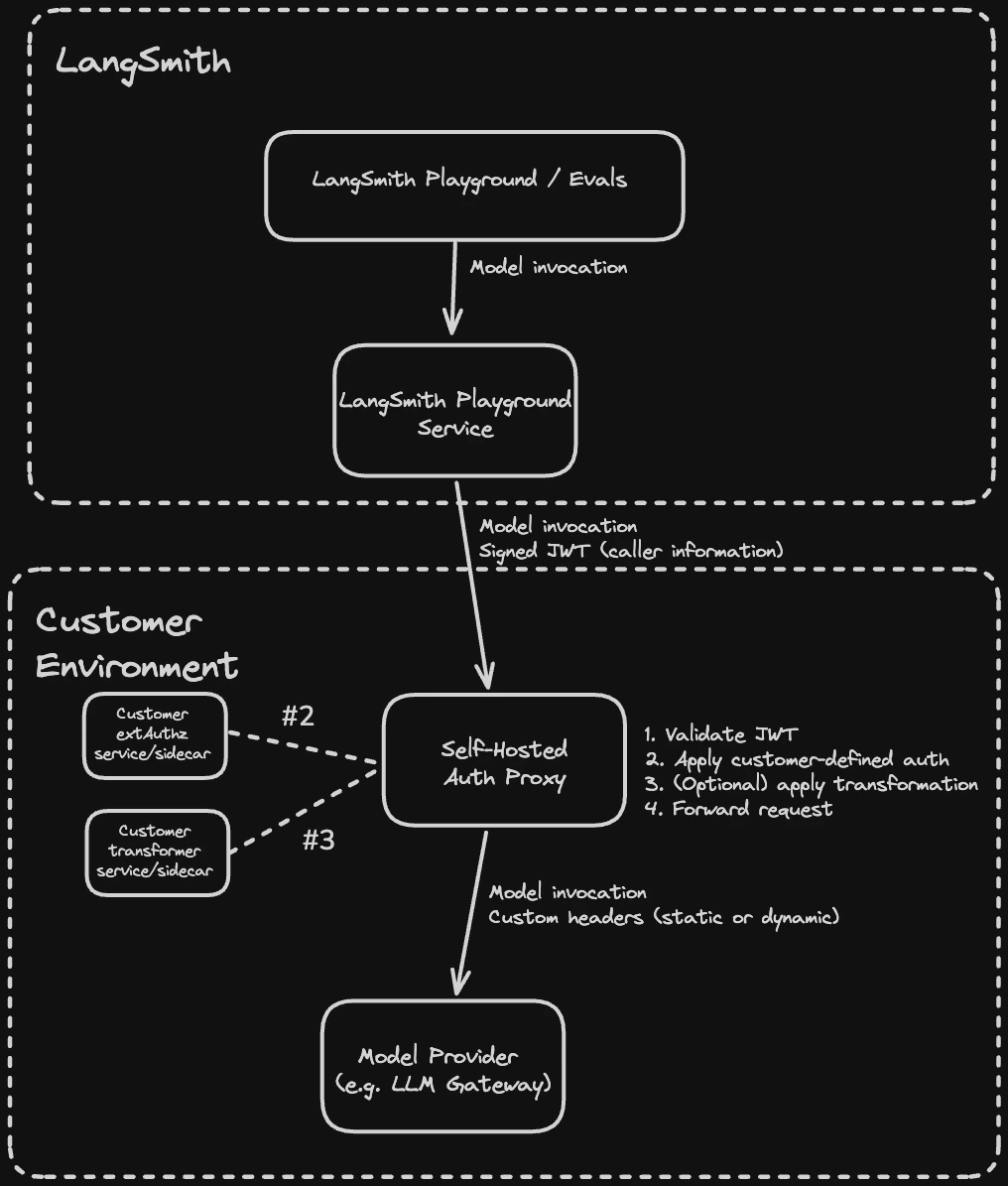
Each request from LangSmith passes through the following steps in the proxy:- Validate the JWT (signature, issuer, audience)
- Call your
ext_authzservice, which receives the validated JWT and returns the provider credentials to inject as headers - Optionally call your
ext_proctransformer, which can rewrite request and response bodies (for example, converting between OpenAI format and a custom gateway format) - Forward the request with custom headers (static or dynamic) to the upstream provider
ext_authz service and the transformer are customer-deployed components that run alongside the proxy in your environment. Either or both can be enabled depending on your use case.
Prerequisites
- LangSmith Enterprise plan (SaaS or self-hosted on version 0.13.33+)
- Kubernetes cluster with Helm 3
- Envoy v1.37 or later (the Helm chart defaults to
envoyproxy/envoy:v1.37-latest) - The URL of your upstream LLM provider or gateway (the destination the proxy will forward requests to)
The auth proxy currently supports the Playground, Evals, Fleet, Chat, and Insights features.
Playground and Evals are available in v0.13.33+. Chat and Insights are available in v0.13.39+.
1. Configure JWT signing (self-hosted LangSmith only)
Skip this step for LangSmith SaaS. JWT signing is already configured. Follow Configure a signing JWKS to generate the shared Ed25519 key and provide it to the LangSmith Helm chart. The private key signs each request, while the auth proxy fetches only the public key from LangSmith. Set the issuer for LLM auth proxy tokens in your LangSmithvalues.yaml:
config.llmAuthProxyIssuer sets the iss claim in signed JWTs. Use langsmith to match the SaaS default, or a custom identifier like langsmith:self-hosted:<short_identifier> to distinguish your installation. The value must match jwtIssuer in the auth proxy chart in Step 4.
2. Enable LLM Auth Proxy for your organization
- Self-hosted
- SaaS
Option A: Enable for a specific organization:In the LangSmith UI, navigate to the Settings page, copy the organization ID at the top left next to Organizations.Run the following against your LangSmith PostgreSQL database:Option B: Enable for all organizations in an installation:Add the following to
commonEnv in your LangSmith values.yaml:This setting has no effect on Personal organizations.
3. Configure organization settings in LangSmith
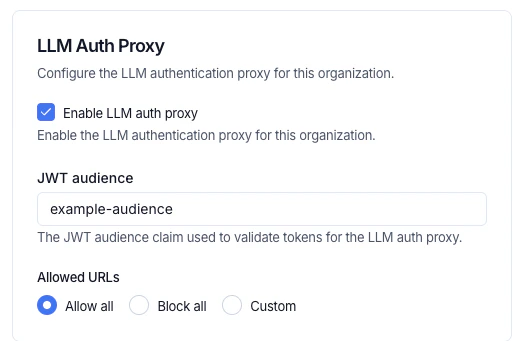
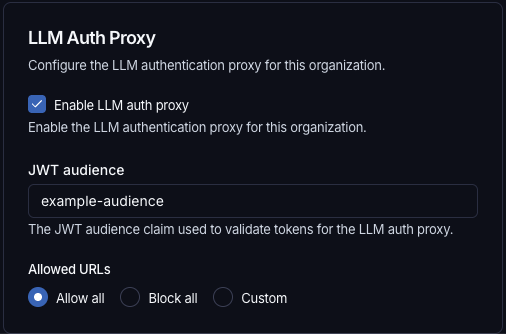
In the LangSmith UI, navigate to Settings > General, configure the following:-
JWT audience: the
audclaim value the proxy will validate (for example,example-audience). This must matchjwtAudiencesin the auth proxy chart in Step 4. - Enable LLM auth proxy: toggle on for your organization.
-
Allowed URLs: control which destination URLs the proxy is permitted to forward JWTs to. This prevents credential forwarding to unintended hosts. Choose one of three options:
- Allow all (default): permits JWT forwarding to any upstream URL. Equivalent to no restriction.
- Block all: blocks JWT forwarding to all URLs.
- Custom: specify an explicit list of allowed URL patterns. Empty strings and bare
*are not accepted. The control is disabled when the LLM auth proxy toggle is off.
4. Install the auth proxy Helm chart
Add the LangChain Helm repository:values.yaml with the upstream URL and JWT validation settings. There are two options for JWKS configuration:
jwksUri(recommended): Point to your LangSmith instance’s/.well-known/jwks.jsonendpoint. Envoy fetches and caches the public keys automatically, supporting seamless key rotation.jwksJson(inline): Paste the JWKS JSON directly intovalues.yaml. Use this for testing or air-gapped environments where the auth proxy has no outbound network access to LangSmith. Requires a chart update to rotate keys. Include only the public key components; omit thedfield (the private key).
jwksUri takes precedence.
Write an ext_authz service
Use ext_authz when you need to add, remove, or edit authorization headers, for example, to inject a provider API key based on the identity in the JWT. Your service receives the validated JWT and optionally the request body, and returns the headers to inject upstream. This uses Envoy’s HTTP ext_authz filter (not gRPC).
Enable it in values.yaml:
How it works
Before forwarding each request, Envoy calls your service at<serviceUrl>/check<original_path> using the same HTTP method as the original request. Your service receives the validated JWT in the x-langsmith-llm-auth header.
Your service returns a plain HTTP response:
2xx: allow the request. Any headers matchingallowedUpstreamHeaderspatterns (default:authorizationandx-*) are injected into the upstream request. To strip the JWT before forwarding, includex-envoy-auth-headers-to-remove: x-langsmith-llm-authin your response.- Non-
2xx: deny the request. The status code and any headers matchingallowedClientHeaderspatterns (default:www-authenticateandx-*) are returned to the client.
Deployment options
Yourext_authz service can run in two ways:
- Sidecar: run the service in the same pod as the proxy. Add the container under
authProxy.deployment.sidecarsand any required volumes underauthProxy.deployment.volumesinvalues.yaml. Use alocalhostURL, for examplehttp://localhost:10002. - Separate deployment: deploy the service independently and point
extAuthz.serviceUrlat it. Use the in-cluster DNS name, for examplehttp://my-auth-service.my-namespace.svc.cluster.local:8080, or an external HTTPS URL if the service has its own ingress.
Sample deployment
The example below is a minimal Pythonext_authz service that performs an OAuth2 client credentials token exchange. On each request, it returns a cached Authorization header with a fresh access token, refreshing it from the configured token endpoint before it expires. See e2e/oauth/ in the chart repository for the full example.
ext-authz-oauth.py
ext-authz-oauth.py
extAuthz parameters, see the Helm chart README.
Write an ext_proc transformer
Use ext_proc when you need to rewrite request or response bodies, for example, to convert between OpenAI format and a custom gateway format, or to inject additional fields into the request payload. This uses Envoy’s ext_proc filter.
Unlike ext_authz (HTTP), ext_proc uses a bidirectional gRPC stream. Envoy sends your transformer service one message per processing phase (request headers, request body, response headers, response body), and your service replies with mutations for each phase. Your transformer must implement the envoy.service.ext_proc.v3.ExternalProcessor gRPC service. See e2e/transformer/ in the chart repository for a sample Go implementation.
When to use ext_proc vs ext_authz
Use
ext_authz if you only need to inject auth headers, for example, for API keys. Use ext_proc if you need to rewrite bodies. Both can be enabled simultaneously.
Enable ext_proc in values.yaml:
failureModeAllow: true to allow requests through if the transformer is unavailable. The default (false) rejects the request.
Processing modes
Control which phases are sent to your transformer viaprocessingMode. Only enable the phases you need, as disabling unused phases reduces latency.
- Use
BUFFEREDfor request body rewriting: buffers the full body before sending, simplest for JSON rewriting. - Use
STREAMEDfor streaming LLM response body rewriting: sends chunks as they arrive, lower latency but more complex to implement. - Use
NONEto skip a phase entirely.
Request flow
Example withext_proc enabled for header injection and body rewriting:
Sample deployment
The example below deploys a minimal Go transformer as a Kubernetes Deployment. It reads the JWT from request headers, injects anAuthorization header, and rewrites the request body from OpenAI format to a custom format.
transformer-configmap.yaml
transformer-configmap.yaml
transformer-deployment.yaml
transformer-deployment.yaml
For production, pre-build a container image instead of compiling in an init container. See
e2e/transformer/Dockerfile in the Helm chart repository for an example multi-stage build.Additional configuration
HTTP proxy
Envoy does not respectHTTP_PROXY, HTTPS_PROXY, or NO_PROXY environment variables. Configure an HTTP proxy explicitly:
Deploy without a public ingress
When the auth proxy does not have a public ingress and is only reachable through internal Kubernetes networking, LangSmith services must be configured to allow outbound requests to private IP addresses. Without these settings, the built-in SSRF protection blocks requests to private IPs. Add the following environment variables to your LangSmithvalues.yaml:
SSRF_ALLOW_K8S_INTERNAL— required on all services that make LLM calls. Add this tocommonEnvfor services that support it or to each service’sextraEnvfor services that do not supportcommonEnv.SSRF_ALLOW_PRIVATE_IPS_PLAYGROUND— required on theplaygroundservice only. Add this toplayground.deployment.extraEnv.
commonEnv does not apply to all required services in your deployment, set SSRF_ALLOW_K8S_INTERNAL individually via extraEnv on each service that makes LLM calls.
Other options
For ingress, autoscaling, resource limits, and other configuration options, see the Helm chart README.Full configuration example
JWT claims reference
LangSmith signs JWTs using Ed25519 (EdDSA). Public keys are served at/.well-known/jwks.json and fetched automatically by the proxy. The auth proxy validates signatures using these public keys.
The JWT is passed to your
ext_authz or transformer service in the x-langsmith-llm-auth request header.
FAQ
Does the auth proxy support corporate proxies?
Does the auth proxy support corporate proxies?
Yes. Configure an HTTP proxy via the
httpProxy section in values.yaml. See HTTP proxy for details.Does the auth proxy support custom certificates?
Does the auth proxy support custom certificates?
Yes, via
customCa for custom CA certificates and mtls for mutual TLS.Can a single auth proxy route to multiple upstream LLM gateways?
Can a single auth proxy route to multiple upstream LLM gateways?
No. The auth proxy has a single
upstream field.Can the auth proxy serve multiple organizations?
Can the auth proxy serve multiple organizations?
Yes. Multiple organizations can point to the same auth proxy instance via their model configuration in LangSmith.
Can the LangSmith to auth proxy connection use HTTP instead of HTTPS?
Can the LangSmith to auth proxy connection use HTTP instead of HTTPS?
Yes, but only in self-hosted, and we generally recommend placing the auth proxy behind a dedicated ingress so communication uses HTTPS. To allow HTTP, add
LLM_AUTH_PROXY_ACCEPT_HTTP to commonEnv and playground.deployment.extraEnv in your LangSmith values.yaml.
To enable HTTP traffic to the auth proxy for Chat and Insights, set this environment variable in the respective extraEnv sections: config.polly.agent.extraEnv (for Chat, which was formerly called Polly) and config.insights.agent.extraEnv.Does the auth proxy work without a public ingress?
Does the auth proxy work without a public ingress?
Yes. When the auth proxy is only reachable through internal Kubernetes networking (no public ingress), add
SSRF_ALLOW_K8S_INTERNAL to all services that make LLM calls and both SSRF_ALLOW_K8S_INTERNAL and SSRF_ALLOW_PRIVATE_IPS_PLAYGROUND to the playground service. See Deploy without a public ingress for configuration details.When should I use the LLM auth proxy versus OAuth client credentials on a model configuration?
When should I use the LLM auth proxy versus OAuth client credentials on a model configuration?
Use the LLM auth proxy when authentication needs custom logic beyond OAuth2
client_credentials. For example, exchanging the LangSmith JWT for a provider-specific token, injecting GCP or AWS identity, or rewriting request and response bodies. Use OAuth client credentials on a model configuration when each workspace or team needs self-service control over its own OAuth2 client_credentials against a custom gateway. Both can coexist within the same organization; routing is per-configuration.Helm chart reference
For the full list of configurable values, see the Helm chart README.Connect these docs to your agent of choice via MCP for real-time answers.