

The hybrid option requires an Enterprise plan. Get a demo to learn more.
- Control plane (LangSmith UI, APIs, and orchestration) runs in LangChain’s cloud, managed by LangChain.
- Data plane (your and agent workloads) runs in your cloud, managed by you.
Learn more about the control plane, data plane, and Agent Server architecture concepts.
When running LangSmith in a hybrid model, you authenticate with a LangSmith API key.
Workflow
- Use the
langgraph-clior Studio to test your graph locally. - Build a Docker image using the
langgraph buildcommand. - Deploy your Agent Server from the control plane UI.
Supported Compute Platforms: Kubernetes. See Kubernetes setup below.
Architecture
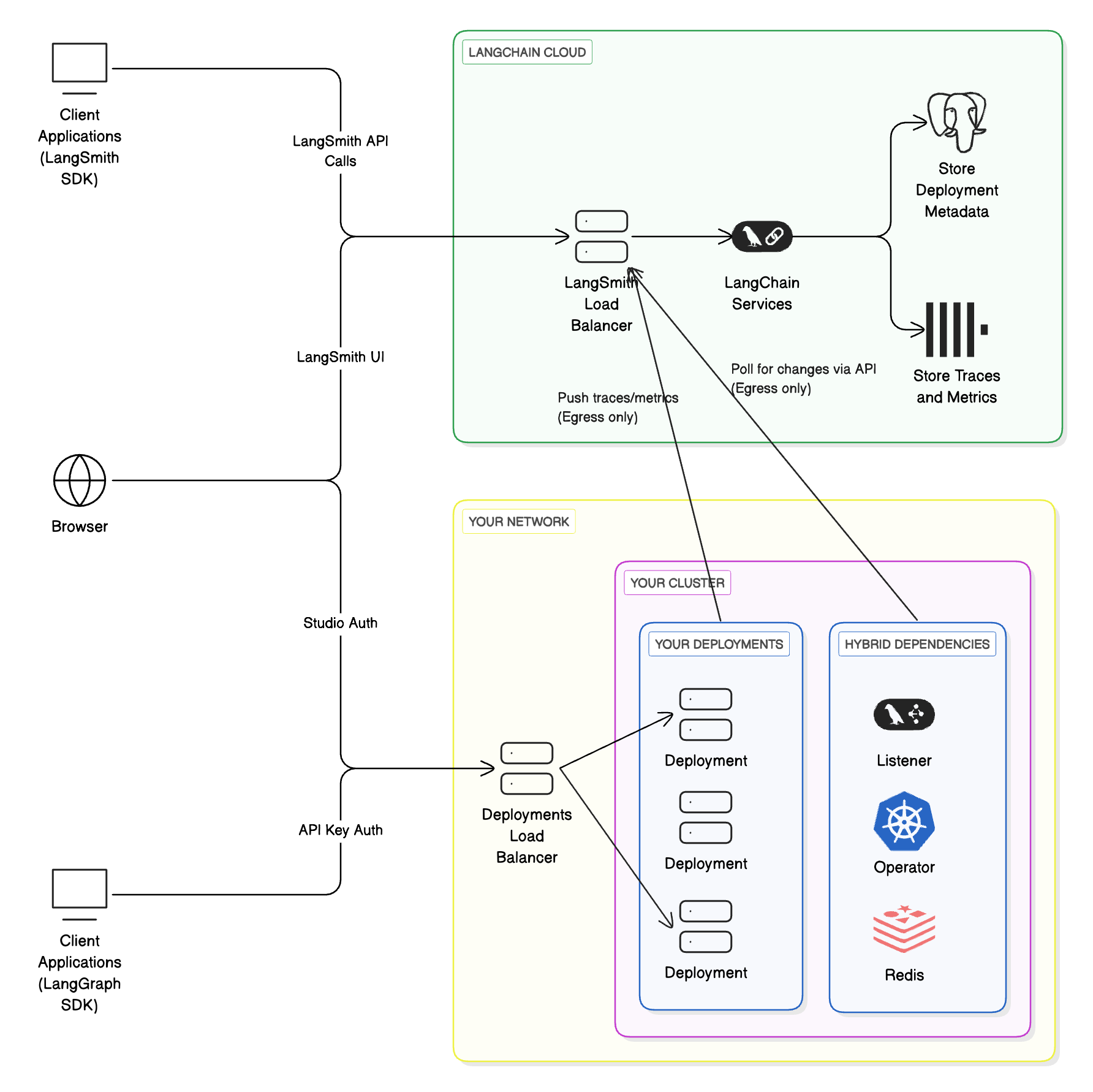
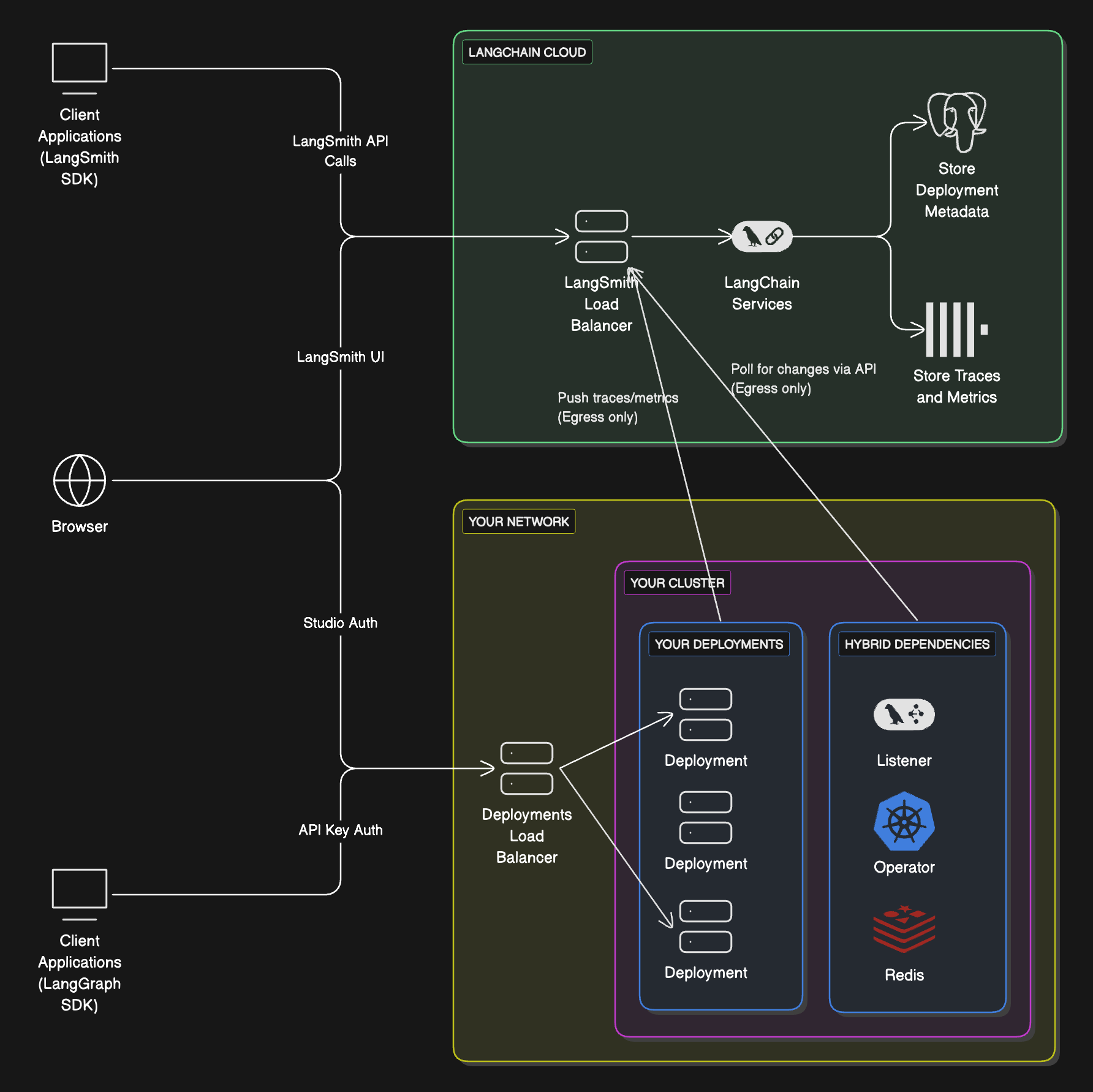
Compute platforms
- Kubernetes: Hybrid supports running the data plane on any Kubernetes cluster.
Egress to LangSmith and the control plane
In the hybrid deployment model, your self-hosted data plane will send network requests to the control plane to poll for changes that need to be implemented in the data plane. Traces from data plane deployments also get sent to the LangSmith instance integrated with the control plane. This traffic to the control plane is encrypted, over HTTPS. The data plane authenticates with the control plane with a LangSmith API key. In order to enable this egress, you may need to update internal firewall rules or cloud resources (such as Security Groups) to allow certain IP addresses.Kubernetes setup
The following steps describe how to connect your self-hosted data plane to the managed LangSmith control plane.Prerequisites
-
KEDAis installed on your cluster.KEDAis used to automatically scale the deployment system based on queue size. -
A valid
Ingresscontroller is installed on your cluster. For more information about configuring ingress for your deployment, refer to Create an ingress for installations. We highly recommend using the modern Gateway API in a production setup. - If you plan to have the listener watch multiple namespaces, you MUST use the Gateway API or an Istio Gateway instead of the standard ingress resource. A standard ingress resource can only route traffic to services in the same namespace, whereas a Gateway or Istio Gateway can route traffic to services across multiple namespaces.
-
You have slack space in your cluster for multiple deployments.
Cluster-Autoscaleris recommended to automatically provision new nodes. - You will need to enable egress to two control plane URLs. The listener polls these endpoints for deployments. Use the pair that matches your LangSmith region.
| Region |
|---|
| GCP US |
| GCP EU |
| GCP APAC |
| AWS US |
| Region |
|---|
| GCP US |
| GCP EU |
| GCP APAC |
| AWS US |
Setup
- Provide your LangSmith organization ID to us. Your LangSmith organization will be configured to deploy the data plane in your cloud.
-
Create a listener from the LangSmith UI. The
Listenerdata model is configured for the actual listener application.- In the left-hand navigation, select
Deployments>Listeners. - In the top-right of the page, select
+ Create Listener. - Enter a unique
Compute IDfor the listener. TheCompute IDis a user-defined identifier that should be unique across all listeners in the current LangSmith workspace. TheCompute IDis displayed to end users when they are creating a new deployment. Ensure that theCompute IDprovides context to the end user about where their Agent Server deployments will be deployed to. For example, aCompute IDcan be set tok8s-cluster-name-dev-01. In this example, the name of the Kubernetes cluster isk8s-cluster-name,devdenotes that the cluster is reserved for “development” workloads, and01is a numerical suffix to reduce naming collisions. - Enter one or more Kubernetes namespaces. Later, the listener application will be configured to deploy to each of these namespaces.
- In the top-right on the page, select
Submit. - After the listener is created, copy the listener ID. You will use it later when installing the actual listener application in the Kubernetes cluster (step 5).
Important Creating a listener from the LangSmith UI does not install the listener application in the Kubernetes cluster. - In the left-hand navigation, select
-
A Helm chart is provided to install the necessary components in your Kubernetes cluster.
langgraph-dataplane-listener: This is a service that listens to LangChain’s control plane for changes to your deployments and creates/updates downstream CRDs. This is the listener application.LangGraphPlatform CRD: A CRD for LangSmith Deployment. This contains the spec for managing an instance of a LangSmith Deployment.langgraph-dataplane-operator: This operator handles changes to your LangSmith CRDs.langgraph-dataplane-redis: A Redis instance is used by thelanggraph-dataplane-listenerto manage various tasks (mainly creating and deleting deployments).
-
Configure your
langgraph-dataplane-values.yamlfile.config.langsmithApiKey: Thelanggraph-listenerdeployment authenticates with LangChain’s LangGraph control plane API with thelangsmithApiKey.config.langsmithWorkspaceId: Thelanggraph-listenerdeployment is coupled to Agent Server deployments in the LangSmith workspace. In other words, thelanggraph-listenerdeployment can only manage Agent Server deployments in the specified LangSmith workspace ID.config.langgraphListenerId: In addition to being coupled with a LangSmith workspace, thelanggraph-listenerdeployment is also coupled to a listener. When a new Agent Server deployment is created, it is automatically coupled to alanggraphListenerId. SpecifyinglanggraphListenerIdensures that thelanggraph-listenerdeployment can only manage Agent Server deployments that are coupled tolanggraphListenerId.config.watchNamespaces: A comma-separated list of Kubernetes namespaces that thelanggraph-listenerdeployment will deploy to. This list should match the list of namespaces specified in step 2d.config.enableLGPDeploymentHealthCheck: To disable the Agent Server health check, set this tofalse.ingress.hostname: As part of the deployment workflow, thelanggraph-listenerdeployment attempts to call the Agent Server health check endpoint (GET /ok) to verify that the application has started up correctly. A typical setup involves creating a shared DNS record or domain for Agent Server deployments. This is not managed by LangSmith. Once created, setingress.hostnameto the domain, which will be used to complete the health check.operator.createCRDs: Set this value tofalseif the Kubernetes cluster already has theLangGraphPlatform CRDinstalled. During installation, an error will occur if the CRD is already installed. This situation may occur if multiple listeners are deployed on the same Kubernetes cluster.
-
Deploy
langgraph-dataplaneHelm chart. -
If successful, you will see three services start up in your namespace.
Your hybrid infrastructure is now ready to create deployments.
Configuring additional data planes in the same cluster
To create a data plane in a different namespace in the same cluster, repeat the above steps and pass a-n option to helm upgrade to specify a different namespace.
When installing multiple data planes in the same cluster, it is very important to follow the rules below:
- The
config.watchNamespaceslist should never intersect with other installationsconfig.watchNamespaces. For example, if installation A is watching namespacesfoo,bar, installation B cannot watch eitherfooorbar. Multiple operators or listeners watching the same namespace will lead to unexpected behavior. This means that multiple LangSmith workspaces cannot deploy to the same namespace! Please review the cluster organization section to understand this better. - It is required to use the Gateway API or an Istio Gateway. Relying on the standard ingress resource can cause conflicts with Ingress objects created by other data planes in the same cluster. Because behavior in these cases depends on the specific ingress controller, this may result in unpredictable or undesired outcomes.
Listeners
In the hybrid option, one or more listener applications can run depending on how your LangSmith workspaces and Kubernetes clusters are organized.Kubernetes cluster organization
- One or more listeners can run in a Kubernetes cluster.
- A listener can deploy into one or more namespaces in that cluster.
- Multiple listeners cannot deploy to the same namespace.
- Cluster owners are responsible for planning listener layout and Agent Server deployments.
LangSmith workspace organization
- A workspace can be associated with one or more listeners.
- A listener can only be associated with one workspace. LangSmith workspace to listener is a one-to-many relationship.
- A workspace can only deploy to Kubernetes clusters where all of its listeners are deployed.
Use cases
Here are some common listener configurations (not strict requirements):Each LangSmith workspace → separate Kubernetes cluster
- Cluster
alpharuns workspaceA - Cluster
betaruns workspaceB
One cluster, one namespace per workspace
- Cluster
alpha, namespace1runs workspaceA - Cluster
alpha, namespace2runs workspaceB
Separate clusters, with shared “dev” cluster
- Cluster
alpharuns workspaceA - Cluster
betaruns workspaceB - Cluster
devruns workspacesAandB - Both workspaces have two listeners; cluster
devhas two listener deployments
Connect these docs to your agent of choice via MCP for real-time answers.