

deepagents is an open-source agent framework built on top of LangGraph, designed for complex, multi-step tasks that require planning, tool usage, and sub-agent delegation. Deep Agents supports native LangSmith tracing.
This guide shows you how to enable LangSmith tracing for Deep Agents, view traces in the LangSmith UI, and (optionally) customize trace configuration for more advanced use cases.
Installation
Installdeepagents in your Python environment:
deepagents requires:
- Python 3.11+.
- An LLM that supports tool calling (for example, OpenAI or Anthropic models).
- For tracing, a LangSmith account and API key (free to sign up).
You do not need to install the
langsmith Python package to trace Deep Agents. deepagents is built on LangGraph, which includes native LangSmith tracing support. As long as the LangSmith environment variables are set, traces are sent automatically.The langsmith package is only required if you want programmatic control over tracing (for example, using tracing_context, adding custom metadata, or querying runs from Python).Setup
You can find your LangSmith API key and project name in the LangSmith UI under Settings:Create a trace
Once tracing is enabled via environment variables, Deep Agents will automatically emit traces to LangSmith. For example:Viewing traces
Details View
Click on the trace, and toggle to the Details view on the top right. Your trace tree in the LangSmith UI will look like this, with the following structure:- Agent run (top level) representing the full Deep Agents invocation.
- LLM call where the agent analyzes the user request and decides which tools to use.
- Tool run:
compute_compound_interest:- Displays the tool inputs (for example, principal, annual_rate, years, and compounds_per_year).
- Displays the structured output, including the ending balance and total interest earned.
- LLM call that interprets the calculation results and determines the next step.
- Tool run:
yearly_balance_schedule:- Shows the inputs used to generate the schedule.
- Returns a year-by-year breakdown of ending balances and interest earned.
- Final LLM response that summarizes the results for the user.
Trajectory view
The Trajectory view in the LangSmith UI shows a simplified conversation history between the user and the agent. This view pulls messages from the top-level trace, (including the user’s initial request, tool calls and the agent’s final response) and represents them in a chat-like format.Filter by subagent
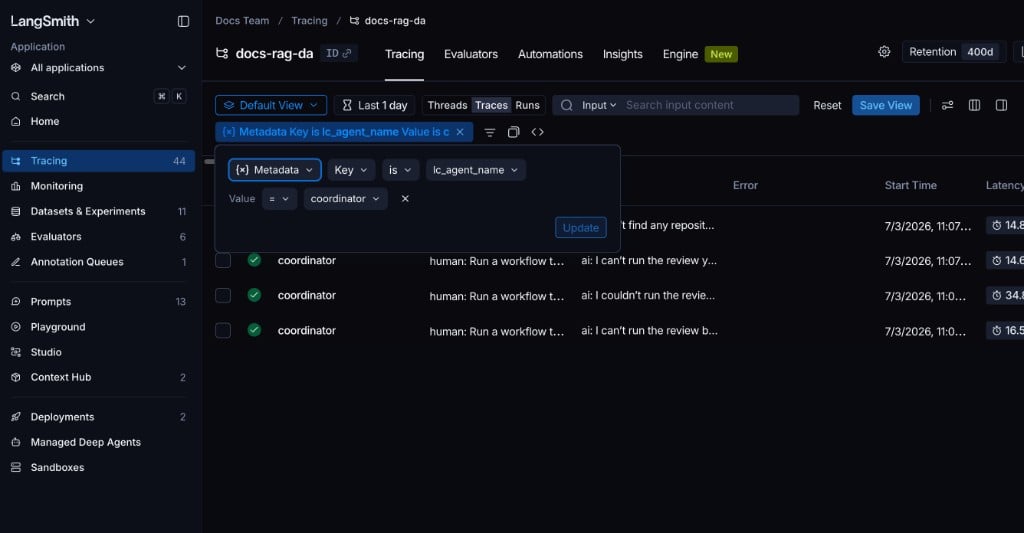
Deep Agents automatically writes the subagent’sname to the lc_agent_name metadata key on every run that subagent produces. Use this to isolate all runs from a specific subagent in LangSmith—useful for debugging, monitoring, or comparing subagent behavior.
Filter in the LangSmith UI:
- Open your tracing project in LangSmith.
- Switch the view to Runs to see individual spans.
- Click Add filter and select Metadata.
- Set the Key to
lc_agent_nameand the Value to the subagent name, for examplecoordinator.
Customize LangSmith tracing
By default, Deep Agents traces are emitted automatically when LangSmith tracing is enabled via environment variables. You can use the LangSmith SDK directly to customize your tracing, such as scoping traces to part of your code, attaching tags or metadata, or overriding the project name. Install and uselangsmith if you want to:
- Trace only specific agent invocations.
- Add custom tags or metadata for filtering in the UI.
- Override the project name at runtime.
- The first invocation is untraced, because it runs outside of
tracing_context. - The second invocation is traced, because it runs inside
tracing_context(enabled=True, ...).
LANGSMITH_TRACING=true:
tracing_context block enables tracing and also configures how the trace is recorded and organized in LangSmith:
enabled=Trueexplicitly enables tracing for the duration of the block, even ifLANGSMITH_TRACINGis unset or set tofalse.project_name="deepagents-demo"routes traces from this block to the specified LangSmith project. This overridesLANGSMITH_PROJECTfor runs created within the context.tags=[...]attaches tags to the traced runs. Tags appear in the LangSmith UI, which you can use to filter and group traces.metadata={...}attaches arbitrary structured metadata (for example, environment, experiment name, or feature flag).
tracing_context is recorded. This demonstrates how you can selectively trace specific parts of a Deep Agents workflow without enabling global tracing for the entire process.
Connect these docs to your agent of choice via MCP for real-time answers.