

Choose how to run Deep Agents
Managed Deep Agents
Build deep agents with managed deployment infrastructure for complex, long-running tasks. LangSmith runs the harness, Agent Server, sandboxes, and schedules.
Deep Agents SDK
The same deep agents harness with maximum flexibility. Host agents yourself, or run a custom LangSmith Deployment when you need more control over the runtime.
- Take actions in an environment: Take actions via tools, read and write files, execute code
- Connect to your data: Load memories, skills, and domain knowledge at the right moment
- Manage growing context: Summarize history and offload large results across long runs
- Parallelize tasks: Delegate to general or specialized subagents running in isolated context windows
- Stay in the loop: Pause for human approval at critical decision points
- Improve over time: Update memory, skills, and prompts based on real usage
Self-host with the SDK
Use the open source SDK when you run the agent in your own process or container, need a custom backend, store, or checkpointer, or want a LangSmith Deployment you configure yourself. For managed deployment instead, see Managed Deep Agents.Try it
Quickstart
View example trace
Open a public LangSmith run for this example.
Core capabilities
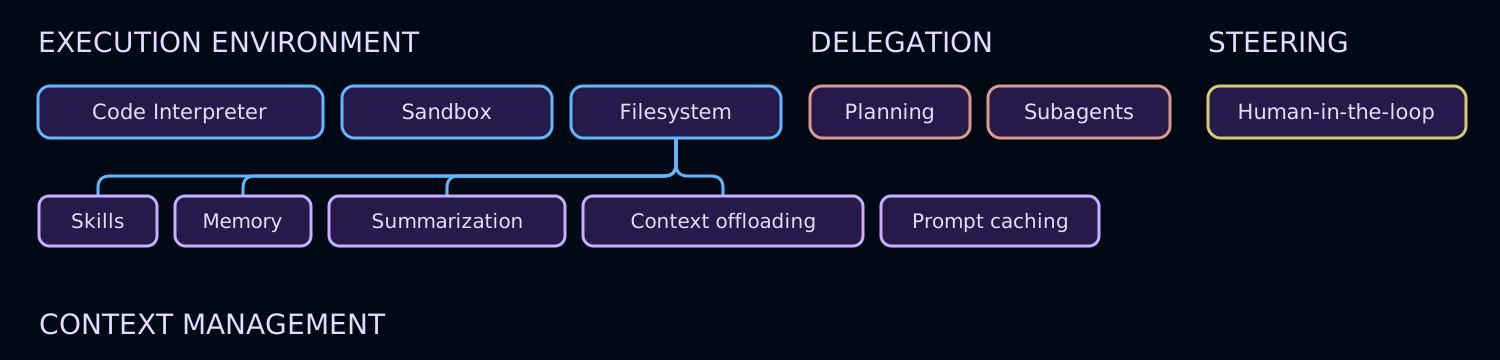
Execution environment
Tools, virtual filesystem, optional sandbox, and REPL (interpreter)
Context management
Skills, memory, summarization, context offloading, and prompt caching
Delegation
Subagent spawning and optional task planning
Steering
Human-in-the-loop approval and interrupts
deepagents is a standalone library built on top of LangChain’s core building blocks for agents. It uses the LangGraph runtime for durable execution, streaming, human-in-the-loop, and other features.
LangChain is the framework that provides the core building blocks for your agents.
To learn more about the differences between LangChain, LangGraph, and Deep Agents, see Frameworks, runtimes, and harnesses. For a side-by-side comparison with Anthropic’s harness, see Deep Agents vs. Claude Agent SDK.
For building custom agents without these built-in capabilities, consider using LangChain’s create_agent or building a custom LangGraph workflow.
Execution environment
The execution environment is where an agent acts. It has four layers:- Tools: custom functions, APIs, and databases the agent can call
- Virtual filesystem: file tools backed by pluggable backends
- Filesystem permissions: declarative access control over which paths agents can read or write
- Code execution: sandboxed shell execution and an in-process JavaScript interpreter
Tools and MCP
Pass custom functions, LangChain tools, or tools from any MCP server with thetools= parameter. Deep Agents fully support the Model Context Protocol (MCP), letting you connect to databases, APIs, file systems, and more through a standard interface.
Virtual filesystem access
The harness provides a configurable virtual filesystem which can be backed by different pluggable backends: in-memory state, local disk, LangGraph store, composite routing, or a custom backend with permission rules for read and write access. The backends support the following file system operations:The
delete tool requires deepagents>=0.7. Backends that do not support deletion have the tool automatically hidden from the model.Supported multimodal file extensions
Supported multimodal file extensions
Running without the default filesystem tools
Running without the default filesystem tools
To hide the filesystem tools listed above from the model, register a harness profile with Removing
excluded_tools:FilesystemMiddleware itself via excluded_middleware is intentionally rejected—it is required scaffolding in the Deep Agents stack. Use excluded_tools to hide only the model-visible tool surface and leave the middleware in place. To remove the task tool, see Running without subagents.Restricting filesystem tools
Restricting filesystem tools
The
tools allowlist on FilesystemMiddleware requires deepagents>=0.7.tools allowlist to FilesystemMiddleware and provide the instance through middleware=. Any built-in filesystem tool left out of the list is removed from the model’s tool list.read_file must always be included in the list—omitting it raises ValueError when the agent is created. The execute and delete tools are also dropped from the tool surface whenever the configured backend doesn’t support them, whether or not you include them in tools. Custom tools you add through create_deep_agent’s own tools= argument are never affected by this allowlist.Passing your own FilesystemMiddleware instance this way replaces the default one for the main agent and the general-purpose subagent inherits the same restriction. See Override a default middleware instance for more information. Declarative subagents don’t inherit it: include a FilesystemMiddleware(tools=...) instance in that subagent’s own middleware field to restrict it independently.Filesystem permissions
The harness supports declarative permission rules that control which files and directories the agent can read or write. Permissions apply to the built-in filesystem tools listed above and are evaluated in declaration order with first-match-wins semantics. Define permissions by passing a list of rules topermissions= when creating the agent. Each rule includes:
operations:"read"and/or"write"paths: Glob patterns for files or directoriesmode:"allow"or"deny"
/workspace/), protect sensitive files such as .env or credentials, and give subagents narrower access than the parent agent.
Permissions do not apply to sandbox backends, which support arbitrary command execution via the execute tool. For custom validation logic, use backend policy hooks.
For the full rule structure, examples, and subagent inheritance, see Permissions.
Code execution
Deep Agents supports code execution in two ways:- Sandbox backends expose an
executetool for shell commands in an isolated environment. - Interpreters add an
evaltool that runs JavaScript in a scoped QuickJS runtime.
SandboxBackendProtocolV2; when detected, the harness adds the execute tool to the agent’s available tools.
Use interpreters when the agent needs a lightweight programmable layer for loops, batching, deterministic data transformations, or programmatic tool calling. Interpreters do not provide shell access, package installs, or filesystem and network access.
For sandbox setup, providers, and file transfer APIs, see Sandboxes. For the QuickJS runtime and programmatic tool calling, see Interpreters.
Streaming
Event streaming exposes agent runs as typed projections for messages, tool calls, values, and output. Deep Agents addstream.subagents so each delegated task gets its own handle with independent message, tool-call, and nested subagent streams.
Context management
The context management component controls what the agent knows, how long it can operate within token limits, and what it retains across sessions. It has four layers:- Skills: on-demand domain knowledge loaded progressively from skill files
- Memory: persistent instructions and preferences loaded at startup from
AGENTS.mdfiles - Summarization and context offloading: automatic compression of conversation history and large tool results
- Prompt caching: static prompt sections are cache-eligible to speed up inference and reduce cost on supported models
Skills
Skills package specialized workflows, domain knowledge, and custom instructions for your deep agent. Each skill follows the Agent Skills standard and lives in a directory with aSKILL.md file. Skills can also include scripts, templates, reference docs, and other supporting resources.
Deep Agents load skills with progressive disclosure: the agent reads SKILL.md frontmatter at startup, then reads full skill content only when a task needs it. This keeps startup context compact while still making rich capabilities available on demand.
For more information, see Skills.
Memory
Memory gives your deep agent persistent context across conversations, such as coding style, preferences, conventions, and project guidelines. Memory usesAGENTS.md files that you pass through the memory parameter when creating the agent. Unlike skills, memory files are always loaded, and the content is stored in the configured backend (StateBackend, StoreBackend, or FilesystemBackend).
The agent can also update memory based on interactions and feedback, so preferences and patterns can carry forward without needing to restate them in each thread.
For configuration details and examples, see Memory. To generate a repository wiki that coding agents discover through AGENTS.md, see OpenWiki.
Summarization and context offloading
The harness manages context so deep agents can handle long-running work within token limits while keeping the most relevant information in scope. This context flow has four parts:- Input context: System prompt, memory, skills, and tool prompts define what the agent starts with.
- Compression: Built-in offloading and summarization compress conversation history and large intermediate results.
- Isolation: Subagents quarantine heavy subtasks and return only final results (see Delegation).
- Long-term memory: Persistent storage in the virtual filesystem carries information across threads.
Prompt caching
For Anthropic and Amazon Bedrock models,create_deep_agent automatically applies prompt caching to static sections of the system prompt—the base agent instructions, memory, and skill content that repeat on every turn. This avoids reprocessing the same tokens across calls, reducing both latency and cost on long-running agents.
Prompt caching is enabled by default when using an Anthropic model, or a Bedrock model (Claude or Nova). No configuration is required.
For other providers, see Middleware integrations for available provider-specific caching middleware.
Delegation
The delegation component enables agents to break large problems into smaller, parallelizable units of work. It has two layers:- Task planning: an opt-in
write_todostool for structured task tracking - Subagents: ephemeral child agents that handle isolated subtasks
Task planning
Task planning is an opt-in harness capability that lets agents maintain a structured task list during execution. Starting in v0.7 task planning is opt-in only. In earlier versions, task planning middleware was included by default. Planning is often useful for:- Long or complicated multi-step tasks
- Less capable models that benefit from an explicit accountability tool
- UIs that stream progress from agent state (see Todo list)
TodoListMiddleware to the middleware parameter to give the agent a write_todos tool for maintaining a structured task list during execution.
'pending', 'in_progress', 'completed') and are persisted in agent state. This gives agents a lightweight planning layer for organizing long-running and multi-step work.
For configuration options and behavior details, see To-do list.
Subagents
The harness includes a built-intask tool that lets the main agent create ephemeral subagents for isolated, long-running, multi-step, or parallel tasks.
Two subagent types are available: synchronous subagents (the default) block the supervisor until they return a single report, and async subagents run in parallel and support mid-flight steering via launch, check, update, and cancel tools.
Subagent execution provides:
- Isolated or inherited context: By default, each invocation creates a new agent instance with its own context (
mode: "isolated"). Usemode: "fork"to inherit the parent’s full conversation history instead. See Forked subagents. - Autonomous execution: The subagent runs independently until completion.
- Single handoff: It returns one final report to the main agent.
- Configurable strategy: Use the default
general-purposesubagent (enabled by default) or define custom subagents. - Stateless messaging: Subagents are stateless and cannot send multiple messages back.
- Context and token efficiency: Heavy subtask work stays isolated and is compressed into a compact result.
task tool, see Running without subagents.
Steering
The steering component gives humans control over agent behavior at runtime and sets filesystem permissions for agent work.Human-in-the-loop
Deep Agents integrate with LangGraph interrupts so you can pause for approval on sensitive tool calls. Enable this behavior with theinterrupt_on parameter in create_deep_agent.
interrupt_on accepts a mapping of tool names to interrupt configurations. For example, interrupt_on={"edit_file": True} pauses before every edit, letting you approve the call, add guidance, or modify tool inputs before execution.
This gives you a runtime safety and control layer for destructive operations, expensive API calls, and interactive debugging.
For more information, see Human-in-the-loop.
Get started
Managed Deep Agents
Build deep agents with managed deployment infrastructure
SDK quickstart
The same deep agents harness, self-hosted
Customization
Learn about SDK customization options
Code
Use Deep Agents Code
ACP
Use deep agents in code editors with ACP
Reference
See the
deepagents API referenceConnect these docs to your agent of choice via MCP for real-time answers.