

Use this file to discover all available pages before exploring further.
Guardrails help you build safe, compliant AI applications by validating and filtering content at key points in your agent’s execution. They can detect sensitive information, enforce content policies, validate outputs, and prevent unsafe behaviors before they cause problems.Common use cases include:
Preventing PII leakage
Detecting and blocking prompt injection attacks
Blocking inappropriate or harmful content
Enforcing business rules and compliance requirements
Validating output quality and accuracy
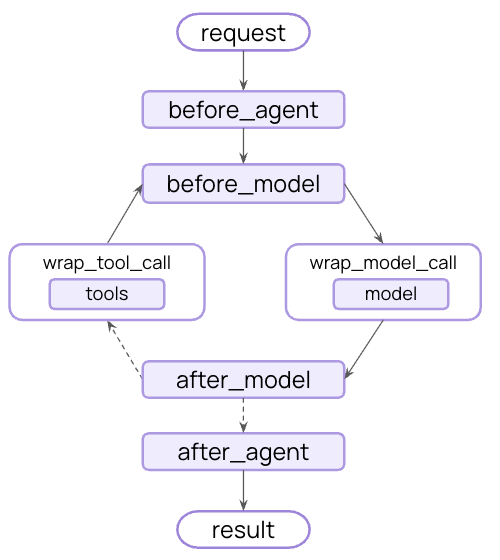
You can implement guardrails using middleware to intercept execution at strategic points - before the agent starts, after it completes, or around model and tool calls.
Guardrails can be implemented using two complementary approaches:
Deterministic guardrails
Use rule-based logic like regex patterns, keyword matching, or explicit checks. Fast, predictable, and cost-effective, but may miss nuanced violations.
Model-based guardrails
Use LLMs or classifiers to evaluate content with semantic understanding. Catch subtle issues that rules miss, but are slower and more expensive.
LangChain provides both built-in guardrails (e.g., PII detection, human-in-the-loop) and a flexible middleware system for building custom guardrails using either approach.
LangChain provides built-in middleware for detecting and handling Personally Identifiable Information (PII) in conversations. This middleware can detect common PII types like emails, credit cards, IP addresses, and more.PII detection middleware is helpful for cases such as health care and financial applications with compliance requirements, customer service agents that need to sanitize logs, and generally any application handling sensitive user data.The PII middleware supports multiple strategies for handling detected PII:
Strategy
Description
Example
redact
Replace with [REDACTED_{PII_TYPE}]
[REDACTED_EMAIL]
mask
Partially obscure (e.g., last 4 digits)
****-****-****-1234
hash
Replace with deterministic hash
a8f5f167...
block
Raise exception when detected
Error thrown
from langchain.agents import create_agentfrom langchain.agents.middleware import PIIMiddlewareagent = create_agent( model="gpt-5.4", tools=[customer_service_tool, email_tool], middleware=[ # Redact emails in user input before sending to model PIIMiddleware( "email", strategy="redact", apply_to_input=True, ), # Mask credit cards in user input PIIMiddleware( "credit_card", strategy="mask", apply_to_input=True, ), # Block API keys - raise error if detected PIIMiddleware( "api_key", detector=r"sk-[a-zA-Z0-9]{32}", strategy="block", apply_to_input=True, ), ],)# When user provides PII, it will be handled according to the strategyresult = agent.invoke({ "messages": [{"role": "user", "content": "My email is john.doe@example.com and card is 5105-1051-0510-5100"}]})
LangChain provides built-in middleware for requiring human approval before executing sensitive operations. This is one of the most effective guardrails for high-stakes decisions.Human-in-the-loop middleware is helpful for cases such as financial transactions and transfers, deleting or modifying production data, sending communications to external parties, and any operation with significant business impact.
from langchain.agents import create_agentfrom langchain.agents.middleware import HumanInTheLoopMiddlewarefrom langgraph.checkpoint.memory import InMemorySaverfrom langgraph.types import Commandagent = create_agent( model="gpt-5.4", tools=[search_tool, send_email_tool, delete_database_tool], middleware=[ HumanInTheLoopMiddleware( interrupt_on={ # Require approval for sensitive operations "send_email": True, "delete_database": True, # Auto-approve safe operations "search": False, } ), ], # Persist the state across interrupts checkpointer=InMemorySaver(),)# Human-in-the-loop requires a thread ID for persistenceconfig = {"configurable": {"thread_id": "some_id"}}# Agent will pause and wait for approval before executing sensitive toolsresult = agent.invoke( {"messages": [{"role": "user", "content": "Send an email to the team"}]}, config=config)result = agent.invoke( Command(resume={"decisions": [{"type": "approve"}]}), config=config # Same thread ID to resume the paused conversation)
For more sophisticated guardrails, you can create custom middleware that runs before or after the agent executes. This gives you full control over validation logic, content filtering, and safety checks.
Use “before agent” hooks to validate requests once at the start of each invocation. This is useful for session-level checks like authentication, rate limiting, or blocking inappropriate requests before any processing begins.
from typing import Anyfrom langchain.agents.middleware import AgentMiddleware, AgentState, hook_configfrom langgraph.runtime import Runtimeclass ContentFilterMiddleware(AgentMiddleware): """Deterministic guardrail: Block requests containing banned keywords.""" def __init__(self, banned_keywords: list[str]): super().__init__() self.banned_keywords = [kw.lower() for kw in banned_keywords] @hook_config(can_jump_to=["end"]) def before_agent(self, state: AgentState, runtime: Runtime) -> dict[str, Any] | None: # Get the first user message if not state["messages"]: return None first_message = state["messages"][0] if first_message.type != "human": return None content = first_message.content.lower() # Check for banned keywords for keyword in self.banned_keywords: if keyword in content: # Block execution before any processing return { "messages": [{ "role": "assistant", "content": "I cannot process requests containing inappropriate content. Please rephrase your request." }], "jump_to": "end" } return None# Use the custom guardrailfrom langchain.agents import create_agentagent = create_agent( model="gpt-5.4", tools=[search_tool, calculator_tool], middleware=[ ContentFilterMiddleware( banned_keywords=["hack", "exploit", "malware"] ), ],)# This request will be blocked before any processingresult = agent.invoke({ "messages": [{"role": "user", "content": "How do I hack into a database?"}]})
Use “after agent” hooks to validate final outputs once before returning to the user. This is useful for model-based safety checks, quality validation, or final compliance scans on the complete agent response.
from langchain.agents.middleware import AgentMiddleware, AgentState, hook_configfrom langgraph.runtime import Runtimefrom langchain.messages import AIMessagefrom langchain.chat_models import init_chat_modelfrom typing import Anyclass SafetyGuardrailMiddleware(AgentMiddleware): """Model-based guardrail: Use an LLM to evaluate response safety.""" def __init__(self): super().__init__() self.safety_model = init_chat_model("gpt-5.4-mini") @hook_config(can_jump_to=["end"]) def after_agent(self, state: AgentState, runtime: Runtime) -> dict[str, Any] | None: # Get the final AI response if not state["messages"]: return None last_message = state["messages"][-1] if not isinstance(last_message, AIMessage): return None # Use a model to evaluate safety safety_prompt = f"""Evaluate if this response is safe and appropriate. Respond with only 'SAFE' or 'UNSAFE'. Response: {last_message.content}""" result = self.safety_model.invoke([{"role": "user", "content": safety_prompt}]) if "UNSAFE" in result.content: last_message.content = "I cannot provide that response. Please rephrase your request." return None# Use the safety guardrailfrom langchain.agents import create_agentagent = create_agent( model="gpt-5.4", tools=[search_tool, calculator_tool], middleware=[SafetyGuardrailMiddleware()],)result = agent.invoke({ "messages": [{"role": "user", "content": "How do I make explosives?"}]})