

To cap LLM cost on evaluator runs, refer to Track and limit evaluator spend. Evaluator spend tracking and limits use the per-model pricing configured under Model pricing.
View costs in the LangSmith UI
In the LangSmith UI, you can explore usage and spend three ways: as a breakdown within individual traces, as aggregated metrics in project stats, and in dashboards.Token and cost breakdowns
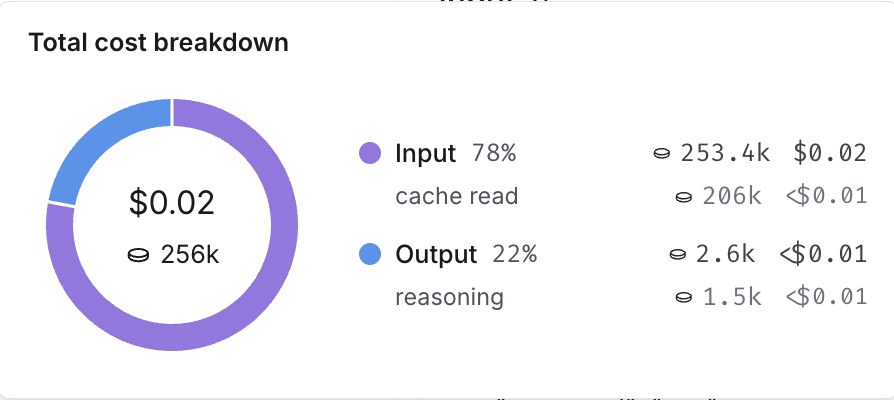
The UI separates token usage and costs into three categories:- Input: Tokens in the prompt sent to the model. Subtypes include: cache reads, text tokens, image tokens, etc.
- Output: Tokens generated in the response from the model. Subtypes include: reasoning tokens, text tokens, image tokens, etc.
- Other: Costs from tool calls, retrieval steps, or any custom runs.
In the trace tree
The trace tree shows the most detailed view of token usage and cost (for a single trace). It displays the total usage for the entire trace, aggregated values for each parent run and token and cost breakdowns for each child run. Open any run inside a tracing project to view its trace tree.When tracking costs across threads, ensure that all child runs include the thread metadata (
session_id or thread_id). Without thread metadata on child runs, token counts and costs from those runs won’t be included in thread-level aggregations. Refer to configuring threads for details on setting thread metadata.In project stats
The project stats panel shows the total token usage and cost for all traces in a project.In dashboards
Dashboards help you explore cost and token usage trends over time. The prebuilt dashboard for a tracing project shows total costs and a cost breakdown by input and output tokens. You may also configure custom cost tracking charts in custom dashboards.Cost tracking
You can track costs in two ways:- Automatically: derived from token counts and model prices for LLM calls.
- Manually: specified directly on any run, including non-LLM types.
LLM calls: Automatically track costs based on token counts
To compute cost automatically from token usage, you need to provide token counts, the model and provider, and the model price.-
Send token counts. Many models include token counts as part of the response. You must extract this information and include it in your run using one of the following methods:
-
Set a
usage_metadatafield on the run’s metadata. The advantage of this approach is that you do not need to change your traced function’s runtime outputs:The Java and Kotlin examples use a dedicated executor. Shutting down the executor and awaiting termination ensures background trace submissions complete before the process exits. -
Return a
usage_metadatafield in your traced function’s outputs. Include theusage_metadatakey directly within the object returned by your traced function. LangSmith will extract it from the output:
Usage Metadata Schema and Cost Calculation
The following fields in theusage_metadatadict are recognized by LangSmith. You can view the full Python types or TypeScript interfaces directly.numberNumber of tokens used in the model input. Sum of all input token types.numberNumber of tokens used in the model response. Sum of all output token types.numberNumber of tokens used in the input and output. Optional, can be inferred. Sum of input_tokens + output_tokens.objectBreakdown of input token types. Keys are token-type strings, values are counts. Example{"cache_read": 5}.Known fields include:audio,text,image,cache_read,cache_creation,cache_read_over_200k(Gemini),ephemeral_5m_input_tokens,ephemeral_1h_input_tokens(Anthropic ephemeral caching tiers). Additional fields are possible depending on the model or provider.objectBreakdown of output token types. Keys are token-type strings, values are counts. Example{"reasoning": 5}.Known fields include:audio,text,image,reasoning. Additional fields are possible depending on the model or provider.numberCost of the input tokens.numberCost of the output tokens.numberCost of the tokens. Optional, can be inferred. Sum of input_cost + output_cost.objectDetails of the input cost. Keys are token-type strings, values are cost amounts.Cost CalculationsThe cost for a run is computed greedily from most-to-least specific token type. Suppose you set a price of $2 per 1M input tokens with a detailed price of $1 per 1MobjectDetails of the output cost. Keys are token-type strings, values are cost amounts.cache_readinput tokens, and $3 per 1M output tokens. If you uploaded the following usage metadata:Then, the token costs would be computed as follows: -
Set a
-
Specify model name. When using a custom model, the following fields need to be specified in a run’s metadata in order to associate token counts with costs. It’s also helpful to provide these metadata fields to identify the model when viewing traces and when filtering.
ls_provider: The provider of the model, e.g., “openai”, “anthropic”ls_model_name: The name of the model, e.g., “gpt-5.4-mini”, “claude-opus-4-8”
-
Set model prices. LangSmith maps model names to per-token prices using its model pricing table to compute costs from token counts.
For models that have different pricing for different token types (e.g., multimodal or cached tokens), you can specify a breakdown of prices for each token type. Hovering over the … next to the Input price and Output price entries shows you the price breakdown by token type.The table comes with pricing information for most OpenAI, Anthropic, and Gemini models. You can create a new model price entry or overwrite pricing for default models if you have custom pricing.LangSmith does not reflect updates to the model pricing map in the costs for traces already logged. Backfilling model pricing changes is not supported.
Create a new or modify an existing model price entry
To modify the default model prices, create a new entry with the same model, provider and match pattern as the default entry. To create a new entry in the model pricing map, click on the + Model button in the top right corner. Here, you can specify the following fields:- Model Name: The human-readable name of the model.
- Input Price: The cost per 1M input tokens for the model. This number is multiplied by the number of tokens in the prompt to calculate the prompt cost.
- Input Price Breakdown (Optional): The breakdown of price for each different type of input token, e.g.,
cache_read,video,audio. - Output Price: The cost per 1M output tokens for the model. This number is multiplied by the number of tokens in the completion to calculate the completion cost.
- Output Price Breakdown (Optional): The breakdown of price for each different type of output token, e.g.,
reasoning,image, etc. - Model Activation Date (Optional): The date from which the pricing is applicable. Only runs after this date will apply this model price.
- Match Pattern: A regex pattern to match the model name. This is used to match the value for
ls_model_namein the run metadata. - Provider (Optional): The provider of the model. If specified, this is matched against
ls_providerin the run metadata.
LLM calls: Send costs directly
Gemini 2.5 Pro Preview and Gemini 2.5 Pro use a stepwise cost function, which LangSmith supports by default. For any other model with non-linear pricing, calculate costs client-side and send them asusage_metadata as shown in the following code:
Other runs: Send costs
You can also send cost information for any non-LLM runs, such as tool calls. Specify the cost in thetotal_cost field of the run’s usage_metadata:
usage_metadata directly in your traced function’s return value:
Connect these docs to your agent of choice via MCP for real-time answers.