

make apply.
Use this page as a reference while planning a rollout or troubleshooting an existing one. It covers:
- Platform layers and application core services.
- AWS managed services, IRSA roles, and cluster infrastructure.
- Network topology, ingress options, and TLS/DNS strategies.
- LangSmith Deployment add-on.
- Module dependency graph and opt-in security modules.
Platform layers
LangSmith on AWS deploys in two stages with one optional add-on. The infrastructure stage provisions the cloud foundation. The application stage installs the LangSmith Helm chart. The LangSmith Deployment add-on is opt-in and adds the host-backend, listener, and operator services for managing LangGraph applications from the UI.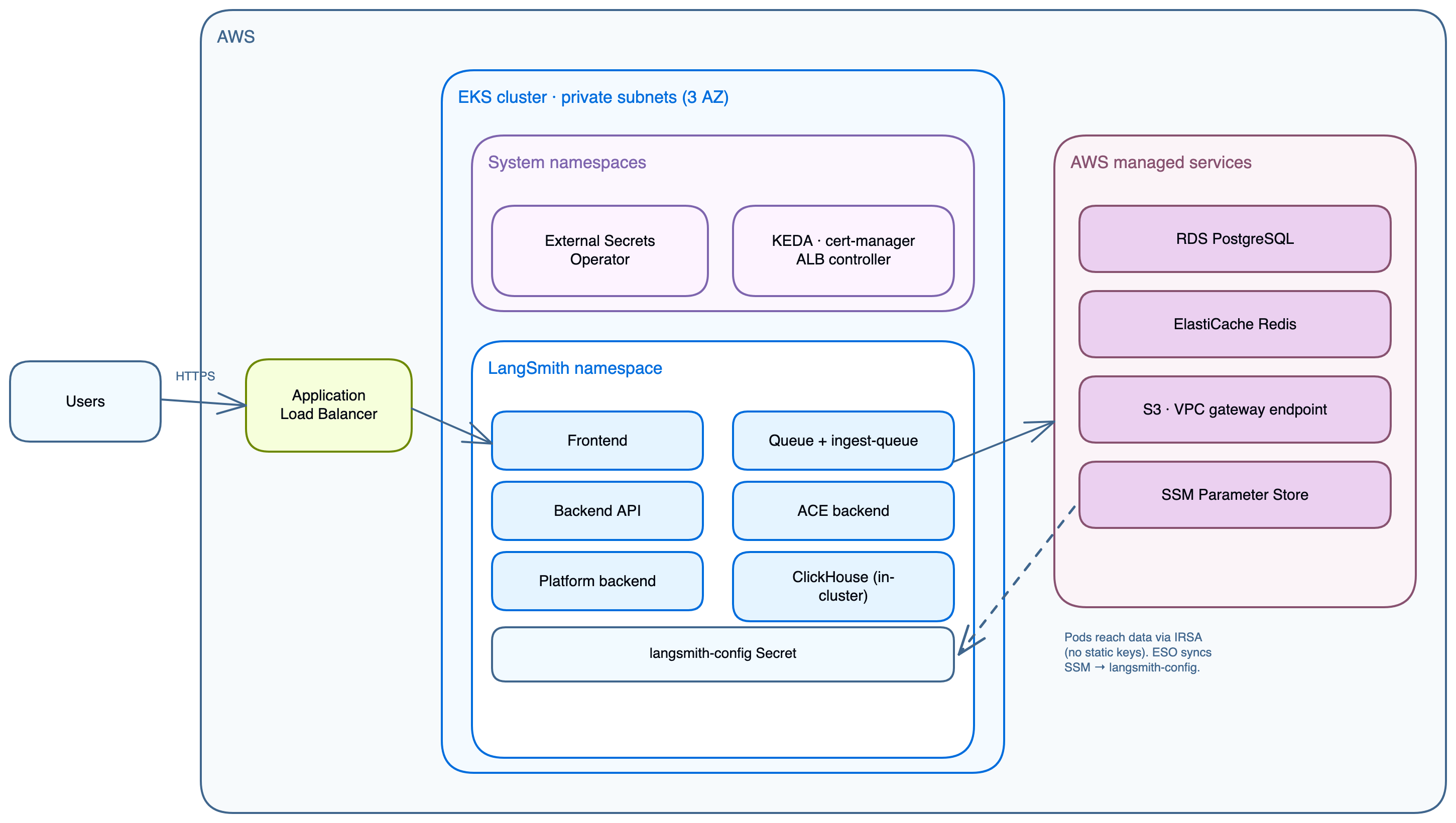
Component to storage mapping
Application core services
These pods run on every deployment. All write logs and metrics; the busier components (backend, queue, ingest-queue) scale horizontally.SmithDB is LangSmith’s purpose-built observability backend, available for self-hosted starting with chart v16 (see self-hosted support). The AWS modules provision ClickHouse by default. Setting
enable_smithdb = true also provisions SmithDB’s dependencies: a dedicated metastore RDS PostgreSQL instance (with smithdb_metastore_source = "create", the default), an S3 object-store bucket, an IRSA role, and Karpenter NodePools for NVMe instance-store nodes. ClickHouse stays enabled on chart v16 and v17. See SmithDB in the deployment guide.One-time jobs
The Helm chart runs three jobs at install and upgrade time:LangSmith Deployment add-on
Whenenable_deployments = true, three additional services are installed and a LangGraphPlatform CRD is registered. Each deployment the user creates in the LangSmith UI produces a Kubernetes Deployment in the langsmith namespace, managed by the operator.
AWS managed services
Whenpostgres_source = "external" and redis_source = "external" (the recommended production setting), Terraform provisions the following AWS managed services.
When Fleet, LangSmith Chat, or Insights use external storage, they share the RDS instance and the Redis cluster. An in-cluster Job creates each feature’s logical database, and each feature gets its own Redis DB index: 1 for Fleet, 2 for LangSmith Chat, 3 for Insights. DB 0 belongs to the main install.
RDS PostgreSQL
- Default size:
db.t3.large, private subnets, port 5432. - Defaults: PostgreSQL 16, storage encrypted, 10GB autoscaling to 100GB, 7-day backups, deletion protection on, IAM database authentication enabled.
- Holds orgs, users, projects, API keys, settings.
- Secret flow:
setup-env.shstores the password at SSM/langsmith/{base_name}/postgres-passwordand passes it to Terraform, which sets it on the instance and writes theconnection_urlinto thelangsmith-postgresKubernetes Secret.
ElastiCache Redis
- Default size:
cache.m6g.xlarge, private subnets, TLS port 6379. - Redis 7.1, a single cache node, encryption at rest and in transit.
- Trace ingestion queue, pub/sub, short-lived cache.
- Secret flow:
setup-env.shstores the auth token at SSM/langsmith/{base_name}/redis-auth-tokenand passes it to Terraform, which sets it on the replication group and writes theconnection_urlinto thelangsmith-redisKubernetes Secret.
Sandbox JuiceFS Redis
Whenenable_sandboxes = true, Terraform provisions a second, dedicated ElastiCache Redis ({base_name}-jfs-redis, default cache.m6g.large, noeviction parameter group, 7-day snapshots) for the JuiceFS sandbox filesystem. It also adds a sandbox-host managed node group (default m5d.metal, tainted sandbox.langsmith.com/host).
S3 bucket
- Trace payloads: large inputs and outputs, attachments.
- IRSA via
langsmith_irsa_role(no static keys). VPC Gateway Endpoint, no public internet. - Encrypted with SSE-S3, or SSE-KMS when
s3_kms_key_arnis set. Public access is blocked, and the bucket policy grants the LangSmith IRSA role access through the VPC endpoint. - Prefixes:
ttl_s/(short TTL) andttl_l/(long TTL). - The S3 bucket is always required, regardless of tier. Disabling blob storage breaks the cluster on large payloads.
SSM Parameter Store
- Centralized secret store for all LangSmith secrets.
- Flow:
source infra/scripts/setup-env.shwrites secrets to SSM. The ESOClusterSecretStorereads them and projects alangsmith-configKubernetes Secret that the Helm chart mounts viaconfig.existingSecretName. - Prefix:
/langsmith/{name_prefix}-{environment}/.
Cluster infrastructure
Two Terraform modules install the cluster-level services LangSmith depends on. Theeks module installs the AWS-integration controllers through eks-blueprints-addons and the EBS CSI driver as an EKS add-on; the k8s-bootstrap module installs the workload dependencies and the ingress gateways (see Ingress options):
IRSA roles
IRSA replaces static credentials. IAM trusts the EKS cluster’s OIDC issuer; service accounts inlangsmith, kube-system, external-secrets, cert-manager, and (with SmithDB) karpenter are annotated with role ARNs and pods receive temporary credentials via the EKS token webhook.
Network topology
VPC and private endpoints
Withcreate_vpc = true, the module builds a 10.0.0.0/16 VPC across up to three availability zones, and works in two-AZ regions such as us-west-1. It uses /21 private and public subnets and a single NAT gateway.
The module creates one VPC endpoint, an S3 gateway endpoint. When you bring a VPC without NAT or internet egress (create_vpc = false), create com.amazonaws.<region>.ecr.api and com.amazonaws.<region>.ecr.dkr interface endpoints with private DNS enabled, attached to a security group that allows TCP 443 from the VPC CIDR, so nodes can pull images.
Set alb_existing_security_group_id, postgres_existing_security_group_id, redis_existing_security_group_id, or bastion_existing_security_group_id to attach a security group you manage. Terraform attaches it but never writes rules to it.
Default ingress (ALB and Envoy Gateway)
Envoy Gateway split dataplane
With the default Envoy Gateway, the ALB forwards to the Envoy proxy pods on port 10080 through aTargetGroupBinding on the internal ClusterIP Envoy Service (port 80). The ALB terminates TLS. Agent pods can run in a separate langsmith-agents namespace:
Both langsmith and langsmith-agents attach to the shared langsmith-gateway through an HTTPRoute with allowedRoutes: All.
Egress path with Network Firewall
Whencreate_firewall = true, all outbound internet traffic from private subnets is inspected before reaching the NAT gateway:
Ingress options
Four mutually exclusive ingress options ship with the modules. The Terraform-managed ALB fronts Envoy Gateway, NGINX, and Istio. In ALB Ingress mode, the AWS Load Balancer Controller provisions its own ALB and the Terraform ALB goes unused. The choice determines whether split dataplane (agent pods in a separate namespace) is supported.
Envoy is on unless you set
enable_istio_gateway or enable_nginx_ingress. Set enable_envoy_gateway = false explicitly to use ALB Ingress.
Why ALB Ingress cannot support split dataplane
Standard Kubernetes Ingress is namespace-scoped. The ALB controller routes only to services in the same namespace as the Ingress resource. Agent pods inlangsmith-agents are invisible to an Ingress in langsmith. Envoy Gateway and Istio both support cross-namespace routing via the Kubernetes Gateway API.
ALB in front of Envoy Gateway
In the default layout, the ALB handles TLS and DNS, with Envoy Gateway behind it. Optional WAF attaches to the ALB:make init-values writes the gateway settings.
TLS and DNS
Thetls_certificate_source variable controls the certificate strategy:
Why ACM versus cert-manager
ACM certificates are non-exportable. AWS attaches them directly to the ALB, which makes ACM the right choice when TLS terminates at the ALB. With the module’s gateways, TLS still terminates at the ALB, so ACM works with Envoy, Istio, and NGINX. cert-manager is only needed when you want TLS to terminate inside the cluster. Theletsencrypt source is a reference implementation for the ALB path: it installs cert-manager with a Let’s Encrypt HTTP-01 ClusterIssuer bound to the ALB ingress class. For in-cluster TLS on Istio, set create_cert_manager_irsa = true instead, which uses a DNS-01 ClusterIssuer validated through Route 53. HTTP-01 (via ALB) and DNS-01 (via Route 53) are mutually exclusive. In production, swap the ClusterIssuer for any cert-manager-compatible issuer.
With
create_cert_manager_irsa = true, the Terraform module provisions the cert-manager IRSA role and Route 53 permissions. Only the ClusterIssuer manifest changes between issuers.
Auto-provisioned DNS
Whenlangsmith_domain is set and acm_certificate_arn is empty, Terraform activates the dns module which creates:
- A Route 53 public hosted zone for the domain, or, with
dns_create_zone = falseanddns_existing_zone_id, records in an existing public zone (the exact zone or a parent zone; no NS delegation needed). - An ACM certificate with DNS validation records. Add a
*.<domain>SAN withdns_include_wildcard_san = true. - A Route 53 alias record pointing the domain to the Terraform-managed ALB. In ALB Ingress mode that ALB goes unused, so point the domain at the Ingress hostname yourself (
kubectl get ingress -n langsmith).
langsmith_domain with tls_certificate_source = "none" first. Terraform creates the hosted zone and certificate without blocking on validation. Delegate the NS records at your registrar, then flip to tls_certificate_source = "acm" in a later apply. Terraform blocks until the certificate validates and wires it into the HTTPS listener.
Bring your own certificate
Setacm_certificate_arn directly to skip the dns module. For TLS that terminates inside the cluster, create a Kubernetes TLS Secret manually and reference it in the Gateway or VirtualService.
Module dependency graph
Opt-in security modules
Default resource sizes
terraform.tfvars.production, terraform.tfvars.dev, and terraform.tfvars.minimum change these sizes. Production uses db.r6g.xlarge. Dev uses m5.2xlarge nodes with db.t3.medium and cache.t3.medium. Minimum uses m5.xlarge with db.t3.small and cache.t3.small. sizing_profile (production, production-large, dev, minimum, or default) selects the matching Helm sizing overlay; default leaves chart defaults in place.
For production sizing recommendations, see the scaling guide and the AWS deployment guide.
Validated behaviors and known constraints
These constraints were validated during the April 2026 gateway permutation test run.Verification commands
Connect these docs to your agent of choice via MCP for real-time answers.