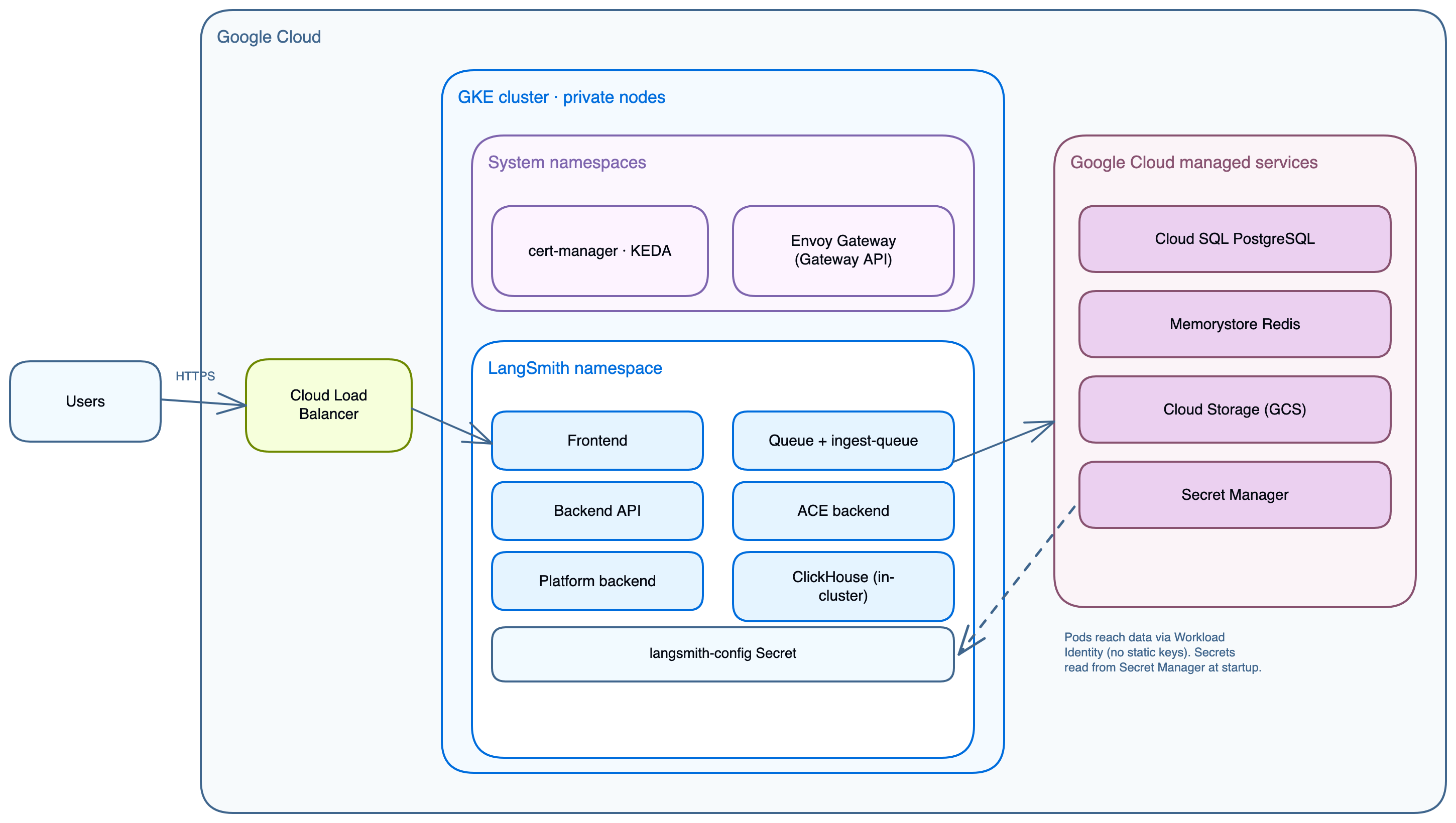
Understand what the GCP Terraform modules provision and how the pieces fit together, so you can size, secure, and customize your LangSmith deployment before running make apply. Use this page as a reference while planning a rollout or troubleshooting an existing one. It covers:
  • Platform layers and deployment tiers (light versus production).
  • Module descriptions and dependencies.
  • Networking, Workload Identity, and traffic flow.
  • Add-ons: LangSmith Deployment, Fleet, Insights, and Polly.
  • GCP managed services and Secret Manager integration.
If you are ready to install, start with the deployment walkthrough.

Platform layers

LangSmith on GCP deploys in up to five stages. Each stage adds a capability layer on top of the previous. All layers share the same GKE cluster and langsmith namespace. LangSmith on GCP deployment stages and service layout
StageLayerWhat it adds
1GCP infrastructureVPC, GKE, Cloud SQL, Memorystore, GCS, K8s bootstrap, cert-manager, KEDA, Envoy Gateway
2LangSmith basefrontend, backend, platform-backend, queue, ace-backend, clickhouse, playground
3LangSmith Deploymenthost-backend, listener, operator + per-deployment pods
4Fleetstandalone-fleet-api-server, standalone-fleet-tool-server, standalone-fleet-trigger-server, standalone-fleet-queue
5Insights + PollyClio analytics (ClickHouse-backed), Polly eval agent
Fleet (chart v0.15+) is the current form of the feature formerly called Agent Builder. Enable it with enable_fleet. Unlike the deprecated enable_agent_builder path, it does not require the LangSmith Deployment layer. The two flags are mutually exclusive and share the same encryption key. See Enable add-ons in the deployment guide.

Module descriptions

ModulePathPurpose
networkinginfra/modules/networking/VPC, subnet with secondary ranges, Cloud Router, Cloud NAT, private service connection for Cloud SQL and Memorystore
k8s-clusterinfra/modules/k8s-cluster/GKE Standard or Autopilot cluster, private nodes, node pool with autoscaling, Workload Identity enabled
postgresinfra/modules/postgres/Cloud SQL PostgreSQL instance, regional HA standby, private IP, deletion protection
redisinfra/modules/redis/Memorystore Redis STANDARD_HA tier, private IP within VPC
storageinfra/modules/storage/GCS bucket with versioning and lifecycle rules for ttl_s/ (14 days) and ttl_l/ (400 days) prefixes
k8s-bootstrapinfra/modules/k8s-bootstrap/langsmith namespace, Kubernetes Secrets for Postgres and Redis URLs, cert-manager and KEDA Helm releases
ingressinfra/modules/ingress/Envoy Gateway Helm release, GatewayClass, HTTPRoute, optional HTTPS Gateway listener
iaminfra/modules/iam/GCP service account and Workload Identity bindings for GCS access (wired by default)
dnsinfra/modules/dns/Cloud DNS managed zone and managed cert (optional, enable with enable_dns_module)
secretsinfra/modules/secrets/Secret Manager secret bundle (optional, enable with enable_secret_manager_module)

Deployment tiers

Light deploy (all in-cluster)

VPC
└── subnet (10.0.0.0/20, GKE nodes only)
    No Cloud SQL or Memorystore; chart pods handle both

GKE Cluster
├── langsmith namespace
│   ├── frontend, backend, platform-backend, queue, ace-backend, playground
│   ├── clickhouse (in-cluster)
│   ├── postgres   (in-cluster)
│   └── redis      (in-cluster)
├── cert-manager
├── keda
└── envoy-gateway-system

GCS Bucket (trace payloads, always external)
Set in terraform.tfvars:
postgres_source   = "in-cluster"
redis_source      = "in-cluster"
clickhouse_source = "in-cluster"

Production (external managed services)

VPC
├── subnet (10.0.0.0/20, GKE nodes, pods, services)
│   └── Secondary ranges: pods 10.4.0.0/14, services 10.8.0.0/20
└── Private service connection (VPC peering to Google managed network)
    ├── Cloud SQL PostgreSQL  (private IP, regional standby)
    └── Memorystore Redis     (private IP, STANDARD_HA tier)

GKE Cluster
├── langsmith namespace
│   ├── frontend, backend, platform-backend, queue, ace-backend, playground
│   └── clickhouse (in-cluster; use LangChain Managed for production scale)
├── cert-manager
├── keda
└── envoy-gateway-system

GCS Bucket (Workload Identity, no static keys)

Application core services

ServicePurposePortHPAWorkload IdentityDepends on
langsmith-frontendReact UI30001 to 10Nobackend, platform-backend
langsmith-backendMain API (traces, runs, projects, API keys, feedback)19843 to 10Yes (GCS)Postgres, Redis, ClickHouse, GCS
langsmith-platform-backendOrg and user management, auth, billing, settings19861 to 10Yes (GCS)Postgres, Redis, GCS
langsmith-playgroundLLM prompt playground UI30011 to 10Nobackend
langsmith-queueTrace ingestion worker (Redis to ClickHouse + GCS)3 to 10 + KEDAYesRedis, ClickHouse, GCS
langsmith-ingest-queueDedicated high-throughput ingestion worker3 to 10 + KEDAYesRedis, GCS
langsmith-ace-backendAsync compute (dataset runs, evaluations, background jobs)1 to 5NoPostgres, Redis
langsmith-clickhouseColumnar store (trace spans, run metadata, eval results)StatefulSet, single replicaNo500Gi premium-rwo PVC
In-cluster ClickHouse is dev/POC only (single pod, no replication, no backups). For production, use LangChain Managed ClickHouse or a self-managed external cluster.
SmithDB is LangSmith’s purpose-built observability backend, available for Self-hosted starting with self-hosted version 0.16.0 (see deployment support). These Terraform modules provision ClickHouse, so the guidance in the previous sections applies to current deployments.

One-time jobs

JobPurpose
langsmith-backend-migrationsPostgreSQL schema migrations
langsmith-backend-ch-migrationsClickHouse schema migrations
langsmith-backend-auth-bootstrapCreates the initial org and admin account

LangSmith Deployment add-on

ServicePurposeWorkload Identity
langsmith-host-backendLangGraph control plane API. Manages deployment lifecycle, serves deployment metadata.Yes (GCS)
langsmith-listenerWatches host-backend for state changes, creates and updates LangGraphPlatform CRDs.Yes (GCS)
langsmith-operatorKubernetes operator. Reconciles LangGraphPlatform CRDs, creates and deletes Deployments and Services.RBAC for Deployments and Services
Each LangGraph deployment created in the UI produces a Kubernetes Deployment in the langsmith namespace, with pods running as the langsmith-ksa ServiceAccount. That ServiceAccount must carry the iam.gke.io/gcp-service-account annotation, which deploy.sh applies idempotently.

GCP managed services

When postgres_source = "external" and redis_source = "external" (the recommended production setting), Terraform provisions:

Cloud SQL PostgreSQL

  • Default size db-custom-2-8192 (2 vCPU, 8 GB), private IP, port 5432.
  • REGIONAL availability with automatic failover.
  • Holds orgs, users, projects, API keys, settings.
  • Terraform writes the connection URL directly to the langsmith-postgres-credentials Kubernetes Secret.

Memorystore Redis

  • Default 5 GB, STANDARD_HA tier, private IP, port 6379.
  • Trace ingestion queue, pub/sub, short-lived cache.
  • No auth token required. Access is controlled by VPC private IP only.
  • Terraform writes the connection URL directly to the langsmith-redis-credentials Kubernetes Secret.

Cloud Storage bucket

  • Trace payloads: large inputs and outputs, attachments.
  • The shipped Helm values use native GCS mode (engine: GCS, apiURL: https://storage.googleapis.com), authenticated through Workload Identity with no HMAC keys.
  • An S3-compatible mode (engine: S3) is also supported, shown in helm/values/examples/langsmith-values.yaml. It requires HMAC keys: create one under Cloud Storage → Settings → Interoperability and pass them to Helm via config.blobStorage.accessKey and config.blobStorage.accessKeySecret.
  • Lifecycle rules: ttl_s/ prefix (14 days default), ttl_l/ prefix (400 days default).
  • The GCS bucket is always required, regardless of tier.

Secret Manager (optional module)

  • Stores a single JSON secret bundle (generated LangSmith secret key, Postgres password, Redis password) when enable_secret_manager_module = true.
  • Core secrets (langsmith-postgres-credentials, langsmith-redis-credentials) are always stored in Kubernetes Secrets by k8s-bootstrap regardless of this module. Secret Manager provides an additional durable store for secrets that must survive cluster recreation.

Cluster infrastructure

ServiceNamespaceInstalled byRequired for
Envoy Gatewayenvoy-gateway-systemingress module (install_ingress = true, default)All ingress
KEDAkedak8s-bootstrap module when enable_langsmith_deployment = trueLangSmith Deployment add-on and later
cert-managercert-managerk8s-bootstrap module when tls_certificate_source = "letsencrypt" or install_cert_manager = trueLet’s Encrypt TLS
The Gateway resource is managed by Terraform; the HTTPRoute is managed by Helm. Do not delete the Gateway resource manually. GCP releases the external IP when the Gateway is deleted, then issues a new IP on recreate.

Workload Identity

GKE pods access GCS through Workload Identity. The Kubernetes ServiceAccount is bound to a GCP service account via an IAM binding; pods receive temporary credentials with no static keys in Secrets or environment variables.
GKE pod
  └── Kubernetes ServiceAccount (annotated with iam.gke.io/gcp-service-account)
        └── IAM binding: roles/iam.workloadIdentityUser
              └── GCP Service Account
                    └── roles/storage.objectAdmin on the GCS bucket
ComponentAnnotationPermissions
langsmith-backendiam.gke.io/gcp-service-account: <gsa>GCS storage.objectAdmin on the LangSmith bucket
langsmith-platform-backendSameGCS storage.objectAdmin
langsmith-queueSameGCS storage.objectAdmin
langsmith-ingest-queueSameGCS storage.objectAdmin
langsmith-host-backendSameGCS storage.objectAdmin
langsmith-listenerSameGCS storage.objectAdmin
langsmith-ksa (operator pods)SameGCS storage.objectAdmin
The GSA is defined by the iam module and output as workload_identity_annotation. init-values.sh writes these annotations into values-overrides.yaml automatically. In native GCS mode (the shipped default), the GSA bindings above are sufficient. The optional S3-compatible mode (engine: S3) also requires HMAC keys: create one under Cloud Storage → Settings → Interoperability and pass it to Helm.

Network topology

RangeCIDRUsed by
Subnet10.0.0.0/20GKE nodes
Pods10.4.0.0/14GKE pod IPs (secondary range)
Services10.8.0.0/20GKE ClusterIP services (secondary range)
Private service connection/16 allocated by GoogleCloud SQL, Memorystore private IPs
Cloud SQL and Memorystore are accessed exclusively via private IP. The networking module establishes a private service connection (VPC peering to Google’s managed network) whenever postgres_source = "external" or redis_source = "external".

Traffic flow

Internet (HTTPS :443)

Envoy Gateway  (envoy-gateway-system, external LoadBalancer IP)
  TLS terminated: cert-manager + Let's Encrypt or existing certificate

  ├── /                     → frontend:80
  ├── /api/*                → backend:1984
  └── /api/v1/deployments/* → host-backend:1985  (LangSmith Deployment add-on)

Internal traffic (private IPs, never leaving VPC):
  backend       → Cloud SQL:5432    via private IP
  backend       → Memorystore:6379  via private IP
  backend       → GCS               via Workload Identity (native GCS mode)
  host-backend  → K8s API           reads deployment pod status
  listener      → K8s API           reconciles Deployment CRDs
  operator      → K8s API           creates and manages deployment pods

Component to storage mapping

ComponentPostgreSQLRedisClickHouseGCS
backendOrg config, run metadataIngestion queueTrace objects
platform-backendBlob routing
queuePops jobsWrites trace blobs
clickhouseTrace search index
host-backendDeployment lifecycle state

Secret Manager integration

Without Secret Manager:
terraform.tfvars → terraform apply → kubernetes_secret (postgres, redis)
With Secret Manager:
terraform.tfvars → terraform apply ─┬─→ kubernetes_secret (postgres, redis)
                                    └─→ Secret Manager (durable copy, survives cluster recreation)
Terraform writes the Kubernetes Secrets directly in both cases. Enabling Secret Manager adds a durable copy of the Postgres password, Redis password, and generated secret key outside the cluster. Nothing syncs Secret Manager back into the cluster, so no External Secrets Operator is installed on GCP (unlike the AWS modules, which use it to sync from SSM Parameter Store).

Terraform module graph

google_project_service (APIs enabled)
  └── module.networking
        ├── module.gke_cluster
        │     └── time_sleep.wait_for_cluster
        │           ├── module.cloudsql      (count = postgres_source == "external")
        │           ├── module.redis         (count = redis_source    == "external")
        │           ├── module.storage
        │           ├── module.iam           (count = enable_gcp_iam_module)
        │           ├── module.secrets       (count = enable_secret_manager_module)
        │           ├── module.dns           (count = enable_dns_module)
        │           ├── module.k8s_bootstrap
        │           └── module.ingress       (count = install_ingress)
        └── (private_service_connection when external services)
The infra layer does not install the LangSmith chart. The application stage installs it one of two ways, both consuming the same layered values files under helm/values/:
  • Deploy script: make init-values && make deploy runs helm upgrade --install.
  • Terraform app layer: make init-values && make init-app && make apply-app manages the chart as a helm_release resource. make init-app pulls the infra outputs (cluster, bucket, Workload Identity annotation) into app/infra.auto.tfvars.json, so the app layer reads them without a remote-state data source.

Verification commands

# Cluster connectivity
gcloud container clusters get-credentials <cluster-name> --region <region> --project <project-id>
kubectl cluster-info
kubectl get nodes -o wide

# All LangSmith pods
kubectl get pods -n langsmith

# Envoy Gateway
kubectl get pods -n envoy-gateway-system
kubectl get svc -n envoy-gateway-system

# cert-manager
kubectl get pods -n cert-manager
kubectl get certificate -n langsmith

# KEDA (LangSmith Deployment add-on)
kubectl get pods -n keda

# Cloud SQL connectivity test
kubectl run psql-test --rm -it --image=postgres:15 -n langsmith -- \
  psql "postgresql://langsmith:<password>@<cloud-sql-private-ip>:5432/langsmith" -c "SELECT version();"

# Memorystore connectivity test
kubectl run redis-test --rm -it --image=redis:7 -n langsmith -- \
  redis-cli -h <redis-private-ip> ping

# GCS connectivity test
kubectl run gcs-test --rm -it --image=google/cloud-sdk -n langsmith -- \
  gsutil ls gs://<bucket-name>