

get_graph(), including StateGraph. See the Graph reference.
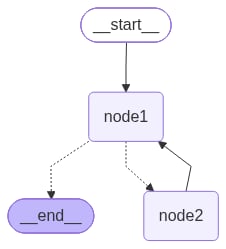
The examples below use the same small graph in both languages: two nodes, a conditional edge from node1, and a loop back from node2.
Mermaid
Calldraw_mermaid() on the drawable graph to get Mermaid syntax. Paste the string into any Mermaid renderer, or keep it in docs and PRs.
PNG
Render the same graph as a.png with one of three approaches:
- Mermaid.ink API (default; no extra packages)
- Mermaid + Pyppeteer (
pip install pyppeteer) - Graphviz (
pip install pygraphviz, plus the system Graphviz binary)
draw_mermaid_png() uses the Mermaid.ink API to generate the diagram.
See also
Connect these docs to your agent of choice via MCP for real-time answers.